BB-SR30000120-SWH - Router Advantech - Free user manual and instructions
Find the device manual for free BB-SR30000120-SWH Advantech in PDF.


User questions about BB-SR30000120-SWH Advantech
0 question about this device. Answer the ones you know or ask your own.
Ask a new question about this device
Download the instructions for your Router in PDF format for free! Find your manual BB-SR30000120-SWH - Advantech and take your electronic device back in hand. On this page are published all the documents necessary for the use of your device. BB-SR30000120-SWH by Advantech.
USER MANUAL BB-SR30000120-SWH Advantech
© 2023 Advantech Czech s.r.o. No part of this publication may be reproduced or transmitted in any form or byanymeans,electronicormechanical,includingphotography,recording,oranyinformationstorageandretrieval systemwithoutwrittenconsent.Informationinthismanualissubjecttochangewithoutnotice,anddoesnot representacommitmentonthepartofAdvantech.
AdvantechCzechs.r.o.shallnotbelievableforincidentalorconsequentialdamagesresultingfromthefurnishing,performance,oruseofthismanual.
Allbrandnamesusedinthismanualaretheregisteredtrademarksoftheirrespectiveowners. Theuseof trademarksorotherdesignationsinthispublicationisforreferencepurposesonlyanddoesnotconstitutean endorsementbythetrademarkholder.
Usedsymbols

Danger-Informationregardingusersafetyorpotentialdamagetotherouter.

Attention—Problemsthatcanariseinspecificsituations.

Information, notice—Usefultipsorinformationofspecialinterest.

text_image
CE UK CA
TÜVRheinland ^®
COTI
ISO 9001
Contents
1 Safety Instructions2
1.1 Hazardous Locations Installation Instructions....2
1.2OtherSafetyInstructions....3
2WEEEdirective4
3RouterDescription5
4ContentsofPackage6
5RouterDesign7
5.1 Routerversions....7
5.2Deliveryidentification....8
5.3Ordercodes....9
5.4 Basic dimensions of the router box 11
5.5 Mounting recommendations 11
5.6 Removal from the DIN rail 12
5.7 Description of the rear panel 13
5.8 Description of the front panel 13
5.8.1 Status indication 14
5.8.2 Power connector PWR 15
5.8.3 Antenna connector WiFi 17
5.8.4 MicroSD card reader 18
5.8.5 Ethernet Ports (ETH0 and ETH1) 20
5.8.6 Power over Ethernet (PoE) 21
5.8.7 USB Port 23
5.8.8 I/O Port 24
5.8.9 Reset 26
5.9 Interfaces Description 27
5.9.1 SWITCH interface 27
6FirstUse 28
6.1 Connecting the router before first use 28
6.2 Start 29
6.3 Configuration 29
6.3.1 Configuration over web browser 29
7TechnicalParameters 31
7.1 Basicparameters....31
7.2Standardsandregulations....32
7.3 Typetestsandenvironmentalconditions....33
7.4 Technical parameters of WiFi....34
7.5 Technical parameters of / Oport....34
7.6TechnicalParametersofPoweroverEthernet(PoE)......35
7.7OtherTechnicalParameters....35
8RelatedDocuments36
9Troubleshooting37
9.1FAQ....37
10CustomerSupport
39
ListofFigures
1Contentsofpackage......6
2VersionSWITCH(plastic)....7
3VersionSWITCHandWiFi(plastic)....7
4VersionSWITCH(metal)....7
5VersionSWITCHandWiFi(metal)....7
6Labelexample....8
7Basicdimensionsoftherouterbox....11
8 Default position of plastic and metal DIN rail clip 12
9 Removal from the DIN rail 12
10 SPECTRE v3 ERT front panel 13
11 Power connector 15
12 Connection of power supply 15
13 Antenna connector 17
14 MicroSD card 18
15 Ethernet connector 20
16 Connection of Ethernet cable 20
17 PoE PD usage 21
18 PoE PSE usage 22
19 USB connector 23
20 I/O connector 24
21 Binary connection 25
22 Router reset 26
23 Version with SWITCH board 27
24 Router connection 28
25 Entering the IP address of the router 29
26 Entering login information 30
27 Router web interface 30
ListofTables
1Routerversions....7
2Deliveryidentification....8
3Ordercodesoverview....9
4PoweroverEthernet....9
5Typeofrouterbox....10
6Typeofpowersupply....10
7 Examples of order code 10
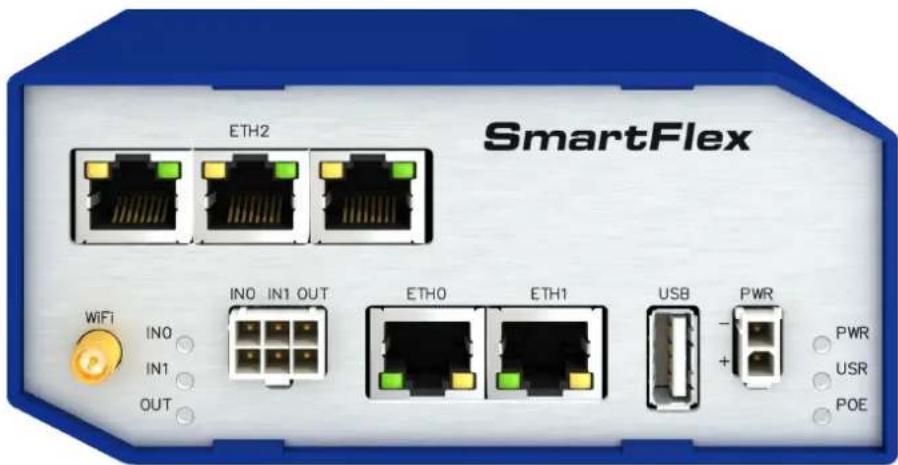
8 Front panel description 13
9 LED status indication 14
10 Connection of power connector 15
11 Technical specifications of microSD card 18
12 Ethernet connector pinout 20
13 Insulation strength of Ethernet ports 20
14 Connection of USB connector 23
15 Connection of I/O port 24
16 Characteristics of inputs 24
17 Description of reset and restart router 26
18 State indication of the SWITCH interface 27
19 SWITCH interface parameters 27
20 Basic parameters 31
21 Standards and regulations 32
22 Type tests and environmental conditions 33
23 Technical parameters of WiFi 34
24 Characteristics of inputs 34
25 PoE PD: parameters for opposite PSE 35
26 PoE PSE parameters 35
27 Other technical parameters 35
1. SafetyInstructions
!
Please, observethefollowinginstructions:
1.1 Hazardous Locations Installation Instructions
Thesedevicesareopen-typedevicesthataretobeinstalledinanenclosures suitable for the environment and canonly be accessed with the use of atoolor key.
This equipment is suitable for use in Class I, Division 2, Groups A, B, C, AND DOR non-hazardous locations only.
WARNING-EXPLOSIONHAZARD-DONOTDISCONNECTEQUIPMENTUNLESSPOWERHASBEENREMOVEDORTHEAREAISKNOWNTOBENON-HAZARDOUS.
WARNING-EXPLOSIONHAZARD-SUBSTITUTIONOFANYCOMPONENTSMAYIM-PAIRSUITABILITYFORCLASSI,DIVISION2.
WARNING-EXPLOSIONHAZARD-BATTERIESMUSTONLYBECHANGEDINANAREA FREEOFIGNITIBLECONCENTRATION.
Allantennas, antennacablesandwiringhavenotbeenevaluatedasexternalwiring.
This equipment shall be mounted in an ATEX Zone2 certified enclosure with a minimum ingress protection rating of at least IP54 (as defined in EN60529) and used in an environment of not more than Pollution Degree2 (as defined in EN60664-1) when applied in Zone2 environments. The enclosure must be accessible only by the use of a tool.
Provisionshallbemadetopreventtheratedvoltagefrombeingexceededbytransientdisturbancesofmorethan140%oftheratedvoltagewhenappliesinZone2environments.
1.2 Other Safety Instructions
- Theroutermustbeusedincompliancewithallapplicableinternationalandnationallaws andincompliancewithanyspecialrestrictionsregulatingtheutilizationoftherouterin prescribedapplicationsandenvironments.
- Topreventpossibleinjuryanddamagetoappliancesandtoensurecompliancewith allrelevantprovisions,useonlytheoriginalaccessories.Unauthorizedmodificationsor theuseofunapprovedaccessoriesmayresultindamagetotherouterand/orabreach ofapplicableregulations.Unauthorizedmodificationsoruseofunapprovedaccessories mayvoidthewarranty.
• Theroutercannotbeopened. - Powersupplymustnotexceed60VDCmax.
- Donotexposetheroutertoextremeambientconditions.Protecttherouteragainstdust, moistureandhightemperature.
- Onlyrouterswithappropriatecertificationandlabellingshouldbeusedinlocationswhere flammableandexplosivematerialsarepresent,includinggasstations,chemicalplants,orlocationsinwhichexplosivesareused.Weremindtheusersoftedutytoobserve therestrictionsconcerningtheutilizationofradiodevicesatpetrolstations,inchemical plants,orinthecourseofblastingworksinwhichexplosivesareused.
- Switchofftherouterwhentravellingbyplane.Utilizationoftherouterinaplanemay endangertheoperationoftheplaneorinterferewiththemobiletelephonenetwork,and maybeunlawful.Failuretoobservetheseinstructionsmayresultinthesuspensionorcancellationoftelephoneservicesfortherespectiveclient,or,itmayresultinlegal sanctions;itmayalsoresultinbotheventualities.
- When using the router in the close proximity of personal medical devices, such as cardiac pacemakers or hearing aids, you must proceed with heightened caution.
- TheroutermaycauseinterferencewhenusedincloseproximitytoTVsets,radioreceiversorpersonalcomputers.
- It is recommended that you create an appropriate copy or backup of all important settings that are stored in the memory of the device.
2.ProductDisposalInstructions
TheWEEE(WasteElectricalandElectronicEquipment:2012/19/EU)directivewasintroducedtoensurethatelectrical/electronicproductsarerecycledusingthebestavailable recoverytechniquestominimizetheenvironmentalimpact. Thisproductcontainhighquality materialsandcomponentswhichcanberecycled.Attheendofit'slifethispro-ductMUST NOTbemixedwithothercommercialwastefordisposal.Thedevicecontainsabattery.Removethebatteryfromthedevicebeforesposal.Thebatteryinthedeviceneedstobe disposedofapartaccordingly.Checkthetermsandconditionsofoursupplierfordisposal information.
3.RouterDescription
LANIndustrialrouterSmartFlexSR300isanidealdevicefortherealizationofasecure connectionoftwolocalareanetworks(LANs).InterconnectioniscarriedoutusingtwoETH-ERNET10/100interfacesandsecuretunnel(IPSec,OpenVPN,L2TP).
TheotherequallyimportantwaystousethisrouteristoconnectanydevicewithRS232, RS485orI/Ointerfacetothelocalnetwork(LAN).Forthispurpose,SmartFlexSR300is equippedwithtwoETHERNET10/100portsandotherinterfacesbasedontheversionofthe routerchosenbytheuser.
Asastandard, thisrouterisequipped with two ETHERNET10/100 ports, one USB2.0 Hostport, twobinary inputs and one output (I/O connector). An integral part of the router is also an memory card reader placed on therear panel. This reader allows SmartFlexSR300 to operate with micro SD cards and increase storage space of the router up to 64 GB (32 GB in case of SDHC cards). Therout can be equipped with WiFimodule on customer's request, however it is not possible to order it and add to other router later. Therout can be equipped with PoEPD (Powerover Ethernet – powered device) topowerther outervia Ethernet, or PoEPSE (powersource equipment) topower other devices by therouter. Rich range of interfaces is available in versions containing three switched Ethernets. SmartFlexSR300 is supplied either in a plastic or metal casing, based on therequirements of the customer.
For configuration of the industrial router is available as web interface protected by password. Web interface provides (after logging in) detailed statistics about the router activities, signal strength, detailed system log etc. This device supports the creation of VPN tunnels using technologies IPSec, OpenVPN and L2TP for secure communications. There are also supported functions such as DHCP, NAT, NAT-T, DynDNS, NTP, VRRP, backup primary connection and many other functions.
Otherdiagnosticfunctionsensuringcontinuouscommunicationincludehardwarewatchdogwhichmonitorsthestatusoftherouter.Usingaspecialwindow(startupscriptwindow)youmayinsertLinuxscriptsforvariousactions.Forsomeapplicationsiscrucialthepossibilitytocreateseveraldifferentconfigurationsforonerouter.Theseconfigurationscanbeswitchedasnecessary(forexamplebybinaryinputstatus,etc.).SmartFlexroutersmayautomaticallyupgradeconfigurationandfirmwarefromserver.Thisallowsmassreconfigurationofmanyroutersinonetime.
TherouteralsosupportsadditionalsoftwarelikeR-SeeNetforpermanenttrafficmonitoring ofrouters.

Examplesofpossibleapplications
- fleetmanagement
- securitysystem
- telematic
•telemetric
- remotemonitoring
•vendinganddispatchermachines
4. ContentsofPackage

Basicdeliveredsetofrouterincludes:
- router,
- powersupply,
• crossoverUTPcable, - 2.4GHzWiFiantenna(onlyforversionwithWiFi),
- loosepowerandl/Oconnector(+8pins 1),
- clipfortheDINrail,
- printedQuickStartGuideLeaflet.
natural_image
Product photo of a SmartFlex network device showing Ethernet ports, USB ports, and connected cables (no visible text or symbols)Figure1:Contentsofpackage

Temperaturerangeforpowersupplyisreducedto0 °Cto+40 °C!
5.RouterDesign
5.1Routerversions

CheckwithyourlocalAdvantechsalesrepresentativeforavailableoptionsandHWconfigurations.
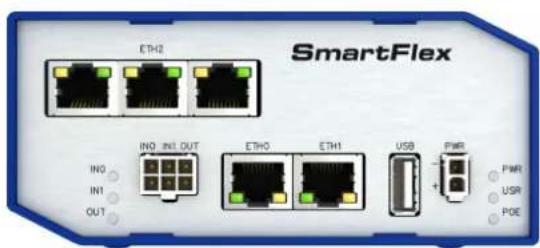
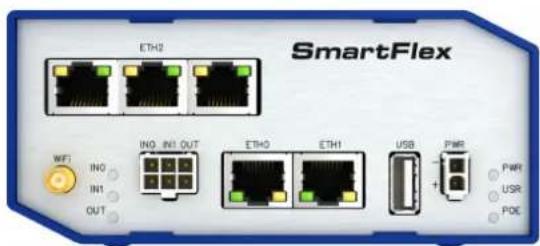
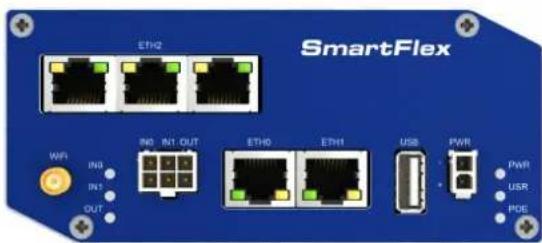
SmartFlexSR300routerissuppliedinthefollowingversions(seetablebelow).Allversions areavailableinplasticormetalboxaccordingtocustomerrequirements.Allversionsare availablewithPoEPD(PoweroverEthernet–powereddevice)soyoucanpowertherouter frombothETH0andETH1interfaces,orwithPoEPSE(powersourceequipment)soyoucan powerotherdevicesbytherouter.

text_image
Routerversions BIN BOUT USB SD ETH WiFi VersionwithSWITCHboard2x1x1x1x5x VersionwithSWITCHboard&WiFi2x1x1x1x5x1xTable1:Routerversions
text_image
SmartFlex ETH2 INQ INI OUT ETH0 ETH1 USB PWM IN1 OUT PWR USR POEFigure2:VersionSWITCH(plastic)

text_image
SmartFlex ETH0 IN0 IN1 OUT ETH0 ETH1 USB PWR IN1 OUT PWR USR POEFigure4:VersionSWITCH(metal)
text_image
SmartFlex ETHQ WFT INQ INI OUT ETHO ETH1 USB PWR IN1 OUT PWR USR POCFigure3: Version SWITCHandWiFi(plastic)
text_image
SmartFlex ETH2 IN3 IN1 OUT INT INT OUT ETH0 ETH1 USB PWR PWR USR POSFigure5: Version SWITCH Hand WiFi (metal)
5.2 Deliveryidentification
TradenameProductnameDescription
SmartFlexSR300SmartFlexRouterinaplasticormetalbox
Table2: Deliveryidentification
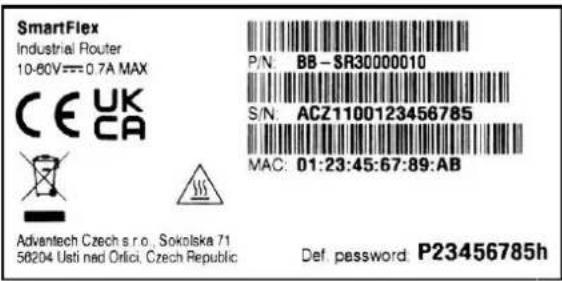
text_image
SmartFlex Industrial Router 10-60V==0.7A MAX CE UK CA Advantech Czech s r.o., Sokolska 71 58204 Usti nad Orlici, Czech Republic P/N: BB-SR30000010 S/N: ACZ1100123456785 MAC: 01:23:45:67:89:AB Def. password P23456785h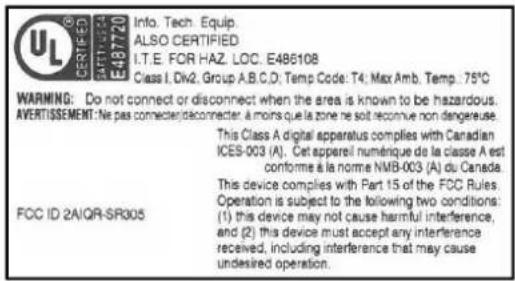
text_image
UL CERTIFIED AFT/TXT 437720 E487720 Info. Tech. Equip. ALSO CERTIFIED I.T.E. FOR HAZ. LOC. E486108 Class I, Div2, Group A,B,C,D; Temp Code: T4; Max Amb. Temp. 75°C WARNING: Do not connect or disconnect when the area is known to be hazardous. AVERTISSEMENT: Ne pas connect/disconnector, à moins que la zone ne soit reconnue non dangereuse. This Class A digital apparatus complies with Canadian ICES-003 (A). Cet appareil numérique de la classe A est conforme à la norme NMB-003 (A) du Canada. This device complies with Part 15 of the FCC Rules. Operation is subject to the following two conditions: (1) this device may not cause harmful interference, and (2) this device must accept any interference received, including interference that may cause undesired operation.Figure6: Labelexample
5.3Ordercodes
Ordercodesoverviewisshowninthetablebelow.
| ProductNameOrdercodeFeatures—interfaces | ||
| SR300BB-SR3000x1yz | * | 5xETH,1xUSB,2xBI,1xBO,1xmicroSDreader, |
| SR300BB-SR3001x1yz | * | 5xETH,1xUSB,2xBI,1xBO,1xmicroSDreader,WiFi |
Table3:Ordercodesoverview

* Replacetheletters"x", "y" and "z" with the values from the following tables:
Letter"x"-PoweroverEthernet(PoE)
| PoweroverEthernet(PoE)Number"x"incode | |
| VersionwithoutPoE0 | |
| PoEPSE-PowerSourceEquipment-powersotherdevices8 | |
| PoEPD-PoweredDevice-canbepoweredviaEthernet9 |
Table4:PoweroverEthernet
Letter"y"-typeoftherouterbox
| TypeofboxNumber"y"in code | |
| Plastic1 | |
| Metal2 | |
Table5: Typeofrouterbox
Letter"z"-typeofthepowersupplyconnector
| TypeofpowersupplyNumber"z"incode | |
| Withoutaccessories0 | |
| European1 | |
| Interchangeableplug adapters(EU,US,UK, AUS) | 5 |
Table6: Typeofpowersupply
Examplesofcompleteordercode:
| OrdercodeFeatures—interfaces | Box | Power | supply |
| BB-SR30008111 | 5x ETH, 1x USB, 2x BI, 1x BO, 1x microSD reader, PoE PSE | plastic | Europe |
| BB-SR30019121 | 5x ETH, 1x USB, 2x BI, 1x BO, 1x microSD reader, WiFi, PoEPD | metal | Europe |
| BB-SR30000113 | 5x ETH, 1x USB, 2x BI, 1x BO, 1x microSD reader | plastic | Australia |
| BB-SR30010120 | 5x ETH, 1x USB, 2x BI, 1x BO, 1x microSD reader, WiFi | metal | None |
Table7:Examplesofordercode
5.4 Basic dimensionsoftherouterbox
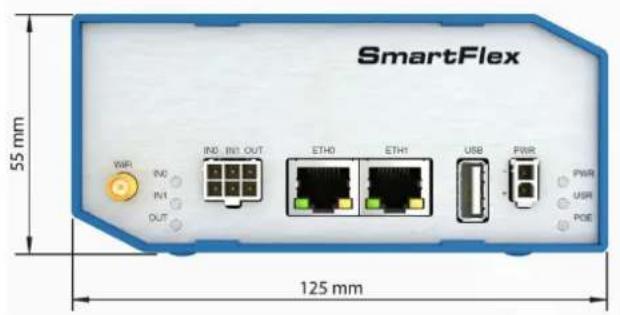
text_image
SmartFlex 55 mm 125 mm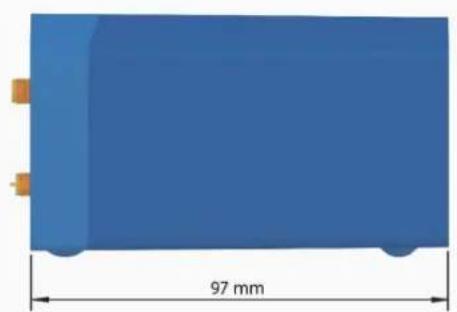
natural_image
Blue rectangular object with a 97 mm dimension label, no other text or symbols visibleFigure7: Basicdimensionsoftherouterbox
5.5Mountingrecommendations
- Possibilitytobeputonaworksurface,
•DINrailEN60715withincludedplasticormetalclip.
Forthemostofapplicationswithabuilt-inrouterinaswitchboarditispossibletorecognize twokindsofenvirnments:
- nopublicandindustryenvironmentoflowvoltagewithhighinterference,
- publicenvironmentoflowvoltagewithouthighinterference.
For both of these environments, it is possible to mount a routort o as switch board, the following there is none e to have examination immunity or issues in connection with EMC according to EN60439-1 ed.2:00+A1:04.

ComplianceofEN60439-1ed.2:00+A1:04specificationitisnecessarytoobservenext assemblyoftheroutertotheswitch-board:
- Foreverycableswerecommendtobindthebunch, werecommendforthisuse:
-Lengthofthebunch(thecombinationofpowersupplyanddatacables)canbe maximum1.5m.Ifthelengthofdatacablesexceeds1.5morintheeventof, thecableleadstowardstheswitch-board.Werecommendinstallingover-voltage protectors(surgesuppressors). -
With data cables they mustn't carry cables with reticular tension 230 V/50 Hz.
-
Sufficient space must be left before individual connectors for handling of cables,
- Forcorrectfunctionoftherouterwerecommendtouseintheswitch-boardearth-bonding distributionframeforgroundingofpowersupplyofrouter, datacablesandantenna.
5.6RemovalfromtheDINrail

TheDINrailclipissuitableforaDINrailaccordingtoEN60715standardonly. Thedefault positionofplasticormetalrailclip,whichisusedformountingtherouteronaDINrail,is showninthefollowingfigure.Itspositioncanbechangedonsomemodels(backorbottom). WhenchangingthepositionoftheDINrailclip,tightenthescrewswithmax.0.4Nmtorque.

natural_image
Two views of a metallic mechanical component with mounting holes and a side view showing internal structure (no text or symbols)Figure8:DefaultpositionofplasticandmetalDINrailclip
ToremovetherouterfromtheDINrail, pushtherouterdownlightly, sothebottompartof theDINrailclip(hitchedtotheDINrail) getsoutoftherailandthenpulloutthebottompartof therouterawayfromtheDINrail.

text_image
DIN rail Router 1. 2. 3.Figure9:RemovalfromtheDINrail
5.7 Description of therear panel
The rear panel contains only one holder for SD card (SD) and RST button used to restore defaultconfigurationandreboottherouter.
5.8 Description of the front panel
Onthefrontpanelisthefollowing:
| CaptionConnectorDescription | ||
| PWR2-pinConnectorforthepowersupply | ||
| ETH0RJ45 | Connectorforconnectionintothecomputernetwork,PoE(only forPoEPSEorPoEPDversions) | |
| ETH1RJ45 | Connectorforconnectionintothecomputernetwork,PoE(only forPoEPSEorPoEPDversions) | |
| WiFi | R-SMA | Connector for WiFi antenna (only for versions with WiFi module!) |
| USB | USB-A2.0 Host | Connector for connection of USB devices to the router. SupportsdeviceswithPL-2303andFTDIUSB/RS232converters. |
| I/O | 6-pinConnectorforconnectionofthebinaryinputsandoutput | |
Table8:Frontpaneldescription
text_image
SmartFlex ETH2 IN0 IN1 OUT ETH0 ETH1 USB PWR + - PWR USR POE WiFi INO IN1 OUTFigure10: SPECTREv3ERTfrontpanel
5.8.1 Statusindication
TherearestatusLEDsonthefrontpaneltoproviderouterstatusinformation.EachETH porthastwoadditionalLEDsthatprovideinformationabouttheportstatus.
| CaptionColorStateDescription | |||
| PWRGreenBlinking | OnFastblinking | Therouterisbootingup.Therouterbootedupandisready.Therouterfirmwareisbeingupdated. | |
| USRYellow— | ThefunctionofthisLEDisuser-defined. | ||
| POEYellow | Green | OnBlinkingOnBlinkingOff | PSE:TheinsufficientvoltageonthePWRconnector.PSE:Thepowereddevicetakestoomuchpower.1PD:ThepowersupplyispresentonanETHport.PSE:AcorrectpowersupplyonthePWRconnector.PSE:AdeviceispoweredviaoneoftheETHports.PD:ThepowersupplyisnotpresentonanETHport.PSE:ThePoEdisabledintheEthernetconfiguration. |
| IN0 | Green | On | The first binary input is active. |
| IN1 | GreenOn | Thesecondbinaryinputisactive. | |
| OUTYellowOn | Thebinaryoutputisactive. | ||
| ETH0ETH1 | GreenOn | Off | Selected100Mbit/sSelected10Mbit/s |
| ETH0ETH1 | YellowOn | BlinkingOff | ThenetworkcableisconnectedDatatransmissionThenetworkcableisnotconnected |
Table9: LEDstatusindication
5.8.2 PowerconnectorPWR
Panelsocket2-pin.
PinnumberSignalmarkDescription
1GND(-)NegativepoleofDCsupplyvoltage
2VCC(+)PositivepoleofDCsupplyvoltage(+10to+60VDC)
Table10:Connectionofpowerconnector
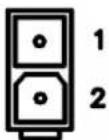
Figure11:Powerconnector

UnithastobesuppliedbyapowersupplyspecifiedasaLimitedPowerSource(LPS)accordingtoAnnexQofIEC62368-1. Ifthepowersupply/cableprovidedwithdeviceisnot used,alwaysusethecableswithminimumwiresize(nominalcrosssection)0.5squaremm forpowersupply.
Thepowersupplyfortheroutermustbebetween+10Vto+60VDCsupply.Protection against reversed polarity without signaling is built into the router. Note: The protection against reversedpolarityislostifthenegativepoleisgrounded!

Circuitexample:

text_image
DC - + PWRFigure12: Connectionofpowersupply

Note for PoE: See Chapter 5.8.6 for information on how PoE versions of the router impact the power supply usage. The power supply for a PoE router has to meet other specific requirements.

Allmetalpartsareconnectedtogetherwiththenegativepoleofpowersupply(commonpole).
LowPowerMode

Inapplicationsrequiringlowpowerconsumption(suchassolarpower-not7/24mode) isstrictlyrecommendedtouseLPMmodepriortopoweringdowntheentirerouter.
LPM(LowPowerMode)isaroutermodewheretherouterisinsleepmodewithminimal powerconsumption. Theroutercanbewokenupfromthismodebyasignalappliedtothe BIN1inputoafterapredeterminedperiodoftime.PuttingtherouterintoLPMmodecanbe done using the 1pm command, see Commands and Scripts application note for more details. ConsumptioninLPMmodemayvarydependingontheconfigurationoftherouter.
5.8.3 Antennaconnector WiFi
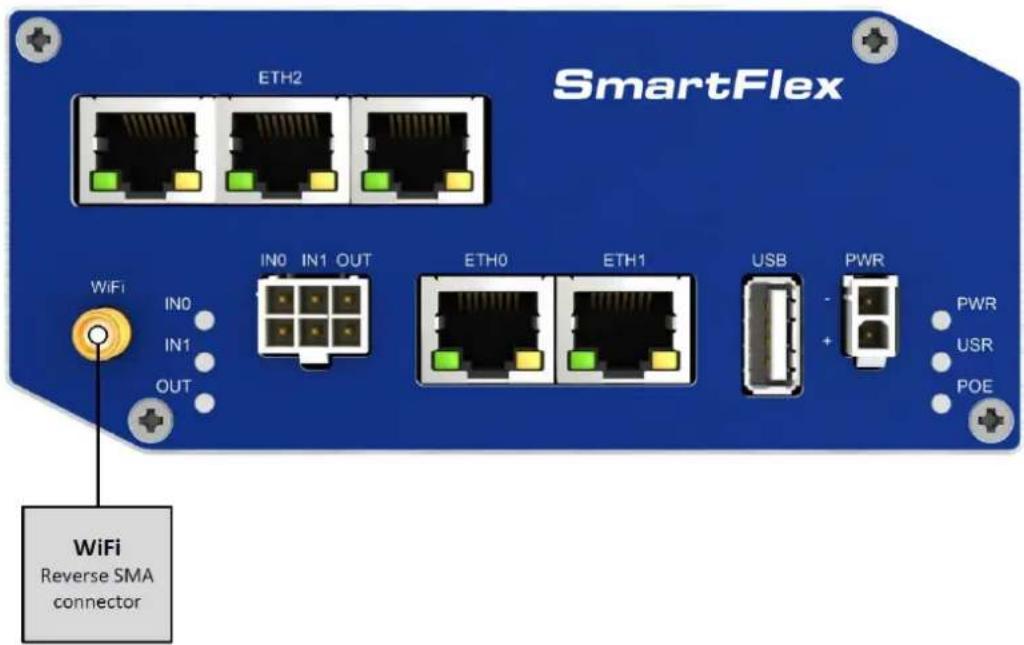
IftherouterisequippedwithWiFiimoduleonthecustomer'srequest,appropriateantenna isconnectedtothereverseSMAconnector(WiFi).

TheextarnalantennaisconnectedbyscrewingthisantennatothereverseSMAconnectorontherouter'sfrontpanel(seethefigurebelow).
text_image
SmartFlex ETH2 IN0 IN1 OUT ETH0 ETH1 USB PWR PWR USR POE WiFi Reverse SMA connectorFigure13:Antennaconnector
5.8.4MicroSDcardreader
ThemicroSDcardreaderisplacedontherearpaneloftherouter(thereisonlyasingle slot).ThiscardreaderallowstheroutertooperatewithmemorycardsmicroSD. Technical specificationsarestatedinthetablebelow.
| TechnicalspecificationsofmicroSDcard | ||
| SupportedtechnologiesSDHC,SDXC | ||
| SupportedcapacitySDHC | SDXC | upto32GBfrom32GBto64GB |
| SupportedmicroSDcardfilesystemsvfat,ext2,ext3,ext4 | ||
Table11: TechnicalspecificationsofmicroSDcard
ChangingthemicroSDcard:
- Usetheflatendofaspudger,oryourfingernail,topressthemicroSDcardslightly deeperintoitsslotuntilyouhearaclick.
- Aftertheclick, releasethecardanditwillpopoutofitsslot.
- RemovethemicroSDcardandpushanyothermicroSDcardintotheslotuntil clicksinplace.


natural_image
Blue electronic device casing with white panel and red indicator light (no text or symbols)Figure14:MicroSDcard
MountingmicroSDCardtotheSystem
ItisnecessarytomountthemicroSDcardtobeabletoaccessitinthesystemofthe router.Followthesestepstomountthecard:
- Use the dmesg command to seethelist of recently connected devices.
- IntheoutputofthecommandfindouttheentryforthemicroSDcard,forexample:mmcblk0:p1
- To mount the card to to mnt directory, use the mount command: mount/dev/mmcblk0p1/mnt

Formoreinformationaboutthecommandsforcreating,mounting,checkingandunmounting afilesystemonamicroSDcard,seetheapplicationnoteforExt4_toolsrouterapp.
5.8.5 EthernetPorts(ETH0 and ETH1)
ThepanelsocketRJ45isusedforthisinterface. TheisolationbarrieroftheEthernetsignal portsagainstthegroundis1500V.
| Pin | 10base-T&100base-TPoE(ModeB) |
| 1 | Tx+(TransmitData+)— |
| 2 | Tx-(TransmitData-)— |
| 3 | Rx+(ReceiveData+)— |
| 4 | —PoE+(positivepole) |
| 5 | —PoE+(positivepole) |
| 6 | Rx-(ReceiveData-)— |
| 7 | —PoE-(negativepole) |
| 8 | —PoE-(negativepole) |
Table12: Ethernetconnectorpinout

Figure15: Ethernetconnector
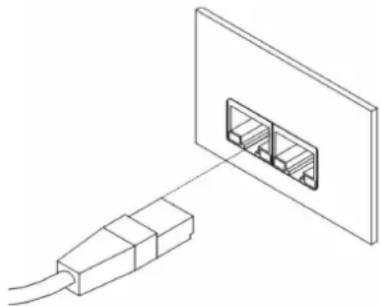
The crossover UTP cable (Ethernet cable) plugs into the RJ45 connector labeled as ETH0 or ETH1 (seethefigure below).
natural_image
Diagram of a cable connector inserted into a wall-mounted socket (no text or symbols)Figure16: ConnectionofEthernetcable

The insulation strength of Ethernet ports from each other and from the rest of the router (grounding) is dependent on the routerversion:
| Router Version | Insul. Strength from Router | Insul. Strength between Ports |
| WithoutPoE | 1.5kV | 1.5kV |
| PoEPD | 1.5kV | none |
| PoEPSE | none | none |
Table13: InsulationstrengthofEthernetports
5.8.6 PoweroverEthernet(PoE)
AvailableonlyformodelswithPoEfeature;seeChapter5.3fortheordercodes.
YoucannotpowertherouterviatheETH2portsontheSWITCHrouterversion.ThePoEPD isavailableontheETH0andETH1portsonly.
The IEEE 802.3af/PoE (Type 1) and IEEE 802.3at/PoE+ (Type 2) standards are supported. The device is Mode B compliant.
You can use the pse command to control the PoE functionality; see the Commands and Scripts applicationnote.
Basedonthemodelconfiguration, the PoEPSE or PoEPD feature can be supported for both Ethernet ports (ETH0 and ETH1).
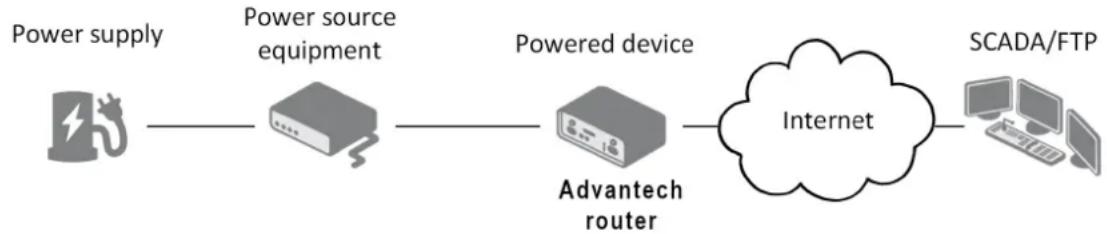
ThePoEPSEversionallowstheroutertopowerotherdevicesovertheEthernet. ThePoEPDversionenablestheroutertobepoweredbyanotherPoEPSEdeviceovertheEthernet.
PoEPD
flowchart
graph LR
    A["Power supply"] --> B["Power source equipment"]
    B --> C["Powered device"]
    C --> D["Internet"]
    D --> E["SCADA/FTP"]
    C --> F["Advantech router"]
Figure17: PoEPDusage
ThePoEPDparameterscanbefoundinChapter7.6.ThePOELEDonthefrontpanel oftherouterlightsupgreenwhenvoltageispresentonanEthernetport,sotheuserknows theroutercanbePoEpowered.Youcanstillpowertherouterwiththisconnectorevenifthe routerispoweredwithPoE(inPoEPDversion),buttheinputvoltagemustbehigherthan 15VDC.Iftheinputvoltageislowerthan15VDCandthePoEvoltageispresent(POELED greenon),therouterwillstillbepoweredfromtheEthernetconnectorviaPoE.
PoEPSE

flowchart
graph TD
    A["Powered devices"] --> B["Power source equipment"]
    C["Powered devices"] --> B
    D["Power supply"] --> E["Advantech router"]
    B --> F["Internet"]
    E --> F
    G["SCADA/FTP"] --> F
Figure18: PoEPSEusage

ThepowersupplyusedwiththePoEPSErouterhastoprovidevoltagefrom44to57VDCandtheoutputpowerhastobeatleast65WforfullPoE+use(Class4)in bothEthernetports(ETH0andETH1).
ThePoEPSEparameterscanbefoundinChapter7.6.ThePoEstateisindicatedbythe POELEDonthefrontpaneloftherouter,seeChap.5.8.1.Whensufficientvoltage(44to 57V)andpowerisavailableisindicatedbythegreenlight.AyellowPOELEDindicates insufficientpowerorvoltagethroughthePWRconnector.Whenadeviceisbeingpowered fromtherouter,thePOELEDwillbeblinkinggreen.Yellowblinkingisshownforanoverload (thepowereddeviceisusingtoomuchpower)orashortcircuit(incorrectwiringofthecable orofthedevicewithoutPoEsupport).
YoucanenableordisablethePoEPSEfeatureseparatelyontheETH0andETH1ports via the Web interface of the router. This can be found in the LAN configuration pages (Primary forETH0, SecondaryforETH1).WhenPoEPSEisenabled,youcanfindthecurrent,voltage, powerandpowerclassinformationontheGeneralpageoftherouter'sWebinterface;seethe Configurationmanual[1].
5.8.7USBPort
PanelsocketUSB-A.
| Pin | Signalmark | Description | Dataflowdirection |
| 1+5V | Positivepoleof5VDCsupplyvoltage,0.5A | ||
| 2USBdata-USBdatasignal-negativepoleInput/Output | |||
| 3USBdata+USBdatasignal-positivepoleInput/Output | |||
| 4GND | NegativepoleofDCsupplyvoltage | ||
Table14: ConnectionofUSBconnector

Figure19:USBconnector

The USB port is disabled on overload to prevent its damage (connected device is trying to get too high current). The port is enabled again after the reboot of the router.
MountingUSBFlashDrive to theSystem
It is necessary to mount the USB flash drive to be able to access it in the system of the router. Follow these steps to mount the drive:
- Use the dmesg command to see the list of recently connected devices.
- In the output of the command find out the entry for the microSD card, for example: sda: sda1
- To mount the card to to mnt directory, use the mount command: mount /dev/sda1 /mnt

Formoreinformationaboutthecommandsforcreating,mounting,checkingandunmounting a file system on a USB Flash Drive, see the application note for Ext4_tools router app.
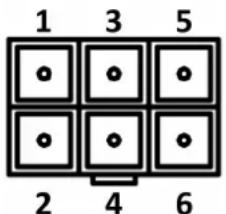
5.8.8I/OPort
Panelsocket6-pin.
| PinSignalmarkDescription | |
| 1IN0Binaryinput0 | |
| 2IN0Binaryinput0 | |
| 3IN1Binaryinput1 | |
| 4IN1Binaryinput1 | |
| 5OUTBinaryoutput | |
| 6OUTBinaryoutput | |
Table15:Connectionofl/Oport
text_image
1 3 5 2 4 6Figure20:I/Oconnector
TheI/OuserInterfaceisdesignedfortheprocessingofbinaryinputandcontrol(setting) ofbinaryoutput.Binaryoutputisopeninthedefaultconfiguration. Theisolationstrength is 1.5kV. Thepinsareisolatedfromeachotherwiththesamestrength.
The input circuits are bipolar and allow connection as needed with common plus or minus (according to the connection of an external voltage).
Binaryinputs
- Characteristicsofinputs:
| Logical0/1 * | Voltage | Current | Webinterfacestatus |
| log. 1 max | 3 V | 0.4 mA | Off |
| log.0min | 5V | 0.7mA | On |
| log.0type | 12V | 2mA | On |
| log.0max | 60V | 7mA | On |
Table16: Characteristicsofinputs
* The binary input status in the Shell is returned via io get bin0 or io get bin1.
Binaryoutput
- Binaryoutputparameters:
-60VAC/300mA
-60VDC/300mA
- The current of the binary output is limited by a resettable fuse (300mA).
Binaryinputsandoutputconnections
Binaryinputsandoutputconnectionsexample:

flowchart
graph TD
    subgraph Left_Bay
        A["AC or DC"] --> B["PIN 1 - IN 0"]
        B --> C["ESD"]
        C --> D["Diode"]
        D --> E["Router"]
        F["PIN 2 - IN 0"] --> G["ESD"]
        G --> H["Diode"]
        H --> I["Diode"]
        J["PIN 3 - IN 1"] --> K["ESD"]
        K --> L["Diode"]
        L --> M["Diode"]
        N["PIN 4 - IN 1"] --> O["ESD"]
        O --> P["Diode"]
        Q["PIN 5 - OUT"] --> R["ESD"]
        R --> S["Diode"]
        T["PIN 6 - OUT"] --> U["ESD"]
    end
    subgraph Right_Bay
        V["AC or DC"] --> W["PIN 3 - IN 1"]
        W --> X["ESD"]
        X --> Y["Diode"]
        Y --> Z["Diode"]
        AA["PIN 4 - IN 1"] --> AB["ESD"]
        AB --> AC["Diode"]
        AD["PIN 5 - OUT"] --> AE["ESD"]
        AE --> AF["Diode"]
        AG["PIN 6 - OUT"] --> AH["ESD"]
    end
    style Left_Bay fill:#f9f,stroke:#333
    style Right_Bay fill:#bbf,stroke:#333
Figure21: Binaryconnection
5.8.9Reset
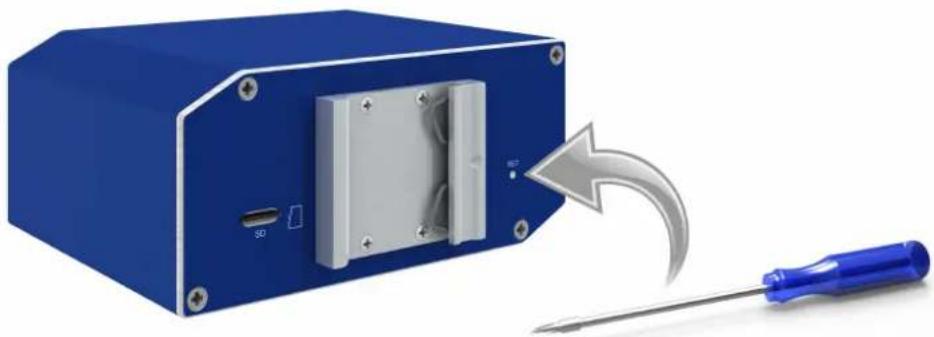
WhenPWRLEDstartsflashingonthefrontpanel,itispossibletorestorethedefaultconfiguration of the router by pressing the RST button on the rear panel. After pressing this button thedefaultconfigurationisrestoredandthenrouterreboots(greenLEDwillbeon).

ForpressingtheRSTbuttoncouldbeusedanarrowscrewdriver.
natural_image
Blue electronic device with a screwdriver and internal panel, showing a curved arrow indicating motion (no text or symbols)Figure22:Routerreset

Werecommendbackingupconfigurationoftherouter(seeConfigurationmanual) becauseresetoftheroutersetstheconfigurationtothedefaultstate.
Itisimportanttodistinguishbetweenresetandreboottherouter.
| ActionRouterbehaviorInvokingevents | |
| RebootTurnoffandthenturnonrouterDisconnectandconnectthepower, PresstheRebootbuttonintheweb configuration | |
| ResetRestoredefaultconfigurationandreboot therouter | PressRS7button |
Table17: Descriptionofresetandrestartrouter
5.9 InterfacesDescription
Thereareavailableversionswithoneofthefollowinginterfaces:
- SWITCHInterface
5.9.1 SWITCHinterface
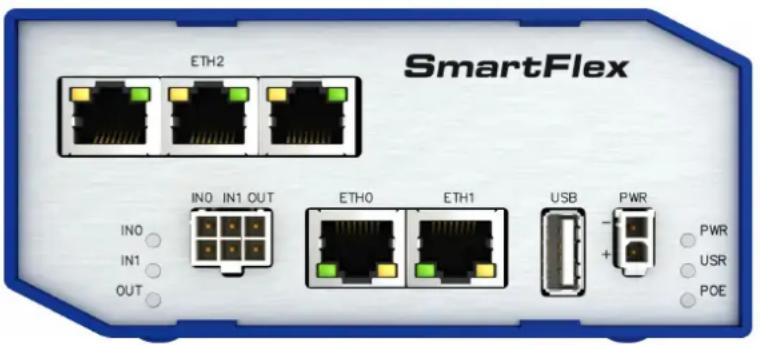
ThreeLANportsofSWITCHinterfaceforSmartFlexrouters(RJ45connectorsforconnectingEthernetdevices)actasatypicalswitchdevice.ThismeansthattherouterreadsEthernetframes(datapacketsonanEthernetlink)fromanyportonSWITCHinterfaceandtransmitsthemonotherportsoftheSWITCHinterface.Eachportcantransmitframesindependentlyontheotherports.Stateindicationisprovidedoneveryconnector.RouterinthisversioncomplieswiththestandardsandtemperaturerangesdeclaredinChap.7.1 exceptforthelowermaximumoperatingtemperaturewhichis+70 °C.
text_image
SmartFlex ETH2 IN0 IN1 OUT IN0 IN1 OUT ETH0 ETH1 USB PWR + - PWR USR POEFigure23:VersionwithSWITCHboard
Stateindicationoftheinterface:
| Descriptionofindication | ||
| GreenLEDOn | Off | Selected100MbpsSelected10Mbps |
| YellowLEDOn | BlinkingOff | ThenetworkcableisconnectedDatatransmissionThenetworkcableisnotconnected |
Table18:StateindicationoftheSWITCHinterface
TechnicalspecificationofEthernetIEEE802.3:
| Ethernetinterface,IEEE802.3standard | |
| Maximumdatarate100Mbps | |
| Max.totalcablelength(300Bd,200nF/km)100m | |
Table19: SWITCHInterfaceparameters
6.FirstUse
6.1 Connectingtherouterbeforefirstuse
Beforeputtingtherouterintooperationitisnecessarytoconnectallcomponentswhich arerequiredtorunyourapplications.

Therouter cannot operate without connected powersupply.
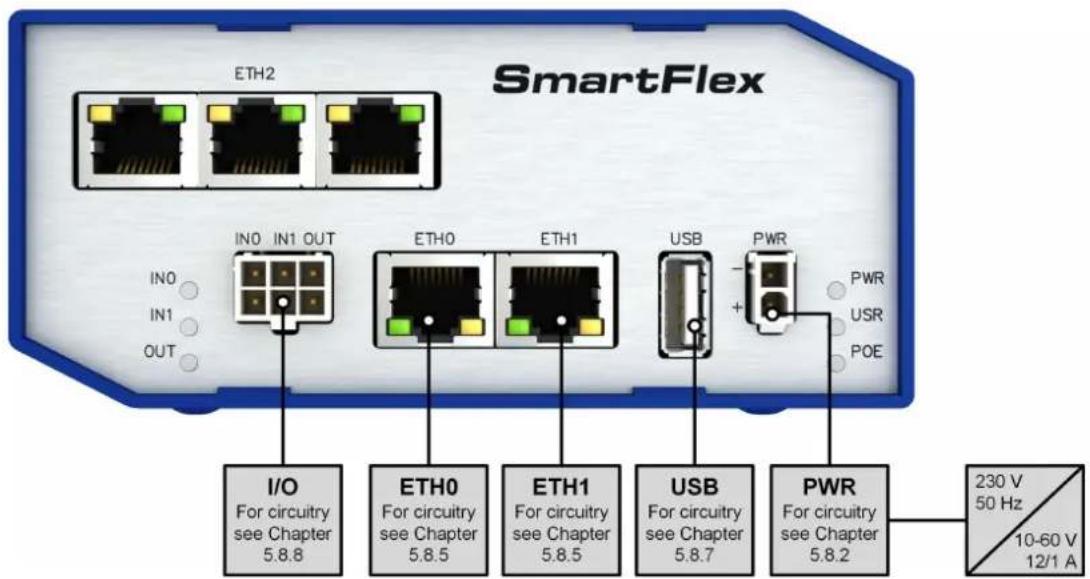
text_image
SmartFlex ETH2 IN0 IN1 OUT IN0 IN1 OUT ETH0 ETH1 USB PWR + - PWR USR POE I/O For circuitry see Chapter 5.8.8 ETH0 For circuitry see Chapter 5.8.5 ETH1 For circuitry see Chapter 5.8.5 USB For circuitry see Chapter 5.8.7 PWR For circuitry see Chapter 5.8.2 230 V 50 Hz 10-60 V 12/1 AFigure24:Routerconnection
6.2Start
Therouterisputintooperationwhenthepowersupplyisconnectedtothisrouter.By default,therouterwillautomaticallystarttologontothedefaultAPN.DHCPserverwillstartto assignaddressesfordevicesontheEthernetportETH0.Router'sbehaviorcanbechanged viathewebinterface.ThisisdescribedindetailintheConfigurationmanualforSmartFlex routers.
6.3Configuration
6.3.1Configurationoverwebbrowser
Forstatusmonitoring, configuration and administration of the router is available as web interface which can be accessed by entering the IP address of the router into the web browser. The default IP address of the router is 192.168.1.1. Attention, its necessary to use HTTPS protocol for secure communication over an network!

text_image
https://192.168.1.1/ SmartFlex SmartFlex LTE Router Status Network DHCP Network S InterfaceFigure25: EnteringtheIPaddressoftherouter
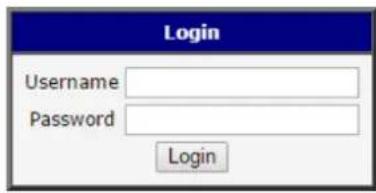
Configurationmaybeperformedonlybytheuser"root".Thedefaultpassworddisprinted ontherouter'slabel. ^1 Changethedefaultpasswordassoonaspossible!
Allroutershavethe WebAccess/DMPclientpre-installedbydefault. Theactivatedclient periodically uploads router identifiers and configuration to the WebAccess/DMP server. See the configuration manual [1], chapter Basic Information -> WebAccess/DMP Configuration, formoreinformation.
Aftersuccessfullyenteringlogininformationusergainsaccesstotherouterviahisinternet browser.
A detailed description of the router settings via the Web interface can be found in the documentConfigurationmanualforSmartFlexrouters.
text_image
Login Username Password LoginFigure26: Enteringlogininformation
| Status | General Status |
| General WIFI WiFi Scan Network DHCP IPsec DynDNS System Log | Primary LAN |
| Configuration | IP Address : 10.40.28.66 / 255.255.252.0 MAC Address : 7C:66:9D:38:30:F0 Rx Data : 10.4 KB Tx Data : 21.0 KB » More Information « |
| LAN VRRP PPPoE WIFI WLAN Backup Routes Firewall NAT OpenVPN IPsoc GRE L2TP PPTP DynDNS NTP SNMP SMTP Expansion Port 1 Expansion Port 2 USB Port Startup Script Up/Down Script Automatic Update | Secondary LAN |
| Customization | Peripheral Ports |
| User Modules | System Information |
| Administration | |
| Change Profile Change Password Set Real Time Clock Backup Configuration Restore Configuration Update Firmware Reboot |
Figure27:Routerwebinterface
7. Technical Parameters
7.1 Basicparameters
| SmartFlexSR300 | ||
| TemperaturerangeOperating | Storage | -40 °Cto+80 °C-40 °Cto+85 °C |
| Coldstart-40 | °C | |
| HumidityOperating | Storage | 0to95%relativehumiditynoncondensing0to95%relativehumiditynoncondensing |
| AltitudeOperating2000m/70kPa | ||
| DegreeofprotectionIP30 | ||
| Supplyvoltage | 10to60VDC | |
| BatteryforRTC | CR1225 | |
| Consumption | Idle | 2 W |
| Average | 3.3W | |
| Peak | 4.5W | |
| Sleepmode | 10mW | |
| Dimensions | 55x97 x125mm(DIN35mm,EN60715) | |
| Weight | PlasticboxMetalbox | approximately211g(dependsoninterface)approximately327g(dependsoninterface) |
| Antenna connectors | Reverse SMA - 50 Ω (only for versions with WiFimodule) | |
| Userinterface | 2xETHUSBI/OMicroSD | Ethernet(10/100Mbps)USB2.06-pinpanelsocketSDHC,SDXC |
Table20: Basicparameters
7.2 Standardsandregulations
Theroutercomplieswiththefollowingstandardsandregulations:
| Standardsandregulations |
| RadioETSIEN300328,ETSIEN301893 |
| EMCETSIEN301489-1,ETSIEN301489-1,ETSIEN301489-17 |
| SafetyIEC62368-1(ULE487720),EN62311 |
| ULC1D2 |
| ULE486108* |
| NationalCE,UKCAcompliant |
Table21:Standardsandregulations
*ExcludingversionswithPoEPSE.
7.3 Typetestsandenvironmentalconditions
| PhenomenaTestDescriptionTestlevels | |||
| ESDEN61000-4-2Enclosurecontact | Enclosureair | ±6kV(crit.A)±8kV(crit.A) | |
| RFfieldAM modulated | EN61000-4-3Enclosure20V/m(crit.A) | (80–2700MHz)3V/m(crit.A)(2700–6000MHz) | |
| FasttransientEN61000-4-4Signalports | Powerports Ethernetports | ±2kV(crit.A)±2kV(crit.A)±2kV(crit.A) | |
| Surge | EN61000-4-5Ethernetports Powerports I/Oports | ±2kV(crit.B),shieldedcab. ±0,5kV(crit.B)±1kV,LtoL(crit.A)±2kV,LtoGND(crit.A) | |
| RFconducted | EN61000-4-6Allports | 10V/m(crit.A)(0,15–80MHz) | |
| Radiatedemission | EN55022 | EnclosureClassB | |
| Conducted emission | EN55022 | DCpowerports Ethernetports | ClassB ClassB |
| Powerfrequency magneticfield | EN61000-4-8Enclosure160A/m(crit.A) | ||
| Dryheat | EN60068-2-2+75 | °C*,40%rel.humidity | |
| ColdEN60068-2-1-40 | °C* | ||
| Vibration | EN60068-2-64 ed. 2 | Vibration spec-trum A.3 (rolling stock) | Category 1 (3 axis, 8 hours peraxis) |
| Shock | EN60068-2-27 ed. 2 | half-sine,50 gpeak,11 ms | |
Table22: Typetestsandenvironmentalconditions
* The temperatures given are for the basic version of the router. These can vary for other versions.
7.4 Technical parameters of WiFi
| WiFi | |
| AntennaconnectorR-SMA-50Ω | |
| SupportedWiFiband2.4GHz,5Ghz | |
| Standards802.11a,802.11b,802.11g,802.11n | |
| 2.4GHzsupportedchannels1,2,3,4,5,6,7,8,9,10,11,12,13 | |
| 5GHzsupportedchannels1 | 36,38,40,42,44,46,48,52,56,60,64,100,104,108,112,116,120,124,128,132,136,140,149,153,157,161,165 |
| TypeofdeviceAccesspoint,station | |
| Max.clientsinAPmode10 | |
| WiFiTXOutputPower17,3dBm | |
| WiFiRXSensitivity | -96,3dBm |
| AP maximum users | 10 users (WiFi module supports multi-role operation in STA and AP. Multi-role does not affect the maximum numberofusers). |
Table23: Technical parameters of WiFi
7.5 Technical parameters of Oport
- Characteristicsofinputs:
| Logical0 / 1 * | Voltage | Current | Webinterfacestatus |
| log. 1 max | 3 V | 0.4 mA | Off |
| log. 0 min | 5 V | 0.7 mA | On |
| log. 0 type | 12 V | 2 mA | On |
| log. 0 max | 60 V | 7 mA | On |
Table24: Characteristicsofinputs
* The binary input status in the Shell is returned via io get bin0 or io get bin1.
- Binaryoutputparameters:
- 60 V AC / 300 mA
- 60 V DC / 300 mA
7.6 Technical Parameters of Powerover Ethernet (PoE)
StandardsIEEE802.3at-2009(PoE+)andIEEE802.3af-2003(PoE)aresupported.CablingneededisCategory5,upto12.5Ω.ItispossibletouseapassivePoEinjector.
PoEPD:parametersforoppositePSE
| Inputvoltagerange42.5–57V | |
| Poweravailable25.50W | |
| Maximumcurrent600mA | |
Table25:PoEPD:parametersforoppositePSE
PoEPSEparameters
| Powersupplyneeded44-57V,65W |
| Poweravailable2x25.50W(ETH0,ETH1) |
Table26: PoEPSEparameters
7.7 Other Technical Parameters
Othertechnicalparameters
| CPUpower2DMIPSperMHz | |
| Flashmemory256MB | |
| RAM512MB | |
| M-RAM128kB | |
Table27: Othertechnical parameters
8.RelatedDocuments
[1]AdvantechCzech:ConfigurationManualforSmartFlexRouters
9. Troubleshooting
If you cannot connect to other router from your PC, your network card may be configured in such a way that it is not possible to connect to other router. Take one more of the following steps in order to solv the problem:
- MakesureyourPC'snetworkcardisconfiguredtoobtaintheIPaddressformtheDHCPserver(bydefaulttheDHCPserverisrunningintherouter).
- ConnecttheroutertothePCviaSwitch.
- ConnecttheroutertothePC,starttherouterfirstandthenstartthePCaftertherouter'sinitialization.
9.1FAQ
Ethernetconnectionfailsorisnotestablishing.
- Itispossibletoturnautonegotiationoffandsetarateandduplexmanuallyonthe Ethernetinterfaceoftherouter.Availableon"LANConfiguration"pageintherouter.
☐I cannot connect from the Internet to the device behind the router. I have NAT enabled.
- Thedevice'sgatewayhastobeconfiguredsoitpointstotherouter.
Ican'taccessmyWebserverplacedbehindtherouteroverNAT.
- TheremoteHTTPaccesstotherouterhastobedisabledon"NATConfiguration" page in the router. Also enable "Send all remaining incoming packets to default server"featureandfillinthelPaddressofyourWebserver. OntheWebserver, thedefaultgatewayhastobethelPaddressoftherouter.
DynDNSdoesn'twork.
- IfthesameIPaddressisrecordedinyourcanonicnameasadynamicallyassigned address, itmeansthattheproviderisusingNATorafirewall.
- YoucanverifyNATusingpingtoyourserverwithstaticaddressandthencompare withrouter'sIPaddress.
- YoucanverifyaFirewallbyaccessingremotelytotherouter'sWebinterface.
- TheoperatormaynotprovidetheaddressofDNSserverandwithoutDNSserver's address it is impossible to connect to the dyndns.org server. The following messageswillbeshownintheSystemLog:
-DynDNSdaemonstarted
-Error resolving hostname: nosuchfileordirectory
-ConnecttoDynDNSserverfailed
L2TPorIPSecisn'testablishing.
- Checkthe "SystemLog" pageforerrormessages.
IPSectunnelestablishesbutthecommunicationdoesnotrun.
- Probablytherearebadroutingrulesdefinedintheconnecteddevices,orthedefault gateway.
Serialcommunicationisnotworking.
- Verifythattheroutermodelsupportsserialcommunications.Alsoverifytheserial communicationsettings.Todoso,opentherouter'sconfigurationmenuviathe webbrowser,selecttheappropriate"ExpansionPort"from"Configuration"partof themenuandverifythesettings.
IstherouterCiscocompatible?CanlusetheCiscoconfiguration?
- No, the Firmware in the router (ConelOS) is based on Linux with BusyBox. Thus the Cisco configuration cannot be used. But network connections are defined by standardsoconnecting theroutertotheCisco other networking devices is possible and will be compatible.
FTPorSFTPdoesnotwork
- FTPwillworkonv2routersonly. YoucanuseSFTPonallrouterstotransferfiles to/fromtherouter. IfhavingtroubleswithFTPonv2routers, makesureyouhave FTPenabled: "Configuration" section, "Services", "FTP". Thenyoucanconnect withanyclientonport21 withnameandpasswordsameasfortheWebinterface. IfhavingtroubleswithSFTP, makesureyouhaveSSHenabled: "Configuration" section, "Services", "SSH". Thenyoucanconnectwithanyclientonport22 with nameandpasswordsameasfortheWebinterface.
HowcanIconnecttotherouter'scommandline?(SSH,Telnet)
- YoucanuseSSHonallroutersorTelnetonv2routersonly.SSHisenabledby default, butyoucanverifyinWebinterfacein"Configuration"section,"Services", "SSH". ThenconnectwithanySSHclientonport22oftherouter.UserandpasswordisthesameasfortheWebinterface.Telnetonv2routerscanbeenabled here:"Configuration"section,"Services","Telnet".
10.CustomerSupport
CustomerSupportforEurope
AdvantechCzechs.r.o.
Sokolska71
56204, UstinadOrlici,
CzechRepublic
Phone:+35391792444
Fax:+35391792445
E-mail:iiotcustomerservice@advantech.eu
Web:www.advantech.com
CustomerSupportforNAM
AdvantechB+BSmartWorx
707DaytonRoad
Ottawa, IL61350 USA
Phone:+1-800-346-3119(Monday–Friday,7a.m.to5:30p.m.CST)
Fax:+1-815-433-5109
E-mail: support@advantech-bb.com
Web:www.advantech-bb.com
CustomerSupportforAsia
Phone:+886-2-2792-7818#1299(Monday–Friday,9a.m.to5:30p.m.UTF+8)
Fax:+886-2-2794-7327
E-mail: icg.support@advantech.com.tw
Web:www.advantech.com

We, Advantech Czechs.r.o., declare that the radio equipment narrated in this user's manual complies with Radio Equipment Regulations 2017 (S.I. 2017 No. 1206).

We, Advantech Czechs.r.o., declare that the radio equipment narrated in this user's manual complies with Directive 2014/53/EU.
ThefulltextoftheEUDeclarationofConformityisavailableatthefollowinginternetaddress: icr.advantech.cz/eudoc