ALPINE KIT-8MBM - Installation Kit

KIT-8MBM - Installation Kit ALPINE - Free user manual and instructions

Find the device manual for free KIT-8MBM ALPINE in PDF.

📄 4 pages English EN Download 💬 AI Question 10 questions ⚙️ Specs
Notice ALPINE KIT-8MBM - page 2
Pick your language and provide your email: we'll send you a specifically translated version.
Product Type Installation Kit
Model KIT-8MBM
Brand Alpine
Compatible Head Unit Alpine INE-W928R
Vehicle Compatibility Mercedes A-Class, B-Class, Viano, Vito
Kit Contents Mounting frames (2 sets), facia plate, countersunk flat head tapping screws, recessed countersunk flat head screws
Material Plastic and metal
Color Black
Installation Location Dashboard (double DIN slot)
Installation Method Requires professional installation
Package Dimensions (approx.) 30 x 20 x 5 cm
Package Weight (approx.) 0.5 kg
Safety All installation work must be performed by a qualified professional installer; manufacturer/dealer not liable for incidental or indirect damages
Maintenance Keep clean and dry; avoid moisture
Repairability Kit components are not user-serviceable; replace if damaged
General Information This kit enables installation of Alpine INE-W928R into specific Mercedes models

Frequently Asked Questions - KIT-8MBM ALPINE

Is the Alpine KIT-8MBM compatible with my Mercedes A-Class?
Yes, the KIT-8MBM is designed for Mercedes A-Class, B-Class, Viano, and Vito models. Ensure your vehicle matches the specified models.
What Alpine head units does this kit support?
This kit is specifically designed for the Alpine INE-W928R double DIN navigation unit.
What is included in the KIT-8MBM package?
The kit includes mounting frames for A-Class/B-Class and Viano/Vito, a facia plate, countersunk flat head tapping screws, and recessed countersunk flat head screws.
Can I install this kit myself?
Professional installation is strongly recommended. The manual states: "All installation work must be performed by a qualified professional installer only." Incorrect installation may cause damage.
Do I need any additional parts for installation?
Typically, the kit includes all necessary mounting hardware. However, you may need wiring harnesses or adapters for your specific Mercedes model; consult a professional installer.
How do I remove the original factory radio?
For A-Class/B-Class: Insert pulling hooks into air vent catches, pull out air vents, disconnect hazard light switch plugs, remove air vents completely, unclip and remove lower panel. For Viano/Vito: Remove OEM trim panel, then remove four screws at top and bottom of head unit, then remove the head unit. Refer to the manual for detailed steps.
Can I use this kit with other Alpine models?
The KIT-8MBM is specifically designed for the INE-W928R. It may not fit other Alpine double DIN units without modification. Always check compatibility.
What tools are required for installation?
Typical tools include Torx screwdrivers (for Mercedes screws), plastic pry tools, and possibly a socket set. The manual references removing Torx screws (size not specified).
How do I clean and maintain the installation kit?
Keep the plastic and metal components clean with a soft, dry cloth. Avoid using harsh chemicals or moisture. Regularly check screws for tightness.
Where can I find the full installation manual?
The full manual is available for free download in PDF format on notice-facile.com. It includes step-by-step instructions and illustrations for both A-Class/B-Class and Viano/Vito.

User questions about KIT-8MBM ALPINE

0 question about this device. Answer the ones you know or ask your own.

Ask a new question about this device

The email remains private: it is only used to notify you if someone responds to your question.

No questions yet. Be the first to ask one.

Download the instructions for your Installation Kit in PDF format for free! Find your manual KIT-8MBM - ALPINE and take your electronic device back in hand. On this page are published all the documents necessary for the use of your device. KIT-8MBM by ALPINE.

USER MANUAL KIT-8MBM ALPINE

Compatible with these Alpine navigation devices INE-W928R1 Mounting Frames for A-Class / B-Class 2 Mounting Frames for Viano / Vito 3 4 5
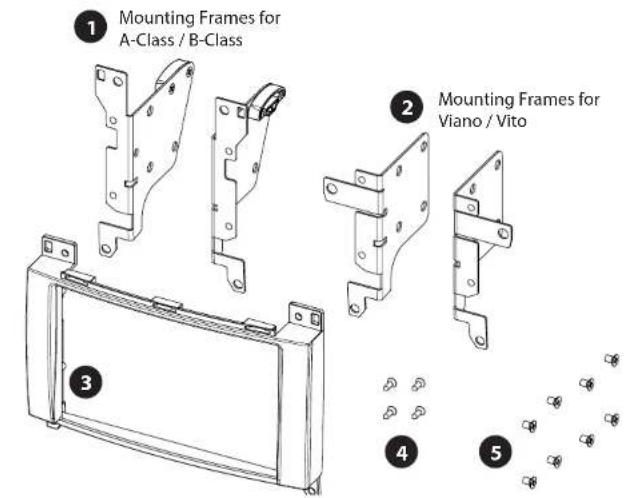
• (1) Mounting Frames for A-Class / B-Class

• (2) Mounting Frames for Viano / Vito

• (3) Facia plate

• (4) countersunk flat head tapping screw

• (5) recessed countersunk flat head screw

Mercedes A-Class / B-Class

Interior view of a car dashboard with air vent grilles and control panel (no visible text or symbols)

  1. Insert pulling hooks into air vent catches. Pull out air vents

Air vent catches

Close-up of mechanical components with no visible text or symbols

  1. Disconnect plugs for hazard light switch
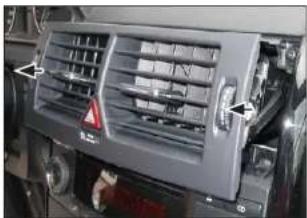
Close-up of a car air vent system with directional arrows indicating airflow or movement (no text or symbols visible)

  1. Remove air vents completely

Close-up of hands inserting a device into a black appliance with control knobs and dials (no visible text or symbols)

  1. Unclip and remove lower panel

Mercedes Viano / Vito
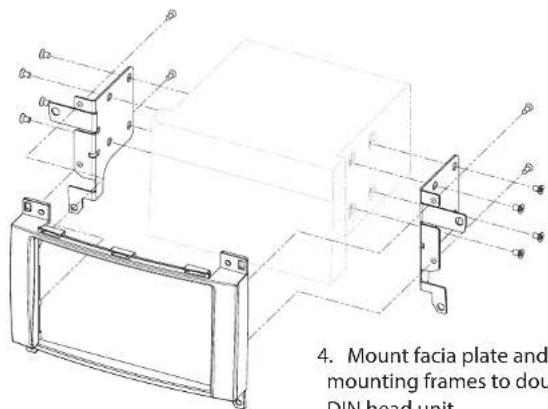
4. Mount facia plate and mounting frames to double DIN head unit

  1. Mount facia plate and mounting frames to double DIN head unit

Connect all required circuit points and push double DIN head into dash board

Car dashboard display showing a digital audio interface with Chinese text and playback controls

  1. Clip OEM trim panel on dash board to finish installation

Mercedes A-Class / B-Class

Interior view of a car dashboard with control knobs and a digital display (no visible text or symbols)

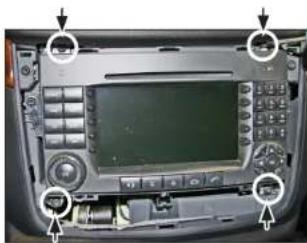
  1. Remove four torx screws. Remove OEM head unit.

6. Mount facia plate and mounting frames for A-0

  1. Mount facia plate and mounting frames for A-Class / B-Class to Alpine INE-W928R.

Mercedes A-Class / B-Class

Post Mio Box Post Mio Box Running Post 100% 200% C-478 300% C-478 50% C-478 50% C-478 50% C-478 50% C-478 50% C-478 50% C-478 50% C-478 50% C-478 50% C-478 50% C-478 50% C-478 50% C-478 51.11.11.11.11.11.11.11.11.11.11.11.11.11.11.11.11.11.11.11.11.11.11.11.11.11.11.11.11.11.11.11.11.11.12 50% C-478…

  1. Connect all required circuit points and push double DIN head into dashboard.

Reinstall everything in reverse order to finish installation.

Mercedes Viano / Vito

Interior view of a car dashboard with digital display and control panel (no visible text or symbols)

  1. Vehicle with OEM head unit.

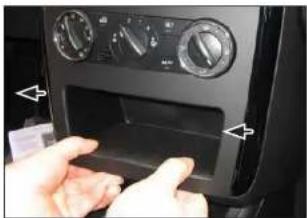
Remove OEM trim panel surrounding the radio.
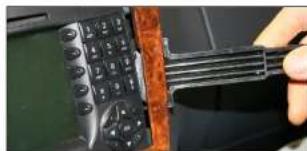
Close-up of a hand holding a black handheld device next to a black flip-flop on a green surface (no visible text or symbols)

Interior view of a car dashboard with control panels and buttons (no visible text or symbols)

  1. Remove the four screws at the top and bottom of OEM head unit.
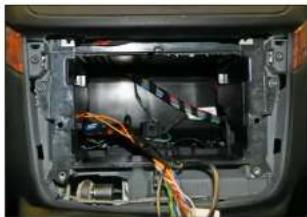
Interior view of a car showing exposed internal components with visible wiring and connectors (no text or symbols)

  1. Remove the OEM head unit.

All installation work must be performed by a qualified professional installer only. The manufacturer / dealer is not liable for any kind of incidental or indirect damages.

Table of contents Click a title to access it
Manual assistant
Powered by Anthropic
Waiting for your message
Product information

Brand : ALPINE

Model : KIT-8MBM

Category : Installation Kit