PH 26F - Measurement PCE Instruments - Free user manual and instructions
Find the device manual for free PH 26F PCE Instruments in PDF.


User questions about PH 26F PCE Instruments
0 question about this device. Answer the ones you know or ask your own.
Ask a new question about this device
Download the instructions for your Measurement in PDF format for free! Find your manual PH 26F - PCE Instruments and take your electronic device back in hand. On this page are published all the documents necessary for the use of your device. PH 26F by PCE Instruments.
USER MANUAL PH 26F PCE Instruments
text_image
QR code image containing encoded data, no visible human-readable textUser manuals in various languages (français, italiano, español, português, nederlands, türk, polski, русский, 中文) can be found by using our product search on: www.pce-instruments.com
Last change: 19 August 2021
v1.0
Contents
1 Safety notes....1
2 Specifications.... 2
3 Delivery scope.... 3
3.1 PCE-PH 26F 3
3.2 PCE-PH 28L 3
4 System description....3
4.1 Display....3
4.2 Keys.... 4
5 Measurement preparation....4
5.1 Insert batteries .... 4
5.2 Preparation of the buffer solution.... 4
5.3 Electrode control 4
5.4 Switch meter on / off.... 5
5.5 Basic settings.... 5
6 pH calibration 6
6.1 1-point calibration....7
6.2 2-point calibration....8
6.3 3-point calibration....9
7 Temperature calibration....10
8 pH measurement....11
9 Care and maintenance of the electrodes....11
10 Troubleshooting.... 11
11 Warranty....12
12 Disposal 12
1 Safety notes
Please read this manual carefully and completely before you use the device for the first time. The device may only be used by qualified personnel and repaired by PCE Instruments personnel.
Damage or injuries caused by non-observance of the manual are excluded from our liability and not covered by our warranty.
- The device must only be used as described in this instruction manual. If used otherwise, this can cause dangerous situations for the user and damage to the meter.
- The instrument may only be used if the environmental conditions (temperature, relative humidity, ...) are within the ranges stated in the technical specifications. Do not expose the device to extreme temperatures, direct sunlight, extreme humidity or moisture.
- Do not expose the device to shocks or strong vibrations.
- The case should only be opened by qualified PCE Instruments personnel.
- Never use the instrument when your hands are wet.
- You must not make any technical changes to the device.
- The appliance should only be cleaned with a damp cloth. Use only pH-neutral cleaner, no abrasives or solvents.
- The device must only be used with accessories from PCE Instruments or equivalent.
- Before each use, inspect the case for visible damage. If any damage is visible, do not use the device.
- Do not use the instrument in explosive atmospheres.
- The measurement range as stated in the specifications must not be exceeded under any circumstances.
- Non-observance of the safety notes can cause damage to the device and injuries to the user.
We do not assume liability for printing errors or any other mistakes in this manual.
We expressly point to our general guarantee terms which can be found in our general terms of business.
If you have any questions please contact PCE Instruments. The contact details can be found at the end of this manual.
2 Specifications
| pH measurement | |
| Measurement range | -1.00 ... 15.00 pH |
| Accuracy | ±0.01 pH |
| Resolution | 0.01 pH |
| Calibration points | 1, 2 or 3 |
| Buffer solutions | USA (pH 4.01 / 7.00 / 10.01) and NIST (pH 4.01 / 6.86 / 9.18) |
| Automatic recognition of the buffer solution | yes |
| Temperature measurement | |
| Measurement range | 0 ... 60 °C / 32 ... 140°F |
| Accuracy | ±1 °C |
| Resolution | 1 °C |
| Calibration points | 1 |
| General specifications | |
| Temperature compensation | 0 ... 60 °C / 32 ... 140°F |
| Temperature of medium | 0 ... 60 °C / 32 ... 140°F |
| Environmental conditions | 0 ... 60 °C / 32 ... 140°F; <80 % RH |
| Batteries | 2 x 1.5 V AAA |
| Weight | 100 g / <1 lb |
| Total dimensions | |
| PCE-PH 26F | 185 mm x ∅ 40 mm / 7.3 x 1.6 in |
| PCE-PH 28L | 240 mm x ∅ 40 mm / 9.44 x 1.6 in |
| Electrode dimensions | |
| PCE-PH 26F | 40 mm x ∅ 26 mm / 1.6 in x ∅ 1.02 in |
| PCE-PH 28L | 75 mm x ∅ 14 mm / 2.95 in x ∅ 0.55 in |
3 Delivery scope
3.1 PCE-PH 26F
1 x pH meter PCE-PH 26F
1 x buffer 4.01 pH powder for 250 ml solution
1 x buffer 7.00 pH powder for 250 ml solution
1 x buffer 10.01 pH powder for 250 ml solution
2 x batteries 1.5 V AAA
1 x storage box
1 x user manual
3.2 PCE-PH 28L
1 x pH meter PCE-PH 28L
1 x buffer 4.01 pH powder for 250 ml solution
1 x buffer 7.00 pH powder for 250 ml solution
1 x buffer 10.01 pH powder for 250 ml solution
3 x container for calibration solution
2 x batteries 1.5 V AAA
1 x carrying case
1 x user manual
4 System description
4.1 Display
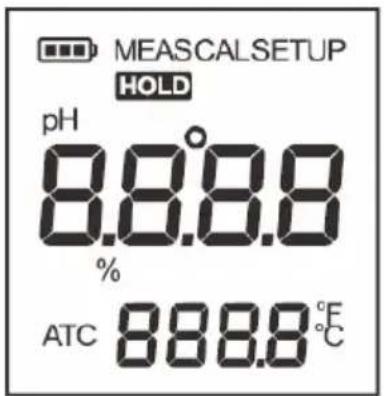
text_image
MEASCALSETUP HOLD pH 8.8.8.8 % ATC 888.8 °C| Icon | Description |
| MEAS | Measuring mode |
| CAL | Calibration mode |
| SETUP | Setup mode |
| HOLD | Measured value is stable |
| ATC | Automatic temperature compensation enabled |
| Battery full (the icon disappears when the battery is flat) |
4.2 Keys
| Key | Function |
| MEAS / Hold | - Switches the meter ON/OFF- Freezes the reading. Press the key again to continue measurement.- Ends the calibration or adjustment and returns to measuring mode |
| CAL | - Press the key to start the calibration.- Press and hold the key to open the setup menu.- In setting mode, press the key to select the default option. |
| Enter | Confirms the entries |
5 Measurement preparation
5.1 Insert batteries

text_image
1 2 3-
Unscrew the union nut of the electrode and pull the electrode off the measuring device, observing correct axial alignment.
-
Insert two AAA batteries into the battery compartment. Observe correct polarity.
-
Align the guide groove with the electrode and carefully push the electrode into the meter. Screw the union nut of the electrode tight.
5.2 Preparation of the buffer solution
Prepare 3 sealable containers with at least 250ml content. Open the bags with the buffer powder and put the contents of one bag into each container. Fill each container with 250ml of distilled water and stir the liquid until the powder has completely dissolved.
5.3 Electrode control
Remove the protective cap from the electrode and check for damage.
Damaged electrodes must be replaced.
Rinse off any salt crystals that may have settled from the storage solution under running water.
The salt crystals develop naturally and are not a deficiency.
If the electrode has become dry, place it in a 3M KCL solution for at least 15 minutes. (storage solution for pH electrodes).
5.4 Switch meter on / off
To switch on the meter, press and hold the "MEAS" key until the display switches on.
Press and hold the "MEAS" key for 5 seconds to switch it off.
The auto-off function switches the unit off after 8 minutes without a key being pressed. The function can be enabled or disabled in the basic settings.

text_image
MEAG pH 7.00 ATC 25.0 °C Waterproof Call Enter Meas hold Power On
text_image
Waterproof Call Enter Moss Hold 5 sec. Power Off5.5 Basic settings
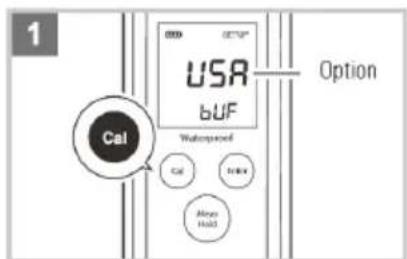
Press and hold the "CAL" key for 3 seconds to call up the basic settings.
Press the "CAL" key to call up the possible options of the adjustable items.
Press the "ENTER" key to confirm the selection and jump to the next item.
text_image
1 USA BUF Option Cal Waterwater Cal Control Minor Hold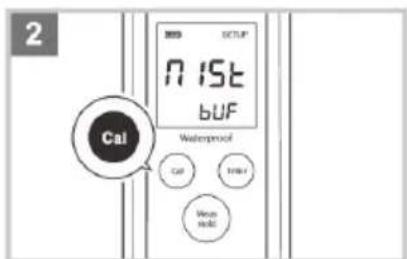
text_image
2 Cal N 15t BUF Waterproof Cal Turb/ Wise wolt
text_image
3 CAL Wakereproof Enter CAL Enter Mean InstallAfter confirming all selected items, the meter returns to measuring mode. By pressing the "MEAS" key, you can return directly to measuring mode.
| MENU ITEM | DESCRIPTION | OPTIONS | FACTORY SETTING | |
| BUF | Selection of the calibration points | USA | USA (pH4.01/7.00/10.01) | USA |
| NIST | NIST (pH4.01/6.86/9.18) | |||
| CAL | Number of calibration points | 1 | 1 point | 2 points |
| 2 | 2 points | |||
| 3 | 3 points | |||
| UNIT | Selection of the temperature unit | °C | Celsius | °C |
| °F | Fahrenheit | |||
| °C | Temperature calibration | CAL | --- | --- |
| HOLD | Enables the hold function when the measured value is stable | YES | On | Off |
| NO | Off | |||
| OFF | The auto-off function switches the unit off after 8 minutes without any key being pressed | YES | On | On |
| NO | Off | |||
| -5t | Reset to factory settings | YES | Yes | No |
| NO | No | |||
After resetting the meter to factory settings, calibration is mandatory.
6 pH calibration
The devices allow a calibration of up to 3 points. To achieve high measurement accuracy, we recommend at least a 2-point calibration. The meter automatically recognises and calibrates to the following standard buffer values.
USA standard buffer pH 4.01, 7.00, 10.01
NIST standard buffer pH 4.01, 6.86, 9.18
The 1-point calibration can only be performed with pH 7.00 or pH 6.86, otherwise the calibration will not be accepted.
The meter must be calibrated before first use.
Regular calibration is recommended to ensure measurement accuracy. DO NOT reuse the pH buffer solution after calibration as impurities in the solution will affect the calibration and eventually the accuracy of the measurement.
6.1 1-point calibration
text_image
Cal Waterproof pH 7.00 CAL 1 Cal Enter Meas Hold 7.00 Enter Cal 7.00 ATC 25.0℃ Waterproof Cal Enter Meas Hold Cal End Waterproof Cal Enter Meas Hold
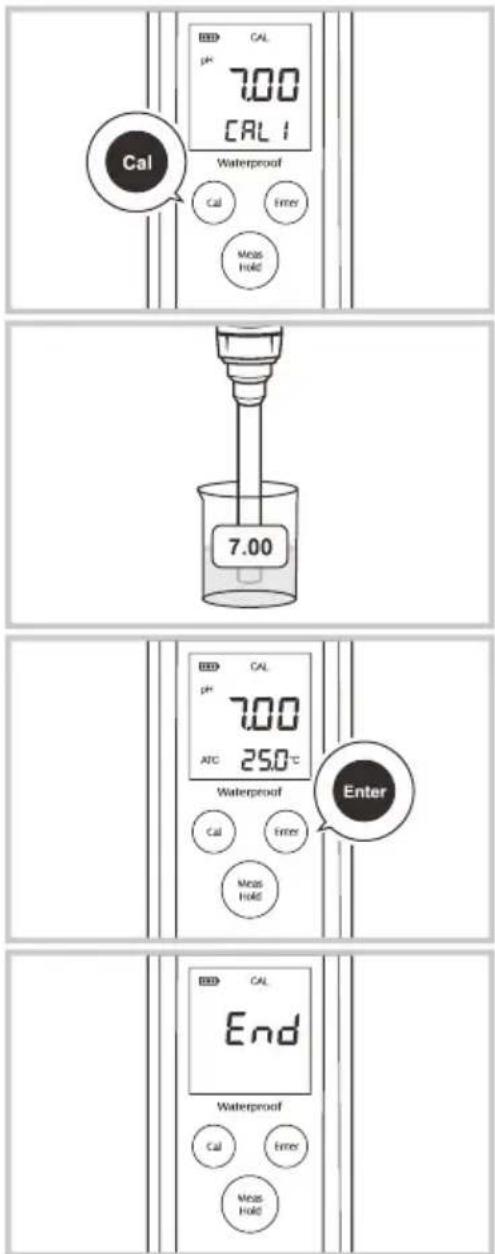
6.1.1 The 1-point calibration must be selected in the basic settings.
6.1.2 Rinse the electrode with distilled water. Press the "CAL" key.
Depending on the setting, the display shows "pH 7.00/CAL1" or "pH 6.86/CAL1".
6.1.3 Immerse the electrode in the pH 7.00 (or pH 6.86) buffer solution with the end of the electrode completely immersed in the calibration solution. Gently stir the solution with the electrode to obtain a homogeneous solution.
6.1.4 Press the "ENTER" key. The meter starts the calibration.
6.1.5 After the measured value has stabilised, the display shows "End". The calibration is completed.
6.2 2-point calibration
text_image
CAL pH CAL2 Waterproof Cal Enter Meas Hold 4.01 CAL pH 4.01 ATC 25.0℃ Waterproof Cal Enter Meas Hold Enter CAL 99 % SLOP Waterproof Cal Enter Meas Hold6.2.1 The 2-point calibration must be selected in the basic settings.
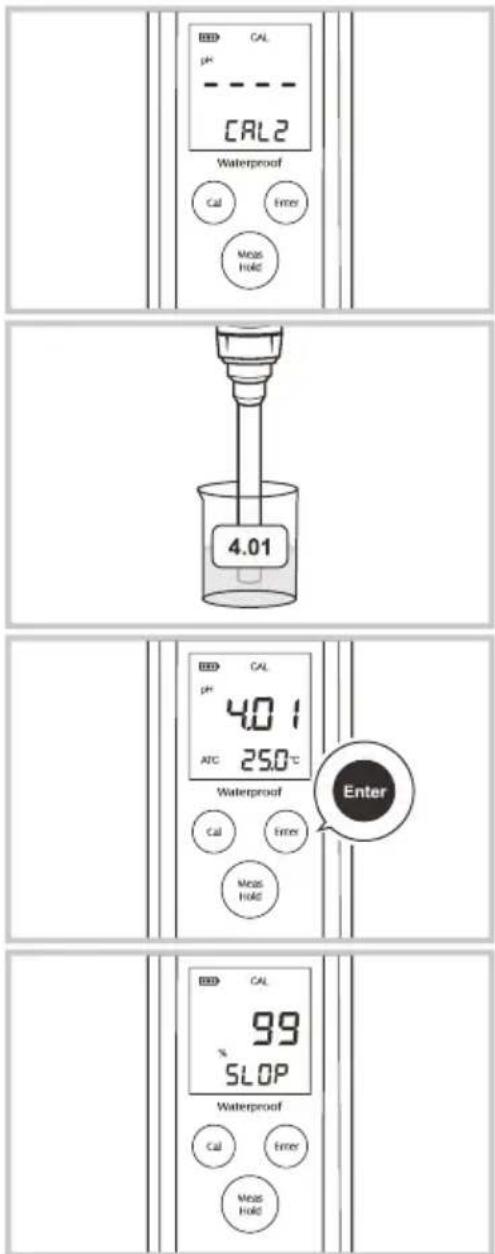
6.2.2. Carry out the calibration of the first calibration point as described under 6.1.2. ... 6.1.4.
The display shows "CAL 2".
6.2.3 Rinse the electrode with distilled water. Immerse the electrode in the pH 4.01 or pH 10.01 (pH 9.18) buffer solution with the end of the electrode completely immersed in the calibration solution. Carefully stir the solution with the electrode to obtain a homogeneous solution.
6.2.4 Press the "ENTER" key.
The meter automatically detects the selected calibration liquid and starts the calibration.
6.2.5 After the measured value has stabilised, the display shows the slope of the electrode in % and then displays "End".
The 2-point calibration is completed.
6.3 3-point calibration

text_image
4.01 CAL2 Waterproof Cal Enter Meas HOLD 4.01 Enter CAL PH 4.01 ATC 25.0℃ Waterproof Cal Enter Meas HOLD 10.01 Waterproof Cal Enter Meas HOLD 10.016.3.1 The 3-point calibration must be selected in the basic settings.
6.3.2. Carry out the calibration of the first calibration point as described under 6.1.2. ... 6.1.4.
The display shows "pH 4.01" and "CAL 2".
6.3.3 Rinse the electrode with distilled water Immerse the electrode in the pH 4.01 buffer solution with the end of the electrode completely immersed in the calibration solution. Stir the solution carefully with the electrode to obtain a homogeneous solution.
6.4.4 Press the "ENTER" key. The meter starts the calibration.
6.3.5 After the measured value has stabilised, the display shows the slope of the electrode in %, followed by "pH 10.01" (pH 9.18) and "Cal 3".
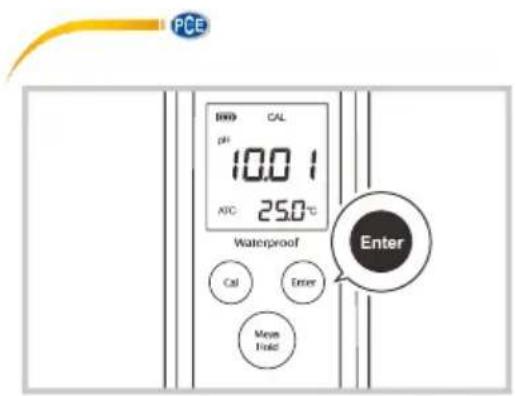
6.3.6 Rinse the electrode with distilled water Immerse the electrode in the pH 10.01 (pH 9.18) buffer solution with the end of the electrode completely immersed in the calibration solution. Gently stir the solution with the electrode to create a homogeneous solution.
text_image
PCE BRD CAL pH 10.0 °C ATIC 25.0 °C Waterproof Enter Cal Enter Mean Field6.3.7. press the "ENTER" key.
The meter starts the calibration.
6.3.8 After the measured value has stabilised, the display shows the slope of the electrode in % and then displays "End".
The 3-point calibration is completed.
Press the "MEAS" key to return to measuring mode even during calibration.
7 Temperature calibration
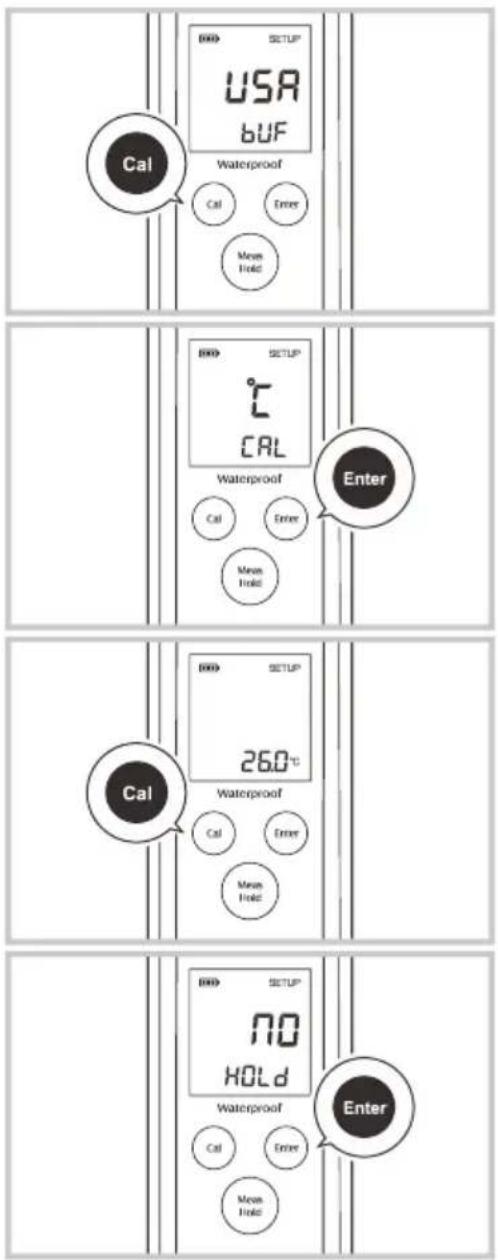
When deviating temperature values are displayed, you can adjust them in the corresponding menu item.
text_image
Cal USR BUF Waterproof Cal Enter Move Hold SETUP CAL Waterproof Cal Enter Move Hold Enter Cal 26.0°C Waterproof Cal Enter Move Hold SETUP NO HOLD Waterproof Cal Enter Move Hold Enter7.1. Press and hold the "CAL" key for 3 seconds to call up the basic settings.
7.2. Press the "Enter" key repeatedly until the display shows "°C" and "CAL" or "°F" and "CAL".
7.3 Press the "CAL" key.
7.4 Press the "CAL" key again until the temperature display matches the actual temperature.
7.5 Press the "ENTER" key to confirm your entry.
7.6 Press the "MEAS" key to return to measuring mode.
8 pH measurement
Check the electrode as described in chapter 5.3 and switch on the meter, see chapter 5.4.
Rinse the electrode with distilled water.
Immerse the electrode in the medium with the end of the electrode completely immersed in the medium. Move the electrode slightly back and forth to make good contact with the measuring medium.
Read the result after stabilisation.
With the automatic "Hold" function switched on, the measurement result remains on the display after stabilisation. (see basic settings)
9 Care and maintenance of the electrodes
For best results, always keep the glass-sensitive membrane moist.
Make sure that the electrode is thoroughly rinsed with distilled or deionised water after use.
If you do not use the meter for a long period of time, store the electrode in the 3M KCL solution.
(Storage solution PCE-SSOxxx)
If the meter cannot be calibrated or shows fluctuating readings for calibration standards, you must replace the electrode.
Remove and attach the electrode in the same way as described in chapter 5.1.
10 Troubleshooting
| Display indication | Cause of error | Troubleshooting |
| --- | Electrode too dry | Place the electrode in a 3M KCL solution for at least 15 minutes. (Storage solution) |
| Overrange | Check whether the electrode is dirty or the glass body is defective. | |
| Err | Wrong buffer solution | Use the correct buffer solution. |
| Electrode defective | Replace the electrode. |
11 Warranty
You can read our warranty terms in our General Business Terms which you can find here: https://www.pce-instruments.com/english/terms.
12 Disposal
For the disposal of batteries in the EU, the 2006/66/EC directive of the European Parliament applies. Due to the contained pollutants, batteries must not be disposed of as household waste. They must be given to collection points designed for that purpose.
In order to comply with the EU directive 2012/19/EU we take our devices back. We either re-use them or give them to a recycling company which disposes of the devices in line with law.
For countries outside the EU, batteries and devices should be disposed of in accordance with your local waste regulations.
If you have any questions, please contact PCE Instruments.

text_image
Pb www.pce-instruments.com
PCE Instruments contact information
Germany France Spain
PCE Deutschland GmbH PCE Instruments France EURL PCE Ibérica S.L.
Im Langel 4 23, rue de Strasbourg Calle Mayor, 53
D-59872 Meschede 67250 Soultz-Sous-Forets 02500 Tobarra (Albacete)
Unit 11 Southpoint Business Park
Ensign Way, Southampton
Hampshire
United Kingdom, SO31 4RF
Tel: +44 (0) 2380 98703 0
Fax: +44 (0) 2380 98703 9
info@pce-instruments.co.uk
www.pce-instruments.com/english
Italy
PCE Italia s.r.l.
Via Pesciatina 878 / B-Interno 6
55010 Loc. Gragnano Pehlivan Sok. No.6/C
Capannori (Lucca)
Italia
www.pce-instruments.com/turkish
The Netherlands
PCE Brookhuis B.V.
Institutenweg 15
7521 PH Enschede
Nederland
Telefoon: +31 (0)53 737 01 92
info@pcebenelux.nl
www.pce-instruments.com/dutch Fax: +1 (561) 320-9176
info@pce-americas.com
United States of America
PCE Americas Inc.
1201 Jupiter Park Drive, Suite 8
Jupiter / Palm Beach
33458 FL
USA
Tel: +1 (561) 320-9162