670 - Measurement PCE Instruments - Free user manual and instructions
Find the device manual for free 670 PCE Instruments in PDF.


User questions about 670 PCE Instruments
0 question about this device. Answer the ones you know or ask your own.
Ask a new question about this device
Download the instructions for your Measurement in PDF format for free! Find your manual 670 - PCE Instruments and take your electronic device back in hand. On this page are published all the documents necessary for the use of your device. 670 by PCE Instruments.
USER MANUAL 670 PCE Instruments
text_image
QR code image containing encoded data, no visible human-readable textUser manuals in various languages (français, italiano, español, português, nederlands, türk, polski, русский, 中文) can be found by using our product search on: www.pce-instruments.com
Last change: 13 May 2020
v1.0
Contents
1 Safety notes....1
2 Specifications.... 2
3 Delivery contents ...... 2
4 Views....2
5 On / off....2
6 Measurement....3
7 How to change the unit .... 3
8 Error codes....3
9 Battery....4
10 Cleaning 4
11 Contact....5
12 Disposal 5
1 Safety notes
Please read this manual carefully and completely before you use the device for the first time. The device may only be used by qualified personnel and repaired by PCE Instruments personnel.
Damage or injuries caused by non-observance of the manual are excluded from our liability and not covered by our warranty.
- The device must only be used as described in this instruction manual. If used otherwise, this can cause dangerous situations for the user and damage to the meter.
- The instrument may only be used if the environmental conditions (temperature, relative humidity, ...) are within the ranges stated in the technical specifications. Do not expose the device to extreme temperatures, direct sunlight, extreme humidity or moisture.
- Do not expose the device to shocks or strong vibrations.
- The case should only be opened by qualified PCE Instruments personnel.
- Never use the instrument when your hands are wet.
- You must not make any technical changes to the device.
- The appliance should only be cleaned with a damp cloth. Use only pH-neutral cleaner, no abrasives or solvents.
- The device must only be used with accessories from PCE Instruments or equivalent.
- Before each use, inspect the case for visible damage. If any damage is visible, do not use the device.
- Do not use the instrument in explosive atmospheres.
- The measurement range as stated in the specifications must not be exceeded under any circumstances.
- Non-observance of the safety notes can cause damage to the device and injuries to the user.
- Never target any persons or animals with the laser beam.
We do not assume liability for printing errors or any other mistakes in this manual.
We expressly point to our general guarantee terms which can be found in our general terms of business.
If you have any questions please contact PCE Instruments. The contact details can be found at the end of this manual.
2 Specifications
| Temperature measurement range | -33 ... 500°C / -27.4 ... 932°F |
| Resolution | -9.9 ... 199.9°C / 14.2 ... 391.8°F : 0.1°C / 0.18°F |
| < 10°C / 50°F : 1°C / 1.8°F | |
| >200°C / 392°F : 1°C / 1.8°F | |
| Accuracy | ± 2% of rdg. or ± 2°C / 3.6°F the greater value applies |
| Optical resolution | 9: 1 |
| Emissivity | 0.95 (fixed) |
| Laser | Circle laser |
| Class 2 <1mW | |
| Operating time | About 30 h |
| Operating conditions | 0 ... 30°C / 32 ... 86°F, max. 90% rh |
| Storage conditions | -10 ... 40°C / 14 ... 104°F, max. 65% rh |
| Power supply | 1.5V AA battery |
| Display | LC display |
| Dimensions | 150 x 25 x 27 mm / 5.9 x 1 x 1.1 in |
| Weight | About 74 g / < 1 lb |
3 Delivery contents
1 x infrared thermometer PCE-670
1 x 1.5V AA battery
1 x User manual
4 Views

text_image
Top view 36.7 HOLD MAX MIN °C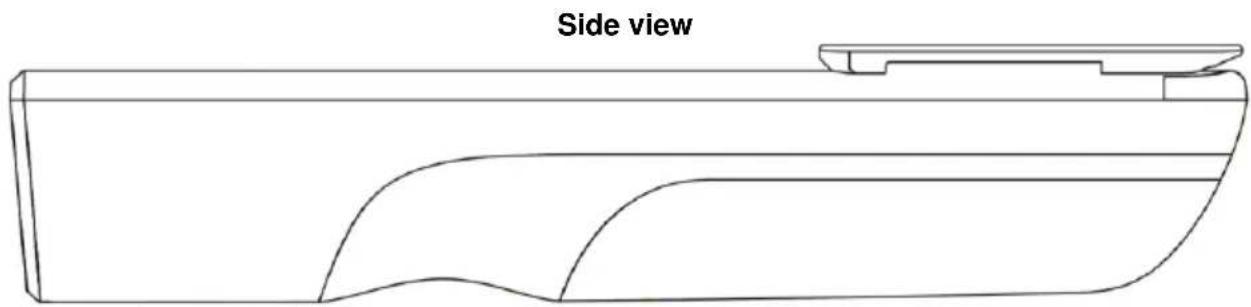
natural_image
Side view diagram of a mechanical component with curved surfaces and a flat top (no text or symbols)5 On / off
To switch on the measuring instrument, press the measuring key briefly. To turn off the meter, wait a few seconds. When not in use, the meter will turn off automatically.
6 Measurement
To make a measurement, target the surface to be tested with the meter. Now press the measuring key After completion of the measurement, release the key. At two-second intervals, a history of the last, the lowest and the highest measured value is now displayed.

7 How to change the unit
To select one of the units °C and °F, first open the battery compartment. There is a switch above the negative pole of the battery. With this switch you can choose the desired unit.

text_image
°C °F SIZE AA or EQUIV I8 Error codes
If measurements are incorrect, the meter displays an error message. These error messages have the following meanings.
As soon as the measured value is outside the measuring range, "HI" or "LO" is displayed. If "HI" is displayed, the measured temperature is too high. "LO" means that the measured temperature is too low.
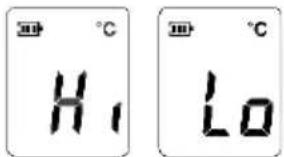
text_image
H₁ LoEr1 means that the ambient temperature is outside the range of -10 ... 50 °C. To correct this error, only work in an environment within -10 ... 50 °C. If the temperature fluctuates considerably, the measuring instrument must acclimatise for approx. 30 minutes to achieve a reliable measurement result.

text_image
E r 1 E r 2 E r 3Er2 is displayed when the meter is exposed to rapid temperature changes. Allow the measuring instrument to adapt to the current ambient conditions.
For all other error messages starting from Er 3, you must reset the meter. Remove the battery for about one minute.
9 Battery
The infrared thermometer has a battery level indicator. This display shows the current battery power.

text_image
HOLD 26.7°C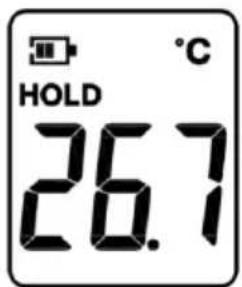
text_image
HOLD 26.7°C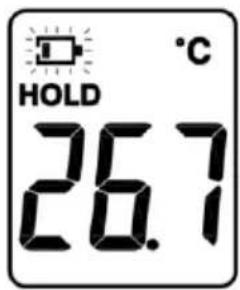
text_image
HOLD 26.7°C| Battery is full. | Battery is discharged.Measurements are still possible. | Battery is completely discharged.Measurements are no longer possible. |
To replace the battery, first open the battery compartment at the rear side.

natural_image
Diagram of a cylindrical object with a hand pointing to the right side and an arrow indicating direction (no text or symbols)Now replace the flat battery by a new 1.5 V AA battery. Observe correct polarity.
10 Cleaning
The sensor system of the infrared thermometer must always be clean and free from dust. To clean the sensor system, use a cotton swab in order to remove the dust inside the sensor system.

natural_image
Simple line drawing of a container with a lid and a beaker inside, containing a mesh pattern (no text or symbols)11 Contact
If you have any questions, suggestions or technical problems, please do not hesitate to contact us. You will find the relevant contact information at the end of this user manual.
12 Disposal
For the disposal of batteries in the EU, the 2006/66/EC directive of the European Parliament applies. Due to the contained pollutants, batteries must not be disposed of as household waste. They must be given to collection points designed for that purpose.
In order to comply with the EU directive 2012/19/EU we take our devices back. We either re-use them or give them to a recycling company which disposes of the devices in line with law.
For countries outside the EU, batteries and devices should be disposed of in accordance with your local waste regulations.
If you have any questions, please contact PCE Instruments.

text_image
Pb www.pce-instruments.com
PCE Instruments contact information
Germany France Spain
PCE Deutschland GmbH PCE Instruments France EURL PCE Ibérica S.L.
Im Langel 4 23, rue de Strasbourg Calle Mayor, 53
D-59872 Meschede 67250 Soultz-Sous-Forets 02500 Tobarra (Albacete)
Germany United Kingdom Italy
Unit 11 Southpoint Business Park
Ensign Way, Southampton
Capannori (Lucca)
Italia
Tel: +44 (0) 2380 98703 0
Fax: +44 (0) 2380 98703 9
info@pce-instruments.co.uk
www.pce-instruments.com/english
PCE Italia s.r.l.
Via Pesciatina 878 / B-Interno 6
55010 Loc. Gragnano
www.pce-instruments.com/dutch
China
PCE (Beijing) Technology Co., Limited
1519 Room, 6 Building
Zhong Ang Times Plaza
No. 9 Mentougou Road, Tou Gou District
102300 Beijing, China
Tel: +86 (10) 8893 9660
info@pce-instruments.cn
www.pce-instruments.cn
Hong Kong
PCE Instruments HK Ltd.
Unit J, 21/F., COS Centre
56 Tsun Yip Street
Kwun Tong
Kowloon, Hong Kong
Tel: +852-301-84912
jyi@pce-instruments.com
www.pce-instruments.cn
United States of America
PCE Americas Inc.
711 Commerce Way suite 8
Jupiter / Palm Beach
33458 FL
USA Türkiye
Tel: +1 (561) 320-9162
Fax: +1 (561) 320-9176
info@pce-americas.com
www.pce-instruments.com/us
Turkey
Pehlivan Sok. No.6/C
www.pce-instruments.com/turkish