CP73PL - Fridge Summit - Free user manual and instructions
Find the device manual for free CP73PL Summit in PDF.


User questions about CP73PL Summit
0 question about this device. Answer the ones you know or ask your own.
Ask a new question about this device
Download the instructions for your Fridge in PDF format for free! Find your manual CP73PL - Summit and take your electronic device back in hand. On this page are published all the documents necessary for the use of your device. CP73PL by Summit.
USER MANUAL CP73PL Summit
Write Serial No. (on back of unit) here:
Felix Storch, Inc.
Summit Appliance Division
An ISO 9001:2015 registered company
770 Garrison Avenue Bronx, New York 10474
www.summitappliance.com
TABLE OF CONTENTS
Appliance Safety 3
Important Safeguards 3-4
Location of Parts 5
Installation Instructions 6-7
Before Using your Appliance 6
Installation of your Appliance 6
Reversing the Door Swing 7-8
Electrical Connection 9
Operating Instructions 10
Setting the Temperature Control 10
Interior Light 10
Defrosting 10
Care and Maintenance 11
Cleaning your Appliance 11
Changing the Light Bulb 11
Power Failure 11
Vacation 11
Moving your Appliance 11
Energy-Saving Tips 11
Troubleshooting 12
Limited Warranty 14
APPLIANCE SAFETY
Your safety and the safety of others are very important.
We have provided many important safety messages in this manual and on your appliance. Always read and obey all safety messages.

This is the Safety Alert Symbol. The symbol alerts you to potential hazards that can kill or injure you and others. All safety messages will follow the Safety Alert Symbol and either the words "DANGER" or "WARNING".
! DANGER !
DANGER means that failure to heed this safety statement may result in severe personal injury or death.
! WARNING
WARNING means that failure to heed this safety statement may result in extensive product damage, serious personal injury, or death.
All safety messages will alert you about the potential hazard, tell you how to reduce the chance of injury, and let you know what can happen if the instructions are not followed.
IMPORTANT SAFEGUARDS

Before the appliance is used, it must be properly positioned and installed as described in this manual, so read the manual carefully. To reduce the risk of fire, electrical shock or injury when using the appliance, follow basic precautions, including the following:
! DANGER !
- Plug into a grounded 3-prong outlet, do not remove grounding prong, do not use an adapter, and do not use an extension cord.
- Replace all panels before operating.
- It is recommended that a separate circuit serving only your appliance be provided. Use receptacles that cannot be turned off by a switch or pull chain.
- Never clean appliance parts with flammable fluids. These fumes can create a fire hazard or explosion. And do not store or use gasoline or other flammable vapors and liquids in the vicinity of this or any other appliance. The fumes can create a fire hazard or explosion.
- Before proceeding with cleaning and maintenance operations, make sure the power line of the unit is disconnected.
- Do not connect or disconnect the electric plug when your hands are wet.
- Unplug the appliance or disconnect power before cleaning or servicing. Failure to do so can result in electrical shock or death.
- Do not attempt to repair or replace any part of your appliance unless it is specifically recommended in this manual. All other servicing should be referred to a qualified technician.
- This appliance is CFC- and HFC-free and contains small quantities of Isobutane (R600a) which is environmentally friendly, but flammable. It does not damage the ozone layer, nor does it increase the greenhouse effect. Care must be taken during transportation and setting up of the appliance that no parts of the cooling system are damaged. Leaking coolant can ignite and may damage the eyes.
• In the event of any damage:
- Avoid open flames and anything that creates a spark,
-
Disconnect from the electrical power line,
Air the room in which the appliance is located for several minutes, and Contact the Service Department for advice. -
The more coolant there is in an appliance, the larger the room it should be installed in. In the event of a leakage, if the appliance is in a small room, there is the danger of combustible gases building up. For every ounce of coolant at least 325 cubic feet of room space is required. The amount of coolant in the appliance is stated on the data plate on the back of the appliance. It is hazardous for anyone other than an Authorized Service Person to carry out servicing or repairs to this appliance.
- Take serious care when handling, moving, and using the appliance to avoid either damaging the refrigerant tubing or increasing the risk of a leak.
- Replacing component parts and servicing shall be done by factory authorized service personnel so as to minimize the risk of possible ignition due to incorrect parts or improper service.

WARNING

- Use two or more people to move and install appliance. Failure to do so can result in back or other injury.
- To ensure proper ventilation for your appliance, the front of the unit must be completely unobstructed. Choose a well-ventilated area with temperatures above 60°F (16°C) and below 90°F (32°C). (Optimum operation occurs within the range 72° to 78°F, or 23°-26°C.) This unit must be installed in an area protected from the elements, such as wind, rain, water spray or drips.
• The appliance should not be located next to ovens, grills or other sources of high heat.
- The appliance must be installed with all electrical, water and drain connections in accordance with state and local codes. A standard electrical supply (115 V AC only, 60 Hz), properly grounded in accordance with the National Electrical Code and local codes and ordinances, is required.
- Do not kink or pinch the power supply cord of the appliance.
• The size of the fuse (or circuit breaker) should be 15 amperes.
- It is important that the appliance be leveled in order to work properly. You may need to make several adjustments to level it.
• All installations must be in accordance with local plumbing code requirements.
• Make certain that the pipes are not pinched, kinked or damaged during installation.
- Check for leaks after connection.
• Never allow children to operate, play with or crawl inside the appliance.
- Do not use solvent-based cleaning agents or abrasives on the interior. These cleaners may damage or discolor the interior.
• Use this appliance only for its intended purpose as described in this User Manual.
- Keep fingers out of the "pinch point" areas. Clearances between the door and cabinet are necessarily small. Be careful closing doors when children are in the area.
- Do not store explosive substances such as aerosol cans with a flammable propellant in this appliance.
- Keep ventilation openings, in the appliance enclosure or in the built-in structure, clear of obstruction.
- Do not use mechanical devices or other means to accelerate the defrosting process, other than those recommended by the manufacturer.
- Do not damage the refrigerant circuit.
- Do not use electrical appliances inside the food storage compartments of the appliance, unless they are of the type recommended by the manufacturer.

DANGER

Risk of child entrapment!
Child entrapment and suffocation are not problems of the past. Junked or abandoned appliances are still dangerous, even if they will “just sit in the garage a few days”.
Before discarding your old refrigerator:
√ Take off the doors
√ Leave the shelves in place so that children may not easily climb inside.
- SAVE THESE INSTRUCTIONS -
LOCATION OF PARTS

text_image
Technical diagram of an open refrigerator with numbered compartments and ventilation slots- Door Hinge
- Freezer Shelf
- Refrigerator Door Racks
- Temperature Control
- Refrigerator Shelves
- Can Racks and 2L Bottle Rack
- Crisper Drawer
- Freezer Door Bin
INSTALLATION INSTRUCTIONS
Before Using your Appliance
- Remove the exterior and interior packing.
- Check to be sure you have all of the following parts:
- 2 Refrigerator shelves (Glass)
- 1 Vegetable crisper
- 1 Glass crisper cover
- 1 Freezer shelf (Wire)
- 1 User Manual
- Before connecting the unit to the power source, let it stand upright for approximately 2 hours. This will reduce the possibility of a malfunction in the cooling system from handling during transportation.
- Clean the interior surface with lukewarm water using a soft cloth.
Installation of your Appliance
- Place your refrigerator-freezer on a floor that is strong enough to support the refrigerator-freezer when it is fully loaded. To level your refrigerator-freezer, adjust the leveling legs at the bottom of unit.
- Allow 5" of space between the back and sides of the unit to allow for proper air circulation around the compressor
- Locate the unit away from direct sunlight and sources of heat (stove, heater, radiator, etc.).
- Direct sunlight may affect the acrylic coating and heat sources may increase electrical consumption. Extreme cold ambient temperatures may also cause the refrigerator-freezer not to perform properly.
- Avoid locating the unit in moist areas.
- Plug the unit into an exclusive properly installed-grounded wall outlet. Do not under any circumstances cut or remove the third (ground) prong from the power cord. Any questions concerning power and/or grounding should be directed toward a certified electrician or an authorized service center.
NOTE: It is not recommended to install the unit where the ambient temperature will drop below 60^ F ( 16^ C) or rise above 90^ F ( 32^ C) in order for the compressor to maintain proper temperatures. If locating the unit in a location where temperatures will drop below 50^ F, set the freezer temperature control to the “COLDEST” setting to improve the overall performance.
Reversing the Door Swing
The doors of your appliance are reversible if you want the doors to open from the opposite side.
• Make sure the unit is unplugged.
- It is necessary that the unit be tipped back slightly to reverse the door swing. Rest the unit on something solid, so it will not slip during the door reversing process.
- Do NOT lay the unit flat on its back, as this may damage the coolant system.
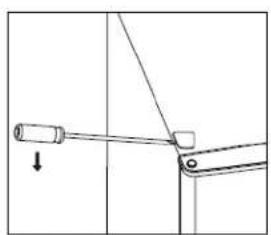
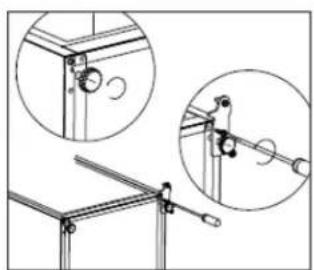
- Carefully remove the top hinge over with a Phillips head screw driver.
- Unscrew the top hinge screws.

natural_image
Simple line drawing of a mechanical component with a rod and arrow indicating direction (no text or symbols)
natural_image
Line drawing of a mechanical assembly with a pipette inserted into a component (no text or symbols)- Remove the hinge hole cover.
- Move the hinge hold cover from the left to the right side. Then, lift the upper door off of the unit, and place the door on a padded surface to prevent any scratching of the door.
natural_image
Pure mechanical diagram showing a lever and pivot mechanism without any text or symbols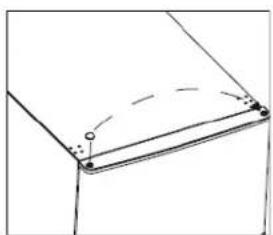
natural_image
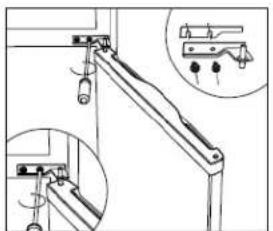
Pure geometric diagram showing a curved line with dashed extension and marked points (no text or symbols)- Unscrew the middle hinge. Lift the bottom door off of the unit, and place it on a soft pad to avoid scratching the door.
- Move the middle hinge hole covers from the left to the right-hand side.
natural_image
Technical line drawing of a mechanical lever assembly with inset detail (no text or symbols)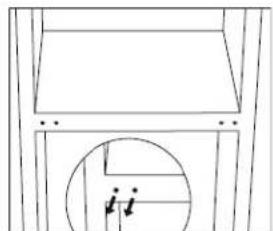
natural_image
Pure architectural line drawing of a building facade with circular cutouts (no text or symbols)- Carefully tip the unit back, and unscrew the bottom hinge and leveling foot.
- Unscrew and remove the bottom hinge pin. Turn the bracket over to reinstall it.
natural_image
Technical line drawing of a mechanical assembly with two views (top and side), no visible text or symbols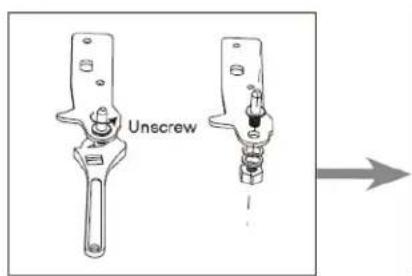
text_image
Unscrew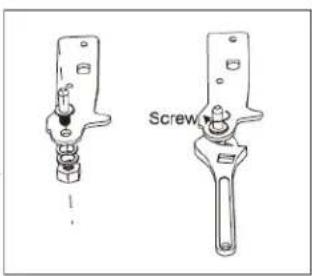
text_image
Screw- Install the hinge at the left-hand side, and the adjustable foot at the right-hand side. Then, screw the two leveling feet back into the bottom of the unit, using their original parts.
- Move the middle hole covers from the left to the right-hand side.
natural_image
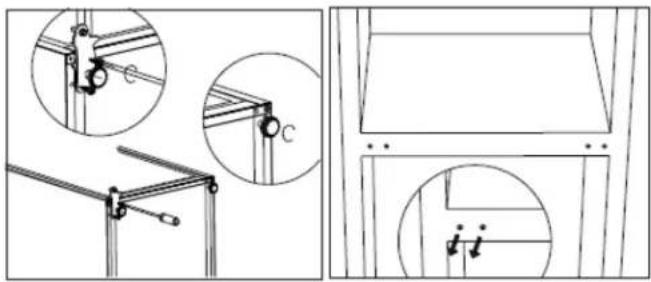
Technical line drawings of mechanical components and structural elements, showing brackets and mounting details (no text or symbols)- Stand the unit upright, and set the bottom door onto the lower hinge. Make sure the bottom hinge is inserted into the door hole. Then, move the bottom door hinge hole cover from the left to the right side.
- Install the middle hinge.

natural_image
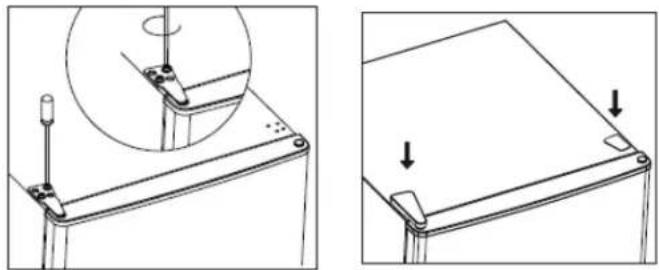
Pure architectural line drawing of a window frame with no text, numbers, or symbols- Install the upper door, and attach the upper hinge. Then, cap the hinge cover and hole cover on the top of the unit.
natural_image
Technical line drawing showing two views of a mechanical component with a circular inset detail (no text or symbols)Electrical Connection

WARNING
Improper use of the grounded plug can result in the risk of electrical shock. If the power cord is damaged, have it replaced by a qualified electrician or an authorized service center.
This appliance should be properly grounded for your safety. The power cord of this appliance is equipped with a three-prong plug which mates with standard three prong wall outlets to minimize the possibility of electrical shock.
Do not under any circumstances cut or remove the third ground prong from the power cord supplied. This appliance requires a standard 115Volts\~/60Hz electrical outlet with three-prong ground.
The cord should be secured behind the appliance and not left exposed or dangling to prevent accidental injury.
Never unplug the appliance by pulling the power cord. Always grip the plug firmly and pull straight out from the receptacle.
Do not use an extension cord with this appliance. If the power cord is too short, have a qualified electrician or service technician install an outlet near the appliance.
Extension Cord
Because of potential safety hazards under certain conditions, it is strongly recommended that you do not use an extension cord with this unit. However, if you must use an extension cord it is absolutely necessary that it be a UL/CUL-Listed, 3-wire grounding type appliance extension cord having a grounding type plug and outlet and that the electrical rating of the cord be 115 volts and at least 10 amperes.
Surge Protector
Most electrical appliances use a series of electric control boards to operate. These boards are very susceptible to power surges and could be damaged or destroyed.
If the appliance is going to be used in an area or if your city / country is prone to power surges / outages; it is suggested that you use a power surge protector for all electrical devices / appliances you use. The surge protector that you select must have a surge block high enough to protect the appliance it is connected to. If you have any questions regarding the type and size of surge protector needed contact a licensed electrician in your area.
Damages due to power surges are not considered a manufacturer covered defect and will void your product warranty.
OPERATING INSTRUCTIONS
Setting the Temperature Control
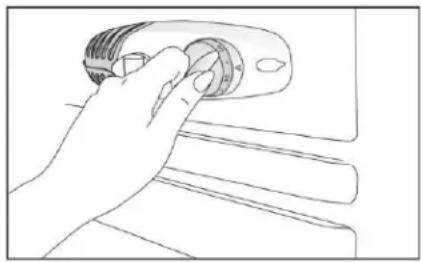
Your unit has only one control for regulating the temperature in the compartment. The temperature control is located on the upper right hand side of the refrigerator compartment.
The first time you turn the unit on, set the temperature control to "7". The range of the temperature control is from position "0" to "7". After 24 to 48 hours, adjust the temperature control to the setting that best suits your needs. The setting of "5" should be appropriate for home or office use.
natural_image
Line drawing of a hand holding a small mechanical component (no text or symbols)To turn the refrigerator off, turn the temperature control to "0".
NOTES:
- Turning the temperature control to "0" position stops the cooling cycle but does not shut off the power to the unit.
- If the unit is unplugged, has lost power, or is turned off, you must wait 3 to 5 minutes before restarting the unit. If you attempt to restart before this time delay, the unit will not start.
Interior Light
When you open the door, the light will be ON automatically. When you close the door, the light will turn OFF automatically.
NOTE: If the unit is unplugged, has lost power, or is turned off, you must wait 3 to 5 minutes before restarting the unit. If you attempt to restart before this time delay, the refrigerator-freezer will not start.
Defrosting
Defrost the freezer compartment when the frost on the refrigerator wall grows to 14 " thick. To defrost your freezer:
- Set the thermostat to the "0" position, and disconnect the power supply.
- Remove any frozen food from the compartment, and place it into a cooler to protect it while defrosting the unit.
- Leave the door ajar for a brief period to make the accumulated ice easier to scrape off.
- Use a plastic scraper to remove any ice being careful not to damage the inner surfaces of the freezer.
- Wipe up the scraped off frost and ice before it is completely defrosted.
CAUTION: Do not use boiling water to melt any accumulated ice because it may damage the plastic parts. Do not use sharp or metallic instruments to remove ice or frost, as it may damage the cooling coils and will void the warranty. A plastic scraper is recommended for removing frost and ice.
The refrigerator compartment does not need to be defrosted because any ice buildup on the inner back wall is defrosted automatically.
CARE AND MAINTENANCE
Cleaning your Appliance
- Unplug the unit, and remove the food and baskets.
- Wash the inside with a warm water and baking soda solution. The solution should be about 2 tablespoons of baking soda to a quart of water.
- Wash the baskets with a mild detergent solution.
- The outside of the unit should be cleaned with mild detergent and warm water.
CAUTION: Failure to unplug the unit before cleaning could result in electrical shock or personal injury.
Changing the Light Bulb
- Unplug the AC power cord from the wall.
- Remove the screw securing the light bulb cover.
- Remove the light bulb cover, and unscrew the bulb.
- Replace with a 10 watts bulb that is the same shape and size.
- Replace the light bulb cover, replace the screw and secure the light bulb cover.
Power Failure
Most power failures are corrected within a few hours and should not affect the temperature of your refrigerator-freezer if you minimize the number of times the door is opened. If the power is going to be off for a longer period of time, you need to take the proper steps to protect your food.
Vacation
- Short vacations: Leave the unit operating during vacations of less than three weeks.
- Long vacations: If the appliance will not be used for several months, remove all food and unplug the power cord. Clean and dry the interior thoroughly. To prevent odor and mold growth, leave the door open slightly: blocking it open if necessary
Moving your Appliance
- Remove all the food.
- Securely tape down all loose items inside your unit.
- Turn the leveling screws up to the base to avoid damage.
- Tape the door shut.
- Be sure the unit stays in the upright position during transportation.
Energy-Saving Tips
- The unit should be located in the coolest area of the room, away from heat producing appliances or heating ducts, and out of direct sunlight.
- Let hot foods cool to room temperature before placing them in the unit. Overloading the unit forces the compressor to run longer. Foods that freeze too slowly may lose quality, or spoil.
- Be sure to wrap foods properly, and wipe containers dry before placing them in the unit. This cuts down on frost build-up inside the freezer.
- Organize and label food to reduce door openings and extended searches. Remove as many items as needed at one time, and close the door as soon as possible.
TROUBLESHOOTING
You can solve many common problems easily, saving you the cost of a possible service call. Try the suggestions below to see if you can solve the problem before calling the service technician.
| PROBLEM | POSSIBLE CAUSE |
| Unit does not operate. | Not plugged in.The circuit breaker tripped or there is a blown fuse. |
| Compressor turns on and off frequently. | The room temperature is hotter than normal.A large amount of food has been added to the refrigerator - freezer.The door is opened too often.The door is not closed completely.The temperature control is not set correctly.The door gasket does not seal properly.The refrigerator -freezer does not have the correct clearances. |
| Vibrations. | Check to assure that the refrigerator - freezer is level. |
| The unit seems to make too much noise. | The rattling noise may come from the flow of the refrigerant, which is normal.As each cycle ends, you may hear gurgling sounds caused by the flow of refrigerant in your refrigerator - freezer.Contraction and expansion of the inside walls may cause popping and crackling noises.The unit is not level. |
| The door will not close properly. | The unit is not level.The door is reversed and not properly installed.The gasket is dirty.The baskets are out of position. |
If you've checked the table above and find that you still need help with your appliance, call our Customer Service facility at 800-932-4267 between 9:00AM and 5:00PM ET. We will do our best to answer your questions.
NOTES
LIMITED WARRANTY
ONE-YEAR LIMITED WARRANTY
Within the 48 contiguous United States, for one year from the date of purchase, when this appliance is operated and maintained according to instructions attached to or furnished with the product, warrantor will pay for factory-specified parts and repair labor to correct defects in materials or workmanship. Service must be provided by a designated service company. Outside the 48 states, all parts are warranted for one year from manufacturing defects. Plastic parts, shelves and cabinets are warranted to be manufactured to commercially acceptable standards, and are not covered from damage during handling or breakage.
5-YEAR COMPRESSOR WARRANTY
- The compressor is covered for 5 years.
- Replacement does not include labor.
ITEMS WARRANTOR WILL NOT PAY FOR:
- Service calls to correct the installation of your appliance, to instruct you how to use your appliance, to replace or repair fuses or to correct wiring or plumbing.
- Service calls to repair or replace appliance light bulbs or broken shelves. Consumable parts (such as filters) are excluded from warranty coverage.
- Damage resulting from accident, alteration, misuse, abuse, fire, flood, acts of God, improper installation, installation not in accordance with electrical or plumbing codes, or use of products not approved by warrantor.
- Replacement parts or repair labor costs for units operated outside the United States.
- Repairs to parts or systems resulting from unauthorized modifications made to the appliance.
- The removal and reinstallation of your appliance if it is installed in an inaccessible location or is not installed in accordance with published installation instructions.
DISCLAIMER OF IMPLIED WARRANTIES; LIMITATION OF REMEDIES
CUSTOMER'S SOLE AND EXCLUSIVE REMEDY UNDER THIS LIMITED WARRANTY SHALL BE PRODUCT REPAIR AS PROVIDED HEREIN. IMPLIED WARRANTIES, INCLUDING WARRANTIES OF MERCHANTABILITY OR FITNESS FOR A PARTICULAR PURPOSE, ARE LIMITED TO ONE YEAR. WARRANTOR SHALL NOT BE LIABLE FOR INCIDENTAL OR CONSEQUENTIAL DAMAGES. SOME STATES DO NOT ALLOW THE EXCLUSION OR LIMITATION OF INCIDENTAL OR CONSEQUENTIAL DAMAGES, OR LIMITATIONS ON THE DURATION OF IMPLIED WARRANTIES OF MERCHANTABILITY OR FITNESS, SO THESE EXCLUSIONS OR LIMITATIONS MAY NOT APPLY TO YOU. THIS WARRANTY GIVES YOU SPECIFIC LEGAL RIGHTS AND YOU MAY ALSO HAVE OTHER RIGHTS, WHICH VARY FROM STATE TO STATE.

WARNING: This product can expose you to chemicals including Nickel (Metallic) which is known to the State of California to cause cancer.
For more information go to www.P65Warnings.ca.gov
Note: Nickel is a component in all stainless steel and some other metallic compositions.
Felix Storch, Inc.
Summit Appliance Division
An ISO 9001:2015 registered company
770 Garrison Avenue Bronx, New York 10474
www.summitappliance.com

For parts and accessory ordering, troubleshooting and helpful hints, visit: www.summitappliance.com/support
Printed in China