ATXM50A2V1B - Air-conditioner DAIKIN - Free user manual and instructions
Find the device manual for free ATXM50A2V1B DAIKIN in PDF.


User questions about ATXM50A2V1B DAIKIN
0 question about this device. Answer the ones you know or ask your own.
Ask a new question about this device
Download the instructions for your Air-conditioner in PDF format for free! Find your manual ATXM50A2V1B - DAIKIN and take your electronic device back in hand. On this page are published all the documents necessary for the use of your device. ATXM50A2V1B by DAIKIN.
USER MANUAL ATXM50A2V1B DAIKIN
User reference guide
Daikin room air conditioner
natural_image
Blank white rectangular panel with a small circular icon at the bottom right corner (no text or symbols)Siesta®
Download the ONECTA app

STAND BY ME
Discover our service offer
ATXM20A2V1B
ATXM25A2V1B
ATXM35A2V1B
ATXM50A2V1B
ATXM20A5V1B
ATXM25A5V1B
ATXM35A5V1B
ATXM50A5V1B
Table of contents
1 About the documentation 4
1.1 About this document 4
2 General safety precautions 5
2.1 About the documentation 5
2.1.1 Meaning of warnings and symbols 5
3 User safety instructions 7
3.1 General 7
3.2 Instructions for safe operation 8
4 About the system 12
4.1 Indoor unit 12
4.1.1 Daikin eye indication lamp 13
4.2 About the user interface.... 14
4.2.1 Components: Wireless remote control.... 15
4.2.2 Status: Wireless remote control LCD 15
4.2.3 To operate the wireless remote control.... 17
5 Before operation 18
5.1 Overview: Before operation 18
5.2 To insert the batteries 18
5.3 To mount the wireless remote control holder 19
5.4 The clock setting 19
5.4.1 To set the clock.... 19
5.5 Brightness of the Daikin eye 20
5.5.1 To set the brightness of the Daikin eye 20
5.6 To turn on the power supply 20
6 Operation 21
6.1 Operation range 21
6.2 When to use which feature 21
6.3 Operation mode and temperature setpoint 22
6.3.1 To start/stop operation mode and to set the temperature 23
6.4 Airflow rate 24
6.4.1 To adjust the airflow rate.... 24
6.5 Airflow direction 24
6.5.1 To adjust vertical airflow direction 25
6.5.2 To adjust horizontal airflow direction.... 25
6.5.3 To use 3D airflow direction.... 25
6.6 Comfort airflow and Intelligent eye operation 26
6.6.1 Comfort airflow operation 26
6.6.2 Intelligent eye operation.... 26
6.6.3 To start/stop Comfort and Intelligent eye operation 27
6.7 Powerful operation 27
6.7.1 To start/stop Powerful operation 28
6.8 Econo and Outdoor unit quiet operation.... 28
6.8.1 Econo operation 28
6.8.2 Outdoor unit quiet operation.... 29
6.8.3 To start/stop Econo and Outdoor unit quiet operation.... 29
6.9 Flash Streamer (air cleaning) operation 29
6.9.1 To start/stop Flash Streamer (air cleaning) operation 30
6.10 OFF/ON timer operation.... 30
6.10.1 24 hour clock OFF/ON timer setting.... 30
6.10.2 12 hour countdown OFF/ON timer setting.... 32
6.11 Weekly timer operation.... 33
6.11.1 To set Weekly timer operation 33
6.11.2 To copy reservations 35
6.11.3 To confirm reservations 35
6.11.4 To deactivate and reactivate Weekly timer operation.... 36
6.11.5 To delete reservations.... 36
6.12 Wireless LAN connection.... 37
6.12.1 Precautions when using the wireless LAN 37
6.12.2 To install the ONECTA app 37
6.12.3 To set the wireless connection 38
6.13 About Multi system.... 41
6.13.1 Priority room setting 41
6.13.2 Night quiet mode.... 42
6.13.3 Cooling/heating mode lock in Multi-system 43
7 Energy saving and optimum operation 44
8 Maintenance and service 46
8.1 Overview: Maintenance and service 46
8.2 To clean the indoor unit and wireless remote control 47
8.3 To clean the front panel 48
8.4 To remove the front panel 48
8.5 About the air filters 48
8.6 To clean the air filters 49
8.7 To clean the titanium apatite deodorising filter and the silver particle filter (Ag-ion filter).... 50
8.8 To replace the titanium apatite deodorising filter and the silver particle filter (Ag-ion filter) 51
8.9 To re-install the front panel 51
8.10 To take following items into account before a long idle period 51
9 Troubleshooting 53
9.1 Symptoms that are NOT system malfunctions.... 55
9.1.1 Symptom: A sound like water flowing is heard 55
9.1.2 Symptom: A blowing sound is heard.... 55
9.1.3 Symptom: A ticking sound is heard 55
9.1.4 Symptom: A whistling sound is heard 55
9.1.5 Symptom: A clicking sound during operation or idle time is heard 55
9.1.6 Symptom: A clapping sound is heard.... 56
9.1.7 Symptom: White mist comes out of a unit (Indoor unit, outdoor unit).... 56
9.1.8 Symptom: The units can give off odours 56
9.1.9 Symptom: The outdoor fan rotates while the air conditioner is not in operation 56
9.1.10 Symptom: Indoor unit fan speed does NOT correspond with the setpoint (during low ambient cooling operation in Multi system) 56
9.1.11 Symptom: Airflow rate setting does NOT resume when Comfort airflow is deactivated by ONECTA app.. 56
9.1.12 Symptom: Some operation icons are not visible on the wireless remote control, or some functions cannot be activated in the ONECTA app.... 56
9.1.13 Symptom: In ONECTA app, powerful operation is NOT indicated as active 56
9.2 Solving problems based on error codes 57
9.3 Troubleshooting for wireless LAN connection 58
10 Disposal 60
11 Glossary
61
1 About the documentation
1.1 About this document
Thank you for purchasing this product. Please:
- Keep the documentation for future reference.
Target audience
End users

INFORMATION
This appliance is intended to be used by expert or trained users in shops, in light industry, and on farms, or for commercial and household use by lay persons.
Documentation set
This document is part of a documentation set. The complete set consists of:
■ General safety precautions:
- Safety instructions that you must read before operating your system
- Format: Paper (in the box of the indoor unit)
- Operation manual:
- Quick guide for basic usage
- Format: Paper (in the box of the indoor unit)
- User reference guide:
- Detailed step-by-step instructions and background information for basic and advanced usage
- Format: Digital files on https://www.daikin.eu. Use the search function 🔒 to find your model.
Latest revisions of the supplied documentation may be available on the regional Daikin website or via your installer.
Scan the QR code below to find the full documentation set and more information about your product on Daikin website.
The original instructions are written in English. All other languages are translations of the original instructions.
2 General safety precautions
2.1 About the documentation
- The original instructions are written in English. All other languages are translations of the original instructions.
- The precautions described in this document cover very important topics, follow them carefully.
- The installation of the system, and all activities described in the installation manual and in the installer reference guide MUST be performed by an authorised installer.
2.1.1 Meaning of warnings and symbols

DANGER
Indicates a situation that results in death or serious injury.

DANGER: RISK OF ELECTROCUTION
Indicates a situation that could result in electrocution.

DANGER: RISK OF BURNING/SCALDING
Indicates a situation that could result in burning/scalding because of extreme hot or cold temperatures.

DANGER: RISK OF EXPLOSION
Indicates a situation that could result in explosion.

WARNING
Indicates a situation that could result in death or serious injury.

WARNING: FLAMMABLE MATERIAL

A2L
WARNING: MILDLY FLAMMABLE MATERIAL
The refrigerant inside this unit is mildly flammable.

CAUTION
Indicates a situation that could result in minor or moderate injury.

NOTICE
Indicates a situation that could result in equipment or property damage.

INFORMATION
Indicates useful tips or additional information.
Symbols used on the unit:
| Symbol Explanation | |
 | Before installation, read the installation and operation manual, and the wiring instruction sheet. |
 | Before performing maintenance and service tasks, read the service manual. |
 | For more information, see the installer and user reference guide. |
 | The unit contains rotating parts. Be careful when servicing or inspecting the unit. |
Symbols used in the documentation:
| Symbol Explanation | |
| [ZAST] | Indicates a figure title or a reference to it.Example:"1-3 Figure title" means "Figure 3 in chapter 1". |
 | Indicates a table title or a reference to it.Example:"1-3 Table title" means "Table 3 in chapter 1". |
3 User safety instructions
Always observe the following safety instructions and regulations.
3.1 General

WARNING
If you are NOT sure how to operate the unit, contact your installer.

WARNING
This appliance can be used by children aged from 8 years and above and persons with reduced physical, sensory or mental capabilities or lack of experience and knowledge if they have been given supervision or instruction concerning use of the appliance in a safe way and understand the hazards involved.
Children SHALL NOT play with the appliance.
Cleaning and user maintenance SHALL NOT be made by children without supervision.

WARNING
To prevent electrical shocks or fire:
Do NOT rinse the unit.
- Do NOT operate the unit with wet hands.
- Do NOT place any objects containing water on the unit.

CAUTION
- Do NOT place any objects or equipment on top of the unit.
- Do NOT sit, climb or stand on the unit.
- Units are marked with the following symbol:
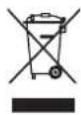
This means that electrical and electronic products may NOT be mixed with unsorted household waste. Do NOT try to dismantle the system yourself: dismantling the system, treatment of the refrigerant, of oil and of other parts MUST be done by an authorised installer and MUST comply with applicable legislation.
Units MUST be treated at a specialised treatment facility for reuse, recycling and recovery. By ensuring this product is disposed of correctly, you will help to prevent potential negative consequences for the environment and human health. For more information, contact your installer or local authority.
- Batteries are marked with the following symbol:

This means that the batteries may NOT be mixed with unsorted household waste. If a chemical symbol is printed beneath the symbol, this chemical symbol means that the battery contains a heavy metal above a certain concentration.
Possible chemical symbols are: Pb: lead (>0.004%).
Waste batteries MUST be treated at a specialised treatment facility for reuse. By ensuring waste batteries are disposed of correctly, you will help to prevent potential negative consequences for the environment and human health.
3.2 Instructions for safe operation

A2L
WARNING: MILDLY FLAMMABLE MATERIAL
The refrigerant inside this unit is mildly flammable.

CAUTION
The indoor unit contains radio equipment, minimum separation distance between the radiating part of the equipment and the user is 10 cm.

CAUTION
Do NOT insert fingers, rods or other objects into the air inlet or outlet. When the fan is rotating at high speed, it will cause injury.

WARNING
- Do NOT modify, disassemble, remove, reinstall or repair the unit yourself as incorrect dismantling or installation may cause an electrical shock or fire. Contact your dealer.
- In case of accidental refrigerant leaks, make sure there are no naked flames. The refrigerant itself is entirely safe, non-toxic and mildly flammable, but it will generate toxic gas when it accidentally leaks into a room where combustible air from fan heaters, gas cookers, etc. is present. Always have qualified service personnel confirm that the point of leakage has been repaired or corrected before resuming operation.

CAUTION
ALWAYS use the wireless remote control or other user interface (if applicable) to adjust the position of the flaps and louvers. When the flaps and louvers are swinging and you move them forcibly by hand, the mechanism will break.

CAUTION
NEVER expose little children, plants or animals directly to the airflow.

WARNING
Do NOT place a flammable spray bottle near the air conditioner and do NOT use sprays near the unit. Doing so may result in a fire.

CAUTION
Do NOT operate the system when using a room fumigation-type insecticide. Chemicals could collect in the unit, and endanger the health of people who are hypersensitive to chemicals.

WARNING
- The refrigerant inside the unit is mildly flammable, but normally does NOT leak. If the refrigerant leaks in the room and comes in contact with fire from a burner, a heater, or a cooker, this may result in fire, or the formation of a harmful gas.
- Turn OFF any combustible heating devices, ventilate the room, and contact the dealer where you purchased the unit.
- Do NOT use the unit until a service person confirms that the part from which the refrigerant leaked has been repaired.

WARNING
- Do NOT pierce or burn refrigerant cycle parts.
- Do NOT use cleaning materials or means to accelerate the defrosting process other than those recommended by the manufacturer.
- Be aware that the refrigerant inside the system is odourless.

WARNING
The appliance shall be stored so as to prevent mechanical damage and in a well-ventilated room without continuously operating ignition sources (e.g. open flames, an operating gas appliance, or an operating electric heater). The room size shall be as specified in the General safety precaution.

DANGER: RISK OF ELECTROCUTION
To clean the air conditioner or air filter, be sure to stop operation and turn all power supplies OFF. Otherwise, an electrical shock and injury may result.

CAUTION
After a long use, check the unit stand and fitting for damage. If damaged, the unit may fall and result in injury.

CAUTION
Do NOT touch the heat exchanger fins. These fins are sharp and could result in cutting injuries.

WARNING
Be careful with ladders when working in high places.

WARNING
Improper detergents or cleaning procedure may cause damage on plastic components or water leakage. Splashed detergent on electric components, such as motors, may cause failure, smoke or ignition.

DANGER: RISK OF ELECTROCUTION
Before cleaning, be sure to stop the operation, turn the breaker OFF or pull out the supply cord. Otherwise, an electrical shock and injury may result.

WARNING
Stop operation and shut OFF the power if anything unusual occurs (burning smells etc.).
Leaving the unit running under such circumstances may cause breakage, electrical shock or fire. Contact your dealer.

WARNING
If the supply cord is damaged, it MUST be replaced by the manufacturer, its service agent or similarly qualified persons in order to avoid a hazard.
4 About the system

A2L
WARNING: MILDLY FLAMMABLE MATERIAL
The refrigerant inside this unit is mildly flammable.

CAUTION
The indoor unit contains radio equipment, minimum separation distance between the radiating part of the equipment and the user is 10 cm.

NOTICE
Do NOT use the system for other purposes. In order to avoid any quality deterioration, do NOT use the unit for cooling precision instruments, food, plants, animals, or works of art.
4.1 Indoor unit

CAUTION
Do NOT insert fingers, rods or other objects into the air inlet or outlet. When the fan is rotating at high speed, it will cause injury.

INFORMATION
The sound pressure level is less than 70 dBA.

WARNING
- Do NOT modify, disassemble, remove, reinstall or repair the unit yourself as incorrect dismantling or installation may cause an electrical shock or fire. Contact your dealer.
In case of accidental refrigerant leaks, make sure there are no naked flames. The refrigerant itself is entirely safe, non-toxic and mildly flammable, but it will generate toxic gas when it accidentally leaks into a room where combustible air from fan heaters, gas cookers, etc. is present. Always have qualified service personnel confirm that the point of leakage has been repaired or corrected before resuming operation.

INFORMATION
The following figures are just examples and may NOT completely match your system layout.
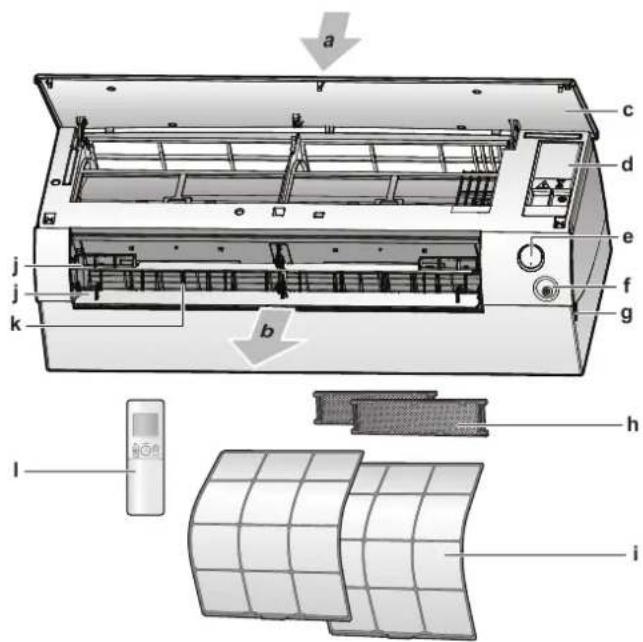
text_image
Technical diagram of an air conditioner unit with labeled parts and internal structure, including a digital display and grid panel.a Air inlet
b Air outlet
c Front panel
d Service cover
e ON/OFF button, Daikin eye and timer lamp, Intelligent eye lamp
f Intelligent eye sensor
g Inlet for room temperature sensor
h Titanium apatite deodorising filter and silver allergen removal air purifying filter
i Air filter
j Flaps (horizontal blades)
k Louvers (vertical blades)
I User interface (wireless remote control)
ON/OFF button
If the user interface (e.g. wireless remote control) is missing, you can use the ON/OFF button on the indoor unit to start/stop operation. When operation is started using this button, the following settings are used:
- Operation mode = Automatic
- Temperature setting = 25°C
- Airflow rate = Automatic
4.1.1 Daikin eye indication lamp
The Daikin eye colour will change according to operation.

text_image
a ba ON/OFF button
b Daikin eye (with infrared signal receiver)
| Operation Daikin eye colour | |
| Automatic Red/blue | |
| Cooling Blue | |
| Heating Red | |
| Fan only White | |
| Drying Green | |
| Timer operation Orange | (a) |
(a) When the OFF/ON timer or Weekly timer operation is set, the Daikin eye periodically changes to orange. After lighting orange for about 10 seconds, it returns to the colour of the operation mode for 3 minutes. Example: When the timer is set during cooling operation, the Daikin eye will periodically light orange for 10 seconds, and then switch to blue for 3 minutes.
4.2 About the user interface
Wireless remote control

INFORMATION
The indoor unit is delivered with the wireless remote control as the user interface. This manual describes only operation with this user interface. If another user interface is connected, refer to the operation manual of the connected user interface.
- Direct sunlight. Do NOT expose the wireless remote control to direct sunlight.
- Dust. Dust on the signal transmitter or receiver will reduce sensitivity. Wipe off dust with a soft cloth.
- Fluorescent lights. Signal communication might be disabled if fluorescent lamps are in the room. In that case, contact your installer.
- Other appliances. If the wireless remote control signals operate other appliances, move the other appliances, or contact your installer.
- Curtains. Make sure that curtains or other objects do NOT block the signal between the unit and the wireless remote control.

NOTICE
- Do NOT drop the wireless remote control.
- Do NOT let the wireless remote control get wet.
4.2.1 Components: Wireless remote control
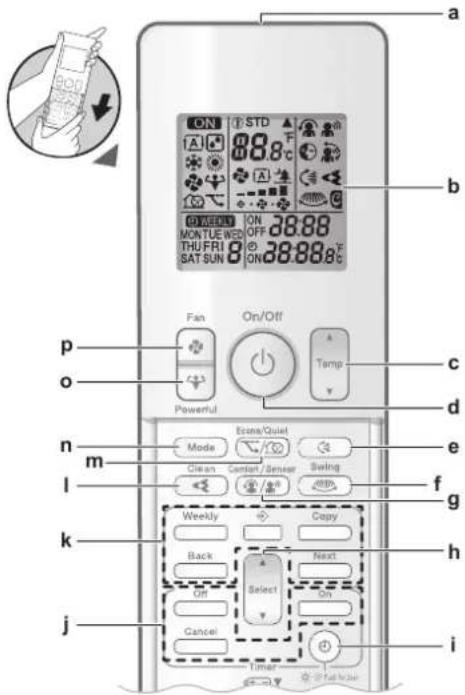
text_image
ON STD 88.8 F a b ON ON OFF 38:88 MONTUE WEB THU FRI SAT SUN ON 38:88.8 C c p o Powerful On/Off A Temp v d n m Mode Econ/Quiet e f i Clean Comfort/Sensor Swing g k Weekly Copy h Back Next On Select y Cancel j ia Signal transmitter
b LCD display
c Temperature adjustment button
d ON/OFF button
e Vertical swing button
f Horizontal swing button
g Comfort airflow and Intelligent eye operation button
h Select button
i Clock and indoor unit display brightness button
j OFF/ON timer operation buttons
k Weekly timer operation buttons
Flash Streamer (air cleaning) operation button
m Econo and Outdoor unit quiet operation button
n Mode button
- Powerful button
p Fan button
4.2.2 Status: Wireless remote control LCD

text_image
ON A 88.8°C WEEKLY ON 38:88 MONTUEWED OFF THU FRI B ON 38:88.8°C SAT SUN| Icon Description | |
| ON | Operation is active |
| A | Operation mode = Automatic |
| Operation mode = Drying | |
| Operation mode = Heating | |
| Operation mode = Cooling | |
| [A4HC] | Operation mode = Fan only |
| [24ZA] | Powerful operation is active |
| [2226] | Econo operation is active |
| [85DC] | Outdoor unit quiet operation is active |
| [H6K2] | The indoor unit receives a signal from the wireless remote control |
 | Current temperature setting |
| [88CE] | Airflow rate = Automatic |
 | Airflow rate = Indoor unit quiet |
| [057H] | Airflow rate = High |
 | |
 | Airflow rate = Medium high |
| [8AA48] | |
| [0547Z] | Airflow rate = Medium |
| [0W7H] | |
| [2WAK] | Airflow rate = Medium low |
| [4DWX] | |
| [X7BB] | Airflow rate = Low |
| [SYOT] | |
| [02CS] | Comfort operation is active |
| [TWEZ] | Intelligent eye is active |
| [2228] | Automatic vertical swing is active |
| [AG006] | Automatic horizontal swing is active |
 | Flash Streamer (air cleaning) is active |
| [2×HT] | ON timer is active |
| [3C04] | OFF timer is active |
| [2X8K] | Weekly timer is active |
MONTUEWED  RI SAT SUN RI SAT SUN | Day of the week |
| [1603] | Current time |
4.2.3 To operate the wireless remote control

natural_image
Technical line drawing of a rectangular air conditioner unit with a label 'a' and a scroll icon, no readable text or symbols present.a Infrared signal receiver
1 Aim the signal transmitter at the infrared signal receiver on the indoor unit (maximum distance for communication is 7 m).
Result: When the indoor unit receives a signal from the wireless remote control, you will hear a sound:
| Sound Description | |
| Beep-beep Operation starts. | |
| Beep Setting changes. | |
| Long beep Operation stops. |
5 Before operation
5.1 Overview: Before operation
This chapter describes what you have to do before operating the unit.
Typical workflow
Before operation usually consist of the following stages:
- Inserting the batteries in the wireless remote control.
- Fixing the wireless remote control to the wall.
- Setting the brightness of the Daikin eye lamp.
- Setting the clock.
- Turning on the power supply.
5.2 To insert the batteries
The batteries will last for about 1 year.
1 Remove the front cover.
2 Insert both batteries at once.
3 Put back the front cover.

text_image
AAA.LR03
INFORMATION
- Low energy of battery is indicated by flashing of LCD display.
- ALWAYS replace both batteries at once.
5.3 To mount the wireless remote control holder
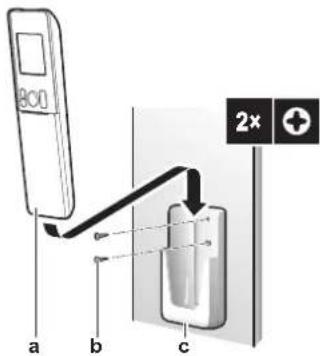
text_image
a b c 2xa Wireless remote control
b Screws (field supply)
c Wireless remote control holder
1 Choose a place where the signals reach the unit.
2 Attach the holder with screws to the wall or a similar location.
3 Hang the wireless remote control on the holder.
5.4 The clock setting
If the indoor unit's internal clock is NOT set to the correct time, the ON timer, OFF timer and weekly timer will NOT operate correctly. The clock must be set again:
■ After a circuit breaker has turned the unit OFF.
■ After a power failure.
• After replacing batteries in the wireless remote control.
5.4.1 To set the clock
Note: If the time is NOT set, MONa and blink
1 Press.
Result: MONd block

2 Press a Select to set the current day of the week.
| Display Day of the week | |
| MON | Monday |
| TUE | Tuesday |
| WED | Wednesday |
| THU | Thursday |
| FRI | Friday |
| SAT | Saturday |
| SUN | Sunday |
3 Press.
Result: eblinks.

4 Press aSelect to set the correct time.
Note: Holding down increases or decreases the time setting rapidly.
5 Press.
Result: Setting is complete. blinks.

5.5 Brightness of the Daikin eye
You can set the brightness of the Daikin eye on the indoor unit to high, low or turn it OFF.
5.5.1 To set the brightness of the Daikin eye
1 Keep pressed for at least 2 seconds every time you need to change the setting.
Result: Brightness will be changed in order: high, low, off.
5.6 To turn on the power supply
1 Turn the circuit breaker on.
Result: The flap of the indoor unit will open and close to set the reference position.
6 Operation

INFORMATION
The indoor unit is delivered with the wireless remote control as the user interface. This manual describes only operation with this user interface. If another user interface is connected, refer to the operation manual of the connected user interface.
6.1 Operation range
Use the system in the following temperature and humidity ranges for safe and effective operation.
| In combination with outdoor units: 2AMXM and 3AMXM | ||
| Cooling and drying(a)(b) | Heating(a) | |
| Outdoor temperature -10~46°C DB | -15~24°C DB | -15~18°C WB |
| Indoor temperature 18~32°C DB | 14~23°C WB | 10~30°C DB |
| Indoor humidity ≤80% | (b) | — |
(e) A safety device might stop the operation of the system if the unit runs outside its operation range.
(b) Condensation and water dripping might occur if the unit runs outside its operation range.
| In combination with other outdoor units | ||
| Cooling and drying(a)(b) | Heating(a) | |
| Outdoor temperature -10~50°C DB | -20~24°C DB | -21~18°C WB |
| Indoor temperature 18~32°C DB | 14~23°C WB | 10~30°C DB |
| Indoor humidity ≤80% | (b) | — |
(e) A safety device might stop the operation of the system if the unit runs outside its operation range.
(b) Condensation and water dripping might occur if the unit runs outside its operation range.
6.2 When to use which feature
You can use the following table to determine which features to use:

INFORMATION
Operation modes: cooling, drying and automatic are NOT available for the heating only version of the product.
| Feature Tasks | |
| Basic features | |
| Operation modes and temperature | To start/stop the system and to set the temperature:In Heating and Cooling mode, heat up or cool down a room.In Fan only mode, blow air in a room without heating or cooling.In Drying mode, decrease the humidity in a room.In Automatic mode, an appropriate temperature and operation mode is automatically selected. |
| + Airflow direction | To adjust the airflow direction (swing or fixed position). |
| Airflow rate | To adjust the amount of air blown into the room.To run more quietly. |
| Advanced features | |
| Flash Streamer | To remove airborne allergens such as pollen, adjuvant substances...To reduce bad odors. |
| Econo | To use the system when you are also using other power-consuming appliances.To save energy. |
| Outdoor unit quiet | To decrease the noise level of the outdoor unit.Example: At night. |
| Comfort | To automatically adjust the airflow direction to cool down or heat up the room more effectively. |
| Intelligent eye | To prevent the air from coming in direct contact with people.To save energy when nobody is in the room. |
| Powerful | To cool down or heat up the room quickly. |
| ON timer + OFF timer | To automatically turn ON or OFF the system. |
| Weekly timer | To automatically turn ON or OFF the system on a weekly basis. |
| Additional features | |
| Wireless LAN connection To operate the unit using smart appliances. | |
6.3 Operation mode and temperature setpoint
When. Adjust the system operation mode and set the temperature when you want to:
- Heat up or cool down a room
- Blow air in a room without heating or cooling
■ Decrease the humidity in a room
What. The system operates differently, depending on the user selection.

INFORMATION
Operation modes: cooling, drying and automatic are NOT available for the heating only version of the product.
| Setting Description | |
| Automatic | The system cools down or heats up a room to the temperature setpoint. It automatically switches between cooling and heating if necessary. |
| Drying | The system decreases the humidity in a room. |
| Heating | The system heats up a room to the temperature setpoint. |
| Cooling | The system cools down a room to the temperature setpoint. |
| Fan | The system only controls the airflow (airflow rate and airflow direction).The system does NOT control the temperature. |
Additional info:
- Outside temperature. The system's cooling or heating effect decreases when the outside temperature is too high or too low.
- Defrost operation. During heating operation, frost might occur on the outdoor unit and decrease the heating capacity. In that case, the system automatically switches to defrosting operation to remove the frost. During defrosting operation, hot air is NOT blown from the indoor unit.
6.3.1 To start/stop operation mode and to set the temperature
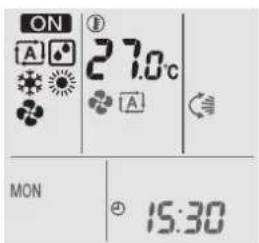
text_image
ON A 27.0°C A MON 15:30ON: Unit is operating.
(A): Operation mode = Automatic
: Operation mode = Drying
✿: Operation mode = Cooling
: Operation mode = Heating
◆: Operation mode = Fan only
①88.8c: Shows the set temperature.
1 Press on more times to select the operation mode.
Result: The mode will be set as follows:

2 Press to start operation.
Result: ON the selected mode are displayed on the LCD.
3 Press or one or more times to lower or raise the temperature.
| Cooling operation Heating operation Automatic operation | Drying or Fan only operation | |
| 18~32°C 10~30°C 18~30°C — |
Note: When using drying or fan only mode, you cannot adjust the temperature.
4 Press to stop operation.
Result: ON appears from the LCD. The operation lamp goes off.
6.4 Airflow rate
1 Press to choose:
| 5 airflow rate levels, from "to" | |
| Automatic airflow rate operation | |
| Indoor unit quiet operation. When the airflow rate is set to "the noise from the unit will be reduced. |

text_image
INFORMATION • If the unit reaches the temperature setpoint in cooling or heating mode, the fan will stop operating. • When using drying operation mode, you CANNOT adjust the airflow rate setting.6.4.1 To adjust the airflow rate
1 Press to change the airflow setting as follows:

flowchart
graph LR
    A["Start"] --> B["A"]
    B --> C["Step 1"]
    C --> D["Step 2"]
    D --> E["Step 3"]
    E --> F["Step 4"]
    F --> G["End"]
6.5 Airflow direction
When. Adjust the airflow direction as desired.
What. The system directs the airflow differently, depending on the user selection (swinging or fixed position). It does so by moving horizontal blades (flaps) or vertical blades (louvers).
| Setting Airflow direction | |
| Vertical automatic swing | Moves up and down. |
| Horizontal automatic swing | Moves from side to side. |
| + airflow direction | Moves alternately up and down and from side to side |
| [—] Stays in a fixed position. | |

CAUTION
ALWAYS use the wireless remote control or other user interface (if applicable) to adjust the position of the flaps and louvers. When the flaps and louvers are swinging and you move them forcibly by hand, the mechanism will break.

INFORMATION
If the Comfort airflow is selected, vertical automatic swing will be canceled.
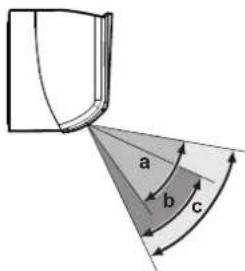
The movable range of the flap varies according to the operation mode. The flap will stop at the upper position when the airflow rate is changed to low during the up and down swing setting.
text_image
a b ca Flap range in cooling or drying operation
b Flap range in heating operation
c Flap range in fan only operation
6.5.1 To adjust vertical airflow direction
1 Press .
Result: 📋 appears on the LCD. The flaps (horizontal blades) will begin to swing.
2 To use fixed position, press when the flaps reach the desired position.
Result: disappears from the LCD. The flaps will stop moving.
6.5.2 To adjust horizontal airflow direction
1 Press.
Result: 🖼 appears on the LCD. The louvers (vertical blades) will begin to swing.
2 To use fixed position, press when the louvers reach the desired position.
Result: disappears from the LCD. The louvers will stop moving.

INFORMATION
When the unit is installed in a corner of a room, the direction of the louvers should be facing away from the wall. Efficiency will drop if a wall blocks the air.
6.5.3 To use 3D airflow direction
1 Press and
Result: ⏻ and ⏻ appear on the LCD. The flaps (horizontal blades) and louvers (vertical blades) will begin to swing.
2 To use fixed position, press and when the laps and louvers reach the desired position.
Result: and disappear from the LCD. The flaps and the louvers will stop moving.
6.6 Comfort airflow and Intelligent eye operation
You can use Comfort and Intelligent eye operation separately, or combine them.
6.6.1 Comfort airflow operation
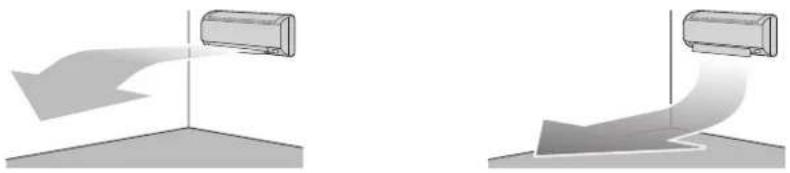
This operation can be used in heating or cooling operation mode. It will provide a comfortable wind that will NOT come in direct contact with people. The system automatically sets the fixed airflow position upward in Cooling and downward in Heating operation mode.
Cooling operation mode Heating operation mode
natural_image
Two identical diagrams showing a curved air conditioner unit with airflow direction, no text or symbols present.
INFORMATION
Powerful and Comfort airflow operation CANNOT be used at the same time. The last selected function takes priority. If the vertical automatic swing is selected, Comfort airflow operation will be cancelled.
6.6.2 Intelligent eye operation
The system detects movement in the room and automatically adjusts the airflow direction and temperature in order to avoid direct contact with people. If no movement is detected for 20 minutes, the system switches to energy saving operation:
| Operation Energy saving operation | |
| Heating Temperature is lowered by 2°C. | |
| Cooling and drying If the temperature in the room is:• <30°C, the temperature is raised by 2°C• ≥30°C, the temperature is raised by 1°C | |
| Fan only Decreases airflow rate. |
About the Intelligent eye sensor

NOTICE
- Do NOT hit or push the Intelligent eye sensor. Doing so may lead to malfunction.
- Do NOT place large objects near the Intelligent eye sensor.

INFORMATION
Night set mode (OFF timer) CANNOT be used at the same time with Intelligent eye operation.
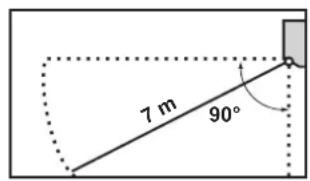
- Detection range. Up to 7 m.
Vertical angle (side view)
text_image
7 m 90°Horizontal angle (top view)

text_image
55° 55° 7 m- Detection sensitivity. Changes according to location, the number of persons in the room, temperature range, etc.
- Detection mistakes. The sensor may mistakenly detect pets, sunlight, moving curtains, etc.
6.6.3 To start/stop Comfort and Intelligent eye operation
1 Press one or more times.
Result: The setting will change as follows:

| Display Operation | |
| Comfort airflow | |
| Intelligent eye | |
| Comfort airflow and Intelligent eye | |
| — Both deactivated |
Note: If there are people close to the front of the indoor unit or there are too many people, use both operations at the same time.
2 To stop operation, press until both symbols disappear from the LCD.
6.7 Powerful operation
This operation quickly maximizes the cooling/heating effect in any operation mode. You can get the maximum capacity.
| Mode Airflow rate | |
| Cooling/Heating • To maximize the cooling | ing/heating effect, the capacity of outdoor unit is increased.• The airflow rate is fixed to the maximum setting.• The temperature and airflow settings CANNOT be changed. |
| Drying • The temperature setting is lowered by 2.5°C.• The airflow rate is slightly increased. | |
| Fan only The airflow rate is fixed to the | maximum setting. |

INFORMATION
Powerful operation CANNOT be used together with Econo, Comfort airflow and Outdoor unit quiet operation. The last selected function takes priority.
Powerful operation will NOT increase the capacity of the unit if it already operates at maximum capacity.
6.7.1 To start/stop Powerful operation
1 Press to start.
Result: 📁 displayed on the LCD. Powerful operation runs for 20 minutes; after that, operation returns to the previously set mode.
2 Press to stop.
Result: disappears from the LCD.
Note: Powerful operation can be set only when the unit is running. If you press or if you change operation mode, operation will be cancelled; disappears from the LCD.
6.8 Econo and Outdoor unit quiet operation
6.8.1 Econo operation
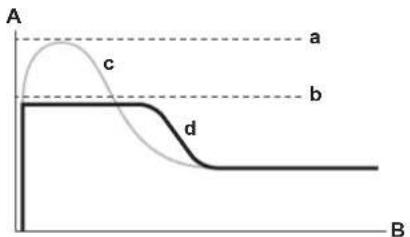
This is a function which enables efficient operation by limiting the maximum power consumption value. This function is useful for cases in which attention should be paid to ensure a circuit breaker will not trip when the product runs alongside other appliances.

INFORMATION
- Powerful and Econo operation CANNOT be used at the same time. The last selected function takes priority.
- Econo operation reduces power consumption of the outdoor unit by limiting the rotation speed of the compressor. If power consumption is already low, Econo operation will NOT further reduce power consumption.
text_image
A a c b d BA Running current and power consumption
B Time
a Maximum during normal operation
b Maximum during Econo operation
c Normal operation
d Econo operation
- The diagram is for illustrative purposes only.
- The maximum running current and power consumption of the air conditioner in Econo operation varies with the connected outdoor unit.
6.8.2 Outdoor unit quiet operation
Use Outdoor unit quiet operation when you want to decrease the noise level of the outdoor unit. Example: At night.

INFORMATION
- Powerful and Outdoor unit quiet operation CANNOT be used at the same time. The last selected function takes priority.
This function is only available in Automatic, Cooling, and Heating operation. - Outdoor unit quiet operation limits the rotation speed of the compressor. If the rotation speed of compressor is already low, Outdoor unit quiet operation will NOT further reduce the compressor rotation speed.
6.8.3 To start/stop Econo and Outdoor unit quiet operation
1 Press one or more times.
Result: The setting will change as follows.

flowchart
graph LR
    A["Downward Arrow"] --> B["Loop Back"]
    B --> C["Upward Arrow"]
    C --> D["Downward Arrow"]
    D --> E["X"]
| Display Operation | |
| Econo | |
| Outdoor unit quiet | |
| — Both deactivated |
2 To stop operation, press until both symbols disappear from the LCD.
Note: Econo operation can be only set when the unit is running. Pressing ⏻ cancels the setting and disappears from the LCD.
Note: Remains on the LCD, even if you turn off the unit using the wireless remote control or indoor unit ON/OFF switch.
6.9 Flash Streamer (air cleaning) operation
Streamer generates a high-speed electron stream with a high oxidizing power, reducing bad odours. Together with the titanium apatite deodorising filter, silver allergen removal air purifying filter and the air filters, this function cleans the air in the room.

INFORMATION
- The high-speed electrons are generated and go away inside the unit to ensure safe operation.
The Streamer discharge may generate a fizzing sound. - If the airflow becomes weak, the Streamer discharge may stop temporarily to prevent ozone smell.
6.9.1 To start/stop Flash Streamer (air cleaning) operation
Prerequisite: Make sure the unit is operating ON displayed on the wireless remote control LCD).
1 Press .
Result: ◀ displayed on the LCD and the air in the room is cleaned when the unit is operating.
2 To stop operation, press.
Result: disappears from the LCD and operation stops.
6.10 OFF/ON timer operation
Timer functions are useful for automatically switching the air conditioner off/on at night or in the morning. You can also use OFF timer and ON timer in combination.
There are two types of OFF/ON timer setting:
- 24 hour clock OFF/ON timer (default). The unit will stop/start operating at the set time. Example: The ON timer is set to 13:30, the unit will start operating at 13:30.
- 12 hour countdown OFF/ON timer. The unit will stop/start operating after the set number of hours. Example: The ON timer is set at 10:30 to 3 hours, the unit will start operating at 13:30.
Note: It is possible to combine both timer setting types.

INFORMATION
Program the timer again in case of:
A breaker has turned the unit off.
A power failure.
■ After replacing batteries in the wireless remote control.

INFORMATION
The clock MUST be set correctly before using any timer functions. Refer to "5.4.1 To set the clock" [▶ 19].
6.10.1 24 hour clock OFF/ON timer setting
To start/stop OFF timer operation
1 Press to start.
Result: 0:00 is displayed on the LCD and OFF blinks. ⊙ and the day of the week disappear from the LCD.
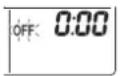
2 Press do to change the time setting.
3 Press again off
Result: OFF and the set time are displayed on the LCD. The Daikin eye lights orange.

INFORMATION
Each time is pressed, the time setting advances by 10 minutes. Holding the button down will change the setting rapidly.
4 To cancel the timer setting, press . Cancel
Result: The set time and OFS appear from the LCD. and the day of the week are displayed on the LCD. The Daikin eye stops lighting orange.

INFORMATION
When you set the ON/OFF timer, the time setting is stored in the memory. The memory will be reset when the wireless remote control batteries are replaced.
Night set mode
When the OFF timer is set, the air conditioner automatically adjusts the temperature setting (0.5°C up in cooling, 2.0°C down in heating) to prevent excessive cooling/heating and ensure a comfortable sleeping temperature.
To start/stop ON timer operation
1 Press to start.
Result: 6:00 is displayed on the LCD and blinkN and the day of the week disappear from the LCD.

2 Press do to change the time setting.
3 Press again
Result: ON and the set time are displayed on the LCD. The Daikin eye lights orange.

INFORMATION
Each time is pressed, the time setting advances by 10 minutes. Holding the button down will change the setting rapidly.
4 To cancel the timer setting, press . Cancel
Result: The set time and ON disappear from the LCD. ⊙ and the day of the week are displayed on the LCD. The Daikin eye stops lighting orange.
To combine OFF timer and ON timer
1 To set the timers, refer to "To start/stop OFF timer operation" [▶ 30] and "To start/stop ON timer operation" [▶ 31].
Result: OFF and ON are displayed on the LCD.
Example:
| Display Current time Set while... Operation | ||
| OFF 7:00ON 14:00 | 6:00 the unit is | operating. Stops at 7:00 and starts at 14:00. |
| the unit is NOT operating. Starts at 14:00. | ||
Note: If the timer setting is active, the current time is NOT displayed on the LCD.
6.10.2 12 hour countdown OFF/ON timer setting
To start/stop countdown OFF/ON timer operation
1 Press and hold or for about 5 seconds; when blinks, release ▲ the button.
Result:

For the OFF timer, it appears on the LCD and bOFFs, and the day of the week disappear from the LCD.

For the ON timer, it appears on the LCD and bONks. and the day of the week disappear from the LCD.
2 Press of Select to change the time setting. The time can be set between 1\~12 hours. Each pressing of the button increases or decreases the time setting by 1 hour.
3 Press or to confirm the setting.
Result: OFF and/or ON and the set time are displayed on the LCD. The Daikin eye lights orange. The time displayed on the LCD will automatically count down by 1 hour for every hour that passes.
Example: If the OFF timer is set to 3 hours, the displayed time will change as follows: 3hr 2hr 1hr blank (OFF)
4 To change the setting back to 24 hour OFF/ON timer, repeat step 1 when on the home screen when ON and/or NOT blinking.
5 To cancel the timer setting, press . Cancel
To combine the timer display modes
Different display modes (24 hour and 12 hour countdown OFF/ON timer) can be used for the OFF timer and ON timer simultaneously.
1 For setting, see "To start/stop OFF timer operation" [▶ 30], "To start/stop ON timer operation" [▶ 31] and "To start/stop countdown OFF/ON timer operation" [▶ 32].
Example:
| Display Current time Set while... Operation | |||
 | 22:00 | the unit is operating. | Stops at 1:00(3 hours after present time)Starts at 6:00.(8 hours after present time) |
 | |||
 | |||
Note: If the timer setting is active, the current time is NOT displayed on the LCD.
6.11 Weekly timer operation

INFORMATION
The following setting procedure is for the wireless remote control only. However, we recommend to perform the weekly timer setting using the ONECTA app. Refer to "6.12 Wireless LAN connection" [▶ 37] for more information.
With this operation, you can save up to 4 timer settings for each day of the week.
Example: Create a different setting from Monday to Friday and a different setting for weekends.
| Day of the week Setting example | |
| MondayMake up to 4 settings. |  |
| Tuesday~FridayUse the copy mode if the settings are the same as for Monday. | 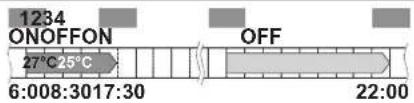 |
| SaturdayNo timer setting | — |
| SundayMake up to 4 settings. | 1 ON 2 OFF 3 OFF 4 ON25°C 27°C 27°C8:00 10:00 19:00 21:00 |
- ON-ON-ON-ON setting. Enables scheduling the operation mode and set temperature.
- OFF-OFF-OFF-OFF setting. Only the turn off time can be set for each day.
Note: Be sure to aim the wireless remote control at the indoor unit and check for a receiving tone when setting the Weekly timer operation.

INFORMATION
The clock MUST be set correctly before using any timer functions. Refer to "5.4.1 To set the clock" [▶ 19].

INFORMATION
- Weekly timer and OFF/ON timer operation CANNOT be used at the same time. The OFF/ON timer operation takes priority. Weekly timer will be in standby, Ⓧ WEEKLY disappears from the LCD. When the OFF/ON timer is completed, the Weekly timer becomes active.
- The day of the week, OFF/ON timer mode, time and temperature (only for ON timer) can be set with the Weekly timer. Other settings are based on previous ON timer setting.
6.11.1 To set Weekly timer operation
1 Press
Result: The day of the week and the reservation number of the current day are displayed.
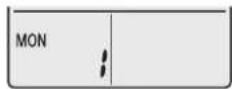
2 Press or to select the day of the week and the reservation number.
3 Press . Next
Result: The day of the week is set. 📄 WEEKLY link. ON
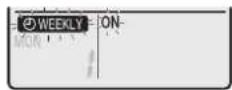
4 Press or to select the mode.
Result: The setting will change as follows:

| Display Feature | |
| ON | ON timer |
| OFF | OFF timer |
| Blank Deletes reservation |
5 Press . Next
Result: The OFF/ON timer mode is set. Ⓧ WEEKLY e time blink.
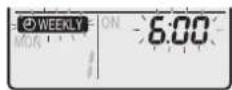
Note: Press to return to the previous screen. If blank is selected, continue to step 9.
6 Press or to select the time. The time can be set between 0:00\~23:50 in 10-minute intervals.
7 Press . Next
Result: The time is set and Ⓓ WEEKLY e temperature blink.
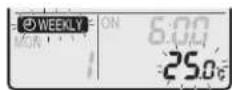
Note: Press tBackreturn to the previous screen. If OFF timer is selected, continue to step 9.
8 Press d to select the desired temperature.
Note: The set temperature for the weekly timer is displayed only when setting the weekly timer mode.

INFORMATION
The temperature can be set between 10\~32°C on the wireless remote control, however:
- in cooling and automatic operation mode, the unit will operate at minimum 18°C, even if is set to 10\~17°C;
- in heating and automatic operation mode, the unit will operate at maximum 30°C, even if is set to 31\~32°C.
9 Press . Next
Result: The temperature and time are set for the ON timer. The time is set for the OFF timer. The Daikin eye lights orange.
Result: A new reservation screen will appear.
10 Repeat the previous procedure to set another reservation or press to complete the setting.
Result: Ⓑ WEEKLY played on the LCD.
Note: A reservation can be copied with the same settings to another day. Refer to "6.11.2 To copy reservations" [▶ 35].
6.11.2 To copy reservations
A reservation can be copied to another day. The complete reservation of the selected day of the week will be copied.
1 Press.
2 Press a select to select the day of the week to be copied.
3 Press . Copy
Result: The reservation of the selected day of the week will be copied.
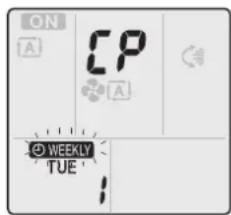
text_image
ON A CP A WEEKLY TUE4 Press do select to select the destination day.
5 Press. Copy
Result: The whole reservation is copied to the selected day and the Daikin eye lights orange.

text_image
ON A CP A WEEKLY - ON 6:00 TUE 25cNote: To copy to another day, repeat the procedure.
6 Press to complete the setting.
Result: Ⓐ WEEKLY played on the LCD.
Note: To change the reservation setting after copying, refer to "6.11.1 To set Weekly timer operation" [▶ 33].
6.11.3 To confirm reservations
You can confirm if all reservations are set to your needs.
1 Press.
Result: The day of the week and the reservation number of the current day are displayed.

2 Press of to select the day of the week and reservation number to be confirmed and check the reservation details.
Note: To change the reservation setting, refer to "6.11.1 To set Weekly timer operation" [▶ 33].
3 Press to exit the confirmation mode.
6.11.4 To deactivate and reactivate Weekly timer operation
1 To deactivate the Weekly timer, press 📋 is displayed on the LCD.
Result: Ⓧ WEEKLY ears from the LCD and the Daikin eye stops lighting orange.
2 To reactivate the Weekly timer, press again
Result: The last set reservation mode will be used.
6.11.5 To delete reservations
To delete individual reservations
Use this function if you want to delete a single reservation setting.
1 Press.
Result: The day of the week and the reservation number are displayed.
2 Press or to select the day of the week to be deleted.
3 Press . Next
Result: WEEKLY Nink. OFF
4 Press or and select "blank".
Result: The setting will change as follows:

5 Press . Next
Result: The selected reservation is deleted.
6 Press to exit.
Result: Remaining reservations are active.
To delete a reservation for each day of the week
Use this function if you want to delete all reservation settings for one day of the week. This can be used in confirmation or setting mode.
1 Press.
2 Press or to select the day of the week to be deleted.
3 Hold for about 5 seconds.
Result: All reservations for the selected day are deleted.
4 Press to exit.
Result: Remaining reservations are active.
To delete all reservations
Use this function if you want to delete all reservations for all days of the week in one go. This procedure CANNOT be used in the setting mode.
1 Hold for Weekout 5 seconds while in the default display.
Result: All reservations will be deleted.
6.12 Wireless LAN connection
Simply connect your unit to your home network and download the app to change the thermostat, set temperature schedules, review your energy consumption and more.
For details on specifications, setting methods, FAQ, troubleshooting tips, visit app.daikineurope.com.

The customer is responsible for providing:
- Smartphone or tablet with minimum supported version of Android or iOS, specified on app.daikineurope.com.
- Internet line and communication device, such as a modem, router, etc.
- Wireless LAN access point
- Installed free ONECTA application
Note: If needed, the SSID (Service Set Identifier) and the KEY (password) are located on the unit.

text_image
aa Label with the SSID and the KEY
6.12.1 Precautions when using the wireless LAN
Do NOT use near:
- Medical equipment. E.g. persons using cardiac pacemakers or defibrillators. This product may cause electromagnetic interference.
- Auto-control equipment. E.g. automatic doors or fire alarm equipment. This product may cause faulty behaviour of the equipment.
- Microwave oven. It may affect wireless LAN communications.
6.12.2 To install the ONECTA app
1 Go to Google Play (for Android devices) or the App Store (for iOS devices) and search for "ONECTA".
2 Follow the directions on the screen to install the ONECTA app.

INFORMATION
Scan the QR code to download and install the ONECTA app on your mobile phone or tablet:
6.12.3 To set the wireless connection
There are two options to connect the wireless adapter to your home network.
- Using a smart device (smartphone, tablet) and SSID (Service Set Identifier) and KEY (password)
- Using the WPS (Wi-Fi Protected Setup) button on your Wi-Fi router.
For more information and FAQ, refer to app.daikineurope.com.
Note: Setting is done by the wireless remote control in the wireless LAN setting menu. During setting, always aim the wireless remote control at the infrared signal receiver on the unit.

INFORMATION
Make sure operation is stopped before setting the wireless connection. Connection CANNOT be made when the unit is in operation.
1 Stop operation before setting the wireless connection.
2 Make sure the wireless router is close enough to the unit and nothing obstructs the signal.
| Menu Description | |
| 1 | Connection status check |
| 2 | Connection using WPS button |
| 3 | Connection using SSID and KEY |
| R | Reset to factory default |
| oFF | Wireless LAN OFF |
To confirm the wireless LAN connection status
1 On home screen menu, press and hold for at least 5 seconds while the unit is not operating.
Result: The SP (wireless connection setting menu) appears. I is blinking.

text_image
25.0°C MON 10:00 (5 sec.) SP />2 Press to confirm the selection.
Result: 1 is blinking.
3 Check the Daikin eye.

text_image
a b ca Daikin eye
b Partly green
c Red, orange or blue
| Daikin eye colour alternates between partly green and... | ...then wireless adapter is... |
| Red not connected | |
| orange running and ready to connect to the home network via WPS button; see "To connect using the WPS button" [▶ 39]. | |
| blue connected to the home network: | • via SSID + KEY.or• via the WPS button on the router. |
4 Press to exit the menu.
Result: The display will return to the default screen.
To connect the wireless LAN to your home network
The wireless adapter can be connected to your home network using the:
- WPS button (Wi-Fi Protected Setup) on the router (if present),
- The SSID (Service Set Identifier) and the KEY (password) - located on the unit.
To connect using the WPS button
1 On home screen menu, hold for at least 5 seconds while the unit is not operating.
Result: The SP menu! appears. is blinking.
2 Change to the SP menu by pressing once or repeatedly.

text_image
25.0°C MON 10:00 (5 sec.) SP 1x Tamp SP 23 Press to confirm the selection.
Result: 2 is blinking. The Daikin eye colour alternates between orange and partly green.
4 Press the WPS button on your communication device (e.g. router) within approximately 1 minute. Refer to the manual of your communication device.
Result: The Daikin eye colour alternates between blue and partly green.

INFORMATION
If the connection with your router is not possible, try procedure "To connect using SSID and KEY number" [▶ 40].
5 Press to exit the menu.
Result: The display will return to the default screen.
To connect using SSID and KEY number
1 On home screen menu, hold for at least 5 seconds while the unit is not operating.
Result: The SP menu / appears. / is blinking.
2 Change to the SP menu by pressing twice or repeatedly.
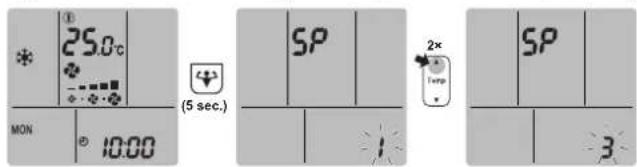
text_image
25.0°C MON 10:00 (5 sec.) SP 2× Temp SP 33 Press to confirm the selection.
Result: 3 is blinking. The Daikin eye colour alternates between red and partly green.
4 Open the ONECTA application on your smart device and follow the steps on the screen.
Result: If the connection was successful, the Daikin eye colour alternates between blue and partly green.
5 Press to enter the menu.
Result: The display will return to the default screen.
To reset the connection setting to the factory default
Reset the connection setting to the factory default in case you want to:
- disconnect the wireless LAN and the communication device (e.g. router) or smart device,
- repeat the setting if the connection was unsuccessful.
1 On home screen menu, hold for at least 5 seconds while the unit is not operating.
Result: The SP menu / appears. / is blinking.
2 Change to the SP menu by pressing twice or repeatedly.
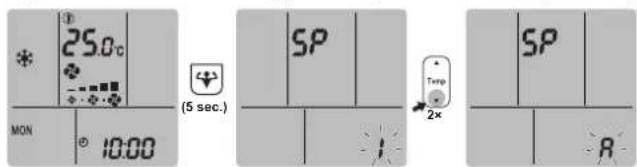
text_image
25.0°C MON 10:00 (5 sec.) SP Temp 2x SP R3 Hold for at least 2 seconds to confirm the selection.
Result: A is blinking. The Daikin eye colour alternates between red and partly green. The setting is reset to the factory default.
4 Press to exit the menu.
Result: The display will return to the default screen.
To turn off the wireless LAN connection
If you want to turn off the wireless connection function:
1 On home screen menu, press for at least 5 seconds while the unit is not operating.
Result: The SP menu; appears.; is blinking.
2 Change to the SP menu by pressing once or repeatedly.

text_image
25.0°C MON 10:00 (5 sec.) SP 1x SP OFF3 Hold for at least 2 seconds to confirm the selection.
Result: off blinking. The Daikin eye alternates between white and partly green. Communication is OFF.
4 Press to Exicate the menu.
Result: The display will return to the default screen.
6.13 About Multi system
In Multi system, 1 outdoor unit is connected to multiple indoor units. Example:
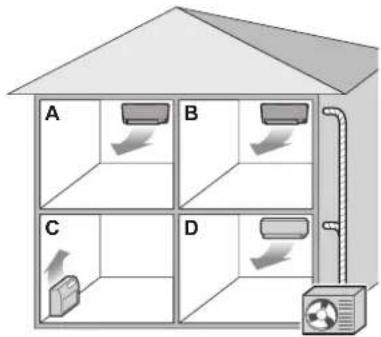
text_image
A B C D6.13.1 Priority room setting
Priority room setting requires initial programming during installation. Please consult your authorized dealer for assistance.
When priority room setting is inactive or not present
When more than 1 indoor unit is operating, priority is given to the first unit that was turned on. Set other units to the same operation mode. Otherwise, they will enter the standby mode, and the Daikin eye will flash (does NOT indicate malfunction).
Exceptions: If the first unit that was turned on is set to fan only, and then in the other room heating mode is set, priority will be given to the unit set to the heating mode. The first unit will go in standby and the Daikin eye will flash.

INFORMATION
The cooling, drying, and fan only operation modes may be used at the same time.
- The automatic operation mode automatically selects cooling or heating, depending on the room temperature and the temperature setting. If the automatic operation mode is selected for all units, all units will operate in the mode of the first unit that was turned on.
Priority when using Outdoor unit quiet operation
Refer to "6.8.2 Outdoor unit quiet operation" [▶ 29].
1 Set Outdoor unit quiet operation in all rooms using the wireless remote controls of the units.
2 To cancel Outdoor unit quiet operation, you may stop operation in 1 room using a wireless remote control.
Result: Operation will stop in all rooms. Ⓦ remain on the display of the other wireless remote controls.
3 To remove the symbol from the other wireless remote controls, stop Outdoor unit quiet operation in all rooms separately.
Result: The symbol will disappear.
When priority room setting is active
You can select a different operation mode for each room.
Example: Room A has priority, cooling operation mode is selected.
| Operation mode in room B, C, D Status of room B, C and D | |
| Cooling, drying or fan only Current operation mode maintained | |
| Heating Standby mode. Operation resumes when room A stops operating. | |
| Automatic If cooling operation continues. If heating units enter standby mode. Operation resumes when room A stops operating. |
Priority when using Powerful operation
Example: Room A has priority. Rooms B, C and D are operating.
1 Set Powerful operation in room A.
Result: Capacity in room A is increased. Cooling or heating efficiency in rooms B, C and D may be slightly reduced.
Priority when using Outdoor unit quiet operation
Example: Room A has priority.
1 Set Outdoor unit quiet operation on one unit.
Result: All units enter the Outdoor unit quiet operation mode at once.
6.13.2 Night quiet mode
The Night quiet mode requires initial programming during installation. Please consult your dealer for assistance. This mode reduces the operation noise of the outdoor unit during the night by reducing the cooling efficiency.
The Night quiet mode is activated automatically when the temperature drops ≥5^ below the highest temperature recorded that day.
6.13.3 Cooling/heating mode lock in Multi-system
The cooling/heating mode lock can be set via the Multi outdoor unit. Please consult your authorized dealer for assistance. The cooling/heating mode lock sets the unit forcibly to either cooling or heating operation. Activate this function if you wish to set all indoor units connected in a Multi-system to 1 operation mode.

INFORMATION
The Cooling/heating mode lock CANNOT be activated together with the priority room setting.
7 Energy saving and optimum operation

INFORMATION
Even if the unit is turned OFF, it consumes electricity.
- When the power turns back on after a power break, the previously selected mode will be resumed.

CAUTION
NEVER expose little children, plants or animals directly to the airflow.

NOTICE
Do NOT place objects below the indoor and/or outdoor unit that may get wet. Otherwise condensation on the unit or refrigerant pipes, air filter dirt or drain blockage may cause dripping, and objects under the unit may get dirty or damaged.

WARNING
Do NOT place a flammable spray bottle near the air conditioner and do NOT use sprays near the unit. Doing so may result in a fire.

CAUTION
Do NOT operate the system when using a room fumigation-type insecticide. Chemicals could collect in the unit, and endanger the health of people who are hypersensitive to chemicals.
Observe the following precautions to ensure the system operates properly.
- Prevent direct sunlight from entering a room during cooling operation by using curtains or blinds.
- Make sure the area is well ventilated. Do NOT block any ventilation openings.
- Ventilate often. Extended use requires special attention to ventilation.
- Keep doors and windows closed. If the doors and windows remain open, air will flow out of your room causing a decrease in the cooling or heating effect.
- Be careful NOT to cool or heat too much. To save energy, keep the temperature setting at a moderate level.
- NEVER place objects near the air inlet or the air outlet of the unit. Doing so may cause a reduced heating/cooling effect or stop operation.
- Turn off the main power supply switch to the unit when the unit is NOT used for longer periods of time. If the main power supply switch is on, the unit consumes electricity. Before restarting the unit, turn on the main power supply switch 6 hours before operation to ensure smooth running.
- Condensation may form if the humidity is above 80% or if the drain outlet gets blocked.
- Adjust the room temperature properly for a comfortable environment. Avoid excessive heating or cooling. Notice that it may take some time for the room temperature to reach the set temperature. Consider using the timer setting options.
- Adjust the air flow direction to avoid cool air from gathering on the floor or warm air against the ceiling. (Up during cooling or dry operation to the ceiling and down during heating operation.)
- Avoid direct air flow to room inhabitants.
- Operate the system within the recommended temperature range (26\~28°C for cooling and 20\~24°C for heating) to save energy.
8 Maintenance and service
8.1 Overview: Maintenance and service
The installer has to perform a yearly maintenance.
About the refrigerant
This product contains fluorinated greenhouse gases. Do NOT vent gases into the atmosphere.
Refrigerant type: R32
Global warming potential (GWP) value: 675

NOTICE
Applicable legislation on fluorinated greenhouse gases requires that the refrigerant charge of the unit is indicated both in weight and CO_2 equivalent.
Formula to calculate the quantity in CO_2 equivalent tonnes: GWP value of the refrigerant × total refrigerant charge [in kg]/1000
Contact your installer for more information.

NOTICE
Maintenance MUST be done by an authorised installer or service agent.
We recommend performing maintenance at least once a year. However, applicable legislation might require shorter maintenance intervals.

WARNING
- The refrigerant inside the unit is mildly flammable, but normally does NOT leak. If the refrigerant leaks in the room and comes in contact with fire from a burner, a heater, or a cooker, this may result in fire, or the formation of a harmful gas.
- Turn OFF any combustible heating devices, ventilate the room, and contact the dealer where you purchased the unit.
- Do NOT use the unit until a service person confirms that the part from which the refrigerant leaked has been repaired.

WARNING
- Do NOT pierce or burn refrigerant cycle parts.
- Do NOT use cleaning materials or means to accelerate the defrosting process other than those recommended by the manufacturer.
- Be aware that the refrigerant inside the system is odourless.

WARNING
The appliance shall be stored so as to prevent mechanical damage and in a well-ventilated room without continuously operating ignition sources (e.g. open flames, an operating gas appliance, or an operating electric heater). The room size shall be as specified in the General safety precaution.

DANGER: RISK OF ELECTROCUTION
To clean the air conditioner or air filter, be sure to stop operation and turn all power supplies OFF. Otherwise, an electrical shock and injury may result.

WARNING
To prevent electrical shocks or fire:
- Do NOT rinse the unit.
- Do NOT operate the unit with wet hands.
- Do NOT place any objects containing water on the unit.

CAUTION
After a long use, check the unit stand and fitting for damage. If damaged, the unit may fall and result in injury.

CAUTION
Do NOT touch the heat exchanger fins. These fins are sharp and could result in cutting injuries.

WARNING
Be careful with ladders when working in high places.
Following symbols may occur on the indoor unit:
Symbol Explanation
Measure the voltage at the terminals of main circuit capacitors or electrical components before servicing.
8.2 To clean the indoor unit and wireless remote control

WARNING
Improper detergents or cleaning procedure may cause damage on plastic components or water leakage. Splashed detergent on electric components, such as motors, may cause failure, smoke or ignition.

DANGER: RISK OF ELECTROCUTION
Before cleaning, be sure to stop the operation, turn the breaker OFF or pull out the supply cord. Otherwise, an electrical shock and injury may result.

NOTICE
- Do NOT use gasoline, benzene, thinner, polishing powder or liquid insecticide. Possible consequence: Discoloration and deformation.
- Do NOT use water or air of 40°C or higher. Possible consequence: Discoloration and deformation.
- Do NOT use polishing compounds.
- Do NOT use a scrubbing brush. Possible consequence: The surface finishing peels off.
- As an end user, you may NEVER clean inside parts of the unit by yourself; this work must be performed by a qualified service person. Contact your dealer.
1 Clean with a soft cloth. If it is difficult to remove stains, use water or a neutral detergent.
8.3 To clean the front panel
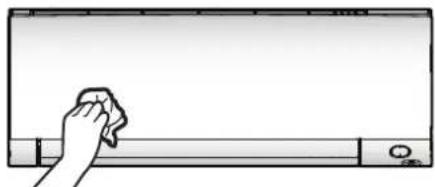
natural_image
Simple line drawing of a hand cleaning a whiteboard with a cloth (no text or symbols)1 Clean the front panel with a soft cloth. If it is difficult to remove stains, use water or a neutral detergent.
8.4 To remove the front panel
1 Place your fingers in the indentations on the unit (one each on the left and right sides), and open the front panel until it stops.
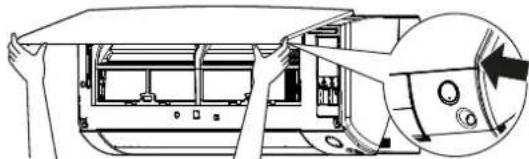
natural_image
Technical line drawing of a car interior showing front and side views of the engine compartment (no text or symbols)2 Push the left panel shaft outward and up to disconnect the front panel from the unit. (Remove the right side front panel shaft in the same manner.)
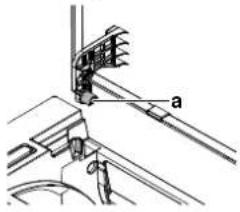
text_image
Technical diagram showing mechanical assembly with labeled component 'a'a Front panel shaft
3 After removing both front panel shaft, pull the front panel toward yourself and remove it.
8.5 About the air filters
Operating the unit with dirty filters means that the filter:
- CANNOT deodorise the air,
- CANNOT clean the air,
- poor heating/cooling,
- causes odour.
| List of treated articles used in Daikin products based on Regulation (EU) No 528/2012 | |
| Treated article ofa biocidal product Air resin filter | |
| Active substance Silver phosphate glass | |
| Content <0,02 % | |
| CAS Nr. 308069-39-8 | |
| Active substancefunction Antiviral and antibacterial effect | |
| Safety Information RoHS compliant, non-toxic or corrosive.There are no specific PPE recommendations.Disposal shall comply with government and legal regulations governing the disposal of material.Store in the room temperature.Eye contact- wash with waterSkin contact- wash with water, shouldn't affect the skinInhalation- no specific hazards indicated | |
8.6 To clean the air filters
1 Push the tab at the centre of each air filter, then pull it down.
2 Pull out the air filters.
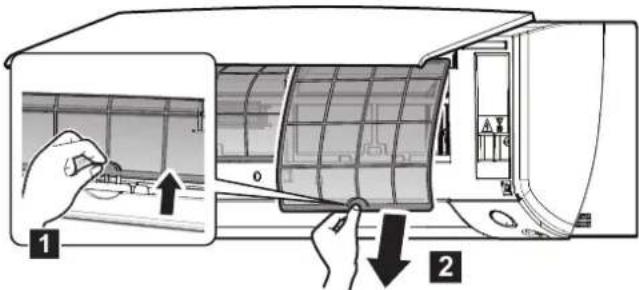
text_image
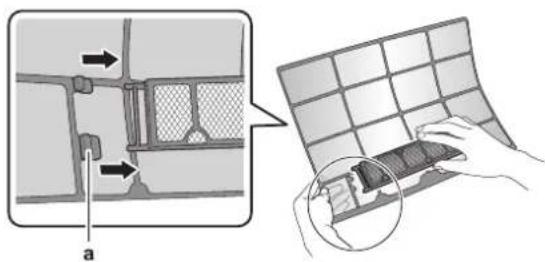
Diagram showing a hand inserting a solar panel into an air conditioner oven, with labeled parts and directional arrows.3 Remove the titanium apatite deodorising filter and the silver particle filter from all 4 claws.
text_image
Diagram illustrating a mechanical or structural assembly with labeled components and a magnified view of the grid structure.a Claw
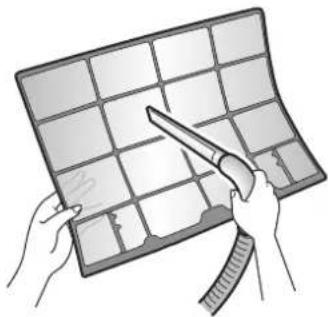
4 Wash the air filters with water or clean them with a vacuum cleaner.
natural_image
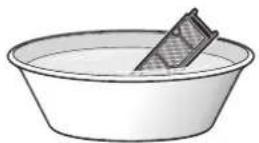
Illustration of hands holding a grid-based object with a tool, no text or symbols present5 Soak in lukewarm water for about 10 to 15 minutes.

natural_image
Simple line drawing of a bowl with a rectangular dish on top (no text or symbols)
INFORMATION
- If the dust does NOT come off easily, wash them with a neutral detergent diluted in lukewarm water. Dry the air filters in the shade.
It is recommended to clean the air filters every 2 weeks.
8.7 To clean the titanium apatite deodorising filter and the silver particle filter (Ag-ion filter)

INFORMATION
Clean the filter with water every 6 months.
1 Remove the titanium apatite deodorising filter and the silver allergen removal air purifying filter from all 4 claws.

text_image
Diagram illustrating a mechanical assembly process with labeled components and a magnified view of the component being handled.a Tab
2 Remove the dust from the filter with a vacuum cleaner.

3 Soak the filter for 10 to 15 minutes in warm water.
Note: Do NOT remove the filter from the frame.
4 After washing, shake off remaining water and dry the filter in the shade. Do NOT wring out the filter when removing water.
8.8 To replace the titanium apatite deodorising filter and the silver particle filter (Ag-ion filter)

INFORMATION
Replace the filter every 3 years.
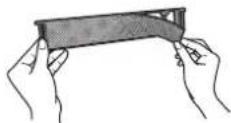
1 Remove the filter from the tabs of the filter frame and replace the filter with a new one.

INFORMATION
- Do NOT throw away the filter frame, but use it again.
- Dispose of the old filter as non-flammable waste.
To order titanium apatite deodorising filter or silver particle filters, contact your dealer.
| Item Part number | |
| Titanium deodorising filter KAF970A46 | |
| Silver particle filter KAF057A41 |
8.9 To re-install the front panel
1 Attach the front panel. Align the shafts with the slots and push them all the way in.
2 Close the front panel slowly; press at both sides and at the centre.
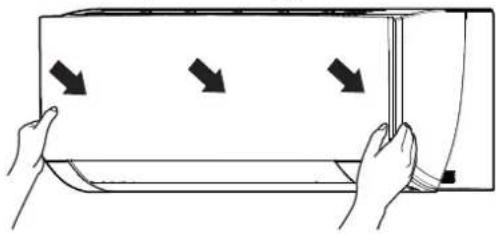
natural_image
Illustration of hands holding a rectangular device with three arrows pointing inward (no text or symbols)8.10 To take following items into account before a long idle period
Operate the unit several hours in fan only mode to dry the inside of the unit.
1 Press and select operation.
2 Press and start operation.
3 After operation stops, turn the breaker OFF.
4 Clean the air filters and replace them in their original positions.
5 Remove the batteries from the wireless remote control.

INFORMATION
It is recommended to have periodical maintenance performed by a specialist. For specialist maintenance, contact your dealer. Maintenance costs shall be borne by the customer.
In certain operating conditions the inside of the unit may get dirty after several seasons of use. This results in poor performance.
9 Troubleshooting
If one of the following malfunctions occurs, take the measures shown below and contact your dealer.

WARNING
Stop operation and shut OFF the power if anything unusual occurs (burning smells etc.).
Leaving the unit running under such circumstances may cause breakage, electrical shock or fire. Contact your dealer.
The system MUST be repaired by a qualified service person.
| Malfunction Measure | |
| If a safety device such as a fuse, a breaker or an earth leakage breaker frequently actuates or the ON/OFF switch does NOT function properly. | Turn OFF the main power switch. |
| If water leaks from the unit. Stop operation. | |
| The operation switch does NOT function properly. | Turn OFF the power supply. |
| The Daikin eye flashes and you can check the error code by the wireless remote control. To display the error code, see "9.2 Solving problems based on error codes" [▶ 57]. | Notify your installer and report the error code. |
If the system does NOT operate properly except for the above mentioned cases and none of the above mentioned malfunctions is evident, investigate the system in accordance with the following procedures.
| Malfunction Measure | |
| If the system does NOT operate at all. | Check if there is no power failure. Wait until power is restored. If a power failure occurs during operation, the system automatically restarts immediately after power is restored.Check if no fuse has blown or breaker is activated. Change the fuse or reset the breaker if necessary.Check the batteries of the wireless remote control.Check the timer setting. |
| The system suddenly stops operating. | Check if the air inlet or outlet of the outdoor or indoor unit is NOT blocked by obstacles. Remove any obstacles and make sure the air can flow freely.The air conditioner may stop operating after sudden large voltage fluctuations to protect the system. It automatically resumes operation after about 3 minutes. |
| The fan will stop during airflow operation. | If the set temperature is reached, the airflow rate is reduced and operation stops. Operation will resume automatically when the indoor temperature rises or falls. |
| Malfunction Measure | |
| The flaps do NOT start to swing immediately. | The indoor unit is adjusting the position of the flaps. The flaps will start moving soon. |
| Operation does NOT start soon. | In case the ON/OFF button was pressed right after operation was stopped or if the mode was changed. Operation will start after 3 minutes to protect the system. |
| The system operates, but cooling or heating is insufficient. | Check the airflow rate setting. Refer to "6.4 Airflow rate" [▶ 24].Check the temperature setting. Refer to "6.3.1 To start/stop operation mode and to set the temperature" [▶ 23].Check if the airflow direction setting is appropriate. Refer to "6.5 Airflow direction" [▶ 24].Check if the air inlet or outlet of the outdoor or indoor unit is NOT blocked by obstacles. Remove any obstacles and make sure the air can flow freely.Check if the air filters are clogged. Clean the air filters. See "8 Maintenance and service" [▶ 46].Check for open doors or windows. Close doors and windows to prevent wind from coming in.Check if the unit operates in Econo or Outdoor unit quiet operation. Refer to "6.8 Econo and Outdoor unit quiet operation" [▶ 28].Check if there is any furniture directly under or next to the indoor unit. Move the furniture. |
| The system operates, but heating is insufficient (air is NOT blown from the unit). | The air conditioner may be warming up for heating operation. Wait for 1 to 4 minutes.If a flowing sound is heard, the outdoor unit may be in defrost operation. Wait for 4 to 12 minutes. |
| The ON/OFF timer does NOT operate according to the settings. | Check if the Weekly timer and ON/OFF timer are set to the same time. Change or deactivate the setting. Refer to "6.10 OFF/ON timer operation" [▶ 30] and "6.11 Weekly timer operation" [▶ 33].Check if the clock and the day of the week are set correctly. Refer to "5.4 The clock setting" [▶ 19]. |
| Cooling operation CANNOT be selected. | Check if your system is NOT heating only version. |
| An abnormal function happens during operation. | The air conditioner may malfunction because of lightning or radio waves. Turn the breaker OFF and back ON. |
| The unit does NOT receive signals from the wireless remote control. | Check the batteries of the wireless remote control. Refer to "5.2 To insert the batteries" [▶ 18].Make sure that the transmitter is NOT exposed to direct sunlight.Check if there are any electronic starter type fluorescent lamps in the room. Contact your dealer. |
| The wireless remote control display is blank. | Replace the batteries of the user interface. |
| Other electric appliances start to operate. | If the wireless remote control signals operate other electric appliances, move the other appliances away, and contact your dealer. |
If after checking all above items, it is impossible to fix the problem yourself, contact your installer and state the symptoms, the complete model name of the unit (with manufacturing number if possible) and the installation date (possibly listed on the warranty card).
9.1 Symptoms that are NOT system malfunctions
The following symptoms are NOT system malfunctions:
9.1.1 Symptom: A sound like water flowing is heard
This sound is caused by the refrigerant flowing in the unit.
- This sound may be generated when water is flowing away from the unit during cooling or drying operation.
- The refrigerant flows in the air conditioner even if the indoor unit is turned off and an indoor unit in another room is operating.
9.1.2 Symptom: A blowing sound is heard
This sound is generated when the direction of the refrigerant flow is changed (e.g. when switching from cooling to heating).
9.1.3 Symptom: A ticking sound is heard
This sound is generated when the unit slightly expands or contracts with changes in temperature.
9.1.4 Symptom: A whistling sound is heard
This sound is generated by the refrigerant flowing during defrost operation.
9.1.5 Symptom: A clicking sound during operation or idle time is heard
This sound is generated when the refrigerant control valves or electrical parts operate.
9.1.6 Symptom: A clapping sound is heard
This sound is generated when an external device sucks air out of the room (e.g. exhaust fan, extractor hood) while the doors and windows in the room are closed. Open the doors or windows, or turn off the device.
9.1.7 Symptom: White mist comes out of a unit (Indoor unit, outdoor unit)
When the system is changed over to heating operation after defrost operation. Moisture generated by defrost becomes steam and is exhausted.
9.1.8 Symptom: The units can give off odours
The unit can absorb the smell of rooms, furniture, cigarettes, etc., and then emit it again.
9.1.9 Symptom: The outdoor fan rotates while the air conditioner is not in operation
- After operation has stopped. The outdoor fan continues to rotate for another 30 seconds for system protection.
- While the air conditioner is not in operation. When the outdoor temperature is very high, the outdoor fan starts to rotate for system protection.
9.1.10 Symptom: Indoor unit fan speed does NOT correspond with the setpoint (during low ambient cooling operation in Multi system)
- During low ambient cooling operation in Multi system, indoor unit may change fan speed to high regardless of the user setting to defrost the indoor unit heat exchanger.
9.1.11 Symptom: Airflow rate setting does NOT resume when Comfort airflow is deactivated by ONECTA app
If Comfort airflow operation is deactivated by ONECTA app, the airflow rate does NOT return to previous airflow rate setting, and indoor unit operates in automatic airflow rate.
9.1.12 Symptom: Some operation icons are not visible on the wireless remote control, or some functions cannot be activated in the ONECTA app
Some combinations of features are not permitted (example: Fan only mode and Outdoor unit quiet operation). This features may display at the ONECTA app, but function CANNOT be activated.
9.1.13 Symptom: In ONECTA app, powerful operation is NOT indicated as active
When the powerful operation is activated while indoor unit is OFF, the powerful operation may not be displayed as active for 2 minutes until the cloud data are updated.
9.2 Solving problems based on error codes
Fault diagnosis by the wireless remote control
If the unit runs into a problem, you can identify the fault by checking the error code by the wireless remote control. It is important to understand the problem and take measures before resetting the error code. This should be done by a licensed installer or your local dealer.

INFORMATION
See the service manual for:
The complete list of error codes
- A more detailed troubleshooting guideline for each error
To check the error code by the wireless remote control
1 Aim the wireless remote control at the unit and press Cancel for about 5 seconds.
Result: 00 links in the temperature setting display section.
2 Aim the wireless remote control at the unit and press repeatedly until a continuous beep is heard.
Result: The code is now displayed on the display.

INFORMATION
- A short beep and 2 consecutive beeps indicate non-corresponding codes.
- To cancel the code display, hold Cancel for 5 seconds. The code will also disappear from the display if the button is NOT pressed within 1 minute.
System
| Error code Description | |
| oo | Normal |
| uo | Refrigerant shortage |
| u2 | Overvoltage detection |
| u3 | Malfunction of transmission |
| u4 | Signal transmission error (between indoor and outdoor unit) |
Indoor unit
| Error code Description | |
| R1 | Indoor unit PCB abnormality |
| R5 | Freeze-up protection or high-pressure control |
| R6 | Fan motor (DC motor) abnormality |
| C4 | Indoor heat exchanger thermistor abnormality |
| C9 | Room temperature thermistor abnormality |
Outdoor unit
| Error code Description | |
| ER | 4-way valve abnormality |
| E1 | Outdoor unit PCB abnormality |
| E3 | Actuation of high pressure switch (HPS) |
| E5 | Overload activation (compressor overload) |
| E6 | Compressor lock |
| E7 | DC fan lock |
| F3 | Discharge pipe temperature control |
| H3 | Malfunction of high pressure switch (HPS) |
| H6 | Position sensor abnormality |
| H8 | DC voltage / current sensor abnormality |
| H9 | Outdoor temperature thermistor abnormality |
| J3 | Discharge pipe thermistor abnormality |
| J6 | Outdoor heat exchanger thermistor abnormality |
| L4 | Radiation fin temperature rise |
| L5 | Inverter instantaneous overcurrent (DC) |
| P4 | Radiation fin thermistor abnormality |
9.3 Troubleshooting for wireless LAN connection
The following table provides a brief description of how to deal with some problems. If none of the following solutions fix the problem, go to app.daikineurope.com for more information and FAQ.
| Problem Measure | |
| Connection to the wireless LAN is not possible (Daikin eye is NOT blinking during wireless LAN connection setting). | Try operating the unit with the wireless remote control.Check if the power is on.Turn the unit off and back on again. |
| The wireless LAN is NOT visible on the unit overview screen (Home screen) after configuration of the WLAN adapter (WPS option). | Make sure the wireless LAN is close enough to the communication device.Check if communication is OK.Make sure that the smart device is connected to the same wireless network as the wireless LAN.Try resetting to the factory default and repeat the setting. See "To reset the connection setting to the factory default" [▶ 40]. |
| The wireless LAN is NOT visible in the available Wi-Fi networks list on the smart device (Access point option). | Try switching between access point and WPS setting to change the wireless channel. The wireless channel MUST be between 1~13.Check if communication is OK.Try resetting to the factory default and repeat the setting. See "To reset the connection setting to the factory default" [▶ 40]. |
| Displayed indoor/outdoor temperature value in ONECTA differs from the value measured by other appliances. | ONECTA displays indoor/outdoor temperature only for the indoor/outdoor unit's surrounding.Measured temperature for other appliances may differ due to different condition around the unit (e.g. direct sunlight, frost accumulation...)Temperature displayed in ONECTA is only referential. |
10 Disposal

NOTICE
Do NOT try to dismantle the system yourself: dismantling of the system, treatment of the refrigerant, oil and other parts MUST comply with applicable legislation. Units MUST be treated at a specialised treatment facility for reuse, recycling and recovery.
11 Glossary
Dealer
Sales distributor for the product.
Authorised installer
Technical skilled person who is qualified to install the product.
User
Person who is owner of the product and/or operates the product.
Applicable legislation
All international, European, national and local directives, laws, regulations and/or codes that are relevant and applicable for a certain product or domain.
Service company
Qualified company which can perform or coordinate the required service to the product.
Installation manual
Instruction manual specified for a certain product or application, explaining how to install, configure and maintain it.
Operation manual
Instruction manual specified for a certain product or application, explaining how to operate it.
Accessories
Labels, manuals, information sheets and equipment that are delivered with the product and that need to be installed according to the instructions in the accompanying documentation.
Optional equipment
Equipment made or approved by Daikin that can be combined with the product according to the instructions in the accompanying documentation.
Field supply
Equipment NOT made by Daikin that can be combined with the product according to the instructions in the accompanying documentation.

natural_image
Blank grid paper with no text, numbers, or symbols

natural_image
Blank grid paper with no text, numbers, or symbolsDAIKIN EUROPE N.V.