AX-BXLOC2-PRO - Audio converter AXESS - Free user manual and instructions
Find the device manual for free AX-BXLOC2-PRO AXESS in PDF.


User questions about AX-BXLOC2-PRO AXESS
0 question about this device. Answer the ones you know or ask your own.
Ask a new question about this device
Download the instructions for your Audio converter in PDF format for free! Find your manual AX-BXLOC2-PRO - AXESS and take your electronic device back in hand. On this page are published all the documents necessary for the use of your device. AX-BXLOC2-PRO by AXESS.
USER MANUAL AX-BXLOC2-PRO AXESS
Premium Active LOC with Bass Restoration 2 IN - 4 OUT, Input Of 400 Watts Per Channel, 40v Max
Universal Premium LOC
The Axxess AX-BXLOC2-PRO is a compact premium line output converter with active input circuitry, which allows it to accept speaker-level signals of up to 400 watts per channel from factory-installed source units or amplifiers. It converts them to high-quality pre-amp signals that can then be directed to aftermarket amplifiers. The AX-BXLOC2-PRO offers Built In Load Resistors for those factory radios or amplifiers that stop passing audio when OE speakers are disconnected. The built in load resistors trick the factory equipment to pass audio into the Axxess LOC allowing easy audio upgrades. Many of these factory audio systems regulate lower frequencies to prevent potential damage to the OE speakers, which is not a desirable feature when wanting to add subwoofers to your OE system. Some OE radios and amplifiers can reduce the output of low frequencies as the volume is increased. Having a product with a Bass-X restoration circuit in the LOC will allow users to enjoy their music as it was recorded. Users can enjoy maximum sound quality while maintaining the use of factory volume and steering wheel controls. A bass remote control with digital voltmeter is included, so that you can monitor your car audio amplifier voltage to prevent damage to all your car audio equipment.
COMPONENTS

text_image
AXXESS® Max-X Max-1 Power Max-1 Max-2 Max-3 Max-4 Max-5 Max-6 Max-7 Max-8 Max-9 Max-10 Max-11 Max-12 Max-13 Max-14 Max-15 Max-16 Max-17 Max-18 Max-19 Max-20 Max-21 Max-22 Max-23 Max-24 Max-25 Max-26 Max-27 Max-28 Max-29 Max-30 Max-31 Max-32 Max-33 Max-34 Max-35 Max-36 Max-37 Max-38 Max-39 Max-40 Max-41 Max-42 Max-43 Max-44 Max-45 Max-46 Max-47 Max-48 Max-49 Max-50 Max-51 Max-52 Max-53 Max-54 Max-55 Max-56 Max-57 Max-58 Max-59 Max-60 Max-61 Max-62 Max-63 Max-64 Max-65 Max-66 Max-67 Max-68 Max-69 Max-70 Max-71 Max-72 Max-73 Max-74 Max-75 Max-76 Max-77 Max-78 Max-79 Max-80 AX-BXLOC2 - PRO
natural_image
Line drawing of a mechanical device with a cylindrical component and mounting base (no text or symbols)Bass Knob AX-BXLOC2-PRO Line Out Converter (LOC)
TABLE OF CONTENTS
Quick Start Guide
Things to Know 2
Connections....2
Gain setup
Basic setup....3
Advanced Setup....3
Setting up Bass-X 4
Feature Breakdowns 5
Quick Reference 6
Diagram....7
Specifications 8
TOOLS RECOMMENDED
• Digital Multi-meter
- Test Tones
QUICK START GUIDE
THINGS TO KNOW
- This is an active LOC and MUST have constant 12 volt and a good ground to operate properly. Having a poor ground can induce noise into your system, use the same gauge wire as the 12 volt line.
- Determine a suitable mounting location. Make sure you can access all controls and connections.
- When ready to mount your LOC, check under your selected mounting location to make sure it is clear of any wiring harnesses, fuel or brake lines, or anything else that may affect the vehicle safety.
CONNECTIONS
- Connect your 12 volt and ground wires to the terminals. 14-16 gauge wire is recommended.
- By default the LOCs Turn On Mode is set to DC Offset. Other turn on options are available and described in the Turn On Signal Feature Breakdown portion of this manual.
- Connecting your Speaker Input can happen in a few different places based on your factory system.
a. If your vehicle doesn't have an OE amplifier your best option is to use the speaker wires located behind the radio. Your LOC only requires two inputs, we recommend a left and right signal full range signal.
b. If your vehicle has an OE amplifier your best option is to use the speaker wires on the output side of your factory amplifier, look for a full range signal. - Find a suitable mounting location of the Bass Knob and run the control wire to that location in the vehicle. The Bass Knob included offers a voltage display and control of Bass Output levels.
- Connect your RCAs. Red RCAs are for the right channel. Black, Gray, or White are for the left channels. An explanation of the RCA's Main Output and Bass Output are described in the Feature Breakdown portion of this manual.
GAIN SETUP
Setting gains is very important, if done incorrectly you can damage your speakers. It is recommended that all settings be adjusted by a professional. Axxess LOCs have a maximum output of 9.5v RMS. On average aftermarket amplifiers have a maximum input voltage range of 3-6 volts.
When adjusting the gains it is important to understand the input sensitivity of your aftermarket equipment and adjust the Output Levels of the LOC to match. If the output levels of the LOC are increased beyond the input capabilities of the amplifier it will cause the input stage of the aftermarket amplifier to clip, creating distortion. The fix would be to lower the output levels of the LOC until the distortion is removed.
Basic Setup - No Tools Required
- Before turning your system on, set all levels and gains to minimum. This includes the LOC and all aftermarket amplifiers.
- On your radio make sure all audio adjustments i.e. Bass, Treble, Balance and Fade are all Centered and Flat. Turn Loudness off and any preset EQ to Flat.
- While playing a Pink noise track or a song with dynamic sound, increase radio's volume to 3/4 of the way up.
- Adjust the output levels of the LOC slowly until the clipping indicator activates, then reduce the levels so the indicator light doesn't come on.
- Do NOT adjust the amplifier's gain.
Advanced Setup - Tools Required: Digital Multi-meter, Test Tones
- During this setup process the RCAs between the LOC and aftermarket amplifier need to be disconnected. They will be reconnected in Step 11.
- Set all levels to Minimum on the LOC.
- On your radio make sure all audio adjustments Bass, Treble, Balance, and Fade are all Centered and Flat. Turn Loudness off and any preset EQ to Flat.
- Open the manual for the aftermarket amplifier and look for Line Input Maximum Sensitivity on the specifications page. This measurement will be in volts. (i.e. 3vrms 6vrms)
- If setting gains for a full range system, play a 1 kHz tone through your radio into the LOC. If setting levels for a subwoofer, play a 100 Hz tone from the factory radio into the LOC.
- Turn the radio all the way up, you should not hear the tone playing.
- Using a Digital Multi-meter set to Volts AC, touch the Black lead to the OUTPUT RCA shield and insert the Red lead to the center of the RCA OUTPUT. You will see a voltage reading show on the Multi-meter's screen.
- Adjust the OUTPUT LEVEL of the LOC until the voltage shown on the screen matches the Line Input Maximum Sensitivity of the aftermarket amplifier. If the Maximized light comes on before the level is reached reduce OUTPUT LEVEL until the light is off.
- Repeat Steps 7 and 8 for the rear output.
- Turn the radio's volume down
- Connect the RCAs from aftermarket amplifier to the LOC.
- Adjust the gain on your amplifier(s) to minimum.
- Refer to the amplifier's manual if additional adjustments are required.
SETTING UP BASS-X
Many automotive manufactures load predetermined crossover slopes into OE radios to protect the factory speakers. The louder the volume the more low frequencies are removed. This feature is not ideal when wanting to upgrade your factory system with aftermarket amplifiers and speakers. The Bass-X Feature on the BXLOC Series restores those lost frequencies, improving the overall listening experience with just a few simple adjustments.
- Start by turning the Bass-X Gain to MIN and the Bass-X Threshold all the way down.
- Turn the Bass-X Level Adjustment to the center position.
- With the volume all the way down start playing music with a good vocal and bass track. During these next steps be sure to pay attention to how far you turn the volume up so you do not damage your equipment.
- Slowly turn the radio's volume up until you hear the bass drop off. This could happen at any time. Once you believe you have found the point at which the bass drops off turn the volume up and down until you are confident the bass is being affected, then stop.
Tip: Keep playing the same song at the same time stamp during this process.
- Using a small screw driver, adjust the Bass Threshold Control up until the bass starts to come back.
- The Bass Level Control on top of the LOC can be used to fine tune the low frequency output to the listening preference.
Note: If during Step 4 your bass does not roll off, but you still want more, turn the Bass-X Level Control fully down, rotate the Threshold Control fully clockwise to lock in the bass equalization.
FEATURE BREAKDOWNS
Turn On Signal
Audio sense – When selected the LOC will power up when an audio signal is present, regardless of source. If the radio is muted and the LOC doesn't see an audio signal, it will turn off.
DC Signal Sense (Default) – Detects when the OE radio or OE amplifier turns on. The AX-BXLOC2-PRO detects the DC voltage across the speaker leads and will provide 12 volts to the REM OUT.
REM IN – This is the standard way to turn of aftermarket equipment by using a dedicated amp turn on signal or a true ignition signal. When the REM IN is powered it will output through the REM Out.
Ground Isolation Settings – Different types of ground noise can easily enter into your audio system. The Ground Isolation switch on the LOC will help eliminate some of the most common ground noises with the simple flip of a switch.
GND – The ground for the LOC is tied to the ground shield of the audio signal.
ISO – The ground of the LOC and ground shield of the RCA are separated.
200 ohm - LOC ground and ground shield of RCA are connected to each other by a 200 ohm resistor, balancing yet isolating the ground circuit.
Load Select Settings – Factory radios and amplifiers can sometimes stop passing audio when they do not see the original speaker's impedance. This is a common issue found in many Chrysler vehicles. The load selector switch will offer two Ohm Load settings that will make the factory equipment think the original speakers are still connected and start passing audio. In some Chrysler vehicles you will need to let the vehicle go to sleep (turn ignition off for 2 minutes) after each load selection.
20 ohm - Commonly used in vehicles that do not have a factory amplifier. Mainly late model Chrysler vehicles, which includes RAM, JEEP, DODGE, and some FIATS.
60 ohm - Commonly used in vehicles with a factory amplifier. Mainly late model Chrysler vehicles, which includes RAM, JEEP, DODGE, and some FIATS.
20k ohm - Default setting and used for all other applications.
If none of these Ohm load settings restore the factory audio or if you have distortion Axxess offers additional load resistors that plug directly into the speaker level input terminal(s) of each LOC. AX-LR39 is the only value not built into the Axxess LOCs.
QUICK REFERENCE: AX-BXLOC2-PRO

text_image
BASS LEVEL - Adjusts Bass output levels. Variable when the Bass REM is plugged in. MAIN LEVEL - Adjust output levels of the Main RCA Outputs. BASS-X - Puts the bass back into your system. Refer to page 5 detail for additional information. GND - Connect to chassis ground. +12 Volt - Connect to constant 12 volt source. BASS OUTPUT - Low Frequency RCA output. BASS-X THRESHOLD - Adjustment that determines when the bass is restored. Refer to page 5 detail for additional information. MAIN OUTPUT - Full Range level adjustment. 3.5" Bass-X - When lit the LOC is compensating for a loss in low frequencies. Maximized - While adjusting the MAIN LEVEL the Maximized LED may light up meaning a clipped signal is detected. Reduce the MAIN LEVEL adjustment until the LED is no longer lit. Power Indicator - When lit the AX-BXLOC2-PRO is on. Ground Isolation - Three selections: 200 Ohm, ISO, GND. Refer to page 5 for additional information. Default setting: ISO. Turn on mode - Selectable three position switch that will control when the LOC turns on. Settings are REM, DC, and Audio. Refer to page 5 for additional information. Load Select - Three selectable ohm load options, 20k, 60, and 20. Adjust resistance loads to keep OE equipment producing audio. Refer to page 5 for additional information.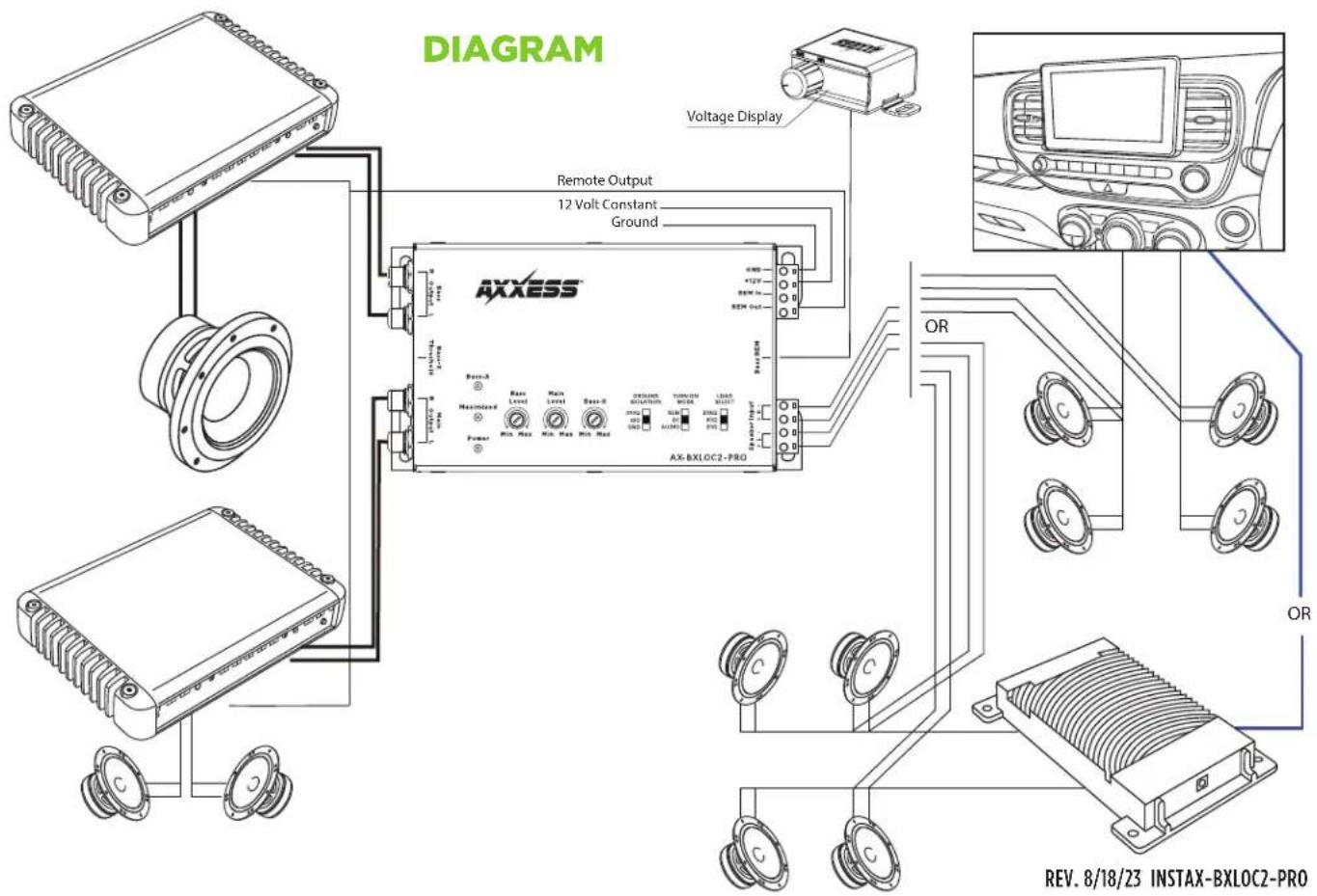
text_image
DIAGRAM Remote Output 12 Volt Constant Ground AXXESS Voltage Display AX-BXLOC2-PRO OR OR REV. 8/18/23 INSTAX-BXLOC2-PRO
AX-BXLOC2-PRO
INSTALLATION INSTRUCTIONS
SPECIFICATIONS
| Channels | 2 IN - 4 OUT (2 Main & 2 SUB) |
| Max Input Level (20kOhm) 40V / 400W @20K Ohm | |
| Operating Voltage 9V - 16V | |
| Trigger Selection REM / DC / AUDIO | |
| Turn On Trigger (DC) 3V - 7V | |
| Output Max@T3.8V 9.5V RMS | |
| Input Impedance Selection (Speaker Level) 20 / 60 / 20k Ohm | |
| Input Impedance (RCA Level) N/A | |
| Ground Selection N/A | |
| Gain Adjustment - 28dB to +1dB | |
| Input Sensitivity 0.5V - 20V | |
| Signal to Noise >110dB @6.4V Output | |
| THD+N (Total Harmonic Distortion) <0.01% | |
| Frequency Response | 20Hz - 20kHz |
| Low Pass Filter N/A | |
| Clip Indicator | YES |
| Bass Boost | 0dB + 12dB |
| Remote Control | N/A |
| Remote Control w/Voltmeter | Included |
Having difficulties? We're here to help.
Contact our Tech Support line at:
385-257-1187
Or via email at:
techsupport@metra-autosound.com
Tech Support Hours (Eastern Standard Time)
Monday - Friday: 9:00 AM - 7:00 PM
Saturday: 10:00 AM - 5:00 PM
Sunday: 10:00 AM - 4:00 PM

KNOWLEDGE IS POWER
Enhance your installation and fabrication skills by enrolling in the most recognized and respected
enrolling in the most recognized and resp mobile electronics school in our industry.
Log onto www.installerinstitute.edu or call
386-672-5771 for more information and take steps toward a better tomorrow.