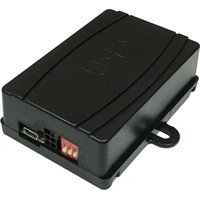
SWRGM-49R - Radio Interface CRUX - Free user manual and instructions
Find the device manual for free SWRGM-49R CRUX in PDF.


| Product Type | Radio Interface |
| Brand | CRUX |
| Model | SWRGM-49R |
| Compatibility | Select Chevrolet and GMC vehicles (2019-up): Camaro, Colorado, Cruze, Equinox, Malibu, Silverado, Sonic, Spark, Terrain, Sierra, Canyon, Acadia, Yukon |
| Power Supply | 12V DC (Constant, ACC, Ground) |
| Outputs Provided | Illumination, Parking Brake, Reverse, Speed Sense |
| Steering Wheel Control Retention | Yes, pre-programmed for factory SWC |
| Chime Retention | Yes, with adjustable volume via potentiometer |
| Backup Camera Retention | Yes, via RCA connector (except Camaro IOR 2019-up) |
| Included Parts | Module, Harness, SWC Cable |
| Connectors | 56-pin, 16-pin black, 4-pin, 3.5mm SWC |
| DIP Switch Settings | Configurable for various aftermarket radio brands (Alpine, Clarion, Kenwood, JVC, Boss, Sony, etc.) |
| LED Indicators | Solid blue (CAN recognized), Flashing blue (CAN not recognized), Solid red (ACC on), Red off (ACC off) |
| RAP (Retained Accessory Power) | Supported |
| Audio System Compatibility | For non-amplified or bypassed amplified systems (does not retain Bose amplifier) |
| OnStar Retention | No |
| Radio Code Requirement | IOR (found in glove box or driver door jamb) |
| Installation | Plug-and-play, includes installation diagram |
| Manufacturer | Crux Interfacing Solutions, Chatsworth, CA |
Frequently Asked Questions - SWRGM-49R CRUX
User questions about SWRGM-49R CRUX
0 question about this device. Answer the ones you know or ask your own.
Ask a new question about this device
Download the instructions for your Radio Interface in PDF format for free! Find your manual SWRGM-49R - CRUX and take your electronic device back in hand. On this page are published all the documents necessary for the use of your device. SWRGM-49R by CRUX.
USER MANUAL SWRGM-49R CRUX
- Retains chime functions.
- Pre-programmed to retain factory Steering Wheel Controls
- RAP (Retained Accessory Power).
- Provides illumination, parking brake, reverse, and speed sense outputs.
- Made for non-amplified vehicles or vehicles that will have their amps bypassed.
- Retains factory back-up camera. (Excluding Camaro (IOR) 2019-Up)
PARTS INCLUDED:
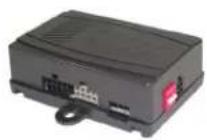

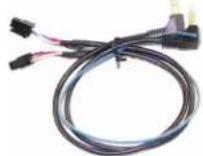
SWRGM-49R MODULE SWRGM-49R HARNESS SWC CABLE
INSTALLATION DIAGRAM:
![graph TD A["56-pin Connector"] --> B["To Factory Harness"] B --> C["Reverse Illumination (+) +12V Constant +12V ACC Ground Right Front (-) Right Front (+) Left Front (-) Right Rear (+) Right Rear (-) Left Rear (-)"] B --> D["Red/White Orange Yellow Red Black Gray White White Violet Violet Green Gree…](/content/2026/06/1226912/images/0601a01919bbed12d560274416668d7cb4b0a77843b59e5c90a130d296ac5eaa.jpg)
1 of 3
rev.072022

CHIME VOLUME ADJUSTMENT:
The SWRGM-49R has a potentiometer to adjust the chime volume. It is set at half way by default. To adjust the volume, simply use a suitable screw driver and turn the potentiometer clockwise to increase the volume and counter-clockwise to decrease the volume.

OEM CAMERA RETENTION:
The SWRGM-49R is prewired with an RCA connector to retain the OEM camera on vehicles with a IOR system.
- Connect Yellow video RCA to the new aftermarket radio reverse camera input.
- Test the video feed before installing the radio back into the dashboard. (Radio may need to be set prior to testing)
DIP SWITCH SETTINGS:
AFTERMARKET RADIO DIP SWITCH SETTINGS:
| RADIO BRAND: | DIP#: | 1 | 2 | 3 |
| Atoto, Dual, Fahrenheit, Jensen | OFF | ON | ON | |
| Pioneer, Power Acoustik, Soundstream | OFF | ON | ON | |
| Blaupunkt, Most off-brand Radio | OFF | ON | ON | |
| Alpine | OFF | OFF | OFF | |
| Clarion | ON | ON | OFF | |
| Kenwood | ON | ON | ON | |
| JVC | ON | OFF | ON | |
| Boss, Old Sony | ON | OFF | OFF | |
| New Sony | OFF | ON | OFF |
SWC MODULE
DIP SWITCH
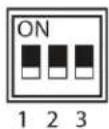
NOTE: For Atoto, Blaupunkt, Dual, Farenheit, Power Acoustik, Soundstream, and most off-brand radios, check the aftermarket radio's manual to see if the SWC buttons need to be programmed.
3.5MM SWC CABLE
Plug in the 3.5MM to 4-Pin SWC cable to the SWC module.
NOTE: Cap or Insulate the 3.5mm plug and Blue/Yellow wire if not being used.
For aftermarket radios that have wires for SWC connections, cut off the 3.5mm plug on the Crux SWC Cable (option B) and connect the SWC wires as follows:
Note that there are some radios that only have SWC1 and SWC2, in this case "shield" does not need to be connected.

RED to SWC Key 1 WHITE to SWC Key 2 SHIELD to SWC Ground

2 of 3
rev.072022
Crux Interfacing Solutions • Chatsworth, CA 91311 phone: (818) 609-9299 • fax: (818) 996-8188 • www.cruxinterfacing.com
VEHICLE APPLICATIONS:
Chevrolet
| Camaro* | 2019-Up |
| Colorado | 2019-Up |
| Cruze | 2019 |
| Equinox* | 2019-Up |
| Malibu* | 2019-Up |
| Silverado* | 2019-Up |
| Sonic | 2019-Up |
| Spark | 2019-Up |
GMC
*USE GM49R-EXT, 5 foot Extension Harness is used with GM IOR in cases where the Radio Control Module is located at front passenger side ( by the door hinge ). Sold Separately

Compatible with the following radio code: IOR
NOTE: The radio code can be found in the Glove Box.
NOTE: Newer model GM vehicles are now using a QR code label. If the Service Parts Identification Label is not located in the Glove Box, reference the Vehicle Certification Label on the driver's door jamb opening for the QR code.
NOTES:
- Does not retain Bose amplifier.
- Does not retain OnStar.


Brand : CRUX
Model : SWRGM-49R
Category : Radio Interface