Platinum Q 160 - Sewing machine Husqvarna-Viking - Free user manual and instructions
Find the device manual for free Platinum Q 160 Husqvarna-Viking in PDF.


User questions about Platinum Q 160 Husqvarna-Viking
0 question about this device. Answer the ones you know or ask your own.
Ask a new question about this device
Download the instructions for your Sewing machine in PDF format for free! Find your manual Platinum Q 160 - Husqvarna-Viking and take your electronic device back in hand. On this page are published all the documents necessary for the use of your device. Platinum Q 160 by Husqvarna-Viking.
USER MANUAL Platinum Q 160 Husqvarna-Viking
© 2020 Singer Sourcing Limited LLC. All rights reserved.
The information contained in this document is subject to change without notice. If you find any problems in the manual, please report them to us in writing. This document is not warranted to be error-free. Singer Sourcing Limited LLC assumes no responsibility or liability for any errors or inaccuracies that may appear in the informational content contained in this manual.
How to Use This Manual
Special Information
NOTE: A NOTE indicates important information that helps you make better use of your Platinum™ Q|160 quilting machine.
IMPORTANT: An IMPORTANT note provides information that is essential to properly using your Platinum™ Q|160 quilting machine.
△ CAUTION: A CAUTION indicates a potential for causing harm to your quilting machine, the quilt, or to yourself.
Congratulations on Your Purchase!
Welcome to the Husqvarna® Viking® family!
Husqvarna® Viking® is committed to your quilting success through excellence in customer service and education. With that in mind, we invite you to visit our website at www.husqvarnaviking.com to learn more about the art of quilting. Plus, you will find tips, tricks and inspiration on a variety of quilting topics including the basics of setting up your machine and loading a quilt.
We invite you to share your projects with us by tagging us in your Facebook and Instagram posts - we may even feature your post. Your new quilting friends are already there and they can't wait to see your creations!
Remember, if you ever have questions, your local retailer can help you or you can contact us by calling (385) 777-5256.
Thank you and happy quilting!
IMPORTANT: These packaging materials are designed to prevent the machine from being damaged. Keep them in case you need to bring this machine to the dealer or send it for repair.
Register Your Platinum™ Q|160 Quilting Machine
For product and warranty registration, go to the Husqvarna® Viking® web site at www.husqvarnaviking.com.
Table of Contents
Congratulations on Your Purchase! ....1
What's Included with Your Machine ....4
Important Safety and Machine Information ....4
Important Safety Instructions 4
To Use the Machine Safely....8
To Increase the Life of Your Machine 8
To Repair or Adjust the Machine....8
About your Machine....9
General Specifications....9
Platinum™ Q|160 Components....10
Installation and Setup....13
Setting up the Table 13
Placing the Machine in the Table 13
Installing the Foot Pedal 14
Installing the Thread Mast....14
Installing the Color Touch-Screen 15
Using Your Machine....16
Needle/Thread Selection Guide 16
Changing the Hopping Foot 16
Threading the Machine 17
Inserting (or Changing) the Needle....19
Bobbin Case and Bobbin Thread Tension Adjustments ....20
Inserting the Bobbin....20
Drawing the Bobbin Thread to the Top of the Quilt 21
Checking and Adjusting Bobbin Case Tension 21
Tighten Bobbin Case Tension....21
Easy to Set Tension Adjustment....22
Tighten Top Thread Tension....22
Loosen Top Thread Tension 22
Maintenance ....23
Cleaning and Lubricating the Machine 23
Cleaning the Touch-Screen Display 23
Using The Touch-Screen Display....24
Main Screen Manual Mode Button Functions 24
(A) Pause/Play Indicator 24
(B) My Speed 24
(C) Limit Controls 24
(D) Presets. 25
(E) Basting Mode In Manual Operation 25
(F) Easy to Set Tension 25
(G) Bobbin Thread Indicator 26
(H) Needle Stop 26
(I) Up/Down/TieOff 27
Main Screen Regulated Mode Button Functions 27
Stitches Per Inch (SPI)....27
Basting Stitches 27
Precision 28
Cruise....28
Tools Menu 29
Low Bobbin 30
Timer And Stitch Count 31
Alarms 31
Lighting 32
Calculator Screen 32
Diagnostics Screen 32
Diagnostics Tests ....33
Motor Sensor Test 33
Speed Sensor Test....33
Motion Sensors....34
Needle Sensor Test 34
Tension Calibration....35
Foot Pedal Test 35
Language 36
Update 36
System Information Screen....37
Getting Started Quilting 38
Thread Requirements 38
Needle Requirements 38
To Prepare for Quilting 38
Troubleshooting....39
Appendix 1....45
What's Included With Your Machine
• Bobbins (5) • 3/32 wrench
• Bobbin case • 2 mm hex wrench
• INSPIRA needles size 100/16 (pack of 10) • 2.5 mm hex wrench
- Thread tray and thread mast • 3 mm hex wrench
- Lint brush • Open-toe foot (ruler foot installed)
- Pen oiler
- Bobbin Winder
• Power cord • Platinum™ Q|160 Quilting Machine
- Screwdriver
Important Safety and Machine Information
This device complies with Part 15 of the FCC Rules. Operation is subject to the following two conditions: (1) This device may not cause harmful interference, and (2) this device must accept any interference received, including interference that may cause undesired operation. See the full Declaration of Conformity in the Appendix.
IMPORTANT: Do not operate your Platinum™ Q|160 quilting machine until you have completely read the information contained in this manual. Please keep all packaging and order information for warranty purposes.
IMPORTANT SAFETY INSTRUCTIONS
Read all instructions before using this machine.
When using this machine, basic safety precautions should always be followed, including the following:
DANGER — To reduce the risk of electric shock:
- A quilting machine should never be left unattended when plugged in. Always unplug the machine from the electrical outlet immediately after using and before cleaning.
— To reduce the risk of burns, fire, electric shock, or injury to persons:
- The Platinum™ Q|160 is heavy. Never attempt to lift it alone. Always use two people when lifting. Always lift from the throat of the machine.
- Always unplug the Platinum™ Q|160 from the electrical outlet when performing any maintenance, changing the needle, removing thread locks, or when left unattended.
- Do not unplug by pulling on cord. To unplug, grasp the plug, not the cord.
- Keep fingers away from all moving parts. Use caution around the needle or sharp external components.
- Change the needle often. Do not use bent or dull needles. "Every quilt deserves a new needle".
- Switch the machine to the symbol off, or 0, position to turn it off when making any adjustments in the needle area, such as threading needle, changing needle, threading bobbin, changing hopping foot, and so forth.
- Never drop or insert foreign objects into any opening.
- The Platinum™ Q | 160 should only be used indoors away from moisture.
- The Platinum™ O|160 should not be stored or used in extreme temperatures.
- Use the Platinum™ O|160 only for its intended use as described in this manual.
- To disconnect from the wall outlet, push the switch to the off position, then remove the plug from outlet pulling from the plug, not the cord. Never operate the Platinum™ Q|160 if the cord is damaged or not working correctly. If a mechanical or electrical problem is encountered, return the Platinum™ Q|160 to the nearest authorized service center or the manufacturer for examination, repair, electrical, or mechanical adjustment.
- It is not recommended that the Platinum™ Q|160 quilting machine be used with any machine quilting frame other than those recommended by Husqvarna® Viking®.
- Use this quilting machine only for its intended use as described in this manual. Use only attachments recommended by the manufacturer as contained in this manual.
- Never operate the machine with any air openings blocked. Keep ventilation openings of the machine free from the accumulation of lint, dust, and loose cloth.
- Do not operate where aerosol (spray) products are being used or where oxygen is being administered.
- Do not pull or push the machine across the fabric excessively while stitching. It may deflect the needle enough to cause it to break.
- Use only needles designed for free motion quilting and recommended by Husqvarna® Viking® for this machine. Other types of needles may break during normal quilting.
- Children shall not play with the machine. Close attention is necessary when this machine is used by or near children.
- This sewing machine may be used by children age 8 years and above and persons with reduced physical, sensory, or mental capabilities or lack of experience and knowledge if they have been given supervision or instruction concerning use of the machine in a safe way and understand the hazards involved.
- Cleaning and user maintenance shall not be made by children without supervision.
AVERTISSEMENT
Save These Instructions
This machine is intended for household or commercial use.
Disclaimer
Husqvarna® Viking® and its Retailers are in no way legally responsible or liable for damage to the Platinum™ Q|160 when used improperly or not in accordance with the guidelines stated in this manual or when used on machine quilting frames not recommended by Husqvarna® Viking®.
Optional U.S. Grounding for Customers with 120 VAC Connections

flowchart
graph TD
    A["Grounded Outlet Boxes"] --> B["TAB FOR GROUNDING SCREW"]
    B --> C["ADAPTER"]
    C --> D["METAL SCREW"]
    D --> E["(C)"]
    F["GROUNDING PIN"] --> A
This product is for use on a nominal 120 V or nominal 220 V circuit, and has a grounding plug that looks like the plug illustrated in sketch A above. A temporary adapter, which looks like the adapter illustrated in sketches B and C, may be used to connect this plug to a 2-pole receptacle as shown in sketch B if a properly grounded outlet is not available. The temporary adapter should be used only until a properly grounded outlet can be installed by a qualified electrician. The green colored rigid ear, lug, and the like, extending from the adapter, must be connected to a permanent ground such as a properly grounded outlet box cover. Whenever the adapter is used, it must be held in place by the metal screw.
IMPORTANT: In Canada, the use of a temporary adapter is not permitted by the Canadian Electric Code.
To Use the Machine Safely
- Carefully watch the needle when sewing. Do not touch the hand wheel, take up lever, needle, or other moving parts.
- Turn the machine off and unplug the cord in the following cases:
- when you have stopped using the machine
- when you replace or remove the needle or any other part
- when you check or clean the machine
-
when you leave the machine unattended
-
Connect the machine directly to the wall outlet or to a surge protector that connects directly to the wall outlet. Do not use extension cords.
To Increase the Life of Your Machine
- Do not store this machine in areas exposed to direct sunlight or high humidity. Never use or store the machine near a heater, an iron, a halogen lamp or other hot things.
- Use only neutral soaps or detergents to clean the machine. Benzene, solvents and scouring powders can damage the case and the machine and therefore should never be used.
- Do not drop or bump the machine.
- Always consult the manual to replace or fix the hopping foot, needle or any other part of the machine. If necessary contact an authorized Husqvarna® Viking® retailer or Husqvarna® Viking® technical support.
To Repair or Adjust the Machine
If the machine breaks down or needs adjustment, first check the troubleshooting chart at the end of this manual to inspect and adjust the machine yourself.
For more product information and updates, visit our website at www.husqvarnaviking.com.
The contents of this manual and product specifications are subject to change without prior notice. Check for updated manuals at www.husqvarnaviking.com.
About Your Machine
General Specifications
The Pla ^TM num Q|160 utilizes high-tech electronics and an innovative touch-pad user interface to offer greater functionality and ease of operation to home quilters than ever before conceived in the quil-ng industry. The Pla ^TM num Q|160 quil-ng machine is a high quality machine that incorporates very robust design features and is very easy to service.
Sewing Opening Dimensions 8.25" X 18" (210 mm X 457 mm)
Sewing Speed Maximum: 2200 SPM
Needle System 134 (135 X 7)
Hook System Rotary, Horizontal axis, M-class bobbin
Bobbin Type Aluminum, Class M
Bobbin Case Type MF
Motor Type Brushless DC
Needle Positioning Up and down, e-o s tch
Electrical Power
US/Canada: 105 – 120 VAC, 47-63Hz, 300W peak
Rest of the world: 100 - 250 VAC, 47-63Hz, 300W peak
This machine conforms to UL and international safety standards for sewing machines and US and international laws for electromagneto compliance.
Outlet Power 120 walls maximum
Sew Foot Stroke/Li 5 mm
Needle Bar Stroke 35.3 mm
Take-Up Stroke
73 mm
Lubrication, main components
Kluber Lube, permanent
Lubricaton of hook
Velocite 10, Texaco 22
Disclaimer
Husqvarna® Viking® and its Retailers are in no way legally responsible or liable for damage to the Platinum™ Q/160 when used improperly or not in accordance with the guidelines stated in this manual or when used on machine-quilting tables not recommended by Husqvarna® Viking®.
Platinum™ Q|160 Components
Front Side View
Components Not Identified
Because the Platinum™ Q|160 is upgradeable to a stand-up frame quilting system, there are components found on the machine that are not used for stationary machine quilting (such as threaded holes for handlebars).

text_image
Technical diagram of a sewing machine with numbered components and directional arrows indicating assembly or movement.- Thread Mast 6. Stirrup Thread Guide D
- Thread Guide A 7. Take-Up Lever
- Three-Hole Thread Guide B 8. Thread Guide E
- Thread Guide C 9. Front Casing/Frame
- Top Thread Tension Assembly 10. Hand Wheel
Back Side View

text_image
Technical diagram of a sewing machine with numbered parts and an inset view of the component assembly.- Needle Bar 18. Presser Bar
- Needle Bar Thread Guide 19. Front Threaded Display Mounting Holes
- Needle 20. Back Casing/Frame
- Ruler Foot 21. Color Touch-Screen Display Connector
- Needle Plate 22. Threaded Horizontal Spool Pin Mounting Hole
- Feet mount
Rear and Front Views
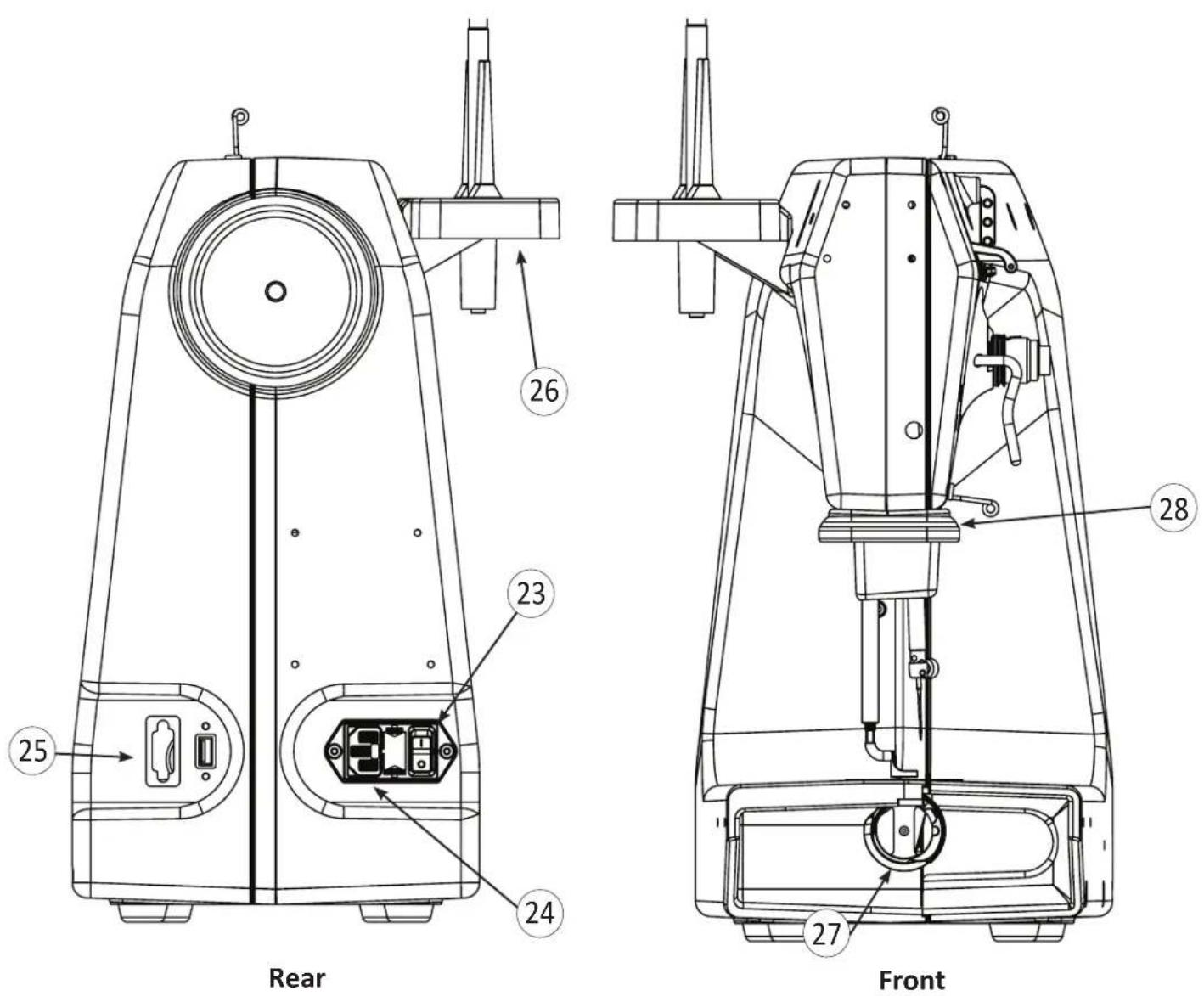
- On/Off Switch 26. Thread Mast
- Power Cord Connector 27. Bobbin Assembly
- Foot Pedal Connector 28. LED Light Ring
Installation and Setup
Setting Up the Stationary Longarm Table
The Stationary Longarm Table is designed to accommodate the Platinum™ Q|160 machine. It has legs that are height-adjustable and is heavy enough to provide stabilization for quilting at high speeds.
See the instructions provided with the Stationary Longarm Table for table assembly.
Placing the Machine in the Table
- We recommend having someone help lift and place the machine.
- Lift the machine by putting one arm through the throat space.
- Remove the insert if in place and set the machine into the machine tray. Center the machine left to right in the opening.
- Slide the insert into place and move the machine until it is aligned with the insert.
- If necessary, adjust the machine plate to align the top of the insert with the table top. See Stationary Longarm Table Assembly Instructions for more information.
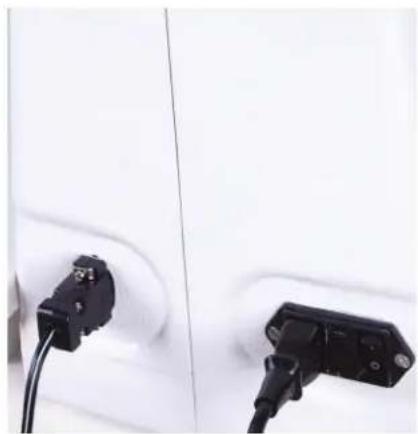
Installing the Power Cord
Check that the On/Off switch is turned off (the 0 setting). Plug the power cord into the top power outlet on the back of the machine. Do not plug the power cord into a power source at this time.
natural_image
Close-up of two black electrical connectors plugged into a white car panel (no visible text or symbols)Installing the Foot Pedal
- Plug in the foot pedal cord end into the foot pedal connector that is attached to the Stationary Longarm Table.
- Place the foot pedal under the table where operator can reach it from the front of the machine.
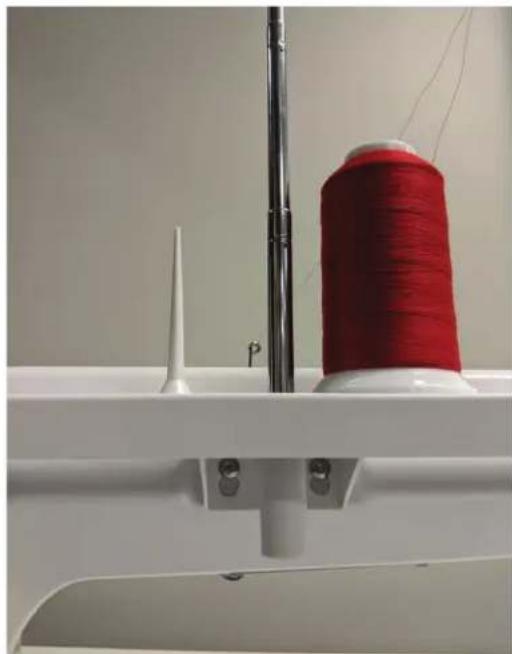
Installing the Thread Mast
- Locate the two threaded holes on the left side of the machine, near the top and towards the middle.
- Remove the 2 screws with the 3mm hex wrench. Line up the holes of the thread stand with the holes on the machine and reinsert the screws.
- Turn the thread stand until the eyelets are positioned over the spool pins.
NOTE: The eyelets of the thread mast MUST be centered over the spool pins. This ensures that the cone of thread will not pull, turn or tilt, which will cause thread tension problems.
natural_image
Close-up of a sewing machine needle with a spool of red thread and a white spool, no visible text or symbols.Installing the Color Touch-Screen
The color touch-screen comes pre-installed on its mounting bracket.
NOTE: Confirm that the power is turned off before installing the color touch-screen.
- Remove the two bolts from the bag in which they are packed.
- There are two holes on front of the machine head.
- Align the holes in the color touch-screen bracket with the two holes on the front of the machine.
- Use a 3mm hex wrench to insert the two bolts through the holes of the bracket and into the machine. Tighten in place.
- Plug the remaining cable end into the display connector located on the side of the machine.
- Remove the protective plastic from the touchscreen before using.

natural_image
Close-up of a white electrical socket with black cable and blue component attached, no visible text or symbolsUsing your Machine
Needle/Thread Selection Guide
Needle Size Threads
| 12 (80) Monofilament, 100 wt. Silk, 60 wt. poly, mylar |
| 14 (90) Silk (100 wt) 60 wt., monofilament, glitter, some metallics |
| 16 (100) 60 wt., 50 wt., 40 wt., monofilament, glitter, metallics |
| 18 (110) 50 wt., 40 wt., 30 wt., metallic |
21 (125) 30 wt., 20 wt., 12 wt.
Changing the Hopping Foot
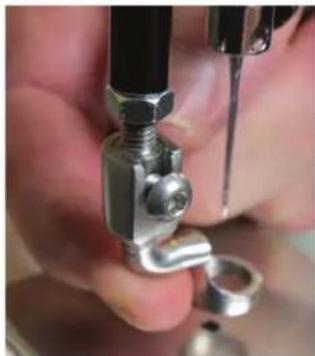
Your machine comes with two hopping feet: a ruler foot and an open-toe foot. Use the ruler foot for ruler work and everyday quilting, and the open-toe foot when you need greater stitch visibility (such as micro quilting).
- Remove the foot that is on the mount by using the 2.5mm hex wrench to loosen the mounting screw far enough that you can slide the foot off of the mount.
- Slide the desired foot onto the mount. Note that the opening on the side of the foot is lined up with the screw hole. Push the foot up as far as it will go.
- Tighten the foot firmly with the 2.5mm hex wrench.
natural_image
Close-up of hands using a mechanical tool to adjust a metal clamp or connector (no visible text or symbols)
natural_image
Close-up of hands using a tool to adjust or install a mechanical component (no visible text or symbols)- Ensure the middle of the foot opening is centered with the needle when the foot is fully tightened with the 2.5mm hex wrench. If it isn't properly centered, loosen the lock nut on the foot adaptor with an 8mm wrench, center the foot with the needle; hold the foot firmly in position; and tighten the lock nut.
Threading the Machine
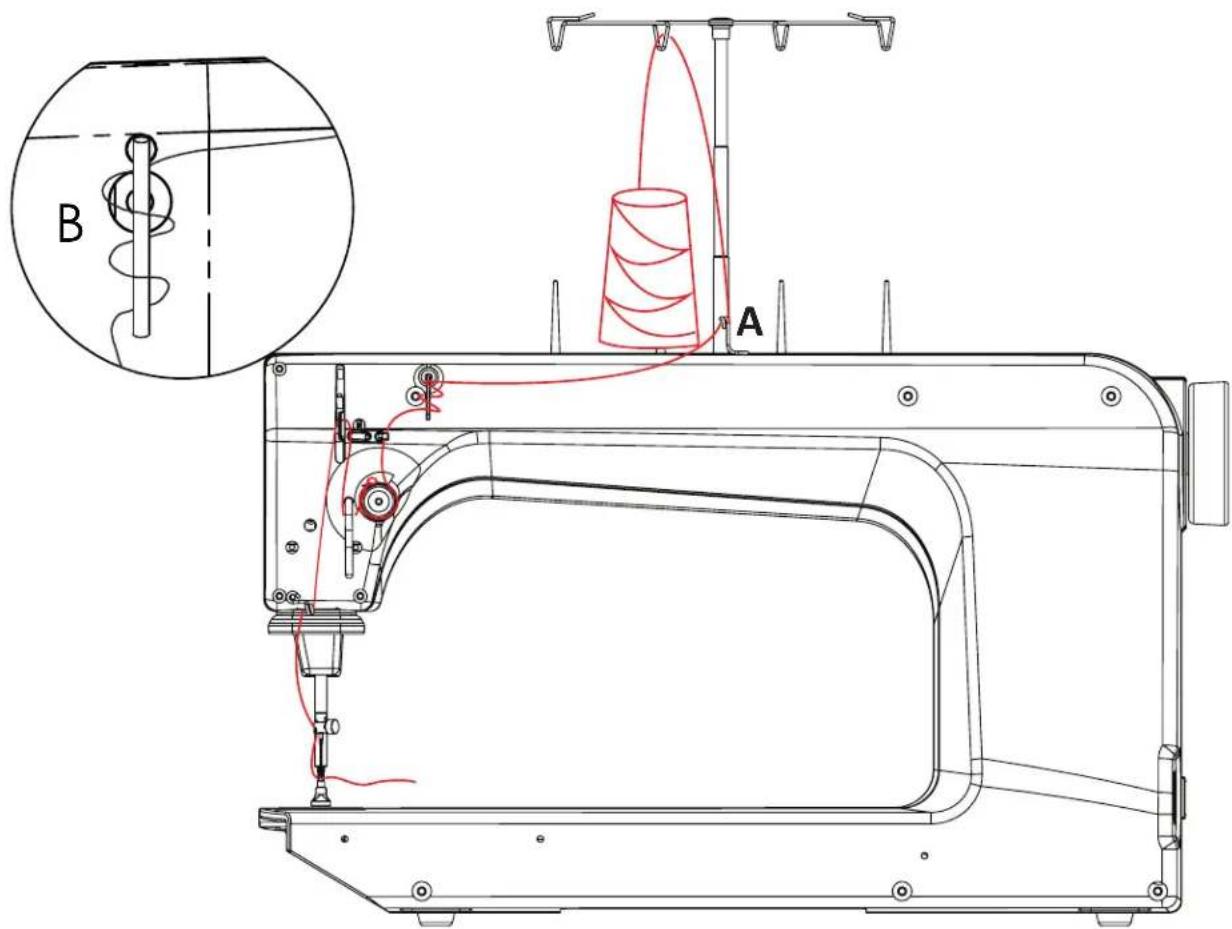
text_image
Technical diagram of a sewing machine with labeled components and a magnified inset showing component B-
Place a cone or spool of thread on the spool pin. If using a spool, make sure that any slits on the spool are against the base of the spool pin holder. Pass the thread through the thread-mast eyelet from back to front, continuing to thread guide A.
-
Continue to the three-hole thread guide B. Beginning at the top, wrap all three holes from back to front, hand wheel side to needle side.
NOTE: The purpose of the three-hole thread guide B is to prevent loops of thread coming off the thread cone from going into the top tension as a knot, causing thread breakage and bad tension. For most threads on a cone, it is important to thread all three holes for consistent results and to make adjustments at the top tension assembly. An exception to this rule is when working with very delicate threads, such as holographic or threads that are prone to breakage. You may try skipping one or two holes on thread guide B when using these threads.
- Thread continues through thread guide C, and then down to the tension assembly.
NOTE: It is important that the thread is "flossed" up between the two tension discs. If the thread is not firmly in place between the two tension discs, the thread rests on the outside of the tension discs (without tension) and looping on fabric or thread nests may occur.
4. Once the thread is in place, be sure that the thread catches on the take-up spring and then pull it down under the stirrup (thread guide D).
5. Bring the thread back up through the take-up lever from back to front, and then down through thread guide E. Pull the thread at the take-up lever to ensure that it is properly flossed between the tension discs. If it is properly flossed in the tension discs you should feel some resistance as you pull the thread. If it is not, then the thread will pull freely.
6. Pull the thread down to the needle thread guide and thread through the hole (thread guide F).
7. Make sure the thread is following the groove down the front of the needle and threads from front to back. Be careful that the thread does not twist around the needle.

text_image
C D E FIMPORTANT: The Platinum™ Q|160 quilting machine does not have a presser foot lever or top tension release like a home sewing machine. On a home sewing machine, the top tension is released when the presser foot is raised, allowing the thread to come freely out of the machine.
When a home machine is threaded, the presser foot is raised, and the tension discs are released and open for the thread to easily fall between the tension discs. This is not the case with the Platinum™ Q|160 quilting machine, where the top tension is always tight and the tension discs are never open.
Therefore, the thread must be pulled up or “flossed” between the tension discs, or it will stay outside the discs and float without tension, causing serious stitch problems and/or thread nests. It is also possible to bend the needle while it is threaded if care is not taken while moving the quilt across the quilting table because the top tension is never released.
Inserting (or Changing) the Needle
The needle that is in the machine when it arrives at your home has been used for 20 minutes of testing. It is possible that it could be damaged in shipping or as you remove the machine from the box. For these reasons, Husqvarna® Viking® recommends that you replace the needle before beginning to quilt with your new machine.
-
Move the needle bar to the highest position by turning the hand wheel. Then turn off the power.
-
Loosen the needle-bar-clamp screw.
-
Remove the old needle by pulling it down. Discard the old needle in a safe way.
-
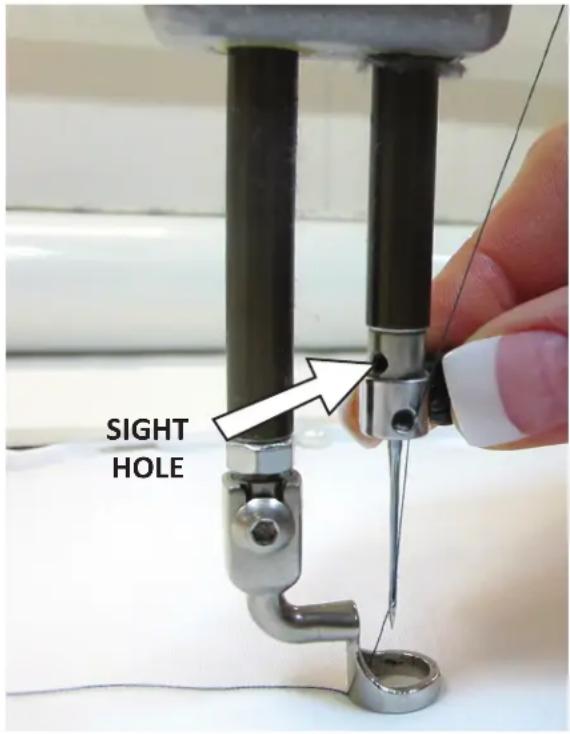
With the scarf (small ground out section/dip on the back side of the needle just above the needle eye) facing toward the back, hand-wheel side of the machine, and the long groove down the front of the needle facing the bobbin case side, push the needle all the way up into the needlebar, until it can go no farther and you can see the top of the needle touching the top of the sight hole.
-
Carefully tighten the needle bar clamp screw until the needle is securely fastened into the machine. Use the 2.5mm hex tool to secure the needle; however take care not to over tighten the screw. This may result in damaged or stripped threads in the needle clamp. Damage to the needle clamp may also make it difficult to fully insert the needle, which will change the machine timing, causing more issues. Stripped threads and damage caused by improper needle installation or tightening are not covered under warranty.
NOTE: It is recommended to use a new needle for each new quilt. Also, replace the needle any time it becomes bent, dull or burred.
text_image
SIGHT HOLEIMPORTANT: Check the needle to confirm it is fully inserted. The needle bar has a stop/sight hole above the needle bar clamp screw. Make sure the needle is touching the top of the stop/sight hole. If it is not, the machine timing will be off and it may be possible for the needle to collide with internal parts, causing damage not covered by warranty.
△ CAUTION: Your Husqvarna® Viking® machine stitches at a much faster speed than your home sewing machine, therefore, it is essential that the needle is seated into the needle bar and fully tightened (but not over tightened). Check often that the needle has not become loose. If the needle comes loose, it could break in the machine, causing damage, altering the machine's timing, or causing bodily harm.
Needles are inexpensive and are important to the success of your project. Plan to change needles every 5-7 hours of quilting or more often if working with fusibles or heavy materials.
Bobbin Case and Bobbin Thread Tension Adjustments
Inserting the Bobbin
NOTE: Turn off the power switch while inserting the bobbin case or anytime your hands are near the needle area.
-
Place the bobbin in the bobbin case so that the thread pulls off clockwise when viewing the open side.
-
Slide the thread through the slot and under the tension spring leaving 5-6 inches of thread hanging loose.
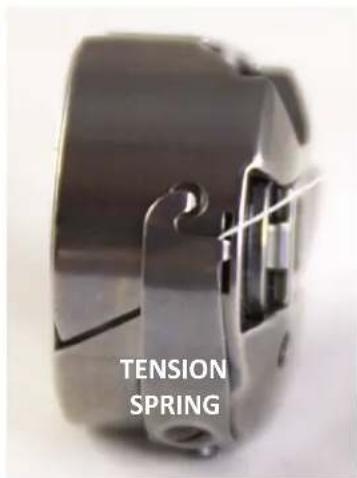
text_image
TENSION SPRING- To insert the bobbin case into the machine, grasp the bobbin case with thumb and first finger. Do not lift the lever on bobbin case. Fit the bobbin case onto the hook spindle in the machine. Rotate the case until the open throat keys into the alignment notch in the middle of the hook. Push the case in until it stops in place. Push the case inward further until it clicks. Allow the thread end to hang freely.
NOTE: Pulling out the latch lever pushes the bobbin forward in the bobbin case, aiding in removal of the bobbin. The lever should be used only for removing the bobbin case from the machine.

natural_image
Close-up of a metallic pulley with a circular hole and curved arrow indicating rotation (no text or symbols)
natural_image
Close-up of a circular mechanical component with a curved arrow indicating rotation (no text or symbols visible)
natural_image
Close-up of a metallic mechanical component with internal cavities and mounting holes (no visible text or symbols)Drawing The Bobbin Thread to the Top of the Quilt
-
After threading the machine, plug it in and turn on the power. Place quilt sandwich under hopping foot.
-
While firmly holding the tail of the needle thread with the left hand, choose one of the following methods to cycle the needle through one full rotation to bring the bobbin thread to the top of the quilt.
A. Foot Pedal Method. LIGHTLY tap the foot pedal to make the needle go down. Then LIGHTLY tap again to bring the needle up.
B. Needle Up/Down Button Half-Stitch. Find the Needle Up/Down Button in the center of the color touch-screen main display. Press once to cycle the needle down. Press again to cycle the needle back up.
C. Needle Up/Down Button, Full-Stitch. Find the Needle Up/Down Button in the center of the color touch-screen main display. Press and hold briefly to cycle the needle through one complete stitch cycle (down and back up).
-
Pull the fabric 3-4 inches away while holding the needle thread.
-
Bobbin thread will pull up and through to the top, allowing you to grasp the loop and pull it to the desired length.
Checking and Adjusting Bobbin Case Tension
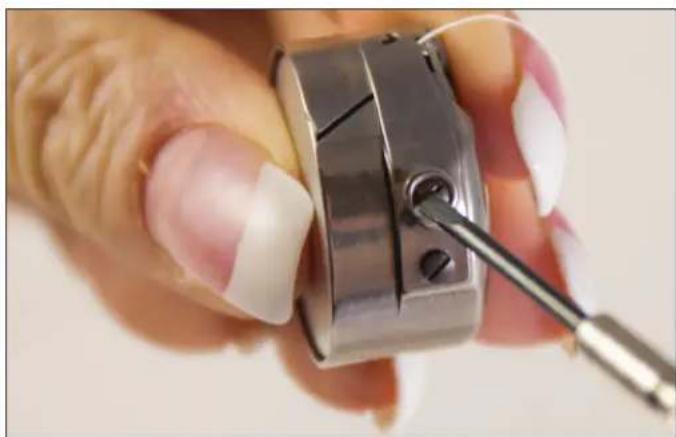
The bobbin case tension is the foundation tension for the entire machine. To test that bobbin tension is correct, hold the bobbin case in the palm of your hand with the open end facing up. Wrap the thread around your index finger and lift the bobbin case from your hand. While gently moving the finger front to back (not up and down, which is not consistent), the bobbin case should slide slowly down the thread, like a spider on its web.
The small screw in the center of the tension spring is where the adjustment is made. Turn clockwise to tighten and counter-clockwise to loosen the bobbin case tension. Make very small adjustments. Check the bobbin tension every time a new bobbin is inserted.
natural_image
Close-up of a hand using a dental tool to adjust or repair a tooth model (no text or symbols visible)Tighten Bobbin Case Tension
The bobbin case tension is TOO LOOSE if it will not lift up onto its side. Turn screw clockwise to tighten. The bobbin case screw requires very small adjustments. Think of the "tick of a clock". Adjust, then check. Adjust and check again.
Easy to Set Tension Adjustment
IMPORTANT: Top thread tension should be adjusted only after the bobbin case foundation tension adjustment is made.
Puckering, gathers and thread breakage occur when the top tension is too tight. Loops and thread nests occur on the back when the top thread tension is too loose. Tension may need to be adjusted, depending on the fabric, thread or batting used in each project.
As you change the top tension, the value in the tension indicator box on the Main screen increases or decreases in increments of five. When you are happy with the tension, note the top tension value for that type of thread (brand, weight, and color) so you can quickly and easily set the tension when you use this thread again in the future.
Unlike the bobbin case adjustment, which requires minute adjustments, the top tension knob may require turns anywhere from 1/4 of a turn to two to four turns to achieve balanced tension.
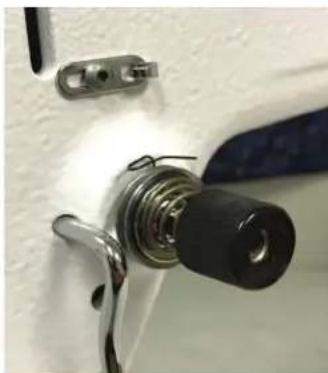
Tighten Top Thread Tension
To adjust the top tension tighter, turn the top thread tension knob clockwise.
Loosen Top Thread Tension
To loosen the tension, turn the top thread tension knob counter-clockwise.
natural_image
Close-up of a mechanical component with a black threaded end and metallic brackets (no visible text or symbols)
NOTE: Before adjusting the top tension, remember to floss or pull the top thread up into the tension discs or it will float outside the discs providing little or no top tension. This could cause significant tension or nesting problems on the bottom side of the quilt. If the top tension is too loose (causing loops of thread on the underside of the quilt) and no amount of tightening the top thread tension knob seems to affect it, there's a good chance that the thread is riding on the outside of the tension discs and is not "flossed" between them.

text_image
A stitch is balanced when the top thread and the bobbin thread meet in the middle of the quilt sandwich. Tight top tension Loose top tensionMaintenance
NOTE: Turn off the machine and remove the power cord when performing maintenance on the machine.
Cleaning and Lubricating the Machine
Only use light sewing machine oil in the Platinum™ Q|160. Internal oiling is not necessary on the Platinum™ Q|160 except when the machine is taken to a service technician for routine maintenance and cleaning. The hook assembly, however, needs regular lubricating. Failure to keep the hook assembly lubricated can cause severe damage to the machine.
To lubricate, turn off the machine. Remove the bobbin and case before oiling. Clean around the hook assembly with a soft brush to remove lint. Put a very small drop of oil on the hook in the region where the bobbin basket assembly and the rotating hook meet. The bobbin basket is the portion of the hook that the bobbin case snaps into. The bobbin basket remains stationary while the hook rotates around the basket. The oil lubricates the region where these two components interlock. A drop of oil in the region indicated will work its way back into the interlocking area of the hook and bobbin basket.

natural_image
Close-up of a mechanical component with a central shaft and internal structure (no visible text or symbols)The frequency of lubrication depends upon the usage of the machine. Lubricating is recommended before running the machine if it has not been used regularly, or every other bobbin change if used frequently. After oiling, always stitch through a scrap piece of fabric, as oil may cling to thread. Over-oiling can cause excess dripping from the bobbin assembly. Lack of lubricant may be noticed by a change in the sound of the machine and will affect stitch quality.
Cleaning the Touch-Screen Display
Use a soft rag dampened with isopropyl alcohol to gently wipe the display and remove any marks. Never use any other chemicals to clean your display as they may adversely affect the touch-screen response and clarity.
Using the Touch-Screen Display
The Plati num™ Q|160 has a color touch-screen display on the front of the machine. Setti ngs are changed using this display.
Main Screen Manual Mode Butt on Functions
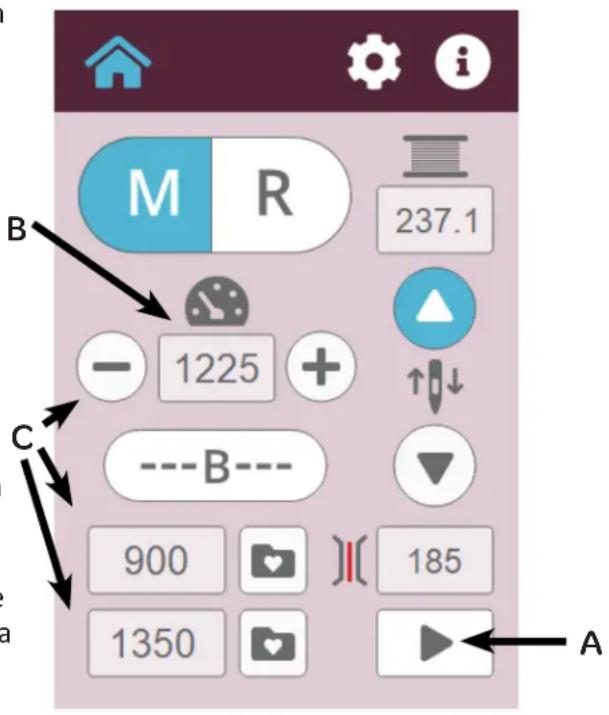
The Machine is in Manual Mode when the M is blue.
(A) Pause/Play Indicator
The Pause/Play butt on on the bottom right of the screen may be used to start and stop the machine instead of the foot controller. When the butt on is pressed, the machine will start even if the foot controller is not pressed, and the symbol on the butt on will change from the play arrow to a double line pause icon. The butt on color will also change to blue. When the butt on is pressed again, the machine will stop and the symbol on the butt on will change back to the play icon with a white background color.
When the machine foot controller is pressed, the butt on color and icon show that the machine is running by changing the butt on to the pause icon and blue background. When the foot controller is released, this butt on will return to the blue butt on with the play icon.
(B) My Speed
My Speed Indicator is the current selected maximum speed the machine will run when the foot pedal is fully depressed. The value displayed will vary as you press and release the foot pedal. The maximum stitches per minute that is displayed is controlled by this limit that is set for the machine.
(C) Limit Controls
The Limit Controls encompass two main features, the My Speed controls and Preset buttons. The My Speed controls consist of “+” and “−” butt ons and the white My Speed display box. Pressing the “+” butt on will increase the maximum motor speed the pedal controls. Pressing the “−” butt on will decrease the maximum speed.
text_image
M R 237.1 - 1225 + ↑↓ ---B--- 900 [ ] ( 185 1350 A(D) Presets
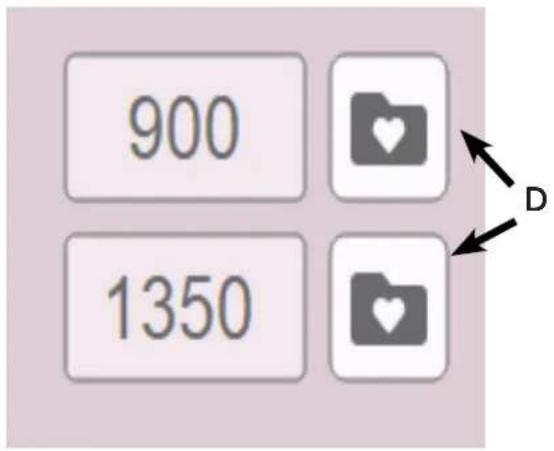
Save up to two preset speeds to quickly switch between speed preferences. For example, you may prefer a slower speed when using rulers and a faster speed when doing all-over meandering.
Use the "+" and "-" butt ons to adjust the speed percentage and then press the Record butt on next to one of the preset values to store that speed as a preset. To use one of the preset speeds, simply press the speed.
(E) Basti ng Mode In Manual Operati on
The Plati num™ Q|160 has a basti ng mode that causes a sti tch to be formed at a specifi ed ti me interval – every 0.5 second, 0.75 second, 1.0 second, 1.5 second, or 2.0 seconds. Touch the basti ng icon to acti vate basti ng mode. Then press the “+” or “-” butt on to set the ti me interval for the basti ng sti tch.
Press the foot pedal to begin quilti ng. The Plati num™ Q|160 will take a sti tch (needle down and then needle up) at the specifi ed interval. Coordinate how quickly you move the quilt sandwich with how quickly the machine takes a basti ng sti tch. Experiment with the various speed opti ons along with moving the quilt to fi nd which of the setti ngs work best for you to positi on the basti ng sti tches on your quilt.
(F) Easy to Set Tension
The tension box on the Main Screen shows the current tension setting as a numeric value. As the tension dial is turned clockwise to tighten the top tension, the number increases in increments of fi ve. As the tension dial is turned counter-clockwise to loosen the top tension, the number decreases in increments of fi ve. The faster the dial is turned, the faster the numbers increase or decrease.
Aft er setti ng the bobbin tension, test the top tension by sti tching on a fabric scrap on the edge of the quilt batti ng and backing. Increase or decrease as needed until I balanced tension is achieved. Make a note of the thread type (weight, brand, color) and the tension value to quickly and easily set the tension when this same thread is used again in the future.
text_image
900 1350
text_image
M R 237.1 - 1225 + ↑↓ ----B---- 900 185 1350
text_image
185 F(G) Bobbin Thread Indicator
When using the Low-Bobbin Esti mator feature, The Bobbin Thread Indicator box shows how much bobbin thread remains on the bobbin. The value counts down until it gets to zero, at which ti me the low-bobbin alarm sounds an alert indicating it is ti me to put in a new bobbin. When recording a bobbin length, REC will appear in this box. When recording is turned off, the bobbin remaining value will again appear in this space.

text_image
M R 237.1 G - 1225 + ---B--- 900 185 1350(H) Needle Stop
Needle Stop setting indicates whether the needle stops in the up or down position. Blue indicates the selected butt on.
The Needle Stop butt ons indicate the positi on the needle will stop, up or down, when the foot pedal is released or the Play butt on is turned off.

text_image
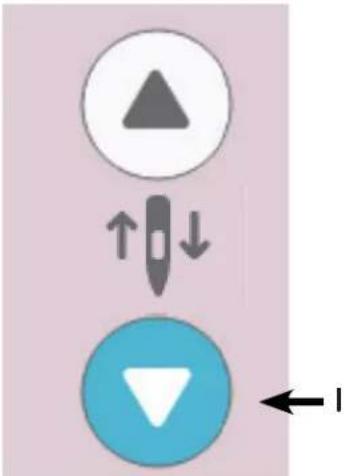
M R 237.1 - 1225 + ---B--- 900 185 1350(I) Up/Down/TieOff
The arrow butt ons can assist in creati ng ti eoff sti tches, basti ng, or needle-positi oning functi ons without the use of the foot pedal. Pressing and releasing the arrow butt on quickly will send the needle to the next needle stop positi on. If the needle is up, pressing the butt on will cause the needle to move to the down positi on. If the needle is down, it will return to the up positi on.
Pressing and holding the blue arrow butt on for a longer ti me creates a full sti tch. The needle will conti nue to cycle while holding the arrow butt on and stop when the butt on is released. This acti on is useful for ti eing off beginning and ending sti tches.
flowchart
graph TD
    A["△"] --> B["↓"]
    B --> C["▼"]
Main Screen Regulated Mode Butt on Functions
Your Plati num™ Q|160 comes equipped with the all new built-in sti tch regulator. The two sensors in the table insert (on either side of the needle) sense the movement of fabric and adjusts the machine's sti tch speed during free-moti on quilting. This ensures balanced, equal-length sti tches.
The Machine is in Regulated Mode (A) when the R is blue.
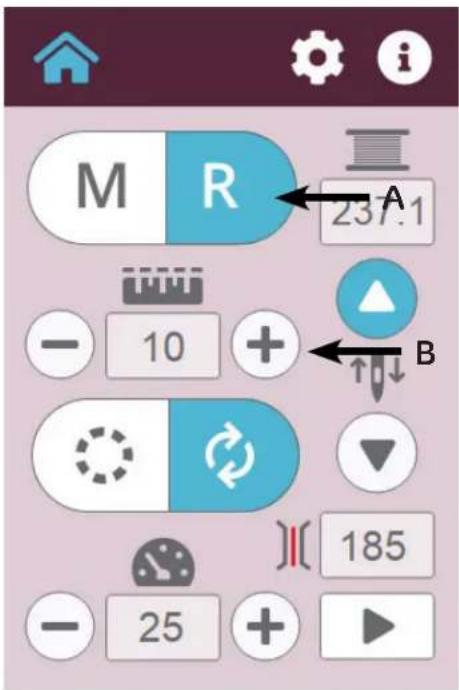
(B) Stitches Per Inch (SPI)
Pressing the “+” or “-” butt ons in the mid left porti on of the screen will increase or decrease the sti tches per inch (SPI) setti ng. The setti ng is reflected in the white indicator box between the “+” and “-” butt ons. The value can be adjusted between 4 and 22 sti tches per inch.
Basti ng Sti tches
There are four basti ng sti tch setti ngs controlled by the sti tches per inch functi on. Aft er the SPI reaches its lowest setti ng of 4 sti tches per inch, pressing the “-” butt on will acti vate the basti ng setti ngs:
text_image
M R 237.1 - 10 + B 185 - 25 +• 0.5-inch baste (one sti tch every half-inch movement of the fabric over the table)
• 1-inch baste (one sti tch every one inch movement of the fabric over the table)
• 2-inch baste (one sti tch every two inches of movement of the fabric over the table)
• 4-inch baste (one sti tch for every four inches of movement of the fabric over the table)
After selecting the basting stitch setting, begin quilting by pressing the Play button or by pressing down on the foot pedal. As the fabric moves across the table, the machine will perform a stitch (needle down and needle up) every half inch, one inch, two inches or four inches.
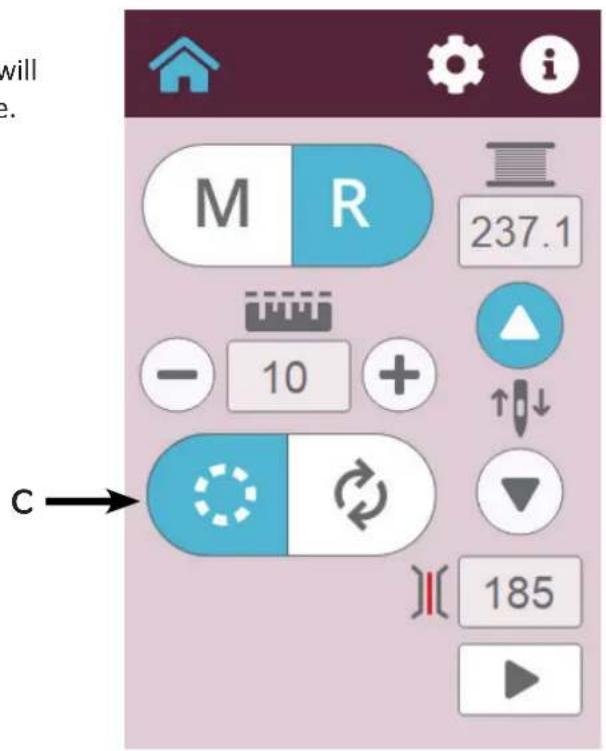
The stitch regulation mode (Precision or Cruise) which is selected will be indicated by the button being blue.
(C) Precision
If Precision mode is selected, the Plati num™ Q|160 will not start sti tching until fabric moves across the table.
text_image
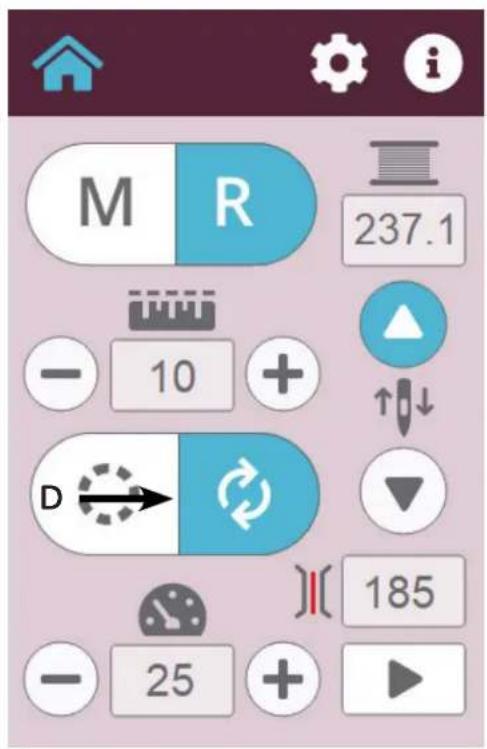
will e. M R 237.1 - 10 + ↑↓ ↓ C → 185(D) Cruise
If Cruise mode is selected, the machine will immediately begin sti tching at the speed (sti tches per minute) indicated in the box when the foot pedal is depressed or the play butt on is selected.
The Cruise speed is the minimum speed the machine will sti tch, regardless of how slowly the fabric is moving across the table.
The Cruise speed can be adjusted using the "+" and "-" butt ons that appear below the Cruise butt on when Cruise mode is selected. Cruise speed can be adjusted between 50 and 1,100 stitches per minute.
The Play/Pause indicator will change as soon as you press it or the foot pedal. In Precision mode, the needle will not move until the fabric moves across the table. In Cruise mode, the needle will stich immediately at the Cruise speed as soon as you press the Play butt on or on the foot pedal.
text_image
M R 237.1 - 10 + D → ↔ - 25 + 185Tools Menu
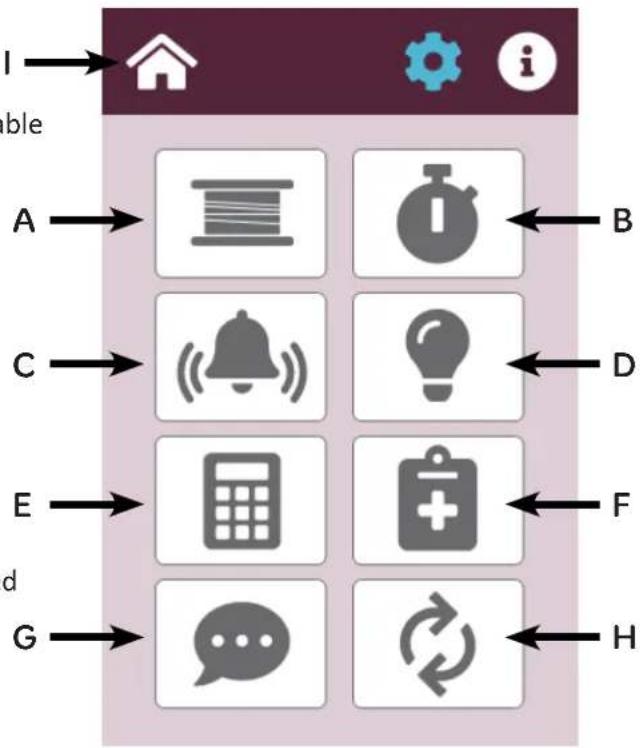
The Tools menu allows access to other functions available on the Plati num™ Q|160.
(A) Low Bobbin
The Plati num™ Q|160 includes a low bobbin alarm to esti mate how soon the bobbin thread will run out.
(B) Timer and Stitch Count
Track the ti me and sti tch count per quilt project.
(C) Alarms
The machine has two alarms. The first is the over-speed alarm in regulated mode, and the second is the ti mer alarm.
(D) Lighti ng
For selecting light ring, light bar, and setting their brightness levels.
(E) Calculator
An on-screen calculator may be accessed from the Tools screen.
(F) Diagnosti cs
The Diagnosti cs butt on acti vates the screen where machine diagnosti c functi ons can be performed. Diagnosti c functi ons are generally only used when working with an authorized Husqvarna® Viking® retailer to resolve issues.
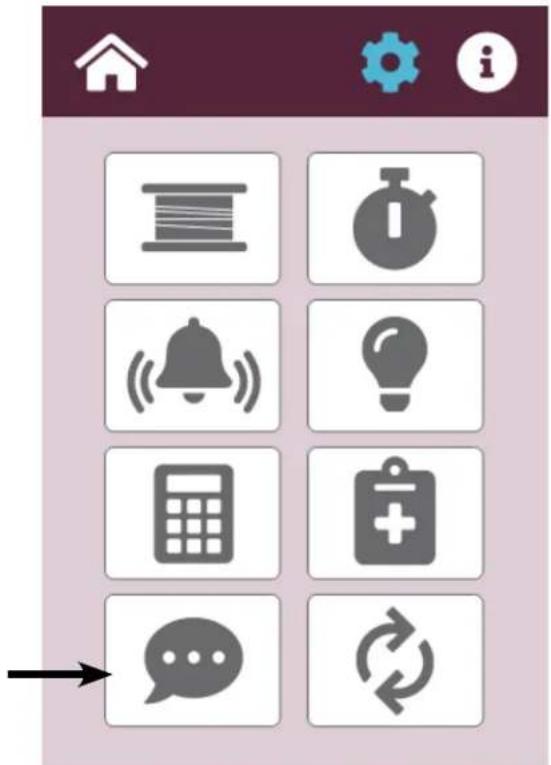
(G) Set Language
The Plati num™ Q|160 screens can appear in English, French, German, or Spanish. On the Tools Screen, press the lower left icon to cycle between English, Français, Deutsch, and Español.
(H) Update
This is used for updating the display, machine, or sensor code.
(I) Main
Press the Home butt on to return to the Main menu screen.
flowchart
graph TD
    I["Home"] --> A["A"]
    I --> C["C"]
    I --> E["E"]
    I --> G["G"]
    B["Bear icon"] --> C
    D["Laptop icon"] --> E
    F["Healthcare icon"] --> G
    H["Recycle icon"] --> G
Low Bobbin
The Plati num™ Q|160 includes a low bobbin alarm to esti mate how soon the bobbin thread will run out. This low bobbin capacity is based on an esti mate of how much of a particular thread can fit on a bobbin, in combinati on with other quilti ng factors such as tension, sti tches per inch, and how much bobbin thread is used to pull up and ti e off when beginning and ending quilti ng.
To esti mate how much thread is on a bobbin, place a full bobbin in the machine, press the red Record butt on "A", and quilt as usual.
When the bobbin runs out, press the top left butt on to Stop Recording. Note the number that is indicated under the Bobbin Thread Capacity "B". Use the “—” butt on to reduce the number by 15 to 20 so the alarm will sound before the bobbin runs out. Save the reduced number as one of the Bobbin Thread Capacity Presets "D". Make a note as to which type of thread the preset represents.

text_image
A B C D E 332.9 332.9 254.1 289.4 FBUTTON ICONS:
A = Record/Stop
B = Bobbin Thread Capacity
C = New Bobbin
D = Save Preset
E = Set Alarm
F = Preset Value
Put a new bobbin with the same thread into the machine and press the New Bobbin button "C". Then press the Alarm button "E". As you quilt, the remaining bobbin thread value will estimate how much thread remains on the current bobbin, and when you reach the capacity value, an alarm will sound warning that the bobbin is nearly out of thread.
When operating in manual mode, the low bobbin functi on assumes sti tching at approximately the last SPI setting on the regulated screen. If the SPI setting was below 8 sti tches per inch, the functi on will assume you will quilt at 10 sti tches per inch. It is advisable therefore to set the sti tches per inch, on the regulated screen before you change to manual mode.
Three Bobbin Thread Capacity preset values can be stored – one for each of three different types of thread. Simply go through the record process with a full bobbin of that type of thread and then store the capacity as a preset. Press the corresponding preset button “F”, insert a full bobbin with that type of thread, and press New Bobbin butt on to start.
Timer and Stitch Count
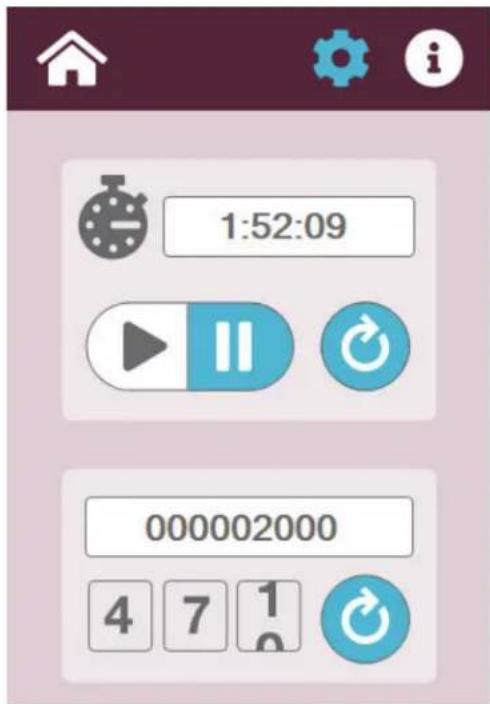
Use the quilti ng ti mer to keep track of how much ti me is spent on a quilt. When beginning a new project, press the Reset button. Then press the Play button to begin recording quilti ng ti me. The ti mer records only when the machine is quilti ng. The ti me is saved even when the machine is turned off . When beginning another quilti ng session, quilti ng ti me is added to the ti mer. Press Reset to zero-out the ti mer and begin a new ti ming session.
Use the sti tch counter to count the number of sti tches in a quilt. Press the Reset butt on to zero-out the counter when starting a new quilt. To see the lifeti me sti tch counter for the machine, see the Informati on screen.
text_image
1:52:09 000002000 4 7 1 0Alarms
The Plati num™ Q|160 has alarms that can be turned on or off.
The overspeed alarm is enabled by pressing the alarm butt on next to the speed icon. It only functions in regulated mode. When enabled, an alarm will sound if the machine is being moved too fast to properly maintain sti tch regulati on.
The ti mer can be set to any amount of ti me as a convenient reminder. When the alarm butt on below the ti me value is pressed, an alarm will sound when the set ti me has expired.
Adjust the time using the "-" and "+" butt ons next to the alarm butt on.

text_image
Mobile app interface screenshot showing weather icons, a timer display, and control buttonsLighting
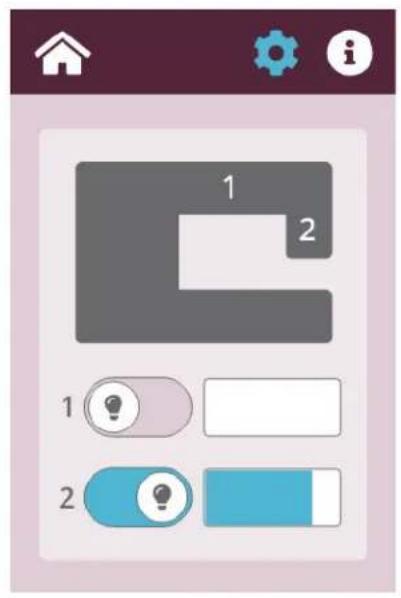
The brightness porti on of this screen has two butt ons and a sliding control. The LED Light Ring and light bar can be turned on or off with the switch butt on associated with the LED locati on. Use the slide bar to adjust the brightness of each light.
text_image
1 2 1 2Calculator Screen
A basic six-functi on calculator is provided. The functi ons provided are additi on, subtracti on, multi plicati on, division, square root, and percentage. Use the back space on the top right to delete a digit mistakenly entered.

text_image
0.0 ÷ 7 8 9 C × 4 5 6 CE - 1 2 3 % + ± 0 . ✓ MR M+ MC =Diagnosti cs Screen
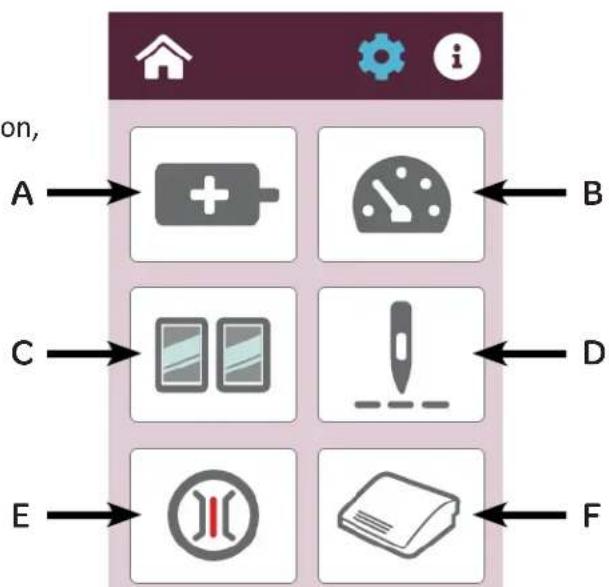
Six different diagnostics tests can be performed on the machine. These functions test the motor control operation, the foot pedal, and the internal position sensors.
• (A) Motor Sensor Test
• (B) Speed Sensor Test
• (C) Moti on Sensor Test (Stitch Regulation)
• (D) Needle Sensor Test
• (E) Tension Calibrati on
• (F) Foot Pedal Test
Press the Home butt on to return to the Main menu screen or the Tools butt on to return to the Diagnosti cs screen opti on.
text_image
on, A → + - B C → 2 - D E → FDiagnosti cs Tests
Motor Sensor Test
The Motor Sensor Test helps you determine if there may be a problem with the Plati num™ Q|160 motor. Slowly rotating the hand wheel should result in an audible beep. If you get a constant solid beep or no beep at all, this indicates a failed test and the machine should be inspected by a quali fied Husqvarna® Viking® repair technician.
Press the HOME butt on to return to the Main menu screen or the Tools butt on to return to the Diagnosti cs menu screen.
Speed Sensor Test
The Speed Sensor test can helps determine if there is a problem with the Plati num™ Q|160 speed sensor. Before performing this test, remove the bobbin case and the top thread. Press the foot pedal so that the machine will begin slowly running. The white box will show a number that should stabilize at 100 if the sensor is functioning properly. Release the foot pedal to stop the machine.
Press the Home butt on to return to the Main menu screen or the Tools butt on to return to the Diagnosti cs menu screen.

text_image
Motor Sensor Test Rotate the hand wheel SLOWLY. Passing Test: Regular pulsing beeps as you rotate the hand wheel. Failing Test: A solid tone or no beeping at all as you rotate the hand wheel.
natural_image
Simple icon set with a house, gear, and information symbol on a maroon background (no text or labels)Speed Sensor Test
Remove bobbin case and top thread.
Clear all objects from the needle area. Press the start button.
Passing Test:
The value stabilizes at 100.

Moti on Sensors
This test checks the movement of the fabric across the sensors for the sti tch regulati on.

text_image
Motion Sensors The machine will beep as fabric is moved across the sensors. If there is no beep check the cable connections. The values below will help a technician determine the quality of the sensor data when fabric is one the sensors. 3540 2989Needle Sensor Test
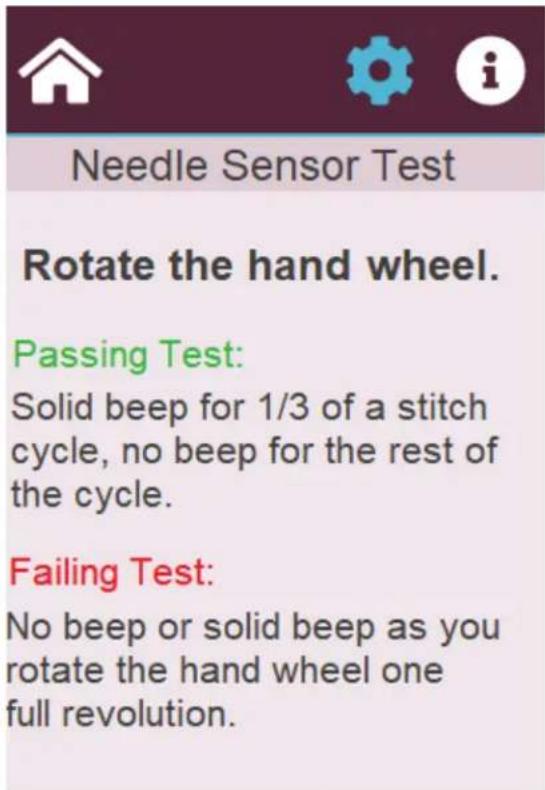
The Needle Sensor test will indicate whether the nee dle positi on sensor is functi oning properly. Rotati ng the hand wheel should result in a beep for a third of a sti tch cycle followed by no beep for the other two-thirds.
If you hear a constant beep or no beep at all for a full 360° rotati on of the hand wheel, this indicates a failed test and the machine should be inspected by a quali fied Husqvarna® Viking® repair technician.
text_image
Needle Sensor Test Rotate the hand wheel. Passing Test: Solid beep for 1/3 of a stitch cycle, no beep for the rest of the cycle. Failing Test: No beep or solid beep as you rotate the hand wheel one full revolution.Tension Calibrati on
The Tension butt on on the Diagnosti cs menu resets the tension device. Only calibrate the tension device under the directi on of Husqvarna® Viking® technical support.
When calibrating the tension, do the following:
- Remove the tension knob.
- Gently press the spring against the tension discs while not compressing the spring.
- While holding the spring in place, press Reset.
- When calibrati on is complete, replace the tension knob.
Foot Pedal Test
The Pedal test will help determine if there is a problem with the Plati num™ Q|160 foot pedal. Slowly depress the foot pedal, a percent of depression will appear in the white box. The foot pedal should be controllable from 0 to 100%. Press the Home butt on to return to the Main menu screen or the Tools butt on to return to the Diagnosti cs menu screen.

text_image
Tension Calibration Calibration should only be done under the guidance of a qualified Technician. Carefully remove the tension knob Gently press the spring against tension discs but do not compress the spring. Hold the spring in position and press the reset button. Replace the tension knob.
text_image
Foot Pedal Test Remove bobbin case and top thread. Clear all objects from the needle area. Depress foot pedal. Passing Test: Value below varies from 0 to 100%.Language
Set Language
- Touch the Tools icon in the toolbar. The Tools screen appears.
- Press the fl ag icon to rotate through the language options: English, French (Français), German (Deutsch), and Spanish (Español).
- When the flag representing the language you want to use appears, press the Home butt on to return to the Main screen.
text_image
Mobile app interface with nine function icons including books, stopwatch, bell, calculator, and message exchangeUpdate
- Place the USB stick into the port on the right side of the display as shown.
- Wait for the color of the selecti on butt ons to change from blue to white.
- Select the machine, display, or sensor icon for update as needed.
- When the display update butt on is selected the screen will go blank and you will hear three beeps until the update has completed and the screen comes back on.
- Power down the machine between doing the display and the machine updates.
- When the machine update butt on is selected, the display screen stays on and a count down number appears above the machine update butt on icon. A four tone signal sounds when the update on the machine is done.

text_image
Mobile app interface icons with Chinese labels and UI elements, showing home, battery, and device status indicators.System Information on Screen
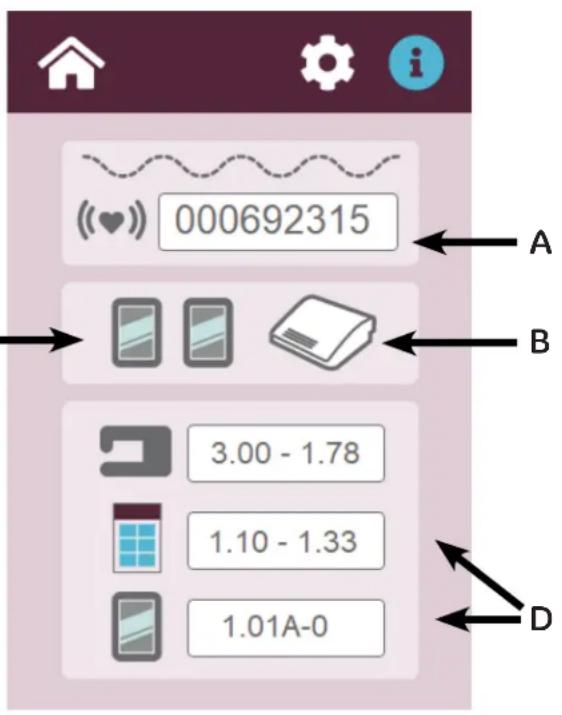
(A) The Lifeti me sti tch counter counts the number of sti tches the machine has performed. The Lifeti me count is the total number of sti tches made since the machine was built. The Lifeti me counter cannot be reset and should be used as an indicator to determine when general machine maintenance should be performed by an authorized Husqvarna® Viking® Retailer.
(B) The foot controller icon in the middle of the screen indicates whether the foot controller is att ached. A red "X" will appear if it is not connected properly.
(C) The left and right sensor icons indicate whether the sensors are functioning. A red "X" will appear if sensors are not functioning properly.
(D) Informati on contained in the white boxes at the bottom of the screen identi fies the electronics board revision numbers as well as the firmware revision numbers of the Plati num™ Q|160 machine the display version, and the sensor version.
Press the Home butt on to return to the Main menu screen or the Tools butt on to return to the Diagnosti cs menu screen.
text_image
000692315 A B 3.00 - 1.78 1.10 - 1.33 1.01A-0 DGetting Started Quilting
Thread Requirements
Be sure to choose high quality threads for your valuable heirloom quilts.
Needle Requirements
For general quilting, a size 16/100 needle will accom modate most threads and fabrics. Heavier threads, such as top stitch and some decora tive threads, require a larger needle such as 18/110 or 21/125. Heavier fabrics such as denim, canvas, or densely woven fabric may re quire a larger needle.
To Prepare for Quilting
With any quilting machine, it is important to under stand the basics of free motion quilting. The Platinum™ Q|160 quilting machine does not have feed dogs like domestic machines; therefore, the fabric does not automatically feed under the hopping foot. The operator controls the machine sewing speed with the My Speed setting and the foot pedal, and moves the fabric to get an even, consistent stitch.
In order to become comfortable using the Platinum™ Q|160, quilters can begin with a few simple techniques using a sample quilt sandwich (two pieces of fabric with a layer of batting between them). Set the machine at a medium My Speed setting (700 SPI) and begin moving the fabric until you become ac customed to the resistance. By moving the fabric faster, the stitches begin to elongate. The My Speed setting can either be increased or the fabric can be moved slower to get the stitches back to the desired length. By moving the fabric slower, the stitches get shorter and can build up on top of each other, breaking the thread or making it extremely difficult to unpick.
The My Speed setting can be decreased or the foot pedal released slightly, while maintaining a constant motion with the fabric, to bring the stitches back to the desired length.
When quilting, relax your hands and maintain a light touch on the fabric. Gripping the fabric too tightly may cause body tension resulting in poor quilting quality and discomfort.
Different colors of fabric may require different brightness settings for the LED light ring to prevent eye strain.
Troubleshooting
You can correct many problems on your own. If you need additional help, contact your local, authorized Platinum™ Q|160 retailer.
First check the following:
- The AC power cord is properly connected and both power switches are turned on.
- Confirm that all cables are properly seated into their connections.
- Turn off the machine completely. Wait for at least ten seconds and then turn it back on.
If the above checks did not solve the problem, refer to the information below.
| Skipped Stitches Corrective Measure(s) | |
| The needle is damaged, dull, bent, or installed improperly | Replace the needle often, normally once or twice per day for continuous quilting or at least once per quilt. Use only the recommended needle system.Always change the needle if the needle has struck any hard object such as a pin, etc. The tip of the needle can become damaged or burred, resulting in fabric damage as well as skipped stitches, thread breakage, or shredding.Always change the needle if it has been hit, bumped or pulled off center while maneuvering the machine over the quilt. A slightly bent needle can be a major cause of skipped stitches. |
| Incorrect needle size• Use the proper size needle for the work and thread being used.Some battings and fabrics used in quilting may constrict or impede the thread passing through the front groove of the needle. This diminishes the loop required for stitch formation. Typically, a larger needle will solve the problem. However, using certain smaller sizes of needles and ball pointed needles solve some specific problems. You will need to experiment to determine which works best with your combination of fabric, thread, and batting. | |
| Thread tension too tight | Check bobbin case tension and then check top thread tension.(For more information about adjusting tension, see Bobbin and Bobbin Tension and Easy to Set Tension in the Using Your Machine section of this manual.) |
| Improper threading• Ensure that the machine is threaded correctly. | |
| The needle is not positioned properly | ·Position the needle properly to the needle bar. Inspect the position of the needle to make sure the needle is at the 6 o'clock position. When you stand directly in front of the needle (facing the bobbin case side of the machine), you will see the entire needle eye directly facing you. This is 6 o'clock position.·Make sure (a) the needle is installed all the way into the needle bar to the needle-stop hole, (b) the long groove in the needle is toward the front (bobbin case side), and (c) the scarf (scooped out part of the back of the needle) is toward the back of the machine.·The needle can sometimes be rotated to 5 o'clock (slightly right) or 7 o'clock (slightly left) to adjust for a more positive thread loop pickup by the hook point. |
| The Needle Breaks Corrective Measure(s) | |
| The needle is bent or not installed properly | ·Replace the needle. Make sure that the needle is pushed into the needle bar clamp until it can go no further. Visually check that it is up to the top of the sight hole above the needle bar clamp screw. If the needle isn't installed properly, it can cause damage in the bobbin area and throat plate. |
| The needle hits the throat plate | ·Correctly position the needle, throat plate, or hopping foot. Replace with a new needle. |
| Stitches are Puckered Corrective Measure(s) | |
| The tension is not balanced · Balance the tension of the needle thread after ensuring the bobbin tension is adjusted correctly. (For more information about adjusting tension, see Bobbin and Bobbin Tension and Easy to Set Tension in the Using Your Machine section of this manual.) | |
| Needle too large for quilting fabric | ·Replace the needle with a size better suited for the fabric. |
| Poor Stitch Quality Corrective Measure(s) | |
| The tension is not balanced · Balance the tension of the needle thread after ensuring the bobbin tension is adjusted correctly. (For more information about adjusting tension, see Bobbin and Bobbin Tension and Easy to Set Tension in the Using Your Machine section of this manual.) | |
| Bobbin case is damaged, corroded, dirty, etc. | ·Since thread slides over the surface of the bobbin case at a high speed, make sure the case is free of any lint or foreign matter that could impede thread passage through the machine. |
| Moving the quilt too fast for needle speed selected (Manual mode) | · Synchronize quilt movement and needle speed to get your desired stitch length. Elongated stitches are an indication of moving the quilt too fast for the current speed. |
| Tension is Poor Corrective Measure(s) | |
| Lint caught under the tension spring in the bobbin | · If using short-staple threads, inexpensive threads, industrial threads, or coated threads, lint and other material will build up under the tension spring and begin to lift the spring, reducing the spring's ability to compress against the thread. Insert a pin or the corner of a business card under the spring and clear out the lint. The bobbin tension will return fairly close to its preset tension. Test the tension before quilting. |
| Hand Wheel Won't Rotate Corrective Measure(s) | |
| Thread is entangled and caught in the hook, creating a thread lock | · Carefully rock or turn the hand wheel in direction of motion and then the other direction until the thread lock breaks free. Once the hand wheel can be turned freely, remove the thread from the hook and basket. Now re-oil the hook and make sure the hand wheel turns freely without the hook hitting the needle. It is possible for a thread lock to cause a timing problem. |
| Thread Nests Under Quilt Corrective Measure(s) | |
| Not enough tension on top thread | · Check that the machine is threaded correctly. Make certain that the thread is flossed snugly in place between the two tension discs. If the machine is threaded correctly, tighten top tension by rotating the tension knob clockwise. (For more information about adjusting tension, see Bobbin and Bobbin Tension and Easy to Set Tension in the Using Your Machine section of this manual.) |
| Improper threading | · Refer to threading diagram and threading instructions. |
| Thread Backlash Corrective Measure(s) | |
| Bobbin thread tangles within the bobbin case, tangles and winds onto the hook spindle, or occasionally forms loops on the bottom of the quilt | · Make sure the bobbin is in the bobbin case correctly and the thread is coming out from under the tension spring. The bobbin should rotate clockwise when the thread is pulled. |
| Motor Fails to Run Corrective Measure(s) | |
| On/Off switch turned off · Make | sure the power switch is turned on. |
| Machine not receiving power | ·Check that the power connector is securely plugged into the back of the machine and the three-prong end is plugged into the power source. |
| Thread Breaks Corrective Measure(s) | |
| Thread is poor quality or may have severe twisting or thread rot | ·Look for severe twisting of threads when approximately 12 to 15 inches has been pulled off, with the ends pinched together.Cotton threads are particularly susceptible to dry rot or wet rot which makes thread brittle. Do not use poor quality thread, or thread that is rotted or brittle. |
| Top and bobbin tensions not balanced | ·Balance the tension of the needle thread after ensuring the bobbin tension is adjusted correctly. (For more information about adjusting tension, see Bobbin and Bobbin Tension and Easy to Set Tension in the Using Your Machine section of this manual.) |
| The machine head has been threaded incorrectly or thread spools are not positioned correctly | ·Check that the machine is threaded correctly.·Inspect for accidental double wrapping of thread on thread guides.·Inspect the thread mast, making sure the eyelets of the mast are directly over the spools.·Inspect the vertical positioning of the thread cones. Tipped cones can dramatically affect thread tension and can cause breakage. |
| Debris in tension discs | ·Inspect for particles and remove any fuzz or debris. |
| Bobbin rotation is not smooth | ·Change the bobbin. The slightest hesitation of the bobbin rotation can be the cause of dramatic tension change and thread breakage. |
| Needle is burred, bent or dull, or installed incorrectly | ·Change the needle at least once per quilt. Make sure the needle is installed to the top of the stop hole in the needle bar. |
| Needle not suitable for thread | ·Replace the needle to one better suited for the thread. Use the proper size needle. Refer to on chart on page 16. |
| Hesitating too long at one point in quilting motif | ·Move more quickly so stitches don’t overlap or build up. When starting the machine, begin moving fabric immediately. Sewing in one place too long will cause the thread to break. |
| Improper needle/hook relationship | ·Machine timing needs to be checked. Consult an authorized Husqvarna® Viking® technician. |
| Damage or burr at needle hole of throat plate or other thread handling part | ·If thread is shredding at the throat plate, check for burrs or jagged edges. Gently rub with emery cloth to remove the sharp edge. Consult a repair technician to polish any hard-to-reach or delicate areas, or if the burr is inside the throat. |
| Wrong type of needle | ·Use only the needles recommended by Husqvarna® Viking® (134, sizes 12 through 21). |
| Other possible problems | ·Needle too close to hook, causing friction and possible collision of hook point and needle (causing broken thread). ·Needle plate damage ·Hook damage ·Broken needles or damaged needle bar clamp |
| Nothing visible on the display Corrective Measure(s) | |
| Display cables unplugged • Locate the black cable that plugs into the touch-screen display. Turn off machine. Connect the cable to the side of the machine and to the display. Make sure both ends are plugged in securely. | |
Appendix 1
Federal Communications Commissions (FCC) Declaration of Conformity (For USA Only)
Responsible Party: SVP Worldwide
1714 Heil Quaker Blvd Suite 130
Vergne, TN 37086
declares that the product
Product Name: Platinum™ Q|160
complies with Part 15 of the FCC Rules. Operation is subject to the following two conditions: (1) this device may not cause harmful interference, and (2) this device must accept any interference received, including interference that may cause undesired operation.
This equipment has been tested and found to comply with the limits for Class B digital device, pursuant to Part 15 of the FCC Rules. These limits are designed to provide reasonable protection against harmful interference in a residential installation. This equipment generates, uses, and can radiate radio frequency energy and, if not installed and used in accordance with the instructions, may cause harmful interference to radio communications. However, there is no guarantee that interference will not occur in a particular installation.
If this equipment does cause harmful interference to radio or television reception, which can be determined by turning the equipment off and on, the user is encouraged to try to correct the interference by one or more of the following measures:
- Reorient or relocate the receiving antenna.
- Increase the separation between the equipment and receiver.
- Consult the dealer or an experienced radio/TV technician for help.
Changes or modifications not expressly approved by the manufacturer or local sales distributor could void the user's authority to operate the equipment.
Canadian Department of Communications Compliance Statement (For Canada Only)
This digital apparatus does not exceed the Class B limits for radio noise emission from digital apparatus as set out in the interference-causing equipment standard entitled “Digital Apparatus”, ICES-003 of the Department of Communications.
Radio Interference (Other than USA and Canada)
This machine complies with EN55022 (CISPR Publication 22) /Class B and AUS/NZ 55022/Class B.