RR20T1Z2YR2 - Fridge SAMSUNG - Free user manual and instructions
Find the device manual for free RR20T1Z2YR2 SAMSUNG in PDF.


User questions about RR20T1Z2YR2 SAMSUNG
0 question about this device. Answer the ones you know or ask your own.
Ask a new question about this device
Download the instructions for your Fridge in PDF format for free! Find your manual RR20T1Z2YR2 - SAMSUNG and take your electronic device back in hand. On this page are published all the documents necessary for the use of your device. RR20T1Z2YR2 by SAMSUNG.
USER MANUAL RR20T1Z2YR2 SAMSUNG
Free Standing Appliance
text_image
SAMSUNGSAMSUNG
Contents
Safety information 3
Important safety symbols and precautions 4
Severe warning signs for installation 6
Severe warning signs for using 8
Caution signs for installation 10
Caution signs for using 11
Caution signs for cleaning and maintenance 12
Severe warning signs for disposal 13
This appliance is intended to be used in household and similar applications such as 14
Instructions about the WEEE 15
Installation 16
Refrigerator at a glance 16
Step-by-step installation 18
Operations 22
Adjusting the temperature control 22
Special features 23
Maintenance 26
Handle and care 26
Cleaning 28
Replacing the Bulb lamp 28
Troubleshooting 29
English2
Safety information
- Before operating the appliance, please read this manual thoroughly and retain it for your reference.
- Use this appliance only for its intended purpose as described in this instruction manual.
This appliance is not intended for use by persons (including children) with reduced physical, sensory or mental capabilities, or lack of experience and knowledge, unless they have been given supervision or instruction concerning use of the appliance by a person responsible for their safety.
- This appliance can be used by children aged from 8 years and above and persons with reduced physical, sensory or mental capabilities or lack of experience and knowledge if they have been given supervision or instruction concerning use of the appliance in a safe way and understand the hazards involved. Children shall not play with the appliance.
Cleaning and user maintenance shall not be made by children without supervision.
- Warnings and Important Safety Instructions in this manual do not cover all possible conditions and situations that may occur.
It is your responsibility to use common sense, caution, and care when installing, maintaining, and operating your appliance.
Safety information
- Because these following operating instructions cover various models, the characteristics of your refrigerator may differ slightly from those described in this manual and not all warning signs may be applicable. If you have any questions or concerns, contact your nearest service center or find help and information online at www.samsung.com.
- R-600a or R-134a is used as a refrigerant. Check the compressor label on the rear of the appliance or the rating label inside the fridge to see which refrigerant is used for your refrigerator. When this product contains flammable gas (Refrigerant R-600a), contact your local authority in regard to safe disposal of this product.
- It is hazardous for anyone other than an Authorised Service Person to service this appliance. - Do not drink the liquid which is inside the cool pack although it is not toxic to human body.
Important safety symbols and precautions
WARNING
Hazards or unsafe practices that may result in severe personal injury or death.
English4
CAUTION
Hazards or unsafe practices that may result in minor personal injury or property damage.
NOTE
Do NOT attempt.
Do NOT disassemble.
Do NOT touch.
Follow directions carefully.
Unplug the power plug from the wall socket.
Make sure the machine is grounded to prevent electric shock.
Call the contact center for help.
These warning signs are here to prevent injury to you and others.
Please follow them carefully.
After reading this section, keep it in a safe place for future reference.
Safety information
Severe warning signs for installation
WARNING
- Do not plug several appliances into the same multiple power board. The refrigerator should always be plugged into its own individual electrical outlet which has a voltage rating that matched the rating plate. - This provides the best performance and also prevents overloading house wiring circuits, which could cause a fire hazard from overheated wires.
- If the wall socket is loose, do not insert the power plug.
- There is a risk of electric shock or fire.
- Do not use a cord that shows cracks or abrasion damage along its length or at either end.
- Do not bend the power cord excessively or place heavy articles on it.
- Do not use aerosols near the refrigerator.
- Aerosols used near the refrigerator may cause an explosion or fire.
- Connect the power plug in proper position with the cord hanging down.
- If you connect the power plug upside down, wire can get cut off and cause fire or electric shock.
- Make sure that the power plug is not squashed or damaged by the back of the refrigerator.
English6
- When moving the refrigerator, be careful not to roll over or damage the power cord.
- This constitutes a fire hazard.
- This appliance should be positioned in such a way that it is accessible to the power plug.
- Failing to do so may result in an electric shock or fire due to electric leakage.
This appliance must be properly grounded.
- Do not ground the appliance to a gas pipe, plastic water pipe, or telephone line.
- You must ground the refrigerator to prevent any power leakages or electric shocks caused by current leakage from the refrigerator.
- This may result in an electric shock, fire, explosion, or problems with the product.
- Never plug the power cord into a socket that is not grounded correctly and make sure that it is in accordance with local and national codes.
- If the supply cord is damaged, it must be replaced by the manufacturer, its service agent or similarly qualified persons in order to avoid a hazard.
- The fuse on the refrigerator must be changed by a qualified technician or service company.
- Failing to do so may result in an electric shock or personal injury.
Safety information
Severe warning signs for using
WARNING
Do not touch the power plug with wet hands. - This may result in an electric shock.
- Do not store articles on the top of the appliance.
- When you open or close the door, the articles may fall and cause a personal injury and/or material damage.
- Do not put a container filled with water on the refrigerator.
- If spilled, there is a risk of fire or electric shock.
- Children should be supervised to ensure that they do not play with the appliance.
- Keep fingers out of “pinch point” areas: clearances between the doors and cabinet are necessarily small. Be careful when you open the doors when children are in the area.
- Do not let children hang on the door. If not, a serious injury may occur.
- There is a Risk of children entrapment. Do not let children enter inside the refrigerator.
- Do not keep volatile or inflammable objects or substances (benzene, thinner, propane gas, alcohol, ether, LP gas and other such products etc.) in the refrigerator.
- This refrigerator is for storing food only.
- This may result in fire or explosion.
English8
- Do not place or use electrical appliance inside the refrigerator, unless they are of a type recommended by the manufacturer.
- Do not use a hair dryer to dry the inside of the refrigerator. Do not place a lighted candle in the refrigerator for removing bad odours.
- This may result in an electric shock or fire.
- Do not touch the inside walls of the freezer or products stored in the freezer with wet hands.
- This may cause frostbite.
- Do not use mechanical devices or any other means to accelerate the defrosting process, other than those recommended by the manufacturer.
- Do not damage the refrigerant circuit.
- Fill the water tank, ice tray, water cubes only with potable water.
This product is intended only for the storage of food in a domestic environment.
- Bottles should be stored tightly together so that they do not fall out.
-
Do not insert hands, feet or metal objects (such as chopsticks, etc.) into the bottom or the back of the refrigerator.
-
This may result in an electric shock or injury.
- Any sharp edges may cause a personal injury.
Safety information
Do not attempt to repair, disassemble, or modify the appliance yourself.
- Do not use any fuse (such as cooper, steel wire, etc.) other than the standard fuse.
- When repairing or reinstalling the appliance is required, contact your nearest service center.
- Failing to do so may result in an electric shock, fire, problems with the product, or injury.
- If the appliance generates a strange noise, a burning or smell or smoke, unplug the power plug immediately and contact your nearest service center.
- Failing to do so may result in an electric or fire hazards.
- Pull the power plug out of the socket before changing the interior lamps of the refrigerator.
- Otherwise, there is a risk of electric shock.
- If any dust or water is in the refrigerator, pull out power plug and contact your Samsung Electronics service center.
- Otherwise there is a risk of fire.
Caution signs for installation
CAUTION
- Keep ventilation opening in the appliance enclosure or mounting structure clear of obstruction.
English10
- The installation or any service of this appliance is recommended by a qualified technician or service company.
- Failing to do so may result in an electric shock, fire, explosion, problems with the product, or injury.
Caution signs for using

CAUTION

- Do not place glass or bottles or carbonated beverages into the freezer.
- The container may freeze and break, and this may result in injury.
- There is no need to disconnect the refrigerator from the power supply if you will be away for less than three weeks.
But, remove all the food if you are going away for the three weeks or more. Unplug the refrigerator and clean it, rinse and dry.

natural_image
Line drawing of a hand holding a small object with a starburst effect, no text or symbols present- Be careful that your fingers are not caught in.
Safety information
Caution signs for cleaning and maintenance

CAUTION
Do not clean the appliance by spraying water directly onto it.
- Do not use benzene, thinner, or Clorox, Chloride for cleaning.
- They may damage the surface of the appliance and may cause a fire.
- Do not spray inflammable gas near the refrigerator.
- There is a risk of explosion or fire.
-
Remove all foreign substances such as dust or water from the power plug terminals and contact points using a dry cloth on a regular basis.
-
Unplug the power plug and clean it with a dry cloth.
- Failing to do so may result in an electric shock or fire.
- Before cleaning or performing maintenance, unplug the appliance from the wall socket.
- Failing to do so may result in an electric shock or fire.
- If the key is provided with refrigerator, the keys should be kept out of the reach of children and not be in the vicinity of the appliance.
English12-
Severe warning signs for disposal

WARNING

- Leave the shelves in place so that children may not easily climb inside.
- Ensure that none of the pipes on the back of the appliance are damaged prior to disposal.
• R-600a or R-134a is used as a refrigerant.
Check the compressor label on the rear of the appliance or the rating label inside the refrigerator to see which refrigerant is used for your refrigerator.
When this product contains flammable gas (Refrigerant R-600a), contact your local authority in regard to safe disposal of this product. Cyclopentane is used as an insulation blowing gas.
The gases in insulation material require special disposal procedure.
Please contact your local authorities in regard to the environmentally safe disposal of this product.
Ensure that none of the pipes on the back of the appliances are damaged prior to disposal.
Pipes shall be broken in the open space.
- When disposing of this or other refrigerator/s, remove the door/door seals, door latch so that children or animals cannot become trapped inside.
Safety information
Children should be supervised to ensure that they do not enter and play with the appliance.
- If trapped inside, the child may become injury and suffocate to death.
- Please dispose of the packaging material for this product in an environmentally friendly manner.
This appliance is intended to be used in household and similar applications such as
- staff kitchen areas in shops, offices and other working environments;
- farm houses and by clients in hotels, motels and other residential type environments;
• bed and breakfast type environments;
• catering and similar non-retail applications.
English14
Instructions about the WEEE

natural_image
Symbol of a trash bin crossed with no text or labels, representing waste sorting or disposal (no text present)Correct Disposal of This Product (Waste Electrical & Electronic Equipment) (Applicable in countries with separate collection systems)
This marking on the product, accessories or literature indicates that the product and its electronic accessories (e.g. charger, headset, USB cable) should not be disposed of with other household waste at the end of their working life. To prevent possible harm to the environment or human health from uncontrolled waste disposal, please separate these items from other types of waste and recycle them responsibly to promote the sustainable reuse of material resources.
For more information on safe disposal and recycling visit our website www.samsung.com/in/support or contact our Helpline numbers - 1800 40 SAMSUNG (1800 40 7267864).
Installation
Follow these instructions carefully to ensure a proper installation of this refrigerator and to prevent accidents before using it.
WARNING
- Use the refrigerator only for its intended purpose as described in this manual.
- Any servicing must be performed by a qualified technician.
- Dispose of the product packaging material in compliance with the local regulations.
NOTE
The actual image and provided component parts of the refrigerator may differ, depending on the model and the country.
Refrigerator at a glance

text_image
01 02 03 04 05 06 07 08 0901 Ice making compartment (Super Freeze Zone)
02 Chiller compartment
03 Bulb Lamp
04 Ice tray
05 Shelf
06 Vegetable box
07 Guard egg
08 Guard Jumbo
09 Stand table *
* applicable models only
English16
Optional accessories \*

natural_image
Isometric line drawing of a rectangular electronic component or tray (no text or symbols)Cool pack: This helps keep the refrigerator cool.

natural_image
Isometric line drawing of a rectangular plastic tray with internal grid structure (no text or symbols)Ice tray: Used to make ice.
* Your refrigerator may not include optional accessories listed above. Provision of optional accessories depends on the model and the country.
To secure more room for storage in the refrigerator compartment
To get more space, you can remove cool pack(s) which can be removed without aid of a tool. It does not affect thermal and mechanical characteristics.
A declared storage volume is calculated with cool pack(s) removed.
• These optional accessories do not affect thermal and mechanical performance.
- A declared storage volume of the freezer is based on the nonexistence of those optional accessories.
- For best energy efficiency, make sure all of shelves, drawers, and baskets are placed in their original position.
Installation
Step-by-step installation
STEP 1 Select a site
Site requirements:
- Solid, level surface without carpeting or flooring that may obstruct ventilation
• Away from direct sunlight - Adequate room for opening and closing the door
- Away from a heat source
• Room for maintenance and servicing
• Temperature range: between 10 °C and 43 °C
Effective temperature range
The refrigerator is designed to operate normally in the temperature range specified by its class rating.
| Class Symbol | Ambient Temperature range (°C) | ||
| IEC 62552 (ISO 15502) | ISO 8561 | ||
| Extended Temperate SN | +10 to +32 +10 to +32 | ||
| Temperate N +16 | to +32 +16 to +32 | ||
| Subtropical ST +16 | to +38 +18 to +38 | ||
| Tropical T +16 to | +43 +18 to +43 | ||

NOTE
The cooling performance and power consumption of the refrigerator may be affected by the ambient temperature, the door-opening frequency, and the location of the refrigerator. We recommend adjusting the temperature settings as appropriate.
English18-
Clearance
See the pictures and table below for space requirements for installation.
Basic Model Stand Model
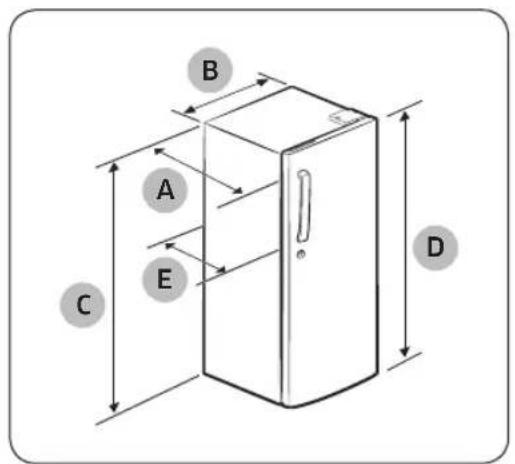
text_image
A B C E D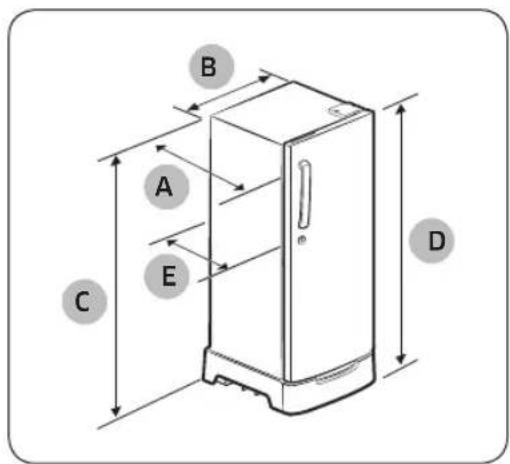
text_image
A B C D E| RR19/20** | ||
| Basic Stand | ||
| Depth “A” 529 529 | ||
| Width “B” 532 532 | ||
| Height “C” 1139 1246 | ||
| Overall Height “D” 1188 | 1300 | |
| Depth “E” 649 649 | ||
(unit: mm)
Installation

text_image
100 mm 429 mm 127° 927 mm 530 mm 529 mm 78 mm 48 mm 1082 mmNOTE
Each measurement based on the design dimension, so it may differ depending on the measuring method.
CAUTION
Please tie up the extra length of the power cord at the back of the refrigerator so as not to be touched on the floor preventing the power cord from being crushed by the rollers upon relocation.
STEP 2 Flooring

natural_image
Two identical electrical cabinets with circular and diagonal warning symbols, one marked with a circle and the other with a prohibition sign (no text or labels)- The surface to install the refrigerator must support a fully loaded refrigerator.
- To protect the floor, put a large piece of cardboard on each leg of the refrigerator.
- Once the refrigerator is in its final position, do not move it unless necessary to protect the floor.
If you have to, use a thick paper or cloth such as old carpets along the movement path.
English20
STEP 3 Adjust the levelling feet

natural_image
Diagram showing a mechanical linkage or suspension system with a circular inset highlighting a curved component (no text or symbols present)Level the refrigerator by manually adjusting the levelling feet.
Turn the levelling feet clockwise to lower the position, or turn counter clockwise to raise.
For safety reasons, adjust the front side a little higher than the rear side.
NOTE
This model does not allow for adjusting the front right foot that is fixed. Use the front left foot for levelling.
STEP 4 Initial settings
By completing the following steps, the refrigerator should be fully functioning.
- Plug the power cord into the wall socket to turn the refrigerator on.
- Open the door, and check if the interior light lights up.
- Set the temperature to the coldest, and wait for about an hour.
- Remove the 4 shipping caps from the shelf, which are attached for safe transportation.
- Wait until the refrigerator reaches the set temperature. Now the refrigerator is ready for use.
STEP 5 Final check
When installation is complete, confirm that:
- The refrigerator is plugged into an electrical outlet and grounded properly.
- The refrigerator is installed on a flat, level surface with a reasonable clearance from the wall or the cabinet.
- The refrigerator is level and is sitting firmly on the floor.
- The door opens and closes freely, and the interior light turns on automatically when you open the door.
Operations
Adjusting the temperature control
Freezer / Fridge (Temperature adjustment)

text_image
OFF ON 1 Winter सर्दी 2 3 4 5 6 Summer गमी Monsoon मानसूनDIAL At "Monsoon" POINT (3\~4 No.)
- To maintain optimum temperature for food storage, set the control dial at the "Monsoon" Position.
DIAL At "Summer" POINT (5\~6 No.)
- When setting the control dial at the "Summer" Position, the Refrigerator becomes coldest. - When large quantities of food is stored, For quickice making set the control dial at the "Summer" Position.
DIAL At "Winter" POINT (1\~2 No.)
- When setting the control dial at the "Winter" Position, the Refrigerator becomes warmer.
- When small quantities of food is stored.
NOTE
- If the temperature where the Refrigerator is placed is lower than 5 °C, set the temperature control to WINTER. Because the temperature of the Refrigerator is affected by the temperature around the Refrigerator and it will be lower than the set value.
- Apart from knob settings mentioned above, if you desire to increase or reduce the cooling, turn the knob clockwise or anticlockwise to the degrees you want.
English22-
Special features
The actual image and special functions of your refrigerator may differ, depending on the model and the country.
How to defrost
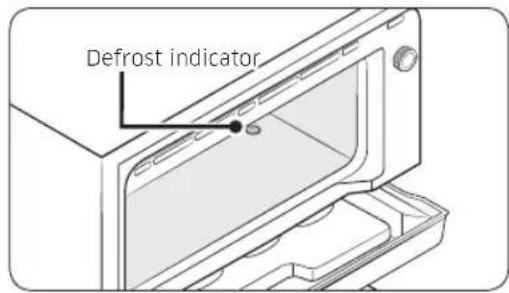
text_image
Defrost indicator- Check the layer thickness of the frost/ice formed on the inner bottom of the ice making compartment. If more frost is formed, please defrost.
text_image
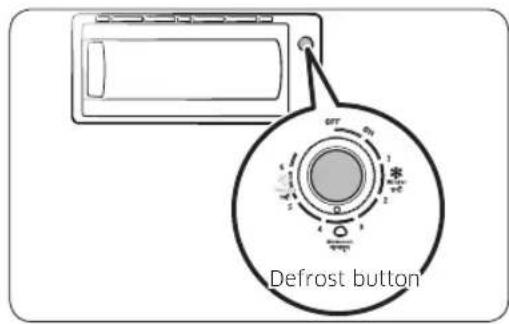
Defrost button- Push the Defrost button to defrost. Frost on the surface of the evaporator will begin to melt and can be easily removed. After defrosting is finished, the refrigerator will start automatically.
CAUTION
In order to remove ice from the ice making compartment, do not use a keen tool, knife or screw driver.
Operations
Cool Pack (Applicable models only)

natural_image
Diagram of a device interior showing a tray with internal compartments and arrows indicating movement or force (no text or symbols)- Take out the Chilled Room tray from inside the refrigerator.
- Put the Cool Pack in the Chilled Room tray.
NOTE
- If the Chiller compartment is not inserted to the end, water can drop to the bottom of refrigerator when defrost is performed.
- So the Chiller compartment should be inserted to the end when you store the food in the Chiller compartment.
Ice making
natural_image
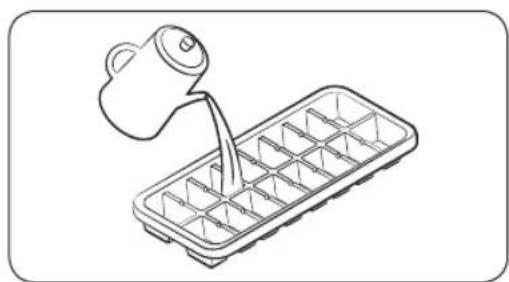
Line drawing of a container with a pitcher pouring liquid into it (no text or symbols)- Fill the tray up to 80 % with water level.
NOTE
It is recommended that you wait about 1\~2 hours after setting max of Freezer or COLDEST of temperature control for the ice cubes to form.
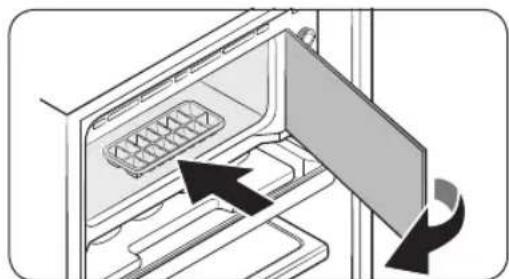
2. Place the ice tray in the Super Freeze Zone.
natural_image
Diagram of an open refrigerator with a door open and a tray inside, showing internal compartments and a scroll arrow (no text or symbols)English24
natural_image
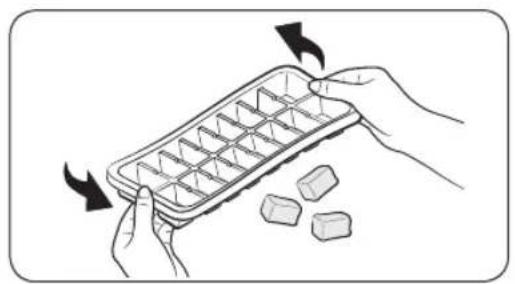
Illustration of hands holding a raw ice block with arrows indicating rotation (no text or symbols)- To empty the ice tray, hold both ends of the tray and gently twist to remove the ice cubes.

CAUTION
- The coldest part of the Refrigerator is the Super Freeze Zone.
This is the best place to store delicate foodstuffs. - Glass bottles containing liquids should never be stored in the Super Freeze Zone as the glass can shatter when the contents freeze.
Maintenance
Handle and care
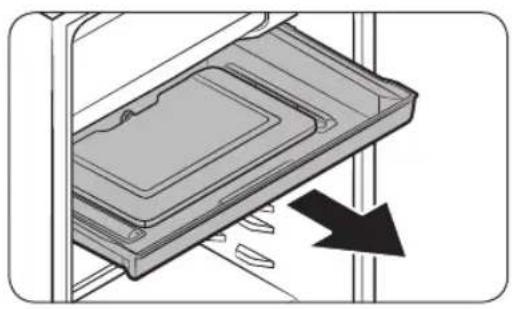
Chiller compartment
natural_image
Diagram of a device with a black arrow pointing to a component, no text or symbols presentPull the chiller compartment towards you until it meets the stopper.
Tilt the front upward and pull the compartment out.
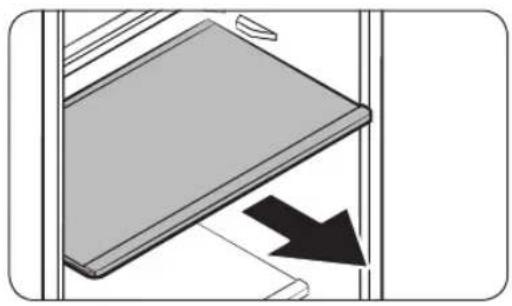
Shelves
natural_image
Diagram showing a mechanical component with an arrow indicating direction, no text or symbols presentPull the shelf forward until it meets the stopper.
Tilt the front of the shelf up and pull it out.
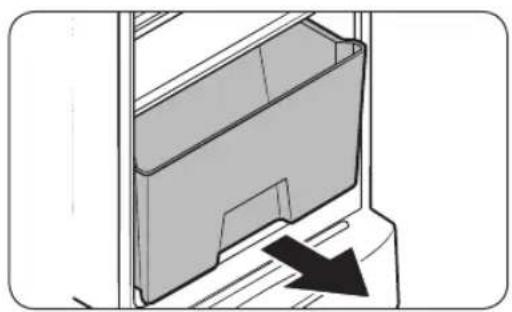
Vegetable Box
natural_image
Diagram of a mechanical component with a black arrow indicating direction (no text or symbols present)Pull the moisturizing veg box forward and take it out of the Refrigerator.
Lift the cover up and pull it out of the Refrigerator.
English26-
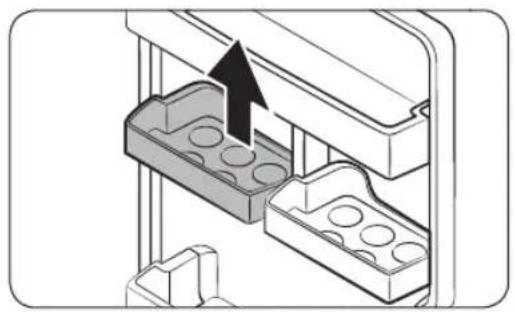
Guard egg
natural_image
3D diagram of a mechanical assembly with two internal cavities and an arrow indicating direction (no text or symbols)Lift the Guard egg up and side it out. (This Guard egg is adjustable and may be positioned to best fit your needs.)
Guard Jumbo

natural_image
Diagram of a mechanical component with an upward arrow indicating direction (no text or symbols present)Lift the guard up and slide it out. (This Guard Jumbo is not adjustable; it fits in only one position.)
Maintenance
Cleaning
WARNING
- Do not use benzene, thinner, or home/car detergent such as Clorox™ for cleaning purposes. They may damage the surface of the refrigerator and cause a fire.
- Do not spray water onto the refrigerator. This may cause electric shock.
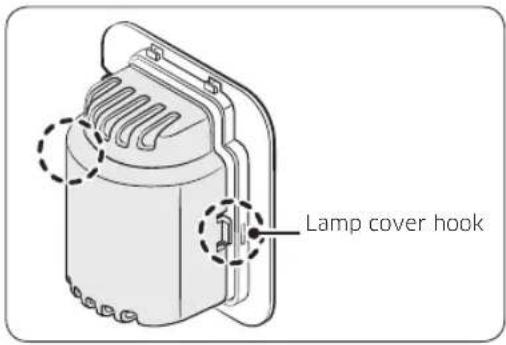
Replacing the Bulb lamp
text_image
Lamp cover hookWARNING
Disconnect power supply before replacing the lamp.
- Unplug the power cord from the socket.
- Remove Tray partition and shelf.
- Push the Lamp cover hook on both side and then take Lamp cover out.
- Turn the lamp counter clockwise.
- Replace with new lamp same specification as original one.
English28-
Troubleshooting
| Problem Solution | |
| The appliance is not operating at all or the temperature is too high or low. | Check that the power plug is correctly connected.Is the temperature control on the front panel correctly set?Is the appliance in direct sunlight or located near a heat source.?If so, it may not be able to cool as well. Please put it in a place that is out of direct sunlight and not near a heat source.Is the back of the appliance too close to the wall?If so, it may not be able to cool sufficiently. Keep it an appropriate distance from the wall.Is there too much food inside so that the food is blocking the outlet vent? To keep the refrigerator at a suitable temperature, do not fill the refrigerator with too much food. |
| The food in the Refrigerator is frozen. | Is the temperature control or control panel set to the coldest temperature?Is the surrounding temperature too low? |
| There are unusual noises. | Check if the appliance is installed on a stable and even floor.Is the back of the appliance too close to the wall?Have any foreign objects fallen behind or under the appliance?Is the noise coming from the compressor in the appliance?A ticking sound occurs when the various accessories contract or expand. |
| The front corners and sides of the appliance are warm and condensation starts to form. | Heat-proof pipes are installed in the front corners of the appliance to prevent condensation from forming.When the surrounding temperature rises, this may not always be effective.However, this is not abnormal.In very humid weather, condensation may form on the outer surface of the appliance when the moisture in the air comes into contact with the cool surface of the appliance. |
| You can hear a liquid bubbling in the appliance. | This is the refrigerant, which cools the inside of the appliance. |
Troubleshooting
| Problem Solution | |
| There is a bad smell inside the appliance. | Has a food item spoiled?Make sure that strong smelling food (for example, fish) is wrapped so that it is airtight.Clean out your Freezer periodically and throw away any spoiled food.When cleaning the inside of the fridge, store food elsewhere and unplug the appliance. Wipe with a dry dishcloth after 2-3 hours and then circulate air inside the refrigerator. |
| There is a layer of frost on the appliances walls. | Are the air outlet vents blocked by food stored inside the Refrigerator?Space the food out as much as possible to improve ventilation.If the freezer drawer is not completely closed or is blocked, humidity from outside may enter and cause severe frost to form. |
| Condensation forms on the inside wall of the appliance and around vegetables. | Food with a high water content is stored uncovered with a high humidity level or the door has been left open for a long time.Store the food with a cover or in sealed containers. |
| The lamps in the freezer and refrigerator are not turned on. | The lamps may not be turned back on if the doors of the freezer and refrigerator remain opened side by side for 2 seconds or longer. Close the doors and then open them again. |
English30-
Memo
SAMSUNG
Contact SAMSUNG WORLD WIDE
If you have any questions or comments relating to Samsung products, please contact the SAMSUNG customer care center.
| Country Contact Center Web Site | ||
| INDIA | 1800 40 SAMSUNG (1800 40 7267864) (Toll-Free) | www.samsung.com/in/support |
| SRI LANKA 01159 | 00000 www.samsung.com/support | |
This Product is RoHS compliant


DA68-03111C-03
रेफ्रिजरेटर
उपयोगकर्ता मार्गदर्शिका
RR19/20**