SDC3C803 - Coffee maker SAMSUNG - Free user manual and instructions
Find the device manual for free SDC3C803 SAMSUNG in PDF.


User questions about SDC3C803 SAMSUNG
0 question about this device. Answer the ones you know or ask your own.
Ask a new question about this device
Download the instructions for your Coffee maker in PDF format for free! Find your manual SDC3C803 - SAMSUNG and take your electronic device back in hand. On this page are published all the documents necessary for the use of your device. SDC3C803 by SAMSUNG.
USER MANUAL SDC3C803 SAMSUNG
Condensing Dryer user manual

100%
Recycled Paper
This manual is made with 100% recycled paper.
imagine the possibilities
Thank you for purchasing this Samsung product.
To receive more complete service,
please register your product at
www.samsung.com/register
SAMSUNG
features
1. Super capacity
Ultra drying capabilities are at your fingertips! Now you can dry extra-large loads. Our large 8kg capacity dryer circulates more air through your clothes, drying them faster, for a wrinkle-free result.
2. Visible water tank indicator
For the first time in the industry, users can see the water level of the water tank through the transparent scale panel, without having to open the water tank.
3. Sensor drying (fully automatic drying)
By adopting humidity and temperature sensors, the operating time and energy usage is controlled using digital technology.
4. Interior lamp
The interior lamp allows the easy viewing of the interior even when it is dark.
5. Rack drying
This is a low-temperature drying function developed to protect fragile fabrics from the tumbling process and to dry items such as sports shoes that cannot be dried by the tumble drying course.
6. Certified wool course
(Not all models have acquired the Woolmark certification.)
The wool-mark certified course minimizes damage when drying wool clothes.
M1006(Woolmark approval number).
7. Reversible door for easier door opening at any location
Our dryers will fit just about anywhere and without a door conflict. The direction of our easy reversible door can be changed with simple handy work.
8. Diamond drum for fabric care
Samsung electronics' proprietary diamond-shaped drum offers excellent protection to your laundry.
9. High energy efficiency
Energy efficiency has been optimised to minimize unnecessary power consumption.
2_ features
safety information
Congratulations on your new Samsung Dryer. This manual contains important information on the installation, use, and care of your appliance. Please take the time to read this manual to take full advantage of your dryer's many benefits and features.

WARNING - Risk of Fire
• Clothes dryer installation must be performed by a qualified technician.
- Install the clothes dryer according to the manufacturer's instructions and local codes.
• To reduce the risk of severe injury or death, follow all installation instructions.
WHAT YOU NEED TO KNOW ABOUT SAFETY INSTRUCTIONS
Warnings and Important Safety Instructions in this manual do not cover all possible conditions and situations that may occur. It is your responsibility to use common sense, caution, and care when installing, maintaining, or operating your dryer.
Always contact your manufacturer about problems or conditions you do not understand.
IMPORTANT SAFETY SYMBOLS AND PRECAUTIONS
| WARNING | Hazards or unsafe practices that may result in severe personal injury or death. |
| CAUTION | Hazards or unsafe practices that may result in minor personal injury or property damage. |
| CAUTION | To reduce the risk of fire, explosion, electric shock, or personal injury when using your washer, follow these basic safety precautions: |
| Do NOT attempt. | |
| Do NOT disassemble. | |
| Do NOT touch. | |
| Follow directions explicitly. | |
| Unplug the power plug from the wall socket. | |
| Make sure the machine is grounded to prevent electric shock. | |
| Call the service center for help. | |
| Note | |
| Read operator's manual | |
safety information _3
safety information

This appliance is not intended for use by persons (including children) with reduced physical, sensory or mental capabilities, or lack of experience and knowledge, unless they have been given supervision or instruction concerning use of the appliance by a person responsible for their safety.
Children should be supervised to ensure that they do not play with the appliance.

Never stop a tumble dryer before the end of the drying cycle unless all items are quickly removed and spread out so that the heat is dissipated.
4_ safety information

The installation of this appliance must be performed by a qualified technician or service company.
- Failure to do so may result in electric shock, fire, an explosion, problems with the product, or injury.
Plug the power cord into an AC 220\~240 V / 50 Hz, AC220 V / 60 Hz (Philippines Only) wall socket or higher and use the socket for this appliance only. In addition, do not use an extension cord or double adapter.
- Sharing a wall socket with other appliances using a power strip or extending the power cord may result in electric shock or fire.
- Ensure that the power voltage, frequency and current are the same as those of the product specifications. Failure to do so may result in electric shock or fire. Failure Plug the power plug into the wall socket firmly.
Remove all foreign substances such as dust or water from the power plug terminals and contact points using a dry cloth on a regular basis.
- Unplug the power plug and clean it with a dry cloth.
- Failure to do so may result in electric shock or fire.
Keep all packaging materials well out of the reach of children, as packaging materials can be dangerous to children.
- If a child places a bag over its head, it may result in suffocation.

This appliance must be properly grounded.
Do not ground the appliance to a gas pipe, plastic water pipe, or telephone line.
- This may result in electric shock, fire, an explosion, or problems with the product
- Never plug the power cord into a socket that is not grounded correctly and make sure that it is in accordance with local and national codes.
Do not install or keep the product exposed to the outdoor elements.

Do not use a damaged power plug, damaged power cord or loose wall socket.
- This may result in electric shock or fire.
If the plug (power supply cord) is damaged, it must be replaced by the manufacturer or its service agent or a similar qualified technician in order to avoid a hazard.
This appliance should be positioned to be accessible to the power plug after installation.
Do not pull or excessively bend the power cord.
Do not twist or tie the power cord.
Do not hook the power cord over a metal object, place a heavy object on the power cord, insert the power cord between objects, or push the power cord into the space behind the appliance.
- This may result in electric shock or fire.
Do not pull the power cord, when unplugging the power plug.
- Unplug the power plug by holding the plug.
- Failure to do so may result in electric shock or fire.
This appliance must be properly grounded. Never plug the power cord into a receptacle that is not grounded adequately and in accordance with local and national codes. See installation instructions for grounding this appliance.
safety information _5
safety information

SEVERE WARNING SIGNS FOR USING

Do not let children or pets on or into the product. In addition, when disposing of this product, disassemble the door lock (lever).
- This may result in children falling and injuring themselves.
- If children become locked in the product, there is a danger of suffocation.
Do not try to access the inside of the product when the drum is rotating.
Do not sit on the product or lean against the door.
- This may result in the product turning over and resulting in injury.
Dry the laundry only after it was spun by an appropriate washing machine.
Do not dry unwashed items in the tumble dryer.
Do not drink the condensed water.
Never stop a tumble dryer before the end of the drying cycle unless all items are quickly removed and spread out so that the heat is dissipated.
Do not dry laundry contaminated by inflammable materials such as gasoline, kerosene, benzene, thinner, alcohol, etc.
- This may result in electric shock, fire or explosion.
Do not let pets chew or play with the dryer.
- This may result in electric shock or injury.
When disposing of the product, separate the door and the power cord before disposing of the product.
- Failing to do so may result in damage to the power code or an injury.
Do not touch the power plug with wet hands.
- This may result in electric shock.

Do not repair, replace, or attempt to service any part of the appliance unless specifically recommended in the user-repair instructions. You must also have the skills necessary to service this appliance.

Do not attempt to repair, disassemble, or modify the appliance yourself.
- Do not use any fuse(such as cooper, steel wire, etc.) other than the standard fuse.
- When repairing or reinstalling the appliance is required, contact your nearest service center.
- Failure to do so may result in electric shock, fire, problems with the product, or injury.
The product you have purchased is designed for domestic use only.
The use for business purposes qualifies as product misuse. In this case, the product will not be covered by the standard warranty provided by Samsung and no responsibility can be attributed to Samsung for malfunctions or damages resulting from such misuse.
6\_ safety information

Do not stand on top of the appliance or place objects (such as laundry, lighted candles, lighted cigarettes, dishes, chemicals, metal objects, etc.) on the appliance.
- This may result in electric shock, fire, problems with the product, or injury.
Do not touch the glass door and inside of the drum during or just after drying as it is hot.
- This may result in burns.
Do not press the buttons using sharp objects such as pins, knives, fingernails, etc.
- This may result in electric shock or injury.
Do not use dry cleaning detergent directly and do not wash, rinse, or spin laundry contaminated by dry cleaning detergent.
- This may result in spontaneous combustion or ignition due to the heat of the oxidation of the oil.
Do not dry laundry containing forming rubber (latex) or similar rubber textures.
- If forming rubber is heated, it may start a fire.
Do not dry laundry contaminated by vegetable oil or cooking oil as a large amount of the oil will not be removed when washing the laundry. In addition, use the Cool Down cycle so that the laundry is not heated.
- The oxidization heat of the oil may start a fire.
Make sure that the pockets of all clothing to be washed are empty.
- Hard, sharp objects, such as coins, safety pins, nails, screws, or stones can cause extensive damage to the appliance.
Do not wash clothing with large buckles, buttons, or other heavy metal.
Do not use softener or a static electricity remover unless recommended by the manufacturer.
- This may result in damage to the laundry.
Do not use the dryer near dangerous powders such as coal dust, wheat flour, etc.
- This may result in electric shock, fire or an explosion.
Do not place inflammable materials near the product.
- This may result in toxic gases from the product, damage to parts, electric shock, fire or an explosion.
- The appliance should not be placed behind lockable doors etc.

SEVERE WARNING SIGNS FOR CLEANING
Do not clean the appliance by spraying water directly onto it.
Do not use benzene, thinner or alcohol to clean the appliance.
- This may result in discolouration, deformation, damage, electric shock or fire.
Before cleaning or performing maintenance, unplug the appliance from the wall socket.
- Failure to do so may result in electric shock or fire.
Clean the filter case before and after using the dryer.
Clean the inside of the product on a regular basis by asking an authorized service engineer.
Clean the condenser with water once a month.
The interior of the dryer should be cleaned periodically by qualified service personnel.
safety information _7
contents
INSTALLING YOUR DRYER
9
OPERATING INSTRUCTIONS, TIPS
18
CARE AND CLEANING
24
SPECIAL LAUNDRY TIPS
27
TROUBLESHOOTING
28
APPENDIX
31
9 Tools needed for installation
9 See Dryer Exterior
10 Check before installing
10 Before using the product
10 Important to installer
10 Location considerations
10 Alcove or closet installation
11 Electrical requirements
11 Grounding
12 Installation side by side
12 Final installation checklist
13 Draining water without using the water tank
13 Connecting the drain hose
15 Installation stacking
16 Door Reversal
18 Overview of the control panel
20 Child lock
20 Signal off
21 My cycle
21 Delay End
21 Interior Lamp
22 Rack Dry
23 Load the dryer properly
23 Getting started
24 Clean the filter case
24 Clean the condenser
24 Control Panel
24 Tumbler
24 Stainless Steel Tumbler
24 Dryer Exterior
25 Dumping condensed water()
25 Cleaning the filter case( )
26 Cleaning the condenser assembly
27 Special laundry tips
28 Check these points if your dryer...
30 Information codes
31 Fabric care chart
32 Protecting the environment
32 Declaration of conformity
32 Specifications
33 Cycle chart
34 Consumption data
8_ contents
installing your dryer
TOOLS NEEDED FOR INSTALLATION
Hire a professional to install this dryer properly. If there is a service call performed as a result of poor setup, adjustment, and connection, it is considered the responsibility of the installer. If you install the dryer you are responsible.
Make sure you have everything necessary for proper installation (AC 220\~240 V / 50 Hz, AC220 V / 60 Hz (Philippines Only)).
- A GROUNDED ELECTRICAL OUTLET is required. See Electrical Requirements (See page 11).
- CONDENSING SYSTEM - Condenses, processes and circulates hot and humid air internally using an internal heat condenser.
SEE DRYER EXTERIOR
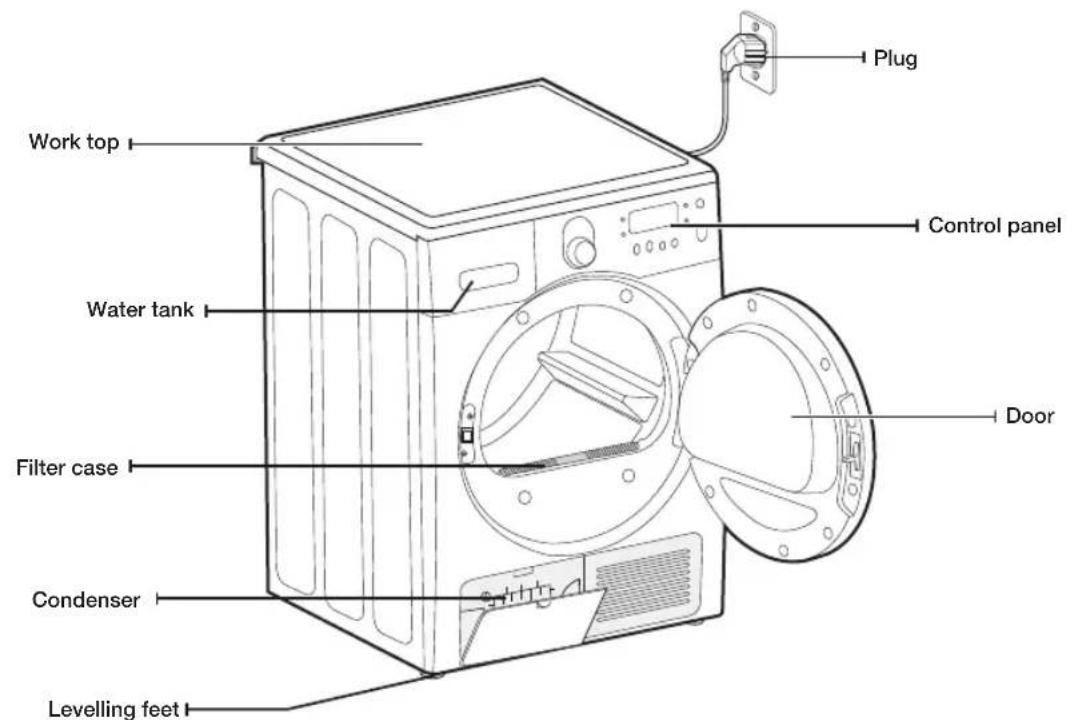
text_image
Work top Water tank Filter case Condenser Levelling feet Plug Control panel DoorParts


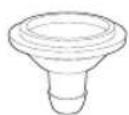


Hose guide
Cable tie
Hose connector
Long drain hose (2m) Manual book
installing your dryer _9
installing your dryer
CHECK BEFORE INSTALLING
- Do not plug the power cord into the wall outlet before completing the dryer installation.
- Check the appearance of the product for any damaged parts before starting the product installation.
- If there are any parts that appear to be damaged, please contact your nearest Samsung Customer Service Center.
- When moving the product, do not move the product by yourself.
• Take care of the edges of the dryer as they can be sharp. - Do not install the dryer in a location exposed to frost. Cold water may damage the product.
- Use the product indoors only.
- Do not place the dryer on one side when lifting it, and do not move the dryer in such a way that the internal parts shake. This may result in damage to the internal parts of the product.
BEFORE USING THE PRODUCT
- Check if there are any accessories remaining inside the drum.
- Plug in the power cord just before operating the product.
- Do not block the air inlet hole of the cooling grill at the front of the dryer.
- Do not place inflammable objects near the dryer and keep the surroundings clean.
- Keep the dryer level with the ground.
- Do not remove the adjustable levelling feet of the dryer. They are necessary to keep the product level with the ground.
IMPORTANT TO INSTALLER
Please read the following instructions carefully before installing the dryer. These instructions should be kept for future reference.

REMOVE THE DOOR FROM ALL DISCARDED APPLIANCES TO AVOID THE DANGER OF A CHILD SUFFOCATING.
LOCATION CONSIDERATIONS
Because a condensing type has been adopted, which condenses and processes air inside the dryer, external ventilation is not required.
Therefore, The dryer can be installed and used in any location where the temperature is between 5 and 35 degrees centigrade, unlike a conventional dryer that requires an external exhaust system.
ALCOVE OR CLOSET INSTALLATION
To operate safely and properly, your new Dryer requires minimum clearances of:
Sides - 25 mm Rear - 51 mm
Top - 25 mm Front - 465 mm
If both the washing machine and a dryer are installed together, the front of the alcove or closet must have at least 465 mm unobstructed air opening.
10_ installing your dryer
ELECTRICAL REQUIREMENTS

Electrical Requirements is AC 220\~240 V / 50 Hz, AC220 V / 60 Hz (Philippines Only).

- Improper connection of the equipment grounding conductor can result in a risk of electric shock. Check with a qualified electrician or serviceman if you are in doubt as to whether your dryer is properly grounded. Do not modify the plug provided with your dryer – if it doesn't fit the outlet, have a proper outlet installed by a qualified electrician.
- To prevent unnecessary risk of fire, electrical shock, or personal injury, all wiring and grounding must be done in accordance with local codes, or in the absence of local codes, It is your responsibility to provide adequate electrical services for your dryer.
GROUNDING
Your dryer must be grounded. If your dryer malfunctions or breaks down, grounding will reduce the risk of electric shock by providing a path of least resistance for the electric current.
Your dryer comes with a power cord having a three-prong grounding plug for use in a properly installed and grounded outlet.

Never connect the ground wire to plastic plumbing lines, gas lines, or hot water pipes.
Improperly connecting the equipment-grounding conductor can result electrical shock.
Check with a qualified electrician or serviceman if you are unsure if the dryer is properly grounded. Do not modify the plug provided with the dryer. If it does not fit the outlet, have a proper outlet installed by a qualified electrician.

If the product is not grounded, there is a danger of fire or electric shock.
installing your dryer _11
installing your dryer
For proper installation, we recommend that you hire a professional. To install:
-
Move your dryer to an appropriate location for installation. Consider installing the dryer and washer side-by-side. Lay two of the carton cushion-tops on the floor. Tip your dryer on its side so it will lay across both cushion-tops.
-
Set your dryer back in an upright position.
-
To ensure that the dryer provides optimal drying performance, it must be level. To minimize vibration, noise, and unwanted movement, the floor must be a perfectly level, solid surface.

To set the dryer to the same height as the washer, fully retract the levelling feet by turning them counterclockwise, then loosen the legs by turning them clockwise
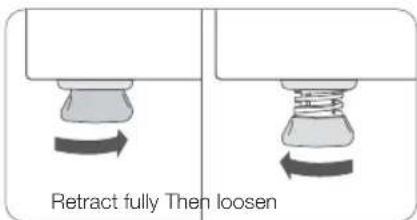
text_image
Retract fully Then loosen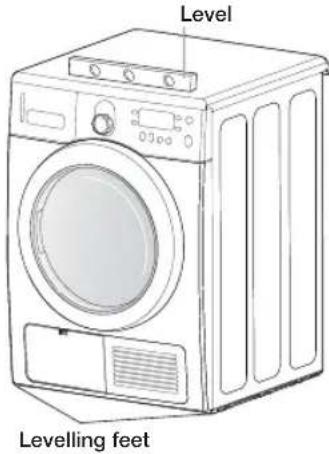
text_image
Level Levelling feet
Adjust the levelling feet only as much as necessary to level the dryer. Extending the levelling feet more than necessary can cause the dryer to vibrate.
-
Review Electrical Requirements section (See page 11). BEFORE OPERATING OR TESTING.
-
With a level, check your dryer and make necessary adjustments to the levelling legs.
-
Plug in your dryer, and check operation by using the checklist below.
FINAL INSTALLATION CHECKLIST
□ Dryer is plugged into electrical outlet and is properly grounded.
□ Dryer is leveled and is sitting firmly on the floor.
☐ Start your dryer to confirm that it runs, heats, and shuts off.

installing your dryer
DRAINING WATER WITHOUT USING THE WATER TANK
You can use the dryer without using the water tank by following the procedures below.
CONNECTING THE DRAIN HOSE
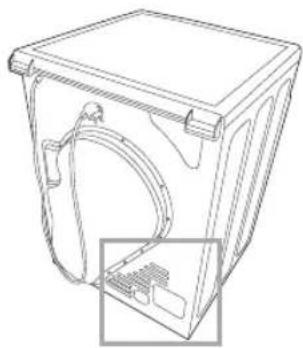
The Dryer can pump the condensed water outside of the DRYER directly with dain hose provide.
The procedures to connect the drain hose are as follows.
natural_image
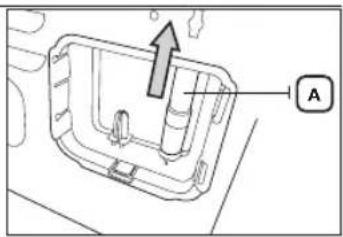
Technical line drawing of a mechanical housing component with an inset showing internal components (no text or symbols)- Disconnect the drain hose A.
text_image
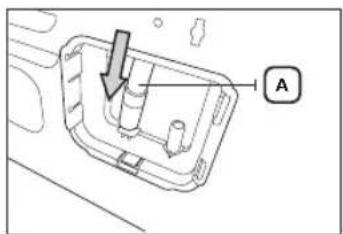
Technical diagram showing a mechanical component with an arrow and label 'A' pointing to a feature.- Connect the drain hose A to the other hole.
natural_image
Technical diagram of a mechanical component with labeled section A (no text or symbols beyond label)- Connect accessory hose(long drain hose) B to the hole next to the hole that is connected to drain hose A.

- When connecting hose B, take care that the height of the hose does not exceed 90cm.
- After connecting the drain hose, you can directly drain the condensed water via the drain-outlet through the connected drain hose or through the washstand or the drain-outlet of the washstand.

text_image
Binstalling your dryer _13
installing your dryer
Connecting the drain hose
The end of the drain hose can be positioned in three ways:
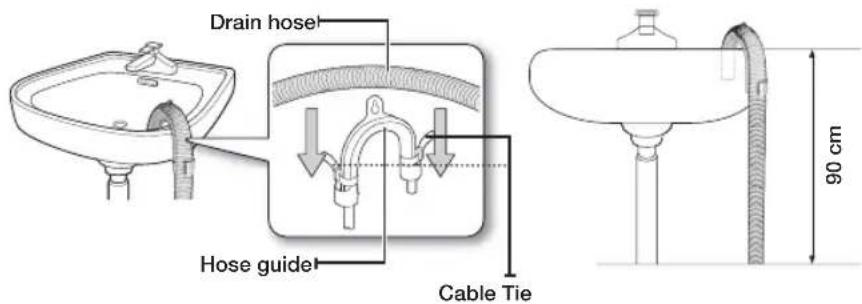
- Over the edge of a wash basin: The drain hose must be placed lower than 90cm. If the end of the drain hose needs to be placed above the ground, we recommend a height of 60cm \~ 90cm. To keep the drain hose spout bent, use the supplied plastic hose guide. Secure the guide to the wall with a hook or to the tap with a piece of string to prevent the drain hose from moving.
text_image
Drain hose Hose guide Cable Tie 90 cm- Assemble the drain hose and the hose guide and fix them with the cable-tie.
- You can drain the condensed water by connecting the accessory hose (long drain hose) to the drain-outlet directly.
Connecting the direct-hose
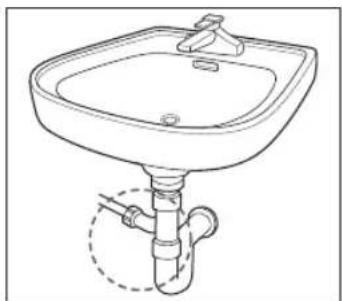
You can immediately drain the condensed water that comes out while drying, by connecting the drain hose to the tap.
- Assemble the hose connector and the hose.

Since there is a danger of water leaking from the hose connector and accessory hose, make sure that they are connected firmly.
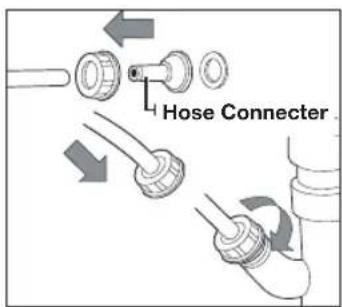
text_image
Hose Connector- Connect the end of the hose to the tap.
natural_image
Line drawing of a standard square sink with a pipe fitting and a handle (no text or symbols)14_ installing your dryer
INSTALLATION STACKING

In case of purchasing the additional stacking kit, contact our Samsung service center or local distributors. [Part no. SK-DH / SK-DA]
- Carefully lay the dryer on its side. Use the packing material so you don't scratch the finish on the dryer.
natural_image
Line drawing of a microwave oven with control panel and fan (no text or symbols)-
Install rubber pads to dryer base.
-
Locate the 4 rubber pads in the parts package. Insert the rubber pads into the holes at the bottom of the levelling legs.
• Purchase the stacking-kit package additionally.

natural_image
Pure technical line drawing of a door or cabinet with no text, numbers, or symbols- Set the dryer upright.

The stacking kit can only be installed for Samsung family products.
- Install bracket to dryer.
- Remove washer top cap screw from the rear left. Align left bracket holes with top cap screw hole on rear left of the unit and replace screw.

Leave screw loose so dryer hole alignment will be easier.
- Repeat the above step with the right side.

text_image
Bracket-Stacking- Install dryer and bracket on washer

- Lift the dryer on top of the washer. Protect the washer control panel with cardboard or other protection. Be sure to lift the dryer high enough to clear the washer control panel.
Personal Injury. More than two people are recommended to lift the dryer into position because of its weight and size. Failure to do so could result in injury.
- Align the holes in the bracket with the holes in the back of the dryer. Using a Phillips screwdriver, attach the M4x12 tapping screws.
- Tighten the washer bracket screws; then tighten all stacking kit screws.

text_image
Screw- Finalise the installation

- Refer to the washer Installation Instructions to complete the washer installation.
- Refer to the dryer Installation Instructions to complete the dryer installation.
- Carefully slide or walk the stacked washer and dryer into place. Use felt pads or other sliding device to assist moving and to protect flooring.
Do not push on the dryer once installed to top of the washer. Pushing on the dryer may result in pinched fingers.
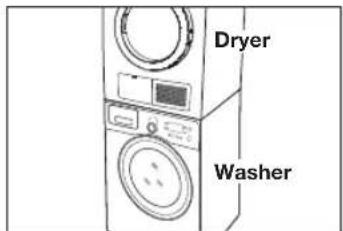
text_image
Dryer Washerinstalling your dryer _15
installing your dryer
DOOR REVERSAL
Depending on your requirements (installation location, space constraints), you can change the direction the door opens.

This is done according to the customer's needs. The qualified technician or customer can do this themselves directly.
- Unplug the power cord.
- Remove the two screws from the door-hinge.
- Lift the door to separate it.
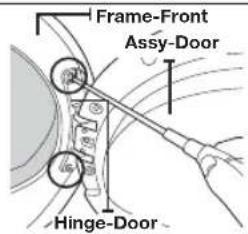
text_image
Frame-Front Assy-Door Hinge-Door- Remove the 16 screws.
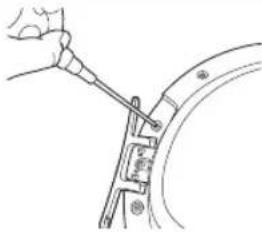
natural_image
Line drawing of a hand using a tool to adjust or install a mechanical component (no text or symbols present)- After removing the screw, rotate the holder-glass, the door-glass, and the cover-door (I) by 180° as shown in the figure.

- Since the holder-glass, the door-glass, and the cover-door (I) are not completely fixed, rotate them holding the lower part so that they are not separated.
• Work carefully so that the door-seal is not removed.
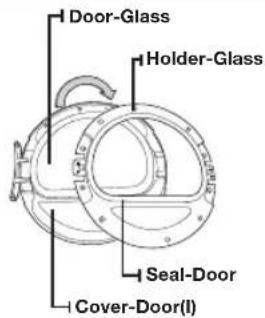
text_image
Door-Glass Holder-Glass Seal-Door Cover-Door(I)- After rotating them by 180^ , hold them in the position as shown by the figure.
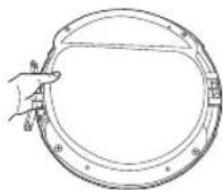
natural_image
Line drawing of a hand holding a circular mechanical component (no text or symbols)- Assemble the glass-holder in the correct direction. (After the disassembly, assemble it by rotating it by 180°.)
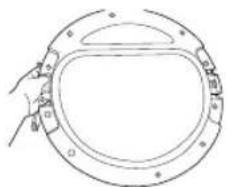
natural_image
Line drawing of a hand holding a circular frame with a central oval and mounting holes (no text or symbols)16_ installing your dryer
- Fasten the 16 screws in the correct positions.
- Note that two of the screws have a different length from the others. (Use the longer screws for the door-lever.)
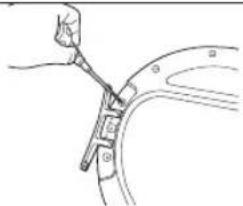
text_image
Diagram showing a hand using a tool to adjust or install a curved component, labeled with numbers 1, 2, and 3.- Move the position of the screw at the back of the door-hinge.

natural_image
Technical line drawing of a mechanical component with no visible text or symbols- Fasten the screw in the bottom hole.
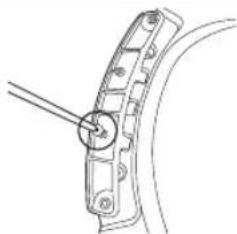
natural_image
Technical line drawing of a mechanical clamp or bracket with a tool inserted (no text or symbols)- Remove the two screws holding the front-frame at the left.
- Remove the two screws holding the holder-lever at the left.
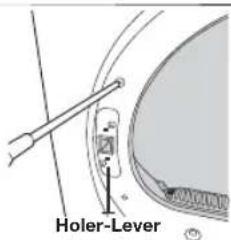
text_image
Holer-Lever- Now, move to the right side of the product and fasten the two screws holding the front-frame and the two screws holding the lever-holder.
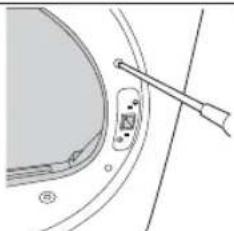
natural_image
Technical line drawing of a mechanical component with a tool inserted (no text or symbols)- Align the door with the fixing holes.
- Fasten the two screws holding the door-hinge.
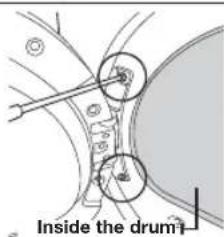
text_image
Inside the drum
You can restore the direction the door opens by following the procedures above, if necessary.
installing your dryer _17
operating Instructions, tips
OVERVIEW OF THE CONTROL PANEL

text_image
Cotton Extra Dry Cupboard Dry- Iron Dry Wool Ultra Delicate- Freshen Up Sports Wear 1 2 1:59 Synthetics A Extra Dry Cupboard Dry Iron Dry Quick Dry Time Dry Warm Air Cool Air My Cycle Delay End Temp. Time Rack Dry Wrinkle Prevent 6897111012 Mixed Load Bell Interior Lamp Power Start Pause| 1 Digital Graphic Display | Displays the remaining drying cycle time, all cycle information, and error messages. |
| 2 Cycle Selector | To select a cycle, rotate the Cycle Selector dial to the desired cycle.[Cotton] Cupboard Dry → Extra Dry → [Synthetics] Extra Dry → Cupboard Dry → Iron Dry → Quick Dry → Time Dry → Warm Air → Cool Air → Sports Wear → Freshen Up → Ultra Delicate → Wool → [Cotton] Iron → Cupboard DryCotton- For averagely or lightly soiled cottons, bed linen, table linen, underwear, towels, shirts, etc.Extra Dry - Use for heavy-duty fabrics or items that should be very dry, such as jeans and towels.Cupboard Dry - Use this cycle to dry loads such as cotton, underwear, and linen (NOT appropriate for jeans).Iron Dry - Finishes the dry cycle in a moist state appropriate for Ironing.Synthetics- For averagely or lightly soiled blouses, shirts, etc., made of polyester (diolen, trevira), polyamide (perlon, nylon) or other similar blends.Extra Dry - Use for heavy-duty fabrics or items that should be very dry, such as jeans and towels.Cupboard Dry - Use this cycle to dry loads such as shirts, blouses, bed linen and table linen. (NOT appropriate for jeans).Iron Dry - Finishes the dry cycle in a moist state appropriate for Ironing.Quick Dry- Provides a 29 minutes drying time and high temperature level is automatically selected.Time Dry- Time Dry allows you to select the desired cycle time and simultaneously it is possible to select the temperature level.Turn the cycle selector dial to Time Dry, then pressTimeButton to set the drying time. Press theTimebutton repeatedly to scroll through the time settings.The drying time increase in every 10 minutes up to 90 minutes.Warm Air- For small items, pre-dried laundry and normal fabrics using low temperature in 20 minutes.Cool Air- For all fabrics to need freshing tumbles without heating. |
18_ operating Instructions, tips
Wool - For machine washable and tumble dryable wool only. Load should be under 1.0 kg. The Wool cycle of this machine has been approved by Woolmark company for Total-Easy-Care Wool products, M1006(Woolmark approval number).Ultra Delicate - The Delicates cycle is designed For lingeries at a low drying temperature.Freshen Up - With this cycle the odors can be removed and especially this cycle freshens garments.Sports Wear - Use for water-proofed or proofed garments to keep their good looks and fresh feel (except Gore-Tax).For better drying results, turn the laundry inside out before drying it.Overloading the dryer may not yield the same results. For the Max Load of each drying course, refer to the Cycle Chart in the appendix. Load should be under 1.0 kg. The Wool cycle of this machine has been approved by Woolmark company for Total-Easy-Care Wool products, M1006(Woolmark approval number).Ultra Delicate - The Delicates cycle is designed For lingeries at a low drying temperature.Freshen Up - With this cycle the odors can be removed and especially this cycle freshens garments.Sports Wear - Use for water-proofed or proofed garments to keep their good looks and fresh feel (except Gore-Tax).For better drying results, turn the laundry inside out before drying it.Overloading the dryer may not yield the same results. For the Max Load of each drying course, refer to the Cycle Chart in the appendix. | |
| 3 My CycleSelection Button | Choose your favorite cycle including cycle, temp, Drying level option, etc. (See page 21 for detail.) |
| 4 Delay EndSelection Button | Press this button repeatedly to cycle through the available Delay End options (from 4 hours to 19 hours in one hour increments).The hour displayed indicates the time when the dry cycle will be finished. |
| 5 Temp SelectionButton | Press this button repeatedly to cycle through the available temperature level for the drying. |
| 6 Time SelectionButton | When using Manual Dry cycles, time can be adjusted by pressing the Time Selection button.20min→30min→40min→50min→60min→70min→80min→90minDuring the Sensory Dry cycle, the time indicator of manual is off because exact drying times are determined by fluctuating humidity levels. |
| 7 Rack DrySelection Button | Rack Dry is available only at time dry cycle. Temperature will be set only to Low. (page 22 for detail.) |
| 8 Wrinkle PreventSelection Button | Wrinkle Prevent provides approximately 60 minutes of intermittent tumbling in unheated air at the end of the cycle to reduce wrinkling. Press the Wrinkle Prevent button to activate this feature.The indicator light above the pad will illuminate when Wrinkle Prevent is selected. Dried laundry is prevented from becoming wrinkled by periodic drum rotations after the completion of the drying course. (Even after “End” is displayed, the drum rotates intermittently.) |
| 9 Interior LampSelection Button | Lights the dryer drum while the dryer is running.It can be set while your dryer is not only running but also when it is stopped. If you do not turn the Drum Light off within 4 minutes of turning it on, it is automatically turned off. |
| 10 Mixed Load BellSelection Button | This is an alarm that notifies the user when the average drying level is damp dry (80% dried) when the laundry contains various types of materials and fabric.If the corresponding condition is satisfied, the Mixed load bell LED blinks. |
| 11 Start/Pauseselection button | Press to start a dry cycle. If the dryer is running, press it once and it will pause the dryer. Press it again to restart the dry cycle. |
| 12 Power button | Press once to turn your dryer on, press again to turn it off. If your dryer is left on for more than 10 minutes without any buttons being touched, the power automatically turns off. |
operating Instructions, tips _19
operating Instructions, tips
CHILD LOCK
A function to prevent children from playing with your dryer.
Activating/Deactivating
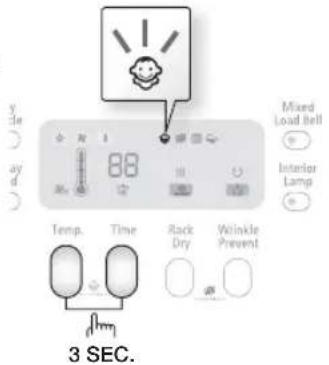
If you want to activating/deactivatin the Child Lock, press both the Temp. and Time buttons simultaneously for 3 seconds.
The "Child Lock 😊" will be lit when this feature is activated.

- When the power is turned on, the Child Lock function is available.
- Once you set the Child Lock function, no button, except for the Power button, will respond until you release the Child Lock function.
- If the dryer is powered on again, the Child Lock function stays on.
- When other buttons, except for the Power button, do not respond, check the Child Lock indicator to see if the function is on.
text_image
Mixed Load Bell Interior Lamp Temp. Time Rack Dry Wrinkle Prevent 3 SEC.SIGNAL OFF
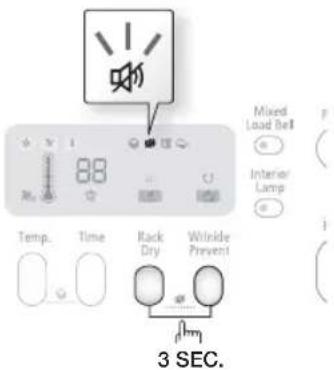
The Signal Off function can be selected during all courses. When this function is selected, sound is turned off for all courses. Even if the power is turned on and off repeatedly, the setting is retained.
Activating/Deactivating
If you want to activate or deactivate the Signal Off function, press the Rack Dry and Wrinkle Prevent buttons at the same time for 3 seconds.
text_image
Mixed Load Bell Interior Lamp Temp. Time Rack Dry Winkle Prevent 3 SEC.20_ operating Instructions, tips
MY CYCLE
Lets you activate your customised cycle that includes Dryness, drying temperature and time option.
By pushing the My Cycle button, you activate the settings used during the previous My Cycle mode.
(Default : Normal Cycle)
If My Cycle mode is activated, the My Cycle indicator will be lit.
You can select all options in My Cycle mode as follows.
-
Select cycle using the Cycle Selector dial.
-
After cycle selection, set each option.

Each cycle has certain default options that are automatically set.
To see these default options, go to page 33.
- Then, you can start My Cycle by pushing the Start/Pause button in My Cycle mode. The cycle and options you select will be displayed the next time you choose My Cycle.

You can change the My Cycle settings by repeating the same process above.
The last used setting will be displayed the next time you choose My Cycle.
DELAY END
You can set the dryer to finish your drying cycle automatically at a later time, choosing a delay of between 4 to 19 hours (in 1 hour increments). The hour displayed indicates the time at which the dry will be finished.
- Manually or automatically set your drying machine according to the type of laundry you are drying.
- Press the Delay End button repeatedly until the required delay time is set. If the delay time is set, the "Delay End" function becomes ON state.
- Press the Start/Pause button. The "Delay End ⏻" indicator will blink and the clock will begin counting down until it reaches the set time.
- To cancel a Delay End function, press the Power button and then turn the dryer on again.
INTERIOR LAMP
Lights the dryer drum while the dryer is running.
Setting & releasing
If you want to set or release the Interior Lamp, press both the Interior Lamp buttons simultaneously.

This can be set as long as the power cord is connected to the wall outlet. If you do not turn the Drum Light off within 5 minutes of turning it on, it is automatically turned off.
operating Instructions, tips _21
operating Instructions, tips
RACK DRY
Installing the drying rack
- Open the dryer door.
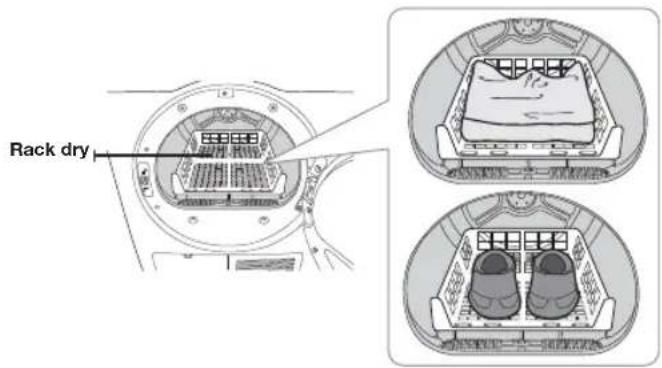
- Position the drying rack in the tumbler, placing the front lip of the drying rack on the top of the lint filter case.
- Place the rear legs in the two recessed areas of the dryer's back wall then push down the middle of the drying rack to fix.
-
Place the items to be dried on the rack, leaving space between them so air can circulate.
-
Close the dryer door.
-
Press the Power button.
-
Select Time Dry by using the cycle selector dial, set the time and then press the Rack Dry button.

- You can set a drying time up to 90 minutes. The temperature setting is automatically set to Low and cannot be changed. Select the time according to the moisture and weight of the items. Start dryer. It may be necessary to reset the timer if a longer drying time is needed.
-
If do not select Time Dry cycle, Rack Dry function is not selected.
-
Press the Start/Pause button.
text_image
Rack dry| SUGGESTED ITEMS REMARKS (MAX 1.5kg) | |
| Washable sweaters(block to shape and lay flat on rack) | When drying the laundry using the Rack, fold and place the clothes on the Rack to prevent the clothing from becoming wrinkled. |
| Stuffed toys(cotton or polyester fiberfilled) | |
| Stuffed toys(foam or rubber-filled) | |
| Foam rubber pillows | |
| Sneakers | To dry sports shoes, place the shoes on the Rack so that the soles of the shoes are facing downwards. |

Drying foam rubber, plastic, or rubber on a heat setting may cause damage to the items and lead to a fire hazard.

Since damage may result when drying shoes, use the Rack Dry course to dry shoes.
22_ operating Instructions, tips
LOAD THE DRYER PROPERLY
- Place only one wash load in your dryer at a time.
- Mixed loads of heavy and lightweight fabrics will dry differently, which may result in lightweight fabrics being dry while heavy fabrics remain damp at the end of a drying cycle.
- Add one or more similar items to your dryer when only one or two articles of clothing need drying. This improves the tumbling action and drying efficiency.
- Overloading restricts tumbling action, resulting in uneven drying as well as excessive wrinkling of some fabrics.
- Make sure to insert laundry that has been spun by an appropriate washing machine.
- No unwashed textiles should be dried
- Textiles which have been in contact with oil, alcohol, petrol etc. should not be dried.
GETTING STARTED
- Load your dryer loosely - DO NOT overload.
- Close the door.
- Select the appropriate cycle and options for the load (see pages 20, 21).
- Press the Start/Pause button.
- The dryer indicator light will illuminate.
- The estimated cycle time will appear in the display. The time may fluctuate to better indicate drying time remaining in the cycle.

- When the cycle is complete and "End" will appear in the display.
- Pressing Power cancels the cycle and stops your dryer.
- The Drying, Cooling, and Wrinkle Prevent indicator lights will illuminate during those portions of the cycle.
operating Instructions, tips _23
care and cleaning
CLEAN THE FILTER CASE
• After each load.
• To shorten drying time.
• To operate more energy efficiently.

Do not operate your dryer without the filter case in place.

There is a danger of damaging the laundry when drying laundry without the filter case.
CLEAN THE CONDENSER
- Clean once a month
- Clean with water

If you do not clean it for a long time, the drying performance may be degraded.
CONTROL PANEL
Clean with a soft, damp clothes. Do not use abrasive substances.
Do not spray cleaners directly on the panel.
The control panel finish may be damaged by some laundry pre-treatment soil and stain remover products.
Apply such products away from your dryer and wipe up any spills or overspray immediately.
TUMBLER
Remove any stains such as crayon, ink, or fabric dye (from new items such as towels or jeans) with an all-purpose cleaner.
Tumble old towels or rags to remove any excess stain or cleaning substance.
Once these steps are followed, stains may still be visible, but should not transfer to subsequent loads.
STAINLESS STEEL TUMBLER
To clean the stainless steel tumbler, use a damp cloth with a mild, non-abrasive cleaner suitable for stainless steel surfaces.
Remove the cleaner residue and dry with a clean cloth.
DRYER EXTERIOR
The entire dryer has a high-gloss finish. Clean with a soft, damp cloth. Do not use abrasive substances. Protect the surface from sharp objects as they may scratch or damage the finish.
Do not place any heavy or sharp objects or a detergent box on the dryer. Keep them on the purchased pedestal or in a separate storage box.
24\_ care and cleaning
DUMPING CONDENSED WATER
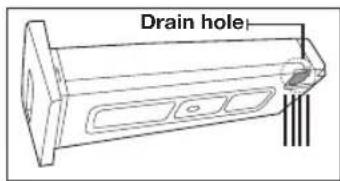
- Pull the water-tank forwards to separate it.

When removing the Water tank from the product, hold it using both hands as it is heavy and take care not to spill any water inside the tank.

text_image
Water-Tank- Remove the condensed water inside the water-tank.
- Remove the condensed water in the tank after every drying operation.

Since there is a danger of water leaking if you do not drain the water after using the product, make sure to drain the water.
text_image
Drain hole
If you empty the water tank and press the Start button, the Water Tank Full (☐) in the LED panel is turned off.
CLEANING THE FILTER CASE(图)
- Open the door and remove the filter by pulling it upwards.
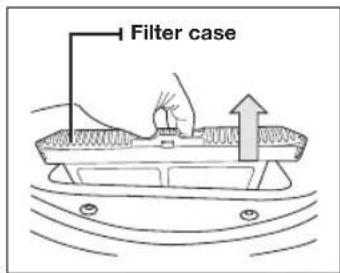
text_image
Filter case- Open and clean the filter case.
- Clean the filter case after the drying operation is completed.
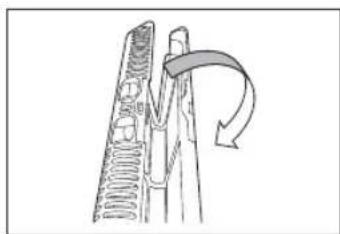
natural_image
Diagram of a mechanical component with a curved arrow indicating rotation or force (no text or symbols)
- Since the drying performance may be degraded and there is a danger of fire if you do not clean the filter case after the specified period of use, clean the filter case at the specified cleaning interval.
- Since the drying performance may be degraded and there is a danger of fire if you use a damaged or broken filter case, replace the filter case in this case.
- Clean the filter case after every drying operation.

- If the surface of the filter is wet, use the filter after drying it completely. - If you clean the filter case and press the Start button, the Filter (☐) in the LED panel is turned off.
care and cleaning
25
care and cleaning
CLEANING THE CONDENSER ASSEMBLY
- Open the condenser compartment cover.
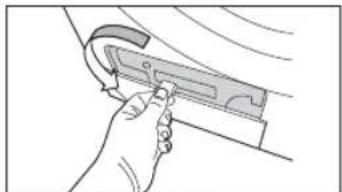
natural_image
Hand holding a tool interacting with a mechanical component (no text or symbols visible)- Unlock the fixer condenser.

text_image
Fixer Condenser- Remove the condenser.

natural_image
Hand inserting a fan into a rack-mounted device (no text or symbols visible)- Clean the condenser completely under the tap letting water to flow through.

natural_image
Illustration of hands using a tool to lift a component (no text or symbols visible)
- Since the drying performance may be degraded if you do not clean the condenser after a specified period of use, clean the condenser at the specified cleaning interval.
- Clean it once a month.
- When assembling the condenser after cleaning it, make sure to that the fixer condenser is set to the lock position.
26_ care and cleaning
special laundry tips
SPECIAL LAUNDRY TIPS
Please follow the care label or manufacturer's instructions for drying special items. If care label instructions are not available, use the following information as a guide.
| Bedspreads & Comforters | Follow the care label instructions or dry on the Cotton cupboard and High temperature.Make sure the item is thoroughly dry before using or storing.May require repositioning to ensure even drying. |
| Blankets | Use Cotton cupboard and dry only one blanket at a time for best tumbling action.Make sure the item is thoroughly dry before using or storing. |
| Cloth Nappies | Use the Cotton cupboard and the High temperature settings for soft,fluffy diapers. |
| Down-filled Items (jackets, sleeping bags, comforters, etc.) | Use the Cotton cupboard and the Low or Low temperature setting.Adding a couple of dry towels shortens drying time and absorbs moisture. |
| Foam Rubber (rug backs, stuffed toys, shoulder pads, etc.) | DO NOT dry on a heat setting. Use the Cool Air cycle (no heat).WARNING – Drying a rubber item with heat may damage it or be a fire hazard. |
| Pillows | Use the Cotton cupboard.Add a couple of dry towels to help the tumbling action and to fluff the item.DO NOT dry kapok or foam pillows in dryer. Use the Cool Air cycle. |
| Plastics (shower curtains, outdoor furniture covers, etc.) | Use the Cool Air cycle or the Time Dry cycle and the Low or Low temperature settings depending on the care label instructions. |
THINGS TO AVOID :
• Fiberglass items (curtains, draperies, etc.).
- Woolens, unless recommended on the label.
• Vegetable or cooking oil-soaked items.
special laundry tips _27
troubleshooting
CHECK THESE POINTS IF YOUR DRYER...
| PROBLEM SOLUTION | |
| Doesn't run. | Make sure the door is latched shut.Be sure the power cord is plugged into a live electrical outlet.Check the home's circuit breaker and fuses.Press the Start/Pause button again if the door is opened during the cycle.Empty the water in the condensed water tank.Clean the filter case. |
| Doesn't heat. | Check the home's circuit breaker and fuses.Select a heat setting other than Cool Air.Check the case filter and condenser and clean them if necessary.Dryer may have moved into the cool-down phase of the cycle. |
| Doesn't dry. | Check all of the above, plus...Do not overload. 1 wash load = 1 dryer load.Sort heavy items from lightweight items.Large, bulky items like blankets or comforters may require repositioning to ensure even drying.Check that the dryer is draining properly to extract adequate water from the load.Load may be too small to tumble properly. Add a few towels.Clean the filter case.Clean the Condenser.Check if the cooling air vent is blocked. |
| Is noisy. | Check the load for objects such as coins, loose buttons, nails, etc.Remove promptly.Be sure the dryer is leveled properly as outlined in the installation instruction.It is normal for the dryer to hum due to the high velocity of air moving through the dryer drum and fan. |
| Dries unevenly. | Seams, pockets, and other similarly heavy areas may not be completely dry when the rest of the load has reached the selected dryness level. This is normal. Select the Extra Dry setting if desired.If one heavy item is dried with a lightweight load, such as one towel with sheets, it is possible that the heavy item will not be completely dry when the rest of the load has reached the selected dryness level. Sort heavy items from lightweight items for best drying results. |
| Has an odour. | Household odors from painting, varnishing, strong cleaners, etc. may enter the dryer with the surrounding room air. This is normal as the dryer draws the air from the room, heats it, pulls it through the tumbler, and exhausts it outside.When these odors linger in the air, ventilate the room completely before using the dryer. |
| Shuts off before load is dry | Dryer load is too small. Add more items or a few towels and restart the cycle.Dryer load is too large. Remove some items and restart the dryer. |
28_troubleshooting
| PROBLEM SOLUTION | |
| Lint on clothes | Make sure the lint filter is cleaned before every load. With some loads that produce high amounts of lint, it may be necessary to clean the filter case during the cycle.Some fabrics are lint producers (for example, a fuzzy white cotton towel) and they should be dried separately from clothes that are lint trappers (for example, a pair of black linen pants)Divide larger loads into smaller loads for dryingCheck pockets thoroughly before drying and drying clothes. |
| Garments still wrinkled after Wrinkle prevent | Small loads of 1 to 4 items work best.Load fewer garments.Load similar-type garments. |
| Odours remain in clothing after Refresh. | Fabrics containing strong odors should be washed. |
troubleshooting
INFORMATION CODES
Information codes may be displayed to help you better understand what is occurring with your Dryer.
| ERROR DISPLAY | MEANING SOLUTION | |
| tE2 | Clogged filter case is restricted. Clean | the filter case or condenser.If the problem continues call for service. |
| tE4 | ||
| dE | Running the dryer with door open Close | the door and then restart.If the problem continues call for service. |
| dF | Door is not closing properly Call for service. | |
| bE | Button stuck for more than 30 secs Make sure a button is NOT being pressed continuously. Try restarting the cycle.If the problem continues, call for service. | |
| hE | Clogged filter case is restricted.Invalid heating Temp when running the dryer. | Clean the filter case or condenser.If the problem continues call for service |
| Et | EEPROM is not communicating properly | Try restarting the cycle.If the problem continues call for service. |
| 3E | The motor does not work properly. Try restarting the cycle.If the problem continues call for service. | |
| 5E | The water tank is full of water.The drain pump is out of order. | Empty the water tank and start again.If the problem continues call for service. |
For any codes not listed above, or if the suggested solution doesn't fix the problem, call your Samsung Service Centre or local Samsung dealer.
30_troubleshooting
appendix
FABRIC CARE CHART
The following symbols provide garment care direction. The Clothing care labels include symbols for drying, bleaching, drying and ironing, or dry cleaning when necessary. The use of symbols ensures consistency among garment manufacturers of domestic and imported items. Follow care label directions to maximize garment life and reduce laundering problems.
| Wash Cycle Special Instructions | Warning Symbols for Laundering | ||||
| Normal Line Dry/ Hang to | Dry Do Not Wash | ||||
| Permanent Press / Wrinkle Resistant / Wrinkle Control | Drip Dry Do Not Wring | ||||
| Gentle/Delicates Dry Flat Do Not Bleach | |||||
| Hand Wash | Heat Setting | Do Not Tumble Dry | |||
| Water Temperature** | High | No Steam (added to iron) | |||
| Hot Medium Do Not Iron | |||||
| Warm Low | Dryclean | ||||
| Cold Any Heat Dry Clean | |||||
| Bleach | No Heat/Air Do Not Dry Clean | ||||
| Any Bleach (when needed) | Iron-Dry or Steam Temperatures | Line Dry/ Hang to Dry | |||
| Only Non-Chlorine (color-safe) Bleach (when needed) | High Drip Dry | ||||
| Tumble Dry Cycle Medium | Dry Flat | ||||
| Normal | Low | ||||
| Permanent Press/ Wrinkle Resistant/ Wrinkle Control | |||||
| Gentle/ Delicates | |||||
** The dot symbols represent appropriate wash water temperatures for various items. The temperature range for Hot is 41^ - 52^ , for Warm 29^ - 41^ and for Cold 16^ - 29^ . (Wash water temperature must be a minimum of 16^ for detergent activation and effective cleaning.)
appendix_31
appendix
PROTECTING THE ENVIRONMENT
This appliance is manufactured from recyclable materials. If you decide to dispose of this appliance, please observe local waste disposal regulations. Cut off the power cord so that the appliance cannot be connected to a power source. Remove the door so that animals and small children cannot get trapped inside the appliance.
DECLARATION OF CONFORMITY
This appliance complies with European safety standards, EC directive 93/68 and EN Standard 60335.
SPECIFICATIONS
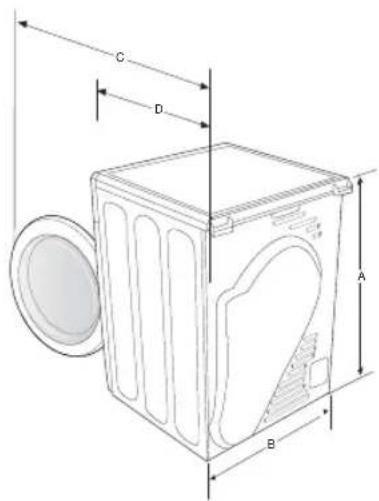
text_image
C D A B| TYPE FRONT LOADING DRYER | ||
| DIMENSIONS | A. Height | 84.8 cm |
| B. Width | 59.8 cm | |
| C. Depth with door open 90° | 108.6 cm | |
| D. Depth | 63.4 cm | |
| WEIGHT | 44.5 kg | |
| HEATER RATING | 2500 W (1750 W+750 W)2290 W (1600+690 W) [Philippines Only] | |
| POWER CONSUMPTION | NO HEAT | 175 W |
| HEATING | 2675 W2465 W [Philippines Only] | |
| He drum illumination | LED (Different according to model) | |

To replace the LED illumination please contact our service line.

appendix
CYCLE CHART
(● user option)
| Cycle | Max load(kg) (Dry Laundry) | Temp. | Delay End | My Cycle | Mixed Load Bell | Interior Lamp | Wrinkle Prevent | Sound Off | Cooling Time (min) | |
| Cotton | Extra Dry | High 8 | High | ● | ● | ● | ● | ● 5 | ||
| Cupboard Dry High | ● | ● | ● | ● | ● 5 | |||||
| Iron Dry High | ● | ● | - | ● | ● | ● | 5 | |||
| Synthetics | Extra Dry | Medium4 | Medium | ● | ● | ● | ● | ● 5 | ||
| Cupboard Dry Medium | ● | ● | ● | ● | ● 5 | |||||
| Iron Dry Medium | ● | ● | - | ● | ● | ● | 5 | |||
| * WoolM1006(Woolmark approval number) | 1 Low | ● | ● | - | ● | ● | ● | 1 | ||
| Ultra Delicate | 1 Low | ● | ● | ● | ● | ● 3 | ||||
| Freshen Up | 1.5 High | ● | ● | - | ● | ● | ● | 5 | ||
| Sports Wear | 1.5 Low | ● | ● | ● | ● | ● 5 | ||||
| Quick Dry | - High | ● | ● | - | ● | ● | ● | 8 | ||
| Time Dry | - High | ● | ● | - | ● | ● | ● | 8 | ||
| Warm Air | - Low | ● | ● | - | ● | ● | ● | 5 | ||
| Cool Air | - N/A | ● | ● | - | ● | ● | ● | |||
* Depending on the percentage of wool in the laundry, the time may extend up to 43 minutes.
appendix _33
appendix
CONSUMPTION DATA
| Program | Load(kg)* | Final spin speed In a domestic washing machine (Rpm) | Energy (kWh) | Max Duration (Minutes) |
| Cotton Cupborad | 8 | 1000 (60% residual moisture)**1400 (50% residual moisture) | 5.134.78 | 145135 |
| Cotton Iron | 8 | 1000 (60% residual moisture)**1400 (50% residual moisture) | 4.533.94 | 10596 |
- * : Weight of dry laundry
** : EN 61121:2013 test program
- All data without a "star" against it was calculated using EN 61121:2013
Consumption data can vary from the nominal values given above depending in the size of the load, types of textiles, residual moisture levels after spinning, fluctuations in the electricity supply and any extra options selected.
34_ appendix
memo
SAMSUNG
QUESTIONS OR COMMENTS?
| Country CALL OR | VISIT US ONLINE AT | |
| MALAYSIA 1800-88 | 9999 www.samsung.com/my | |
| PHILIPPINES | 1-800-10-SAMSUNG(726-7864) for PLDT1-800-3-SAMSUNG(726-7864) for Digitel1-800-8-SAMSUNG(726-7864) for Globe02-5805777 | www.samsung.com/ph |
| SOUTH AFRICA 0860 | SAMSUNG(726-7864) www.samsung.com |
Code No. DC68-02805K-05_EN