PGF84WH1 - Fridge EPV - Free user manual and instructions
Find the device manual for free PGF84WH1 EPV in PDF.


User questions about PGF84WH1 EPV
0 question about this device. Answer the ones you know or ask your own.
Ask a new question about this device
Download the instructions for your Fridge in PDF format for free! Find your manual PGF84WH1 - EPV and take your electronic device back in hand. On this page are published all the documents necessary for the use of your device. PGF84WH1 by EPV.
USER MANUAL PGF84WH1 EPV
text_image
EPV ELITEPRIMEVISIONFixed Frame Projection Screen
Peregrine Series:
HD / AcousticPro 1080P2 (4k) / 235 / Rear Pro
User's Guide
PARTS LIST
- Frame Parts x's 6 pcs (4 top/bottom frame pcs. + 2 side frame pcs)
- Tension Rods x's 6 pcs (4 top/bottomrods + 2 side rods)
- Screen Materialx's 1 pc
- Center joints x's 2 pcs
- Elbow Jointsx's4pcs
- Wall bracketsx's2-4pcs
- Screws x's 16 pcs
- User Guide x's pc
- Center Support Bar x's 1 - 2 pcs (depending on model/size)
- Support joinerx's 2-4 pcs (depending on model/size)
- Fix Plates x's 30 - 90 pcs (depending on model/size)
Note: Please make sure all parts are included in your package before proceeding to assemble your Elite Screens fixed frame projection screen.
ASSEMBLING THE FRAME
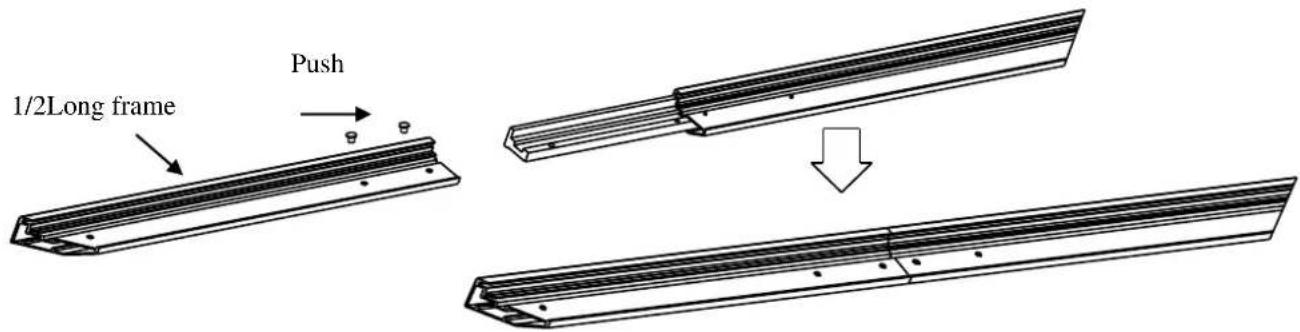
- Insert the center joint connector to the horizontal frame piece and then fasten it with 2 screws.

text_image
Push Joint Long frame- Insert the other horizontal frame piece to the center joint connector and then fasten it with 2 screws.
text_image
1/2Long frame PushMake sure the frame piece lines up correctly before you tighten the screws completely.
- Insert both elbowjoint connectors into the long horizontal frame (fig.1).

text_image
Push Long frame Push Joint ( fig. 1 )
text_image
Push Shut fuse Shut fuse Push- Join all four frame parts together following the steps showed below(fig.2).

text_image
Insert the exposed ends of the joint connectors into the short (vertical) frame and align the four corners so that they meet at perfect right angles Push Push(fig.2)
- After making sure that all four corners join at right angles to form a perfect rectangle, fasten the four angles together by using the (x8) joint screws included (fig.3).

natural_image
Technical line drawing of a rectangular frame with an inset showing a corner detail (no text or symbols)ATTACHING THE SCREEN MATERIAL TO THE FRAME
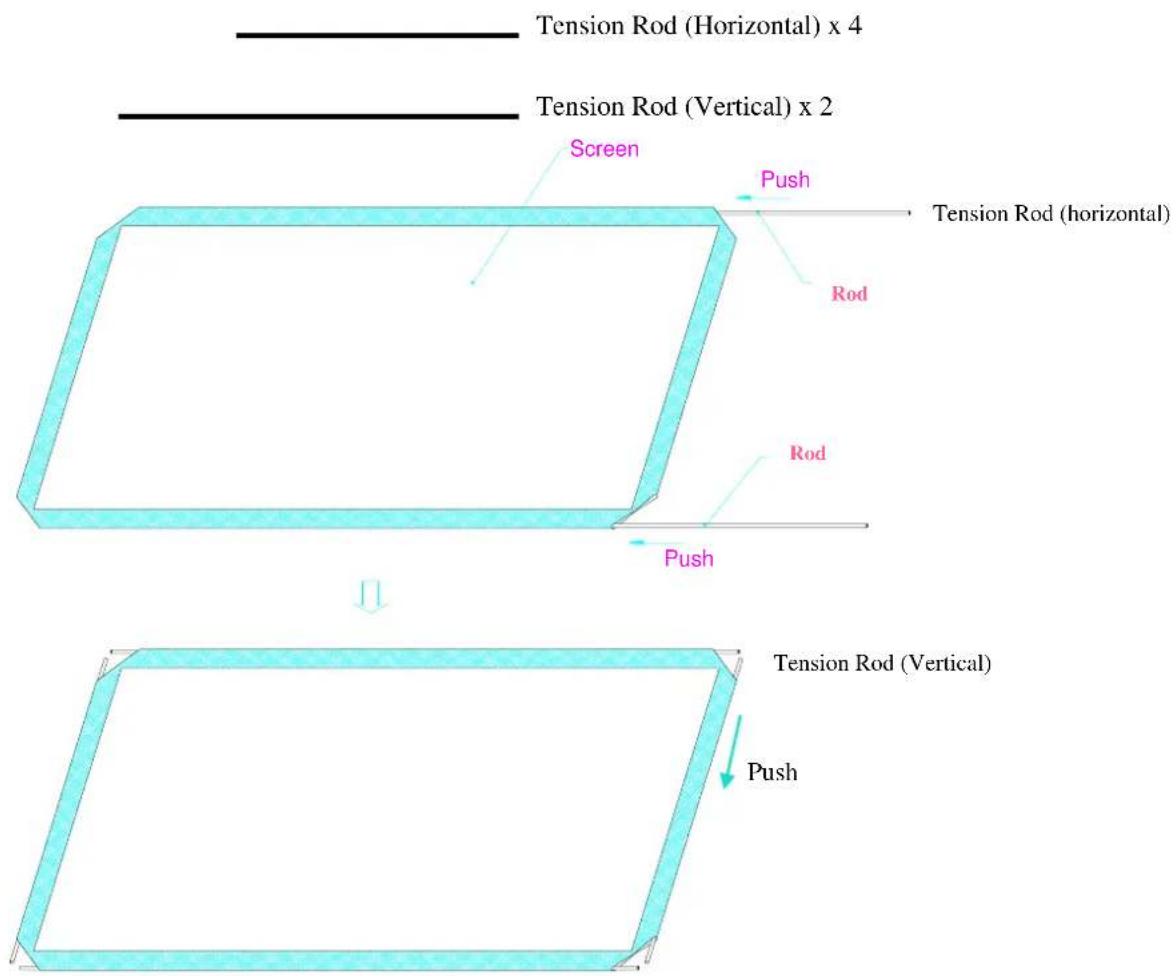
- Lay out the screen and tension rods on a clean and dry surface. Insert the tension rods through the sleeves according to their corresponding lengths on each edge of the screen as seen below (fig.4).
text_image
Tension Rod (Horizontal) x 4 Tension Rod (Vertical) x 2 Screen Push Tension Rod (horizontal) Rod Rod Push Tension Rod (Vertical) Push(fig.4)
- Place the screen material on the back of the built frame and slip the tension rods into the grooves running along each side on the back of the frame. Clip the fix plates to the back of the frame to secure the rods into place creating tension for a tight and flat surface (fig. 5 & fig. 6).

text_image
(fig. 5) Viewing surface (Front of screen) Push fix plate 8 feel rod (fig. 5) (fig. 6) Tension RodBlack backing for Acoustically Transparent models
This procedure only applies to Acoustically Transparent Screen Material models with AcousticPro1080P2 and A4K. Disregard if your Peregrine HD screen material is not acoustically transparent. The black backing counters the effects of light penetration that would otherwise reflect light from items behind the screen and will distort the image.
The black backing goes behind the projection surface and are held into position by Velcro-faced fix plates.

text_image
Black backing Fix plate secures AcousticPro material and the black backing behind it. Acoustically Transparent ScreenMaterialCovered byBlack Blackbacking for AT material Fix Plate Tension Rod (stretches the AT screen material)After the material has been installed, the backing will lie over the back of the white (AT) material and then be held into place by the fix plates as they are added (Fig.1-3). Interval markings reveal the best likely points of attachment (Fig. 1). The prongs on the fix plates (Fig. 2) straddle a lip on the back of the frame creating a friction hold that will firmly keep the material and backing in place (Fig. 3-4).

ATTACHING THE FIX PLATES
- Make sure that the material and frame are both lying face down on a clean, dry and non-abrasive surface.
- Center the material inside the frame.
Please note the material will be noticeably smaller than the frame. Stretching the material is required to create a sufficient amount of tension for perfect material flatness.
- Start attaching the fix plates in the center of the long horizontal edge and (1) then alternate with the center short sides (2) as shown in diagram (fig.7).
Note: Follow these instructions to make sure the material is properly fixed in the center position of the frame. After attaching the fix plates in sequence #2 (the center of the short sides), please remove the fix plates in sequence #1 (the center of the long horizontal edge) and reattach them again, and also remove the fix plates on sequence# (2) and reattach them again.
- Then continue to follow our recommended order numbers3-8 to properly distribute tension to the screen material.

text_image
Flx plate Push ① ② ③ ④ ⑤ ⑥ ⑦ ⑧(fig. 7)
CENTER SUPPORT BAR
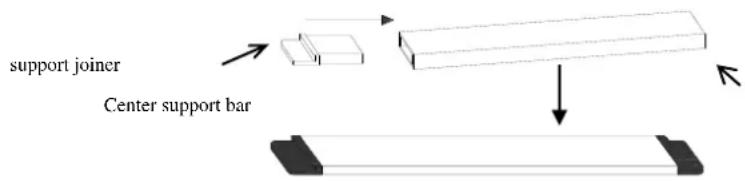
- Insert the support joiner into each side of the center support bar to complete assembly.
text_image
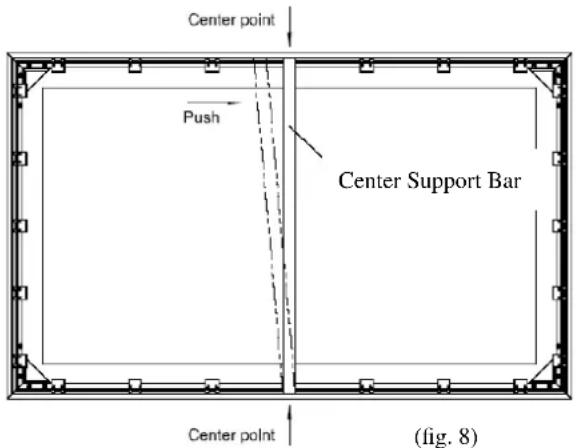
support joiner Center support bar- Insert the Center Support Bar into the upper top groove on the back of the frame (not where the fix plate inserts are) with the bottom end near the approximate center point of the frame and place it in at an angle so that both ends of the bar are in alignment with the groove (Fig. 8).
- Slide the top end of the bar into the top center point location to complete center support bar installation. This will provide added stability to your frame and added tension to the material.
text_image
Center point Push Center Support Bar Center point (fig. 8)INSTALLATION INSTRUCTIONS
-
Locate your desired installation location with a stud finder (recommended) and mark the drill-hole area of where the screen is to be installed.
-
Drill a hole with the proper bit size according to the wood screws included.
-
Line up the wall brackets with the drilled holes on the installation location and screw them in using a Philips screwdriver.
-
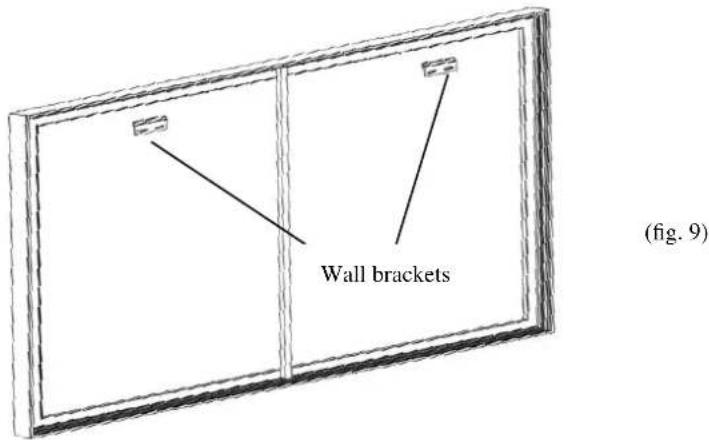
Position the fixed frame screen onto the top wall brackets as shown (fig. 9) and push down at the center of the bottom frame to secure the installation.
-
The wall brackets allow flexibility by allowing the fixed frame screen to slide to the sides. This is an important feature as it allows your screen to be properly centered.
text_image
Wall brackets (fig. 9)CAUTION
Please follow these instructions carefully to ensure proper maintenance and safety with your screen.
-
When hanging the screen, please make sure that no other objects such as power switches, outlets, furniture, ladders, windows, etc. occupy the space designated for your Fixed-Frame screen.
-
Regardless if the screen is hung on or installed into the wall, make sure that the proper mounting anchors are used and that the weight is supported appropriately by a strong and structurally sound surface just as any large and heavy picture frame should.
-
Frame parts are made of high quality velour-surfaced aluminum and should be handled with care.
-
When not in use cover the screen with a furniture sheet to protect it from dirt, grime, paint or any other impurities.
-
When cleaning, use a damp soft cloth with warm water to remove any marks on the frame or screen surface.
-
Never attempt to use any solutions, chemicals, or abrasive cleaners on the screen surface.
-
In order to avoid damaging the screen, do not touch it directly with your fingers, tools or any other sharp or abrasive objects.
-
Spare parts should be placed out of reach of small children in accordance with household safety guidelines.
For a local Elite Screens contact or Technical Support, please visit
www.EPVscreens.com