
KAWPWTRFNTA - Pet water fountain Kogan - Free user manual and instructions
Find the device manual for free KAWPWTRFNTA Kogan in PDF.


| Brand | Kogan |
| Model | KAWPWTRFNTA |
| Product Type | Smart Pet Water Fountain |
| Material | ABS |
| Dimensions | 174 x 181 x 154 mm |
| Net Weight | 580 g |
| Capacity | 1.9 L |
| Input Voltage | DC 5V, 1A |
| Power Consumption | 5 W |
| Connectivity | Wi-Fi (2.4 GHz only) |
| Smart App Compatibility | Kogan SmarterHome app (iOS/Android) |
| Flow Modes | Normal (continuous), Geyser (5 min on, 5 min off) |
| UV Sterilization | UVC light (do not look directly) |
| Filter Type | Water filter + foam filter |
| Filter Replacement | Every 30 days (soak water filter before use) |
| Indicator Lights | Status (on = low water, flashing red = filter replacement), Wi-Fi (on = connected, fast flash = EZ pairing, slow flash = AP pairing) |
| Cleaning Recommendation | Weekly rinse; monthly deep clean; clean pump regularly |
| Suitable For | Cats and small to medium dogs |
| Safety Features | Unplug when not in use; do not immerse cord; child supervision; pet-proof cord management |
| Included Components | Fountain base, lid, filter tray, water filter, foam filter, user guide (USB adapter not included) |
Frequently Asked Questions - KAWPWTRFNTA Kogan
User questions about KAWPWTRFNTA Kogan
0 question about this device. Answer the ones you know or ask your own.
Ask a new question about this device
Download the instructions for your Pet water fountain in PDF format for free! Find your manual KAWPWTRFNTA - Kogan and take your electronic device back in hand. On this page are published all the documents necessary for the use of your device. KAWPWTRFNTA by Kogan.
USER MANUAL KAWPWTRFNTA Kogan
natural_image
Line drawing of a modern kitchen appliance with a lid and base (no text or symbols)KOGAN SMARTERHOME™ 1.9L PET WATER FOUNTAIN
KAWPWTRFNTA
SAFETY & WARNINGS
To protect against electric shock, avoid immersing the power cord in water or any other liquid.
- Close supervision is necessary when children are using or are near the appliance.
- Unplug the appliance from the outlet when it is not in use and before cleaning.
- Do not operate the appliance if the cord is damaged. If the appliance malfunctions or has been damaged in any way, cease use immediately and contact help.Kogan.com for support.
- Do not use any accessory or attachments that have not being supplied with this product.
- Do not use this appliance outdoors.
- Avoid letting the power cord hang over the edge of a table or counter or come into contact with hot surfaces.
- Do not place the appliance on or near a hot gas or electric burner or in a heated oven.
• Always attach the plug to the appliance first, and then connect it to an electrical outlet. - Use the appliance only for its intended purpose.
- This appliance is not intended for use by individuals (including children) with reduced physical, sensory, or mental capabilities, or lack of experience and knowledge, unless they have received supervision or instructions on how to use the appliance safely from a person responsible for their safety.
- Children should be supervised to ensure that they do not play with the appliance.
- Avoid looking directly into the UVC light during operation.
• Over time, yellowing inside the product is normal. - Please ensure that the unit is placed on a flat surface to prevent accidental overturning, which can cause the fountain or function incorrectly.
- Ensure the power cord is properly shielded and organised in a way that prevents pets from biting the cable and causing dangerous situations, such as electric shock.
- This product is suitable for cats or small to medium sized dogs.
COMPONENTS

natural_image
Line drawing of a simple electric water heater with no text or symbolsFountain

natural_image
Simple line drawing of a rectangular tray with a central hole (no text or symbols)Water Filter
natural_image
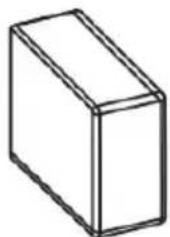
Simple line drawing of a 3D rectangular prism (no text or symbols)Foam Filter

User Guide
OVERVIEW

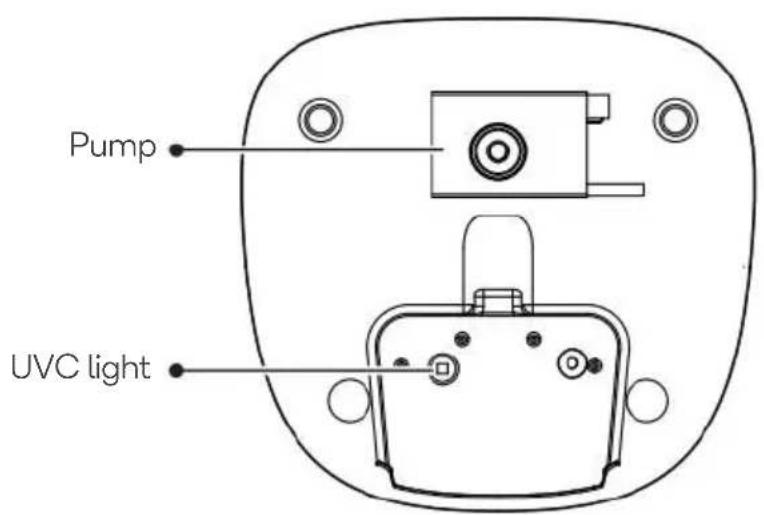
ASSEMBLY
- Clean the inside of the tank, the lid and the filter tray using a soft cloth.
- Soak the water filter in clean water for 5 minutes.

natural_image
Line drawing of a hand placing a small object onto a device into a multi-tiered container (no text or symbols)- Fill the tank with clean water. Note: Do not exceed the maximum water level.

-
Place the pre-soaked filter into the filter tray.
-
Place the filter tray on the tank and then place the lid onto the filter tray.

- Connect the power cord to a USB (5V 1A) power adaptor then plug it into an electrical outlet. Note: USB power adapter is not supplied.

natural_image
Line drawing of a portable water heater connected to a power outlet, with an inset showing three plug outlets (no text or symbols)CONNECT TO SMARTERHOME™ APP
Install App
Download the "Kogan SmarterHome" app from the Play Store (Android) or App Store (iOS).


App Store (iOS)

To register:
- If you already have a SmarterHome account, select 'Log In'. To register a new account, select 'Sign Up'.
- The system will automatically recognise your country. If needed, you can manually select your country from the drop-down box. Enter your email address and tap 'Get Verification Code' to continue.
- A 6-digit code will be sent to the submitted email address. Enter this code before the one-minute timer expires.
- Continue to the next page and complete your SmarterHome profile.


Add device through network
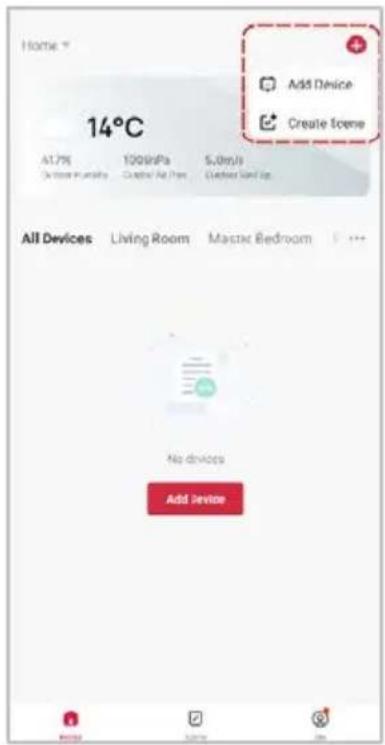
- Once registered, tap "Add Device" on the app's home page, or the "+" in the upper right corner, to add a new device through the network.
- The SmarterHome™ app will begin scanning for nearby devices. If it doesn't automatically detect the product, proceed to Step 3.
- Select the product type from the list of options in the app (Other > Kogan Smart Pet Fountain).
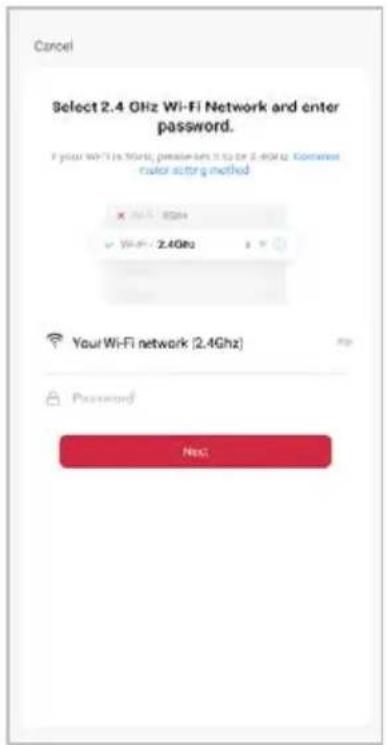
- Enter your Wi-Fi details. It is important that your SmarterHome™ device and the app are connected to the same Wi-Fi network during setup.

Notes:
- The device and the app have to use the same Wi-Fi network.
- The device is only compatible with 2.4Ghz networks.
- Depending on the product, Steps 3 and 4 may be in opposite order.
Set device in pairing mode
When the device is first turned on, it may automatically enter pairing mode (Wi-Fi indicator is flashing rapidly).
If not automatically in pairing mode when powered on, you can manually set the device in pairing mode:
- Disconnect the power adapter, wait 10 seconds then reconnect it and tap "Next".
- Press and hold the mode button for 5 seconds until the Wi-Fi indicator begins flashing rapidly. If the indicator is flashing slowly, press and hold the mode button again for 5 seconds until the Wi-Fi indicator begin flashing rapidly and tap "Next".
- Tap "Confirm the indicator is fast blinking" and click "Next".


- The device will commence the pairing process and connect to the app. Ensure your Wi-Fi router, mobile phone, and the SmarterHome™ device are kept close until connection is complete.
- After successfully being added, you will have the option to rename the device and assign it to a location. It will now be listed on the app's home page. Tap the device listing to enter its control page.


Note:
Once connected, you can select Create Scene from the “+” in the upper right corner (or from the Scene tab) to group connected SmarterHome™ products and automate their functions.
The prior steps detail the process for “EZ Mode” connection. If that does not work for your connection, we suggest trying it again, and if still no success, attempting the following method for “AP Mode” connection.
Using AP Mode to add device
- Follow the previous steps to select your product type (Other > Kogan Smart Pet Fountain).
- Adjust your connection method by tapping on the mode type in the top-right corner of the screen. Select "AP Mode" for the set-up type.
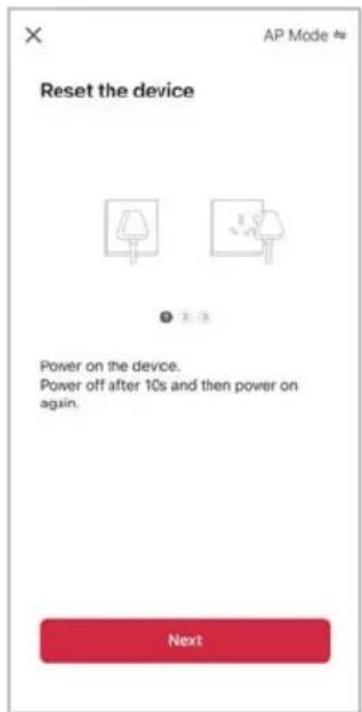
- Disconnect the power adapter, wait 10 seconds then reconnect it and tap "Next".
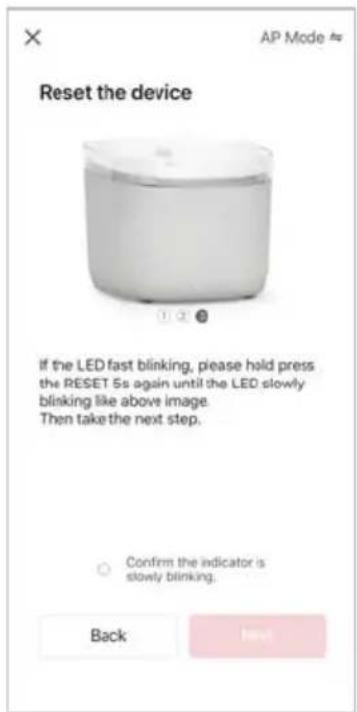
- Press and hold the mode button for 5 seconds until the Wi-Fi indicator begins flashing slowly. If the indicator is flashing rapidly, press and hold the mode button again for 5 seconds until the Wi-Fi indicator begin flashing slowly and tap "Next".
- Tap "Confirm the indicator is slowly blinking" and click "Next".

Notes:
-
The device and the app have to use the same Wi-Fi network.
• The device is only compatible with 2.4Ghz networks. -
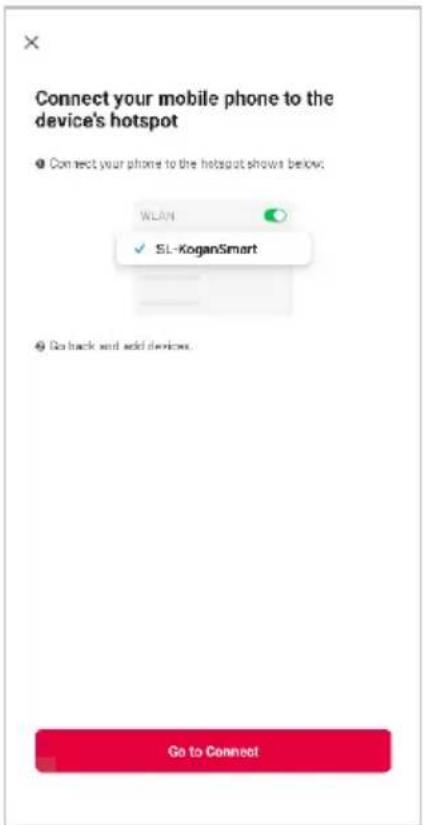
Follow the in-app prompts to continue AP Mode connection, which will pair your mobile phone to the device's Wi-Fi hotspot to ensure a connection. This may be named "SL-KoganSmart", "SmartLife-XXXX", or another similar name.
Note:
If the Wi-Fi hotspot does not appear on your phone in the list of available networks, your device may not be set in AP Pairing Mode correctly. Try repeating the steps outlined above to ensure your device is ready for
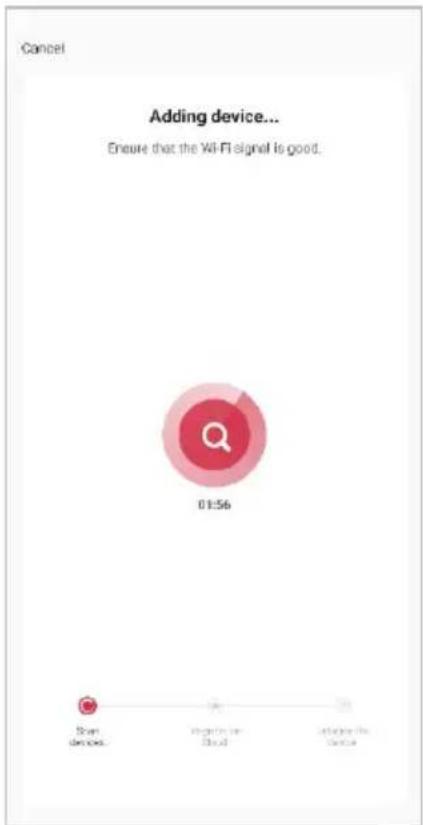
- The device will commence the pairing process and connect to the app. Ensure your Wi-Fi router, mobile phone, and the SmarterHome™ device are kept close until connection is complete.
- After successfully being added, you will have the option to rename the device and assign it to a location. It will now be listed on the app's home page. Tap the device listing to enter its control page.

Note:
Once connected, you can select Create Scene from the “+” in the upper right corner (or from the Scene tab) to group connected SmarterHome™ products and automate their functions.
OPERATION
Switching Modes
This product features two different modes: normal and geyser. To switch between the two modes, press the Mode button. Alternatively, you can swap modes using the app.
- Normal Mode: In this mode, water will flow continuously without any interruptions.
- Geyser Mode: When this mode is activated, water will flow for 5 minutes, then pause for 5 minutes before resuming. It's important to note that during the pause, water will collect in the lid, allowing your pet to continue drinking.
Settings
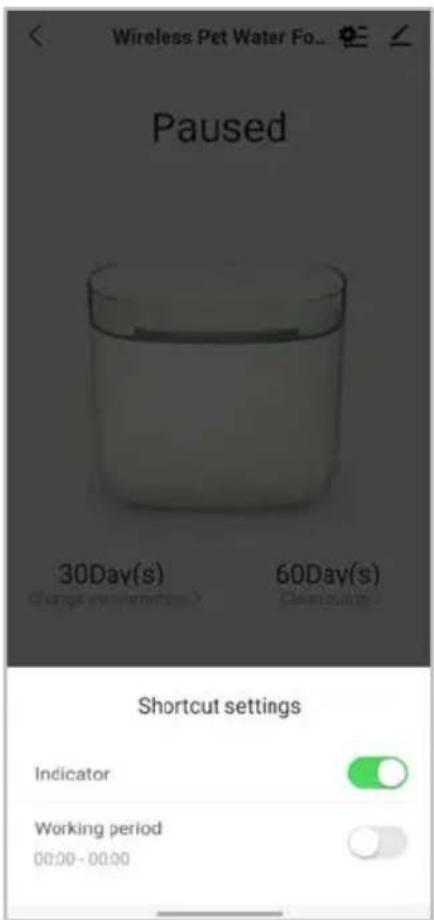
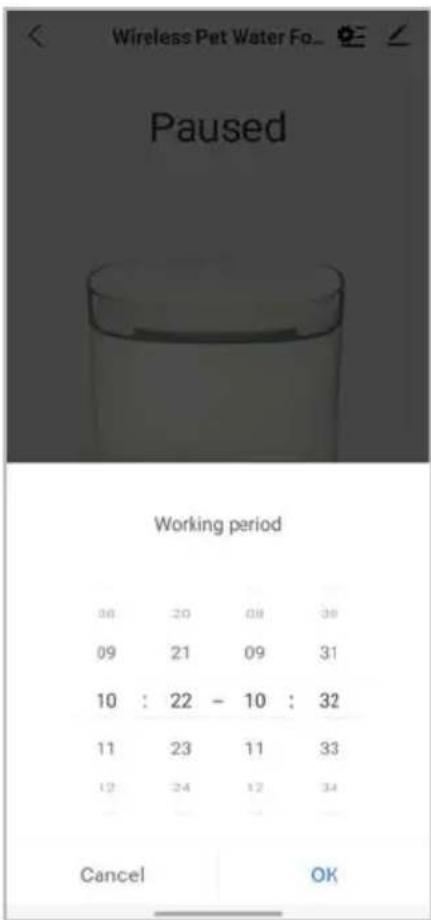
- Tap the settings icon in the top right corner of the app to access the device settings.
- Tap the "Indicator" toggle to turn the device's indicator ON/OFF.
- Tap "Working period" to schedule the desired running time of the water fountain and click "OK" to save it.

CLEANING & CARE
- Clean the fountain at least once a week to prevent the build-up of dirt, debris, and bacteria.
- Before cleaning, always unplug the fountain from the power source. Disassemble the fountain components, including the pump, filters, and water tank.
- Rinse all removable parts with warm water to remove any loose debris. Use a mild detergent and a soft brush to scrub away stubborn stains or residue. Avoid using abrasive cleaners or harsh chemicals that could damage the fountain.
- Clean the pump thoroughly as it plays a vital role in maintaining water circulation. Remove any hair, debris, or clogs from the pump to ensure its optimal performance.
- Regularly empty the water reservoir and refill it with fresh water. Stagnant water can promote bacterial growth and affect the water quality.
- Do not overfill the tank beyond the maximum water level indicator. Overfilling can lead to spillage and potential damage to the fountain.
- Perform a deep cleaning of the entire fountain, including all nooks and crannies, every month. This thorough cleaning helps eliminate any hidden debris or bacteria.
- Ensure that your pet's mouth is clean and free from any debris or foreign objects before they use the fountain.
Filter replacement
It is recommended to replace both the water filter and foam filter every 30 days.
Note: Soak the water filter in clean water for 5 minutes before installing it into the filter tray.

flowchart
graph TD
    A["Device with lid"] --> B["Component 1"]
    B --> C["Component 2"]
    C --> D["Component 3"]
    D --> E["Component 4"]
    E --> F["Final Product"]
TROUBLESHOOTING
Indicator Status
| Indicator | Meaning |
| Status indicator ON | Low water |
| Status indicator flashing RED | Filter needs to be replaced |
| Wi-Fi indicator ON | Connected to network |
| Wi-Fi indicator flashing rapidly | Ready to pair with SmarterHomeTM App (EZ Mode) |
| Wi-Fi indicator flashing slowly | Ready to pair with SmarterHomeTM App (AP Mode) |
SPECIFICATIONS
Dimensions 174 x 181 x 154mm
Material ABS
Net Weight 580g
Capacity 1.9L
Connectivity Wi-Fi (2.4GHz)
Input Voltage DC 5V 1A
NOTES
The Ground Truth image displays a single, solid horizontal line. According to Rule 2 (UNDERSCORE & LINE RULES), this is a stylistic or background line, not a placeholder underscore. Therefore, the OCR result must ignore it and output nothing or only meaningful text. The provided OCR content is "____", which consists of four underscores. This is an incorrect interpretation of the line as a fill-in-the-blank placeholder, violating the rule that stylistic lines must be ignored. The OCR has hallucinated underscores where none should exist based on the GT's visual context. Hence, the OCR result is inconsistent with the Ground Truth.
[Non-Text]
[Non-Text]
[EMPTY]
[Non-Text]
[Non-Text]
The Ground Truth image displays a single, continuous horizontal line, which is a stylistic or background element (like a ruled paper line). According to Rule 2, such lines must be ignored by the OCR result. The OCR content provided is "", which consists of no characters. Since the OCR output correctly ignores the background/stylistic line and produces no actual text, it complies with the “Stylistic/Background Lines (Ignore)” rule. Therefore, the OCR result is consistent with the Ground Truth.
[Non-Text]
[Non-Text]
[EMPTY]
[Non-Text]
[Non-Text]
The Ground Truth image displays a single, continuous horizontal line, which is a stylistic or background element (like a ruled paper line). According to Rule 2, such lines must be ignored by the OCR result. The provided OCR content is "____", which consists of underscores. Underscores are not equivalent to a solid line and are not permitted under the “Stylistic/Background Lines (Ignore)” rule. Outputting underscores for a stylistic line is incorrect because it misinterprets the line as a fill-in-the-blank placeholder. Therefore, the OCR result is inconsistent with the Ground Truth.
[Non-Text]
[Non-Text]
[NO TEXT]
[Non-Text]
[Non-Text]
The Ground Truth image displays a single, continuous horizontal line, which is a stylistic or background element (like a ruled paper line). According to Rule 2, such lines must be ignored by the OCR result. The provided OCR content is "____", which consists of underscores. Underscores are not equivalent to a solid line and are not permitted under the “Stylistic/Background Lines (Ignore)” rule. Outputting underscores for a stylistic line is incorrect because it misinterprets the line as a fill-in-the-blank placeholder. Therefore, the OCR result is inconsistent with the Ground Truth.
[Non-Text]
[Non-Text]
The Ground Truth image displays a single, continuous horizontal line, which is a stylistic or background element (like a ruled paper line). According to Rule 2, such lines must be ignored by the OCR result. The provided OCR content is "____", which consists of underscores. Underscores are not equivalent to a solid line and are not permitted under the “Stylistic/Background Lines (Ignore)” rule. Outputting underscores for a stylistic line is incorrect because it misinterprets the line as a fill-in-the-blank placeholder. Therefore, the OCR result is inconsistent with the Ground Truth.
[Non-Text]
[Non-Text]
The Ground Truth image displays a single, continuous horizontal line, which is a stylistic or background element (like a ruled paper line). According to Rule 2, such lines must be ignored by the OCR result. The provided OCR content is "____", which consists of underscores. Underscores are not equivalent to a solid line and are not permitted under the “Stylistic/Background Lines (Ignore)” rule. Outputting underscores for a stylistic line is incorrect because it misinterprets the line as a fill-in-the-blank placeholder. Therefore, the OCR result is inconsistent with the Ground Truth.
[Non-Text]
[Non-Text]
The Ground Truth image displays a single, continuous horizontal line, which is a stylistic or background element (like a ruled paper line). According to Rule 2, such lines must be ignored by the OCR result. The provided OCR content is "____", which consists of underscores. Underscores are not equivalent to a solid line and are not permitted under the “Stylistic/Background Lines (Ignore)” rule. Outputting underscores for a stylistic line is incorrect because it misinterprets the line as a fill-in-the-blank placeholder. Therefore, the OCR result is inconsistent with the Ground Truth.
[Non-Text]
[Non-Text]
The Ground Truth image displays a single, solid horizontal line, which is a stylistic or background element (like a ruled paper line). According to Rule 2, such lines must be ignored by the OCR result. The provided OCR content is "____", which consists of underscores. Underscores are not equivalent to a solid line and are not permitted under the “Stylistic/Background Lines (Ignore)” rule. Outputting underscores for a stylistic line is incorrect because it misinterprets the line as a placeholder fill-in-the-blank area. Since the OCR output incorrectly rendered a stylistic line as underscores (which should be ignored), this violates the rule. Therefore, the OCR result is inconsistent with the Ground Truth.
[Non-Text]
[Non-Text]
The Ground Truth image displays a single, solid horizontal line, which is a stylistic or background element (like a ruled paper line or separator), not a placeholder for text. According to Rule 2, such stylistic/background lines must be ignored by the OCR result. The OCR content provided is "", which consists of no characters. This correctly represents the absence of any textual content in the GT and correctly matches the visual line as a stylistic element. Therefore, the OCR output should not contain any underscores or line representations. Outputting underscores for a stylistic line violates the rule and constitutes an error.
[Non-Text]
[Non-Text]
[Non-Text]
The Ground Truth image displays a single, solid horizontal line. According to Rule 2 (UNDERSCORE & LINE RULES), this is a stylistic or background line, not a placeholder underscore. Therefore, the OCR result must ignore it and output nothing or only meaningful text. The provided OCR content is "____", which consists of four underscores. This is an incorrect interpretation of the line as a placeholder, violating the rule that stylistic lines must be ignored. The OCR has hallucinated underscores where none should exist based on the GT's visual context. Hence, the OCR result is inconsistent with the Ground Truth.
[Non-Text]
[Non-Text]
The Ground Truth image displays a single, continuous horizontal line, which is a stylistic or background element (like a ruled paper line). According to Rule 2, such lines must be ignored by the OCR result. The provided OCR content is "____", which consists of underscores. Underscores are not equivalent to a solid line and are not permitted under the “Stylistic/Background Lines (Ignore)” rule. Outputting underscores for a stylistic line is incorrect because it misinterprets the line as a fill-in-the-blank placeholder. Therefore, the OCR result is inconsistent with the Ground Truth.
[Non-Text]
The Ground Truth image displays a single, solid horizontal line. According to Rule 2 (UNDERSCORE & LINE RULES), this is a stylistic or background line, not a placeholder underscore. Therefore, the OCR result must ignore it and output nothing or only meaningful text. The provided OCR content is "____", which consists of four underscores. This is an incorrect interpretation of the line as a placeholder, violating the rule that stylistic lines must be ignored. The OCR has hallucinated placeholder underscores where none should exist in the GT. Hence, the OCR result is inconsistent with the Ground Truth.
The Ground Truth image displays a single, solid horizontal line, which is a stylistic or background element (like a ruled paper line). According to Rule 2, such lines must be ignored by the OCR result. The OCR content provided is "", which consists of no characters. Since the OCR output correctly ignores the stylistic line, it complies with Rule 2. Therefore, the OCR result is consistent with the Ground Truth.
[Non-Text]
(No text)
The Ground Truth image displays a single, solid horizontal line. According to Rule 2 (UNDERSCORE & LINE RULES), this is a stylistic or background line, not a placeholder underscore. Therefore, the OCR result must ignore it and output nothing or only meaningful text. The provided OCR content is "____", which consists of four underscores. This is an incorrect interpretation of the line as a fill-in-the-blank placeholder, violating the rule that stylistic lines must be ignored. The OCR has hallucinated underscores where none should exist based on the GT's visual context. Hence, the OCR result is inconsistent with the Ground Truth.
[Non-Text]
[Non-Text]
[EMPTY]
[Non-Text]
[Non-Text]
The Ground Truth image displays a single, continuous horizontal line, which is a stylistic or background element (like a ruled paper line). According to Rule 2, such lines must be ignored by the OCR result. The OCR content provided is "", which consists of no characters. Since the OCR output correctly ignores the background/stylistic line and produces no actual text, it complies with the “Stylistic/Background Lines (Ignore)” rule. Therefore, the OCR result is consistent with the Ground Truth.
[Non-Text]
[Non-Text]
[EMPTY]
[Non-Text]
[Non-Text]
The Ground Truth image displays a single, continuous horizontal line, which is a stylistic or background element (like a ruled paper line). According to Rule 2, such lines must be ignored by the OCR result. The provided OCR content is "____", which consists of underscores. Underscores are not equivalent to a solid line and are not permitted under the “Stylistic/Background Lines (Ignore)” rule. Outputting underscores for a stylistic line is incorrect because it misinterprets the line as a fill-in-the-blank placeholder. Since the OCR output incorrectly rendered a stylistic line as underscores (which should be ignored), this violates the rule. Therefore, the OCR result is inconsistent with the Ground Truth.
[Non-Text]
[Non-Text]
[NO TEXT]
[Non-Text]
[Non-Text]
The Ground Truth image displays a single, continuous horizontal line, which is a stylistic or background element (like a ruled paper line). According to Rule 2, such lines must be ignored by the OCR result. The provided OCR content is "____", which consists of underscores. Underscores are not equivalent to a solid line and are not permitted under the “Stylistic/Background Lines (Ignore)” rule. Outputting underscores for a stylistic line is incorrect because it misinterprets the line as a fill-in-the-blank placeholder. Therefore, the OCR result is inconsistent with the Ground Truth.
[Non-Text]
[Non-Text]
The Ground Truth image displays a single, continuous horizontal line, which is a stylistic or background element (like a ruled paper line). According to Rule 2, such lines must be ignored by the OCR result. The provided OCR content is "____", which consists of underscores. Underscores are not equivalent to a solid line and are not permitted under the “Stylistic/Background Lines (Ignore)” rule. Outputting underscores for a stylistic line is incorrect because it misinterprets the line as a fill-in-the-blank placeholder. Therefore, the OCR result is inconsistent with the Ground Truth.
[Non-Text]
[Non-Text]
The Ground Truth image displays a single, continuous horizontal line, which is a stylistic or background element (like a ruled paper line). According to Rule 2, such lines must be ignored by the OCR result. The provided OCR content is "____", which consists of underscores. Underscores are not equivalent to a solid line and are not permitted under the “Stylistic/Background Lines (Ignore)” rule. Outputting underscores for a stylistic line is incorrect because it misinterprets the line as a fill-in-the-blank placeholder. Therefore, the OCR result is inconsistent with the Ground Truth.
[Non-Text]
[Non-Text]
The Ground Truth image displays a single, continuous horizontal line, which is a stylistic or background element (like a ruled paper line). According to Rule 2, such lines must be ignored by the OCR result. The provided OCR content is "____", which consists of underscores. Underscores are not equivalent to a solid line and are not permitted under the “Stylistic/Background Lines (Ignore)” rule. Outputting underscores for a stylistic line is incorrect because it misinterprets the line as a fill-in-the-blank placeholder. Therefore, the OCR result is inconsistent with the Ground Truth.
[Non-Text]
[Non-Text]
The Ground Truth image displays a single, solid horizontal line, which is a stylistic or background element (like a ruled paper line). According to Rule 2, such lines must be ignored by the OCR result. The provided OCR content is "____", which consists of underscores. Underscores are not equivalent to a solid line and are not permitted under the “Stylistic/Background Lines (Ignore)” rule. Outputting underscores for a stylistic line is incorrect because it misinterprets the line as a fill-in-the-blank placeholder. Therefore, the OCR result is inconsistent with the Ground Truth.
[Non-Text]
[Non-Text]
The Ground Truth image displays a single, solid horizontal line, which is a stylistic or background element (like a ruled paper line or separator), not a placeholder for text. According to Rule 2, such stylistic/background lines must be ignored by the OCR result. The OCR content provided is "", which consists of no characters. This correctly represents the absence of any textual content in the GT and correctly matches the visual line as a stylistic element. Therefore, the OCR output should not contain any underscores or line representations. Outputting underscores for a stylistic line violates the rule and constitutes an error.
[Non-Text]
[Non-Text]
[Non-Text]
The Ground Truth image displays a single, solid horizontal line. According to Rule 2 (UNDERSCORE & LINE RULES), this is a stylistic or background line, not a placeholder underscore. Therefore, the OCR result must ignore it and output nothing or only meaningful text. The provided OCR content is "____", which consists of four underscores. This is an incorrect interpretation of the line as a placeholder, violating the rule that stylistic lines must be ignored. The OCR has hallucinated underscores where none should exist based on the GT's visual context. Hence, the OCR result is inconsistent with the Ground Truth.
[Non-Text]
[Non-Text]
The Ground Truth image displays a single, continuous horizontal line, which is a stylistic or background element (like a ruled paper line). According to Rule 2, such lines must be ignored by the OCR result. The provided OCR content is "____", which consists of underscores. Underscores are not equivalent to a solid line and are not permitted under the “Stylistic/Background Lines (Ignore)” rule. Outputting underscores for a stylistic line is incorrect because it misinterprets the line as a fill-in-the-blank placeholder. Therefore, the OCR result is inconsistent with the Ground Truth.
[Non-Text]
The Ground Truth image displays a single, solid horizontal line. According to Rule 2 (UNDERSCORE & LINE RULES), this is a stylistic or background line, not a placeholder underscore. Therefore, the OCR result must ignore it and output nothing or only meaningful text. The provided OCR content is "____", which consists of four underscores. This is an incorrect interpretation of the line as a placeholder, violating the rule that stylistic lines must be ignored. The OCR has hallucinated placeholder underscores where none should exist in the GT. Hence, the OCR result is inconsistent with the Ground Truth.
The Ground Truth image displays a single, solid horizontal line, which is a stylistic or background element (like a rule line on paper). According to Rule 2, such lines must be ignored by the OCR result. The OCR content provided is "", which consists of no characters. Since the OCR output correctly ignores the stylistic line, it complies with Rule 2. Therefore, the OCR result is consistent with the Ground Truth.
[Non-Text]
(No text)
Need more information?
We hope that this user guide has given you the assistance needed for a simple set-up.
For the most up-to-date guide for your product, as well as any additional assistance you may require, head online to help.kogan.com
kogan.com
- KOGAN SMARTERHOME™ 1.9L PET WATER FOUNTAIN
- SAFETY & WARNINGS
- COMPONENTS
- OVERVIEW
- ASSEMBLY
- CONNECT TO SMARTERHOME™ APP
- Install App
- To register:
- Add device through network
- Notes:
- Set device in pairing mode
- Note:
- Using AP Mode to add device
- OPERATION
- Switching Modes
- Settings
- CLEANING & CARE
- Filter replacement
- TROUBLESHOOTING
- SPECIFICATIONS
- NOTES
- Need more information?
Brand : Kogan
Model : KAWPWTRFNTA
Category : Pet water fountain