SPMXC2060 - Remote control toy SPEKTRUM - Free user manual and instructions
Find the device manual for free SPMXC2060 SPEKTRUM in PDF.


User questions about SPMXC2060 SPEKTRUM
0 question about this device. Answer the ones you know or ask your own.
Ask a new question about this device
Download the instructions for your Remote control toy in PDF format for free! Find your manual SPMXC2060 - SPEKTRUM and take your electronic device back in hand. On this page are published all the documents necessary for the use of your device. SPMXC2060 by SPEKTRUM.
USER MANUAL SPMXC2060 SPEKTRUM
Scan the QR code and select the Manuals and Support quick links from the product page for the most up-to-date manual information.
All instructions, warranties and other collateral documents are subject to change at the sole discretion of Horizon Hobby, LLC. For up-to-date product literature, visit horizonhobby.com or towerhobbies.com and click on the support or resources tab for this product.
Meaning of Special Language
The following terms are used throughout the product literature to indicate various levels of potential harm when operating this product:
WARNING: Procedures, which if not properly followed, create the probability of property damage, collateral damage, and serious injury OR create a high probability of superficial injury.
CAUTION: Procedures, which if not properly followed, create the probability of physical property damage AND a possibility of serious injury.
NOTICE: Procedures, which if not properly followed, create a possibility of physical property damage AND little or no possibility of injury.

WARNING: Read the ENTIRE instruction manual to become familiar with the features of the product before operating. Failure to operate the product correctly can result in damage product, personal property and cause serious injury.
This is a sophisticated hobby product. It must be operated with caution and common sense and requires some basic mechanical ability. Failure to operate this product in a safe and responsible manner could result in injury or damage to the product or other property. This product is not intended for use by children without direct adult supervision. Do not attempt disassembly, use with incompatible components or alter product in any way without the approval of Horizon Hobby, LLC. This manual contains instructions for safety, operation and maintenance. It is essential to read and follow all the instructions and warnings in the manual, prior to assembly, setup or use, in order to operate correctly and avoid damage or serious injury.
Age Recommendation: Not for children under 14 years. This is not a toy.

WARNING: To reduce the risk of fire or electric shock, carefully follow these instructions.
NOTICE: This appliance is not intended for use by persons with reduced physical, sensory or mental capabilities, or lack of experience and knowledge, unless they have been given supervision or instruction concerning use of the appliance by a person responsible for their safety.
Specifications
| Output Port Connectors IC3 | ® and IC5® (EC3TM/EC5TM compatible) |
| Input Voltage | AC 100–240V |
| Charge Current 0.1–8.0A (selectable) | |
| Rated Battery Capacity 22,000mAh max | |
| Balance Current 0.15A Max | |
| Balance Cells 2–4S | |
| Battery Types (cell count) | LiFe/Lilon/LiPo/LiHv (1–4S) |
| NiMH/Cd (1–12S) | |
| Display 1.5” LCD | |
| Operating Temperature 0–40°C (32–104°F) | |
Layout Diagram
| A AC Power Input | G Balance Port |
| B Display Screen | H Charge Port Covers |
| C Channel Selection Button | I IC3 Battery Charge Port |
| D Scroll Up/Down Buttons | J IC5 Battery Charge Port |
| E Start/Enter Button | K USB-C Data Update Port |
| F Back/Cancel Button |
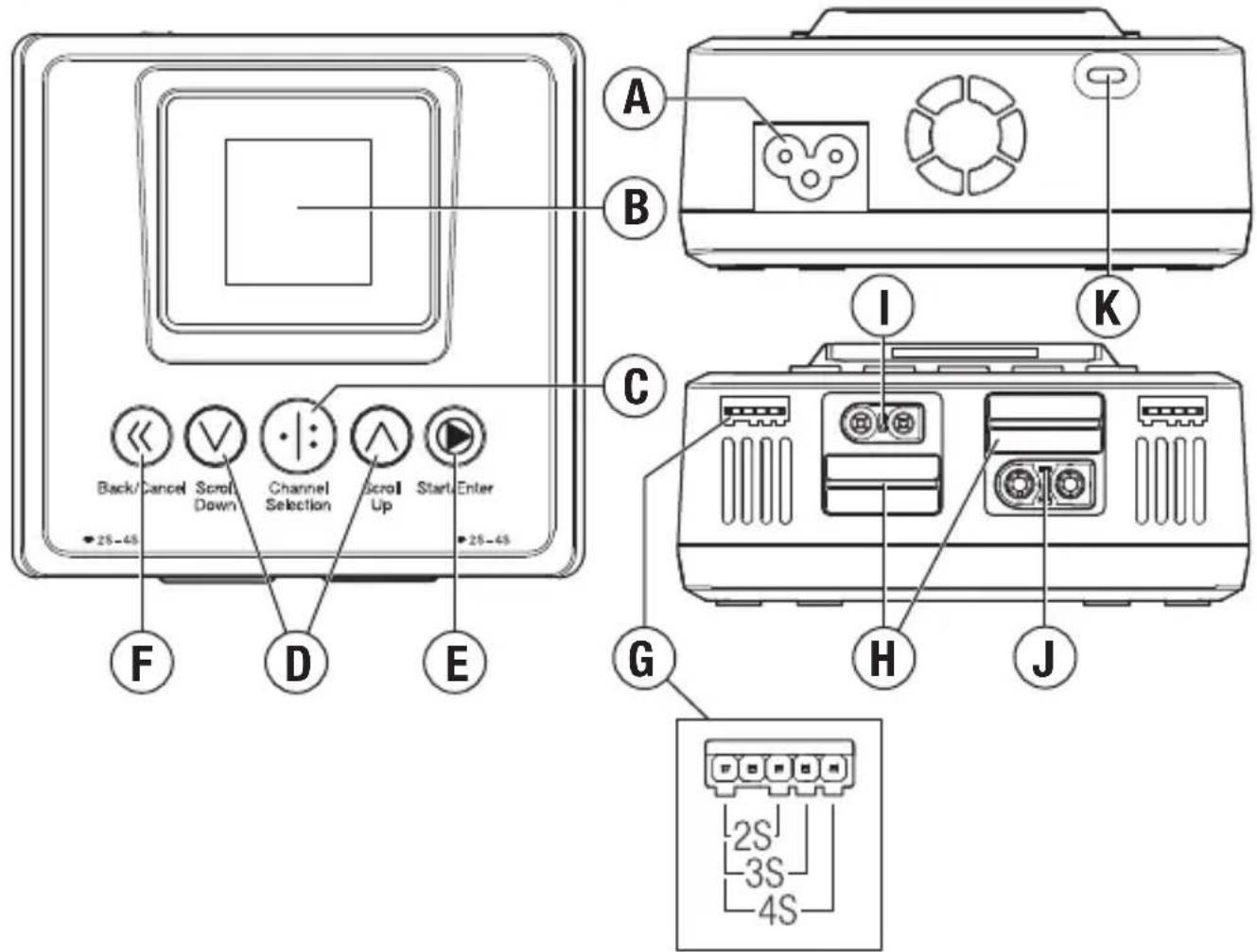
text_image
Back/Cancel Scroll Down Channel Selection Scroll Up Start Enter 25-45 F D E A B C I K G H J 2S 3S 4SGeneral Charging Warnings

WARNING: Failure to exercise caution while using this product and comply with the following warnings could result in product malfunction, electrical issues, excessive heat, and ultimately injury and property damage.
- NEVER LEAVE CHARGING BATTERIES UNATTENDED DURING USE.
• NEVER CHARGE BATTERIES OVERNIGHT. - Never attempt to charge dead, damaged or wet battery packs.
- Never attempt to charge a battery pack containing different types of batteries.
- Never allow children under 14 years of age to charge battery packs.
- Never charge batteries in extremely hot or cold places or place in direct sunlight.
- Never charge a battery if the cable has been pinched or shorted.
- Never connect the charger if the power cable has been pinched or shorted.
- Never connect the charger to an automobile 12V battery while the vehicle is running.
- Never attempt to dismantle the charger or use a damaged charger.
- Never attach your charger to both an AC and a DC power source at the same time.
- Never connect the input jack (DC input) to AC power.
- Always use only rechargeable batteries designed for use with this type of charger in the correct programming mode.
- Always inspect the battery before charging.
- Always keep the battery away from any material that could be affected by heat.
- Always monitor the charging area and have a fire extinguisher available at all times. Always end the charging process if the battery becomes hot to the touch or starts to change form (swell) during the charge process.
- Always connect the charge cable to the charger first, then connect the battery to avoid short circuit between the charge leads. Reverse the sequence when disconnecting.
- Always connect the positive red leads (+) and negative black leads (−) correctly.
- Always disconnect the battery after charging, and let the charger cool between charges.
- Always charge in a well-ventilated area.
- Always terminate all processes and contact Horizon Hobby if the product malfunctions.
- Charge only rechargeable batteries. Charging non-rechargeable batteries may cause the batteries to burst, resulting in injury to persons and/or damage to property.
- The socket-outlet shall be installed near the equipment and shall be easily accessible.

WARNING: Never leave charger unattended, exceed maximum charge rate, charge with non-approved batteries or charge batteries in the wrong mode. Failure to comply may in excessive heat, fire and serious injury.

CAUTION: Always ensure the battery you are charging meets the specifications of this charger and that the charger settings are correct. Not doing so can result in excessive and other related product malfunctions, which can lead to user injury or property damage. contact Horizon Hobby or an authorized retailer with compatibility questions.
Navigating the Charger
Navigation of the charger menus is accomplished using the push buttons on the top of the charger.
- Press the Channel Selection button to choose between channel 1 and channel 2
- Press the Start/Enter button to select a menu item.
- Press the Scroll Down button to scroll down a menu list.
- Press the Scroll Up button to scroll up a menu list.
- Press the Back/Cancel button to return to the previous menu or stop the charging cycle.
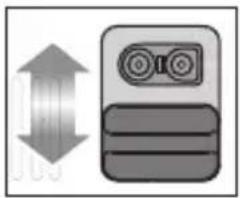
Charge port connector selection
Both channels of the S250 Smart charger are capable of charging through either an IC3 or IC5 port.
- Slide the port cover down to use the IC3 connector.
- Slide the port cover up to use the IC5 connector.
IMPORTANT: Do not remove the charging port covers.
natural_image
Simple icon showing a double-headed arrow pointing left and a stylized device with two lenses (no text or symbols)Operating the Charger
IMPORTANT: Before operating the charger, know your battery's specifications and any battery-
specific safety warnings.
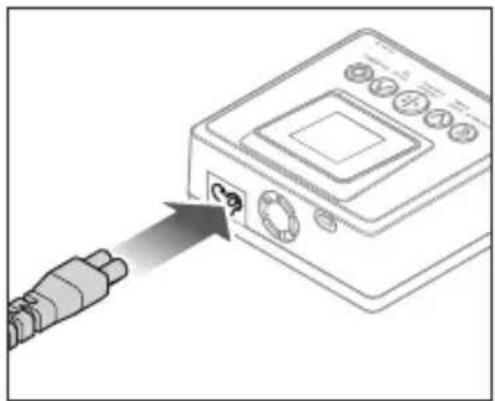
- Connect the included AC cord to the charger and appropriate power supply to power on your Spektrum S250 Smart charger.
- Connect the battery charge lead to either of the ports on the front of the charger.
- Connect the battery balance lead, if available, to the balance port next to the chosen charge port. Make sure the balance lead is positioned correctly, all the way to the left side of the balance port.
natural_image
Diagram of a device with an external cable emitting a power outlet (no text or symbols present)Smart Batteries: Spektrum G1 and G2 series Smart batteries are compatible with G2 series Smart chargers. If charging a Spektrum Smart battery, the cell count, battery type, charge current rate and battery capacity are set automatically and the charger will begin charging automatically when the battery and the balance lead are connected to the charger.

text_image
Back/Cancel Scroll Down Channel Selection Scroll Up Start/Enter- Press the Channel Selection button to choose the correct charge port channel.
- Press and hold the Start/Enter button to display the Charger Settings list.
- Select the desired task.
- Confirm the settings are correct for the battery being charged.

WARNING: Always check charging parameters before initiating the charge process.
Charging any battery with improper settings, including charging a battery in the wrong can result in property damage and fire.
- Scroll to the Start menu item.
- Press and release the menu/select button to begin charging.
During the charging process:
While the battery is charging the main screen displays:
- Percent charged
- Battery data
- Charge rate
- Capacity charged
- Charge time remaining (Smart batteries only)
- Total charge time
a. Scroll down to the Battery Voltage screen to see individual cell voltage information.
b. Scroll down to the Internal Resistance screen to see individual cell internal resistance.
When the fast charge cycle is complete, the charger beeps once and the battery bar changes to green. The charger is balancing the battery cells.
To stop the charging cycle:
Press and release the Back/Cancel button anytime during the charge cycle.
OR
Press and hold the Start/Enter button, and select the Stop menu item.
The charger stops charging and returns to the ready screen.

WARNING: Always stop the charging cycle or remove power supplied to the charger if you notice any irregularities (like a swollen battery) during charging.
When charging is complete:
The charger beeps once to indicate fast charging is done. Once the charger is finished balancing the cells it will double beep twice.
- The main screen displays a green battery bar at the top to indicate the battery is fully charged and the charging process has finished.
- The total capacity charged and total charge time is displayed.
- Disconnect the battery from the charger. The battery is ready and the charger will return to the home screen.
Charger Errors
If the charger displays an error, follow the on-screen prompts to remedy the error. If necessary, disconnect the battery from the output and balance ports, disconnect the power supply, and restart the charger. If there is still an error perform the Self Test menu item found in the System Settings menu.
Firmware Update
To update the firmware on the S250 charger, connect a USB-C cable to the charger USB-C data update port and a PC or laptop. The latest firmware available for download and instructions are listed under the manuals and support tab on the S250 product page at SpektrumRC.com or Horizonhobby.com.
Charger Menus
| Charger Settings | |
| Task | Select Charge |
| Battery (Type) | Select the appropriate battery chemistry |
| Cells (Cell Count) | Set the number of cells in the battery (this value auto-detects if using a SpektrumTM Smart battery or if the battery balance lead is connected to the balance port) |
| Current | Set the charge current |
| Start | Start the charge cycle |
| Voltage | Set the end cell voltage |
| Smart Battery Settings | Configure the settings on your Smart battery |
| System Settings | Charger settings |
| Charger History | Displays number of charger cycles on the day, total number of cycles, charger temperature, and input power |
| Smart Settings* | |
| Auto Storage Select to run Auto Storage function with a delay between 12 and 240 hours | |
| Charge Current Change the default charge current for your Smart battery | |
| Charge Voltage Select the charge voltage for your Smart battery | |
| Storage Voltage Select the storage voltage for each cell | |
| Battery History Provides number of battery cycles, battery temp and production date | |
| Fault Log | Provides a list of faults, including over-voltage, under-voltage or over-temperature, and the date of exception |
| Battery Update Update Smart battery firmware if an update is available | |
| Back | Return to the home screen |
*The Smart Settings menu is only available if a Spektrum Smart battery is connected.
| System Settings | |
| Backlight Low, Medium, | High |
| Volume Off, Low, Middle, | High |
| Completion Tone Single or Repeat | |
| Language Select language | |
| Auto Charge On or Off | |
| Self-Test | Initiates the charger self test. Do not connect a battery to the output port while the self test is running |
| System Information View | the charger firmware version |
| Back Return to the home | screen |
Screen Icons
| Icon Description | Icon Description | ||
 | Charging | Input Voltage | |
 | Current | Output Voltage | |
 | Task | Storage Voltage | |
 | Start | Backlight | |
 | Back | Volume | |
 | Forward | Touch Sensitivity | |
 | Input Power | Completion Tone | |
 | Settings (Battery/System) | Fault/Error/Fault Log | |
 | Temperature | Cycles | |
 | Date | No Battery Detected | |
 | Internal Resistance | Charger/ Charger History | |
 | Battery History | Info | |
 | Mode | Chemistry | |
What this Warranty Covers
Horizon Hobby, LLC, (Horizon) warrants to the original purchaser that the product purchased (the "Product") will be free from defects in materials and workmanship for a period of 1 year from the date of purchase.
What is Not Covered
This warranty is not transferable and does not cover (i) cosmetic damage, (ii) damage due to acts of God, accident, misuse, abuse, negligence, commercial use, or due to improper use, installation, operation or maintenance, (iii) modification of or to any part of the Product, (iv) attempted service by anyone other than a Horizon Hobby authorized service center, (v) Product not purchased from an authorized Horizon dealer, or (vi) Product not compliant with applicable technical regulations or (vii) use that violates any applicable laws, rules, or regulations. OTHER THAN THE EXPRESS WARRANTY ABOVE, HORIZON MAKES NO OTHER WARRANTY OR REPRESENTATION, AND HEREBY DISCLAIMS ANY AND ALL IMPLIED WARRANTIES, INCLUDING, WITHOUT LIMITATION, THE IMPLIED WARRANTIES OF NON-INFRINGEMENT, MERCHANTABILITY AND FITNESS FOR A PARTICULAR PURPOSE. THE PURCHASER ACKNOWLEDGES THAT THEY ALONE HAVE DETERMINED THAT THE PRODUCT WILL SUITABLY MEET THE REQUIREMENTS OF THE PURCHASER'S INTENDED USE.
Purchaser's Remedy
Horizon's sole obligation and purchaser's sole and exclusive remedy shall be that Horizon will, at its option, either (i) service, or (ii) replace, any Product determined by Horizon to be defective. Horizon reserves the right to inspect any and all Product(s) involved in a warranty claim. Service or replacement decisions are at the sole discretion of Horizon. Proof of purchase is required for all warranty claims. SERVICE OR REPLACEMENT AS PROVIDED UNDER THIS WARRANTY IS THE PURCHASER'S SOLE AND EXCLUSIVE REMEDY.
Limitation of Liability
HORIZON SHALL NOT BE LIABLE FOR SPECIAL, INDIRECT, INCIDENTAL OR CONSEQUENTIAL DAMAGES, LOSS OF PROFITS OR PRODUCTION OR COMMERCIAL LOSS IN ANY WAY, REGARDLESS OF WHETHER SUCH CLAIM IS BASED IN CONTRACT, WARRANTY, TORT, NEGLIGENCE, STRICT LIABILITY OR ANY OTHER THEORY OF LIABILITY, EVEN IF HORIZON HAS BEEN ADVISED OF THE POSSIBILITY OF SUCH DAMAGES. Further, in no event shall the liability of Horizon exceed the individual price of the Product on which liability is asserted. As Horizon has no control over use, setup, final assembly, modification or misuse, no liability shall be assumed nor accepted for any resulting damage or injury. By the act of use, setup or assembly, the user accepts all resulting liability. If you as the purchaser or user are not prepared to accept the liability associated with the use of the Product, purchaser is advised to return the Product immediately in new and unused condition to the place of purchase.
Law
These terms are governed by Illinois law (without regard to conflict of law principals). This warranty gives you specific legal rights, and you may also have other rights which vary from state to state. Horizon reserves the right to change or modify this warranty at any time without notice.
WARRANTY SERVICES
Questions, Assistance, and Services
Your local hobby store and/or place of purchase cannot provide warranty support or service. Once assembly, setup or use of the Product has been started, you must contact your local distributor or Horizon directly. This will enable Horizon to better answer your questions and service you in the event that you may need any assistance. For questions or assistance, please visit our website at www.horizonhobby.com, submit a Product Support Inquiry, or call the toll free telephone number referenced in the Warranty and Service Contact Information section to speak with a Product Support representative.
Inspection or Services
If this Product needs to be inspected or serviced and is compliant in the country you live and use the Product in, please use the Horizon Online Service Request submission process found on our website or call Horizon to obtain a Return Merchandise Authorization (RMA) number. Pack the Product securely using a shipping carton. Please note that original boxes may be included, but are not designed to withstand the rigors of shipping without additional protection. Ship via a carrier that provides tracking and insurance for lost or damaged parcels, as Horizon is not responsible for merchandise until it arrives and is accepted at our facility. An Online Service Request is available at http://www.horizonhobby.com/content/service-center_render-service-center. If you do not have internet access, please contact Horizon Product Support to obtain a RMA number along with instructions for submitting your product for service. When calling Horizon, you will be asked to provide your complete name, street address, email address and phone number where you can be reached during business hours. When sending product into Horizon, please include your RMA number, a list of the included items, and a brief summary of the problem. A copy of your original sales receipt must be included for warranty consideration. Be sure your name, address, and RMA number are clearly written on the outside of the shipping carton.
NOTICE: Do not ship Li-Po batteries to Horizon. If you have any issue with a Li-Po battery, please contact the appropriate Horizon Product Support office.
Warranty Requirements
For Warranty consideration, you must include your original sales receipt verifying the proof-of-purchase date. Provided warranty conditions have been met, your Product will be serviced or replaced free of charge. Service or replacement decisions are at the sole discretion of Horizon. Non-Warranty Service – Should your service not be covered by warranty, service will be completed and payment will be required without notification or estimate of the expense unless the expense exceeds 50% of the retail purchase cost. By submitting the item for service you are agreeing to payment of the service without notification. Service estimates are available upon request. You must include this request with your item submitted for service. Non-warranty service estimates will be billed a minimum of 12 hour of labor. In addition you will be billed for return freight. Horizon accepts money orders and cashier's checks, as well as Visa, MasterCard, American Express, and Discover cards. By submitting any item to Horizon for service, you are agreeing to Horizon's Terms and Conditions found on our website http://www.horizonhobby.com/content/service-center_render-service-center.
ATTENTION: Horizon service is limited to Product compliant in the country of use and ownership. If received, a non-compliant Product will not be serviced. Further, the sender will be responsible for arranging return shipment of the un-serviced Product, through a carrier of the sender's choice and at the sender's expense. Horizon will hold non-compliant Product for a period of 60 days from notification, after which it will be discarded.
10/15
Warranty and Service Contact Information
| Country of Purchase | Horizon Hobby Contact Information Address | ||
| United States of America | Horizon Service Center (Repairs and Repair Requests) | servicecenter.horizonhobby.com/RequestForm/ | 2904 Research Rd Champaign, Illinois, 61822 USA |
| Horizon Product Support (Product Technical Assistance) | productsupport@horizonhobby.com | ||
| 800-338-4639 | |||
| Sales | websales@horizonhobby.com | ||
| 800-338-4639 | |||
| European Union | Horizon Technischer Service service@horizonhobby.de Hanskampring | 9D 22885Barsbüttel, Germany | |
| Sales: Horizon Hobby GmbH +49 (0) 4121 2655 100 | |||
FCC Information
Supplier's Declaration of Conformity S250 G2 AC Smart Charger (SPMXC2060)

This device complies with part 15 of the FCC rules. Operation is subject to the following two conditions: (1) this device
may not cause harmful interference, and (2) this device must accept any interference received, including interference that may cause undesired operation.

CAUTION: Changes or modifications not expressly approved by the party sible for compliance could void the authority to operate the equipment.
NOTE: This equipment has been tested and found to comply with the limits for a Class B digital device, pursuant to part 15 of the FCC Rules. These limits are designed to provide reasonable protection against harmful interference in a residential installation. This equipment generates, uses and can radiate radio frequency energy and, if not installed and used in accordance with the
instructions, may cause harmful interference to radio communications. However, there is no guarantee that interference will not occur in a particular installation. If this equipment does cause harmful interference to radio or television reception, which can be determined by turning the equipment off and on, the user is encouraged to try to correct the interference by one or more of the following measures:
- Reorient or relocate the receiving antenna.
- Increase the separation between the equipment and receiver.
- Connect the equipment into an outlet on a circuit different from that to which the receiver is connected.
- Consult the dealer or an experienced radio/TV technician for help.
Horizon Hobby, LLC
2904 Research Road
Champaign, IL 61822
Email: compliance@horizonhobby.com
Web: HorizonHobby.com
IC Information
IC: CAN ICES-3 (B)/NMB-3(B)
This Class B digital apparatus complies with Canadian ICES-003.
Compliance Information for the European Union

EU Compliance Statement: S250 G2 AC Smart Charger (SPMXC2060): Hereby, Horizon Hobby, LLC declares that the
device is in compliance with the following: EU Low Voltage Directive 2014/35/EU; EU EMC Directive 2014/30/EU; RoHS 2 Directive 2011/65/EU; RoHS 3 Directive - Amending 2011/65/EU Annex II 2015/863. The full text of the EU declaration of conformity is available at the following internet address: https://www.horizonhobby.com/content/support- render-compliance.
NOTE: This product contains batteries that are covered under the 2006/66/EC European Directive, which cannot be disposed of with normal household waste. Please follow local regulations.
EU Manufacturer of Record:
Horizon Hobby, LLC
2904 Research Road
Champaign, IL 61822 USA
EU Importer of Record:
Horizon Hobby, GmbH
Hanskampring 9
22885 Barsbüttel Germany
WEEE NOTICE:
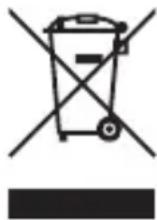
This appliance is labeled in accordance with European Directive 2012/19/EU concerning waste of electrical and electronic equipment (WEEE). This label indicates that this product should not be disposed of
with household waste. It should be deposited at an appropriate facility to enable recovery and recycling.

E328

SPEKTRUM®
© 2023 Horizon Hobby, LLC.
IC3, IC5, EC3, EC5, the Smart Technology logo and the Horizon Hobby logo are trademarks or registered trademarks of Horizon Hobby, LLC.
The Spektrum trademark is used with permission of Bachmann Industries, Inc.
All other trademarks, service marks and logos are property of their respective owners.
CN201721563463.4. Other patents pending.
Created 5/23 SPMXC2060 336323