CU1526-E - Ice Maker Scotsman - Free user manual and instructions
Find the device manual for free CU1526-E Scotsman in PDF.


User questions about CU1526-E Scotsman
0 question about this device. Answer the ones you know or ask your own.
Ask a new question about this device
Download the instructions for your Ice Maker in PDF format for free! Find your manual CU1526-E - Scotsman and take your electronic device back in hand. On this page are published all the documents necessary for the use of your device. CU1526-E by Scotsman.
USER MANUAL CU1526-E Scotsman
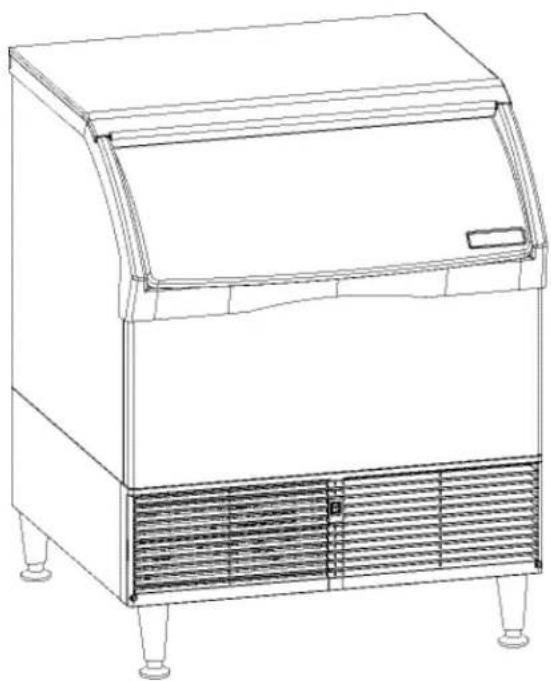
Self Contained Prodigy® Cubers
Models CU1526, CU2026 and CU3030
E Series
natural_image
Line drawing of a laboratory ice cream oven with cooling unit and side legs (no text or symbols)Introduction
The design of this cuber is the result of years of experience and testing. Standard features include a removable bin for service.
Keep this manual for future reference.
This installation and user manual is divided into three main sections: Installation, which provides the trade person with the information needed to set up and install this product; Use and Operation, which provides the user with the information to use the product; and Maintenance, which provides the user with the information needed keep it operating efficiently.
Table of Contents
| Installation: Product Specifications | Page 2 |
| Model Number Description | Page 3 |
| Water | Page 4 |
| CU1526 and CU2026 Cabinet Layout | Page 5 |
| CU3030 Cabinet Layout | Page 6 |
| Ice Storage Bin Removal | Page 7 |
| Plumbing Requirements | Page 8 |
| Electrical | Page 9 |
| Final Check List | Page 9 |
| Initial Start Up | Page 10 |
| Adjustments | Page 11 |
| Use and Operation | Page 12 |
| Control Switches | Page 13 |
| Cleaning, Sanitation and Maintenance | Page 14 |
| What to do before calling for service | Page 16 |
Note any Caution or Warning symbols when they appear on the product or in this manual. They indicate potential hazards.
WARNING
CAUTION

WARNING: Cancer and Reproductive Harm
www.P65Warnings.ca.gov
CU1526, CU2026, CU3030
User Manual
Installation: Product Specifications
Location Limitations:
The product is designed to be installed indoors, in a controlled environment. Air cooled models discharge very warm air into the room. Water cooled models discharge warm water into the building's drain. Space needs to be provided for service access.
Space Limitations
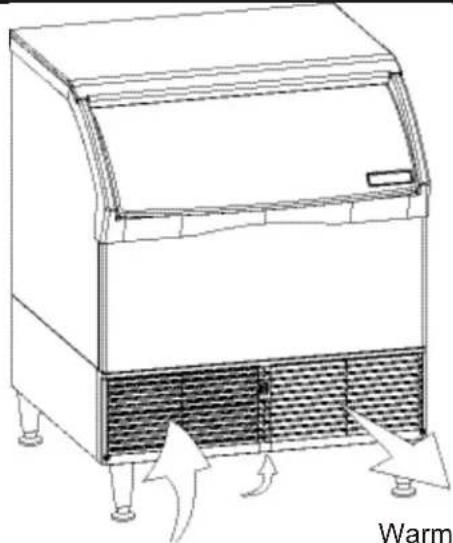
Do not block air flow at the front.
natural_image
Line drawing of a laboratory oven with heat exchanger and air flow arrows (no text or symbols)Room Temp Air In
Warm Air Out
Air Flow - Do Not Restrict
Airflow for air cooled models is in the front left and out the front right; CU3030 air cooled models also take air in from the bottom of the cabinet
Built In Situations:
- If built in under the counter with no space above, the bin cannot be removed without moving the unit.
- If built in with 1" or more clearance above the unit, the bin can be removed without moving the unit.
- If built in with between 1/2 and 1 inch of clearance, releasing the top panel's back flap prior to placement will allow removal of the bin without moving the unit.
In most cases, CU3030 air cooled models installed without legs or casters will experience reduced ice making capacity.
Environmental Limitations
| Minimum Maximum | ||
| Air temperature 50 | °F. 100 | °F. |
| Water temperature 40 | °F. 100 | °F. |
| Water pressure 20 psi | 80 psi | |
Note: Ice making capacity will be severely reduced for air cooled machines in hot environments, such as those over 95 degrees.
Power supply – acceptable voltage ranges
| Minimum Maximum | |
| 115 volt model 104 1 | 26 |
| 230 volt model 198 2 | 53 |
Warranty Information
The warranty statement for this product is provided separately from this manual. Refer to it for applicable coverage. In general warranty covers defects in material or workmanship. It does not cover maintenance, corrections to installations, or situations when the machine is operated in circumstances that exceed the limitations printed above.
Product Information
The product is a self contained cuber with bin. That type of machine is designed to be free standing or it can be built in under the counter.
Options
Casters may be used in place of the supplied legs, the kit number is KBC1.
When not using legs or casters, most codes require sealing to the floor. Kit numbers to allow sealing are KPUFM26 and KPUFM30.
Model Number Description
Example:
- CU2026SA-1E
• C= cuber
• U=under the counter type - 20= nominal ice capacity in 10s of pounds
• 26= nominal width of cabinet - S= Cube size. S=small or half dice cube. M=medium or full dice cube
- A=Condenser type. A=air cooled. W=water cooled
- -1=115 60 Hz, -32 = 230 volt, 60 Hz
- E=Series revision code. E=latest series
Scotsman ice systems are designed and manufactured with the highest regard for safety and performance.
Scotsman assumes no liability of responsibility of any kind for products manufactured by Scotsman that have been altered in any way, including the use of any part and/or other components not specifically approved by Scotsman.
Scotsman reserves the right to make design changes and/or improvements at any time. Specifications and design are subject to change without notice.
Note: In some areas of this manual model numbers may include only the first six characters of the model number, meaning that the cube size, condenser type and voltage differences are not critical to the information listed there.
Product Description & Electrical Requirements
| Dimensionsw" x d" x h"** (without legs) | Model | Electricalvolts/Hz/phase | Condenser | Total LoadAmps | MaximumFuse Size* |
| 26.62 x 27.5 x 33 | CU1526SA-1E | 115/60/1 | Air | 5.7 | 15 |
| CU1526SW-1E | 115/60/1 | Water | 5.2 | 15 | |
| 26.62 x 27.5 x 33 | CU2026SA-1E | 115/60/1 | Air | 4.6 | 15 |
| CU2026SW-1E | 115/60/1 | Water | 3.8 | 15 | |
| CU2026MA-32E | 208-230/60/1 | Air | 4.6 | 15 | |
| CU2026SW-32E | 208-230/60/1 | Water | 4.2 | 15 | |
| 30.62 x 30 x 33 | CU3030SA-1E | 115/60/1 | Air | 10.2 | 15 |
| CU3030SW-1E | 115/60/1 | Water | 9.4 | 15 | |
| CU3030SA-32E | 208-230/60/1 | Air | 6.0 | 15 |
Table notes: Height is without legs. Medium cube models have the same electrical characteristics as Small. Series revision code omitted. * Or HACR type circuit breakers.
** If not using legs, add .25" for screws below base. Legs add 6 to 6.75 inches, but not the 1/4 inch for the screws. Use of floor mounting kit adds about a half inch.
Water
The quality of the water supplied to the ice machine will have an impact on the time between cleanings and ultimately on the life of the product. Water can contain impurities either in suspension or in solution. Suspended solids can be filtered out. In solution or dissolved solids cannot be filtered, they must be diluted or treated. Water filters are recommended to remove suspended solids. Some filters have treatment in them for suspended solids. Check with a water treatment service for a recommendation.
RO water. This machine can be supplied with Reverse Osmosis water, but the water conductivity must be no less than 10 microSiemens/cm.
Potential for Airborne Contamination
Installing an ice machine near a source of yeast or similar material can result in the need for more frequent sanitation cleanings due to the tendency of these materials to contaminate the machine. Most water filters remove chlorine from the water supply to the machine which contributes to this situation. Testing has shown that using a filter that does not remove chlorine, such as the Scotsman Aqua Patrol, will greatly improve this situation, while the ice making process itself will remove the chlorine from the ice, resulting in no taste or odor impact. Additionally, devices intended to enhance ice machine sanitation, such as the Scotsman Aqua Bullet, can be placed in the reservoir to keep it cleaner between manual cleanings.
This manual covers several models. The model number on the product is located in two places, on the back dataplate and on the model and serial number tag, located behind the front panel. See the illustration for the dataplate and serial tag locations.
Write the model and serial number of this product here:
Water purge
Cube ice machines use more water than what ends up in the bin as ice. While most water is used during ice making, a portion is designed to be drained out every cycle to reduce the amount of hard water scale in the machine. That's known as water purge, and an effective purge can increase the time between needed water system cleaning.
In addition, this product has the capability to automatically vary the amount of water purged based on the purity of the water supplied to it. The water purge rate can also be set manually. Adjustments of purge due to local water conditions are not covered by warranty.
Uncrate and Set Up
Remove the carton, and using part of the carton as a cushion, tip the unit on its back to remove the skid and attach the legs or casters.
If installing the optional kit to attach the unit to the floor, see that kit's instructions. If placing on the floor without using that kit, position field supplied furniture glide pads under the unit to reduce floor scratches from the metal on the bottom of the unit.
Return the unit to an upright position. Do not start the unit for at least an hour after it has been returned to the upright position.
Place the ice machine in the selected location and level it by adjusting the bin leg levelers.
text_image
PORTABLE WATER INLET 3.8 PARE [15.5] 15.55 COND DRAIN 1/2 NPT (W/C ONLY) COND WATER REGULATOR 3.8 NPT (N/C ONLY) DRIN 3/4 RFT [15.50] [11.8.32] [6.13.19] [6.62.60] [12.34.85] [16.56.50] POWER CORD [76.330.04]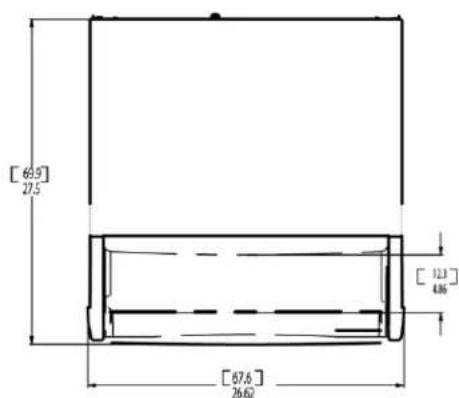
text_image
[6.9] 27.5 [12.3] 486 [67.6] 26.62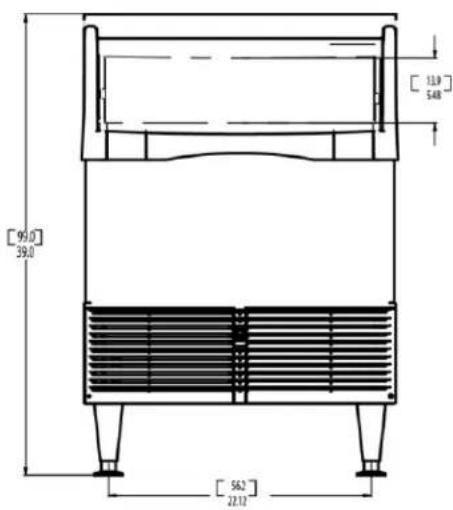
text_image
[95.0] 39.0 [13.9] 5.48 [56.2] 22.12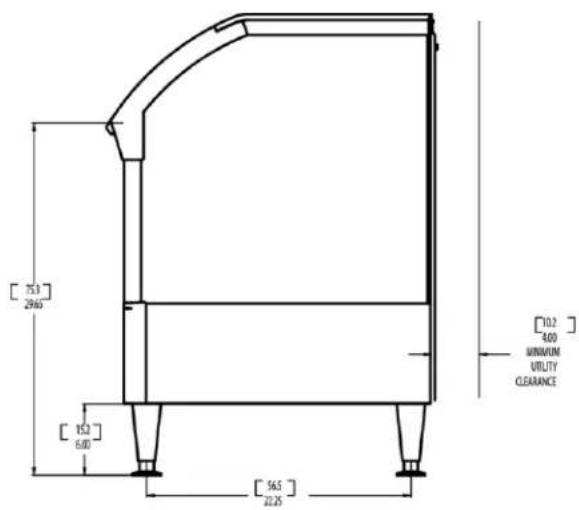
text_image
[75.3] 29465 [15.2] 6.00 [56.5] 22.25 [10.2] 4.00 MINIMUM UTILITY CLEARANCE
text_image
[60.5] 23.82 POTABLE WATER INLET 3/8 FLAME COND DRAWN 1/2 NPT (W/C ONLY) COND WATER REGULATOR 3.8 NPT (W/C ONLY) DRAIN 3/4 FFT [7.7] 6.99 [11] 4.33 [8.1] 3.19 [7] 2.17 [11.8] 4.65 [15.9] 6.27 POWER COND 74.6 29.36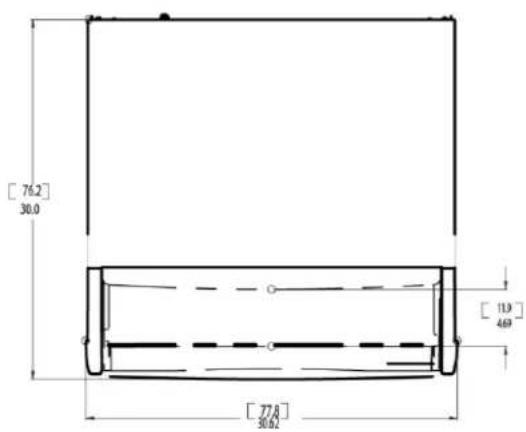
text_image
[76.2] 30.0 [11.9] 469 [77.8] 50.02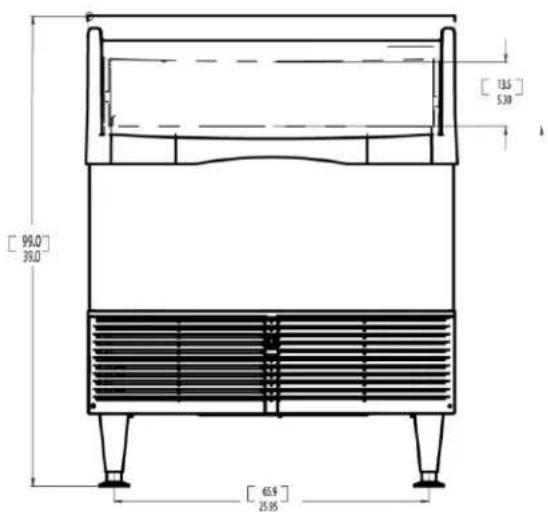
text_image
[99,0] 39,0 [13,5] 5,30 [46,9] 25,95
text_image
[75.3] 20.63 [15.2] 6.00 [61.6] 34.25Ice Storage Bin Removal
The ice storage bin is removable to allow access to the refrigeration system for service.
- Remove front louvers. Remove left then right.
- If the machine is in an ice making mode, push and release the Manual Harvest button to release any ice that might be on the evaporator.
- Push and hold the controller's Off button to shut the machine off.
- Remove all ice from the bin.
- Disconnect electrical power.
- Remove door (open about 1.5" and pull bottom out).
- Remove the top panel, there are two fasteners under the front corners of the top. Back them out and lift the top up, push back slightly and lift panel up and off the machine..
text_image
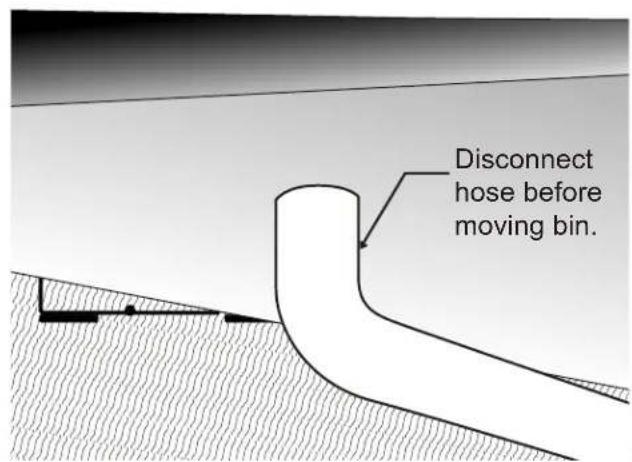
Disconnect hose before moving bin.-
Disconnect the drain tube from the bin drain fitting.
-
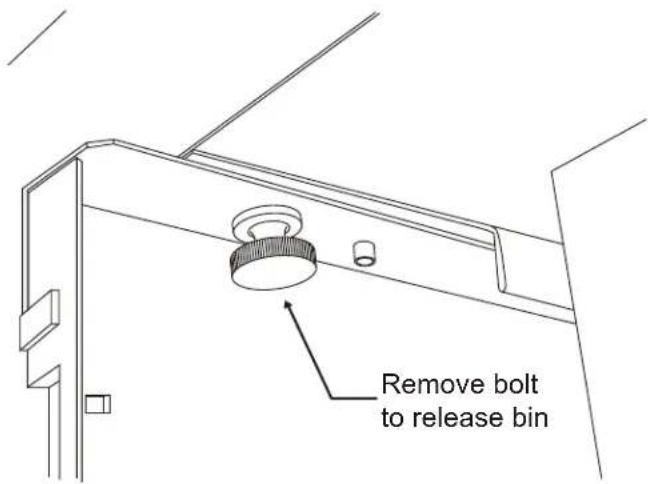
Remove two bolts from the bottom of the bin, one on the left and one on the right.
text_image
Remove bolt to release bin- Remove bolt from the back wall of the bin.

text_image
Remove bolt to release bin- Pull the bin forward and off the chassis.
Plumbing Requirements
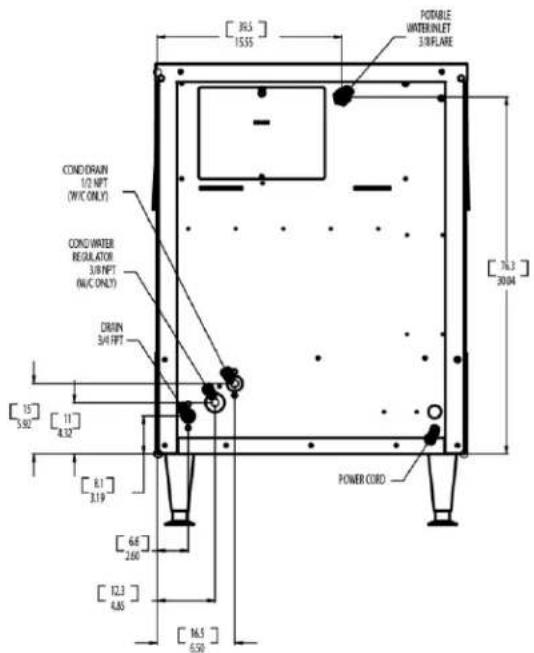
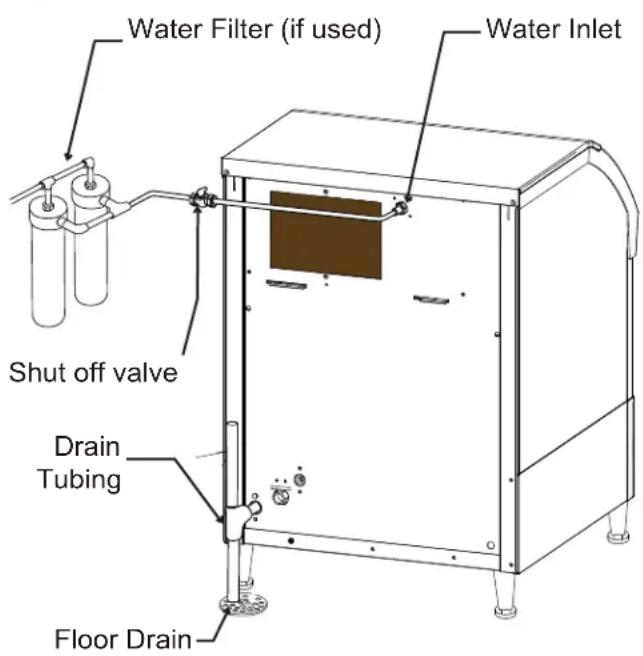
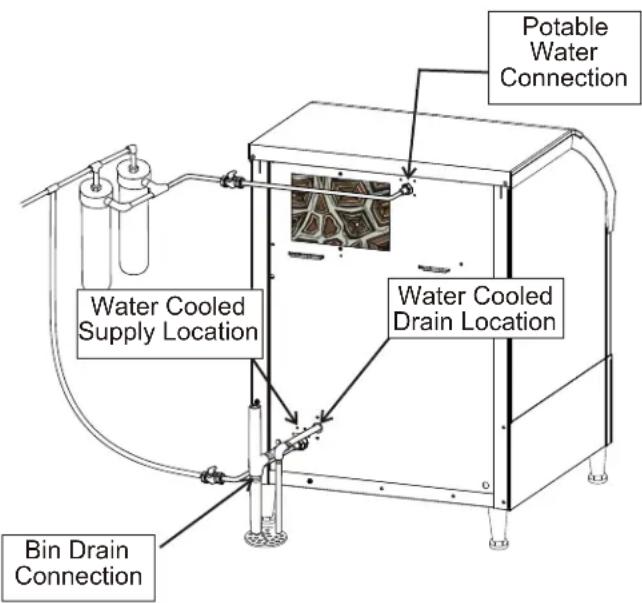
Connect to cold, potable water. A hand actuated valve within site of the machine is required. Air cooled models have a single 3/8" male flare inlet water connection. Water cooled models have an additional 3/8" FPT condenser inlet water connection, and a 1/2" FPT condenser drain.
Water Supply and Filters
If connecting to water filtration, filter only the water to the reservoir, not to the condenser. Install a new filter cartridge.
All models require drain tubing to be attached to them. Air cooled models have a single 34 " FPT drain fitting in the back of the cabinet. Water cooled models have the same fitting plus an additional 12 " FPT drain fitting in the back of the cabinet.
Install new tubing when replacing a prior ice machine, as the tubing will have been sized for the old model and might not be correct for this one.
- Connect water supply to water inlet fittings. 3/8" OD tubing is recommended.
Note: This NSF listed model has a 1" anti-back flow air gap between the float valve orifice and the highest possible reservoir water level; no back flow device is required for the potable water inlet.
- Connect drain tubing to drain fittings.
- Route the drain tubing to building drain. Follow local codes for air gap.
Drain Tubing
Use rigid drain tubes and route them separately – do not Tee into the bin's drain and, if water cooled, do not Tee the condenser drain into the reservoir or bin drain.
Vent the reservoir drain. A vertical vent at the back of the drain, extended about 8 - 10" will allow the gravity drain to empty and also keep any surges during draining from discharging water out the vent.
Horizontal runs of drain tubing need a 14 " fall per foot of run for proper draining.
Follow all applicable codes.
text_image
Water Filter (if used) Water Inlet Shut off valve Drain Tubing Floor DrainAir Cooled Model Plumbing Connections
text_image
Potable Water Connection Water Cooled Supply Location Water Cooled Drain Location Bin Drain ConnectionWater Cooled Plumbing Connections
Electrical
The machine is supplied with a power cord. 208-230 volt, 60 Hz cords have NEMA 6-20P plugs.
This is a cord-connected unit, and must be on a separate power supply. Check the dataplate for the voltage, ampacity and maximum fuse size and per the dataplate use fuses or HACR circuit breakers.
Follow All Local Codes - This Unit Must Be
Grounded. Do not use extension cords and do not disable or by-pass ground prong on electrical plug.
Final Check List
After connections,
- Wash out the bin. If desired, the interior of the bin could be sanitized.
- Locate the ice scoop (if supplied) and have it available for use when needed.
Final Check List:
- Is the unit located indoors in a controlled environment?
- Is the unit located where it can receive adequate cooling air?
- Has the correct electrical power been supplied to the machine?
- Have all the water supply connections been made?
- Have all the drain connections been made?
- Has the unit been leveled?
- Have all unpacking materials and tape been removed?
- Is the water pressure adequate?
- Have the drain connections been checked for leaks?
-
Has the bin interior been wiped clean or sanitized?
-
Have any water filter cartridges been replaced?
-
Have all required kits and adapters been properly installed?
Initial Start Up
- Remove left front louver. Check machine for any packing or wires rubbing moving parts. Note location of control board at the left.
- Switch on the electrical power to the machine. Observe that some of the control's indicator lights glow and its display shows 0.
- Open the water supply valve.
- Push and release the ON button. The code display will begin to blink F.
The purge valve opens and the water pump starts. In a few seconds the purge valve closes and the water pump stops. Water will flow into the machine until the reservoir is full. The hot gas valve and harvest assist device will activate, then the compressor and water pump will start. If it's an air cooled model the fan(s) motors will begin to turn a few moments after the compressor starts. The display will show a continuous F. Five seconds later the hot gas valve will close and the harvest assist device will return to its standby position. Warm air will be discharged from air cooled models.
- Observe the Ready for Harvest indicator light. It may blink early in the cycle, that is normal. The control will ignore that signal for the first 6 minutes of freeze.
- During the Freeze cycle move the curtain and observe that the SW1 or SW2 light on the control board blinks On when the curtain moves away from the evaporator and Off when returned to its normal position.
Note: Moving the curtain during the Freeze cycle has no affect on control function, but will cause water to flow into the bin.
- When enough ice has frozen, the Ready for Harvest indicator light will be on steady. After it's been on steady for a few seconds Harvest will begin.

text_image
Technician Section Code Description Manual Hazard Ocean Color Display Control Operation - See Manual Water Light On - Observe water supply to macrolide. On-Stroke Light On - Clean and clean by drain. Flush Setting - To Change: Depress Off to 3 seconds, Pressure On in make it longer 4.25 feet of Air or air after 1000 m³. Air Mass - Depress Off for 3 seconds Bar Access Condition For 3 seconds Flush Access Condition For 3 seconds for air must be installed at the end of the flood on Floor 1, 2, 4, 6 or 9 degrees Officer Depressed On. Compared Condition Indicator light 10:48:25The display shows an H. The hot gas valve opens, the air cooled fan motor(s) shut off and the harvest assist mechanism is activated. The purge valve opens to drain some water, when it does the float valve opens to refill the reservoir. After a few seconds the purge valve closes but the float valve continues to fill the reservoir. Harvest continues until the ice is released as a unit and forces the curtain to open. When the curtain opens it signals the controller which returns the unit to a freeze cycle.
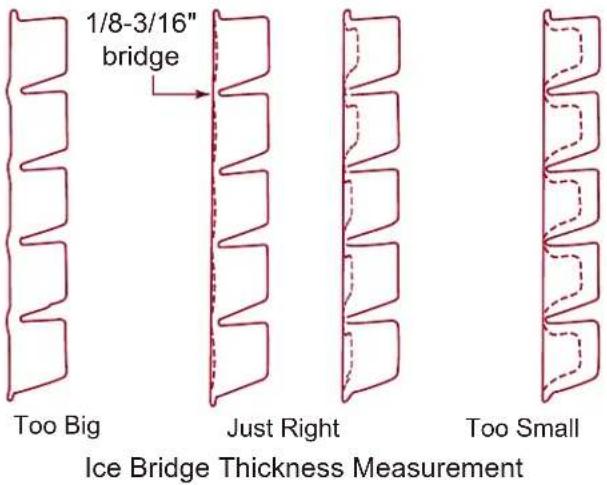
- Check the ice harvested for proper bridge thickness. The ice bridge is factory set at 1/8 inch. If needed, adjust bridge thickness. Do NOT make it too thin.
- Return the louver to its normal position and secure it to the machine.
- Instruct the user in the operation of the machine and its maintenance requirements.
- Fill out and mail the warranty registration form.
Write the day, month and year of initial start up here:
Typical Ice Making Cycle Times (minutes).
Listed times are for clean machines in proper installations. Cycle length at startup will be longer until the system stabilizes.
| Model | 70°F air /50°F. water | 90°F. air /70°F. water |
| CU1526A 22-25 | 36-29 | |
| CU1526W 21-24 | 28-31 | |
| CU2026A 15-18 | 25-28 | |
| CU2026W 15-18 | 20-23 | |
| CU3030A 12-15 | 19-22 | |
| CU3030W 10-13 | 15-18 |
Adjustments
Bridge Thickness - For the Service Tech Only
- Remove left louver, locate controller on and off switches.
- Push and hold Off till the machine stops.
- Remove curtain.
- Use a hex wrench and rotate the bridge thickness adjustment screw in 1/8 turn increments CW to increase bridge thickness. Rotate CCW to decrease bridge thickness.
Caution: Do not make the bridge too thin or the machine will not harvest properly. Bridge thickness adjustments are not covered by warranty.
- Return curtain and louver to their normal positions.
- Push and release the On button. Check next harvest of ice. Repeat steps 1-6 if needed.
Water Purge Setting
The water purge is factory set to the automatic position, suitable for most water conditions. The setting can be changed to one of 5 manual settings or left on automatic.
| Setting Water Type | |
| 1 Minimum | - RO water or equivalent |
| 2 Moderate | - Low TDS, non RO |
| 3 Standard | - for typical water |
| 4 Heavy - High TDS | |
| 5 Maximum | - Very high TDS |
| A Automatic | - Factory setting |
Note: Water cooled models, the refrigeration system discharge pressure is factory set at 245 PSIG, which should yield a freeze cycle discharge water temperature of about 105-110 degrees F. Adjust if necessary.
text_image
1/8-3/16" bridge Too Big Just Right Too Small Ice Bridge Thickness Measurement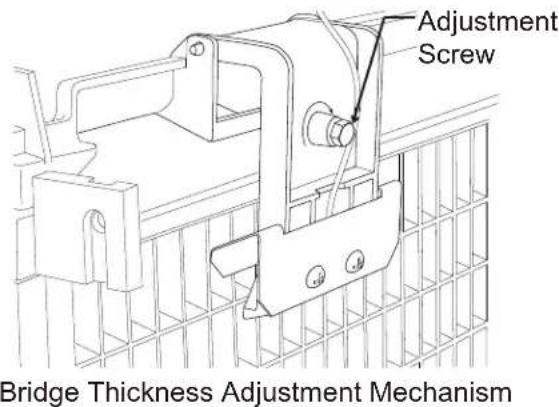
text_image
Adjustment Screw Bridge Thickness Adjustment MechanismTo set purge:
- Switch the machine OFF by holding the Off button in until a number or the letter R shows on the display.
- Press and release the On button repeatedly until the number on the display corresponds to the desired setting.
- Press and release the Off switch again to return to the normal control state.
Use and Operation
Once started, the ice machine will automatically make ice until the curtain is held open by the ice at the top of the pile. The typical ice level when the machine is off will be several inches below the door sill. When ice level drops from use or meltage, the ice machine will resume making ice. If a small cluster of ice is holding the curtain open, open the curtain slightly to release it. The machine should resume making ice in a few minutes.
Tip: Scoop the ice to the front and back of the bin to maximize storage.
There are four indicator lights under the bin that provide information on the condition of the machine.
Indicator Lights:
• Power, Status, Water De-scale & Sanitize
| Indicator Lights & Their Meanings | ||||
| Power Status Water | De-Scale & Sanitize | |||
| Steady Green | Normal | Normal | - | - |
| Blinking Green | Self Test Failure | Switching on or off - - | ||
| Blinking Red - | Diagnostic shut down, or, if making ice, temperature sensor failure | Lack of water | - | |
| Yellow - - - | Time to de-scale and sanitize | |||
| Blinking Yellow | - - - In Cleaning mode | |||
| Light Off | No power | Switched off | Normal | Normal |
If the Water light is on, the machine has sensed a lack of water. Check the water supply to the machine. The water could have been shut off or the water filter cartridges might need to be changed.
If the De-Scale light is on, the machine has determined that it needs to be cleaned. Contact an authorized Scotsman service agent and have the machine cleaned, de-scaled and sanitized.
Note: A Component Indicator Light switches ON to indicate that the component is operating.
Note: There are two Curtain Switch lights, SW1 and SW2. These single plate models have one curtain switch light on all the time, as a curtain switch light is ON when a curtain is either open or not present.
Control Switches
The controller (located inside the cabinet) has on and off switches:
To switch the machine OFF, push and release the Off button. The machine will shut off at the end of the next cycle. To shut the machine off immediately, push and hold the Off button for 3 seconds.
To switch the machine ON, push and release the On button. The machine will go through a start up process and then resume ice making.
Ice
The cuber drops ice in large sections. That ice will break up into random parts as it falls into the bin, but some large sections may remain on top of the ice in the bin. When removing ice, tap the groups of ice with an ice scoop to separate them into smaller units.
Using the ice will help to level it out and allow the machine to fill it to its maximum level.
Heat
Air cooled models will generate heat when in operation. That heat is discharged out the front of the cabinet.
Noise
The ice machine will make noise when it is in ice making mode. The compressor, fan motor(s) if air cooled and water pump all produce some sound. It is also normal to hear some cracking just before the harvest cycle begins. In addition, during the harvest cycle the harvest assist solenoid will click twice as it pushes the ice out and returns to its normal position. The ice harvests as a unit or slab, which makes some noise when it impacts the bin. These noises are all normal for this machine.
This ice system requires three types of maintenance:
- Remove the build up of mineral scale from the ice machine's water system and sensors.
- Sanitize the ice machine's water system and the ice storage bin.
- Clean or replace the air filter and clean the air cooled condenser (air cooled models only).
It is the User's responsibility to keep the ice machine and ice storage bin in a sanitary condition. Without human intervention, sanitation will not be maintained. Ice machines also require occasional cleaning of their water systems with a specifically designed chemical. This chemical dissolves mineral build up that forms during the ice making process.
Sanitize the ice storage bin as frequently as local health codes require, and every time the ice machine is cleaned and sanitized.
The ice machine's water system should be cleaned and sanitized a minimum of twice per year.
- Remove the left front louvered panel.
- Remove the top panel.
- If the machine is operating, push and release the Harvest button. When the machine completes the Harvest cycle it will stop. If the bin is full (b shows in display) push and release the Off button.
- Remove all ice from the storage bin
- Push and release the Clean button. The yellow Clean light will blink and the display will show £. The machine will drain the reservoir and refill it. Go onto the next step when the reservoir has filled.
- Pour 8 ounces of Scotsman Clear 1 ice machine scale remover into the reservoir.
CAUTION
natural_image
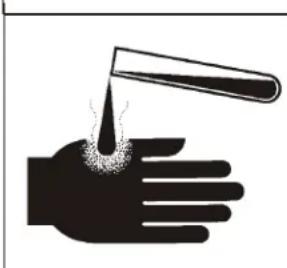
Silhouette of a hand holding a test tube with liquid being poured into it (no text or symbols)Ice machine scale remover contains acids. Acids can cause burns. If concentrated cleaner comes in contact with skin, flush with water. If swallowed, do NOT induce vomiting. Give large amounts of water or milk. Call Physician immediately. Keep out of the reach of children.
-
Allow the ice machine scale remover to circulate in the water system for at least 10 minutes.
-
Push and release the Clean button again. The yellow Clean light will be on continuously and the machine will drain and refill the reservoir repeatedly to purge out the ice machine scale remover and residue.
- Allow the drain and refill process to continue for at least 20 minutes.
- Push and release the Off button. The clean cycle will stop and the display will show .
Note: If unit has not been de-scaled for an extended period of time and significant mineral scale remains, repeat steps 5-10.
- Mix a cleaning solution of 1 oz of ice machine scale remover to 12 ounces of water.
- Locate curtain, push in on edge of curtain by pivot pin to release it. Pull curtain out of machine.
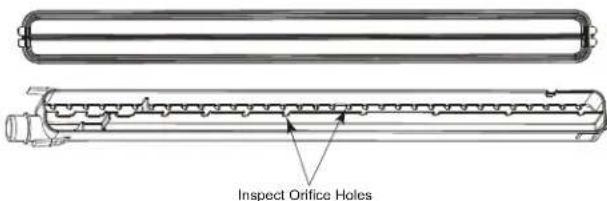
- Remove water distributor from ice machine. Inspect distributor for restricted orifice holes. Be sure all holes are fully open.
text_image
Inspect Orifice HolesInspect Water Distributor
- Locate ice thickness sensor. Squeeze mounting legs together to release sensor. Wash the metal surfaces of the sensor and the adjustment screw with ice machine scale remover solution. Also wash the water distributor and curtain with the ice machine cleaner solution.
- Locate water sensor. Squeeze catches together and pull up to remove sensor. Wash metal surfaces of sensor with ice machine scale remover solution.
- Mix a solution of sanitizer.
Note: A possible sanitizing solution may be made by mixing 1 ounce of liquid household bleach with 2 gallons of warm (95-115°F.) potable water.
- Thoroughly wash all surfaces of the ice thickness sensor, water level sensor, curtain inside of the top panel and the water distributor with the sanitizer solution.
- Wash all interior surfaces of the freezing compartment, including storage bin liner with the sanitizer solution.
- Return water level sensor, ice thickness sensor, water distributor and curtain to their normal positions.
- Push and hold the clean button to drain the reservoir. Push and release the clean button again and when the purge valve indicator light goes out, immediately pour the remaining cleaning solution into the reservoir.
- Circulate the sanitizer solution for 10 minutes, then push and release the Clean button.
-
Allow the water system to be flushed of sanitizer for at least 20 minutes, then push and release the Off button.
-
Push and release the On button to resume ice making.
- Return the top panel and front louvered panel to their normal position and secure with the original fasteners.
Air cooled condenser filter used on the CU1526 and CU2026 only
- Remove left front grill.
- Wash the dust and grease off the filter.
- Return it to its original position.
Air cooled condenser
If the machine does not have a air filter the air cooled condenser fins will need to be cleaned. The fins are located behind the fan blades. The services of a refrigeration technician is recommended to properly clean the condenser.
Exterior Panels
Fingerprints, dust and grease can build up on the panels and will require occasional cleaning.
Water filters
If the machine has been connected to water filters, check the cartridges for the date they were replaced or for the pressure on the gauge. Change cartridges if they've been installed more than 6 months or if the pressure drops too much when the ice machine fills with water.
Reasons the machine might shut itself off:
- Lack of water.
- Freeze cycle takes too long.
• Harvest cycle takes too long.
• High discharge temperature. - Controller self test failure.
Check the following:
- Has the water supply to the ice machine or building been shut off? If yes, the ice machine will automatically restart within 25 minutes after water begins to flow to it.
- Has power been shut off to the ice machine? If yes, the ice machine will automatically restart when power is restored.
- Has someone shut the water off to a water cooled unit? If yes, after the water supply has been restored the ice machine may need to be manually reset.
- Is the curtain open because some ice is stuck under it? If so, remove the ice and the machine should start in a few minutes.
Note: Curtain can be removed & replaced anytime the machine is in a standby mode or when it is in a freeze cycle. However, removal of the curtain during freeze will result in water flowing into the bin. Removal of the curtain during harvest terminates harvest at that point and, if left off, will result in the machine shutting off.
To Manually Reset the machine.
- Push and release the On/Off button.
- Push and release the On/Off button.
To Shut the Machine Off:
At the controller, push and hold the Off button for 3 seconds or until the machine stops.

text_image
Power Status De-scaleWater Sanitize On Off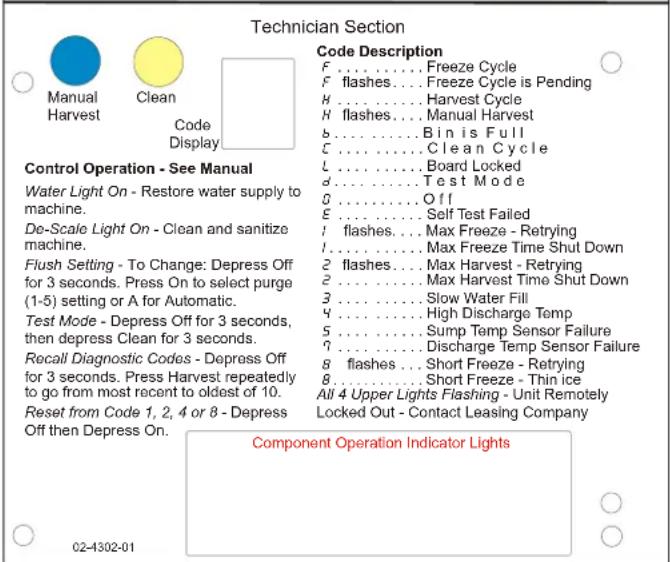
text_image
Technician Section Code Description F ....... Freeze Cycle F flashes.... Freeze Cycle is Pending H ....... Harvest Cycle H flashes.... Manual Harvest b ....... Bin is Full C ....... Clean Cycle L ....... Board Locked d ....... Test Mode g ....... Off E ....... Self Test Failed 1 flashes.... Max Freeze - Retrying I ....... Max Freeze Time Shut Down 2 flashes.... Max Harvest - Retrying 2 ....... Max Harvest Time Shut Down 3 ....... Slow Water Fill 4 ....... High Discharge Temp 5 ....... Sump Temp Sensor Failure 7 ....... Discharge Temp Sensor Failure 8 flashes.... Short Freeze - Retrying 8 ....... Short Freeze - Thin ice All 4 Upper Lights Flashing - Unit Remotely Locked Out - Contact Leasing Company Control Operation - See Manual Water Light On - Restore water supply to machine. De-Scale Light On - Clean and sanitize machine. Flush Setting - To Change: Depress Off for 3 seconds. Press On to select purge (1-5) setting or A for Automatic. Test Mode - Depress Off for 3 seconds, then depress Clean for 3 seconds. Recall Diagnostic Codes - Depress Off for 3 seconds. Press Harvest repeatedly to go from most recent to oldest of 10. Reset from Code 1, 2, 4 or 8 - Depress Off then Depress On. Component Operation Indicator Lights 02-1302-01SCOTSMAN ICE SYSTEMS
101 Corporate Woods Parkway
Vernon Hills, IL 60061
1-800-726-8762
www.scotsman-ice.com