POE-173S-12V - Network switch Planet - Free user manual and instructions
Find the device manual for free POE-173S-12V Planet in PDF.


User questions about POE-173S-12V Planet
0 question about this device. Answer the ones you know or ask your own.
Ask a new question about this device
Download the instructions for your Network switch in PDF format for free! Find your manual POE-173S-12V - Planet and take your electronic device back in hand. On this page are published all the documents necessary for the use of your device. POE-173S-12V by Planet.
USER MANUAL POE-173S-12V Planet
Single-Port 10/100/1000Mbps
802.3bt PoE++ Splitter
POE-173S-12V
User's Manual
Table of Contents
- Package Contents....3
- Product Features .... 4
- Product Specifications....5
- Hardware Introduction....7
4.1 Product Outlook....7
4.2 LED Indicators....7
4.3 Physical Dimensions....8 - Hardware Installation....9
5.1 Before Installation....9
5.2 The POE-173S-12V Installation 10
5.3 Wall-mount Installation 11
5.4 DIN-rail Mounting (optional) 11 - Customer Support 13
1. Package Contents
Thank you for purchasing PLANET POE-173S-12V Single-Port 10/100/1000Mbps 802.3bt PoE++ Splitter.
| Model LAN Port Speed PoE Standard DC Out | |
| POE-173S-12V 10/100/1000Mbps IEEE 802.3at/bt 12V |
Please unpack the box of the POE-173S-12V carefully, and the box should contain the following items:
◆ 802.3bt PoE++ splitter x 1
◆ QR code sheet x 1
◆ 5.5/2.5mm to 5.5/2.5mm DC plug cable x 1
◆ 5.5/2.5mm to 5.5/2.1mm DC plug cable x 1
◆ 5.5/2.5mm to 5Pin/18AWG DC plug cable x 1 (For special order)
◆ 15cm RJ45 cable x 1
If any of these are missing or damaged, please contact your dealer immediately.
2. Product Features
◆ Interface
■ 2 RJ45 interfaces
➢ 1-port data + power input
1-port data output
■ 1-port DC plug-in
◆ Power over Ethernet
■ Complies with 802.3bt Power over Ethernet plus plus PD
■ Backward compatible with 802.3at PoE+ with up to 30-watt power output
■ Splits the PoE power over RJ45 Ethernet cable into DC 12V output
■ Distance up to 100 meters
Hardware
■ Metal case
■ All-in-one compact size design
■ PoE usage level LED indicators
3. Product Specifications
| Model | POE-173S-12V | |
| Hardware Specifications | ||
| Interface | Ethernet | 1 x 10/100/1000BASE-T RJ45, Ethernet data output port |
| PoE in | 1 x 10/100/1000BASE-T RJ45, PoE power input port | |
| Power socket 1 x DC plug-in | ||
| DC Socket DC receptacle 2.5mm | ||
| LED Indicators | PoE in:30W (Green)60W (Green)90W+ (Green) | |
| Data Rate 10/100/1000Mbps | ||
| Dimensions (W x D x H) | 94 x 70.3 x 39.2 mm | |
| Weight 265g | ||
| Installation Desktop/wall mountable/DIN-rail | ||
| Enclosure Metal case | ||
| Power Requirements 48~56V DC PoE | ||
| Unit Output Current(at 56VDC Input) | With 803.bt type 3 PoE++ input:4.5A@12V DCWith 803.bt type 4 PoE++ input:5A@12V DC | |
| Power Consumption | Ethernet full loading without DC output:6.5 wattsFull loading with maximum 12V DC, 5A output:70 watts | |
| Network Cable | 803.bt PoE(60W+) | 4-pair UTP Cat. 5, 5e, 6 up to 100m (328ft) |
| 802.3at PoE(30W) | 2-pair UTP Cat. 5, 5e, 6 up to 100m (328ft) | |
| Power over Ethernet | ||
| PoE Standard | 802.3bt Type 3/4 Power over Ethernet4-pair 802.3at PoE+ Compliant with voltage within 48-56V DC | |
| Power Output DC 12V | ||
| PoE Power Supply Type | End-span + Mid-spanEnd-spanMid-span | |
| Power Pin Assignment | 1/2 (+), 3/6 (-); 4/5 (+), 7/8 (-) or1/2 (-), 3/6 (+); 4/5 (+), 7/8 (-) | |
| Standards Conformance | ||
| Standards Compliance | IEEE 802.3 10BASE-T EthernetIEEE 802.3u 100BASE-TX Fast EthernetIEEE 802.3ab 1000BASE-T Gigabit EthernetIEEE 802.3at Power over Ethernet PlusIEEE 802.3bt 4-pair Power over Ethernet Type 4 | |
| Regulatory Compliance FCC, | CE | |
| Environment | ||
| Operating Temperature | 0 ~ 50 degrees C | |
| Storage Temperature | -10 ~ 70 degrees C | |
| Humidity 5 ~ 95% (non-condensing) | ||
4. Hardware Introduction
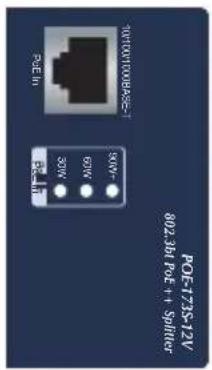
4.1 Product Outlook
text_image
TUTU100BASE-1 32V 30W 65W 90W- POE-173S-12/ 802.361 POE++ SPRUG
text_image
PLANET IEEE 802.3bit Power over Ethernet Splitter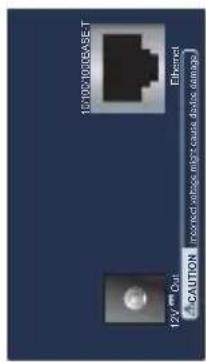
text_image
101001000000-T Ethernet A CAUTION 12V mm OutFigure 1: POE-173S-12V Outlook
4.2 LED Indicators
| LED | Color | Function |
| 30W | Green | Lights to indicate the PoE splitter is connecting to 30W (or more) PoE power source. |
| 60W | Green | Lights to indicate the PoE splitter is connecting to 60W (or more) PoE power source. |
| 90W+ | Green | Lights to indicate the PoE splitter is connecting to 90W (or more) PoE power source. |
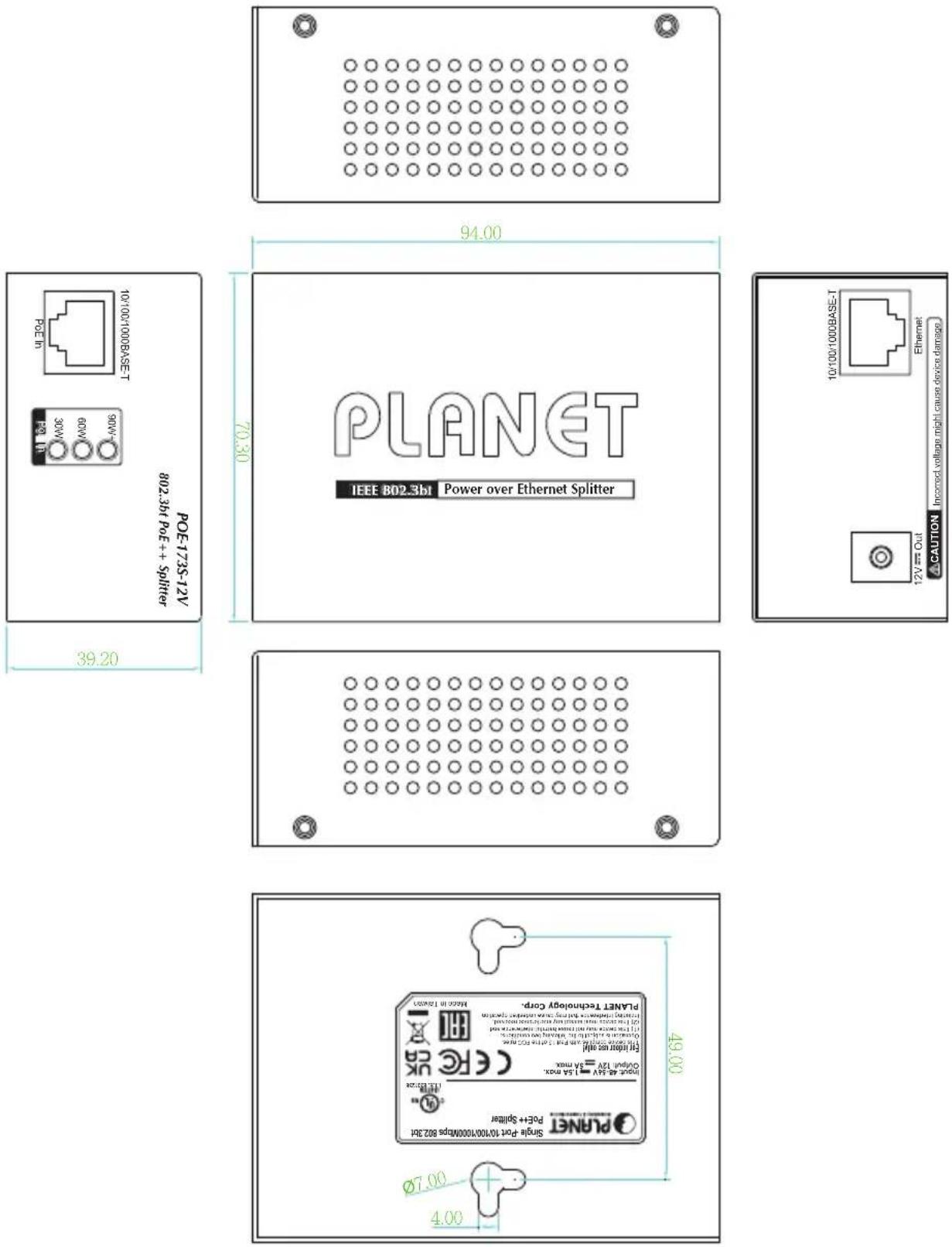
4.3 Physical Dimensions
POE-173S-12V dimensions (W x D x H): 94 x 70.3 x 39.2 mm
text_image
POE-173S-12V POE-10 10/100/1000BASE-T 802.3bit POE++ Splitter 94.00 39.20 PLANET IEEE BD2.3bit Power over Ethernet Splitter PLANT Technology Corp. NATEN 16,4507 49.00 Single port 10100/10000MPS 802.31 Open as 5V = 1.5 max Output 12V = 3.5 max CPU 12V = 1.5 max CPU 12V = 3.5 max CPU 12V = 3.5 max CPU 12V = 3.5 max CPU 12V = 3.5 max CPU 12V = 3.5 max CPU 12V = 3.5 max CPU 12V = 3.5 max CPU 12V = 3.5 max CPU 12V = 3.5 maxUnit: mm
5. Hardware Installation
The following section describes the hardware features of the POE-173S-12V. Before connecting any network device to them, please read this chapter carefully.
Please refer to the following sections for detailed information about the POE-173S-12V.
5.1 Before Installation
Before installation, it is recommended to check your network environment. If there is difficulty in finding a power socket for AC-DC adapter of your non-PoE IEEE 802.3bt networked device, the POE-173S-12V provides you with a way out to supply DC power to this Ethernet device conveniently and easily.

Note
-
Please ensure the output voltage is correct for remote device. Otherwise, it will damage your remote device.
-
The PoE circuits are designated as ES1 circuits. According to IEC TR 62102, the information technology equipment (ITE) is not connected to an Ethernet Network with external plant routing, including campus environment. The installation instruction clearly states that the ITE is to be connected only to PoE networks without any external plant routing.
-
This product is intended to be supplied by a Listed Power Supply, rated 48-56 Vdc, 1.5 A min., output complied with Limited Power Source (LPS) or PS2. Tma 50^ min. an altitude 2000 ~m . , if you need further assistance, please contact Planet for further information.
-
The power cord must be connected to a socket or outlet with a ground connection.
5.2 The POE-173S-12V Installation
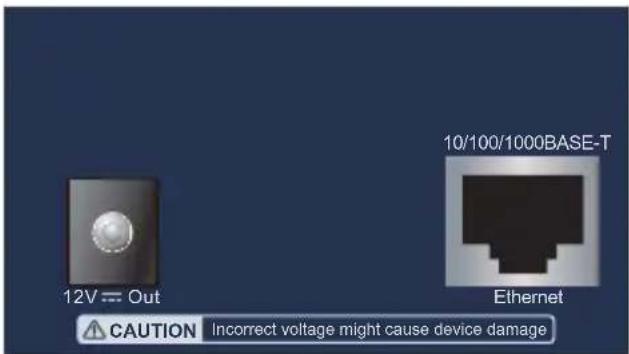
- Connect DC plug from "DC Out" of the POE-173S-12V to remote device.
text_image
12V Out 10/100/1000BASE-T Ethernet CAUTION Incorrect voltage might cause device damage-
Connect standard UTP cable from "Ethernet" port of the POE-173S-12V to remote device.
-
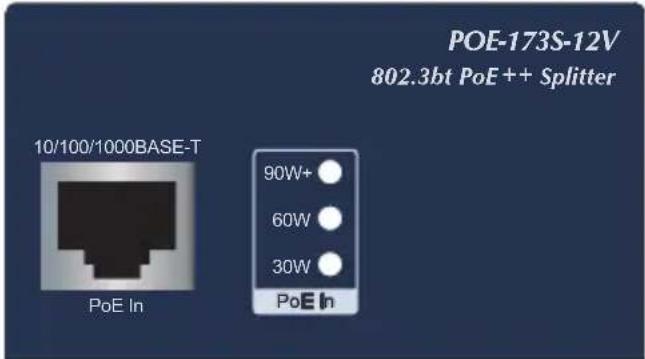
Connect standard UTP cable from "PoE In" port of the POE-173S-12V to PoE switch/injector.
text_image
POE-173S-12V 802.3bt PoE++ Splitter 10/100/1000BASE-T PoE In 90W+ 60W 30W PoE In- Power on the PoE switch/injector to enable the POE-173S-12V and remote device to be powered.
5.3 Wall-mount Installation
-
To install the POE-173S-12V on the wall, please follow the instructions described below.
-
Find the wall that you want to mount the POE-173S-12V on.
-
Refer to the picture below to screw the two screws on the wall to mount unit on the wall, making sure the screw size is 19mm in length and 4.1mm in diameter.

text_image
49.00 Ø7.00 4.00Unit: mm
- Hang the POE-173S-12V on the screws from the wall.
5.4 DIN-rail Mounting (optional)
There are two DIN-rail holes on the left side of the POE-173S-12V that allows it to be easily mounted on the DIN rail. If the DIN-rail mounting is opted, the DIN-rail mounting kit (RKE-DIN) has to be ordered as it is not included in the package. The following steps for DIN-rail mounting are shown below:
Step 1: Screw the DIN-rail bracket on the POE-173S-12V. The screw size is 4mm in length, and 3mm in diameter.

text_image
PLANETStep 2: First put the upper DIN-rail bracket on to the rail shown below and then slide the lower bracket into the rail to finish the mounting.

text_image
1 PLANET 2Step 3: Make sure the POE-173S-12V unit is tightly fixed on the track.

text_image
PLAET
Caution
You must use the screws supplied with the mounting brackets. Damage caused to the parts by using incorrect screws would invalidate your warranty.
6. Customer Support
Thank you for purchasing PLANET products. You can browse our online FAQ resource at the PLANET Web site first to check if it could solve you need more support information, please contact PLANET support team.
PLANET online FAQs :
https://www.planet.com.tw/en/support/faq?method=category&c1=2
Support team mail address:
NOTE: This equipment has been tested and found to comply with the limits for a Class B digital device, pursuant to part 15 of the FCC Rules. These limits are designed to provide reasonable protection against harmful interference in a residential installation.
This equipment generates, uses and can radiate radio frequency energy and, if not installed and used in accordance with the instructions, may cause harmful interference to radio communications. However, there is no guarantee that interference will not occur in a particular installation.
If this equipment does cause harmful interference to radio or television reception, which can be determined by turning the equipment off and user is encouraged to try to correct the interference by one or more of the following measures:
— Reorient or relocate the receiving antenna.
— Increase the separation between the equipment and receiver.
— Connect the equipment into an outlet on a circuit different from which the receiver is connected.
— Consult the dealer or an experienced radio/TV technician for help.
CE Mark Warning
This is a Class B product. In a domestic environment, this product may cause radio interference, in which case the user may be required to take adequate measures.
WEEE Warning

To avoid the potential effects on the environment and human as a result of the presence of hazardous substances in electrical and electronic equipment, end users of electrical and electronic equipment should understand the meaning of the crossed-out wheeled bin symbol. Do not dispose of WEEE as unsorted municipal waste and have to collect such WEEE separately.
IC Warning
CAN ICES-003(*) / NMB-003(*)
This device complies with Industry Canada license-exempt RSS standard(s).
Operation is subject to the following two conditions: (1) this device may not cause interference, and (2) this device must accept any interference, including interference that may cause undesired operation of the device.