RemoteAmp - Earphones JK Audio - Free user manual and instructions
Find the device manual for free RemoteAmp JK Audio in PDF.


User questions about RemoteAmp JK Audio
0 question about this device. Answer the ones you know or ask your own.
Ask a new question about this device
Download the instructions for your Earphones in PDF format for free! Find your manual RemoteAmp - JK Audio and take your electronic device back in hand. On this page are published all the documents necessary for the use of your device. RemoteAmp by JK Audio.
USER MANUAL RemoteAmp JK Audio
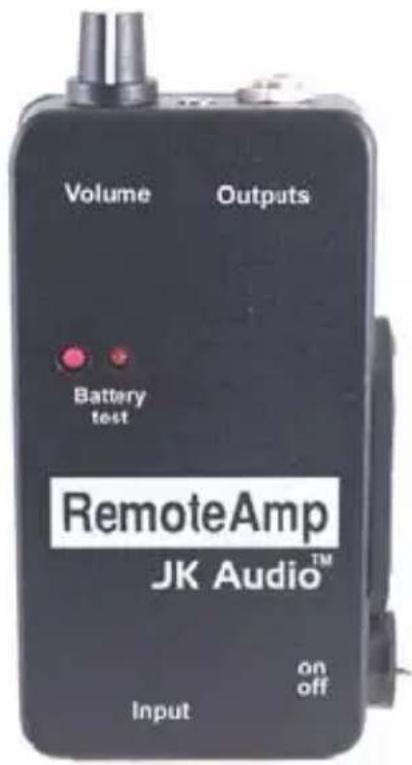
Headphone / Earpiece Amplifier
text_image
Volume Outputs Battery test RemoteAmp JK Audio™ on off InputUser Guide
JK Audio
Description
Input
The input XLR accepts line level signals from your mixer, distribution amplifier or phone line hybrid. The balanced input XLR is wired:
Pin 1 Ground
Pin 2 Signal +
Pin 3 Signal -
This is a transformer balanced input. If you are using an unbalanced source, you must connect your signal lead to pin 2 and then connect your ground to pins 1 and 3. Do not connect a powered input to this device.
Output
The 1/8" earpiece jack is current limited to prevent excessive signals into your earpiece. This mono jack will power earpieces with an impedance of 150 ohms or greater. If you would like to use light-weight stereo headphones that are typically 8 to 36 ohms, wired with a 1/8" stereo jack, you will need to use an adapter to plug into the 1/4" stereo headphone jack. Or you can solder a jumper wire across the top of the 150 ohm resistor, R2.
The 1/4" headphone jack is wired for either a stereo or mono plug. If a stereo headphone plug is used, you will hear signal in both the left and right ears.
A 1/4" mono plug can also be used without any problem, however, if you plan to always use a 1/4" mono plug, you might consider a simple modification to the RemoteAmp.
Operating
Resistor R3 provides signal to the "ring" of tip-ring-sleeve. If you clip one of the leads on R3, you will disable stereo operation and increase the power available to the left or mono output. Another common solution is to wire your headphones with a stereo headphone plug but wire both ears to the left channel (the tip of the plug) and leave the ring unconnected. This has the same effect as clipping the resistor on RemoteAmp.
Gain Adjustment
Behind the back cover of the RemoteAmp you will find a jumper on the circuit board which allows you to adjust the maximum amount of gain the RemoteAmp delivers. In the factory default open position you will receive a maximum of 25 dB gain. If the jumper is set to the optional closed position, a maximum of 40 dB gain will be delivered.
Battery
An alkaline battery is strongly recommended. The battery test indicator shows the strength of the battery power remaining. A bright light indicates plenty of power, a dim light reminds you to be prepared with a fresh battery. Once the LED stops responding to the test switch, you will begin to hear signal breakup and distortion as the battery is drained of its last breath which may mean minutes or hours depending on the circumstances.
Specifications
Input: Female XLR Balanced, 600 ohm impedance, -20 dBm to +12 dBm
Outputs: 1/4" jack Stereo/mono, 8 ohms impedance 1/8" jack Mono, 150 ohms impedance
Frequency Response: 30 Hz - 20 kHz ± 1 dB
Warranty
The model RemoteAmp is covered by a 2 year warranty to be free from defective workmanship and materials. In the event that the RemoteAmp needs repair, you must call us to get an authorization, and then carefully pack and ship it to us. You will pay for shipping to us and we will pay for return back to you, UPS ground. No free repairs will be made if the defect was caused by misuse, weather conditions, or other cause, except for defective workmanship or materials. THERE ARE NO EXPRESSED OR IMPLIED WARRANTIES WHICH EXTEND BEYOND THE WARRANTY HERE MADE.
06/06
JK Audio, Inc. 1311 E 6th Street, Sandwich, IL 60548 USA
Voice: (815) 786-2929 Toll Free: 800-JK-Audio
Fax: 815-786-8502
Info@jkaudio.com www.jkaudio.com
Copyright © 2006 JK Audio, Inc. All Rights Reserved.