ANI-527XX - Audio / Vidéo A-NeuVideo - Free user manual and instructions
Find the device manual for free ANI-527XX A-NeuVideo in PDF.


User questions about ANI-527XX A-NeuVideo
0 question about this device. Answer the ones you know or ask your own.
Ask a new question about this device
Download the instructions for your Audio / Vidéo in PDF format for free! Find your manual ANI-527XX - A-NeuVideo and take your electronic device back in hand. On this page are published all the documents necessary for the use of your device. ANI-527XX by A-NeuVideo.
USER MANUAL ANI-527XX A-NeuVideo
4K60Hz UHD+ HDR HDMI HDBaseT Transmitter/Receiver w/ Bi-directional 24V PoC
text_image
WEC TIN1500 WEC TIN1500 (ECL-CCCH MICH) WEC TIN1500 (ECL-CCCH MICH) UPDATE ISP STD RS-232 POWER SYNC ReceiverTransmitter

text_image
SOSHUM ELECTRIC POWER HOSP UPDATE ISP STD RS-232 POWER SYNC Transmitter- To ensure the best results from this product, please read this manual and all other documentation before operating your equipment. Retain all documentation for future reference.
- Follow all instructions printed on unit chassis for proper operation.
- To reduce the risk of fire, do not spill water or other liquids into or on the unit, or operate the unit while standing in liquid.
- Make sure power outlets conform to the power requirements listed on the back of the unit. Keep unit protected from rain, water and excessive moisture.
- Do not attempt to clean the unit with chemical solvents or aerosol cleaners, as this may damage the unit. Dust with a clean dry cloth.
- Do not use the unit if the electrical power cord is frayed or broken. The power supply cords should be routed so that they are not likely to be walked on or pinched by items placed upon or against them, paying particular attention to cords and plugs, convenience receptacles, and the point where they exit from the appliance.
- Do not force switched or external connections in any way. They should all connect easily, without needing to be forced.
- Always operate the unit with the AC ground wire connected to the electrical system ground. Precautions should be taken so that the means of grounding of a piece of equipment is not defeated.
- AC voltage must be correct and the same as that printed on the rear of the unit. Damage caused by connection to improper AC voltage is not covered by any warranty.
- Turn power off and disconnect unit from AC current before making connections.
- Never hold a power switch in the "ON" position.
- This unit should be installed in a cool dry place, away from sources of excessive heat, vibration, dust, moisture and cold. Do not use the unit near stoves, heat registers, radiators, or other heat producing devices.
- Do not block fan intake or exhaust ports. Do not operate equipment on a surface or in an environment which may impede the normal flow of air around the unit, such as a bed, rug, carpet, or completely enclosed rack. If the unit is used in an extremely dusty or smoky environment, the unit should be periodically "blown free" of foreign dust and matter.
- To reduce the risk of electric shock, do not remove the cover. There are no user serviceable parts inside. Refer all servicing to qualified service personnel. There are no user serviceable parts inside.
- When moving the unit, disconnect input ports first, then remove the power cable; finally, disconnect the interconnecting cables to other devices.
- Do not drive the inputs with a signal level greater than that required to drive equipment to full output.
- The equipment power cord should be unplugged from the outlet when left unused for a long period of time.
- Save the carton and packing material even if the equipment has arrived in good condition. Should you ever need to ship the unit, use only the original factory packing.
- Service Information Equipment should be serviced by qualified service personnel when:
A. The power supply cord or the plug has been damaged.
B. Objects have fallen, or liquid has been spilled into the equipment.
C. The equipment has been exposed to rain.
D. The equipment does not appear to operate normally, or exhibits a marked change in performance.
E. The equipment has been dropped, or the enclosure damaged.
THIS SAFETY INFORMATION IS OF A GENERAL NATURE AND MAY BE SUPERSEDED BY INSTRUCTIONS CONTAINED WITHIN THIS MANUAL.
SAFETY PRECAUTIONS
Please read all instructions before attempting to unpack, install or operate this equipment and before connecting the power supply. Please keep the following in mind as you unpack and install this equipment:
• Always follow basic safety precautions to reduce the risk of fire, electrical shock and injury to persons.
• To prevent fire or shock hazard, do not expose the unit to rain, moisture or install this product near water.
- Never spill liquid of any kind on or into this product.
- Never push an object of any kind into this product through any openings or empty slots in the unit, as you may damage parts inside the unit.
- Do not attach the power supply cabling to building surfaces.
- Use only the supplied power supply unit (PSU). Do not use the PSU if it is damaged.
- Do not allow anything to rest on the power cabling or allow any weight to be placed upon it or any person walk on it.
- To protect the unit from overheating, do not block any vents or openings in the unit housing that provide ventilation and allow for sufficient space for air to circulate around the unit.
DISCLAIMERS
The information in this manual has been carefully checked and is believed to be accurate. We assume no responsibility for any infringements of patents or other rights of third parties which may result from its use.
We assume no responsibility for any inaccuracies that may be contained in this document. We make no commitment to update or to keep current the information contained in this document.
We reserve the right to make improvements to this document and/or product at any time and without notice.
COPYRIGHT NOTICE
No part of this document may be reproduced, transmitted, transcribed, stored in a retrieval system, or any of its part translated into any language or computer file, in any form or by any means — electronic, mechanical, magnetic, optical, chemical, manual, or otherwise — without the express written permission and consent.
© Copyright 2020. All Rights Reserved.
Version 1.0 MAR 2020
TRADEMARK ACKNOWLEDGMENTS
All products or service names mentioned in this document may be trademarks of the companies with which they are associated.
TABLE OF CONTENTS
A NEUVIDEO
INTRODUCTION & CONTENTS 2
FEATURES....3
SPECIFICATIONS....4
SYSTEM REQUIREMENTS / APPLICATIONS....5
OPERATION CONTROLS & FUNCTIONS....6
REMOTE CONTROL / RS-232 PINOUT....5
CABLE PINOUTS / RS-232 BYPASS PINOUT / HDBASET™ FEATURES....10
CONNECTION DIAGRAM....11
VIDEO SPECIFICATIONS....12
AUDIO / CABLE SPECIFICATIONS....15
INTRODUCTION
The ANI-527RX & ANI527TX HDMI over HDBaseT™ Receiver & Transmitter are a great solution for extending UHD video and audio as well as Ethernet and control via a single run of CAT5e/6/7 cable over distances up to 230 feet / 70 meters. This extender complies with the advanced HDCP 2.2 and HDMI 2.0 standards, as well as supporting the legacy HDCP 1.x and HDMI 1.x standards. In addition, despite HDBaseT™'s 10.2Gbps bandwidth limitation, 4K UHD HDMI video sources, up to and including 4K@60Hz (4:4:4, 8-bit) as well as 10/12-bit sources with HDR, are able to be processed and extended by the use of AVLC (Adaptive Visually Lossless Compression) when needed. Multiple data and control interfaces are also able to be extended, including IR, RS-232, and LAN connections.
This unit supports bi-directional 24V PoC (Power over Cable) allowing the system to be completely powered by, or provides power to, the compatible connected Receiver or Transmitter, allowing for greater flexibility within different installation scenarios. This product has a 3 year warranty.
PACKAGE CONTENTS
Before attempting to use this unit, please check the packaging and make sure the following items are contained in the shipping carton:
• ANI-527RX HDMI to HDBaseT™ Receiver w/ Bi-directional 24V PoC
• 3.5mm to IR Extender Cable
- Users Guide
• ANI-527TX HDMI to HDBaseT™ Transmitter w/ Bi-directional 24V PoC
• 24V/1.25A DC Power Adapter
- 2-pin Terminal Block
• 3.5mm to IR Blaster Cable
- Users Guide
&
FEATURES
• HDMI with HDR, 3D & 4K@60Hz support, DVI 1.0 compatible
• HDCP 1.x and HDCP 2.2 compliant
• Supports up to 4K UHD (18Gbps, 4K@50/60Hz 4:4:4, 8-bit) video input and output
• Supports Deep Color input and output up to 12-bit
• Supports 10-bit and 12-bit HDR (High Dynamic Range) input/output
• Supports CEC bypass
- HDBaseT™ feature support: HD Video and Audio, 24V PoC and Control (bi-directional IR/RS-232 pass-through)
- Receiver: HDBaseT™ input receives video, audio and data over a single CAT5e/6/7 cable and can reach distances up to 70M/230ft at 1080p and 40M/131ft at 4K when using CAT6a/7
- Transmitter: HDBaseT™ output transmits video, audio and data over a single CAT5e/6/7 cable and can reach distances up to 70M/230ft at 1080p and 40M/131ft at 4K when using CAT6a/7
- Integrated AVLC (Adaptive Visually Lossless Compression) activates when the bandwidth requirements of the source are beyond 10.2Gbps (340MHz) allowing for support of sources up to 18Gbps (600MHz) with no loss of visual quality
- Supports pass-through of many audio formats including LPCM 2.0/5.1/7.1, Bitstream, and HD Bitstream
- Bi-directional 24V PoC allows the unit to be powered by, or provide power to, a compatible connected Transmitter
Note: The 24V PoC function is designed to power, or receive power from, compatible Transmitter units only. Non-PoC Transmitters will need their own power supply. Other brands of Transmitter may not be compatible.
Note: The 24V PoC function is designed to power, or receive power from, compatible Receiver units only. Non-PoC Receivers will need their own power supply. Other brands of Receiver may not be compatible.
SPECIFICATIONS
• HDMI Bandwidth: 600MHz/18Gbps
- HDBaseT™ Bandwidth: 340MHz/10.2Gbps
• RX Input Port: HDBaseT™ (RJ-45)
- RX Output Port: HDMI
- RX Pass-through Ports:
- IR Extender (3.5mm)
- IR Blaster (3.5mm)
- RS-232 (DE-9)
• TX Input Port: HDMI
• TX Output Port: HDBaseT™ (RJ-45)
• TX Pass-through Ports:
- IR Extender (3.5mm)
- IR Blaster (3.5mm)
- RS-232 (DE-9)
- IR Frequency: 30 – 50kHz (30 – 60kHz under ideal conditions)
• Baud Rate: Up to 115200
• Power Supply: 24V/1.25A DC (US/EU standards, CE/FCC/UL certified)
• ESD Protection Human Body Model:
- ±8kV (Air Discharge)
-
± 4kV (Contact Discharge)
-
Dimensions (WxHxD): 4 x 1 x 4.2 in (102x25x107.5mm) [Case Only] / 4 x 1 x 4.5 in (102x25x115mm) [All Inclusive]
• Weight: RX: 9.17 oz / 260g / TX: 8.61 oz / 244g
• Chassis Material: Metal (Steel) - Chassis Color: Black
- Operating Temperature: 0^ - 40^ / 32^ - 104^
- Storage Temperature: -20°C–60°C/-4°F–140°F
- Relative Humidity: 20–90% RH (Non-condensing)
• Power Consumption: 14.5W (Tx+Rx)
As product improvements are continuous, specifications are subject to change without notice.
SYSTEM REQUIREMENTS / APPLICATIONS
SYSTEM REQUIREMENTS
- HDMI receiving equipment such as an HDTV, monitor or audio amplifier.
- An HDBaseT™ Transmitter equipped with AVLC and 24V PoC support is strongly recommended.
- An HDBaseT™ Receiver equipped with AVLC and 24V PoC support is strongly recommended.
- The use of “Premium High Speed” HDMI cables, and industry standard CAT6, CAT6a or CAT7, is highly recommended.
APPLICATIONS
• Household entertainment sharing and control
- Lecture room display and control
• Showroom display and control
- Meeting room presentation and control
• Classroom display and control
OPERATION CONTROLS & FUNCTIONS
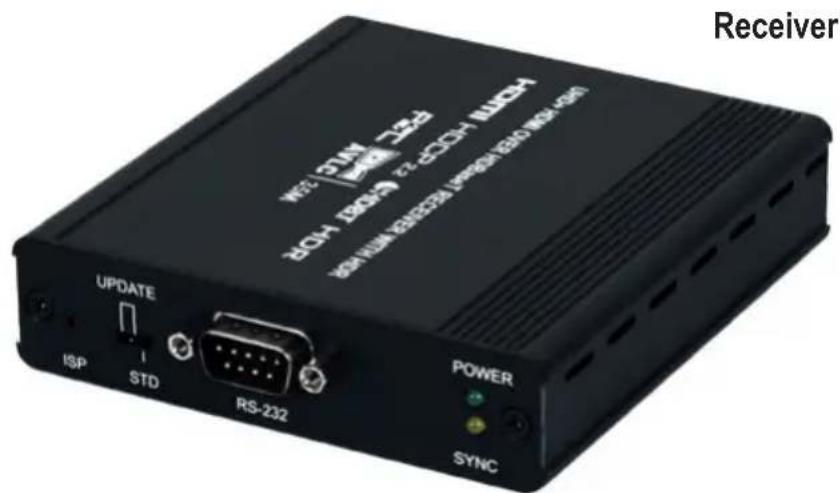
FRONT PANEL - RECEIVER

text_image
UPDATE ISP STD RS-232 POWER SYNC 1 2 3 4① ISP PINHOLE: This button is reserved for factory use only.
② STD/UPDATE SWITCH: This switch is reserved for factory use only.
Note: This should be left on the default setting of "STD" for normal operation.
3 RS-232 PORT: Connect to a PC, laptop, or serial controllable device for the extension of RS-232 signals between both ends of the HDBaseT™ connection.
4 POWER LED: This LED will illuminate to indicate the unit is on and, receiving power.
SYNC LED: This LED will illuminate when a live input source is detected.
OPERATION CONTROLS & FUNCTIONS
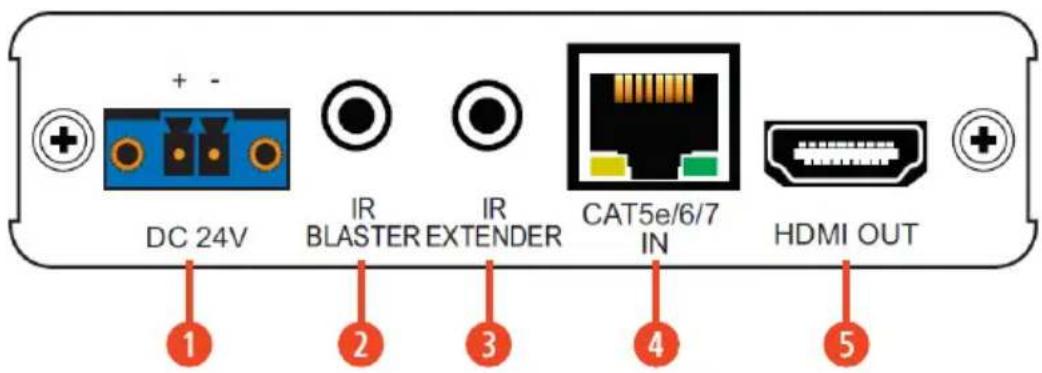
BACK PANEL - RECEIVER
text_image
DC 24V IR BLASTER EXTENDER IR CAT5e/6/7 IN HDMI OUT① DC 24V TERMINAL BLOCK: Plug the 24V DC power adapter into this terminal block and connect it to an AC wall outlet for power. (Optional)
Note: This connection is not required if the unit is receiving power via 24V PoC from the Transmitter.
② IR BLASTER PORT: Connect to an IR Blaster to transmit IR signals from the other end of the HDBaseT™ connection to devices within direct line-of-sight of the IR Blaster.
③ IR EXTENDER PORT: Connect to the provided IR Extender to receive IR control signals and extend them to devices connected to the other end of the HDBaseT™ connection. Ensure that the remote being used is within direct line-of-sight of the IR Extender.
④ CAT5E/6/7 IN PORT: Connect to a compatible HDBaseT™ Transmitter with a single CAT5e/6/7 cable for transmission of all data signals. 24V PoC can also be supplied to, or received from, a connected compatible Transmitter.
Note: The 24V PoC function is designed to power, or receive power from, compatible Transmitter units only. Non-PoC Transmitters will need their own power supply. Other brands of Transmitter may not be compatible.
⑤ HDMI OUT PORT: Connect to an HDMI TV, monitor, or amplifier for digital video and audio output.
OPERATION CONTROLS & FUNCTIONS
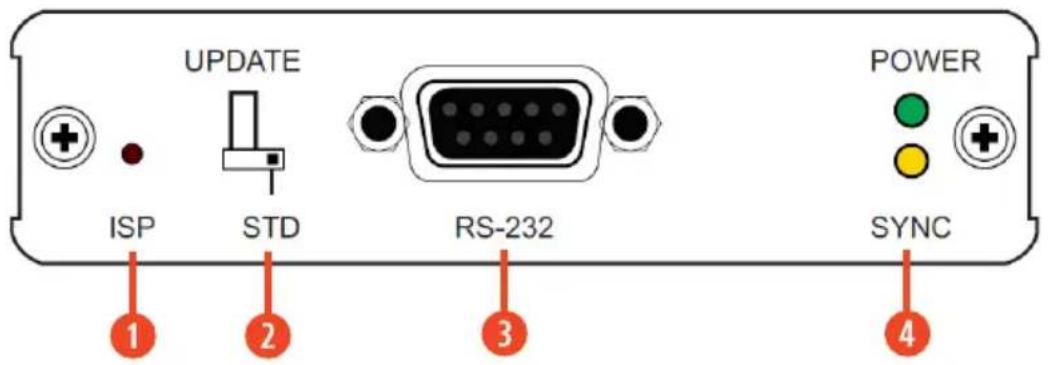
FRONT PANEL - TRANSMITTER
text_image
UPDATE POWER ISP STD RS-232 SYNC 1 2 3 4① ISP PINHOLE: This button is reserved for factory use only.
② STD/UPDATE SWITCH: This switch is reserved for factory use only.
Note: This should be left on the default setting of "STD" for normal operation.
3 RS-232 PORT: Connect to a PC, laptop, or serial controllable device for the extension of RS-232 signals between both ends of the HDBaseT™ connection.
4 POWER LED: This LED will illuminate to indicate the unit is on and, receiving power.
SYNC LED: This LED will illuminate when a live input source is detected.
OPERATION CONTROLS & FUNCTIONS
BACK PANEL - TRANSMITTER

text_image
DC 24V IR BLASTER EXTENDER IR CAT5e/6/7 OUT HDMI IN 1 2 3 4 5① DC 24V TERMINAL BLOCK: Plug the 24V DC power adapter into this terminal block and connect it to an AC wall outlet for power. (Optional)
Note: This connection is not required if the unit is receiving power via 24V PoC from the Receiver.
2 IR BLASTER PORT: Connect to an IR Blaster to transmit IR signals from the other end of the HDBaseT™ connection to devices within direct line-of-sight of the IR Blaster.
③ IR EXTENDER PORT: Connect to the provided IR Extender to receive IR control signals and extend them to devices connected to the other end of the HDBaseT™ connection. Ensure that the remote being used is within direct line-of-sight of the IR Extender.
④ CAT5E/6/7 IN PORT: Connect to a compatible HDBaseT™ Receiver with a single CAT5e/6/7 cable for transmission of all data signals. 24V PoC can also be supplied to, or received from, a connected compatible Receiver.
Note: The 24V PoC function is designed to power, or receive power from, compatible Receiver units only. Non-PoC Receivers will need their own power supply. Other brands of Receiver may not be compatible.
⑤ HDMI IN PORT: Connect to HDMI source equipment such as a media player, game console, or set-top box. DVI sources are supported with the use of an HDMI to DVI adapter.
CABLE PINOUTS / RS-232 BYPASS PINOUT / HDBASET™ FEATURES
CABLE PINOUTS

text_image
IR Blaster Cable 1 Power 2 Infrared 3 Not Used IR Extender Cable 1 Infrared 2 Power 3 GroundRS-232 BYPASS PINOUT
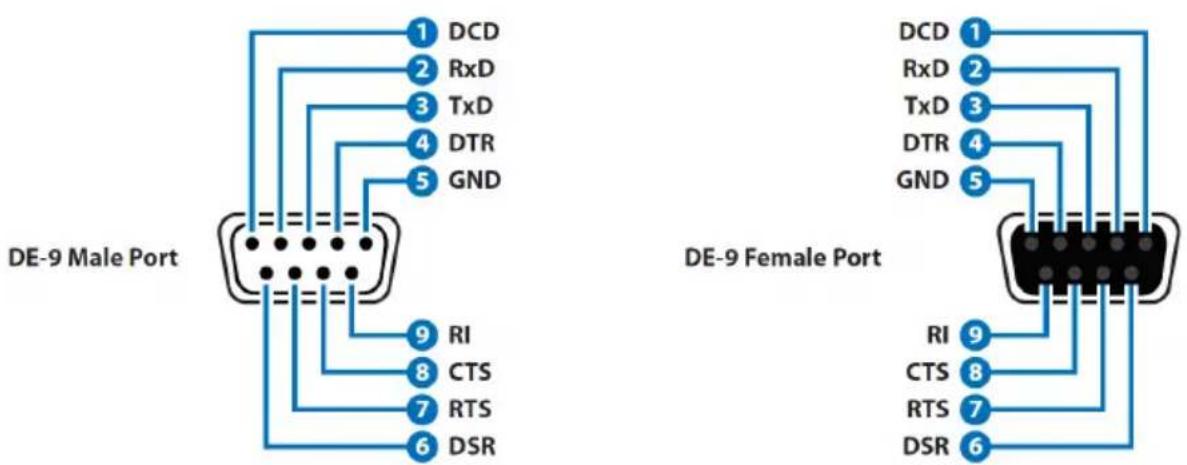
text_image
DE-9 Male Port DE-9 Female PortRECEIVER TRANSMITTER
HDBASET™ FEATURES
| HDBaseT ^TM Feature Set | |
| Video & Audio Supported | |
| IR Pass-through Supported | |
| RS-232 Pass-through Supported | |
| Accept power from Transmitter Supported | |
| Send power to Transmitter Supported | |
| LAN Pass-through Unsupported | |
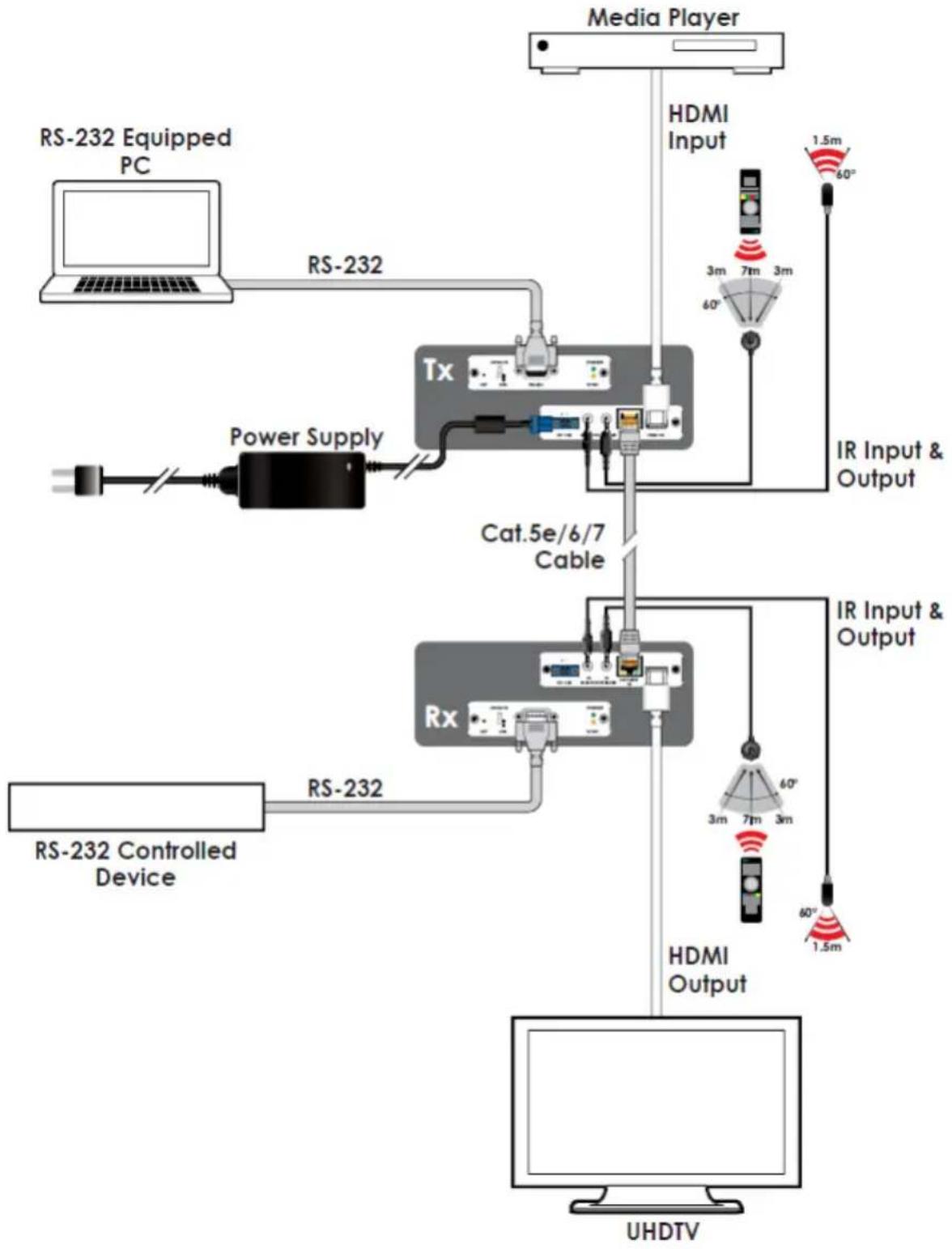
flowchart
graph TD
    A["Media Player"] --> B["HDMI Input"]
    B --> C["IR Input & Output"]
    D["RS-232 Equipped PC"] --> E["RS-232"]
    E --> F["Power Supply"]
    F --> G["Tx"]
    G --> H["Cat.5e/6/7 Cable"]
    H --> I["Rx"]
    I --> J["HDMI Output"]
    K["RS-232 Controlled Device"] --> L["RS-232"]
    L --> M["HDMI Output"]
    N["UHDTV"] --> O["HDMI Output"]
    P["1.5m 60°"] --> Q["IR Input & Output"]
    R["3m 7m 3m"] --> S["60°"]
    T["60°"] --> U["1.5m"]
| Receiver Supported Resolutions (Hz) | Input Output | |
| HDBT HDMI | ||
| 720x400p@70/85 | √ | √ |
| 640x480p@60/72/75/85 | √ | √ |
| 720x480i@60 | √ | √ |
| 720x480p@60 | √ | √ |
| 720x576i@50 | √ | √ |
| 720x576p@50 | √ | √ |
| 800x600p@56/60/72/75/85 | √ | √ |
| 848x480p@60 | √ | √ |
| 1024x768p@60/70/75/85 | √ | √ |
| 1152x864p@75 | √ | √ |
| 1280x720p@50/60 | √ | √ |
| 1280x768p@60RB/60/75/85 | √ | √ |
| 1280x800p@60RB/60/75/85 | √ | √ |
| 1280x960p@60/85 | √ | √ |
| 1280x1024p@60/75/85 | √ | √ |
| 1360x768p@60 | √ | √ |
| 1366x768p@60RB/60 | √ | √ |
| 1400x1050p@60RB/60 | √ | √ |
| 1440x900p@60RB/60/75 | √ | √ |
| 1600x900p@60RB | √ | √ |
| 1600x1200p@60 | √ | √ |
| 1680x1050p@60RB/60 | √ | √ |
| 1920x1080i@50/60 | √ | √ |
| 1920x1080p@24/25/30 | √ | √ |
| 1920x1200p@60RB | √ | √ |
| 2560x1440p@60RB | × | × |
| 2560x1600p@60RB | × | × |
| 2048x1080p@24/25/30 | √ | √ |
| 2048x1080p@50/60 | √ | √ |
| 3840x2160p@24/25/30 | √ | √ |
| 3840x2160p@50/60 (4:2:0) | √ | √ |
| 3840x2160p@24/25/30, HDR10 AVLC | AVLC | ✓ |
| 3840x2160p@50/60 (4:2:0), HDR10 AVLC | AVLC | ✓ |
| 3840x2160p@50/60 AVLC | AVLC | ✓ |
| 4096x2160p@24/25/30 | ✓ | ✓ |
| 4096x2160p@50/60 (4:2:0) | ✓ | ✓ |
| 4096x2160p@24/25/30, HDR10 | × | × |
| 4096x2160p@50/60 (4:2:0), HDR10 | × | × |
| 4096x2160p@50/60 | × | × |
| Transmitter Supported Resolutions (Hz) | Input Output | |
| HDMI HDBT | ||
| 720x400p@70/85 | √ | √ |
| 640x480p@60/72/75/85 | √ | √ |
| 720x480i@60 | √ | √ |
| 720x480p@60 | √ | √ |
| 720x576i@50 | √ | √ |
| 720x576p@50 | √ | √ |
| 800x600p@56/60/72/75/85 | √ | √ |
| 848x480p@60 | √ | √ |
| 1024x768p@60/70/75/85 | √ | √ |
| 1152x864p@75 | √ | √ |
| 1280x720p@50/60 | √ | √ |
| 1280x768p@60RB/60/75/85 | √ | √ |
| 1280x800p@60RB/60/75/85 | √ | √ |
| 1280x960p@60/85 | √ | √ |
| 1280x1024p@60/75/85 | √ | √ |
| 1360x768p@60 | √ | √ |
| 1366x768p@60RB/60 | √ | √ |
| 1400x1050p@60RB/60 | √ | √ |
| 1440x900p@60RB/60/75 | √ | √ |
| 1600x900p@60RB | √ | √ |
| 1600x1200p@60 | √ | √ |
| 1680x1050p@60RB/60 | √ | √ |
| 1920x1080i@50/60 | √ | √ |
| 1920x1080p@24/25/30 | √ | √ |
| 1920x1200p@60RB | √ | √ |
| 2560x1440p@60RB | × | × |
| 2560x1600p@60RB | × | × |
| 2048x1080p@24/25/30 | √ | √ |
| 2048x1080p@50/60 | √ | √ |
| 3840x2160p@24/25/30 | √ | √ |
| 3840x2160p@50/60 (4:2:0) | √ | √ |
| 3840x2160p@24/25/30, HDR10 AVLC | √ | AVLC |
| 3840x2160p@50/60 (4:2:0), HDR10 AVLC | √ | AVLC |
| 3840x2160p@50/60 AVLC | √ | AVLC |
| 4096x2160p@24/25/30 | √ | √ |
| 4096x2160p@50/60 (4:2:0) | √ | √ |
| 4096x2160p@24/25/30, HDR10 | × | × |
| 4096x2160p@50/60 (4:2:0), HDR10 | × | × |
| 4096x2160p@50/60 | × | × |
AUDIO SPECIFICATIONS
DIGITAL AUDIO
| HDMI INPUT/OUTPUT | |
| LPCM | |
| Maximum Channels 8 Channels | |
| Sampling Rate (kHz) 32, 44.1, 48, 88.2 | 96, 176.4, 192 |
| BITSTREAM | |
| Supported Formats Standard & High-Definition | |
CABLE SPECIFICATIONS
| CABLE LENGTH | 1080p 4K30 4K60 | |||
| 8-bit 12-bit (4:4:4) 8-bit (4:4:4) 8-bit | ||||
| High Speed HDMI Cable | ||||
| HDMI Output 32 ft / 10 M | 26 ft / 5 M 26 ft / 5 | M 10 ft / 3 M | ||
| Ethernet Cable | ||||
| CAT5e/6 197 ft / 60 M 16 | ft / 35 M | |||
| CAT6a/7 230 ft / 70 M 13 | ft / 40 M | |||
• 1080p (FHD Video)
- Up to 1080p@60Hz, 12-bit color
• Data rates lower than 5.3Gbps or below 225MHz TMDS clock
• 4K30 (UHD Video)
• 4K@24/25/30Hz & 4K@50/60Hz (4:2:0), 8-bit color
• 4K@50/60Hz (4:4:4, 8-bit) with AVLC active
• Data rates higher than 5.3Gbps or above 225MHz TMDS clock but below 10.2Gbps
- 4K60 (UHD+ Video)
- 4K@50/60Hz (4:4:4, 8-bit), AVLC required over HDBaseT™
• 4K@50/60Hz (4:2:0, 10-bit HDR), AVLC required over HDBaseT™
• Data rates higher than 10.2Gbps
TERMS AND CONDITIONS OF USE
PLEASE READ THE FOLLOWING TERMS AND CONDITIONS CAREFULLY BEFORE USING THIS HARDWARE, COMPONENTS AND SOFTWARE PROVIDED BY, THROUGH OR UNDER A-NeuVideo, INC (COLLECTIVELY, THE "PRODUCT"). By using installing or using the Product, you unconditionally signify your agreement to these Terms and Conditions. If you do not agree to these Terms and Conditions, do not use the Product and return the Product to A-NeuVideo, Inc. at the return address set forth on the Product's packing label at your expense. A-NeuVideo, Inc. may modify these Terms and Conditions at anytime, without notice to you.
RESTRICTIONS ON USE OF THE PRODUCT
It is your responsibility to read and understand the installation and operation instructions, both verbal and in writing, provided to you with respect to the Product. You are authorized to use the Product solely in connection with such instructions. Any use of the Product not in accordance with such instructions shall void any warranty pertaining to the Product. Any and all damages that may occur in the use of the Product that is not strictly in accordance with such instructions shall be borne by you and you agree to indemnify and hold harmless A-NeuVideo, Inc. from and against any such damage.
The Product is protected by certain intellectual property rights owned by or licensed to A-NeuVideo. Any intellectual property rights pertaining to the Product are licensed to you by A-NeuVideo, Inc. and/or its affiliates, including any manufacturers or distributors of the Product (collectively, "A-NeuVideo") for your personal use only, provided that you do not change or delete any proprietary notices that may be provided with respect to the Product.
The Product is sold to you and any use of any associated intellectual property is deemed to be licensed to you by A-NeuVideo for your personal use only. A-NeuVideo does not transfer either the title or the intellectual property rights to the Product and A-NeuVideo retains full and complete title to the intellectual property rights therein. All trademarks and logos are owned by A-NeuVideo or its licensors and providers of the Product, and you may not copy or use them in any manner without the prior written consent of A-NeuVideo, which consent may be withheld at the sole discretion of A-NeuVideo.
The functionality and usability of the Product is controlled by A-NeuVideo, Inc. from its offices within the State of Texas, United States of America. A-NeuVideo makes no representation that materials pertaining to the Product are appropriate or available for use in other locations other than the shipping address you provided with respect thereto. You are advised that the Product may be subject to U.S. export controls.
DISCLAIMERS AND LIMITATION OF LIABILITY
A-NeuVideo may change or modify the Product at any time, from time to time.
THE PRODUCT IS PROVIDED "AS IS" AND WITHOUT WARRANTIES OF ANY KIND EITHER EXPRESS OR IMPLIED. A-NEUVIDEO DOES NOT WARRANT OR MAKE ANY REPRESENTATIONS REGARDING THE USE OR THE RESULTS OF THE USE OF THE PRODUCT'S CORRECTNESS, ACCURACY, RELIABILITY, OR OTHERWISE.
A-NeuVideo has no duty or policy to update any information or statements pertaining to the Product and, therefore, such information or statements should not be relied upon as being current as of the date you use the Product. Moreover, any portion of the materials pertaining to the Product may include technical inaccuracies or typographical errors. Changes may be made from time to time without notice with respect to the Product.
TO THE FULLEST EXTENT PERMISSIBLE PURSUANT TO APPLICABLE LAW, A-NEUVIDEO DISCLAIMS ALL WARRANTIES, EXPRESS OR IMPLIED, INCLUDING, BUT NOT LIMITED TO IMPLIED WARRANTIES OF MERCHANTABILITY, FITNESS FOR A PARTICULAR PURPOSE AND NON-INFRINGEMENT. A-NEUVIDEO DOES NOT WARRANT THE ACCURACY, COMPLETENESS OR USEFULNESS OF ANY INFORMATION WITH RESPECT TO THE PRODUCT. A-NEUVIDEO DOES NOT WARRANT THAT THE FUNCTIONS PERTAINING TO THE PRODUCT WILL BE ERROR-FREE, THAT DEFECTS WITH RESPECT TO THE PRODUCT WILL BE CORRECTED, OR THAT THE MATERIALS PERTAINING THERETO ARE FREE OF DEFECTS OR OTHER HARMFUL COMPONENTS. A-NEUVIDEO WILL USE ITS REASONABLE EFFORTS TO CORRECT ANY DEFECTS IN THE PRODUCT UPON TIMELY WRITTEN NOTICE FROM YOU NOT TO EXCEED 10 BUSINESS DAYS AFTER RECEIPT BY YOU OF THE PRODUCT, BUT YOU (AND NOT A-NEUVIDEO) ASSUME THE ENTIRE COST OF ALL NECESSARY SERVICING, REPAIR AND CORRECTION THAT WAS CAUSED BY YOU UNLESS OTHERWISE AGREED TO IN A SEPARATE WRITING BY A-NEUVIDEO.
UNDER NO CIRCUMSTANCES, INCLUDING, BUT NOT LIMITED TO, NEGLIGENCE, SHALL A-NEUVIDEO BE LIABLE FOR ANY SPECIAL OR CONSEQUENTIAL DAMAGES THAT RESULT FROM THE USE OF, OR THE INABILITY TO USE THE PRODUCT IN ACCORDANCE WITH ITS SPECIFICATIONS, EVEN IF A-NEUVIDEO OR ITS REPRESENTATIVES HAVE BEEN ADVISED OF THE POSSIBILITY OF SUCH DAMAGES. IN NO EVENT SHALL A-NEUVIDEO'S TOTAL LIABILITY TO YOU FROM ALL DAMAGES, LOSSES, AND CAUSES OF ACTION (WHETHER IN CONTRACT, OR OTHERWISE) EXCEED THE AMOUNT YOU PAID TO A-NEUVIDEO, IF ANY, FOR THE PRODUCT.