
HLB-4K - HDR Converter Postium - Free user manual and instructions
Find the device manual for free HLB-4K Postium in PDF.


| Product Type | HDR Converter (Convertisseur HDR) |
| Model | HLB-4K |
| Brand | Postium |
| Dimensions (WxHxD) | 210 x 44 x 168 mm (8.26 x 1.73 x 6.61 in) |
| Weight | 1.5 kg (3.3 lbs) |
| Power Requirements | DC 12V / 2A |
| Power Consumption | 24 W |
| Operating Temperature | 0°C to 40°C (32°F to 104°F) |
| Operating Humidity | 20% to 80% RH |
| Input Formats | 4x BNC (12G/6G/3G/HD/SD-SDI), 1x HDMI 2.0, 2x SFP (Optical) |
| Output Formats | 4x BNC (12G/6G/3G/HD/SD-SDI Loop), 1x HDMI (1080p Monitoring) |
| Supported Input Resolutions | Up to 4096x2160p60 (12G-SDI) and 3840x2160p60 (HDMI 2.0) |
| Color Conversion | HDR/SDR, External 3D LUT, BT.709 to BT.2020 and vice versa |
| 3D LUT Support | Up to 10 files, 33^3, 34^3, 64^3, 65^3 cube formats |
| Display | 2.2-inch TFT LCD, 320x240, 262K colors |
| Firmware Update | Via USB memory stick |
| Control | Front panel buttons and rotary encoder, Ethernet (RJ-45) for remote control |
| GPIO | 1x GPIO (7-pin, RJ-45) |
| Accessories Included | Adapter, Power Cable |
| Safety Certifications | FCC Class A |
| Cleaning Instructions | Use a mild, neutral detergent only |
| Disposal | Do not dispose as household waste; recycle per local regulations (WEEE symbol) |
Frequently Asked Questions - HLB-4K Postium
User questions about HLB-4K Postium
0 question about this device. Answer the ones you know or ask your own.
Ask a new question about this device
Download the instructions for your HDR Converter in PDF format for free! Find your manual HLB-4K - Postium and take your electronic device back in hand. On this page are published all the documents necessary for the use of your device. HLB-4K by Postium.
USER MANUAL HLB-4K Postium
High Dynamic Range LUT BOX-4K
HLB-4K
HDR Converter Operational Instructions
natural_image
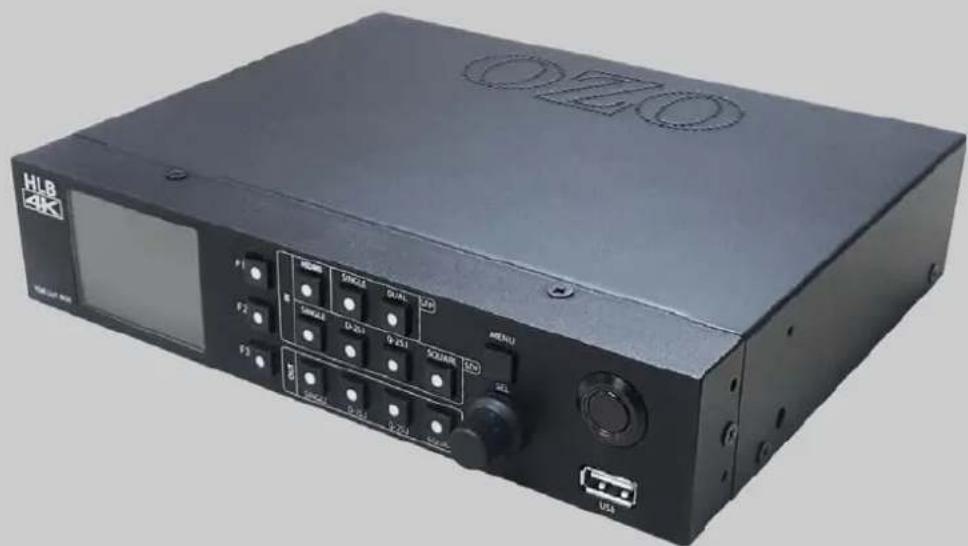
Black electronic device labeled 'OZO' with control knobs and ports, no visible text or symbols beyond branding and labelsTable of Contents
- Precaution....2
- Location and Function of Controls......4
- Menu Organization......8
- Menu Adjustment....9
- Menu Operations....10
- Available Signal Formats......14
- Specifications....15
- Dimensions....16
1. Precaution
Always use set voltage.
DC 12V
All these instructions should be read and understood before operating the unit.
If liquid is spilled on or impacts this product, please disconnect the product immediately and seek professional help before continued use.
Unplug the product from the wall outlet if it is not to be used for several days or more.
Keep the product in a well-ventilated place to prevent overheating.
Do not install the product near any heat-generating equipment. Also, keep the product out of direct sunlight or dusty areas.
Protect the power cord from being walked on or pinched particularly at plugs, convenience receptacles, and the point where they exit from the apparatus.
When using other DC 12V adapters instead of the standard adapter provided by the manufacturer, please check the proper load capacity or current capacity and use an adapter with stable voltage.
Do not overload AC outlets or extension cords. Overloading can cause fire or electric shock.
Do not attempt to service the product yourself. Removing covers can expose you to high voltage and other dangerous conditions. Request a qualified service person to perform servicing.
When the product needs replacement parts, make sure that the service person uses replacement parts specified by the manufacturer, or those with the same characteristics and performance as the original parts. Use of unauthorized parts may result in fire, electric shock and/or other danger.
Only clean the product with a noncommercial, mild and neutral detergent.
Do not throw away the carton and packing materials. When transporting the product, make use of its original packaging for safer carriage.
FCC (Federal Communications Commission)
This equipment has been tested and found to comply with the limits for class A digital device, pursuant to part 15 of the FCC Rules. These limits are designed to provide reasonable protection against harmful interference when the equipment is operated in a commercial environment. This equipment generates, uses, and can radiate radio frequency energy, and if not installed and used in accordance with the instruction manual, may cause harmful interference to radio communications. Operation of this equipment in a residential area is likely to cause harmful interference in which case the user will be required to correct the interference at his own expense.
Warning!!: Changes or modifications not expressly approved by the manufacturer could void the user's authority to operate the equipment.
Disposal of Old Electrical & Electronic Equipment
(Applicable in the European Union and other European countries with separate collection systems)
This symbol on the product or on its packing indicates that this product shall not be treated as household waste. Instead it shall be handed over to the applicable collection point for the recycling of electrical and electronic equipment. By ensuring this product is disposed of correctly, you will help prevent potential negative consequence for the environment and human health, which could otherwise be caused by inappropriate waste handling of this product. The recycling of materials will help to conserve natural resources.
2. Location and Function of Controls
Front Panel

A : Input Selection Buttons
Press the button to select the signal input.
[HDMI]
- Press the button to select HDMI input.
[SFP SINGLE]
- Press the button to select one channel of SFP input. The SFP Module should be connected to the SFP 1 Connector.
[SFP DUAL]
- Press the button to select SFP Dual-Link.
[SDI SINGLE]
- Press the button to select one channel of the SDI input. The mode changes in the order of SDI 1, SDI 2, SDI 3, SDI 4.
[SDI D-2S.I]
- Press the button to select the SDI Dual-Link 2-Sample Interleave mode. The input cables should be connected to the SDI 1 and SDI 2 Connectors.
[SDI Q-2S.I]
- Press the button to select the SDI Quad-Link 2-Sample Interleave mode.
[SDI SQUARE]
- Press the button to select the SDI Quad-Link Square Division mode.
B : Output Selection Buttons
[SDI SINGLE]
- Press the button to select one channel of the SDI. The mode changes in the order of SDI 1, SDI 2, SDI 3, SDI 4.
[SDI D-2S.I]
- Press the button to select the SDI Dual-Link 2-Sample Interleave mode. The input cables should be connected to the SDI 1 and SDI 2 Connectors.
[SDI Q-2S.I]
- Press the button to select the SDI Quad-Link 2-Sample Interleave mode.
[SDI SQUARE]
- Press the button to select the SDI Quad-Link Square Division mode.
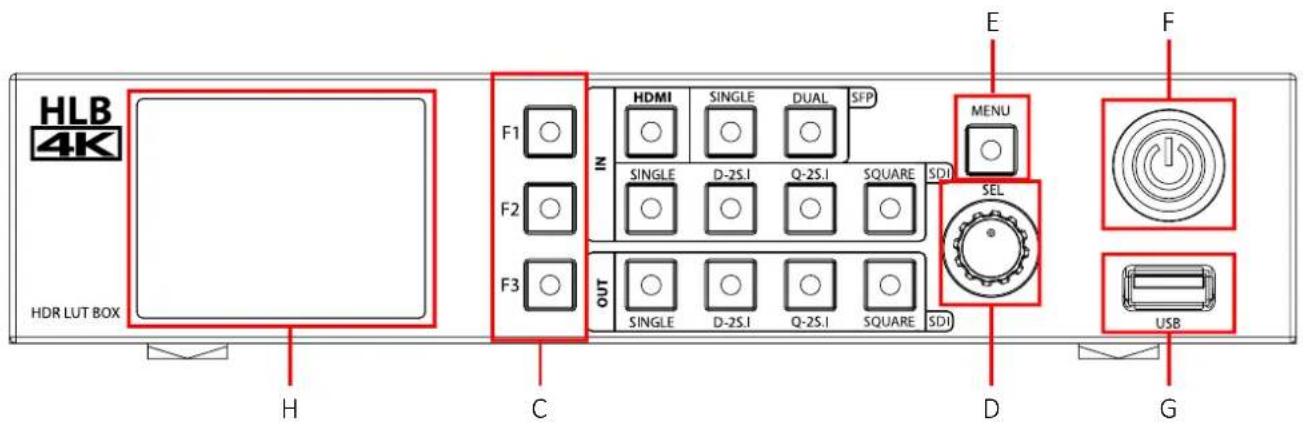
C : F1 \~ F3 Button
Press to adjust or turn on/off the assigned function.
The following functions are assigned at the factory.
[F1]: Conversion Mode
[F2]: Input Color
[F3]: User LUT
D : Rotary Encoder
[SEL] knob
When the Menu is displayed, turn this knob left or right to move up or down the menu and press this knob to confirm the selected setting.
E : Menu Button
[MENU]
Activates or deactivates the display of the Main Menu.
F : Power Button
[POWER]
Press to turn on or off the power.
G : USB connector
[USB] Connector
- Used to update the firmware.
- If you insert the USB memory stick with the firmware file and turn on the power, the firmware update is done.
H : LCD Module
[LCD] TFT LCD
- Displays the OSD Menu and the current setting values on the LCD screen.
Rear Panel
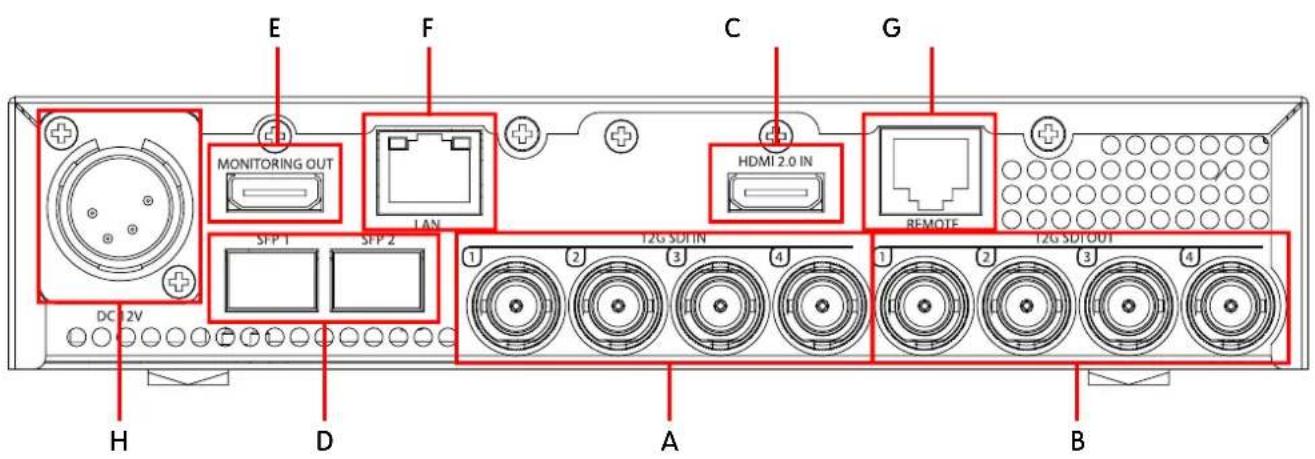
A : SDI IN (SDI Input) connectors (BNC)
Used to input the SDI signal.
B : SDI OUT (SDI Output) connectors (BNC)
Used to output the SDI signal.
C : HDMI input connectors
Used to input the HDMI signal.
- High Speed HDMI Cable with the cable type logo or HDMI 2.0 Cable is recommended.
- When inputting 4K resolution(3840 x 2160 or 4096 x 2160) signal, use a cable of 3m or less.
D : SFP Input connector
Used to input the SFP module.
E : Monitoring OUT
Will be supported.
F : LAN
Will be supported.
G : Remote
Will be supported.
H : DC 12V IN terminal
Connects the DC power supply.
DC IN Socket
1:GND
4: +12V

3. Menu Organization
The LCD module displays the status information as follows.
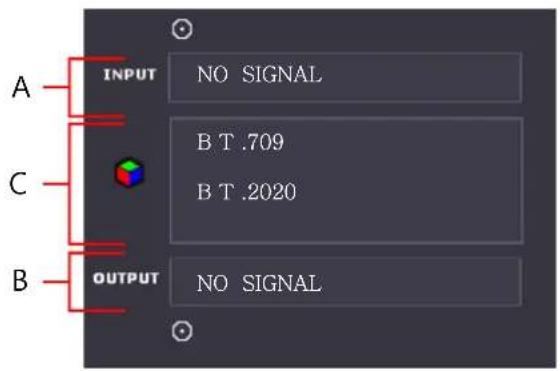
A : Displays the input signal.
The input port which is currently connected is displayed as an icon.
B : Displays the output signal.
The output port which is currently connected is displayed as an icon.
C : Displays the conversion data which is currently applied.
This unit is equipped with an OSD menu to make various adjustments and settings.
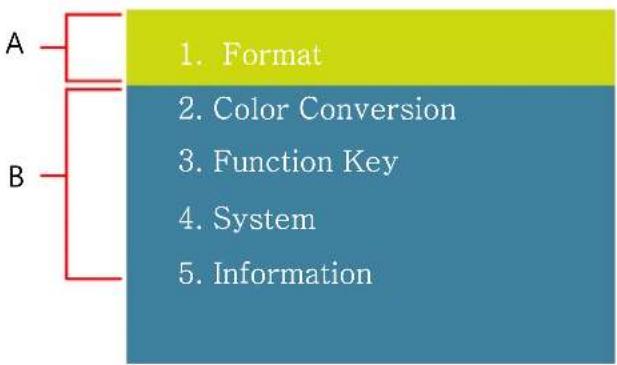
flowchart
graph TD
    A["A"] --> B["B"]
    B --> C["1. Format"]
    B --> D["2. Color Conversion"]
    B --> E["3. Function Key"]
    B --> F["4. System"]
    B --> G["5. Information"]
A : The menu currently selected is highlighted green.
B : Other menu list
4. Menu Adjustment
1. Enter the menu
When the MENU button is pressed, the OSD menu is displayed.
- Format
- Color Conversion
- Function Key
- System
- Information
2. Enter the submenu
Turn the SEL knob left or right to choose the menu.
Push the SEL knob to enter the submenu.
The menu presently selected is shown in green.
FORMAT
H D MI Color
3G Level
3. Select an item
Turn the SEL knob to select an item, and push the knob to change the item.
When an item is changed, the check mark is displayed to the item.
H D MI COLOR
√ Auto
RG B(Full)
RG B(Limit)
YCbCr
4. Previous Menu
Press the MENU button to return to the previous menu.
5. Menu Operations
1.Format
\* HDMI Color
Adjusts the color of the HDMI input.
- Auto : Reads the HDMI color characteristics and adjusts the color automatically.
- RGB(Full) : Sets the HDMI color to RGB(Full).
- RGB(Limit) : Sets the HDMI color to RGB(Limit).
- YCbCr : Sets the HDMI color to YCbCr.
H D MI COLOR
√ A uto
RG B(Full)
RG B(Limit)
YCbCr
\* 3G Level
Adjusts the 3G Level type of the SDI input signal.
- Auto : Sets the SDI 3G Level automatically.
- A 444 YUV 10b : Sets the Level A 4:4:4 YCbCr 10bit type.
- A 444 GBR 10b : Sets the Level A 4:4:4 GBR 10bit type.
- A 444 YUV 12b : Sets the Level A 4:4:4 YCbCr 12bit type.
- A 444 GBR 12b : Sets the Level A 4:4:4 GBR 12bit type.
- A 422 YUV 12b : Sets the Level A 4:2:2 YCbCr 12bit type.
- B 444 YUV 10/12b : Sets the Level B 4:4:4 YCbCr 10/12bit type.
- B 444 GBR 10/12b : Sets the Level B 4:4:4 GBR 10/12bit type.
- B 422 YUV 12b : Sets the Level B 4:2:2 YCbCr 12bit type.
- B 422 YUV 10b 60p : Sets the Level B 4:2:2 YCbCr 10bit 60p type.
H D MI COLOR
√ A uto
RG B(Full)
RG B(Limit)
YCbCr
2. Color Conversion
\* Mode
Makes the settings related to the color conversion.
- OFF
Selects OFF to not convert the color.
- HDR/SDR Conv.
Selects this mode to convert HDR to SDR or SDR to HDR.
- Extern. LUT
Selects this mode to use the external 3D LUT.
- Color
Selects this mode to convert BT.709 to BT.2020 or BT.2020 to BT.709.
MO DE
√ O FF
H D R/SDR Conv
Extern. LUT
Color

flowchart
graph LR
    A["Input"] --> B["HDR/SDR"]
    A --> C["External LUT"]
    A --> D["Color"]
    B --> E["Output Signal Input Signal"]
    C --> E
    D --> E
    B --> F["OFF"]
    C --> F
    D --> F
\* Input
In the HDR/SDR Conv. mode, when the input video is the normal SDR signal, select SDR.
- SDR : SDR(Standard Dynamic Range)
In the HDR/SDR Conv. mode, when the input video is the HDR signal, select the type.
- ST 2084 : PQ(Perceptual Quantizer) signal
- HLG : Hybrid Log Gamma signal
- S-Log3 : Sony log signal
- C-Log : Cannon log signal
- Log-C : Arri camera log signal
- V-Log : Panasonic log signal
\* Output
In the HDR/SDR Conv. mode, selects the output signal's SDR or HDR type.
- ST 2084 : PQ(Perceptual Quantizer) signal
- HLG : Hybrid Log Gamma signal
- S-Log3 : Sony log signal
- C-Log : Cannon log signal
- Log-C : Arri camera log signal
- V-Log : Panasonic log signal
\* User LUT
Selects this mode to use the external 3D LUT.
- 10 files of 3D LUT can be loaded and used.
*How to load the external 3D LUT:
See the menu [4. System] -> [Load LUT]
\* Color
Selects this mode to convert the color space.
- BT.709 to BT.2020 : Change the BT.709 color to the BT.2020 color.
- BT.2020 to BT.709 : Change the BT.2020 color to the BT.709 color
INPUT
√ S DR
S T2084
HLG
S -Log3
INPUT
√ S DR
S T2084
HLG
S -Log3
US ER LUT
√ N one 1
None 2
None 3
None 4
CO L OR
√ BT .709 to BT.2020
BT .2020 to BT.709
3. Function Key
\* F1 key, F2 key, F3 key
Assigns the function for F1 to F3 Key.
The following functions can be assigned.
[Conv. Mode], [Input Color], [User LUT]
FUNCTION KEY
F1Key
F 2 Key
F 3 Key
4. System
\* Update F/W
Updates the firmware with the USB memory stick.
Insert the USB memory stick which includes the firmware file, and then select [OK] in the menu shown right.
SYTEM
Rea dy to update Ins ert thumb mem.
OK
CA NCEL
\* Load LUT
Loads the 3D LUT file by using the USB memory stick.
The loaded 3D LUT can be selected and used in [Extern. LUT] mode. 10 files of 3D LUT can be loaded.
33^3, 34^3, 64^3, 65^3 cube file format is supported.
Insert the USB memory stick which includes the 3D LUT file, and then select [OK] in the menu shown right.
SYT EM
Rea dy to update Ins ert thumb mem.
OK
CA NCEL
\* Network
Adjusts the settings related to TCP/IP.
DHCP : DHCP allows the unit to receive an IP address from your network for remote control via various programs.
IP Address : The user can manually configure network settings when DHCP is disabled.
NE T WORK
DHCP
IP Address
\* Backlight
Adjusts the brightness of the LCD display.
Selects the value from 0 to 10.
SYT EM
Ba c klight value
0
5. Information
Displays the information of the unit.
\* S/N
Displays the serial number of the unit.
\* Running Time
Displays the operation time of the unit in hours.
\* Version
Displays the firmware version of the unit.
SYT EM
S/N 38473859
RunningTime 0005
Version 01
6. Available Signal Formats
INPUT OUTPUT
| Transmission method | Signal format | Color depth / Standards | Transmission method | Signal format | Color depth / Standards | |||||||||
| SINGLE SDI | 3G | 1920x1080 | 60, 59.94, 50p | LEVEL A | 4:2:2 YCbCr 10bit | SINGLE SDI | 3G | 1920x1080 | 60, 59.94, 50p | LEVEL A | 4:2:2 YCbCr 10bit | |||
| 3G | 2048x1080 | 60, 59.94, 50p | LEVEL A | 4:2:2 YCbCr 10bit | 3G | 2048x1080 | 60, 59.94, 50p | LEVEL A | 4:2:2 YCbCr 10bit | |||||
| HD-SDI | 1920x1080 | 23.98, 24, 25, 29.97, 30p/Psf, 50, 59.94, 60i | 4:2:2 YCbCr 10bit | HD-SDI | 1920x1080 | 23.98, 24, 25, 29.97, 30p/Psf, 50, 59.94, 60i | 4:2:2 YCbCr 10bit | |||||||
| 2048x1080 | 23.98, 24, 25, 29.97, 30p/Psf | 4:2:2 YCbCr 10bit | 2048x1080 | 23.98, 24, 25, 29.97, 30p/Psf | 4:2:2 YCbCr 10bit | |||||||||
| 1280x720 | 50,59.94,60p | 4:2:2 YCbCr 10bit | 1280x720 | 50,59.94,60p | 4:2:2 YCbCr 10bit | |||||||||
| 6G-SDI | 3840x2160 | 23.98, 24, 25, 29.97, 30p | 4:2:2 YCbCr 10bit | 6G-SDI | 3840x2160 | 23.98, 24, 25, 29.97, 30p | 4:2:2 YCbCr 10bit | |||||||
| 4096x2160 | 23.98, 24, 25, 29.97, 30p | 4:2:2 YCbCr 10bit | 4096x2160 | 23.98, 24, 25, 29.97, 30p | 4:2:2 YCbCr 10bit | |||||||||
| 12G-SDI | 3840x2160 | 50, 59.94, 60p | 4:2:2 YCbCr 10bit | 12G-SDI | 3840x2160 | 50, 59.94, 60p | 4:2:2 YCbCr 10bit | |||||||
| 4096x2160 | 50, 59.94, 60p | 4:2:2 YCbCr 10bit | 4096x2160 | 50, 59.94, 60p | 4:2:2 YCbCr 10bit | |||||||||
| SINGLE SDI | 6G-SDI | 3840x2160 | 23.98, 24, 25, 29.97, 30p | 4:2:2 YCbCr 10bit | Q-2SI | QL-HD | 3840x2160 | 23.98, 24, 25, 29.97, 30p | 4:2:2 YCbCr 10bit | |||||
| 4096x2160 | 23.98, 24, 25, 29.97, 30p | 4:2:2 YCbcr 10bit | 4096x2160 | 23.98, 24, 25, 29.97, 30p | 4:2:2 YCbCr 10bit | |||||||||
| 12G-SDI | 3840x2160 | 50, 59.94, 60p | 4:2:2 YCbCr 10bit | QL-3G | 3840x2160 | 50, 59.94, 60p | LEVEL A | 4:2:2 YCbCr 10bit | ||||||
| 4096x2160 | 50, 59.94, 60p | 4:2:2 YCbCr 10bit | 4096x2160 | 50, 59.94, 60p | LEVEL A | 4:2:2 YCbCr 10bit | ||||||||
| D-2SI | DL-6G | 3840x2160 | 50, 59.94, 60p | 4:2:2 YCbCr 10bit | SINGLE SDI Q-2SI | 12G-SDI | 3840x2160 | 50, 59.94, 60p | 4:2:2 YCbCr 10bit | |||||
| 4096x2160 | 50, 59.94, 60p | 4:2:2 YCbCr 10bit | 4096x2150 | 50, 59.94, 60p | 4:2:2 YCbCr 10bit | |||||||||
| DL-6G | 3840x2160 | 50, 59.94, 60p | 4:2:2 YCbCr 10bit | QL-3G | 3840x2160 | 50, 59.94, 60p | LEVEL A | 4:2:2 YCbCr 10bit | ||||||
| 4096x216O | 50, 59.94, 60p | 4:2:2 YCbCr 10bit | 4096x2160 | 50, 59.94, 60p | LEVEL A | 4:2:2 YCbCr 10bit | ||||||||
| Q-2SI | QL-3G | 3840x2160 | 50, 59.94, 60p | LEVEL A/B | 4:2:2 YCbCr 10bit | SINGLE SDI Q-2SI | 12G-SDI | 3840x2160 | 50, 59.94, 60p | 4:2:2 YCbCr 10bit | ||||
| 4096x2160 | 50, 59.94, 60p | LEVEL A/B | 4:2:2 YCbCr 10bit | 4096x2160 | 50, 59.94, 60p | 4:2:2 YCbCr 10bit | ||||||||
| QL-3G | 3840x2160 | 50, 59.94, 60p | LEVEL A | 4:2:2 YCbCr 10bit | QL-3G | 3840x2160 | 50, 59.94, 60p | LEVEL A | 4:2:2 YCbCr 10bit | |||||
| 4096x2160 | 50, 59.94, 60p | LEVEL A | 4:2:2 YCbCr 10bit | 4096x2160 | 50, 59.94, 60p | LEVEL A | 4:2:2 YCbCr 10bit | |||||||
| QL-3G | 3840x2160 | 50, 59.94, 60p | LEVEL A/B | 4:2:2 YCbCr 10bit | QL-3G | 3840x2160 | 50, 59.94, 60p | LEVEL A | 4:2:2 YCbCr 10bit | |||||
| 4096x2160 | 50, 59.94, 60p | LEVEL A/B | 4:2:2 YCbCr 10bit | 4096x2160 | 50, 59.94, 60p | LEVEL A | 4:2:2 YCbCr 10bit | |||||||
| QL-3G | 3840x2160 | 50, 59.94,60p | LEVEL A/B | 4:2:2 YCbCr 10bit | QL-3G | 3840x2160 | 50, 59.94, 60p | LEVEL A | 4:2:2 YCbCr 10bit | |||||
| 4096x2160 | 50, 59.94, 60p | LEVEL A/A | 4:2:2 YCbCr 10bit | 4096x2160 | 50, 59.94, 60p | LEVEL A | 4:2:2 YCbCr 10bit | |||||||
| QL-3G | 3840x2160 | 50, 59.94, -60p | LEVEL A/B | 4:2:2 YCbCr 10bit | QL-3G | 3840x2160 | 50, 59.94, 60p | LEVEL A | 4:2:2 YCbCr 10bit | |||||
| 4096x2160 | 50, 59.94, 60p | LEVEL A/BA | 4:2:2 YCbCr 10bit | 4096x2160 | 50, 59.94, 60p | LEVEL A | 4:2:2 YCbCr 10bit | |||||||
| QL-3G | 3840x2160 | 50, 59.94, .60p | LEVEL A/B | 4:2:2 YCbCr 10bit | QL-3G | 3840x2160 | 50, 59.94, 60p | LEVEL A | 4:2:2 YCbCr 10bit | |||||
| 4096x2160 | 50, 59.94, .60p | LEVEL A/BA | 4:2:2 YCbCr 10bit | 4096x2160 | 50, 59.94, 60p | LEVEL A | 4:2:2 YCbCr 10bit | |||||||
| QL-3G | 3840x2160 | 50 , 59.94 , 60p | LEVEL A/B | 4:2:2 YCbCr 10bit | QL-3G | 3840x2160 | 50, 59.94, 60p | LEVEL A | 4:2:2 YCbCr 10bit | |||||
| 4096x2160 | 50, 59.94, .60p | LEVEL A/A | 4:2:2 YCbCr 10bit | 4096x2160 | 50, 59.94, 60p | LEVEL A | 4:2:2 YCbCr 10bit | |||||||
| QL-3G | 3840x2160 | 50,59.94,60p | LEVEL A/B | 4:2:2 YCbCr 10bit | QL-3G | 3840x2160 | 50, 59.94, 60p | LEVEL A | 4:2:2 YCbCr 10bit | |||||
| 4096x2160 | 50, 59.94, .60p | LEVEL A/B | 4:2:2 YCbCr 10bit | 4096x2160 | 50, 59.94, 60p | LEVEL A | 4:2:2 YCbCr 10bit | |||||||
| QL-3G | 3840x2160 | 50,59.94, .60p | LEVEL A/B | 4:2:2 YCbCr 10bit | QL-3G | 3840x2160 | 50, 59.94, 60p | LEVEL A | 4:2:2 YCbCr 10bit | |||||
| 4096x2160 | 50, 59.94, 60p | LEVEL AA/A | 4:2:2 YCbCr 10bit | 4096x2160 | 50, 59.94, 60p | LEVEL A | 4:2:2 YCbCr 10bit | |||||||
| QL-3G | 3840x2160 | 50,59.94, .80p | LEVEL A/B | 4:2:2 YCbCr 10bit | QL-3G | 3840x2160 | 50, 59.94, 60p | LEVEL A | 4:2:2 YCbCr 10bit | |||||
| 4096x2160 | 50, 59.94, .80p | LEVEL A/A | 4:2:2 YCbCr 10bit | 4096x2160 | 50, 59.94, 60p | LEVEL A | 4:2:2 YCbCr 10bit | |||||||
| QL-3G | 3840x2160 | 50,58.94, .80p | LEVEL A/B | 4:2:2 YCbCr 10bit | QL-3G | 3840x2160 | 50, 59.94, 60p | LEVEL A | 4:2:2 YCbCr 10bit | |||||
| 4096x2160 | 50, 59.94, .81p | LEVEL A/A | 4:2:2 YCbCr 10bit | 4096x2160 | 50, 59.94, 60p | LEVEL A | 4:2:2 YCbCr 10bit | |||||||
| QL-3G | 3840x2160 | 50,58 .94 , .80p | LEVEL A/B | 4:2:2 YCbCr 10bit | QL-3G | 3840x2160 | 50, 59.94, 60p | LEVEL A | 4:2:2 YCbCr 10bit | |||||
| 4096x2160 | 50, 59.94, .80p | LEVELA/A/A/A/A/A/A/A/A/A/A/A/A/A/A/A/A/A/A/A/A/A/A/A/A/A/A/A/A/A/A/A/A/A/A/A/A/A/A/A/A/A/A/A/A/A/A/A/A/A/A/A/A/A/A/A/A/A/A/A/A/A/A/A/A/A/A/A/A/A/A/A/A/A/A/A/A/A/A/A/A/A/A/A/A/A/A/A/A/A/A/A/A/A/A/A/A/A/A/A/AA/A/A/A/A/A/A/A/A/A/A/A/A/A/A/A/A/A/A/A/A/A/A/A/A/A/A/A/A/A/A/A/A/A/A/A/A/A/A/A/A/A/A/A/A/A/A/A/A/A/A/A/A/A/A/A/A/A/A/A/A/A/A/A/A/A/A/A/A/A/A/A/A/A/A/A/A/A/A/A/A/A/A/A/A/A/A/A/A/A/A/A/A/A/A/A/A/A/AA/AA/A/A/A/A/A/A/A/A/A/A/A/A/A/A/A/A/A/A/A/A/A/A/A/A/A/A/A/A/A/A/A/A/A/A/A/A/A/A/A/A/A/A/A/A/A/A/A/A/A/A/A/A/A/A/A/A/A/A/A/A/A/A/A/A/A/A/A/A/A/A/A/A/A/A/A/A/A/A/A/A/A/A/A/A/A/A/A/A/A/A/A/A/A/A/A/A/A/A/A/AA/A/A/A/A/A/A/A/A/A/A/A/A/A/A/A/A/A/A/A/A/A/A/A/A/A/A/A/A/A/A/A/A/A/A/A/A/A/A/A/A/A/A/A/A/A/A/A/A/A/A/A/A/A/A/A/A/A/A/A/A/A/A/A/A/A/A/A/A/A/A/A/A/A/A/A/A/A/A/A/A/A/A/A/A/A/A/A/A/A/A/A/A/A/A/A/A/A/AA/AA/AA/AA/AA/AA/AA/AA/AA/AA/AA/AA/AA/AA/AA/AA/AA/AA/AA/AA/AA/AA/AA/AA/AA/AA/AA/AA/AA/AA/AA/AA/AA/AA/AA/AA/AA/AA/AA/AA/AA/AA/AA/AA/AA/AA/AA/AA/AA/AA/ AA/ AA/ AA/ AA/ AA/ AA/ AA/ AA/ AA/ AA/ AA/ AA/ AA/ AA/ AA/ AA/ AA/ AA/ AA/ AA/ AA/ AA/ AA/ AA/ AA/ AA/ AA/ AA/ AA/ AA/ AA/ AA/ AA/ AA/ AA/ AA/ AA/ AA/ AA/ AA/ AA/ AA/ AA/ AA/ AA/ AA/ AA/ AA/ AA/ AA/ A/ AA/ AA/ AA/ AA/ AA/ AA/ AA/ AA/ AA/ AA/ AA/ AA/ AA/ AA/ AA/ AA/ AA/ AA/ AA/ AA/ AA/ AA/ AA/ AA/ AA/ AA/ AA/ AA/ AA/ AA/ AA/ AA/ AA/ AA/ AA/ AA/ AA/ AA/ AA/ AA/ AA/ AA/ AA/ AA/ AA/ AA/ AA/ AA/ AA/ AB/ AA/ AA/ AA/ AA/ AA/ AA/ AA/ AA/ AA/ AA/ AA/ AA/ AA/ AA/ AA/ AA/ AA/ AA/ AA/ AA/ AA/ AA/ AA/ AA/ AA/ AA/ AA/ AA/ AA/ AA/ AA/ AA/ AA/ AA/ AA/ AA/ AA/ AA/ AA/ AA/ AA/ AA/ AA/ AA/ AA/ AA/ AA/ AA/ AA/ BB/ AA/ AA/ AA/ AA/ AA/ AA/ AA/ AA/ AA/ AA/ AA/ AA/ AA/ AA/ AA/ AA/ AA/ AA/ AA/ AA/ AA/ AA/ AA/ AA/ AA/ AA/ AA/ AA/ AA/ AA/ AA/ AA/ AA/ AA/ AA/ AA/ AA/ AA/ AA/ AA/ AA/ AA/ AA/ AA/ AA/ AA/ AA/ AA/ AA/ BA/ AA/ AA/ AA/ AA/ AA/ AA/ AA/ AA/ AA/ AA/ AA/ AA/ AA/ AA/ AA/ AA/ AA/ AA/ AA/ AA/ AA/ AA/ AA/ AA/ AA/ AA/ AA/ AA/ AA/ AA/ AA/ AA/ AA/ AA/ AA/ AA/ AA/ AA/ AA/ AA/ AA/ AA/ AA/ AA/ AA/ AA/ AA/ AA/ AA/ B/ AA/ AA/ AA/ AA/ AA/ AA/ AA/ AA/ AA/ AA/ AA/ AA/ AA/ AA/ AA/ AA/ AA/ AA/ AA/ AA/ AA/ AA/ AA/ AA/ AA/ AA/ AA/ AA/ AA/ AA/ AA/ AA/ AA/ AA/ AA/ AA/ AA/ AA/ AA/ AA/ AA/ AA/ AA/ AA/ AA/ AA/ AA/ AA/ AA/ SS/ AA/ AA/ AA/ AA/ AA/ AA/ AA/ AA/ AA/ AA/ AA/ AA/ AA/ AA/ AA/ AA/ AA/ AA/ AA/ AA/ AA/ AA/ AA/ AA/ AA/ AA/ AA/ AA/ AA/ AA/ AA/ AA/ AA/ AA/ AA/ AA/ AA/ AA/ AA/ AA/ AA/ AA/ AA/ AA/ AA/ AA/ AA/ AA/ AA/ NN/ AA/ AA/ AA/ AA/ AA/ AA/ AA/ AA/ AA/ AA/ AA/ AA/ AA/ AA/ AA/ AA/ AA/ AA/ AA/ AA/ AA/ AA/ AA/ AA/ AA/ AA/ AA/ AA/ AA/ AA/ AA/ AA/ AA/ AA/ AA/ AA/ AA/ AA/ AA/ AA/ AA/ AA/ AA/ AA/ AA/ AA/ AA/ AA/ AA/ NA/ AA/ AA/ AA/ AA/ AA/ AA/ AA/ AA/ AA/ AA/ AA/ AA/ AA/ AA/ AA/ AA/ AA/ AA/ AA/ AA/ AA/ AA/ AA/ AA/ AA/ AA/ AA/ AA/ AA/ AA/ AA/ AA/ AA/ AA/ AA/ AA/ AA/ AA/ AA/ AA/ AA/ AA/ AA/ AA/ AA/ AA/ AA/ AA/ AA/ AAA/ AA/ AA/ AA/ AA/ AA/ AA/ AA/ AA/ AA/ AA/ AA/ AA/ AA/ AA/ AA/ AA/ AA/ AA/ AA/ AA/ AA/ AA/ AA/ AA/ AA/ AA/ AA/ AA/ AA/ AA/ AA/ AA/ AA/ AA/ AA/ AA/ AA/ AA/ AA/ AA/ AA/ AA/ AA/ AA/ AA/ AA/ AA/ AA/ AA/ BBB/ AA/ AA/ AA/ AA/ AA/ AA/ AA/ AA/ AA/ AA/ AA/ AA/ AA/ AA/ AA/ AA/ AA/ AA/ AA/ AA/ AA/ AA/ AA/ AA/ AA/ AA/ AA/ AA/ AA/ AA/ AA/ AA/ AA/ AA/ AA/ AA/ AA/ AA/ AA/ AA/ AA/ AA/ AA/ AA/ AA/ AA/ AA/ AA/ AA/ SINGLE SDI | ||||||||||||
- Specifications
| ITEM HLB-4K | ||
| Input | 4 x BNC | 12G/6G/3G/HD/SD-SDI-1/2, 3G/HD/SD-SDI-3/4 |
| 1 x HDMI | HDMI 2.0 | |
| 2 x SFP | Optical | |
| Output | 4 x BNC | 12G/6G/3G/HD/SD-SDI-1/2/3/4 Loop Output |
| 1 x HDMI | 1080p(Monitoring) | |
| Input Signal Format | SMPTE ST 2082 | 2160p(60/59.94/50) |
| SMPTE ST 2081 | 2160p(30/29.97/25/24/23.98) | |
| SMPTE ST 425-AB | 1080p(60/59.94/50/30/29.97/25/24/23.98/30sF/29.97sF/25sF/24sF/23.98sF)/ 1080i (60/59.94/50) | |
| SMPTE ST 274 | 1080p(30/29.97/25/24/24sF/23.98/23.98sF) | |
| SMPTE ST 296 | 1080i(60/59.94/50) | |
| SMPTE ST 260 | 1920 x 1035i(60/59.94) | |
| SMPTE ST 2084 | 2048 x 1080p(24/23.98/24sF/23.98sF) | |
| HDMI 2.0 | ~ 2160p(60) | |
| SFP | 12Gbps, 6Gbps, 2.970Gbps, 1.485Gbps, 270Mbps | |
| Display | Size | 2.2" |
| Resolution | 320 X 240 | |
| Pixel Pitch | 0.315mm | |
| Color | 262K | |
| Display Area (H x V) | 33.84 x 45.12mm | |
| General | 1 x Ethernet | Control RJ-45P In put |
| 1 x GPIO | GPI-7 Port, RJ-45P Jack | |
| 1 x USB | For firmware update | |
| Power Requirements | DC 12V / 2A | |
| Power Consumption | 24W | |
| Operating Temperature | 0°C ~ 40°C(32°F~104°F) | |
| Operating Humidity | 20% ~ 80% RH | |
| Weight | 1.5kg / 3.3 lbs | |
| Dimension(WxHxD) | 210 x 44 x 168 mm / 8.26 x 1.73 x 6.61 inch | |
| Accessories | Adapter, Power Cable | |
* Specifications are subject to change without prior notice for the product quality improvement.
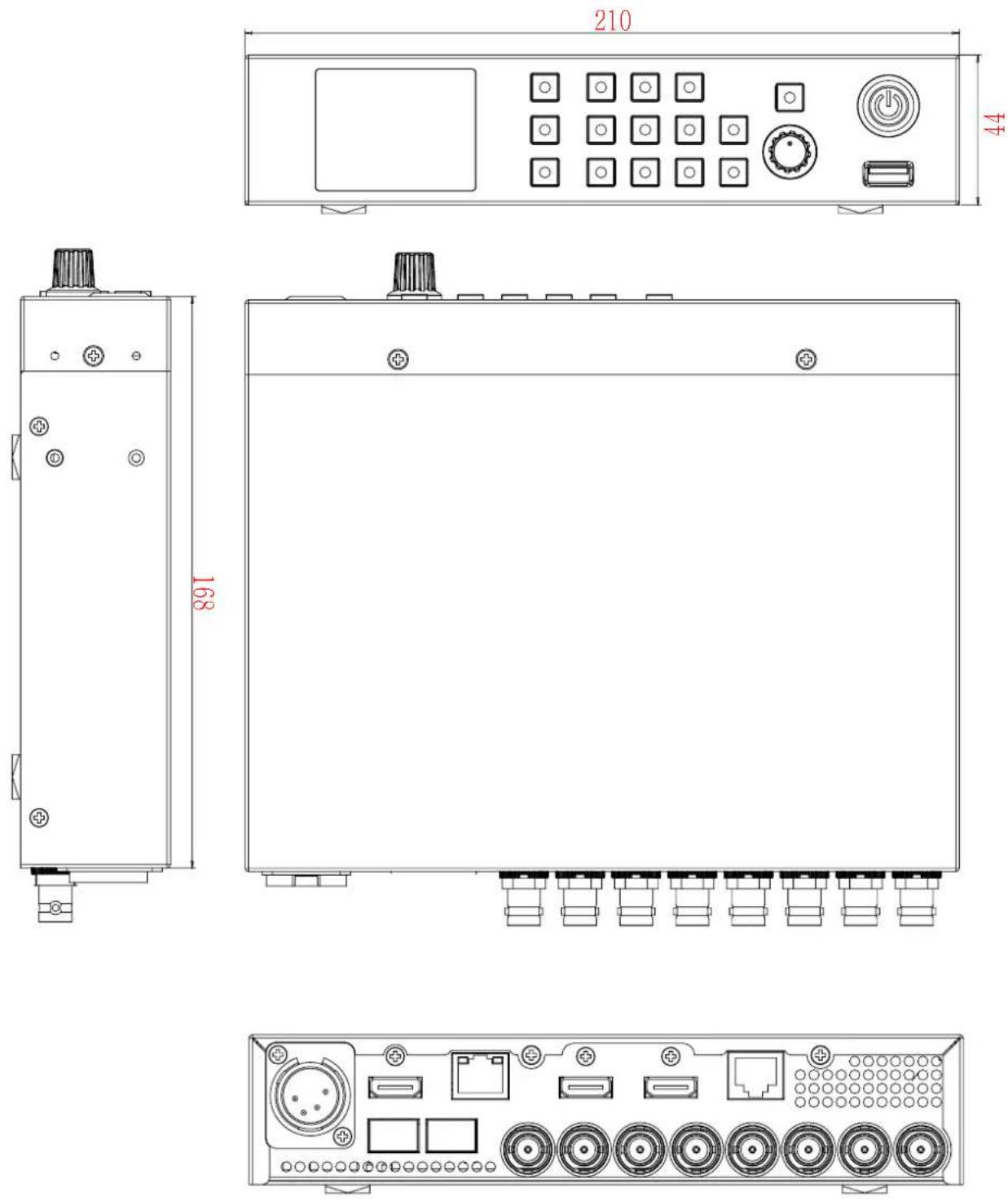
8. Dimensions
Dimensions(W x H x D): 210 x 44 x 168 mm / 8.26 x 1.73 x 6.61 inch

POSTIUM KOREA Co., Ltd.
208, Building A, Samsong Techno Valley, 140, Tongil-ro,
Deogyang-gu, Goyang-si, Gyeonggi-do, Korea, 10594
Tel : +82.2.354.6055 / Fax : +82.2.354.6056
E-mail : sales@postium.com
www.postium.com

- High Dynamic Range LUT BOX-4K
- HLB-4K
- HDR Converter Operational Instructions
- Table of Contents
- Precaution
- FCC (Federal Communications Commission)
- Disposal of Old Electrical & Electronic Equipment
- Location and Function of Controls
- A : Input Selection Buttons
- B : Output Selection Buttons
- C : F1 \~ F3 Button
- D : Rotary Encoder
- E : Menu Button
- F : Power Button
- G : USB connector
- H : LCD Module
- Rear Panel
- Menu Organization
- Menu Adjustment
- Enter the menu
- Enter the submenu
- Select an item
- Previous Menu
- Menu Operations
- 1.Format
- \* HDMI Color
- \* 3G Level
- Color Conversion
- \* Mode
- \* Input
- \* Output
- \* User LUT
- \* Color
- INPUT
- US ER LUT
- CO L OR
- Function Key
- \* F1 key, F2 key, F3 key
- FUNCTION KEY
- System
- \* Update F/W
- SYTEM
- \* Load LUT
- SYT EM
- \* Network
- NE T WORK
- \* Backlight
- Information
- \* S/N
- \* Running Time
- \* Version
- Available Signal Formats
- Dimensions
- POSTIUM KOREA Co., Ltd.
Brand : Postium
Model : HLB-4K
Category : HDR Converter