AXTC-VW1 - Kit voiture Metra - Free user manual and instructions
Find the device manual for free AXTC-VW1 Metra in PDF.


User questions about AXTC-VW1 Metra
0 question about this device. Answer the ones you know or ask your own.
Ask a new question about this device
Download the instructions for your Kit voiture in PDF format for free! Find your manual AXTC-VW1 - Metra and take your electronic device back in hand. On this page are published all the documents necessary for the use of your device. AXTC-VW1 by Metra.
USER MANUAL AXTC-VW1 Metra
natural_image
Black electronic device with attached connectors and cable, no visible text or symbolsVolkswagen SWC (Steering Wheel Control) and Data Interface 2002-2017
INTERFACE FEATURES
- Provides accessory power (10-amp)
- Provides wires for multimedia radios (park brake, reverse, speed sense)
• Used in both amplified and non-amplified systems*
• Retains audio controls on the steering wheel -
Designed to be compatible with all major radio brands
-
Auto detects vehicle type, radio connection, and preset controls
- Ability to dual assign steering wheel control buttons
- Retains memory settings even after battery disconnection or interface removal (non volatile memory)
- Provides illumination output
- Micro-B USB updatable
* Excluding Fender audio systems
APPLICATIONS
Volkswagen
Beetle 2012-2015
CC 2009-2017
EOS 2007-2016
Golf (DDIN models only) 2002
Golf, Golf R 2003-2014
GTI 2002-2014
Jetta (DDIN models only) 2002
- Crimping tool and connectors, or solder gun, solder, and heat shrink • Tape • Wire cutter
- Zip ties
Product Info

CONNECTIONS

text_image
AXXESS Reset Button LED Light Aftermarket Radio (radio's features may vary) Front Rear Sub AUX-IN Rear View SWC Vehicle Connector Radio Connections Black - Ground Yellow - Battery power Red - Accessory power Orange - Illumination Blue - Not used Blue/White - Amp turn-on Blue/Pink - VSS/Speed-Sense Green/Purple - Reverse signal Light Green - Parking brake Gray - Front right speaker + Gray/Black - Front right speaker - White - Front left speaker + White/Black - Front left speaker - Green - Rear left speaker + Green/Black - Rear left speaker - Purple - Rear right speaker + Purple/Black - Rear right speaker - 3.5mm Adapter (for radios with a wire for SWC) Boss (with SWC wire): Key 1 (Gray) - Brown Kenwood / JVC (with SWC wire): Blue/Yellow - Brown XITE: SWC-2 - Brown Universal Radio*: Key-A or SWC-1 - Brown * After programming, assign SWC buttons within radio menuPROGRAMMING
1.

Open the driver's door, and keep open during the programming process.
2.
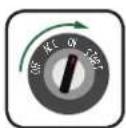
Cycle the ignition on.
3.

Connect the AXTC-VW1 harness to the AXTC-VW1 interface, and then to the wiring harness in the vehicle.
4.
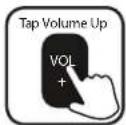
Locate the Volume Up button on the the steering wheel. Program the interface by tapping the Volume Up button at a heartbeat pace until the LED light stops flashing.
5.
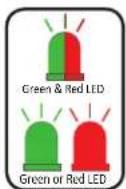
The LED light will flash Green & Red while the interface programs the radio to the steering wheel controls. Once programmed, the LED light will go out, then produce a pattern which will identify the radio type installed. Refer to the Radio LED Feedback section under Troubleshooting for radio types.
6.

The LED light will go out, then once again quickly flash Green & Red while the interface programs itself to the vehicle. Once programmed, the LED light will go out again, then turn solid Green.
7.

Cycle the ignition off, then back on.
8.

Test all functions of the installation for proper operation.
Note: Audio Mode must be selected in the MFI menu to allow track up and down to function. Refer to the vehicle owner's manual for more information.
TROUBLESHOOTING
1.2
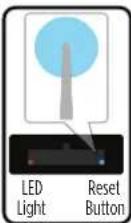
If the interface fails to function, press and release the reset button, then repeat the programming process from step 4 to try again.
Final LED Feedback
At the end of programming the LED light will turn Solid Green which indicates programming was successful. If the LED light didn't turn Solid Green, reference the list below to understand which programming section the problem may stem from.
| LED Light | Radio Programming Section | Vehicle Programming Section |
| Solid Green | Pass | Pass |
| Slow Red Flash | Fail | Pass |
| Slow Green Flash | Pass | Fail |
| Solid Red | Fail | Fail |
QR Code Scan Here

Further troubleshooting steps and information can be located at:
axxessinterfaces.com/product/AXTC-VW1
Note: If the LED light shows Solid Green for Pass (indicating everything programmed correctly), yet the steering wheel controls don't work, check to ensure that the 3.5mm jack is plugged in, and also plugged into the correct jack on the radio. Once corrected, press the reset button, then program again
Having difficulties? We're here to help.

our Tech Support line at:
386-257-1187

mail at:
techsupport@metra-autosound.com
Tech Support Hours (Eastern Standard Time)
Monday - Friday: 9:00 AM - 7:00 PM
Saturday: 10:00 AM - 7:00 PM
Sunday: 10:00 AM - 4:00 PM

KNOWLEDGE IS POWER
Enhance your installation and fabrication skills by enrolling in the most recognized and respected mobile electronics school in our industry. Log onto www.installerinstitute.com or call 800-354-6782 for more information and take steps toward a better tomorrow.

Metra recommends MECP certified technicians