
SCL-1 - Video Scaling AMX - Free user manual and instructions
Find the device manual for free SCL-1 AMX in PDF.


| Product Type | 4K60 Video Scaler |
| Dimensions (W x D x H) | 4.33" x 5.91" x 0.98" (11 cm x 15.01 cm x 2.5 cm) |
| Weight | Approx. 1.1 lb (0.50 kg) |
| Power Supply | External 12 VDC 2A adapter (100-240V AC input); includes US, UK, EU plugs |
| Power Consumption | 8 W (max) |
| Input | 1 x HDMI Type A (female) |
| Output | 1 x HDMI Type A (female) |
| Video Support | Up to 4K@60Hz 4:4:4 8-bit; HDCP 1.4/2.2 compliant |
| Scaling | Automatic or manual via DIP switch; supports multiple resolutions up to 4096x2160@60 |
| Control | DIP switch, RS-232 (API commands), CEC |
| Power LED | Green LED (rear) – solid on when powered |
| Mounting | V-style surface mount brackets included |
| Included Accessories | Power adapter with lock-ring plug, 3-pin Phoenix connector, mounting ears, 4x M2.5 screws, US/UK/EU plug adapters |
| Compliance | CE, FCC (Class B), NRTL, RoHS, WEEE |
| Operating Temperature | 32°F to 122°F (0°C to 50°C) |
| Storage Temperature | 14°F to 140°F (-10°C to 60°C) |
| Humidity (Operating) | 10% to 90% RH (non-condensing) |
| Thermal Dissipation | 27 BTU/hr |
| RS-232 Baud Rate | 9600 bps (default) |
| Data Rate (Max) | 18 Gbps |
| Cleaning Instructions | Clean only with dry cloth; do not use liquids |
| Warranty | See AMX warranty policy at www.amx.com |
Frequently Asked Questions - SCL-1 AMX
User questions about SCL-1 AMX
0 question about this device. Answer the ones you know or ask your own.
Ask a new question about this device
Download the instructions for your Video Scaling in PDF format for free! Find your manual SCL-1 - AMX and take your electronic device back in hand. On this page are published all the documents necessary for the use of your device. SCL-1 by AMX.
USER MANUAL SCL-1 AMX
IMPORTANT SAFETY INSTRUCTIONS
-
READ these instructions.
-
KEEP these instructions.
-
HEED all warnings.
-
FOLLOW all instructions.
-
DO NOT use this apparatus near water.
-
CLEAN ONLY with dry cloth.
-
DO NOT block any ventilation openings. Install in accordance with the manufacturer's instructions.
-
DO NOT install near any heat sources such as radiators, heat registers, stoves, or other apparatus (including amplifiers) that produce heat.
-
DO NOT defeat the safety purpose of the polarized or grounding type plug. A polarized plug has two blades with one wider than the other. A grounding type plug has two blades and a third grounding prong. The wider blade or the third prong are provided for your safety. If the provided plug does not fit into your outlet, consult an electrician for replacement of the obsolete outlet.
-
PROTECT the power cord from being walked on or pinched, particularly at plugs, convenience receptacles, and the point where they exit from the apparatus.
-
ONLY USE attachments/accessories specified by the manufacturer.
-
USE ONLY with a cart, stand, tripod, bracket, or table specified by the manufacturer, or sold with the apparatus. When a cart is used, use caution when moving the cart/apparatus combination to avoid injury from tip-over.

- UNPLUG this apparatus during lightning storms or when unused for long periods of time.
- REFER all servicing to qualified service personnel. Servicing is required when the apparatus has been damaged in any way, such as power-supply cord or plug is damaged, liquid has been spilled or objects have fallen into the apparatus, the apparatus has been exposed to rain or moisture, does not operate normally, or has been dropped.
- DO NOT expose this apparatus to dripping or splashing and ensure that no objects filled with liquids, such as vases, are placed on the apparatus.
- To completely disconnect this apparatus from the AC Mains, disconnect the power supply cord plug from the AC receptacle.
- Where the mains plug or an appliance coupler is used as the disconnect device, the disconnect device shall remain readily operable.
- DO NOT overload wall outlets or extension cords beyond their rated capacity as this can cause electric shock or fire.

The exclamation point, within an equilateral triangle, is intended to alert the user to the presence of important operating and maintenance (servicing) instructions in the literature accompanying the product.

The lightning flash with arrowhead symbol within an equilateral triangle is intended to alert the user to the presence of uninsulated "dangerous voltage" within the product's enclosure that may be of sufficient magnitude to constitute a risk of electrical shock to persons.

ESD Warning: The icon to the left indicates text regarding potential danger associated with the discharge of static electricity from an outside source (such as human hands) into an integrated circuit, often resulting in damage to the circuit.
WARNING: To reduce the risk of fire or electrical shock, do not expose this apparatus to rain or moisture.
WARNING: No naked flame sources - such as candles - should be placed on the product.
WARNING: Equipment shall be connected to a MAINS socket outlet with a protective earthing connection.
COPYRIGHT NOTICE
AMX© 2018, all rights reserved. No part of this publication may be reproduced, stored in a retrieval system, or transmitted, in any form or by any means, electronic, mechanical, photocopying, recording, or otherwise, without the prior written permission of AMX. Copyright protection claimed extends to AMX hardware and software and includes all forms and matters copyrightable material and information now allowed by statutory or judicial law or herein after granted, including without limitation, material generated from the software programs which are displayed on the screen such as icons, screen display looks, etc. Reproduction or disassembly of embodied computer programs or algorithms is expressly prohibited.
LIABILITY NOTICE
No patent liability is assumed with respect to the use of information contained herein. While every precaution has been taken in the preparation of this publication, AMX assumes no responsibility for error or omissions. No liability is assumed for damages resulting from the use of the information contained herein. Further, this publication and features described herein are subject to change without notice.
AMX WARRANTY AND RETURN POLICY
The AMX Warranty and Return Policy and related documents can be viewed/downloaded at www.amx.com.
ESD WARNING
 | To avoid ESD (Electrostatic Discharge) damage to sensitive components, make sure you are properly grounded before touching any internal materials.When working with any equipment manufactured with electronic devices, proper ESD grounding procedures must be followed to make sure people, products, and tools are as free of static charges as possible. Grounding straps, conductive smocks, and conductive work mats are specifically designed for this purpose. These items should not be manufactured locally, since they are generally composed of highly resistive conductive materials to safely drain static discharges, without increasing an electrocution risk in the event of an accident.Anyone performing field maintenance on AMX equipment should use an appropriate ESD field service kit complete with at least a dissipative work mat with a ground cord and a UL listed adjustable wrist strap with another ground cord. |


WARNING: Do Not Open! Risk of Electrical Shock. Voltages in this equipment are hazardous to life. No user-serviceable parts inside. Refer all servicing to qualified service personnel.
Place the equipment near a main power supply outlet and make sure that you can easily access the power breaker switch.
WARNING: This product is intended to be operated ONLY from the voltages listed on the back panel or the recommended, or included, power supply of the product. Operation from other voltages other than those indicated may cause irreversible damage to the product and void the products warranty. The use of AC Plug Adapters is cautioned because it can allow the product to be plugged into voltages in which the product was not designed to operate. If the product is equipped with a detachable power cord, use only the type provided with your product or by your local distributor and/or retailer. If you are unsure of the correct operational voltage, please contact your local distributor and/or retailer.
WARNING: Avoid exposure to extreme heat or cold.
FCC AND CANADA EMC COMPLIANCE INFORMATION:
This equipment has been tested and found to comply with the limits for a Class B digital device, pursuant to Part 15 of the FCC Rules. These limits are designed to provide reasonable protection against harmful interference in a residential installation. This equipment generates uses and can radiate radio frequency energy and, if not installed and used in accordance with the instructions, may cause harmful interference to radio communications. However, there is no guarantee that interference will not occur in a particular installation. If this equipment does cause harmful interference to radio or television reception, which can be determined by turning the equipment off and on, the user is encouraged to try to correct the interference by one or more of the following measures:
• Reorient or relocate the receiving antenna.
- Increase the separation between the equipment and receiver.
- Connect the equipment into an outlet on a circuit different from that to which the receiver is connected.
- Consult the dealer or an experienced radio/TV technician for help.
Changes or modifications not expressly approved by the party responsible for compliance could void the user's authority to operate the equipment.
EU COMPLIANCE INFORMATION:
Eligible to bear the CE mark; Conforms to European Union Low Voltage Directive 2014/35/EU; European Union EMC Directive 2004/108/EC; European Union Restriction of Hazardous Substances Recast (RoHS2) Directive 2011/65/EU; European Union WEEE (recast) Directive 2012/19/EU; European Union Eco-Design Directive 2009/125/EC; European Union Registration, Evaluation, Authorization and Restriction of Chemicals (REACH) Directive 2006/121/EC
You may obtain a free copy of the Declaration of Conformity by visiting http://www.amx.com/techcenter/certifications.asp.
WEEE NOTICE:
 | This appliance is labeled in accordance with European Directive 2012/19/EU concerning waste of electrical and electronic equipment (WEEE). This label indicates that this product should not be disposed of with household waste. It should be deposited at an appropriate facility to enable recovery and recycling. |
Table of Contents
Safety Instructions 2
ESD Warning.... 3
Table of Contents 4
Overview....5
Features 5
Package Contents.... 5
Specifications.... 6
Front Panel Description 8
Rear Panel Description.... 9
SCALER DIP Switch 10
Installation.... 11
Wiring 12
Connection Modes 13
Endpoint Mode 13
Standalone Mode 13
Troubleshooting.... 14
API Command List Instructions.... 15
Overview
The AMX SCL-1 4K60 Scaler is a small-format scaler that adjusts the output to match the optimal resolution of the display. The scaler includes a single input and a single output, with a size small enough to be mounted behind a display.
It was designed to be used in combination with products such as the local HDMI outputs on the AMX Precis 8x8 that do not have built-in scaling. This offers a more flexible, lower cost solution for installations where scaling is needed only on certain outputs.
The SCL-1 is compatible with 4K60 4:4:4 resolutions and HDCP 2.2, offering support for the latest source devices and displays. Because the SCL-1 includes automatic scaling, the device can be configured to automatically scale to the optimal resolution of the display based on its EDID. It can be set to always scale to a particular resolution.
Common Applications
Ideal for a variety of applications where there is no video scaling built into the switcher.
Features
4K60 4:4:4 and HDCP 2.2 Support – Both 4K60 and non-4K content are supported
Single Input/Output - Can be used in combination with products such as presentation switchers which do not have resolution support to match displays.
Automatic Scaling Option - Can be configured to automatically scale to the optimal resolution of the display based on its EDID, or it can be set to always scale to a particular resolution.
HDMI input and output support up to 4K@60Hz 4:4:4 8bit
HDCP 2.2 compliant
Supports fast switching when working with PR01-0808
Scaling output adjusted by DIP switch
EDID management by API commands
Package Contents
- 1x SCL-1
• 1x Power Adapter (DC 12V 2A) with lock-ring plug
• 1x Phoenix Male Connector (3.5 mm, 3 pins) - 1x US Plug
- 1x UK Plug
- 1x EU Plug
- 2x Mounting Ears
- 4x Mounting Screws
Specifications
| SCL-1 Specifications | |
| General | |
| Dimensions 5.91 in (15.01 cm) depth 4.33" (11 cm) width .98" (25 mm) height) | |
| Weight Approx. 1.1 lb (0.50 kg) | |
| Shipping Weight Approx. 2.2 lb (1.00 kg) | |
| Mounting Options Includes V-Style surface mount brackets | |
| MTBF TBD | |
| Airflow Convection (openings on sides of cases) | |
| Approvals: Regulatory Compliance | CE, FCC, NRTL, RoHS, WEEE |
| Included Accessories 1x 3P-3.5MM Phoenix Connectors 1x 12V/2A Power Adapter 1x US exchangeable adapters 1x EU exchangeable adapters 1x UK exchangeable adapters 2x mounting ear 4x M2.5 screw (for mounting ears) | |
| Power Supply | |
| External, Included 12 VDC 2A Max Output; 100-240V 50/60Hz AC Input | |
| Active Power Requirements | |
| Voltage, DC (Typical) 12 VDC | |
| Power Consumption 8w | |
| Power Connector Screw down locking power connector | |
| Environmental | |
| Temperature (Operating) | 32°F to 122°F (0°C to 50°C) |
| Temperature (Storage) | 14°F to 140°F (-10°F to 60°C) |
| Humidity (Operating) 10% to 90% RH (non-condensing) | |
| Humidity (Storage) 10% to 90% RH (non-condensing) | |
| Thermal Dissipation 27 BTU/hr | |
| Front Connectors | |
| HDMI Input (1) HDMI Type A Female Connector | |
| HDMI Output (1) HDMI Type A Female Connector | |
| Rear Connectors | |
| DC Power | (2) Screw Down Locking Power Connector |
| Serial | 3 Position 3.5mm Pluggable Phoenix Terminal Block Bidirectional RS-232 Standard NetLinx Baud rate 1200-115k Parity support Odd/Even/None |
| HDMI Input (4) HDMI Type A Female Connector | |
| Program Port | (5) USB Type A |
| Controls and Indicators | |
| Power Indicator | Green LED, Solid ON when power is applied (Rear) |
| Scaler Configuration | Dip Switch 4 position (Front) |
Specifications
| SCL-1 Specifications (cont.) | |
| HDMI | |
| Compatible Formats HDMI, HDCP | |
| Signal Type Support HDMI, DisplayPort++ (input only with HDMI cable adapter) | |
| Output Signal Type HDMI, HDCP | |
| Output Connector HDMI Type A Female | |
| Output Scaling Yes, Auto or Manual | |
| Output Scaling Resolutions | 800x600 @ 60 Hz1280x720 p @ 50 Hz, 59.95 Hz, 60 Hz1024x768 @ 60 Hz 1280x768, @ 60 Hz1280x800 @ 60 Hz 1280x960 @ 60 Hz1280x1024 @ 60 Hz 1360x768 @ 60 Hz1366x768 @ 60 Hz 1440x900 @ 60 Hz1600x900 @ 60 Hz 1600x1200 @ 60 Hz1680x1050 @ 60 Hz1920x1080 p @ 50 Hz, 59.94 Hz, 60 Hz1920x1200 @ 60 Hz3840x2160 @ 24 Hz, 25Hz, 30 Hz, 60 Hz4096x2160 @ 24 Hz, 25Hz, 30 Hz, 60 Hz |
| Input Video Level .5 - 1.2 V p-p | |
| Data Rate (Max) 18 Gbps | |
| Pixel Clock (Max) Up to | 600 Mhz |
| 4K Format Support 384 | 0x2160p@24/25/30/60 Hz, 4:4:44096x2160p@24/25/30/60 Hz, 4:4:43840x2160p@50/60 Hz, 4:2:04096x2160p@50/60 Hz, 4:2:0 |
| Audio Format Support 2 | CH L-PCM |
| HDCP Support Yes HDCP | 1.4, 2.2 |
| CEC Support Yes, Auto or Manual | |
Front Panel Description

| No. Name Description | |
| 1 HDMI IN Connects to HDMI source device or PR01-0808 matrix switcher HDMI OUT. | |
| 2 SCALER Adjusts the output scaling. | |
| 3 HDMI OUT Connects to HDMI display device. |
Rear Panel Description

| No. | Name Description | |
| 1 | DC 12V Connects the | included 12V power adapter. |
| 2 | POWER LED On: SCL-1 | is powered on.Off: SCL-1 is powered off. |
| 3 | RS232 For serial communication or firmware update. | |
| 4 | PROGRAM Connect to | flash drive for upgrading |
SCALER DIP Switch
Scaling output adjustment by DIP switch.
The default setting is Auto Scaler (Position: 000). Refer to the following table to reset.
Note: When set to position 000, the SCL-1 also can be set through API commands.

| DIP Function | |||
| 0 0 0 | Auto Scaling | (Default) | |
| 0 0 1 | 3840 x 2160 | @ 60 Hz | |
| 0 1 0 | 3840 x 2160 | @ 30 Hz | |
| 0 1 1 | 1920 x 1080 | @ 60 Hz | |
| 1 0 0 | 1920 x 1200 | @ 60 Hz | |
| 1 0 1 | 1280 x 800 | @ 60 Hz | |
| 1 1 0 | 1280 x 720 | @ 60 Hz | |
| 1 1 1 | 1024 x 768 | @ 60 Hz | |
Installation
Note: Before installation, ensure the SCL-1 is disconnected from the power source.
To install the presentation switcher on a solid surface:
- Position and install the mounting brackets with the four mounting screws provided.
- Mount the switcher on a flat and solid surface with the mounting screws.

natural_image
Technical line drawing of a mechanical bracket with mounting holes and a dashed line indicating assembly (no text or symbols)Attach the brackets provided to side panels of the device
Wiring
- Connect HDMI sources (Blu-ray player, games console, Satellite/cable media server etc.) to the HDMI IN port via an HDMI cable.
- Connect a PRO1-0808 matrix switcher or an HDMI display device to the HDMI OUT port of SCL-1.
- Connect a PC to the RS232 port for API control.
-
Connect the included 12V power adapter to the SCL-1.
-
When you need to upgrade the firmware:
a) Download firmware upgrading execution software to a flash drive.
b) Connect the flash drive to the USB port.
c) Send the Commands by CommUart Assistant to upgrade.
d) When the upgrading is complete, power cycle the SCL-1 OFF and ON.
Wiring
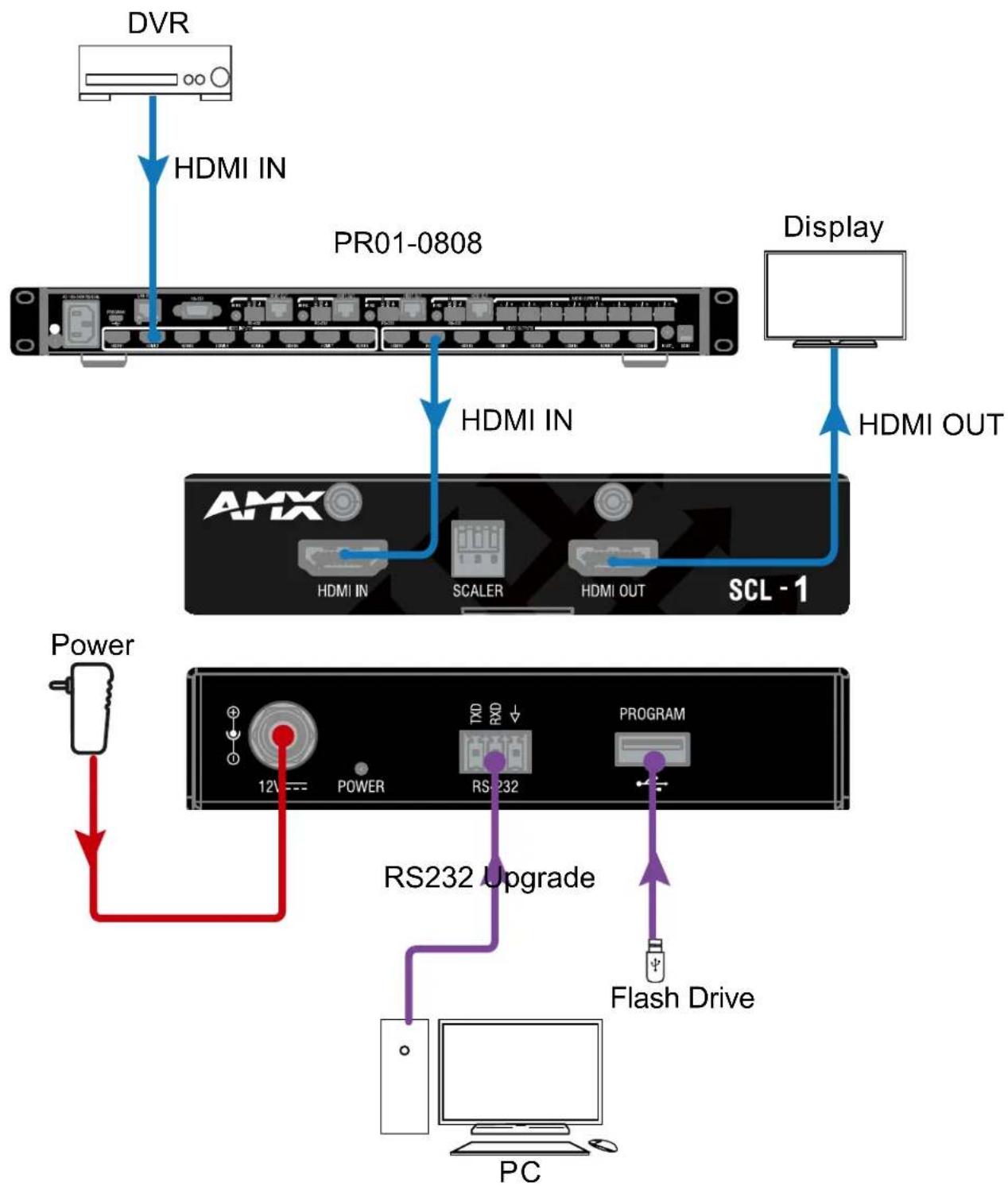
flowchart
graph TD
    A["DVR"] --> B["HDMI IN"]
    B --> C["PR01-0808"]
    C --> D["Display"]
    D --> E["HDMI OUT"]
    F["Power"] --> G["RS232 Upgrade"]
    G --> H["Program"]
    H --> I["Flash Drive"]
    I --> J["PC"]
    C --> K["AMX"]
    K --> L["SCL - 1"]
    L --> M["Power"]
    M --> N["12V Power"]
    N --> O["RS232"]
Connection Modes
ENDPOINT MODE:
The SCL-1 will change to Endpoint mode when it detects the presence of PR01-0808. Endpoint mode takes effect immediately. A reboot is not needed.
Endpoint Mode Settings:
- Copy EDID (always change EDID audio to 2CH).
- Get input HDCP info from PR01-0808.
- Follow PR01-0808 instructions to send CEC commands.
- Use DIP switch on SCL-1 to set scaling output.
- Receive API commands through RS232 port on SCL-1 to set other features.
- Upgrade FWs via RS232 port and USB Type-A port.
STANDALONE MODE:
The SCL-1 will change to Standalone mode when it cannot detect the presence of PR01-0808. Standalone mode takes effect immediately. A reboot is not needed.
Standalone Mode Settings:
- EDID controlled by API commands through RS232 on SCL-1, copy EDID is default setting (always change EDID audio to 2CH):
• 3840 x 2160@60_2ch
• 3840 x 2160@30_2ch
• 1920 x 1200@60_2ch
• 1920 x 1080@60_2ch
• 1280 x 800@60_2ch
• 1280 x 720@60_2ch
- 1024 x 768@60_2ch
- Copy(Default);
- SCL-1 gets input HDCP information automatically.
- SCL-1 controls CEC commands.
- Use DIP switch on SCL-1 to set scaling output.
- Receive API commands through RS232 port on the SCL-1.
- Upgrade FWs via RS232 port and USB Type-A port.
Troubleshooting
1. The power LED is off.
- Check that all the devices are on.
- Check that all the cables are the correct specification and connected properly.
2. The display connected to the SCL-1 shows no picture.
- Check that all the devices are on.
- Check that all the cables are the correct specification and connected properly.
- Check that the display works properly, and that the source device has a normal output signal.
- Make sure that the display device supports HDCP.
- Check that no compatibility issues exist between the device and the display. If so, replace the display with a compatible model.
3: The display connected to the SCL-1 displays snow or a mosaic pattern.
- Check that all the cables are the correct specification and connected properly.
- Check that the source input device has no problems, such as snow, mosaic or a damaged disc. If so, replace it with a normal input source.
- Check that no compatibility issues exist between the SCL-1 and the display. If so, replace the display with other models.
API Command List Instructions
General rules for using BCS commands
- Command strings typically are not case-sensitive.
- All command strings must end with the Take command "T" which tells the system of execute the command.
- “O” is the letter O, no the number zero (0).
- Entering "X" at any point in a command string cancels the command.
- A command cannot be canceled after the "T" has been entered.
- Command strings cannot be edited. If a mistake has been made, enter an "X" and then reenter the command.
- To specify multiple outputs, inputs, levels, or local presets, enter a space “” between each number. Multiple inputs are only valid in Disconnect commands.
- To specify a range of outputs, inputs or local presets, enter a space " " between each number. Multiple inputs are only valid in Disconnect commands.
- To specify a range of outputs, inputs or local presets, insert a colon ":" between the lowest and highest numbers of the range (not supported if the command is otherwise invalid, e.g., cannot specify a range of inputs in a Change command; the first input only would be routed.).
- Colons ":" and spaces " " can be used in the same command string.
- If the level designation "L" is omitted, the command is executed on the default level, which is normally Level 0.
RS232 Default Setting
| Parameters Value | |||
| Baud Rate 9600 bps | |||
| Data bits 8 bits | |||
| Parity None | |||
| Stop bits 1 bit | |||
| Flow control None | |||
| IDX Function Description Syntax Example | |||
| 1 To | execute a sink power by CEC | Command:CSP#TReturn:CSP#TDescription:CECPWR_ONOFF will control sink power on or offSP#: #={0, 1}0 : OFF1 : ON | Command:CSP1T[CR/LF]Return:CSP1T[CR/LF]Description:Executes the sink power on. |
| 2 To | define a sink power by CEC automatically | Command:CSPA#TReturn:CSPA#TDescription:SPA#: #={0, 1}0 : Disable1 : Enable | Command:CSPA1TReturn:CSPA1TDescription:Enable control the sink power by CEC automatically. |
| 3 To | get a sink power by CEC automatically | Command:SSPATReturn:SSPAT( # )Description:#: #={0, 1}0 : Disable1 : Enable | Command:SSPATReturn:SSPAT( 1 )Description:Enable control the sink power by CEC automatically. |
| 4 To | define a Delay Time to execute a sink power off when on active signal | Command:CD#SPTReturn:CD#SPTDescription:CECAUTO_DELAY is short for CEC auto Power Delay TimingD#: #={1~30MIN} | Command:CD5SPTReturn:CD5SPTDescription:Define Delay 5 minutes to control the sink power off when on active signal. |
| 5 To | get a Delay Time to execute a sink power off when on active signal | Command:SDSPTReturn:SDSPT( # )Description:CECAUTO_DELAY is short for CEC auto Power Delay Timing#: #={1~30MIN} | Command:SDSPTReturn:SDSPT( 5 )Description:Get Delay time to control the sink power off when on active signal is 5 minutes. |
| 6 To | set output resolutionCommand:CR#TReturn:CR#TDescription:R#: # = {1~27}1: 4096x2160@602: 4096x2160@303: 4096x2160@254: 4096x2160@245: 3840x2160@606: 3840x2160@507: 3840x2160@308: 3840x2160@259: 3840x2160@2410: 1920x1200@6011: 1920x1080@6012: 1920x1080@5013: 1280x720@6014: 1280x720@5015: 1680x1050@6016: 1600x1200@6017: 1600x900@6018: 1440x900@6019: 1366x768@6020: 1360x768@6021: 1280x1024@6022: 1280x960@6023: 1280x800@6024: 1280x768@6025: 1024x768@6026: 800x600@6027: AUTOAuto (preferred native timing of the display) | Command:CR1TReturn:CR1TDescription:Set Output resolution is Fixed 4096x2160@60. | |
| 7 To | verify outputresolutionCommand:SRTReturn:SRT( # )Description:R#: # = {1~17, 101~117}1: Fix 3840x2160@602: Fix 3840x2160@303: Fix 1920x1200@604: Fix 1920x1080@605: Fix 1280x720@606: Fix 1280x800@607: Fix 1024x768@60101: Auto 3840x2160@60102: Auto 3840x2160@30103: Auto 1920x1200@60104: Auto 1920x1080@60105: Auto 1280x720@60Auto (preferred native timing of the display) | Command:SRTReturn:SRT( 1 ) or SRT( 101 )Description:Output resolution is Fixed 3840x2160@60 or Auto 3840x2160@60. | |
| 8 To | reset system settingCommand:~SYSR!Return:~SYSR!Description:Reset system setting. | Command:~SYSR!Return:~SYSR!Description:Reset system setting. | |
| 9 To | cause a warm rebootCommand:~APP!Return:~APP!Description:Cause a warm reboot. | Command:~APP!Return:~APP!Description:Cause a warm reboot. | |
| 10 To determine the system's Application Code version | Command:~VER!Return:~VER!( # )Description:Get system's version. | Command:~VER!Return:~VER!( 1.0 )Description:The system's version is 1.0. | |
| 11 To upgrade the MCU Command | Command:~UPGM!Return:~UPGM!Description:Upgrade MCU. | Command:~UPGM!Return:~UPGM!Description:Upgrade MCU. | |
| 12 To upgrade the Scaler Command | Command:~UPG!Return:~UPG!Description:Upgrade the scaler. | Command:~UPG!Return:~UPG!Description:Upgrade the scaler. | |
| 13 To Set Input EDID Command | CE#TReturn:CE#TDescription:E#: # = {1 ~ 8}1 : 3840x2160@60_2ch2 : 3840x2160@30_2ch3 : 1920x1200@60_2ch4 : 1920x1080@60_2ch5 : 1280x800@60_2ch6 : 1280x720@60_2ch7 : 1024x768@60_2ch8 : copy | Command:CE1TReturn:CE1TDescription:Set input Fixed EDID is 3840x2160@60_2ch. | |
| 14 To Get Input EDID Command | SETReturn:SET( # )Description:# : # = {1 ~ 8}1 : 3840x2160@60_2ch2 : 3840x2160@30_2ch3 : 1920x1200@60_2ch4 : 1920x1080@60_2ch5 : 1280x800@60_2ch6 :1280x720@60_2ch7 : 1024x768@60_2ch8: copy | Command:SETReturn:SET( 1 )Description:Get input FIX EDID is 3840x2160@60_2ch. | |
- IMPORTANT SAFETY INSTRUCTIONS
- COPYRIGHT NOTICE
- LIABILITY NOTICE
- AMX WARRANTY AND RETURN POLICY
- ESD WARNING
- FCC AND CANADA EMC COMPLIANCE INFORMATION:
- EU COMPLIANCE INFORMATION:
- WEEE NOTICE:
- Table of Contents
- Overview
- Common Applications
- Features
- Package Contents
- Specifications
- Front Panel Description
- Rear Panel Description
- SCALER DIP Switch
- Installation
- Wiring
- Connection Modes
- ENDPOINT MODE:
- Endpoint Mode Settings:
- STANDALONE MODE:
- Standalone Mode Settings:
- Troubleshooting
- The power LED is off.
- The display connected to the SCL-1 shows no picture.
- 3: The display connected to the SCL-1 displays snow or a mosaic pattern.
- API Command List Instructions
- General rules for using BCS commands
Brand : AMX
Model : SCL-1
Category : Video Scaling