DC10RCDH - Heating DIMPLEX - Free user manual and instructions
Find the device manual for free DC10RCDH DIMPLEX in PDF.


User questions about DC10RCDH DIMPLEX
0 question about this device. Answer the ones you know or ask your own.
Ask a new question about this device
Download the instructions for your Heating in PDF format for free! Find your manual DC10RCDH - DIMPLEX and take your electronic device back in hand. On this page are published all the documents necessary for the use of your device. DC10RCDH by DIMPLEX.
USER MANUAL DC10RCDH DIMPLEX
natural_image
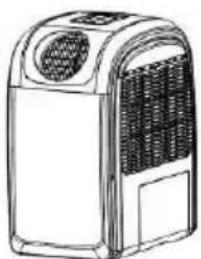
Line drawing of a portable air conditioner unit with ventilation grilles and control panel (no text or symbols)PORTABLE AIR CONDITIONER
IMPORTANT INFORMATION
Carefully read this instruction manual before you install or use your portable air conditioner. Please retain this manual for product warranty and for future reference.
CAUTION
- Make sure the inlet and outlet vents are never blocked.
- Ensure the appliance is on a stable, even surface when operating to avoid water leakage.
- Do not operate this unit in an explosive or corrosive atmosphere.
- When switched to cooling, only operate this unit in ambient temperatures between 17^ C and 43^ C. For heating, only operate this unit in ambient temperatures between 5^ C and 23^ C.
- Clean the air filter frequently to ensure efficient operation.
- To prevent compressor damage when the unit has been operating and is turned off, please wait at least 3 minutes before restarting.
- This unit needs to be plugged into a 220-240V \~ 50Hz AC, 10 Amp power outlet.
- Do not use any extension cords with this unit.
- This unit is for indoor operation only.
- Open the adjustable air vent and extend the exhaust pipe (and drain pipe, if fitted) to the closest window before using.
- Only ever have a professional technician, manufacturer or service agent replace a damaged power cord.
- The batteries from the remote control must be removed and disposed of safely, before the appliance is scrapped.
- This appliance is not intended for use by persons (including children) with reduced physical, sensory or mental capabilities, or lack of experience and knowledge, unless they have been given supervision or instruction concerning use of the appliance by a person responsible for their safety.
- Children should be supervised to ensure that they do not play with the appliance.
Important.
The air conditioner must always be stored and transported upright. In case of doubt we suggest you wait for at least 24 hours before operation.
(Please keep unit upright at all times)
PACKAGE CONTENTS
Portable air conditioner
Remote control
User manual
Extendable window kit
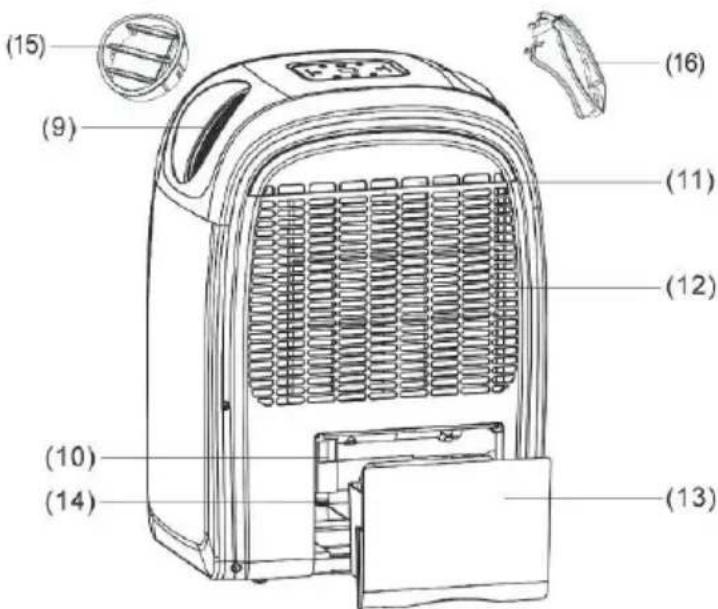
PARTS
- Control panel
- Remote control receiver
- Adjustable air vent
- Window kit adaptor
- Exhaust hose
- Hot air filter
- Hot air inlet
- Home for remote control

text_image
(A) + (B) (4) (2) (1) (3) (5) (6) (7) (8)-
Hot air outlet
-
Water filler (for humidifying function)
-
Cool air filter
-
Cool air inlet
-
Water tank
-
Drain hole
-
Outlet grille (for heating and humidifying
-
Exhaust hose attachment
text_image
(15) (9) (16) (11) (12) (10) (14) (13)CONTROLS AND DISPLAY
text_image
(6) (8) (5) (7) (2) SLEEP ○ TURBO ○ HI ○ LOW ○ AUTO ○ SPEED SLEEP TIMER ○ COOLING ○ DEHMOFER ○ HEATING ○ HUMOFER ○ TEMP+ POWER TEMP- FUNC (3) (1) (4)1. POWER
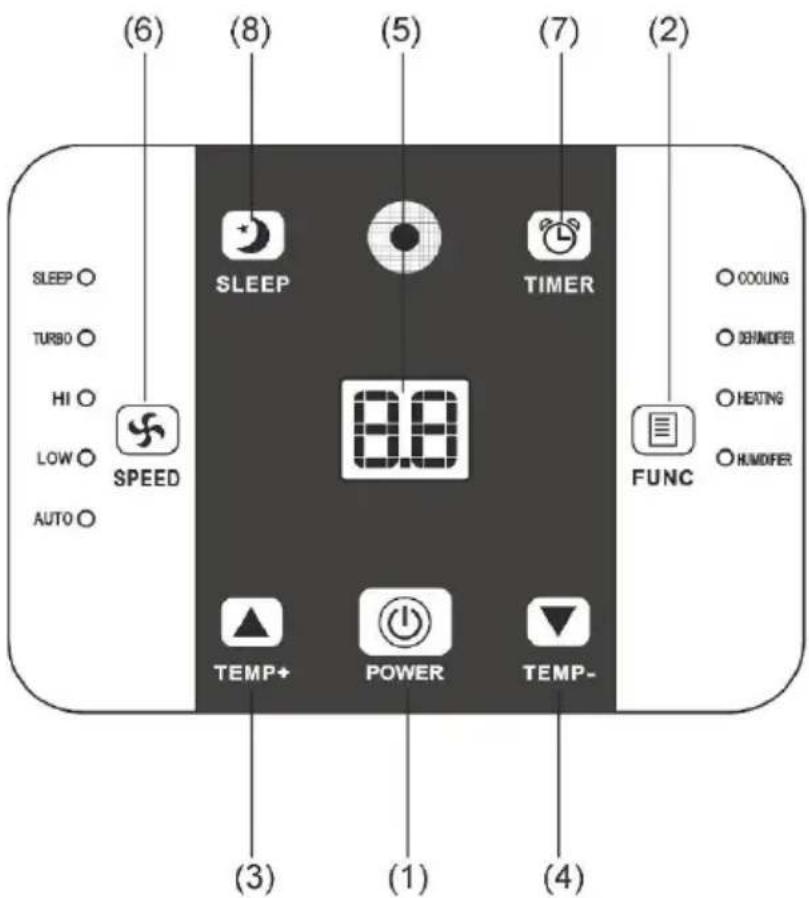
Press the POWER button to turn the unit "ON" or "OFF".
※ The portable air conditioner is fitted with a compressor delay protection circuit. This protects the unit from possible damage due to rapid starting and stopping of its compressor. Compressor operation begins 3 minutes after the unit is switched on or the mode is switched from dehumidify to air conditioning.
2. FUNCTION
Press this key to select cooling, heating, dehumidifying or humidifying.
※ Humidifier:
- The unit will stop automatically after four hours of operation. Put water into the water filler (10) to restart operation.
- The unit will stop humidifying if the ambient humidity is equal to the pre-set humidity.
3. (TEMP+)
In cooling mode, this button raises the set temperature by 1^ C each time it is pressed to a maximum of 30^ C. In heating mode, this button raises the set temperature by 1^ C each time it is pressed to a maximum of 25^ C.
4. (TEMP-)
In cooling mode, this button lowers the set temperature by 1^ C each time it is pressed, to a minimum of 17^ C. In heating function, this button lowers the set temperature by 1^ C each time it is pressed to a minimum of 15^ C.
※ The time taken to reach the desired set temperature will depend on the environment and the size of the space in which the unit is operating in. For example, if the ambient temperature is too hot or the room is too large, the rate at which the temperature descends will be slow as the cooling may be less effective.
5. DISPLAY
The display indicates the current set temperature or the timer setting. When the timer or temperature is adjusted, the new setting is shown before the display returns to the current set temperature.
※ The display is also used to show error codes should a fault occur, see ERROR CODES.
6. SPEED
Press SPEED to select TURBO, HIGH, LOW or AUTO fan speed. If AUTO fan speed is selected, the unit operates at maximum capacity and turbo fan speed while the room temperature is more than 2^ C from the set temperature. When the room temperature is within 2^ C of the set temperature, the unit operates at HIGH fan speed. Once the room temperature equals the set temperature, the unit will operate at minimum capacity and low fan speed to efficiently maintain the desired temperature. When TURBO, HIGH or LOW speed is selected, the unit operates at maximum capacity until the set temperature
is reached. The fan operates at the selected speed.
- TIMER ON/OFF button for the programmable timer.
The timer can be used to turn the unit on automatically after a set time delay is complete.
- With the unit OFF, press the "TIMER" button to set the desired time delay before you wish the unit to start.
- Choose the function desired (cooling, dehumidifier, heating or humidifier.)
- Once the set time delay is complete, the unit will turn on automatically.
- If you press the "POWER" button before the time delay is complete, the delay will be cancelled and the unit will turn on immediately.
The timer can be used to turn the unit off automatically after a set time period is complete.
- With the unit ON, press the "TIMER" button to set the desired time for the unit to remain on.
- Once the set time period is complete, the unit will turn off automatically.
-
If you press the "POWER" button before the time delay is complete, the delay will be cancelled and the unit will turn off immediately.
-
SLEEP Press the SLEEP button to select the sleep comfort mode.
When the unit is cooling and sleep mode is selected, the unit will raise the set temperature 1^ C each hour to a maximum of 2^ C over two hours.
When the unit is heating and sleep mode is selected, the unit will lower the set temperature 1^ C each hour to a maximum of 2^ C over two hours.
These temperatures will be maintained for the balance of the time set and help maximize sleep comfort.
When setting the "sleep comfort" mode, please ensure that you
set the number of hours required by using the TIMER function. The hours set will be shown on the display by pressing either the TEMP+ or TEMP- buttons.
REMOTE CONTROL FUNCTION

text_image
Gray remote control interface with icons for settings, navigation, and power controls- POWER ⏻
- FUNC
- TIMER Ⓤ
- AUTO AUTO
- TURBO
6.HI - LOW
- SLEEP
- TEMP. ▲ ↓ ▼
On/Off switch
Function "MODE" selector
Hourly programming
Automatic fan speed
Turbo fan speed
High fan speed
Low fan speed
Night operation selector
Temperature selector
INSTALLATION
Unit Setup
natural_image
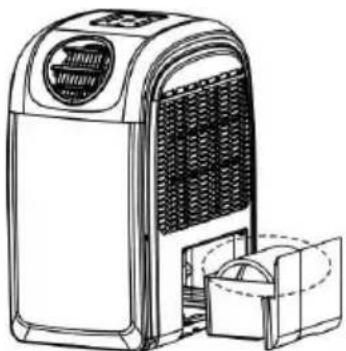
Line drawing of a portable air conditioner unit with cooling fan and cooling unit (no text or symbols)- Remove the water tank and take out the exhaust hose.
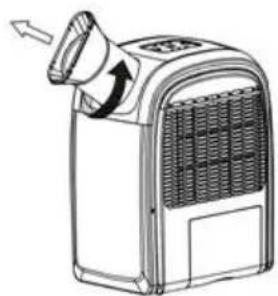
- Remove the outlet grille and install the exhaust tube by rotating it clockwise onto the rear air outlet. Please ensure it is fully inserted before use. To remove the exhaust hose, please rotate in an anti-clockwise direction.

natural_image
Diagram showing the installation of an air conditioner unit into a second, with no text or symbols present.Fig.1
natural_image
Line drawing of a portable air conditioner unit with airflow direction arrow (no text or symbols)Fig.2
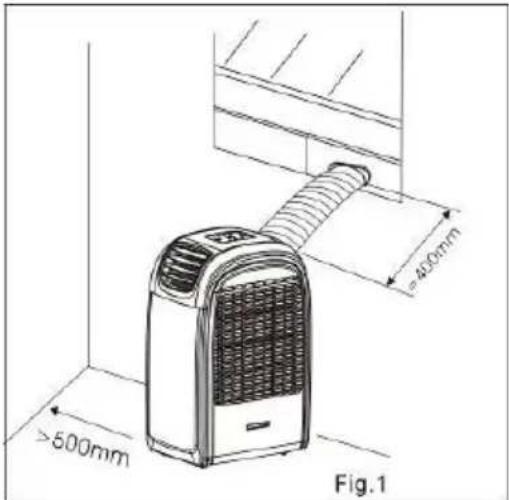
text_image
>500mm 400mm Fig.1Locating the unit.
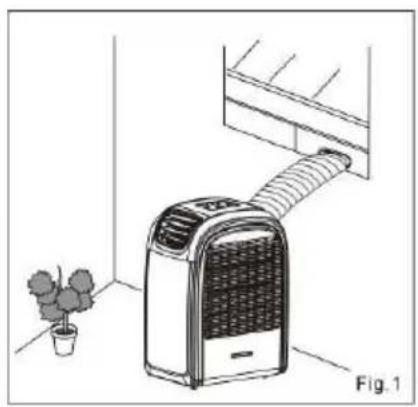
Install the portable air conditioner in a flat location with adequate space to ensure the air inlets and outlets will not be blocked.
Keep a minimum clearance of 50cm from walls and other objects. Position the unit to allow the exhaust hose to reach a suitable window, as shown.
Avoid sharp bends or kinks in the exhaust hose.
The optional adjustable window slider is included to ensure the exhaust hose is held in place (in the window) and prevents expelled hot air re-entering the room.
The appliance should not be used in damp areas such as a laundry or bathroom.
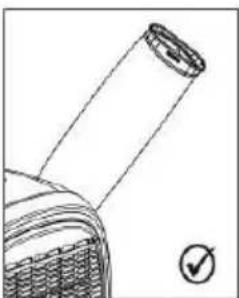
natural_image
Technical line drawing of a mechanical component with a circular end and a checkmark indicator (no text or symbols)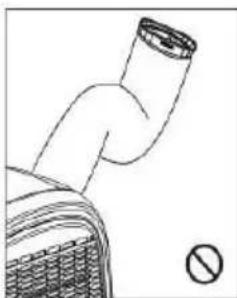
natural_image
Simple line drawing of a pipe with a stop sign (no text or symbols on the diagram itself)Do not place the unit where it will be in direct sunlight as it may overheat and turn off.
ADJUSTABLE WINDOW SLIDER KIT
The adjustable window slider kit is installed as shown below.
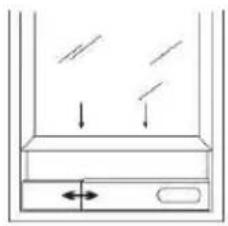
natural_image
Simple line drawing of a container with liquid and arrows indicating flow or movement (no text or symbols)Window slider kit
min: 55cm
max: 100cm
natural_image
Line drawing of a portable air conditioner unit with a potted plant nearby (no text or symbols)
natural_image
Pure diagram of a door with arrows indicating direction, no text or symbols presentWindow slider kit
min: 55cm
max: 100cm

natural_image
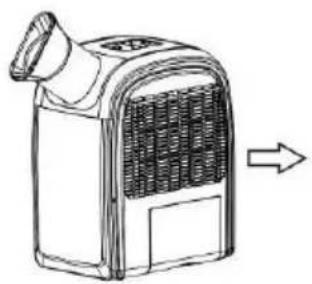
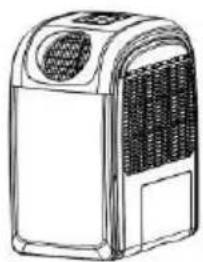
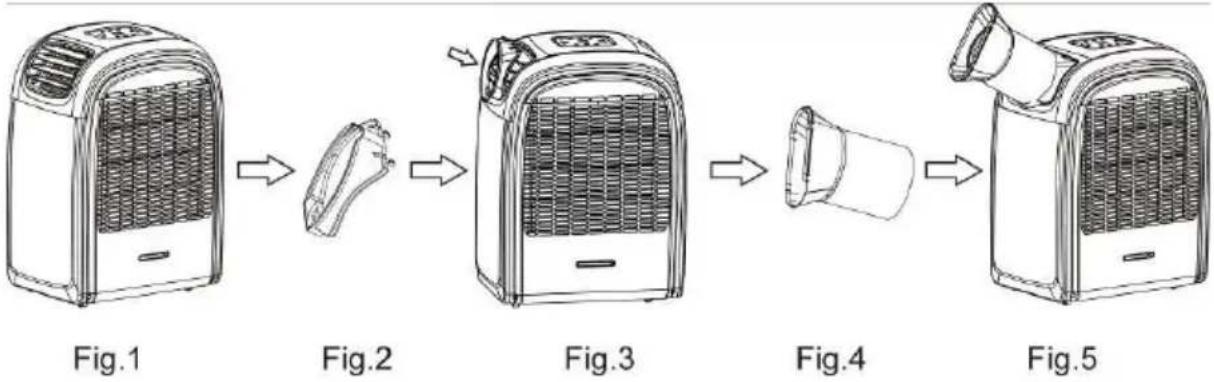
Line drawing of an air conditioner unit with a coiled tube, placed near a window and a potted plant (no text or symbols)When using the heating function, remove the exhaust hose (Fig. 2) and replace the opening (Fig. 3) with the outlet grille as shown in Fig. 4.
natural_image
Line drawing of a portable air heater with a vent and handle, showing airflow direction (no text or symbols)Fig.1
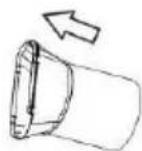
Fig.2
natural_image
Line drawing of a portable electric heater with ventilation grille and control panel (no text or symbols)Fig.3


natural_image
Line drawing of a portable electric heater with fan grille and ventilation unit (no text or symbols)Fig.4
Fig.5
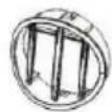
On the opposite end, install the exhaust hose attachment (Fig. 2) onto the unit's grille as shown in Fig.3. Attach the exhaust hose (Fig.4) onto the exhaust hose attachment (Fig. 2) by rotating it in a clockwise direction.
flowchart
graph LR
    A["Hot air heater"] --> B["Light bulb with lid"]
    B --> C["Light bulb inside fan"]
    C --> D["Light bulb inside fan with lid"]
    D --> E["Light bulb inside fan with lid"]
    E --> F["Light bulb inside fan with lid with lid"]
Once complete, ensure the outlet exhaust is attached to the window when using the heating function. Reverse the process for cooling or dehumidification.
HUMIDIFYING
When using the humidifying function, remove the exhaust hose and fix the outlet grille on the unit.
- Fill the water filler and select humidifier function.
- The unit will stop automatically after four hours of operation. Put water into the water filler to restart operation.
- The unit will stop humidifying if the ambient humidity is equal to the pre-set humidity.
WATER DRAIN (Error code E4)
When the air conditioner is used, excess water condensation may be produced that will fill the water tank. When the water tank is full, the unit will stop working and display an E4 error code.
This means the unit will need to be drained as follows:
- Switch off and unplug the unit.
- Remove the water tank and pour out the water.
- Put the water tank back to original position.
- Restart the unit.
CONTINUOUS DRAINAGE
To continually drain the unit in dehumidifying mode, follow below steps:
- Switch off and unplug the unit.
- Remove the water tank and pour out the water.
- Remove drain plug (Fig.1)
- Plug draining tube to draining hole (Fig.2)
-
Put the water tank back to original position.
-
Draining tube should be placed lower than the draining hole to allow the water to flow out effectively.

natural_image
Technical diagram of a mechanical device with labeled component (no text or symbols present)
natural_image
Technical line drawing of a refrigerator interior with visible wiring and components (no text or symbols)MAINTENANCE
WARNING: ALWAYS UNPLUG THE UNIT BEFORE MOVING OR CLEANING.
CLEANING
Air filters
The air filters are located on the left and right side of the unit. To remove the air filters, please follows the arrow directions below by pulling out the filters in an upward direction. Clean only with warm soapy water.

natural_image
Technical line drawing of a car air vent system with airflow indicators and internal components (no text or symbols)Cabinet
As with filters, clean only with warm soapy water.
CARE OF THE UNIT
- Only plug the unit into a suitable 220-240V\~50Hz AC 10 AMP power supply.
- Hold the plug when unplugging the unit, never pull on the cord.
- Do not place the unit in direct sunlight. This can fade the plastic case.
- Do not operate the unit in a confined space.
- Do not place objects on top of the unit. This blocks the air outlet.
- Do not place the unit where the air inlets or outlets may be blocked by curtains or furniture.
- Keep the filters clean.
OVERHEAT PROTECTION
This unit is fitted with an overheat prevention device. If the unit overheats it will automatically turn off. The unit can be restarted after 30 minutes.
ERROR CODES
Error codes are shown on the display should a fault occur.
E1: Indicates open circuit or short circuit in the room temperature sensor.
E2: Indicates open circuit or short circuit in the pipe temperature sensor.
E3: Indicates a refrigerant leak.
Please contact an authorized service centre if any of the above error messages are shown.
E4: Indicates the water tank is full. Refer to WATER DRAIN.
If error code E4 persists, please contact an authorized service centre.
TROUBLE SHOOTING
| Never try to repair or dismantle the air conditioner yourself. Unauthorized repairs may result in the loss of warranty and can endanger the user and their property. | ||
| Problem | Cause | Solution |
| The air conditioner does not operate. | No power supply. | Connect to a functioning power supply socket and switch on. |
| Error code E4 is shown, indicating the internal water container is full. | Empty the internal water container. (Refer to WATER DRAIN) | |
| The start timer function is active. | Press the POWER button to deactivate the TIMER function. | |
| The air conditioner does not seem to operate efficiently. | The air conditioner is in direct sunlight. | Close the curtains. |
| Windows or doors are open. | Close windows and doors. | |
| The filters are dirty. | Clean the filters. | |
| The air inlets or outlets are blocked. | Remove the blockage. | |
| The room temperature is below the set temperature. | Lower set temperature. | |
| The air conditioner is noisy. | The air conditioner is not level. | Place the air conditioner on an even, solid surface. |
| The compressor does not work. | The overheat protection is activated. | Wait 30 minutes until the temperature has decreased, then restart the air conditioner. Note: Compressor operation begins 3 minutes after the unit is switched on. |
| The remote control does not function. | The distance between the remote control and the air conditioner is too far. | Move closer to the air conditioner. Aim the remote control directly at the control panel. |
| The batteries are flat. | Replace the batteries. | |
If you have any issues with your unit, please contact Glen Dimplex on 1300 556 816 for your nearest service agent. Proof of purchase is required at the time of service.
WARRANTY
The warranty period is 24 months from the date of purchase.
Glen Dimplex Australia Pty Ltd.
Unit 1, 21 Lionel Road.
Mount Waverley VIC 3149.
Australia
Ph: 1300 556 816
Fax: 1800 058 900
Web: www.dimplex.com.au
Glen Dimplex New Zealand Ltd.
38 Harris Road, East Tamaki,
Manukau, Auckland 2013
New Zealand
Ph: (09) 274 8265
Fax: (09) 274 8472
Web: www.dimplex.co.nz
DISPOSAL
natural_image
Simple line drawing of a trash bin with no text or symbols- Do not dispose of electrical appliances as unsorted municipal waste. Use separate collection facilities.
- Contact your local government for information regarding the collection systems available.
- If electrical appliances are disposed of in landfills or dumps, hazardous substances can leak into the ground water, polluting the food chain and damaging health and well-being.
SPECIFICATION
| Model No. | DC10RCDH | DC12RCDH |
| Power Source | 220-240V~50Hz | 220-240V~50Hz |
| Power Consumption (EN14511) | 1153W/967W | 1346W/1129W |
| Rated Power (EN60335) | 1280W/1100W | 1480W/1300W |
| Cooling/Heating Capacity | 3000W/3000W | 3500W/3500W |
| Humidifying Capacity | 0.2L/H | 0.2L/H |
| Air Flow | 360M3/H | 450M3/H |
| Moisture Removed | 50 L/day | 60 L/day |
| Water Tank Capacity | 2.4L | 2.4L |
| Refrigerant | R410A | R410A |
| Min. room size | 10m3 | 10m3 |
| Max. room size | 22m3 | 25m3 |
| Dimensions (mm) | 330Wx477Dx630H | 330Wx477Dx630H |
| Net Weight | 28KG | 29.5KG |