DCS-5230 - Pregnant DAP-Audio - Free user manual and instructions
Find the device manual for free DCS-5230 DAP-Audio in PDF.


User questions about DCS-5230 DAP-Audio
0 question about this device. Answer the ones you know or ask your own.
Ask a new question about this device
Download the instructions for your Pregnant in PDF format for free! Find your manual DCS-5230 - DAP-Audio and take your electronic device back in hand. On this page are published all the documents necessary for the use of your device. DCS-5230 by DAP-Audio.
USER MANUAL DCS-5230 DAP-Audio
text_image
DAP AUDIOENGLISH
DCS-5230
V1
Ordercode: D6579
Table of contents
Warning 2
Safety Instructions....2
Operating Determinations....3
Return Procedure 4
Claims....4
Installation....5
Troubleshooting 5
Product Specification 6
Dimensions....6
Warning

For your own safety, please read this user manual carefully before your initial start-up!

Unpacking Instructions
Immediately upon receiving this product, carefully unpack the carton and check the contents to ensure that all parts are present, and have been received in good condition. Notify the dealer immediately and retain packing material for inspection if any parts appear damaged from shipping or the carton itself shows signs of mishandling. Save the carton and all packing materials. In the event that a fixture must be returned to the factory, it is important that the fixture be returned in the original factory box and packing.
Your shipment includes:
• DAP Audio DCS-5230 5" 2-way design ceiling speaker
- User manual

CAUTION!
Keep this device away from rain and moisture! Unplug mains lead before opening the housing!

Safety Instructions
Every person involved with the installation, operation and maintenance of this system has to:
- be qualified
• follow the instructions of this manual

CAUTION! Be careful with your operations. With a dangerous voltage you can suffer a dangerous electric shock when touching the wires!

Before you initial start-up, please make sure that there is no damage caused by transportation. Should there be any, consult your dealer and do not use the system.
To maintain perfect condition and to ensure a safe operation, it is absolutely necessary for the user to follow the safety instructions and warning notes written in this manual.
Please consider that damages caused by manual modifications to the system are not subject to warranty.
This system contains no user-serviceable parts. Refer servicing to qualified technicians only.
IMPORTANT:
The manufacturer will not accept liability for any resulting damages caused by the non-observance of this manual or any unauthorized modification to the system.
• Never remove warning or informative labels from the unit.
• Never leave any cables lying around.
- Do not open the device and do not modify the device.
• Do not set the input signal level higher than required to drive the equipment to full output.
• Only use system indoors, avoid contact with water or other liquids.
- Avoid flames and do not put close to flammable liquids or gases.
• Make sure you do not use the wrong kind of cables or defective cables.
- Extreme frequency boosts in connection with a high input signal level may lead to overdriving your equipment. Should this occur, it is necessary to reduce the input signal level.
- If system is dropped or struck, disconnect the power supply immediately. Have a qualified engineer inspect for safety before operating.
- If the system has been exposed to drastic temperature fluctuation (e.g. after transportation), do not switch it on immediately. The arising condensation water might damage your system. Leave the system switched off until it has reached room temperature.
- If your Dap Audio device fails to work properly, discontinue use immediately. Pack the unit securely (preferably in the original packing material), and return it to your Dap Audio dealer for service.
• Repairs, servicing and electric connection must be carried out by a qualified technician.
- Keep this manual for future reference.
- Clean only with dry cloth.
- When making the hole in your ceiling to mount the DCS-5230, make sure there is sufficient clearance behind the ceiling (no obstructions like A/C channels, power lines etc).
- Take care of your speaker wires, they should be free of damage. Damaged speaker wires might result in poor sound quality and can damage amplifiers.
• Make sure the ceiling can support the speaker's weight.
• No main power shall be connected to the loudspeakers; doing so will damage the speaker.
• This device should only be serviced by qualified personnel. If not warranty might be void.
• Use cable of the right gauge, certainly for long runs.
• Use cables with clear color indication and maintain polarity throughout the whole system.
- Avoid loud feedback from microphones, this can damage your speaker.
- Please check the units condition after unpacking. If the outside of the carton box has been damaged, inform your shipper immediately.
Operating Determinations
If this system is operated in any other way, than the one described in this manual, the product may suffer damages and the warranty becomes void.
Any other operation may lead to dangers like short-circuit, burns, electric shock, etc.
You endanger your own safety and the safety of others!
Improper installation can cause serious injuries and damage of property !

Return Procedure

Returned merchandise must be sent prepaid and in the original packing, call tags will not be issued.
Package must be clearly labeled with a Return Authorization Number (RMA number). Products returned without an RMA number will be refused. Highlite will not accept the returned goods or any responsibility. Call Highlite 0031-455667723 or mail aftersales@highlite.nl and request an RMA prior to shipping the fixture. Be prepared to provide the model number, serial number and a brief description of the cause for the return. Be sure to properly pack fixture, any shipping damage resulting from inadequate packaging is the customer's responsibility. Highlite reserves the right to use its own discretion to repair or replace product(s). As a suggestion, proper UPS packing or double-boxing is always a safe method to use.
Note: If you are given an RMA number, please include the following information on a piece of paper inside the box:
01) Your name
02) Your address
03) Your phone number
04) A brief description of the symptoms
Claims
The client has the obligation to check the delivered goods immediately upon delivery for any shortcomings and/or visible defects, or perform this check after our announcement that the goods are at their disposal. Damage incurred in shipping is the responsibility of the shipper; therefore the damage must be reported to the carrier upon receipt of merchandise.
It is the customer's responsibility to notify and submit claims with the shipper in the event that a fixture is damaged due to shipping. Transportation damage has to be reported to us within one day after receipt of the delivery.
Any return shipment has to be made post-paid at all times. Return shipments must be accompanied with a letter defining the reason for return shipment. Non-prepaid return shipments will be refused, unless otherwise agreed in writing.
Complaints against us must be made known in writing or by fax within 10 working days after receipt of the invoice. After this period complaints will not be handled anymore.
Complaints will only then be considered if the client has so far complied with all parts of the agreement, regardless of the agreement of which the obligation is resulting.
Installation
01) Drill a hole in the ceiling, big enough to fit the speaker (∅ 180 mm).
02) Connect the blue cable to the common cable.
03) Connect one of the colored cables to the main feed cable: red cable = 20W, yellow cable = 10W, green cable = 5W.
04) Insert the speaker into the hole on the ceiling.
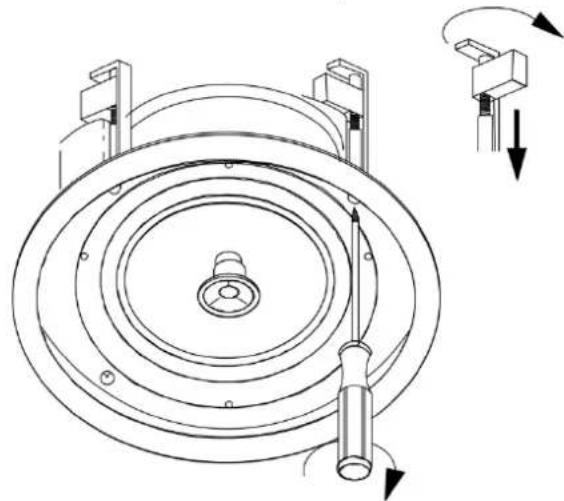
05) Using a screwdriver, turn the screws to lock the clamps and secure the speaker in position.
natural_image
Technical line drawing of a mechanical component with concentric rings and directional arrows indicating motion (no text or symbols)Fig. 01
Troubleshooting
No Sound
Always check if all the cables and cords are connected. Always turn off power to the area before checking the wires, to prevent electric shock.
If everything works properly and there is still no sound, revisit the manufacturer's instructions to make sure they were followed during installation. If everything was installed correctly and there is still no sound, you may want to consider bringing in a professional to take a look at your speakers.
Low and Poor Sound
If your ceiling speakers are working but the sound volume coming from them is low, check the speakers to see if they are well insulated. If the speakers were installed and there was no insulation around or behind them, you are going to want to add some. Adding insulation will help to buffer the sound and stop it from going up into your attic. It will also make sure that the speakers are secure in the holes, and won't vibrate.
Uneven Sound
If you put the insulation in unevenly, then this could result in uneven sound. Make sure to put in the same amount of insulation around each speaker. If some speakers are packed tightly, while others just have the insulation loosely around them, then you will end up with different levels of sound absorption.
Sound Warping
If the sound coming out of your ceiling speakers is loud enough, but seems to be warped or distorted, your treble or bass levels may need to be adjusted.
If there are not many pieces of furniture in the room and the floor has no carpet or rug, then you will most likely have to set your treble to minus. With very little in the room to absorb the sound, too much treble can make the sound bounce off of fixtures in the room, making it tinny sounding.
With the bass, if the speakers are too close to a wall and are not aimed properly, then you will need to set the bass to minus, to stop the low tones from bouncing off of the walls or large pieces of furniture.
Product Specification
| Power taps: | 5/10/20W |
| Line voltage: | 100V |
| Impedance: | 8 Ω |
| Speaker size LF: | 5 inch |
| Speaker size HF: | 12 inch |
| Frequency response: | 100-20 kHz |
| Sensitivity: | 88 dB +/- 3 dB |
| Material: | ABS |
| Color: | White |
| IP rating: | IP40 |
| Mounting hole: | ∅ 180 mm |
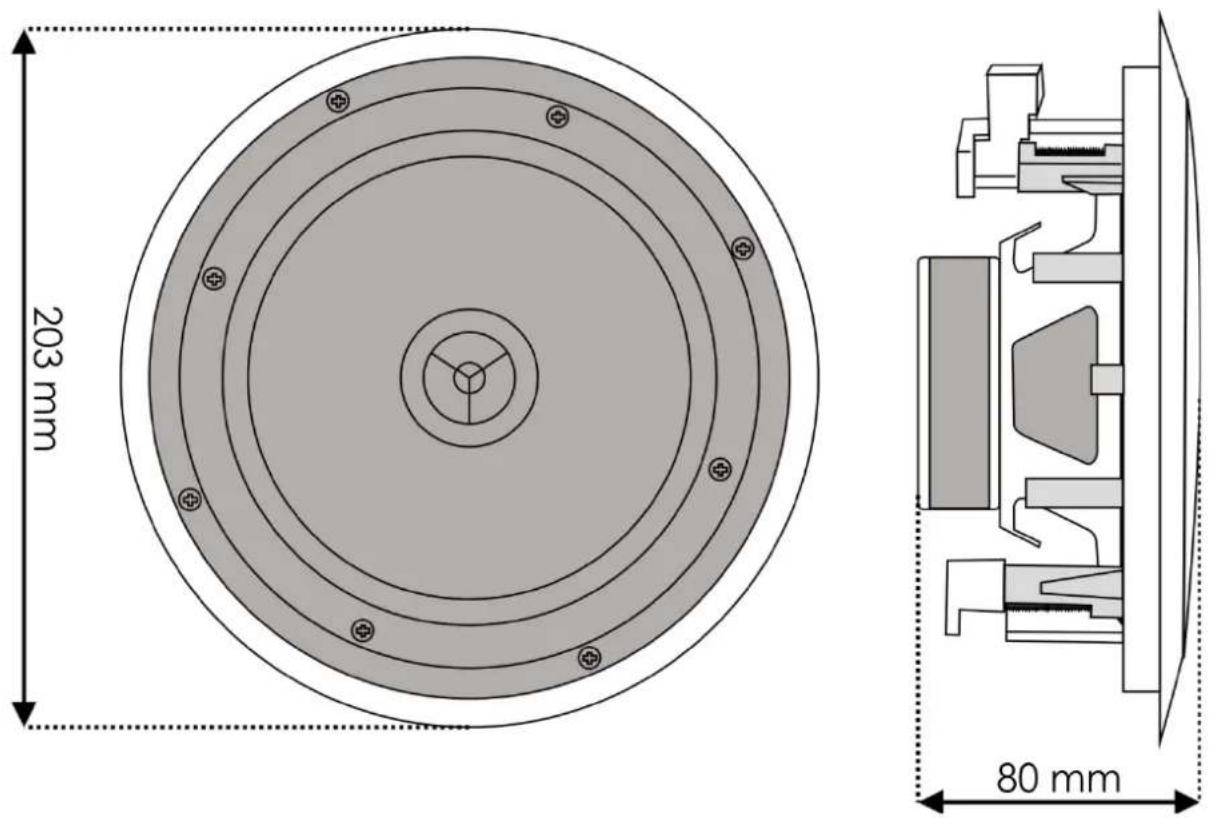
| Dimensions: | 203 x 203 x 80 mm (LxWxH) |
| Weight: | 1,3 kg |
Dimensions
text_image
203 mm 80 mmDesign and product specifications are subject to change without prior notice.
CE
Website: www.Dap-audio.info
Email: service@highlite.nl