SBAR - Capteurs de stationnement VOXX - Free user manual and instructions
Find the device manual for free SBAR VOXX in PDF.


User questions about SBAR VOXX
0 question about this device. Answer the ones you know or ask your own.
Ask a new question about this device
Download the instructions for your Capteurs de stationnement in PDF format for free! Find your manual SBAR - VOXX and take your electronic device back in hand. On this page are published all the documents necessary for the use of your device. SBAR by VOXX.
USER MANUAL SBAR VOXX
natural_image
Abstract blue and white geometric logo design (no text or symbols)AUDIOVOX®
ELECTRONICS CORP.
Vehicle Parking Sensor System
Model: SBAR
Installation/User Manual

natural_image
Metal mechanical component with two circular ports and a central hub (no visible text or symbols)Features:
• 3 Ultra Sonic Rear Obstacle Sensors
- Mounts on Any Vehicle
• Automatically Turns on when Vehicle is in Reverse
- Mounts on the vehicles license plate or directly to the bumper.
• Heavy Duty Chrome plating for long life.
• Waterproof and dust proof
TABLE OF CONTENTS
Warnings 2
Product Description - 3
Packing List 4
Installation Instructions 5
Operating the System 8
Testing the System 8
Specifications 9
Maintenance 9
Troubleshooting 10
Warnings
This product is intended to assist in safe driving and to alert the driver to obstructions while the vehicle is in reverse. You, as the driver, are solely responsible for the safe operation of your vehicle and the safety of your passengers according to your local traffic regulations. Do not use any features of this system to the extent it distracts you from safe driving. Your first priority while driving should always be the safe operation of your vehicle. Audiovox Electronics Corporation cannot accept any responsibility whatsoever for accidents resulting from failure to observe these precautions or safety instructions. This system can be affected by weather, dirt, or other on interference. Always use your mirrors and back up safely.
- This product utilizes high voltage. Any unauthorized modifications or damage to the product may result in electrical shock. Handle all components with care. Inspect regularly for damage to components and cabling.
- You are responsible for ensuring that the installation of this product does not void or affect the vehicle manufacturer's warranty. Audiovox Electronics Corporation or its subsidiaries are not liable in full or in part for improper installation resulting in loss or damage to your property, or for voiding all or part of the vehicle manufacturer's warranty.
- Do not apply excessive force to any of the components contained within this kit. Excessive force used before, during or after installation that results in a damaged or non-functional part will void all warranties.
- Please follow the procedures in this installation manual. Improper installation or modification of this product will void all warranties.
Many jurisdictions have laws and regulations relating to the use of backup sensors and / or cameras and some do not allow for the obstruction of information contained on a license plate. Before using this product, it is the buyer's responsibility to be aware of and comply with any applicable laws and regulations that apply.
Product Description
The SBAR Vehicle Parking Sensor System is designed to assist the driver by providing a warning tone when there are obstructions in the area behind the vehicle whenever the vehicle is shifted into reverse. Never rely solely on this product to ensure the area is clear of children and/or obstructions. Use your mirrors and look both ways. This product is not intended to replace existing safety procedures, but rather to add an additional safety tool to your vehicle.
CAUTION: Do not back up your vehicle while watching the monitor screen. Always look in the direction the vehicle is traveling. Use the monitor and sensors as an aid to ensure there are no children or obstructions. The image on the monitor is not designed to show distance and may be misleading. The actual distance is less than appears in the monitor. The range of the image is limited. The warning tone is not designed to indicate a set distance and may be misleading. The actual distance may be less than the last time it was used due to weather conditions or obstruction by dirt. The range of the sensor is limited. Be aware of blind spots since all models of vehicles are shaped differently.
Packing List
The model SBAR monitor package consists of the following items:
- Chrome Sensor Bar - 1 qty Part # 31062380
- Buzzer - 1 qty Part # 31062150
- 2.5m Power Supply Cable - 1 qty Part # 31062160
- Hardware Bag Contains: Part # 31062010
a) Straight Bumper Brackets - 2 pieces
b) L Shaped Bumper Brackets - 2 pieces
c) 4mm x 16mn bolts - 2 qty
d) 6mm x 30mm bolts - 2 qty
e) 6mm Nuts - 2 qty
f) 4mm Nuts - 2 qty
g) 6mm Flat Washers - 2 qty
h) 4mm Lock Washers - 4 qty
i) Tap Connectors - 2 qty
j) Double Sided Mounting Tape - 1qty
- Installation/Users Manual - 1 qty Part # 31062020
Installation Instructions
READ THIS MANUAL COMPLETELY BEFORE INSTALLATION
We have included all of the items needed for most standard installations. However, since all vehicles are different, we recommend that you review your vehicle completely before starting.
SBAR Installation

natural_image
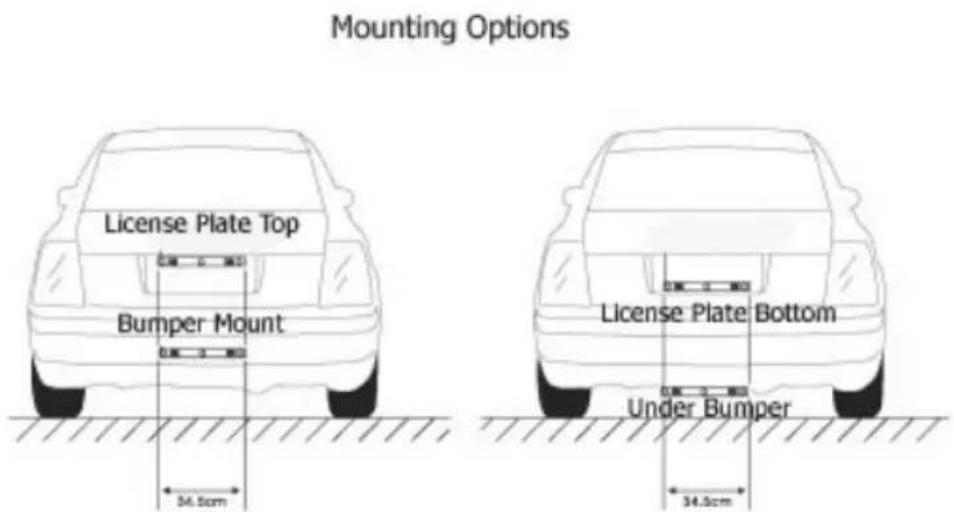
Metal mechanical component with three circular holes (no visible text or symbols)Determine the best location on your vehicle. The SBAR may be mounted below the bumper for better coverage if your vehicle does not have a clear path from the license plate or is obstructed by a rear spare tire. The SBAR must be placed where the sensors can clearly detect objects behind the vehicle. The best height is between 18 Inches and 30 Inches above the ground. If mounted to high off the ground you may not receive a warning and if too low you may experience false alarms from the sensors picking up the ground. Each vehicle is different you may want to try several locations to find the best for you and your vehicle. If mounting below the bumper, use the supplied brackets.
text_image
Mounting Options License Plate Top Bumper Mount 34.5cm License Plate Bottom Under Bumper 34.5cmInstalling the SBAR on the License Plate
-
Remove the rear license plate to determine the best way to run the power wires to the reverse lights. It is important to use the Reverse lights and not the license plate illumination lamp or other lamps. The system is designed to come on when the vehicle is in reverse gear only. Improper installation can cause the system to operate incorrectly or to run at undesired times. NOTE: All vehicles are designed differently. We offer some general installation advice here, but check and re-check your installation before you begin. Some vehicles may have the license plate on the tailgate and the Reverse lights may be located on the vehicle pillar. In this case, you will need to study your vehicle closely to determine the best route for the power wire. In some vehicles it may be necessary to extend the power wire to reach the reverse lamps. Power wire can be purchased at an auto parts store or hardware store, if needed. Most installations can be completed by running the power cable behind the trunk or tailgate rubber gasket, tucking it under the interior trim panel, and then either connecting it at the back of the reverse lamp in the trunk or removing the reverse lamp assembly (the same procedure required to replace the light bulb).
-
The signal / power cable can be routed as recommended, above or through an existing wire grommet, to reach the interior of the vehicle. If an existing grommet is not available for use, you can drill a hole behind the license plate to access the vehicle. If drilling a hole, purchase and install a rubber grommet (from an auto parts store) to protect the wire from the sharp hole edges. The rubber grommet must be a minimum of 13/32" to allow the wire and fuse holder to pass through. Be sure to check behind the intended drilling location before drilling to ensure no wires or mechanisms interfere or could be damaged during drilling. Check for interference with license plate lights and the hatch release switch or mechanism. If not using an existing factory grommet, drill a hole to match the rubber grommet size that you intend to use (13/32" minimum) at the selected location near the vehicle's rear license plate. Route the camera cable connector through the grommet and insert the grommet into the hole to prevent water from entering into the vehicle. Be sure to leave enough wire to route behind the license plate.
-
Place the SBAR over the license plate and line up the holes. Fasten the SBAR to the license plate using the provided bolts from behind the plate and then fasten the license plate to the vehicle. Use either the lower or upper mounting holes on the license plate, making sure to not block any information on your plate that is required by your state laws to be visible.
a. Continue to run the power harness for the SBAR to the vehicle's reverse lamp. Locate the reverse lamp in the tail light assembly. Generally, the Positive wire on the reverse lamp will be a colored wire and the Negative wire will be black.
Wiring the Power to the Vehicle's Reverse Lamp
- Locate the reverse lamp in the tail light assembly. You may be able to access the wires for the lamp from within the trunk, behind a panel, or depending on your vehicle you may have to remove the tail lamp. Follow the procedure that is recommended by your vehicle manufacturer for replacement of a light bulb. To verify the wiring:
b. Engage the emergency brake on the vehicle.
c. Turn the ignition switch but do not start the car.
d. Have another person engage the brake pedal and shift into reverse (please make sure the emergency brake is engaged to ensure your safety).
e. Check the wires with a 12 volt test lamp. (not included)
f. Once you have confirmed the positive and negative connection point, place the vehicle in park, turn off the ignition and proceed.
- Using the tap connector supplied, perform the following steps:
a) Place the un-stripped positive lead from the tail lamp in the run channel, which runs completely through the connector.
b) Insert the un-stripped red power wire from the power completely into the other channel in the connector.
c) Make the connection between the wires by crimping down the metal connector with a pair of pliers, making sure the metal is flush with the plastic insulator.
d) Close the top plastic hinged cover until latched.
- Repeat the above steps for the black wire or attach the black wire to the ground (negative).

natural_image
Pure mechanical component diagram without any text, numbers, or symbols
natural_image
Line drawing of a mechanical device with a paper sheet, no text or symbols present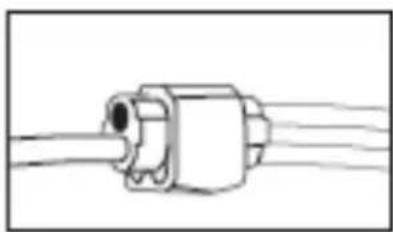
natural_image
Pure electrical connector diagram without any text, numbers, or symbolsInstalling the Buzzer Module
- The buzzer can be located anywhere in the vehicle. Find a suitable location, generally at the rear of the inside passenger compartment. Using the supplied double sided tape, apply the tape to the module and then place on a clean, flat surface.
- Route the wire from the buzzer to the SBAR power lead and plug into the receptacle at the power lead.
The installation is now complete.
Operating the System
The SBAR operates when the vehicle is shifted into reverse. The back up sensor system is designed to send out an ultra sonic signal that detects obstructions behind your vehicle for an average of 6 feet. If an object is located, the system will sound the buzzer. The buzzer will beep slowly, denoting that the object is far away. As your vehicle approaches the object it will beep faster. Once you are very close to the object, the buzzer will sound continuously, warning you to stop.
NOTE: If you receive a warning realize that an item that is low to the ground may not be seen by the sensors when it gets very close to the vehicle due to the mounting location of the bar or the shape of the vehicle. Take all warnings seriously! Remember this is a driver assistance device, continue to use all common safety practices while driving, backing, and parking.
Testing the System
Because all objects are shaped differently, the warning system may not give the same warning distance for all objects. As you learn how your system operates, you will become more comfortable with the warning buzzer. When you think you are close to the object, STOP! Do not rely on this system as a complete safety system. Always use your mirrors and look around.
To test the system:
- Place an object behind the vehicle, such as a trash can or cardboard box.
- Place the vehicle into reverse and slowly backup towards the object.
- As you get close to the object, the buzzer will sound, beeping more rapidly as you get closer to the obstacle.
If the system does not alert you or does not see the item at 1 foot behind the vehicle, you may need to mount the sensor bar lower. If mounted on the license plate, use the included brackets and mount it to the bumper or below the bumper. Re-test the system after it is re-mounted.
Specifications
Power Supply DC12V
Power Consumption <6W
Current Draw <400 mA
Operating Temperature Range 0 to 50
Fuse
2
Maintenance
Though your system requires little care, you will still need to maintain its condition and performance by following the guidelines below.
- Keep your system away from excessive moisture, extreme heat or cold.
- Occasionally clean the surface of the SBAR with a soft cloth moistened with water or glass cleaner.
- Remove snow or ice build up as this may cause the system to issue a false alarm.
- DO NOT Paint the SBAR. Painting will interfere with the operation of the sensors.
Troubleshooting
| Symptoms | Solutions |
| The SBAR does not come on after the vehicle is started and the vehicle is in reverse | 1. Check the wiring and connections2. Check the fuse in the power harness3. Check the power connection on the at the reverse lamp |
| Backup sensors keep sounding | Clean the bar lens with a soft cloth. |
| The system stays on all the time or runs when the vehicle is not in reverse. | The power is not wired correctly. If the system continues to operate while not in reverse gear, re-check your wiring at the reverse lamp. |
text_image
Handwritten signature or scribble on a white background with faint text and symbols12 MONTH LIMITED WARRANTY
Applies to Audiovox Mobile Video Products
AUDIOVOX ELECTRONICS CORP. (the Company) warrants to the original retail purchaser of this product that should this product or any part thereof, under normal use and conditions, be proven defective in material or workmanship within 12 months from the date of original purchase, such defect(s) will be repaired or replaced with reconditioned product (at the Company's option) without charge for parts and repair labor. A game controller, if supplied, is similarly warranted for ninety (90) days. To obtain repair or replacement within the terms of this Warranty, the product is to be delivered with proof of warranty coverage (e.g. dated bill of sale), specification of defect(s), transportation prepaid, to the Company at the address shown below. This Warranty does not extend to the elimination of externally generated static or noise, to correction of antenna problems, to costs incurred for installation, removal or reinstallation of the product, or to damage to digital memory/media devices, gaming devices, discs, speakers, accessories, or vehicle electrical systems.
This Warranty does not apply to any product or part thereof which, in the opinion of the Company, has suffered or been damaged through alteration, Improper Installation, mishandling, misuse, neglect, accident, or by removal or defacement of the factory serial number/bar code label(s). THE EXTENT OF THE COMPANY'S LIABILITY UNDER THIS WARRANTY IS LIMITED TO THE REPAIR OR REPLACEMENT PROVIDED ABOVE AND, IN NO EVENT, SHALL THE COMPANY'S LIABILITY EXCEED THE PURCHASE PRICE PAID BY PURCHASER FOR THE PRODUCT.
This Warranty is in lieu of all other express warranties or liabilities. ANY IMPLIED WARRANTIES, INCLUDING ANY IMPLIED WARRANTY OF MERCHANTABILITY, SHALL BE LIMITED TO THE DURATION OF THIS WRITTEN WARRANTY. ANY ACTION FOR BREACH OF ANY WARRANTY HEREUNDER INCLUDING ANY IMPLIED WARRANTY OF MERCHANTABILITY MUST BE BROUGHT WITHIN A PERIOD OF 24 MONTHS FROM DATE OF ORIGINAL PURCHASE. IN NO CASE SHALL THE COMPANY BE LIABLE FOR ANY CONSEQUENTIAL OR INCIDENTAL DAMAGES FOR BREACH OF THIS OR ANY OTHER WARRANTY. No person or representative is authorized to assume for the Company any liability other than expressed herein in connection with the sale of this product.
Some states do not allow limitations on how long an implied warranty lasts or the exclusion or limitation of incidental or consequential damage so the above limitations or exclusions may not apply to you. This Warranty gives you specific legal rights and you may also have other rights which vary from state to state.
128-5495F
Audiovox Electronics Corporation, 150 Marcus Blvd., Hauppauge, New York 11788 • 1-800-645-4994

natural_image
Simple line drawing of a laptop with a triangular icon on the screen (no text or symbols)For Customer Service
Visit Our Website At
www.audiovox.com
Product Information, Photos,
FAQ's Owner's Manuals