CGN700-AL - Jokofu Husky - Free user manual and instructions
Find the device manual for free CGN700-AL Husky in PDF.


User questions about CGN700-AL Husky
0 question about this device. Answer the ones you know or ask your own.
Ask a new question about this device
Download the instructions for your Jokofu in PDF format for free! Find your manual CGN700-AL - Husky and take your electronic device back in hand. On this page are published all the documents necessary for the use of your device. CGN700-AL by Husky.
USER MANUAL CGN700-AL Husky
User manual: Stainless steel CGN range Storage Refrigerators and FGN Storage Freezers
natural_image
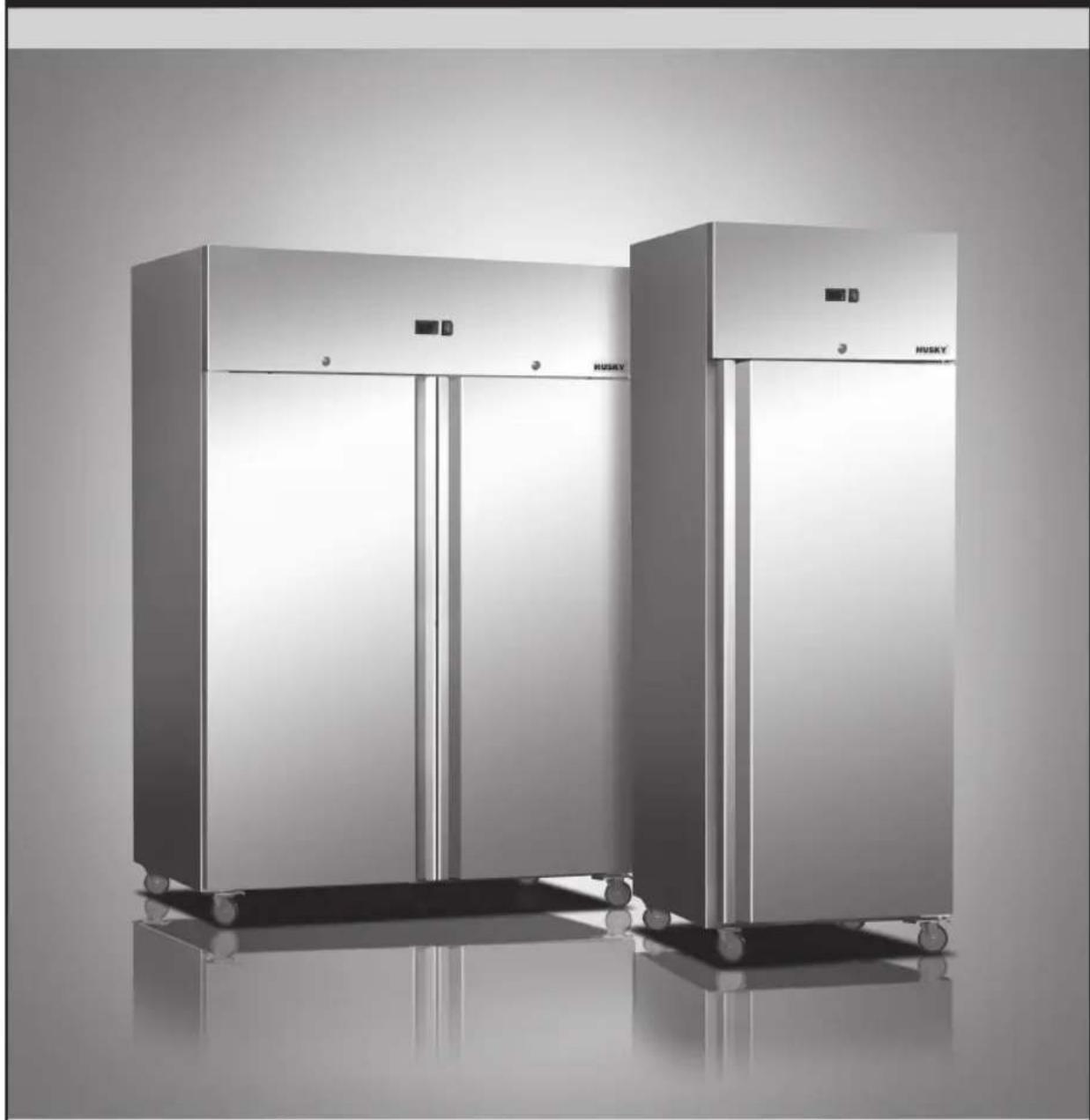
Exterior view of two stainless steel HUSKY refrigerators on wheels, no visible text or symbolsTo ensure safe operation, please read this user manual thoroughly before use.
© 2017 Husky. Husky reserve the right to change specifications at any time without notice.
Images used are for illustration only. Stock not included.
Welcome to your new Husky
Thank you for buying this Husky commercial storage refrigerator/freezer. It has been designed and manufactured for many years of trouble-free service.
Operation is very simple, but please take a few minutes to read this user manual. It contains important safety information, and tips to ensure you receive the best possible service from your Husky unit.
CONTENTS
Important Notes....3
Warning! Risk of electrical shock hazard....3
Disposal of old refrigerators....3
WEEE Compliance....3
Safety instructions and warnings....3
Before using for the first time....4
Troubleshooting....5
CGN700 & CGN1400 Storage Refrigerators, and FGN700 & FGN1400 Storage Freezers......6
Operating Instructions....6
Illustration / Cleaning....7
Circuit diagrams....9
All models
Important Notes
WARNING: RISK OF ELECTRICAL SHOCK HAZARD
USERS IN EUROPE: This refrigeration unit must be earthed.
If the power cable is damaged, it must be replaced by a qualified engineer to avoid shock hazard.
DO NOT ATTEMPT TO SERVICE THE ITEM YOURSELF. Ensure that the unit is properly earthed. Stop using the unit immediately if electric shock is felt when touching the cabinet.

DISPOSAL OF OLD REFRIGERATORS
BE SURE TO MAKE ANY LOCKS UNUSABLE. IF POSSIBLE, REMOVE THE DOOR(S) AND DISCARD SEPARATELY.
WARNING - CHEMICAL HAZARD: DO NOT ALLOW CHILDREN TO PLAY WITH OLD REFRIGERATORS. CONTACT YOUR LOCAL AUTHORITY FOR PROPER DISPOSAL PROCEDURES.
Before disposing of an old refrigerator, please make sure it is switched off and safe. Unplug the refrigerator and break any locks in order to avoid children becoming trapped.
Please note: the refrigeration system contains gases and refrigerants which require specialist waste disposal. The valuable materials contained in a refrigerator can be recycled.
Contact your local waste disposal depot for proper disposal of an old refrigerator and contact your local authority or dealer if you have any questions.
Ensure the pipework of your refrigerator is not damaged prior to disposal. You can contribute to the environmental awareness by insisting on an appropriate non-polluting method of disposal.
WEEE COMPLIANCE
Husky refrigerators/freezers are authorised to carry the CE (Conformité Européenne) and WEEE (Waste Electrical and Electronic Equipment Directive) symbols.
The WEEE symbol on this unit indicates that the product must not be disposed of with household waste. To help prevent

possible harm to health and the environment, the product must be disposed of by recycling methods authorised as environmentally safe. For more information on how to dispose of this product appropriately, contact your dealer or the recycling department at your local authority.
Husky refrigerators/freezers and their components undergo strict product testing by independent companies to comply or exceed all applicable local and international regulatory standards.
SAFETY INSTRUCTIONS & WARNINGS
Before switching on your Husky commercial storage refrigerator/freezer, read the information in this user manual carefully. The user manual contains important observations relating to the assembly, operation and maintenance of the unit.
Please keep this user manual in a safe place for future reference. If you ever sell this unit, hand this user manual to the new owner.
The manufacturer does not accept responsibility for any damages that may arise due to non-observation of these instructions.
- Do not use the unit if it is damaged. If you are in any doubt, consult an engineer.
- Connection and installation of your Husky unit are to be carried out in strict compliance with the relative instructions in this user manual.
• Make sure there is a suitable power outlet (230 volts, 13 amps outlet) with proper grounding to power the refrigerator/freezer.
- For safety, the unit must be properly earthed in accordance with specifications.
• Always remember to unplug the unit before cleaning. Never unplug this unit by pulling on the power cable. Always grip plug firmly and pull straight out from the socket.
- All electrical repairs must be carried out by a qualified engineer. Inadequate repairs may be dangerous.
- Do not damage any parts of the unit which carry refrigerant by piercing, perforating, crushing, twisting or scraping. If refrigerant comes into contact with the eyes it may cause serious eye injury.
- Do not obstruct or cover the ventilation grille.
- Do not allow children to play with the unit, or to sit on it or hang onto the door.
- This unit is not intended for use by persons (including children) with reduced physical, sensory or mental capabilities, or lack of experience and knowledge, unless they have been given supervision or instruction concerning use of the unit by a person responsible for their safety.
BEFORE USING FOR THE FIRST TIME
IMPORTANT: Before switching the unit on, we recommend you allow it to stand upright for 8 hours. Failure to do this may result in damage to the unit.

- Remove the wooden pallet and the packing.
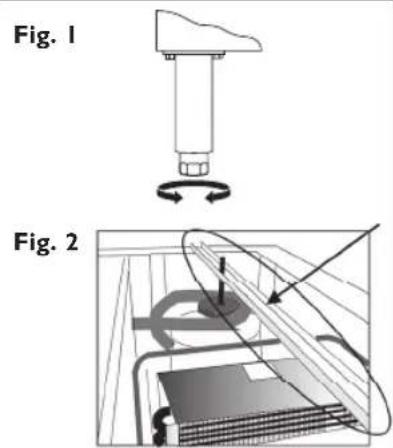
• To ensure correct operation, it is important that the unit is level. If the unit is fitted with legs, these may be adjusted by screwing the foot up or down (see Fig. 1). Use a spirit level to check.
- Before operation, the protective film must be removed. We recommend that the cabinet is cleaned for reasons of hygiene and to remove any residue left from manufacture.
• Before operation, you should also remove the transport safety bar on the compressor. Remove the whole bar as shown in Fig. 2.
- Ensure there is sufficient space at the sides of the unit to clean/replace the shelves, and to clean around the hinge.
- For good circulation, vents must not be blocked. Keep a minimum of 150mm of clear space around the refrigerator/freezer. Your Husky unit should be placed on flat and firm surface for quieter operation.
- Do not expose the unit to direct sunlight or a heat source such as ovens, radiators, heaters, etc.
- Do not under any circumstances place heated food or beverages in your Husky
text_image
Fig. 1 Fig. 2commercial refrigerator/freezer.
- Do not open the door more often than necessary to lessen the escape of cold air.
• For better air circulation, do not overfill the unit. - Adjust the thermostat according to the amount of product and the ambient temperature.
Troubleshooting
Before calling Technical Support, please check the following points; you may be able to solve any problem yourself.
| Problem | Solution |
| The sound of flowing liquid may be heard. | This is the refrigerant circulating and is part of normal operation. |
| There is frost on the unit. | A little frost develops if the ambient humidity is high.Wipe away with a soft cloth. |
| The compressor cannot be heard but the refrigerator/freezer's inner temperature reads normally. | This is part of normal operation. High levels of insulation means that the compressor may not need to operate for long periods. |
| Compressor does not work. | 1. Check the power cable is con nected and the socket is switched on.2. Check the fuse and replace with a fuse of a similar rating if necessary.3. Check the power switch is in the ON position and the thermostat is on the correct setting. |
| The unit is excessively noisy. | Check the floor is level and the unit is securely positioned. |
| The compressor may be heard working constantly. | If the temperature inside is too high, this constant running of the compressor may be explained by:1. Warm items being placed into the unit. Ensure warm items are never placed into the unit.2. The doors are not being closed properly. Always ensure the doors are closed securely.3. A build-up of ice on the evaporator. Defrost the refrigerator/freezer regularly. |
| If the temperature inside is correct, then this constant running may be due to:1. The ambient temperature is too high. If possible try to move the unit to a cooler location, or out of direct sunlight.2. The thermostat is set too low. Check and adjust as necessary.3. The thermostat is not working correctly. Refer to an engineer. |
CGN700 & CGN1400 Storage Refrigerators, and FGN700 & FGN1400 Storage Freezers
Operating Instructions
TO OPERATE THE ELECTRONIC THERMOSTAT
text_image
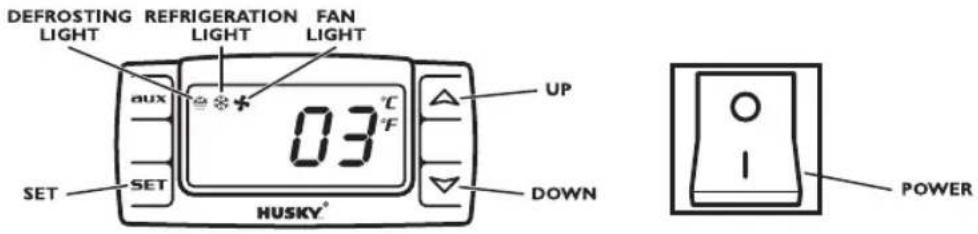
DEFROSTING REFRIGERATION FAN LIGHT LIGHT LIGHT LIGHT aux 03 °C UP SET SET DOWN HUSKY° POWERConnect the unit to a power outlet and press the Power switch.
The thermostat has been pre-set, and in most cases it is not necessary to adjust the settings. When the unit is operating normally, the display will show the current temperature.
To display the set temperature press the button. Press the button again to return to normal operation.
To set a new temperature, press SET the display will flash and the current set temperature will be displayed. Press the button to increase the set temperature, or press the button to decrease the set temperature. Press the button to save the new setting. The display will flash with the new value and then revert to display the cabinet temperature.
Please note:
-
When the chiller is connected to the mains for the first time there will be a short delay before cooling starts. During this time the Refrigeration Light will flash. After the short delay, cooling will begin and the Refrigeration Light will be illuminated. When the chiller reaches the set temperature, the Refrigeration Light will be off.
-
If you do not press any button, after six seconds the controller will return to its normal display.
ALARM CODES
PFI flashing in the display indicates that the cabinet sensor is defective. The unit will attempt to maintain the set temperature until the fault is repaired.
PF2 flashing in the display indicates that the evaporator sensor is defective. This does not compromise the operation of the unit, but the fault should be repaired as soon as possible.
DEFROSTING
The unit defrosts automatically at preset intervals. If however the doors are opened too often, or if the unit if in a location with high humidity, or if the contents are changed more frequently, it may be necessary to defrost the unit manually. To start or stop manual defrosting, press the button for six seconds. The Defrosting Light will be illuminated. Melt water runs to a container placed in the compressor compartment and evaporates. After defrosting is complete, the unit will return to normal operation.
(Model CGNI400 pictured)
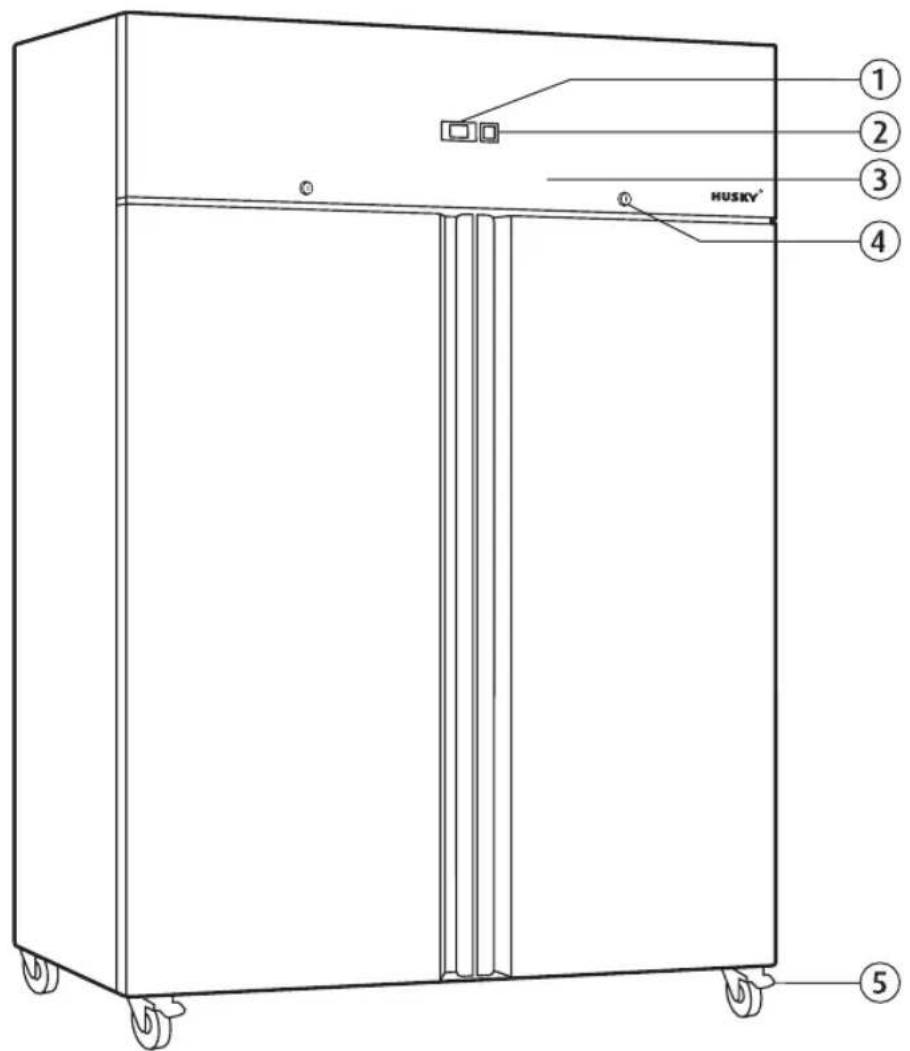
text_image
① ② ③ ④ HUSKY* ⑤I.Electronicthermostat
2.Powerswitch
3. Condenser/compressor compartment
4.Lock
5. Lockable front castors
CGN700 & CGN1400 Storage Refrigerators, and FGN700 & FGN1400 Storage Freezers
CLEANING
The condenser and the compressor compartment MUST be cleaned quarterly. Switch the unit off and disconnect from the mains supply. Use a vacuum cleaner fitted with a soft brush attachment to remove dust carefully from the condenser, the components and grilles.
The external and internal surfaces of the unit should be cleaned regularly. Switch the unit off and disconnect from the mains supply. Clean the external and internal surfaces of the unit with a mild soap solution, then wipe dry. Do NOT use cleansers containing chlorine or other harsh cleansing agents, as these can damage the stainless steel surfaces and components. Use mild soapy water to clean the gasket and seals.
GETTING SERVICE ASSISTANCE
The cooling system is a hermetically sealed circuit and does not require any maintenance other than regular cleaning (see 'Cleaning').
If the unit fails to work, first check the power supply. If you cannot locate the reason for the failure, please contact your supplier, stating the model and serial number of the cabinet. You may find this information on the rating plate, which is affixed on the back wall.
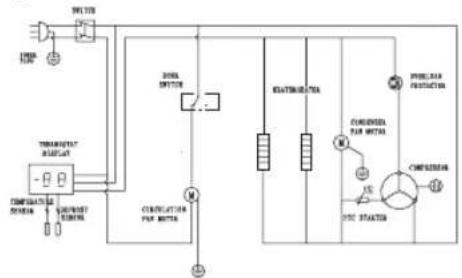
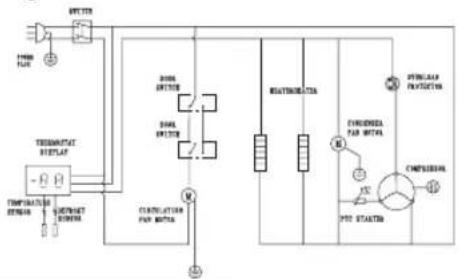
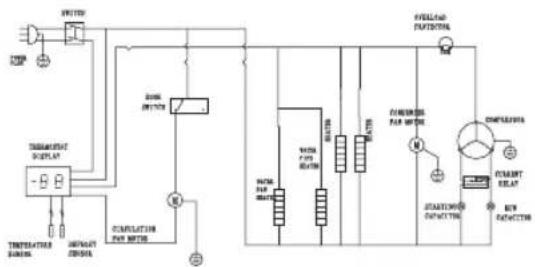
Circuit Diagrams
CGN700 Storage Refrigerator
flowchart
graph TD
    A["Power Source"] --> B["THEMETER SWITCH"]
    B --> C["Motor"]
    C --> D["Pressure Protection"]
    D --> E["POWER"]
    F["AC Source"] --> G["CONCULATOR PAR MOTOR"]
    G --> H["M"]
    H --> I["RELATION METER"]
    I --> J["CONCULATOR PAR METER"]
    J --> K["M"]
    K --> L["POWER"]
    M["AC Source"] --> N["CONCULATOR PAR METER"]
    N --> O["M"]
    O --> P["RELATION METER"]
    P --> Q["M"]
    Q --> R["CONCULATOR PAR METER"]
    R --> S["M"]
    S --> T["POWER"]
CGNI400 Storage Refrigerator
flowchart
graph TD
    A["Power Source"] --> B["Transformer"]
    B --> C["Control Panel"]
    C --> D["CONTROL Panel"]
    D --> E["INTUATE"]
    E --> F["CONTROL Panel"]
    F --> G["CONTROL Panel"]
    G --> H["INTUATE"]
    H --> I["CONTROL Panel"]
    I --> J["CONTROL Panel"]
    J --> K["INTUATE"]
    K --> L["CONTROL Panel"]
    L --> M["CONTROL Panel"]
    M --> N["INTUATE"]
    N --> O["CONTROL Panel"]
    O --> P["CONTROL Panel"]
    P --> Q["INTUATE"]
    Q --> R["CONTROL Panel"]
    R --> S["CONTROL Panel"]
    S --> T["INTUATE"]
    T --> U["CONTROL Panel"]
    U --> V["CONTROL Panel"]
    V --> W["INTUATE"]
    W --> X["CONTROL Panel"]
    X --> Y["CONTROL Panel"]
    Y --> Z["INTUATE"]
    Z --> AA["CONTROL Panel"]
FGN700 Storage Freezer
flowchart
graph TD
    A["TEMP"] --> B["UNITED"]
    B --> C["THEMICAL SWITCH"]
    C --> D["INTIGAL SWITCH"]
    D --> E["COMPLICATION FOR METER"]
    E --> F["POWER PWR SWITCH"]
    F --> G["POWER PWR SWITCH"]
    G --> H["POWER PWR SWITCH"]
    H --> I["POWER PWR SWITCH"]
    I --> J["POWER PWR SWITCH"]
    J --> K["POWER PWR SWITCH"]
    K --> L["POWER PWR SWITCH"]
    L --> M["POWER PWR SWITCH"]
    M --> N["POWER PWR SWITCH"]
    N --> O["POWER PWR SWITCH"]
    O --> P["POWER PWR SWITCH"]
    P --> Q["POWER PWR SWITCH"]
    Q --> R["POWER PWR SWITCH"]
    R --> S["POWER PWR SWITCH"]
    S --> T["POWER PWR SWITCH"]
    T --> U["POWER PWR SWITCH"]
    U --> V["POWER PWR SWITCH"]
    V --> W["POWER PWR SWITCH"]
    W --> X["POWER PWR SWITCH"]
    X --> Y["POWER PWR SWITCH"]
    Y --> Z["POWER PWR SWITCH"]
    Z --> AA["POWER PWR SWITCH"]
    AA --> AB["POWER PWR SWITCH"]
    AB --> AC["POWER PWR SWITCH"]
    AC --> AD["POWER PWR SWITCH"]
    AD --> AE["POWER PWR SWITCH"]
    AE --> AF["POWER PWR SWITCH"]
    AF --> AG["POWER PWR SWITCH"]
    AG --> AH["POWER PWR SWITCH"]
    AH --> AI["POWER PWR SWITCH"]
    AI --> AJ["POWER PWR SWITCH"]
    AJ --> AK["POWER PWR SWITCH"]
    AK --> AL["POWER PWR SWITCH"]
    AL --> AM["POWER PWR SWITCH"]
    AM --> AN["POWER PWR SWITCH"]
    AN --> AO["POWER PWR SWITCH"]
    AO --> AP["POWER PWR SWITCH"]
    AP --> AQ["POWER PWR SWITCH"]
    AQ --> AR["POWER PWR SWITCH"]
    AR --> AS["POWER PWR SWITCH"]
    AS --> AT["POWER PWR SWITCH"]
    AT --> AU["POWER PWR SWITCH"]
    AU --> AV["POWER PWR SWITCH"]
    AV --> AW["POWER PWR SWITCH"]
    AW --> AX["POWER PWR SWITCH"]
    AX --> AY["POWER PWR SWITCH"]
FGNI400 Storage Freezer
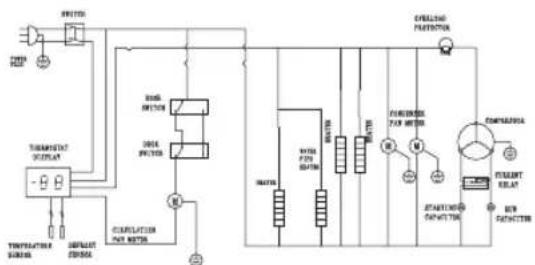
flowchart
graph TD
    A["Power Source"] --> B["Switch"]
    B --> C["Temperature Control Unit"]
    C --> D["Pressure Gauge"]
    D --> E["Combustion Heat System"]
    E --> F["Control Valve"]
    F --> G["Thermal Protection"]
    G --> H["Electric Generator"]
    H --> I["Pressure Gauge"]
    I --> J["Thermal Protection"]
    J --> K["Control Valve"]
    K --> L["Thermal Protection"]
    L --> M["Electric Generator"]
    M --> N["Pressure Gauge"]
    N --> O["Thermal Protection"]

natural_image
Color palette bar with grayscale shades and a crosshair symbol (no text or labels)


natural_image
Color palette bar with grayscale shades and a crosshair symbol (no text or labels)


natural_image
Black-and-white product photo of various beverage refrigerators including large canes, refrigerators, and a HUSKY brand (no visible text or symbols on main objects)Welcome to Husky, the home of smart refrigeration. We are a leading global refrigeration specialist with over 25 years experience in quality refrigeration for convenience and hospitality professionals, and we have a great range of chillers for the home too. You'll find Husky products all over the world, so whatever your requirements we're sure to have a good looking energy-efficient model that's perfect for you.
HUSKY ^®
HELPLINE/TECHNICAL SUPPORT
To contact your local technical support, refer to the rating plate on the inside wall or the back of your unit.
010617