Verismo IP Profile WW - Air-conditioner Blizzard - Free user manual and instructions
Find the device manual for free Verismo IP Profile WW Blizzard in PDF.


User questions about Verismo IP Profile WW Blizzard
0 question about this device. Answer the ones you know or ask your own.
Ask a new question about this device
Download the instructions for your Air-conditioner in PDF format for free! Find your manual Verismo IP Profile WW - Blizzard and take your electronic device back in hand. On this page are published all the documents necessary for the use of your device. Verismo IP Profile WW by Blizzard.
USER MANUAL Verismo IP Profile WW Blizzard
natural_image
Black VERISHOB lighting fixture with adjustable arm and screen (no text or symbols visible)
blizzard
Blizzard Lighting, LLC http://www.blizzardpro.com Waukesha, WI USA Copyright (c) 2023
TABLE OF CONTENTS
1. Getting Started 3
What's In The Box? 3
Getting It Out Of the Box 3
Powering Up! 3
Getting A Hold Of Us 3
Safety Instructions 4
2. Meet the Verismo™ Profile IP WW 5
Main Features 5
DMX Quick Reference 5
Verismo™ Profile IP WW Pin-Up Picture 6
The Rear Connections 6
3. Setup 7
Fuse Replacement 7
Connecting A Bunch of Verismo™ Profile IP Fixtures 7
Data/DMX Cabling 7
Cable Connectors 8
Take It To The Next Level: Setting Up DMX Control 8
Lens Barrels & Focusing 8
Insert the Gobo Holder 9
Rotating the Shutter Barrel 9
Mounting & Rigging 9
4. Operating Adjustments 10
The Control Panel 10
Control Panel Menu Structure 11
Static Mode 12
Dimming Curves 12
Dimming Speed 12
Dimming Frequency 13
DMX Fail 13
Fan Settings 13
System Reset 13
DMX Values In-Depth 13
5. Appendix 14
Keeping Your Verismo™ Profile IP As Good As New 14
Returns (Gasp!) 14
Shipping Issues 14
Tech Specs! 15
1. GETTING STARTED
What's In The Box?
- Verismo™ Profile IP WW Engine
- Power Cable
- Gobo Holder
• This Lovely User Manual
Optional Accessories (sold separately)
The following accessories are available for this fixture. But the lone wolves that they are, they must be purchased separately. Contact your authorized Blizzard Lighting dealer for pricing.
• Verismo-LENS-19: Verismo Profile 19° Lens
• Verismo-LENS-26: Verismo Profile 26° Lens
• Verismo-LENS-36: Verismo Profile 36° Lens
• Verismo-LENS-50: Verismo Profile 50° Lens
Getting It Out Of the Box
Congratulations on purchasing the Verismo™ Profile IP WW. Now that you've got your fixture, you should carefully unpack the box and check the contents to ensure that all parts are present and in good condition. If anything looks as if it has been damaged in transit, notify the shipper immediately and keep the packing material for inspection. Again, please save the carton and all packing materials. If a fixture must be returned to the factory, it is important that the fixture be returned in the original factory box and packing.
Powering Up!
All fixtures must be powered directly off a switched circuit and cannot be run off a rheostat (variable resistor) or dimmer circuit, even if the rheostat or dimmer channel is used solely for a 0% to 100% switch.
Warning! All fixtures must be connected to circuits with a suitable Ground (Earthing).
Getting A Hold Of Us
If something happens to go wrong, visit blizzardpro.com/support and open a support ticket. We'll be happy to help, honest.
Disclaimer: The information contained in this document are subject to change without notice. Blizzard Lighting™ assumes no responsibility or liability for any errors or omissions that may appear in this user manual. We reserve the right to update the existing, or create a new document to correct any errors or omissions at any time. You can download the latest version of this document from www.blizzardpro.com.
| Author: Date: Last Edited: Date: | ||
| J. Thomas 1/24/2022 J. Thomas 6/8/2023 |

text_image
Yellow triangular warning sign with black exclamation mark, commonly used to indicate a hazard or alert event.Please read these instructions carefully. They include important information about the installation, usage and maintenance of this product.
- Please keep this User Guide for future use. If you sell the unit to someone else, be sure that they also receive this User Guide.
- ALWAYS make sure that you are connecting to the proper voltage, and that the line voltage you are connecting to is not higher than that stated on the decal or rear panel of the fixture.
- Make sure there are no flammable materials close to the unit while operating.
- The unit must be installed in a location with adequate ventilation, at least 20in (50cm) from adjacent surfaces. Be sure that no ventilation slots are blocked.
- ALWAYS disconnect from the power source before servicing or replacing fuse and be sure to replace with same fuse size and type.
- ALWAYS secure fixture using a safety chain. NEVER carry the fixture by its head. Use its carrying handles.
- DO NOT operate at ambient temperatures higher than 104^ (40°C).
- In the event of a serious operating problem, stop using the unit immediately. NEVER try to repair the unit by yourself. Repairs carried out by unskilled people can lead to damage or malfunction. Please contact the nearest authorized technical assistance center. Always use the same type spare parts.
- NEVER connect the device to a dimmer pack.
- Make sure the power cord is never crimped or damaged.
- Never disconnect the power cord by pulling or tugging on the cord.
- Avoid direct eye exposure to the light source while it is on.
Caution! There are no user serviceable parts inside the unit. Do not open the housing or attempt any repairs yourself. In the unlikely event your unit may require service, please open a support ticket at www.blizzardpro.com/support.
2. MEET THE VERISMO™ PROFILE IP WW
Main Features
• Light source: 300W WW COB LED
- 19°, 26°, 36°, and 50° lens tubes are available
• Color temperature: 3200K, CRI: 98
• 16-bit dimming, with 4 user-selectable dimming curves
- User selectable dimming speeds (low/medium/high)
- 4x manual framing shutters & manual focus
• 1-25Hz strobe effects
- Flicker-free resolution, perfect for video
- Adjustable LED refresh rates (1000-8000 Hz)
- Gobo/pattern holder (B sized gobos)
- IP Rating: IP65
• Aluminum housing (black)
- PowerCON® TRUE1™ compatible in/out power connectors
- 5-pin male/female XLR input & output connections
Control
• Control system: STM32 control chip, DMX-512
• DMX channels: 1/2/3/4-channels
- Easy-to-use 4-button control panel with OLED display
- Operating modes: DMX-512, standalone
DMX Quick Reference (1/2/3/4-Channel Modes)
| 1-CH 2-CH 3-CH 4-CH What It Does | ||||
| 1 1 1 1 Dimmer (0% <--> 100%) | ||||
| -- 2 2 2 Dimmer Fine (0% <--> 100%) | ||||
| -- -- 3 3 Strobe (slow <--> fast) | ||||
| -- -- -- 4 Dimming Curves | ||||
Verismo™ Profile IP WW Pin-Up Picture

text_image
Mounting Bracket Gobo Holder Slot VERSMOS Focus Knobs Framing Shutters Lens Barrel *Lens barrels are sold separately with 19°, 26°, 36°, and 50° angles.The Rear Connections
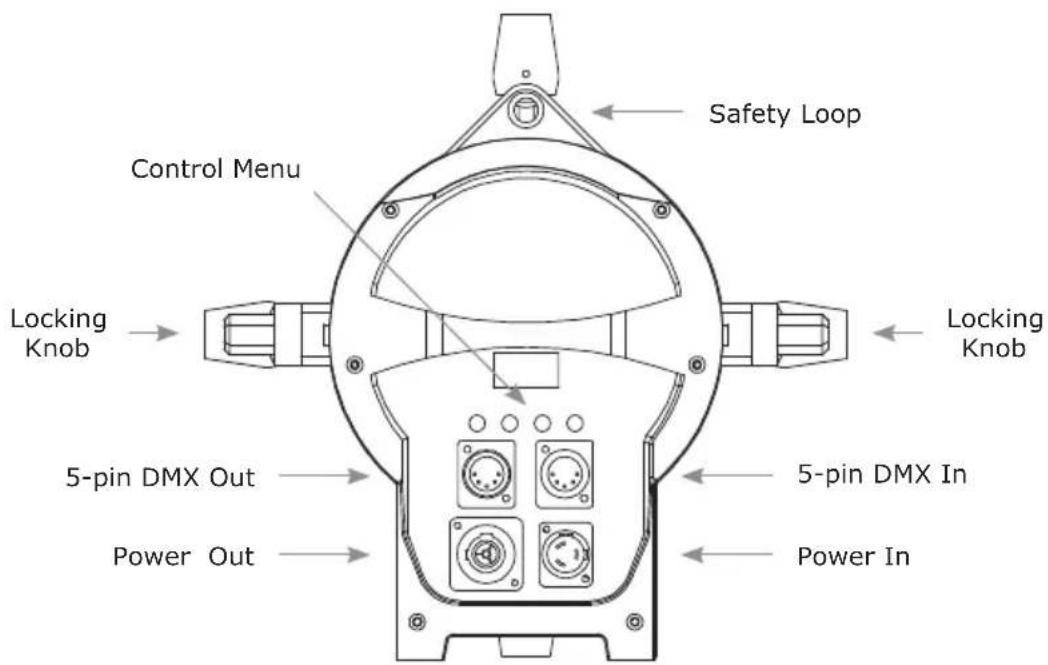
text_image
Safety Loop Control Menu Locking Knob Locking Knob 5-pin DMX Out 5-pin DMX In Power Out Power In3. SETUP

text_image
Yellow triangular warning sign with black exclamation mark, commonly used to indicate a hazard or alert event.Before replacing the fuse, disconnect the power cord. ALWAYS replace it with the same type and rating.
Fuse Replacement
Verismo™ Profile IP fixtures utilize a high-output switch-mode power supply with an internal fuse. Under normal operating conditions, the fuse should not require replacement. The fuse is field replaceable, however it is an advanced procedure suited to qualified individuals. Should the fuse require replacement, please contact Blizzard Lighting for instructions, or to return your unit for service.
Connecting A Bunch of Verismo™ Profile IP Fixtures
You can use a serial data link to run light shows when using a DMX-512 controller with two or more fixtures. The combined number of channels required by all the fixtures on a serial data link determines the number of fixtures the data link can support.
Fixtures on a serial data link must be daisy chained in one single line. Also, connecting more than 32 fixtures on one serial data link without the use of a DMX optically-isolated splitter may result in deterioration of the digital DMX signal. The maximum recommended cable-run distance is 500 meters (1640 ft). The maximum recommended number of fixtures on a serial data link is 32 fixtures.
Data/DMX Cabling
To link fixtures together you'll need data cables. You should use data-grade cables that can carry a high quality signal and are less prone to electromagnetic interference.
For instance, Belden© 9841 meets the specifications for EIA RS-485 applications. Standard microphone cables will "probably" be OK, but note that they cannot transmit DMX data as reliably over long distances. The cable should have the following characteristics:
• 2-conductor twisted pair plus a shield
• Maximum capacitance between conductors - 30 pF/ft.
• Maximum capacitance between conductor & shield – 55 pF/ft.
• Maximum resistance of 20 ohms / 1000 ft.
• Nominal impedance 100 - 140 ohms
Cable Connectors
Cables must have a male XLR connector on one end and a female XLR connector on the other end. This fixture offers both 3-pin and 5-pin connections.
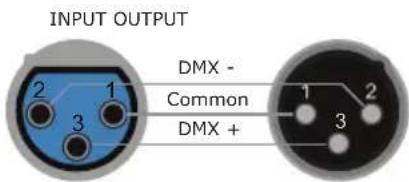
text_image
INPUT OUTPUT DMX - Common DMX + 1 2 3A Word on Termination:
DMX is a resilient communication protocol, however errors still occasionally occur. Termination reduces signal errors, and therefore best practices include use of a terminator in all circumstances. If you are experiencing problems with erratic fixture behavior, especially over long signal cable runs, a terminator may help improve performance.
Take It To The Next Level: Setting Up DMX Control
Step 1: Connect the male connector of the DMX cable to the female connector (output) on the controller.
Step 2: Connect the female connector of the DMX cable to the first fixture's male connector (input).
Note: It doesn't matter which fixture address is the first one connected. We recommend connecting the fixtures in terms of their proximity to the controller, rather than connecting the lowest fixture number first, and so on.
Step 3: Connect other fixtures in the chain from output to input. You should place a DMX terminator on the output of the final fixture to ensure best communication.
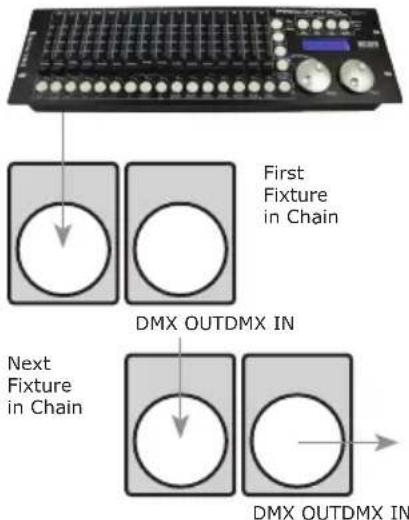
text_image
First Fixture in Chain DMX OUTDMX IN Next Fixture in Chain DMX OUTDMX INLens Barrels & Focusing
1.) Align and insert a lens tube (sold separately) into the shutter barrel.
2.) Install the top focus knob.
3.) Install the top and bottom focus knobs.
4.) When in use, slide the lens barrel in/out to achieve proper focus, and tighten the focus knobs to secure the lens.
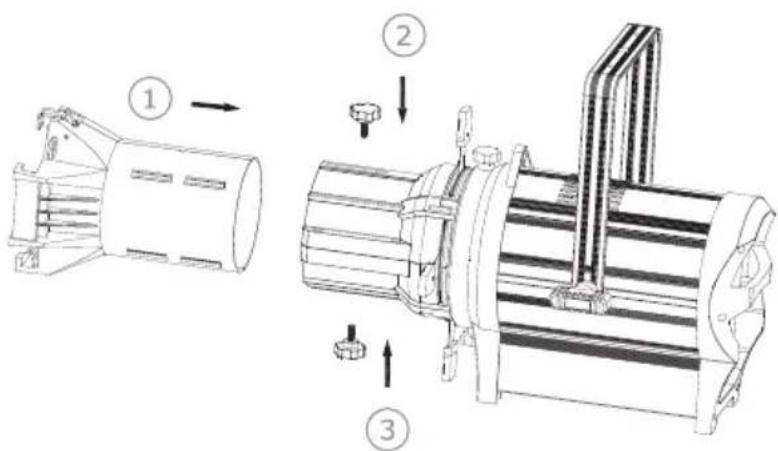
text_image
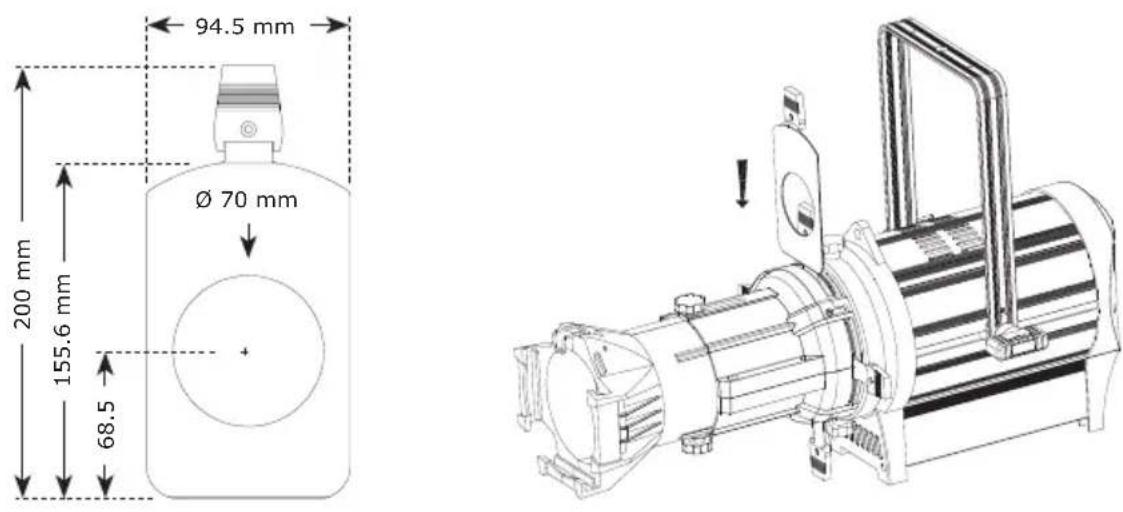
Technical diagram showing three stages of a mechanical assembly with numbered annotations indicating process flow.Insert the Gobo Holder
The gobo holder slot is on the top side of the shutter barrel and in front of the shutters. It can accommodate standard B sized gobos, with a recommended image size of 40mm.
Rotating the Shutter Barrel
1.) Loosen the upper and lower barrel rotation knobs located directly behind the shutters. Do not remove the barrel rotation knobs.
2.) Rotate the barrel to the desired position (it can rotate up to 34^ in either direction from the centered position).
3.) Once the barrel is positioned, tighten the barrel's rotation knobs to lock it in place.
Mounting & Rigging
This fixture may be mounted in any SAFE position provided there is enough room for ventilation. The fan or vent pathway must never be obstructed.
Mount the fixture using a suitable "C" or "O" type clamp. The clamp should be rated to hold at least 10x the fixture's weight to ensure structural stability. Do not mount to surfaces of unknown strength, and ensure properly rated rigging is used when mounting fixtures overhead.
IMPORTANT: Regardless of the rigging option you choose for your fixtures, always be sure to secure your fixture with a safety cable.

text_image
34° 34°4. OPERATING ADJUSTMENTS
The Control Panel
All the features and different modes possible with the Verismo™ Profile IP are accessed by using the control panel on the rear of the fixture. There are 4 control buttons under the menu display which allow you to navigate through the various control panel menus.
Is used to navigate to the previous higher-level menu item.
Scrolls through menu items and numbers in ascending order.
Scrolls through menu items and numbers in descending order.
Is used to select and confirm/store the current selection.

natural_image
Empty white rectangle with black border (no text or symbols)
MENU

UP

DOWN

ENTER
The control panel display shows the menu items you select from the menu map on page #11. When a menu function is selected, the display will show immediately the first available option for the selected menu function. To select a menu item, press
Use the
Control Panel Menu Structure
| DMX Address Set the starting address (1-512) | |||
| Static Dimmer Dimmer (0% <--> 100%) | |||
| Personality Dim Curve Linear | |||
| Square law | |||
| Inv square law | |||
| S Curve | |||
| Low | |||
| Medium | |||
| High | |||
| 1200Hz | |||
| 1500Hz | |||
| 2000Hz | |||
| 4000Hz | |||
| 8000Hz | |||
| Auto | |||
| Silent | |||
| Blackout | |||
| Info Version | Shows current firmware version | ||
| RDM UID Unique RDM ID | |||
| Usage Time Power on Total running hrs. | |||
| Temperature Celsius (°C) | |||
| Reset | Yes/No Load factory defaults | ||
DMX Mode
Allows the unit to be controlled by any universal DMX controller.
Select the Channel Mode
1.) Navigate the menu to reach DMX, and press
2.) Use the
3.) Then use the
Select the Starting DMX Address
1.) Navigate the menu to reach DMX, and press
2.) Use the
3.) Then use the
Static Mode
1.) Navigate the menu to reach Static, and press
2.) Use the
3.) The Dimmer values will increase/decrease the brightness from 0% to 100%, and Strobe values will change the effect (from slow to fast).
Dimming Curves
1.) Navigate the menu to reach Personality, and press
2.) Use
3.) Then use the
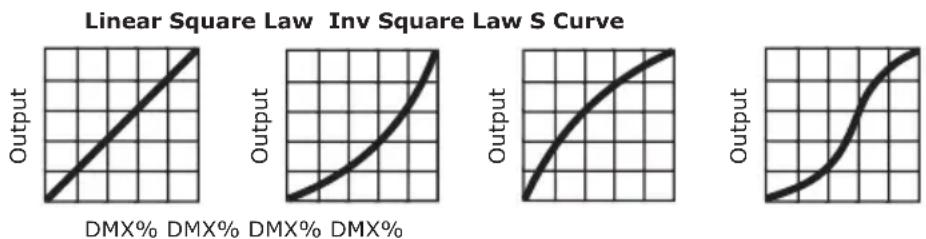
line
| DMX Percentage | Output | | -------------- | ------ | | 0% | 0 | | 100% | 1 | | 200% | 2 | | 300% | 3 | | 400% | 4 | | 500% | 5 | | 600% | 6 | | 700% | 7 | | 800% | 8 | | 900% | 9 | | 1000% | 10 |Note: Smoother (and slower) dimming capabilities can be achieved with use of the 4 available dimming curve settings.
Dimming Speed
Allows you to set a fade speed of either Low, Medium, or High. This can help simulate fade speeds of incandescent lamps.
1.) Navigate the menu to reach Personality, and press
2.) Use the
3.) Then use the
Dimming Frequency
1.) Navigate the menu to reach Personality, and press
2.) Use the
3.) Then use the
DMX Fail
This setting allows you to choose to either hold the last received signal or blackout the fixture if the DMX signal is lost.
1.) Navigate the menu to reach Personality, and press
2.) Use the
3.) Then use the
Fan Settings
1.) Navigate the menu to reach Personality, and press
2.) Use the
3.) Then use the
System Reset
1.) Navigate the menu to reach Reset, and press
2.) Then use the
DMX Values In-Depth (1/2/3/4-Channel Modes)
| 1-CH | 2-CH | 3-CH | 4-CH | Value | What It Does | |
| 1 1 1 | 1 000 | <-> | 255 | Dimmer | (0% <--> 100%) | |
| -- 2 2 | 2 000 | <-> | 255 | Dimmer | Fine (0% <--> 100%) | |
| -- -- 3 | 3 | Strobe | ||||
| Strobe (slow <--> fast) | ||||||
| -- -- -- | 4 | Dimming Curves | ||||
| Linear | ||||||
| Square law | ||||||
| Inverse square law | ||||||
| S curve |
5. APPENDIX
Keeping Your Verismo™ Profile IP As Good As New
The fixture you've received is a rugged, tough piece of pro lighting equipment, and as long as you take care of it, it will take care of you. That said, you'll need to take care of it if you want it to operate as designed. You should keep the fixture clean, especially if you are using it in an environment with a lot of dust, fog, haze, wild animals, wild teenagers or spilled drinks.
Cleaning the optics routinely with a suitable glass cleaner will greatly improve the quality of light output. Keeping the fans free of dust and debris will keep the fixture running cool and prevent damage from overheating.
In transit, keep the fixtures in cases. You wouldn't throw a prized guitar, drumset, or other piece of expensive gear into a gear trailer without a case, and similarly, you shouldn't even think about doing it with your shiny new light fixtures.
Common sense and taking care of your fixtures will be the single biggest thing you can do to keep them running at peak performance and let you worry about designing a great light show, putting on a great concert, or maximizing your client's satisfaction and "wow factor." That's what it's all about, after all!
Returns (Gasp!)
We've taken a lot of precautions to make sure you never even have to worry about sending a defective unit back, or sending a unit in for service. But, like any complex piece of equipment designed and built by humans, once in a while, something doesn't go as planned. If you find yourself with a fixture that isn't behaving like a good little fixture should, you'll need to obtain a Return Authorization (RA).
Don't worry, this is easy. Just visit www.blizzardpro.com/support and open a support ticket, and we'll issue you an RA. Then, you'll need to send the unit to us using a trackable, pre-paid freight method. We suggest using USPS Priority or UPS. Make sure you carefully pack the fixture for transit, and whenever possible, use the original box & packing for shipping.
When returning your fixture for service, be sure to include the following:
1.) Your contact information (Name, Address, Phone Number, Email address).
2.) The RA# issued to you
3.) A brief description of the problem/symptoms.
We will, at our discretion, repair or replace the fixture. Please remember that any shipping damage which occurs in transit to us is the customer's responsibility, so pack it well!
Shipping Issues
Damage incurred in shipping is the responsibility of the shipper, and must be reported to the carrier immediately upon receipt of the items. Claims must be made within seven (7) days of receipt.
Tech Specs!
| Weight & Dimensions | |
| Dimensions 25.6" x 1 | 2.6" x 18" (649 x 320 x 458 mm) |
| Weight (engine only) 19 | bs. (8.6 kg) |
| Power | |
| Operating Voltage 100 | -240VAC, 50-60 Hz |
| Power 266W 2.36A, PF: .99 | |
| Light Source | |
| LED 300W WW COB L | ED, 50,000+ hour lifetime |
| Optical | |
| Luminous Intensity 19° Lens: 27,165 Lux @ 2.5M, 7,421 Lux 5M | |
| Gobo Size B (86mm outer, 40mm image) | |
| Color Temperature 32 | 00K, CRI: 98 |
| Control | |
| Protocol USITT DMX-512 | |
| DMX Channels 1/2/3/4-channel | |
| Input/Output 5-pin XL | LR male/female |
| Operating Modes | DMX-512, standalone |
| Warranty | 2-year limited warranty, does not cover malfunction caused by damage to LEDs. |
Dimensional Drawings

text_image
25.6" (649 mm) 12.4" (315 mm) 10.1" (255 mm) 12.6" (320 mm) 18" (458 mm)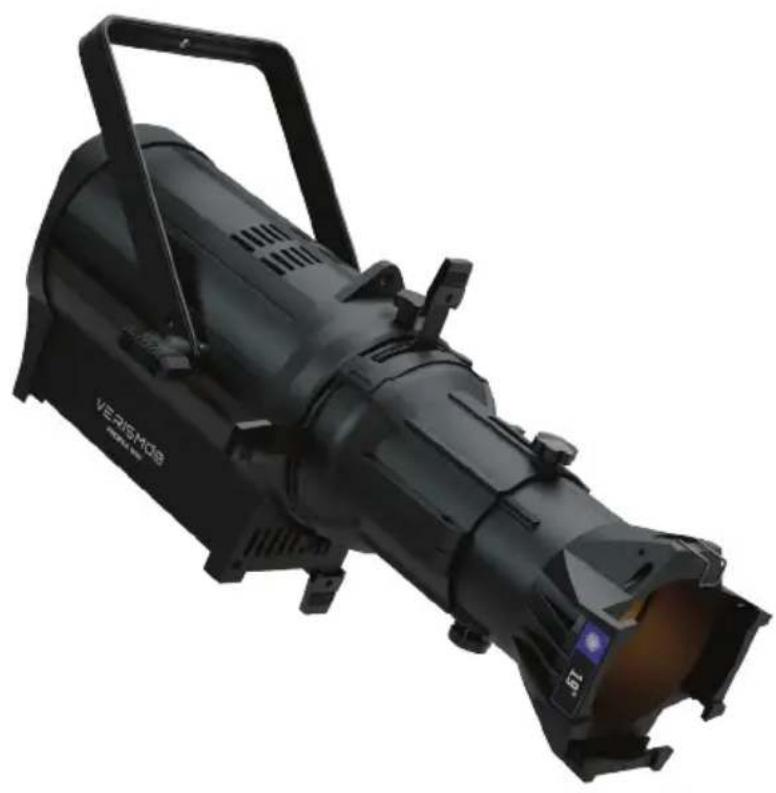
natural_image
Black Verismos radar light with adjustable arm and aperture (no text or symbols visible)Enjoy your product! Our sincerest thanks for your purchase! --The team @ Blizzard Lighting