AVSP-HDMI1X4 - Switch Black Box - Free user manual and instructions
Find the device manual for free AVSP-HDMI1X4 Black Box in PDF.


User questions about AVSP-HDMI1X4 Black Box
0 question about this device. Answer the ones you know or ask your own.
Ask a new question about this device
Download the instructions for your Switch in PDF format for free! Find your manual AVSP-HDMI1X4 - Black Box and take your electronic device back in hand. On this page are published all the documents necessary for the use of your device. AVSP-HDMI1X4 by Black Box.
USER MANUAL AVSP-HDMI1X4 Black Box
1 x 2, 1 x 4, and 1 x 8 HDMI Splitters
Broadcast the same video plus audio signal source to two, four, or eight HDMI or DVI compatible outputs.
Support HDMI /DVI display resolutions of up to Full HD (1920 x 1080), WUXGA (1920 x 1200), and UXGA (1600 x 1200).
Splitters are Blu-ray ready.

natural_image
Exterior view of a black BLACK BOX industrial control unit with multiple ports and indicator lights (no readable text or symbols)Customer Support Information
Order toll-free in the U.S.: Call 877-877-BBOX (outside U.S. call 724-746-5500) • FREE technical support 24 hours a day, 7 days a week: Call 724-746-5500 or fax 724-746-0746 • Mailing address: Black Box Corporation, 1000 Park Drive, Lawrence, PA 15055-1018 Web site: www.blackbox.com • E-mail: info@blackbox.com
Trademarks Used in this Manual
Black Box and the Double Diamond logo are registered trademarks of BB Technologies, Inc.
Any other trademarks mentioned in this manual are acknowledged to be the property of the trademark owners.
FEDERAL COMMUNICATIONS COMMISSION AND INDUSTRY CANADA RADIO FREQUENCY INTERFERENCE STATEMENTS
This equipment generates, uses, and can radiate radio-frequency energy, and if not installed and used properly, that is, in strict accordance with the manufacturer's instructions, may cause interference to radio communication. It has been tested and found to comply with the limits for a Class A computing device in accordance with the specifications in Subpart B of Part 15 of FCC rules, which are designed to provide reasonable protection against such interference when the equipment is operated in a commercial environment. Operation of this equipment in a residential area is likely to cause interference, in which case the user at his own expense will be required to take whatever measures may be necessary to correct the interference.
Changes or modifications not expressly approved by the party responsible for compliance could void the user's authority to operate the equipment.
This digital apparatus does not exceed the Class A limits for radio noise emission from digital apparatus set out in the Radio Interference Regulation of Industry Canada.
2.1 Introduction....8
2.2 Features 8
2.3 What's Included 9
2.4 Optional Items You Might Need 9
2.5 Hardware Requirements....9
2.6 Hardware Description.... 10
2.6.1 AVSP-HDMI1X2 10
2.6.2 AVSP-HDMI1X4 11
2.6.3 AVSP-HDMI1X8 13
- Installation 15
- Operation 20
- Troubleshooting 21
1. Specifications
Enclosure: Metal
Maximum Cable Length: 16.4 feet (5 meters)
Maximum Video Resolution/Signal Type:
Full HD 1080p (1920 x 1080), VGA (640 x 480), SXGA (1280 x 1024),
UXGA (1800 x 1200), WUXGA (1920 x 1200);
Number of Video Outputs: AVSP-HDMI1X2: (2);
AVSP-HDMI1X4: (4);
AVSP-HDMI1X8: (8)
Rackmountable: AVSP-HDMI1X2: No;
AVSP-HDMI1X4, AVSP-HDMI1X8: Yes
Connectors: AVSP-HDMI1X2: Input: (1) HDMI female, (1) set of audio jacks,
Output: (2) HDMI female, (1) set of audio jacks;
AVSP-HDMI1X4: Input: (1) HDMI female, (1) set of audio jacks,
Output: (4) HDMI female, (2) sets of audio jacks;
AVSP-HDMI1X8: Input: (1) HDMI female, (1) set of audio jacks,
Output: (8) HDMI female, (4) sets of audio jacks
Indicators: AVSP-HDMI1X2: (1) dual-color LED: Power Active/Video OK,
(2) Video Output LEDs;
AVSP-HDMI1X4: (1) dual-color LED: Power Active/Video OK,
(4) Video Output LEDs;
AVSP-HDMI1X8: (1) dual-color LED: Power Active/Video OK,
(8) Video Output LEDs
Power: All: Input: 9–12 VDC;
AVSP-HDMI1X2: Output: 2.8 W;
AVSP-HDMI1X4: Output: 4.1 W;
AVSP-HDMI1X8: Output: 10.2 W
Size: AVSP-HDMI1X2: 0.8"H x 7.1"W x 3.4"D (2 x 18 x 8.5 cm);
AVSP-HDMI1X4: 1.7"H x 8.7"W x 5.3"D (4.4 x 22 x 13.5 cm);
AVSP-HDMI1X8: 1.7"H x 17.2"W x 7.1"D (4.4 x 43.8 x 18 cm)
2. Overview
2.1 Introduction
The 1 x 2, 1 x 4, or 1 x 8 HDMI Splitters broadcast the same video plus audio signal source to two, four, or eight HDMI or DVI compatible outputs.
Depending on the cable's length and quality, these fully compliant splitters support HDMI/DVI display resolutions of up to Full HD (1920 x 1080), WUXGA (1920 x 1200), and UXGA (1600 x 1200), and are also Blu-ray ready.
You don't need to install or configure an interface card. Just connect the cables, power up the system, and you are ready to have duplicated video images on multiple monitors with excellent clarity. The 1 x 8 model can also be rackmounted.
Use the HDMI Splitters for a variety of public broadcasting applications, including:
- Presentations
- Exhibits
- Demonstrations
- Trade shows
- Monitor testing and burn-in
- Business meetings
- News
- Stock tickers
- Airline/train/bus schedules
- Retail stores
2.2 Features
- Provides an easy and affordable way to duplicate video input to multiple HDMI outputs.
- Includes automatic power-save when the signal input is lost.
- Cascade units for more signal outputs.
• Gives you crisp, clear video images. - Supports EDID, HDCP, and is Blu-ray ready for high-definition display.
- Supports HDMI display resolutions of up to UXGA (1600 x 1200), WUXGA (1920 x 1200), and Full HD 1080p (1920 x 1080).
- LED indicators enable you to monitor signal activity.
- Accurately and reliably reproduces digital video signals without attenuation and distortion.
- Installs in seconds.
2.3 What's Included
Your package should include the following items. If anything is missing or damaged, contact Black Box Technical Support at 724-746-5500 or info@blackbox.com.
- Video splitter
- Power adapter with AC cord or plug-in power adapter
- Foot pad
- Rackmount bracket (included with 1 x 8 unit only)
- This user's manual
2.4 Optional Items You Might Also Need
• HDMI male-to-male cable for connecting the HDMI source
- Audio cable
• DVI-to-HDMI adapter
- HDMI-to-DVI adapter
2.5 Hardware Requirements
• Video sources (PS3, Blu-ray, DVD players, etc. with HDMI output and audio output
- HDMI cables
- HDCP-compliant display devices (TVs, monitors, projectors, etc.) for the HDCP video source (optional)
- Speakers for audio
2.6 Hardware Description
2.6.1 AVSP-HDMI1X2
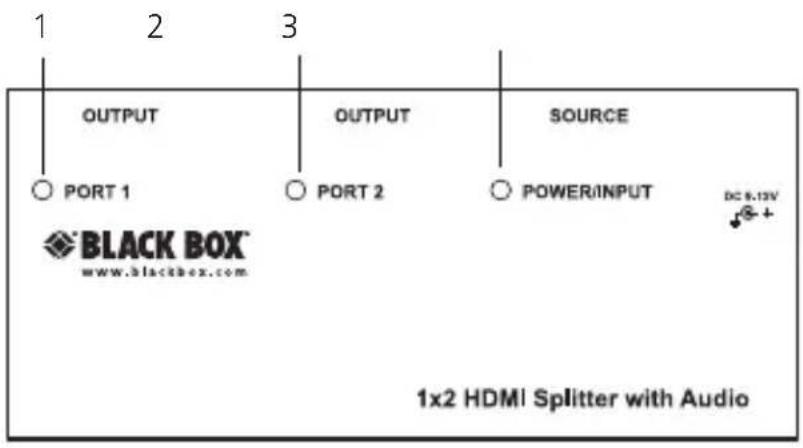
Figures 2-1 and 2-2 show the front and side panels of the AVSP-HDMI1X2. Table 2-1 describes its components.
text_image
OUTPUT OUTPUT SOURCE PORT 1 PORT 2 POWERINPUT DC 8.13V BLACK BOX® www.blackbox.com 1x2 HDMI Splitter with AudioFigure 2-1. AVSP-HDMI1X2 front panel.

text_image
7 8 2 1 SOURCE 2 1 4 5 6Figure 2-2. AVSP-HDMI1X2 side panel.
Table 2-1. AVSP-HDMI1X2 components.
| Number | Component Description |
| 1 | Port 1 LED Lights when there is activity on Port 1. |
| 2 | Port 2 LED Lights when there is activity on Port 2. |
| 3 | Power input LED Lights when power is connected. |
| 4 | Power connector Connects to AC power source. |
| 5 | HDMI connector Connects to input source. |
| 6 | (2) HDMI connectors Links to output monitors.. |
| 7 | Audio connector Connects to audio input. |
| 8 | (2) audio connectors Connects to audio outputs. |
2.6.2 AVSP-HDMI1X4
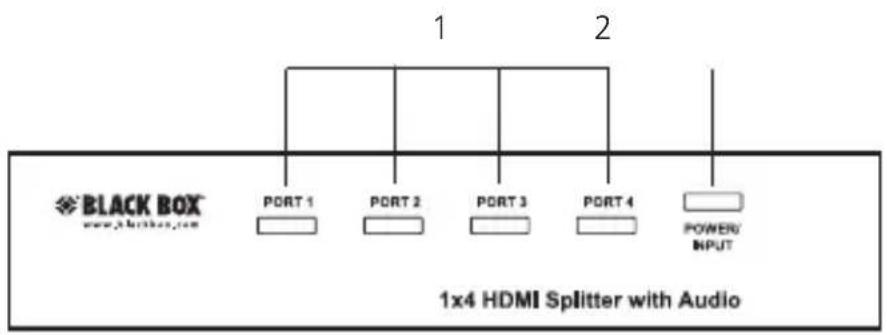
Figures 2-3 and 2-4 show the front and back panels of the AVSP-HDMI1X4. Table 2-2 describes its components.
text_image
BLACK BOX www.1x4box.com PORT 1 PORT 2 PORT 3 PORT 4 POWER INPUT 1x4 HDMI Splitter with AudioFigure 2-3. AVSP-HDMI1X4 front panel.

text_image
6 7 SOURCE 3 4 5Figure 2-4. AVSP-HDMI1X4 back panel.
Table 2-2. AVSP-HDMI1X4 components.
| Number | Component Description | |
| 1 | Ports 1–4 LEDs | Lights when there is activity on Ports 1–4. |
| 2 | Power input LED Lights when power is connected. | |
| 3 | Power connector Connects to AC power source. | |
| 4 | HDMI connector Connects to input source. | |
| 5 | (4) HDMI connectors Links to output monitors. | |
| 6 | Audio connector Connects to audio input. | |
| 7 | (4) audio connectors Connects to audio outputs. | |
2.6.3 AVSP-HDMI1X8
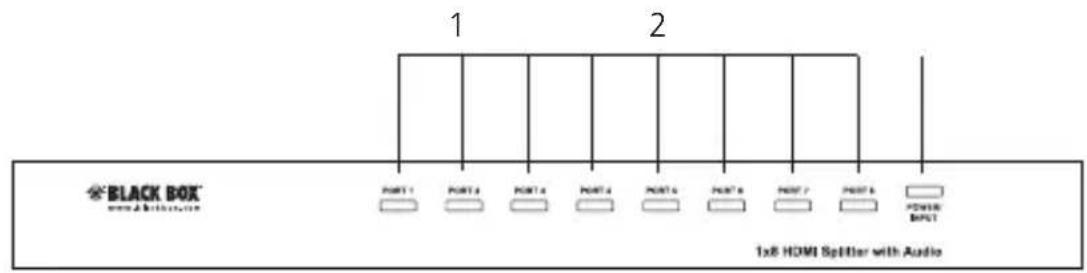
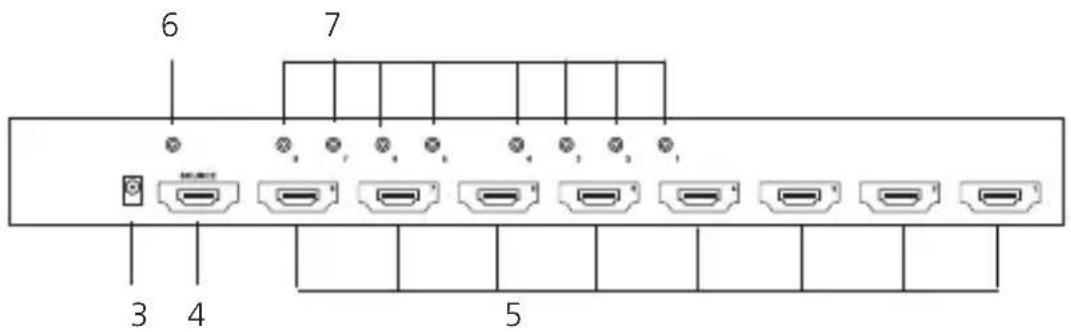
Figures 2-5 and 2-6 show the front and back panels of the AVSP-HDMI1X8. Table 2-3 describes its components.
text_image
BLACK BOX 1x8 HDMI Splitter with AudioFigure 2-5. AVSP-HDMI1X8 front panel.
text_image
6 7 3 4 5Figure 2-6. AVSP-HDMI1X8 back panel.
Table 2-3. AVSP-HDMI1X8 components.
| Number | Component Description | |
| 1 | Ports 1–8 LEDs | Lights when there is activity on Ports 1–8. |
| 2 | Power input LED Lights when power is connected. | |
| 3 | Power connector Connects to AC power source. | |
| 4 | HDMI connector Connects to input source. | |
| 5 | (8) HDMI connectors Links to output monitors. | |
| 6 | Audio connector Connects to audio input. | |
| 7 | (8) audio connectors Connects to audio outputs. |
3. Installation
WARNINGS: Before installation, make sure you power off all devices that will be connected to this system.
Make sure that all devices you will connect are properly grounded.
Place cables away from fluorescent lights, air conditioners, and machines that are likely to generate electrical noise.
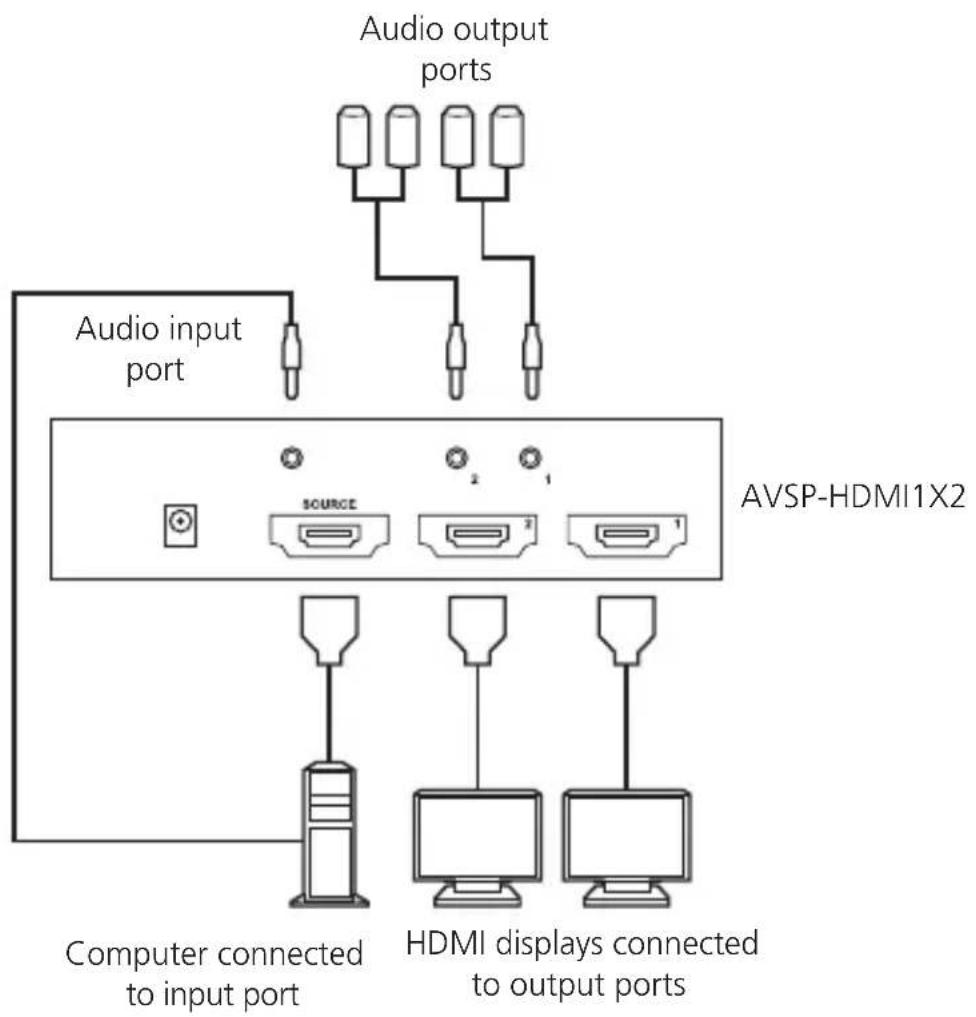
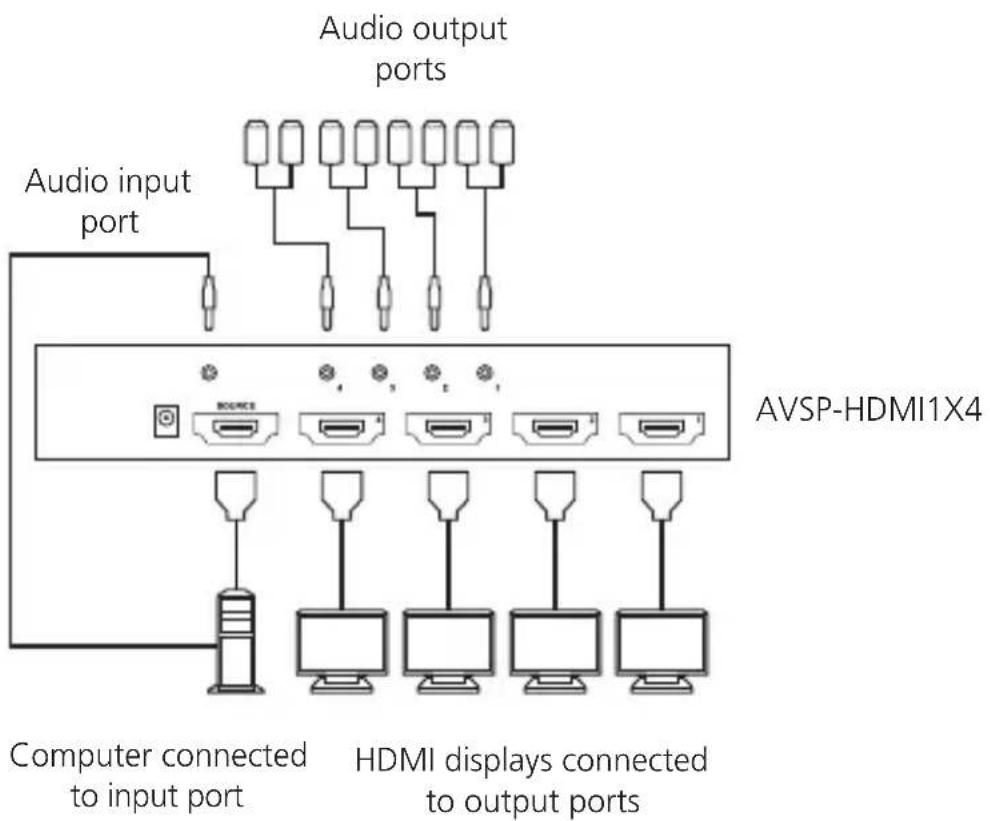
Use one HDMI male-to-male cable to connect a video source to the video splitter input (SOURCE). Connect multiple monitors or TVs to the video splitter's output ports as shown in Figures 3-1 through 3-3.
Plug a set of audio jacks from the speaker to the splitter's audio port.
Turn on your video source only after you've made all the connections.
text_image
Audio output ports Audio input port AVSP-HDMI1X2 SOURCE Computer connected to input port HDMI displays connected to output portsFigure 3-1. AVSP-HDMI1X2 connection.
text_image
Audio output ports Audio input port AVSP-HDMI1X4 Computer connected to input port HDMI displays connected to output portsFigure 3-2. AVSP-HDMI1X4 connection.

text_image
Audio output ports Audio input port AVSP-HDMI1X8 Computer connected to input port HDMI displays connected to output portsFigure 3-3. AVSP-HDMI1X8 connection.
NOTES: At least one monitor connection to the splitter unit is required when powering on the source device.
Connect the splitter unit to the computer before powering on the computer.
The splitter unit is HDMI compliant and must use the HDCP compliant display when it is connecting to the HDCP video source.
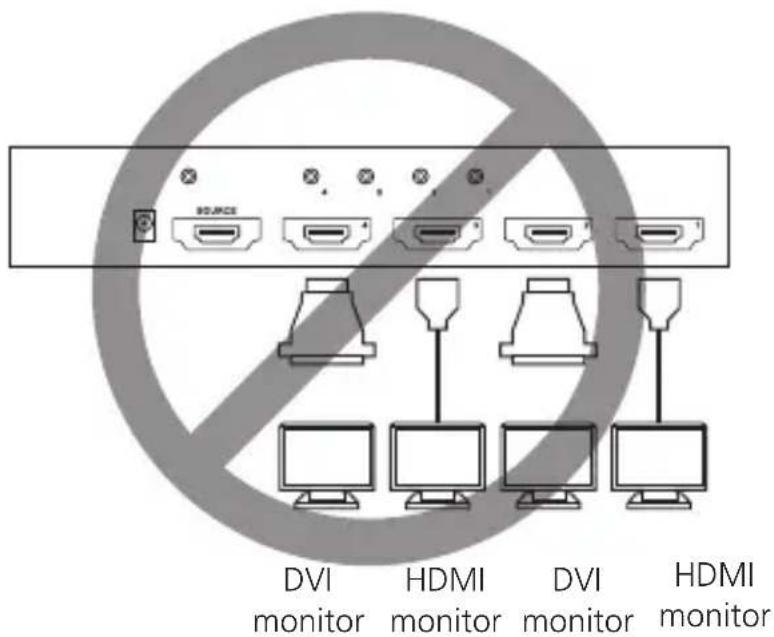
NOTE: Do not use mixed (HDMI and DVI) ouptut connections, as shown in Figure 3-4. This configuration might cause signal degradation. For example, an AVSP-HDMI1X4 unit cannot have one output connection to an HDMI monitor via an HDMI cable and another output connection to a DVI monitor via a DVI cable.
text_image
DVI monitor HDMI monitor DVI monitor HDMI monitorFigure 3-4. Do not use this type of mixed connection pattern
Blu-ray Ready
The splitter can support high-definition video such as DVD or Blu-ray and multichannel audio, and carry the best signal from source to displays. The high bandwidth enables large amounts of information to transmit at a very high speed.
Blu-ray uses a blue-violet laser to read and write data, while current optical disk technologies such as DVD, DVD±R, DVD±RW, and DVD-RAM rely on a red laser to read and write data. The blue-violet laser operates at a shorter wavelength (405 nm) than the red laser (650 nm). The shorter-wavelength laser spot focuses with even greater precision, so more data will fit on the disk even though it's the same size as a CD/DVD.
4. Operation
The quality of the output signal depends upon the quality of the video source, cable, and display device used. Low-quality cables degrade the output signal, causing elevated noise levels. Use the proper cable and make sure the display can handle the resolution and refresh rate you select. Interference from nearby electrical devices can adversely affect signal quality.
LED Display
The splitter has two LEDs: one dual-color LED (lights green for power on and blue for video signal OK), and one video output signal LED.
5. Troubleshooting
Table 5-1. Symptoms, Possible Causes, and Solutions.
| Symptom Possible Cause Solution | ||
| Video does not display on some ports | The source's HDMI specification doesn't match the HDMI cable and/or the HDMI display device. | Check if the splitter unit has been connected to the source computer before the computer powered on. |
| Erratic behavior | The splitter may not be receiving enough power. | Check the power adapter attached to the splitter to make sure it matches the system specifications and is functioning properly. |
| Not receiving picture or sound | Wrong installation process | The video splitter requires at least one monitor connection before powering on the source device. |
| The signal source may require a display device that is HDCP compliant. | Check that the display monitor is HDCP compliant. HDCP prevents the transfer of digital content to unauthorized HDMI devices. | |
Chapter 5: Troubleshooting
Table 5-1 (continued). Symptoms, Possible Causes, and Solutions.
| Symptom Possible Cause Solution | ||
| Not receiving picture or sound | The display monitor is added to the unit by hot-plug, but the video source may not support hot-plug. | Check if the video source supports hot-plug. If it doesn’t, shut down the source device and reboot it again. |
| The attached devices are not well connected. | Check if you have connected your components correctly. | |
Black Box Tech Support: FREE! Live. 24/7.
Tech support the way it should be.

natural_image
Black-and-white portrait of a smiling woman wearing a headset (no visible text or symbols)Great tech support is just 30 seconds away at 724-746-5500 or blackbox.com.

BLACK BOX®
NETWORK SERVICES
About Black Box
Black Box Network Services is your source for more than 118,000 networking and infrastructure products. You'll find everything from cabinets and racks and power and surge protection products to media converters and Ethernet switches all supported by free, live 24/7 Tech support available in 30 seconds or less.
© Copyright 2010. All rights reserved.
AVSP-HDMI1X2, rev. 1