ULN-29RWH-15 - Fridge U-Line - Free user manual and instructions
Find the device manual for free ULN-29RWH-15 U-Line in PDF.


User questions about ULN-29RWH-15 U-Line
0 question about this device. Answer the ones you know or ask your own.
Ask a new question about this device
Download the instructions for your Fridge in PDF format for free! Find your manual ULN-29RWH-15 - U-Line and take your electronic device back in hand. On this page are published all the documents necessary for the use of your device. ULN-29RWH-15 by U-Line.
USER MANUAL ULN-29RWH-15 U-Line
1000 SERIES & ADA MANUAL CONTROL MODELS
Models Covered
WINE CAPTAIN®
MODELS BEVERAGE CENTER REFRIGERATOR FREEZER
U-1075WCS-00 U-1075BEVS-00 ULN-29RB-00 ULN-75FB-00
U-1075WCS-02 U-1075BEVS-02 ULN-29RB-02 ULN-75FB-13
U-1075WCS-13 U-1075BEVS-13 ULN-29RB-06 ULN-75FWH-00
U-1075WCS-15 U-1075BEVS-15 ULN-29RB-09 ULN-75FWH-13
ULN-29RB-13
ULN-29RB-15
ULN-29RWH-00
ULN-29RWH-02
ULN-29RWH-06
ULN-29RWH-09
ULN-29RWH-13
ULN-29RWH-15
ULN-29RWH-23
ULN-29RWH-25
PRODUCT LIABILITY POLICY
Field service technicians are authorized to make an initial assessment. If in the servicer's judgment the damage is the result of a product defect, the product would be removed and returned to U-Line in an unaltered condition. The dealer would then be authorized to permanently replace the end-user's product at no cost to the end-user. Please call U-Line immediately at I-800-779-2547 to initiate the RA and product exchange process.
If in the servicer's judgment the damage is the result of installation issues (water connection/drain, etc.), the consumer would be so notified and the correction would be made by the servicer or installer without requiring removal of the product. Any claim for damages should be directed to the original installer.
Any U-Line unit involved in an alleged property damage claim must remain unaltered and unrepaired, for evaluation. No service or repairs should be performed on any unit suspected to be involved in a property damage situation. If a unit has been altered or repaired in the field prior to U-Line's evaluation, any claim for damage may be declined.
If the unit in question is a U-Line CLR or CLRCO with a drain pump, both the unit and the drain pump (regardless of the manufacturer) must be returned to U-Line Corporation.
To complete the damage claim process for the customer, please obtain the following and forward to U-Line at onlineservice@U-Line.com, fax to 1-414-354-5696 or mail to the address below.
Pictures of the unit, installation and any alleged property damage.
Inquire when the problem first appeared, any prior problems with the product and provide a brief description of the alleged damages.
To expedite the claim process, U-Line will need two damage repair estimates.
Reference the RA number and customer name when providing this information.
If a unit is returned to U-Line, this evaluation will take approximately ten business days. No field service company is authorized to perform this evaluation. When a Return Authorization Number is issued, and the unit has been boxed in a U-Line carton, U-Line should be contacted and then will make arrangements for shipping, or designate a truck line to have the unit shipped freight collect.
If U-Line's evaluation finds the unit, (or U-Line P60 pump) to be defective, causing the property damage, the damage claim will be reviewed by the U-Line Customer Assurance Department.
If U-Line's evaluation finds the unit not to be defective, does not repeat a failure or does not leak any water from the U-Line unit or U-Line P60 pump, all claims for damage will be declined.
When a product evaluation is needed, it is the customer's responsibility to assure that the unit is returned for evaluation. If the customer fails to do so, or has the unit repaired in the field prior to U-Line's evaluation, any claim for damage will be declined.
8900 N. 55th St. • P.O. Box 245040
Milwaukee, WI 53224-9540 U.S.A.
1-414-354-0300 • Fax: 1-414-354-7905
Website: u-line.com
Leaders In Quality Undercounter Refrigeration
General Information
Safety Alert Definitions....I
General Precautions....I
Models Covered....2
Warranty Claims Procedure 3
Proof of Purchase....3
Serial Number 4
Replacement Parts 4
Checking Product Temperature....5
Normal Operating Sounds....5
Control Dial....6
Adjusting Air Temperature....6
Standard Doors
Door Alignment and Adjustment....7
Door Reversability....7
Reversing the Door 7
Maintenance
Leveling....9
Removing and Installing Grille....9
Removing and Installing Interior Shelves 10
Removing and Installing Door Shelves 10
Removing and Installing Wine Racks 10
Troubleshooting
Customer Call Guide....11
Troubleshooting Guide....12
Compressor Information 13
Compressors....13
Refrigeration Systems....14
Refrigeration System Diagnosis Guide....14
Service
Before Calling for Service 15
If Service is Required....15
Cleaning
Exterior Cleaning....16
Interior Cleaning 16
Defrosting....16
Condenser Cleaning....17
Storage, Vacation and Moving....17
Product Disposal....17
General Information
NOTICE
- PLEASE READ all instructions before installing, operating, or servicing the appliance.
- Proper installation procedures must be followed when completing an installation or relocation of a unit. An INSTALLATION GUIDE for the unit, providing complete installation information, is available from U-Line Corporation direct. Consult the installation guide before any installation begins. U-Line contact information appears on the rear cover of this guide.
- This unit requires connection to a dedicated 15 Amp grounded (three-prong), polarized receptacle, installed by a qualified electrician, compliant with applicable electrical codes.
Safety Alert Definitions
Throughout this guide are safety items labeled with a Danger, Warning or Caution based on the risk type:

DANGER
Danger means that failure to follow this safety statement will result in severe personal injury or death.

WARNING
Warning means that failure to follow this safety statement could result in serious personal injury or death.

CAUTION
Caution means that failure to follow this safety statement may result in minor or moderate personal injury, property or equipment damage.
General Precautions
Use this appliance for its intended purpose only and follow these general precautions with those listed throughout this guide:

DANGER
RISK OF CHILD ENTRAPMENT. Before you throw away your old refrigerator or freezer, take off the doors and leave shelves in place so children may not easily climb inside.

WARNING
• SHOCK HAZARD - Electrical Grounding Required.
- Never attempt to repair or perform maintenance on the unit until the electricity has been disconnected.
- Never remove the round grounding prong from the plug and never use a two-prong grounding adaptor.
- Altering, cutting of power cord, removal of power cord, removal of power plug, or direct wiring can cause serious injury, fire and/or loss of property and/or life, and will void the warranty.
- Never use an extension cord to connect power to the unit.
• Always keep your working area dry.

WARNING
Install provided Anti-Tip kit on all Wine Captain Models and Glass Door Refrigerators. Serious personal injury could occur.

CAUTION
- Use care when moving and handling the unit. Use gloves to prevent personal injury from sharp edges.
- If your model requires defrosting, DO NOT use an ice pick or other sharp instrument to help speed up defrosting. These instruments can puncture the inner lining or damage the cooling unit. DO NOT use any type of heater to defrost. Using a heater to speed up defrosting can cause personal injury and damage to the inner lining.
NOTICE
- Do not lift unit by door handle.
- Never install or operate the unit behind closed doors. Be sure front grille is free of obstruction. Obstructing free airflow can cause the unit to malfunction and will void the warranty.
- Failure to clean the condenser every six months can cause the unit to malfunction. This could void the warranty.
- Allow unit temperature to stabilize for 24 hours before use.
- Do not Block any in ternal Fans.
Use only genuine U-Line replacement parts. Imitation parts can damage the unit, affect its operation or performance and may void the warranty.
Models Covered
This guide covers the following models:
| Model | Voltage | Hinge Configuration | Door Configuration | Cabinet Configuration | Reversible Door |
| U-1075BEVS-00 | 120V | Right Hand Hinge | Stainless Glass Door | Glass Shelves/Wine Racks | Yes |
| U-1075BEVS-02 | 230V | Right Hand Hinge | Stainless Glass Door | Glass Shelves/Wine Racks | Yes |
| U-1075BEVS-13 | 120V | Right Hand Hinge | Stainless Glass Door w/Lock | Glass Shelves/Wine Racks | No |
| U-1075BEVS-15 | 120V | Left Hand Hinge | Stainless Glass Door w/Lock | Glass Shelves/Wine Racks | No |
| U-1075WCS-00 | 120V | Right Hand Hinge | Stainless Glass Door | Wine Racks | Yes |
| U-1075WCS-02 | 230V | Right Hand Hinge | Stainless Glass Door | Wine Racks | Yes |
| U-1075WCS-13 | 120V | Right Hand Hinge | Stainless Glass Door w/Lock | Wine Racks | No |
| U-1075WCS-15 | 120V | Left Hand Hinge | Stainless Glass Door w/Lock | Wine Racks | No |
| ULN-29RB-00 | 120V | Right Hand Hinge | Solid Black Door | Glass Shelves | Yes |
| ULN-29RB-02 | 230V | Right Hand Hinge | Solid Black Door | Glass Shelves | Yes |
| ULN-29RB-06 | 230V | Right Hand Hinge | Solid Black Door | Glass Shelves | Yes |
| ULN-29RB-09 | 230V | Right Hand Hinge | Solid Black Door | Glass Shelves | Yes |
| ULN-29RB-13 | 120V | Right Hand Hinge | Solid Black Door w/Lock | Glass Shelves | No |
| ULN-29RB-15 | 120V | Left Hand Hinge | Solid Black Door w/Lock | Glass Shelves | No |
| ULN-29RWH-00 | 120V | Right Hand Hinge | Solid White Door | Glass Shelves | Yes |
| ULN-29RWH-02 | 230V | Right Hand Hinge | Solid White Door | Glass Shelves | Yes |
| ULN-29RWH-06 | 230V | Right Hand Hinge | Solid White Door | Glass Shelves | Yes |
| ULN-29RWH-09 | 230V | Right Hand Hinge | Solid White Door | Glass Shelves | Yes |
| ULN-29RWH-13 | 120V | Right Hand Hinge | Solid White Door w/Lock | Glass Shelves | No |
| ULN-29RWH-15 | 120V | Left Hand Hinge | Solid White Door w/Lock | Glass Shelves | No |
| ULN-29RWH-23 | 230V | Right Hand Hinge | Solid White Door w/Lock | Glass Shelves | No |
| ULN-29RWH-25 | 230V | Left Hand Hinge | Solid White Door w/Lock | Glass Shelves | No |
| ULN-75FB-00 | 120V | Right Hand Hinge | Solid Black Door w/Lock | Glass Shelves | Yes |
| ULN-75FB-13 | 120V | Right Hand Hinge | Solid Black Door | Glass Shelves | No |
| ULN-75FWH-00 | 120V | Right Hand Hinge | Solid White Door | Glass Shelves | Yes |
| ULN-75FWH-13 | 120V | Right Hand Hinge | Solid White Door w/Lock | Glass Shelves | No |
Warranty Claims Procedure
NOTICE
Warranty claims must be filed within 60 days after the completion of the service call.
When submitting claims for warranty payment, please follow these guidelines.
You can use any form you would normally use to bill your customer (your own computer generated form, Narda, USA, etc.). Claims can also be filed on-line at u-lineservice.com. Warranty rate must be agreed upon before submittal.
The model and serial number MUST be on the claims. Claims will not be paid without a model and serial number.
If you used a part in your repair, you MUST put the part number, the invoice number and where the part came from. Claims will be returned without this information.
If you work on more than one unit per service call please submit a separate claim for each unit.
We track all defects through warranty claims, so please be specific on what the repair was. If it is a system leak, please specify where the leak was.
Please be sure the claim is legible. If the claim form cannot be read, it will be returned, unpaid.
Remember: Door and water level adjustments are 30 day warranties only.
If you are changing out a unit please supply the model and serial number of both units (the unit being replaced and the new unit) and the R.A. number.
Occasionally the customer does not return their warranty cards. In this case we use the date the unit was shipped to our distributor for a beginning warranty date. This may cause the claim to be rejected for a proof of purchase. If you want to check on a purchase date, you may contact the U-Line Corporation Customer Assurance Department at 1-800-779-2547. This will allow you to get a proof of purchase, if needed, before you submit the claim.
At U-Line, parts and labor claims are paid separately. Included in labor are freon and recovery charges, all other parts are handled by the parts department. We require that some parts be returned to us, so we may return them to our vendor. It will be noted on your packing list if we require you to return the part. If a part is to be returned please include a copy of the packing list and a copy of your claim. If the part was purchased at one of our part distributors, you must handle the part warranty with that company. For labor payment please send a readable copy of your claim to U-Line Corporation, P.O. Box 245040, Milwaukee WI, 53224-9540, U.S.A., or fax it to I-414-354-5696. Claims can also be filed on-line at u-lineservice.com.
Proof of Purchase
Proof of Purchase and/or Proof of Install is an important part of the warranty claim process. Sometimes it is difficult to obtain a proper Proof of Purchase/Proof of Install for a number of different reasons:
- The customer does not have a copy (only the original).
- The customer has only their copy of the final Walk Through or sign-off of new construction.
- Other valid reasons that prevent your technician from leaving the job site with a suitable Proof of Purchase/Proof of Install.
We understand the problem and have modified our Proof of Purchase policy to help you in these situations.
Effective immediately, if a copy of the Proof of Purchase/Proof of Install is not available at the site, the technician should record the following information on the Labor Invoice:
• The name of the selling Dealer
• The date of purchase/installation
• The Order or Invoice number (if available)
- The type of document they saw, i.e. Store Receipt, Closing Papers, Sign-Off of Building Permit, Final Walk Through, etc.
If we have this information on the Labor Invoice, and we have the other information that is needed (correct Serial Number, type of repair, time spent on repairs, parts used in the repair, invoice number for the part, etc.), we will be able to process the invoice for you in a timely manner.
Serial Number
The serial number is divided into four segments. A typical serial number is 0914997-11-0005.

text_image
1214997-08-0005 Year Factory Month Factory Use Only Use OnlyThe first two digits of the first segment, 09, represents the year the unit was made.
The next four/five digits of the first segment, 14997, is a factory internal control number used at U-Line Corporation.
The next two digit segment, 11, represents the month the unit was made.
The last four digit segment, XXXX, is a factory internal control number used at U-Line Corporation.
Replacement Parts
How to Order Replacement Parts
In order to purchase parts from U-Line directly, you must have a current re-sale certificate on file. Please go to u-line.com to find a local parts distributor.
- Refer to Service Parts and locate the illustration(s) for the model you are servicing.
- Locate the desired part to be serviced and note the item number assigned to it.
- Locate the item number within the parts list. Note the full description and the corresponding part number. If this is for a warranty unit, indicate and record the model and serial numbers.
- When ordering parts, it will be necessary to supply Model Number, Serial Number, Part Number, Part Description and in some cases Color or Voltage.
All warranty parts will be shipped at no charge as long as warranty status has been confirmed. If we require that a part be returned to U-Line, you will be informed at the time the order is placed. It will be noted on your packing list if we require you to return a part or if you may field scrap it. If U-Line requires a defective part to be returned, a prepaid shipping label will be included with your new replacement part. When returning parts enclose a copy of your packing list and a copy of your labor claim, showing the model and serial number, and tag or label the part with the nature of the defect.
Our warranty records may not match the customer's information. In this case, a proof of purchase will be required. If you do not have the proof of purchase at the time the order is placed, the part will be sent net 15 days, charged to a Visa or Master Card if you don't have an open account with U-Line Corporation. When the proof of purchase is provided, we will credit your account.
- Parts may be ordered on-line, by FAX or phone:
u-lineservice.com
onlineparts@u-line.com
FAX Number 1-414-354-7905
Phone Number 1-414-354-0300 or 1-800-779-2547
REPLACEMENT PARTS: Use only genuine U-Line replacement parts. The use of non-U-Line parts can reduce ice rate, cause water to overflow from ice maker mold, damage the unit, and can void the warranty.
Checking Product Temperature
natural_image
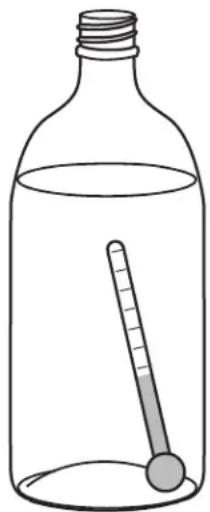
Simple line drawing of a glass bottle with a thermometer inside, no text or symbols presentTo check the actual product temperature in the unit.
I. Partially fill a plastic (nonbreakable) bottle with water.
2. Insert an accurate thermometer.
3. Tighten the bottle cap securely.
4. Place the bottle in the desired area for 24 hours.
5. Avoid opening the unit during the testing period.
6. After 24 hours, check the temperature of the water. If required, adjust the temperature control in a small increment (See ADJUSTING THE SET-POINT).
Causes which affect the internal temperatures of the cabinet include:
• Temperature setting.
- Ambient temperature where installed.
- Installation in direct sunlight or near a heat source.
- The number of door openings and the time the door is open.
- The time the internal light is illuminated. (This mainly affects product on the top rack or shelf.)
- The front grille or condenser are obstructed.
Normal Operating Sounds
All models incorporate rigid foam insulated cabinets to provide high thermal efficiency and maximum sound reduction for its internal working components. Despite this technology, your model may make sounds that are unfamiliar.
Normal operating sounds may be more noticeable because of the unit's environment. Hard surfaces such as cabinets, wood, vinyl or tiled floors and paneled walls have a tendency to reflect normal appliance operating noises.
Listed below are common refrigeration components with brief description of the normal operating sounds they make. NOTE: Your product may not contain all the components listed.
- Compressor: The compressor makes a hum or pulsing sound that may be heard when it operates.
- Evaporator: Refrigerant flowing through an evaporator may sound like boiling liquid.
- Condenser Fan: Air moving through a condenser may be heard.
- Automatic Defrost Drain Pan: Water may be heard dripping or running into the drain pan when the unit is in the defrost cycle.
Control Dial
The control dial sets a single continuous set-point temperature. This set point is for the middle zone, it is a base number used by the controller to maintain the multiple temperature zones in the unit. The temperature set point can be affected by the ambient conditions. The unit is shipped with the control dial in a position suggested for standard room conditions.

text_image
Technical diagram of a mechanical or electrical component with labeled parts 1 and 2Adjusting Air Temperature
NOTICE
- Adjust the set point temperature in single increments, and wait 24 hours for the temperature to stabilize before rechecking.
- Factory recommended set-point is MID setting on dial control.
To adjust the set point temperature:
Adjust the temperature by turning the numbered dial (1) in small increments.
Standard Doors
Door Alignment and Adjustment
Align and adjust the door if it is not level, or is not sealing properly. If the door is not sealed the unit may not cool properly, or excessive frost may form in the interior.
NOTICE
Properly aligned, the door's gasket should be firmly in contact with the cabinet all the way around the door (no gaps). Carefully examine the door's gasket to assure that it is firmly in contact with the cabinet. Also make sure the door gasket is not pinched on the hinge side of the door.
To align and adjust the door.
I. Loosen (do not remove) top and bottom hinge screws.
2. Align door squarely with cabinet.
3. Make sure gasket is firmly in contact with cabinet all the way around the door (no gaps).
4. Tighten bottom hinge screws.
5. Tighten top hinge screws.
Door Reversability
(Does not apply to ADA or lock units)
Location of the unit may make it desirable to mount the door on the opposite side of the cabinet.
Models with black and white doors are field-reversible.
Stainless steel models with glass doors without locks are field-reversible. See the table at the front of this book for a summary of units that are reversible.
Stainless steel models without glass doors must be ordered right- or left-hand hinged.
Reversing the Door
(Does not apply to ADA or lock units)
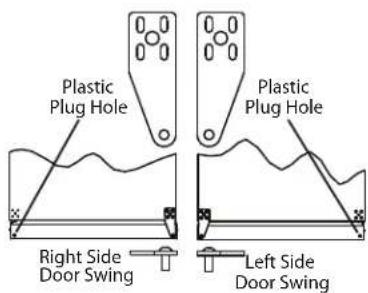
The hinge hardware will be removed and reinstalled on the opposite side of the cabinet.
The hinge plate is flipped over when it is reinstalled on the opposite side of the cabinet.
text_image
Plastic Plug Hole Plastic Plug Hole Right Side Door Swing Left Side Door SwingRemove grille.
Remove the grille, see MAINTENANCE section of this guide.

natural_image
Line drawing showing two hands using a screwdriver to adjust or install a component (no text or symbols present)Remove top hinge, and door.
I. Hold door to keep it from falling.
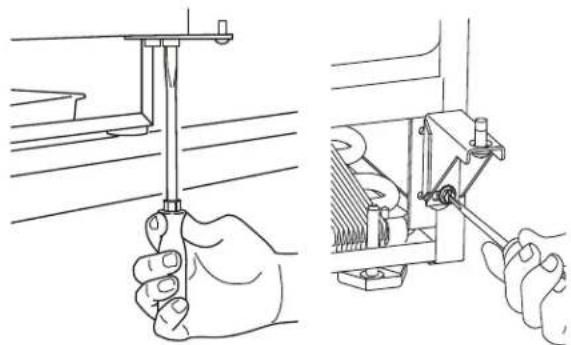
2. Remove top hinge from cabinet by removing three or four screws, depending on model.
3. Remove door by tilting forward and lifting door off bottom hinge.
4. Remove three or four plastic screw plugs from hinge holes on the opposite side. Reinstall into holes where the hinge was removed. Ensure not to scratch cabinet.
natural_image
Technical line drawing showing hands using a tool to adjust or install a mechanical component (no text or symbols present)Remove bottom hinge.
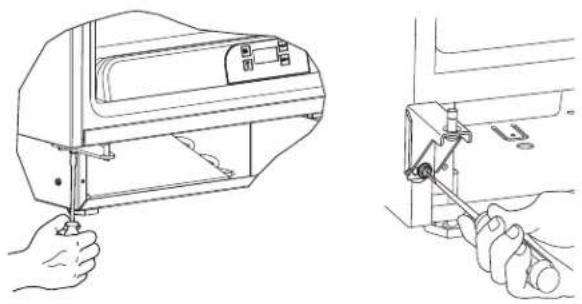
I. Remove bottom hinge from cabinet. Some models will have a gusset with two screws. Other models will have a plate with three screws.
2. Remove corresponding screws on opposite side of cabinet. On some models there may be a nut behind one or both screws on either side.
natural_image
Technical line drawing showing hands operating a sewing machine (left) and a close-up of the mechanical component being inserted (right), no text or symbols present.Install bottom hinge.
- If you have a plate hinge, reorient the pivot screw so it protrudes the opposite direction from the hinge. Remove the pivot screw from the hinge. Turn the plate over and reinstall the screw.
- Align hinge outer edge with cabinet. For models with a plate hinge, the flat edge of the hinge aligns with the outer edge of the cabinet.
Install two or three screws, depending on model. Replace nuts if used.
text_image
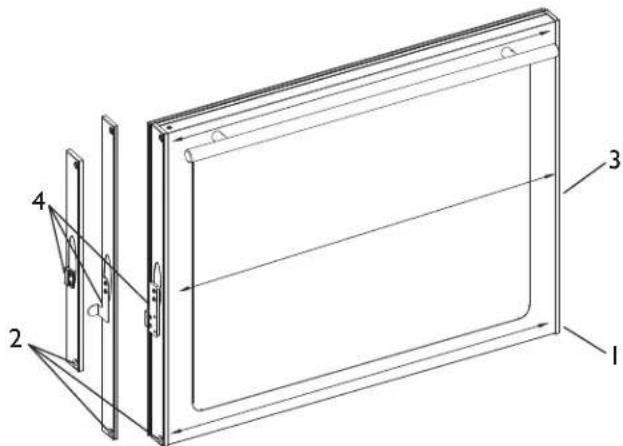
Technical diagram of a door frame with numbered components and directional arrows indicating assembly or movement.Prepare door for reinstallation.
For stainless steel models with glass doors:
- Stainless glass doors are flipped upside down to be reversed.
- Lay the door on its side. Remove the plastic hole plug (1) and install in the corner opposite of where it was removed.
- Remove the plastic hinge bushing (2) and install in the corner opposite of where it was removed.
- Remove the U-Line nameplate (3) from door. This will reveal mounting holes for the door actuator bracket.
- Remove door actuator (4) from door. Be sure to only remove the two screws holding the actuator to the door. Reinstall the actuator (4) on the opposite end of the door where the nameplate was removed.
- Install new nameplate where the actuator assembly was removed.
- Install screws into holes on opposite side, where the hinge was removed. Replace nuts if used.
natural_image
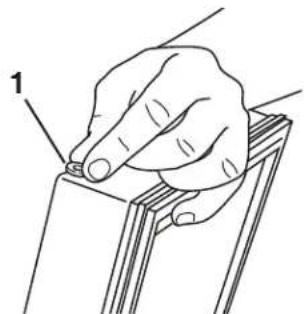
Line drawing of a hand holding a small object on a wooden panel (no text or symbols)Prepare door for reinstallation.
For black or white doors:
- Remove plastic hinge bushing on bottom of door and reinstall on opposite side. Clean out bushing hole in door bottom with a screwdriver if necessary.
natural_image
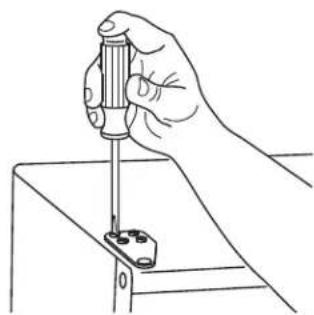
Line drawing of a hand using a screwdriver to adjust or install a small component on a metal frame (no text or symbols)Install top hinge and door.
- Reorient the pivot screw so it protrudes the opposite direction from the hinge. Remove the pivot screw from the hinge. Turn the plate over and reinstall the screw.
- Hold door to keep it from falling.
- Lift the door onto the bottom hinge.
- Align flat edge of the top hinge with the outer edge of the unit.
- Install three or four screws, depending on model.
Align and adjust the door.
- Align and adjust the door, see DOOR ALIGNMENT AND ADJUSTMENT.
Install grille.
Install the grille, see MAINTENANCE section of this guide.
Maintenance
Leveling
NOTICE
Unit must be level, for proper door and ice maker (if equipped) operation.
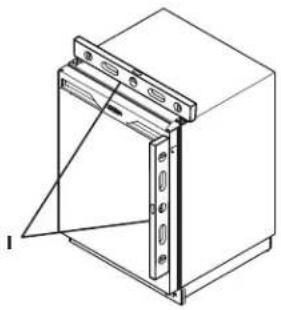
natural_image
Technical line drawing of a mechanical cabinet or enclosure with mounting holes and a side panel (no text or symbols)For Models with adjustable leveling feet:
- Use a level to check the levelness of the unit from front to back and from side to side. Place the level along top edge and side edge as shown (1).
- If the unit is not level, rotate the adjustable leveling legs to raise or lower each corner of the unit as necessary.
- Check levelness after each adjustment and repeat the previous steps until the unit is level.
For Models without adjustable leveling feet:
NOTICE
The unit must be located on a level surface, for proper door and ice maker (if equipped) operation.
Use a level to check the levelness of the unit from front to back and from side to side. Place the level along top edge and side edge as shown (1).
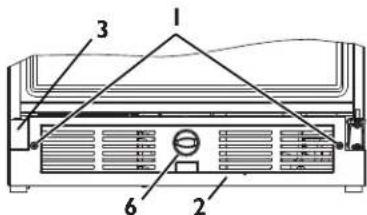
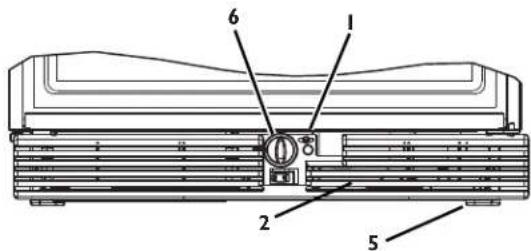
Removing and Installing Grille

WARNING
Disconnect electric power to the unit before removing the grille.

CAUTION
DO NOT touch the condenser fins(4). The condenser fins are SHARP and can be easily damaged.
- If endcaps were included, ensure they are installed on grille.
- For some 75 series product you must tilt the grille into place, hooking the back first.
- Align and install screws.
- Install knob.
- Re-connect power.
29 Models
text_image
1 2 3 6Ice Maker Models
text_image
Technical diagram of a refrigerator or air conditioner unit with numbered components labeled 1 through 6.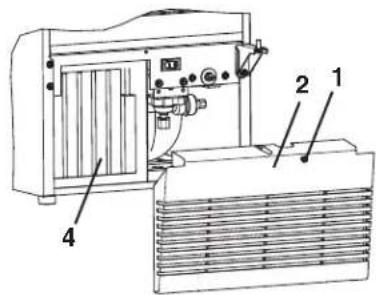
text_image
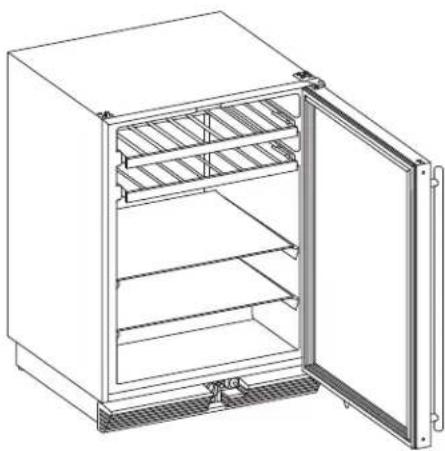
Technical diagram of an industrial machine with labeled components 1, 2, and 4Removing and Installing Interior Shelves
natural_image
Line drawing of a refrigerator with open door and side panel (no text or symbols)For models equipped with glass shelves having shelf supports, remove the shelves as follows:
- Open door completely.
- Grasp the shelf edge in the center and slide the shelf from the unit.
Insert the shelves as follows:
Reposition the shelf as required, ensure the raised white edge strip is toward the rear of the unit and graphics, if applied, are on the underside of the shelves.
Removing and Installing Door Shelves

text_image
Technical diagram showing a mechanical or fluidic device with labeled parts 1 and 2, including a curved pipe connection.For models equipped with door shelves:
To remove the door shelf.
- Grasp shelf in center, and lift until the shelf notches (1) clear the pins (2).
- Carefully pull the shelf away from the door.
To install the door shelf.
- Holding the shelf in the center, center the shelf in the door at the desired location, slightly above the pins (2).
- Lower the shelf onto the pins (2).
Removing and Installing Wine Racks
- Remove any bottles stored on the rack.
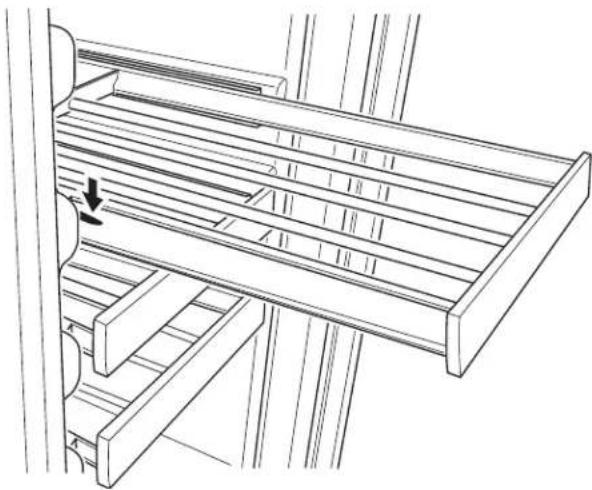
- Grasp the end of the rack, and gently slide it out until it stops
natural_image
Technical line drawing of a mechanical assembly with no visible text or symbols- Press the left rack release lever down. At the same time, lift the matching right rack release lever up. Pull the rack out until it is free of the tracks and the cabinet.
NOTICE
Do not remove the track rails from the cabinet.
To insert a rack in the cabinet:
Align the left and right rack channels with the tracks in the cabinet. Ensure an even track engagement on both sides by gently pushing the rack into the cabinet until it stops.
Before reloading the rack, ensure proper movement of the travel stops in the left and right track rails by pulling the rack out gently until it stops.
Customer Call Guide
U-Line's warranty does not cover customer education calls. It has been reported that as high as 50% of all service calls performed are customer education calls.
The following guide has been developed to help answer frequently asked questions. It can be used by persons scheduling service calls. Things to consider before scheduling a service call been developed to help answer frequently asked questions. It can be used by persons scheduling service calls. Things to consider before scheduling a service call
| Concern Response | |
| The unit is not cold enough. | Are you familiar with the factory temperature specifications for your unit? Many factors can cause these temperatures to vary; ambient temperature, application, amount of use (number of times and length of time the door or drawers or opened and closed), etc.Is the door or drawers sealing properly? If the door or drawer is not sealed properly, it allows heat into the unit. U-Line's warranty is 90 days for door or drawer adjustments.Has the door or drawers been left open?Is the condenser clean? U-Line's warranty does not cover cleaning the condenser.Is the unit behind closed doors or the vent restricted? The front grille must be free of obstruction.Is the unit in an application of heavy usage? Heavy usage or high ambient temperatures will cause a unit to frost up.Did you try adjusting the temperature to a colder level? Adjust to a colder level. Be sure to allow 24 hours between temperature control adjustments. |
| Temperature is too cold. · Check actual temperature versus set-point. | Did you try adjusting the temperature to a warmer level? Adjust to a warmer level. Be sure to allow 24 hours between temperature control adjustments. |
| The unit is frosting up. | Are you familiar with the defrost technology of your unit?Is the door or drawers sealing properly? If the door or drawer is not sealing properly, it allows heat/humidity into the unit. U-Line's warranty is 90 days for door or drawer adjustments.Has the door or drawers been left open?Is the unit in an application of heavy usage? Heavy usage or high ambient temperatures will cause a unit to frost up. |
Troubleshooting Guide

CAUTION
Never attempt to repair or perform maintenance on the unit until the main electrical power has been disconnected.
| Potential Causes Suggested Remedy | ||
| Not Cooling Compressor overheating Verify proper air flow through condenser. (Refer to | Airflow/General information Section of this manual) | |
| Confirm condenser fan operation. (Refer to Airflow/General information Section of this manual) | ||
| Compressor not operating Test overload and relay, replace as needed. | ||
| Compressor operating - no cooling | Refer to Refrigeration System Diagnosis Guide Section of this manual. | |
| Evaporator fan not operating convect cool models only | Refer to Convection Cooling Section of this manual. convect cool models only | |
| Frozen Product Control set too cold Refer to Adjusting Air Temperature Section of this | manual. | |
| Review logged error codes electronic control models only | Refer to Fault System Diagnosis Guide Section of this manual. electronic control models only | |
| Thermistor failure electronic control models only | Refer to Thermistor Failure Section of this manual. electronic control models only | |
| Frost Buildup Inside Unit | Door ajar or restricted from closing | Inspect/Repair door closure, adjust as needed. |
| Display Not Working Unit placed in Sabbath mode electronic control models only | Refer to Sabbath Mode Section of this manual. electronic control models only | |
| Display unplugged electronic control models only | Verify that both ends of the display wiring are firmly connected. electronic control models only | |
| Display wiring broken or damaged electronic control models only | Perform continuity test of wiring and replace as needed. electronic control models only | |
| Internal Lights Not Working | Door switch misaligned or defective | Check light switch, wiring and acuator. Adjust as needed. |
| Door switch misaligned or defective electronic control models only | Refer to Reed Switch Section of this manual. electronic control models only | |
| Noisy | Refrigeration tubing touching cabinet | Carefully reposition tubing. |
| Fan blade obstruction (wiring, foam insulation, packaging material) | Remove obstruction. | |
| Ice Buildup In Drain Trough or Drain Problem | Obstructed drain cup or tube | Clear as needed, test flow. |
| Kinked condensate drain line | Reroute condensate drain line and test flow. | |
| Drain trough and cup misaligned | Trough is slotted for adjustment. Loosen retainers and adjust as needed. | |
Compressor Information
Cooling process
Refrigerant is pumped from the compressor to the condenser as a high pressure, high temperature vapor.
As the refrigerant cools in the high pressure condenser, the vapor condenses to liquid. During this phase change, a great amount of heat is rejected with the help of the condenser fan.
The liquid then flows to the dryer where it is strained and filtered.
From the dryer, the refrigerant flows through the capillary tube which meters the liquid refrigerant to the evaporator.
The pressure of the refrigerant is reduced to the evaporating or low side pressure.
The reduction of pressure on the liquid refrigerant causes it to boil or vaporize until it reaches saturation temperature. As the low temperature refrigerant passes through the evaporator coil, it continues to absorb a lot of heat, causing the boiling action to continue until the refrigerant is completely vaporized. It is during this phase that the most heat is absorbed (the cooling takes place) in the refrigerator.
The refrigerant vapor leaving the evaporator travels through the suction line to the compressor inlet. The compressor takes the low pressure vapor and compresses it, increasing both pressure and temperature. The hot, high pressure gas is pumped out the discharge line and into the condenser. The cycle continues.

flowchart
graph TD
    A["Condenser"] --> B["Compressor"]
    B --> C["Dryer"]
    C --> D["Capillary Tube"]
    D --> E["Evaporator"]
    E --> F["Return Line"]
    style A fill:#f9f,stroke:#333
    style B fill:#ccf,stroke:#333
    style C fill:#cfc,stroke:#333
    style D fill:#fcc,stroke:#333
    style E fill:#cff,stroke:#333
    style F fill:#ffc,stroke:#333
Compressors

DANGER
Electrocution can cause death or serious injury. Burns from hot or cold surfaces can cause serious injury. Take precautions when servicing this unit.
- Disconnect the power source.
- Do not stand in standing water when working around electrical appliances.
• Make sure the surfaces you touch a re not hot or frozen. - Do not touch a bare circuit board unless you are wearing an anti-static wrist strap that is grounded to an electrical ground or grounded water pipe.
- Handle circuit boards carefully and avoid touching components.
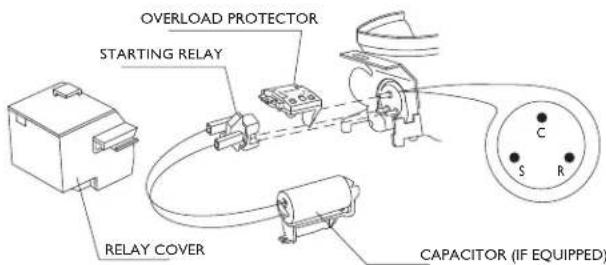
To measure the start winding resistance, measure across the C and S pins.
To measure the run winding resistance, measure across the C and R pins.
Also check S to R and you should get the sum of the run and start windings.
To ensure the windings are not shorted, check the S and R to ground.
| EMI30HER EMU30HSC EMU40HNP | |||
| Voltage 115 I | 15 220 | ||
| F | r | e | q u |
| Start Winding 2 | .20 7.0 | 40 | |
| Run Winding | 7.9 | 8.4 | 30 |
text_image
OVERLOAD PROTECTOR STARTING RELAY RELAY COVER CAPACITOR (IF EQUIPPED)Refrigeration System Diagnosis Guide
| System Condition | Suction Pressure | Suction Line | Compressor Discharge | Condenser Capillary Tube | Evaporator Wattage | |
| Normal Normal | Slightly below room temperature | Very hot Very hot | Hot Warm Cold Normal | |||
| Overcharge | Higher than normal | Very cold - may frost heavily | Slightly warm to hot | Hot to warm Cool Cold | Higher than normal | |
| Undercharge | Lower than normal | Warm - near room temperature | Hot Warm | Warm | Extremely cold near inlet - outlet below room temperature | |
| Partial Restriction | Somewhat lower than normal - in vacuum | Warm - near room temperature | Very hot | Top passes warm - lower passes cool (near room temperature due to liquid | Room temperature (cool) or colder | Extremely cold near inlet -outlet below room temperature backing up |
| Complete Restriction | In deep vacuum | Room temperature (cool) | Room temperature (cool) | Room temperature (cool) | Room temperature (cool) | No refrigeration |
| No Gas | 0 PSIG to 25" | Room temperature (cool) | Cool to hot | Room temperature (cool) | Room temperature (cool) | No refrigeration |
Service
Before Calling for Service
If you think your U-Line product is malfunctioning, read the OPERATION section of this guide to understand clearly the function of the control.
If the problem persists, read the NORMAL OPERATING SOUNDS and TROUBLESHOOTING GUIDE section of this guide to help you quickly identify common problems, and possible causes and remedies. Most often, this will resolve the problem without the need to call for service.
If Service is Required
If you do not understand a troubleshooting remedy, or your product needs service, contact U-Line Corporation directly.
Phone 1-800-779-2547
FAX 1-414-354-5696
Email: onlineservice@u-line.com
u-lineservice.com
When you call, you will need your product Model and Serial Numbers. This information can be recorded inside the front cover of this guide. It also appears on the Model and Serial number plate located on the upper right or rear wall of the interior of your product.
Cleaning
Exterior Cleaning
Vinyl Clad (Black or White) Models:
- Clean surfaces with a mild detergent and warm water solution. Do not use solvent-based or abrasive cleaners. Use a soft sponge and rinse with clean water. Wipe with a soft, clean towel to prevent water spotting.
- Clean any glass surfaces with a non-chlorine glass cleaner.
Stainless Models:
- Stainless door panels, handles and frames can discolor when exposed to chlorine gas, pool chemicals, saltwater or cleaners with bleach.
- Keep your stainless unit looking new by cleaning with a good quality all-in-one stainless steel cleaner polish monthly. For best results use Claire® Stainless Steel Polish and Cleaner, which can be purchased from U-Line Corporation (Part Number 173348). Comparable products are acceptable. Frequent cleaning will remove surface contamination that could lead to rust. Some installations may require cleaning weekly.
- Do not clean with steel wool pads.
- Do not use stainless steel cleaners polishes on any glass surfaces.
- Clean any glass surfaces with a non-chlorine glass cleaner.
- Do not use cleaners not specifically intended for stainless steel on stainless surfaces (this includes glass, tile and counter cleaners).
- If any surface discoloring or rusting appears, clean it quickly with Bon-Ami® or Barkeepers Friend Cleanser® and a nonabrasive cloth. Always clean towards the grain. Always finish with Claire Stainless Steel Polish and Cleaner or comparable product to prevent further problems.
- Using abrasive pads such as Scotchbrite™ will cause the graining in the stainless to become blurred.
- Rust not cleaned up promptly can penetrate the surface of the stainless steel and complete removal of the rust may not be possible.
Interior Cleaning
- Disconnect power to the unit.
- Clean the interior and all removed components using a mild nonabrasive detergent and warm water solution applied with a soft sponge or non-abrasive cloth.
- Rinse the interior using a soft sponge and clean water.
- Do not use any solvent-based or abrasive cleaners. These types of cleaners may transfer taste to the interior products and damage or discolor the interior.
Defrosting
Automatic Defrost Models
Frost on the rear wall is normal and will melt during each off cycle. If there is excessive build-up of 1/4" or more, manually defrost the unit.
- Ensure the door is closing and sealing properly.
- High ambient temperature and excessive humidity can also produce frost.

CAUTION
DO NOT use an ice pick or other sharp instrument to help speed up defrosting. These instruments can puncture the inner lining or damage the cooling unit. DO NOT use any type of heater to defrost. Using a heater to speed up defrosting can cause personal injury and damage to the inner lining.
NOTICE
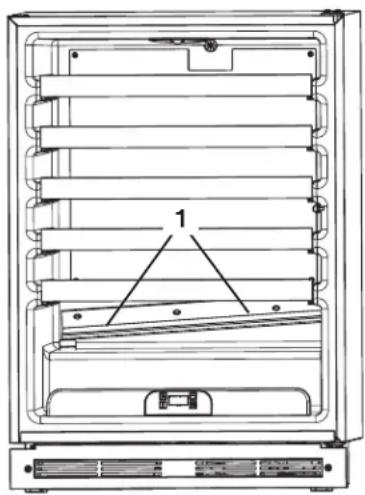
The drain pan was not designed to capture the water created when manually defrosting. To prevent water from overflowing the drain pan, place towels or other absorbent materials over the interior drain trough, under the evaporator (1), before defrosting.
natural_image
Technical line drawing of a multi-chamber refrigerator with labeled component (no text or symbols beyond label)To defrost:
I. Disconnect power to the unit.
2. Remove all products from the interior.
3. Prop the door in an open position (2 in. [5 cm] minimum).
4. Allow the frost to melt naturally.
5. After the frost melts completely clean the interior and all removed components. (See INTERIOR CLEANING)
6. When the interior is dry, reconnect power and turn unit on.
Condenser Cleaning
Interval - Every Six Months
To maintain operational efficiency, keep the front grille free of dust and lint, and clean the condenser every three months. Depending on environmental conditions, more or less frequent cleaning may be necessary.

WARNING
Disconnect electric power to the unit before cleaning the condenser.

CAUTION
DO NOT touch the condenser fins. The condenser fins are SHARP and can be easily damaged.
NOTICE
DO NOT use any type of cleaner on the condenser unit.
I. Remove the grill. (See MAINTENANCE)
2. Clean the condenser coil (4) using a using a soft brush with a "combing" action or vacuum cleaner. Do not touch the condenser coil.
3. Install the grill. (See MAINTENANCE)

text_image
15 & 29 Models Typical Model Shown 5 3 4 2 1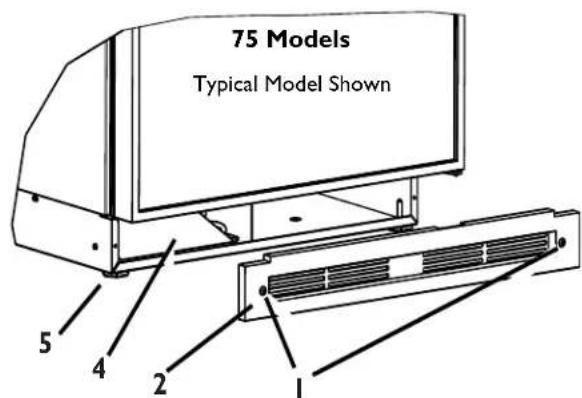
text_image
75 Models Typical Model Shown 5 4 2 1Storage, Vacation and Moving
If not using the unit for an extended period, or otherwise stored, follow these steps completely:

WARNING
Electrical Shock Hazard. Disconnect power before servicing. Before operating, replace all panels. Failure to do so may result in death or electrical shock.
NOTICE
If the ambient temperature is expected to drop below 50^ F, turn off and unplug unit, and drain all water from the unit to prevent freezing damage not covered by the warranty.
- Remove all consumable contents from the unit.
- Disconnect the power cord from its outlet, and leave it disconnected until the unit is returned to service.
- Clean and dry the interior of the cabinet.
- During periods of nonuse, the cabinet must remain open to prevent formation of mold and mildew. Open door a minimum of 2 in. (5 cm) to provide the necessary ventilation.
Product Disposal
If the unit is being removed from service for disposal, check and obey all Federal, State and or Local regulations regarding the disposal and recycling of refrigeration appliances, and follow these steps completely:
- Remove all consumable contents from the unit.
- Disconnect power to the unit and unplug the power cord from its outlet.

DANGER
RISK OF CHILD ENTRAPMENT. Before you throw away your old refrigerator or freezer, take off the doors and leave shelves in place so children may not easily climb inside.
- Remove the cabinet door.
PRODUCT INFORMATION
Complete Installation Guides, Use and Care Guides, Specifications & Features and Benefits, CAD Drawings, Overlay Panel/Frame and Toe-Kick Specifications and Instructions, Compliance Documentation and Applicable Energy Guides are available for reference and download at u-line.com.
SERVICE INFORMATION
Please consult your Use and Care Guide for troubleshooting information. Answers to Customer Frequently Asked Questions are available at u-line.com under Customer Service. You may contact U-Line directly:
GENERAL INQUIRIES:
U-Line Corporation
P.O. Box 245040
Milwaukee, Wisconsin 53224-9540 U.S.A.
Phone 1-414-354-0300
FAX 1-414-354-7905
Email: sales@u-line.com
u-line.com
SERVICE ASSISTANCE:
Phone 1-800-779-2547
FAX 1-414-354-5696
Email: onlineservice@u-line.com
u-lineservice.com
PARTS ASSISTANCE:
E-mail: onlineparts@u-line.com
BUILDING ON THREE GENERATIONS OF INNOVATION
For nearly five decades and three generations, U-Line continues to be the leader in innovation, quality and value in the premium built-in undercounter ice making, refrigeration and wine preservation market. U-Line has captivated those with an appreciation for the finer things with exceptional functionality, style, inspired innovation and attention to even the smallest details. We are known and respected for our unwavering dedication to product design, quality and selection.
In 1962, Henry Uihlein founded U-Line Corporation as an outgrowth of Ben-Hur Freezer Company and was the first to develop and patent an automatic stand-alone undercounter residential ice maker. His foresight and determination to develop new ideas and to succeed when there were no clear guidelines or solutions are evident today. The newest Uihlein generation continues to build upon the family's innovative legacy at the Milwaukee, Wisconsin based business by providing continuity and vision from which new designs and technology continue to be born.
Today the complete U-Line product collection includes Ice Makers, Wine Captain® Models, Combo® Models, a Refrigerator / Freezer, Refrigerators, Drawers and Beverage Centers. The U-Line brand offers products in the 1000 Series, 2000 Series and the Modular 3000 Series. The 1000 Series offers a more targeted priced product with appropriate features, while the 2000 Series offers upscale features, advanced technology and specialized product families. U-Line's approach to its breadth of products, multiple price points and features allows a choice and product that will fit any lifestyle.
DESIGNED, ENGINEERED AND ASSEMBLED IN WISCONSIN, USA