3018RFOL-00 - Fridge U-Line - Free user manual and instructions
Find the device manual for free 3018RFOL-00 U-Line in PDF.


User questions about 3018RFOL-00 U-Line
0 question about this device. Answer the ones you know or ask your own.
Ask a new question about this device
Download the instructions for your Fridge in PDF format for free! Find your manual 3018RFOL-00 - U-Line and take your electronic device back in hand. On this page are published all the documents necessary for the use of your device. 3018RFOL-00 by U-Line.
USER MANUAL 3018RFOL-00 U-Line
natural_image
Front and back view of a stainless steel double-bout refrigerator with glass doors (no visible text or symbols)BEVERAGE CENTERS

natural_image
Exterior view of a modern stainless steel double-decker refrigerator with glass doors and side panels (no visible text or symbols)GLASS DOOR
REFRIGERATORS
natural_image
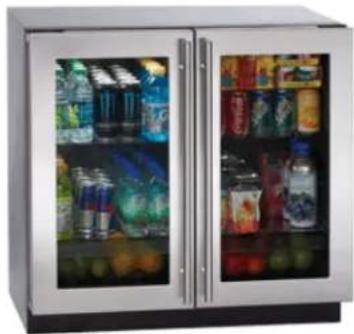
Exterior view of a modern stainless steel double-door refrigerator with glass doors showing various beverage cans and beverages (no visible text or symbols)REFRIGERATORS
natural_image
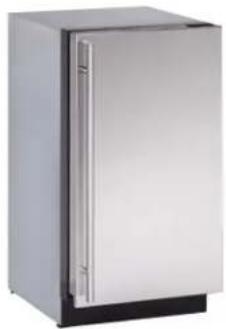
Exterior view of a modern stainless steel refrigerator (no visible text or symbols)U-3018WCOL-00
U-3018WCOL-01
U-3018WCS-00
U-3018WCS-01
U-3018WCS-13
U-3018WCS-15
U-3024WCOL-00
U-3024WCOL-01
U-3024WCS-00
U-3024WCS-01
U-3036WCWCOL-00
U-3036WCWCS-00
U-3036WCWCS-13
U-3024BEVOL-00
U-3024BEVOL-01
U-3024BEVS-00
U-3024BEVS-01
U-3036BVWCOL-00
U-3036BVWCS-00
U-3036BVWCS-13
U-3018RGLOL-00
U-3018RGLOL-01
U-3018RGLS-00
U-3018RGLS-01
U-3018RGLS-13
U-3018RGLS-15
U-3024RGLOL-00
U-3024RGLOL-01
U-3024RGLS-00
U-3024RGLS-01
U-3036RRGLOL-00
U-3036RRGLS-00
U-3036RRGLS-13
U-3018RFOL-00
U-3018RFOL-01
U-3018RFS-00
U-3018RFS-01
U-3024RFOL-00
U-3024RFOL-01
U-3024RFS-00
U-3024RFS-01
U-3036RROL-00
U-3036RRS-00
THE MODULAR 3000 SERIES ARE INTENDED FOR BUILT-IN INSTALLATIONS ONLY
Introduction

U-LINE
Congratulations on your purchase of a U-Line refrigerator.
For nearly five decades and three generations, U-Line continues to be the leader in innovation, quality and value in the premium built-in undercounter ice making, refrigeration and wine preservation market. U-Line has captivated those with an appreciation for the finer things with exceptional functionality, style, inspired innovation and attention to even the smallest details. We are known and respected for our unwavering dedication to product design, quality and selection.
In 1962, Henry Uihlein founded U-Line Corporation as an outgrowth of Ben-Hur Freezer Company and was the first to develop and patent an automatic stand-alone undercounter residential ice maker. His foresight and determination to develop new ideas and to succeed when there were no clear guidelines or solutions are evident today. The newest Uihlein generation continues to build upon the family's innovative legacy at the Milwaukee, Wisconsin based business by providing continuity and vision from which new designs and technology continue to be born.
Today the complete U-Line product collection includes Ice Makers, Wine Captain® Models, Combo® Models, a Refrigerator / Freezer, Refrigerators, Drawers and Beverage Centers. The U-Line brand offers products in the 1000 Series, 2000 Series and the Modular 3000 Series. The 1000 Series offers a more targeted priced product with appropriate features, while the 2000 Series offers upscale features, advanced technology and specialized product families. U-Line's approach to its breadth of products, multiple price points and features allows a choice and product that will fit any lifestyle.
Read and save this Use and Care Guide.
NOTICE
READ all instructions in this guide completely before using the appliance for the first time.
For future reference, keep this guide in a safe, accessible location. If you need additional information or assistance, please contact U-Line Corporation direct. Contact information appears on the back cover of this guide.
Before Calling Service. If you think your U-Line product is malfunctioning, read the OPERATION section of this guide to understand clearly the function of the control. If the problem persists, read the TROUBLESHOOTING GUIDE section of this guide to help you quickly identify common problems, and provide information on possible causes and remedies.
Please Record Your Model Information
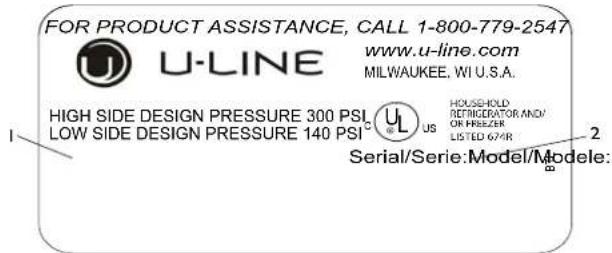
You will need your product model and serial number when you request additional information or services. You can find this information on the serial plate located on the upper right or back wall in the interior of your product. This information also appears on the warranty registration card. Please complete and mail your warranty registration card. You may also register online at u-line.com
text_image
FOR PRODUCT ASSISTANCE, CALL 1-800-779-2547 www.u-line.com U-LINE MILWAUKEE, WI U.S.A. HIGH SIDE DESIGN PRESSURE 300 PSI LOW SIDE DESIGN PRESSURE 140 PSI HUSHELD REFRIGCRATOR AND/ OR FREEZER LISTED 674R Serial/Serie:Model/Modele:Please record the model number (1), serial number (2), date of purchase, and dealer contact information for your U-Line product below:
Model Number:
Serial Number:
Purchase Date:
Dealer Name:
Dealer Address:
Dealer Telephone:
Table of Contents
Safety Precautions
Safety Alert Definitions....I
General Precautions....I
3000 Series Product Features
3000 Series Features 2
Air Flow....3
Initial Startup 3
U-Select® Control....3
Adjusting Temperature Settings 3
Product Operation
Interior Lighting....4
Error Notification....5
U-Line Wine Guide
Looking Behind the Label....7
Wine Selections Suggestions....7
Wine Stocking Recommendation....9
3000 Series Maintenance
Leveling....10
Adjusting Interior Shelves....11
Wine Rack Removal and Installation....11
Refrigerator Bin Installation & Removal 12
3000 Series Doors
Door Alignment and Adjustment....13
Cleaning
Exterior Cleaning....14
Interior Cleaning....14
Defrosting....14
Product Disposal....15
Service
Before Calling for Service 16
If Service is Required....16
Replacement Parts 16
Normal Operating Sounds....16
Troubleshooting Guide....16
NOTICE
- PLEASE READ all instructions before installing, operating, or servicing the appliance.
- Proper installation procedures must be followed when completing an installation or relocation of a unit. An INSTALLATION GUIDE for the unit, providing complete installation information, is available from U-Line Corporation direct. Consult the installation guide before any installation begins. U-Line contact information appears on the rear cover of this guide.
- This unit requires connection to a dedicated 15 Amp grounded (three-prong), polarized receptacle, installed by a qualified electrician, compliant with applicable electrical codes.
Safety Alert Definitions
Throughout this guide are safety items labeled with a Danger, Warning or Caution based on the risk type:

DANGER
Danger means that failure to follow this safety statement will result in severe personal injury or death.

WARNING
Warning means that failure to follow this safety statement could result in serious personal injury or death.

CAUTION
Caution means that failure to follow this safety statement may result in minor or moderate personal injury, property or equipment damage.
General Precautions
Use this appliance for its intended purpose only and follow these general precautions with those listed throughout this guide:

DANGER
RISK OF CHILD ENTRAPMENT. Before you throw away your old refrigerator or freezer, take off the doors and leave shelves in place so children may not easily climb inside.

WARNING
SHOCK HAZARD - Electrical Grounding Required.
- Never attempt to repair or perform maintenance on the unit until the electricity has been disconnected.
- Never remove the round grounding prong from the plug and never use a two-prong grounding adapter.
- Altering, cutting of power cord, removal of power cord, removal of power plug, or direct wiring can cause serious injury, fire and or loss of property and or life, and will void the warranty.
- Never use an extension cord to connect power to the unit.
• Always keep your working area dry.

WARNING
Install provided Anti-Tip kit on all 3000 series units. Serious personal injury could occur.

CAUTION
- Use care when moving and handling the unit. Use gloves to prevent personal injury from sharp edges.
- If your model requires defrosting, DO NOT use an ice pick or other sharp instrument to help speed up defrosting. These instruments can puncture the inner lining or damage the cooling unit. DO NOT use any type of heater to defrost. Using a heater to speed up defrosting can cause personal injury and damage to the inner lining.
NOTICE
- Do not lift unit by door handle.
- Never install or operate the unit behind closed doors. Be sure front grille is free of obstruction. Obstructing free airflow can cause the unit to malfunction and will void the warranty.
- Failure to clean the condenser every six months can cause the unit to malfunction. This could void the warranty.
- Do not Block any internal Fans.
Use only genuine U-Line replacement parts. Imitation parts can damage the unit, affect its operation or performance and may void the warranty.

U-LINE
3000 Series Features
Advanced OLED control system: State of the art OLED control system display.
Fully Integrated Design: Units are designed to blend seamlessly with surrounding decor.
Stainless Steel: Stainless steel models offer a commercial stainless steel handle and door wrap.
Overlay Models: Overlay models accept a custom overlay panel or frame to achieve perfect symmetry with surrounding cabinetry.
Fully Adjustable Toe-Kick / Grille: Grille is fully adjustable and can be lined up with surrounding cabinetry toe kick height and depth for a truly built in look.
Adjustable Leg Levelers: Heavy Duty leg levelers help dial in the perfect fit. Rear leg levelers are adjusted from the front of the unit for ease of installation.
Advanced diagnostic system: Advanced diagnostic systems accessible through front grille mounted USB port, an industry first.
Advanced LED lighting system: Energy efficient and low heat LED lighting provides an elegant illumination system. Theater style lights build to fully on and dim to fully off over a 3 second window. Fully programmable / adjustable.
Convection Cooling: Units are equipped with a convection cooling system. Convection systems cool items faster and maintain entire cabinet temperature precisely to user set-point.
3036 Model Features:
Dual Zone: Two independently controlled zones allow precise storage of a wide range of perishable and temperature sensitive goods.
Multiple Cabinet Configuration: The 3036 models are available in a large range of cabinet configurations. From Wine storage to bin style refrigeration, also in a wide range of combinations.
Refrigeration Centers (Solid Door)
Solid Door: Available in thermally insulated ultra energy efficient solid door design. Doors are available in both stainless steel and overlay.
Slide out bins: 3 full extension slide-out bins on 3018/3024 models and 6 full extension slide-out bins on 3036 models. Bins are easily removed for cleaning.
3018 Capacity: 3.4 cubic feet.
3024 Capacity: 4.78 cubic feet.
3036 Capacity: 6.8 cubic feet.
Refrigeration Centers (Glass Door)
Glass Door: Standard with energy efficient, triple pane, Low-E coated, argon filled glass doors. Door(s) are available in stainless steel wrap or overlay.
Adjustable Shelving:
3018/3024: 3 removable/adjustable tempered glass shelves, I fixed lower shelf.
3036: 6 removable/adjustable tempered glass shelves,
3 per zone, and 2 fixed lower shelves, 1 per zone.
Crisper Drawer: Includes "true" crisper drawer, 3036 units include 1 per zone.
3018 Capacity: 3.6 cubic feet
12 oz Bottle = 60 (with two glass shelves)
12 oz Cans = 127 (with four glass shelves)
3024 Capacity:
3024RGLOL Capacity: 4.66 cubic feet
3024RGLSS Capacity: 4.87 cubic feet
12 oz Bottle = 84 (with two glass shelves)
12 oz Cans = 168 (with four glass shelves)
3036 Capacity: 7.1 cubic feet
12 oz Bottle = 120 (with two glass shelves)
12 oz Cans = 254 (with four glass shelves)
Wine Captain®
Glass Door: Standard with energy efficient, Low-E coated, argon filled glass doors.
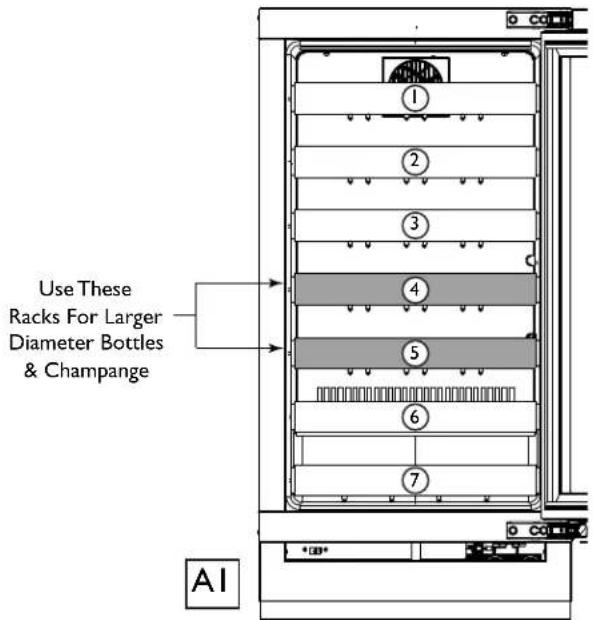
Full extension wine racks: 6 fully extendable wine racks per zone safely store your wine at the perfect humidity and temperature. 2 of the 6 extendable wine racks in each zone have been designed to carry both standard or large diameter bottles, including champagne. An additional wine rack per zone on the bottom carries two additional bottles.
3018 Capacity: 3.6 cubic feet. Wine Bottles: Up to 31 (.75L)
3024 Capacity: 3024WCOL Capacity: 4.80 cubic feet. 3024WCS Capacity: 5.03 cubic feet. Wine Bottles: Up to 43 (.75L)
3036 Capacity: 7.1 cubic feet. Wine Bottles: Up to 62 (.75L)
Beverage / Wine Combination Model (3036)
Glass Door: Standard with energy efficient, triple pane, Low-E coated, argon filled glass doors. Doors are available in stainless steel wrap or overlay.
Adjustable Shelving: 3 removable/adjustable tempered glass shelves, I fixed lower shelf.
Full extension wine racks: 6 fully extendable wine racks. 2 of the 6 extendable wine racks have been designed to carry both standard or large diameter bottles. An additional wine rack on the bottom carries two additional bottles.
Capacity: 7.1 cubic feet total. Wine bottles 31. 12 oz cans 127.
Beverage Centers (3024)
Glass Door: Standard with energy efficient, triple pane, Low-E coated, argon filled glass doors. Doors are available in stainless steel wrap or overlay.
Adjustable Shelving: 3 removable/adjustable tempered glass shelves, I fixed lower shelf.
Capacity: 3024BEVOL Capacity: 4.66 cubic feet.
3024BEVLS Capacity: 4.87 cubic feet. 12 oz Cans = 126
Product Operation
Air Flow
NOTICE
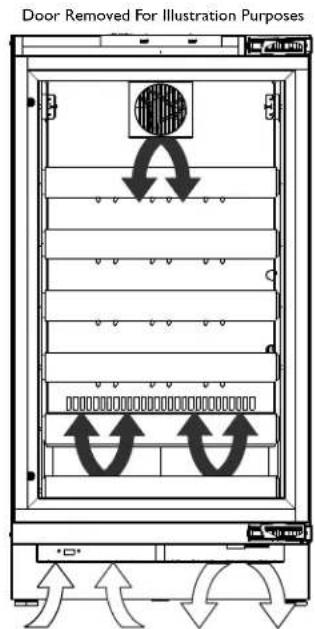
The unit requires proper air flow to perform at its highest efficiency. Do not block the front grille, internal fans or vents at any time, or the unit will not perform as expected. Do not install the unit behind a door.
text_image
Door Removed For Illustration PurposesInternal Air Flow And Unit Ventilation Diagram
Initial Startup
All U-Line controls are preset at the factory. Initial startup requires no adjustments.
NOTICE
U-Line recommends allowing the unit to run overnight before loading refrigerator with product.
To power your unit on simply press POWER and the unit will immediately switch on. To turn the unit off, press and hold POWER for 5 seconds and release. The display will show a countdown to switching the unit off.
U-Select® Control
Digital Display
The 3000 Series units are controlled by a feature rich, advanced OLED display control unit. The control panel allows adjustment to temperature set point, access to Energy Saver Mode, internal temperature readings, and many other features.
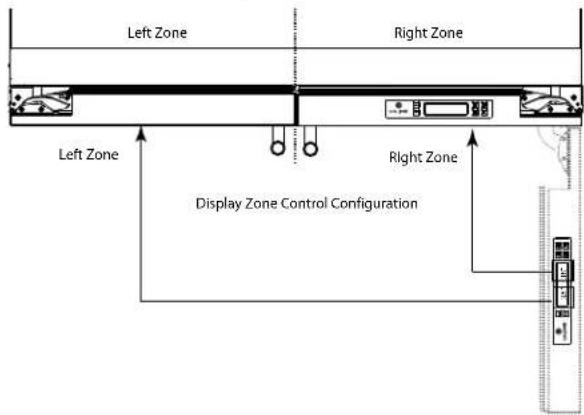
Zone Control 3036 Models
3036 Models have a single control module for both zones. Each side of the control refers to a specific zone. See Below.
text_image
Left Zone Right Zone Left Zone Right Zone Display Zone Control ConfigurationAdjusting Temperature Settings
text_image
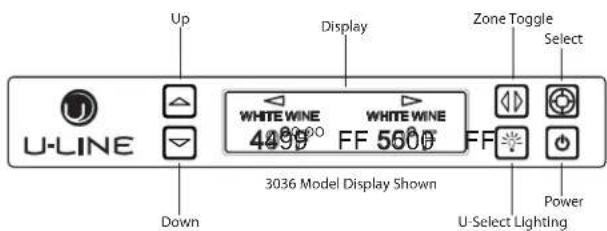
Up Display Zone Toggle Select U-LINE WHITE WINE 4299 FF 5600 FF Down 3036 Model Display Shown Power U-Select LightingEach Zone has a Series of Mode Settings with a default value for each setting. Each Mode Setting can be further customized by fine tuning the temperature set point. See the table below for a description of each Mode and Mode temperature ranges. Mode selection will vary by model.
Mode Settings Chart
Setting Default (°F) Range (°F)
| Red Wine | 55° | 55° - 65° |
| White Wine | 50° | 45° - 55° |
| Sparkling Wine | 45° | 38° - 50° |
| Beverage | 38° | 34° - 65° |
| Market | 38° | 34° - 40° |
| Root | 50° | 45° - 55° |
| Pantry | 42° | 34° - 70° |
| Deli | 36° | 34° - 40° |
Many food types have an optimum storage temperature. Storing your food properly will help maintain its freshness and flavor. The chart on page 4 contains food types and their respective optimum storage temperatures.
Food Storage Chart
Mode Food Types
| Deli | Meats, Fish, Cheeses, Dairy, Butter, Garlic, Oils, Nuts, Condiments |
| Market Fru | ts, Vegetables, Berries, Lettuce |
| Pantry | Dry Goods, Breads, Baking Items, Spices, Seasonings |
| Root | Root Vegetables, Potatoes, Onions, Lemon, Lime, Melon, Peppers, Beans, Cucumber, Cut Vegetables |
The 3036 Models have two independently controlled zones. Each zone may have its own mode and set point. The 3018 models have a single zone. Available Mode Settings will vary with model.
1. In order to adjust temperatures in the 3036 you must first select a Zone to adjust. To select, press Zone Toggle 📄 The left side Mode Setting will flash. Pressing Zone Toggle again will select the right side and the right side Mode Setting will flash. For 3018 Models simply press Select 📄 to alter Mode Settings.
2. Pressing Select 📂 all cycle through the available modes for your model. Reference the Mode Settings Chart on page 3 for each Setting's default set point and range.
3. Once your have selected your desired Mode the default set temperature will display. You may further fine tune the temperature by pressing Up Or Down.
Quick Chill

CAUTION
A number of zones include a quick chill feature. Quick chill is designed to quickly pull warm beverages and foods down to optimum storage temperature. It is important to only initiate quick chill modes when the Refrigerator or Wine Captain® have been fully loaded with warm product. Failure to follow this notice could result in food or beverages that are cooled to a point below optimum or frozen.
The following table lists modes which include the quick chill feature and the time which quick chill will run.
| Mode Run Time | |
| Beverage 4 Hours | |
| Deli 5 Hours | |
| Market 4 Hours | |
| Pantry 4 Hours | |
| Red Wine | Not Available |
| Root | 1 Hour |
| Sparkling 1 Hour | |
| White Wine | 1 Hour |
To Initiate quick chill.
- In 3036 models use Zone Select ☐ to select the desired zone, left or right.
- Press Select to select the desired mode setting.
- Press Down until the temperature set point reads "Quick"
The quick chill feature will then begin for the period of time dictated by the mode type. To cancel quick chill, simply select a set point other than “quick”.
Note: There may be a delay before quick chill is activated in 3036 models. If the opposite zone is currently in a cooling cycle while quick chill is selected, the cooling cycle on the opposite zone will first be completed.
Note: Please note, that when quick chill is activated in a 3036, the zone opposite the active quick chill zone will not return to a cooling cycle until quick chill is complete. If storing product in the opposite zone it is important to limit the number of times the door is opened in the zone not currently under quick chill.
Interior Lighting
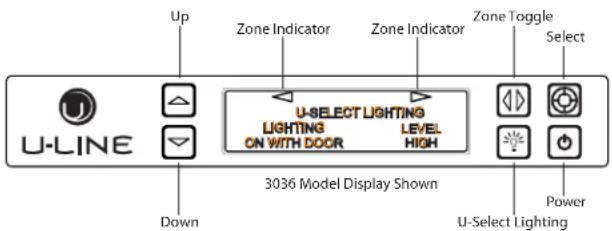
Your U-Line 3000 Series unit uses a state of the art LED lighting system. The 3036 model dual zone's lighting can be independently controlled or set as a group.
3036 Model
text_image
Up Zone Indicator Zone Indicator Zone Toggle Select U-LINE U-SELECT LIGHTING LIGHTING ON WITH DOOR LEVEL HIGH Down 3036 Model Display Shown Power U-Select LightingI. To begin, press U-Select Lighting to enter the lighting menu.
2. In 3036 Models the unit initially defaults to control the lighting in both Zones simultaneously. To select a single zone press Zone Toggle Notice the arrows on top of the display changing state. Pressing Zone Toggle Once will select the left side zone, pressing it again will select the right side zone, pressing it a third time will select both zones again.
3. Use Up or Down to cycle through each available brightness setting; Low, Medium, or High.
4. Use U-Select Lighting ☐ to cycle through each available timer setting. Selections include "On With Door", "On 3 Hours", "On 6 Hours", or "On 24 Hours".
5. To exit, press Select 📋 or simply wait for the menu to time out.
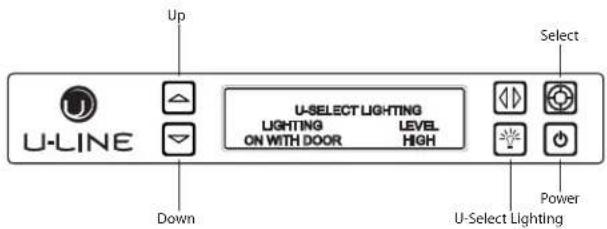
3018/3024 Model
text_image
Up U-LINE Down U-SELECT LIGHTING LIGHTING LEVEL ON WITH DOOR HIGH Select Power U-Select LightingI. To begin, press U-Select Lighting to enter the lighting menu.
2. Use Up or Down to cycle through each available brightness setting: Low, Medium, or High.
3. Use U-Select Lighting to cycle through each available timer setting. Selections include "On With Door", "On 3 Hours", "On 6 Hours", or "On 24 Hours".
4. To exit, press Select 📋 or simply wait for the menu to time out
Error Notification
The 3000 model series continuously monitors a series of inputs and parameters to ensure proper and efficient operation of your unit. Should the system detect a fault, an error notification will be displayed on the user interface. See below for a list of errors
Note: Singe zone models will not use (L) left or (R) right zone indicators in error notification.
ID Description Solution
| No Comm Unit lost | Disconnect and reconnect power to unit. Contact customer care if persistent. | |
| communication to the display. | ||
| (L) (R) Zone T Open | Left or right zone thermistor circuit open. | Contact Customer Care. |
| Amb Thrm Open A | ambient thermistor circuit open. | Contact Customer Care. |
| (L) (R) Zone T Short | Left or right zone thermistor circuit shorted. | Contact Customer Care. |
| Amb Thrm Short A | ambient thermistor circuit shorted. | Contact Customer Care. |
| (L) (R) Temp Hi 6H+ | Left or right Zone temperature +10° over set point for over 6 hours. | Verify door is closed and sealing. Contact customer care if persistent. |
| (L) (R) Temp Hi 12H+ | Zone temperature +10° over set point for over 12 hours. | Verify door is closed and sealing. Contact customer care if persistent. |
| (L) (R) Temp Lo 6H+ | Zone temperature -10° under set point for over 6 hours. | Verify door is closed and sealing. Contact customer care if persistent. |
| (L) (R) Temp Lo 12H+ | Zone temperature -10° under set point for over 12 hours. | Verify door is closed and sealing. Contact customer care if persistent. |
| (L) (R) Door Open 5M | Door switch open for more then 5 minutes. | Verify door is closed and sealing. Contact customer care if persistent. |
Customer Menu
The 3000 Series of U-Line undercounter refrigeration appliances contain a feature rich customer menu. The Customer Menu allows access to a Series of advanced features including Energy Saver Mode, Sabbath mode, actual temperature readings as well a method to restore factory defaults.
3000 Series - Customer Menu
text_image
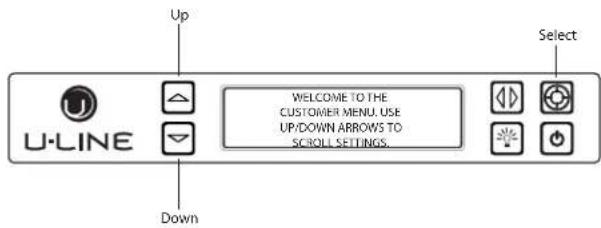
Up U-LINE Down WELCOME TO THE CUSTOMER MENU. USE UP/DOWN ARROWS TO SCROLL SETTINGS. Select- To access the Customer Menu hold Select for 5 seconds.
- Use Up or Down to scroll through available selections.
- Use Select to enter selected sub-menu.
- To exit Customer menu, Use Down ☑ to scroll to the bottom of the display and use Select ☑ to Select "Exit."
Actual Temps

text_image
Up U-LINE Down RETURN TO MENU ACTUAL TEMPS BIN TEMP = 35°F COND TEMP = 114°F SelectThe Actual Temps option displays the actual temperature of each zone, evaporator, as well as ambient temperature.
I. To view actual temperature, Select Actual Temps from the customer menu.
2. Use Up or Down to scroll through available information.
3. To return to the customer menu, Select Return to Menu.
Energy Saver Mode

text_image
Up Energy Saver Mode Indicator Select ICE PRODUCTION (12m remaining) U-LINE DownEnergy Saver mode reduces overall energy consumption by altering user set point, differential, lighting and tone settings. When in Energy Saver mode a small leaf icon will be displayed on the main screen.
I. To enter Energy Saver first select Energy Saver from the Customer Menu.
- Use Down ☑ select "Off" in the menu.
- Press Select .
- Use Up □ Down to Change the selection from Off to On.
- Press Select to confirm your selection.
- To return to the customer menu, Select Return to Menu.
- To cancel Energy Saver mode simply return to the Customer Menu, Select Energy Saver mode and change "On" to "Off".
Sabbath Mode
text_image
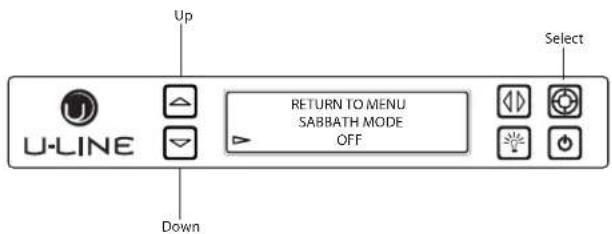
Up U-LINE RETURN TO MENU SABBATH MODE OFF Down SelectThe U-line 3000 Series of models offer a Sabbath mode for users who require this functionality during Sabbaths. Sabbath mode disables system responses to user initiated activities and all external functions; including lighting, display and audible alarms. The unit will still maintain internal temperatures and set points.
I. To enter Sabbath Mode, select Sabbath Mode from the Customer Menu.
2. Use Down to select "Off".
3. Press Select, Off will begin to flash.
4. Use Up or Down to change "Off" to "On".
5. Press Select to confirm your selection.
The Display will fade out as the unit enters Sabbath Mode. Sabbath Mode remains active until Power is pressed.
Languages

text_image
Up U-LINE RETURN TO MENU LANGUAGES ENGLISH Down SelectThe U-Line 3000 Series of models supports a number of display languages including English, Spanish, French and German.
I. To change display language select Languages from the Customer Menu.
2. Use Down ☐ select "English".
3. Press Select, "English" will begin to flash.
4. Use Up or Down to cycle through the available Languages.
5. Press Select to confirm your choice.
Sound Level
text_image
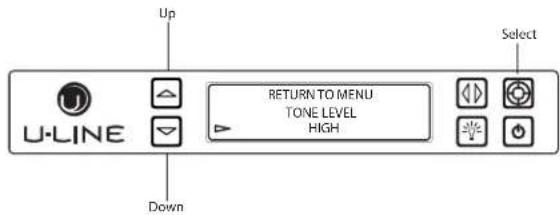
Up U-LINE RETURN TO MENU TONE LEVEL HIGH Down SelectAudible alarms and alert tones support four different Sound Level settings, High, Medium, Low, and Off.
To select a new sound level, enter the Sound Level menu from the Customer Menu.
- Use Up 📄 or Down to select the current sound level.
- Press Select, the current setting will begin to flash.
- Use Up or Down to select a different level.
- Use Select to confirm your choice.
I. Use Down ☑ to select "Degrees".
2. Press Select . The selection will begin to flash.
3. Use Up □ Down to select between °F (Fahrenheit) or °C (Celsius).
4. Press Select to confirm your choice.
Help
text_image
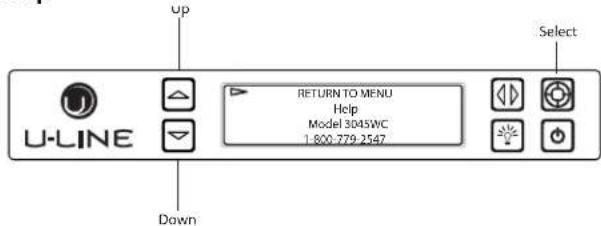
U-LINE Up Down RETURN TO MENU Help Model 3045WC 1.800-779-2547 SelectTo access the Help menu select Help from the Customer Menu. Use Up or Down to scroll through available information.
To return to the customer menu, use Up ☐ to select "Return to Menu" and press Select ☐ to confirm.
U-Line Wine Guide
Looking Behind the Label
To most, wine is a delicious mystery. We purchase it, uncork it, and savor its taste and beauty. But there is so much more to true wine appreciation. Many secrets are simply too good to keep bottled up.
Wine Selections Suggestions
Selecting the right wine for the right occasion can sometimes be a seemingly awkward or difficult task for the beginning wine enthusiast. We would therefore like to present you with a few suggestions which may provide a little more confidence and enjoyment when choosing and serving your wines.
When selecting wines, keep an open mind and do not be afraid to be adventurous. Do not view the subject of wine so seriously it discourages you from learning and discovering for fear of embarrassment if something is incorrect. Wine is best viewed as a hobby and enjoyed.
When assembling your collection, try not to become obsessed with "Vintages." Although a chart can be a useful tool, generalizations about a specific year have led more than one collector to disappointment. Often an "Off Year" will provide a better value and more drinking enjoyment.
The primary guideline to the subject of wine is your own palate. Do not be afraid to make mistakes. Experiment, discover, but most of all, enjoy yourself and your new U-Line product.
Guide To Common Styles Of Wine
| Red Wines | ||
| Full-Bodied Dry California | FrenchItalian | Zinfandel, Cabernet Rhone, Chateauneuf-du-PapeBarbaresco, Barolo |
| Medium-Bodied Dry California | French | Pinot NoirBordeaux, Burgundy |
| Light-Bodied Dry French | Italian | BeaujolaisChianti, Bardolino |
| White Wines | ||
| Full-Bodied Dry California | French | ChardonnayMontrachet, MeursaultPuligny-Montrachet |
| Medium-Bodied Dry California | French | Sauvignon-BlancPouilly-Fuisse, Sancerre,Voumay, Graves |
| Light-Bodied Dry French Chablis, Muscadet, Pouilly-Fume | ||
| Full-Bodied, Very Sweet Germany | FrenchHungary | BeerenausleseSauternesTokay |
| Medium-Bodied, Semi-Sweet | CaliforniaGermany | GewurtztraminerLiebfraumilch |
| Light-Bodied Off Dry Germany | Rhine, Mosel, Riesling | |
Matching Food and Wine
Although there are no hard fast rules for matching wine to food, observe some guidelines. Delicate dishes should be accompanied by lighter more delicate wines. Full-flavored foods should be matched with fuller-bodied wines.
As a general rule, one should aim to ascend in flavor and quality of wines served.
| Serve a: | Before a: |
| DRY wine | SWEET wine |
| WHITE wine | RED wine |
| YOUNG wine | OLD wine |
| LIGHT-BODIED wine | FULL-BODIED wine |
Any step back in quality will be noticed. If a fine wine is tasted prior to a lesser wine, many of the fine wine's subtle qualities may be missed.
Common Food and Wine Matches
| Foods | Wines |
| Fish, Shell Fish, Crab, Oysters | Dry White Wines, Light Sparkling or Extra Dry Champagne |
| Beef, Venison | Full-Bodied Red Wines |
| Pork, Veal, Lamb and Poultry | Light-Bodied Red Wines |
| Fruit | Sweet White and Sparkling Wines |
A Toast to Wine Truths
Like the grapes themselves, many wine myths have been cultivated over the centuries.
Myth I: Most wines taste better when aged.
Truth: In fact, less than 5% of wines produced today are meant to be aged. Most wines are crafted to be consumed within the first one to two years.
Myth 2: Wines should be uncorked and decanted allowing them to "breathe."
Truth: To breathe or not breathe? While it is better to allow a young tannic Red to breathe in a glass or decanter to soften the tannins, an old Red reaches a stage in its life where it should be enjoyed soon after opening. Allow an old Red to breathe for a short time to dissipate any off odors. Most white wines can be served, ideally, 10-15 minutes after opening.
Myth 3: When age worthy wines peak, they must be consumed almost immediately.
Truth: Most great wines reach a plateau period rather than a peak. Great Bordeaux's may have as much as a 10-year plateau before fading.
Myth 4: Wine color does not change with aging.
Truth: As red wines age they get lighter in color while whites get darker.
The Cork: A Mystery on Its Own
Cork Presentation. The ritual of the presentation of the cork has a rich and fascinating history dating back to the late 1800's. A phylloxera (root louse) devastation to the vineyards severely limited the supply of great wines. Restaurateurs would remove labels on inferior wines and replace them with labels from superior wines. This made it necessary for patrons to protect themselves by checking the branding on the cork to ensure that what they ordered was, in fact, what they were served.
When presented with a cork today, feel it to check for its integrity, read and match the branding on the cork to the bottle and set it aside. There is little to be learned from the cork. The proof is in the wine.
"Corked" wines. If you've ever had a wine that smelled or tasted of mold, you've experienced a wine that may have been "corked." Today, between five and eight percent of wines are tainted with Trichloroanisole (TCA). This substance, found naturally in plants and trees, is imparted to the wine through the cork. Corked wines are a major concern for winemakers as it destroys millions of cases per year and puts reputations at stake. Amazing as it may seem twist-off caps may offer a better alternative and many great wineries in California, Australia and New Zealand are pioneering the trend.
Common Tasting Terms
| TerminologyDescription | |
| Acidity A critical element of wine that is responsible for preserving the wines freshness. Excess acidity results in an overly tart and sour wine. | |
| Balance A desired trait where tannin, fruit and acidity are in total harmony. Wines with good balance tend to age gracefully. | |
| Body The weight and presence of wine in the mouth provided by the alcohol and tannin level. Full-bodied wines tend to have this strong concentration. | |
| Bouquet The blending of a wine's aroma within the bottle over a period of time, caused by volatile acidity. | |
| Complex A subjective term often used in tasting. A wine is said to be complex if it offers a variety of flavors and scents that continue to evolve as it develops. | |
| Flabby A wine that lacks structure, or is heavy to the taste, lacks acidity. | |
| Full-Bodied | Wine high in alcohol and extract, generally speaking, fills the mouth, powerful. |
| Lean | Generally describes wines that are slim, lacking of generosity or thin. |
| Oaky | A desirable flavor imparted to wine if done in moderation. Most wines are aged in oak barrels one to three years, thereby receiving this toasty oak characteristic. However, if a weak wine is left in contact too long with an oak barrel it will tend to be overpowered with an oaky taste. |
| Tannin | Tannins are extracted from the grape skins and stems and are necessary for a well-balanced red wine. Tannins are easily identified in wine tasting as the drying sensation over the gums. Tannins generally fade as a wine ages. |
Ideal Wine Storage Considerations
Temperature: The most important element about storage temperature is stability. If wine is kept in a stable environment between 40^ F ( 7^ C) and 65^ F ( 21^ C), it will remain sound. A small 1-2 degree temperature fluctuation within a stable environment is acceptable. Larger temperature fluctuations can affect the corks ability to seal, allowing the wine to “leak” from the bottle.
Humidity: The traditional view on humidity maintains that wines should be stored on their sides in 50% - 80% relative humidity to ensure cork moisture and proper fit in the bottle. Contemporary wisdom suggests that the cork surface is too small to be impacted by humidity. Further the cork is sealed with a metal or wax capsule making humidity penetration impossible. The concept of a humid storage environment was derived from the necessity of wineries to maintain moisture in their cellars to keep wooden barrel staves swollen, preventing wine evaporation and product loss. In fact, vineyards estimate as much as a 10% product loss per year due to evaporation while wine is aging in the wooden barrels. Humidity, however, was not intended for the modern home cellar where wine is stored in glass bottles with sealed corks.
Light: UV rays are not only harmful to people, they are damaging to wines - especially those in clear bottles. Since oxygen molecules in wine absorb UV rays, wine should never be stored in direct light for long periods of time.
Vibration: Provided that sediment is left undistributed and particles are not suspended, vibration in a storage environment is not an issue. Wines can become flat or tired when voids and vacuums are created inside the wine bottle. In order to create voids and vacuums within a liquid, aggressive motion or shaking of the wine bottle would have to occur.
The Right Temperature for Wine
| Temperature | Wines |
| Approximately 60°F (15°C) | Red |
| 50°F - 55°F (10°C -12°C) | White |
| Approximately 45°F (7°C) | Sparkling |
Wine Captain® Models - A Touch of Elegance
In 1985 U-Line was the first North American appliance manufacturer to develop a residential wine storage unit, the Wine Captain®. Each U-Line Wine Captain® model is designed to impress and inspire anyone with an interest in wine by providing cellar conditions in stylish, undercounter units. U-Line Wine Captain® models offer stable storage temperatures, a 50% internal relative humidity and protection from UV light rays. U-Line has the largest product offering available, making storing, presenting, and sharing your wine effortless and elegant.
Wine Stocking Recommendation
Specially designed horizontal wine racks properly positioned the bottles so the wine remains in contact with the cork and assure the cork does not become dry.
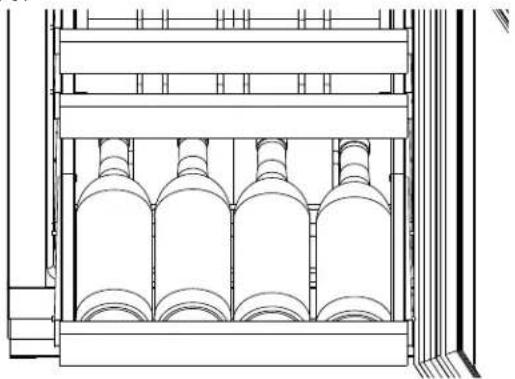
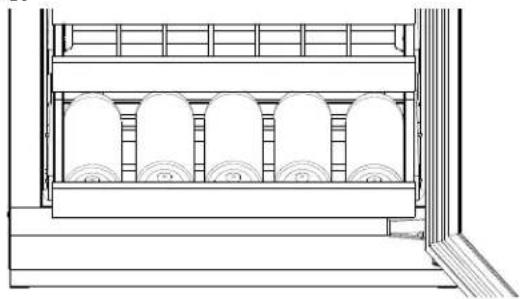
U-Line recommends arranging wine bottles as shown in the illustrations below. Reference illustration AI for rack locations.
3045WC & 3090WCWC Models
Racks I through 5:

natural_image
Technical line drawing of an industrial facility interior with cylindrical tanks and piping (no text or symbols)Rack 6:
natural_image
Technical line drawing of a multi-cylinder storage unit with shelves and bays (no text or symbols)Rack 7:

natural_image
Technical line drawing of a mechanical assembly or enclosure with no visible text or symbolsNote: After stocking, allow unit to stabilize product temperatures for 24 hours.
3060WC Models
Racks I through 5:

natural_image
Technical line drawing of a mechanical assembly with multiple cylindrical components and a conveyor belt (no text or symbols)Rack 6:
natural_image
Technical line drawing of a mechanical device with multiple cylindrical components and a central panel (no text or symbols)Rack 7:

natural_image
Architectural cross-section diagram of a multi-level building with structural elements (no text or labels)3045WC, 3060WC & 3090WCWC Models Larger diameter bottles may be stored on the shaded racks, illustrated below.
text_image
Use These Racks For Larger Diameter Bottles & Champagne AILeveling
NOTICE
Unit must be level for proper door operation.
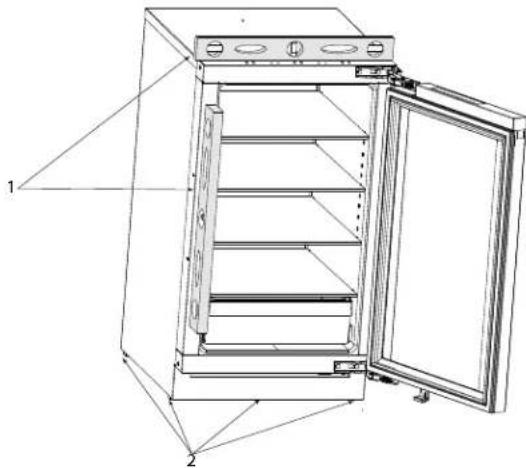
- Use a level to check the levelness of the unit from front to back and from side to side. Place the level along top edge and side edge as shown (1).
- If the unit is not level, rotate the adjustable leveling legs to raise or lower each corner of the unit (2) as necessary.
natural_image
Technical line drawing of a refrigerator with open door and shelves, no text or symbols present-
To rotate rear leveler legs remove grille. See Removing and Installing Grille on page 10.
-
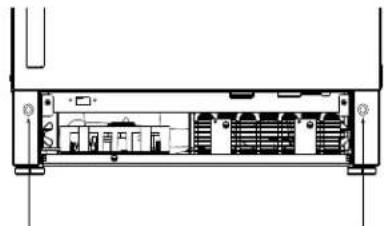
Using the provided 6mm T bar allen wrench, rotate the 2 adjustment screws as shown below.
natural_image
Technical line drawing of a mechanical or electronic device interior with no visible text or symbolsRotate Clockwise to raise rear leg
Rotate Counter-Clockwise to lower
Rotate Clockwise to raise rear leg
Rotate Counter-Clockwise to lower
- Check levelness after each adjustment and repeat the previous steps until the unit is level.
Removing and Installing Grille

WARNING
- Disconnect electrical power to the unit before removing the grille.
- Edges of sheet metal may be sharp.
Removing the grille.
I. Disconnect power to unit.
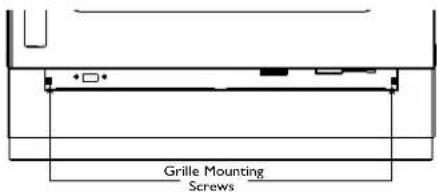
2. Using the included 7/64" Allen wrench, loosen, but do not remove both grille lock screws. See below.
text_image
Grille Mounting Screws-
Gently pull grille away from unit until it stops.
-
Push Grill rails towards the center of the unit to lift rails off lock screws.

text_image
Grille Rail- Pull grille free from unit.
Installing the grille.
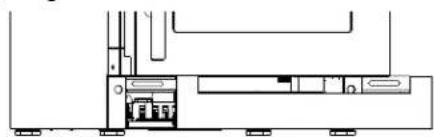
I. Align slots in grille rail with screw heads in base of unit
2. Push grille rails towards the center of the unit and set rails over screw head.
3. Slide grille into position. Using included 7/64" Allen wrench tighten grille lock screws.
natural_image
Pure technical line drawing of a mechanical assembly without any text, numbers, or symbolsAdjusting Grille
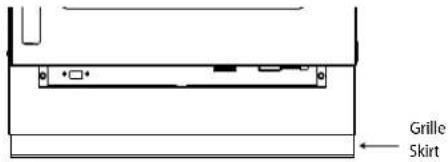
The grille has an automatic vertical plane adjustment and can also be adjusted on its horizontal plane as well. To adjust your grille to match your surrounding cabinetry follow the instructions below.
text_image
Grille Skirt-
Loosen, but do not remove, the lock screws on the inside of the grille rails. Lock screws are located on the inside of each grille rail.
-
Pull grille out to desired position and secure lock screws.
-
The grille skirt may be manually adjusted to the height of your floor. Simply raise or lower the skirt as needed.
Adjusting Interior Shelves
Models equipped with glass shelves have an adjustable mounting system. To adjust or simply remove shelves for cleaning, follow the instructions below.
Removing / Installing Glass Shelves.
I. Remove all product from shelf.
2. Coming from underneath the shelf, lift both the front and rear of the glass.
3. Carefully slide shelf out of unit being careful not to scratch the interior liner.
4. Installation is the reverse of removal.
Adjusting shelf height.
Shelf height may be adjusted to accommodate a broad range of product. To alter your shelf spacing follow the instructions below.
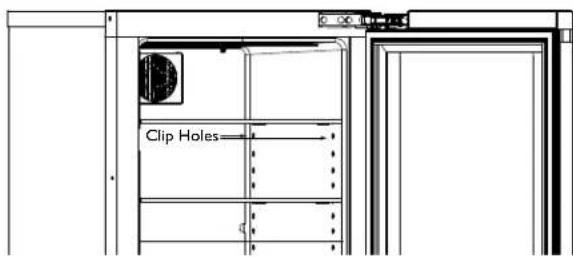
I. Remove the 4 Shelf clips from the shelf clip holes.
2. Move shelf clips as a group to the desired shelf height.
3. Insert shelf clips into the holes of the desired shelf height. Be certain shelf clip is fully seated into shelf clip hole.
text_image
Clip Holes
CAUTION
Clips MUST be installed with the ribbed side down. Failure to do so may result in shelf or unit damage.
NOTICE
All 4 shelf clips for each shelf must be installed at the same height for shelf stability.
- Reinstall shelf.
Cleaning Shelves
Shelves may be cleaned in a soapy warm water solution. A general household disinfectant may be used if necessary. Be sure to completely dry your shelf before reinstalling.
Wine Rack Removal and Installation
Wine cabinets are equipped with full extension wine racks. To remove your wine racks for cleaning follow the instructions below.
To remove a rack from the cabinet:
I. Remove any bottles stored on the rack.
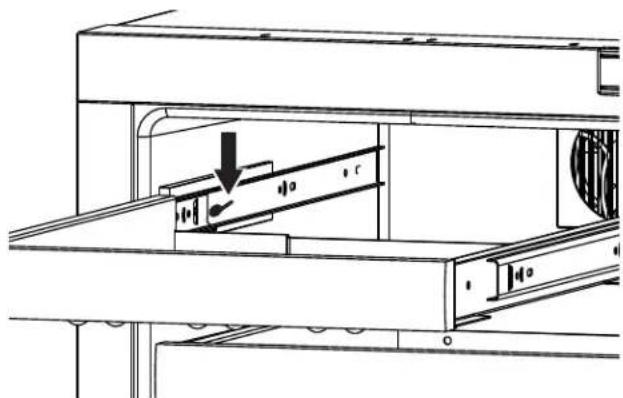
2. Grasp the end of the rack, and gently slide it out until it stops.
3. The release lever are located on the inside of the rack rails. Press the left rack release lever down. At the same time, lift the matching right rack release lever up. Pull the rack out until it is free of the tracks and the cabinet.
natural_image
Technical line drawing of a mechanical assembly with no visible text or symbolsNOTICE
Do not remove the track rails from the cabinet.
To insert a rack in the cabinet:
- Align the left and right rack channels with the tracks in the cabinet. Ensure an even track engagement on both sides by gently pushing the rack into the cabinet until it stops.
- Before reloading the rack, ensure proper movement of the travel stops in the left and right track rails by pulling the rack out gently until it stops.
Cleaning Wine Racks.
- Saturate a soft cloth with a soapy, warm water, solution.
- Wring excess water from cloth and wipe racks down.
NOTICE
The wine racks are greased. This white lithium grease helps provide smooth operation of the slide mechanism. It is important not to remove grease.
Refrigerator Bin Installation & Removal
Refrigerator bins are easily removed for cleaning and sanitizing. To remove your bin follow the instructions below.
natural_image
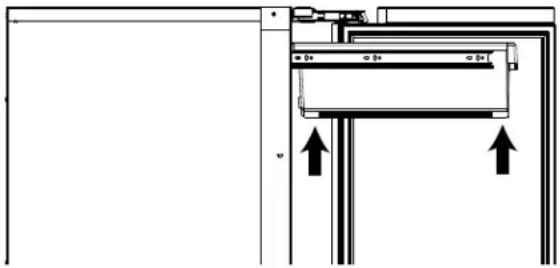
Pure mechanical assembly diagram showing a bracket with mounting holes and directional arrows (no text or symbols)I. Fully extend the bin you wish to remove from the cabinet.
2. Lift the front lip of the bin and raise the bin off the racks.
3. Lift the rear of the bin off its seat on the rack.
4. Pull the bin up and away from the racks.
To Reinstall
- Fully extend the empty rack from within the cabinet.
- Set the rear of the bin over the rear of the slide.
- Seat the front of the bin down and onto the slide rack.
- Push the bin back into the cabinet.
Cleaning
Bins may be cleaned in a soapy warm water solution. A general household disinfectant, safe for plastics, may be used if necessary. Be sure to completely dry your bin before reinstalling.
NOTICE
Bins are NOT dishwasher safe.
Door Alignment and Adjustment
Align and adjust the door if it is not level, or is not sealing properly. If the door is not sealed the unit may not cool properly, or excessive frost or condensation may form in the interior.
NOTICE
Properly aligned, the door's gasket should be firmly in contact with the cabinet all the way around the door (no gaps). Carefully examine the door's gasket to assure that it is firmly in contact with the cabinet. Also make sure the door gasket is not pinched on the hinge side of the door.

CAUTION
- Do not attempt to use the door to raise or pivot your unit. This would put excessive stress on the hinge system.
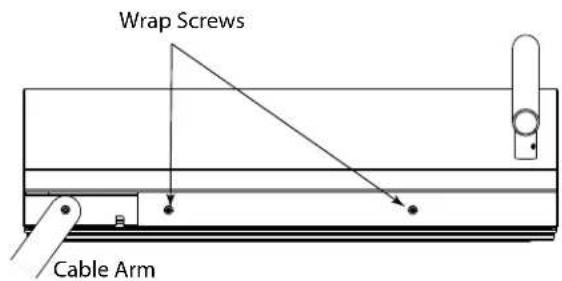
- Pay special attention to the Cable Arm. Make sure not to over extend or damage it during door alignment.
Stainless Models (Removing Wrap)
I. Open door completely.
2. Remove the two wrap screws from the bottom of the stainless steel door wrap.
text_image
Wrap Screws Cable Arm- Gently pull bottom of wrap away from door.
- The Wrap hinges on top of the door. Carefully pull wrap away and then up. See below.

text_image
Door Top Step 2 Door Bottom Step 1- If door being adjusted houses the display unit, remove cable from display by pressing in the release tab on the cable connector.
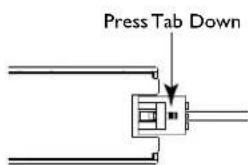
text_image
Press Tab DownAlignment and Adjustment
- Using a T-25 Torx Bit, loosen each pair of Torx head screws on both the upper and lower hinge plate.
- Square and align door as necessary.
- Tighten Torx head screws on hinge.
- If necessary re-connect display and re-install stainless steel wrap.
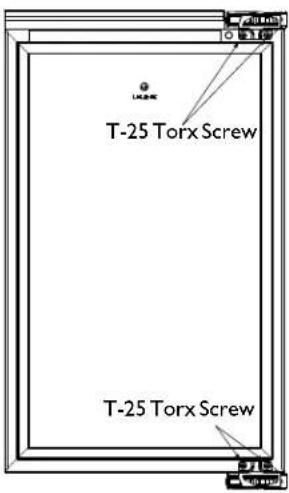
text_image
T-25 Torx Screw T-25 Torx ScrewCleaning
Exterior Cleaning
- Stainless door panels, and handles can discolor when exposed to chlorine gas, pool chemicals, saltwater or cleaners with bleach.
- Keep your stainless unit looking new by cleaning with a good quality all-in-one stainless steel cleaner polish monthly. For best results use Claire® Stainless Steel Polish and Cleaner, which can be purchased from U-Line Corporation (Part Number 173348). Comparable products are acceptable. Frequent cleaning will remove surface contamination that could lead to rust. Some installations may require cleaning weekly.
- Do not clean with steel wool pads.
- Do not use stainless steel cleaners or polishes on any glass surfaces.
- Clean any glass surfaces with a non-chlorine glass cleaner.
- Do not use cleaners not specifically intended for stainless steel on stainless surfaces (this includes glass, tile and counter cleaners).
- If any surface discoloring or rusting appears, clean it quickly with Bon-Ami® or Barkeepers Friend Cleanser® and a nonabrasive cloth. Always clean with the grain. Always finish with Claire Stainless Steel Polish and Cleaner or comparable product to prevent further problems.
- Using abrasive pads such as Scotchbrite™ will cause the graining in the stainless to become blurred.
- Rust not cleaned up promptly can penetrate the surface of the stainless steel and complete removal of the rust may not be possible.
Interior Cleaning
- Disconnect power to the unit.
- Clean the interior and all removed components using a mild nonabrasive detergent and warm water solution applied with a soft sponge or non-abrasive cloth.
- Rinse the interior using a soft sponge and clean water.
- Do not use any solvent-based or abrasive cleaners. These types of cleaners may transfer taste to the interior products and damage or discolor the lining.
Defrosting
Minor Frost on the rear wall, or visible through the evaporator plate vents is normal and will melt during each off cycle. If there is excessive build-up of 1/4" or more, manually defrost the unit.
- Ensure the door is closing and sealing properly.
- High ambient temperature and excessive humidity can also produce frost.

CAUTION
DO NOT use an ice pick or other sharp instrument to help speed up defrosting. These instruments can puncture the inner lining or damage the cooling unit. DO NOT use any type of heater to defrost. Using a heater to speed up defrosting can cause personal injury and damage to the inner lining.
NOTICE
The drain pan was not designed to capture the water created when manually defrosting. To prevent water from overflowing the drain pan and possibly damaging water sensitive flooring the unit must be removed from cabinetry.

CAUTION
Do not attempt to manually defrost your unit without first contacting customer care. The unit must be removed from installation to properly defrost. Attempting to defrost the unit without following proper procedure may result in substantial water damage.
Condenser Cleaning
Interval - As Needed
To maintain operational efficiency, keep the front grille free of dust and lint, and clean the condenser when necessary. Depending on environmental conditions, more or less frequent cleaning may be necessary.

WARNING
Disconnect electric power to the unit before cleaning the condenser.
NOTICE
DO NOT use any type of cleaner on the condenser unit. Condenser may be cleaned using a vacuum, soft brush or compressed air.
Storage, Vacation and Moving
If not using the unit for an extended period, or otherwise stored, follow these steps completely:

WARNING
Electrical Shock Hazard. Disconnect power before servicing. Before operating, replace all panels. Failure to do so may result in electrical shock or death.
NOTICE
If the ambient temperature is expected to drop below 50^ F, turn off and unplug unit.
I. Remove all consumable contents from the unit.
2. Disconnect the power cord from its outlet, and leave it disconnected until the unit is returned to service.
3. Clean and dry the interior of the cabinet.
4. During periods of nonuse, the cabinet must remain open to prevent formation of mold and mildew. Open door a minimum of 2 in. (5 cm) to provide the necessary ventilation.
Product Disposal

DANGER
RISK OF CHILD ENTRAPMENT. Before you throw away your old refrigerator or freezer, take off the doors and leave shelves in place so children may not easily climb inside.
If the unit is being removed from service for disposal, check and obey all Federal, State and Local regulations regarding the disposal and recycling of refrigeration appliances, and follow these steps completely:
I. Remove all consumable contents from the unit.
2. Disconnect power to the unit's power receptacle. Unplug the power cord from its outlet.
3. Remove the cabinet door.
Service
Before Calling for Service
If you think your U-Line product is malfunctioning, read the OPERATION section of this guide to understand clearly the function of the control.
If the problem persists, read the NORMAL OPERATING SOUNDS and TROUBLESHOOTING GUIDE section of this guide to help you quickly identify common problems, and possible causes and remedies. Most often, this will resolve the problem without the need to call for service.
If Service is Required
If you do not understand a troubleshooting remedy, or your product needs service, contact U-Line Corporation directly. Contact information appears on the rear cover of this guide.
When you call, you will need your product Model and Serial Numbers. This information can be recorded inside the front cover of this guide. It also appears on the Model and Serial number plate located on the interior of your product or can be accessed through "Help" in the Customer Menu.
Replacement Parts
When you need replacement parts, always request genuine U-Line replacements. U-Line designs and engineers products using components that work efficiently, and provide superior service life and performance. The use of aftermarket parts or components may affect the safety, operation, performance or durability of your product, and may also void its warranty.
Normal Operating Sounds
All models incorporate rigid foam insulated cabinets to provide high thermal efficiency and maximum sound reduction for its internal working components. Despite this technology, your model may make sounds that are unfamiliar.
Normal operating sounds may be more noticeable because of the unit's environment. Hard surfaces such as cabinets, wood, vinyl or tiled floors and paneled walls have a tendency to reflect normal appliance operating noises.
Listed below are common refrigeration components with brief description of the normal operating sounds they make. NOTE: Your product may not contain all the components listed.
- Compressor: The compressor makes a hum or pulsing sound that may be heard when it operates.
- Evaporator: Refrigerant flowing through an evaporator may sound like boiling liquid.
- Condenser Fan: Air moving through a condenser may be heard.
• Automatic Defrost Drain Pan: Water may be heard dripping or running into the drain pan when the unit is in the defrost cycle.
- Solenoid Valves: An occasional clicking sound may be heard as solenoid valves are operated.
Troubleshooting Guide
! DANGER
ELECTROCUTION HAZARD. Never attempt to repair or perform maintenance on the unit until disconnecting the main electrical power.
Troubleshooting - What to check when problems occur:
| Problem Possible Cause and Remedy | |
| Digital Display and Light Do Not Work. | Ensure power is connected to the unit.If the unit is cooling, it may be in Sabbath mode. (See OPERATION) |
| Interior Light Does Not Illuminate. | If the unit is cooling it may be in Sabbath mode, or manually set to off. (See OPERATION) |
| Light Remains on When Door is Closed. | Lighting may be set to On, reset to with door. (See OPERATION) |
| Unit Develops Frost on Internal Surfaces. | Frost on the rear wall is normal and will melt during each off cycle.If there is excessive build-up of 1/4" or more, manually defrost the unit.Ensure the door is closing and sealing properly.High ambient temperature and excessive humidity can also produce frost. |
| Unit Develops Condensation on External surfaces | The unit is exposed to excessive humidity, moisture will dissipate as humidity levels increase. |
| Digital Display Functions, But Unit Does Not Cool. | Ensure the unit is not in 'Showroom Mode'. Press and hold the Power icon for five seconds to exit Showroom mode. Press the power button again to resume normal operation. |
| Digital Display Shows an Error. | “Door” indicates the door may be opened too long, ensure the door is closing properly. For other error codes contact U-Line Customer Service. |
| Product is Freezing. | Product in contact with the rear wall may freeze, ensure no product is touching the rear wall.Adjust the temperature to a warmer set-point. (See OPERATION) |
| Product is Not Cold Enough. | Air temperature does not indicate product temperature.Adjust the temperate to a cooler set-point. (See OPERATION)Ensure unit is not located in excessive ambient temperatures or in direct sunlight.Ensure the door is closing and sealing properly.Ensure nothing is blocking the front grille, found at the bottom of the unit.Ensure the condenser coil is clean and free of any dirt or lint build-up. |
PRODUCT INFORMATION
Complete Installation Guides, Use and Care Guides, Specifications & Features and Benefits, CAD Drawings, Overlay Panel/Frame and Toe-Kick Specifications and Instructions, Compliance Documentation and Applicable Energy Guides are available for reference and download at u-line.com.
SERVICE INFORMATION
Please consult your Use and Care Guide for troubleshooting information. Answers to Customer Frequently Asked Questions are available at u-line.com under Customer Service. You may contact U-Line directly:
GENERAL INQUIRIES:
U-Line Corporation
P.O. Box 245040
Milwaukee, Wisconsin 53224-9540 U.S.A.
Phone 1-414-354-0300
FAX 1-414-354-7905
Email: sales@u-line.com
u-line.com
SERVICE ASSISTANCE:
Phone 1-800-779-2547
FAX 1-414-354-5696
Email: onlineservice@u-line.com
u-lineservice.com
PARTS ASSISTANCE:
E-mail: onlineparts@u-line.com
BUILDING ON THREE GENERATIONS OF INNOVATION
For over five decades and through three generations, U-Line continues to be the leader in innovation, quality and performance in the premium built-in undercounter ice making, refrigeration and wine preservation market. U-Line has captivated those with an appreciation for the finer things with exceptional functionality, style, inspired innovation and attention to even the smallest details. We are known and respected for our unwavering dedication to product design, quality and selection.
In 1962, Henry Uihlein founded U-Line Corporation as an outgrowth of Ben-Hur Freezer Company and was the first to develop and patent an automatic stand-alone undercounter residential ice maker. His foresight and determination to develop new ideas and to succeed when there were no clear guidelines or solutions are evident today. The newest Uihlein generation continues to build upon the family's innovative legacy at the Milwaukee, Wisconsin based business by providing continuity and vision from which new designs and technology continue to be born.
Today the complete U-Line product collection includes Ice Makers, Ice Machines, Wine Captain ^® Models, Combo ^® Models, Refrigerator / Freezers, Refrigerators, Drawer Models and Beverage Centers. The U-Line brand offers products in the 1000 Series, 2000 Series and the Modular 3000 Series. The 1000 Series offers a more targeted priced product with appropriate features, while the 2000 Series offers upscale features, advanced technology and specialized product families. Our Modular 3000 Series provides sleek design and versatile temperature settings with our U-Select ^® control. U-Line's approach to its breadth of products, multiple price points and features allows a choice and product that will fit any lifestyle.
DESIGNED, ENGINEERED AND ASSEMBLED IN WISCONSIN, USA