SP3OPT003 - Inverter APC - Free user manual and instructions
Find the device manual for free SP3OPT003 APC in PDF.


User questions about SP3OPT003 APC
0 question about this device. Answer the ones you know or ask your own.
Ask a new question about this device
Download the instructions for your Inverter in PDF format for free! Find your manual SP3OPT003 - APC and take your electronic device back in hand. On this page are published all the documents necessary for the use of your device. SP3OPT003 by APC.
USER MANUAL SP3OPT003 APC
Easy UPS 3-Phase Modular
50-250 kW
Installation
380 V, 400 V, 415 V
Latest updates are available on the Schneider Electric website 03/2023

natural_image
Exterior view of a black server rack unit with green branding (no visible text or symbols)Legal Information
The Schneider Electric brand and any trademarks of Schneider Electric SE and its subsidiaries referred to in this guide are the property of Schneider Electric SE or its subsidiaries. All other brands may be trademarks of their respective owners.
This guide and its content are protected under applicable copyright laws and furnished for informational use only. No part of this guide may be reproduced or transmitted in any form or by any means (electronic, mechanical, photocopying, recording, or otherwise), for any purpose, without the prior written permission of Schneider Electric.
Schneider Electric does not grant any right or license for commercial use of the guide or its content, except for a non-exclusive and personal license to consult it on an "as is" basis. Schneider Electric products and equipment should be installed, operated, serviced, and maintained only by qualified personnel.
As standards, specifications, and designs change from time to time, information contained in this guide may be subject to change without notice.
To the extent permitted by applicable law, no responsibility or liability is assumed by Schneider Electric and its subsidiaries for any errors or omissions in the informational content of this material or consequences arising out of or resulting from the use of the information contained herein.

text_image
Green QR code image, scannable for digital information retrievalGo to https://www.productinfo.schneider-electric.com/easyups3pmodular/ or scan the QR code above for digital experience and translated manuals.
Table of Contents
Important Safety Instructions — SAVE THESE
INSTRUCTIONS....5
Electromagnetic Compatibility ....6
Safety Precautions 6
Additional Safety Precautions After Installation....8
Electrical Safety 9
Battery Safety 10
Symbols Used in the Product....12
Specifications 13
Specifications for 50 kW UPS ....13
Specifications for 100 kW UPS ....15
Specifications for 150 kW UPS ....17
Specifications for 200 kW UPS ....19
Specifications for 250 kW UPS ....21
Required Upstream Protection....23
Recommended Cables Sizes 24
Recommended Bolt and Lug Sizes 25
Torque Specifications....26
Requirements for a Third Party Battery Solution....27
Third Party Battery Breaker Requirements ....27
Guidance for Organizing Battery Cables 28
UPS Weights and Dimensions 29
Clearance 30
Environment....31
Compliance....32
Overview 33
Single System Overview 33
Installation Procedure 36
Position the UPS 37
Install the Seismic Anchoring (Option) 39
Prepare the UPS for Top Cable Entry 43
Prepare for TN-C Earthing System 47
Install the Neutral Disconnection Kit (Option)....48
Connect the Power Cables for the UPS with One Internal
Switch 50
Connect the Power Cables for the UPS with Four Internal
Switches....53
Connect the Signal Cables....56
Connect the Signal Cables from Switchgear and Third-Party
Auxiliary Products....59
Connect the Modbus Cables....62
Install the Power Module(s)....64
Backfeed Protection 66
Final Installation 70
Important Safety Instructions — SAVE THESE INSTRUCTIONS
Read these instructions carefully and look at the equipment to become familiar with it before trying to install, operate, service or maintain it. The following safety messages may appear throughout this manual or on the equipment to warn of potential hazards or to call attention to information that clarifies or simplifies a procedure.

The addition of this symbol to a “Danger” or “Warning” safety message indicates that an electrical hazard exists which will result in personal injury if the instructions are not followed.

This is the safety alert symbol. It is used to alert you to potential personal injury hazards. Obey all safety messages with this symbol to avoid possible injury or death.
⚠️ DANGER
DANGER indicates a hazardous situation which, if not avoided, will result in death or serious injury.
Failure to follow these instructions will result in death or serious injury.
▲WARNING
WARNING indicates a hazardous situation which, if not avoided, could result in death or serious injury.
Failure to follow these instructions can result in death, serious injury, or equipment damage.
▲CAUTION
CAUTION indicates a hazardous situation which, if not avoided, could result in minor or moderate injury.
Failure to follow these instructions can result in injury or equipment damage.
NOTICE
NOTICE is used to address practices not related to physical injury. The safety alert symbol shall not be used with this type of safety message.
Failure to follow these instructions can result in equipment damage.
Please Note
Electrical equipment should only be installed, operated, serviced, and maintained by qualified personnel. No responsibility is assumed by Schneider Electric for any consequences arising out of the use of this material.
A qualified person is one who has skills and knowledge related to the construction, installation, and operation of electrical equipment and has received safety training to recognize and avoid the hazards involved.
Electromagnetic Compatibility
NOTICE
RISK OF ELECTROMAGNETIC DISTURBANCE
This is a product category C3 UPS product. In a residential environment, this product may cause radio inference, in which case the user may be required to take additional measures.
Failure to follow these instructions can result in equipment damage.
Safety Precautions
⚠️ DANGER
HAZARD OF ELECTRIC SHOCK, EXPLOSION, OR ARC FLASH
All safety instructions in this document must be read, understood and followed.
Failure to follow these instructions will result in death or serious injury.
⚠️ DANGER
HAZARD OF ELECTRIC SHOCK, EXPLOSION, OR ARC FLASH
Read all instructions in the Installation Manual before installing or working on this UPS system.
Failure to follow these instructions will result in death or serious injury.
⚠️ DANGER
HAZARD OF ELECTRIC SHOCK, EXPLOSION, OR ARC FLASH
Do not install the UPS system until all construction work has been completed and the installation room has been cleaned.
Failure to follow these instructions will result in death or serious injury.
⚠️ DANGER
HAZARD OF ELECTRIC SHOCK, EXPLOSION, OR ARC FLASH
- The product must be installed according to the specifications and requirements as defined by Schneider Electric. It concerns in particular the external and internal protections (upstream breakers, battery breakers, cabling, etc.) and environmental requirements. No responsibility is assumed by Schneider Electric if these requirements are not respected.
- After the UPS system has been electrically wired, do not start up the system. Start-up must only be performed by Schneider Electric.
Failure to follow these instructions will result in death or serious injury.
⚠️ DANGER
HAZARD OF ELECTRIC SHOCK, EXPLOSION, OR ARC FLASH
The UPS system must be installed according to local and national regulations. Install the UPS according to:
- IEC 60364 (including 60364–4–41 - protection against electric shock, 60364–4–42 - protection against thermal effect, and 60364–4–43 - protection against overcurrent), or
- NEC NFPA 70, or
• Canadian Electrical Code (C22.1, Part 1)
depending on which one of the standards apply in your local area.
Failure to follow these instructions will result in death or serious injury.
⚠️ DANGER
HAZARD OF ELECTRIC SHOCK, EXPLOSION, OR ARC FLASH
• Install the UPS system in a temperature controlled indoor environment free of conductive contaminants and humidity.
- Install the UPS system on a non-flammable, level and solid surface (e.g. concrete) that can support the weight of the system.
Failure to follow these instructions will result in death or serious injury.
⚠️ DANGER
HAZARD OF ELECTRIC SHOCK, EXPLOSION, OR ARC FLASH
The UPS is not designed for and must therefore not be installed in the following unusual operating environments:
- Damaging fumes
- Explosive mixtures of dust or gases, corrosive gases, or conductive or radiant heat from other sources
- Moisture, abrasive dust, steam or in an excessively damp environment
- Fungus, insects, vermin
- Salt-laden air or contaminated cooling refrigerant
- Pollution degree higher than 2 according to IEC 60664-1
- Exposure to abnormal vibrations, shocks, and tilting
- Exposure to direct sunlight, heat sources, or strong electromagnetic fields
Failure to follow these instructions will result in death or serious injury.
⚠️ DANGER
HAZARD OF ELECTRIC SHOCK, EXPLOSION, OR ARC FLASH
Do not drill or cut holes for cables or conduits with the gland plates installed and do not drill or cut holes in close proximity to the UPS.
Failure to follow these instructions will result in death or serious injury.
▲WARNING
HAZARD OF ARC FLASH
Do not make mechanical changes to the product (including removal of cabinet parts or drilling/cutting of holes) that are not described in the Installation Manual.
Failure to follow these instructions can result in death, serious injury, or equipment damage.
NOTICE
RISK OF OVERHEATING
Respect the space requirements around the UPS system and do not cover the product's ventilation openings when the UPS system is in operation.
Failure to follow these instructions can result in equipment damage.
NOTICE
RISK OF EQUIPMENT DAMAGE
Do not connect the UPS output to regenerative load systems including photovoltaic systems and speed drives.
Failure to follow these instructions can result in equipment damage.
Additional Safety Precautions After Installation
⚠️ DANGER
HAZARD OF ELECTRIC SHOCK, EXPLOSION, OR ARC FLASH
Do not install the UPS system until all construction work has been completed and the installation room has been cleaned. If additional construction work is needed in the installation room after this product has been installed, turn off the product and cover the product with the protective packaging bag the product was delivered in.
Failure to follow these instructions will result in death or serious injury.
Electrical Safety
⚠️ DANGER
HAZARD OF ELECTRIC SHOCK, EXPLOSION, OR ARC FLASH
- Electrical equipment must be installed, operated, serviced, and maintained only by qualified personnel.
- Apply appropriate personal protective equipment (PPE) and follow safe electrical work practices.
- Turn off all power supplying the UPS system before working on or inside the equipment.
- Before working on the UPS system, check for hazardous voltage between all terminals including the protective earth.
- The UPS contains an internal energy source. Hazardous voltage can be present even when disconnected from the mains supply. Before installing or servicing the UPS system, ensure that the units are OFF and that mains and batteries are disconnected. Wait five minutes before opening the UPS to allow the capacitors to discharge.
- A disconnection device (e.g. disconnection circuit breaker or switch) must be installed to enable isolation of the system from upstream power sources in accordance with local regulations. The disconnection device must be easily accessible and visible.
- The UPS must be properly earthed/grounded and due to a high leakage current, the earthing/grounding conductor must be connected first.
Failure to follow these instructions will result in death or serious injury.
⚠️ DANGER
HAZARD OF ELECTRIC SHOCK, EXPLOSION, OR ARC FLASH
In systems where backfeed protection is not part of the standard design, an automatic isolation device (backfeed protection option or other device meeting the requirements of IEC/EN 62040-1 or UL1778 5th Edition – depending on which of the two standards apply to your local area) must be installed to prevent hazardous voltage or energy at the input terminals of the isolation device. The device must open within 15 seconds after the upstream power supply fails and must be rated according to the specifications.
Failure to follow these instructions will result in death or serious injury.
When the UPS input is connected through external isolators that, when opened, isolate the neutral or when the automatic backfeed isolation is provided external to the equipment or is connected to an IT power distribution system, a label must be fitted at the UPS input terminals, and on all primary power isolators installed remote from the UPS area and on external access points between such isolators and the UPS, by the user, displaying the following text (or equivalent in a language which is acceptable in the country in which the UPS system is installed):
⚠️ DANGER
HAZARD OF ELECTRIC SHOCK, EXPLOSION, OR ARC FLASH
Risk of Voltage Backfeed. Before working on this circuit: Isolate the UPS and check for hazardous voltage between all terminals including the protective earth.
Failure to follow these instructions will result in death or serious injury.
▲CAUTION
RISK OF ELECTRICAL DISTURBANCE
This product can cause a DC current in the PE conductor. Where a residual current-operated protective device (RCD) is used for protection against electrical shock, only an RCD of Type B is allowed on the supply side of this product.
Failure to follow these instructions can result in injury or equipment damage.
Battery Safety
⚠️ DANGER
HAZARD OF ELECTRIC SHOCK, EXPLOSION, OR ARC FLASH
- Battery circuit breakers must be installed according to the specifications and requirements as defined by Schneider Electric.
- Servicing of batteries must only be performed or supervised by qualified personnel knowledgeable of batteries and the required precautions. Keep unqualified personnel away from batteries.
- Disconnect charging source prior to connecting or disconnecting battery terminals.
- Do not dispose of batteries in a fire as they can explode.
- Do not open, alter, or mutilate batteries. Released electrolyte is harmful to the skin and eyes. It may be toxic.
Failure to follow these instructions will result in death or serious injury.
⚠️⚠️ DANGER
HAZARD OF ELECTRIC SHOCK, EXPLOSION, OR ARC FLASH
Batteries can present a risk of electric shock and high short-circuit current. The following precautions must be observed when working on batteries
- Remove watches, rings, or other metal objects.
- Use tools with insulated handles.
- Wear protective glasses, gloves and boots.
- Do not lay tools or metal parts on top of batteries.
- Disconnect the charging source prior to connecting or disconnecting battery terminals.
- Determine if the battery is inadvertently grounded. If inadvertently grounded, remove source from ground. Contact with any part of a grounded battery can result in electric shock. The likelihood of such shock can be reduced if such grounds are removed during installation and maintenance (applicable to equipment and remote battery supplies not having a grounded supply circuit).
Failure to follow these instructions will result in death or serious injury.
⚠️⚠️ DANGER
HAZARD OF ELECTRIC SHOCK, EXPLOSION, OR ARC FLASH
When replacing batteries, always replace with the same type and number of batteries or battery packs.
Failure to follow these instructions will result in death or serious injury.
▲CAUTION
RISK OF EQUIPMENT DAMAGE
- Mount the batteries in the UPS system, but do not connect the batteries until the UPS system is ready to be powered up. The time duration from battery connection until the UPS system is powered up must not exceed 72 hours or 3 days.
- Batteries must not be stored more than six months due to the requirement of recharging. If the UPS system remains de-energized for a long period, we recommend that you energize the UPS system for a period of 24 hours at least once every month. This charges the batteries, thus avoiding irreversible damage.
Failure to follow these instructions can result in injury or equipment damage.
NOTE: Always follow the battery manufacturer's installation manual for battery installation and maintenance instructions.
Symbols Used in the Product
 | This is the earthing/ground symbol. |
 | This is the protective earth/equipment grounding conductor symbol. |
 | This is the direct current symbol. It is also referred to as DC. |
 | This is the alternating current symbol. It is also referred to as AC. |
 | This is the positive polarity symbol. It is used to identify the positive terminal(s) of equipment which is used with, or generates direct current. |
 | This is the negative polarity symbol. It is used to identify the negative terminal(s) of equipment which is used with, or generates direct current. |
 | This is the battery symbol. |
 | This is the static switch symbol. It is used to indicate switches that are designed to connect or disconnect the load to or from the supply respectively without the existence of moving parts. |
 | This is the AC/DC converter (rectifier) symbol. It is used to identify an AC/DC converter (rectifier) and, in case of plug-in devices, to identify the relevant receptacles. |
 | This is the DC/AC converter (inverter) symbol. It is used to identify an DC/AC converter (inverter) and, in case of plug-in devices, to identify the relevant receptacles. |
 | This is the input symbol. It is used to identify an input terminal when it is necessary to distinguish between inputs and outputs. |
 | This is the output symbol. It is used to identify an output terminal when it is necessary to distinguish between inputs and outputs. |
 | This is the switch disconnector symbol. It is used to identify the disconnecting device in the form of switch. |
 | This is the circuit breaker symbol. It is used to identify the disconnecting device in the form of circuit breaker that protects the equipment from short circuit or heavy load current. It opens the circuits once the current flow crosses its maximum limit. |
Specifications
Specifications for 50 kW UPS
| Voltage (V) 380 400 415 | ||||
| Input | Connections L1, L2, L3, N, PE (single mains) | L1, L2, L3, PE (dual mains) | ||
| Input voltage range at full load (V) 304-456 | 2 | 320-460 332-477 | ||
| Frequency (Hz) 40-70 | ||||
| Nominal input current (A) 80 76 74 | ||||
| Maximum input current (A) 100 95 95 | ||||
| Total harmonic distortion (THDI) ≤ 3% for linear load | ||||
| Input power factor > 0.99 (full load) | ||||
| Maximum short circuit rating | Rated conditional short-circuit current lcc = 35 kADevice: Refer to Required Upstream Protection, page 23. | |||
| Ramp-in | Programmable and adaptive 1-40 seconds | |||
| Protection | Built-in backfeed protection and fuses | |||
| Bypass | Connections L1, L2, L3, N, PE | |||
| Minimum bypass voltage (V) | 342 360 374 | |||
| Maximum bypass voltage (V) | 418 440 457 | |||
| Frequency (Hz) 50 or 60 | ||||
| Frequency range (Hz) | ±1 Hz, ±3 Hz, ±10 Hz (user selectable) | |||
| Nominal bypass current (A) | 78 74 71 | |||
| Maximum short circuit rating | Rated conditional short-circuit current lcc = 35 kADevice: Refer to Required Upstream Protection, page 23. | |||
| Protection | Dry contact signal for backfeed protection | |||
| Output | Connections L1, L2, L3, N, PE | |||
| Output voltage regulation | ±1% (symmetrical load)±3% (asymmetrical load) | |||
| Overload capacity Normal operation: ≤125% for 10 minutes; | ≤150% for 1 minuteBypass operation: ≤110% continuous; ≤125% for 10 minutes;≤150% for 1 minuteBattery operation: ≤125% for 1 minute; ≤150% for 1 second | |||
| Output power factor | 1 | |||
| Nominal output current (A) | 76 73 70 | |||
| Total harmonic distortion (THDU) | 1% (linear load)3% (non-linear load) | |||
| Output frequency (Hz) | 50/60 Hz bypass synchronized50/60 Hz ± 0.1% free-running | |||
| Slew rate (Hz/sec) | Programmable to 0.25, 0.5, 1, 2, 4, 6 Hz/second | |||
| Output performance classification (according to IEC/ EN62040-VFI-SS-113) | ||||
| Load power factor 0.7 leading to 0.7 lagging without derating | ||||
| Output short circuit current (inverter) | 160 A/220 ms | |||
| Battery | Charging power in % of output power 5% to 60% (selectable) | |||
| Maximum charging power (kW) 30 | ||||
| Nominal battery voltage (VDC) 480 to 576 | ||||
| Nominal float voltage (VDC) 545 to 654 | ||||
| End of discharge voltage (full load) (VDC) 384 to 461 | ||||
| Temperature compensation (per cell) -3.3 mV/°C/cell for T ≥ | 25 °C0 mV/°C/cell for T < 25 °C | |||
| Battery current at full load and nominal battery voltage (A) 1 | 11 | |||
| Battery current at full load and minimum battery voltage (A) | 130 | |||
| Ripple current < 5% C20 (5-minute runtime) | ||||
| Battery test Manual/automatic (selectable) | ||||
| Maximum short circuit rating | 25 kA | |||
Specifications for 100 kW UPS
| Voltage (V) 380 400 415 | ||||
| Input | Connections L1, L2, L3, N, PE (single mains) | L1, L2, L3, PE (dual mains) | ||
| Input voltage range of full load (V) 304-456 | 4 | 320-460 332-477 | ||
| Frequency (Hz) 40-70 | ||||
| Nominal input current (A) 160 152 147 | ||||
| Maximum input current (A) 200 190 190 | ||||
| Total harmonic distortion (THDI) ≤ 3% for linear load | ||||
| Input power factor > 0.99 (full load) | ||||
| Maximum short circuit rating | Rated conditional short-circuit current Icc = 35 kADevice: Refer to Required Upstream Protection, page 23. | |||
| Ramp-in | Programmable and adaptive 1-40 seconds | |||
| Protection | Built-in backfeed protection and fuses | |||
| Bypass | Connections L1, L2, L3, N, PE | |||
| Minimum bypass voltage (V) | 342 360 374 | |||
| Maximum bypass voltage (V) | 418 440 457 | |||
| Frequency (Hz) 50 or 60 | ||||
| Frequency range (Hz) | ±1 Hz, ±3 Hz, ±10 Hz (user selectable) | |||
| Nominal bypass current (A) | 155 147 142 | |||
| Maximum short circuit rating | Rated conditional short-circuit current Icc = 35 kADevice: Refer to Required Upstream Protection, page 23. | |||
| Protection | Dry contact signal for backfeed protection | |||
| Output | Connections L1, L2, L3, N, PE | |||
| Output voltage regulation | ±1% (symmetrical load)±3% (asymmetrical load) | |||
| Overload capacity Normal operation: ≤125% for | 10 minutes; ≤150% for 1 minuteBypass operation: ≤110% continuous; ≤125% for 10 minutes; ≤150% for 1 minuteBattery operation: ≤125% for 1 minute; ≤150% for 1 second | |||
| Output power factor | 1 | |||
| Nominal output current (A) | 152 145 140 | |||
| Total harmonic distortion (THDU) | 1% (linear load)3% (non-linear load) | |||
| Output frequency (Hz) | 50/60 Hz bypass synchronized50/60 Hz ± 0.1% free-running | |||
| Slew rate (Hz/sec) | Programmable to 0.25, 0.5, 1, 2, 4, 6 Hz/second | |||
| Output performance classification (according to IEC/ EN62040-3) | VFI-SS-11 | |||
| Load power factor 0.7 leading to 0.7 lagging without derating | ||||
| Load crest factor | 2.5 | |||
| Output short circuit current (inverter) | 320 A/220 ms | |||
| Battery | Charging power in % of output power 5% to 60% (selectable) | |||
| Maximum charging power (kW) 60 | ||||
| Nominal battery voltage (VDC) 480 to 576 | ||||
| Nominal float voltage (VDC) 545 to 654 | ||||
| End of discharge voltage (full load) (VDC) 384 to 461 | ||||
| Temperature compensation (per cell) -3.3 mV/°C/cell for T ≥ 25 °C0 mV/°C/cell for T < 25 °C | ||||
| Battery current at full load and nominal battery voltage (A) | 222 | |||
| Battery current at full load and minimum battery voltage (A) | 260 | |||
| Ripple current < 5% C20 (5-minute runtime) | ||||
| Battery test Manual/automatic (selectable) | ||||
| Maximum short circuit rating 25 kA | ||||
Specifications for 150 kW UPS
| Voltage (V) 380 400 415 | ||||
| Input | Connections L1, L2, L3, N, PE (single mains) | L1, L2, L3, PE (dual maïñs) | ||
| Input voltage range at full load (V) 304-456 | 6 | 320-460 332-477 | ||
| Frequency (Hz) 40-70 | ||||
| Nominal input current (A) 240 228 220 | ||||
| Maximum input current (A) 300 285 285 | ||||
| Total harmonic distortion (THDI) ≤ 3% for linear load | ||||
| Input power factor > 0.99 (full load) | ||||
| Maximum short circuit rating Rated conditional short-circuit current Icc = 35 kADevice: Refer to Required Upstream Protection, page 23. | ||||
| Ramp-in | Programmable and adaptive 1-40 seconds | |||
| Protection | Built-in backfeed protection and fuses | |||
| Bypass | Connections L1, L2, L3, N, PE | |||
| Minimum bypass voltage (V) | 342 360 374 | |||
| Maximum bypass voltage (V) | 418 440 457 | |||
| Frequency (Hz) 50 or 60 | ||||
| Frequency range (Hz) | ±1 Hz, ±3 Hz, ±10 Hz (user selectable) | |||
| Nominal bypass current (A) | 232 220 212 | |||
| Maximum short circuit rating Rated conditional short-circuit current Icc = 35 kADevice: Refer to Required Upstream Protection, page 23. | ||||
| Protection | Dry contact signal for backfeed protection | |||
| Output | Connections L1, L2, L3, N, PE | |||
| Output voltage regulation | ±1% (symmetrical load)±3% (asymmetrical load) | |||
| Overload capacity Normal operation: ≤125% for 10 minutes; | ≤150% for 1 minuteBypass operation: ≤110% continuous; ≤125% for 10 minutes;≤150% for 1 minuteBattery operation: ≤125% for 1 minute; ≤150% for 1 second | |||
| Output power factor | 1 | |||
| Nominal output current (A) | 228 217 209 | |||
| Total harmonic distortion (THDU) | 1% (linear load)3% (non-linear load) | |||
| Output frequency (Hz) | 50/60 Hz bypass synchronized50/60 Hz ± 0.1% free-running | |||
| Slew rate (Hz/sec) | Programmable to 0.25, 0.5, 1, 2, 4, 6 Hz/second | |||
| Output performance classification (according to IEC/ EN62040-VFI-SS-113) | ||||
| Load power factor 0.7 leading to 0.7 lagging without derating | ||||
| Output short circuit current (inverter) | 480 A/220 ms | |||
| Battery | Charging power in % of output power 5% to 60% (selectable) | |||
| Maximum charging power (kW) 90 | ||||
| Nominal battery voltage (VDC) 480 to 576 | ||||
| Nominal float voltage (VDC) 545 to 654 | ||||
| End of discharge voltage (full load) (VDC) 384 to 461 | ||||
| Temperature compensation (per cell) -3.3 mV/°C/cell for T ≥ | 25 °C0 mV/°C/cell for T < 25 °C | |||
| Battery current at full load and nominal battery voltage (A) 3 | 33 | |||
| Battery current at full load and minimum battery voltage (A) | 390 | |||
| Ripple current < 5% C20 (5-minute runtime) | ||||
| Battery test Manual/automatic (selectable) | ||||
| Maximum short circuit rating | 25 kA | |||
Specifications for 200 kW UPS
| Voltage (V) 380 400 415 | ||||
| Input | Connections L1, L2, L3, N, PE (single mains) | L1, L2, L3, PE (dual maïns) | ||
| Input voltage range at full load (V) 304-456 | 8 | 320-460 332-477 | ||
| Frequency (Hz) 40-70 | ||||
| Nominal input current (A) 320 304 293 | ||||
| Maximum input current (A) 400 380 380 | ||||
| Total harmonic distortion (THDI) ≤ 3% for linear load | ||||
| Input power factor > 0.99 (full load) | ||||
| Maximum short circuit rating Rated conditional short-circuit current Icc = 35 kADevice: Refer to Required Upstream Protection, page 23. | ||||
| Ramp-in | Programmable and adaptive 1-40 seconds | |||
| Protection | Built-in backfeed protection and fuses | |||
| Bypass | Connections L1, L2, L3, N, PE | |||
| Minimum bypass voltage (V) | 342 360 374 | |||
| Maximum bypass voltage (V) | 418 440 457 | |||
| Frequency (Hz) 50 or 60 | ||||
| Frequency range (Hz) | ±1 Hz, ±3 Hz, ±10 Hz (user selectable) | |||
| Nominal bypass current (A) | 309 294 283 | |||
| Maximum short circuit rating Rated conditional short-circuit current Icc = 35 kADevice: Refer to Required Upstream Protection, page 23. | ||||
| Protection | Dry contact signal for backfeed protection | |||
| Output | Connections L1, L2, L3, N, PE | |||
| Output voltage regulation | ±1% (symmetrical load)±3% (asymmetrical load) | |||
| Overload capacity Normal operation: ≤125% for 10 minutes; | ≤150% for 1 minuteBypass operation: ≤110% continuous; ≤125% for 10 minutes;≤150% for 1 minuteBattery operation: ≤125% for 1 minute; ≤150% for 1 second | |||
| Output power factor | 1 | |||
| Nominal output current (A) | 304 289 279 | |||
| Total harmonic distortion (THDU) | 1% (linear load)3% (non-linear load) | |||
| Output frequency (Hz) | 50/60 Hz bypass synchronized50/60 Hz ± 0.1% free-running | |||
| Slew rate (Hz/sec) | Programmable to 0.25, 0.5, 1, 2, 4, 6 Hz/second | |||
| Output performance classification (according to IEC/ EN62040-VFI-SS-113) | ||||
| Load power factor 0.7 leading to 0.7 lagging without derating | ||||
| Output short circuit current (inverter) | 640 A/220 ms | |||
| Battery | Charging power in % of output power 5% to 60% (selectable) | |||
| Maximum charging power (kW) 120 | ||||
| Nominal battery voltage (VDC) 480 to 576 | ||||
| Nominal float voltage (VDC) 545 to 654 | ||||
| End of discharge voltage (full load) (VDC) 384 to 461 | ||||
| Temperature compensation (per cell) -3.3 mV/°C/cell for T ≥ | 25 °C0 mV/°C/cell for T < 25 °C | |||
| Battery current at full load and nominal battery voltage (A) 444 | ||||
| Battery current at full load and minimum battery voltage (A) | 520 | |||
| Ripple current < 5% C20 (5-minute runtime) | ||||
| Battery test Manual/automatic (selectable) | ||||
| Maximum short circuit rating | 25 kA | |||
Specifications for 250 kW UPS
| Voltage (V) 380 400 415 | ||||
| Input | Connections L1, L2, L3, N, PE (single mains) | L1, L2, L3, PE (dual mains) | ||
| Input voltage range at full load (V) 304-456 | ^10 | 320-460 332-477 | ||
| Frequency (Hz) 40-70 | ||||
| Nominal input current (A) 400 380 367 | ||||
| Maximum input current (A) 500 475 475 | ||||
| Total harmonic distortion (THDI) ≤ 3% for linear load | ||||
| Input power factor | >0.99 (full load) | |||
| Maximum short circuit rating | Rated conditional short-circuit current Icc = 35 kADevice: Refer to Required Upstream Protection, page 23. | |||
| Ramp-in | Programmable and adaptive 1-40 seconds | |||
| Protection | Built-in backfeed protection and fuses | |||
| Bypass | Connections L1, L2, L3, N, PE | |||
| Minimum bypass voltage (V) | 342 360 374 | |||
| Maximum bypass voltage (V) | 418 440 457 | |||
| Frequency (Hz) 50 or 60 | ||||
| Frequency range (Hz) | ±1 Hz, ±3 Hz, ±10 Hz (user selectable) | |||
| Nominal bypass current (A) | 386 367 354 | |||
| Maximum short circuit rating | Rated conditional short-circuit current Icc = 35 kADevice: Refer to Required Upstream Protection, page 23. | |||
| Protection | Dry contact signal for backfeed protection | |||
| Output | Connections L1, L2, L3, N, PE | |||
| Output voltage regulation | ±1% (symmetrical load)±3% (asymmetrical load) | |||
| Overload capacity | Normal operation: ≤125% for 10 minutes; ≤150% for 1 minuteBypass operation: ≤110% continuous; ≤125% for 10 minutes;≤150% for 1 minuteBattery operation: ≤125% for 1 minute; ≤150% for 1 second | |||
| Output power factor | 1 | |||
| Nominal output current (A) | 380 361 348 | |||
| Total harmonic distortion (THDU) | 1% (linear load)3% (non-linear load) | |||
| Output frequency (Hz) | 50/60 Hz bypass synchronized50/60 Hz ± 0.1% free-running | |||
| Slew rate (Hz/sec) | Programmable to 0.25, 0.5, 1, 2, 4, 6 Hz/second | |||
| Output performance classification (according to IEC/ EN62040-VFI-SS-113) | ||||
| Load power factor | 0.7 leading to 0.7 lagging without derating | |||
| Output short circuit current (inverter) | 800 A/220 ms | |||
| Battery | Charging power in % of output power 5% to 60% (selectable) | |||
| Maximum charging power (kW) 150 | ||||
| Nominal battery voltage (VDC) 480 to 576 | ||||
| Nominal float voltage (VDC) 545 to 654 | ||||
| End of discharge voltage (full load) (VDC) 384 to 461 | ||||
| Temperature compensation (per cell) -3.3 mV/°C/cell for T ≥ | 25 °C0 mV/°C/cell for T < 25 °C | |||
| Battery current at full load and nominal battery voltage (A) | 555 | |||
| Battery current at full load and minimum battery voltage (A) | 650 | |||
| Ripple current < 5% C20 (5-minute runtime) | ||||
| Battery test Manual/automatic (selectable) | ||||
| Maximum short circuit rating | 25 kA | |||
Required Upstream Protection
⚠️ DANGER
HAZARD OF ELECTRIC SHOCK, EXPLOSION, OR ARC FLASH
The upstream protection must use the required 3-pole breakers OR 4-pole breakers listed below. The use of 3-pole breaker or 4-pole breaker depends on your local and national regulations.
Failure to follow these instructions will result in death or serious injury.
Required 3-Pole Upstream Protection
| UPS rating 50 | kW 100 kW | |||
| Input Bypass Input Bypass | ||||
| Breaker type NS | X100H TM100D(C10H3TM100) | NSX100H TM80D(C10H3TM080) | NSX250H TM200(C25H3TM200) | NSX160H TM160(C16H3TM160) |
| Io 100 80 | 200 | 160 | ||
| Ir | 100 80 | 200 | 160 | |
| Isd | 800 (fixed) | 640 (fixed) | 5 - 10 | 1250 (fixed) |
| UPS rating | 150 kW | 200 kW | 250 kW | |||
| Input | Bypass | Input | Bypass | Input | Bypass | |
| Breaker type | NSX400HMiC.2.3(C40H32D400) | NSX250HTM250(C25H3TM250) | NSX400HMiC.2.3(C40H32D400) | NSX400HMiC.2.3(C40H32D400) | NSX630HMiC.2.3(C63H32D630) | NSX400HMiC.2.3(C40H32D400) |
| Io | 320 250 400 | 320 500 | 400 | |||
| Ir | 0.95 | 250 | 1 | 1 | 1 | 1 |
| Isd | 1.5 - 10 | 5 - 10 | 1.5 - 10 | 1.5 - 10 | 1.5 - 10 | 1.5 - 10 |
Required 4-Pole Upstream Protection
| UPS rating 50 | kW 100 kW | |||
| Input Bypass Input Bypass | ||||
| Breaker type NS | X100H TM100D(C10H4TM100) | NSX160H TM160(C16H4TM160) | NSX250H TM200(C25H4TM200) | NSX400H MiC.2.3(C40H42D400) |
| Io 100 160 200 | 280 | |||
| Ir | 100 0.8 | 200 | 0.95 | |
| Isd | 800 (fixed) | 1250 (fixed) | 1.5 - 10 | 1.5 - 10 |
| UPS rating | 150 kW | 200 kW | 250 kW | |||
| Input | Bypass | Input | Bypass | Input | Bypass | |
| Breaker type | NSX400HMiC.2.3(C40H42D400) | NSX400HMiC.2.3(C40H42D400) | NSX400HMiC.2.3(C40H42D400) | NSX400HMiC.2.3(C40H42D400) | NSX630HMiC.2.3(C63H42D630) | NSX400HMiC.2.3(C40H42D400) |
| Io | 320 280 400 | 320 500 | 400 | |||
| Ir | 0.95 | 0.95 | 1 | 1 | 1 | 1 |
| Isd | 1.5 - 10 | 1.5 - 10 | 1.5 - 10 | 1.5 - 10 | 1.5 - 10 | 1.5 - 10 |
Recommended Cables Sizes
⚠️⚠️ DANGER
HAZARD OF ELECTRIC SHOCK, EXPLOSION, OR ARC FLASH
All wiring must comply with all applicable national and/or electrical codes. The maximum allowable cable size is 185 mm ^4 .
Failure to follow these instructions will result in death or serious injury.
NOTE: Overcurrent protection is to be provided by external devices..
Cable sizes in this manual are based on table A.52-5 of IEC 60364-5-52 with the following assertions:
- 90 °C conductors
• An ambient temperature of 30 °C
• Use of copper conductors - Installation method C
PE size is based on table 54.3 of IEC 60364-5-54.
If the ambient temperature is greater than 30 °C , larger conductors are to be used in accordance with the correction factors of the IEC.
NOTE: Battery cables are sized according to 40 battery blocks. Contact Schneider Electric for cable sizes for systems with more than 40 battery blocks.
NOTE: It is recommended to use the provided screws to connect cables for clients.
50 kW UPS
| Cable size per phase (m) | Neutral cable size (mm 2) PE | cable size (mm 2)) | |
| Input 25 35 16 | |||
| Bypass 16 (for 3-pole | upstream protection)35 (for 4-pole upstream protection) | 16 | |
| Output 16 35 16 | |||
| Battery | 35 35 16 |
100 kW UPS
| Cable size per phase (mm) | Neutral cable size (mm 2) PE | cable size (mm 2)) | |
| Input 70 2 x 70 | 35 | ||
| Bypass 70 (for 3-pole | upstream protection)2 x 70 (for 4-pole upstream protection) | 35 | |
| Output 70 2 x 70 | 35 | ||
| Battery | 95 95 50 |
150 kW UPS
| Cable size per phase (m3) Neutral cable size (mm 2) PE cable size (mm 2)) | ||
| Input 120 2 x 70 70 | ||
| Bypass 120 (for 3-pole upstream protection)2 x 70 (for 4-pole upstream protection) | 70 | |
| Output 120 2 x 70 70 | ||
| Battery 2 x 70 2 x 70 70 | ||
200 kW UPS
| Cable size per phase (m) | Neutral cable size (mm 2) PE | cable size (mm 2)) | |
| Input 2 x 95 2 x 95 | 95 | ||
| Bypass 2 x 70 | 70 | ||
| Output 2 x 70 2 x 70 | 70 | ||
| Battery 2 x 120 2 x 120 | 120 |
250 kW UPS
| Cable size per phase (m2) Neutral cable size (mm 2) PE cable size (mm 2)) | ||
| Input 2 x 120 2 x 120 | 120 | |
| Bypass 2 x 95 95 | ||
| Output 2 x 95 2 x 95 | 95 | |
| Battery 2 x 150 2 x 150 | 150 | |
Recommended Bolt and Lug Sizes
Copper
| Cable size ( mm^2 ) | Bolt size | Cable lug type |
| 16 | M10x40 mm | TLK 16-10 |
| 25 | M10x40 mm | TLK 25-10 |
| 35 | M10x40 mm | TLK 35-10 |
| 50 | M10x40 mm | TLK 50-10 |
| 70 | M10x40 mm | TLK 70-10 |
| 95 | M10x40 mm | TLK 95-10 |
| 120 | M10x40 mm | TLK 120-10 |
| 150 | M10x40 mm | TLK 150-10 |
| 185 | M10x40 mm | TLK 185-10 |
Torque Specifications
| Bolt size Torque | |
| M4 1.7 Nm | |
| M6 5 Nm | |
| M8 17.5 Nm | |
| M10 30 Nm | |
| M12 50 Nm |
Requirements for a Third Party Battery Solution
Battery breaker boxes from Schneider Electric are recommended for the battery interface. Please contact Schneider Electric for more information.
Third Party Battery Breaker Requirements
⚠️⚠️ DANGER
HAZARD OF ELECTRIC SHOCK, EXPLOSION, OR ARC FLASH
- All selected battery breakers must be equipped with instantaneous trip functionality with an undervoltage release coil or a shunt trip release coil.
- Trip delay must be set to zero on all battery breakers.
Failure to follow these instructions will result in death or serious injury.
NOTE: There are more factors to consider when selecting a battery breaker than the requirements listed below. Please contact Schneider Electric for more information.
Design Requirements for Battery Breaker
| Battery breaker rated DC voltage > Normal battery voltage | The normal voltage of the battery configuration is defined as the highest nominal occurring battery voltage. This can be equivalent to the float voltage which may be defined as number of battery blocks x number of cells x cell float voltage. |
| Battery breaker rated DC current > Rated discharge battery current | This current is controlled by the UPS and must include maximum discharge current. This will typically be the current at the end of discharge (minimum operation DC voltage or in overload condition or a combination). |
| DC landings Two DC landings for DC cables (DC+ | and DC-) are required. |
| AUX switches for monitoring One AUX switch must | be installed in each battery breaker and connected to the UPS. The UPS can monitor up to four battery breakers. |
| Short-circuit breaking capability | The short-circuit breaking capability must be higher than the short-circuit DC current of the (largest) battery configuration. |
| Minimum trip current The minimum short-circuit current | ent to trip the battery breaker must match the (smallest) battery configuration, to make the breaker trip in case of a short circuit, up to the end of its life time. |
Guidance for Organizing Battery Cables
NOTE: For 3rd party batteries, use only high rate batteries for UPS applications.
NOTE: When the battery bank is placed remotely, the organizing of the cables is important to reduce voltage drop and inductance. The distance between the battery bank and the UPS must not exceed 200 m (656 ft). Contact Schneider Electric for installations with a longer distance.
NOTE: To minimize the risk of electromagnetic radiation, it is highly recommended to follow the below guidance and to use grounded metallic tray supports.
| Cable Length | 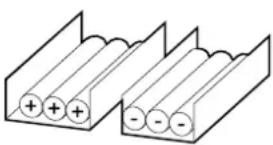 |  | 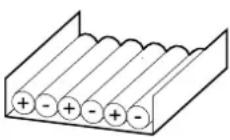 | 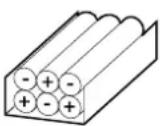 |
| <30 m Not recommended | Acceptable Recommended | |||
| 31–75 m Not recommended | Not recommended | Acceptable Recommended | ||
| 76–150 m Not recommended | Not recommended | Acceptable Recommended | ||
| 151–200 m Not recommended | Not recommended | Not recommended | Recommended | |
UPS Weights and Dimensions
UPS with One Internal Switch
| Type Weight kg Height | mm Width mm Depth mm | ||
| 50 kW 216 1991 600 850 | |||
| 50 kW with N+1 power module | 244 1991 600 850 | ||
| 100 kW 244 1991 600 850 | |||
| 100 kW with N+1 power module | 272 1991 600 850 | ||
| 150 kW 272 1991 600 850 | |||
| 150 kW with N+1 power module | 300 1991 600 850 | ||
| 200 kW 300 1991 600 850 | |||
| 200 kW with N+1 power module | 328 1991 600 850 | ||
| 250 kW 328 1991 600 850 | |||
| 250 kW with N+1 power module | 356 1991 600 850 |
UPS with Four Internal Switches
| Type Weight kg Height | mm Width mm Depth mm | ||
| 50 kW 251 1991 600 850 | |||
| 50 kW with N+1 power module | 279 1991 600 850 | ||
| 100 kW 279 1991 600 850 | |||
| 100 kW with N+1 power module | 307 1991 600 850 | ||
| 150 kW 307 1991 600 850 | |||
| 150 kW with N+1 power module | 335 1991 600 850 | ||
| 200 kW 335 1991 600 850 | |||
| 200 kW with N+1 power module | 363 1991 600 850 | ||
| 250 kW 363 1991 600 850 | |||
| 250 kW with N+1 power module | 391 1991 600 850 |
Clearance
NOTE: Clearance dimensions are published for airflow and service access only. Consult with the local safety codes and standards for additional requirements in your local area.

NOTE: 500 mm rear clearance is also required when the depth adapter is installed with the UPS.
Environment
| Operating Storage | ||
| Temperature 0 °C to 50 °C | with load derating above 40 °C11 | -25 °C to 55 °C |
| Relative humidity 0-95% non-condensing | condensing 0-95% non-condensing | |
| Elevation Designed for operation in 0-3000 m elevation.Derating required from 1000-3000 m with forced air cooling:Up to 1000 m: 1.000Up to 1500 m: 0.975Up to 2000 m: 0.950Up to 2500 m: 0.925Up to 3000 m: 0.900 | ||
| Audible noise^2 | 68 dB at 70% load74 dB at 100% load | |
| Protection class IP20 | ||
| Color Black | ||
Compliance
| Safety IEC 62040-1:20 | 2017, Edition 2.0, Uninterruptible power systems (UPS) – Part 1: Safety requirements |
| EMC IEC 62040-2:20 | 16, Edition 3.0, Uninterruptible power systems (UPS) – Part 2: Electromagnetic compatibility (EMC) requirements.IEC 62040-2:2005-10, Edition 2.0, Uninterruptible Power Systems (UPS) – Part 2: Electromagnetic compatibility (EMC) requirements |
| Performance IEC 620 | 40-3: 2021-03, Edition 3.0, Uninterruptible Power Systems (UPS) - Part 3: Method of specifying the performance and test requirements |
| Transportation IEC TR | 60721-4-2: 2001 Level 2M2 |
| Pollution degree 2 | |
| Overvoltage category | III |
| Earthing system TN-S, TN-C, TN-C-S, TT | |
| Protective class I | |
| Arc flash safety IEC | TR 61641: 2014 Edition 3.0 |
Overview
Single System Overview
| UIB Unit input breaker | |
| SSIB Static switch input breaker | |
| UOB Unit output breaker | |
| IMB Internal maintenance breaker | |
| MBB Maintenance bypass breaker | |
| BB Battery breaker |
Single System - Single Mains (One Internal Switch)

flowchart
graph TD
    Input --> UIB
    UIB --> OUT
    UIB --> BB
    BB --> UPS
    UPS --> IMB
    IMB --> Load
    style UPS fill:#f9f,stroke:#333
    style IMB fill:#ccf,stroke:#333
    style OUT fill:#dfd,stroke:#333
    style BB fill:#dfd,stroke:#333
    style UIB fill:#dfd,stroke:#333
    style BB fill:#dfd,stroke:#333
Single System - Dual Mains (One Internal Switch)
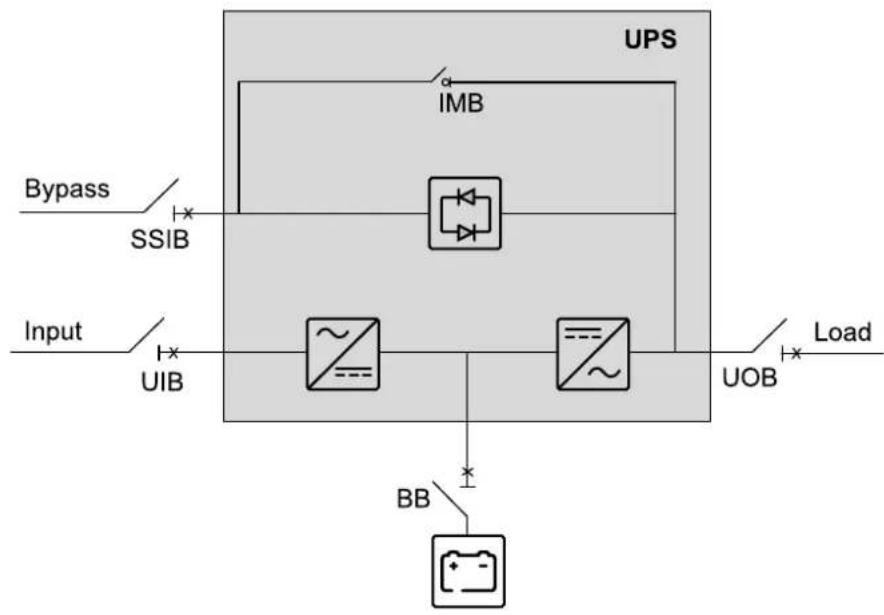
flowchart
graph TD
    A["Input"] --> B["SSIB"]
    B --> C["UPS"]
    C --> D["IMB"]
    D --> E["Load"]
    C --> F["UIB"]
    C --> G["~"]
    C --> H["~"]
    C --> I["BB"]
    I --> J["Output"]
    style A fill:#f9f,stroke:#333
    style C fill:#ccf,stroke:#333
Single System - Single Mains (Four Internal Switches)
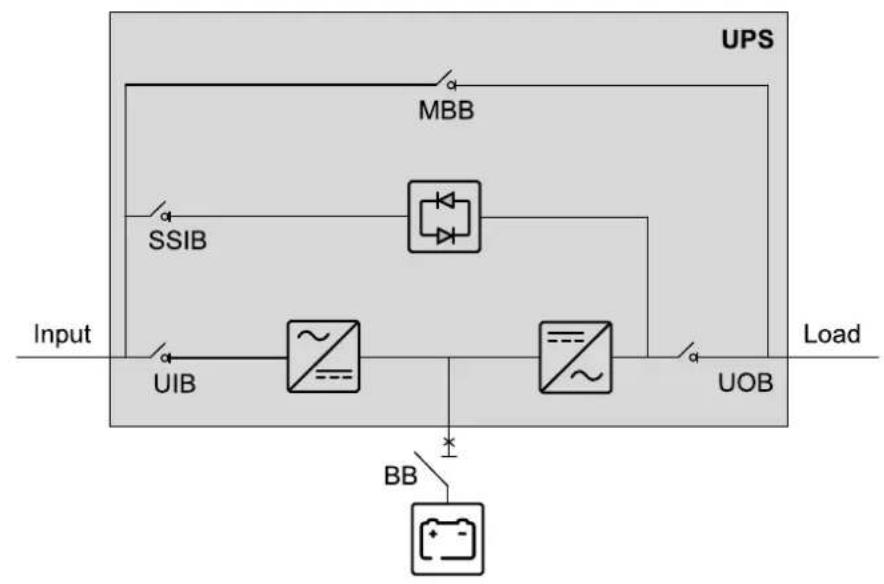
flowchart
graph TD
    Input --> MBB
    MBB --> SSIB
    SSIB --> UIB
    UIB --> UOB
    UOB --> Load
    BB --> UOB
    style MBB fill:#f9f,stroke:#333
    style SSIB fill:#ccf,stroke:#333
    style UIB fill:#cfc,stroke:#333
    style UOB fill:#fcc,stroke:#333
    style BB fill:#ffc,stroke:#333
Single System - Dual Mains (Four Internal Switches)

flowchart
graph TD
    A["Input"] --> B["UIB"]
    B --> C["~"]
    C --> D["~"]
    D --> E["UOB"]
    E --> F["Load"]
    G["Bypass"] --> H["SSIB"]
    H --> I["MBB"]
    I --> J["UPS"]
    K["BB"] --> L["+"]
    L --> M["Ground"]
Installation Procedure
⚠️ DANGER
HAZARD OF ELECTRIC SHOCK, EXPLOSION, OR ARC FLASH
The UPS must be secured against movement. Perform one of the following actions/procedures once the UPS is in its final position:
- Reinstall the front transportation bracket on the UPS and mount it to the floor, OR
• Install the seismic anchoring kit.
Failure to follow these instructions will result in death or serious injury.
▲WARNING
TILTING HAZARD
The cabinet is top heavy - move with care and use ramps over uneven floors.
Failure to follow these instructions can result in death, serious injury, or equipment damage.
-
Perform one of the following procedures:
-
Without seismic anchoring: Position the UPS, page 37, or
-
With seismic anchoring: Install the Seismic Anchoring (Option), page 39.
-
Perform one of the following procedures:
-
Top cable entry: Prepare the UPS for Top Cable Entry, page 43, or
-
Bottom cable entry: Follow the installation manual provided with the bottom entry cabinet.
-
Only for TN-C earthing system: Prepare for TN-C Earthing System, page 47.
- Only for UPS with one internal switch: Install the Neutral Disconnection Kit (Option), page 48.
-
Perform one of the following procedures:
-
Connect the Power Cables for the UPS with One Internal Switch, page 50, or
-
Connect the Power Cables for the UPS with Four Internal Switches, page 53.
-
Connect the Signal Cables, page 56.
- Connect the Signal Cables from Switchgear and Third-Party Auxiliary Products, page 59.
- Connect the Modbus Cables, page 62.
- Install the Power Module(s), page 64.
- Final Installation, page 70.
Position the UPS
⚠️ DANGER
HAZARD OF ELECTRIC SHOCK, EXPLOSION, OR ARC FLASH
The UPS must be secured against movement. Once the UPS is in its final position, reinstall the front and rear transportation brackets on the UPS and mount them to the floor.
Failure to follow these instructions will result in death or serious injury.
- Push the UPS into the final position.
- Lower the front and rear feet on the UPS with a wrench until they connect with the floor. The casters must not have contact with the floor. Use a bubble-leveler to check that the UPS is level.
- Reinstall the front transportation bracket on the UPS and mount it to the floor. Use appropriate hardware for the floor type – the hole diameter in the bracket is 10 mm. The requirement is M8 strength grade 8.8 hardware.

natural_image
Technical diagram of an electronic device showing internal components and a green base with directional arrows (no text or symbols)- Reinstall the rear transportation bracket on the UPS and mount it to the floor. Use appropriate hardware for the floor type – the hole diameter in the bracket is 10 mm. The requirement is M8 strength grade 8.8 hardware.
Rear View
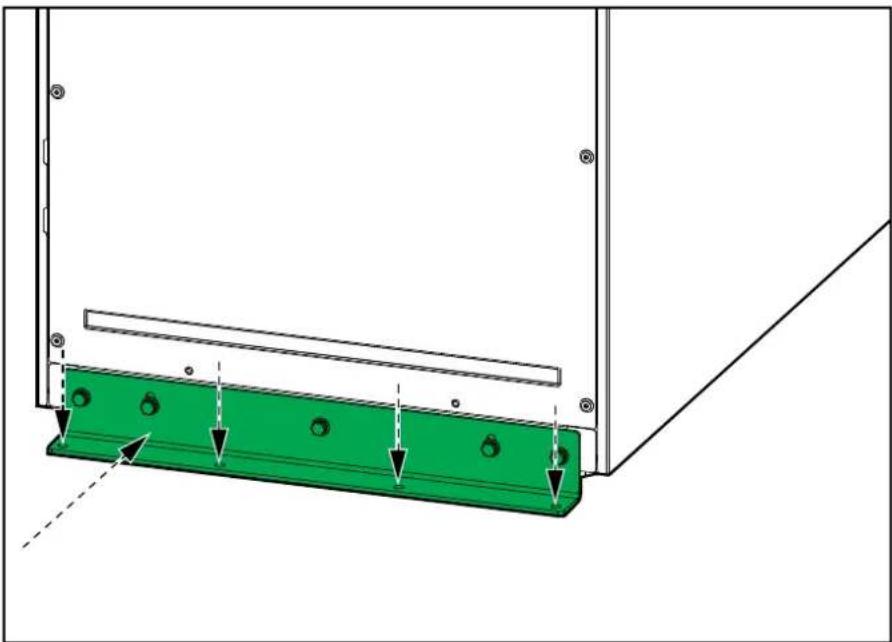
natural_image
Technical diagram of a green metal bracket with mounting holes and directional arrows indicating assembly or force (no text or symbols)Install the Seismic Anchoring (Option)
NOTE: Use the optional seismic kit SP3OPT005 for this procedure.
-
Push the UPS into the final position.
-
Install the rear anchoring bracket on the UPS with the provided M8 x 20 bolts.
Option: Use the shimming sheet (870-91123) for alignment with a two meter tall rack.
Rear View (without Shimming Sheet)
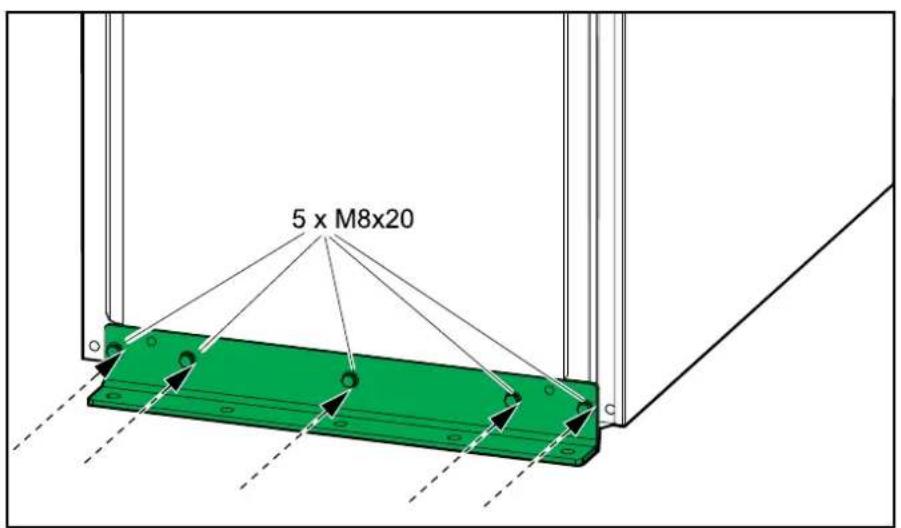
text_image
5 x M8x20Rear View (with Shimming Sheet)
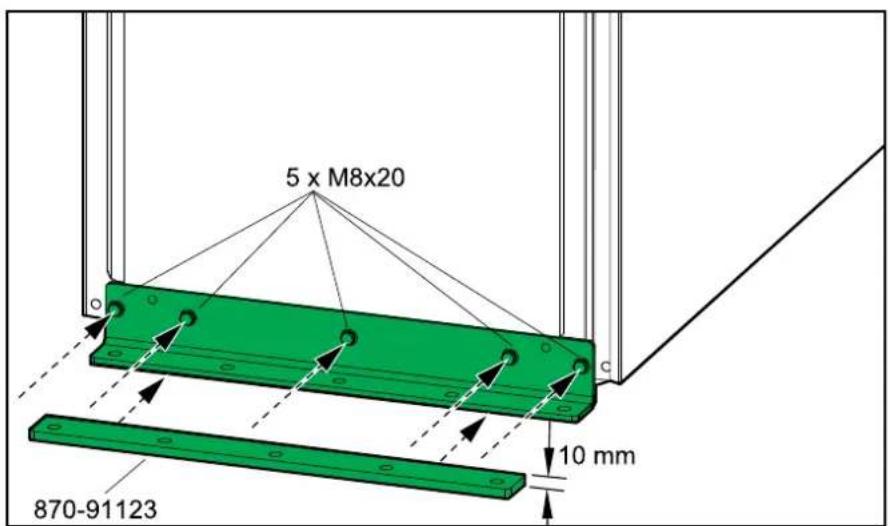
text_image
5 x M8x20 870-91123 10 mm- Mount the rear anchoring bracket to the floor. Use appropriate hardware for the floor type – the hole diameter in the rear anchors is 14 mm. The requirement is M12 strength grade 8.8 hardware.
Rear View (without Shimming Sheet)

text_image
Ø14 mmRear View (with Shimming Sheet)

text_image
Ø14 mm 10 mm- Install the front anchoring bracket on the UPS and mount it to the floor. Use appropriate hardware for the floor type – the hole diameter in the rear anchors is 14 mm. The requirement is M12 strength grade 8.8 hardware.
Option: Use the shimming sheet (870-91123) for alignment with a two meter tall rack.
Front View (without Shimming Sheet)
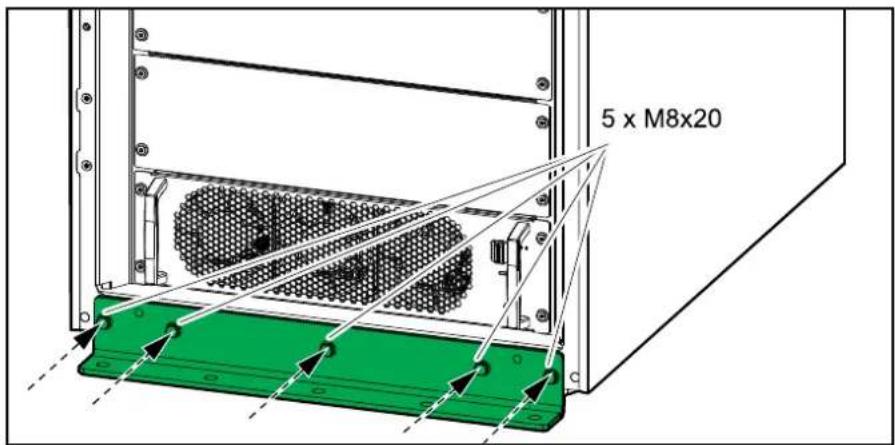
text_image
5 x M8x20Front View (with Shimming Sheet)

text_image
5 x M8x20 870-91123Front View (without Shimming Sheet)
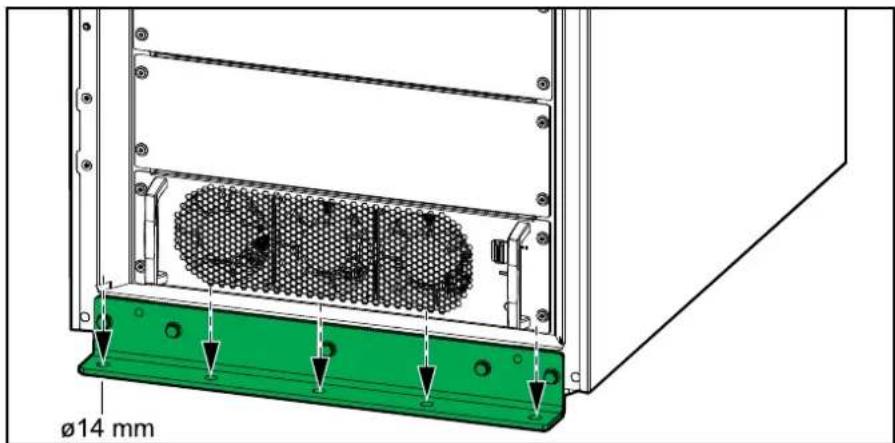
text_image
ø14 mmFront View (with Shimming Sheet)

text_image
Ø14 mm 10 mmPrepare the UPS for Top Cable Entry
△ ▲ DANGER
HAZARD OF ELECTRIC SHOCK, EXPLOSION, OR ARC FLASH
Do not drill or punch holes with the gland plates installed and do not drill or punch holes in close proximity to the cabinet.
Failure to follow these instructions will result in death or serious injury.
- Prepare for power cables:
a. Remove the gland plate from the top of the UPS.
b. Drill/punch holes for power cables or glands/grommets in the gland plate. Install glands/grommets (not provided), if applicable.
c. Reinstall the gland plate.

natural_image
Technical line drawing of a green square frame mounted on a metal frame (no text or symbols)
natural_image
Technical diagram of a green square plate mounted on a metal frame, with mounting holes and alignment markers (no text or symbols)- Remove the front inner cover(s) from the UPS.
UPS with One Internal Switch

natural_image
Technical diagram of an electronic device showing internal components and a green panel with a white arrow indicating direction (no text or symbols present)UPS with Four Internal Switches
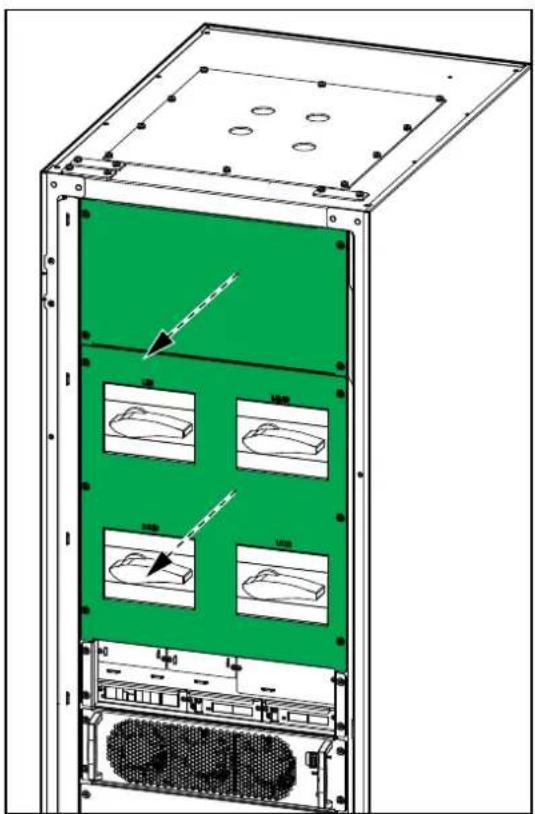
natural_image
Technical diagram of a server rack unit with green panel and four internal compartments, showing mounting holes and ventilation slots (no text or labels)- Remove the rear panel from the UPS.
Rear View

natural_image
Illustration of a three-tiered industrial cabinet with green panels and mounting flanges (no text or symbols)- Remove the signal cable covers from the top of the UPS.

natural_image
Technical line drawing of a mechanical assembly with two green components mounted on a metal frame (no text or symbols)- Perform one of the following:
- Install the provided cable brush plugs from the hardware kit, OR
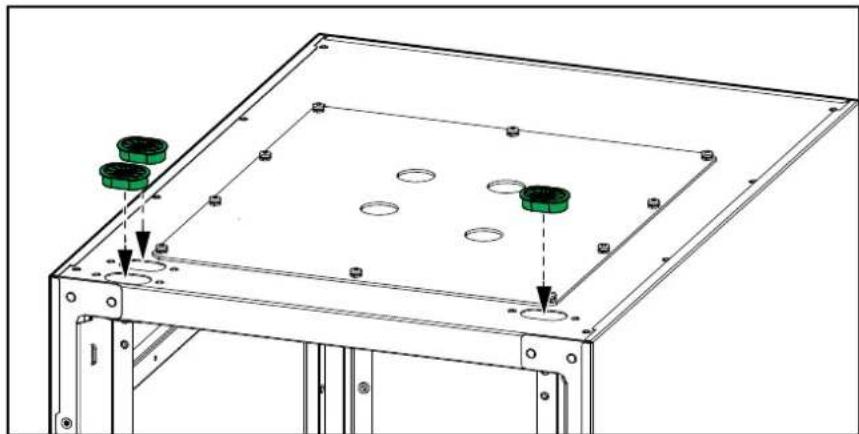
natural_image
Technical line drawing of a metal frame assembly with two green circular components and mounting holes (no text or symbols)- Drill holes in the signal cable covers. Install glands/grommets (not provided) if applicable. Reinstall the signal cable covers.

natural_image
Technical line drawing of a metal frame assembly with two green component blocks and mounting holes (no text or symbols)- Remove the cover from the signal connection terminals.
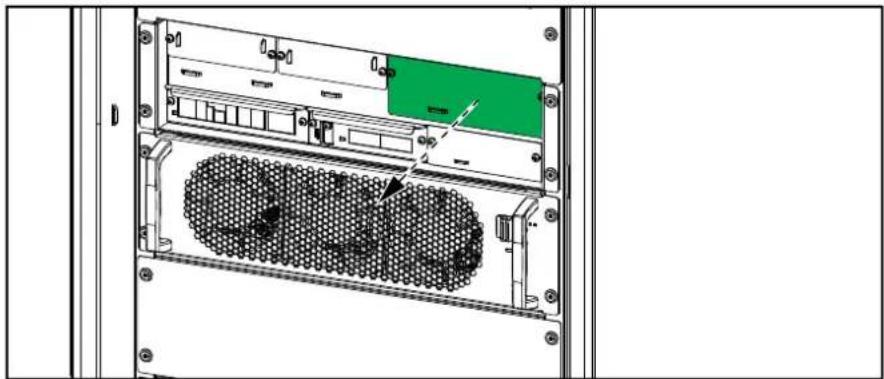
natural_image
Technical diagram of an internal server rack with a green panel and black mesh structure (no text or symbols)- Route the signal cables as shown to separate the Class 2/SELV cables from the non-Class 2/non-SELV cables.
NOTE: For more information about the locations of Class 2/SELV and non-Class 2/non-SELV cables, see Connect the Signal Cables, page 56.
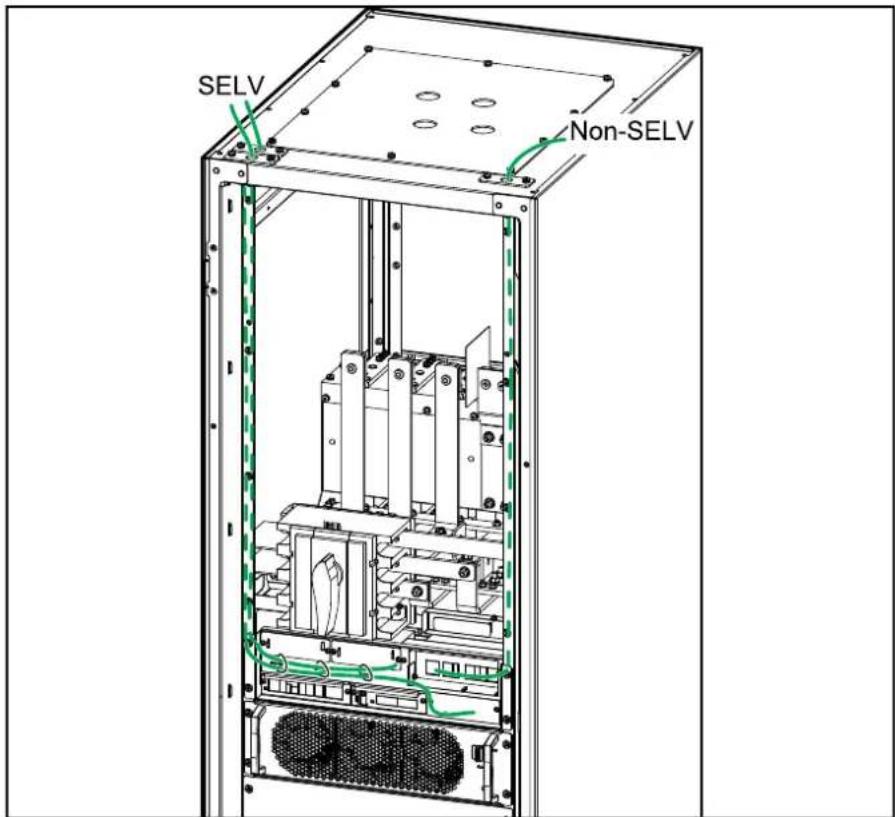
text_image
SELV Non-SELVPrepare for TN-C Earthing System
- Unpack the optional grounding kit and install the copper busbar (880-74018 or 880-74127) in the UPS.
UPS with One Internal Switch
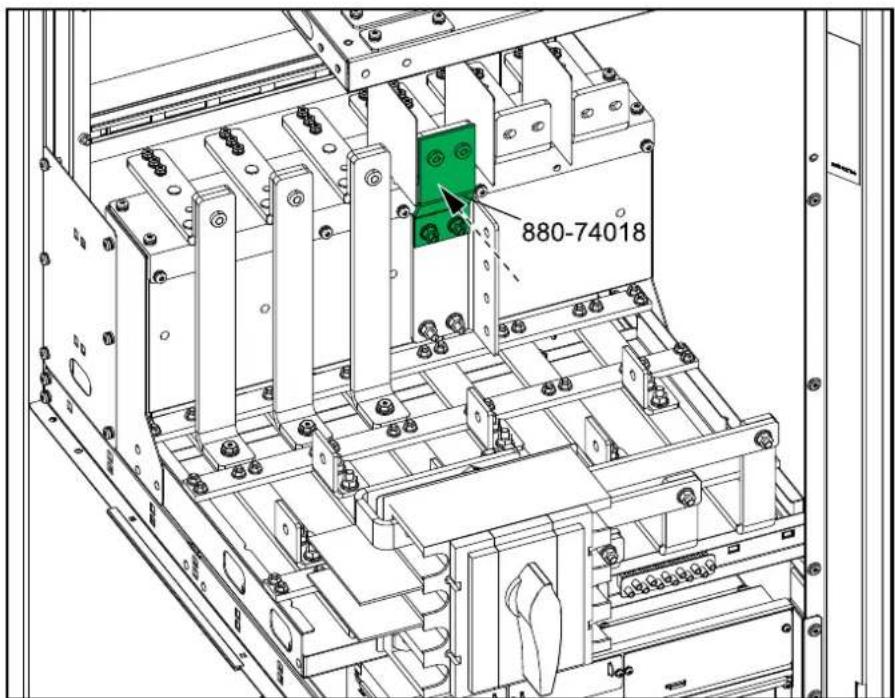
text_image
880-74018UPS with Four Internal Switches

text_image
880-74127Install the Neutral Disconnection Kit (Option)
NOTE: Use the optional neutral disconnection kit SP3OPT004 for this procedure. The neutral disconnection kit is only applicable for a UPS with one internal switch.
- Remove the plastic cover from the neutral disconnection assembly.
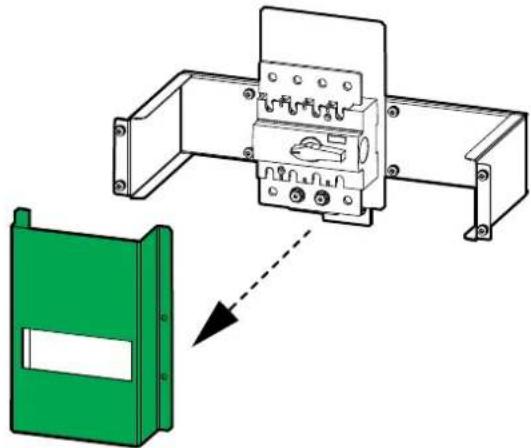
natural_image
Diagram showing a green plastic enclosure connected to an electrical contactor device (no text or symbols present)- Install the neutral disconnection assembly to the rear posts in the UPS with the four provided screws.
Rear View of the UPS

natural_image
Technical diagram of a mechanical assembly with green components and mounting holes (no text or symbols)- Connect the bottom busbar of the neutral disconnection assembly to the neutral busbar in the UPS with the two provided screws.
Front View of the UPS
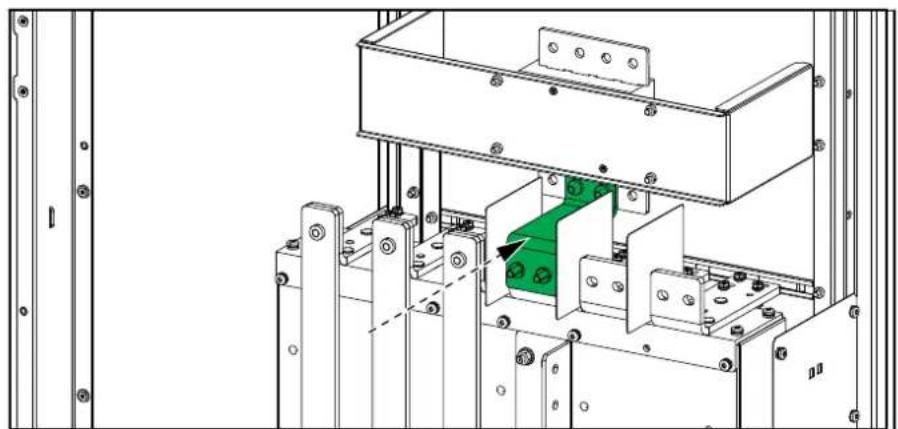
natural_image
Technical line drawing of a mechanical assembly with mounting brackets and a green highlighted component (no text or symbols)- Connect the external neutral cables to the upper busbar of the neutral disconnection assembly.
Rear View of the UPS

natural_image
Technical line drawing of an electrical enclosure with visible wiring and mounting points (no text or symbols)- Reinstall the plastic cover on the neutral disconnection assembly.
Rear View of the UPS

natural_image
Technical line drawing of an electrical enclosure with wiring and components, no visible text or symbolsConnect the Power Cables for the UPS with One Internal Switch
NOTE: Only if the backfeed kit is installed, connect the power cables as described in the following procedure.
- Only for dual mains: Remove the single mains jumper busbars.
NOTE: Save the single mains jumper busbars. They are needed for testing during start-up of the UPS.
Front View of the UPS

natural_image
Technical line drawing of an electrical enclosure with green components and mounting hardware (no text or symbols)- Connect the power cables in the described order.
a. Connect the PE cables.
b. Connect the input cables (L1, L2, L3, (N)).
c. Only for dual mains: Connect the bypass cables (L1, L2, L3, N).
d. Connect the output cables (L1, L2, L3, N).
e. Connect the DC cables (DC+, DC-).
Single Mains
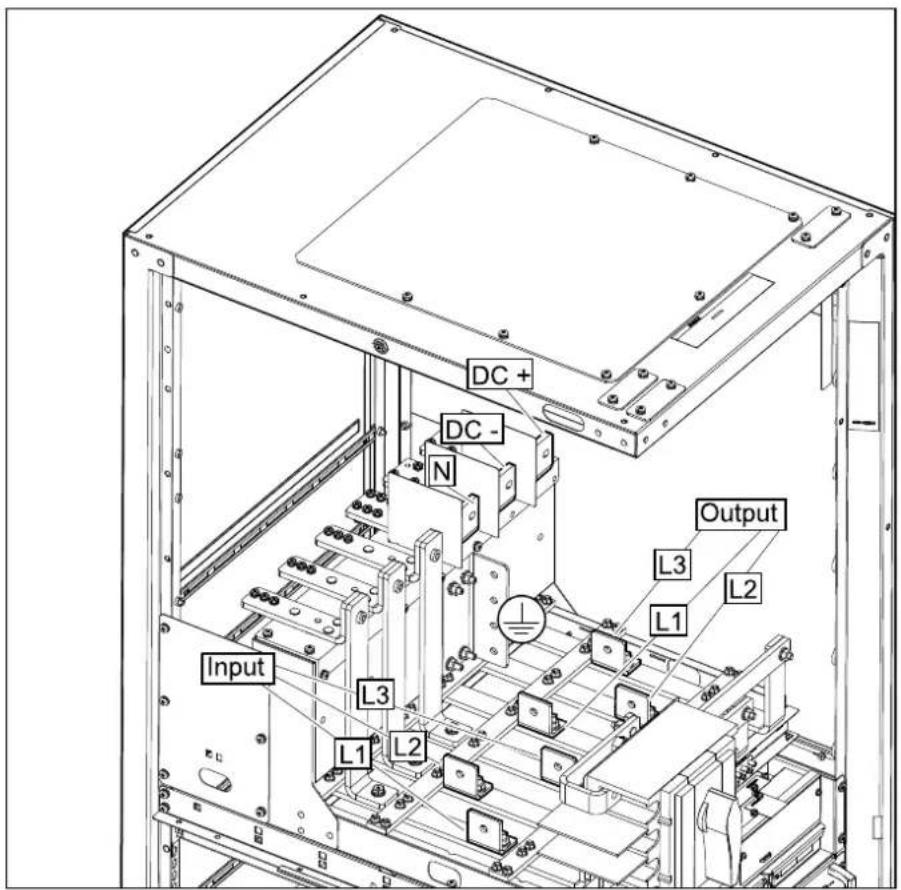
text_image
DC+ DC- N Output L3 L2 L1 Input L3 L1 L2Dual Mains

text_image
Input L1 L3 L2 Bypass DC+ DC- N Output L3 L1 L2 L2 L3- Reinstall the rear panel on the UPS.
Rear View

natural_image
3D diagram of a multi-tiered industrial cabinet with green panels and mounting feet (no text or symbols)Connect the Power Cables for the UPS with Four Internal Switches
NOTE: Only if the backfeed kit is installed, connect the power cables as described in the following procedure.
- Only when the local codes/regulations require removal of the neutral jumper: Remove the neutral jumper (880-74129). The neutral jumper makes a bolted connection of the neutral so that the neutral is not disconnected when the 4-pole switches are opened.
Rear View of the UPS

natural_image
Technical line drawing of an electrical enclosure with internal components and a green component (no text or symbols)- Only for dual mains: Remove the single mains jumper busbars.
NOTE: Save the single mains jumper busbars. They are needed for testing during start-up of the UPS.
Rear View of the UPS

natural_image
Technical line drawing of an electrical cabinet interior with green and black components (no text or symbols)- Connect the power cables in the described order.
a. Connect the PE cables.
b. Connect the input cables (L1, L2, L3, (N)).
c. Only for dual mains: Connect the bypass cables (L1, L2, L3, N).
d. Connect the output cables (L1, L2, L3, N).
e. Connect the DC cables (DC+, DC-).
Single Mains
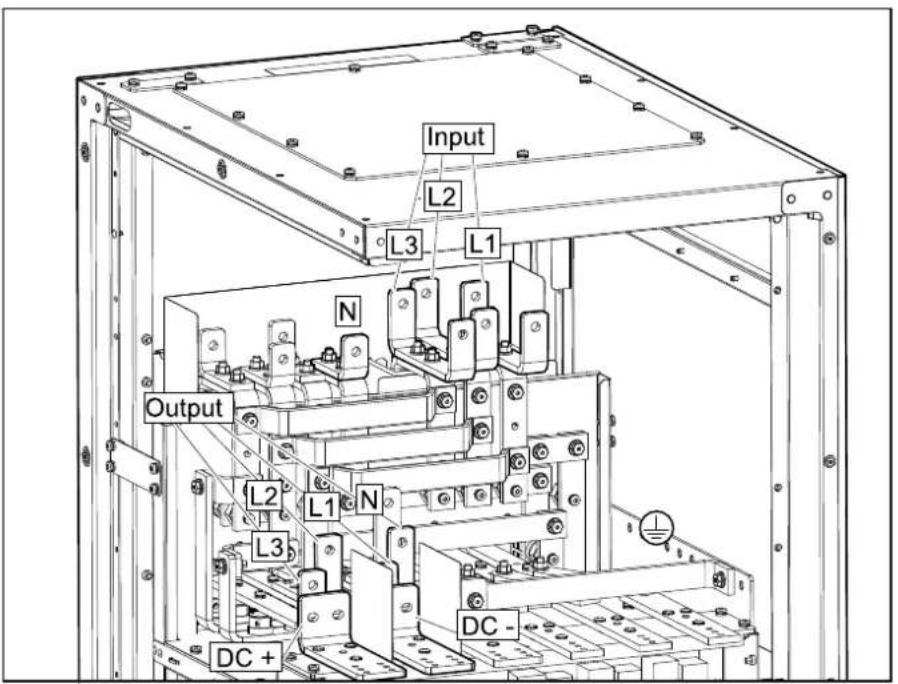
text_image
Input L2 L3 L1 N Output L2 L1 N L3 DC+ DC-Dual Mains
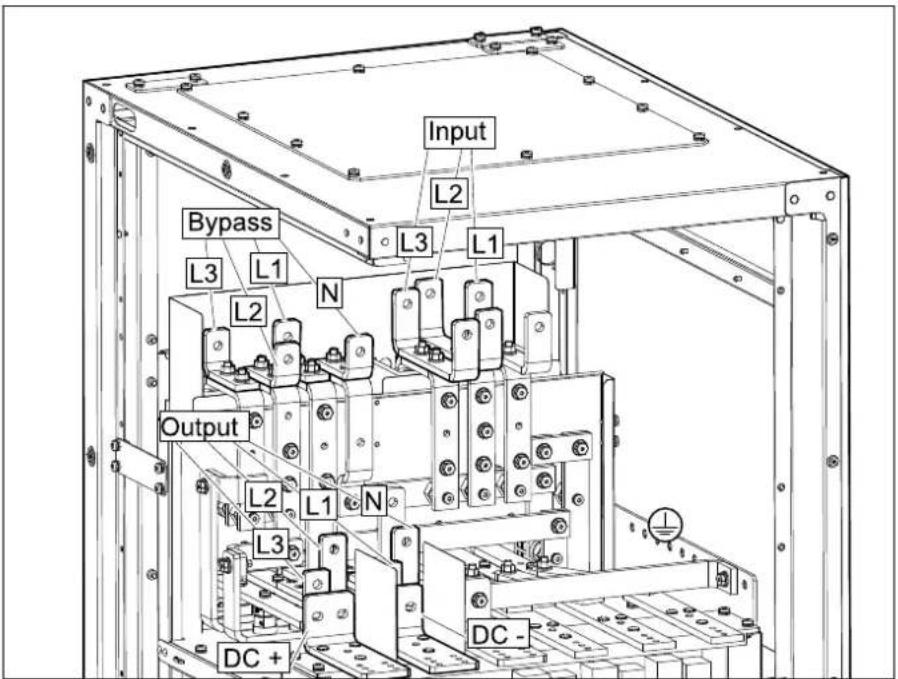
text_image
Input Bypass L2 L3 L1 L3 L1 Output L3 L2 N L2 L1 N L3 DC + DC -- Reinstall the rear panel on the UPS.

natural_image
3D diagram of a vertical green cabinet with mounting feet, showing front view and side view (no text or symbols)Connect the Signal Cables
Overview of Signal Connection Terminals in the UPS

text_image
K L O Q S B D F H M N P R A C G E I JA. Remote EPO (J6600)
B. Display port (for internal use)
C. USB port (for service)
D. Tuner port (for service)
E. Modbus port
F. Battery temperature sensor (J3008)
G. Input contacts (J3009)
H. Output relays (J3001)
I. PBUS2
J. PBUS1
K. Network management card (NMC) slot 1
L. Network management card (NMC) slot 2
M. Backfeed relay and sync output relay (J8310)
N. Auxiliary contacts 1 (J8302)
O. Auxiliary contacts 2 (J8303)
P. Battery breaker auxiliary contacts (J8304)
Q. IMB and RIMB auxiliary contacts (J8305)
R. Sync input (J8300)
S. Battery breaker trip (J8301)
NOTE: Route the signal cables separately from the power cables and route the Class 2/SELV cables (A to L) separately from the non-Class 2/non-SELV cables (M to S). Non-Class 2/non-SELV cables should be rated for 600 V.
NOTE: The recommended size for the signal cables is 0.5 mm
NOTE: Do not unplug the signal terminals by hand. Be sure to use the tool (TME12560) in the accessory bag to unplug the signal terminals. Be sure to restore the two rows of terminals to their original position: the grey terminals in the upper row and the green terminals in the lower row.
- Use the provided terminal unplug tool (TME12560) to remove the covers for the signal connection terminals. Save the tool for future use.

- Connect the Class 2/SELV signal cables from the building EPO to the remote EPO (J6600) in the UPS according to one of the options below.
The EPO circuit is considered Class 2/SELV. Class 2/SELV circuits must be isolated from the primary circuitry. Do not connect any circuit to the EPO terminal block unless it can be confirmed that the circuit is Class 2/SELV.
EPO Configurations (Terminal J6600, 1-9)
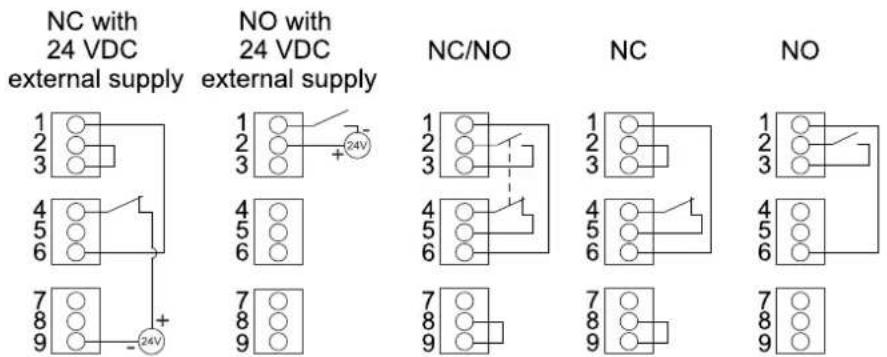
text_image
NC with 24 VDC external supply NO with 24 VDC external supply 1 2 3 4 5 6 7 8 9 + - 24V NC/NO NC NO 1 2 3 4 5 6 7 8 9 1 2 3 4 5 6 7 8 9The EPO input supports 24 VDC.
NOTE: The default setting for the EPO activation is to turn off the inverter.
If you want the EPO activation to transfer the UPS into forced static bypass operation instead, please contact Schneider Electric.
- Connect the Class 2/SELV signal cables to the input contacts and output relays in the UPS.
Do not connect any circuit to the input contacts unless it can be confirmed that the circuit is Class 2/SELV.
The input contacts support 24 VDC 10 mA. All circuits connected must have the same 0 V reference.

text_image
Electrical circuit diagram with two components labeled Ø1 and Ø2, connected to a power source and two output terminals.| Name Description Location | ||
| IN _1 (input contact 1) Configurable input contact Terminal J3009, 1-2 | ||
| IN _2 (input contact 2) Terminal J3009, 3-4 | ||
| IN _3 (input contact 3) Terminal J3009, 5-6 | ||
| IN _4 (input contact 4) Terminal J3009, 7-8 | ||
The output relays support 24 VAC/VDC 1 A. All external circuitry must be fused with maximum 1 A fast acting fuses.
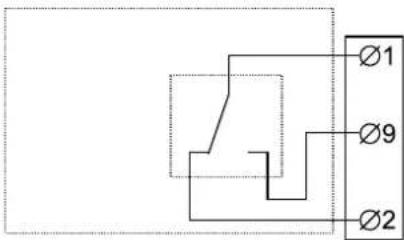
text_image
Ø1 Ø9 Ø2| Name Description Location | ||
| OUT_1 (output relay 1) Configurable output relay Terminal | J3001, 1, 9, 2 | |
| OUT_2 (output relay 2) Terminal J3001, 10, 3, 11 | ||
| OUT_3 (output relay 3) Terminal J3001, 4, 12, 5 | ||
| OUT_4 (output relay 4) Terminal J3001, 13, 6, 14 | ||
| OUT_5 (output relay 5) Terminal J3001, 7, 15, 8 | ||
- Connect the signal cables from the auxiliary products to the UPS. Follow the instructions in the auxiliary product manuals.
Connect the Signal Cables from Switchgear and Third-Party Auxiliary Products
NOTE: Route the signal cables separately from the power cables and route the Class 2/SELV cables separately from the non-Class 2/non-SELV cables.
- Install the optional battery temperature sensor in the battery solution. In battery cabinets, install the battery temperature sensor in the top corner of the battery cabinet.
| ▲WARNING |
| HAZARD OF FIRE |
| Position the battery temperature sensor as described to ensure correct temperature measurements. |
| Failure to follow these instructions can result in death, serious or equipment damage. |
- Route the battery temperature sensor cables from the battery solution to the UPS and connect as shown.
NOTE: Battery temperature sensors (SP3OPT006) are available as an optional kit.
NOTE: The battery temperature sensor cables are considered Class 2/SELV. Class 2/SELV circuits must be isolated from the primary circuitry.

flowchart
graph TD
    subgraph J3008_UPS
        UPS1["UPS 1 BATT_TEMP1"] --> UPS2["UPS 2 BATT_TEMP1_RTN"]
        UPS2 --> UPS3["UPS 3 BATT_TEMP2"]
        UPS2 --> UPS4["UPS 4 BATT_TEMP2_RTN"]
    end
    subgraph UPS_UPS
        UPS3 --> UPS4
    end
    J3008_UPS --> UPS2
    J3008_UPS --> UPS3
    J3008_UPS --> UPS4
- Connect the signal cables from the battery breaker(s) in your battery solution for shunt trip or undervoltage (UV) trip connection to the UPS. Follow the illustration for connection with internal 24 VDC supply. The UPS can connect to and monitor up to three (if J8301-10 is used for backfeed) or four battery breakers.
a. Connect battery breaker 1 to terminal J8301 in the UPS.
b. Connect battery breaker 2 to terminal J8301 in the UPS.
c. Connect battery breaker 3 to terminal J8301 in the UPS.
d. Connect battery breaker 4 to terminal J8301 in the UPS.
e. For battery breaker trip 4, connect trip unit negative to pin 1/4/7 of terminal J8301.
NOTE: The following diagram and table demonstrate the battery breaker trip connection with internal 24 VDC supply and pin connections.
Battery Breaker Trip Connection with Internal 24 VDC Supply

1 GND
2 BB UV TRIP 1
3 BB_SHUNT_TRIP_1
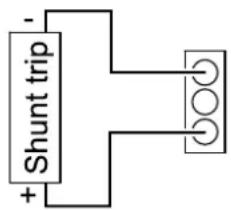
text_image
+ Shunt trip -1 GND
2 BB_UV_TRIP_1
3 BB_SHUNT_TRIP_1
J8301 Pin Connections for Battery Breaker(s)
Battery Breaker 1
| Pin number | Function |
| 1 GND | |
| 2 GNDBB_UV_TRIP_1 | |
| 3 BB_SHUNT_TRIP_1 | |
Battery Breaker 2
| Pin number | Function |
| 4 GND | |
| 5 BB_UV_TRIP_2 | |
| 6 BB_SHUNT_TRIP_2 | |
Battery Breaker 3
| Pin number | Function |
| 7 | GND |
| 8 BB_UV_TRIP_3 | |
| 9 BB_SHUNT_TRIP_3 | |
Battery Breaker 4
| Pin number | Function |
| 10 24 V | |
| 11 BB_UV_TRIP_4 | |
| 12 BB_SHUNT_TRIP_4 | |
- Connect signal cables from the auxiliary contacts in your switchgear to the UPS.
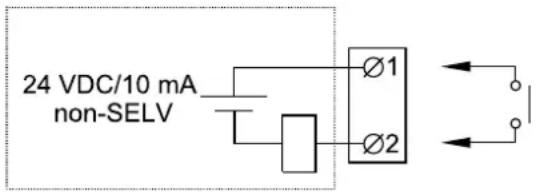
text_image
24 VDC/10 mA non-SELV Ø1 Ø2| Terminal number | Function Connection | |
| J8302, 1-2 UIB | (unit input breaker) Connect to normally open (NO) | auxiliary contacts in unit input breaker UIB. UIB must contain an auxiliary contact for each connected UPS. |
| J8302, 3-4 SSIB | (static switch input breaker) Connect to normally open (NO) | auxiliary contacts in static switch input breaker SSIB. SSIB must contain an auxiliary contact for each connected UPS. |
| J8302, 5-6 Ext. MBB | (external maintenance bypass breaker) Connect to normally closed (NC) | auxiliary contacts in external maintenance bypass breaker (Ext. MBB). Ext. MBB must contain an auxiliary contact for each connected UPS. |
| J8302, 7-8 UOB | (unit output breaker) Connect to normally open (NO) | auxiliary contacts in unit output breaker UOB. |
| J8303, 1-2 | RUOB (redundant AUX switch in unit output breaker) | Connect to redundant auxiliary contacts in unit output breaker UOB. |
| J8304, 1-2 | BB1 (battery breaker 1) | Connect to normally open (NO) auxiliary contacts in battery breaker number 1. |
| J8304, 3-4 | BB2 (battery breaker 2) | Connect to normally open (NO) auxiliary contacts in battery breaker number 2. |
| J8304, 5-6 | BB3 (battery breaker 3) | Connect to normally open (NO) auxiliary contacts in battery breaker number 3. |
| J8304, 7-8 | BB4 (battery breaker 4) | Connect to normally open (NO) auxiliary contacts in battery breaker number 4. |
| J8305, 1-2 One internal switch UPS:IMB (internal maintenance breaker)Four internal switches UPS:MBB (maintenance bypass breaker) | Connect to normally closed (NC) auxiliary contacts in internal maintenance breaker IMB or maintenance bypass breaker MBB. | |
| J8310, 1 | Backfeed relay common | See Backfeed Protection, page 66. |
| J8310, 2 | Backfeed relay normally closed (NC) | See Backfeed Protection, page 66. |
| J8310, 3 | Backfeed relay normally open (NO) | See Backfeed Protection, page 66. |
Connect the Modbus Cables
NOTE: For cyber security protection, strict access control to the installation room must be exerted at all times.
-
Connect the Modbus cables to the terminal J3000 of the UPS(s). Use either 2-wire or 4-wire connection.
-
Shielded twisted pair cables must be used for Modbus connections. The shield connection to the ground must be as short as possible (ideally below 1 cm). The cable shield must be connected to the Ch GND pin on each device.
- Wiring should be done in accordance with local wiring codes.
- Route signal cables separately from power cables to ensure sufficient isolation.
- The Modbus port is galvanically isolated with the Ch GND pin as ground reference.
Example: 2-Wire Connection with Two UPSs
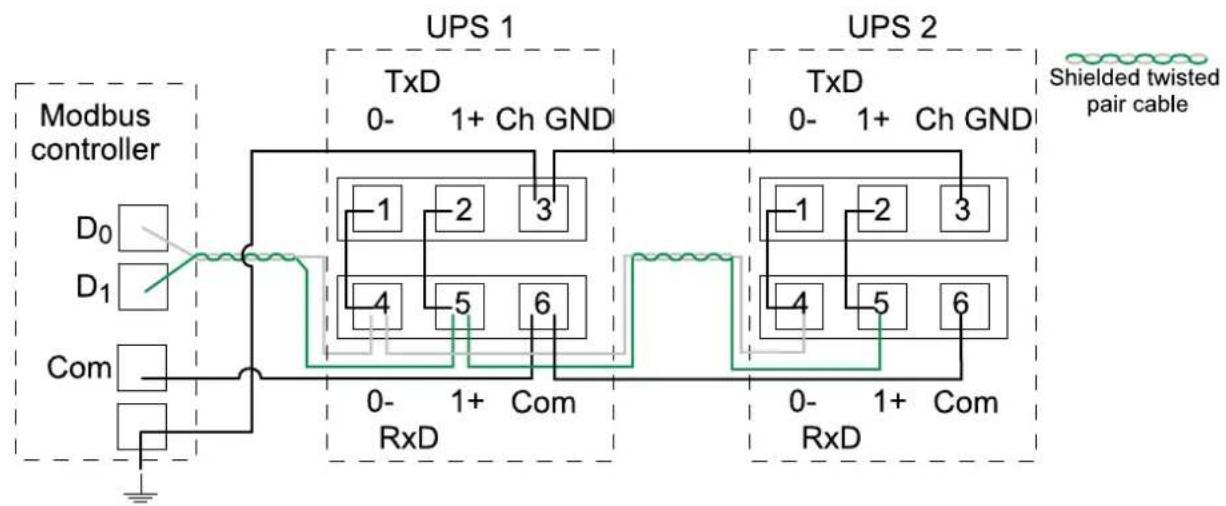
flowchart
graph TD
    subgraph_Modbus_controller["Modbus controller"]
        D0["D0"] --> Modbus_controller
        D1["D1"] --> Modbus_controller
        Com["Com"] --> Modbus_controller
    end

    subgraph_UPS_1["TxD 0- 1+ Ch GND"]
        -1["-1"] --> RxD["0-RxD"]
        -2["-2"] --> RxD
        -3["3"] --> RxD
        -4["4"] --> RxD
        -5["-5"] --> RxD
        -6["6"] --> RxD
    end

    subgraph_UPS_2["TxD 0- 1+ Ch GND"]
        -1["1"] --> RxD
        -2["2"] --> RxD
        -3["3"] --> RxD
        -4["4"] --> RxD
        -5["5"] --> RxD
        -6["6"] --> RxD
    end

    style Modbus_controller fill:#f9f,stroke:#333
    style UPS_1 fill:#ccf,stroke:#333
    style UPS_2 fill:#ccf,stroke:#333
    style RxD fill:#cfc,stroke:#333
Example: 4-Wire Connection with Two UPSs

flowchart
graph TD
    subgraph_Modbus_controller["Modbus controller"]
        RX0["RX₀"] --> UPS1["TxD 0- 1+Ch GND"]
        RX1["RX₁"] --> UPS1
        TX0["TX₀"] --> UPS1
        TX1["TX₁"] --> UPS1
        Com["Com"] --> UPS1
    end

    UPS1 --> UPS2["TxD 0- 1+Ch GND"]
    UPS2 --> UPS1a["0- 1+Ch GND"]
    UPS2 --> UPS2b["0- 1+Ch GND"]
    UPS1a --> UPS1c["4 5 6"]
    UPS2a --> UPS2b["4 5 6"]
    UPS1c --> UPS1d["0-RxD Com"]
    UPS2b --> UPS2c["0-RxD Com"]
    UPS1d --> UPS1e["Shielded twisted pair cable"]
    UPS2e --> UPS2f["Shielded twisted pair cable"]
- Install 150 Ohm termination resistors at each end of each bus if the buses are very long and operate at high data rates. Busses under 610 meters at 9600 baud or under 305 meters at 19.200 baud should not require termination resistors.
Install the Power Module(s)
NOTE: One 50 kW power module is preinstalled in the UPS. Additional power modules are shipped separately for UPS ratings over 50 kW and must be installed to reach the correct UPS kW rating.
NOTE: Install power modules starting with the bottom positions and upward.
▲WARNING
RISK OF EQUIPMENT DAMAGE
- Store the power modules at an ambient temperature of -25 °C to 55 °C, 0-95% non-condensing humidity.
- Store the power modules in their original protective packaging.
Failure to follow these instructions can result in death, serious injury, or equipment damage.
▲CAUTION
HEAVY LOAD
Power modules are heavy (28 kg) and require two persons to lift.
Failure to follow these instructions can result in injury or equipment damage.
- Remove the filler plate from the empty power module slot. Save the filler plate for future use.

natural_image
Technical diagram of a structural frame with green panel and directional arrows indicating movement (no text or symbols)- Set the unlock tab on the power module to the OFF position. Push the power module into the slot. The enable mechanism will latch when the power module is correctly inserted.
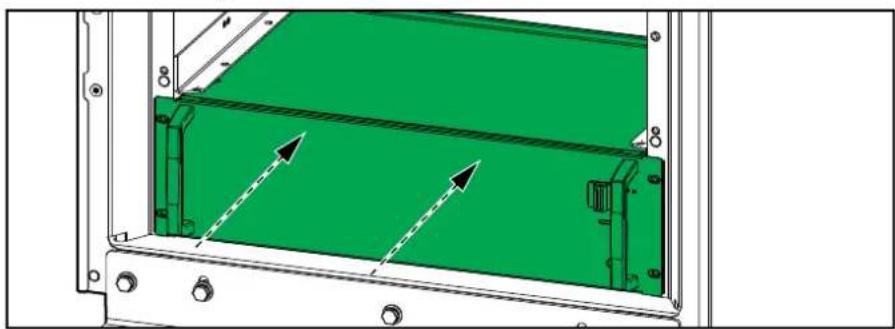
natural_image
Technical diagram of a mechanical assembly with green panel and mounting holes (no text or symbols)- Reinstall the screws in the sides of the power module.

natural_image
Technical line drawing of a mechanical assembly with mounting holes and internal components (no text or symbols)- Set the unlock tab on the power module to the ON position.
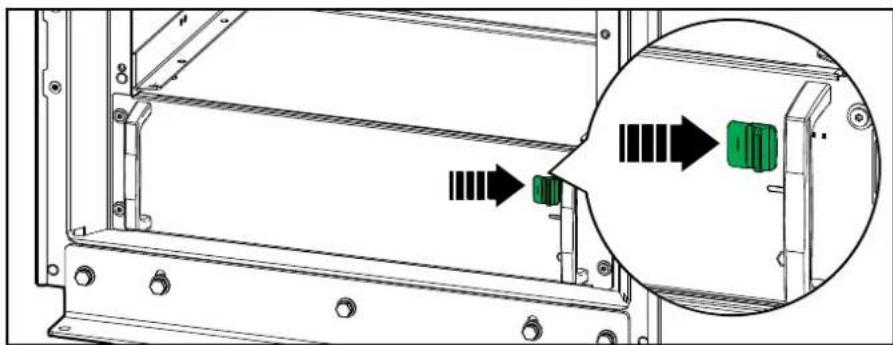
natural_image
Technical diagram of a mechanical assembly with green connectors and directional arrows indicating movement (no text or symbols)△ ▲ DANGER
HAZARD OF ELECTRIC SHOCK, EXPLOSION, OR ARC FLASH
All power module slots must have either a power module or a filler plate installed.
Failure to follow these instructions will result in death or serious injury.
Backfeed Protection
⚠️ DANGER
HAZARD OF ELECTRIC SHOCK, EXPLOSION, OR ARC FLASH
Mandatory backfeed protection on bypass must be implemented by installation of upstream breaker with shunt trip or under voltage trip connected to the UPS. See diagrams and instructions below.
Failure to follow these instructions will result in death or serious injury.
Installation of Third Party Backfeed Protection
Connect the breaker shunt trip/ under voltage trip and auxiliary contacts to the UPS as shown below. Use double insulated cables. Breaker shunt trip or under voltage trip must be rated for 24 VDC nominal, inrush max 20 W.
885-92858 (provided with the UPS) must be placed visible at the bypass upstream breaker.
⚠️ DANGER
HAZARD OF ELECTRIC SHOCK, EXPLOSION, OR ARC FLASH
In systems where backfeed protection is not a part of the standard design, an automatic isolation device (Schneider Electric backfeed protection option or other device, such as a breaker, switch, or contactor with trip function, meeting the requirements of IEC62040-1 or UL1778 5th edition – depending on which standard applies to your local area), is required to be installed to prevent hazardous voltage or energy at the input terminals of the isolation device. The device must be rated and controlled according to the specifications in this manual.
Failure to follow these instructions will result in death or serious injury.
When the UPS input is connected through external isolators that, when opened, isolate the neutral or when the automatic backfeed isolation is provided external to the equipment or is connected to an IT power distribution system, a label must be fitted at the UPS input terminals, and on all primary power isolators installed remotely from the UPS area and on external access points between such isolators and the UPS, by the user, displaying the following text (or equivalent in a language which is acceptable in the country in which the UPS system is installed):
⚠️ DANGER
HAZARD OF ELECTRIC SHOCK, EXPLOSION, OR ARC FLASH
Risk of voltage backfeed. Before working on this circuit: Isolate the UPS and check for hazardous voltage between all terminals including the protective earth.
Failure to follow these instructions will result in death or serious injury.
UPS and Third Party Backfeed Protection (UVR trip) – Single Mains
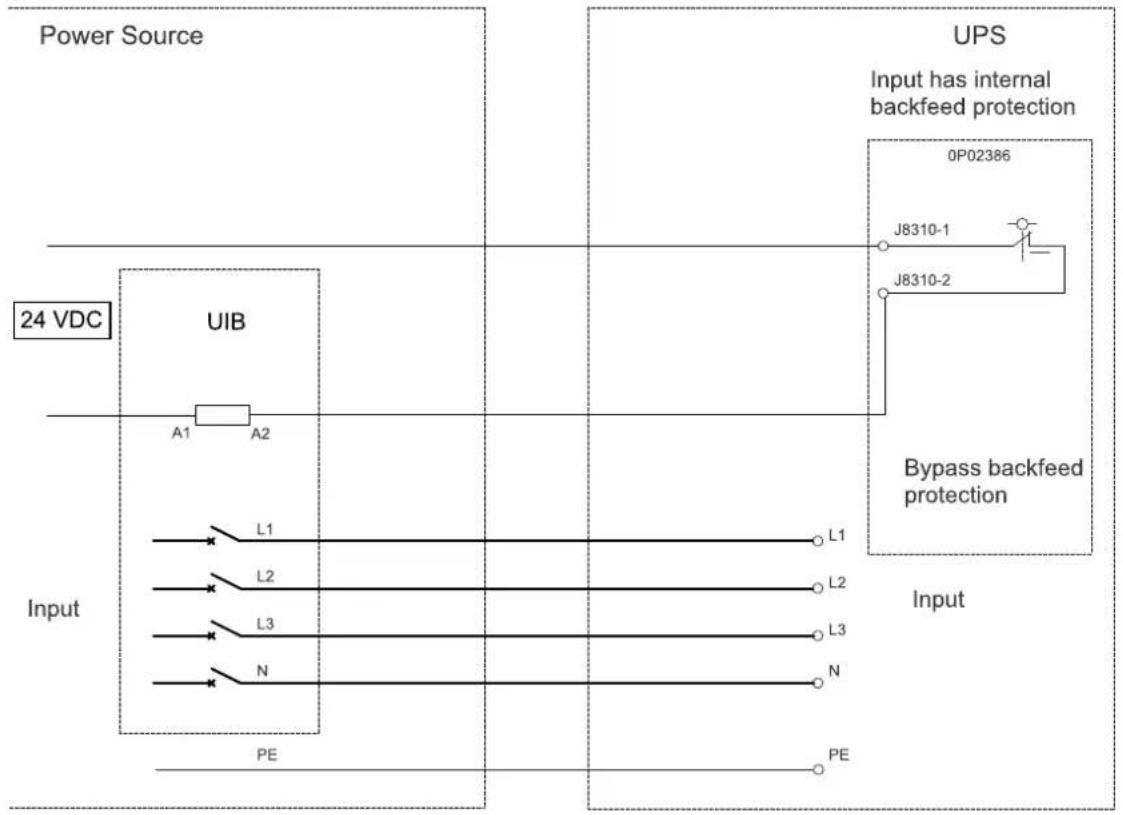
flowchart
graph TD
    subgraph Power Source
        direction LR
        A["24 VDC"] --> B["UIB"]
        B --> C["A1"]
        B --> D["A2"]
        E["Input"] --> F["L1"]
        E --> G["L2"]
        E --> H["L3"]
        E --> I["N"]
        J["Input"] --> K["L1"]
        J --> L["L2"]
        J --> M["L3"]
        J --> N["N"]
        O["PE"] --> P["Output"]
    end

    subgraph UPS
        Q["0P02386"] --> R["J8310-1"]
        Q --> S["J8310-2"]
        T["Input has internal backfeed protection"] --> U["Output"]
    end

    style Power Source fill:#f9f,stroke:#333
    style UPS fill:#ccf,stroke:#333
    style Input fill:#cfc,stroke:#333
NOTE: An external 24 V power supply is required for backfeed protection with UVR trip.
UPS and Third Party Backfeed Protection (Shunt trip) – Single Mains

flowchart
graph TD
    A["Power Source"] --> B["Input"]
    B --> C["UIB"]
    C --> D["L1"]
    C --> E["L2"]
    C --> F["L3"]
    C --> G["N"]
    B --> H["PE"]
    I["UPS"] --> J["Input has internal backfeed protection"]
    J --> K["0P02386"]
    J --> L["J8301-10"]
    J --> M["J8310-1"]
    J --> N["J8310-3"]
    J --> O["J8301-1"]
    P["Bypass backfeed protection"] --> Q["Input"]
    Q --> R["L1"]
    Q --> S["L2"]
    Q --> T["L3"]
    Q --> U["N"]
    Q --> V["PE"]
UPS and Third Party Backfeed Protection (UVR trip) – Dual Mains
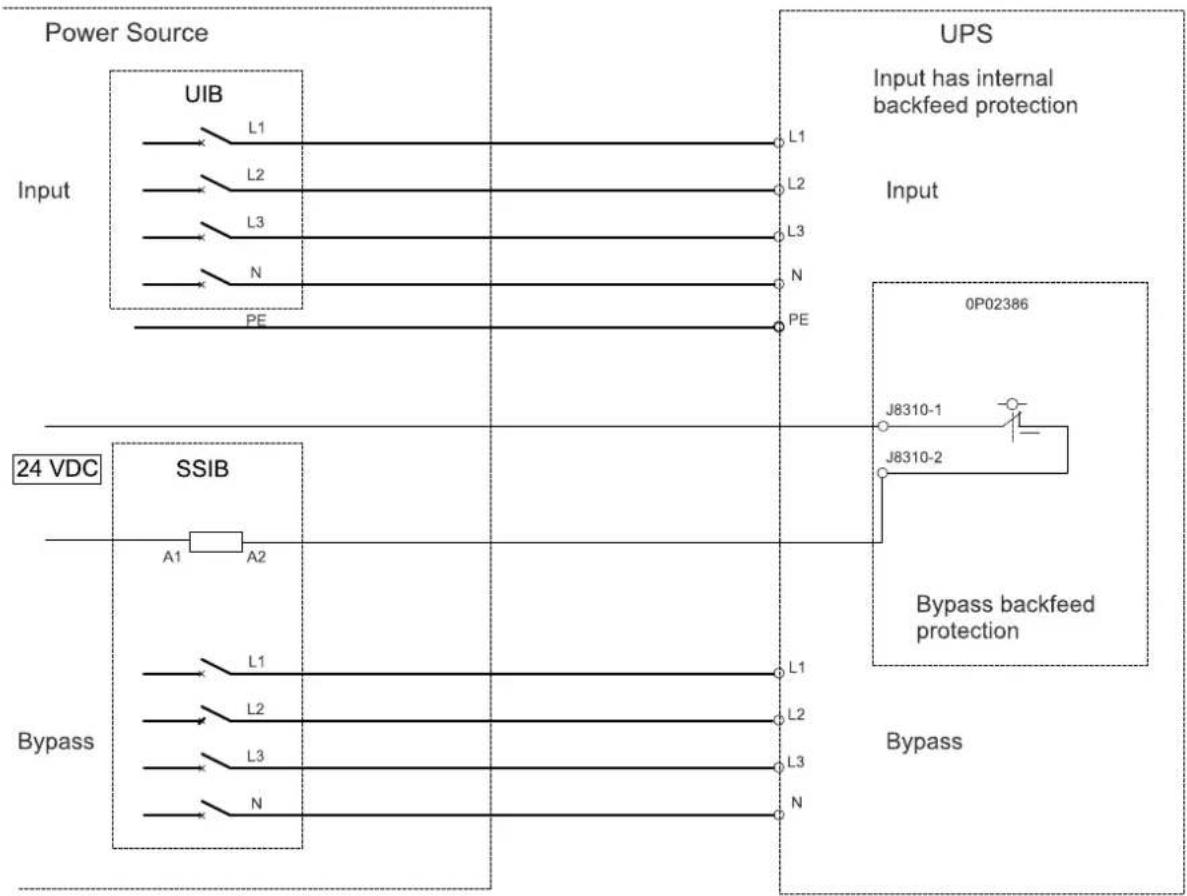
flowchart
graph TD
    subgraph Power Source
        A["Input"] --> B["UIB"]
        B --> C["L1"]
        B --> D["L2"]
        B --> E["L3"]
        B --> F["N"]
        B --> G["PE"]
    end

    subgraph UPS
        H["Input has internal backfeed protection"]
        I["0P02386"]
        J["J8310-1"] --> K["Bypass backfeed protection"]
        L["J8310-2"] --> K
    end

    subgraph SSIB
        M["24 VDC"] --> N["SSIB"]
        N --> O["A1"] & P["A2"]
        Q["Bypass"] --> R["L1"]
        S["Bypass"] --> T["L2"]
        U["Bypass"] --> V["L3"]
        W["Bypass"] --> X["N"]
    end

    style Power Source fill:#f9f,stroke:#333
    style UPS fill:#ccf,stroke:#333
    style SSIB fill:#cfc,stroke:#333
    style UPS fill:#fcc,stroke:#333
    style SSIB fill:#ffc,stroke:#333
    style UPS fill:#cff,stroke:#333
    style SSIB fill:#ffc,stroke:#333
    style UPS fill:#ffc,stroke:#333
NOTE: An external 24 V power supply is required for backfeed protection with UVR trip.
UPS and Third Party Backfeed Protection (Shunt trip) – Dual Mains

flowchart
graph TD
    subgraph Power Source
        A["Input"] --> B["UIB"]
        B --> C["L1"]
        B --> D["L2"]
        B --> E["L3"]
        B --> F["N"]
        G["Input"] --> H["PE"]
        I["Input"] --> J["PE"]
    end

    subgraph UPS
        K["0P02386"] --> L["J8301-10"]
        K --> M["J8310-1"]
        K --> N["J8310-3"]
        K --> O["J8301-1"]
        P["Bypass backfeed protection"] --> Q["Output"]
        R["Bypass"] --> S["Output"]
    end

    subgraph SSIB
        T["A1"] --> U["A2"]
        V["L1"] --> W["L2"]
        X["L2"] --> Y["L3"]
        Z["L3"] --> AA["N"]
    end

    style Power Source fill:#f9f,stroke:#333
    style UPS fill:#ccf,stroke:#333
Final Installation
- Reinstall the cover over the signal connection terminals.
Front View of the UPS

natural_image
Technical diagram of an internal server rack with a green panel and black mesh casing (no text or symbols)- Reinstall the front inner cover(s) on the UPS.
UPS with One Internal Switch

natural_image
Technical diagram of a device enclosure with green panel, black panel, and internal components (no text or symbols)UPS with Four Internal Switches
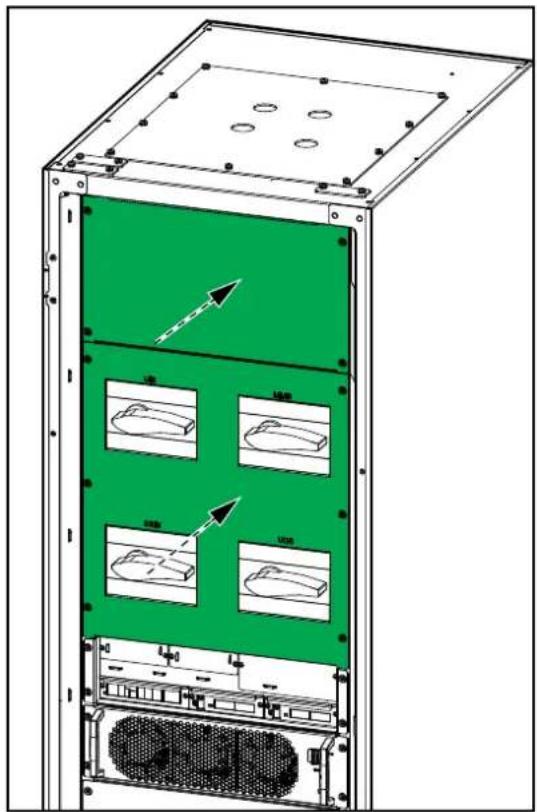
text_image
Technical diagram of an electronic device with labeled components and directional arrows indicating motion or movement.- Fill out the model-specific power rating information on the UPS name plate.

text_image
Model installed: V kW/kVA Name of installer: Note: Refer to the type specifications label or the installation manual for nominal currents for all kW/kVA sizes.- Remove the labels 885-92827(x 2) and 885-92828 (x 1) from the top dust covers.
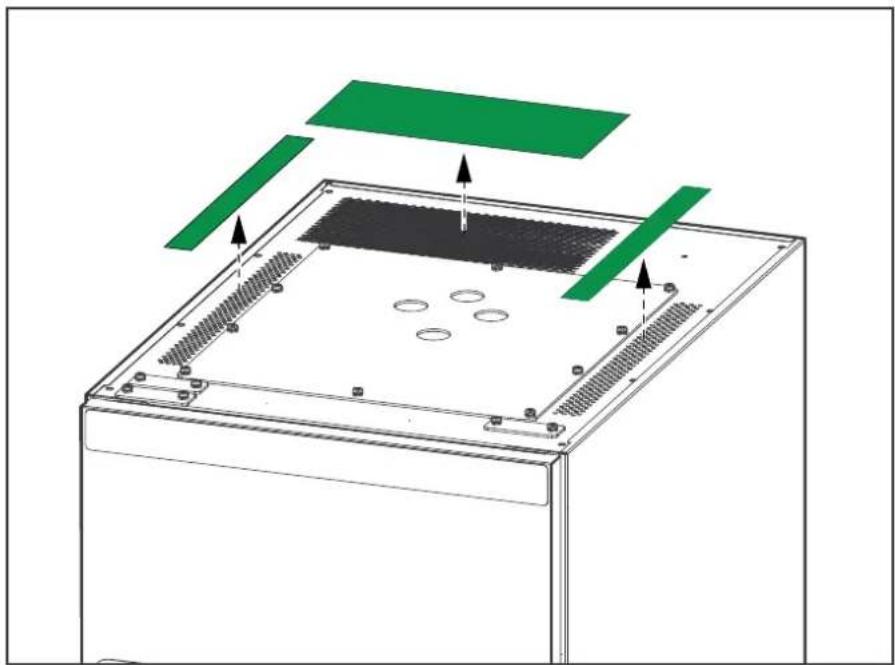
natural_image
Diagram of a server rack with green and black components, no text or symbols presentSchneider Electric
As standards, specifications, and design change from time to time, please ask for confirmation of the information given in this publication.