
500222 - Loudspeaker MuxLab - Free user manual and instructions
Find the device manual for free 500222 MuxLab in PDF.


| Product Type | Passive Ceiling Speaker |
| Brand | MuxLab |
| Model | 500222 |
| Power Handling (RMS) | 40 Watts (IEEE 219) |
| Frequency Range (±3dB) | 96 Hz - 20 kHz |
| Impedance | 8 Ohms |
| Tweeter | 1" (25 mm) Titanium Dome |
| Woofer | 6.25" (165 mm) Graphite Cone, Rubber Surround |
| Sensitivity (1W @ 1m) | 86 dB |
| Crossover Frequency | 3.5 kHz |
| Taps (70V/100V/8Ω) | 8Ω, 0, 40W, 20W, 10W, 5W |
| Nominal Coverage | 90° conical |
| Termination | Standard pressed connector |
| Attachment | Low-profile grille |
| Cutout Diameter | 8.90" (226 mm) |
| Material | ABS + iron |
| Dimensions (H x D) | 236 x 257 mm (9.01" x 10.11") |
| Weight | 3.3 kg (7.3 lbs) |
| Shipping Weight | 3.6 kg (8.0 lbs) |
| Warranty | 2 years |
| Package Contents | Speaker, hole template, safety wire rope, user manual |
| Safety Precautions | Read all instructions; do not open housing; avoid moisture; unplug when not in use |
| Installation | Ceiling mount with cutout template; secure with mounting screws; attach grille |
| Applications | Commercial and residential background music and vocal performance |
Frequently Asked Questions - 500222 MuxLab
User questions about 500222 MuxLab
0 question about this device. Answer the ones you know or ask your own.
Ask a new question about this device
Download the instructions for your Loudspeaker in PDF format for free! Find your manual 500222 - MuxLab and take your electronic device back in hand. On this page are published all the documents necessary for the use of your device. 500222 by MuxLab.
USER MANUAL 500222 MuxLab
natural_image
Close-up of a black cylindrical mechanical component with a white top and small protruding pin (no text or symbols visible)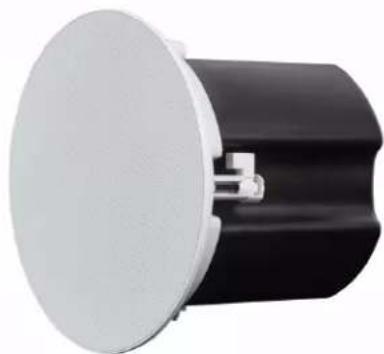
natural_image
Close-up of a black cylindrical component with a white circular top and metallic connector (no text or symbols visible)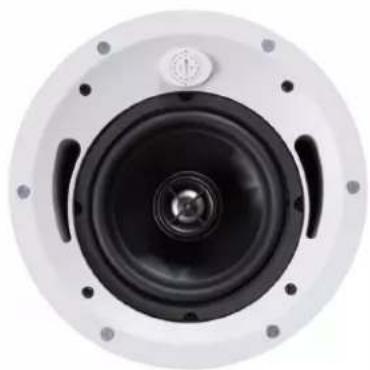
natural_image
Close-up of a speaker cone with black inner components and white outer casing (no text or symbols visible)
natural_image
Interior view of a black electronic device with a green connector and mounting bracket (no visible text or symbols)Table of Contents
- Safety Precautions....3
- Introduction......4
- Features......4
- Package Contents......4
- Specifications....5
- Technical Drawings....5
- Installation....6
- Applications......8
1. Safety Precautions
To ensure the best performance from the product, please read all instructions carefully before using the device. Save this manual for future reference.
- Follow basic safety precautions to reduce the risk of fire, electrical shock, and injury.
- Do not dismantle the housing or modify the module. It may result in electrical shock or burns.
- Do not open or remove the housing of the device as you may be exposed to dangerous voltage or other hazards.
- To prevent fire or shock hazard, do not expose the unit to rain, moisture and do not install this product near water. Keep the product away from liquids.
- Spillage into the housing may result in fire, electrical shock, or equipment damage. If an object or liquid falls or spills on the housing, unplug the module immediately.
- Do not use liquid or aerosol cleaners to clean this unit. Always unplug the power to the device before cleaning.
- Using supplies or parts not meeting the product specifications may cause damage, deterioration or malfunction.
• Refer all servicing to qualified service personnel.
• Install the device in a place with adequate ventilation to avoid damage caused by overheat. - Unplug the power when left unused for a long period of time.
- Information on disposal of devices: do not burn or mix with general household waste, please treat them as normal electrical waste.
Copyright Notice
All contents in this manual are copyrighted, and cannot be cloned, copied, or translated without the express permission of MuxLab Inc. Product specifications and information in this document are for reference only, and the content may be updated from time to time without prior notice.
2. Introduction
The MuxLab Passive Ceiling Speaker 8 Ohms/70V/100V, 40W (Model: 500222) is a high-performance full band and easy installation speaker ideal for providing background music and vocal performance in a wide range of applications and installations and is designed with advanced linear sound source technology. This speaker can be used as an 8 ohm speaker at 40 W but can also be cascaded when set as a 70V speaker system with taps at 2.5W, 5W, 10W and 20W, and as a 100V speaker system with taps at 5W, 10W, 20W and 40W.
The MuxLab Passive Ceiling Speaker 8 Ohms/70V/100V, 40W comes with a 6.25" coaxial 40W loudspeaker driver that has excellent dispersion, wide bandwidth, and smooth frequency response which makes this the top choice for today's overhead commercial and residential applications.
3. Features
- 40 Watts RMS
• Frequency Range 96Hz - 20KHz (+/- 3dB) - Impedance 8
- Tweeter 1" (25mm) Titanium Dome
- Woofer 6.25" (165mm) Graphite Cone, Rubber Surround
4. Package Contents
• One (1) Passive Ceiling Speaker 8 Ohms/70V/100V, 40W
• One (1) Speaker hole template
• One (1) Safety Wire Rope for Ceiling Speaker
• One (1) User manual (available via download)
Notes: Confirm that the product and accessories are all included. If not, please contact the supplier from which you purchased the unit.
5. Specifications
| Audio Input | Analog Audio Signal |
| Frequency Range +/- 3dB | 96Hz ~ 20KHz |
| Tweeter | 1" (25mm) Titanium Dome |
| Woofer | 6.25" (165mm) Graphite Cone, Rubber Surround |
| Power Handling RMS 40W (IEEE 219) | |
| Sensitivity (1W @ 1m) 86dB | |
| Crossover Frequency 3.5 kHz | |
| Conformity (Input) | 100V (8Ω) |
| Taps | 8Ω, 0, 40W, 20W, 10W, 5W |
| Impedance | 8Ω |
| Nominal Coverage | 90 degrees conical |
| Termination | Standard pressed connector |
| Attachment | Low-profile grille |
| Included Accessories | Cutout template grille |
| Dimension (H x D) | 236 x 257 mm (9.01" x 10.11") |
| Weight | 3.3kg |
| Cut out diameter | 8.90" (226mm) |
| Material | ABS + iron |
| Shipping Weight | 8.0 lbs (3.6 kg) |
| Warranty | 2 years |
| Order Information | 500222 Passive Ceiling Speaker 8 Ohms/70V/100V, 40W (UPC: 627699002223) |
6. Technical Drawings
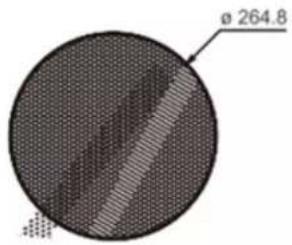
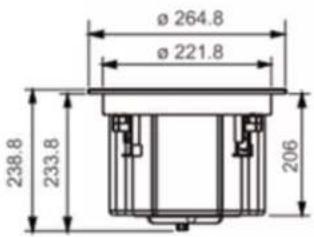

7. Installation
STEP 1
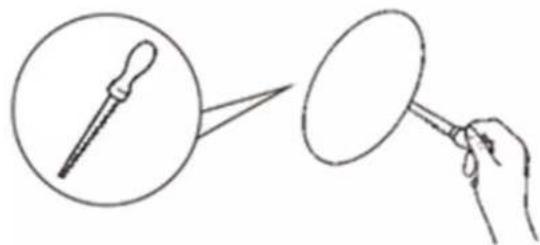
Using a stud finder (available at low cost at most hardware stores) or other accurate method, locate center point between two joists and mark. Using template provided, trace hole pattern on surface of ceiling.

natural_image
Illustration of a hand holding a circular object with a pencil, alongside a magnified view of a pencil tip (no text or symbols)STEP 2
Using a sabre saw, keyhole saw or very sharp utility knife, cut hole in ceiling. Following trace pattern.
natural_image
Line drawing showing a dropper being held by a hand holding a magnifying glass (no text or symbols)STEP 3
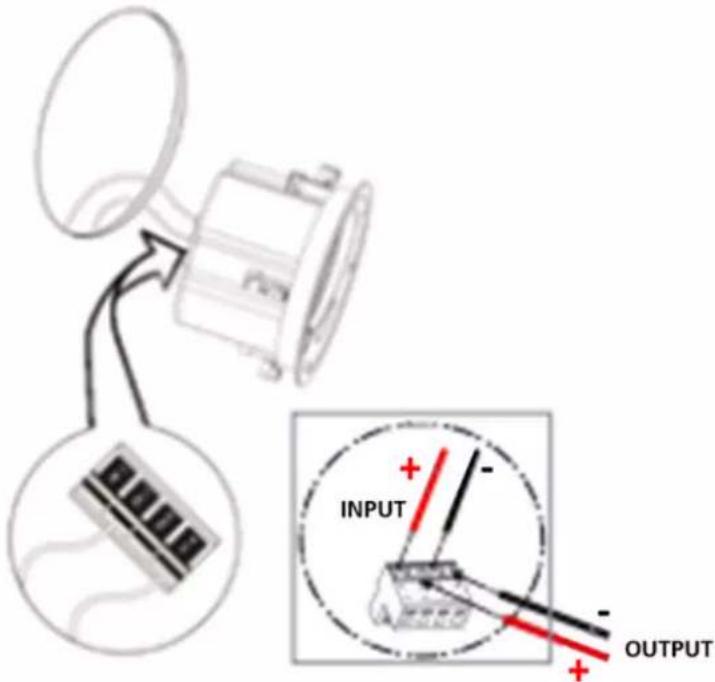
Run loudspeaker wire to sound source location. There are several methods you can use to accomplish wiring, depending on the construction characteristics of the room or house. You can add a professional touch to your installation by using a speaker terminal plate at the source location. Leave sufficient amount of wire at speaker location (8-10 inches / 20-25 cm) to complete connection.
STEP 4
Attach loud speaker wire to speaker terminals observing correct polarity and position speaker frame up into cutout. Be careful not pinch wires in the process.
natural_image
Technical line drawing of a mechanical component with no visible text or symbolsSTEP 5
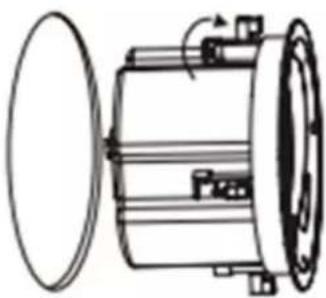
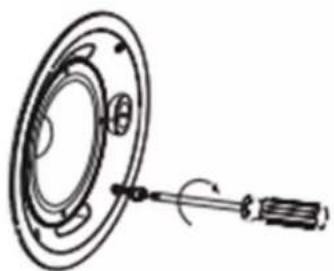
Carefully tighten the four mounting screws. This will cause the mounting wings to rotate our behind the mounting surface and secure the speaker in place.
natural_image
Diagram of a mechanical component with a rotating shaft and circular housing (no text or symbols)STEP 6
After the speaker panel is secured tightly, test sound. When you are satisfied the speaker is operational, then affix grill. As grill is designed for a snug fit you'll need to position one edge into slot first and press or squeeze around perimeter of grill, while pushing leading edges into grill slot.

natural_image
Two abstract geometric shapes: a circular ring with internal components and a textured oval (no text or symbols)8. Applications
The Passive Ceiling Speaker 8 Ohms/70V/100V, 40W are ideal for hotels, conference rooms, shopping center, education, hospitals, retail stores, performing art centers, restaurants, airports, houses of worship, and board rooms.
Below you will find some diagrams showing the 500222 speakers as a solution in different scenarios working together with other MuxLab devices.
Audio over IP
Using 500222 speakers in an audio over IP setup.

flowchart
graph TD
    A["Analog Audio Source 1"] --> B["500812"]
    C["Analog Audio Source 2"] --> D["500755 - AMP - TX"]
    B --> E["Ethernet Switch"]
    D --> F["500755 - AMP - RX"]
    F --> G["500755 - 70V"]
    G --> H["500222"]
    H --> I["Chained 70V Passive Speakers"]
    I --> J["500222"]
    J --> K["500222"]

Speakers and Amplifiers
Using 500222 speakers with analog audio amplifiers.
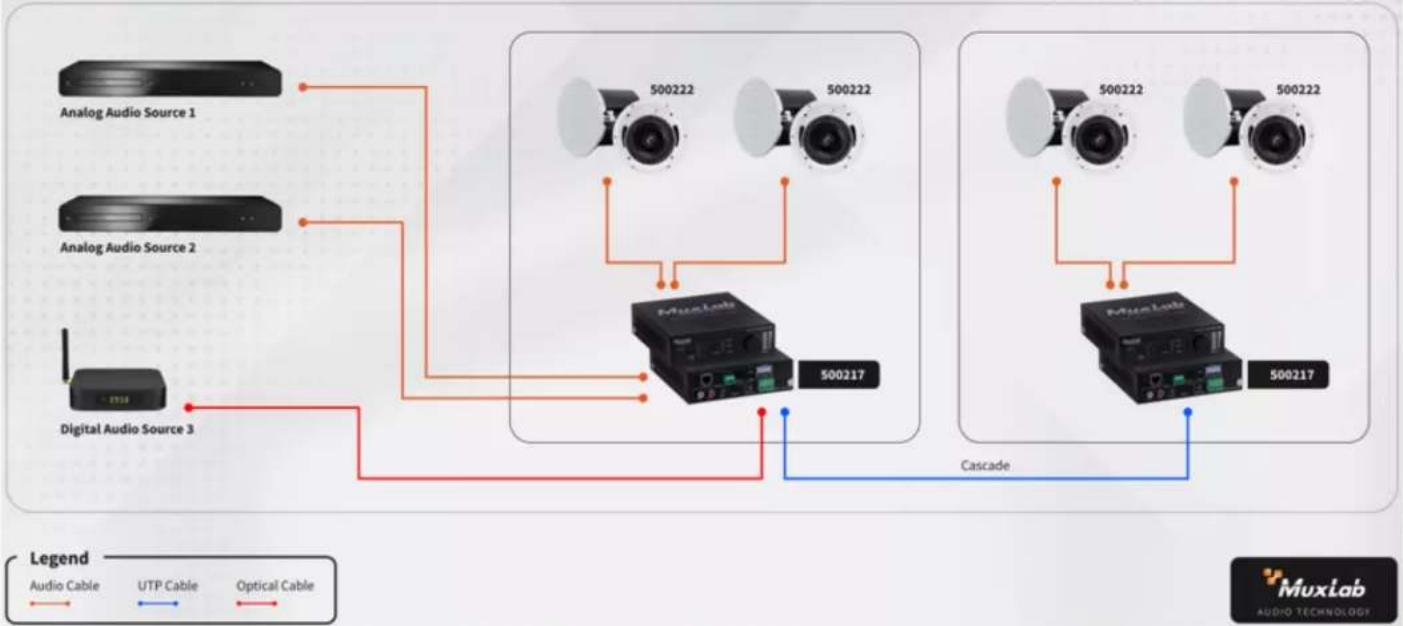
flowchart
graph TD
    A["Analog Audio Source 1"] --> B["Muxlab"]
    C["Analog Audio Source 2"] --> B
    D["Digital Audio Source 3"] --> B
    B --> E["500217"]
    B --> F["500222"]
    B --> G["500222"]
    H["Cascade"] --> B
    I["Audio Cable"] --> B
    J["UTP Cable"] --> B
    K["Optical Cable"] --> B
    L["MuxLab AUDIO TECHNOLOGY"] --> M["500217"]
Dante Technology
Using 500222 speakers with Dante technology.
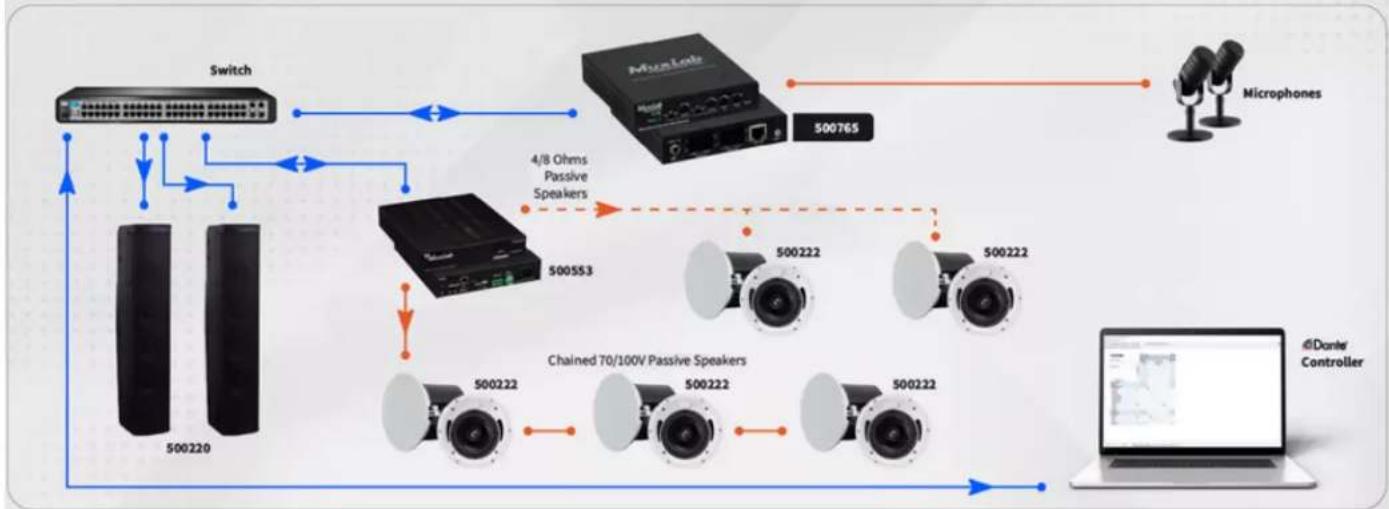
flowchart
graph TD
    A["Switch"] -->|4/8 Ohms Passive Speakers| B["Microphone"]
    A --> C["Chained 70/100V Passive Speakers"]
    C --> D["500222"]
    C --> E["500222"]
    C --> F["500222"]
    C --> G["500222"]
    C --> H["500553"]
    H --> I["500765"]
    I --> J["Microphone"]
    K["500220"] --> A
    L["4/Daner Controller"] --> M["Computer"]


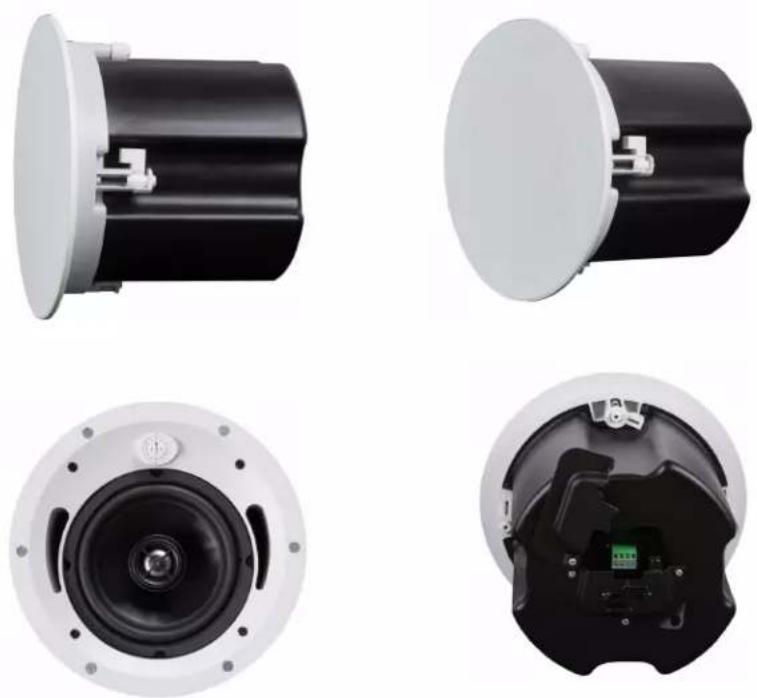
natural_image
Four views of a black cylindrical device with white mounting flanges, showing external and internal components (no text or symbols visible)Brand : MuxLab
Model : 500222
Category : Loudspeaker