WF-T1122TH - Washing machine LG - Free user manual and instructions
Find the device manual for free WF-T1122TH LG in PDF.


User questions about WF-T1122TH LG
0 question about this device. Answer the ones you know or ask your own.
Ask a new question about this device
Download the instructions for your Washing machine in PDF format for free! Find your manual WF-T1122TH - LG and take your electronic device back in hand. On this page are published all the documents necessary for the use of your device. WF-T1122TH by LG.
USER MANUAL WF-T1122TH LG
Please read this manual carefully before operating your set.
Retain it for future reference.
Record model name and serial number of the set.
Quote this information to your dealer when you require service.

The Trubo Drum washing machine does not operate with the lid open. If the lid is opened during wash, rinse and spin cycles, the machine will stop automatically.
- A built-in load sensor automatically detects and measures the laundry load and a microprocessor optimizes washing conditions such as ideal water consumption and washing time.
● Advanced technology is built into the Electronic Control System which ensures the best washing result.
● While the "Punch + 3" pulsator rotates in one direction, the Turbo Drum rotates in the opposite direction. This creates an even flow of water in both the upper and lower parts of the drum, resulting in and an enhanced washing and rinsing action.

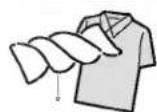
● 3 step washing makes the best washing performance with low tangling.
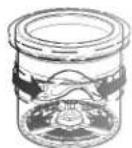

Rubbing

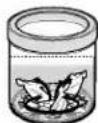
Rubbing and Shaking


Shaking and Disentangling
- The Punch action's powerful vertical water thrust combined with the rotating pulsator movement improves washing performance and reduces tangles.
● 3 Spinning mini-pulsators create powerful jets of water which move the laundry up and down in the drum to ensure your laundry is evenly and thoroughly washed.
Strong showering water supply
● Strong showering removes detergent and naps to ensure improved rinsing effects.


● Lint and loose threads from laundry generated during the washing cycle are caught by the lint filters for a cleaner wash.

- By employing a strong spin method, laundry becomes much cleaner.
Read this manual
Inside you will find many helpful hints on how to use and maintain your washer properly. Just a little preventive care on your part can save you a great deal of time and money over the life of your washer. You will find many answers to common problems in the Troubleshooting section. If you review our chart of Troubleshooting Tips first, you may not need to call for service at all.
| Introduction | Safety information | 4 |
| Identification of Parts | 5 | |
| Before Starting to Wash | Function Information | 6 |
| Preparation Before Washing | 7 | |
| Use of Water, Detergent, Bleach and Softener | 8 | |
| Function of each Button | 10 | |
| Washing Programs | Fuzzy Wash (Normal Wash) | 12 |
| Jean Wash, Blanket Wash, Wool Wash | ||
| Home Dry Wash | 14 | |
| Economy Wash | 15 | |
| Soak Wash | 16 | |
| Additional Function Options | Delay start (Reservation) Wash | 17 |
| Option Washing | 18 | |
| Other useful Functions | 20 | |
| Installation | Placing and Leveling | 21 |
| Connecting Water Supply Hose | 22 | |
| Connecting Drain Hose | 25 | |
| Care and Maintenance | Grounding Method | 26 |
| Cleaning | 27 |
Specification
Specification

WARNING!
Read and follow this safety information carefully.
For your safety, the information in this manual must be followed to minimize the risk of fire or explosion, electric shock, or to prevent property damage, personal injury, or loss of life.
Save these instructions.
| WATERHEATER SAFETY | ·Under certain conditions hydrogen gas may be produced in a water heater that has not been used for two weeks or more. Hydrogen gas can be explosive under these circumstances. If the hot water has not been used for two weeks or more, prevent the possibility of damage or injury by turning on all hot water faucets and allowing them to run for several minutes. Do this before using any electrical appliance which is connected to the hot water system. This simple procedure will allow any built-up hydrogen gas to escape. Since the gas is flammable, do not smoke or use an open flame or appliance during this process. |
| PROPER INSTALLATION | ·Install or store where it will not be exposed to temperatures below freezing or exposed to the weather.·Properly ground washer to conform with all governing codes and ordinances. Follow details in Installation Instructions. |
| YOUR LAUNDRY AREA | ·Keep the area underneath and around your appliances free of combustible materials such as lint, paper, rags, chemicals, etc.·Close supervision is necessary if this appliance is used by or near children. Do not allow children to play on, with, or inside this or any other appliance. |
| WHEN USING THEWASHER | ·Use this appliance only for its intended purpose as described in this Owner's Manual.·Never reach into washer while it is moving. Wait until the machine has completely stopped before opening the lid.·Do not mix chlorine bleach with ammonia or acids such as vinegar and/or rust remover. Mixing different chemicals can produce a toxic gas which may cause death.·Do not wash or dry articles that have been cleaned in, washed in, soaked in, or spotted with combustible or explosive substances (such as wax, oil, paint, gasoline, dry-cleaning solvents, kerosene, etc.) which may ignite or explode. Do not add these substances to the wash water. Do not use or place these substances around your washer or dryer during operation.·The laundry process can reduce the flame retardancy of fabrics. To avoid such a result, carefully follow the garment manufacturer's wash and care instructions.·To minimize the possibility of electric shock, unplug this appliance from the power supply or disconnect the washer at the household distribution panel by removing the fuse or switching off the circuit breaker before attempting any maintenance or cleaning.NOTE: Pressing Power button to turn off does NOT disconnect the appliance from the power supply.·Never attempt to operate this appliance if it is damaged, malfunctioning, partially disassembled, or has missing or broken parts, including a damaged cord or plug. |
| WHEN NOT IN USE | ·Turn off water faucets to relieve pressure on hoses and valves and to minimize leakage if a break or rupture should occur. Check the condition of the fill hoses; they may need replacement after 5 years.·Before discarding a washer, or removing it from service, remove the washer lid to prevent children from hiding inside.·Do not attempt to repair or replace any part of this appliance unless specifically recommended in this Owner's Manual, or in published user-repair instructions that you understand and have the skills to carry out.·Do not tamper with controls. |
text_image
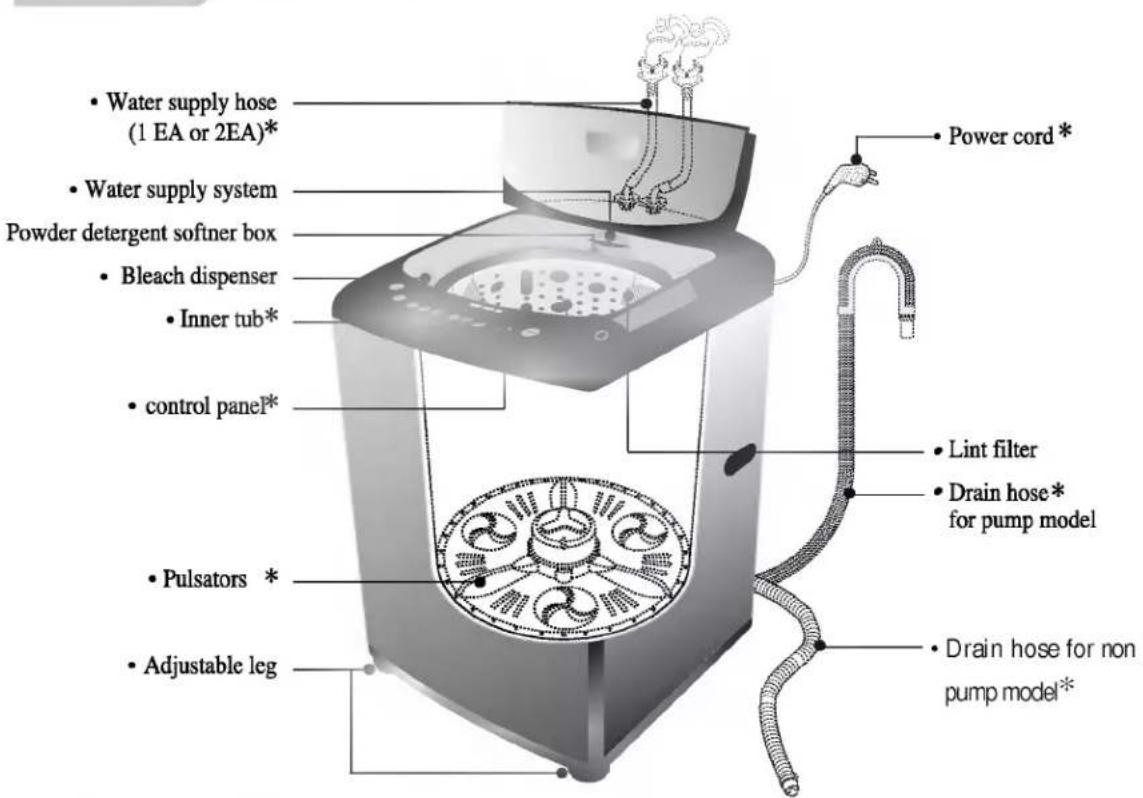
• Water supply hose (1 EA or 2EA)* • Water supply system Powder detergent softner box • Bleach dispenser • Inner tub* • control panel* • Pulsators * • Adjustable leg • Power cord * • Lint filter • Drain hose* for pump model • Drain hose for non pump model*Accessories
Water supply hoses
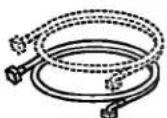
or
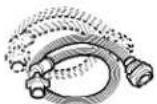
1 Each for cold and
hot water
Drain hose
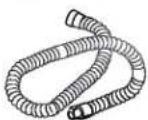
or
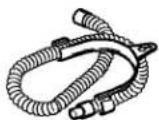

Parts can be different according to the model.

natural_image
Solid black image with no visible content, text, or symbolsOur machine provides various washing methods which suit various conditions and types of laundry.
Different types of laundry washing
Use this Program for normal clothes except for woolen clothes and lingerie.
The sensor automatically detects the quantity of laundry and selects the appropriate water level, wash power, washing time, rinsing time and spinning time. (refer to p12)
Thick and heavy clothes or those which are excessively dirty like jeans or working uniforms can be washed. (refer to p12)
Blankets of different size can be easily washed. (refer to p12)
Delicate clothes (lingerie, wool, etc.) which may be easily damaged can be washed. (refer to p12)
The fibers of machine washable woolens have been specifically modified to prevent felting when they are machine washed. Most handknitted garments are not made of machine washable wool and we recommend that you hand wash them
- Before washing your woolens check the care label for the washing instructions.
- When washing woolens use a mild detergent recommended for washing wool.
- Hand washed woolens may be spun in a washing machine to reduce the time they take to dry.
- To dry woolens lay down them flat on a towel and pat into shape. Dry woolens out of direct sunlight. (The heat and tumble action of a dryer may cause shrinkage or felting of woolen garments.)
Some wool underlays and sheepskin products can be washed in a washing machine but may cause pump blockages. (Ensure that the whole article is suitable for machine washing and not just the backing material.) You may wish to handwash these articles and place them in the machine to spin dry.
Home Dry Wash (Home Dry Cleaning)
This setting allows you to wash items marked HAND WASH & DRY CLEARABLE or WATER WASHING & DRY tags. (refer to p14)
Washing according to the condition of laundry
Economy wash can be selected to wash moderately soiled clothes of less than 3.2 kg in a short time.
(refer to p15)
Soak Wash can be selected to wash heavily soiled laundry by soaking in water for some time to remove dirt and grime. (refer to p16)
Other washing method
Delay start (Reservation) Wash
Delay start (Reservation) Wash is used to delay the finishing time of the operation.
Delayed start washing can be set according to preference. (refer to p17)
Spin, Wash, Wash/Rinse, or Rinse, Rinse/Spin only options can selected. (refer to p118)
Preparation Before Washing
* Look for a care label on your clothes. This will tell you about the fabric content of your garment and how it should be washed.
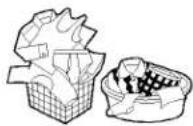
Sort clothes into loads that can be washed with the same wash cycle, water temperature and spin speed.
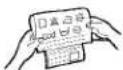
To get the best results, different fabrics need to be washed in different ways.
• SOIL (Heavy, Normal, Light)
• COLOR (Whites, Lights, Darks)
• LINT (Lint producers, Collectors)
Lint Producers
Lint Collectors
Separate clothes according to the type and amount of soil.
Separate white fabrics from colored fabrics.
Separate lint producers and lint collectors.
Terry cloth, Chenile, Towels, Nappies, Diapers
Synthetics, Corduroy, Permanent Press, Socks
- Check all pockets to make sure that they are empty. Things such as nails, hairclips, matches, pens, coins, and keys can damage both your washer and your clothes.
- Mend any torn garments or loose buttons. Tears or holes may become larger during washing.
- Remove belts, underwires, etc. to prevent damage to the machine or your clothes.
- Pretreat any dirt and stains.
• Make sure the clothes are washable in water. - Check the washing instructions.
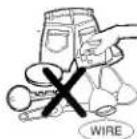
Do not wash fabrics containing flammable materials (waxes, cleaning fluids, etc.).
Load Size
The water level should just cover the clothes. Adjust the load size accordingly. Loosely load clothes no higher than the top row of holes in the washer tub. To add items after washer has started, press Start button and submerge additional items. Close the lid and press Start button again to restart.
Light and Large-sized clothing
Clothes like downs and woollens are light weight, large and float easily. Use a nylon net and wash
them in a small amount of water.
If the laundry floats during the wash cycle, it may become damaged.
Use dissolved detergent to prevent the detergent from clumping.

Long laundry items
Use nylon nets for long, delicate items.
For laundry with long strings or long length, a net will prevent tangling during washing.
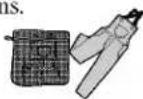
Fasten zippers, hook, and strings to make sure that these items don't snag on other clothes.
※ Nylon net is not supplied by LG.
!

Fire Hazard
Never place items in the washer that are dampened with gasoline or other flammable fluids.
No washer can completely remove oil.
Do not dry anything that has ever had any type of oil on it (including cooking oils).
Doing so can result in death, explosion, or fire.

se of Water, Detergent, Bleach and Softener
Using water
- This machine detects the quantity of laundry automatically, then sets the water level and proper amount of detergent.
- When you select a wash program, the water level and amount of detergent (to be used) will be shown on the control panel.
• The following table shows the amount of water.
| Laundry Load | over7.1 kg | under7.0 kg | under5.5 kg | under4.2 kg | under3.2 kg | under2.2 kg | under1.0 kg |
| Water Level / Amount of Water | Ex 94l | ExL 85l | L 80l | LM 72l | M 65l | MS 52l | S 45l |
- When the water level is automatically detected, it may differ depending on the quantity of laundry even though the same water level is indicated on the control panel.
- When washing load is under 0.6kg, the machine automatically adjusts to the minimum water level (36 liters) to decrease water consumption.
Water temperature
• The machine sets the appropriate temperature automatically according to the wash program.
- You can change the water temperature by pressing the WATER TEMP button. (refer to p10)
- The temperature of the water impacts the effectiveness of all laundry additives and therefore, the cleaning results. We recommend temperatures of:
- HOT 49\~60°C...(120-140°F) White items, diapers, underclothing and heavily soiled, colorfast items.
- WARM 29\~40°C...(85-105°F) Most items
- COLD* 18\~24°C...(65-75°F) Only very bright colors with light soil.
- When washing in cold water additional steps may be needed:
- Adjust detergent amount and pre-dissolve detergent in warm water
- Pretreat spots and stains - Soak heavily soiled items - Use appropriate bleach
* Temperature below 18°C...(65°F) will not activate laundry additives and may cause lint, residue, poor cleaning, etc. In addition, detergent manufactures and care labels define cold water as 26\~29°C...(80-85°F). If the temperature of the water in the tub is too cold for your hands, the detergent will not activate and clean effectively.
Note
• Water current can be selected by pressing WASH POWER button. (refer to p 10)
Using Detergent and Fabric Softener
- When you select a wash program, the water level and the amount of detergent will be shown on the control panel. The amount of a cup in the diagram is about 40g for concentrated detergent.
- For the correct amount of detergent, refer to detergent manufacturer's instruction.

Available Detergent Type
- Synthetic detergents that yield a low level of foam are recommended.
- When liquid detergent is used, mix it with water (1:1) and pour it into the bleach dispenser.
Attention
If excessive detergent is used, the rinse will not be as clean and efficient. Also, it could cause environmental pollution, so use it accordingly.
- Do not use concentrated fabric softener. This may cause some problems in automatic dispensing.
- For more details refer to the softener products instructions for use.
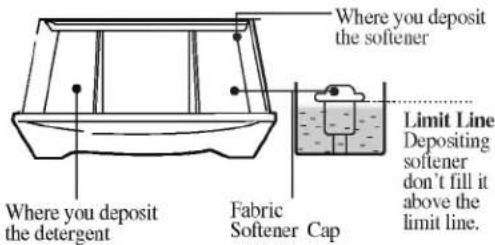
Depositing Detergent and Fabric Softener

- Open the detergent dispenser and deposit the appropriate amount of detergent.
- Don't use softener with detergent. Use softener in last rinse water
- When using dispenser, dilute softener (30ml) with fresh water (30ml)
- When filling dispenser, do not splash or overfill. It may stain clothes.
- Never pour fabric softener directly on clothes. It may stain them
- If spotting occurs, wet and rub hand dishwashing liquid (or mild bar soap) and rewash.
Powder Detergent & Fabric Softener) dispenser.
text_image
Where you deposit the softener Limit Line Depositing softener don't fill it above the limit line. Fabric Softener Cap Where you deposit the detergentNote
Fabric Softener will be inserted automatically during the final rinse and the machine gives on alarm sound. When water pressure is low, the softener may have to be inserted manually.
Using Bleach
• Use oxygenated bleach.
•Powdered bleach should mixed with water and then be deposited into the tub.
•For more details refer to the products instruction for use.
- Separate the laundry to be bleached and deposit liquid bleach into the Bleach dispenser. The dispenser dilutes liquid chlorine bleach before it reaches into your wash load.
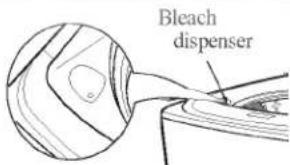
text_image
Bleach dispenserAttention
■ Do not insert bleach or fabric softener directly onto laundry. This may affect colours or damage clothing
■ Do not mix chlorine bleach with ammonia or acids such as vinegar and/or rust remover. Mixing can produce a toxic gas which may cause death.
Time left, Delay start (Reservation), Alarm indication
Time left - During operation, the remaining time is indicated, and while paused, the washing time, rinsing time, and spin time is indicated. For example, while washing, "1:09" indicates the time combined remaining for wash, rinse, and spin cycles. When paused, 15m2+6T indicates a wash time of 15 minutes, 2 Rinse times, and 6 minute spin time.
Delay start (Reservation) indication - When Delay start (Reservation) program is selected, it indicates for the finishing time. (RES. = DELAY)
Alarm indication - When an error occurs, an error message appears to indicate the abnormality. For example, indicates that the lid is open.
Water temperature button
- Use to select water temperature. Pressing button allows you to warm (Hot&Cold), Hot Cold respectively. De setting is Cold.
Delay start (Reservation) button
- Use to set a delayed finishing time. The time increases when the button is pushed. (refer to 17p)
Water level button (indication of detergent amount)
- Use to adjust the water level as required. The appropriate amount of detergent is shown next to the water level in the WATER-DETERGENT diagram - Water level is automatically selected for fuzzy normal and jean programs.
The following settings are indicated as the button is pushed LARGE LARGE, EX-LARGE EX-LARGE SMALL SMALL, MEDIUM MEDIUM MEDIUM, LARGE LARGE
Wash power button
• This button allows you to select the strength of the water current.
• Power option selections light up in sequence as follows NORMAL STRONG GENTLE NORMAL as the button is pushed. This can be selected for any program, but when washing jeans, it starts with Strong.
- Adjustment can be made while washing.

text_image
Washing progress Indicator • The cycle name is to show the washing progress. • The light turns on for the process to be progressed, flickers during cycle operation, and it turns off automatically at the cycle's completion. Program button • Use for selecting wash program. • This button allows you to select 6 different programs for different kinds of laundry and dirtiness. • Program selections light up in sequence as follows: FUZZY (NORMAL) BLANKET ECONOMY JEAN WOOL HOME DRY FUZZY (NORMAL), by pressing the button. AUTO OFF (Power) button • Use to turn the power on or off. • Push again and power goes on or off. • The power goes off automatically for about 10 seconds after the wash is finished. Start/ Pause button • Use to start or pause the washing process. • Repeats start and pause by pushing the button. • The power goes off automatically 10 minutes after stopping. Child lock function • Use to lock or unlock the control buttons to prevent settings from being changed by a child. • To lock, push wash, rinse buttons simultaneously and to unlocking push them one more time during the washing process. (refer to p20) Wash. Rinse. Spin button • Use when wash, rinse, spin time need to be adjusted. • The time increases when the button is pressed . • If adjustments are needed during the wash, press the [start/pause] button before making any changes. • When the button is pressed during washing, the remaining time is displayed. (refer to p18, 19)
natural_image
Solid black image with no visible content or text※ : 3 step works at large and medium water level of Fuzzy and Jean course.

natural_image
Solid black image with no visible content or text※ The figure within arrow is processing order manually.
| Washing Programs | AUTO OFF | Add |  |  |  |  |
| Fuzzy Washing(Normal Wash)Used for normal loads, this mode automatically selects the most appropriate conditions and completes the sequence in one operation. The built-in sensor detects the size of the load and the ideal wash power and wash, rinse and spin times are set accordingly. |  |  |  |  | ||
| · Add the appropriate quantity of detergent as indicated by the water level next to WATER-DETERGENT.Or follow the detergent manufacturer's Instructions | ||||||
| Jean WashUse jeans program when washing heavy, thick, and extremely dirty laundry such as jeans and work outfits. |  |  |  |  |  | |
| · Select the Jean program on the Control panel. | ||||||
| Blanket WashBlankets of different size can be easily washed. |  |  |  |  |  | |
| · Select the Blanket program on the Control panel. | ||||||
| Wool WashUse this program for washing delicate fabrics such as lingerie and woolens (wash only "water washable" clothes) Before washing your woolens check the care label for the washing instructions(wash only water washable clothes) | ||||||
 |  |  |  |  | ||
| · Select the Wool program on the Control panel. | · Use neutral detergent appropriate for the laundry.· When washing woolens use a mild detergent recommended for washing wool. |









| START PAUSE | Close the lid | Finish | Caution & Note | ||
| The pulsator rotates for 8 seconds to detect the laundry load.Then the water level and the amount of detergent to be used will be shown and water will be supplied. | Water will be supplied for 2 minutes after the start of the wash to supplement the water the laundry has absorbed. | When the wash program ends, the buzzer will ring for 10 seconds before the Power goes off automatically. | If water is already in the tub, or putting wet laundry into the tub before starting will increase the water level.With light weight bulky, water level can be set low.Changes to water temperature (hot/cold) and wash level are possible during operation.(refer to p 10) | ||
| Before starting to wash, make sure that the laundry is washable. | |||||
| Possible Laundry | 100% chemical fiber with the hand-wash tag | Weight: the weight of sheet is under 5.0kg | |||
| 100% Polyester with the hand-wash tag | Blanket Stuffing: Weight about 2kg (total weight of blanket 3.5kg)Size: under approx. 2m(width) × 2.5m(breadth) | ||||
| Impossible Laundry | electrical blankets | carpets | |||
| Use a nylon net for washing cashmere blankets to prevent them floating out of the tub.Water may splash out when washing light laundry, such as a cashmere blanket or bed sheet with water set at high level. | |||||
| When setting the water level manually, do not set to MEDIUM to prevent damage to laundry.Washing with hot water may damage the laundry (Water is set to cold automatically). Ensure that the load is under 2kg.To dry woolens lay down them flat on a towel and pat into shape. Dry woolens out of direct sunlight.(The heat and tumble action of a dryer may cause shrinkage or felting of woolen garments.)In order to avoid damage to laundry, the spin cycle may appear slow. This also avoids wrinkles and clothing may still contain some water. This is normal.Sbak Wash cannot be selected for the Wool Wash program. | |||||
Home dry is a special wash program for delicate items such as wool. Use this program for clothes that have [Hand Wash and Dry] or [Water Wash and Dry] tags. For home dry, amount of and laundry must be less than 1.2kg at a time.
Press the AUTO OFF (Power) button to turn power on.

Press the PROGRAM button to select HOMEDRY.

- Select the HOME DRY program on the Control panel.
Add the detergent.
- The appropriate quantity of detergent marked next to the water level of WATER-DETERGENT.
Add the laundry and press the START/PAUSE button.

• 3 Rinse cycle will be automatically selected.
• The water level and the amount of detergent to be used will be shown and water will be supplied.
Close the lid.
• Water will supplied for 2 minutes after the start of the wash to supplement the water the laundry has absorbed.
Finish
When the wash program ends, the buzzer will ring for 10 seconds before the Power goes off automatically.
Attention
- Use only neutral detergent or the detergent for dry cleaning
- Use this program for garments with 'Hand Wash and 'dry Clearable' tags. Do not wash 'Dry Clean' only garment.
- Unwashable laundries: Silk, Leather garments, Rayon, Easily discolored garments and ties.
- Only Cold water is set (water temperature must be below 30°C)
Use this mode when washing lightly soiled clothes for a short time.
The weight should be under 3.0kg.
Press the POWER button to turn power on.

Press the PROGRAM button to select ECONOMY.

- Select the ECONOMY program on the Control panel.
Add the detergent.
• The appropriate quantity of detergent marked next to the water level of WATER-DETERGENT.
Add the laundry and press the START/PAUSE button.

• The water level and the amount of detergent to be used will be shown and water will be supplied.
Close the lid.
• Water will be supplied for 2 minutes after the start of the wash to supplement the the laundry has absorbed.
Finish
When the wash program ends the buzzer will ring for 10 seconds before the Power goes off automatically.
Use this mode for washing excessively dirty laundry by soaking in water for some time to remove proteins and fats. 'SOAK' mode can be used with all washing programs simultaneously except for WOOL and HOME DRY program.
Press the AUTO OFF (Power) button to turn power on.

Press the PROGRAM button to select the washing program.

• The SOAK will not work in WOOL and HOME DRY cleaning Program.
Press the WASH button, to select SOAK program.

- Keep pressing the WASH button until the light turns on 'Soak' and 'Wash' simultaneously as next image.
• SOAK program only works when socking time is 40, 60 or 90 minutes.

Add the detergent.
- The appropriate quantity of detergent marked next to the water level of WATER-DETERGENT.
Add the laundry and press the START/PAU SE button.

- The water level and the amount of detergent to be used will be shown and water will be supplied.
Close the lid.
• Water will be supplied for 2 minutes after the start of the wash to supplement the absorbed water by the laundry.
Finish
When the wash program ends, the buzzer will ring for 10 seconds before the Power goes off automatically.
Note
• Order of Soak-Wash timing
Soak-Wash

flowchart
graph LR
    A["15 min"] --> B["18 min"]
    B --> C["21 min"]
    C --> D["25 min"]
    D --> E["40 min"]
    E --> F["60 min"]
    F --> G["90 min"]
    G --> H["Lamp Off"]
    H --> I["3 min"]
    I --> J["6 min"]
    J --> K["9 min"]
    K --> L["12 min"]
- Select soaking time 40 minutes, 60 minutes, or 90 minutes (including washing time) by pressing the Wash button repeatedly.
- If necessary, select the times of Rinse and the time for Spinning by pressing the Rinse or Spin buttons till you reach the desired times.

elay start (Reservation) Wash
Delay start (Reservation) Wash is used to delay the finishing time of the operation. The hours to be delayed can be set by the user accordingly.
The time on the display is the finishing time, not the start time.
Press the AUTO OFF (Power) button to turn power on.

Press the PROGRAM button to select the washing program.

- Select the program for laundry on the Control panel. This method will not work in Wool Program.
Press the DELAY START (RESERVATION) button.

- The light will 'DELAY' turn on and 'TIME LEFT' will be marked.
- Press the button repeatedly to set the desired finishing time. For example, To finish washing in 9 hours from now, by make the number 9:00 pressing the DELAY START
(RESERVATION) button repeatedly.
(RES.=DELAY)

Add the detergent.
- The appropriate quantity of detergent marked next to the water level of WATER-DETERGENT.
- When the lid is open the machine will not operate, and an alarm signal will remind you to close the lid.
Add the laundry and press the START/PAUSE button.

- When you press the START/PAUSE button the light will blink and the time will be shown.
Close the lid.
• Water will be supplied for 2 minutes after the start of the wash to supplement the water the laundry has absorbed.
Finish
The washing will be finished according to the delayed time.
- Finishing time can be delayed from 3\~48 hours. Delaying from 3\~12 hours can be done in 1 hour time intervals and from 12\~48 hours in 2 hour time intervals.
- If the lid is open, the machine will not work, and an alarm signal will alarm to remind you to close the lid.
- To select washing time, rinsing times, spinning time, water level, hot/cold or wash power manually, press the DELAY START (RESERVATION) button and select the desired option. Then press the START/PAUSE button.
- When the laundry cannot be taken out immediately after the wash program ends, it is better to omit the spinning program. (The laundry will be wrinkled if left for a long time after spinning.)

natural_image
Solid black image with no visible content, text, or symbolsWhen you only need the Wash, Wash/Rinse or Rinse cycles, these can be set manually.
Press the AUTO OFF (Power) button to turn power on.

| Only Wash | Only Wash,Rinse |
Press the WASH button to select the desired timing. (refer to p11) | Press the WASH button to select the desired timing.(refer to p11)  Press the RINSE button to select the desired times of rinse.(refer to p11) Press the RINSE button to select the desired times of rinse.(refer to p11)  You can use this option for preventing wrinkles of laundry You can use this option for preventing wrinkles of laundry |
Press the WATER LEVEL button, to control the water level according to the amount of laundry. If you do not choose anything, it is set the middle water level automatically. (refer to p10)


Add the laundry into the washing tub.

Press the START/PAUSE button.


Add the detergent and close the lid.
Press the AUTO OFF (Power) button to turn power on.

| Only Rinse | Only Rinse,Spin | Only Spin/Only drain | |
Press the RINSE button to select the desired times of rinse. (refer to p 11) | Press the RINSE button to select the desired times of rinse. (refer to p 11) Press the SPIN button to select the desired times of rinse. (refer to p 11) Press the SPIN button to select the desired times of rinse. (refer to p 11) | Press the SPIN button to select the desired times of rinse. (refer to p 11) When you want to only drain, wait until the water in the washing tub drains completely. When you want to only drain, wait until the water in the washing tub drains completely. | |
| Press the WATER LEVEL button to control the water level according to the amount of laundry. (refer to p 10)WATER LEVEL | |||
Add the laundry into the washing tub.

text_image
Press the START/ PAUSE button. START /PAUSEAdd the detergent and close the lid.

- When a Wash, Wash/Rinse or Rinse only option is selected, after the wash is completed the water will not be drained off. If you wish to drain the water, press SPIN button and wait until the water in the tub has drained completely. Then press the START/PAUSE button.
- If you do not specify the water level, then Medium will be automatically selected.
- If only Rinse is selected, the process will start from Water Supply.
natural_image
Solid black image with no visible content or textChild Lock Function
If you want to lock all the keys to prevent all the setting from being changed by a child, you can use the child lock option.
How to Lock
Press the AUTO OFF(Power) button.

- Turn Power on.
Press the START/PAUSE button to start washing.

• After all washing conditions are set according to the manual.
Press both the WASH button and the RINSE button simultaneously.
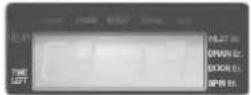
- During the wash program, all the buttons are locked until washing is completed or it is child-lock function is deactivated manually.

How to Unlock
If you want to unlock during wash, press both the WASH and the RINSE button simultaneously again.
- “ [L]” & the remaining time are alternatively shown on the display while they are locked.
Mute Option
If you want to use the washing machine without alarm signal sounds, press both the WASH and SPIN buttons simultaneously.
To make buzzer work, press both the WASH and SPIN buttons simultaneously one more time.
Seeing Remaining Time
To see the remaining time for each process, press one of the WASH, RINSE and SPIN buttons.
The remaining time for each process will appear for about 1 second.
Place the machine on a flat and firm surface which allows proper clearance.
We suggest a minimum clearance of 2cm to the right side and left sides of the machine for ease of installation.
At the rear, a minimum clearance of 10cm is suggested.

text_image
more than 10cm more than 2cm more than 2cmCheck that the machine is level
Open the lid and look from above to see if it is same as shown. Check that the bubble of the level indicator is placed in the center.
Top view of the machine

Level indicator
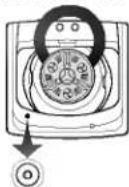
Level indicator
Leveling the machine
Lift the front of the washing machine and twist the Adjustable Leg until the surface bubble is placed in the center.
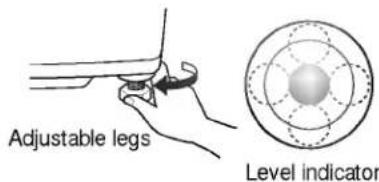
text_image
Adjustable legs Level indicatorIf the appliance is supplied from a cord extension set or generator, the cord extension set or electrical portable outlet device should be positioned so that it is not exposed to splashing or ingress of moisture.
Connecting Water Supply Hose
Before connecting the Water Supply Hose to the water tap, check the hose type and then choose the correct instruction here under. Note that the Water Supply Hose supplied may vary from country to country. Make sure to connect the blue inlet hose to the cold water tap, and the orange inlet hose to the hot water tap.
Connecting Water Supply Hose to water tap

(Normal tap without thread & screw type inlet hose.)
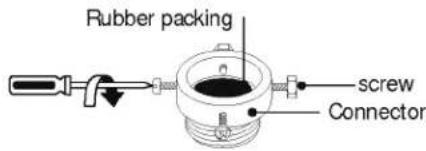
Untighten the screw
Untighten the screw of the connector so that the tap can be placed in the middle.
text_image
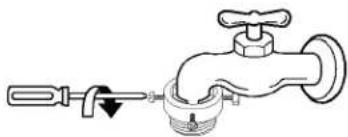
Rubber packing screw ConnectorFixing the connector to the tap
Push the upper connector up till the rubber packing is in tight contact with the tap. Then tighten the 4 screws.
natural_image
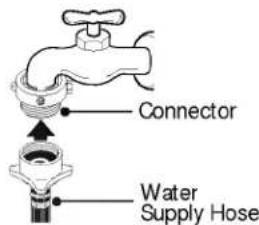
Line drawing of a faucet with handle and valve (no text or symbols)Attach the water supply hose connects securely to the connector
Push the water supply hose vertically upwards so that the rubber seal within the hose can adhere completely to the tap.
text_image
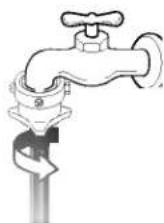
Connector Water Supply HoseFixing the connector to the water supply hose
Attach the water supply hose to the connector and then tighten it by screwing it to the right.
Check the connection of water supply hose and the connector
After connecting the hose, open the tap to check for any water leakage.
If the connection leaks, close the tap and start again from step 1

(Normal tap without thread & one touch type inlet hose.)
Separate Middle connector from Water Supply Hose
Separate Middle connector from the Water Supply Hose by pulling the Pressing Rod and the Pressing Handle that is attached to the Water Supply Hose while pressing them.
Middle connector

Fixed Sticker Pressing Handle Pressing Rod
Water Supply Hose
Loosen the fixed nuts to connect the connector to the tap
Untighten the screw of the connector so that the tap can be placed in the middle.

Rubber packing screw Fixed sticker
In case the tap is too large.
If the tap diameter is too large or is square, untighten the 4 screws and remove the guide plate.
Guide plate
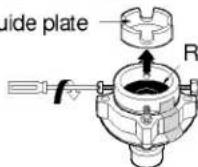
Rubber packing
Fixing Connectors to the Tap
Push the upper connector up till the rubber packing is in tight contact with the tap. Then tighten the 4 screws.

Fixing Upper Connector and Middle Connector
Remove the fixed sticker in between the Upper and Middle Connectors. Tighten the connectors by holding one connector and twist middle connector to the right.
Connector


Connecting Middle Connector and Water Supply Hose
Press down the pressing rod of the Water Supply Hose which was separated from middle connector(refer to Step1) and then join it to the middle connector.
Pressing rod
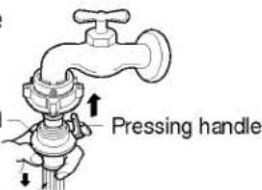
text_image
Pressing handleWater Supply Hose
Check for the water leakage
After connecting the hose, open the tap to check for any water leakage.
If the connection leaks, close the tap and start again from step 1.
If you skip step1, Water leakage may occur.


connecting Water Supply Hose

Attach the water supply hose to the tap.
Push the water supply hose up so that the rubber packing within the hose can adhere completely to the tap.

text_image
Water tap Rubber Packing Water Supply HoseConnect the water supply hose to the tap.
Connect the water supply hose to the tap and then tighten it by screwing it to the right.

Check water leakage.
After connecting the hose, open the tap to check for any water leakage.
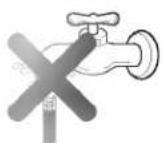
Connecting Water Supply Hose to the machine
Connect the water supply hose to inlet valve of the washing machine, and then lock it by turning the hose connecting part.
Check to see if there is a rubber seal inside the connector.
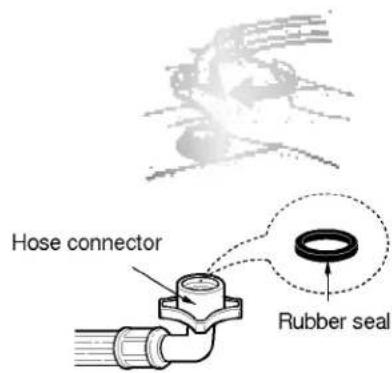
text_image
Hose connector Rubber sealBefore connecting Drain Hose, check your Drain Hose model and choose the correct instructions.

Fit the machine end of the drain hose to the outlet of the drain pump and tighten the clamp.
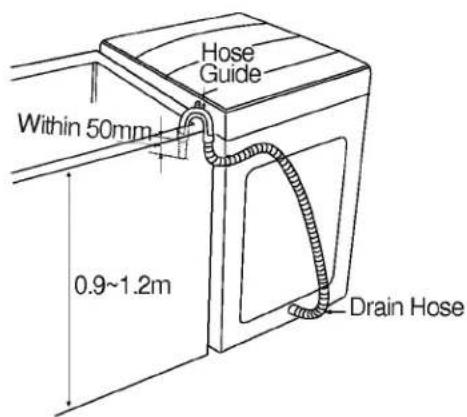
Put the other end of the drain hose over the standpipe or wash tub.
Fit the plastic holder into either holes for the holder at the rear of the machine.
The holder is possible to fit at either direction according to location of the standpipe. Make sure that the holder keeps firmly the drain hose so that the drain hose should not fall down.
text_image
Hose Guide Within 50mm 0.9~1.2m Drain HoseNote
• To prevent siphoning, the drain hose should not extend more than 50mm from the end of the hose guide.
• The discharge height should be approximately 0.9 \~ 1.2 m from the floor.
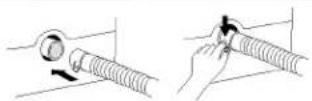
None Pump Model
Before connecting
Ensure that the hose clip is set as indicted here.

text_image
ClipConnect the Elbow Hose
Push the elbow hose toward the body of the washing machine.
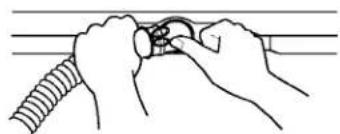
natural_image
Illustration of hands adjusting a circular component with a rope (no text or symbols)Place the Drain Hose
To change the direction of the hose, pull out the elbow hose and change the direction. Repeat Step2.

natural_image
Diagram of a coiled cable or hose with insulation and mesh texture, no text or symbols presentEarth wire should be connected.
If the earth wire is not connected, there is possible danger of electric shock caused by the current leakage.
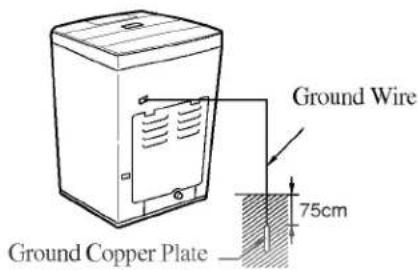
Grounding Method with Ground insert space Terminal
If the AC current outlet has a ground terminal, then separate grounding is not required. Note that AC power outlet configurations may differ from country to country.
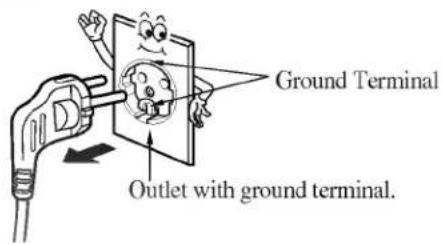
text_image
Ground Terminal Outlet with ground terminal.Other Grounding Method
Connect the Ground Wire to a Ground Copper Plate and bury it more than 75cm in the ground.
text_image
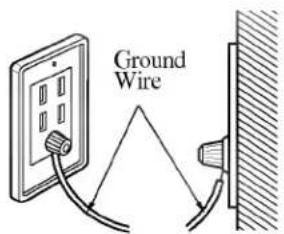
Ground Wire 75cm Ground Copper PlateConnect the ground Wire to the socket provided exclusively for Grounding.
text_image
Ground WireUsing Short Circuit Breaker
Using a Circuit Breaker and If grounding methods described above are not possible, a separate circuit breaker should be employed and installed by a qualified electrician.

text_image
Short-circuit breaker• To prevent a possible explosion, do not connect ground to a gas pipe.
- Do not connect ground to telephone wires or lightning rods. This may be dangerous during electrical storms..
- Connecting ground to plastic has no effect.
- Ground wires should be connected when an extension cord is used.
When water supply into the tub is not clean or the filter is clogged with particles(such as sands...), clean the filter in the inlet valve occasionally. The figure of power cord and water tap may vary according to the country.
To Clean the Filter in the Inlet Valve

Close the tap before turning off the power.
Select both hot/cold and then press the [START/PAUSE] button to remove water from the machine completely.

Turn off the power before pulling out the cord.
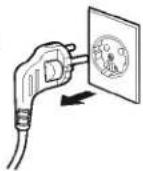

After removing the water supply hose pull out the filter. Then use a brush to clean the filter.

Replace the filter after cleaning it.
To Clean the Lint Filter

Pull out the lint filter from the tub in the direction shown below.
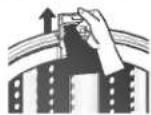
Note
Turn the net inside out to clean the filter and rinse it with water.

Replace- the filter to the original location. Push the lip of the filter until a pop sound is heard.
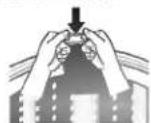
- If the lint filter is torn or damaged, purchase a new one from LG service center.
To Clean the Pump casing (for pump model)

Unfasten 4 screws of the back cover.

Turn the cap as shown in diagram and unfasten it. Remove foreign objects such as pin, button, coin, etc
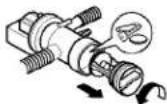
(Bottom view)

Reassemble the cap to the arrow direction and fasten it.

(Bottom view)
Self-cleaning function(for pump model)
In the initial stage of every washing machine process, the drain pump works for 3\~5 seconds to pump out water with dirt from the washing tub. It helps to keep the wash tub clean and improve pumping ability.

- Check if water leaks after reassembling. (The Rubber ring is in the cap)

natural_image
Pure horizontal gradient bar with no text, numbers, or symbolsIF FROZEN

Remove the water supply hose, and immerse it in hot water at approx. 40 °C.

Pour approx. 2 liters of hot water at approx. 40 °C, into the bowl and let it stand for 10 minutes.

Connect the water supply hose to the water tap and confirm that the washing machine performs the supply and drainage of water.
WHEN THERE IS A FEAR OF FREEZING

Close the water taps and remove the Water Supply Hose.

Remove the water which remains in the water supply.

Lower the drain hose and drain the water in the bowl and the drain hose by spinning.
Wash Inner-tub
Leave the lid open after washing to allow moisture to evaporate. If you want to clean the inner-tub use a clean soft cloth dampened with liquid detergent, then rinse. (Do not use harsh or gritty cleaners.)
Inlet Hoses Exterior
Hoses connecting washer to faucet should be replaced every 5 years. Immediately wipe off any spills. Wipe with damp cloth. Try not to hit surface with sharp objects.
Long Vacations
Be sure water supply is shut off at faucets. Drain all water from hoses if weather will be below freezing.
SCRUD
Scrud is the name given to the waxy build-up that can occur within any washer when the fabric softener comes into contact with detergent. This build-up is not brought about by a fault in the machine. If scrud is allowed to build-up in the machine it can result in stains on your clothes or an unpleasant smell in your washer.

If you wish to use fabric softener we recommend:
• Using fabric the dispenser, do not splash or overfill.
- Clean dispenser as soon as the cycle has finished.
- Clean your machine regularly
- Cold water washing increases the chance of this build-up occurring. We recommend a warm or hot wash at regular intervals e.g. approx. every 5^th wash.
- fabric softener of thinner consistency is less likely to leave residue on the dispenser and contribute to a build-up.
CLEANING THE INSIDE OF YOUR WASHER

If you use fabric softener or do regular cold water washing, it is important that you occasionally clean the inside of your machine.
- Let it rotate for several minutes.
- Stop the machine, open the lid, and leave it to soak overnight.
• After soaking, drain the machine and run the machine through a regular cycle.
We do not recommend that you wash clothes during this procedure.
- Fill your machine with hot water. Add about two cups of a powder detergent that contains phosphate.
Look for your problem below, then check the things we suggest. More often than not, this will give you the answer to your problem. And you'll be able to carry on without having to telephone your service center.
WASH PROBLEM
| Problem | Possible Causes | What To Do |
| Lint or residue on clothes | Incorrect sortingWashing too long | Separate lint producers from lint collectors.Wash small loads for a shorter time than larger loads. |
| Detergent on clothes | Detergent not dissolving | Try using less detergentUse warmer water temperature.Try a liquid detergent.Try pre-dissolving the detergent |
| Black spots on clothes | Incorrect use of fabric softenerDye transfer | When filling dispenser, do not splash or overfill.Never pour fabric softener directly on clothes.Pre-treat stain and rewash.Sort whites or lightly colored items from dark colors.Wash and dry non-colorfast clothes separately |
| Fabric damage Snags, holes, tears, rips or excessive wear | Pins, snaps, hooks, sharp buttons, belt buckles, zippers, and sharp objects left in pocketsUndiluted chlorine bleach | Fasten snaps, hooks, buttons, and zippers.Remove any loose brassiere wires.Remove objects in pockets and sharp buttons.Turn knits (which snag easily) inside out.Check bleach package instructions for proper amount.Never add undiluted bleach to wash or allow clothes to come in contact with undiluted bleach. |
| The laundry comes out dirty | Water temperature is too cold.Stain is not pre-treatedWasher is overloadedIncorrect sorting | Use warmer water temperatureBrush a little detergent dissolved in water onto stains like collars and cuffs to help shift dirt.Wash stains as soon as possible. The longer they are left the harder they are to remove.Did you load too much into the machine?White clothes are better washed separately.Separate light and heavily soiled items. |
Before calling for service check the problem against the list belows.
| Symptom | Error Message | Check up |
| Water Supply Failure |  | • Is the water tap shut off?• Is the water supply cut off ?• Is the tap or water supply hose frozen ? (refer to p28)• Is the water pressure low or is the filter of the inlet valve clogged with impurities? (refer to p27)• Is Hot/Cold selected to Hot when the hose connected is Cold?• Is the Cold hose connected to Hot? |
| Drainage Failure |  | • Is the drain hose positioned correctly?• Is the drain hose bent or placed too high?• Is the internal part of the hose or drain pump (only pump model) clogged with impurities?• Check if electric power has gone off. |
| Spin Failure |  | • Is the laundry evenly balanced? (refer to p21)• Is the washing machine placed on a flat surface? (refer to p21) |
| Door(Lid) Open |  | • Is the lid closed? |
| Internal sensing failure |  | • Please call your nearest LG Electronics Service Center for help. |
| Power failure | 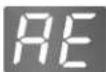 | |
| Overflow failure |  |

text_image
925mm 1007mm 625mm 625mm| Model | WF-T1022TP(H) |
| Weight | 47 kg |
| Size | 625(W)x625(D)x1007(H) |
| Standard water level | 94L |
| Water tab pressure | 30 -800 kPa (0.3 -8 kgf /cm ^2 ) |

natural_image
Solid black image with no visible content, text, or symbols.