MOBILEMOUNT - Weather Station Ambient Weather - Free user manual and instructions
Find the device manual for free MOBILEMOUNT Ambient Weather in PDF.


User questions about MOBILEMOUNT Ambient Weather
0 question about this device. Answer the ones you know or ask your own.
Ask a new question about this device
Download the instructions for your Weather Station in PDF format for free! Find your manual MOBILEMOUNT - Ambient Weather and take your electronic device back in hand. On this page are published all the documents necessary for the use of your device. MOBILEMOUNT by Ambient Weather.
USER MANUAL MOBILEMOUNT Ambient Weather
SKU: MOBILEMOUNT (weather station not included).
natural_image
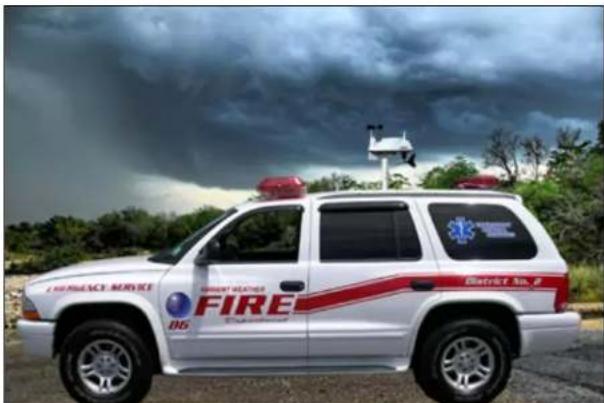
White emergency vehicle with red roof and 'FIRE' logo parked in front of a stormy sky (no readable text or symbols on vehicle body)The MobileMount vehicle weather station mounting system is an easy to install, portable mounting solution ideal for storm chasers, hazmat, first responders and racing enthusiasts.
Whether operating in severe weather or responding to hazmat incidents, you can receive on-scene weather data immediately and simultaneously with Ambient Weather's Vehicle-Mount Weather Station.
Designed for storm chaser vehicles, mobile home vehicles, incident command and mobile communications vehicles, the 14" x 18" base plate provides a thermal barrier (shields heat transfer from the vehicle's rooftop) and includes four powerful mounting magnets (requires a metal roof), to rapidly deploy or detach the weather station mount. Tie downs provide additional security.
This instruction manual will take you step-by-step through the process of assembling and mounting Ambient Weather MobileMount.

Warning: Do not operate the MobileMount with the cle in motion.
Do not install the weather station while the vehicle is in motion.
Four point tie down (tie downs included) prevent movement of the MOBILEMOUNT.
Failure to do so may result in damage, injury or death.
Components
The MobileMount (Figure 1) component list is shown in Table 1.

ambient weather
| Quantity Description | |
| 1 | MobileMount Assembly |
| 4 | Bungee Cable Ropes with hooks and clasps |
Table 1

text_image
Lock BoltFigure 1
Dimensions
18 x 14 x 16" (L x W x H)
Tools and Materials Needed
12 " wrench
Safety Goggles
Assembly Steps
Connect the Weather Station
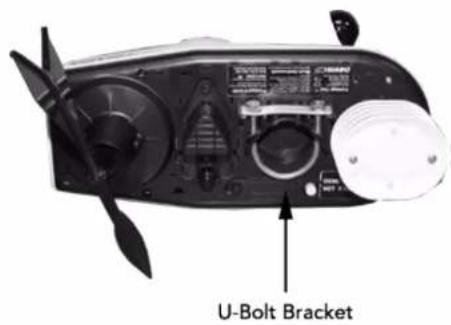
- Connect the U-Bolt assembly (sold with the weather station) to the weather station, as shown on Figure 2. Do not tighten.
- Position the Lock Bolt (Figure 1) in the 3 o'clock position.
text_image
U-Bolt BracketFigure 2
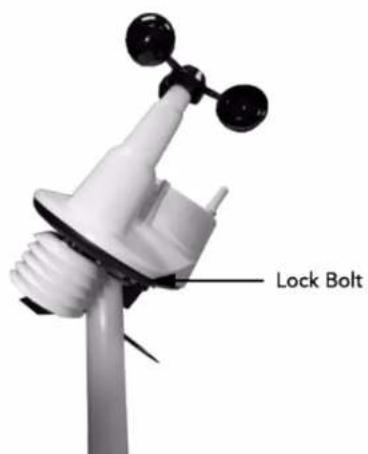
- Connect the weather station to the MobileMount mast as shown in Figure 3. Position the U-Bolt below the Lock Bolt at a 45 degree angle and slide over the top of the mast assembly.

ambient weather
text_image
Lock BoltFigure 3
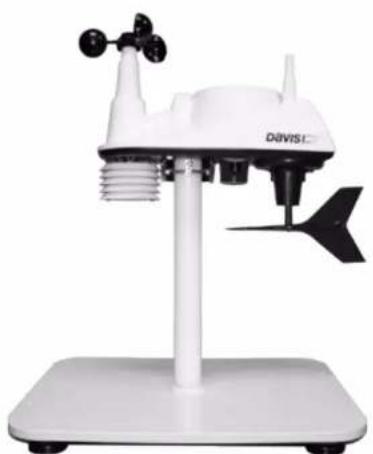
- Make sure the weather station is level. Tighten the U-Bolt assembly to the mast and position the lock bolt in the 6 o'clock position, as shown in Figure 4.
There should be no movement in the weather station assembly when twisted.
natural_image
White DAVIS C weather station instrument with sensor and antenna mounted on a stand (no visible text or symbols)Figure 4
Attach the MobileMount
Attach the MobileMount and assembly to the metal roof of the vehicle or structure, as shown in Figure 5. Adjust the position on the roof by slowly lifting one corner of the assembly. Do not attempt to lift all corners at the same time. Do not lift the mount from the vehicle by using the vertical pole. The force of the magnets can damage or deflect the vehicle roof.

ambient weather

natural_image
Close-up of a weather monitoring device mounted on a vehicle roof, showing no visible text or symbols.Figure 5
Attach the Tie Downs
Connect each corner of the mounting plate with the bungee cable cord ropes, as shown in Figure 5. Attach the opposite end of the Bungee Cable Cord Ropes to the vehicle or hook and clasp to the accompanied bungee cable hook and clasp.
Adjust the length of the bungee cables by using the attached hardware or by tying a slip not in each cable.

Warning: Use safety goggles with installing the eye cables to prevent eye damage.
Calibrate the Wind Direction
Calibrate the weather station wind direction based on the position of the vehicle. You must recalibrate the wind
direction each time the vehicle is moved. Refer to your weather station manual for calibration.
Remove the MobileMount
To remove the MobileMount from the vehicle or structure, disconnect bungee cables and slowly lift each corner of the MobileMount from the vehicle or structure. Do not remove the mount from the vehicle by using the vertical pole. Do not attempt to lift all four corners at the same time.

Note: Ambient Weather is not responsible for any ge caused to the weather station due to misuse.
Ambient Weather is not responsible for any damage caused to the vehicle due to misuse.
All warranties are voided if the MobileMount is not properly installed as required in this instruction guide.
Make sure that you are aware and comply with any applicable local, state and federal laws and regulations.

ambient weather
Liability Disclaimer
Please help in the preservation of the environment and return used batteries to an authorized depot. The electrical and electronic wastes contain hazardous substances. Disposal of electronic waste in wild country and/or in unauthorized grounds strongly damages the environment.
Reading the “User manual” is highly recommended. The manufacturer and supplier cannot accept any responsibility for any incorrect readings and any consequences that occur should an inaccurate reading take place. This product is designed for use in the home only as indication of weather conditions. This product is not to be used for medical purposes or for public safety information. The specifications of this product may change without prior notice.
This product is not a toy. Keep out of the reach of children. No part of this manual may be reproduced without written authorization of the manufacturer.
Ambient, LLC WILL NOT ASSUME LIABILITY FOR INCIDENTAL, CONSEQUENTIAL, PUNITIVE, OR OTHER SIMILAR DAMAGES ASSOCIATED WITH THE OPERATION OR MALFUNCTION OF THIS PRODUCT.
Warranty Information
Ambient, LLC provides a 1-year limited warranty on this product against manufacturing defects in materials and workmanship.
This limited warranty begins on the original date of purchase, is valid only on products purchased and only to the original purchaser of this product. To receive warranty service, the purchaser must contact Ambient, LLC for problem determination and service procedures.
Warranty service can only be performed by a Ambient, LLC. The original dated bill of sale must be presented upon request as proof of purchase to Ambient, LLC.
Your Ambient, LLC warranty covers all defects in material and workmanship with the following specified exceptions: (1) damage caused by accident, unreasonable use or neglect (lack of reasonable and necessary maintenance); (3) damage resulting from failure to follow instructions contained in your owner's manual; (4) damage resulting from the performance of repairs or alterations by someone other than an authorized Ambient, LLC authorized service center; (5) units used for other than personal use (6) applications and uses that this product was not intended (7) the products inability to receive a signal due to any source of interference or metal obstructions and (8) extreme acts of nature, such as lightning strikes or floods.
This warranty covers only actual defects within the product itself, and does not cover the cost of installation or removal from a fixed installation, normal set-up or adjustments, claims based on misrepresentation by the seller or performance variations resulting from installation-related circumstances.

ambient weather
California Prop 65
WARNING: Use of the Ambient Weather Products can expose you to chemicals, including lead and lead compounds, which are known to the State of California to cause cancer and bisphenol A (BPA), and compounds, which are known to the State of California to cause cancer and bisphenol A (BPA), and phthalates DINP and/or DEHP, which are known to the State of California to cause birth defects or other reproductive harm.
Can I Trust that Ambient Weather Products are Safe Despite this Warning? In 1986, California voters approved the Safe Drinking Water and Toxic Enforcement Act known as Proposition 65 or Prop 65. The purpose of Proposition 65 is to ensure that people are informed about exposure to chemicals known by the State of California to cause cancer, birth defects and/or other reproductive harm. A company with ten or more employees that operates within the State of California (or sells products in California) must comply with the requirements of Proposition 65. To comply, businesses are: (1) prohibited from knowingly discharging listed chemicals into sources of drinking water; and (2) required to provide a "clear and reasonable" warning before knowingly and intentionally exposing anyone to a listed chemical. Proposition 65 mandates that the Governor of California maintain and publish a list of chemicals that are known to cause cancer, birth defects and/or other reproductive harm. The Prop 65 list, which must be updated annually, includes over 1,000 chemicals, including many that are commonly used in the electronics industry.
Although our manufacturing process is "lead-free" and RoHS compliant, it remains possible that trace amounts of lead could be found in components or subassemblies of Ambient Weather Products. Bisphenol A (BPSA) could conceivably be present in minute amounts in our plastic housings, lenses, labels or adhesives, and DEHP & DINP (phthalates) could possibly be found in PVC wire coatings of our cables, housings, and power cords. Unlike RoHS, Prop 65 does not establish a specific threshold for reporting on the substances of concern and instead sets forth a much less definitive standard requiring that the business demonstrate with certainty that there is "no significant risk" resulting from exposure. With respect to carcinogens, the "no significant risk" level is defined as the level which is calculated to result in not more than one excess case of cancer in 100,000 individuals exposed over a 70-year lifetime. In other words, if you are exposed to the chemical in question at this level every day for 70 years, theoretically, it will increase your Version 1.14 ©Copyright 2020, Ambient LLC. All Rights Reserved. Page 60 chances of getting cancer by no more than 1 case in 100,000 individuals so exposed. With respect to reproductive toxicants, the "no significant risk" level is defined as the level of exposure which, even if multiplied by 1,000, will not produce birth defects or other reproductive harm. In other words, the level of exposure is below the "no observable effect level," divided by 1,000. (The "no observable effect level" is the highest dose level which has not been associated with observable reproductive harm in humans or test animals.) Proposition 65 does not clarify whether exposure is to be measured only in normal operation, or in the event of misuse such as intentionally damaging, incinerating, or consuming an Ambient Weather Product or component and Ambient Weather has not attempted to evaluate the level of exposure.
A Proposition 65 warning means one of two things: (1) the business has evaluated the exposure and has concluded that it exceeds the "no significant risk level"; or (2) the business has chosen to provide a warning simply based on its knowledge about the presence of a listed chemical without attempting to evaluate the exposure. The California government has itself clarified that "The fact that a product bears a Proposition 65 warning does not mean by itself that the product is unsafe." The government has also explained, "You could think of Proposition 65 more as a 'right to know' law than a pure product safety law."

ambient weather
While using Ambient Weather Products as intended, we believe any potential exposure would be negligible or well within the "no significant risk" range. However, to ensure compliance with California law and our customers' right to know, we have elected to place the Proposition 65 warning signs on Ambient Weather Products.
For further information about California's Proposition 65, please visit https://ochha.ca.gov/prop65/background/p65plain.html