OM60NMTDB1 - Oven Fisher & Paykel - Free user manual and instructions
Find the device manual for free OM60NMTDB1 Fisher & Paykel in PDF.


User questions about OM60NMTDB1 Fisher & Paykel
0 question about this device. Answer the ones you know or ask your own.
Ask a new question about this device
Download the instructions for your Oven in PDF format for free! Find your manual OM60NMTDB1 - Fisher & Paykel and take your electronic device back in hand. On this page are published all the documents necessary for the use of your device. OM60NMTDB1 by Fisher & Paykel.
USER MANUAL OM60NMTDB1 Fisher & Paykel
OM60NMTDB1, OM60NMTDG1 models
CONTEMPORARY
OM60NDTDX1 models
USER GUIDE
UK IE EU
Safety and warnings 3
First use 9
Setting a function 12
Conditioning the oven 14
Wi-Fi connection and remote mode 15
Cooking options 17
Temperature sensor 19
Sabbath Mode 20
Oven shelves 22
Care and cleaning 23
Side racks 25
Oven lights 27
Troubleshooting
Fault codes 30
28
WARNING!
Precautions to avoid possible exposure to excessive microwave energy
- Do not attempt to operate this microwave with the door open. This can result in harmful exposure to microwave energy. It is important not to damage or tamper with the safety interlocks.
- Do not place any object between the microwave oven and the door or allow soil or cleaner residue to accumulate on sealing surfaces.
- Do not operate the microwave oven if it is damaged. It is particularly important that the microwave oven door closes properly and that there is no damage to the: (1) door (bent), (2) hinges and latches (broken or loosened), (3) door seals and sealing surfaces.
- Do not repair or replace any part of the appliance unless specifically recommended in this guide. All other servicing should be done by a Fisher & Paykel trained and supported service technician.
- If the door seals are damaged, the oven must not be operated until it has been repaired by a competent person.
- It is hazardous for anyone other than a competent person to carry out any service or repair operation that involves the removal of a cover which gives protection against exposure to microwave energy.
WARNING!
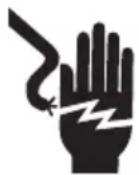
Electric Shock Hazard
Failure to follow this advice may result in electric shock or death.
- Before carrying out any work on the electrical section of the appliance, it must be disconnected from the mains electricity supply.
- Connection to a good ground wiring system is absolutely essential and mandatory.
- Alterations to the domestic wiring system must only be made by a qualified electrician.
- Turn the oven off at the wall before replacing the oven lamp.
WARNING!
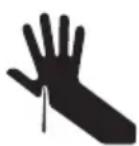
Cut Hazard
Failure to use caution could result in injury.
• Take care - some edges are sharp.
WARNING!

Fire Hazard
Failure to follow this advice may result in overheating, burning, and injury.
- Do not use adapters, reducers, or branching devices to connect this appliance to the mains power supply.
- The microwave oven is intended for heating food and beverages. Drying of food or clothing and heating or warming pads, slippers, sponges, damp cloths and similar may lead to risk of injury, ignition or fire.
IMPORTANT SAFETY INSTRUCTIONS READ CAREFULLY AND KEEP FOR FUWTURE REFERENCE
WARNING!
To reduce the risk of fire, electrical shock, injury to persons or damage when using the appliance, follow the important safety instructions listed below. Read all the instructions before use. Use only for its intended purpose as described in these instructions.
Installation
- Ensure your appliance is properly installed and grounded by a qualified technician in accordance with the provided installation instructions.
• This appliance is intended to be built-in.
• Install or locate this appliance only in accordance with the provided installation instructions. - Do not install or operate the appliance if it is damaged or not working properly. If you receive a damaged product, contact your dealer or installer immediately.
- The appliance must not be installed behind a decorative door in order to avoid overheating.
- Do not mount this appliance over a sink.
- This oven is not approved or tested for marine use.
- Do not store this appliance outdoors. Do not use this near a swimming pool, near a sink or in similar locations.
- Do not immerse cord or plug in water. Do not let cord hang over edge of table or counter. Keep cord away from heated surfaces.
- Do not cover or block any openings on the appliance.
Servicing
- User servicing: do not repair or replace any part of the appliance unless specifically, recommended in this guide. All other servicing should be done by a Fisher & Paykel trained and supported service technician.
- WARNING: If the door or door seals are damaged, the oven must not be operated until it has been repaired by a trained person.
- If the microwave oven light fails, contact a Fisher & Paykel trained and supported service technician or Customer Care.
Fire hazard
- Do not overcook food. Carefully attend appliance when paper, plastic or other combustible materials are placed inside the microwave oven to facilitate cooking.
- Remove wire twist-ties from paper or plastic bags before placing in microwave.
- If materials inside the microwave oven should ignite, keep microwave oven door closed, turn microwave oven off and disconnect the power cord or shut off power at the fuse or circuit breaker panel.
- Do not use the cavity for storage purposes. Do not leave paper products, cooking utensils or food in the cavity when not in use.
- Utensils should be checked to ensure that they are suitable for use in microwave ovens.
- When heating food in plastic or paper containers, check the oven frequently due to the possibility of ignition.
- If smoke is observed, switch off or unplug the appliance and keep the door closed in order to stifle any flames.
- During and after use, do not touch, or let clothing or other flammable materials contact any interior area of the oven; allow sufficient time for cooling first.
- In case of fire, smother the flame or use a dry chemical or foam type extinguisher.
- Use only dry oven mitts or potholders. Moist or damp potholders on hot surfaces could result in burns from steam. Do not let potholders touch hot areas or heating elements. Do not use a towel or a bulky cloth for a potholder. It could catch fire.
Food safety
- Safe food handling: leave food in the oven for as short a time as possible before and after cooking. This is to avoid contamination by organisms which may cause food poisoning. Take particular care during warm weather.
General
- This product has been designed for use in a domestic (residential) environment. This product is not designed for any commercial use. Any commercial use by the customer will affect this product's manufacturer's warranty.
-
This appliance is intended to be used in household and similar applications such as:
-
staff kitchen areas in shops, offices and other working environments
- farm houses
• by clients in hotels, motels and other residential environments
• bed and breakfast type environments
• Household appliances are not intended to be played with by children.
- Do not leave children alone. Children should not be left alone or unattended in the area where the appliance is in use. They should never be allowed to sit or stand on any part of the appliance.
- HOT CONTENTS CAN CAUSE SEVERE BURNS. DO NOT ALLOW CHILDREN TO USE THE MICROWAVE. Use caution when removing hot items.
- Children of less than 8 years old must be kept away from the appliance unless continuously supervised. This appliance can be used by children aged from 8 years and above, and persons with reduced physical, sensory or mental capabilities or lack of experience and knowledge, if they have been given supervision or instruction concerning the use of the appliance in a safe way and they understand the hazards involved. Cleaning and user maintenance shall not be done by children without supervision.
- Do not place heavy objects on the oven door.
- Do not let aluminium foils and food probes touch the heating elements.
- Do not operate your appliance by means of an external timer or separate remote control system.
- Placement of oven shelves: always position shelves in the desired location while the oven is cool (before preheating). If a shelf must be removed while the oven is hot, do not let the oven mitts or potholder contact hot heating elements in the oven or the base of the oven.
- During use the appliance becomes hot. Care should be taken to avoid touching heating elements inside the oven.
- Do not heat unopened food containers. They can build up pressure that may cause the container to burst and result in injury.
- Do not change or modify the wireless communication device in any way. Changes or modifications not expressly approved by Fisher & Paykel could void the user's authority to operate the equipment.
Cleaning
- The oven must be cleaned periodically and all food residues must be removed.
-
Failure to keep the oven clean could cause deterioration of the surfaces that could reduce the life of the appliance and cause dangerous conditions.
-
Do not use oven cleaners, harsh/abrasive cleaning agents, waxes, or polishes. No commercial oven cleaner, oven liner, or protective coating of any kind should be used in or around any part of the oven. Do not use harsh/abrasive cleaners, scourers or sharp metal scrapers to clean the oven door glass since they scratch the surface, which may result in the glass shattering.
- Avoid using products containing chlorine, acids or abrasives, especially for cleaning painted parts. In addition, avoid using acid or alkaline substances.
- Do not spray water or use a steam cleaner to clean any part of the oven. Use only slightly damp cloths.
Microwave cooking
- Do not operate microwave functions while the oven is empty.
- Eggs in their shells and whole hard-boiled eggs should not be heated in microwave ovens since they may explode, even after microwave heating has ended.
- The contents of feeding bottles and baby food jars are to be stirred or shaken and the temperature is to be checked before consumption, in order to avoid burns.
- Microwave heating of beverages can result in delayed eruptive boiling, therefore care has to be taken when handling the container.
- Liquids, such as water, coffee or tea are able to be overheated beyond the boiling point without appearing to be boiling. Visible bubbling or boiling when the container is removed from the microwave oven is not always present. THIS COULD RESULT IN VERY HOT LIQUIDS SUDDENLY BOILING OVER WHEN A SPOON OR OTHER UTENSIL IS INSERTED INTO THE LIQUID.
- Do not overheat liquid. To avoid delayed boiling when heating liquids, always put a spoon in the container. Beverages containing spoons should be placed in the centre of the oven. Metal components must stay at least 2 cm from the walls of the oven and the inside of the door. Sparks could damage the inside of the glass door. Stir the liquid both before and halfway through heating it.
- Do not use straight-sided containers with narrow necks. Use a wide-mouthed container.
- After heating, allow the container to stand in the microwave oven for at least 20 seconds before removing the container.
- Use extreme care when inserting a spoon or other utensil into the container.
- WARNING: Liquids and other foods must not be heated in sealed containers since they are liable to explode.
- Only use utensils that are suitable for use in microwave ovens.
Unsuitable dishware
- Never turn on the microwave oven before you have put in the food. The only exception allowed is testing dishware.
- Only use plates and crockery that are microwave safe.
- Never heat food covered in tin foil when using microwave or combination functions.
- Use only bakeware approved for oven use. Follow the manufacturer's instructions.
- Metallic containers for food and beverage are not allowed during microwave cooking.
Pacemakers
- Most pacemakers are shielded from interference from electronic products, including microwaves. However, patients with pacemakers may wish to consult their physicians if they have concerns.
Arcing
- Arcing can occur during both speed cooking and microwave cooking. If you see arcing, press CANCEL/OFF and correct the problem. Arcing is the microwave term for sparks in the oven. Arcing is caused by:
- Metal or foil touching or being very close to the side of the oven walls.
- Metal cookware used during microwave or combination functions.
- Metal such as twist-ties, poultry pins, or goldrimmed dishes in the oven.
• Recycled paper towels containing small metal pieces being used in the oven.
- The temperature sensor touching the microwave racks and shelves. To prevent this, remove the temperature sensor from the oven when not in use and ensure it does not protrude from your food during use.
Light source information
- This product contains a light source of energy efficiency class G. The light source used in this appliance is not suitable for room illumination.

text_image
10:45 ① ② ③ ④ ⑤ ⑥ ⑦Features and accessories
① Oven controls
② Oven light
③ Shelves
④ Side racks
⑤ Temperature sensor
⑥ Grill rack
⑦ Glass dish

text_image
10:45 QUICKSTART MICROWAVE COOK BY FUNCTION COOK BY FOOD TYPE COOK BY RECIPE 10:45 COOK BY FUNCTION COOK BY FOOD TYPE COOK BY RECIPEControl panel
| 1 Power button Press and hold to turn the display ON.*Press to turn the display OFF, or to cancel cooking. | |
| 2 Touchscreen display | Use to navigate cooking functions, features and settings. |
| 3 Control dial | Turn the dial to scroll.Press to select or confirm.Press and hold to cancel or exit. |
| 4 Quickstart Microwave | Select to quickly access everyday microwave cooking. |
| 5 Cook by Function Choose a function best suited to your cooking requirements. | |
| 6 Cook by Food Type | Guided cooking to help you get optimal results. |
| 7 Cook by Recipe | A collection of recipes designed specifically for this style of oven. |
| 8 Menu Press to access additional features and settings. | |
*Low Power mode: If the product is inactive for 20 minutes after use, it will switch to standby mode. To turn low power modeON/OFF, go to SETTINGS.

text_image
MENU TIMER LOCK LIGHT SETTINGS REMOTE| Menu | ||
| TIMER | [KZWZ] | Use the timer to keep track of cooking times. You can use it at any time, even if you are not using the oven.The timer does not turn the oven off. Refer to ‘Cooking options’ for automatic cooking options. |
| LOCK |  | Lock the oven controls to prevent accidental use. When locked, the controls will be unresponsive and the oven will not turn on.Press and hold the dial to unlock. |
| LIGHT |  | Turn the oven lights ON/OFF. |
| SETTINGS |  | Adjust the oven settings to suit your preferences or set up a Wi-Fi connection. Refer to ‘Wi-Fi connection & Remote mode’. |
| REMOTE |  | Enable or disable REMOTE.Your oven may be connected to your wireless network and operated using the app. Refer to ‘Wi-Fi connection & Remote mode’. |
Before you begin
- Ensure all cable ties and packaging have been removed.
- Set the time. To change the time at any point go to SETTINGS and select CLOCK: SET TIME.
- Condition your oven according to the instructions under 'Conditioning the oven'.
- Connect your oven to Wi-Fi to operate remotely using the app. For more information refer to 'Wi-Fi Connection & Remote mode'.
①
natural_image
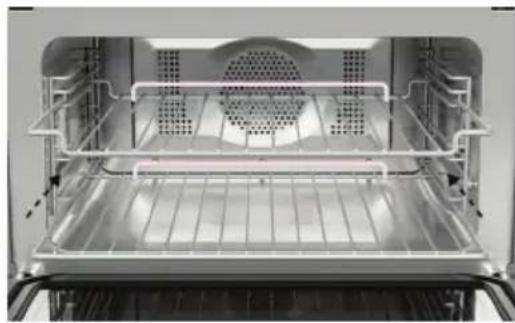
Interior view of an oven with ventilation grilles and ventilation ducts (no text or symbols visible)Position the shelves at the required height. Ensure shelves are level and correctly positioned with the guard rail at the back.
②

text_image
10:45 QUICKSTART MICROWAVE COOK BY FUNCTION COOK BY FOOD TYPE COO RECISelect a cooking mode.
③

text_image
CONVECTION BAKE FAN FORCED ORILL VEN' BAKI For everyone closing. Great for multi- shelf closing. For opening and closing.Select a function.
For more information on each function, select the description below the function name.
④
text_image
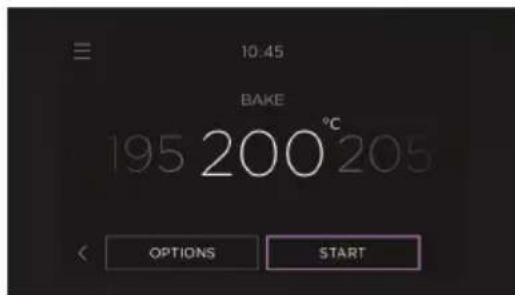
10.45 BAKE 195 200°C 205 OPTIONS STARTAdjust the temperature, microwave power level or cook time if needed, then press START.
• MICROWAVE functions
Place food in the oven before pressing START.
- MICROWAVE + CONVECTION functions
Place food in the oven when prompted.
• CONVECTION functions
Place food in the oven when the oven has finished preheating.
Preheating
A progress bar will show on the screen while the oven is heating. To prevent burning, wait until the oven has reached temperature before placing food inside.
Some functions do not need to preheat and will not show a progress bar. Place food in the oven when ready to start cooking.
To reach the set temperature quickly, some functions have a rapid preheat stage that uses all elements.
Turning the oven off

text_image
10:45 BAKE 195 200 °C 205 OPTIONS CANCELWhen you have finished cooking, press CANCEL to turn the oven off.
We recommend conditioning your oven for 1 hour before initial use to eliminate any manufacturing residue. A small amount of smoke may be present, ensure kitchen is well ventilated.
①

text_image
10:45 BAKE 195 200 °C 205 OPTIONS STARTSet the oven to BAKE at 200^ C and heat for 30 minutes.
②

text_image
10:45 FAN GRILL 195 200°C 205 OPTIONS CANCELAfter 30 minutes change the function to FAN GRILL and heat for 5 minutes.
③
text_image
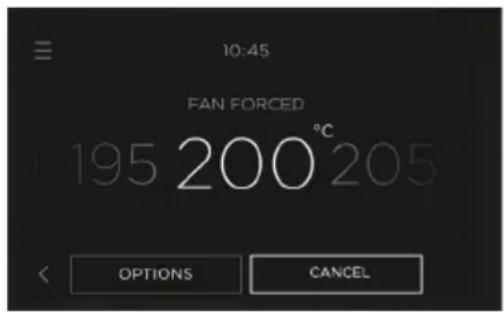
10:45 FAN FORCED 195 200 °C 205 OPTIONS CANCELAfter 5 minutes, change to FAN FORCED and heat for a further 20 minutes. When you have finished, turn the oven off.
After conditioning:
- Wait for the oven to cool completely.
- Wipe oven with a damp cloth and mild detergent.
- Dry with a clean, lint-free cloth.
Your appliance may be connected to your home wireless network and operated remotely using the app.
Getting started
- Ensure your home Wi-Fi network is turned on.
- You will be given step by step guidance on both your appliance and mobile device.
- It may take up to 10 minutes to connect your oven.
- For further guidance and troubleshooting, please refer to the app.
On your mobile device:
① Download the app. Scan the QR code or go to www.fisherpaykel.com/connect
② Register and create an account.
③ Add your appliance and set up the Wi-Fi connection.
Connecting to your home Wi-Fi
①

text_image
10:45 am COOK BY FUNCTION COOK BY FOOD TYPE COOK BY RECIPEGo to the menu.
②

text_image
MENU TIMER LOCK LIGHT SETTINGS REMOTESelect SETTINGS.
③
text_image
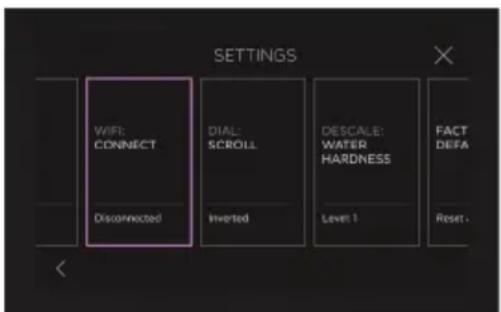
SETTINGS WIFI: CONNECT DIAL: SCROLL DESCALE: WATER HARDNESS FACT DEFA Disconnected Inverted Level 1 Reset.Select WI-FI CONNECT and follow the instructions onscreen.
Enabling Remote Mode
①
text_image
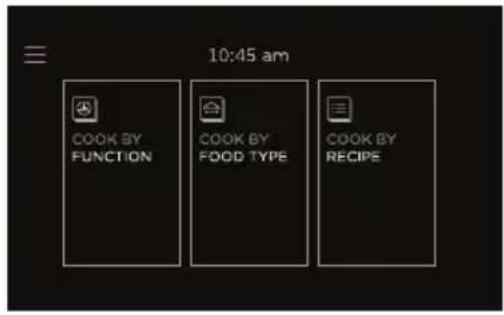
10:45 am COOK BY FUNCTION COOK BY FOOD TYPE COOK BY RECIPEGo to the menu.
②

text_image
MENU TIMER LOCK LIGHT SETTINGS REMOTESelect REMOTE.
③
text_image
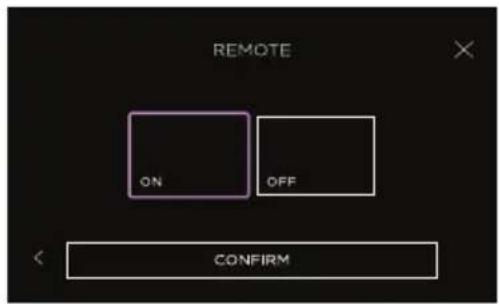
REMOTE ON OFF CONFIRMSelect ON then press CONFIRM. Remote Mode is now enabled.
text_image
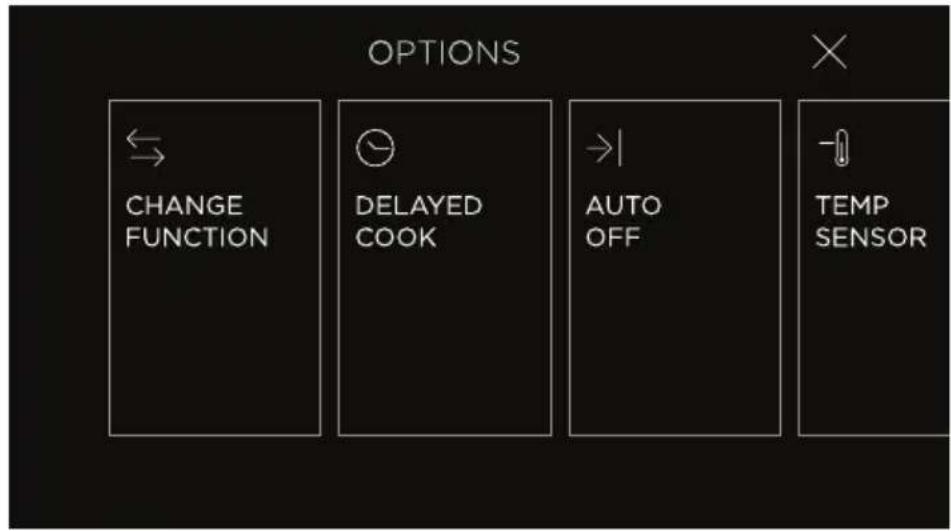
OPTIONS CHANGE FUNCTION DELAYED COOK AUTO OFF TEMP SENSORChange function
Quickly view and switch functions.
Delayed cook
Set the oven to turn on later, cook for a set length of time and turn off automatically.
Auto off
Set the oven to turn off after a set length of time.
Temperature sensor
Use the sensor to monitor cooking and automatically turn the oven off when food is done.
Accessing options
①
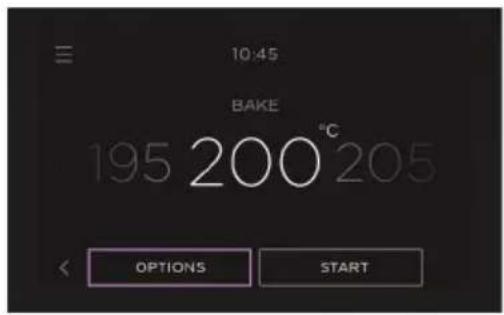
text_image
10:45 BAKE 195 200°C 205 OPTIONS STARTSelect a function, then press OPTIONS.
②

text_image
OPTIONS CHANGE FUNCTION DELAYED COOK AUTO OFF TEN SENSelect a cooking option and follow the instructions onscreen.
Food safety
- Leave food in the oven for as short a time as possible before and after cooking.
- Ensure meat is fully defrosted before cooking.
- Rest meat after cooking to allow the internal temperature to continue to rise.
- High risk foods such as fish should reach a minimum internal temperature of 63 - 70°C and poultry and minced meat should reach 75 - 85°C.
Preheating
The grill element may come on while the oven is heating up. Position food on a lower shelf or cover to prevent burning as the oven heats up.
When using DELAYED COOK we do not recommend using GRILL, FAN GRILL or AIR FRY.
①
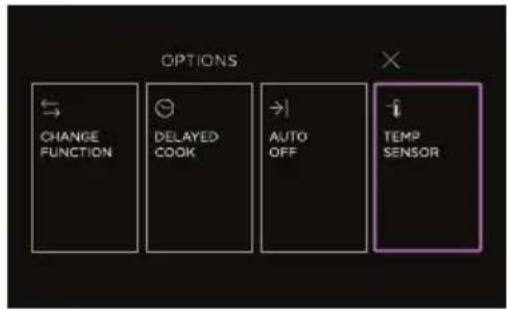
text_image
OPTIONS CHANGE FUNCTION DELAYED COOK AUTO OFF TEMP SENSORSelect a cook function.
Go to OPTIONS and select TEMPERATURE SENSOR.
②

text_image
10:45 BEEF MEDIUM RARE 47 BEEF MEDIUM WELL 46 BEEF MEDIUM WELL 47 BEEF RARE : 45 °C BEEF WELL DONE 46 CHICKEN PIECES 47 STARTSelect a food type and temperature then press CONFIRM.
Allow your oven time to preheat if necessary.
③

natural_image
Simple line drawing of a symmetrical abstract shape with a central dot and dashed line (no text or symbols)Insert the sensor into your food.
Position the sensor in the thickest part of the dish, avoiding fat and bone in meat.
Ensure the tip of the sensor doesn't protrude out the other side of food or touch cookware.
④
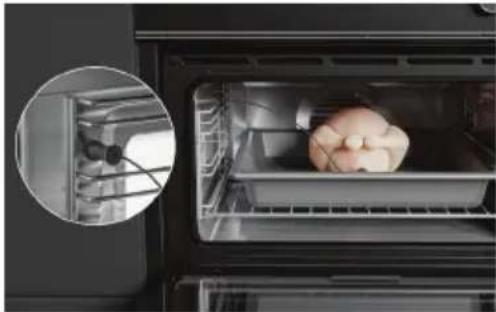
natural_image
Interior view of a modern kitchen oven with a small dog-shaped object on the tray (no visible text or symbols)Place food in the oven and plug in the sensor. The sensor will click when it is in place.
The socket is located inside the oven, on the left hand side.
Proceed with caution when removing the temperature sensor from the product after use. It will be hot, and it may cause burns. For best practice use oven gloves.
Only use the provided temperature sensor in your microwave oven.
When the sensor is not in use, ensure it is removed from the oven and the silicon plug is inserted into the socket.
For the Sabbath observant. Sabbath Mode sets your oven to heat continuously for as long as required. The display will be unresponsive and no tones or alerts will sound.
While your oven is in Sabbath Mode it can operate at the following temperature levels:
HEAT LEVEL APPROXIMATE TEMP (°C) APPLICATION
Low 75 - 100 Keep hot food warm
Moderate 155 - 180 Reheat cooked food from cold
High 185 - 210 Cooking raw food
During Sabbath Mode
- The display will be unresponsive.
- No tones or alerts will sound.
• Wi-Fi will be disconnected. - The oven light will remain either on or off, depending on your preference.
- Lights, fans and display will not respond to the door opening.
Setting Sabbath Mode
text_image
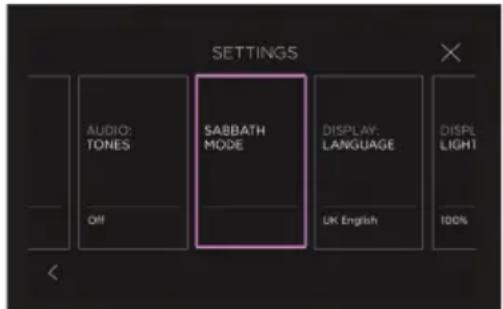
SETTINGS AUDIO: TONES SABBATH MODE DISPLAY: LANGUAGE DISPL LIGHT Off UK English 100%In the settings menu, select SABBATH MODE and follow the instructions onscreen.
The oven may take some time to get to temperature. If you want to cook immediately after setting Sabbath Mode we recommend preheating the oven before setting. Opening the door frequently or for too long may result in heat loss.
Cancelling Sabbath Mode
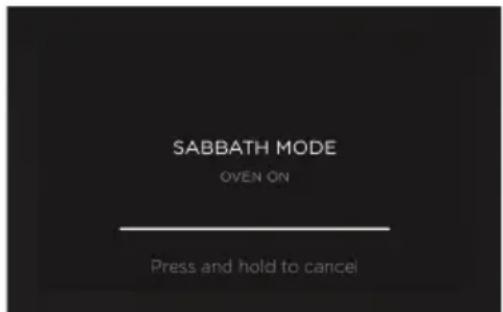
The oven will heat for the set length of time and then turn off. At the end of the cook time, the oven will remain in Sabbath Mode until cancelled.
text_image
SABBATH MODE OVEN ON Press and hold to cancelPress and hold anywhere on the screen to cancel.
Positioning the shelves
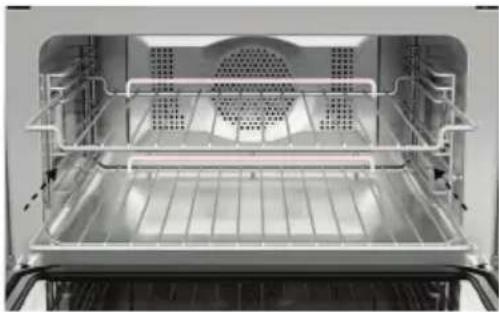
Place shelves in the oven at the required level before heating the oven.
natural_image
Interior view of a stainless steel oven with ventilation grilles and cooling fins (no text or symbols visible)Slide shelves into the cavity.
Ensure shelves are level and correctly positioned with the guard rail at the back.
Turn the oven off at the wall and allow it to cool before doing any cleaning or maintenance.
Cleaning surfaces
Wipe with a damp cloth and mild detergent, then dry with a clean, lint-free cloth. We do not recommend using the following cleaning products as they may damage the surfaces:
- Plastic or stainless steel scouring pads
- Abrasive, solvent, household cleaners
- Acid or alkaline cleaners
- Hand washing liquids or soap
• Stainless steel cleaners or polishes - Laundry detergents or disinfectants
General
We recommend cleaning any easy-to-reach spills or splatters from the oven after every use, to prevent them becoming baked on.
Oven door glass
Clean the oven door glass after every use to prevent stains from becoming baked on.
WHAT? HOW? IMPORTANT!
| Control Panel Take particular | care when cleaningthe control panel glass and screen.Only use a damp cloth with detergent. | Do not use any oven cleaners, harsh or abrasive cleaners, scouring pads, steel wool or sharp metal scrapers on the glass. These may scratch and damage the surface. |
| Dial Clean with hot water and | mild detergent, then wipe dry. | Do not use stainless steel or oven cleaner on the dial. |
| Stainless steel trim/door handle | Clean with hot water and mild detergent, then wipe dry.If necessary, use a suitable stainless steel cleaner and polish. | Ensure stainless steel cleaner does not contain chlorine compounds as these may damage the appearance of your oven.Always rub the stainless steel in the direction of the grain. |
| Oven door frame and plastic corner clips | Clean with hot water and mild detergent, then wipe dry. | |
| Oven seal Do not clean this part. | ||
| Oven cavity Clean with hot water and mild detergent or an ammonia-based cleaner, the wipe dry. | Clean any easy-to-reach spills, food or grease stains from the oven after each use to prevent stubborn soiling. | |
| WHAT? HOW? IMPORTANT! | ||
| Oven door glass(after every use) | Clean with hot water and mild detergent. | Do not use oven cleaners or any other harsh/abrasive cleaners,cloths, scouring pads, steel wool or sharp metal scrapers to clean the oven door glass. These scratch the glass, which in turn could result in the glass cracking and shattering.Do not allow grease to build up on the glass or become baked on as this reduces visibility into the oven. |
| For stubborn stains, try a mixture of baking soda and warm water with a non-abrasive scrubbing pad. | ||
| Temperature sensor Clean with hot water and mild detergent, then wipe dry. | Do not wash in the dishwasher or use oven cleaner on it. | |
| Grill rackGlass dishWire shelves | Clean with hot water and mild detergent. | |
| Soak stubborn stains in a solution of dishwasher powder and hot water.These parts are dishwasher safe. | ||
Removing the side racks
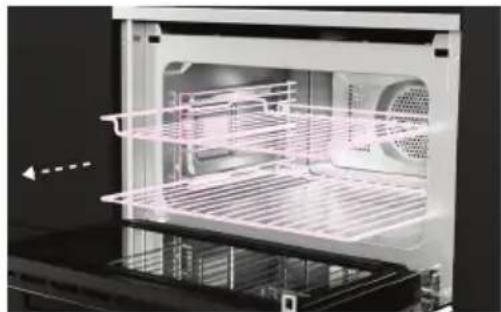
Remove the side racks to make cleaning easier.
①
natural_image
Interior view of an oven with visible grating and ventilation duct (no text or symbols)Remove all shelves.
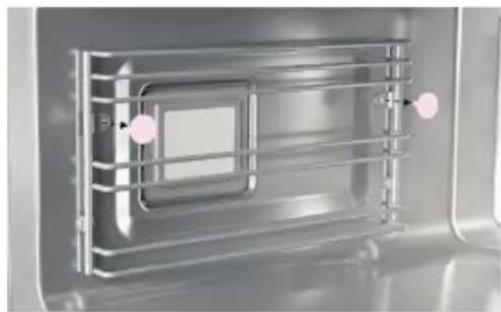
②
natural_image
Interior view of a stainless steel kitchen appliance with metal grating and a central control panel (no visible text or symbols)Unscrew the nuts holding the rack in position.
Use a coin to initially loosen the nuts if required.
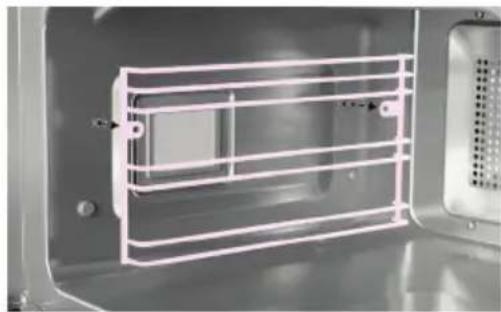
③
natural_image
Interior view of a microwave oven with white plastic grating and ventilation grille (no text or symbols visible)Remove the rack from the oven.
Refitting the side racks
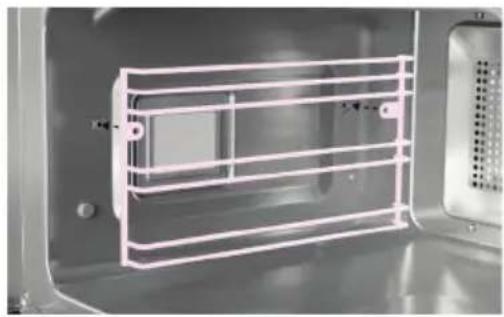
①
natural_image
Interior view of a microwave oven with white plastic grating and ventilation slots (no text or symbols visible)Position the rack in place.
②

natural_image
Close-up of a metallic industrial or laboratory chamber with internal grating and two pink circular markers (no text or symbols visible)Screw the nuts in place to secure the rack. Use a coin to tighten if required.
Oven light specifications

natural_image
3D rendering of a cylindrical electronic component with four pins (no text or symbols visible)G9 220 - 240V/25W halogen bulbs
To replace the oven light bulbs, contact Customer Care or go to our website www.fisherpaykel.com
Oven bulb replacement is not covered by your warranty.
| PROBLEM POSSIBLE CAUSES WHAT TO DO | ||
| The oven does not work No power. Check that the mains power | supply (wall switch) is turned on, the fuse has not tripped and there is no power outage in your area. | |
| The oven does not work but the screen is on | The oven is in Demo Mode. Call Customer Care. | |
| The lights do not come on when I open the oven door | The oven light bulb(s) have blown. Call Customer Care. | |
| The oven light has been turned off. Go to the menu in the top left corner of the screen and select LIGHT. | ||
| The oven controls are unresponsive | The control panel is locked. Touch and hold the screen to unlock. | |
| The oven is not heating The door is not properly closed or it is opened too frequently during cooking. | The heating elements are disabled while the door is open. Make sure the door is properly closed and avoid opening it frequently during cooking. | |
| A glass pane in the oven door has cracked, chipped, or shattered | Incorrect cleaning or the edge of the glass hitting against something. | You must NOT use the oven. Contact a Fisher & Paykel trained and supported service technician or Customer Care |
| I can feel hot air blowing out of the vents after I have turned the oven off | This is normal. For safety reasons the cooling fans will continue to run even when you have turned the oven off. The fans will switch off automatically when the oven has cooled. | |
| The oven fan comes on when I select a function that does not use a fan (eg BAKE or CLASSIC BAKE) | This is normal. The fan comes on while the oven is preheating. It may turn off when the oven has reached the set temperature. | Wait until the progress bar on the screen disappears: the oven will then be ready to use. |
| The oven cancels automatic cooking when I try to adjust the clock setting | The oven was set for automatic cooking when you were trying to adjust the clock setting. | You can only adjust the clock setting while the oven is not set for automatic cooking. |
| The oven has reached the set temperature but the temperature dial halo is still red | The oven is set to GRILL. This is normal. | The dial halo will stay red whenever this function is in use as the grill element is always heating. |
| The oven sounds a tone when I try to set the temperature below a certain temperature | This is normal: for food safety reasons, the oven functions have factory-set minimum temperature settings. | Select a different temperature or try a different function that is designed for low temperatures. |
| The temperature dial halo never turns white when I use GRILL | This is normal: the halo stays red to indicate that the grill element provides instant radiant heat. | |
| The displays work, and the function and temperature dials halos come on but the oven does not heat up | The oven is in ‘Demo’ mode. Call Customer Care. | |
How do I know if there is a problem?
Your oven will beep and an alert will show in the display.
What to do
First try to fix the issue and clear the alert according to the instructions onscreen or the steps in the following table.
Do not turn the oven off at the wall unless it is completely cool. Turning off the power while the oven is too hot may damage the oven and its surrounding cabinetry.
If the problem persists
① Note down the fault code.
② Contact Customer Care or a Fisher & Paykel trained and supported service technician. Refer to the Service and Warranty booklet for contact details.
If the fault code has disappeared, the fault has been reset and you can continue to use your oven.
| FAULT CODE | POSSIBLE CAUSE WHAT TO DO | |
| A1 | The oven has overheated. | Allow the oven to cool down.After the oven has cooled and the door is unlocked, power down the oven before turning it back on.You can now use the oven. |
| A5 | Microwave system has overheated. | Allow the oven to cool down.After the oven has cooled, power down the oven before turning it back on.You can now use the oven. |
| F+ number | Technical fault. | Note down the alert code.Wait until the cooling fans have stopped and the oven has completely cooled down.Turn the power to the oven off at the wall.Contact a Fisher & Paykel trained and supported service technician or Customer Care. |
EU This appliance is marked according to the European Directive 2012/19/EU on Waste Electrical and Electronic Equipment (WEEE). By ensuring this product is disposed of correctly, you will help prevent potential negative consequences for the environment and human health, which could otherwise be caused by inappropriate handling of this product.
The symbol 📁 marked on the serial plate, or on the documents accompanying the product, indicates that this appliance cannot be treated as household waste. It shall be handed over to the applicable collection point for the recycling of electrical and electronic equipment. Disposal of the appliance shall be carried out in accordance with the local environment regulations for waste disposal and ensure the refrigerant circuit is not damaged.
For more detailed information about treatment, recovery and recycling of this product, please contact your local city office, your household waste disposal service or your Fisher & Paykel retailer/dealer from whom you purchased this product.
UK

text_image
QR code image containing encoded data, no visible human-readable textTo access your Warranty and Service Guide
Scan the QR code with your smartphone to access your warranty and book a service, or view online at https://www.fisherpaykel.com/uk/help-and-support/warranty-information
IE

text_image
QR code image containing encoded data, no visible human-readable textTo access your Warranty and Service Guide
Scan the QR code with your smartphone to access your warranty and book a service, or view online at https://www.fisherpaykel.com/ie/help-and-support/warranty-information
EU

text_image
QR code image containing encoded data, no visible human-readable textTo access your Warranty and Service Guide
Scan the QR code with your smartphone to access your warranty and book a service, or view online at https://www.fisherpaykel.com/eu/help-and-support/warranty-information
This product has been designed for use in a domestic (residential) environment. This product is not designed for any commercial use. Any commercial use by the customer will affect this products Manufacturer's Warranty.
For spare parts, please contact Fisher & Paykel Customer Care. Spare parts are available for all Fisher & Paykel products for a minimum period of 10 years from the date of manufacture.
Complete and keep for safe reference:
Model
Serial No.
Purchase Date
Purchaser
Dealer
Suburb
Town
Country
FISHERPAYKEL.COM
© Fisher & Paykel Appliances 2024. All rights reserved.
The models shown in this guide may not be available in all markets and are subject to change at any time.
The product specifications in this guide apply to the specific products and models described at the date of issue. Under our policy of continuous product improvement, these specifications may change at any time.
For current details about model and specification availability in your country, please go to our website or contact your local Fisher & Paykel dealer.