
Y10E052-B1 - Computer Storage and Peripherals Rocstor - Free user manual and instructions
Find the device manual for free Y10E052-B1 Rocstor in PDF.


| Product Type | Vertical Cable Organizer with Finger Ducts |
| Brand | Rocstor |
| Model | Y10E052-B1 |
| Color | Black |
| Material | Steel |
| Length | 34 inches (864 mm) |
| Width (Approx.) | 3.5 inches (89 mm) |
| Depth (Approx.) | 2.5 inches (64 mm) |
| Weight (Est.) | 7 lbs (3.2 kg) |
| Mounting Options | Tool-less (keyhole) or with screws and cage nuts; inside or outside rack |
| Compatibility | Two-post, four-post, or enclosed server racks and cabinets |
| Finger Ducts | Integrated for easy cable routing |
| Removable Cover | Slides down for cable access and management |
| Hardware Included | M5 cage nuts and screws; mounting buttons pre-installed |
| Installation | No tools required for keyhole racks; Phillips screwdriver for alternative mounts |
| Warranty | 5-Year Limited Factory Warranty |
| Certifications | Not specified |
| Package Contents | 1 x Vertical Cable Organizer, 1 x Instruction Manual |
| Usage | Indoor, server room or data center cable management |
| Maintenance | Keep clean; no special maintenance required |
| Repairability | Not user-serviceable; contact Rocstor for warranty or repairs |
Frequently Asked Questions - Y10E052-B1 Rocstor
User questions about Y10E052-B1 Rocstor
0 question about this device. Answer the ones you know or ask your own.
Ask a new question about this device
Download the instructions for your Computer Storage and Peripherals in PDF format for free! Find your manual Y10E052-B1 - Rocstor and take your electronic device back in hand. On this page are published all the documents necessary for the use of your device. Y10E052-B1 by Rocstor.
USER MANUAL Y10E052-B1 Rocstor
natural_image
Technical line drawing of a multi-layered metal grate or rack structure with no text or symbolsVertical Cable Organizer with Finger Ducts Vertical Cable Management Panel - Length 34in - Steel - Black
User Manual
Y10E050-B1
Introduction
The Rocstor Vertical Cable Organizer is compatible with a wide range of server racks or cabinets, including two-post, four-post, or enclosed ones. This high-quality organizer offers an excellent solution for efficiently organizing the cables within your server rack or cabinet. You have the flexibility to mount the cable organizer in various configurations to accommodate your specific requirements. With the inclusion of finger ducts, managing your cables becomes effortless and efficient, allowing you to conveniently route them along the entire length of the server rack or cabi
Package contents
- 1 x vertical cable organizer
- 1 x instruction manual
Requirements
Installation without Tools
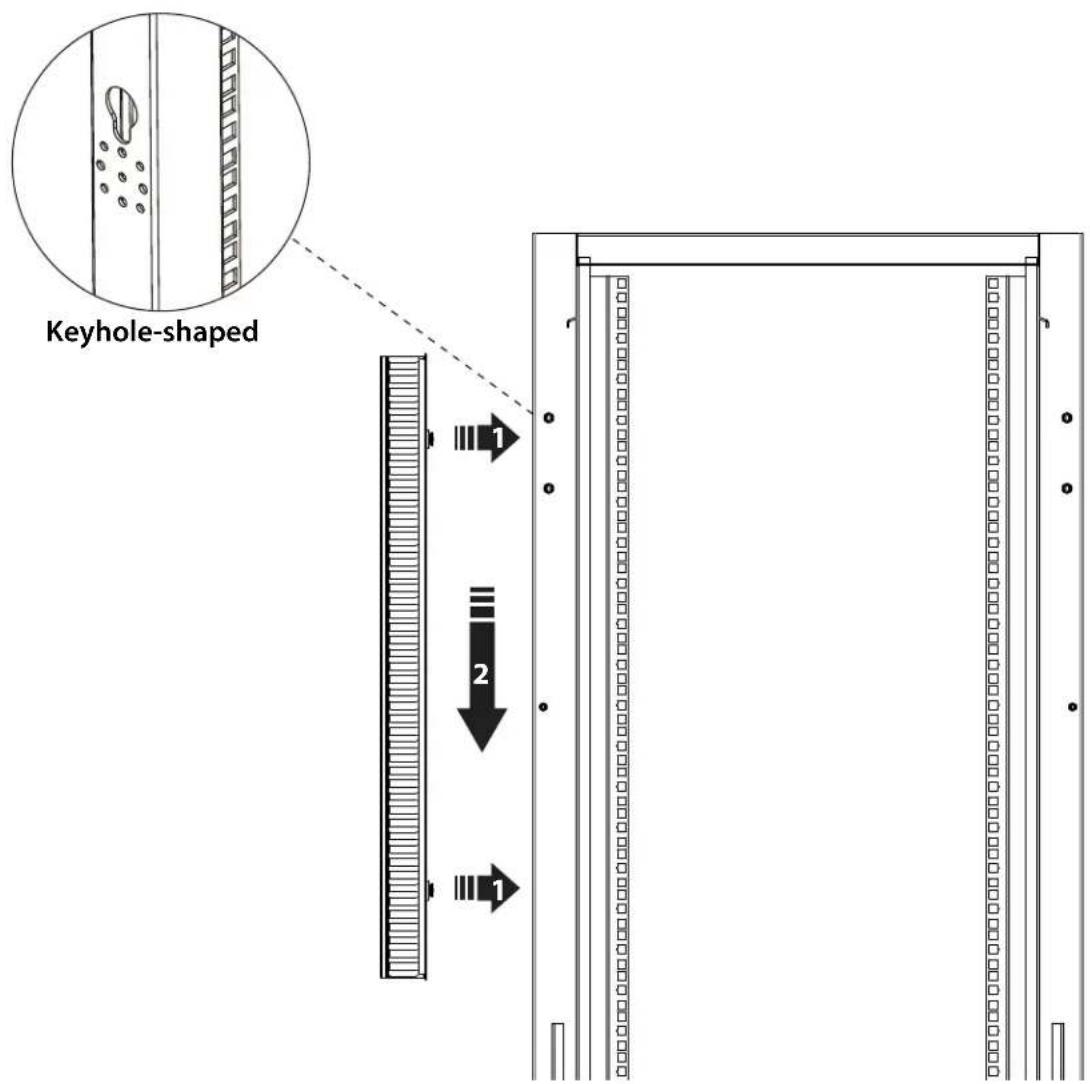
Attaching the cable organizer to a server rack or cabinet does not necessitate any tools if you do not need to reposition the mounting buttons. You have the option to attach the cable organizer either on the outside or the inside of the server rack or cabinet.
Note: When installing the cable organizer onto a rack or cabinet equipped with a roof, it is advisable to slide the removable cover downwards and detach it from the cable organizer prior to installation.
- Ensure that the mounting buttons of the cable organizer align with the keyhole-shaped mounting holes on the server rack or cabinet when attaching it.
Installation utilizing tools
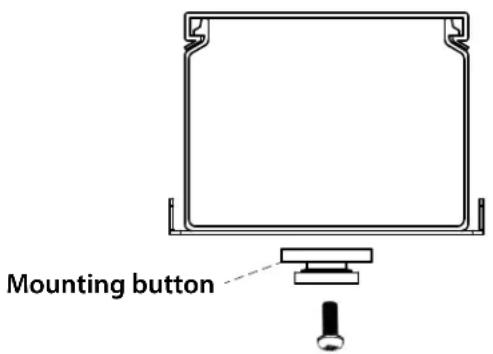
If your server rack lacks keyhole-shaped mounting holes, you will need to remove the mounting buttons and utilize the included hardware to attach the cable organizer to your server rack.
Remove the mounting buttons
In order to utilize the holes where the mounting buttons are located to attach the cable organizer to your server rack, it is necessary to remove the mounting buttons.
- To remove the screws from the mounting buttons, employ a Phillips screwdriver and carefully unscrew them.
Note: Ensure that you store the mounting buttons and screws in a secure location to keep them safe for future use.
Route the cables
- To remove the removable cover from the cable organizer, slide it downwards until it detaches from the cable organizer.
- Thread the cables through the finger ducts on the cable organizer in the manner that suits your setup requirements most effectively.
-
Slide the removable cover back onto the cable organizer, ensuring it is securely in place.
Attaching the cable organizer Once the mounting buttons are removed, follow these steps to attach the cable organizer to your server rack: -
Align the mounting holes on the cable organizer with the corresponding mounting holes on any of the following components on your server rack:
• The vertical mounting plates.
• The horizontal mounting rails.
• The equipment-mounting holes.
-
Insert two M5 cage nuts into the desired location on the server rack where you intend to attach the cable organizer.
-
Insert two M5 cage screws through the cable organizer, aligning them with the previously inserted cage nuts in the server rack. Tighten the screws to secure the cable organizer in place.
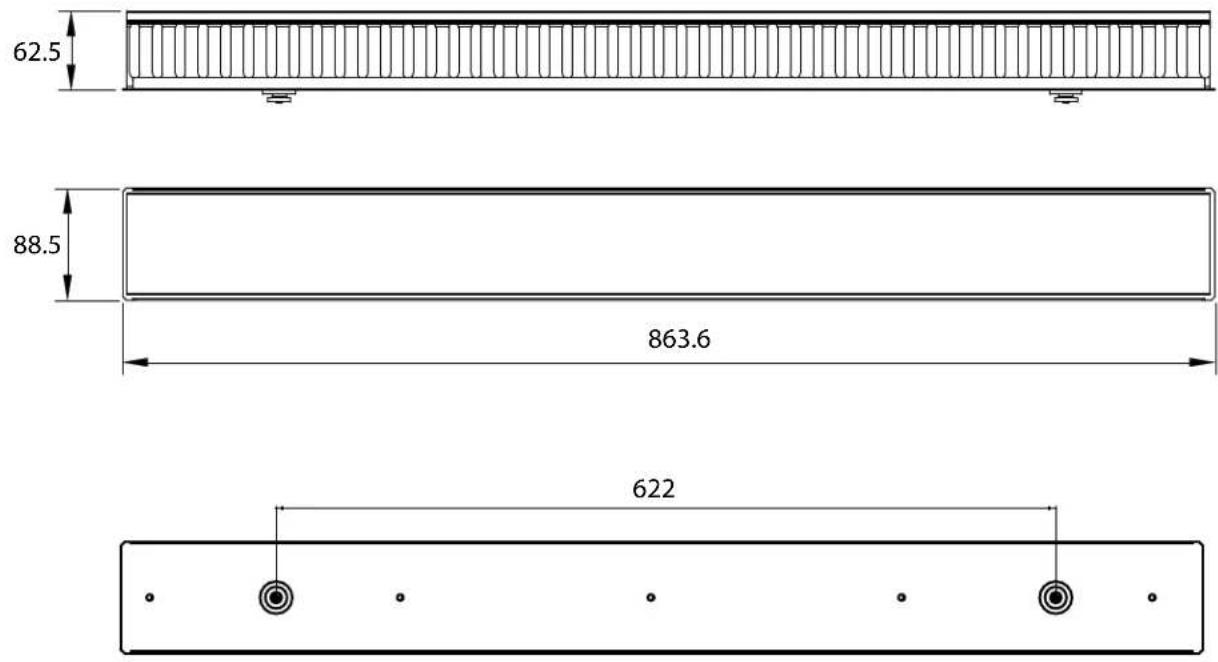
Measurements
Dimension Unit : Millimeter (mm)
Five-Year Factory Warranty
Rocstor provides a Limited Factory Warranty which applies to products you have purchased for commercial or industrial use in the ordinary course of your business.
Terms of warranty
Rocstor warrants its SolidRack product series to be free from defects in materials and workmanship for a period of five years from the date of purchase. Rocstor's obligation under this warranty coverage is limited to repairing or replacing, at its sole discretion, any such defective products. This warranty does not apply to equipment that has been damaged by accident, negligence, or misapplication or has been altered or modified in any way. In the event Rocstor repairs or provide a replacement of a defective product or part, the warranty does not extend the original warranty period. Rocstor reserves the right to repair or replace any parts under warranty as new or factory re manufactured.
Non-transferable warranty
This warranty extends only to the original purchaser who must have properly registered the product. The product may be registered at the Rocstor Web site, https://rocstor.com/customer-support/warranty registration.
Exclusions
If Rocstor tests or examines the alleged defect in the product and finds that the damages or defects do not exist or were caused by a third party or an end user's misuse, improper installation or testing, or negligence, then Rocstor shall not be liable under the warranty. Furthermore, unauthorized attempts to repair or modify the product by wrong or inadequate electrical connection or voltage, inadequate or inappropriate site operation conditions, repair, installation corrosive area or atmosphere, a change in location or operating conditions or use, repair by non-Rocstor designated personnel, exposure to the elements, fire, Acts of God, theft, or equipment installation not recommended or contrary to Rocstor's specifications or recommendations. Warranties will be void and Rocstor will not be liable if the product serial number is tampered with, altered, removed, defaced or any other cause beyond the range of intended use.
Contact Information
Corporate Headquarters
12979 Arroyo Ave
San Fernando, CA 91340 - USA
Office: +1 (818) 727-7000
Email: info@Rocstor.com
Technical Support / RMA
Hours: 9:00 am - 5:00 pm PST
Mon - Fri (excluding holidays)
Tell: +1 (818) 727-7000 (Domestic and Internationals)
Email: support@Rocstor.com
Sales Info
Hours: 8:00 am - 5:00 pm PST
Mon - Fri (excluding holidays)
Tell: +1 (818) 727-7000 (Domestic and Internationals)
Email: support@Rocstor.com
Corporate, Government and Academic Customers
Our Corporate Sales Team's goal is to help our U.S.A. and Canadian customers find a storage solution that best serves their needs. We will help you determine your best purchasing options. For more information please contact the appropriate department below or call us at +1 (818) 727-7000.
General sales information: sales@Rocstor.com
Corporate sales information: corporate_sales@Rocstor.com
Educational sales information: academic_sales@Rocstor.com
Federal, State & Local government sales information: government_sales@Rocstor.com
Resellers/Business Development/OEM Partners
All Channel National and International Resellers, VARs, Consultants ...
contact Rocstor Channel Sales: call: +1 (818) 727-7000
Email: reseller_info@Rocstor.com
- Vertical Cable Organizer with Finger Ducts Vertical Cable Management Panel - Length 34in - Steel - Black
- User Manual
- Introduction
- Package contents
- Requirements
- Installation without Tools
- Installation utilizing tools
- Remove the mounting buttons
- Route the cables
- Measurements
- Five-Year Factory Warranty
- Terms of warranty
- Non-transferable warranty
- Exclusions
- Contact Information
- Corporate Headquarters
- Technical Support / RMA
- Sales Info
- Corporate, Government and Academic Customers
- Resellers/Business Development/OEM Partners
Brand : Rocstor
Model : Y10E052-B1
Category : Computer Storage and Peripherals