DTE515 - CD Player Emerson - Free user manual and instructions
Find the device manual for free DTE515 Emerson in PDF.


| Product Type | CD Player with Karaoke |
| Brand | Emerson |
| Model | DTE515 |
| Power Source | 2 x AA batteries or AC adapter (4.5V DC, 500mA, positive center) |
| Playable Discs | Standard CDs and 3-inch singles |
| Playback Modes | Normal, Repeat One/All, Intro, Random (Shuffle), Program |
| Anti-Shock System | Built-in (ASP), can be toggled on/off |
| Microphone | Included, with MIC jack and ON/OFF switch |
| Speaker | Built-in mono speaker |
| Headphone Jack | Yes (rear of unit) |
| Line Out Jack | Yes (rear) – connect to home audio system |
| Bass Boost | BBS switch (ON/OFF) |
| Volume Limiter | Switch to limit max volume (child safety) |
| Hold Switch | Locks buttons to prevent accidental presses |
| Auto Power Off | After 60 seconds of inactivity |
| Display | LCD with track, time, mode indicators |
| Battery Indicator | Blinks when batteries need replacement |
| Safety | Laser safety, FCC compliant, not for children under 8 years |
| Dimensions | Not specified in manual |
| Weight | Not specified in manual |
Frequently Asked Questions - DTE515 Emerson
User questions about DTE515 Emerson
0 question about this device. Answer the ones you know or ask your own.
Ask a new question about this device
Download the instructions for your CD Player in PDF format for free! Find your manual DTE515 - Emerson and take your electronic device back in hand. On this page are published all the documents necessary for the use of your device. DTE515 by Emerson.
USER MANUAL DTE515 Emerson
Sing-Along CD Player
OWNER'S MANUAL
DTE515
Copyright 2005 Viacom International Inc. All rights reserved. Nickelodeon, Nick Jr., Nicktronics, Dora the Explorer and all related titles, characters and logos are trademarks of Viacom International Inc.
SAFETY PRECAUTIONS

natural_image
Black triangular warning symbol with a lightning bolt symbol (no text or numbers)CAUTION
RISK OF ELECTRIC SHOCK DO NOT OPEN

natural_image
Black triangular warning symbol with exclamation mark (no text or numbers)CAUTION: TO REDUCE THE RISK OF ELECTRIC SHOCK, DO NOT REMOVE COVER (OR BACK). NO USER-SERVICEABLE PARTS INSIDE. REFER SERVICING TO QUALIFIED SERVICE PERSONNEL.

DANGEROUS VOLTAGE:
The lightning flash with arrowhead symbol, within an equilateral triangle is intended to alert the user to the presence of uninsulated dangerous voltage within the product's enclosure that may be of sufficient magnitude to constitute a risk of electric shock to persons.

ATTENTION:
The exclamation point within an equilateral triangle is intended to alert the user to the presence of important operating and maintenance (servicing) instructions in the literature accompanying the appliance.

natural_image
Simple geometric diagram with a triangle, star, and diagonal line inside (no text or symbols)DANGER:
Invisible and hazardous laser radiation when open and interlock failed or defeated. Avoid direct exposure to beam.
LASER SAFETY: This unit employs a laser. Only qualified service personnel should attempt to service this device due to possible eye injury.
CAUTION: USE OF CONTROLS, ADJUSTMENTS OR PERFORMANCE PROCEDURE HEREIN MAY RESULT IN HAZARDOUS RADIATION EXPOSURE.
FCC WARNING:
This equipment may generate or use radio frequency energy. Changes or modifications to this equipment may cause harmful interference unless the modifications are expressly approved in the instruction manual. The user could lose the authority to operate this equipment if an unauthorized change or modification is made.
INFORMATION:
This equipment has been tested and found to comply with the limits for a Class B digital device, pursuant to Part 15 of the FCC Rules. These limits are designed to provide reasonable protection against harmful interference in a residential installation. This equipment generates, uses and can radiate radio frequency energy and, if not installed and used in accordance with the instructions, may cause harmful interference to radio communications. However, there is no guarantee that interference will not occur in a particular installation. If this equipment does cause harmful interference to radio or television reception, which can be determined by turning the equipment off and on, the user is encouraged to try to correct the interference by one or more of the following measures:
- Reorient or relocate the receiving antenna.
- Increase the separation between the equipment and receiver.
- Connect the equipment into an outlet on a circuit different from that to which the receiver is connected.
- Consult the dealer or an experienced radio/TV technician for help.
SAFETY INSTRUCTIONS
- Read these instructions.
- Keep these instructions.
- Heed all warnings.
- Follow all instructions.
- Do not use this unit near water.
-
Clean only with a dry cloth.
-
Do not block any ventilation openings. Install in accordance with manufacturer's instructions.
-
Do not install near any heat sources such as radiators, heat registers, stoves or other apparatus (including amplifiers) that produce heat.
-
Do not defeat the safety purpose of the polarized or grounding-type plug. A polarized plug has two blades with one wider than the other. A grounding-type plug has two blades and a third grounding prong. The wide blade or the third prong are provided for your safety. If the provided plug does not fit into your outlet, consult an electrician for replacement of the obsolete outlet.
- Protect the power cord from being walked on or pinched particularly at plugs, convenience receptacles, and the point where they exit from the unit.
- Only use attachments/accessories specified by the manufacturer.
- Unplug this unit during lightning storms or when unused for long periods of time.
- Refer all servicing to qualified service personnel. Servicing is required when the unit has been damaged in any way, such as the following: the power-supply cord or plug has been damaged; liquid has been spilled or objects have fallen into the unit; and/or the
unit has been exposed to rain or moisture, does not operate normally, has changed its performance or has been dropped.
- This unit should not be exposed to dripping or splashing water and no object filled with liquids such as vases should be placed on the unit.
- Do not overload wall outlet. Use only power source as indicated.
- Use replacement parts as specified by the manufacturer.
- The product may be mounted to a wall only if recommended by the manufacturer.
- Upon completion of any service or repairs to this product, ask the service technician to perform safety checks.
Emerson Radio Corp. has produced this audio product under license from Nickelodeon. We have taken great care to make sure your unit was in perfect working order when it left our factory.
It has been designed to give you many years of enjoyment and trouble-free operation. Read this manual before operating this unit to become familiar with its features. In the event you require technical assistance, please contact the Emerson Radio Customer Service hotline at 1-800-898-9020. Retain this manual for future reference.


WARNING
Choking Hazard - Small Parts and Packaging Materials. Not for children under 8 years.
- All materials for fastening or packing purposes are not part of the unit and should be discarded for children's safety.
- Please keep all information for future reference.
- This is not a toy.
CAUTION!
ELECTRONICALLY OPERATED PRODUCT: Not recommended for children under 8 years old. As with all electric products, precautions should be observed during handling and use to prevent electric shock. Ages 8+
LOCATION OF CONTROLS
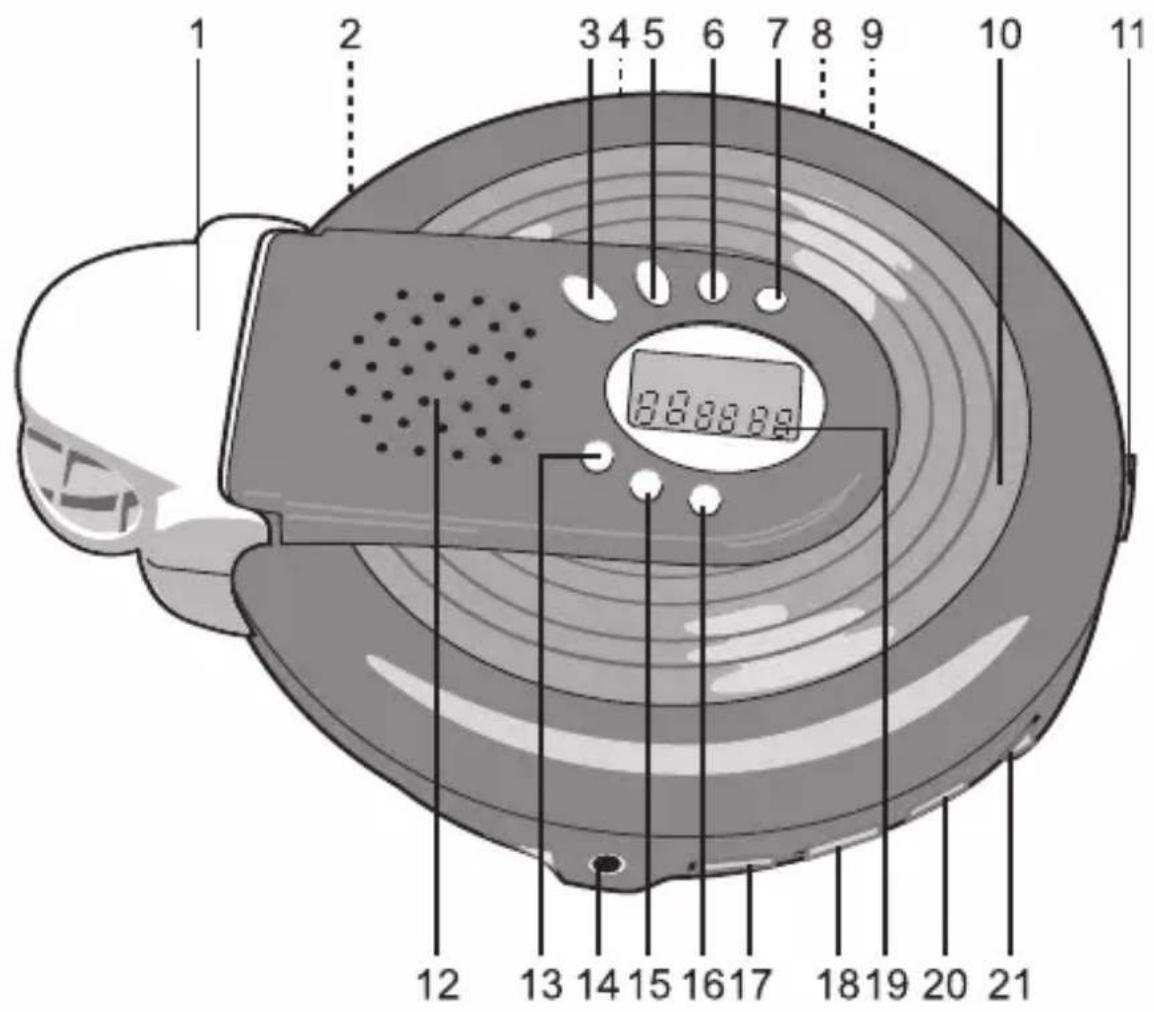
- Microphone Holder
- DC 4.5V IN Jack (Rear of Unit)
- PLAY/PAUSE ▶II Button
- Battery Compartment (Bottom of Unit)
- STOP/OFF ( ■) Button
- SKIP/SEARCH Button
- SKIP/SEARCH ▶Button
- LINE OUT Jack (Rear of Unit)
- HEADPHONE Jack (Rear of Unit)
- CD Compartment
-
CD Door OPEN Switch
-
Speaker
- P-MODE Button
- MIC Jack
- PROG Button
- ASP Button
- HOLD Switch
- BBS (Bass Boost System) Switch
- Display
- VOLUME LIMITER Switch
- VOLUME Control

- INTRO Indicator
- PROGRAM Indicator
- SHUFF Indicator
- Repeat 1/ALL Indicator
- HOLD Indicator
- Battery Indicator
- Track Indicator
- BOOST Indicator
- Time Indicator
- ANTI Indicator
POWER SOURCES
This CD player requires either two (2) “AA” cell batteries (not included) or an AC adapter (not included).
BATTERY INSTALLATION
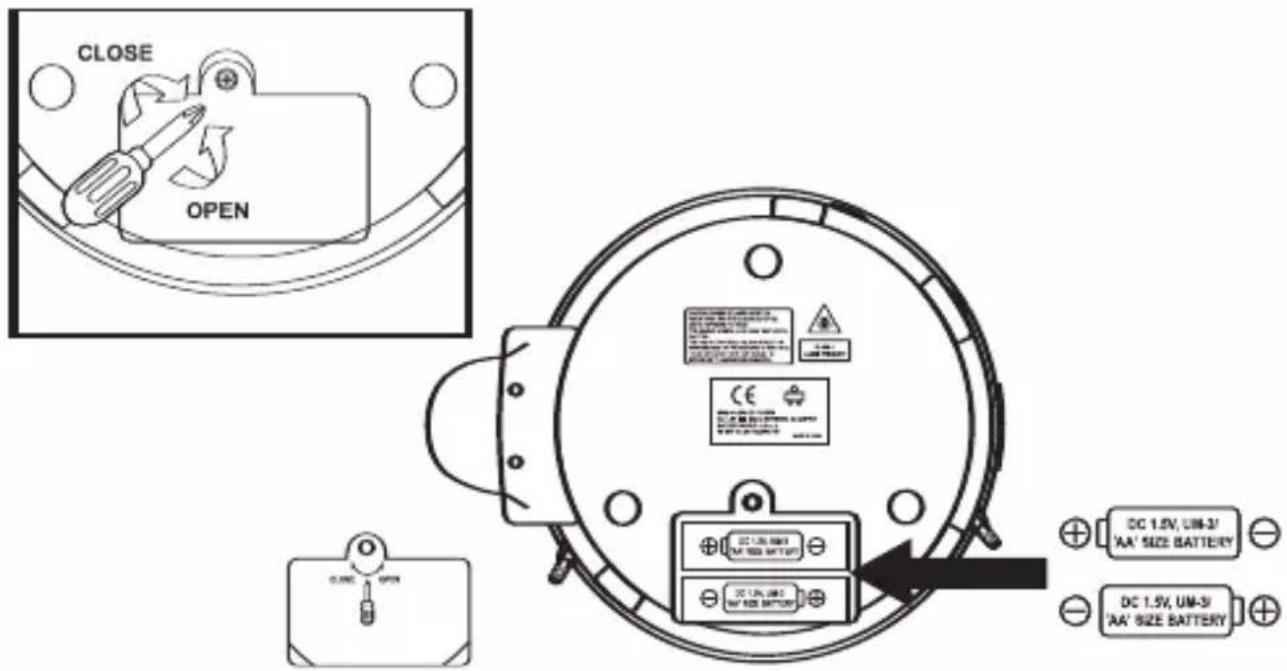
The battery indicator will blink when the batteries need replacing.
- Open the Battery Compartment door by removing the screw.
- Insert two (2) "AA" cell batteries (not included) according to the polarity diagram inside the battery compartment. Alkaline batteries are recommended for the longest playing time.
- Replace Battery Compartment door and screw.
BATTERY PRECAUTIONS
* Replacement of batteries must be done by an adult.
* Do not mix old and new batteries.
* Do not mix alkaline, standard (carbon-zinc) or rechargeable (nickel-cadmium) batteries.
* The supply terminals are not to be short-circuited.
* Non-rechargeable batteries are not to be recharged.
* Exhausted batteries are to be removed.
* Only batteries of the equivalent type are to be used.
* Batteries are to be inserted with the correct polarity.
* Dispose of batteries properly.
Do not dispose of batteries in fire; batteries may explode or leak.
POWER SOURCES (CONTINUED)
AC OPERATION
To operate the unit using AC power, connect an AC adapter (not included) to an AC outlet having 120V AC, 60Hz only. Plug the small end into the 4.5V DC jack on the rear of the unit and connect the other end into the AC outlet. The batteries are automatically disconnected when the AC adapter is used.
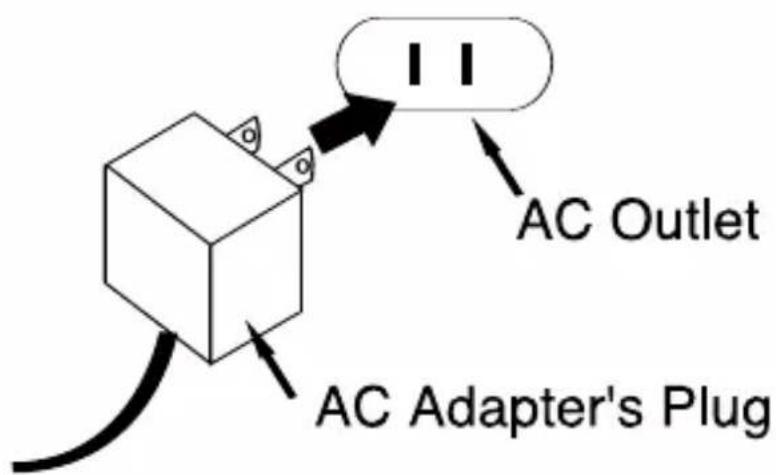
CAUTION: When not using AC power, disconnect the AC adapter from the wall outlet by pulling the plug (not the cord). Do not touch the AC adapter with wet hands. Fully insert the plug without exposing any part of the blade.
AC ADAPTER SPECIFICATIONS
4.5V DC, 500mA
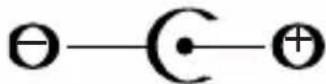
(POSITIVE CENTER)
OPERATION
TO INSERT AND PLAY A CD
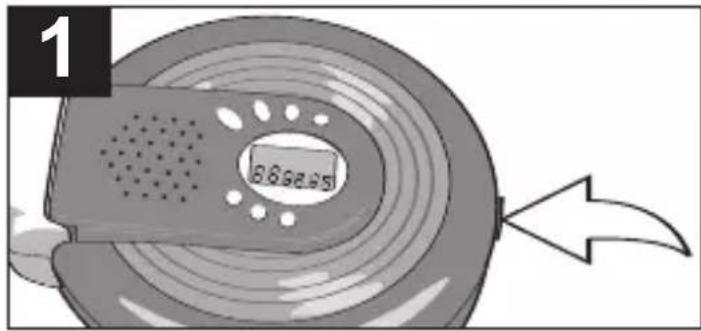

Open the CD compartment lid by sliding the CD Door OPEN switch. Insert a disc onto the center spindle (label side up) and push down gently to make sure it is securely on the spindle. Close the CD compartment lid.
Insert the headphones into the HEADPHONE jack or just listen through the speaker.
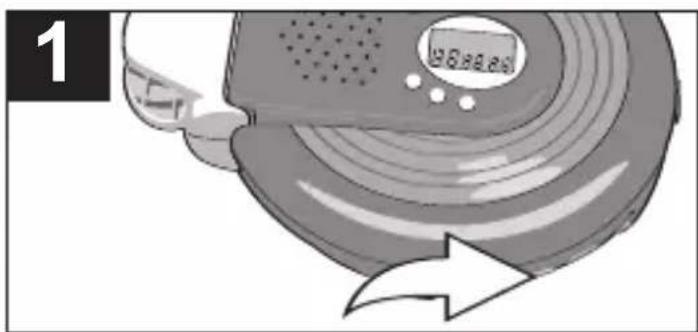
Press the PLAY/PAUSE ▶■ button; “- -” will blink briefly, then the total tracks and playing time will appear and playback will begin. The ASP feature will automatically be activated and “ANTI” will appear in the display.
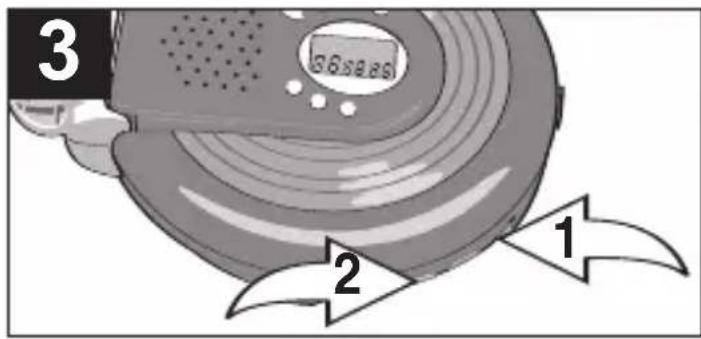

Adjust the VOLUME control ① and BBS switch ② as desired.
To skip forward or backward through the tracks on the disc, press and release the SKIP/SEARCH 🔊① or ➤② button.
To search forward or backward through the disc, press and hold the SKIP/SEARCH 🔊① or ➕② button.
CONTINUED ON THE NEXT PAGE
OPERATION (CONTINUED)

When the disc is through playing, it will stop. Press the STOP/OFF (■) button to stop the disc before it is finished.
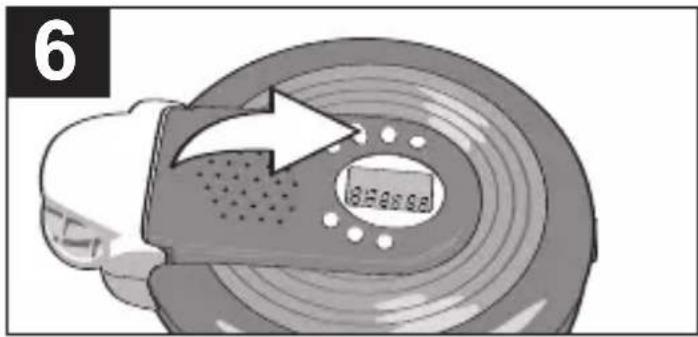
To turn the unit off, press and hold the STOP/OFF (■) button twice.
CD PLAYBACK NOTES:
- This unit is capable of playing standard CDs or 3" singles; no adapter is required.
- If a disc is inserted incorrectly, dirty, damaged or not present at all, "DISC" will appear in the display.
- If there is no activity for 60 seconds, the unit will turn itself off to save the batteries.
TO PAUSE PLAYBACK BASS BOOST

Press the PLAY/PAUSE ▶II button to pause playback; the time display will flash and the disc will continue to spin. Press the PLAY/PAUSE ▶II button to continue playback; the time display will stop blinking and playback will continue.
natural_image
Illustration of a robotic vacuum cleaner with motion arrows indicating speed (no text or symbols)Slide the BBS switch to set the bass. For a normal amount of bass, slide to the OFF position. To enhance the overall bass sound, slide the BBS switch to the ON position, BOOST indicator will light in the display.
OPERATION (CONTINUED)
SEARCH
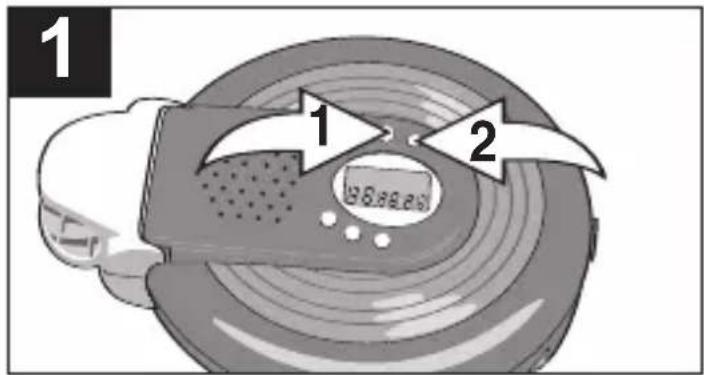
During playback, press and hold either the SKIP/SEARCH ◀ ① or ▶ ② button to move the player forward or backward within a track to locate a specific musical passage.
HOLD SWITCH
natural_image
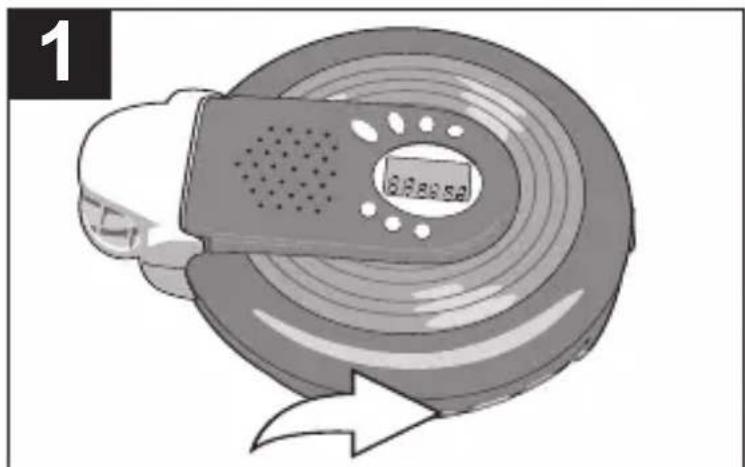
Illustration of a car tire with a speedometer and a warning arrow (no text or symbols)To prevent accidentally pressing a button while walking, etc., slide the HOLD switch to the ON position; "HOLD" will appear in the display. When you want to use these buttons again, slide the HOLD switch back to the OFF position.
VOLUME LIMITER SWITCH
natural_image
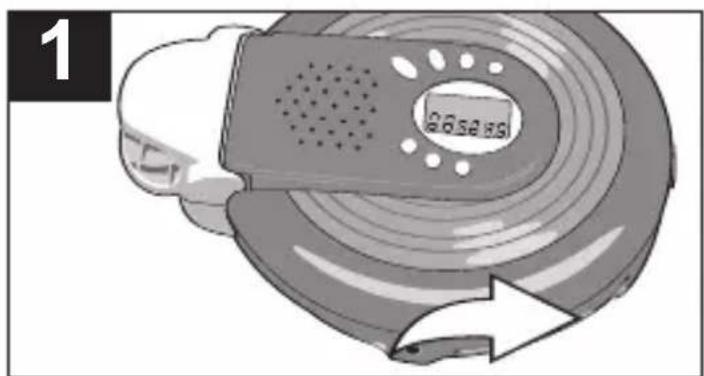
Illustration of a car with a speedometer and circular motion arrow (no text or symbols)Slide this switch to the ON position to limit the maximum sound level. This is useful to protect young children from putting the volume too loud. Slide to the OFF position to deactivate the Volume Limiter.
PLAYBACK THROUGH A HOME AUDIO SYSTEM
By using a home audio connection cable, superb sound can be heard through your home audio system. Before making any connections, turn off the power to all equipment.
Plug a connection cable (not included) between the LINE OUT jack on the rear of the CD player and the amplifier's CD or AUX input jacks. (Do not connect it to the amplifier's PHONO jacks.)
NOTE: If the CD player interferes with TV or radio reception, move the CD player away from the TV or radio or turn off the power to the CD player.
OPERATION (CONTINUED)
TO REPEATEDLY PLAY BACK ONE TRACK
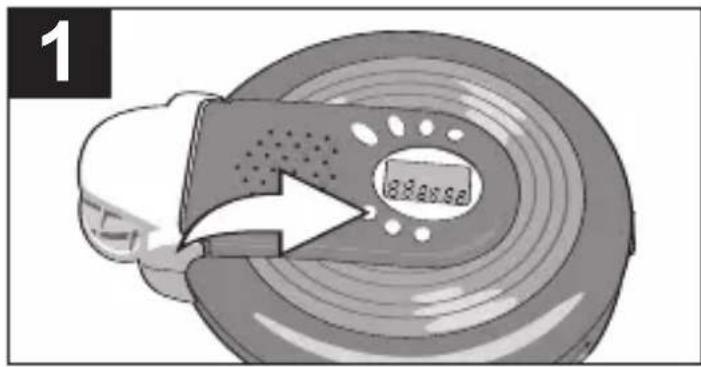
Turn on the unit and insert a CD, then press the P-MODE button once; the Repeat ONE indicator (Ⓧwill appear in the display.

Press the SKIP/SEARCH ◀◀ ① or ▶▶ ② button to select a track and press the PLAY/PAUSE (▶▶) button ③ to start playback and the unit will play all the tracks on the CD over and over until the STOP/OFF (■) button ④ is pressed.
TO REPEATEDLY PLAY BACK ALL TRACKS
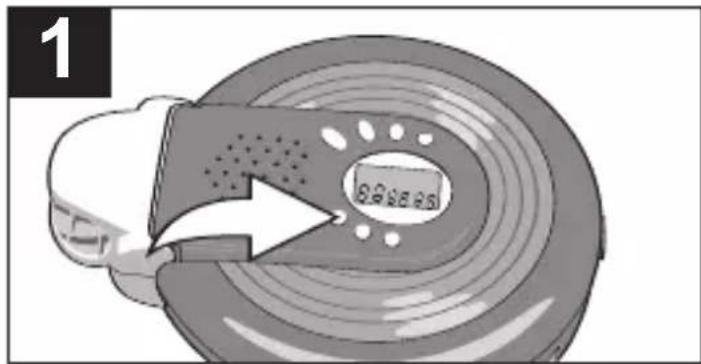
Turn on the unit and insert a CD, then press the P-MODE button twice; the Repeat ALL indicator ( ) will appear in the display.
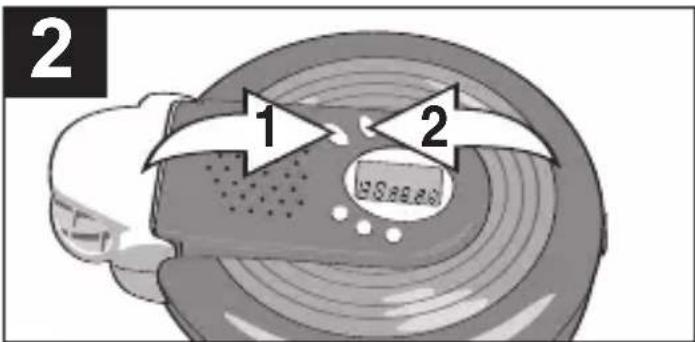
Press the PLAY/PAUSE (▶II) button ① to start playback and the unit will then play all the tracks on the CD over and over until the STOP/OFF (■) button ② is pressed.
TO CANCEL OR STOP REPEAT PLAYBACK:
• TO STOP REPEAT PLAYBACK, press the STOP/OFF (■) button once.
- TO CANCEL REPEAT PLAYBACK, press the P-MODE button so that only the track and time indicators appear in the display. The unit will continue normal playback.
OPERATION (CONTINUED)
INTRO PLAY

Turn on the unit and insert a CD, then press the P-MODE button three times; "INTRO" will blink in the display.

Press the PLAY/PAUSE (▶II) button to begin playback. The unit will play the first 10 seconds of each track.
TO RANDOMLY PLAY BACK A CD
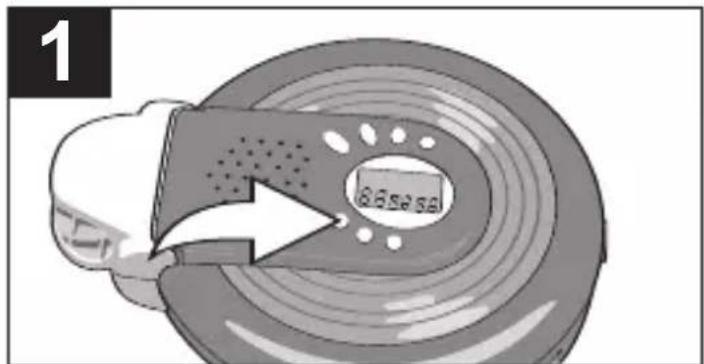
Turn on the unit and insert a CD, then press the P-MODE button four times; the SHUFF indicator will blink in the display.
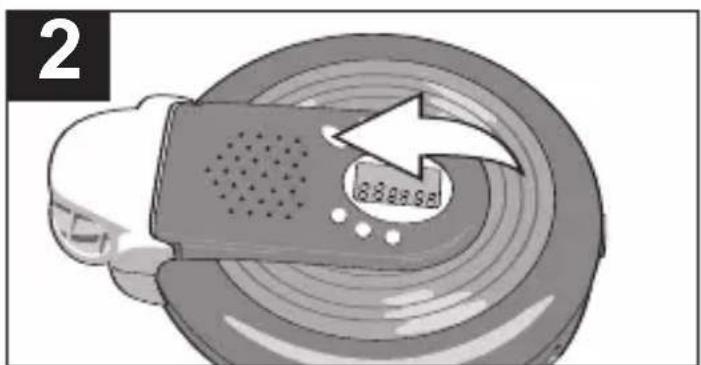
Press the PLAY/PAUSE (▶II) button to begin playback. The unit will play all the tracks in random order. When all the tracks have been played, the unit will stop.
TO CANCEL OR STOP INTRO/RANDOM PLAYBACK:
• TO STOP INTRO/RANDOM PLAYBACK, press the STOP/OFF (■) button once.
- TO CANCEL INTRO/RANDOM PLAYBACK, press the P-MODE button so that only the track and time indicators appear in the display. The unit will continue normal playback.
OPERATION (CONTINUED)
TO PROGRAM THE MEMORY

Turn on the unit and insert a CD, then press the PROG button; the PROG indicator and "00" will blink, then "01" (program number) will appear in the display.

Select the first track to be played back using the SKIP/SEARCH ◀ ① or ▶ ② button, then press the PROG button ③ again. Repeat this step to program additional tracks.

Press the PLAY/PAUSE (▶II) button ① to begin programmed playback and adjust the VOLUME control ② and BBS switch ③ as desired.
To skip forward or backward through the programs, press the SKIP/SEARCH ◀◀① or ▶▶② button. When the disc is through playing, it will stop.
NOTES:
- Press the STOP/OFF ( ■) button to stop the disc before it is finished.
- Programming is the ability to preselect the order in which a series of tracks will be played.
- Press the P-MODE button before pressing the PLAY/PAUSE (▶III) button to activate Repeat One, All, Intro or Random playback.
- Open the door, or turn the power off by pressing the STOP/OFF ( ■) button twice, to clear the program.
OPERATION (CONTINUED)
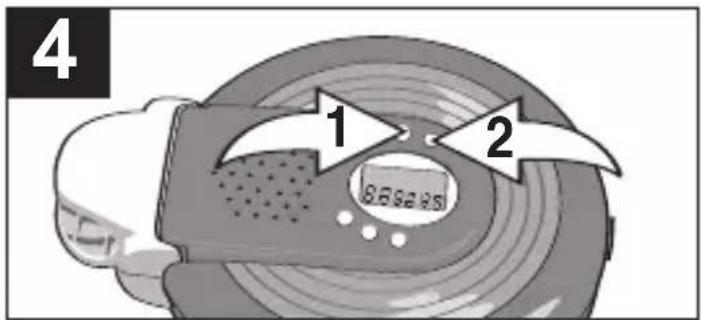
This CD player has a built-in Anti-Shock system that cuts down on CD skipping, which is useful when using the CD player in the car. Follow the steps below to activate and understand the Anti-Shock System.
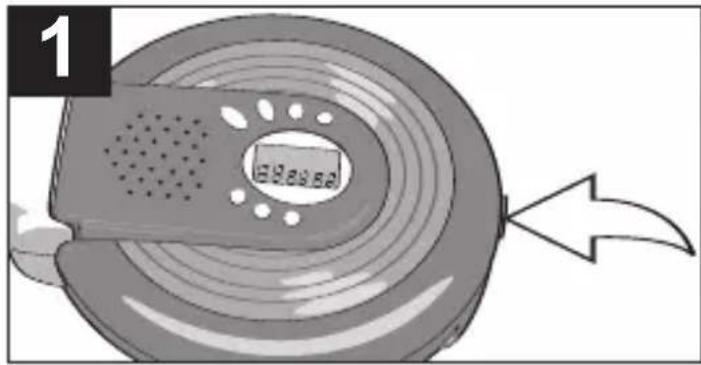
Open the CD compartment lid by sliding the CD Door OPEN switch. Insert a disc and close the CD compartment lid.
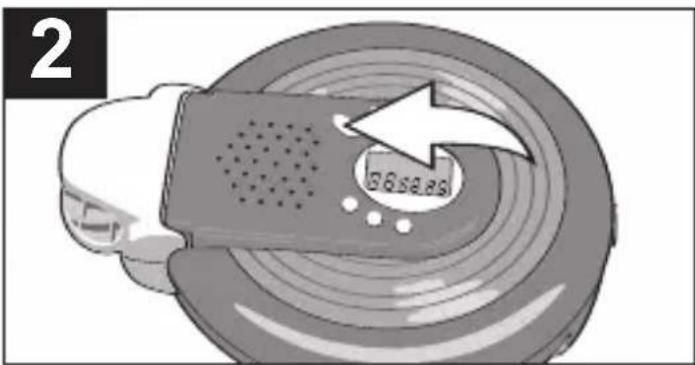
Insert a CD, then press the PLAY/PAUSE (▶II) button to turn the unit on.
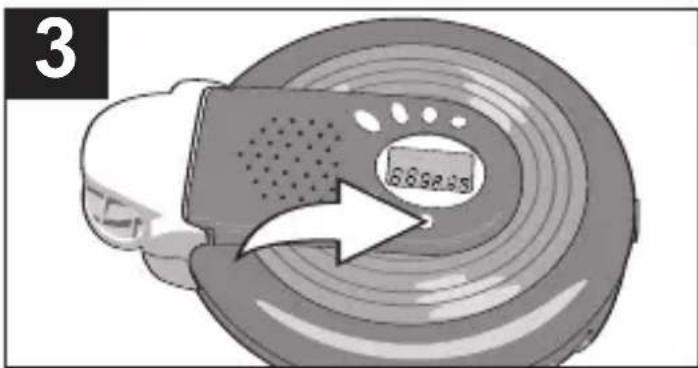
The Anti-Skip system will activate automatically. Within a few seconds, the “ANTI” indicator will indicate music signals are stored in memory. When the memory is full, “ANTI” will stop flashing and the disc rotation will drop to save power consumption.

If the CD player is subject to vibration during playback, “ANTI” will flash. During the vibration, the music should continue to play the signals stored in the memory until the CD player can read the music data properly from the disc.
NOTES:
- The Anti-Skip System provides for continuous sound output when the unit is subject to vibration, but it will not correct errors, such as a defective or dirty CD.
OPERATION (CONTINUED)
5
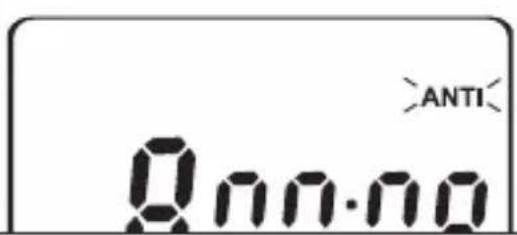
If the vibration continues all the time (more than 45s), then the unit may skip.
If no more vibration occurs, the music signals are once again stored into the memory and "ANTI" will stop flashing indicating that the memory is full.
6
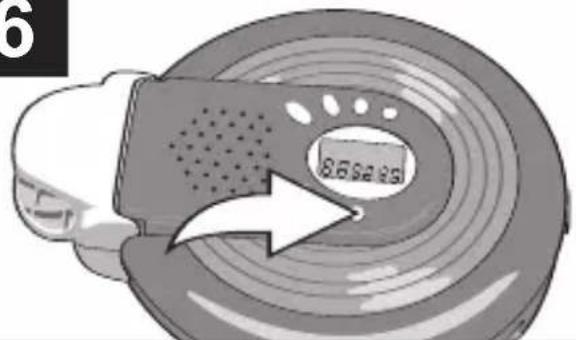
To turn the Anti-Shock system Off, press the ASP button.
To turn the Anti-Shock system On, press the ASP button again.
SINGING ALONG
This unit has a Microphone jack and an included microphone that allows you to sing along with the CD as follows:
1
natural_image
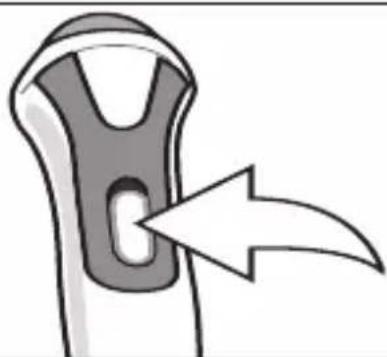
Diagram of a mechanical component with an arrow indicating direction (no text or symbols)Start playback as described on page 9. Insert the Microphone plug into the MIC jack.
2

natural_image
Diagram of a bone structure with an arrow indicating direction (no text or symbols)Slide the MIC's ON/OFF switch to the ON position and sing along! To shut off microphone, slide the MIC's ON/OFF switch to the OFF position.
CARE AND MAINTENANCE
Caring for Compact Discs
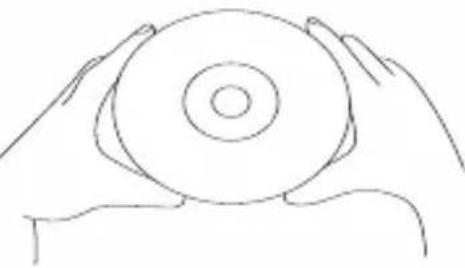
- Treat the compact disc carefully. Handle the compact disc only by its edges. Never allow your fingers to come in contact with the shiny, unprinted side of the compact disc.
- Do not attach adhesive tape, stickers, etc. to the compact disc label.
- Clean the compact disc periodically with a soft, lint-free, dry cloth. Never use detergents or abrasive cleaners to clean the compact disc. If necessary, use a CD cleaning kit.
- If a disc skips or gets stuck on a section of the compact disc, it is probably dirty or damaged (scratched).
- When cleaning the compact disc, wipe in straight lines from the center of the compact disc to the outer edge of the compact disc. Never wipe in circular motions.
natural_image
Line drawing of two hands holding a circular object (no text or symbols)
- This unit is designed to play only compact discs bearing the identification logo as shown here. Other discs may not conform to the CD standard and may not play properly.
- Compact Discs should be stored in their cases after each use to avoid damage.
- Do not expose compact discs to direct sunlight, high humidity, high temperatures or dust, etc. Prolonged exposure or extreme temperatures can warp the compact disc.
- Do not stick or write anything on either side of the compact disc. Sharp writing instruments, or the ink, may damage the surface.

TROUBLESHOOTING GUIDE
If you experience a problem with this unit, check the chart below before calling for service.
| SYMPTOM CAUSE SOLUTION | ||
| Unit will not Weak turn on. batteries. | or dead Replace batteries. | |
| Batteries not Insert correctly. inserted correctly. | ||
| AC adapter Check AC adapter not connected. connection | ||
| Disc will not play. | CD compartment Close CD not closed. | compartment. |
| Disc inserted incorrectly. Reinsert disc correctly. | ||
| HOLD switch is set to ON. | Slide HOLD switch to OFF. | |
| Dirty or defective Try another disc. | ||
| Moisture Wipe disc with soft condensation cloth. on disc. | ||
| No sound from Headphones. | adphone Reinsert headphone plug not inserted correctly. | plug correctly. |
| VOLUME control Increase set to minimum. | volume. | |
| Weak batteries. | Replace batteries. | |
| Defective disc. | Try another disc. | |
| Erratic playback. | Dirty or defective disc. | Clean or replace disc. |
EMERSON RADIO CORP. LIMITED WARRANTY
Emerson Radio Corp. warrants manufacturing defects in original material, including original parts and workmanship, under normal use and conditions, for a period of ninety (90) days from the date of original purchase in the U.S. With your dated proof of purchase, we will provide repair service at no charge for labor and parts at an authorized Depot Repair Facility, or replace the product at our discretion. For repair or replacement, pack your unit in a padded box, enclose your check or money order payable to Emerson Radio Corp. in the amount of \$9.00 (not required by California residents) to cover shipping and handling costs, and enclose a copy of your proof of purchase. Send your unit to:
Emerson Radio Corp.
5101 Statesman Drive
Irving, TX 75063
This warranty does not cover damage from negligence, misuse, abuse, accident, failure to follow operating instructions, commercial use, rental, repairs by an unauthorized facility, or products purchased, used, serviced or damaged outside of the United States.
THIS WARRANTY GIVES YOU SPECIFIC LEGAL RIGHTS, AND YOU MAY ALSO HAVE OTHER RIGHTS WHICH VARY FROM STATE TO STATE.
AU898M
For future reference, record the serial number in the space provided. Model No: DTE515
Serial Number

EMERSON
PART NO: 21-2074 Printed in China
606-03
- Sing-Along CD Player
- OWNER'S MANUAL
- DTE515
- SAFETY PRECAUTIONS
- CAUTION
- RISK OF ELECTRIC SHOCK DO NOT OPEN
- DANGEROUS VOLTAGE:
- ATTENTION:
- DANGER:
- FCC WARNING:
- INFORMATION:
- SAFETY INSTRUCTIONS
- WARNING
- CAUTION!
- LOCATION OF CONTROLS
- POWER SOURCES
- BATTERY INSTALLATION
- BATTERY PRECAUTIONS
- POWER SOURCES (CONTINUED)
- AC OPERATION
- AC ADAPTER SPECIFICATIONS
- OPERATION
- TO INSERT AND PLAY A CD
- CONTINUED ON THE NEXT PAGE
- OPERATION (CONTINUED)
- CD PLAYBACK NOTES:
- TO PAUSE PLAYBACK BASS BOOST
- SEARCH
- HOLD SWITCH
- VOLUME LIMITER SWITCH
- PLAYBACK THROUGH A HOME AUDIO SYSTEM
- TO REPEATEDLY PLAY BACK ONE TRACK
- TO REPEATEDLY PLAY BACK ALL TRACKS
- TO CANCEL OR STOP REPEAT PLAYBACK:
- INTRO PLAY
- TO RANDOMLY PLAY BACK A CD
- TO CANCEL OR STOP INTRO/RANDOM PLAYBACK:
- TO PROGRAM THE MEMORY
- NOTES:
- 5
- 6
- SINGING ALONG
- 1
- 2
- CARE AND MAINTENANCE
- Caring for Compact Discs
- TROUBLESHOOTING GUIDE
- EMERSON RADIO CORP. LIMITED WARRANTY
Brand : Emerson
Model : DTE515
Category : CD Player