HD7003 - CD Player Emerson - Free user manual and instructions
Find the device manual for free HD7003 Emerson in PDF.


| Product Type | Personal CD-R/RW Player |
| Brand | Emerson |
| Model | HD7003 |
| Power Source | 2 x AA alkaline batteries or optional AC adapter (4.5V DC, 500mA, positive center) |
| Battery Type | Alkaline AA (2 pcs) |
| Water Resistance | Water-resistant (not waterproof) |
| Anti-Skip Protection | 45-second electronic anti-skip |
| Bass Boost | 2-level (BASS 1 and BASS 2) |
| Playback Modes | Normal, Shuffle (Random), Intro Scan, Programmed (up to 20 tracks) |
| Repeat Modes | 1-track repeat, All tracks repeat, Programmed repeat |
| Display | Multifunction LCD with track number, elapsed time, indicators |
| Headphone Jack | 3.5mm stereo |
| DC Input | 4.5V DC, 500mA, positive center |
| Program Memory | 20 tracks |
| Disc Compatibility | CD, CD-R, CD-RW |
| Lock Function | HOLD switch to lock controls |
| Accessories Included | Lightweight stereo headphones, hand strap |
| Warranty | 90 days limited warranty |
| Country of Origin | China |
| Safety Class | Class 1 Laser Product |
Frequently Asked Questions - HD7003 Emerson
User questions about HD7003 Emerson
0 question about this device. Answer the ones you know or ask your own.
Ask a new question about this device
Download the instructions for your CD Player in PDF format for free! Find your manual HD7003 - Emerson and take your electronic device back in hand. On this page are published all the documents necessary for the use of your device. HD7003 by Emerson.
USER MANUAL HD7003 Emerson
natural_image
Color palette bar with grayscale shades and a small circular icon at the center (no text or symbols)turbō
WATER RESISTANT
PERSONAL CD-R/RW PLAYER
with 45 SECOND ANTI-SKIP PROTECTION
Emerson®
OWNER'S MANUAL
HD7003
Visit our web site at www.emersonradio.com
Thank you for purchasing this Emerson Water-Resistant Personal CD-R/RW Player. The CD-R/RW player has a 20 track programmable memory so you can listen to the songs on your favorite CD's in any order you choose. Or you can use the Shuffle playback feature and let the player select the playback order for you. Use the 3-way Repeat feature to repeat a single track, the entire disc, or a programmed sequence of tracks indefinitely. We've also included 45 second Electronic Anti-Skip Protection which makes this player virtually skip-free during most active uses.
Please read this instruction manual completely and carefully to make sure you understand the proper operation of this product, and get the maximum enjoyment out of all the features of this state-of-the-art CD-R/RW player.
Once again, thanks for purchasing this Emerson product.
The serial number of your CD player can be found on the bottom cabinet. We suggest that you record the serial number of your unit in the space below for future reference.
Model Number: HD7003
Serial Number:
IMPORTANT NOTES
WARNING: TO PREVENT FIRE OR SHOCK HAZARD, DO NOT EXPOSE THIS UNIT TO RAIN OR MOISTURE.
Avoid installing the unit in locations described below:
- Places exposed to direct sunlight or close to heat radiating appliances such as electric heaters.
- Dusty places.
- Places subject to constant vibration.
• Humid or moist places.
CLASS 1 LASER PRODUCT
CLASS 1 LASER PRODUCT APPAREIL À LASER DE CLASSE 1 PRODUCTO LASER DE CLASE 1
CAUTION INVISIBLE LASER RADIATION WHEN OPEN AND INTERLOCKS DEFEATED. AVOID EXPOSURE TO BEAM

This product contains a low power Laser Device.
CAUTION !!
THIS LASER COMPACT DISC PLAYER FUNCTIONS BY HELP OF INVISIBLE LASER LIGHT AND IS EQUIPPED WITH SAFETY SWITCHES TO AVOID EXPOSURE WHEN DOOR IS OPEN AND SAFETY INTERLOCKS ARE DEFEATED. IT IS DANGEROUS TO DEFEAT OR BYPASS SAFETY SWITCHES.

DANGEROUS VOLTAGE
Uninsulated Dangerous Voltage, that may be of sufficient magnitude to constitute a risk of electric shock to persons is present within this product's enclosure.

ATTENTION
The Owner's Manual contains important operating and maintenance instructions.
For your safety, it is necessary to refer to the manual.
This device complies with part 15 of the FCC rules. Operation is subject to the condition that this device does not cause harmful interference.
PREPARATION FOR USE
POWER SOURCES
This personal CD player is designed to operate on two alkaline "AA" batteries, or on an optional AC adapter, not included. Attempting to operate this unit on any other power source may cause damage to the unit and such damage is not covered by your warranty.
INSTALLING THE BATTERIES
The battery compartment is located inside the CD player.
1.) Open the CD door locking hinge as shown and then open the CD door.

Remove the "dummy CD" transit protection card from the CD spindle and discard it.
2.) Press the battery cover locking tab in the direction of the arrow and open the battery cover as shown.

natural_image
Technical diagram of a device showing internal components and battery assembly (no text or symbols)Note: To prevent loss the battery cover cannot be completely removed from the player.



3.) Insert two fresh "AA" alkaline batteries in the battery compartment. Be sure to follow the polarity makings in the battery compartment. If the batteries are inserted incorrectly the unit will not work.
4.) Close the battery compartment cover and make sure that it is locked in place so that it does not come in contact with a CD.
WHEN TO CHANGE THE BATTERIES
When the Battery Indicator flashes in the display the batteries are getting weak and should be changed as soon as possible. Do not leave weak or exhausted batteries in the player as they will eventually leak and cause corrosion inside the battery compartment.
USING AN OPTIONAL AC/DC ADAPTER
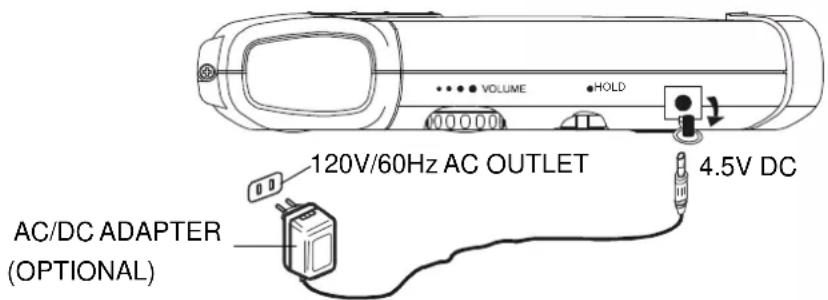
If you decide to purchase an optional AC adapter the specification should be as follows:
Input Voltage: 120V/60Hz AC.
Output Voltage: 4.5V DC 500mA.
Plug Type: Center-pin 1.3mm Female Plug with Positive (+) Center
Positive (+) —●— Negative (−)
You may also purchase a “Universal” type AC adapter that allows you to select the desired output voltage, and normally includes several of the most popular plug sizes. Make sure that the adapter you purchase is “UL Listed”. Look for the “UL” mark on the packaging and on the adapter itself.
Connect the adapter housing directly to a 120V AC outlet. Connect the appropriate adapter plug to the "DC Input 4.5V" jack on the side of the CD player. Remove the rubber cap from the Input jack before connecting the adapter plug. Replace the rubber cap when the adapter plug is removed from the player.
Notes:
- The housing of the adapter may become warm during operation. This is normal.
- Never insert or remove the adapter housing from the AC outlet while your hands are wet.
- The adapter plug must be completely disconnected from the CD player in order to operate the player on batteries.
BATTERY PRECAUTIONS
Follow these precautions when using batteries in this device:
1. Use only the size and type of batteries specified.
2. Be sure to follow the correct polarity when installing the batteries as indicated in the battery compartment. Reversed batteries may cause damage to the device.
3. Do not mix different types of batteries together (e.g. Alkaline and Carbon-Zinc) or old batteries with fresh ones.
4. If the device is not to be used for a long period of time, remove the batteries to prevent damage or injury from possible battery leakage.
5. Do not try to recharge batteries not intended to be recharged; they can overheat and rupture (Follow battery manufacturer's directions.)



HAND STRAP INSTALLATION
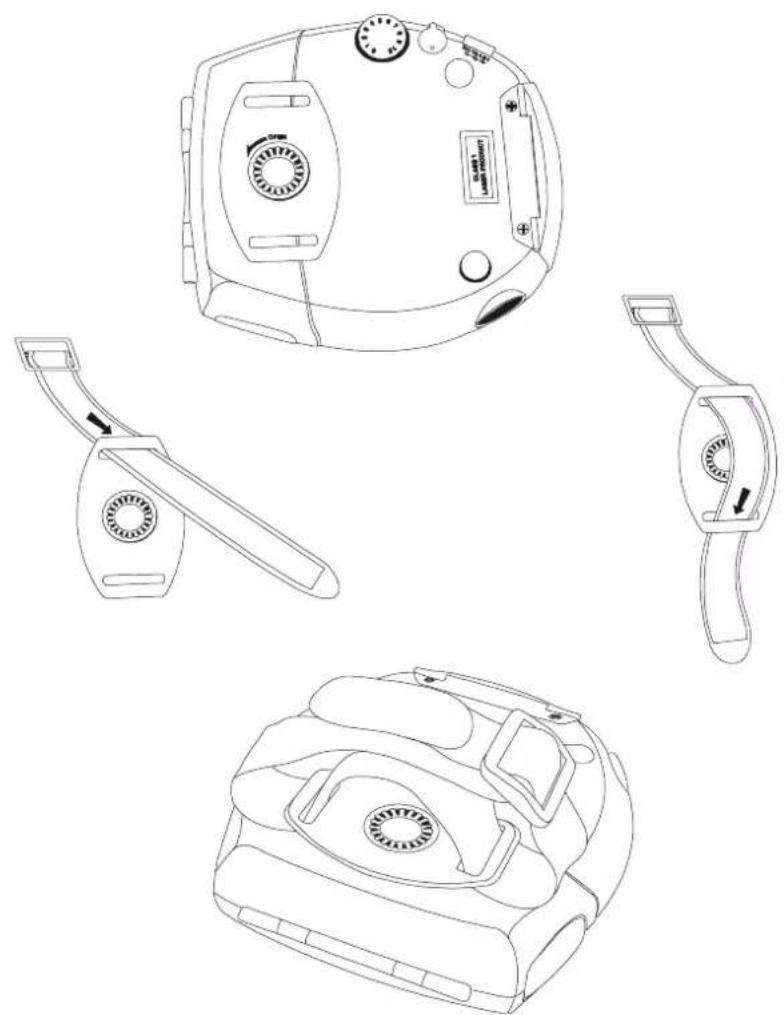
This player is supplied with an accessory hand-strap to secure the player in your hand while you are jogging or performing other strenuous activities.
To install the hand-strap, thread the strap through the two slots in the hand strap bracket as shown, and then through the buckle. Adjust the Velcro® strap to fit comfortably but securely around your hand.
natural_image
Line drawings of four different electronic devices with no visible text or symbols
LOCATION OF CONTROLS AND INDICATORS

TOP CABINET
1.) CD Door Locking Hinge.
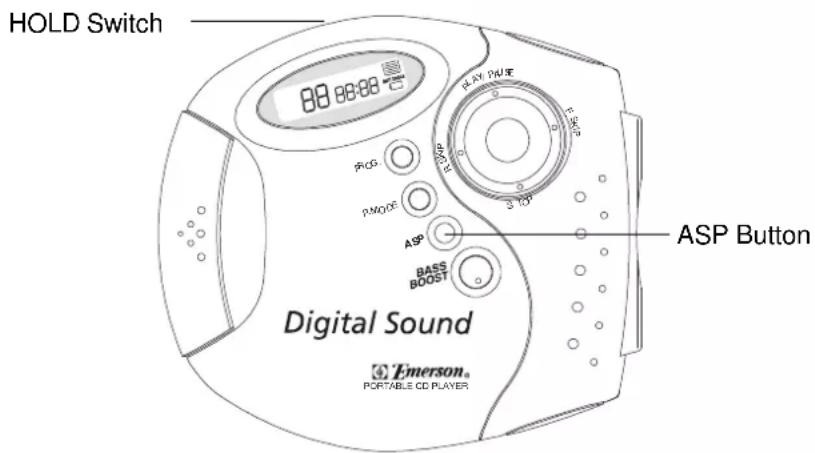
2.) ASP (Anti Skip) Button.
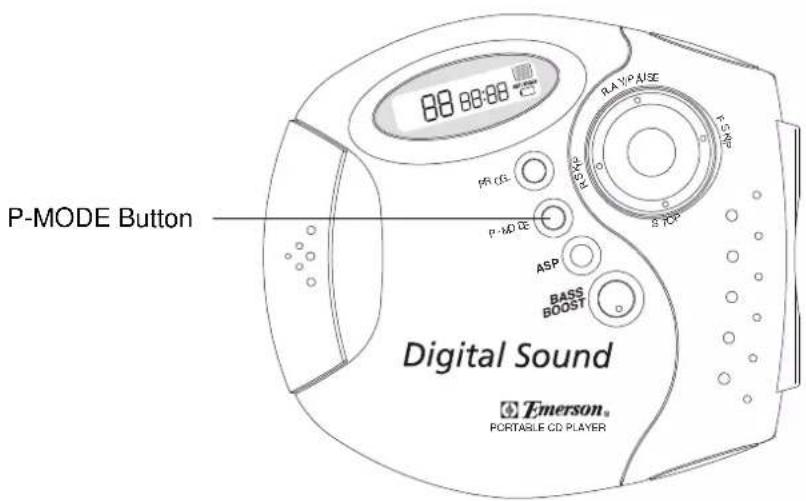
3.) P-MODE Button.
4.) PROG (Program) Button.
5.) LCD Display.
6.) PLAY/PAUSE ▶ button.
7.) F.SKIP Button.
8.) R.SKIP Button.
9.) STOP ■ button.
10.) BASS BOOST Button.
LEFT SIDE CABINET
11.) DC IN 4.5V Jack.
12.) HOLD On/Off Switch.
13.) VOLUME Control.
RIGHT SIDE CABINET
14.) PHONES Jack.
BOTTOM CABINET
15.) Hand-strap Bracket.
MULTIFUNCTION LCD DISPLAY
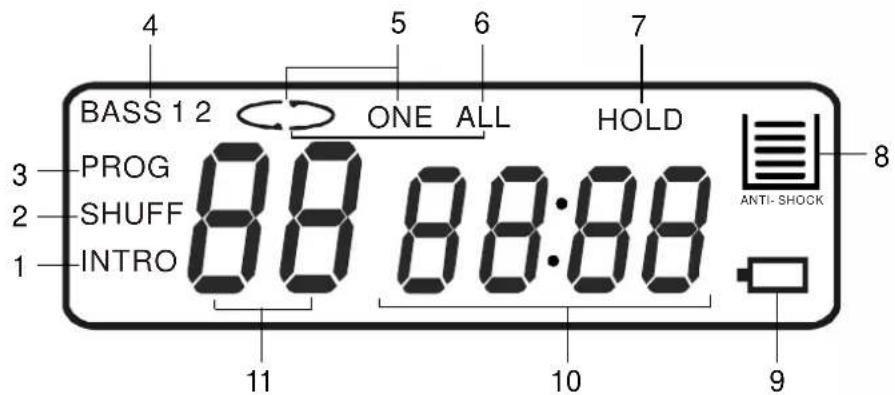
1.) INTRO – Intro Playback Indicator.
2.) SHUFF – Shuffle/Random Playback Indicator.
3.) PROG – Programmed Playback Indicator.
4.) BASS 1 / 2 - Bass Boost Level Indicator.
5.) “⊂> ONE” – One Track Repeat Indicator.
6.) “⊂>ALL” – All Tracks Repeat Indicator.
7.) HOLD Indicator.
8.) Anti Skip Protection (ASP) Level Indicator.
9.) Battery Status Indicator.
10.) Elapsed Time Display.
11.) Track Number / Volume Level Display.
OPERATING INSTRUCTIONS
- Make sure the batteries are installed correctly, or that the optional AC adapter (not included) is installed properly.
- If you have not already done so remove the “dummy CD” transit protection from the CD spindle and discard it.
- Set the VOLUME control to a low level.
- Fully unwind the headphone cord and connect the headphone plug to the headphone jack. The plug must be fully inserted into the jack, otherwise the sound may be intermittent.
- Make sure that the HOLD switch is in the 'Off' position. (HOLD indicator does not appear in the display.)
IMPORTANT INFORMATION
This personal CD player is designed to be "water-resistant". Jogging with this product in the rain will not cause any problems. However this product is not "water-proof" and should never be immersed in water. Extra care should taken to prevent water from getting inside the cabinet while loading or unloading CD's, or while changing the batteries. In addition, the rubber plugs which cover the headphone jack and the DC Input jack should remain sealed when those jacks are not in use. After jogging with this model in the rain please wipe excess moisture off the cabinet with a soft, dry towel before putting the model away for storage.
The lightweight stereo headphones supplied with this CD player have ear-pieces designed to fit directly into your ear. Be sure to observe the "L" (Left) and "R" (Right) markings on the ear-pieces to make sure that you put the headphones on correctly. Always set the VOLUME control to a low level before putting on the earphones, and then gradually increase the volume to a comfortable listening level.
BASS BOOST
This personal CD player has a 2-level Bass Boost control. To increase the bass response press the BASS BOOST button. The "BASS 1" indicator appears in the display. Press again for maximum bass enhancement. The "BASS 2" indicator appears in the display. To cancel Bass Boost press the BASS BOOST button until the "BASS 1/2" indicators no longer appear in the display.
PLAYING COMPACT DISCS
IMPORTANT:
This CD player can play normal CDs plus CD Recordable (CD-R) and CD Rewriteable (CD-RW) discs. However the playability of CD-R and CD-RW discs may be affected by the type of software that was used in 'ripping' the tracks from the original discs and 'burning' the tracks onto the blank media. Playability may also be affected by the quality and condition of the blank media you use for recording. 100% compatibility cannot be guaranteed. This is not an indication of any problems with your player.
NORMAL PLAYBACK
1.) Open the CD door locking hinge, and open the CD door.
2.) Place your CD, CD-R, or CD-RW disc on the center spindle with the printed label side facing up. Gently press down on the disc near the center hole to make sure that the disc is properly 'seated' on the spindle.
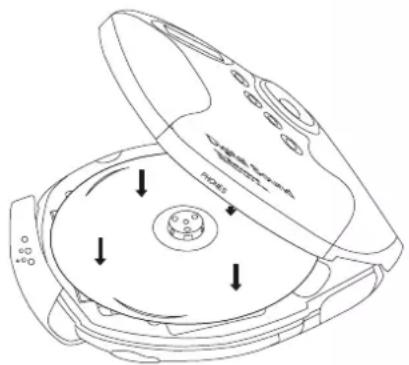
3.) Close the CD door and the door locking hinge.
4.) Press the PLAY/PAUSE ▶ button. The Player will read the contents of the disc and the display will show the total tracks and playing time, then playback begins on track # 1.
Note: If the disc is inserted upside down, no disc or the disc is badly scratched the display will show "disc".
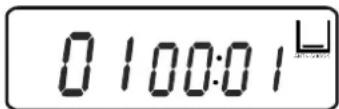
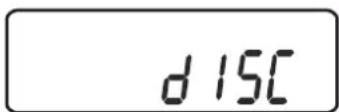
If this occurs, re-load the disc correctly or try another disc.
5.) Put on the lightweight stereo headphones and adjust the VOLUME and BASS BOOST controls as desired.
6.) Playback will continue to the end of the disc. As each track is played the display will show the track number and the elapsed playing time of that track. After the last track has played the player stops and the display again shows the total tracks and total playing time on the disc. After several seconds the power shuts off automatically to conserve battery life and the display goes blank.
7.) To stop playback before the disc ends press the STOP ■ button at any time. Playback stops and the display shows the total tracks and playing time. Press the STOP ■ button again to shut the power off. The display goes blank. Open the CD door and remove your disc.
PAUSE Control
To pause playback momentarily press the PLAY/PAUSE ▶■ button again. Playback
stops but the disc continues to spin and the CD time display flashes. Press the PLAY/PAUSE ▶ button again to cancel pause and resume playback.

SKIP/Search (▶) Controls
To skip to higher or lower numbered tracks during playback press the ▶▶ or ◀◀ buttons repeatedly until the desired track number appears in the display. Playback will begin on the desired track.
During playback, to search forward or backward within a track to locate a specific musical passage press and hold the ▶▶ or ◀◀ buttons. The player will move rapidly forward or backward. When you hear the desired passage release the ▶▶ or ◀◀ buttons and normal speed playback will resume at that point.
HOLD Switch
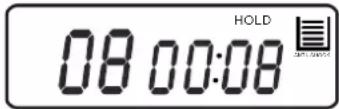
The HOLD switch locks all of the other controls buttons. If you are carrying the CD player in a backpack, handbag, gym bag, etc, set the HOLD switch to the 'On' position to prevent it from starting accidentally by something pressing against the PLAY/PAUSE ▶ button. Likewise, once you start CD playback you can set the HOLD switch to the 'On' position to prevent you from accidentally pressing the STOP ■ button or the SKIP/Search ▶/◀◀ buttons while you are carrying or jogging with the player. Remember that to use any of the other controls the HOLD
switch must be set to the 'Off' position.
Anti-Skip Protection (ASP)
This player includes a 45 second Anti Skip Protection circuit that prevents the CD from skipping during most active uses. ASP is activated automatically when playback begins. The Anti Skip indicator appears in the display and begins to fill with a series of 'bars' 📁.
When the Anti Skip indicator contains 5 bars this indicates that the electronic memory contains 45 seconds of music. If the player is bumped or shaken the music will not skip, but one or more of the bars may disappear indicating that the memory is being depleted. If all 5 bars disappear the Anti Skip memory is empty. If the player is continuously bumped or shaken while the Anti Skip memory is empty the music may skip or the CD may stop completely.
Note: The Anti Skip memory circuit consumes additional battery power. So if you are using the player in a stable location where it will not be subject to bumps and shock, press the ASP button to shut the anti-skip memory 'Off'. The ASP indicator disappears from the display.
Either a single track or the entire disc can be repeated continuously.
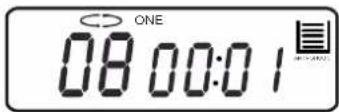
- 1 Track Repeat
Begin playback as usual, then press the ▶▶ or ◀◀ buttons to select the desired track. When the desired track is playing press the P-MODE button once. The
Repeat Indicator "<>ONE" appears in the display. The selected track will be repeated continuously.
Press the STOP button to cancel Repeat playback.
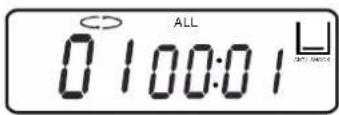
- All Tracks Repeat
Begin playback as usual, then press the P-MODE button twice. The Repeat
Indicator and the "ALL" indicators appear in the display. The entire disc will be repeated continuously.
Press the STOP ■ button to cancel Repeat playback.



Shuffle (SHUFF)/Random Playback
While at stop mode, press the P-MODE button until the SHUFF indicator appears in the display.
Press the PLAY/PAUSE ▶ button, the player will randomly select a track for playback and will continue playing the tracks on the disc in random until all tracks have been played.
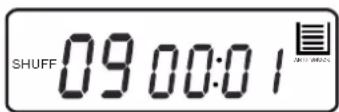
To cancel Shuffle Playback, press the P-MODE button until the SHUFF indicator disappears or press the STOP button.
Intro Scan (INTRO) Playback
This feature plays only the first 10 seconds of each track on the disc. This feature is useful if you are trying to locate a specific song but you do not remember the title.
While at stop mode press the P-MODE button until the INTRO indicator appears in the display.
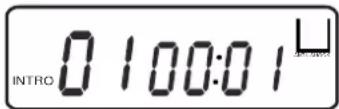
Then press the PLAY/PAUSE ▶ button. The player begins at track 1 and plays the first 10 seconds of each track on the disc.
To cancel Intro Scan Playback, press the P-MODE button until the INTRO indicator disappears or press the STOP button.

PROGRAMMED PLAYBACK
You can program the player to play just the tracks you want to hear in the specific order that you want them to play. A maximum of 20 tracks can be programmed.
1.) Press the PROG (Program) button. The PROG indicator together with the track number "0 0" flash in the display, and the program memory number "0 1" appears.

2.) Press the ▶▶ or ◀◀ buttons to select the first track to be programmed.
Example: Track number 7.
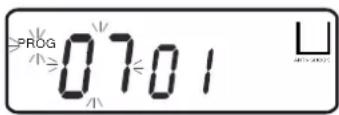
3.) When the desired track number appears in the track display press the PROG button again to enter track number 7 into program memory
number 1. The track number display returns to "0 0" and the program memory number advances to "0 2".

4.) Repeat steps 2 and 3, selecting a different track number each time until you entered up to 20 tracks in the CD program memory.
Note: The same track number can be programmed more than once if desired.
5.) After you have entered up to 20 tracks in the CD program memory press the
PLAY/PAUSE ▶ button to begin programmed playback. The PROG indicator remains in the display. The tracks you programmed will be played in the desired order.




6.) After the last programmed track has played the player stops and the display again shows the total tracks and playing time. However the programmed sequence remain in the memory.

Press the PROG button, then the PLAY/PAUSE ▶ button to play the programmed sequence again.
7.) To erase the programmed sequence from the memory press STOP ■ button at stop mode, or open the CD door.
PROGRAMMED REPEAT PLAYBACK
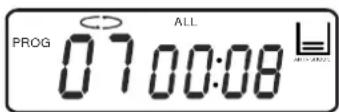
You may use the Program and Repeat Playback functions together to continuously repeat a programmed sequence of tracks. Follow steps 1 through 5 above to
begin programmed playback and then press the P-MODE button twice until the Repeat ALL (CDALL) indicators appear in the display. The programmed sequence will be repeated continuously.
CARE AND MAINTENANCE
CLEANING THE CABINET
Wipe with a soft cloth. If the cabinet is very dirty, dampen the cloth with a weak solution of neutral detergent and water, and then wipe clean.
CLEANING THE LENS
A dirty lens will cause sound skipping and, if the lens is very dirty, the CD may not work. Open the disc cover and clean the lens as follows:
DUST OR DRY PARTICLES
Using a camera lens brush/blower, blow on the lens several times, then wipe it lightly with the brush to remove dust. Then, blow on the lens once more.

natural_image
Illustration of hands using a tool to cut or spread a circular object, no text or symbols presentFINGERPRINTS
To remove fingerprints from the lens, use a cotton swab starting in the middle and working to the outside edge. Use only very light pressure on the lens to avoid forcing it out of alignment.

natural_image
Illustration of two hands performing a circular motion with arrows indicating direction (no text or symbols)CLEANING THE DISC
When a disc becomes dirty, clean it with a cleaning cloth. Wipe the disc from the center out.
NOTE:
Do not use solvents such as benzine, thinner, commercially available cleaners or anti-static spray intended for analog discs.
LIMITED WARRANTY
Emerson Radio Corp. warrants manufacturing defects in original material, including original parts and workmanship, under normal use and conditions, for a period of ninety (90) days from the date of original purchase in the U.S. With your dated proof of purchase, we will provide repair service at no charge for labor and parts at an authorized Depot Repair Facility, or replace the product in our discretion. For repair or replacement, pack your unit in a padded box, enclose your check or money order payable to Emerson Radio Corp. in the amount of \$9.00 (not required by California residents) to cover shipping and handling costs, and enclose a copy of your proof of purchase. Send your unit to:
Emerson Radio Corp.
1901 Diplomat Drive.
Farmers Branch, TX 75234.
This warranty does not cover damage from negligence, misuse, abuse, accident, failure to follow operating instructions, commercial use, rental, repairs by an unauthorized facility, or products purchased, used, serviced or damaged outside of the United States.
THIS WARRANTY GIVES YOU SPECIFIC LEGAL RIGHTS, AND YOU MAY ALSO HAVE OTHER RIGHTS WHICH VARY FROM STATE TO STATE.
AU898M

Emerson®
SERVICE
TO FIND THE LOCATION AND PHONE NUMBER OF YOUR NEAREST SERVICE CENTER PERMITTED TO PERFORM WARRANTY...
CALL TOLL FREE: 1-800-695-0098
FOR ADDITIONAL SET-UP OR OPERATING ASSISTANCE
PLEASE CALL:
1-800-898-9020
FOR CUSTOMER SERVICE, PLEASE WRITE TO:
Emerson Radio Corp.
Consumer Affairs Dept.
1901 Diplomat Drive,
Farmers Branch, TX 75234.
EMERSON RADIO CORP.
EMERSON
Part No.: 16-2885
304-01
PRINTED IN CHINA
- turbō
- WATER RESISTANT
- PERSONAL CD-R/RW PLAYER
- with 45 SECOND ANTI-SKIP PROTECTION
- IMPORTANT NOTES
- Avoid installing the unit in locations described below:
- CLASS 1 LASER PRODUCT
- CAUTION !!
- DANGEROUS VOLTAGE
- ATTENTION
- PREPARATION FOR USE
- POWER SOURCES
- INSTALLING THE BATTERIES
- WHEN TO CHANGE THE BATTERIES
- USING AN OPTIONAL AC/DC ADAPTER
- Notes:
- BATTERY PRECAUTIONS
- HAND STRAP INSTALLATION
- TOP CABINET
- LEFT SIDE CABINET
- RIGHT SIDE CABINET
- BOTTOM CABINET
- OPERATING INSTRUCTIONS
- IMPORTANT INFORMATION
- BASS BOOST
- PLAYING COMPACT DISCS
- IMPORTANT:
- NORMAL PLAYBACK
- PAUSE Control
- SKIP/Search (▶) Controls
- HOLD Switch
- Anti-Skip Protection (ASP)
- - 1 Track Repeat
- - All Tracks Repeat
- Shuffle (SHUFF)/Random Playback
- Intro Scan (INTRO) Playback
- PROGRAMMED PLAYBACK
- PROGRAMMED REPEAT PLAYBACK
- CARE AND MAINTENANCE
- CLEANING THE CABINET
- CLEANING THE LENS
- DUST OR DRY PARTICLES
- FINGERPRINTS
- CLEANING THE DISC
- NOTE:
- LIMITED WARRANTY
- Emerson®
- EMERSON RADIO CORP.
Brand : Emerson
Model : HD7003
Category : CD Player