NR53 - Radio Emerson - Free user manual and instructions
Find the device manual for free NR53 Emerson in PDF.


| Product Type | AM/FM Stereo Radio with CD Player |
| Brand | Emerson |
| Model | NR53 |
| Power Supply | 120V ~ 60Hz AC (polarized plug) |
| Radio Bands | AM, FM, FM Stereo |
| Antenna | Built-in AM antenna; FM lead wire antenna (rear) |
| CD Player | Single disc, supports program (up to 20 tracks) and repeat (single/all/programmed) |
| AUX Input | RCA jacks (rear) for external audio sources |
| Speaker System | Built-in wide-range dynamic speakers (2) |
| Controls | ON/OFF-Volume, Tuning, Band selector (AM/FM/FM ST), Function selector (AUX/CD/TUNER), CD: Play/Pause, Stop, Skip F/B, Repeat, Program |
| Indicators | FM Stereo indicator, CD track number display, Play indicator, Program indicator, Repeat indicator |
| Cabinet Material | Real wood veneer |
| Special Features | Non-skid rubber feet, CD door with support bracket, tuning dial light |
| Safety | Class 1 laser product; polarized plug; FCC compliant |
| Care and Cleaning | Use dry cloth for cabinet; CD clean with soft cloth (inside to outside); avoid detergents |
| Warranty | 90 days from original purchase (parts and labor); customer service hotline: 1-800-898-9020 |
Frequently Asked Questions - NR53 Emerson
User questions about NR53 Emerson
0 question about this device. Answer the ones you know or ask your own.
Ask a new question about this device
Download the instructions for your Radio in PDF format for free! Find your manual NR53 - Emerson and take your electronic device back in hand. On this page are published all the documents necessary for the use of your device. NR53 by Emerson.
USER MANUAL NR53 Emerson
AM/FM Stereo Radio with Stereo CD Player
OWNER'S MANUAL
NR53
Visit our web site at www.emersonradio.com
CAUTION
TO PREVENT FIRE OR SHOCK HAZARD, DO NOT USE THIS PLUG WITH AN EXTENSION CORD, RECEPTACLE OR OTHER OUTLET UNLESS THE BLADES CAN BE FULLY INSERTED TO PREVENT BLADE EXPOSURE. TO PREVENT FIRE OR SHOCK HAZARD, DO NOT EXPOSE THIS APPLIANCE TO RAIN OR MOISTURE.

The lightning flash with arrowhead symbol, within an equilateral triangle is intended to alert the user to the presence of uninsulated 'dangerous voltage' within the product's enclosure that may be of sufficient magnitude to constitute a risk of electric shock to persons.
CAUTION
RISK OF ELECTRIC SHOCK DO NOT OPEN
WARNING: TO REDUCE THE RISK OF ELECTRIC SHOCK DO NOT REMOVE COVER (OR BACK), NO USER SERVICEABLE PARTS INSIDE REFER SERVICING TO QUALIFIED SERVICE PERSONNEL.

The exclamation point within an equilateral triangle is intended to alert the user to the presence of important operating and maintenance (servicing) instructions in the literature accompanying the appliance.
IMPORTANT SAFETY INSTRUCTIONS
1.) Read these instructions.
2.) Keep these instructions.
3.) Heed all warnings.
4.) Follow all instructions.
5.) Do not use this apparatus near water.
6.) Clean only with dry cloth.
7.) Do not block any ventilation openings. Install in accordance with the manufacturer's instructions.
8.) Do not install near any heat sources such as radiators, heat registers, stoves, or other apparatus (including amplifiers) that produce heat.
9.) Do not defeat the safety purpose of the polarized or grounding-type plug. A polarized plug has two blades with one wider than the other. A grounding type plug has two blades and a third grounding prong. The wide blade or the third prong is provided for your safety. If the provided plug does not fit into your outlet, consult an electrician for replacement of the obsolete outlet.
10.) Protect the power cord from being walked on or pinched particularly at plugs, convenience receptacles, and the point where they exit from the apparatus.
11.) Only use attachments / accessories specified by the manufacturer.
12.) Unplug this apparatus during lightning storms or when unused for long periods of time.
13.) Refer all servicing to qualified service personnel. Servicing is required when the apparatus has been damaged in any way, such as power-supply cord or plug is damaged, liquid has been spilled or objects have fallen into the apparatus, the apparatus has been exposed to rain or moisture, does not operate normally, or has been dropped.
14.) This appliance shall not be exposed to dripping or splashing water and no object filled with liquids such as vases shall be placed on the apparatus.
15.) Do not overload wall outlet. Use only power source as indicated.
16.) Use replacement parts as specified by the manufacturer.
17.) The product may be mounted to a wall only if recommended by the manufacturer.
18.) Upon completion of any service or repairs to this product, ask the service technician to perform safety checks.
Thank you... ... ... ... for purchasing this Emerson Heritage Series complete home stereo system. Inside this beautiful real wood veneer cabinet you will find a state of the art audio system that includes an AM/FM Stereo Radio, a Compact Disc player, and a wide-range dynamic speakers. This system has been designed to provide you with many years of enjoyment and trouble-free operation with an absolute minimum of care and maintenance.
Every component in this system was in perfect working order when it left our factory. If you experience any problems with the set up or operation of this system, PLEASE DO NOT RETURN IT TO THE RETAIL STORE. Please call the Emerson Customer Service Hotline, toll-free, at 800-898-9020. One of our representatives will attempt to resolve the problem for you. If the problem cannot be resolved by phone you will be instructed on how to receive a replacement unit.
Please read all of the instructions in this manual to make sure you are getting the maximum benefit out of all the features included in this system. And please save this manual for future reference. It includes your warranty and important service information
Once again, thank you for purchasing this Emerson Heritage Series Complete Stereo System.
The serial number of your system is located on a label on the back panel. Please take a moment now to locate the serial number and write the number in the space provided below. You may be asked to provide this number when calling for product service.
Model Number: NR53
Serial Number:
IMPORTANT NOTES
- Avoid installing this unit in places exposed to direct sunlight or close to heat radiating appliances such as electric heaters, on top of other stereo equipment that radiates too much heat, places lacking ventilation or dusty areas, places subject to constant vibration and/or humid or moist areas.
-
Do not attempt to clean this unit with chemical solvents as this might damage the finish. Use a clean dry cloth.
-
Operate controls and switches as described in the manual.
- Before turning 'On' the power, make certain that power cord is properly installed.
- Store your CDs in a cool area to avoid damage from heat.
- When moving the set, be sure to first disconnect the power cord.
CLASS 1 LASER PRODUCT
CLASS 1 LASER PRODUCT APPAREILÁ LASER DE CLASSE 1 PRODUCTO LASER DE CLASE 1
CAUTION INVISIBLE LASER RADIATION WHENOPEN AND INTERLOCKS DEFEATED. AVOID EXPOSURE TO BEAM

This product contains a low power Laser Device.
FCC INFORMATION
This equipment has been tested and found to comply with the limits for a Class B digital device, pursuant to Part 15 of the FCC Rules. These limits are designed to provide reasonable protection against harmful interference in a residential installation. This equipment generates, uses, and can radiate radio frequency energy and, if not installed and used in accordance with the instructions, may cause harmful interference to radio communications. However, there is no guarantee that interference will not occur in a particular installation. If this equipment does cause harmful interference to radio or television reception, which can be determined by turning the equipment off and on, the user is encouraged to try to correct the interference by one or more of the following measures:
- Reorient or relocate the receiving antenna.
- Increase the separation between the equipment and receiver.
- Connect the equipment into an outlet on a circuit different from that to which the receiver is connected.
- Consult the dealer or an experienced radio/TV technician for help.
This device complies with Part 15 of the FCC Rules. Operation is subject to the following two conditions:
(1) This device may not cause harmful interference, and
(2) This device must accept any interference received, including interference that may cause undesired operation.
PREPARATION FOR USE
UNPACKING AND SET UP
- Carefully remove the unit from the display carton and remove all packing material from the unit.
- Unwind the AC power cord and extend it to its full length.
- Unwind the FM Antenna wire and extend it to its full length.
- Place the unit on a stable, level surface, convenient to an AC outlet, out of direct sunlight, and away from sources of excess heat, dust, moisture, humidity, or strong magnetic fields.
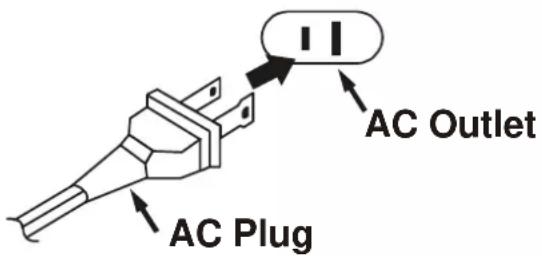
- Connect the plug to your AC outlet.
POWER SOURCE
This system is designed to operate on normal 120V 60 Hz AC house current only. Attempting to operate this system from any other power source may cause damage to the system, and such damage is not covered by your warranty.
NOTE:
This unit has a polarized AC plug with one wide blade and one narrow blade. This plug will only fit into a matching polarized AC outlet. This is a safety feature to reduce the possibility of electric shock. If this plug will not fit in your AC outlet, you probably have an outdated non-polarized outlet. You should have your outdated outlet changed by a qualified, licensed electrician. Do not file the wide blade on the plug, or use an adapter to make the plug fit into your outlet. This defeats the safety feature and could expose you to electric shock.
PROTECT YOUR FURNITURE
This model is equipped with non-skid rubber 'feet' to prevent the product from moving when you operate the controls. These 'feet' are made from non-migrating rubber material specially formulated to avoid leaving any marks or stains on your furniture. However certain types of oil based furniture polishes, wood preservatives, or cleaning sprays may cause the rubber 'feet' to soften, and leave marks or a rubber residue on the furniture. To prevent any damage to your furniture we strongly recommend that you purchase small self-adhesive felt pads, available at hardware stores and home improvement centers everywhere, and apply these pads to the bottom of the rubber 'feet' before you place the product on fine wooden furniture.
IMPORTANT: Raising And Lowering The CD Door
- To open the CD door press downward on the corner of the CD door in the area marked "▲ OPEN/CLOSE". The door will open slightly.
- Manually raise the door until it is fully open. The door support bracket will hold the door in the open position.
- To close the door pull the door support bracket toward you to release it and lower the door. Press downward on the door to close it completely.
TO AVOID DAMAGE TO THE DOOR OR TO THE CABINET, NEVER ATTEMPT TO FORCE THE DOOR CLOSED WITHOUT FIRST RELEASING THE DOOR SUPPORT BRACKET.

LOCATION OF CONTROLS AND INDICATORS
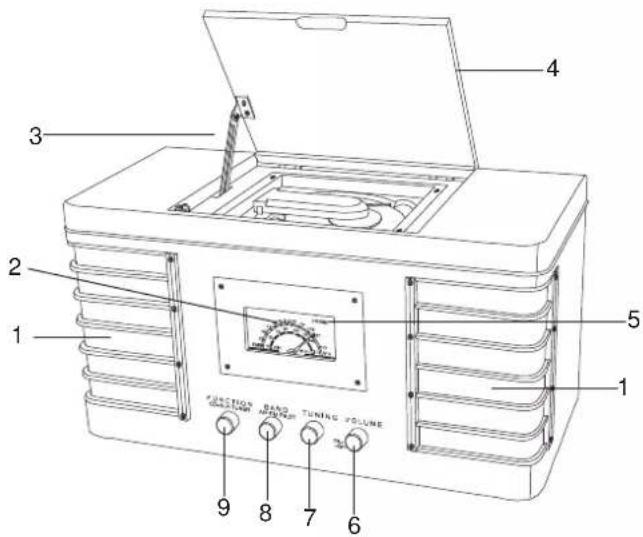
FRONT PANEL
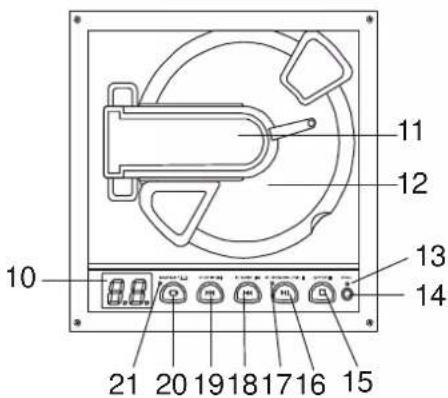
TOP VIEW (CD PLAYER)
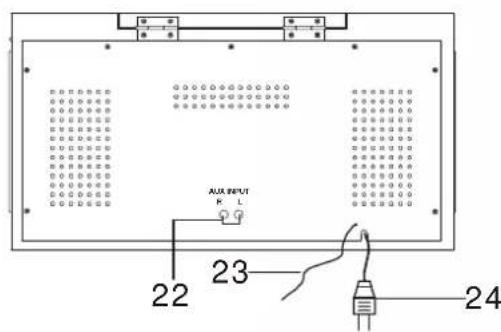
BACK PANEL
6




FRONT PANEL
1.) Speakers.
2.) Tuning Dial.
3.) CD Door Support Bracket.
4.) CD Door.
5.) FM STEREO Indicator.
6.) ON/OFF-VOLUME Control.
7.) TUNING Control.
8.) BAND Selector (AM/FM/FM ST.)
9.) FUNCTION Selector (AUX/CD/TUNER)
CD PLAYER
10.) CD Track Number Display.
11.) CD Clamper Arm.
12.) CD Spindle.
13.) Program Indicator.
14.) PRG. (Program) Button.
15.) STOP Button.
16.) PLAY/PAUSE ▶■ Button.
17.) Play Indicator.
18.) B. SKIP Button.
19.) F. SKIP Button.
20.) REPEAT Button.
21.) Repeat Indicator.
BACK PANEL
22.) AUX INPUT Jacks.
23.) FM Lead Wire Antenna.
24.) AC Power Cord.

OPERATING INSTRUCTIONS
1.) To turn the system 'on', rotate the ON/OFF-VOLUME control clockwise until a 'click' is heard, and set the Volume to a low level. The Tuning Dial light comes 'on'.
2.) Set the FUNCTION selector (AUX/CD/TUNER) to the TUNER position.
3.) Set the BAND selector (AM/FM/FM ST.) to the desired band..
4.) Rotate the TUNING control to tune to the desired radio station. If you selected the FM ST setting and you tune to an FM Stereo station, the FM STEREO indicator will come 'on'.
If FM Stereo reception is noisy or weak, set the BAND selector to the 'FM' position. This will normally improve the reception but the sound will no longer be in stereo,
5.) Adjust the ON/OFF-VOLUME control to the desired level.
6.) When you are finished listening turn the ON/OFF-VOLUME control counter clockwise until a 'click' is heard.
Antenna Information
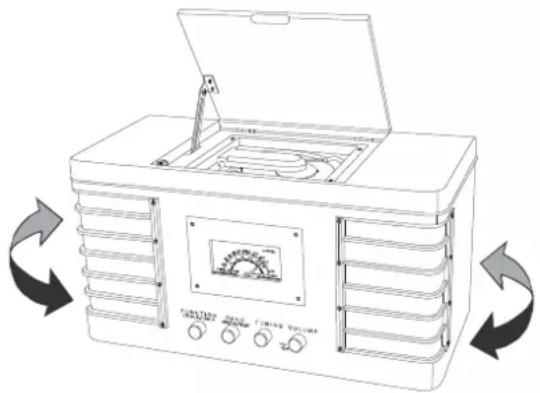
The AM antenna is inside the cabinet. If AM reception is unsatisfactory try repositioning the cabinet slightly until the internal antenna is picking up the strongest signal.
natural_image
Line drawing of a portable air conditioner unit with open lid and control panel, showing airflow direction arrows (no text or symbols)The FM wire antenna is located on the back cabinet. If necessary adjust the position and direction of this antenna until you find the position that provides the best reception.
PLAYING COMPACT DISCS
Raising And Lowering The CD Door
- To open the CD door press downward on the corner of the CD door in the area marked “▲ OPEN/CLOSE”. The door will open slightly.
- Manually raise the door until it is fully open. The door support bracket will hold the door in the open position.
- To close the door pull the door support bracket toward you to release it and lower the door. Press downward on the door to close it completely.
1.) Turn the ON/OFF-VOLUME control clockwise until a 'click' is heard, and set the volume to a low level.
2.) Set the FUNCTION selector (AUX/CD/TUNER) to the CD position. The CD track number display comes 'on'.
3.) Open the CD door. Lift the CD clamper arm, remove the transit card which was used to secure the laser during shipment and dispose of this card.
4.) Place your disc on the CD spindle with the printed label side facing up and lower the CD clamper arm. The disc will spin for a few seconds while the player reads the disc, then the disc stops and the display shows the total number of tracks on the disc.

5.) Press the CD PLAY/PAUSE ▶II button to begin playback on track number one. The Play indicator comes "on"
Note: You may leave the CD door open during playback if you wish, but we recommend closing the door again for better sound and also to prevent excess dust from accumulating on the CD spindle.
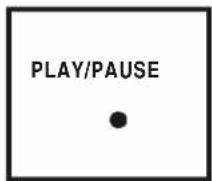
6.) Adjust the ON/OFF-VOLUME control to the desired level.



7.) Playback will continue until the end of the disc. When the disc ends the display again shows the total number of tracks on the disc. You may also stop playback at any time by pressing the CD STOP ■ button.
Pause Control
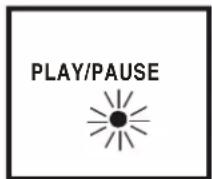
To pause momentarily during playback press the CD PLAY/PAUSE ▶ button again. Playback stops but the disc continues to spin and the Play indicator flashes. Press the CD PLAY/PAUSE ▶ II button once more to cancel Pause and resume playback. The Track Number display stops flashing.
Skipping Tracks and High Speed Music Search
During CD Playback, repeatedly press the F. SKIP ▶▶ (Forward Skip) or B. SKIP ▶◀ (Back Skip) buttons to skip to higher or lower number tracks. When the desired track number appears on the display release the buttons and playback will begin on the desired track.
To rapidly search forward or back within a track to locate a specific musical passage, depress and hold either the F. SKIP ▶▶ (Forward Skip) or B. SKIP ◀◀ (Back Skip) buttons. The player will move forward or backward at high speed as long as the buttons are depressed. When you hear the desired passage release the buttons. Normal playback will resume at that point.

Repeat Playback
This feature allows you to continuously repeat a single track or the entire disc.
To Repeat A Single Track
Press the REPEAT button once. The Repeat indicator flashes. Press the ▶I buttons to select the desired track, then press the CD PLAY/PAUSE ▶II button to begin Repeat Playback of the selected track.

To Repeat The Entire Disc
Press the REPEAT button twice. The Repeat indicator remains 'on'. Press the CD PLAY/PAUSE ▶II button to begin Repeat Playback of the entire disc.

To cancel Repeat Playback press the REPEAT button until the Repeat Indicator goes 'off'. Repeat Playback is also canceled by pressing the STOP ■ button, or setting the FUNCTION selector to the AUX or TUNER position.


PROGRAMMED PLAYBACK
This feature allows you to program up to 20 tracks on a disc for playback in any desired order.
Note: You cannot program tracks while a disc is playing. If the disc is playing press the STOP ■ button first before beginning the programming steps below:
1.) Press the PRG. button to enter the Program Mode. The Program indicator and Program number '01' flash.

2.) Press the F. SKIP ▶ or B. SKIP ◀◀ buttons to select the first track number you wish to enter in the program memory. Example: Track Number 8.
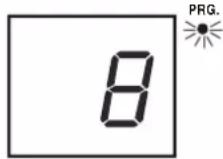
3.) When the desired track number appears on the display, press the PRG. button again to enter that track in memory. The program number display advances to "02".

4.) Repeat Steps 2-3, selecting a different track number each time until you have entered up to 20 tracks in the program memory.
Note: You may program the same track number to play multiple times in the program sequence if desired.
5.) Press the PLAY/PAUSE ▶II button to begin Programmed Playback. The Program indicator stops flashing and remains 'on'. Playback will begin with the first track you programmed and will continue until the last programmed track has played.


6.) After the last track has played the player stops and the display shows the total number of tracks on the disc. However the program sequence remains in the memory and the Program indicator remains 'on. Press the PLAY/PAUSE ▶II button to play the programmed sequence again.

7.) To cancel the programmed sequence from the memory press the STOP button while the player is stopped. The programmed sequence may also be canceled by removing the disc, switching to the AUX, TUNER or shutting the system 'off'.
Program Repeat Playback
You can use the Program and Repeat features together to continuously repeat a programmed sequence of tracks.
First, program the desired tracks according to Steps 1 through 5 on page 12.
When Programmed Playback begins press the REPEAT button twice to activate the All Tracks Repeat feature.
The REPEAT Indicator lights and all the tracks in your programmed sequence will be repeated continuously.
To cancel Programmed Repeat Playback press the STOP ■ button until both the PRG. and REPEAT Indicators go 'Off'.
LISTENING TO AUXILIARY SOURCES
You can listen to the sound of other music sources through the speakers of this system. Connect the Audio Output jacks of your external device such as a TV, VCR, Cassette Player, etc, to the AUX INPUT jacks on the back panel of this system. Connection cables are not included.
Set the FUNCTION selector (AUX/CD/TUNER) of this system to the AUX position. Operate your external source according to its own instructions. Adjust the VOLUME control of this system to the desired level.
Note: You can leave the external device connected to this system and simply select it whenever you want by selecting the AUX function.
CARE AND MAINTENANCE
COMPACT DISC CARE
- To remove a disc from its storage case, press down on the center of the case and lift the disc out, holding it carefully by the edges.

- Fingerprints and dust should be carefully wiped off the disc's recorded surface with a soft cloth. Unlike conventional records, compact discs have no grooves to collect dust and microscopic debris, so gently wiping with a soft cloth should remove most particles. Wipe in a straight line from the inside to the outside of the disc. Small dust particles and light stains will have absolutely no effect on reproduction quality.
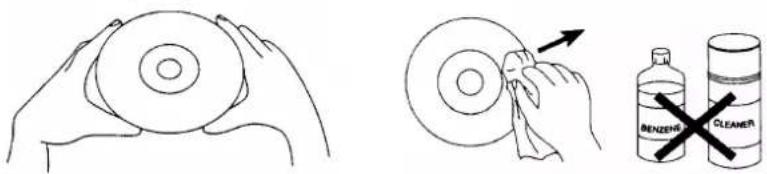
- Clean the disc periodically with a soft, lint-free, dry cloth. Never use detergents or abrasive cleaners to clean the disc. If necessary, use a CD cleaning kit.
- Never write on or affix labels to the surface of compact discs.
CARE OF THE CABINET
You should care for the cabinet as you would care for any piece of fine furniture. When the cabinet becomes dusty wipe it with a soft, non-abrasive dust cloth. If the cabinet becomes smudged with fingerprints you may use any good quality commercial dusting and polishing spray cleaner, however avoid spraying the plastic or metal parts of this system. We recommend that you spray the cleaner on your dust cloth, not directly on the cabinet, to avoid getting any of the spray on the plastic or metal parts.
LIMITED WARRANTY
Emerson Radio Corp. warrants manufacturing defects in original material, including original parts and workmanship, under normal use and conditions, for a period of ninety (90) days from the date of original purchase in the U.S. With your dated proof of purchase, we will provide repair service at no charge for labor and parts at an authorized Depot Repair Facility, or replace the product in our discretion. If your system fails to operate properly during the warranty period due to a manufacturing defect, do not return the system to the retail store. Please call the Emerson Customer Service Hotline toll free at 1-800-898-9020. We will diagnose the problem and instruct you how to have your system repaired or replaced, at our discretion.
This warranty does not cover damage from negligence, misuse, abuse, accident, failure to follow operating instructions, commercial use, rental, repairs by an unauthorized facility, or products purchased, used, serviced or damaged outside of the United States.
THIS WARRANTY GIVES YOU SPECIFIC LEGAL RIGHTS, AND YOU MAY ALSO HAVE OTHER RIGHTS WHICH VARY FROM STATE TO STATE.
AU898R
TO FIND THE LOCATION AND PHONE NUMBER OF YOUR NEAREST SERVICE CENTER PERMITTED TO PERFORM WARRANTY...
CALL TOLL FREE: 1-800-695-0098
FOR ADDITIONAL SET-UP OR OPERATING ASSISTANCE
PLEASE CALL:
1-800-898-9020
FOR CUSTOMER SERVICE, PLEASE WRITE TO:
Emerson Radio Corp.
Consumer Affairs Dept.
1901 Diplomat Drive,
Farmers Branch, TX 75234.
- AM/FM Stereo Radio with Stereo CD Player
- CAUTION
- IMPORTANT SAFETY INSTRUCTIONS
- IMPORTANT NOTES
- CLASS 1 LASER PRODUCT
- FCC INFORMATION
- PREPARATION FOR USE
- UNPACKING AND SET UP
- POWER SOURCE
- NOTE:
- PROTECT YOUR FURNITURE
- IMPORTANT: Raising And Lowering The CD Door
- LOCATION OF CONTROLS AND INDICATORS
- FRONT PANEL
- CD PLAYER
- BACK PANEL
- OPERATING INSTRUCTIONS
- Antenna Information
- PLAYING COMPACT DISCS
- Raising And Lowering The CD Door
- Pause Control
- Skipping Tracks and High Speed Music Search
- Repeat Playback
- To Repeat A Single Track
- To Repeat The Entire Disc
- PROGRAMMED PLAYBACK
- Program Repeat Playback
- LISTENING TO AUXILIARY SOURCES
- CARE AND MAINTENANCE
- COMPACT DISC CARE
- CARE OF THE CABINET
- LIMITED WARRANTY
Brand : Emerson
Model : NR53
Category : Radio