
P.I.P.-EDCb - Audio processor CROWN - Free user manual and instructions
Find the device manual for free P.I.P.-EDCb CROWN in PDF.


| Product Type | Audio Processor (P.I.P. Module) |
| Brand | Crown |
| Model | P.I.P.-EDCb |
| Dimensions (H x W x D) | 6.375 x 1.875 x 3.875 in (16.2 x 4.8 x 9.8 cm) |
| Power Supply | Powered by the host amplifier |
| Input Connectors | Balanced XLR (3-pin female) |
| Input Impedance | 30 kΩ balanced, 15 kΩ unbalanced |
| Maximum Input Level | 35 VAC |
| Maximum Output Level | +18 dB (600 Ω load) |
| Nominal Gain | Unity ±0.5 dB |
| Frequency Response | ±0.1 dB (70 Hz–30 kHz) with subsonic filter at 36 Hz |
| Signal-to-Noise Ratio | >95 dB (20 kHz bandwidth) |
| Total Harmonic Distortion | <0.01% at 1 kHz |
| Common Mode Rejection | >65 dB at 1 kHz |
| Crosstalk | <0.5 mV at 20 kHz |
| Compression Types | Error-driven and signal-driven (variable threshold) |
| Compressor Attack/Release | User-selectable fast/slow (via DIP switch) |
| Subsonic Filter | Adjustable corner frequency (24–36 Hz) |
| Tracking Jumper | Allows compressors to track each other (ON/OFF) |
| Compatibility | Crown Standard P.I.P. and PIP2 amplifiers |
| Safety Precautions | Turn off and unplug amplifier before installation; avoid touching circuitry |
| Maintenance | No user-serviceable parts; do not modify circuitry |
Frequently Asked Questions - P.I.P.-EDCb CROWN
User questions about P.I.P.-EDCb CROWN
0 question about this device. Answer the ones you know or ask your own.
Ask a new question about this device
Download the instructions for your Audio processor in PDF format for free! Find your manual P.I.P.-EDCb - CROWN and take your electronic device back in hand. On this page are published all the documents necessary for the use of your device. P.I.P.-EDCb by CROWN.
USER MANUAL P.I.P.-EDCb CROWN
© 1997 by Crown International, Inc., P.O. Box 1000, Elkhart, IN 46515-1000 U.S.A. Telephone: 219-294-8000. Fax: 219-294-8329. P.I.P. modules are produced by the Professional Audio Division of Crown International, Inc. Trademark Notice: Crown®, Macro-Tech®, Com-Tech®, IOC® and P.I.P. are registered trademarks of Crown International, Inc. Other trademarks are the property of their respective owners.

Fig. 1.1 P.I.P.-EDCb
1 Welcome
Thank you for purchasing the Crown P.I.P.-EDCb. P.I.P.® modules are designed to quickly install in the back of many Crown amplifiers. P.I.P. stands for "Programmable Input Processor." Their versatile features expand the capabilities of your amplifier and enable you to customize it for your particular needs.
The P.I.P.-EDCb adds state-of-the-art error-driven compression, signal-driven input compression with adjustable threshold and a configurable sub-sonic (high-pass) filter to each input of your amplifier. Three conditions can cause a compressor to activate: (1) if the compressor receives an “error” signal from the amplifier’s input/output comparator (IOC®) circuitry, (2) if the input signal exceeds its adjustable threshold, or (3) if an excessively large input signal level is sensed. The compressor circuits activate ahead of all preamp circuitry resulting in low distortion.
Each channel's compressor can operate independently or both channels can be tied together causing the compressors to track each other.
Balanced XLR connectors are provided for quick connection.
Feature Summary
☐ Error-driven compression for each channel.
☐ Variable threshold, signal-driven compression for each channel.
□ User-selectable fast/slow attack and release times.
☐ Each compressor can be turned off.
☐ Variable subsonic (high-pass) filter.

Fig. 2.1 P.I.P.-EDCb (Bottom View)
2 Facilities
A. Input Connectors
A balanced XLR connector is provided for input to each channel. The pin assignments are labeled on the face of the P.I.P. Refer to your amplifier Owner's Manual for wiring details.
CAUTION: Input channel 2 should NOT be used in either mono mode, and its level control should be turned off (fully counterclockwise).
B. DIP Switches (S1, S2)
A nine-segment DIP switch is provided for each channel. Segments 1–6 select the subsonic corner frequency and segments 7–9 configure the compressor. S1 controls channel 1; S2 controls channel 2.
C. Compressor Threshold
Each channel's compressor threshold can be adjusted with these controls. They set the
maximum output voltage and can be used to protect loudspeakers and listeners. When turned to the maximum setting (fully clockwise), the compressor responds only to the channel's IOC error signal. When set lower, the compressor responds to a maximum audio level (see Figure 3.4).
D. Tracking Jumper (Z1)
Moving this jumper to the "ON" position causes the compressors to track each other.
3 Installation
Before installing the P.I.P. module, it should first be configured.
3.1 P.I.P. Configuration
- Set the corner frequency (-3 dB frequency) for each subsonic filter with DIP switches S1 and S2 (see Figure 3.2). Notice that the first six switch segments control the corner frequency.

Fig. 3.1 S1/S2 DIP Switch
- Use DIP switches S1 and S2 to configure each compressor's attack and release times (fast or slow), or turn each compressor off (see
| Compressor Setting | Approximate Time | |
| Attack | Release | |
| Slow Attack / Slow Release | 5 msec | 900 msec |
| Slow Attack / Fast Release | 10 msec | 220 msec |
| Fast Attack / Slow Release | 1.25 msec | 900 msec |
| Fast Attack / Fast Release | 1.5 msec | 220 msec |
Fig. 3.3 Compressor Attack and Release Times (Approximate)
Figure 3.2). Notice that the last three DIP switch segments control attack and release times. The actual attack time depends on the release time. Figure 3.3 provides approximate times for each setting.
- Adjust each channel's compressor threshold using the compressor threshold pots (see Figure 2.1, "C"). Each
| Function | DIP Switch (S1 or S2) | |||||||||
| 1 | 2 | 3 | 4 | 5 | 6 | 7 | 8 | 9 | ||
| Subsonic Filter | 36 Hz Corner Frequency | ON | ON | ON | ON | ON | ON | |||
| 32 Hz Corner Frequency | ON | OFF | ON | OFF | ON | OFF | ||||
| 28 Hz Corner Frequency | OFF | ON | OFF | ON | OFF | ON | ||||
| 24 Hz Corner Frequency | OFF | OFF | OFF | OFF | OFF | OFF | ||||
| Compressor | Slow Attack / Slow Release | OFF | OFF | OFF | ||||||
| Slow Attack / Fast Release | OFF | OFF | ON | |||||||
| Fast Attack / Slow Release | ON | OFF | OFF | |||||||
| Fast Attack / Fast Release | ON | OFF | ON | |||||||
| Compressor OFF | ON | |||||||||
Fig. 3.2 S1/S2 DIP Switch Settings
| Macro-Tech 3600VZ and 36x12 (Channel 1) | All Others | |||
| Mark | Max Sine Wave RMS Voltage | Watts into 8 Ohms | Max Sine Wave RMS Voltage | Watts into 8 Ohms |
| 0 | 13.5 | 23 | 9.5 | 11 |
| 14 | 25 | 10 | 12 | |
| 1 | 14.5 | 26 | 10.5 | 14 |
| 15 | 28 | 11 | 15 | |
| 2 | 16 | 32 | 11.5 | 17 |
| 17 | 36 | 12 | 18 | |
| 3 | 18 | 41 | 13 | 21 |
| 19 | 45 | 14 | 25 | |
| 4 | 20 | 50 | 15 | 28 |
| 22 | 60 | 16 | 32 | |
| 5 | 24 | 72 | 17 | 36 |
| 26 | 85 | 19 | 45 | |
| 6 | 29 | 105 | 21 | 55 |
| 32 | 128 | 23 | 66 | |
| 7 | 37 | 171 | 26 | 85 |
| 42 | 220 | 30 | 113 | |
| 8 | 48 | 288 | 35 | 153 |
| 57 | 406 | 41 | 210 | |
| 9 | 70 | 612 | 50 | 313 |
| 92 | 1058 | 71 | 630 | |
| 10 | 96 | 1152 | 102 | 1300 |
Fig. 3.4 Compressor Threshold Settings
pot has a scale with ten marks (or settings) which correspond to the typical thresholds shown in Figure 3.4.
- Move the P.I.P.'s tracking jumper (Z1) to the "ON" position to make the compressors track each other. In the "OFF" position, each compressor will operate independently (refer to Figure 2.1, "D").
3.2 Installation Procedures
You may need a phillips screw-driver to remove the existing P.I.P. module or panel from your amplifier.
CAUTION: Before connecting this or any P.I.P. to your amplifier, it is important to turn its level controls down, turn it off
and remove the AC power. Don't touch the circuitry. Even though the amplifier is off, there could still be enough energy remaining to cause electric shock.
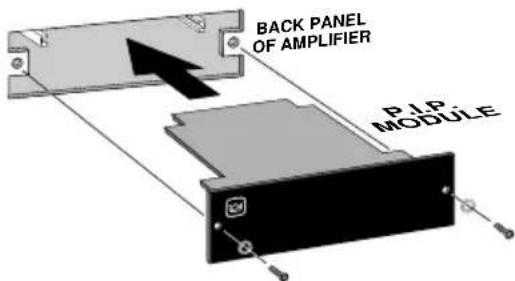
Fig. 3.5 Installation into a Standard P.I.P. Amplifier

Fig. 3.6 PIP2 Input Adapter Connection

Fig. 3.7 Installation into a PIP2 Amplifier
-
Turn down the level controls (full counterclockwise), turn off the amplifier and unplug it from the AC power source.
-
Remove the existing P.I.P. module or panel (two screws). For PIP2 amplifiers, this may involve disconnecting the P.I.P. from a PIP2 input adapter (see Figures 3.6 and 3.7). If a PIP2 input adapter is already present, do not remove the ribbon cables from the adapter. Otherwise you will have to reconnect them in the next step.
-
Standard P.I.P. Amplifiers: Align the edges of the P.I.P.-EDCb in the P.I.P. card rails and firmly push the unit in until it is seated against the mounting bracket (see Figure 3.5).
PIP2 Amplifiers: (Requires a PIP2 input adaptor. Crown part number Q43528-1.) Connect the PIP2 input adapter to the two input cables of the amplifier (see Figure 3.6). Notice that the PIP2 input adapter should be positioned with the P.I.P. edge connector on top and facing away from the amplifier. The 20 pin cable (A) is connected first, then the 18 pin cable (B) is connected. Both ribbon cables should extend below the PIP2 input adapter.
Next, insert the edge connector of the P.I.P.-EDCb
into the PIP2input adapter (see Figure 3.7) and insert the assembly into the P.I.P. opening in the back of the amplifier.
- Secure the P.I.P.-EDCb with the two screws and lock washers provided. (The lock washers are important because they bond the P.I.P. to the chassis ground of the amplifier.)
- Connect input and output wiring.
- Plug in the amplifier and turn it on. Adjust its level controls to a desired setting.
Do not tamper with the circuitry. Circuit changes made by unauthorized personnel, or unauthorized circuit modifications are not allowed.
Remember: Crown is not liable for any damage resulting from overdriving other components in your sound system.
CAUTION: IF PHONE JACKS ARE PROVIDED ON THE AMPLIFIER BACK PANEL, DO NOT USE THEM AS INPUTS WITH THIS P.I.P. INSTALLED.
The amplifier phone jacks are in parallel with the P.I.P. outputs, so they can be used to "daisy chain" the inputs of several amplifiers. If you do this, remember that the signal feeding the other amplifiers will be filtered and compressed too.
Important: If the amplifier is used in either Bridged-Mono or Parallel-Mono mode, you must turn the Ch. 2 amplifier level control off (fully counterclockwise). The input and level control of Ch. 2 are not defeated in mono mode so any signal applied to Ch. 2 will beat against the signal in Ch. 1.
Refer to the amplifier Reference Manual for more information about Bridged-Mono or Parallel-Mono modes of operation.
Electronic image for this figure were not included due to quality considerations. Please refer to the printed documentation.
Only one channel shown.
Electronic image for this figure were not included due to quality considerations. Please refer to the printed documentation.
Notes:
- All resistor values are in ohms, 18 W, 1% unless otherwise specified.
- All capacitor values are in micro-farads unless otherwise specified.
4 Specifications
Note: All specifications are referenced to a 0.775 volt input signal.
Signal to Noise: Greater than 95 dB from subsonic filter corner frequency to 20 kHz.
Frequency Response: ±0.1 dB from 70 Hz to 30 kHz with subsonic filter corner frequency set to 36 Hz. +0, -3 dB from subsonic filter corner frequency to 30 kHz.
Harmonic Distortion (THD): Less than 0.01% THD at 1 kHz.
Common Mode Rejection: Greater than 65 dB at 1 kHz.
Crosstalk: Less than 0.5 mV at 20 kHz.
Connectors: 3-pin female XLR for each input.
Input Impedance: Nominally 30 K ohms balanced. 15 K ohms unbalanced.
Maximum Input Level: 35 VAC.
Maximum Output Level: +18 dB with 600 ohm load.
Nominal Gain: Unity ±0.5 dB.
Dimensions: 6^3/8 × 1^7/8 × 3^7/_8 in. (16.2 x 4.8 x 9.8 cm).
For Technical Support contact:
Crown Audio Division Technical Support Group
Plant 2 SW, 1718 W. Mishawaka Rd., Elkhart, Indiana 46517 U.S.A. Phone: 800-342-6939 (North America, Puerto Rico and Virgin Islands) or 219-294-8200 Fax: 219-294-8301 Fax Back (North America only): 800-294-4094 or 219-293-9200 Fax Back (International): 219-294-8100 Internet: http://www.crownaudio.com
Brand : CROWN
Model : P.I.P.-EDCb
Category : Audio processor