
WGCCV3 - Multi-Station Frames HAGER - Free user manual and instructions
Find the device manual for free WGCCV3 HAGER in PDF.


| Product Type | Multi-gang frame |
| Brand | Hager |
| Model | WGCCV3 |
| Category | Cadres multi-postes (Multi-gang frames) |
| Application | Flush-mounted installation with standard connectable wall boxes, indoor use only |
| Compatibility (Hager Muse) | Centre plates 65 x 52 mm; with accommodation ring for 52 x 52 mm. Not compatible with 52 x 65 mm. |
| Compatibility (Hager Inspire) | Centre plates 65 x 52 mm; with accommodation ring for 52 x 52 mm. Not compatible with 52 x 65 mm. |
| Orientations Available | Horizontal (2-5 gang) for Muse and Inspire; Vertical (2-3 gang) for Inspire |
| Dimensions (Hager Muse Horizontal 2-gang) | 172 x 86 mm |
| Dimensions (Hager Muse Horizontal 3-gang) | 258 x 86 mm |
| Dimensions (Hager Muse Horizontal 4-gang) | 344 x 86 mm |
| Dimensions (Hager Muse Horizontal 5-gang) | 430 x 86 mm |
| Dimensions (Hager Inspire Horizontal 2-gang) | 172 x 86 mm |
| Dimensions (Hager Inspire Horizontal 3-gang) | 258 x 86 mm |
| Dimensions (Hager Inspire Horizontal 4-gang) | 344 x 86 mm |
| Dimensions (Hager Inspire Horizontal 5-gang) | 430 x 86 mm |
| Dimensions (Hager Inspire Vertical 2-gang) | 86 x 172 mm |
| Dimensions (Hager Inspire Vertical 3-gang) | 86 x 258 mm |
| Installation | Must be installed by a qualified electrician in accordance with national standards |
| Safety | Disconnect power supply before installation to avoid electric shock |
| Maintenance | Wipe with a dry, clean cloth; do not use water or cleaning agents |
| Function | Holds multiple flush-mounted devices (switches, sockets, etc.) in a single frame; allows horizontal or vertical combinations |
| Supplied Accessories | Connection bridges for linking devices |
Frequently Asked Questions - WGCCV3 HAGER
User questions about WGCCV3 HAGER
0 question about this device. Answer the ones you know or ask your own.
Ask a new question about this device
Download the instructions for your Multi-Station Frames in PDF format for free! Find your manual WGCCV3 - HAGER and take your electronic device back in hand. On this page are published all the documents necessary for the use of your device. WGCCV3 by HAGER.
USER MANUAL WGCCV3 HAGER
Electrical equipment must only be installed and assembled by a qualified electrician in accordance with the relevant installation standards, regulations, directives and safety and accident prevention directives of the country.
Failure to comply with these installation instructions may result in damage to the device, fire or other hazards.
Function
Multiple frames for 2gang to 5gang combinations of flush-mounted devices. Different versions for horizontal and vertical installation.

Hager Muse: The frames are compatible with most flush-mounted devices of the design with centre plates (Width x Height) = 65 x 52 mm.
In case of centre plates 52 x 52 mm, the accomodation ring must be used.
Not compatible with centre plates 52 x 65 mm.
Correct use
- For flush-mounted installation with standard connectable wall boxes.
- Only suitable for use in indoor areas with no drip and no spray water.
Technical data
Hager Muse:
Dimensions (Width x Height)
- 2gang horizontal 172 x 86 mm
- 3gang horizontal 258 x 86 mm
- 4gang horizontal 344 x 86 mm
- 5gang horizontal 430 x 86 mm
Hager Inspire:
Dimensions (Width x Height)
- 2gang horizontal 172 x 86 mm
- 3gang horizontal 258 x 86 mm
- 4gang horizontal 344 x 86 mm
- 5gang horizontal 430 x 86 mm
- 2gang vertical 86 x 172 mm
- 3gang vertical 86 x 258 mm
Information for electricians Installation and electrical connection
Preparing the devices for installation
■ Remove frame at every single device to be combined (see installation manual of the respective device).
Hager Inspire:
■ Furthermore, remove cover plate at every single device (see installation manual of the respective device).
Installing the devices into the wall boxes
(for example with "3gang frame (horizontal)")

DANGER!
Touching live parts can result in an electric shock.
An electric shock can lead to death.
Disconnect the connecting cables before working on the device and cover all live parts in the area!
- Arrange the devices horizontally or vertically in the desired order depending on frame type. Example here: horizontal.
■ Wire each device of the combination according to its wiring diagram (see installation manual of the respective device).
1

natural_image
Technical diagram of three electrical wall-mounted components with wiring and screwdriver, showing internal circuitry (no text or labels)■ After wiring, fix the devices with the screws into the wall boxes (1).
Connecting the devices for multiple combinations
(for example with "3gang frame (horizontal)")
The devices are connected via the supplied connection bridges (2). On the outside corners of its supporting plate each device has corresponding holes for fixing the bridges.
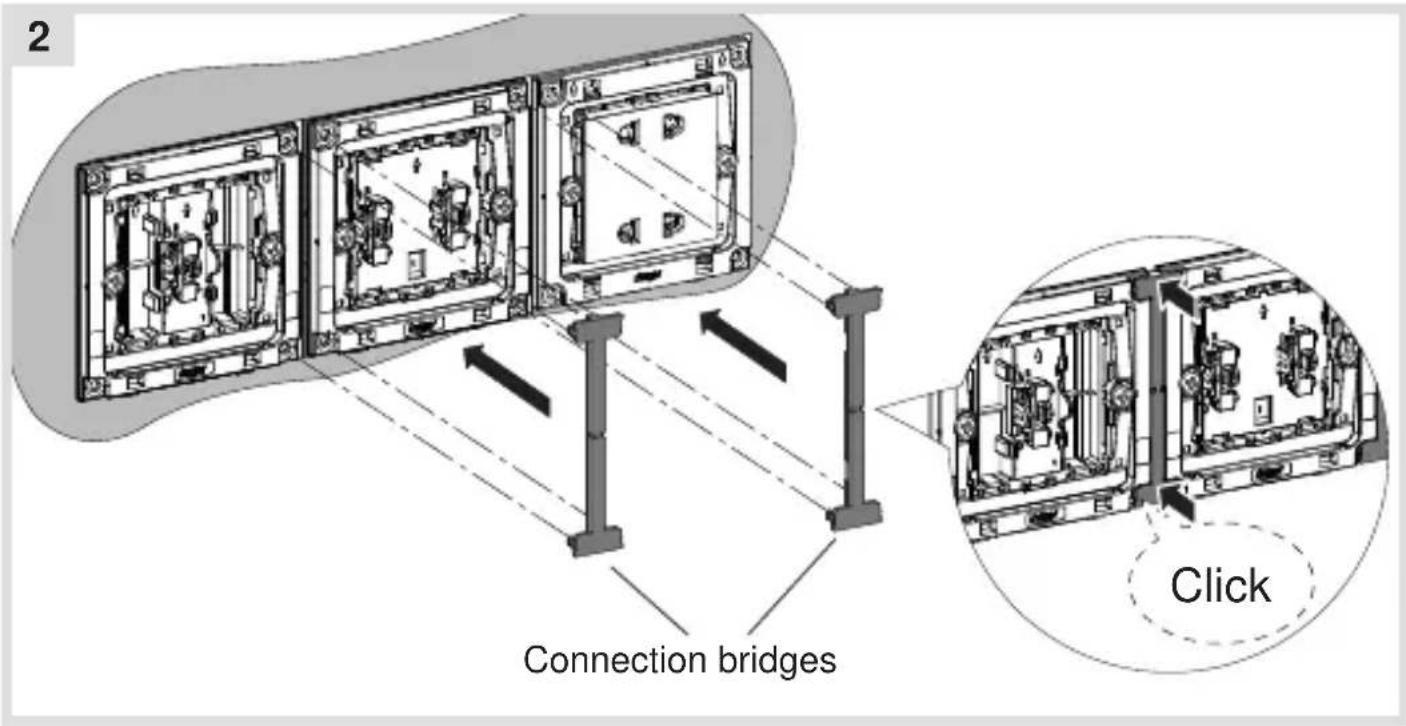
- Align one bridge per connection and clip the bridges one after the other in the supporting plates of the devices (2).
Assembling the covers
(for example with "3gang frame (horizontal)")

Hager Muse (3A):
In case of switches, fix the rockers onto each device.
In case of devices with centre plate 52 x 52 mm, place the accomodation ring onto the device (3A).
■ Then snap the multi-gang frame onto the device combination.
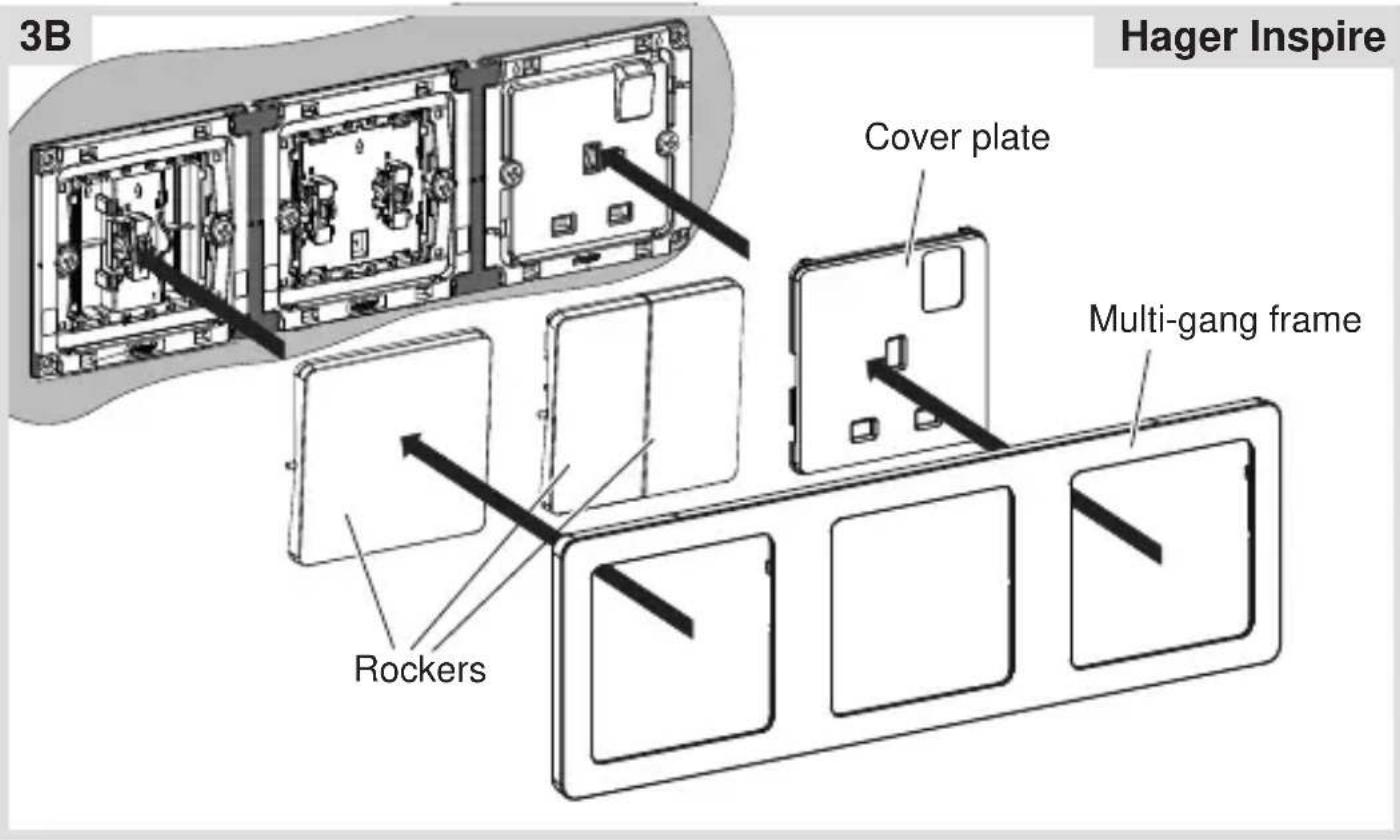
Hager Inspire (3B):
- Fix the rockers and cover plates onto each device.
■ Then snap the multi-gang frame onto the device combination.




- Function
- Correct use
- Technical data
- Hager Muse:
- Hager Inspire:
- Information for electricians Installation and electrical connection
- Preparing the devices for installation
- Installing the devices into the wall boxes
- DANGER!
- Connecting the devices for multiple combinations
- Assembling the covers
- Hager Muse (3A):
- Hager Inspire (3B):
Brand : HAGER
Model : WGCCV3
Category : Multi-Station Frames