COOKTOPCI926DTB4 - Cooker Fisher & Paykel - Free user manual and instructions
Find the device manual for free COOKTOPCI926DTB4 Fisher & Paykel in PDF.


User questions about COOKTOPCI926DTB4 Fisher & Paykel
0 question about this device. Answer the ones you know or ask your own.
Ask a new question about this device
Download the instructions for your Cooker in PDF format for free! Find your manual COOKTOPCI926DTB4 - Fisher & Paykel and take your electronic device back in hand. On this page are published all the documents necessary for the use of your device. COOKTOPCI926DTB4 by Fisher & Paykel.
USER MANUAL COOKTOPCI926DTB4 Fisher & Paykel
Safety and warnings 5
First use 10
Cookware
Using your cooktop 13
Using the timer 17
Cooking features 21
Cooking functions 22
Safety features 24
Customising your cooktop 27
Cooking guidelines 36
Care and cleaning 38
Alert messages 39
Troubleshooting
Energy guidelines 43
Energy guidelines (BI EU only) 44
Warranty and service 45
12
41
Registration
To register your product visit our website: fisherpaykel.com/register
WARNING!

Electric Shock Hazard
Failure to follow this advice may result in electric shock or death.
- Do not cook on a broken or cracked cooktop. If the cooktop surface should break or crack, switch the appliance off immediately at the mains heat supply (wall switch) and contact a qualified technician.
- Switch off the appliance before cleaning or maintenance.
! WARNING!

Fire Hazard
Failure to follow this advice may result in serious burns or death.
- Unattended cooking on a hob with fat or oil can be dangerous and may result in fire.
- Never try to extinguish fire with water. Switch off the appliance. Cover the flame, eg with a lid or fire blanket, or use dry chemical or foam-type extinguisher.
- Do not store items on cooking surfaces.
! WARNING!
 | Hot Surface HazardFailure to follow this advice may result in electric shock or death.During use, accessible parts of this appliance will become hot enough to cause burns.Do not let body, clothing or any item other than suitable cookware contact with the ceramic glass until the surface is cool.Never leave metal objects (such as kitchen utensils) or empty pans on the cooktop as they can become hot very quickly.Beware: magnetisable metal objects worn on the body may become hot in the vicinity of the cooktop. Gold or silver jewellery will not be affected.Keep children away.Handles of saucepans may be hot to touch. Check saucepan handles do not overhang other cooking zones that are on. Keep handles out of reach of children.Failure to follow this advice could result in burns and scalds. |
WARNING!
 | Health HazardFailure to follow this advice may result in death.This appliance complies with electromagnetic safety standards. However, persons with cardiac pacemakers or other electrical implants (such as insulin pumps) must consult with their doctor or implant manufacturer before using this appliance to make sure that their implants will not be affected by the electromagnetic field. |
! WARNING!
 | Cut HazardFailure to follow this advice may result in serious burns or death.The razor-sharp blade of a cooktop scraper is exposed when the safety cover is retracted. Use with extreme care and always store safely and out of reach of children. |
READ AND SAVE THIS GUIDE
WARNING!
To reduce the risk of fire, injury to persons or damage when using the appliance, follow the important safety instructions listed below. Read all the guidance before using the appliance.
Installation
- Unpack the packaging materials from the cooktop.
- Ensure your appliance is properly installed and grounded by a qualified technician.
- If a drawer is situated under an embedded appliance, ensure the space between the content of drawer and appliance is large enough (2cm) to provide correct ventilation.
General Use
- This domestic appliance is exclusively for the cooking of food, to the exclusion of any other domestic, commercial or industrial use.
- Remove all labels and self-adhesives from the ceramic glass.
- Do not change or alter the appliance.
- Never leave the appliance unattended when in use. Boilover causes smoking and greasy spillovers that may ignite.
- Never use your appliance as a work or storage surface.
- Wear proper apparel — Loose-fitting or hanging garments should never be worn while using the appliance.
- Never leave any objects or utensils on the appliance.
- Do not place or leave any magnetisable objects (eg credit cards, memory cards) or electronic devices (eg computers, MP3 players) near the appliance, as they may be affected by its electromagnetic field.
- We recommend using plastic or wooden kitchen utensils for cooking with your induction cooktop.
- Storage on appliance — Flammable materials should not be stored on the cooktop or near surface units.
- Do not place or leave aluminum foil on the cooktop.
- Never use your appliance for warming or heating the room.
- Do not use water on grease fires – Smother fire or flame or use dry chemical or foam-type extinguisher.
- Use only dry potholders — Moist or damp potholders on any hot surfaces may result in burns from steam. Do not let potholder touch hot heating elements. Do not use a towel or other bulky cloth.
- After use, always turn off the cooktop as described in this guide (ie by using the touchscreen).
- Do not rely on the pan detection feature to turn off the cooking zones when you remove the pans.
- Do not use a steam cleaner to clean your cooktop.
- Do not place or drop heavy objects on your cooktop.
- Do not use pans with jagged edges as this can scratch the glass.
- Do not stand on your cooktop.
- Do not use scourers or any other harsh/abrasive cleaning agents to clean your cooktop, as these can scratch the ceramic glass.
- Do not operate your cooktop by means of an external timer or separate remote-control system.
- Do not cook on a broken cooktop. If cooktop is broken, cleaning solutions and spillovers may penetrate inside the cooktop and create a risk of electric shock. Contact a qualified technician immediately.
- CAUTION: The cooking process has to be supervised. A short term cooking process has to be supervised continuously.
Child Safety
- Do not allow children to play with the appliance or sit, stand, or climb on it.
- Do not store items of interest to children in cabinets above the appliance. Children climbing on the cooktop could be seriously injured.
- Do not leave children alone or unattended in the area where the appliance is in use. Children of less than 8 years old must be kept away from the appliance unless continuously supervised. This appliance can be used by children aged from 8 years and above, and persons with reduced physical, sensory or mental capabilities or lack of experience and knowledge, if they have been given supervision or instruction concerning the use of the appliance in a safe way and they understand the hazards involved. Cleaning and user maintenance shall not be done by children without supervision.
Cleaning
- Clean cooktop with caution — If a wet sponge or cloth is used to wipe spills on a hot cooking area, be careful to avoid steam burn. Some cleaners can produce noxious fumes if applied to a hot surface.
Servicing
- Do not repair or replace any part of the appliance unless specifically recommended in the user guide. All other servicing should be undertaken be a Fisher & Paykel trained and supported service technician or qualified person.
- If the power supply cable is damaged, it must only be replaced by a qualified technician.
- If the appliance is malfunctioning, it will display an alert code: first note down the alert code (see section ‘Alert codes’ in this manual), then contact your Authorized Service Center or Customer Care to arrange for service. Do not use your appliance until it has been repaired by a Fisher & Paykel authorized technician.
Standard Requirements
- This induction cooktop generates and uses ISM frequency energy that heats cookware by using an electromagnetic field. It has been tested and complies with Part 18 of the FCC Rules for ISM equipment. This induction cooktop meets the FCC requirements to minimize interference with other devices in residential installation. Induction cooktops may cause interference with television or radio reception. If interference occurs, the user should try to correct the interference by:
- Relocating the receiving antenna of the radio or television
- Increasing the distance between the cooktop and the receiver
- Connecting the receiver into an outlet different than the receiver.

text_image
Diagram of a device control panel with numbered components and labeled buttons, including a zoomed-in box and status bar.DISPLAY DESCRIPTION
| 8 | Cooking zone off(not activated) |
| 0 | Cooking zone on(activated but not operating) |
| 1_9 | Heat levels |
| ! | Pan failure |
| E | Error message |
| H | Residual heat |
| B | Booster |
| ◎ | Locking |
| ☐ | Keep warm |
| || | Pause |
COOKTOP FEATURES
① Cooking area
② Cooktop On/Off
③ Touchscreen
④ Heat display
⑤ Clock
⑥ Keylock
⑦ Kitchen timer
⑧ Pause
⑨ Settings
⑩ Pan icon / position in cooking area*
*Size according to pan dimension
text_image
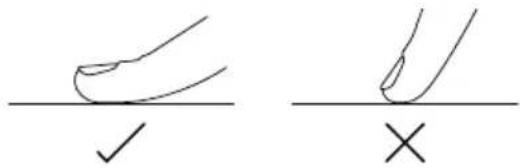
Diagram showing two hand positions with check and cross symbols, likely illustrating correct and incorrect hand positioning.Touch display
Your cooktop is operated using an intuitive touch display. Use the touchscreen to navigate cooking settings.
Using the touchscreen
Use the ball of your finger, not its tip. The controls respond to touch, so pressure is not needed.
WARNING!
Do not place metal objects on top of the touchscreen when the cooktop is on.
Zone display
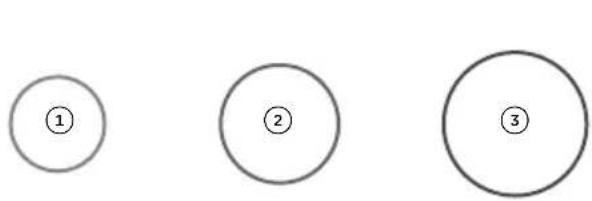
There are three types of possible displays for your pan based on pan dimensions; small, medium and large. The touchscreen will show the pan according to its size and position on the cooking surface.
text_image
① ② ③| PAN SIZE |
| 1 Small |
| 2 Medium |
| 3 Large |
Power display
The colour of the pan icon changes according to the selected heat setting.

text_image
① ② ③ ④ ⑤| COLOR HEAT LEVEL | |
| 1 Grey Pan is lifted | |
| 2 Blue O | |
| 3 Purple | 1 - 3.5 |
| 4 Red | 5 - 6.5 |
| 5 Orange | 7 - B |
Power slider
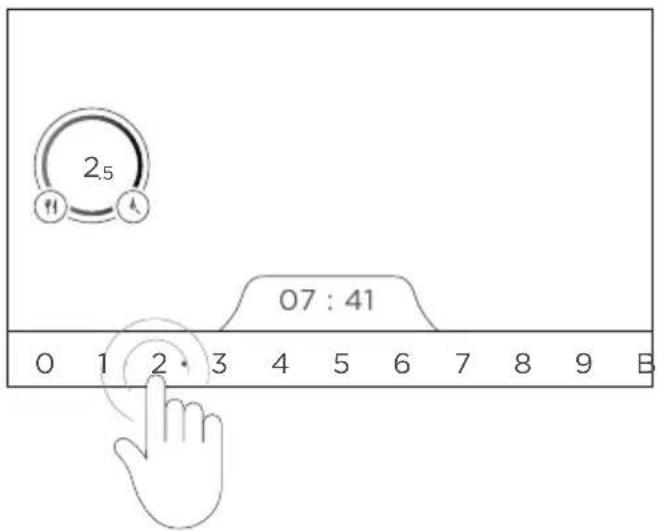
Your cooktop has 17 heat levels and a PowerBoost for optimal usage and control. When a pan is selected by touching the related pan icon, the display shows only full heat levels on the slider. After a heat level is selected on the slider, a small dot will be displayed between the full heat levels to indicate half heat levels.
text_image
2.5 07 : 41 0 1 2 3 4 5 6 7 8 9 BTo select the heat level with the slider, slide your finger on the power slider. For quick access, place your finger directly on the selected level.
The quality of your cookware can affect cooking performance. Only use induction-compatible cookware that has been specifically designed for induction cooking. Look for the induction symbol on the packaging or the bottom of the pan. We recommend to use cookware with maximum diameter of 360mm or less.
Suitable cookware material:
• ferromagnetic stainless-steel
• aluminiumwithferromagneticbottom
- cast iron
- steel
- enamelled steel
Unsuitable cookware material:
- aluminium without ferromagnetic bottom
- stainless-steel without ferromagnetic bottom
- copper
- brass
- glass
- ceramic porcelain
To check if cookware material is suitable, carry out a magnet test:
Move a magnet across the base of the pan. If the magnet is attracted, the pan is induction suitable. Ensure attraction is consistent across the base of the pan. If there are gaps, such as an indented manufacturer's logo, then the performance will be impaired.
If you do not have a magnet, fill the pan with some water in a pan and place it on the cooktop surface. Select the pan indicator icon and set at level 9. This water must heat in a few seconds. Refer to section 'Using your cooktop'.

natural_image
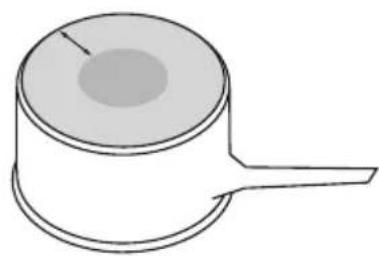
Simple line drawing of a cylindrical container with a handle and a side slot, no text or symbols present.Quickest heating performance
High content of ferromagnetic material. Heating area is consistent across the base and up the sides of pan.
natural_image
Simple line drawing of a cylindrical object with a handle extending from its side (no text or symbols)Average heating performance
Reduced area of ferromagnetic material. Reduced zone of heating, results in poor performance and slower heating.
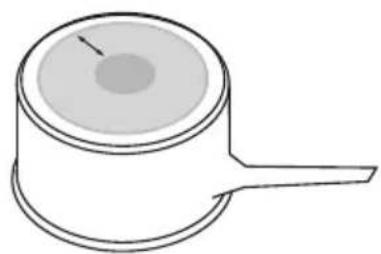
natural_image
Simple line drawing of a cylindrical object with a handle and a circular top (no text or symbols)Slow heating performance
Very limited area of ferromagnetic material. Results in very slow heating performance.
Note: This type of pot is good for very delicate tasks such as melting chocolate, as heating is very slow.
To start cooking
text_image
①Touch and hold ① for two seconds to turn on the cooktop.

text_image
② 07 : 20 0 1 2 3 4 5 6 7 8 9 BPlace a suitable pan anywhere on the cooking surface
- Ensure the bottom of the pan and cooking surface are clean and dry.
Once the pan is placed on the cooking surface, a heat level selector is displayed at the bottom of the touchscreen.
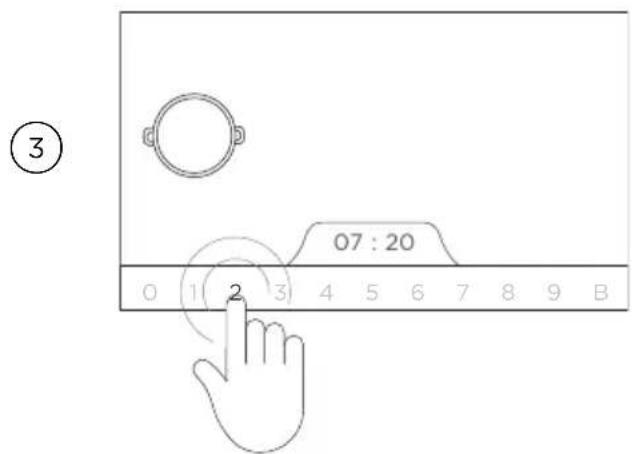
text_image
3 07 : 20 0 1 2 3 4 5 6 7 8 9 BSelect the pan icon on the display, and then select the desired heat level by touching or sliding along the power slider with your finger.
- If heating level is not selected within 20 seconds, the cooktop automatically goes to standby mode.
- You can modify the heat setting at any time during cooking.
While cooking, you can move your pan to any place on the cooking surface while keeping the selected settings. The heat level in the previous position of the pan will be automatically transferred to the new position.
Ensure that you only move one pan at a time. Moving pans simultaneously will result in inconsistent detection of pans or incorrect pan display. An error will be displayed if the pans are not detected and incorrectly positioned.
If the pan is lifted, the pan display will stay for about 20 seconds. After then all settings will reset automatically.
To pause cooking
This feature temporarily stops cooking operation for a maximum of 10 minutes. This is useful if you are leaving for a short period of time while cooking. All selected settings such as heat level, timer will remain when cooking resumes.

text_image
① 2 08:19Touch Ⓐ on the menu bar to pause cooking operation.
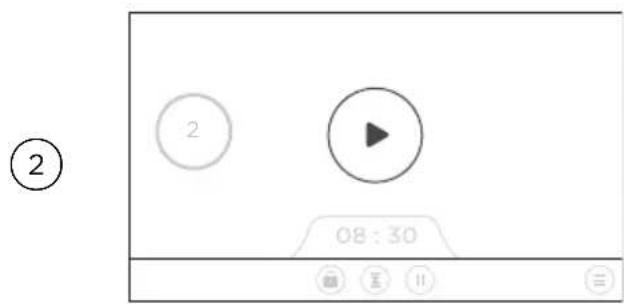
text_image
② 2 08:30The pan icon will turn grey and Ⓧ icon appears.
- All pan settings are retained when in paused mode.

text_image
③ 2To resume cooking, touch ⬤ again.
- The cooktop will operate at its current settings.
If paused state extends longer than 10 minutes, the cooktop will automatically turn off. If you want to cancel cooking during paused mode, touch or slide down your finger down to 0.
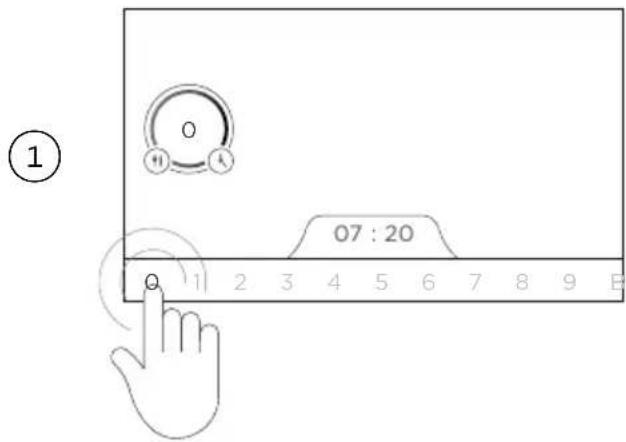
After cooking is done
text_image
① 07 : 20 1 2 3 4 5 6 7 8 9 ESelect the pan icon on the display.
Turn off the pan heating by touching or sliding down to 0.
Ensure heat display shows 'O'.

text_image
②Touch and hold ① for two seconds to turn off the cooktop.
text_image
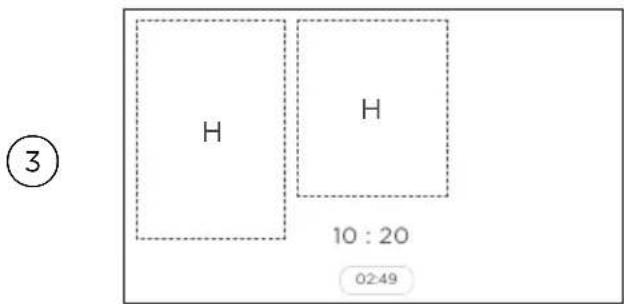
H H 10 : 20 02:49 ③Beware of hot surfaces: H will be displayed on the display screen to indicate areas on the cooktop surface that are still too hot to touch. It will remain on and steadily lit even when the cooktop is turned off. It will disappear when the surface has cooled down to a safe temperature.
Using PowerBoost
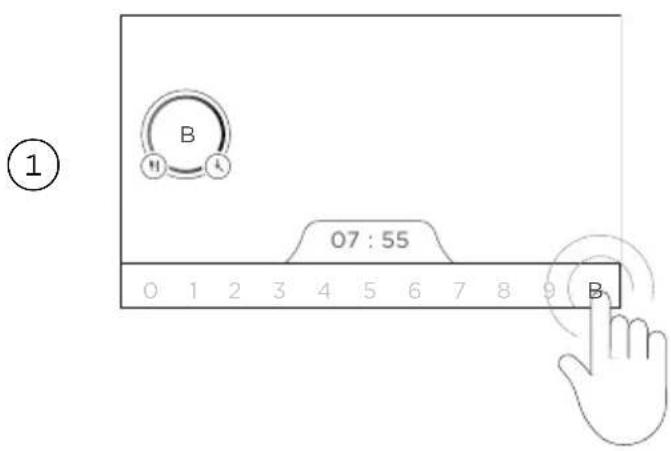
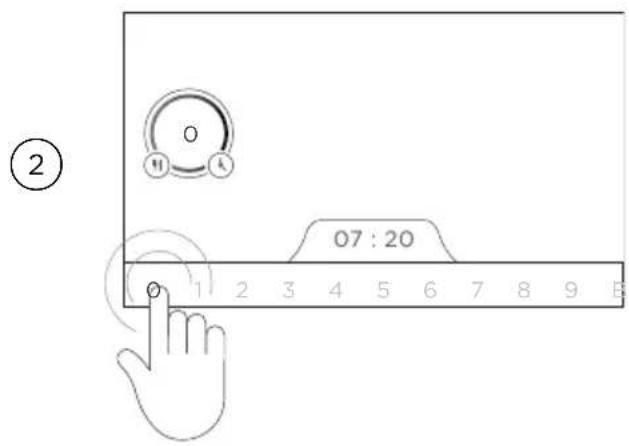
This feature enables you to increase the heat level of a selected pan to maximum power for a short period of time. When activated, this function can be used for rapid heating of large quantities of water for cooking, such as rice, pasta or noodles for 10 minutes. After 10 minutes, the heat level automatically reduces to setting 9.
text_image
B 07 : 55 0 1 2 3 4 5 6 7 8 9 BSelect the pan first.
Select POWERBOOST by touching or sliding to B on the heat selector.
text_image
② 07 : 20To cancel POWERBOOST, touch or slide to any power level 1-9 or deactivate the pan by selecting 0 on the power slider.
Setting the cooking time
This feature enables the cooktop to automatically switch off the heat supply of each pan after a preset time. You can set the cooking time of each individual pan for up to 9 hours and 59 minutes. The timer can be set for each pan independent from other pans.
①

natural_image
Diagram showing a hand interacting with a circular interface element, featuring icons for fork, knife, and knife (no text or symbols)Once the pan is placed on the cooking surface, touch ⏻ on the right of the pan indicator icon.
②

text_image
2 TIMER 09 05 HOURS 00 : 06 MINUTES 01 01 ✓TIMER will be displayed on the screen. Scroll up/down to set the cooking time (hours/minutes).
③

text_image
2 TIMER HOURS 09 05 00 : 06 MINUTES 01 07Touch √ to confirm.
④

text_image
2 05:00The hour/minutes setting will be shown on the lower right side of the pan icon.
5
text_image
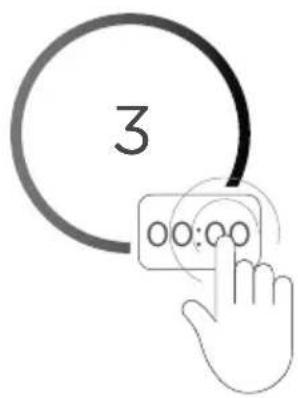
3 00:00When the set time is up, 00:00 will flash and you will hear a beeping sound.
Touch 00:00 to stop the flashing and beeping sound.
If not pressed, the timer automatically stops after 35 seconds.
Resetting the timer
①
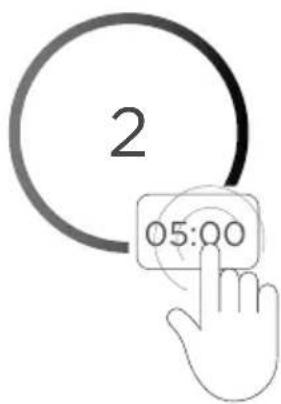
text_image
2 05:00Touch the set time displayed.
②

text_image
2 TIMER 09 05 HOURS 00 : 06 MINUTES 01 07Touch ⚙ to reset the timer to 00:00.
③

text_image
2 TIMER 09 05 HOURS 00 : 06 MINUTES 01 07Touch √ to confirm.
Using the kitchen timer
This feature is used as a standalone timer which has no effect on the cooking process. The heat level setting of any pan can be operated normally while the kitchen timer is running. The kitchen timer can be adjusted ranging from 1 minute to 9 hours and 59 minutes.

text_image
06 : 40 ①Touch ☒ on the menu bar to select Kitchen timer.

text_image
2 TIMER HOURS 00 09 05 06 MINUTES 01 ②TIMER will be displayed on the screen. Scroll up/down to set the cooking time (hours/minutes).
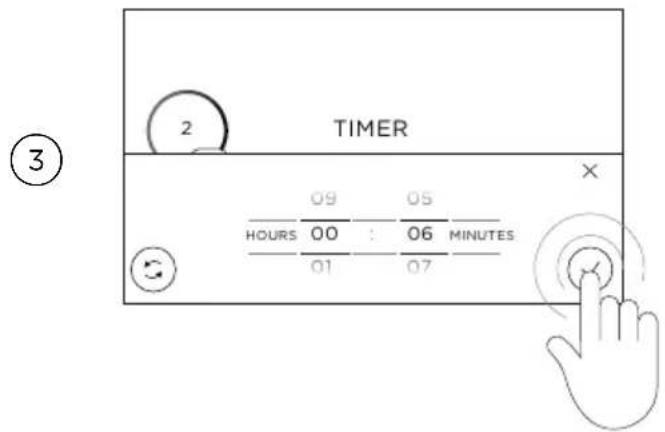
text_image
2 TIMER 09 05 HOURS 00 : 06 MINUTES 01 07 ③Touch √ to confirm.
④

04:06

The timer will start and the display will show the current time.
- If the set time is less than 1 hour, the time is displayed in minutes and seconds.
- If set time is more than 1 hour, the time is displayed in hour/s and minutes.
⑤
OO:OO
When the set time expires, 00:00 will flash and you will hear a beeping sound.
⑥

natural_image
Hand icon pointing at four circular nodes with a connecting line, no text or symbols presentTouch 00:00 to stop the flashing and beeping sound.
The timer menu will automatically close after 15 seconds.
Melting function
This function is suitable for melting chocolate. The temperature of the selected pan is set automatically to 44°C. The maximum duration of this function can be set up for two hours.
①
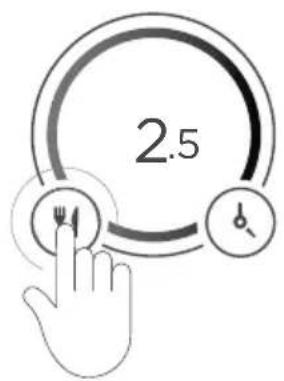
text_image
2.5Once the pan is placed on the cooking surface, touch ☐ on the left of the pan indicator icon.
②
text_image
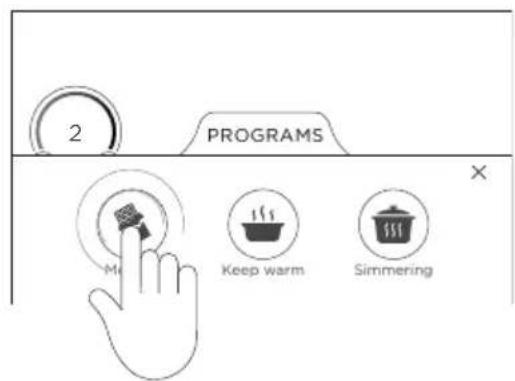
2 PROGRAMS × Keep warm SimmeringThe PROGRAMS menu will open. Touch 🔒 to select MELTING function.
③

natural_image
Simple icon of a wallet with a grid pattern inside, enclosed in a circle (no text or symbols)The MELTING symbol is shown in the pan icon, and the temperature of the pan is automatically set to 44^ C.
④

text_image
07 : 20 1 2 3 4 5 6 7 8 9 BTo stop the function, select the pan icon and slide to 0 to turn off the function.
Keep warm function
This function is suitable for keeping your food warm to a preset temperature of 70°C.
①
text_image
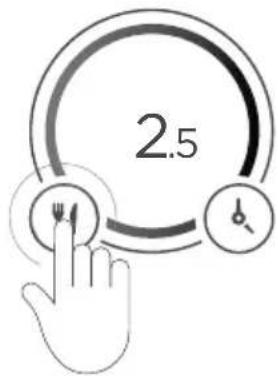
2.5Once the pan is placed on the cooking surface, touch ☐ on the left of the pan indicator icon.
②
text_image
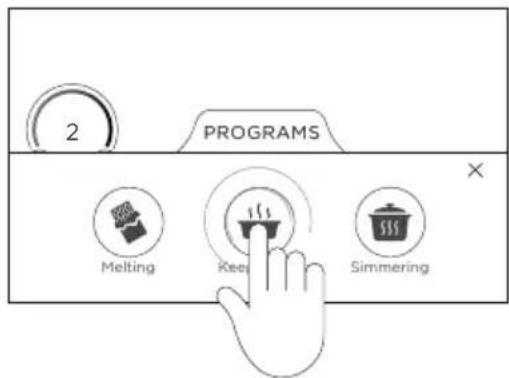
2 PROGRAMS Melting Rees SimmeringThe PROGRAMS menu will open. Touch 📁 to select KEEP WARM.
③

natural_image
Simple icon of a steaming bowl inside a circle (no text or symbols)The KEEP WARM symbol is shown in the pan icon, and the temperature of the pan is automatically set to 70^ C.
④
text_image
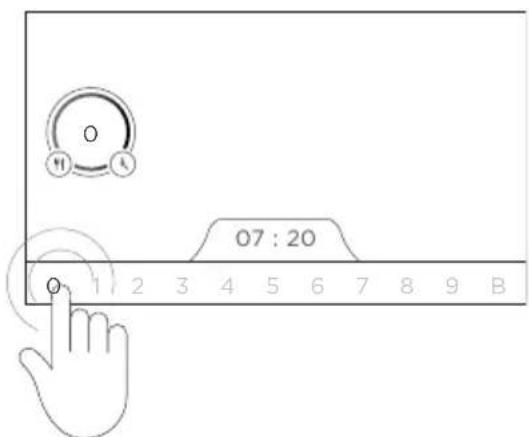
07 : 20 1 2 3 4 5 6 7 8 9 BTo stop the function, select the pan icon and slide to 0 to turn off the function.
Simmering function
This functions sets the temperature of the selected pan to 94^ C. The maximum duration of this function can be set up for two hours.
①

text_image
2.5Once the pan is placed on the cooking surface, touch ☐ on the left of the pan indicator icon.
②
text_image
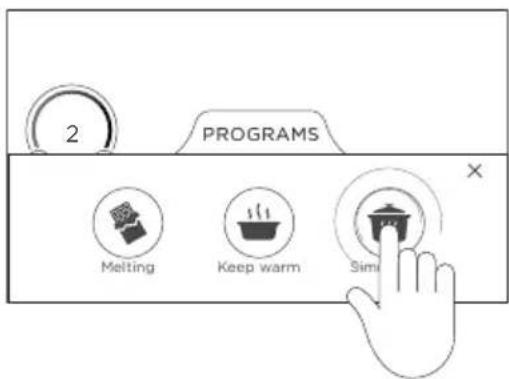
2 PROGRAMS Melting Keep warm SimiThe PROGRAMS menu will open. Touch 📁 to select SIMMERING function.
③

natural_image
Simple icon of a cooking pot with steam inside a circle (no text or symbols)The pan icon will show the SIMMERING symbol, and the temperature of the pan is automatically set to 94°C.
④
text_image
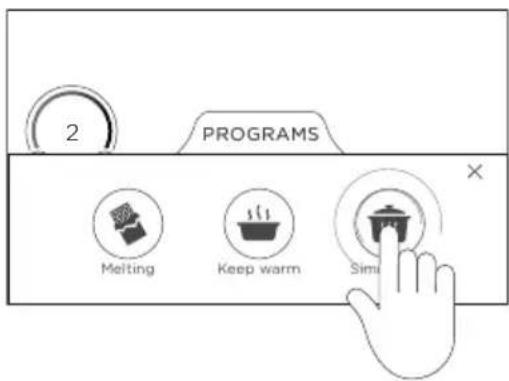
2 PROGRAMS Melting Keep warm SimiTo stop the function, select the pan icon and slide to 0 to turn off the function.
Key Lock
This feature locks all keys on the touchscreen (except On/Off ^① ) to avoid any accidental activation or changing of the pan heat settings when cleaning. When the cooktop is locked, the keys and cooktop display will remain unresponsive.

text_image
06 : 40 ①Touch ☑ on the menu bar to select KEY LOCK.

natural_image
Simple diagram with a padlock icon inside an oval shape, no text or symbols presentThe display will show the KEY LOCK icon to indicate the touchscreen is now locked.
- If a key is touched during lock mode, you will hear a beeping sound and a message on how to unlock will appear at the bottom of the screen.

text_image
③To deactivate key lock, touch the KEY LOCK icon for 3 seconds.
The key lock function stays active if the cooktop is powered Off and On again. In case of power interruption, the key lock function will be cancelled.
Residual heat indicator
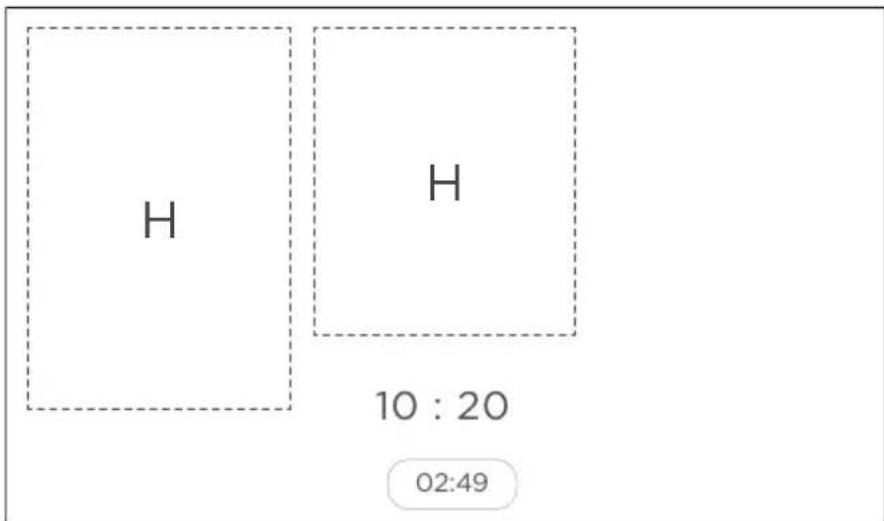
After cooking, this feature indicates if the part of the cooking surface is still too hot to touch. The touchscreen displays 'H' on the indicated cooking surface, and will disappear if temperature is 55^ C or less.
text_image
H H 10 : 20 02:49If there is a power interruption while the residual heat indicator is active, the cooktop will restart at residual heat temperature with 'H' displayed on the touchscreen.
Auto-off function
This is a safety feature that automatically turns off the cooktop after a period of time based on the selected cooking function or heat level setting. Below are the following time limits corresponding to the cooking level.
| COOKING LEVEL MAXIMUM OPERATING TIME (HOURS) | |
| MELTING 2 | |
| KEEP WARM 2 | |
| SIMMERING 2 | |
| 1 - 1.5 10 | |
| 2 - 3.5 5 | |
| 4 - 4.5 4 | |
| 5 - 5.5 3 | |
| 6 - 9 2 | |
| 9.5 1 | |
| B 10* | |
*Power level switches to 9 after 10 minutes.
Settings menu
This feature includes various functions to configure your cooktops:
PERSONALISE, CHILD LOCK, SOUND, BRIGHTNESS, CLOCK, LANGUAGE, FACTORY RESET.
①

text_image
2 06 : 31Touch Ⓤ on the bottom right corner of the touchscreen.
②
flowchart
graph TD
    A["Personalise Child Lock 5"] --> B["Clock Icon"]
    C["Brightness Clock"] --> D["Sound Icon"]
    E["Hand Icon"] --> F["Hand Icon"]
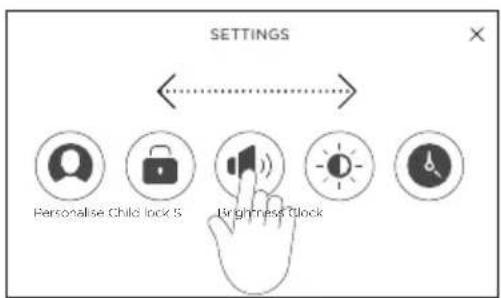
The SETTINGS menu is displayed. Swipe the icons left or right to navigate all functions in this menu.
Personalise
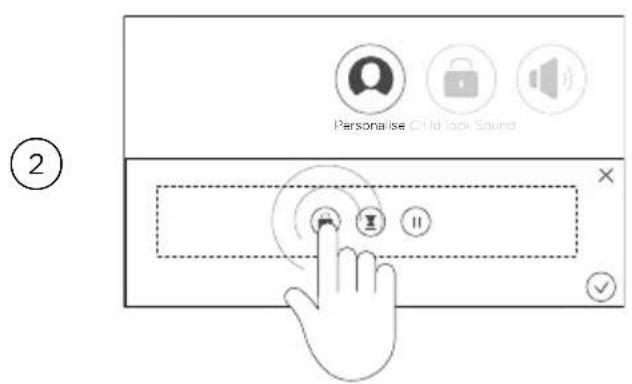
This function allows you to customise the menu bar at the bottom of the touchscreen. It allows you to select which settings can be displayed on the touchscreen.

text_image
SETTINGS Pers CHM lock Sound Brightness ClockOn the SETTINGS menu, touch Ⓞ to open PERSONALISE setting on the touchscreen.
text_image
2 Personalise Child lock SoundThe touchscreen shows an editing box containing the functions in the menu bar.
To remove a function, tap the icon in the editing box. The icon will move to the bottom of the screen.
To add a function, tap the icon at the bottom. The icon will move into the editing box.

text_image
Personalise: Child Rock Sound ③Touch √ to confirm.
Child Lock
This function restricts the access of children to prevent unintended operation of the cooktop. If child lock is activated, the cooktop can still be turned ON but the main screen is not displayed. If power is interrupted, the child lock remains active when the cooktop is turned ON.
①
text_image
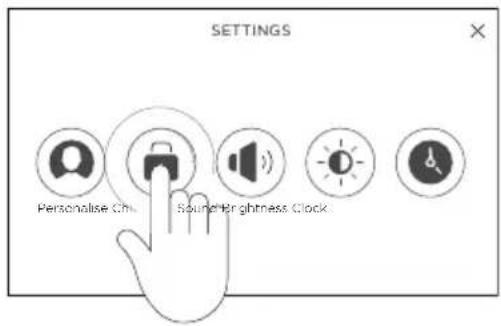
SETTINGS Personalise Clock Sound Brightness ClockTo activate Key lock
On the SETTINGS menu, touch 🔒 to open the CHILD LOCK setting on the touchscreen.
②
text_image
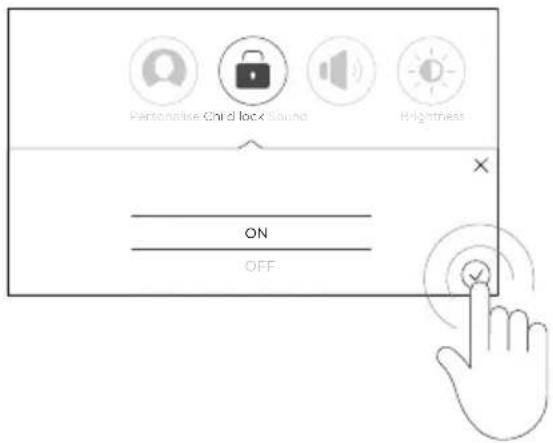
Personalise Child lock Sound Heightness ON OFFScroll to select ON. Touch √ to confirm.
③

text_image
Child lock is activated Child lock will be valid after the next switch ON.Child lock is now activated.
④
text_image
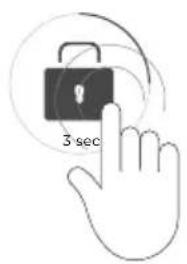
3 secThe child lock icon is displayed each time the cooktop is switched ON.
To access the main screen, touch the icon for 3 seconds.
②
text_image
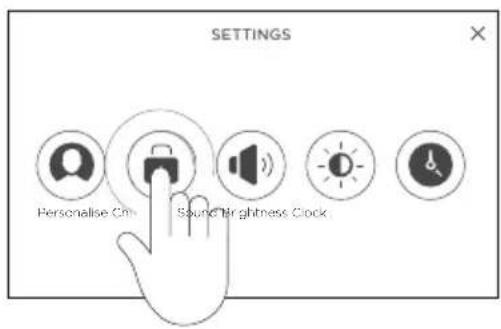
SETTINGS Personalise Clock Sound Brightness ClockTo deactivate Key lock
On the SETTINGS menu, touch 🔒 to open CHILD LOCK setting on the touchscreen.
③
text_image
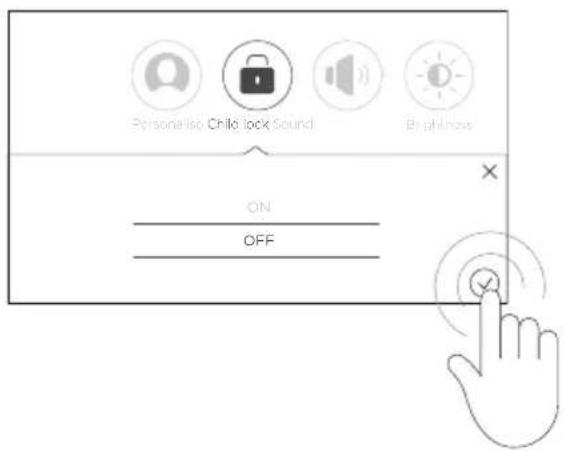
Personalise Child lock Sound Brightness ON OFFScroll to select OFF. Touch √ to confirm.
Child lock is now deactivated.
Sound
This function enables you to change the volume of sound emitted by the touchscreen. There are two volume sliders to adjust the NOTIFICATION and TIMER sounds.
①
text_image
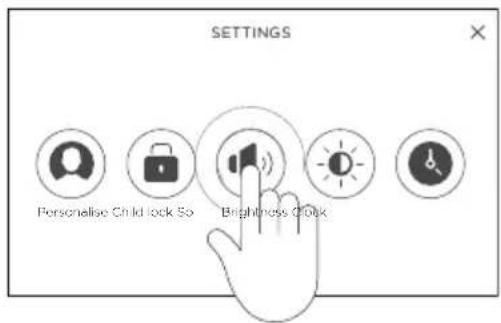
SETTINGS Personalise Child lock So Brightness ClockOn the SETTINGS menu, touch to open SOUND setting on the touchscreen.
②

text_image
Personalize Child lock Sound Brightness clock NOTIFICATION TIMERSlide your finger along NOTIFICATION slider to adjust the volume.
Touch √ to confirm.
③

text_image
Personalise Child lock Sound Brightness Clock NOTIFICATION TIMERSlide your finger along TIMER slider to adjust the volume.
Touch √ to confirm.
Brightness
This function allows you to change the brightness of the touchscreen.
①

text_image
SETTINGS Personalise Chiko Lock Sound Brq ClockOn the SETTINGS menu, touch to open BRIGHTNESS setting on the touchscreen.
②
text_image
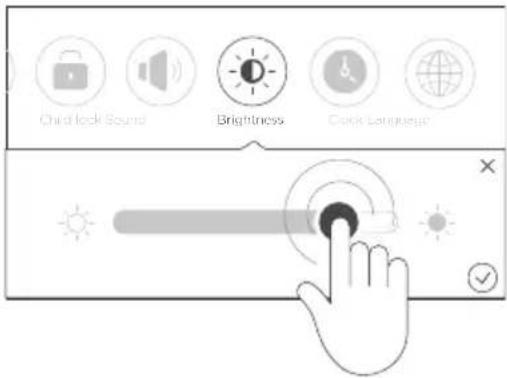
Child lock Sound Brightness Clock LanguageSlide your finger along the slider to adjust the brightness level.
Touch √ to confirm.
Display clock
This function enables you to set the time of clock displayed on the main screen.
①

text_image
SETTINGS Personalise Child lock Sound Brightness (C)On the Settings menu, touch 🔒 to open the CLOCK setting on the touchscreen.
②

text_image
Sound Brightness Clock Language Factory reset 12h 13 13 24h 14 : 14 15 15Select the display format in 12 hours or 24 hours.
Scroll up/down to set the cooking time (hours/minutes).
Touch √ to confirm.
③
14:11
Clock is displayed on the main screen.
After cooking and cooktop is switched off, the clock stays displayed for 15 seconds then disappears. If there is still residual heat on the cooktop, countdown will start only after residual heat is gone.
The clock is still active even if the cooktop is off. Touch anywhere on the touchscreen to display the clock for 15 seconds.
Language
This function allows you to set your preferred language. The languages supported are: English, German, French, Spanish, Italian, Simplified Chinese, Korean and Vietnamese. English is set as the default language.
①

text_image
SETTINGS Child kick Sound Brightness Clock TapOn the SETTINGS menu, touch to open LANGUAGE setting on the touchscreen.
②
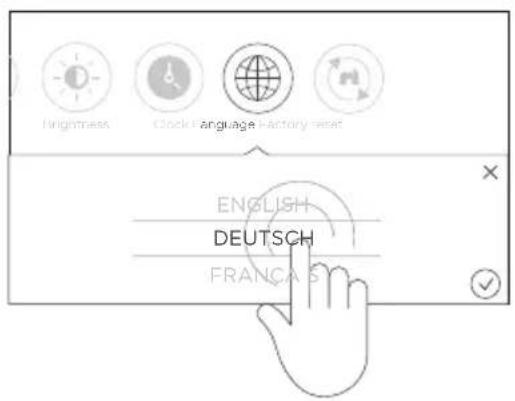
text_image
English DEUTSCH FRANÇA SScroll up/down to set your preferred language.
Touch √ to confirm.
Factory reset
This function enables you to reset the cooktop to its default settings.
①
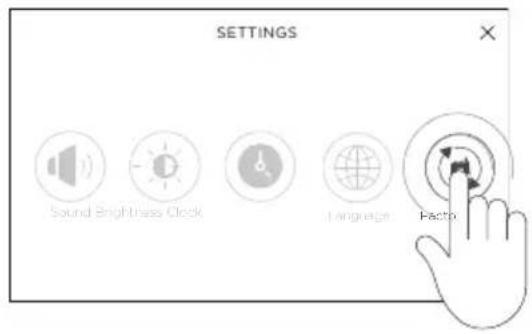
text_image
SETTINGS Sound Brightness Clock Language ActionOn the SETTINGS menu, touch Ⓜ to open FACTORY RESET menu on the touchscreen.
②
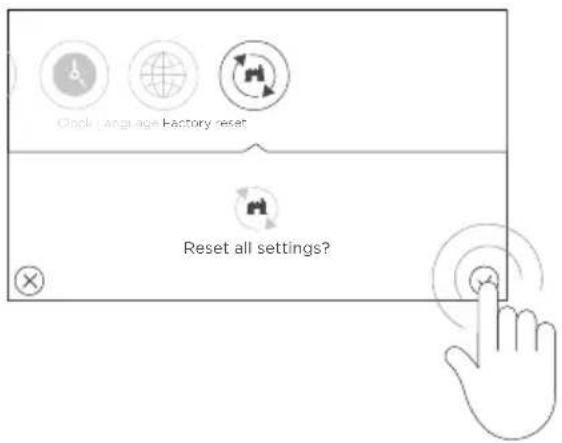
text_image
Clock Language Factory reset Reset all settings?Touch √ to confirm.
To cancel, touch X to exit FACTORY RESET menu and return to the main screen.
Take care when frying: oil and fat heat up very quickly, particularly if you're using PowerBoost. At extremely high temperatures, oil and fat will ignite spontaneously and this presents a serious fire risk.
Cooking tips
- When food comes to boil, reduce the temperature setting.
- Using a lid will reduce cooking times and save energy by retaining the heat.
- Minimize the amount of liquid or fat to reduce cooking times.
- Start cooking on a high setting and reduce the setting when the food has heated through.
Simmering, cooking rice
- Simmering occurs below boiling point, at around 85°C, when bubbles are just rising occasionally to the surface of the cooking liquid. This is the key to delicious soups and tender stews because the flavours develop without overcooking the food. You should also cook egg-based and flour-thickened sauces below boiling point.
- Some tasks, including cooking rice by the absorption method, may require a setting higher than the lowest setting to ensure the food is cooked properly in the time recommended.
Searing steak
To cook juicy flavoursome steaks:
① Stand the meat at room temperature for about 20 minutes before cooking.
② Heat up a heavy-based frying pan.
③ Brush both sides of the steak with oil. Drizzle a small amount of oil into the hot pan and then lower the meat onto the hot pan.
④ Turn the steak only once during cooking. The exact cooking time will depend on the thickness of the steak and how cooked you want it. Times may vary from about 2-8 minutes per side. Press the steak to gauge how cooked it is - the firmer it feels the more ‘well done’ it will be.
⑤ Leave the steak to rest on a warm plate for a few minutes to allow it to relax and become tender before serving.
Stir-frying
When stir-frying be careful to lift the pan clear of the surface if tossing the ingredients. Sliding the pan across the cooktop surface may scratch it.
① Choose an induction compatible flat-based wok or a large frying pan.
② Have all the ingredients and equipment ready. Stir-frying should be quick. If cooking large quantities, cook the food in several smaller batches.
③ Preheat the pan briefly and add two tablespoons of oil.
④ Cook any meat first, put it aside and keep warm.
⑤ Stir-fry the vegetables. When they are hot but still crisp, turn the heat level to a lower setting, return the meat to the pan and add your sauce.
⑥ Stir the ingredients gently to make sure they are heated through.
⑦ Serve immediately.
| HEAT SETTING SUITABILITY FOOD ITEMS | ||
| 1 - 2 | melting, reheating Sauces, butter, chocolate, gelatine, prepared dishes | |
| 2 - 3 | simmering, defrosting Rice, pudding, sugar syrup, dried vegetables, fish frozen products | |
| 3 - 4 | steam Vegetables, fish, meat | |
| 4 - 5 | water Steamed potatoes, soups, pasta, fresh vegetables | |
| 6 - 7 | medium cooking, simmering Meat, eggs, sausages, pancakes | |
| 7 - 8 | cooking Potatoes, fritters, waffles | |
| 9 | frying, roasting, boiling water | Steaks, omelettes, fried dishes, water |
| B | frying, roasting, boiling water | Scallops, steaks, water |
| WHAT? HOW? IMPORTANT! | ||
| Everyday soiling on the glass (fingerprints, marks, stains left by food or non-sugary spillovers on the glass) | 1 Switch off the cooktop before cleaning.2 Apply cooktop cleaner while the glass is still warm (but not hot).3 Rinse and wipe dry with a clean cloth or paper towel. | After the cooktop is switched off, there will be residual heat on the cooking surface. Take extreme care.Heavy-duty scourers, some nylon scourers and harsh/ abrasive cleaning agents may scratch the glass. Always read the label to check if your cleaner or scourer is suitable.Never leave cleaning residue on the cooktop: the glass may become stained. |
| Boilovers, melts, and hot sugary spills on the glass | 1 Remove these immediately with a fish slice, palette knife or razor blade scraper suitable for ceramic glass cooktops, but beware of hot cooking surfaces.2 Hold the blade or utensil at a 30° angle and scrape the soiling or spill to a cool area of the cooktop.3 Clean the soiling or spill up with a dish cloth or paper towel. | Remove stains left by melts and sugary food or spillovers as soon as possible. If left to cool on the glass, they may be difficult to remove or even permanently damage the glass surface.Cut hazard: when the safety cover is retracted, the blade in a scraper is razor-sharp. Use with extreme care and always store safely and out of reach of children. |
| Spillover on the touchscreen | 1 Soak up the spill.2 Wipe the touch control area with a clean damp sponge or cloth.3 Wipe the area completely dry with a paper towel. | The cooktop may beep and turn itself off, and the touchscreen may not function while there is liquid on them. Make sure you wipe the touchscreen area dry before turning the cooktop back on. |
Induction cooking is activated when cookware is detected on the cooking surface. If there is a problem with the cookware, the pan icon will show 1

text_image
3Touch ! to show the corresponding alert message on the touchscreen.
The following are examples of alert messages:

text_image
Oops! Your cookware is not suitable for your induction cooktop. Please use other cookware.The pan you're using is not suitable for induction cooking.
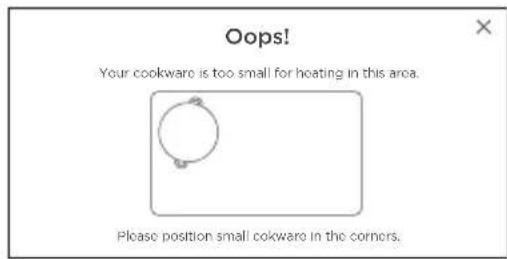
text_image
Oops! Your cookware is too small for heating in this area. Please position small cookware in the corners.The pan is too small or not properly positioned on the cooking surface.
text_image
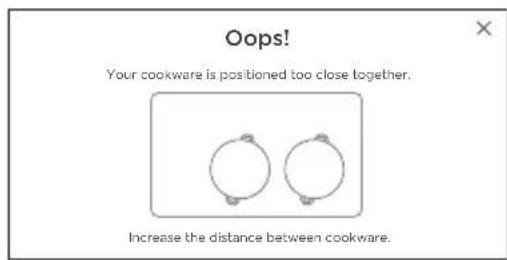
Oops! Your cookware is positioned too close together. Increase the distance between cookware.Two pans heated at different heat levels are placed too close to each other.
text_image
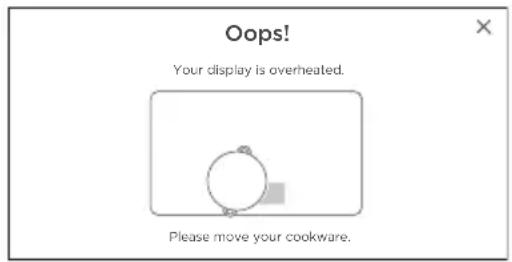
Oops! Your display is overheated. Please move your cookware.The pan is placed too close to the touchscreen which can result in overheating of the panel surface.

text_image
Sorry An error occurred... E04 Please contact service department.Alert code indicates electronic system is defective.
| ALERT CODE POSSIBLE CAUSES WHAT TO DO | ||||
| E1 | Power Supply Error Switch OFF/ON electrical power supply / Hob switch, If the error persists, please call Fisher & Paykel Service Center | |||
| E6 | The air inlet of the ventilator is obstructed. | Remove the obstruction. | ||
| E2_ E21 | The cooktop is overheated. Switch off the cooktop. Let it cool down before before you turn it on again. | |||
| EA EC Ed EE | Error in Electronic connection. Restart the cooktop. If error persists, contact Fisher & Paykel Service Center. | |||
| Er 13 Er21 Er22 | ||||
| Er31 Er35 Er47 | ||||
| Er61 Er66 | ||||
| Er62 | Pan position not detected. Move the pan to another position. | |||
| Pans are placed too closed to each other. | Ensure there is suitable gap between pans. | |||
| PROBLEM POSSIBLE CAUSES WHAT TO DO | ||||
| The cooktop cannot be turned on. | No power. Ensure the cooktop is connected to the power supply and that it is switched on at the wall. Check whether there is a power outage in your home or area. Check the circuit breaker.If you've checked everything and the problem persists, call your Authorized Service Centre or Customer Care. | |||
| The touchscreen are unresponsive. | The controls are locked. Unlock the controls.See section 'Key Lock' for instructions. | |||
| Screen is frozen. | ||||
| The touchscreen is difficult to operate. | There may be a slight film of water or oil over the controls or you may be using the tip of your finger when touching the controls. | Make sure the touchscreen is dry and use the ball of your finger when touching the controls. | ||
| The glass is scratched. Rough-edged cookware. Use cookware with flat and smooth bases. See 'Cookware'. | ||||
| Unsuitable, abrasive scourer or cleaning products being used. | See 'Care and cleaning'. | |||
| Some or all displays flash and there is a continuous beep. | Liquid has spilled onto the touch control area. | Switch the heat to the cooktop off at the wall and see 'Care and cleaning' for instructions. | ||
| There are objects (eg utensils) on the touch control area. | Remove the objects from the touch control area. | |||
| Several touchscreen are registering continuous contact (eg due to someone resting their hand or arm on the touch control area). | Remove the cause of continuous contact. | |||
| The automatic cooking system does not start-up | The cooking surface is still hot 'H'. The highest power level is set to '9' | Check if power slider is set to '0'. | ||
| Touchscreen shows! on pan display. | There is no pan on the cooking surface. | Reposition the pan. | ||
| The pan is placed too close to the touchscreen. | ||||
| The pan is too small. Use a suitable pan. | ||||
| The pan is not compatible with induction. | ||||
| Touchscreen shows! on cooking surface | Electronics error. Disconnect and reconnect the cooktop at the circuit breaker to reset. | |||
| Continuous ventilation after turning off the cooktop | This is normal. The fan continues to run to protect the electronic components. | The fan stops cooling automatically. | ||
| Some pans make crackling or clicking noises. | This may be caused by the construction of your cookware (layers of different metals vibrating differently). | This is normal for induction cookware and does not indicate a fault. | ||
| Condensation is forming on surrounding walls, cabinetry or your overhead rangehood. | This is a normal for induction cooking.Energy efficient technology means that no heat is lost to surrounding surfaces.This results in condensation forming on these cooler surfaces when steam is produced by cooking. | This is normal for induction cooking and does not indicate a fault.To minimise condensation:Ensure adequate ventilation while cooking.Switch your rangehood on 5 minutes before cooking and let it run for at least 5 minutes after cooking.Use your rangehood on a lower speed setting when boiling.Use the cooktop on a lower heat setting when boiling.Use pot lids to stop moisture from escaping.If condensation forms, wipe down surrounding walls and cabinetry as needed. | ||
This cooktop has been designed and constructed in accordance with the following codes and specifications:
In New Zealand and Australia:
• AS/NZS 60335-1:2011 General Requirements for Domestic electrical appliances
- AS/NZS 60335-2-6:2014 Particular Requirements for Domestic electrical cooking appliances
• AS/NZS CISPR 14.1.2013 Electromagnetic Compatibility Requirements.
In Europe:
Safety requirements of EEC Directive "Low voltage" 2014/35/EU:
• EN 60335-1 General Requirements for Domestic electrical appliances
• EN 60335-2-6 Particular Requirements for Domestic electrical cooking appliances
Safety requirements of EEC Directive "EMC" 2014/30/EU:
- EN 55014-1, EN 55014-2, EN 61000-3-2, EN 61000-3-3 Electromagnetic Compatibility Requirements.
Requirements of EEC Directive 93/68/EEC and 2011/65/EU
European directive 2012/16/EU on Waste Electrical and Electronic Equipment (WEEE) (for European Union countries only)
GB This appliance is marked according to the European directive 2012/19/EU on Waste Electrical and Electronic Equipment (WEEE). By ensuring this product is disposed of correctly, you will help prevent potential negative consequences for the environment and human health, which could otherwise be caused by inappropriate waste handling of this product.
The symbol 📄 on the product, or on the documents accompanying the product, indicates that this appliance may not be treated as household waste. Instead it shall be handed over to the applicable collection point for the recycling of electrical and electronic equipment. Disposal must be carried out in accordance with local environmental regulations for waste disposal. For more detailed information about treatment, recovery and recycling of this product, please contact your local city office, your household waste disposal service or the shop where you purchased the product.
| MODEL DIMENSION OF COOKING AREA | MINIMUM DETECTION | NOMINAL POWER (kW)* | ENERGY CONSUMPTION* |
| CI926DTB 920 x 445mm ∅ 150mm 11100 192.5 Wh/kg |
*Energy consumption for whole cooktop calculated in accordance with the regulation (EU) No. 66/2014 and standard BS EN 60350-2:2018.
Reducing the environmental impact of cooking
Reducing energy consumption will reduce the impact of cooking on the environment. You can reduce energy consumption by:
- Thawing frozen foods in the refrigerator first
• Using a moderate setting to conserve energy
• Using the correct sized pot
• Using a pressure cooker - Cutting food into smaller pieces – this will reduce cooking time
- Use a steamer or a pan with a divider to cook different vegetables at the same time
- Using a cover when boiling water to reduce the time it takes to get to the boil.
- Simmering liquid cooked foods instead of boiling vigorously
- Keeping pot lids on to reduce heat loss.
Before you call for service or assistance
Check the things you can do yourself. Refer to the installation instructions and your user guide and check that:
① Your product is correctly installed.
② You are familiar with its normal operation.
If after checking these points you still need assistance or parts, please refer to the Service & Warranty book for warranty details and your nearest Authorized Service Centre, Customer Care, or contact us through our website www.fisherpaykel.com.
Complete and keep for safe reference:
| Model | |
| Serial No. | |
| Purchase Date | |
| Purchaser | |
| Dealer | |
| Suburb | |
| Town | |
| Country |
FISHERPAYKEL.COM
© Fisher & Paykel Appliances 2021. All rights reserved.
The models shown in this guide may not be available in all markets and are subject to change at any time.
The product specifications in this guide apply to the specific products and models described at the date of issue. Under our policy of continuous product improvement, these specifications may change at any time.
For current details about model and specification availability in your country, please go to our website or contact your local Fisher & Paykel dealer.