
PRMC820 - Money Counting Machine Pyle - Free user manual and instructions
Find the device manual for free PRMC820 Pyle in PDF.


| Product Type | Money Counter / Bill Counter |
| Model | PRMC820 |
| Brand | Pyle |
| Dimensions | 242mm x 276mm x 245mm |
| Net Weight | 4.9 kg (6.75 kg gross) |
| Power Source | AC 100-240V, 50/60Hz |
| Power Consumption | 30W (max) |
| Counting Speed | 600, 1000, 1200, 1900 notes/min (selectable) |
| Countable Note Size | 50mm x 110mm to 90mm x 190mm |
| Hopper Capacity | 300 sheets |
| Stacker Capacity | 200 sheets |
| Display | 5-digit LCD (counting) + batch number display |
| Detection Functions | UV, MG, IR, DD (different dimensions), counterfeit, double-note, half-note, chained-note |
| Feed System | Roller friction system |
| Control Keys | RESTART, CLEAR, BATCH, ADD, SPEED, CF, UV, MG, IR, DD, numeric keypad |
| Manual Format | Free PDF download (10 pages, EN) |
| Daily Maintenance | Clean sensors with accessory brush after use |
| Safety Features | Three-prong grounded plug; unplug before moving; avoid direct sunlight, liquids, and pointed objects |
| Warranty / Support | See PyleUSA.com |
Frequently Asked Questions - PRMC820 Pyle
User questions about PRMC820 Pyle
0 question about this device. Answer the ones you know or ask your own.
Ask a new question about this device
Download the instructions for your Money Counting Machine in PDF format for free! Find your manual PRMC820 - Pyle and take your electronic device back in hand. On this page are published all the documents necessary for the use of your device. PRMC820 by Pyle.
USER MANUAL PRMC820 Pyle
natural_image
Front view of a black DMM bank counter with digital display and control buttons (no readable text or symbols)PYLE
PyleUSA.com
CONTENT

natural_image
Line drawing of a mechanical device with control panel and base plate (no text or symbols)HIGH QUALITY AND LEADING ARTICLE IN THE BILL COUNTER
- Name and Brief Description of Main Paris....1
- Operation Panel and Display....2-3
3 Notes in Using Machine 3
4 How to Operate Machine 4-5
5.Different Denomination Detection Function 6-10
6.Error message and solution....1
7.Troble shooting....12-13
8.Precations for Handling of Machine 14
9.Daily cleaning of the machine....15 - Specifications.... 16
- Caution 16
THE QUALITY AND LEADING ATTOLIS IN THE BILL COUNTER
- Name and Brief Description of Main Parts
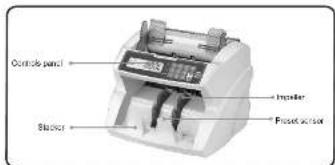
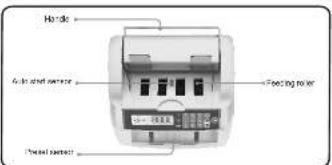


HIGH QUALITY AND LEADING ARTICLE IN THE BILL COUNTER
- Operation Panel and Display
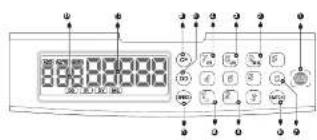
1. RESTART KEY
Used to start counting operation in the following Cases.
a. To resume counting after an error is cleared.
b. To clear the displayed counted number of Press to start counting
0.1 Rose to Start, Ordering
2. UV KEY
Press the CF key, then press this key, the machine will stop in case a counterfeit note is detected Without UV or unconscious specialty.
3. MG KEY
Press the CF key, then press this key, the machine will stop in case a Counterfeit it note is detected. Without MG or unconspicuous specialty
4. IR KEY
Press the CF key, then press this key, the machine will stop in case a chain note is detected.
5. DD KEY
By pressing this key, the size of the first counted note is memorized and in case a smaller or larger size note. Is detected, the machine will stop.
6. CF KEY
By press this key to turn on the counterfeit detect function (press CF, then press the UV, MG, IR, DD to turn on or off this function you want.)
7. CLEAR KEY
Pressing this key to cleaning the displayed Batch Size.
- Operation Panel and Display
8. BATCH KEY
Every time this key is pressed, one of the preset batch amounts 10,
20,25,50,100 and infinity will be displayed and selected by rotation on the Batch Number Display.
9. AUTO KEY
Press CF key, then press this key. Manual or Automatic Switching counting function.
10. ADD KEY
Press CF key, then press this key. Number of Accumulative function
11. SPEED KEY
Counting speed is selected .(1900,1200,1000,600 notes/min.)
- COUNTED NUMBER DISPLAY
The number of counted notes is displayed here.
13. BATCH NUMBER DISPLAY
The optioned number of notes to be batched is display here.
3. Notes in Using Machine
To make the most use of this machine
---Avoid operation under direct sunlight.
—Don't press the operation keys with a pointed tip of pencil or anything pointed.
—Don't make multi wiring from one socket
To use this machine safely;
—Three-prong plug which can be grounded to the building ground should
be used for power supply.
—Use the power cable attached to the machine as accessories.
—Unplug the machine before it is moved.
—Don't place tools, fingers, hair, loose clothing, etc. near any moving part.
—Don't spill drink etc. on the machine.
—For maintenance, use specified parts: don't make improper maintenance.
HIGH QUALITY AND LEADING ARTICLE IN THE
4. how to Operate Machine
Counting Bank Notes
1). switch on the machine.
\~0"will be display on the Counted Number Display.
When the lamp of the machine is set to the AUTO position, a proper threshold is set automatically.
2). Check the Addition Lamp and activate the ADD function
To add counted number one after another, press the ADD Key to activate the ADD function making the addition lamp lit.
3). Set the optional batch number.
Set the batch number by pressing the BATCH Key. Every time this is pressed, one of the preset values 10,20,25,50,100 or infinity will be displayed by rotation on the Batch Number Display.
Counting operation will stop when the counting number reaches the set batch number. Any optional batch number (1-999) other than the preset values can be set by pressing the Ten Keys Pad.
THE QUALITY AND LEADING ATTROLS IN THE BILL COUNTER BILL COUNTER

HIGH QUALITY AND LEADING ARTICLE IN THE

4.how to Operate Machine
4). Set the counting speed.
Set the counting speed by pressing the SPEED Key. Every time this key is pressed, one of the preset rates "600", "1000", "1200", "1900" notes/min will be displayed by rotation on the Counting Number Display.
5). Set a loose of bank notes to be counted in the Hopper.
Set notes to be counted in the Hopper and the machine will start counting automatically.
If a batch number has been set, the machine will stop when the batch number is reached. After the batched notes are removed from the stacker, the next counting operation will start automatically.
For reference
How to change batch number for each counting press the RESTART KEY each time when batch number is changed for each batch counting. What is the "ADD function", When counting operation for a loose of notes placed in the Hopper is finished, the counting operation for the next bundle of notes will be started from 0 on the Counting Number Display. When counting operation is started in the ADD function, the counted numbers for succeeding bundle of notes will be added and displayed.
- Different Denomination Detection Function
Through this function the size of the first counted note is memorized and if a note whose size is different from the memorized value is detected, the machine will stop.. Setting of DD detect function.
- Press the DD key to set the "DD detection function" (DD lamp will be lit.)
Difference between note sizes of different dimensions is detected by checking the width of each note to be counted. The machine is set up so that it can detect notes of different dimensions when the size different is 5mm or more.
The size of dimensions can be adjusted. Press the "DD"Button for 3 seconds, the batch display will show the current size "DXX" then press the numeric Key to choose the desired size (rang from 0-9). After choosing of the size, press "RESTART"button to confirm.
- When the machine stop after detecting a different limit remove the detected one from the Stacker and press the RESTART KEY to restart counting.
Clearing the memory of a dimensions
* In case the Addition Lamp is not lit!
Remove the notes from the Stacker. The memorized value will be cleared when the number on the Counting number Display become 0* In case the Addition Lamp is lit!
Removed the notes from the Hoper and Stacker, and the press the 'RESTART' KEY; memory will be cleared with the indication on the counting Number Display at 0".

THE QUALITY AND LEGENDS ATTROLS IN THE BILL COUNTER BILL COUNTER

HIGH QUALITY AND LEADING ARTICLE IN THE
5.Different Dimensions Detect Function
Activating the CF (counterfeit note) detect function
- Press the CF key to activate the counterfeit note detection function. CF SET will be displayed on the display.
Pressing the detection method selection key on the numeric Key while CF SET is displayed makes the corresponding detection method effective and the corresponding LED light up (UV, MG, IR, ADD, AUTO) - When the machine stop through this function, remove the detected note from the Stacker and recount all the other notes in the Stacker.
- Deactivating the function
Press the detection method selection key on the numeric Key again while CF SET is displayed makes the corresponding detection method ineffective the corresponding LED go out. Pressing the CF key again while CF SET is displayed makes all the detection methods ineffective.
Check the removed suspected notes. If it is found be a genuine notes, return it to the stacker and press the RESTART KEY to continue counting.
UV(ultravoilet) detect function
*Available for the model with UV detection.
--When the machine stop and sound after detecting a counterfeit note, the display will show the message“A”and the UV indicator will blink (alerting the user the presence of a dubious bill). the dubious bill will always be the last one on the stacker. remove the detected note from the Slacker and recount all the other notes in the Stacker.

5.Different Dimensions Detect Function
---The sensitivity of UV detection can be adjusted. Press "UV" button for 3 seconds, The batch display will show the current sensitivity level I'AXX"then press numeric Key to choose the desired sensitivity level (range from 0-9). After choosing of the level, press "RESTART" button to confirm.
MG (magnetic) detection function
*Available for the model with UV & MG detection.
---When the machine stop and sound after detecting a counterfeit note, the display will show the message "b" and the MG indicator will blink (alerting the user the presence of a dubious bill) the dubious bill will always be the last one on the stacker. remove the detected note from the Stacker and recount all the other notes in the Stacker.
---The sensitivity of MG detection can be adjusted. Press "MG button for 3 seconds. The batch display will show the current sensitivity level"BXX" then press numeric Key to choose the desired sensitivity level (range from 0-9). After choosing of the level, press "RESTART" button to confirm.
THE QUALITY AND LEADING ATTACKS IN THE BILL COUNTER

HIGH QUALITY AND LEADING ARTICLE IN THE BILL COUNTER
5.Different Dimensions Detect Function
IR(infra-ed) detection function
*Available for the model with UV&MG&IR detection.
--When the machine stop and sound after detecting a counterfeit note, the display will show the message' db 'and the IR indicator will blink (alterling the user the presence of a dubious bill), the dubious bill will always be the last one on the stacker, remove the deleted note from the Stacker and recount all the other notes in the Stacker.
--The sensitivity of IR detection can be adjusted. Press 'IR' button for 3 seconds. The batch display will show the current sensitivity level'rXX"then press numeric Key to choose the desired sensitivity level (range from 0-9).
After choosing of the level, press 'RESTART' button to confirm.
Double-notes detection function
--By default, serving as a supplementary function, this detection can be activated when the units is powered up.--When the machine stop and the alarm sound after detecting a double-note bill, the display will show the message "Es" (altering the user the presence of a double-note bill). The double-note bill will always be the last one on the stacker, remove the detected note from the Stacker and press'RESTART' button to continue.
5.Different Dimensions Detect Function
Half-note detection function
---By default, serving as a supplementary function, this detection can be activated when the units is powered up.
---When the machine stop and the alarm sound after detecting a half-note bill, the display will show the message'EH* and the (alerting the user the presence of a half-note bill). The half-note bill will always be the last one on the stacker, remove the detected note from the Stacker and recount all the other notes in the Stacker, press" RESTART" button to continue.
Chained-note detection function
---By default, serving as a supplementary function, this detection can be activated when the units is powered up.
--When the machine stop and alarm sound after detecting a half-note bill, the display will show the message'EC'and the (starting the user the presence of a half-note bill). the chained-note will always be the last one on the stacker. remove the detected note from the Stacker and recount all the other notes in the stacker, press' RESTART'button to continue.
< NOTE > The following are applicable to all the counterfeit note detection function.
THE QUALITY AND LEADING ATTACKS IN THE BILL COUNTER

HIGH QUALITY AND LEADING ARTICLE IN THE BILL COUNTER
6.Error message and solution
The batch display may shows some error message when counting, which means there are some problems with the machine. Refer to the following diagram to find way to solve it.
| Message | Error | Solution |
| RQ(k) | Suspicious bill detected by UV system;Problem in the UV system | Remove the last bill from the stacker, press "RSTART" to continue;lower the UV sensitivity. |
| R1(k) | Suspicious bill detected by UV system;Problem in the UV system | Remove the bill before last from the stacker, press "RSTART" to continue;lower the UV sensitivity. |
| b(k) | Suspicious bill detected by MG system;Problem in the MG system | Remove the suspicious bill from the stacker, press "RESTART" to continue;Lower the MG sensitivity |
| c(k) | Suspicious bill detected by IR system;Problem in the IR system | Remove the suspicious bill from the stacker, press "RESTART" to continue;Lower the IR sensitivity |
7. Trouble shooting
When an error occurs, its corresponding error code is displayed on the Batch Number Display. Find the cause of error by the displayed error code and remove the cause according to the following procedure.
| Error code | Type of error | Cause of error | Procedure for the removing the cause of the error |
| EJ(TJ) | Jam | A note is jammed in the machine | 1. Remove notes from in the Hopper2. Set all the removed notes into the Hopper again.3. Restart counting operation by pleasing the "RESTART" key. |
| Ed(EO) | Double note detection | Abnormal notes in mixed in the bundle of notes to be counted. | |
| Eh(ET) | Half note detection | Check all the notes on the Hopper, then set them again Press the "RESTART" key toStart counting operation. | |
| EC(EO) | Chained note detection | ||
| SL(EO) | Note is in the Stacker | Notes(s) is remains in the stacker | Remove the note(s) left in the stacker. |
THE QUALITY AND LEADING ATTACKS IN THE BILL COUNTER
- Trouble shooting
| Error code | Type of error | Cause of error | Procedure for the removing the cause of the error |
| dd0 | DD notes detection | Different size notes are mixed. | Check the last note in the Stacker. |
| Abnormal notes are mixed. | Check all notes in the Stacker, and then set them again. | ||
| dd1 | DD notes detection | Different size notes are mixed. | Check the note before last in the stacker. |
| Abnormal notes are mixed. | Check all the notes in the stacker, and then set them again. | ||
| ER3(EA3) | Problem with speed sensor | Problem with speed sensor | Clean the sensor or replace it |
| ER4(EA4) | Problem with the right counting sensor | Problem with right counting sensor | Clean the sensor or replace it |
| ERL(EA5) | Problem with the left counting sensor | Problem with left counting sensor | Clean the sensor or replace it |
In case that many'dd errors happens, removed all notes from the Hopper and Stacker, and make sure the condition of notes(holes, tear, fold, etc.) Then align and set notes again.

HIGH QUALITY AND LEADING ARTICLE IN THE BILL COUNTER
8. Precations for Handling of Machine
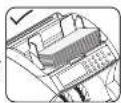
How to Set Bank Notes
Precautions related to proper setting of bank notes to be counted
---Damp and/or badly stained notes should be avoided.
---Check that no foreign matter (piece of paper, paper clip, dust, etc.)
is mixed in with bundle of notes
---Folded or curled notes should be straightened before they are set
in the Hopper
---For brick notes (bundle of new notes which are slucked to each other
by ink). Bend and flex the stack before it is set on the Hopper.
* How to align the notes to be counted.
—Align the long and short edges of the notes by lightly tapping the stack: Insufficient alignment may cause an operation error
--Sensors are used for the counting system of this machine. As these sensors are of optical construction, the system may cause miscounting should dust, dirt, etc. stick to the sensors. Clean the sensors with an accessory brush when counting. Operation is finished.
—piece of paper, dust and/or trash etc. accumulated in the Hopper and/or stack may be taken into the machine; this may cause a malfunction of the machine. Clean the Hopper and Stacker in the same way as above.

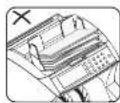
Read and/or
ealine note

Stack of notes mixed with clip or piece of paper or rubber bond

Curled note

Tolded note
THE QUALITY AND LEADING ATTOLIS IN THE BILL COUNTER

HIGH QUALITY AND LEADING ARTICLE IN THE BILL COUNTER
9.Daily cleaning of the machine
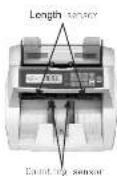
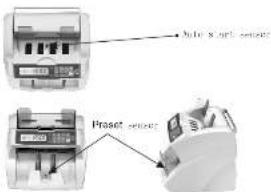
--Sensors are used for counting system of this machine. As these sensors are of optical construction, the system may cause miscounting should dust, dirt, etc.Stick to the sensors.Clean the sensors shown on the photo below with an accessory brush when counting operation is finished.
---Piece of paper, dust and/or trash etc. Accumulated in the Hopper and/or stacker may be taken into the machine; this may cause a malfunction of the machine. Clean the Hopper and Stacker in the same way as above.
10.Specifications
* Dimensions 242mm × 276mm × 245mm
* Net Weight 4.9kgspc
* Grass Weight.... 6.75kg/pc
* Size of countable note....50mm×110mm -90mm×190mm
* Counting speed …… 1930, 1200, 1003, 605 pos/min.
* Feed system .... Roller friction system
* Hopper capacity....300 sheets
* Stacker capacity....200 sheets
* Counting number display 5 Digital LCD
* Power source: AC100-240V 50/60Hz
* Power consumption....30W(max)
11.Caution
* Clean the machine after turn off the power switch.
* Do not use chemical for cleaning the machine.


- CONTENT
- THE QUALITY AND LEADING ATTOLIS IN THE BILL COUNTER
- HIGH QUALITY AND LEADING ARTICLE IN THE BILL COUNTER
- RESTART KEY
- UV KEY
- MG KEY
- IR KEY
- DD KEY
- CF KEY
- CLEAR KEY
- BATCH KEY
- AUTO KEY
- ADD KEY
- SPEED KEY
- BATCH NUMBER DISPLAY
- Notes in Using Machine
- To make the most use of this machine
- To use this machine safely;
- how to Operate Machine
- Counting Bank Notes
- 1). switch on the machine.
- 2). Check the Addition Lamp and activate the ADD function
- 3). Set the optional batch number.
- THE QUALITY AND LEADING ATTROLS IN THE BILL COUNTER BILL COUNTER
- THE QUALITY AND LEGENDS ATTROLS IN THE BILL COUNTER BILL COUNTER
- 5.Different Dimensions Detect Function
- THE QUALITY AND LEADING ATTACKS IN THE BILL COUNTER
- 6.Error message and solution
- Trouble shooting
- Precations for Handling of Machine
- 9.Daily cleaning of the machine
- 10.Specifications
- 11.Caution
Brand : Pyle
Model : PRMC820
Category : Money Counting Machine