RGV3-305-N - Stove Fisher & Paykel - Free user manual and instructions
Find the device manual for free RGV3-305-N Fisher & Paykel in PDF.


User questions about RGV3-305-N Fisher & Paykel
0 question about this device. Answer the ones you know or ask your own.
Ask a new question about this device
Download the instructions for your Stove in PDF format for free! Find your manual RGV3-305-N - Fisher & Paykel and take your electronic device back in hand. On this page are published all the documents necessary for the use of your device. RGV3-305-N by Fisher & Paykel.
USER MANUAL RGV3-305-N Fisher & Paykel
RGV3-366, RGV3-305, RGV3-304
USER GUIDE
US CA
! WARNING!
If the information in this guide is not followed exactly, a fire or explosion may result causing property damage, personal injury or death.
Do not store or use gasoline or other flammable vapors and liquids in the vicinity of this or any other appliance.
NEVER use this appliance as a space heater to heat or warm the room. Doing so may result in carbon monoxide poisoning and overheating of the appliance.
WHAT TO DO IF YOU SMELL GAS
- Do not try to light any appliance.
- Do not touch any electrical switch.
- Do not use any phone in your building.
- Immediately call your gas supplier from a neighbor's phone.
- Follow the gas supplier's instructions.
- If you cannot reach your gas supplier, call the fire department.
Installation and service must be performed by a qualified installer, service agency or the gas supplier.
! WARNING!
Never operate the top surface cooking section of this appliance unattended.
- Failure to follow this warning statement could result in fire, explosion or burn hazard that could cause property damage, personal injury or death.
- If a fire should occur, keep away from the appliance and immediately call your fire department. Do not attempt to extinguish an oil/grease fire with water
Safety and warnings 5
Before you begin 10
First use 11
Cooking guide 16
Cooking charts 20
Burner use 25
Care and cleaning 28
Troubleshooting
Alert codes 40
Warranty and service 41
37
WARNING!

Electric Shock Hazard
Failure to follow this advice may result in electric shock or death.
- Turn the range off at the wall before replacing the oven lamp.
! WARNING!

Fire Hazard
Failure to follow this advice may result in overheating, burning, and injury.
- Do not place aluminium foil, dishes, trays, water or ice on the oven floor during cooking, this will irreversibly damage the enamel. Lining the oven with aluminium foil may cause fire.
- Never use the appliance for warming or heating the room. Persons could be burned or injured or a fire could start.
- Flammable materials should not be stored in an oven or near its surface.
WARNING!
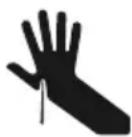
Cut Hazard
Failure to use caution could result in injury.
• Take care - some edges may be sharp.
WARNING!
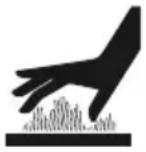 | Hot Surface HazardFailure to follow this advice could result in burns and scalds.To avoid burns and scalds, keep children away from the appliance.Surfaces of the appliance may become hot enough to cause burns. Examples include the oven vent, the surface near the oven vent, and the oven door.Do not touch heating elements or interior surfaces of the oven. Heating elements may be hot, even when they are dark in colour.Use protection when handling hot surfaces, such as oven shelves or dishes.Be careful when opening the oven door. Let hot air or steam escape before removing or replacing food.During and after use, do not touch or let clothing or other flammable materials contact heating elements or interior surfaces of the oven until they have had sufficient time to cool. |
WARNING!
| WARNING! | |
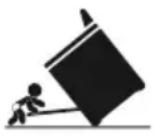 | Tipping HazardFailure to use caution could result in death or serious burns.Range must be secured by a correctly installed anti-tip bracket. See installation guide for details.Ensure the anti-tip bracket is re-engaged when the range is moved. Do not use the appliance until it has been secured. |
WARNING!
 | Explosion HazardFailure to follow this advice may result in injury or death.If you smell gas, do not use the appliance. Open a window or door to let the gas escape, then follow the guidance on the inside front cover of this manual.Do not use water on grease fires. A violent steam explosion may result.Turn all burners off, then smother fire or flame or use dry chemical or foam-type extinguisher.Do not heat unopened food containers, such as cans. The build-up of pressure may cause the container to burst. |
WARNING!
 | Poisoning HazardFailure to follow this advice may result in carbon monoxide poisoning or overheating.·Never use material, such as aluminium foil, to cover an entire rack or the oven floor. Doing so block airflow through the oven.·Clean the appliance with caution. Some cleaners can produce noxious fumes if applied to a hot surface. Follow the directions of the cleaner manufacturer.·Never use the appliance as a space heater to heat or warm the room. |
READ AND SAVE THIS GUIDE
WARNING!
To reduce the risk of fire, electrical shock, injury to persons or damage when using the oven, follow the important safety instructions listed below. Read all the instructions before using the oven. Use the oven only for its intended purpose as described in these instructions.
Installation
- Ensure the appliance is properly installed and earthed by a qualified technician.
- Ensure this range is connected to a circuit that incorporates an isolating switch providing full disconnection from the power supply.
- Do not install or operate the appliance if it is damaged or not working properly. If you receive a damaged product, contact your dealer or installer immediately.
- Verify the anti-tip device has been correctly installed and engaged. See installation guide for details.
Servicing
- Do not repair or replace any part of the appliance unless specifically recommended in the user guide. All other servicing should be undertaken by a Fisher & Paykel trained and supported service technician or qualified person.
Fire Hazard
- Use only dry oven mitts or potholders. Moist or damp potholders on hot surfaces could result in burns from steam. Do not let potholders touch hot areas or heating elements. Do not use a towel or a bulky cloth for a potholder. It could catch fire.
Food Safety
- Leave food in the oven for as short a time as possible before and after cooking. This is to avoid contamination by organisms that may cause food poisoning. Take particular care during warm weather.
General Use
• Household appliances are not intended to be played with by children.
- Children should not be left alone or unattended in the area where the appliance is in use. They should never be allowed to sit or stand on any part of the appliance.
- Children of less than 8 years old must be kept away from the appliance unless continuously supervised.
- This appliance can be used by children aged from 8 years and above, and persons with reduced physical, sensory or mental capabilities or lack of experience and knowledge, if they have been given supervision or instruction concerning the use of the appliance in a safe way and they understand the hazards involved. Cleaning and user maintenance shall not be carried out by children without supervision.
- Caution: Do not store items of interest to children in cabinets above the range or on the backguard of the range. Children climbing to reach items could be seriously injured.
- Do not place heavy objects on the oven door.
• Always keep oven vents unobstructed.
- Do not wear loose fitting or hanging garments when using the appliance. They could ignite or melt if they touch an element or hot surface and you could be burned.
- Caution: Hot air can blow from the vent at the top of the range as part of the range's cooling system.
- Always position shelves in the desired location while the oven is cool (before preheating). If a shelf must be removed while the oven is hot, do not let the oven mitts or potholder contact hot heating elements in the oven or the base of the oven.
- Use only bakeware approved for oven use. Follow the bakeware manufacturer's guides.
- Only certain types of glass, glass/ceramic, earthenware or other glazed utensils are suitable for range-top service without breaking due to sudden temperature changes.
- Ensure flow of combustion and ventilation is unobstructed.
- Do not use the oven for storage.
- Do not cook on a broken cooktop. Should the cooktop break, cleaning solutions and spillovers may penetrate the broken cooktop and create a risk of electric shock. Contact a qualified electrician immediately.
- Do not place metallic objects such as knives, forks, spoons and lids on the cooktop surface as they can get hot.
- Never leave surface units unattended at a high heat setting. Boilover causes smoking and greasy spillover that may ignite.
- Utensil handles should be turned inward and not extend over adjacent surface.
Cleaning and maintenance
- Do not clean the oven seal or use any oven-cleaning products on it. This is essential for a good seal, which ensures that the oven operates efficiently. Care should be taken not to rub, damage or move the oven seal.
- Do not use oven cleaners, harsh/abrasive cleaning agents, waxes, or polishes. No commercial oven cleaner, oven liner, or protective coating of any kind should be used in or around any part of the range.
- Do not use harsh/abrasive cleaners, scourers or sharp metal scrapers to clean the oven door glass since they scratch the surface, which may result in the glass shattering.
- Clean only the parts listed in this guide.
- Do not use a steam cleaner to clean any part of the range.
- Keep appliance area clear and free from combustible materials.
IMPORTANT!
Do not block the vents of the oven or the oven door with cookware, utensils or towels. During cleaning, take care not to let any liquids run down these vents.
- Ensure that the anti-tip bracket at the right rear of the range has been correctly installed.
- Read this guide, taking special note of the 'Safety and warnings' section.
- Remove all packaging from the oven and cooktop. Recycle responsibly.
- Remove any adhesive residue using dishwashing liquid on a soft cloth. Do not use any harsh or abrasive cleaners.
- Condition the oven using the instructions under 'First use'.
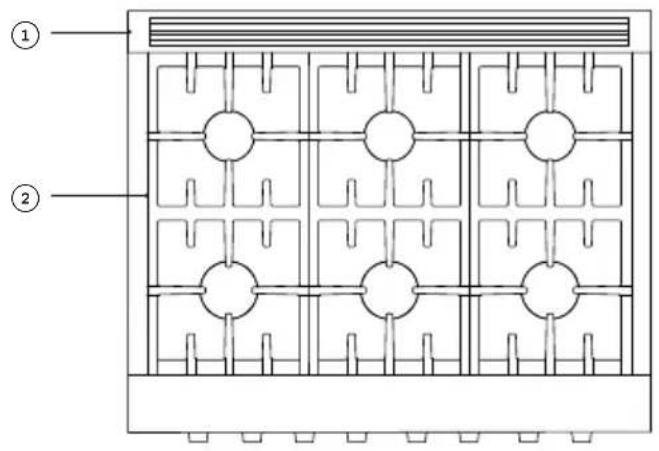
RGV3-366 model illustrated
text_image
Technical diagram showing a grid layout with numbered annotations (① and ②) and circular elements inside each grid.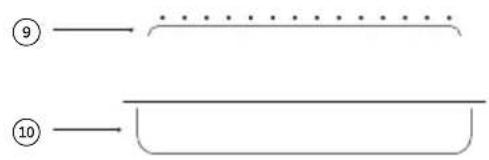
text_image
⑨ ⑩
text_image
Technical diagram of an oven with numbered parts labeled for identificationOven features and accessories
① Back trim
② Burner grates
③ Control panel
④ Oven vent louvres
⑤ Oven seal
⑥ Side rack
⑦ Serial label
⑧ Toe kick
⑨ Broil rack
⑩ Broil pan
text_image
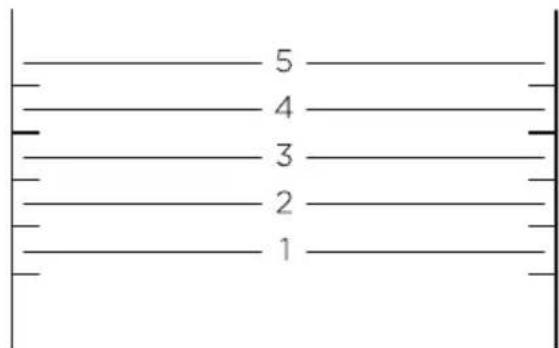
5 4 3 2 1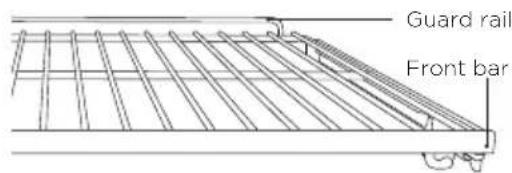
text_image
Guard rail Front bar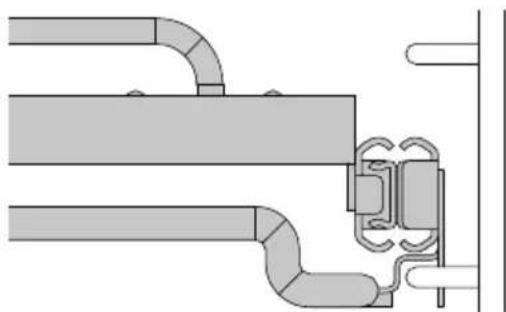
natural_image
Pure technical diagram of pipe connections without any text, numbers, or symbolsShelf positions
Always position the oven shelves before turning the oven on. Remove any unused shelves and baking utensils from the oven.
For advice on which shelf position to use, see sections 'Cooking charts'.
RGV3-366 illustrated
Replacing the shelves
① Grip the shelf at the front (ensuring you are holding the wire shelf and the sliding frame together).
② Ensure the shelf is level and facing the right way with the guard rail at the back.
③ Place the shelf on top of the side racks at the desired height, hooking the rear tags over the side racks on both sides.
④ Push the shelf all the way into the oven, making sure the front tags are also securely hooked over the side racks.
Ensure sliding shelves are positioned on top of the side rack wires instead of between them.
The wire shelves and slides are built together as one unit. When positioned correctly, the slides will prevent the wire shelves from tilting when pulled forward.
Control panel
RGV3-366 model illustrated

text_image
① ② ③ ③ ③ ③ ③ ③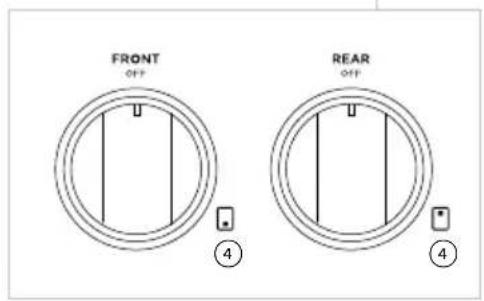
text_image
FRONT OFF ④ REAR OFF ④Control panel features
① Oven mode dial
② Oven temperature dial
③ Burner dials
④ Burner indicators

natural_image
Two hand gestures with circular buttons, one pointing at a finger and the other holding a coin (no text or symbols)Using the burner dials
To use the burner dials, push in and turn counterclockwise to LITE. Hold the dial at LITE before turning to a flame setting.
Dial halos
When a function dial is in use, a red halo will illuminate. When a temperature dial is in use, the halo will transition from white to red as the cavity reaches the set temperature (SLOW COOK and BROIL will turn red immediately).
If all dials are turned OFF, all halos will dim.
Setting a function and temperature
For more information on the functions, see the 'Cooking guide' section of this book.
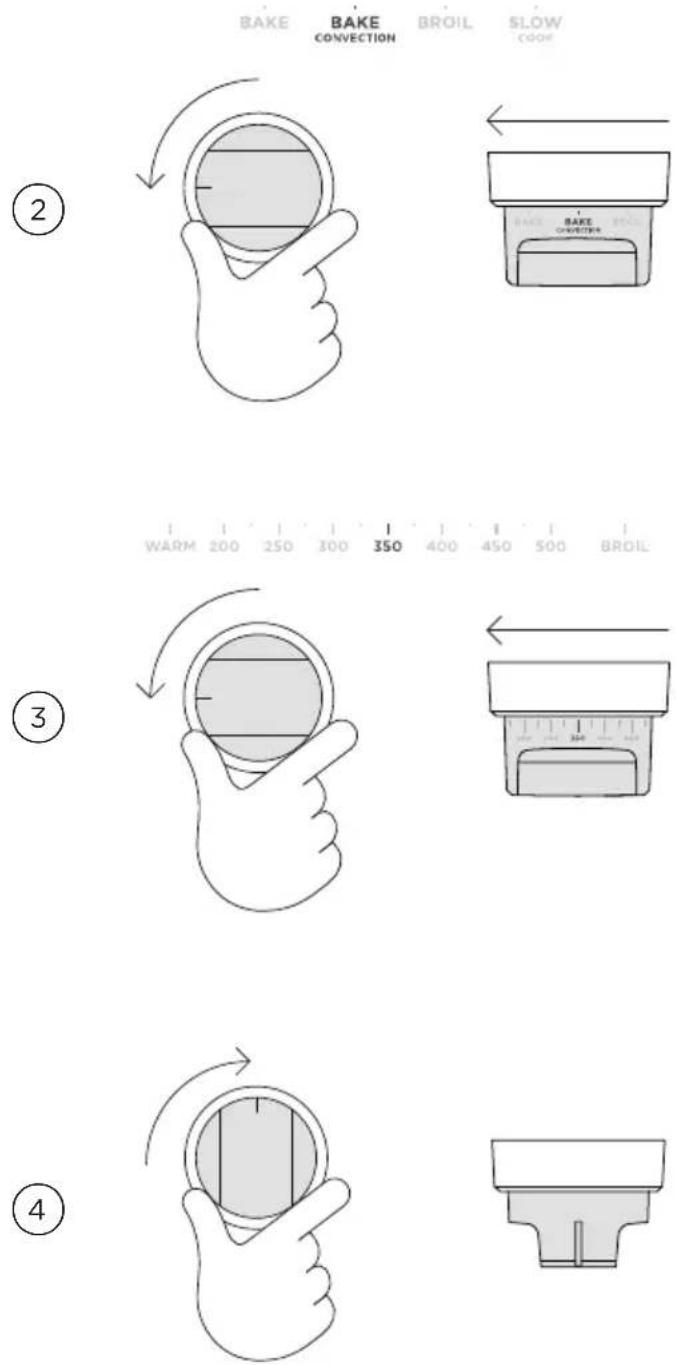
text_image
BAKE BAKE CONVECTION BROIL SLOW COOK WARM 200 250 300 350 400 450 500 BROIL ② ③ ④Set the oven function by turning the dial counterclockwise.
Set the oven temperature by turning the adjacent TEMPERATURE dial counterclockwise to the desired setting.
To stop cooking and turn the oven off, turn the dial back to the OFF position.
Editing or cancelling cooking
Turn the function or temperature dial any point during cooking to adjust.
Changing the temperature
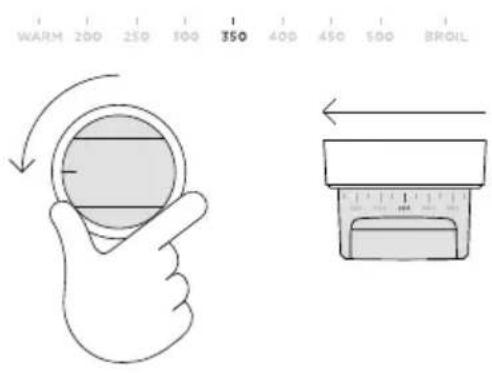
text_image
WARM 200 250 300 350 400 450 500 BROILTurn the dial at any point during cooking to change the temperature.
Changing the function

text_image
BAKE BAKE CONVECTION BROIL SLOW COOKTurn the OVEN MODE dial at any point during cooking to change the function.
Conditioning the oven
It is important to condition your oven before use. This will burn off any manufacturing residues and ensure that you get the best results right from the start.
Before you start
Ensure all packaging is removed and any cables used to secure the shelving during transit. Make sure all shelves are fitted in the oven. Ensure the kitchen is well ventilated during conditioning.
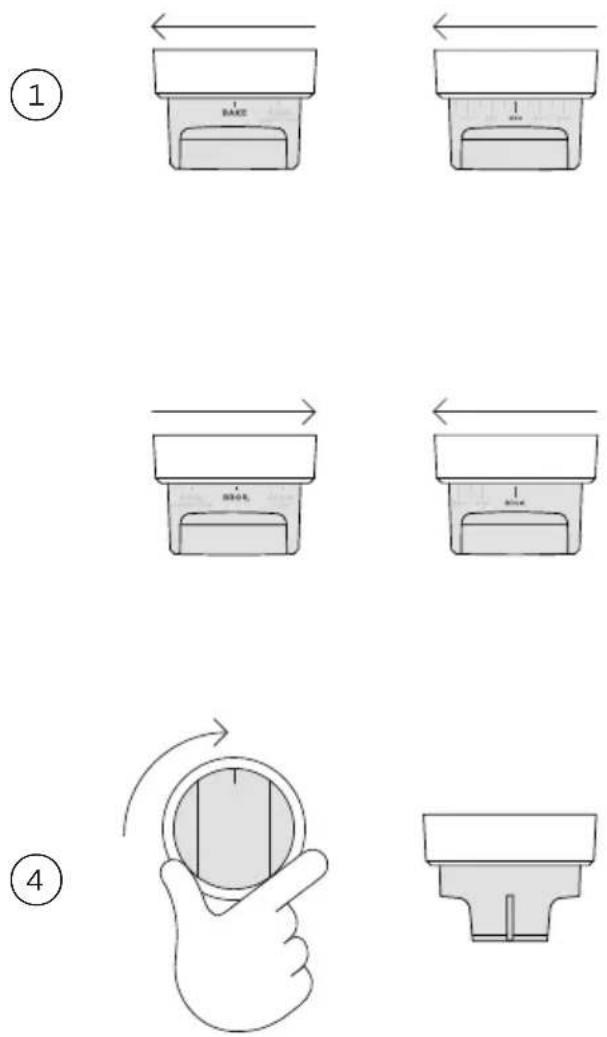
Set the oven to BAKE at 450^ F ( 230^ C) and heat for 30 minutes.
After 30 minutes change both dials to BROIL and heat for a further 30 minutes.②
When you have finished, turn the dial clockwise back to OFF.
After conditioning
There will be a distinctive smell and a small amount of smoke during the conditioning process as manufacturing residue is burnt off, this is normal. Once cooled, wipe out the oven with a damp cloth and mild detergent, and dry thoroughly.
General guidelines
This range has been designed to utilise the bake burner, broiler and cavity fan in different combinations to provide you with enhanced performance. The variety of functions, allows you to cook all food types to perfection.

text_image
Diagram of a kitchen appliance with labeled parts including fan and ventilation systemOven elements
① broil burner
② cavity fan
③ bake burner (concealed)
Ensure all functions are used with the oven door closed.
Baking
- For best results when baking, always pre-heat your oven.
- Single shelf cooking: place your baking on a shelf that will position the top of your pan near the centre of the oven.
- Multi shelf cooking: Always leave a space between shelves to allow the air to circulate.
Broiling
• Always broil with the oven door completely shut.
• Always keep a close watch on your food to avoid charring or burning.
- If you use glass or ceramic pans, be sure they can withstand high oven temperatures.
- For thinner cuts of meat, or for toasting or browning foods, use a higher shelf position.
- Thicker cuts of meats should be broiled on lower shelves or at a lower broil setting to ensure even cooking.
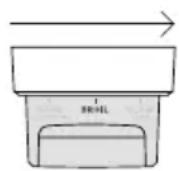

Setting BROIL
Turn both the OVEN MODE and TEMPERATURE dials to BROIL. The temperature is automatically calibrated for optimal broiling.
Roasting
- Boneless, rolled or stuffed roasts require longer than roasts containing bones. Poultry should be well cooked with the juices running clear and a minimum internal temperature of 165^ (75°C).
• Always roast meat fat side up. - Use a meat thermometer to determine when meat is cooked.
- Always rest the meat for at least 10 minutes after roasting to allow the juices to settle. The meat will continue to cook for a few minutes after removing it from the oven.
Reheating
- Never reheat food more than once.
- Use BAKE to reheat food, once hot, use the BAKE function at 200°F (90°C) to keep the food warm.
- Always reheat food to piping hot, or to a minimum internal temperature of 185^ (85°C). This reduces the risk of contamination.
- Reheat food in a dish with a lid or cover tightly with foil.
Dough proofing
- Place dough in a lightly oiled bowl and cover with a clean, damp cloth.
- Position in the centre of the oven and to prevent overproofing check, every 30 minutes.

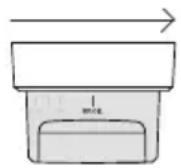
Turn the main OVEN MODE dial to BAKE and the main TEMPERATURE dial to WARM. Heat for 5 minutes before turning the TEMPERATURE dial to OFF and placing the dough in the oven.
Once dough has risen to size, remove and turn the OVEN MODE dial to OFF.

natural_image
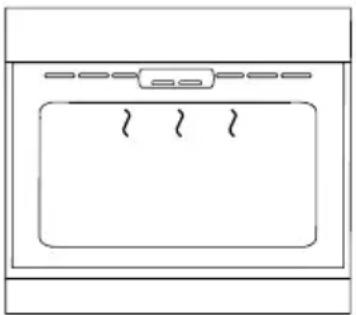
Simple line drawing of a front view of a microwave oven with three outlets (no text or symbols)BAKE
heat is generated by the lower burner
Ideal for:
foods that require a longer cooking time, eg rich fruit cake, brownies, or bread.
- Retains moisture.
- Ideal for cakes and foods that require baking for a long time or at low temperatures.
- This function is not suitable for multi-shelf cooking.
natural_image
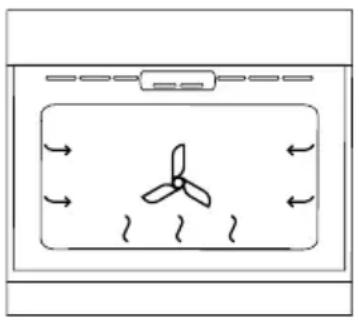
Diagram of a propeller inside a container with airflow arrows indicating direction (no text or symbols)BAKE CONVECTION
heat is generated by lower burner and distributed via fan
Ideal for:
Single shelf baking that requires less than an hour to cook. Foods such as muffins, English scones, cupcakes & enchiladas.
- Hot air is blown into cavity, providing a consistent temperature.
- If using for multi shelf cooking, always leave a gap between to allow air to move freely. This ensures food on the lower tray can still brown.

natural_image
Diagram of a propeller inside a fan or vent, with airflow arrows indicating direction (no text or symbols)SLOW COOK
heat is generated by lower burner and distributed via fan
This function has been designed in collaboration with Star-K for religious faiths that observe a ‘no work’ requirement on the Sabbath*.
Ideal for:
Slow-cooked dishes such as casseroles, stews and braises.
- The fan circulates heat inside the cavity to gently cook food.
- This function has low energy consumption. During use, the lights will not be active.
- The oven does not need preheating.
- The recommended temperature for operating SLOW COOK is 250^ - 325^ (120°C - 165°C).
natural_image
Simple line drawing of a kitchen appliance with a tray and side panel (no text or symbols)BROIL
heat is generated by the broil burner
Ideal for:
toasting bread or for top-browning to finish off dishes.
• Refer to 'Broiling' for details.
- Intense radiant heat is delivered from the broil burner.
- For best results allow oven to preheat for 5 minutes.
- The dial halo will remain red while using the broil function.
Shelf positions
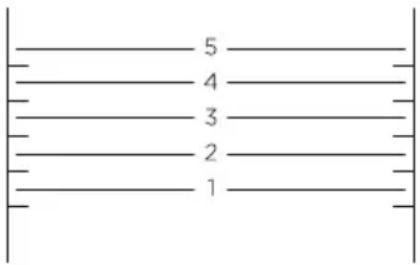
- Position shelves before you turn the oven on.
- Shelf positions are counted from the base up, with 1 being the lowest shelf position and 5 the highest.
text_image
5 4 3 2 1During cooking
- Preheat the oven to the required temperature.
- Oven accessories may temporarily deform slightly when they become hot. This is normal and does not affect their function.
The information in these charts is for guidance only. Refer to your recipe or the packaging and be prepared to adjust the cooking times and settings accordingly.
| BAKING | SHELVES FUNCTION | SHELF POSITION | TEMP (°F) | TEMP (°C) | TIME (MIN) | |
| BISCUITS | ||||||
| Plain Single Bake 3 400-425 210-220 8-15 | ||||||
| Multi Bake Convection 2 and 4 425-450 215-230 10-15 | ||||||
| Chocolate chip | Single | Bake | 3 | 355-375 | 180-190 | 10-15 |
| Multi | Bake Convection | 2 and 4 | 325-340 | 160-170 | 10-15 | |
| Sugar cookies | Single | Bake | 4 | 350-375 | 175-190 | 7-15 |
| Multi | Bake Convection | 2 and 4 | 325-350 | 160-175 | 7-15 | |
| CAKES | ||||||
| Pound cake | Single | Bake | 3 | 325 | 160 | 70-80 |
| Chocolate Brownie (8"x8"/20x20cm pan) | Single | Bake | 3 | 350 | 175 | 20-25 |
| Angel Food Cake (10"x4"/25x10cm tube pan) | Single Bake 3 | 325-350 | 160-175 | 50-60 | ||
| Rich Fruit Cake | Single | Bake | 3 | 275-300 | 135-150 | 3-6hrs |
| Sponge (single large) | Single | Bake | 3 | 350 | 175 | 30-40 |
| Sponge (2x20cm) | Single | Bake | 3 | 350 | 175 | 15-25 |
| SCONES | ||||||
| English Scones | Single | Bake | 3 | 425-450 | 215-230 | 10-12 |
| MERINGUES | ||||||
| Meringues | Single | Bake | 3 | 250-270 | 120-130 | 60-70 |
COOKING CHARTS
| BAKING | SHELVES FUNCTION | SHELF POSITION | TEMP (°F) | TEMP (°C) | TIME (MIN) | |
| MUFFINS/CUPCAKES | ||||||
| Muffins Single Bake 3 345 170 23-30 | ||||||
| Multi | Bake Convection | 2 and 4 | 345 | 170 | 23-30 | |
| Cupcakes Single Bake 3 365 185 13-18 | ||||||
| Multi | Bake Convection | 2 and 4 | 345 | 170 | 13-18 | |
| BREAD/BREAD ROLLS | ||||||
| Sandwich Loaf(9"x5"/23x13cm Loaf Pan) | Multi | Bake | 3 | 350 | 175 | 40-50 |
| Whole-wheat loaf(9"x5"/23x13cm Loaf Pan) | Single | Bake | 3 | 375 | 190 | 35-45 |
| Soft Dinner Rolls | Single | Bake | 3 | 375 | 190 | 15-18 |
| Dough Proof | Single | Proof | 2 | LO | LO | 30 |
| PASTRY | ||||||
| Pastry Shell(baked blind) | Single | Bake | 1 | 350 | 175 | 15 |
| PIES | ||||||
| Fruit pie (2 crust) | Single | Bake Convection | 3 | 400-350 | 200-175 | 20-25 |
| Baked cheesecake(in waterbath) | Single Bake 2 | 325 160 50-60 | ||||
| Pumpkin pie(blind bake, add filling) | Single | Bake | 3 | 350-375 | 175-190 | 15-30 |
| English custard tart(blind bake, then add filling) | Single | Bake | 3 | 350-300 | 175-150 | 15-30 |
| DESSERTS | ||||||
| Crème brulee(in waterbath) | Single | Bake | 2 | 275 | 135 | 35-45 |
| Crème Caramel(in waterbath) | Single | Bake | 2 | 350 | 175 | 35-45 |
COOKING CHARTS
| SAVOURY | SHELVES FUNCTION | SHELF POSITION | TEMP (°F) | TEMP (°C) | TIME (MIN) | |
| CORNBREAD | Single | Bake Convection | 3 | 400-425 | 210-215 | 20-25 |
| VEGETABLES | Single | Bake Convection | 3 | 350-375 | 175-190 | 30-50 |
| LASAGNE | Single | Bake Convection | 3 | 350-375 | 175-190 | 35-40 |
| CASSEROLES | Single | Bake | 2 | 300-350 | 150-175 | 1-2 hrs |
| PIZZA | Single | Bake | 1 | 425 | 220 | 10-15 |
| QUICHE | Single | Bake Convection | 3 | 350 | 175 | 15-30 |
| POTATOES | ||||||
| Whole baked | Single | Bake | 3 | 390 | 200 | 50-60 |
| FRITTATA | ||||||
| Grill to finish | Single | Bake Convection | 3 | 340-360 | 170-180 | 15-20 |
| OVEN MEALS | Single | Bake Convection | 3 | 340-375 | 170-190 | 30-40 |
| ROASTING | SHELVES | FUNCTION | SHELF POSITION | TEMP (°F) | TEMP (°C) | TIME (MIN) |
| BEEF, BONELESS (times per 1lb/450g) | ||||||
| Rare | Single | Bake | 2 | 320-340 | 160-170 | 18-32 |
| Medium | Single | Bake | 2 | 320-340 | 160-170 | 25-40 |
| Well done | Single | Bake | 2 | 320-340 | 160-170 | 30-55 |
| PRIME RIB ROAST (times per 1lb/450g) | ||||||
| Rare | Single | Bake | 2 | 320-340 | 160-170 | 15-30 |
| Medium | Single | Bake | 2 | 320-340 | 160-170 | 20-35 |
| Well done | Single | Bake | 2 | 320-340 | 160-170 | 25-40 |
| LAMB RACK | ||||||
| Medium Rare | Single | Bake | 2 | 390 | 200 | 20 |
| LAMB LEG, BONE IN (times per 1lb/450g) | ||||||
| Medium | Single | Bake | 2 | 320-340 | 160-170 | 18-28 |
| Well done | Single | Bake | 2 | 320-340 | 160-170 | 20-33 |
COOKING CHARTS
| ROASTING | SHELVES FUNCTION | SHELF POSITION | TEMP (°F) | TEMP (°C) | TIME (MIN) | ||
| LAMB LEG, BONELESS (times per 1lb/450g) | |||||||
| Medium Single Bake 2 320-340 160-170 20-35 | |||||||
| Well done Single Bake 2 320-340 160-170 25-45 | |||||||
| VEAL (times per 1lb/450g) | |||||||
| Medium Single Bake 2 320-340 160-170 20-40 | |||||||
| Well done Single Bake 2 320-340 160-170 25-45 | |||||||
| CHICKEN (WHOLE) (times per 1lb/450g) | |||||||
| Without stuffing | Single | Bake | 2 | 350 | 175 | 15-20 | |
| With Stuffing | Single | Bake | 2 | 350 | 175 | 17-22 | |
| Butterflied | Single | Bake | 2 | 350 | 175 | 40-50 | |
| TURKEY, WHOLE (times per 1lb/450g) | |||||||
| Stuffed | Single | Bake | 1 or 2 | 320-340 | 160-170 | 17-22 | |
| Unstuffed | Single | Bake | 2 or 2 | 300-330 | 150-165 | 15-20 | |
| PORK, BONELESS (times per 1lb/450g) | |||||||
| Medium Single Bake 3 340-350 | 170-175 | 25-40 | |||||
| Well done | Single | Bake | 3 | 340-350 | 170-175 | 30-45 | |
| PORK CRACKLING | |||||||
| Crisp | Single | Broil | 3 or 4 | 430 | 220 | 5-10 | |
| VENISON (times per 1"/2.5cm thickness) | |||||||
| Rare | Single | Bake | 3 | 435 | 225 | 7 | |
| Medium | Single | Bake | 3 | 435 | 225 | 9 | |
| BROILING | SHELVES FUNCTION | SHELF POSITION | TEMP (°F) | TEMP (°C) | TIME (MIN) | ||
| BEEF | |||||||
| Steak, rare | Single | Broil | 4 | Broil | Broil | 8-10 | |
| Steak, medium | Single | Broil | 4 | Broil | Broil | 10-15 | |
| Burgers (ground patties) | Single | Broil | 3 | Broil | Broil | 12-15 | |
| Meatballs (ground) | Single | Broil | 3 | Broil | Broil | 12-15 | |
COOKING CHARTS
| BROILING | SHELVES FUNCTION | SHELF POSITION | TEMP (°F) | TEMP (°C) | TIME (MIN) | |
| LAMB CHOPS | ||||||
| Medium Single Broil 4 Broil Broil 15 - 20 | ||||||
| Well done Single Broil 4 Broil Broil 20 - 25 | ||||||
| PORK | ||||||
| Chops, well done Single Broil 3 Broil Broil 15- 20 | ||||||
| Ham steak Single Broil 3 Broil Broil 15 - 20 | ||||||
| Bacon | Single | Broil | 3 | Broil | Broil | 4-7 |
| CHICKEN | ||||||
| Boneless pieces | Single | Broil | 3 | Broil | Broil | 30-40 |
| Bone-in pieces | Single | Broil | 3 | Broil | Broil | 40-50 |
| SAUSAGES | Single | Broil | 3 | Broil | Broil | 10-15 |
| FISH | ||||||
| Fillets | Single | Broil | 3 | Broil | Broil | 8-12 |
| Whole | Single Broil 3 Broil Broil 15 - 20 | |||||
| VEGETABLES | ||||||
| Sliced | Single | Broil | 3 | Broil | Broil | 8-12 |
Selecting and using burners
natural_image
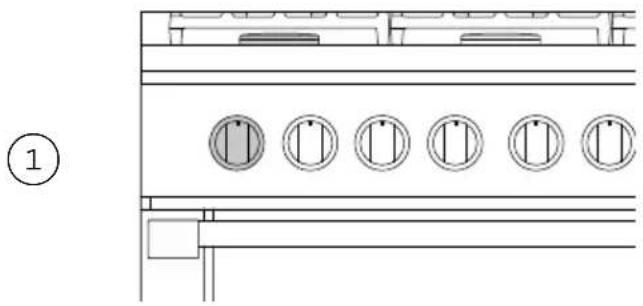
Technical line drawing of a cabinet or rack with five circular components, no text or symbols presentIdentify the desired burner and the corresponding dial.

text_image
② LITEPush the dial in and turn counterclockwise to LITE. Hold the dial at LITE before turning to a flame setting.
You should hear a clicking sound when setting to LITE. If no clicking sound is present, turn the dial back clockwise to OFF and refer to 'Troubleshooting' for advice.
text_image
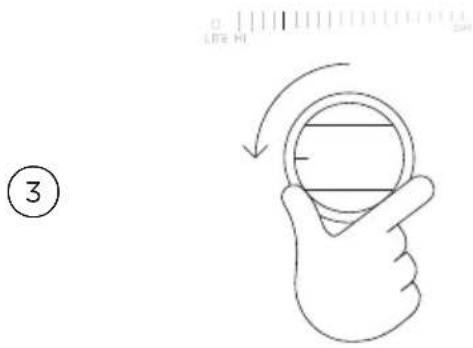
③When the burner is lit, turn the dial to any setting between HI (high) and SIM (simmer).
Note: The clicking should stop as soon as the burner is lit. If the burner doesn't light, and/or the clicking doesn't stop, turn the dial clockwise back to OFF refer to 'Troubleshooting' for advice.

natural_image
Hand gesture showing a finger pressing a circular button with an arrow indicating rotation (no text or symbols)When you have finished cooking, turn the dial clockwise back to OFF.
If you are using LP gas, there may be a slight extinction pop or flash at the flame spreader a few seconds after the burner has been turned off. This is normal.
Manual lighting
If there has been a power outage, the burners can be manually lit. If the flame is blown out during a power failure, turn the dial immediately to OFF as the burner will not relight and gas may escape.

natural_image
Simple line drawing of a hand holding a tool above a tray with a handle, no text or symbols present.Carefully hold a battery operated lighter near the desired burner.
text_image
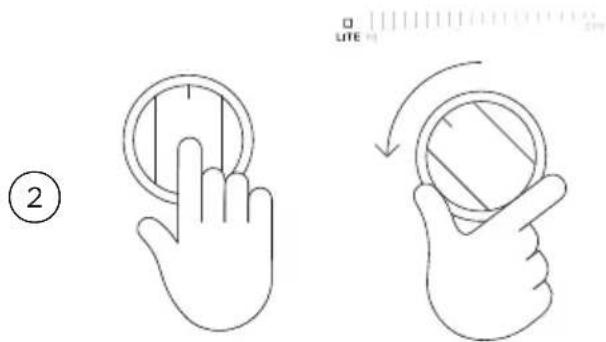
② LITE 1Push the dial in and turn counterclockwise to LITE. Hold the dial at LITE before turning to a flame setting.

text_image
3 LITE NO 2019When the burner is lit, turn the dial to any setting between HI (high) and SIM (simmer).
natural_image
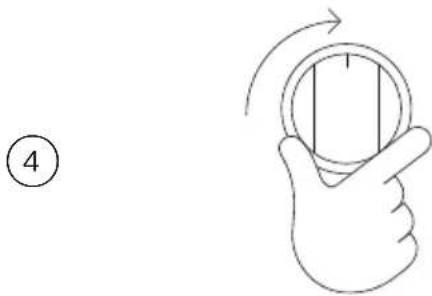
Hand gesture showing a finger pressing a button with an arrow indicating rotation (no text or symbols)When you have finished cooking, turn the dial clockwise back to OFF.
If you are using LP gas, there may be a slight extinction pop or flash at the flame spreader a few seconds after the burner has been turned off. This is normal.
Burner use guidelines
Burner output
All burners have the same low turn-down setting (SIM) for gentle simmering (1,300 BTU/hr). Use SIM for melting chocolate and butter, cooking rice and delicate sauces, simmering soups and stews, and keeping cooked food hot.
For cooking that requires intense heat use the burners listed below. These have a higher maximum output (22,500 BTU/hr for Natural gas) than other burners (17,000 BTU/hr for LP gas).
RGV3-305GD models: Center burner
RGV3-366 models: Front left or front right burner
All other models: Front left burner
Use and care
- Never leave the cooktop unattended when in use. Boil-over causes smoking and greasy spills that may ignite.
- Never allow flames to extend beyond cookware or curl up its sides. This could discolor and damage the utensil and you may get burned touching a hot handle.
- Keep handles out of the way. Turn handles so that they don't extend over the edge of the cooktop or another burner that is on.
• Take care when deep-frying. Oil or fat can overheat very quickly, particularly on a high setting. - Make sure that all burner parts are correctly fitted. Incorrectly or incompletely assembled burners may produce dangerous flames. See 'Replacing burner parts'.
- Keep the burners clean. Especially after a spill or boilover, ensure the affected burners are cleaned before using them again. Food residue may clog the ignitor and the notches of the flame spreader, stopping the burner from functioning correctly. See 'Care and cleaning' for instructions.
- Check that the burner flames are regular. They should be blue with no yellow tipping, and burn without fluttering around the burner cap. If not, see 'Troubleshooting' for advice.
- Use woks only with a wok ring. Wok rings can be purchased separately through your Fisher & Paykel dealer or Customer Care. To use, place the wok ring over the grates, making sure the small protrusions on its bottom straddle the grate fingers. The wok ring should be stable and unable to rotate.
ALWAYS NEVER
- Read these instructions and the 'Safety and warnings' section before you start cleaning your range.
- Before cleaning or removing any part, make sure that everything on the range has been turned off.
- Unless suggested otherwise in the chart following, allow any part to cool to a safe temperature before cleaning. If you do need to handle a warm or hot part take extreme care. Wear long protective mitts to avoid burns from steam or hot surfaces.
- Try using any cleaner on a small area first, to ensure it doesn't stain.
- See the pages following this chart for instructions on removing and replacing different parts of the range for cleaning or maintenance.
-
Ensure the anti-tip device is re-engaged if you move the range for cleaning. Failure to do this may result in the oven tipping which may cause death.
-
Use aerosol cleaners until the range has completely cooled. The propellant substance in these cleaners could catch fire in the presence of heat.
- Let soiling or grease accumulate anywhere in or on the range. This will make future cleaning more difficult and may present a fire hazard.
- Use any abrasive or harsh cleaners, cloths, scouring pads or steel wool. These will scratch your range and damage its appearance.
- Use a steam cleaner to clean any part of the range.
- Lift the black grill and griddle frames off the cooktop.
WHAT? HOW? IMPORTANT!
| Door frame exteriorControl panelSump area around cooktop burnersBack trim | · Soften any stubborn stains using a hot soapy cloth before cleaning with a solution of mild detergent and hot water. Wipe dry with a microfiber cloth.· For extra shine, use a suitable stainless steel cleaner and polish, following manufacturer's instructions. Always rub the stainless steel in the direction of the polish lines. | · Always read the label to ensure your stainless steel cleaner does not contain chlorine compounds as these are corrosive and may damage the appearance of your cooktop.· Do not use stainless steel cleaner on the dials, oven handles, or the toe kick. These are not stainless steel parts and their surface may be damaged by stainless steel cleaner.· When cleaning the back trim and the top of the oven door, ensure liquid does not run down the vents. |
| Control dialsOven handlesToe kick | · Wipe with a damp cloth using a solution of mild detergent and hot water then dry thoroughly with microfiber cloth.· If desired, the dials can be removed for cleaning. Before removing, ensure that dial is set to OFF. Remove only one dial at a time ensuring that you refit completely and correctly. | · Do not use stainless steel cleaner on these parts, as doing so may damage their coating.· The dials are not interchangeable: if removed for cleaning, do so one at a time. This is to ensure that they are replaced correctly. |
| WHAT? HOW? IMPORTANT! | ||
| Enamel oven interior - light soiling | Wipe with a damp cloth and a solution of hot water and mild detergent then dry with a soft cloth. Note: the oven door may be removed for ease of access. | • To prevent soiling from becoming ‘baked on’, we recommend removing any easy-to-reach spills, from the enamel after each use. |
| Side racks | Pre-soak any stubborn, soiling, then clean with a solution of mild detergent and hot water and wipe dry with a microfiber cloth. These parts are dishwasher safe | |
| Oven shelves To remove | stubborn soiling, scrub with a damp, soap-filled, non-abrasive pad, then wipe dry. Apply a chrome cleaner with a damp sponge or cloth following manufacturer instructions. the wipe and dry. | Do not wash the main oven shelves in the dishwasher — doing so will remove the lubricating grease in the slides, stopping them from running smoothly. |
| Broil pan and rack Pre-soak any stubborn soiling in a solution of mild detergent and hot water. Wash by hand or in a dishwasher. | ||
| Burners Do not clean these parts. They self-clean during normal use. | ||
| Oven door glass (exterior) | Clean using a soft cloth and a mixture of warm water and dishwashing liquid or glass cleaner. | |
| Oven door gasket Avoid cleaning this part. To remove large food particles, dampen a sponge with hot water and gently wipe — do not rub. Press a towel gently on the gasket to dry. | Do not use any cleaning agent on the gasket. The gasket is essential for a good seal. Take care not to rub, displace, or damage it. | |
WHAT? HOW? IMPORTANT!
| Burner caps and brass flame spreaders | Ensure the burner is turned OFF and cool. Lift off the burner cap and brass flame spreader and wash in hot soapy water. Rinse and dry. Use a stiff nylon brush or straight-ended paper clip to clear the notches of the flame spreader. Replace the flame spreader and burner cap correctly. See 'Replacing burner parts'. | Keep the notches of the flame spreaders clear. Soiling may clog these and cause ignition problems. Before replacing the burner parts, ensure they are dry. Wet burner parts may result in an irregular flame. Before lighting a burner, ensure all parts are positioned correctly. Incorrect assembly can cause dangerous irregular flames and ignition problems. |
| Ignitors Ensure the burner is turned OFF. Clean the ignitor with a small brush or cotton swab that has been dipped into rubbing alcohol. | The ignitors must be kept clean and dry to work correctly. Dirty or wet ignitors could cause constant clicking and sparking, even if a flame is present. | |
| Burner grates Wok ring (not supplied) | Ensure grates/wok ring has cooled completely before carefully lifting them off the cooktop. Place on a protected surface. To remove stubborn stains, soak the grates in a mixture of clothes detergent and water.Wash in a mixture of hot water and dishwashing liquid, then rinse and allow to dry. The grates are also dishwasher safe. | Take care, the grates are heavy. Ensure you place a dish towel or other soft cover on the surface before putting a grate on it. |
Removing the side racks
Remove the side racks to make cleaning the oven easier.
Always turn the oven off at the wall first. Ensure the oven has cooled down completely before starting.

natural_image
Line drawing of an oven with control panel and vent, no text or symbols presentSlide out all shelves and remove.
natural_image
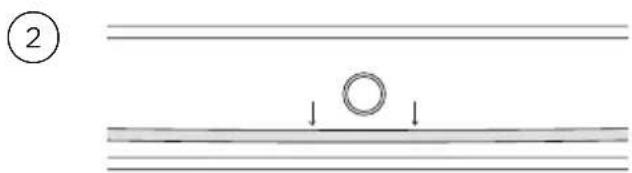
Diagram showing two parallel lines with a circular ring and downward arrows, no text or symbols presentGently pull down on the retaining wire from underneath the lock stud. The retaining wire will pop out.

natural_image
Technical line drawing of a ladder structure with two sensors and a vertical support (no text or symbols)Swing the bottom of the side rack up towards the center of the oven until it is almost horizontal. Slide the prongs at the top out of the mounting slots.
Refitting the side racks
①
natural_image
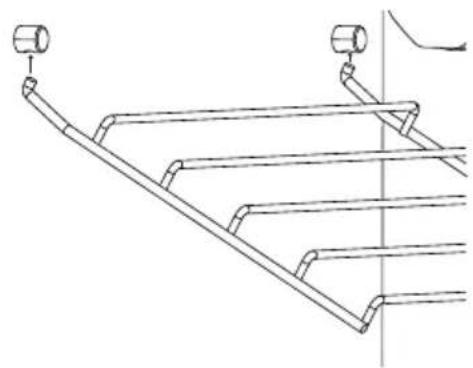
Technical line drawing of a ladder structure with two hanging fixtures (no text or symbols)Supporting the side rack from underneath, hold it almost horizontally and place the prongs into the mounting slots.
②
natural_image
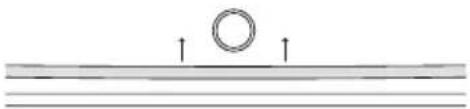
Simple diagram showing a circular object above parallel lines with upward arrows, no text or symbols present.Ensure the prongs are fully inserted into the slots, then lower the side rack carefully, and gently push the retaining wire underneath the lock stud.
Replacing the oven light bulbs
Use a 40 W, 120 V appliance light bulb for replacement. Do not use a standard light bulb in any oven, the heat will break it.
Changing the bulb
① Allow the oven (including the lamp cover and the bulb) to cool completely.
② Remove any shelves that may get in the way.
③ Remove the door if the lamp will be hard to reach.
④ Turn the power supply to the range off at the main fuse or circuit breaker panel. If you don't know how to do this, contact an electrician.
Failure to disconnect the range from the power supply may result in death or electrical shock.
⑤ Remove the lamp cover: turn it counterclockwise to unscrew.
⑥ Remove the faulty bulb and replace with a new 40 W appliance light bulb.
⑦ Replace the lamp cover: turn it clockwise to tighten.
⑧ Turn the power supply to the range back on at the main fuse or circuit breaker panel.
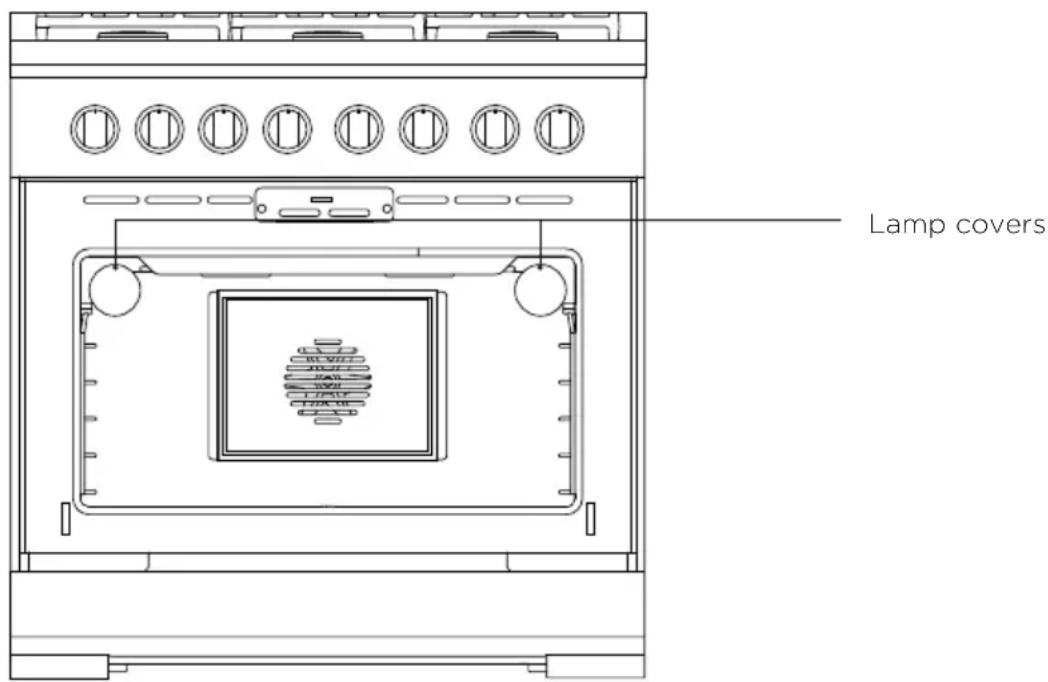
text_image
Lamp coversRemoving and refitting the oven door.
• Take care, the oven door is heavy.
- Do not lift the oven door by its handle. Doing so may damage the door.
- Ensure the oven and the door are cool before you begin to remove the door.
- Before removing the door, ensure there is a large enough clear, protected surface in the kitchen to rest the door on.
To remove the door
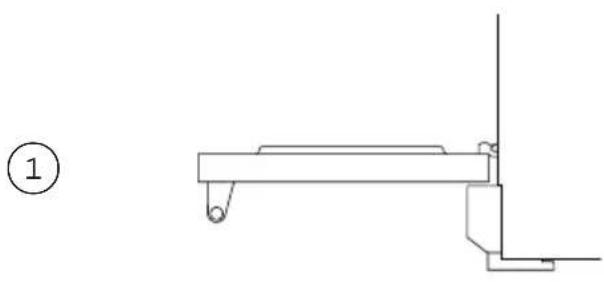
natural_image
Pure technical line drawing of a mechanical component without any text, numbers, or symbolsOpen the door completely.
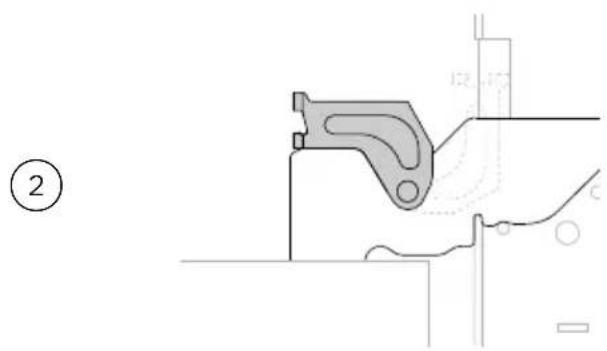
natural_image
Technical line drawing of a mechanical bracket component (no text or symbols)Open the hinge locks fully on both sides.
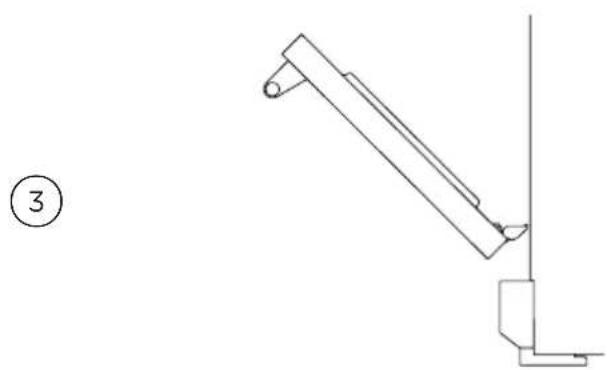
natural_image
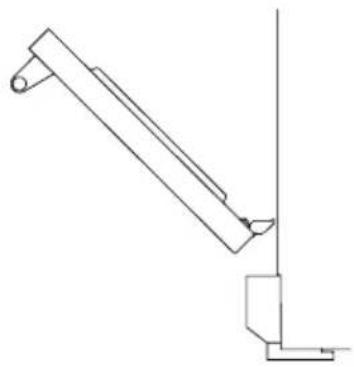
Simple line drawing of a mechanical lever or bracket assembly (no text or symbols)Holding the door on both sides, lift door back up to 45^ and carefully pull the door out and away from the hinges.
To refit the door
①
natural_image
Pure technical line drawing of a mechanical lever or bracket assembly without any text, numbers, or symbolsHolding the door at 45^ , carefully align the hinge tongues with the hinge slots. Push the door in until you feel the latches slot into position on each side.
②

natural_image
Technical line drawing of a mechanical bracket or clamp assembly (no text or symbols)Open the door completely and ensure both hinges are secured by the correct notches.
③

natural_image
Pure technical line drawing of a mechanical component without any text, numbers, or symbolsRotate the locks up into the closed position ensuring they rest inside the slots completely. Incorrect installation will prevent door from correctly sealing.
④

natural_image
Line drawing of a standard electrical oven with six ovals and a blank chamber (no text or symbols)Close the oven door ensuring that when closed, the door is vertical and parallel to any surrounding cabinetry
Replacing burner parts
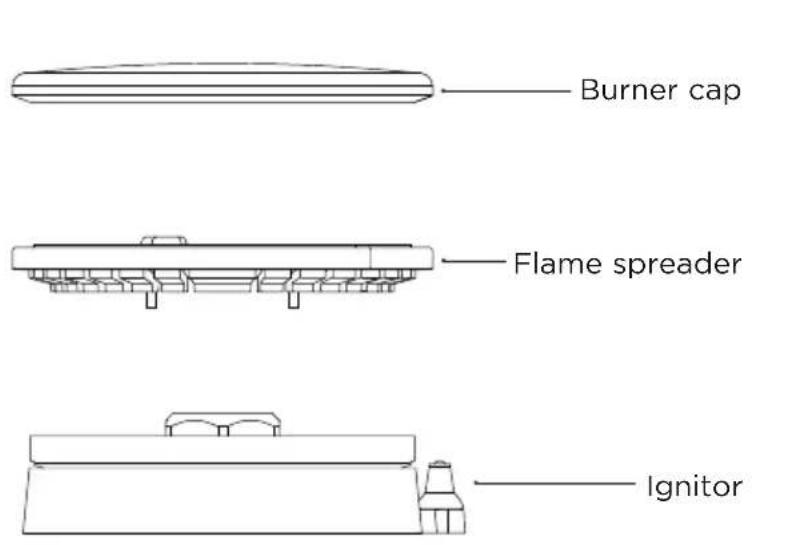
When replacing the burners, ensure the two locating pins on the bottom of the brass flame spreader are correctly aligned with the locating pin holes on the top of the simmer ring. Incorrect alignment will produce a potentially dangerous flame and cause poor burner performance.
text_image
Burner cap Flame spreader Ignitor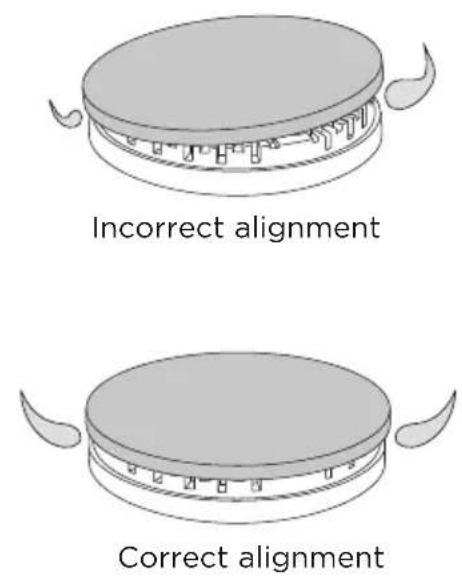
text_image
Incorrect alignment Correct alignmentIf there is a problem with your oven, please check the following points before contacting your local Fisher & Paykel trained and supported service technician or the Customer Care Centre.
General
| PROBLEM POSSIBLE CAUSES WHAT TO DO | ||
| The oven does not work (no heating). | No power supply (oven light and dial halos do not come on). | Ensure the circuit breaker hasn't tripped and there is no power outage in your area. If there is a power outage, you cannot use the oven until power is restored. |
| No gas supply. The supply to the house may be faulty or there may be an outage. Contact your local gas supplier. | ||
| One of the oven lights does not come on, but the oven works. | The oven light bulb(s) have blown. | Replace the light bulb(s). See 'Care and cleaning' for instructions. |
| The light bulb is loose. Ensure bulb is secure See 'Care and cleaning' for instructions. | ||
| The oven is not heating. The door is not properly closed or it is opened too frequently during cooking. | The heating elements are disabled while the door is open. Ensure the door is properly closed and avoid opening it during cooking. | |
| A glass pane in the oven door has cracked, chipped, or shattered. | Incorrect cleaning or the edge of the glass hitting against something. | You must NOT use the oven. Contact a Fisher & Paykel trained and supported service technician or Customer Care |
| I can feel hot air blowing out of the vents after I have turned the oven off. | This is normal. For safety reasons the cooling fans will continue to run even when you have turned the oven off. The fans will switch off automatically. | |
| Steam coming from vents at the back of the range. | Moisture from food evaporating during cooking. | This is normal, especially if you are cooking large quantities of food. |
| The oven fan comes on when I select a function that does not use a fan (eg BAKE). | This is normal. The fan comes on while the oven is preheating. It may turn off when the oven has reached the set temperature. | |
| The oven fan comes on when I select a function that does not use a fan (eg BAKE). | When heating from cold, your oven is designed to initially heat to a temperature higher than what is set. | |
General
| PROBLEM POSSIBLE CAUSES WHAT TO DO | ||
| The oven has reached the set temperature but the temperature dial halo is still red. | The oven is set to BROIL. This is normal. The dial halo will stay red whenever this function is in use as the broil element is always heating. | |
| The oven sounds a tone when I try to set the temperature below a certain temperature. | This is normal: for food safety reasons, the oven functions have factory-set minimum temperature settings. | Select a different temperature or try a different function that is designed for low temperatures. |
| The temperature dial halo never turns white when I use BROIL. | This is normal: the halo stays red to indicate that the broil element provides instant radiant heat. | |
| Fan noise and warm air coming from the range during and after use. | A cooling fan in the range runs to prevent the oven door and control panel from overheating. | This is normal and requires no action. |
| Condensation around oven (eg on control panel or top of oven door). | Food has high moisture content or the local climate is contributing to condensation. | If there is frequent or excessive condensation, ensure that cabinetry around the range is moisture-proof. |
| The oven door does not align with the control panel or cabinetry. | The oven door has been installed incorrectly and the hinges are misaligned within the slots. | Re-install the door. See 'Care and cleaning' for instructions. |
| Temperature is not calibrated correctly. | Door is not sealing correctly. Re-install the door. See 'Care and cleaning' for instructions. | |
| The fan does not come on in a convection mode. | Technical fault. Contact your Authorized Service Center or Customer Care. | |
| Uneven baking. Oven not correctly preheated. Ensure the dial halo has changed to red before beginning. | ||
| The halo around the dial alternates between white and red during use. | The oven needs to heat periodically to maintain the set temperature during use. | This is normal. |
Cooktop burners
| PROBLEM POSSIBLE CAUSES WHAT TO DO | ||
| The ignitor keeps clicking (continuous spark) even when a burner has lit. | Dirty or wet ignitor(s) Clean the ignitor(s).See 'Care and cleaning' for guidance. | |
| None of the burners will light. | No power supply. The cooktop burners can still be used. To light them manually refer to 'Manual lighting' for guidance. | |
| No gas supply. Check that the gas supply to the house is working. You should hear the gas when you turn a burner on. If you are using bottled gas, check that it is not empty. | ||
| Some burners will not light - Flames do not burn all around the burner cap. | Burner parts or ignitors may be wet, dirty, or misaligned. | Check that the burner parts are clean, dry, and correctly assembled. Ensure the ignitors are clean and dry. See 'Care and cleaning' for instructions. |
| There is no clicking when I try to light a burner. | The ignitor is dirty or there is a power outage. | Clean the ignitor(s). See 'Care and cleaning' for guidance. |
| There is a slight 'extinction pop' or flash after I've turned a burner off. | This is normal for LP gas and requires no action. | |
| The flames have suddenly gone out. | A draft or a spill has extinguished the flame. | No action required. The burner will detect this and automatically relight. However, if there has been a large spill, we recommend turning the burners off and cleaning the burners and sump area. See 'Care and cleaning' for guidance. |
| The burner flames are uneven, very large, yellow or yellow-tipped or sooty. | Technical fault: the gas is the wrong type or hasn't been adjusted properly. | Do not use your cooktop burners. Contact a Fisher & Paykel trained and supported service technician or Customer Care. |
If there is a problem, the oven will automatically suspend all oven functions and either the TEMPERATURE or OVEN MODE dial will flash.
IMPORTANT!
Do not turn off the mains power supply to the oven (wall switch) if you get an alert unless the instructions in the chart following instruct you to. There are cooling fans within the oven which are needed to cool the oven's components. Turning off the power while the oven is too hot may damage the oven and its surrounding cabinetry.
What to do if an alert is displayed
① Make a note of the alert displayed. You may need this information.
② If you can fix the problem and the alert code does not reappear, you may continue using your oven.
If you can't fix the problem yourself or the alert reappears and the problem persists: wait until the cooling fans have stopped and the oven has completely cooled down, then turn the power to the oven off at the wall and contact a Fisher & Paykel trained and supported service technician or Customer Care with the alert code information.
| ALERT POSSIBLE CAUSES WHAT TO DO | ||
| The OVEN MODE dial is flashing red | Electronics fault | Allow the oven to cool down.Once the oven has cooled completely, disconnect and reconnect the power supplyIf the alert reappears, contact a Fisher & Paykel trained and supported service technician or Customer Care. |
| The TEMPERATURE dial is flashing red | Electronics fault | Allow the oven to cool down.Once the oven has cooled completely, disconnect and reconnect the power supplyIf the alert reappears, contact a Fisher & Paykel trained and supported service technician or Customer Care. |
| The OVEN MODE dial is flashing white | Technical fault | Contact a Fisher & Paykel trained and supported service technician or Customer Care. |
Before you call for service or assistance
Refer to the installation guide and user guide and check that your product is correctly installed and you are familiar with its normal operation.
If after checking these points you still need assistance or parts, please refer to the Service & Warranty book for warranty details and your nearest Service Center, Customer Care, or contact us through our website www.fisherpaykel.com
Complete and keep for safe reference:
Model ____
Serial No. ____
Purchase Date ____
Purchaser ____
Dealer ____
Suburb ____
Town ____
Country ____
FISHERPAYKEL.COM
© Fisher & Paykel Appliances 2020. All rights reserved.
The models shown in this guide may not be available in all markets and are subject to change at any time.
The product specifications in this guide apply to the specific products and models described at the date of issue. Under our policy of continuous product improvement, these specifications may change at any time.
For current details about model and specification availability in your country, please go to our website or contact your local Fisher & Paykel dealer.