DXM-WH - Kitchen machine DoughXpress - Free user manual and instructions
Find the device manual for free DXM-WH DoughXpress in PDF.


User questions about DXM-WH DoughXpress
0 question about this device. Answer the ones you know or ask your own.
Ask a new question about this device
Download the instructions for your Kitchen machine in PDF format for free! Find your manual DXM-WH - DoughXpress and take your electronic device back in hand. On this page are published all the documents necessary for the use of your device. DXM-WH by DoughXpress.
USER MANUAL DXM-WH DoughXpress
text_image
doughXpress®The Start Of A Great Pizza!
OWNER'S MANUAL
FOR
MODELS
DXA (Air-Automatic)
DXM (Manual/Non-Air)
DXH (Hydraulic Automatic)
DXE (Electrical Mechanical Automatic)

CORPORATION
Food Equipment
For Customer Service, Call (620) 231-8568
or Visit www.doughxpress.com
CONTENTS
Unpacking / Inspection / Installation 2
Operation 3-5
Cleaning / Maintenance 6
Specifications 7
Warranty 8
UNPACKING / INSTALLATION
Please read this manual in its entirety before operating your press.
UNPACKING
Remember to save all packing materials - including any crating, boxes, liners and boards. You may need these for shipping your machine or should a repair be necessary in the future.
INSPECTION
Inspect your machine for hidden shipping damage. Contact the delivery company immediately, should you find damage.
INSTALLATION
- Screw the provided feet into the holes on the bottom of the press.
- Plug the press and your air compressor to be used into the correct grounded electrical outlet for each cord. The correct voltage is indicated on the identification tag.
WARNING: When using an extension cord, use 12 or 14 ga.-3 conductor. Maximum length, 25' (7.62 m).
- If using a different air compressor than the one supplied for the DXA-SS, use a clean (void of oils) and dry (void of water) air source of 110-130 P.S.I. (7-8 bar) to the 1/4" NPT air inlet located on the back of the machine. Requires 1 CFM (30 L/min). It is strongly recommended that an external air filter and water trap be installed at the machine's air inlet connection. Damage to the press's internal air operated components can occur that will not be covered under warranty if it is determined that water, oil or other contaminants have damaged the component.

text_image
STOPBEFORE warranty repair you MUST get Prior Authorization: Call 1-800-835-0606 Warranty will be voided otherwise.
SETTING UP YOUR PRESS
- Push the "Power On" Button.
- On the automatic press, to shut off power to the machine at any time, just press the "Emergency Stop" button. To reset the button, twist it clockwise. On the manual press, to shut off, just push the "Power On/Off" button again.
- To change or set the time (Timer on DXA-SS, DXH-SS & DXE-SS) models only) or temperature, press the menu button on the digital control to the right of the machine (as shown below). The green light next to the appropriate setting will light. Press the up s, or down t, button to your desired setting.
Press the menu button again for the next setting, and adjust with the up and down buttons. When you have your desired settings press the menu button a third time to lock in your settings otherwise the previous settings will still be used.
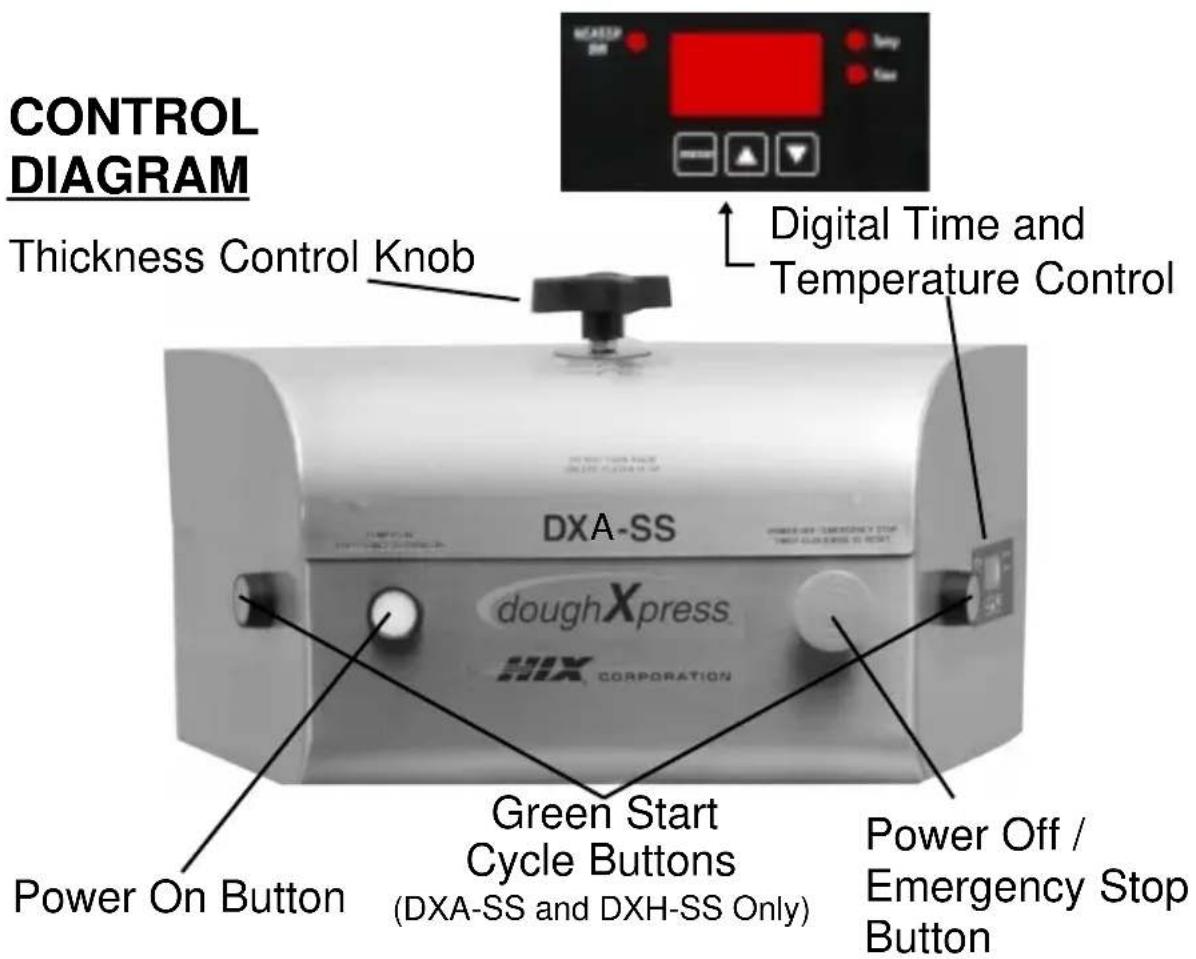
text_image
CONTROL DIAGRAM Thickness Control Knob Digital Time and Temperature Control DXA-SS doughXpress. DRX CORPORATION Green Start Cycle Buttons (DXA-SS and DXH-SS Only) Power On Button Power Off / Emergency Stop ButtonOPERATION
- Wait for the machine to reach your preset temperature which will be indicated on the digital readout. Swing out the bottom platen.
- To set the dough thickness, turn the dial on the top of the machine as indicated below.

text_image
THICK THIN
text_image
THICK THINFor DXH-SS hydraulic automatic must be in notched position. If not in notched position the machine will not operate.
- A. For DXA-SS Air-Automatic, DXH-SS Hydraulic Automatic & DXE-SS Electrical Mechanical:
To start the machine pressing cycle, the lower platen must be pushed all of the way in. Press in both green “Start Cycle” buttons on the sides of the machine at the same time. You must hold both buttons in until the top platen of the machine reaches the lower platen and presses the dough. The top platen will automatically rise at the end of your set time. Remove the flattened dough and place it in your pan.
B. For DXM-SS Manual (Non-Air):
Set the temperature per instruction #3. The lower platen must be pushed all of the way in. Pull down the handle all the way, applying pressure, until it stops. Raise the handle all the way up. Remove the flattened dough and place it in your pan.
PRESSING DOUGH
Your doughXpress pizza press is designed for easy use and operation to reliably press dough balls. Thickness, shape, and size are directly related to your dough ball, its shape, the position on the lower platen, the temperature of the dough, type of lubricating food oil, as well as the settings of your machine. You should experiment with the following for the results you want.
- Set your temperature (per instruction #3 under Operation) to the desired setting. Generally 110°-130°F for room temperature dough and 140°-150°F when using refrigerated dough. WARNING: NEVER ATTEMPT TO PRESS FROZEN DOUGH. PERSONAL INJURY AND DAMAGE TO YOUR MACHINE COULD RESULT!
- Set your time (Per instruction #3 under Operation. DXE-SS, DXA-SS & DXH-SS models only.) to the desired setting. Generally 5-10 seconds for refrigerated dough and 3-6 seconds for room temperature dough.
- Using the thickness control knob, turn right for thicker crust or left for thinner crust until you have the thickness you desire.
- Lightly lubricate the lower platen with olive oil, food/cooking oil, or spray food release lubricant.
- Place your preformed dough ball in the center of the platen and add a small amount of your food lubricant to the top of the dough ball. Do not add flour or dust with flour.
- For DXA-SS Air-Automatic, DXH-SS Hydraulic-Automatic & DXE-SS Electrical Mechanical: Place each hand on a green start button on the sides of the press. Together hold the buttons in until the upper platen fully lowers and then release. The timer activates and will automatically open the press at the end of the time you have set. CAUTION: DO NOT OPERATE THIS PRESS WITH ANY OTHER PERSON(S) / HAND(S) NEAR YOU OR THE PRESS. SERIOUS INJURY COULD RESULT.
- For DXM-SS Manual (Non-Air): Pull down the handle all the way, applying pressure, until it stops. Raise the handle all the way up.
- Rotate the lower platen out and remove your flattened dough. You are now ready for final shaping, edging, and toppings.
CLEANING / MAINTENANCE
WARNING
Before cleaning, maintenance, or repairs, make sure the machine is off and unplugged! This appliance and optional compressor are not waterproof. Never spray or pour water on any electrical appliance.
CLEANING PTFE COATED HEAT PLATENS
Use a mild soap and warm water. Use a soft cloth or sponge. Do not use steel wool scrubbies, kitchen cleansers, or other abrasives.
CLEANING OUTSIDE SURFACES OF MACHINE
Use a mild soap and warm water with a soft cloth or sponge. Do not use steel wool, kitchen cleansers, or other abrasives.
AIR COMPRESSOR TANK (OPTIONAL FOR DXA-SS)
The silent air compressor tank water drain valve access is located under the air reservoir tank.
The unit is equipped with an auto drain so draining the tank occurs automatically.
PRESS SPECIFICATIONS
Dimensions
DXA, DXH, DXE: 18-3/16" wide x 22-3/32" high x 25-3/16" deep.
DXM: 22-1/2" wide x 31-3/8" high x 30-7/8" deep.
Electrical
120V, 60 Hz
1200 Watts
10 Amps
Standard Grounded NEMA Plug
220-230 Volts, 50/60 Hz
1200 Watts
5 Amps
Air (DXA-SS)
100-130 PSI Inlet, 1 CFM
Optional Silent Air Compressor Specifications
1.0 Gallon Tank
84-114 PSI Operating Pressure
120 Volt, 60 Hz, 400 Watts
3/8 HP, 2.64 CFM

text_image
INTERTEK ETV GM LISTED
text_image
NSF®
text_image
CEWARRANTY
STOP
BEFORE warranty repair you MUST get Prior Authorization: Call 1-800-835-0606 Warranty will be voided otherwise.
NOTICE
Our system will automatically register the equipment on the date it was shipped. If the equipment was not purchased directly from HIX, but through a distributor (either domestic or foreign), please keep a copy of their sales invoice showing the serial number and date it was sold/shipped to you with this warranty. In this case, we will use the distributor's invoice date as the beginning warranty date. STAPLE A COPY OF YOUR RECEIPT TO THIS WARRANTY and keep in a safe place to provide verification of your warranty should a problem occur. Thank you.
Please fill in the following information and attach a copy of your receipt for your records.
Date Purchased:
From:
Model #:
Serial #:
This warranty applies to equipment manufactured by the HIX Corporation (HIX), Pittsburg, Kansas, U.S.A. HIX warrants to the original purchaser its Dough, Tortilla and Poultry Presses against defects in workmanship and material, except for wear and tear for a period of “One Year” from the date of purchase. All dough press carts, compressors, and accessories are warranted for 90 days from the date of purchase.
In the event of a defect, HIX, at its option, will repair, replace or substitute the defective item at no cost during this period subject to the limitations of insurance and shipping costs stated below.
This warranty does not cover normal wear and tear, damages due to accident, misuse/abuse, alterations or damage due to neglect or lack of proper lubrication or maintenance. HIX shall not be responsible for repairs or alterations made by any person without the prior written authorization by HIX. This warranty is the sole and exclusive warranty of HIX and no person, agent, distributor, or dealer of HIX is authorized to change, amend or modify the terms set forth herein, in whole or in part.
In the case of a problem with the equipment identified herein, HIX Corporation should be contacted during regular business hours to discuss the problem and verify an existing warranty. HIX personnel will assist the customer to correct any problems which can be corrected through operation or maintenance instructions, simple mechanical adjustments, or replacement of parts. In the event the problem cannot be corrected by phone, and upon the issuance of a return authorization by HIX, the equipment shall be returned to HIX or an authorized service representative. All insurance and shipment/freight costs are solely the responsibility of the customer, and not that of HIX, and HIX shall not be responsible for improper handling or damage in transit. HIX customer service personnel may be contacted for complete return authorization and reconditioning information.
This expressed warranty is given in lieu of any and all other warranties, whether expressed or implied, including but not limited to those of merchantability and fitness for a particular purpose, and constitutes the only warranty made by HIX Corporation.
In no event shall HIX's liability for breach of warranty extend beyond the obligation to repair or replace the nonconforming goods. HIX shall not be liable for any other damages, either incidental or consequential, or the action as brought in contract, negligence or otherwise.
This warranty gives you specific legal rights and you may also have other rights which vary from state to state.

CORPORATION
Food Equipment
1201 E. 27th Terrace • Pittsburg, KS 66762 • U.S.A.
(620) 231-8568 • Fax: (866) 561-0894
E-Mail: mail@hixcorp.com • Website: www.doughxpress.com