PIC18F8490 - Electronic component Microchip - Free user manual and instructions
Find the device manual for free PIC18F8490 Microchip in PDF.


User questions about PIC18F8490 Microchip
0 question about this device. Answer the ones you know or ask your own.
Ask a new question about this device
Download the instructions for your Electronic component in PDF format for free! Find your manual PIC18F8490 - Microchip and take your electronic device back in hand. On this page are published all the documents necessary for the use of your device. PIC18F8490 by Microchip.
USER MANUAL PIC18F8490 Microchip
PICDEM™ LCD 2 Demonstration Kit User's Guide
Note the following details of the code protection feature on Microchip devices:
• Microchip products meet the specification contained in their particular Microchip Data Sheet.
- Microchip believes that its family of products is one of the most secure families of its kind on the market today, when used in the intended manner and under normal conditions.
- There are dishonest and possibly illegal methods used to breach the code protection feature. All of these methods, to our knowledge, require using the Microchip products in a manner outside the operating specifications contained in Microchip's Data Sheets. Most likely, the person doing so is engaged in theft of intellectual property.
• Microchip is willing to work with the customer who is concerned about the integrity of their code.
- Neither Microchip nor any other semiconductor manufacturer can guarantee the security of their code. Code protection does not mean that we are guaranteeing the product as "unbreakable."
Code protection is constantly evolving. We at Microchip are committed to continuously improving the code protection features of our products. Attempts to break Microchip's code protection feature may be a violation of the Digital Millennium Copyright Act. If such acts allow unauthorized access to your software or other copyrighted work, you may have a right to sue for relief under that Act.
Information contained in this publication regarding device applications and the like is provided only for your convenience and may be superseded by updates. It is your responsibility to ensure that your application meets with your specifications. MICROCHIP MAKES NO REPRESENTATIONS OR WARRANTIES OF ANY KIND WHETHER EXPRESS OR IMPLIED, WRITTEN OR ORAL, STATUTORY OR OTHERWISE, RELATED TO THE INFORMATION, INCLUDING BUT NOT LIMITED TO ITS CONDITION, QUALITY, PERFORMANCE, MERCHANTABILITY OR FITNESS FOR PURPOSE. Microchip disclaims all liability arising from this information and its use. Use of Microchip devices in life support and/or safety applications is entirely at the buyer's risk, and the buyer agrees to defend, indemnify and hold harmless Microchip from any and all damages, claims, suits, or expenses resulting from such use. No licenses are conveyed, implicitly or otherwise, under any Microchip intellectual property rights.
QUALITY MANAGEMENT SYSTEM
CERTIFIED BY DNV
=ISO/TS 16949:2002=
Trademarks
The Microchip name and logo, the Microchip logo, dsPIC, KEELOQ, KEELOQ logo, MPLAB, PIC, PICmicro, PICSTART, PIC ^32 logo, rfPIC and UNI/O are registered trademarks of Microchip Technology Incorporated in the U.S.A. and other countries.
FilterLab, Hampshire, HI-TECH C, Linear Active Thermistor, MXDEV, MXLAB, SEEVAL and The Embedded Control Solutions Company are registered trademarks of Microchip Technology Incorporated in the U.S.A.
Analog-for-the-Digital Age, Application Maestro, CodeGuard, dsPICDEM, dsPICDEM.net, dsPICworks, dsSPEAK, ECAN, ECONOMONITOR, FanSense, HI-TIDE, In-Circuit Serial Programming, ICSP, Mindi, MiWi, MPASM, MPLAB Certified logo, MPLIB, MPLINK, mTouch, Omniscient Code Generation, PICC, PICC-18, PICDEM, PICDEM.net, PICkit, PICtail, REAL ICE, rfLAB, Select Mode, Total Endurance, TSHARC, UniWinDriver, WiperLock and ZENA are trademarks of Microchip Technology Incorporated in the U.S.A. and other countries.
SQTP is a service mark of Microchip Technology Incorporated in the U.S.A.
All other trademarks mentioned herein are property of their respective companies.
© 2010, Microchip Technology Incorporated, Printed in the U.S.A., All Rights Reserved.
Printed on recycled paper.
ISBN: 978-1-60932-686-9
Microchip received ISO/TS-16949:2002 certification for its worldwide headquarters, design and wafer fabrication facilities in Chandler and Tempe, Arizona; Gresham, Oregon and design centers in California and India. The Company's quality system processes and procedures are for its PIC® MCUs and dsPIO® DSCs, KEELOQ® code hopping devices, Serial EEPROMs, microperipherals, nonvolatile memory and analog products. In addition, Microchip's quality system for the design and manufacture of development systems is ISO 9001:2000 certified.
Table of Contents
Preface 5
Chapter 1. Introduction
1.1 Welcome 11
1.2 PICDEM LCD 2 Demonstration Board Hardware Features .... 12
1.3 Sample Devices 13
1.4 Sample Programs ...... 13
Chapter 2. Getting Started
2.1 PICDEM LCD 2 as a Stand-Alone Board – Preprogrammed Device ..... 15
2.2 PICDEM LCD 2 Used with an In-Circuit Emulator or In-Circuit Debugger ... 16
Chapter 3. Using the Demo Software
3.1 Demo Firmware Operation 17
Appendix A. Board Technical Information
A.1 Processors 25
A.2 LCD Display 26
A.3 LED Display 46
A.4 Charge Pump and VLCAP 46
A.5 Resistive Ladder Versus Charge Pump 46
A.6 Oscillator Options 47
A.7 RS-232 Serial Port 47
A.8 Real-Time Clock 47
A.9 Serial EEPROM 47
A.10 Analog Input 47
A.11 Temperature Sensor 48
A.12 Switches 48
A.13 ICD Connector 48
A.14 Power Supply 49
A.15 Board Layout and Schematics 52
A.16 PIM Layout and Schematics 56
Worldwide Sales and Service 66
NOTES:
Preface
NOTICE TO CUSTOMERS
All documentation becomes dated, and this manual is no exception. Microchip tools and documentation are constantly evolving to meet customer needs, so some actual dialogs and/or tool descriptions may differ from those in this document. Please refer to our web site (www.microchip.com) to obtain the latest documentation available.
Documents are identified with a "DS" number. This number is located on the bottom of each page, in front of the page number. The numbering convention for the DS number is "DSXXXXXA", where "XXXXX" is the document number and "A" is the revision level of the document.
For the most up-to-date information on development tools, see the MPLAB ^® IDE on-line help. Select the Help menu, and then Topics to open a list of available online help files.
The VL logo is a registered logo of Varitronix Limited. The illustrations on pages 26, 27, 31, 36, 39 and 45 are copyrighted materials of Varitronix and VL Electronics. Reprinted with permission.
INTRODUCTION
This chapter contains general information that will be useful to know before using the PICDEM™ LCD 2 Demonstration Board. Items discussed in this chapter include:
- Document Layout
- Conventions Used in this Guide
- Warranty Registration
- Recommended Reading
• The Microchip Web Site - Development Systems Customer Change Notification Service
- Customer Support
• Document Revision History
DOCUMENT LAYOUT
This document describes how to use the PICDEM LCD 2 as a development tool to emulate and debug firmware on a target board. The manual layout is as follows:
- Chapter 1. "Introduction" – Describes the hardware of the PICDEM LCD 2 Demonstration Board.
- Chapter 2. “Getting Started” – Describes how to use the PICDEM LCD 2 Demonstration Board.
- Chapter 3. “Using the Demo Software” – Describes how to use the application in Demo mode and also how it can be customized.
- Appendix A. "Board Technical Information" – Shows the schematic and layout diagrams for the PICDEM LCD 2 Demonstration Board.
CONVENTIONS USED IN THIS GUIDE
This manual uses the following documentation conventions:
DOCUMENTATION CONVENTIONS
| Description Represents Examples | ||
| Arial font: | ||
| Italic characters Referenced books | MPLAB | ^ IDE User's Guide |
| Emphasized text ...is the only compiler... | ||
| Initial caps A window the Output | ut window | |
| A dialog the Settings dialog | ||
| A menu selection select Enable Programmer | ||
| Quotes A field name in a window or dialog | "Save project before build" | |
| Underlined, italic text with right angle bracket | A menu path File>Save | —— |
| Bold characters A dialog button | Click OK | |
| A tab Click the Power tab | ||
| N'Rnnnn | A number in verilog format, where N is the total number of digits, R is the radix and n is a digit. | 4'b0010, 2'hF1 |
| Text in angle brackets <> | A key on the keyboard | Press,, |
| Courier New font: | ||
| Plain Courier New | Sample source code | #define START |
| Filenames | autoexec.bat | |
| File paths c:\mcc18\h | ||
| Keywords | _asm, _endasm, static | |
| Command-line options | -Opa+, -Opa- | |
| Bit values | 0, 1 | |
| Constants | 0xFF, 'A' | |
| Italic Courier New | A variable argument | file.o, where file can be any valid filename |
| Square brackets [] | Optional arguments | mcc18 [options] file [options] |
| Curly brackets and pipe character: { | } | Choice of mutually exclusive arguments; an OR selection | errorlevel {0|1} |
| Ellipses... | Replaces repeated text | var_name [, var_name...] |
| Represents code supplied by user | void main (void) { ... } | |
WARRANTY REGISTRATION
Please complete the enclosed Warranty Registration Card and mail it promptly. Sending in the Warranty Registration Card entitles users to receive new product updates. Interim software releases are available at the Microchip web site.
RECOMMENDED READING
For the latest information on using other tools, read the tool-specific Readme files in the Readmes subdirectory of the MPLAB ^® IDE installation directory. The Readme files contain update information and known issues that may not be included in this user's guide.
The following documents are comprehensive references for Microchip's enhanced microcontrollers with LCD driver:
"PIC18F85J90 Family Data Sheet" (DS39770)
"PIC18F87J90 Family Data Sheet" (DS39933)
"PIC18F6390/6490/8390/8490 Data Sheet" (DS39629)
"PIC16C9XX Data Sheet" (DS30444)
"PIC16C925/926 Data Sheet" (DS39544)
"PIC16F917/916/914/913 Data Sheet" (DS41250)
"PIC16F/LF1946/47 Data Sheet" (DS41414)
Microchip provides online support via our web site at www.microchip.com. This web site is used as a means to make files and information easily available to customers. Accessible by using your favorite Internet browser, the web site contains the following information:
- Product Support – Data sheets and errata, application notes and sample programs, design resources, user's guides and hardware support documents, latest software releases and archived software
- General Technical Support – Frequently Asked Questions (FAQs), technical support requests, online discussion groups, Microchip consultant program member listing
- Business of Microchip – Product selector and ordering guides, latest Microchip press releases, listing of seminars and events, listings of Microchip sales offices, distributors and factory representatives
DEVELOPMENT SYSTEMS CUSTOMER CHANGE NOTIFICATION SERVICE
Microchip's customer notification service helps keep customers current on Microchip products. Subscribers will receive e-mail notification whenever there are changes, updates, revisions or errata related to a specified product family or development tool of interest.
To register, access the Microchip web site at www.microchip.com, click on Customer Change Notification and follow the registration instructions.
The Development Systems product group categories are:
- Compilers – The latest information on Microchip C compilers and other language tools. These include the MPLAB C18 and MPLAB C30 C compilers; MPASM™ and MPLAB ASM30 assemblers; MPLINK™ and MPLAB LINK30 object linkers; and MPLIB™ and MPLAB LIB30 object librarians.
- Emulators – The latest information on Microchip in-circuit emulators. This includes the MPLAB ICE 2000 and MPLAB ICE 4000.
- In-Circuit Debuggers – The latest information on the Microchip in-circuit debugger, MPLAB ICD 2.
- MPLAB ^® IDE – The latest information on Microchip MPLAB IDE, the Windows ^® Integrated Development Environment for development systems tools. This list is focused on the MPLAB IDE, MPLAB SIM simulator, MPLAB IDE Project Manager and general editing and debugging features.
- Programmers – The latest information on Microchip programmers. These include the MPLAB PM3 and PRO MATE® II device programmers and the PICSTART® Plus and PICkit™ 1 development programmers.
CUSTOMER SUPPORT
Users of Microchip products can receive assistance through several channels:
• Distributor or Representative
- Local Sales Office
• Field Application Engineer (FAE)
- Technical Support
Customers should contact their distributor, representative or field application engineer (FAE) for support. Local sales offices are also available to help customers. A listing of sales offices and locations is included in the back of this document.
Technical support is available through the web site at: http://support.microchip.com
DOCUMENT REVISION HISTORY
Revision C (November 2010)
- Added device information for the PIC16F/LF1946/7.
NOTES:
Chapter 1. Introduction
1.1 WELCOME
Thank you for purchasing the PICDEM LCD 2 Demonstration Kit from Microchip Technology Incorporated. The PICDEM LCD 2 demonstrates the capabilities of the PIC18FXXJ90, PIC18FXX90, PIC16X9XX, and PIC16X19XX families of devices.
The PICDEM LCD 2 can be used stand-alone with a preprogrammed part, with an in-circuit emulator (e.g., MPLAB ^® ICE) or with an in-circuit debugger (e.g., MPLAB ICD 2). Sample programs are provided to demonstrate the unique features of the supported devices.
The PICDEM LCD 2 Demonstration Kit comes with the following:
- PICDEM LCD 2 Demonstration Board (Figure 1-1)
- Sample Plug-in Module (PIM)
- CD-ROM which contains:
- Sample Programs
- "PICDEM™ LCD 2 Demonstration Kit User's Guide"
If you are missing any part of the kit, please contact your nearest Microchip sales office listed in the back of this publication for help.
1.2 PICDEM LCD 2 DEMONSTRATION BOARD HARDWARE FEATURES
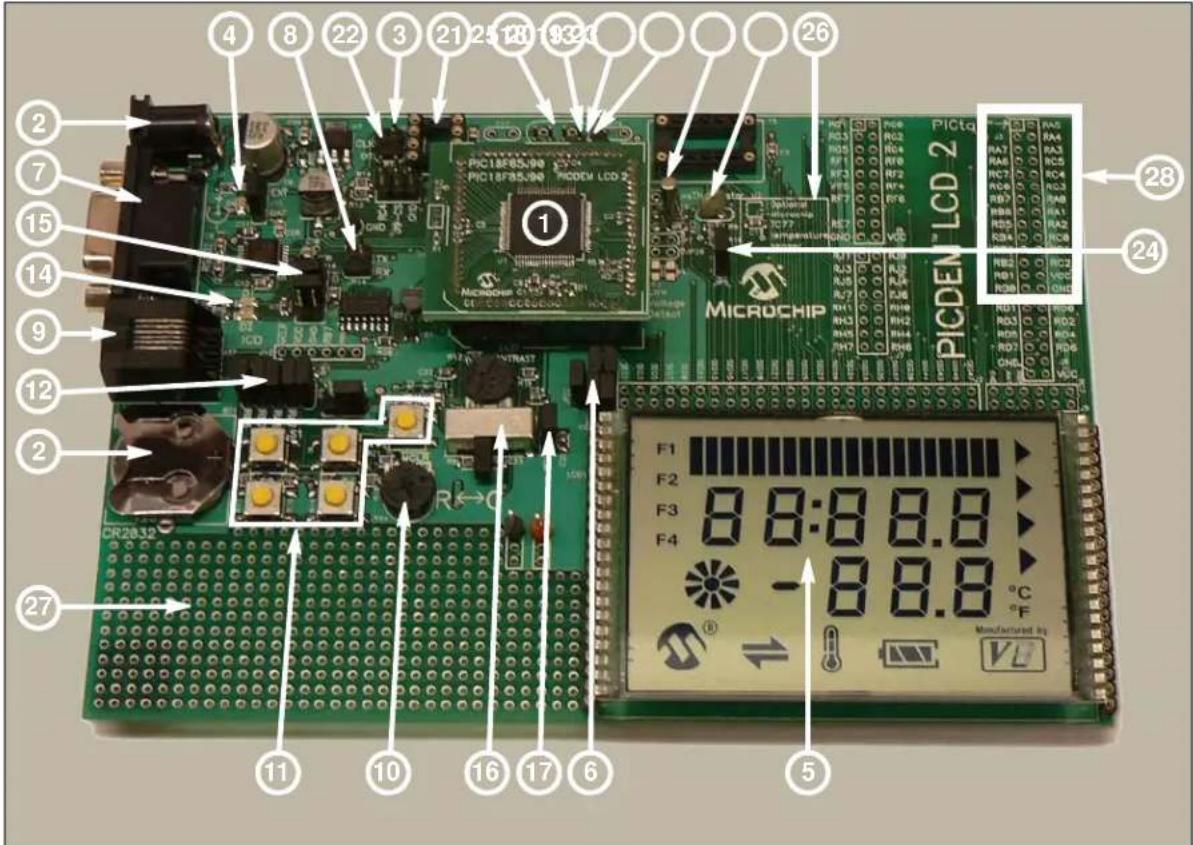
The PICDEM LCD 2 Demonstration Board has the following hardware features; each feature's number corresponding to the number in Figure 1-1:
- The demonstration board provides a daughter board option for the PIC18F85J90, PIC18F87J90, PIC18F8490, PIC16F914/917, PIC16F946, and PIC16F/LF1946/47 families of devices and MPLAB ICE. The board is also supplied with a PIM populated with a PIC18F85J90 device.
Note: Optional PIMs populated with PIC18FXX90, PIC18FXX90, PIC16F9XX, and PIC16X19XX devices are available for purchase from Microchip Direct (www.microchipdirect.com).
The MPLAB ICE can be plugged onto the board without any transition socket for PIC18FXX90 devices. For other devices, a transition socket may be needed.
-
On-board adjustable voltage regulator for direct input from 9V, 100 mA AC/DC wall adapter or 3V button cell battery.
-
Jumper J15 to select different power options.
-
Green power-on indicator LED for direct input from 9V.
-
Varitronix custom segmented LCD display.
-
Jumpers, COM0, COM1, COM2 and COM3, to disconnect COM pins from on-board LCD and allow the usage of any customized LCD glass.
-
RS-232 connection and associated hardware for direct connection to RS-232 interface.
-
Jumpers, JP13 and JP14, to disconnect TX and RX.
-
In-Circuit Debugger (ICD) connector.
-
R44, 10 kΩ, potentiometer for devices with analog inputs.
-
Five push button switches (S1 through S5) for external stimulus and Reset.
-
Jumpers, JP19, JP18, JP1 and JP2, to disconnect switches from RB6, RB7, RA6 and RA7 input pins.
-
Jumper, J11, to select either 10 kΩ (POT R44) or the S1-S4 switches to AN0 (RA0).
-
Two green LEDs connected to RC3 and RC4 (device dependent).
-
Jumpers in J14 to disconnect LEDs from RC3 and RC4.
-
A slide switch (S6) to select either the resistor ladder or the charge pump option for generating the bias values for the LCD pins.
-
Jumper, JP21, to physically tie the resistor ladder to ground.
-
Unpopulated holes provided for crystal connection.
-
Jumpers, JP11 and JP12, to disconnect crystal from OSC1 and OSC2.
-
32.768 kHz crystal with Timer1 for Real-Time Clock (RTC) operation.
-
A Microwire EEPROM 93AA46C provided on a socket.
-
Jumpers, JP15 and JP16, to disconnect EEPROM from CK and DT. Jumper, J6, to connect CS to GND or to RC4 (device dependent). Jumper, J13, to select either 128 x 8 or 64 x 16 memory organization.
-
Thermistor for sensing temperature.
-
Jumper, JP5, to connect thermistor to AN1 (RA1) (device dependent).
-
Jumper, JP17, to select either V cc or I/O to power the peripherals.
-
Unpopulated option for TC77 temperature sensor.
-
Prototype area for user hardware.
-
PICtail™ daughter board connection. (The pin names on the board are valid only for the PIC18F8490 device. For other devices, the PICtail daughter board pin connections may be different or not connected.)
FIGURE 1-1: PICDEM™ LCD 2 HARDWARE
text_image
PIC18F85/90 PIC18F85/90 PICDEM LCD 2 MICROCHIP PIC18F85/90 PICDEM LCD 2 PICta PICDEM LCD 2 PICDEM LCD 2 F1 F2 F3 F4 -8.8.8 °C Manufactured by 27 26 28 24 11 10 16 17 6 51.3 SAMPLE DEVICES
A PIM, populated with the PIC18F85J90, is included.
1.4 SAMPLE PROGRAMS
The PICDEM LCD 2 Demonstration Kit includes a CD-ROM with sample demonstration programs. Depending on the device, these programs may be used with some of the included sample devices with an In-Circuit Emulator (ICE) or with an In-Circuit Debugger (ICD). For each type of device (PIC16F946, PIC16F917, PIC18F8490, PIC18F85J90, PIC18F87J90 and PIC16F/LF1946/47), demo source code, several C and/or .asm files and compiled code (one HEX file) are provided.
NOTES:
Chapter 2. Getting Started
The PICDEM LCD 2 may be used as a stand-alone board with a preprogrammed device, with an In-Circuit Emulator (ICE) or with an In-Circuit Debugger (ICD). For a list of PIC ^® microcontroller compatible ICEs or ICDs, please refer to the “Microchip Development Systems Ordering Guide” (DS30177).
2.1 PICDEM LCD 2 AS A STAND-ALONE BOARD – PREPROGRAMMED DEVICE
The PICDEM LCD 2 may be demonstrated immediately by following the steps listed below:
- Apply power to the PICDEM LCD 2. For information on acceptable power sources, see Appendix A. "Board Technical Information".
Note: In the event that the preprogrammed PICDEM LCD 2 Demonstration Board with the PIC18F85J90 PIM does not operate, check the following conditions:
- The jumper, J15, is configured as per the power supply used. The slide switch, S6, is switched to C.
- JP1, JP2, JP6, JP18 and JP19 are connected.
- The middle two jumpers of J14 are connected.
- JP9 and JP10 are connected.
- J11 connecting POT to AN0 and JP17 connecting V cc to I/O.
The status of all other jumpers will not affect the preprogrammed demonstration.
Refer to Figure A-1 in Appendix A. "Board Technical Information".
To reprogram the sample device, the following will be necessary:
- User source code may be programmed to the device or the sample program may be restored from the file on the included CD-ROM.
- An assembler, such as the MPASM™ Assembler (available with MPLAB IDE), or a compiler, such as MPLAB C18 C Compiler (PIC18XXXX/18XXJXX devices only) must be used.
Source code must be assembled or compiled into a HEX file before it can be programmed into the device. Microchip Technology's MPASM Assembler or MPLAB C18 C Compiler may be used. Both are compatible with MPLAB IDE; however, other assemblers/compilers may be used.
- Once the sample program is in the HEX file format, it can be programmed to a Flash device using an MPLAB ICD 2 or PM3 with an ICSP™ module. Microchip Technology's MPLAB ICD 2 is compatible with MPLAB IDE.
If the code protection bit(s) have not been programmed, the on-chip program memory can be read out for verification purposes.
2.2 PICDEM LCD 2 USED WITH AN IN-CIRCUIT EMULATOR OR IN-CIRCUIT DEBUGGER
To use the PICDEM LCD 2 with an In-Circuit Emulator (ICE) or In-Circuit Debugger (ICD), refer to the tool's user's guide for instructions on how to power-up and configure the ICE/ICD, as well as how to connect to target boards.
Configure the PICDEM LCD 2 for the desired oscillator as described in Table 2-1. Refer to the ICE/ICD user's guide for any oscillator configuration requirements.
TABLE 2-1: OSCILLATOR SELECTION
| Oscillator Selection on PICDEM ^TM LCD 2 | Modification on PICDEM ^TM LCD 2 |
| Crystal JP9 and JP10 not connected. No canned oscillator on board, crystal in Y2, JP11 and JP12 connected, caps in C16 and C17. | |
| Canned Oscillator Put canned | oscillator on socket Y3. Y2 empty, JP9, JP11 and JP12 not connected. |
| Device Internal Oscillator JP11 | and JP12 not connected. No canned oscillator on board. |
| Ceramic Resonator – no internal caps | JP9 and JP10 not connected. No canned oscillator on board, resonator in Y2, JP11 and JP12 connected, caps in C16 and C17. |
| Ceramic Resonator – with internal caps | JP9 and JP10 not connected. No canned oscillator on board, resonator in Y2, JP11 and JP12 connected, C16 and C17 empty. |
Note: The MPLAB ICE can be plugged onto the board without any transition socket for PIC18FXX90 devices. For other devices, a transition socket may be needed.
Chapter 3. Using the Demo Software
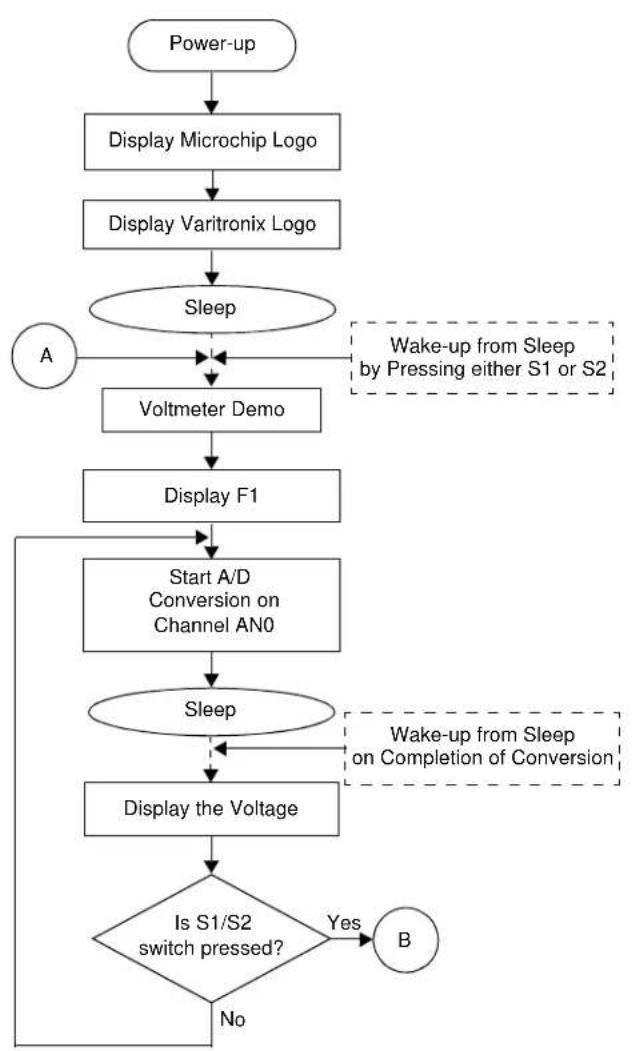
The demo programs are preprogrammed into the sample devices. Also, this program is included on the CD-ROM program disk for user reference. This demo program uses the functions or macros provided by the firmware LCD driver module to display the required characters, strings or icons on the LCD.
The demo firmware is made up of four components, which are individually displayed on the LCD. The PIC microcontroller's internal RC oscillator is used as the system clock source.
1. Voltmeter (F1)
This mode uses the A/D module to measure the voltage of the R44 pot through analog channel AN0, and displays a voltage between 0.00V and 3.30V on the LCD using the LCD module. Voltage is continually updated until the mode is exited by pressing either the S1 or S2 switch.
2. Thermometer (F2)
This mode uses the A/D module to measure the voltage of the thermistor R11 through analog channel AN1, and converts to temperature both in Celsius and Fahrenheit and displays the temperature on the LCD using the LCD module. Temperature is continually updated until the mode is exited by pressing either the S1 or S2 switch.
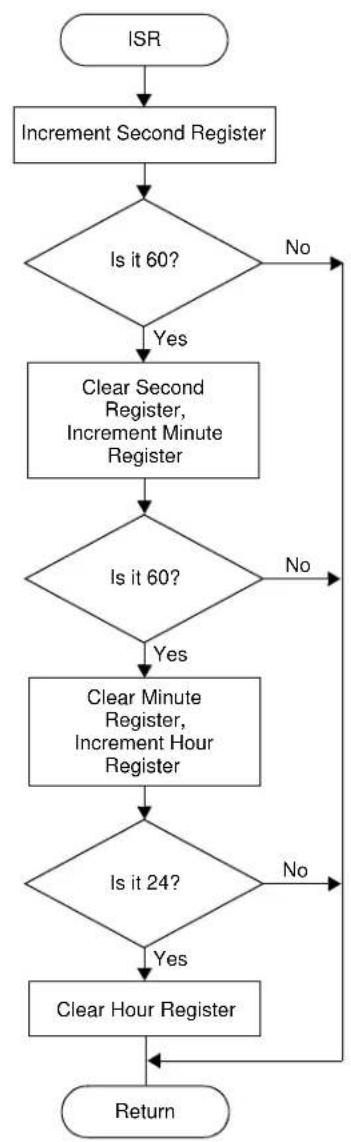
3. Clock (F3) ^(1)
This mode uses the Timer1 module and a 32 kHz clock crystal. Once this mode is entered from the main menu, the Real-Time Clock will start counting from 00:00:00. The S3 switch is used to increment minutes and the S4 switch is used to increment hours. To perform the increment operations, press and hold the switches. The clock keeps running continuously until the mode is exited by pressing either the S1 or S2 switch.
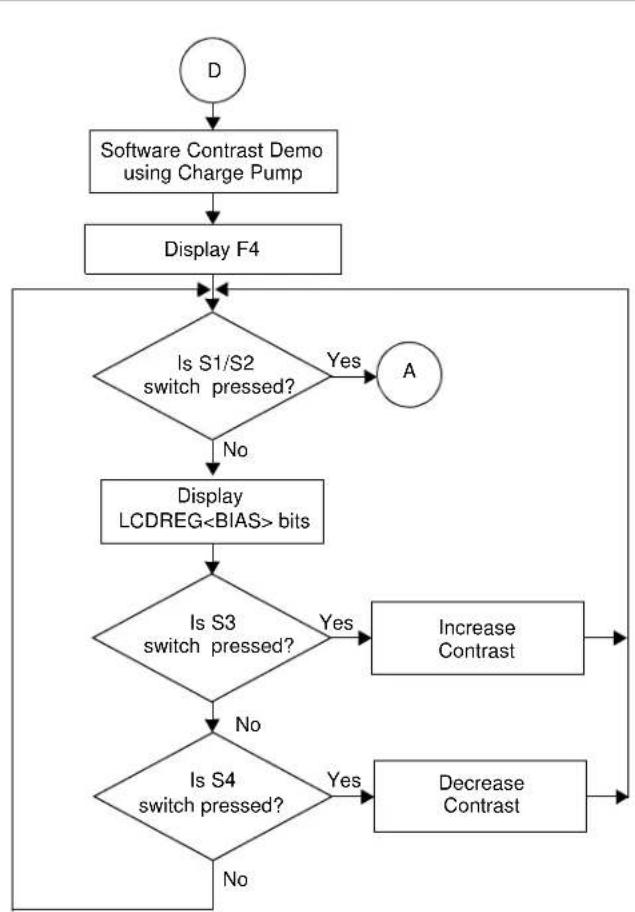
4. Charge Pump and Software Contrast (F4) ^(1)
This mode is available only for the PIC18F85J90 and PIC18F87J90 families of devices and uses the on-board charge pump and LCD voltage regulator. The LCD module is configured in Charge Pump mode and software contrast is achieved by either pressing S3 to increase the contrast or S4 to decrease the contrast until the mode is exited by pressing either the S1 or S2 switch. By exiting this mode, the Voltmeter mode is entered and retains the contrast level.
Note 1: For low-power battery operation in JP17, remove jumper on Vcc and I/O and connect I/O and RB0.
FIGURE 3-1: DEMO PROGRAM FLOWCHART
flowchart
graph TD
    A["Power-up"] --> B["Display Microchip Logo"]
    B --> C["Display Varitronix Logo"]
    C --> D{Sleep}
    D -->|Yes| E["Voltmeter Demo"]
    D -->|No| F["Display F1"]
    E --> F
    F --> G["Start A/D Conversion on Channel AN0"]
    G --> H{Sleep}
    H -->|Yes| I["Display the Voltage"]
    H -->|No| J{Is S1/S2 switch pressed?}
    I --> J
    J -->|Yes| K["B"]
    J -->|No| L["A"]
    style D stroke:#000,stroke-width:2px
    style E stroke:#000,stroke-width:2px
    style F stroke:#000,stroke-width:2px
    style G stroke:#000,stroke-width:2px
    style H stroke:#000,stroke-width:2px
    style I stroke:#000,stroke-width:2px
    style J stroke:#000,stroke-width:2px
    note right of D Wake-up from Sleep by Pressing either S1 or S2
FIGURE 3-2: DEMO PROGRAM FLOWCHART

flowchart
graph TD
    B["Start"] --> A["Thermometer Demo"]
    A --> B
    B --> C["Display F2"]
    C --> D["Start A2D Conversion on Channel AN1"]
    D --> E["Sleep"]
    E --> F["Display the Temperature"]
    F --> G{Is S1/S2 switch pressed?}
    G -->|Yes| H["C"]
    G -->|No| I["End"]
    H --> I
    style E stroke-dasharray: 5 5
    note right of E Wake-up from Sleep on Completion of Conversion
FIGURE 3-3: DEMO PROGRAM FLOWCHART

flowchart
graph TD
    A["C"] --> B["Real-Time Clock Demo"]
    B --> C["Display F3"]
    C --> D{Is S1/S2 switch pressed?}
    D -->|Yes| E["D"]
    D -->|No| F["Display Time"]
    F --> G["Sleep"]
    G --> H{Is S3 switch pressed?}
    H -->|Yes| I["Increment Minute"]
    H -->|No| J{Is S4 switch pressed?}
    J -->|Yes| K["Increment Hour"]
    J -->|No| L["End"]
    I --> L
    K --> L
    style G stroke-dasharray: 5 5
    note right of G Wake-up from Sleep Every Second
FIGURE 3-4: DEMO PROGRAM FLOWCHART
flowchart
graph TD
    A["D"] --> B["Software Contrast Demo using Charge Pump"]
    B --> C["Display F4"]
    C --> D{Is S1/S2 switch pressed?}
    D -->|Yes| E["A"]
    D -->|No| F["Display LCDREG<BIAS> bits"]
    F --> G{Is S3 switch pressed?}
    G -->|Yes| H["Increase Contrast"]
    G -->|No| I{Is S4 switch pressed?}
    I -->|Yes| J["Decrease Contrast"]
    I -->|No| K["End"]
FIGURE 3-5: DEMO PROGRAM FLOWCHART
flowchart
graph TD
    A["ISR"] --> B["Increment Second Register"]
    B --> C{Is it 60?}
    C -->|No| B
    C -->|Yes| D["Clear Second Register, Increment Minute Register"]
    D --> E{Is it 60?}
    E -->|No| D
    E -->|Yes| F["Clear Minute Register, Increment Hour Register"]
    F --> G{Is it 24?}
    G -->|No| F
    G -->|Yes| H["Clear Hour Register"]
    H --> I["Return"]
Appendix A. Board Technical Information
The PICDEM™ LCD 2 hardware is not complicated and is intended to illustrate the ease of use of various PIC® microcontrollers. The PICDEM LCD 2 features the following hardware elements.
Note: Many of the following hardware sections will require specific demo board jumper configurations. If a jumper is not listed in a particular section, then that jumper has no effect on the circuitry within the hardware section you are working. Figure A-1 shows a diagram of the PICDEM LCD 2 silkscreen with all necessary jumpers highlighted in gray. Also, refer to the schematic for circuit connections.
FIGURE A-1: PICDEM™ LCD 2 DEFAULT JUMPER LOCATION

text_image
PICtail™ RA5 RA4 RA3 RC5 RC4 RC3 RA0 RA1 RA2 RC0 RC1 RC2 VCC GND RD0 RD2 RD4 RD6 RB5 AN1 +V VCC RG0 RG2 RG4 RF0 RF2 RF4 RF6 VCC SEQ47 SEQ45 SEQ43 SEQ41 SEQ39 SEQ37 SEQ35 SEQ33 SEQ31 SEQ29 SEQ27 SEQ25 SEQ23 SEQ21 SEQ19 SEQ17 SEQ15 SEQ13 SEQ11 SEG9 SEG8 SEG7 SEG5 SEG3 SEG1 SEG0 SEG2 SEG11 SEG10 SEG9 SEG6 SEG4 SEG3 SEG2 SEG10 SEG0 SEG3F E1F2F3F4F5F6F7F8F9F10F11F12F13F14F15F16F17F18F19F20F21F22F23F24F25F26F27F28F29F30F31F32F33F34F35F36F37F38F39F40F41F42F43F44F45F46F47 VCC RJ0JUJUJUJUJUJUJUJUJUJUJUJUJUJUJUJUJUJUJUJUJUJUJUJUJUJUJUJUJUJUJUJUJUJUJUJUJUJUJUJUJUJUJUJUJUJUJUJUJUJUJ U2 R11 C15 C14 C13 C12 C11 C10 C9 D8 E7 F6 F5 F4 F3 F2 F1 F0 F8 F7 F5 F4 F3 F2 F1 F0 F8 F7 F5 F4 F3 F2 F1 F0 F8 F7 F5 F4 F3 F2 F1 F0 F8 F7 F5 F4 F3 F2 F1 F0 F8 F7 F5 F4 F3 F2 F1 F0 F8 F7 F5 F4 F3 F2 F1 F0 F8 F7 F5 F5 F4 F3 F2 F1 F0 F8 F7 F5 F5 F4 F3 F2 F1 F0 F8 F7 F5 F5 F4 F3 F2 F1 F0 F8 F7 F5 F5 F4 F3 F2 F1 F0 F8 F7 F5 F5 F4 F3 F2 F1 F0 F8 F7 F5 F5 F4 F3 F2 F 1 LCD_VLS573 MICROCHIP COMA COMB COMC CONTRAST LCD CONTRAST LCD CONTRAST LCD CONTRAST LCD CONTRAST LCD CONTRAST LCD CONTRAST LCD CONTRAST LCD CONTRAST LCD CONTRAST LCD CONTRAST LCD CONTRAST LCD CONTRAST LCD CONTRAST LCD CONTRAST LCD CONTRAST LCD CONTRAST LCD CONTRAST LCD CONTRAST LCD CONTRAST LCD CONTRAST LCOCONTRASTLCOCONTRASTLCOCONTRASTLCOCONTRASTLCOCONTRASTLCOCONTRASTLCOCONTRASTLCOCONTRASTLCOCONTRASTLCOCONTRASTLCOCONTRASTLCOCONTRASTLCOCONTRASTLCOCONTRASTLCOCONTRASTLCOCONTRASTLCOCONTRASTLCOCONTRASTLCOCONTRASTLCOCONTRASTLCOCONTRAST LCOCONTRASTLCOCONTRASTLCOCONTRASTLCOCONTRASTLCOCONTRASTLCOCONTRASTLCOCONTRASTLCOCONTRASTLCOCONTRASTLCOCONTRASTLCOCONTRASTLCOCONTRASTLCOCONTRASTLCOCONTRASTLCOCONTRASTLCOCONTRASTLCOCONTRASTLCOCONTRASTLCOCONTRASTLCOONTRUSTMUTMUTMUTMUTMUTMUTMUTMUTMUTMUTMUTMUTMUTMUTMUTMUTMUTMUTMUTMUTMUTMUTMUTMUTMUTMUTMUTMUTMUTMUTMUTMUTMUTMUTMUTMUTMUTMUTMUTMUTMUTMUTMUTMUTMUTMUTMUTMUTMUTMUTMOUTMUTMUTMUTMUTMUTMUTMUTMUTMUTMUTMUTMUTMUTMUTMUTMUTMUTMUTMUTMUTMUTMUTMUTMUTMUTMUTMUTMUTMUTMUTMUTMUTMUTMUTMUTMUTMUTMUTMUTMUTMUTMUTMUTMUTMUTMUTMUTMUTMUTMUNHUNHUNHUNHUNHUNHUNHUNHUNHUNHUNHUNHUNHUNHUNHUNHUNHUNHUNHUNHUNHUNHUNHUNHUNHUNHUNHUNHUNHUNHUNHUNHUNHUNHUNHUNHUNHUNHUNHUNHUNHUNHUNHUNHUNHUNHUNHUNHUNHUNHUN HUNHUNHUNHUNHUNHUNHUNHUNHUNHUNHUNHUNHUNHUNHUNHUNHUNHUNHUNHUNHUNHUNHUNHUNHUNHUNHUNHUNHUNHUNHUNHUNHUNHUNHUNHUNHUNHUNHUNHUNHUNHUNHUNHUNHUNHUNHUNHUNHUNHUNNURS232 RSDYIN P1 R6 CR2032 +9V IN +9V IN -9V IN -9V IN -9V IN -9V IN -9V IN -9V IN -9V IN -9V IN -9V IN -9V IN -9V IN -9V IN -9V IN -9V IN -9V IN -9V IN -9V IN -9V IN -9V IN -9V IN -9V IN -9V IN -9V IN -9V IN -9V IN +9V IN +9V IN +9V IN +9V IN +9V IN +9V IN +9V IN +9V IN +9V IN +9V IN +9V IN +9V IN +9V IN +9V IN +9V IN +9V IN +9V IN +9V IN +9V IN +9V IN +9V IN +9V IN +9V IN +9V IN +9V IN -9V IN -9V IN -9V IN -9V IN -9V IN -9V IN -9V IN -9V IN -9V IN -9V IN -9V IN -9V IN -9V IN -9V IN -9V IN -9V IN -9V IN -9V IN -9V IN -9V IN -9V IN -9V IN -9VIN-9VIN-9VIN-9VIN-9VIN-9VIN-9VIN-9VIN-9VIN-9VIN-9VIN-9VIN-9VIN-9VIN-9VIN-9VIN-9VIN-9VIN-9VIN-9VIN-9VIN-9VIN-9VIN-9VIN-9VIN-9VIN-9VIN-9VIN-9VIN-9VIN-9VIN-9VIN-6 VEN-6 VEN-6 VEN-6 VEN-6 VEN-6 VEN-6 VEN-6 VEN-6 VEN-6 VEN-6 VEN-6 VEN-6 VEN-6 VEN-6 VEN-6 VEN-6 VEN-6 VEN-6 VEN-6 VEN-6 VEN-6 VEN-6 VEN-6 VEN-6 VEN-6 VENNA.1 PROCESSORS
While there is no actual processor populated on the board, a processor is provided with the plug-in module (PIM) that is shipped with the demonstration board. The default processor on the PIM is the PIC18F85J90.
The board also supports the PIC18F87J90, PIC18F8490, PIC16F946, PIC16F917, and PIC16F/LF1946/47 processors, which have been designed for use with the PICDEM LCD 2. These three processors are in the PICDEM LCD 2 PIM Pack which is available for separate purchase.
The part numbers for a replacement PIC18F85J90 and the PIM pack are given in Table A-1.
TABLE A-1: PART NUMBERS (†)
| Item Part number | |
| PICDEM LCD 2 PIM Pack• PIC18F8490 PIM• PIC16F946 PIM• PIC16F917 PIM | MA180019 |
| PIC18F85J90 PIM MA180022 | |
| PIC16F1946/7 PIMPIC16LF1946/7 PIM | MA160016MA160015 |
† For the availability and pricing of parts, go to www.microchipdirect.com.
Note: The PIC16LF1946/7 PIM (MA160015) is limited to a maximum of 3.3V operating voltage.
A.2 LCD DISPLAY
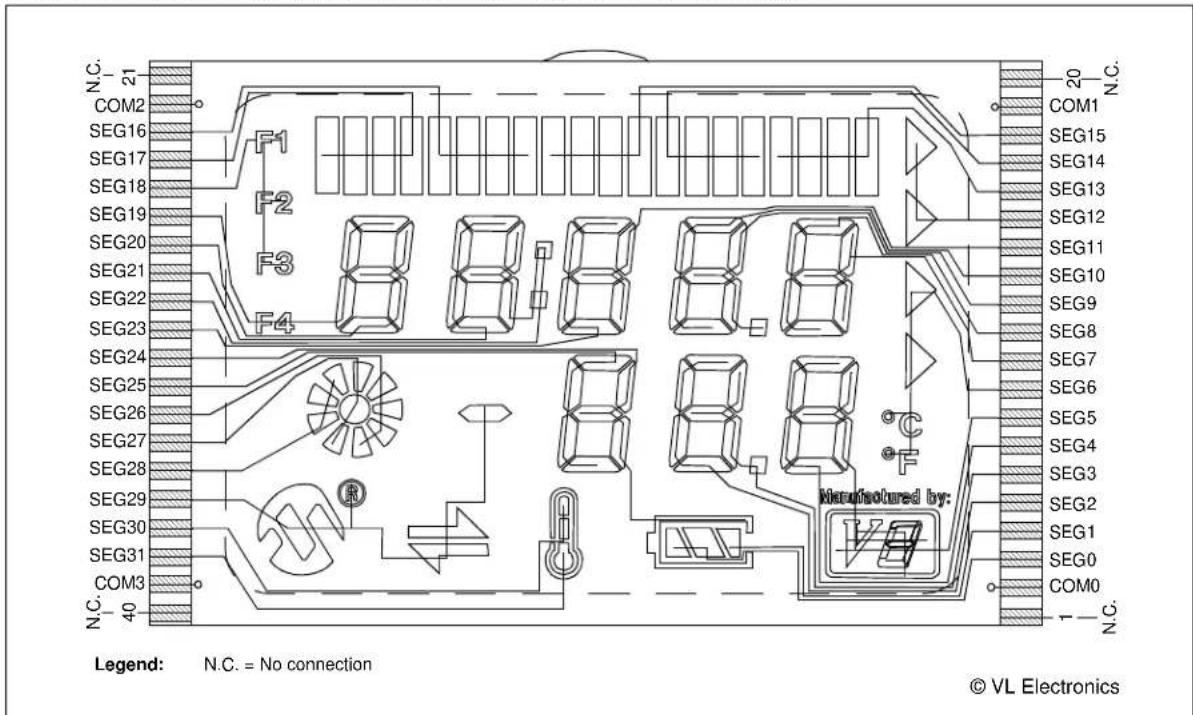
A custom-made segmented LCD glass, manufactured by the Varitronix Corporation, is provided as shown in Figure A-2. This LCD has 4 commons and 32 segments. Table A-2 provides a few of the specifics for the display. Refer to the Varitronix specification sheet (VL_5573_V00) for additional details.
FIGURE A-2: PICDEM™ LCD 2 DISPLAY

text_image
N.C. 21 COM2 SEG16 SEG17 SEG18 SEG19 SEG20 SEG21 SEG22 SEG23 SEG24 SEG25 SEG26 SEG27 SEG28 SEG29 SEG30 SEG31 COM3 N.C. 40 F1 F2 F3 F4 8 8 8 8 8 8 Manufactured by: N.C. 20 N.C. COM1 SEG15 SEG14 SEG13 SEG12 SEG11 SEG10 SEG9 SEG8 SEG7 SEG6 SEG5 SEG4 SEG3 SEG2 SEG1 SEG0 COM0 1 N.C. Legend: N.C. = No connection © VL ElectronicsTABLE A-2: LCD GLASS SPECIFICATIONS
| Type Specification | |
| P.I.D. VL_5573_V00 | |
| Mode/Color/Type Positive / -- / TN | |
| Viewing Direction 6:00 O’Clock | |
| Driving Scheme 1/4 Duty, 1/3 Bias | |
| Drive Voltage (VLCD) ~3.0 Volt (p-p), +20°C | |
| Operating Temperature 0°C - +50°C | |
| Storage Temperature | -10°C - +60°C |
| Polarizer – Front | STD.Transmissive |
| Polarizer – Back | STD.Reflective |
Since the glass used on the PICDEM LCD 2 operates at 3V, there is a voltage protection circuit on the LCDBIAS3 pin, which is enabled in the default configuration. When enabled, even if the VDD is greater than 3V, it regulates the LCDBIAS3 voltage such that it always maintains the value to 3V. This is not necessary for operation of the LCD module, but it is a protection circuit to prevent accidentally applying voltages higher than 3V to the LCD glass present on the board.
FIGURE A-3: DISPLAY DEFINITIONS

text_image
PIN21 (MIN V.A. 44.80) PIN40 (MAX 3.00) (MIN V.A. 66.40) (1.27±0.4) (PITCH 2.54 X 19 = 48.26) (1.50 TYP.) PIN20 X21 X20 X27 X28 X36 X33 X32 S4 6 8 DP1 DP2 S1 S2 S3 S6 S7 S5 S8 S9 S10 S11 S12 S13 X24 X26 X25 X27 X28 F4 F3 F2 F1 F0 F1 F2 F3 F4 F5 F6 F7 F8 F9 F10 F11 F12 F13© VL Electronics
FIGURE A-4: DIGIT DESCRIPTION

text_image
(6.0°) (0.20 TYP.) (10.50) (1.40 TYP.) (6.00)DIGIT 1-8
© VL Electronics
TABLE A-3: LCD SEGx AND COMx
| Pin ICE Pin COM0 COM1 COM2 COM3 | |||||
| 1 N.C. N.C. N.C. | |||||
| 2 | C | O | |||
| 3 SEG0 | S12 — — S10 | ||||
| 4 SEG1 | S11 | — — — | |||
| 5 | SEG2 | 7D | 7F | 7A | 7E |
| 6 | SEG3 | DP2 | 7G | 7B | 7C |
| 7 | SEG4 | 8D | 8F | 8A | 8E |
| 8 | SEG5 | S13 | 8G | 8B | 8C |
| 9 SEG6 | X23 | X25 | X26 | X24 | |
| 10 | SEG7 | 5B | 5C | — | 5G |
| 11 | SEG8 | 5A | 5E | 5D | 5F |
| 12 | SEG9 | 4B | 4C | DP1 | 4G |
| 13 | SEG10 | 4A | 4E | 4D | 4F |
| 14 | SEG11 | 3B | 3C | — | 3G |
| 15 | SEG12 | — X22 | X21 — | ||
| 16 | SEG13 | X17 | X19 | X20 | X18 |
| 17 | SEG14 | X16 | X14 | X13 | X15 |
| 18 | SEG15 | X9 | X11 | X12 | X10 |
| 19 | — | COM1 | — — | ||
| 20 | N.C. N.C. | N.C. N.C. | |||
| 21 | N.C. N.C. | N.C. N.C. | |||
| 22 | — — | COM2 | — | ||
| 23 | SEG16 | X8 | X6 | X5 | X7 |
| 24 | SEG17 | X1 | X3 | X4 | X2 |
| 25 | SEG18 | — | F2 | F1 | F3 |
| 26 | SEG19 | 1A | 1E | F4 | 1F |
| 27 | SEG20 | 1B | 1C | 1D | 1G |
| 28 | SEG21 | 2A | 2E | 2D | 2F |
| 29 | SEG22 | 2B | 2C | COL | 2G |
| 30 | SEG23 | 3A | 3E | 3D | 3F |
| 31 | SEG24 | S9 | 6G | 6B | 6C |
| 32 | SEG25 | 6D | 6F | 6A | 6E |
| 33 | SEG26 | X31 | X33 | X34 | X32 |
| 34 | SEG27 | — | X27 | X35 | X30 |
| 35 | SEG28 | — | X28 | X36 | X29 |
| 36 | SEG29 | S1 | S3 | S4 | S2 |
| 37 | SEG30 S6 | — — | 7 | ||
| 38 | SEG31 S5 | — — | 8 | ||
| 39 | — — — | COM3 | |||
| 40 | N.C. N.C. | N.C. N.C. | |||
Legend: N.C. = No connection
A.2.1 Device-Specific LCD Segment Configuration
The following figures and tables detail which segments are available for specific PIC ^® devices.
TABLE A-4: PIC18F85J90 PIM AND ICE PIN/PORT COMPARISON
| PIC18F85J90PIM Pin No. | PIC18F85J90Port | PIC18F85J90Pin | ICE Pin | ICE Port | ICE Pin No. |
| 1 | RH2 | SEG45 | SEG30 | RG0 | 16 |
| 2 | RH3 | SEG44 | SEG29 | RG1 | 17 |
| 3 | RE1 | BIAS2 | BIAS2 | RE1 | 14 |
| 4 RE0 | BIAS1 | BIAS1 RE0 | 15 44 | ||
| 5 | RG0 | BIAS0 | BIAS0 | RB5 | 67 |
| 6 | RG1 | NC | NC | ||
| 7 | RG2 | VLCAP1 | VLCAP1 | RC3 | 57 |
| 8 | RG3 | VLCAP2 | VLCAP2 | RC4 | 58 |
| 9 | RG5 | MCLR | ICEMCLR | RG5 | 20 |
| 10 | RG4 | SEG26 | SEG26 | RG4 | 21 |
| 11 | Vss | Vss | Vss | Vss | 23 |
| 12 | VDDCORE | VDDCORE | VDD | VDD | 24 |
| 13 | RF7 | SEG25 | SEG25 | RF7 | 25 |
| 14 | RF6 | SEG24 | SEG24 | RF6 | 26 |
| 15 | RF5 | SEG23 | SEG23 | RF5 | 27 |
| 16 | RF4 | SEG22 | SEG22 | RF4 | 28 |
| 17 | RF3 | SEG21 | SEG21 | RF3 | 29 |
| 18 | RF2 | SEG20 | SEG20 | RF2 | 30 |
| 19 | RH7 | SEG43 | SEG43 | RH7 | 31 |
| 20 | RH6 | SEG42 | SEG42 | RH6 | 32 |
| 21 | RH5 | SEG41 | SEG41 | RH5 | 33 |
| 22 | RH4 | SEG40 | SEG40 | RH4 | 34 |
| 23 | RF1 | SEG19 | SEG19 | RF1 | 35 |
| 24 | ENVREG | ENVREG | |||
| 25 | AVDD | AVDD | ICEVDD | AVDD | 37 |
| 26 | AVss | AVss | AVss | AVss | 38 |
| 27 | RA3 | NC | NC | ||
| 28 | RA2 | AN2 | AN1 | RA1 | 41 |
| 29 | RA1 | SEG18 | SEG18 | RF0 | 36 |
| 30 | RA0 | AN0 | AN0 | RA0 | 42 |
| 31 | Vss | Vss | Vss | Vss | 44 |
| 32 | VDD | ICEVDD | ICEVDD | VDD | 45 |
| 33 | RA5 SEG15 | SEG15 | RA5 46 73 | ||
| 34 | RA4 | SEG14 | SEG14 | RA4 | 47 |
| 35 | RC1 | T1OSCI | T1OSCI | RC1 | 48 |
| 36 | RC0 | T1OSCO | T1OSCO | RC0 | 49 |
| 37 | RC6 | TX/CK | TX/CK | RC6 | 50 |
| 38 | RC7 | RX/DT | RX/DT | RC7 | 51 |
| 39 | RJ4 | SEG39 | SEG39 | RJ4 | 52 |
| 40 | RJ5 | SEG38 | SEG38 | RJ5 | 53 |
Legend: Unshaded cells indicate where a perfect match between PIM and ICE pins and ports exists.
Shaded cells indicate where differences between PIM and ICE ports and pins exist.
Bold text indicates the PIM pins that are not connected to any ICE pins or ports.
TABLE A-5: PIC18F85J90 LCD CONNECTIONS COMPARISON
| PIC18F85J90 | ICE Pin # | Pin # | ICE PIC18F85J90 | ||||
| NC | 21 | NC NC | 20 | NC | |||
| COM2 COM2 22 COM3 COM3 COM3 COM3 COM3 COM3 COM3 COM3 COM3 COM3 COM3 COM3 COM3 COM3 COM3 COM3 COM3 COM3 COM3 COM3 COM3 COM3 COM3 COM3 COM3 COM3 COM3 COM3 COM3 COM3 COM3 COM3 COM3 COM3 COM3 COM3 COM3 COM3 COM3 COM3 COM3 COM3 COM3 COM3 COM3 COM3 COM3 COM3 COM3 COM3 COM | X8,X6,X5,X7 X9,X11,X12,X10 | X1,X3,X4,X2 | X16,X14,X13,X15 | 17 | SEG14 | SEG14 | |
| SEG16 SEG16 23 X8, X6, X5, X7 X9, X11, X12, X15 | SEG17 | 24 | -, F2, F1, F3 | X17, X19, X20, X18 | 16 | SEG13 | SEG13 |
| SEG18 | SEG18 | 25 | 1A, 1E, F4, 1F | -, X22, X21, - | 15 | SEG12 | SEG12 |
| SEG19 | SEG19 | 26 | 1B, 1C, 1D, 1G | 3B, 3C, -, 3G | 14 | SEG11 | SEG11 |
| SEG20 | SEG20 | 27 | 1B, 1C, 1D, 1G | 3B, 3C, -, 3G | 14 | SEG11 | SEG11 |
| SEG21 SEG21 28 2A, 2E, 2D, 2F 4A, 4E, 4D, 4F 13 SEG10 SEG10 | |||||||
| SEG22 | SEG22 | 29 | 2B, 2C, COL, 2G | 4B, 4C, DP1, 4G | 12 | SEG9 | SEG9 |
| SEG23 SEG23 30 3A, 3E, 3D, 3F 5A, 5E, 5D, 5F 11 SEG8 | SEG8 | ||||||
| SEG24 | SEG24 | 31 | S9, 6G, 6B, 6C | 5B, 5C, -, 5G | 10 | SEG7 | SEG7 |
| SEG25 | SEG25 | 32 | 6D, 6F, 6A, 6E | X23, X25, X26, X24 | 9 | SEG6 | SEG6 |
| SEG26 | SEG26 | 33 | X31, X33, X34, X32 | S13, 8G, 8B, 8C | 8 | SEG5 | SEG5 |
| SEG29 | SEG27 | 34 | -, X27, X35, X30 | 8D, 8F, 8A, 8E | 7 | SEG4 | SEG4 |
| SEG31 | SEG28 | 35 | -, X28, X36, X29 | DP2, 7G, 7B, 7C | 6 | SEG3 | SEG3 |
| SEG44 | SEG29 | 36 | S1, S3, S4, S2 | 7D, 7F, 7A, 7E | 5 | SEG2 | SEG2 |
| SEG45 | SEG30 | 37 | S6, -, -, S7 | S11, -, -, - | 4 | SEG1 | SEG1 |
| SEG46 | SEG31 | 38 | S5, -, -S8 | S12, -, -, S10 | 3 | SEG0 | SEG0 |
| COM3 COM3 39 COM4 COM4 COM4 COM4 COM4 COM4 COM4 COM4 COM4 COM4 COM4 COM4 COM4 COM4 COM4 COM4 COM4 COM4 COM4 COM4 COM4 COM4 COM4 COM4 COM4 COM4 COM4 COM4 COM4 COM4 COM4 COM4 COM4 COM4 COM4 COM4 COM4 COM4 COM4 COM4 COM4 COM4 COM4 COM4 COM4 COM4 COM4 COM4 COM4 COM4 COM | |||||||
| NC | 40 | NC NC | 1 | NC | |||
Legend: Unshaded cells indicate a perfect match between the PIM and the glass.
Shaded cells indicate the pins that are remapped to the corresponding pin on the PIM.
FIGURE A-5: SEGMENT CONFIGURATION FOR PIC18F85J90 DEVICES

text_image
N.C. 21 COM2 SEG16 SEG17 SEG18 SEG19 SEG20 SEG21 SEG22 SEG23 SEG24 SEG25 SEG26 SEG29 → SEG27(2) SEG31 → SEG28(2) SEG44(1) → SEG29 SEG45(1) → SEG30(2) SEG46(1) → SEG31 COM3 N.C. 40 F1 F2 F3 F4 Manufactured by: N.C. = No connection Note 1: SEG44, SEG45, and SEG46 exist only on PIC18F85J90 devices. 2: Disable SEG27, SEG28, SEG30, and SEG32 when the LCD module is enabled. Although SEG32 is not listed in the diagram, it is multiplexed with the Timer1 oscillator, and therefore, must be disabled when the Timer1 oscillator is enabled. © VL ElectronicsTABLE A-6: PIC18F85J90 PORT AND PIN COMPARISON
| PIC18F85J90 Port | PIC18F85J90 PIN ICE Pin ICE Port | ||
| RA0 AN0 AN0 RA0 | |||
| RA1 SEG18 SEG18 RF0 | |||
| RA6 OSC2 OSC2 RA6 | |||
| RA7 OSC1 OSC1 RA7 | |||
| RB0 RB0 RB0 RB0 | |||
| RB5 | SEG29 | SEG27 | RG3 |
| RB6 RB6 RB6 RB6 | |||
| RB7 RB7 RB7 RB7 | |||
| RC0 | T1OSC1 T1OSC0 | RC0 | |
| RC1 | TIOSC0 | TIOSC1 | RC1 |
| RC3 | SEG17 | SEG17 | RA3 |
| RC4 | SEG16 | SEG16 | RA2 |
| RC6 | TX/CK | TX/CK | RC6 |
| RC7 | RX/DT | RX/DT | RC7 |
Legend: Unshaded cells indicate a perfect match between the PIM and the glass. Shaded cells indicate the pins that are remapped to the corresponding pin on the PIM.
TABLE A-7: PIC18F87J90 PIM AND ICE PIN/PORT COMPARISON
| PIC18F87J90PIM Pin No. | PIC18F87J90Port | PIC18F87J90Pin | ICE Pin | ICE Port | ICE Pin No. |
| 1 | RH2 | SEG45 | SEG30 | RG0 | 16 |
| 2 | RH3 | SEG44 | SEG29 | RG1 | 17 |
| 3 | RE1 | BIAS2 | BIAS2 | RE1 | 14 |
| 4 RE0 | BIAS1 | BIAS1 RE0 | 15 44 | ||
| 5 | RG0 | BIAS0 | BIAS0 | RB5 | 67 |
| 6 | RG1 | NC | NC | ||
| 7 | RG2 | VLCAP1 | VLCAP1 | RC3 | 57 |
| 8 | RG3 | VLCAP2 | VLCAP2 | RC4 | 58 |
| 9 | RG5 | MCLR | ICEMCLR | RG5 | 20 |
| 10 | RG4 | SEG26 | SEG26 | RG4 | 21 |
| 11 | Vss | Vss | Vss | Vss | 23 |
| 12 | VDDCORE | VDDCORE | VDD | VDD | 24 |
| 13 | RF7 | SEG25 | SEG25 | RF7 | 25 |
| 14 | RF6 | SEG24 | SEG24 | RF6 | 26 |
| 15 | RF5 | SEG23 | SEG23 | RF5 | 27 |
| 16 | RF4 | SEG22 | SEG22 | RF4 | 28 |
| 17 | RF3 | SEG21 | SEG21 | RF3 | 29 |
| 18 | RF2 | SEG20 | SEG20 | RF2 | 30 |
| 19 | RH7 | SEG43 | SEG43 | RH7 | 31 |
| 20 | RH6 | SEG42 | SEG42 | RH6 | 32 |
| 21 | RH5 | SEG41 | SEG41 | RH5 | 33 |
| 22 | RH4 | SEG40 | SEG18 | RF0 | 34 |
| 23 | RF1 | SEG19 | SEG19 | RF1 | 35 |
| 24 | ENVREG | ENVREG | |||
| 25 | AVDD | AVDD | ICEVDD | AVDD | 37 |
| 26 | AVss | AVss | AVss | AVss | 38 |
| 27 | RA3 | CTMU | NC | ||
| 28 | RA2 | AN2 | AN1 | RA1 | 41 |
| 29 | RA1 | CTMU | NC | 36 | |
| 30 | RA0 | AN0 | AN0 | RA0 | 42 |
| 31 | Vss | Vss | Vss | Vss | 44 |
| 32 | VDD | ICEVDD | ICEVDD | VDD | 45 |
| 33 | RA5 SEG15 | SEG15 | RA5 46 73 | ||
| 34 | RA4 | SEG14 | SEG14 | RA4 | 47 |
| 35 | RC1 | T1OSCI | T1OSCI | RC1 | 48 |
| 36 | RC0 | T1OSCO | T1OSCO | RC0 | 49 |
| 37 | RC6 | TX/CK | TX/CK | RC6 | 50 |
| 38 | RC7 | RX/DT | RX/DT | RC7 | 51 |
| 39 | RJ4 | SEG39 | SEG39 | RJ4 | 52 |
| 40 | RJ5 | SEG38 | SEG38 | RJ5 | 53 |
Legend: Unshaded cells indicate where a perfect match between PIM and ICE pins and ports exists.
Shaded cells indicate where differences between PIM and ICE ports and pins exist.
Bold text indicates the PIM pins that are not connected to any ICE pins or ports.
TABLE A-8: PIC18F87J90 LCD CONNECTIONS COMPARISON
| PIC18F87J90 | ICE Pin # | Pin # | ICE P | C18F87J90 | ||||
| NC | 21 | NC NC | 20 | NC | ||||
| COM2 COM2 22 COM3 COM2 19 COM1 COM1 | ||||||||
| SEG16 SEG16 23 X8,X6,X5,X7 X9,X11,X12,X10 18 SEG15 SEG15 | ||||||||
| SEG17 SEG17 24 X1,X3,X4,X2 X16,X14,X13,X15 17 SEG14 SEG14 | ||||||||
| SEG40 SEG18 25 | -,F2,F1,F3 X17,X19,X20,X18 16 SEG13 SEG13 | |||||||
| SEG19 | SEG19 | 26 | 1A,1E,F4,1F | -,X22,X21,- | 15 | SEG12 | SEG12 | |
| SEG20 | SEG20 | 27 | 1B,1C,1D,1G | 3B,3C,-,3G | 14 | SEG11 | SEG11 | |
| SEG21 SEG21 28 2A,2E,2D,2F 4A,4E,4D,4F 13 SEG10 SEG10 | ||||||||
| SEG22 | SEG22 | 29 | 2B,2C,COL,2G | 4B,4C,DP1,4G | 12 | SEG9 | SEG9 | |
| SEG23 | SEG23 | 30 | 3A,3E,3D,3F | 5A,5E,5D,5F | 11 | SEG8 | SEG8 | |
| SEG24 | SEG24 | 31 | S9,6G,6B,6C | 5B,5C,-,5G | 10 | SEG7 | SEG7 | |
| SEG25 SEG25 32 6D,6F,6A,6E X23,X25,X26,X24 9 SEG6 SEG6 | ||||||||
| SEG26 | SEG26 | 33 | X31,X33,X34,X32 | S13,8G,8B,8C | 8 | SEG5 | SEG5 | |
| SEG29 | SEG27 | 34 | -,X27,X35,X30 | 8D,8F,8A,8E | 7 | SEG4 | SEG4 | |
| SEG31 | SEG28 | 35 | -,X28,X36,X29 | DP2,7G,7B,7C | 6 | SEG3 | SEG3 | |
| SEG44 | SEG29 | 36 | S1,S3,S4,S2 | 7D,7F,7A,7E | 5 | SEG2 | SEG2 | |
| SEG45 | SEG30 | 37 | S6,-,-,S7 | S11,-,-,- | 4 | SEG1 | SEG1 | |
| SEG46 | SEG31 | 38 | S5,-,-S8 | S12,-,-,S10 | 3 | SEG0 | SEG0 | |
| COM3 COM3 39 COM4 COM1 2 COM0 COM0 | ||||||||
| NC | 40 | NC NC | 1 | NC | ||||
Legend: Unshaded cells indicate a perfect match between the PIM and the glass. Shaded cells indicate the pins that are remapped to the corresponding pin on the PIM.
FIGURE A-6: SEGMENT CONFIGURATION FOR PIC18F87J90 DEVICES

text_image
N.C. 21 COM2 SEG16 SEG17 SEG18 SEG19 SEG20 SEG21 SEG22 SEG23 SEG24 SEG25 SEG26 SEG29→SEG27(2) SEG31→SEG28(2) SEG44(1)→SEG29 SEG45(1)→SEG30(2) SEG46(1)→SEG31 COM3 N.C. 40 F1 F2 F3 F4 Manufactured by: N.C. = No connection Note 1: SEG44, SEG45, and SEG46 exist only on PIC18F87J90 devices. 2: Disable SEG27, SEG28, SEG30, and SEG32 when the LCD module is enabled. Although SEG32 is not listed in the diagram, it is multiplexed with the Timer1 oscillator, and therefore, must be disabled when the Timer1 oscillator is enabled. © VL ElectronicsTABLE A-9: PIC18F87J90 PORT AND PIN COMPARISON
| PIC18F87J90 Port | PIC18F87J90 PIN ICE Pin ICE Port | ||
| RA0 AN0 AN0 RA0 | |||
| RA6 OSC2 OSC2 RA6 | |||
| RA7 OSC1 OSC1 RA7 | |||
| RB0 RB0 RB0 RB0 | |||
| RB5 SEG29 SEG27 | RG3 | ||
| RB6 RB6 RB6 RB6 | |||
| RB7 RB7 RB7 RB7 | |||
| RC0 T1OSC1 | T1OSC0 | RC0 | |
| RC1 | TIOSC0 | TIOSC1 | RC1 |
| RC3 SEG17 SEG17 | RA3 | ||
| RC4 SEG16 SEG16 | RA2 | ||
| RC6 | TX/CK | TX/CK | RC6 |
| RC7 | RX/DT | RX/DT | RC7 |
Legend: Unshaded cells indicate a perfect match between the PIM and the glass. Shaded cells indicate the pins that are remapped to the corresponding pin on the PIM.
TABLE A-10: PIC18F8490 PIM AND ICE PORT/PIN COMPARISON
| PIC18F8490PIM Pin No. | PIC18F8490Port | PIC18F8490Pin | ICE Pin | ICE Port | ICE Pin No. | PIC18F8490PIM Pin No. | PIC18F8490Port | PIC18F8490Pin | ICE Pin | ICE Port | ICE Pin No. |
| 1 RH2 | SEG45 SEG4 | 5 RH2 12 41 | RJ6 SEG3 | 7 SEG3 | 7 RJ6 | 54 | |||||
| 2 RH3 | SEG44 SEG4 | 4 RH3 13 42 | RJ7 SEG3 | 6 SEG3 | 6 RJ7 | 55 | |||||
| 3 | LCDBIAS2 | LCDBIAS2 | BIAS2 | RE1 | 14 | 43 | RC2 | SEG13 | SEG13 | RC2 | |
| 4 | LCDBIAS1 | LCDBIAS1 | BIAS1 | RE0 | 15 | 44 | RC3 | RC3 | RC3 | RC3 | |
| 5 | RG0 | SEG30 | SEG30 | RG0 | 16 | 45 | RC4 | RC4 | RC4 | RC4 | |
| 6 | RG1 | SEG29 | SEG29 | RG1 | 17 | 46 | RC5 | SEG12 | SEG12 | RC5 | |
| 7 | RG2 | SEG28 | SEG28 | RG2 | 18 | 47 | RB7 | RB7 | RB7 | RB7 | |
| 8 | RG3 | SEG27 | SEG27 | RG3 | 19 | 48 | VDD | VDD | ICEVDD | VDD | |
| 9 | RG5 | MCLR | ICEMCLR | RG5 | 20 | 49 | RA7 | OSC1 | OSC1 | RA7 | |
| 10 | RG4 | SEG26 | SEG26 | RG4 | 21 | 50 | RA6 | OSC2 | OSC2 | RA6 | |
| 11 | Vss | Vss | Vss | Vss | 23 | 51 | Vss | Vss | Vss | Vss | |
| 12 | VDD | VDD | ICEVDD | VDD | 24 | 52 | RB6 | RB6 | RB6 | RB6 | |
| 13 | RF7 | SEG25 | SEG25 | RF7 | 25 | 53 | RB5 | RB5 | RB5 | RB5 | |
| 14 | RF6 | SEG24 | SEG24 | RF6 | 26 | 54 | RB4 | SEG11 | SEG11 | RB4 | |
| 15 | RF5 | SEG23 | SEG23 | RF5 | 27 | 55 | RB3 | SEG10 | SEG10 | RB3 | |
| 16 | RF4 | SEG22 | SEG22 | RF4 | 28 | 56 | RB2 | SEG9 | SEG9 | RB2 | |
| 17 | RF3 | SEG21 | SEG21 | RF3 | 29 | 57 | RB1 | SEG8 | SEG8 | RB1 | |
| 18 | RF2 | SEG20 | SEG20 | RF2 | 30 | 58 | RB0 | RB0 | RB0 | RB0 | |
| 19 | RH7 | SEG43 SEG43 RH7 | 31 59 RJ3 SEG35 | SEG35 RJ3 | 73 | ||||||
| 20 | RH6 | SEG42 SEG42 RH6 | 32 60 RJ2 SEG34 | SEG34 RJ2 | 74 | ||||||
| 21 | RH5 | SEG41 SEG41 RH5 | 33 61 RJ1 SEG33 | SEG33 RJ1 | 75 | ||||||
| 22 | RH4 | SEG40 SEG40 RH4 | 34 62 RJ0 SEG32 | SEG32 RJ0 | 76 | ||||||
| 23 | RF1 | SEG19 | SEG19 | RF1 | 35 | 63 | RD7 | SEG7 | SEG7 | RD7 | |
| 24 | RF0 | SEG18 | SEG18 | RF0 | 36 | 64 | RD6 | SEG6 | SEG6 | RD6 | |
| 25 | AVDD | AVDD | ICEVDD | AVDD | 37 | 65 | RD5 | SEG5 | SEG5 | RD5 | |
| 26 | AVss | AVss | AVss | AVss | 38 | 66 | RD4 | SEG4 | SEG4 | RD4 | |
| 27 | RA3 | SEG17 | SEG17 | RA3 | 39 | 67 | RD3 | SEG3 | SEG3 | RD3 | |
| 28 | RA2 | SEG16 | SEG16 | RA2 | 40 | 68 | RD2 | SEG2 | SEG2 | RD2 | |
| 29 | RA1 | AN1 | AN1 | RA1 | 41 | 69 | RD1 | SEG1 | SEG1 | RD1 | |
| 30 | RA0 | AN0 | AN0 | RA0 | 42 | 70 | Vss | Vss | Vss | Vss | |
| 31 | Vss | Vss | Vss | Vss | 44 | 71 | VDD | VDD | VDD | VDD | |
| 32 | VDD | VDD | ICEVDD | VDD | 45 | 72 | RD0 | SEG0 | SEG0 | RD0 | |
| 33 | RA5 | SEG15 | SEG15 | RA5 | 46 | 73 | RE7 | SEG31 | SEG31 | RE7 | |
| 34 | RA4 | SEG14 | SEG14 | RA4 | 47 | 74 | RE6 | COM3 | COM3 | RE6 | |
| 35 | RC1 | TIOSC0 | TIOSC1 | RC1 | 48 | 75 | RE5 | COM2 | COM2 | RE5 | |
| 36 | RC0 | T1OSC1 | T1OSC0 | RC0 | 49 | 76 | RE4 | COM1 | COM1 | RE4 | |
| 37 | RC6 | TX/CK | TX/CK | RC6 | 50 | 77 | COM0 | COM0 | COM0 | RE3 | |
| 38 | RC7 | RX/DT | RX/DT | RC7 | 51 | 78 | LCDBIAS3 | LCDBIAS3 | BIAS3 | RE2 | |
| 39 | RJ4 | SEG39 | SEG39 | RJ4 | 52 | 79 | RH0 | SEG47 | SEG47 | RH0 | |
| 40 | RJ5 | SEG38 | SEG38 | RJ5 | 53 | 80 | RH1 | SEG46 | SEG46 | RH1 | |
TABLE A-11: PIC18F8490 LCD CONNECTIONS COMPARISON
| PIC18F8490 | ICE Pin # Pin # ICE PIC18F8490 | |||||||
| NC 21 NC NC 20 NC | ||||||||
| COM2 | COM2 | 22 | COM3 | COM2 | 19 | COM1 | COM1 | |
| SEG16 | SEG16 | 23 | X8,X6,X5,X7 | X9,X11,X12,X10 | 18 | SEG15 | SEG15 | |
| SEG17 | SEG17 | 24 | X1,X3,X4,X2 | X16,X14,X13,X15 | 17 | SEG14 | SEG14 | |
| SEG18 | SEG18 | 25 | -,F2,F1,F3 | X17,X19,X20,X18 | 16 | SEG13 | SEG13 | |
| SEG19 | SEG19 | 26 | 1A,1E,F4,1F | -,X22,X21,- | 15 | SEG12 | SEG12 | |
| SEG20 | SEG20 | 27 | 1B,1C,1D,1G | 3B,3C,-,3G | 14 | SEG11 | SEG11 | |
| SEG21 | SEG21 | 28 | 2A,2E,2D,2F | 4A,4E,4D,4F | 13 | SEG10 | SEG10 | |
| SEG22 | SEG22 | 29 | 2B,2C,COL,2G | 4B,4C,DP1,4G | 12 | SEG9 | SEG9 | |
| SEG23 | SEG23 | 30 | 3A,3E,3D,3F | 5A,5E,5D,5F | 11 | SEG8 | SEG8 | |
| SEG24 | SEG24 | 31 | S9,6G,6B,6C | 5B,5C,-,5G | 10 | SEG7 | SEG7 | |
| SEG25 | SEG25 | 32 | 6D,6F,6A,6E | X23,X25,X26,X24 | 9 | SEG6 | SEG6 | |
| SEG26 | SEG26 | 33 | X31,X33,X34,X32 | S13,8G,8B,8C | 8 | SEG5 | SEG5 | |
| SEG27 | SEG27 | 34 | -,X27,X35,X30 | 8D,8F,8A,8E | 7 | SEG4 | SEG4 | |
| SEG28 | SEG28 | 35 | -,X28,X36,X29 | DP2,7G,7B,7C | 6 | SEG3 | SEG3 | |
| SEG29 | SEG29 | 36 | S1,S3,S4,S2 | 7D,7F,7A,7E | 5 | SEG2 | SEG2 | |
| SEG30 | SEG30 | 37 | S6,-,-,S7 | S11,-,-,- | 4 | SEG1 | SEG1 | |
| SEG31 | SEG31 | 38 | S5,-,-S8 | S12,-,-,S10 | 3 | SEG0 | SEG0 | |
| COM3 | COM3 | 39 | COM4 | COM1 | 2 | COM0 | COM0 | |
| NC 40 NC NC | 1 NC | |||||||
FIGURE A-7: SEGMENT CONFIGURATION FOR PIC18F8490 DEVICES
text_image
N.C. 21 COM2 SEG16 SEG17 SEG18 SEG19 SEG20 SEG21 SEG22 SEG23 SEG24 SEG25 SEG26 SEG27 SEG28 SEG29 SEG30 SEG31 COM3 N.C. 40 F1 F2 F3 F4 Manufactured by: N.C. = No connection 20 N.C. COM1 SEG15 SEG14 SEG13 SEG12 SEG11 SEG10 SEG9 SEG8 SEG7 SEG6 SEG5 SEG4 SEG3 SEG2 SEG1 SEG0 COM0 N.C. Legend: N.C. = No connection © VL ElectronicsTABLE A-12: PIC18F8490 PIN AND PORT COMPARISON
| PIC18F8490 Port PIC | 18F8490 Pin ICE Pin ICE Port | ||
| RA0 AN0 AN0 RA0 | |||
| RA1 AN1 AN1 RA1 | |||
| R | A | 6 | O S |
| R | A | 7 | O S |
| RB0 RB0 RB0 RB0 | |||
| RB5 RB5 RB5 RB5 | |||
| RB6 RB6 RB6 RB6 | |||
| RB7 RB7 RB7 RB7 | |||
| RC0 T1OSC1 T1OSC0 RC0 | |||
| RC1 T1OSC0 T1OSC1 RC1 | |||
| RC3 RC3 RC3 RC3 | |||
| RC4 RC4 RC4 RC4 | |||
| RC6 TX/CK TX/CK RC6 | |||
| RC7 RX/DT | RX/DT RC7 | ||
TABLE A-13: PIC16F946 PIM AND ICE PIN/PORT COMPARISON
| PIC16F946PIM PinNo. | PIC16F946Port | PIC16F946Pin | ICE Pin | ICE Port | ICE PinNo. |
| 1 | RD6 | SEG19 | SEG19 | RF1 | 35 |
| 2 | RD7 | SEG20 | SEG20 | RF2 | 30 |
| 3 | RG0 | SEG36 | SEG36 | RB1 | 71 |
| 4 | RG1 | SEG37 | SEG37 | RB2 | 70 |
| 5 | RG2 | SEG38 | SEG38 | RJ5 | 53 |
| 6 | RG3 | SEG39 | SEG39 | RJ4 | 52 |
| 7 | RG4 | SEG40 | SEG40 | RH4 | 34 |
| 8 | RG5 | SEG41 | SEG41 | RH5 | 33 |
| 9 | Vss | Vss | Vss | Vss | 23 |
| 10 | VDD | VDD | ICEVDD | ICEVDD | 24 |
| 11 | RF0 | SEG32 | SEG32 | RJ0 | 76 |
| 12 | RF1 | SEG33 | SEG33 | RD0 | 3 |
| 13 | RF2 | SEG34 | SEG34 | RD6 | 78 |
| 14 | RF3 | SEG35 | SEG35 | RD7 | 77 |
| 15 | RB0 | RB0 | RB0 | RB0 | 72 |
| 16 | RB1 | SEG1 | SEG1 | RD1 | 83 |
| 17 | RB2 | SEG2 | SEG2 | RD2 | 82 |
| 18 | RB3 | SEG3 | SEG3 | RD3 | 81 |
| 19 | VDD | VDD | ICEVDD | ICEVDD | 37 |
| 20 | Vss | Vss | Vss | AVss | 38 |
| 21 | RB4 | COM0 | COM0 | RE3 | 8 |
| 22 | RB5 | COM1 | COM1 | RE4 | 7 |
| 23 | RB6 | RB6 | RB6 | RB6 | 66 |
| 24 | RB7 | RB7 | RB7 | RB7 | 60 |
| 25 | AVDD | AVDD | ICEVDD | ICEVDD | 45 |
| 26 | AVss | AVss | AVss | AVss | 44 |
| 27 | RA0 | AN0 | AN0 | RA0 | 42 |
| 28 | RA1 | AN1 | AN1 | RA1 | 41 |
| 29 | RA2 | COM2 | COM2 | RE5 | 6 |
| 30 | RA3 | SEG15 | SEG15 | RA5 | 46 |
| 31 | RA4 | SEG4 | SEG4 | RD4 | 80 |
| 32 | RA5 | SEG5 | SEG5 | RD5 | 79 |
Legend: Unshaded cells indicate where a perfect match between PIM and ICE pins and ports exists.
Shaded cells indicate where differences between PIM and ICE ports and pins exist.
Bold text indicates the PIM pins that are not connected to any ICE pins or ports.
TABLE A-14: PIC16F946 LCD CONNECTIONS COMPARISON
| PIC16F946 | CE Pin # Pin # ICE P | C16F946 | ||||||
| NC 21 | NC NC 20 | NC | ||||||
| COM2 | COM2 | 22 | COM3 | COM2 | 19 | COM1 | COM1 | |
| SEG16 | SEG16 | 23 | X8,X6,X5,X7 | X9,X11,X12,X10 | 18 | SEG15 | SEG15 | |
| SEG17 | SEG17 | 24 | X1,X3,X4,X2 | X16,X14,X13,X15 | 17 | SEG14 | SEG41 | |
| SEG18 | SEG18 | 25 | -,F2,F1,F3 | X17,X19,X20,X18 | 16 | SEG13 | SEG40 | |
| SEG19 | SEG19 | 26 | 1A,1E,F4,1F | -,X22,X21,- | 15 | SEG12 | SEG39 | |
| SEG20 | SEG20 | 27 | 1B,1C,1D,1G | 3B,3C,-,3G | 14 | SEG11 | SEG38 | |
| SEG21 | SEG21 | 28 | 2A,2E,2D,2F | 4A,4E,4D,4F | 13 | SEG10 | SEG10 | |
| SEG22 | SEG22 | 29 | 2B,2C,COL,2G | 4B,4C,DP1,4G | 12 | SEG9 | SEG37 | |
| SEG23 | SEG23 | 30 | 3A,3E,3D,3F | 5A,5E,5D,5F | 11 | SEG8 | SEG36 | |
| SEG24 | SEG24 | 31 | S9,6G,6B,6C | 5B,5C,-,5G | 10 | SEG7 | SEG35 | |
| SEG25 | SEG25 | 32 | 6D,6F,6A,6E | X23,X25,X26,X24 | 9 | SEG6 | SEG34 | |
| SEG26 | SEG26 | 33 | X31,X33,X34,X32 | S13,8G,8B,8C | 8 | SEG5 | SEG5 | |
| SEG27 | SEG27 | 34 | -,X27,X35,X30 | 8D,8F,8A,8E | 7 | SEG4 | SEG4 | |
| SEG28 | SEG28 | 35 | -,X28,X36,X29 | DP2,7G,7B,7C | 6 | SEG3 | SEG3 | |
| SEG29 | SEG29 | 36 | S1,S3,S4,S2 | 7D,7F,7A,7E | 5 | SEG2 | SEG2 | |
| SEG30 | SEG30 | 37 | S6,-,-,S7 | S11,-,-,- | 4 | SEG1 | SEG1 | |
| SEG31 | SEG31 | 38 | S5,-,-S8 | S12,-,-,S10 | 3 | SEG0 | SEG33 | |
| COM3 | COM3 | 39 | COM4 | COM1 | 2 | COM0 | COM0 | |
| NC 40 NC NC | 1 NC | |||||||
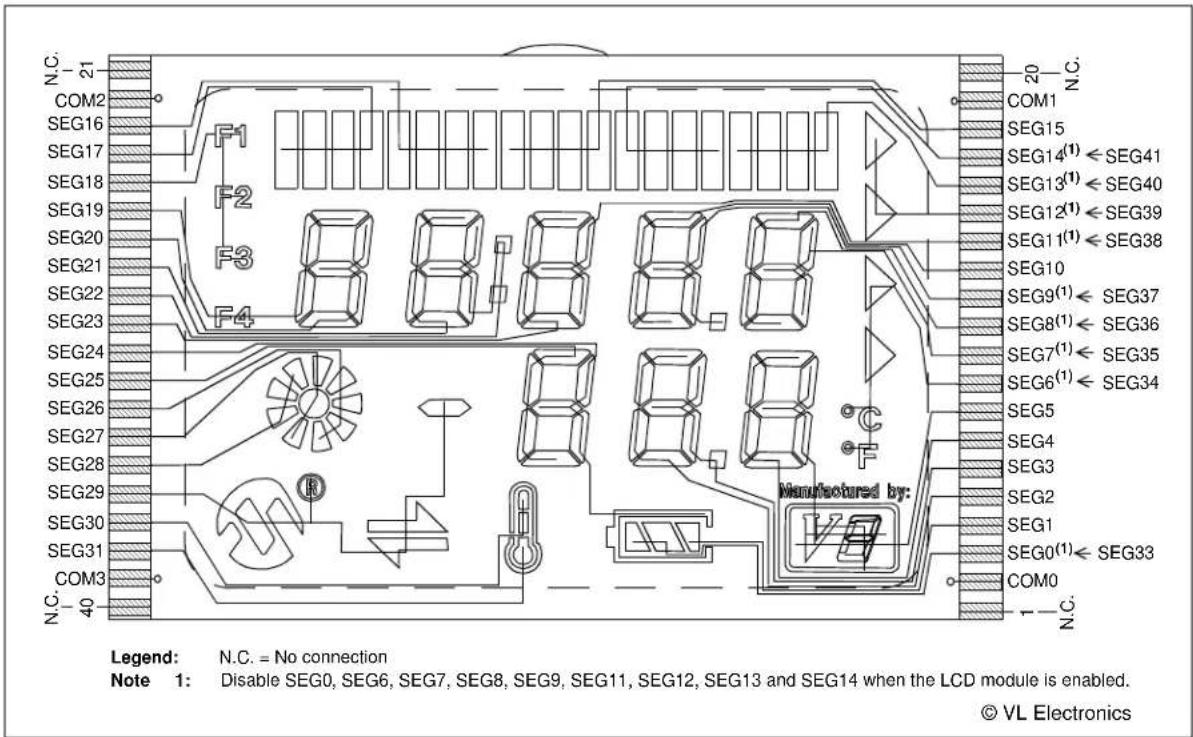
Legend: Unshaded cells indicate a perfect match between the PIM and the glass. Shaded cells indicate the pins that are remapped to the corresponding pin on the PIM.
FIGURE A-8: SEGMENT CONFIGURATION FOR PIC16F946 DEVICES
text_image
N.C. 21 COM2 SEG16 SEG17 SEG18 SEG19 SEG20 SEG21 SEG22 SEG23 SEG24 SEG25 SEG26 SEG27 SEG28 SEG29 SEG30 SEG31 COM3 N.C. 40 F1 F2 F3 F4 Manufactured by: N.C. = No connection Note 1: Disable SEG0, SEG6, SEG7, SEG8, SEG9, SEG11, SEG12, SEG13 and SEG14 when the LCD module is enabled. © VL ElectronicsTABLE A-15: PIC16F946 PORT AND PIN COMPARISON
| PIC16F946 Port PIC16F946 Pin ICE Pin ICE Port | |||
| RA0 AN0 AN0 RA0 | |||
| RA1 AN1 AN1 RA1 | |||
| RA6 T1OSCO T1OSCO RC0 | |||
| RA7 T1OSCI T1OSCI RC1 | |||
| RB0 RB0 RB0 RB0 | |||
| RB5 COM1 COM1 RE4 | |||
| RB6 RB6 RB6 RB6 | |||
| RB7 RB7 RB7 RB7 | |||
| RC0 VLCD1 BIAS1 RE0 | |||
| RC1 VLCD2 BIAS2 RE1 | |||
| RC3 | RC3 | RC3 | RC3 |
| RC4 | RC4 | RC4 | RC4 |
| RC6 | TX/CK | TX/CK | RC6 |
| RC7 | RX/DT RX/DT | RC7 | |
Legend: Unshaded cells indicate a perfect match between the PIM and the glass.
Shaded cells indicate the pins that are remapped to the corresponding pin/port on the PIM.
TABLE A-16: PIC16F/LF1946/7 PIM AND ICE PIN/PORT COMPARISON
| PIC16/LF1946/7 PIMPin No. | PIC16F/LF1946/7Port | PIC16F/LF1946/7 Pin | ICE Pin ICE Port | ICE PinNo. | |
| 1 RE1 | VLCD2 BIAS2 E1 14 33 | C2 SEG13 | SEG13 RC2 56 | ||
| 2 | RE0 | VLCD1 | BIAS1 | E0 | 15 |
| 3 | RG0 | SEG42 | SEG42 | RH6 | 32 |
| 4 | RG1 | SEG43 | SEG43 | RH7 | 31 |
| 5 | RG2 | SEG44 | SEG44 | RJ3 | 13 |
| 6 | RG3 | SEG45 | SEG45 | RG5 | 20 |
| 7 | RG5 | MCLR | ICEMCLR | RG5 | 20 |
| 8 | RG4 | SEG26 | SEG26 | RG4 | 21 |
| 9 | Vss | Vss | Vss | Vss | 23 |
| 10 | VDD | VDD | ICEVDD | ICEVDD | 24 |
| 11 | RF7 | SEG25 | SEG25 | RF7 | 25 |
| 12 | RF6 | SEG24 | SEG24 | RF6 | 26 |
| 13 | RF5 | SEG23 | SEG23 | RF5 | 27 |
| 14 | RF4 | SEG22 | SEG22 | RF4 | 28 |
| 15 | RF3 | SEG21 | SEG21 | RF3 | 29 |
| 16 | RF2 | SEG20 | SEG20 | RF2 | 30 |
| 17 | RF1 | SEG19 | SEG19 | RF1 | 35 |
| 18 | RF0 | SEG41 | SEG41 | RH5 | 33 |
| 19 | VDD | VDD | ICEVDD | ICEVDD | 37 |
| 20 | Vss | Vss | Vss | Vss | 38 |
| 21 | RA3 | SEG35 | SEG35 | RJ3 | 73 |
| 22 | RA2 | SEG34 | SEG34 | RJ2 | 74 |
| 23 | RA1 | AN1 | AN1 | RA1 | 41 |
| 24 | RA0 | AN0 | AN0 | RA0 | 42 |
| 25 | Vss | Vss | ICEVss | ICEVss | 44 |
| 26 | VDD | VDD | ICDVDD | ICDVDD | 45 |
| 27 | RA5 | SEG15 | SEG15 | RA5 | 46 |
| 28 | RA4 | SEG14 | SEG14 | RA4 | 47 |
| 29 | RC1 | T1OSC1 | T1OSC1 | RC1 | 48 |
| 30 | RC0 | T1OSC0 | T1OSC0 | RC0 | 49 |
| 31 | RC6 | TX/CK | TX/CK | RC6 | 50 |
| 32 | RC7 | RX/DT | RX/DT | RC7 | 79 |
| PIC16F/LF 1946/7PIM Pin No. | PIC16F/LF 1946/7 Port | PIC16F/LF 1946/7 Pin | ICE Pin ICE Port | ICE Pin No. | |
| 34 | C3 | RC3 | RC3 | RC3 | 57 |
| 35 | RE2 | RC4 | RC4 | RC4 | 58 |
| 36 | RC5 | SEG12 | SEG12 | RC5 | 59 |
| 37 | RB7 | RB7 | RB7 | RB7 | 60 |
| 38 | VDD | VDD | ICEVDD | ICEVDD | 61 |
| 39 | OSC1 | OSC1 | OSC1 | RC1 | 62 |
| 40 | RA6 | OSC2 | OSC2 | RA6 | 63 |
| 41 | Vss | Vss | Vss | Vss | 65 |
| 42 | RB6 | RB6 | RB6 | RB6 | 66 |
| 43 | RB5 | RB5 | RB5 | RB5 | 67 |
| 44 | RB4 | SEG11 | SEG11 | RB4 | 68 |
| 45 | RB3 | SEG10 | SEG10 | RB3 | 69 |
| 46 | RB2 | SEG9 | SEG9 | RB2 | 70 |
| 47 | RB1 | SEG8 | SEG8 | RB1 | 71 |
| 48 | RB0 | RB0 | RB0 | RB0 | 72 |
| 49 | RD7 | SEG7 | SEG7 | RD7 | 77 |
| 50 | RD6 | SEG6 | SEG6 | RD6 | 78 |
| 51 | RD5 | SEG5 | SEG5 | RD5 | 79 |
| 52 | RD4 | SEG4 | SEG4 | RD4 | 80 |
| 53 | RD3 | SEG3 | SEG3 | RD3 | 81 |
| 54 | RD2 | SEG2 | SEG2 | RD2 | 82 |
| 55 | RD1 | SEG1 | SEG1 | RD1 | 83 |
| 56 | Vss | Vss | Vss | Vss | 84 |
| 57 | VDD | VDD | VDD | VDD | 2 |
| 58 | RD0 | SEG0 | SEG0 | RD0 | 3 |
| 59 | RE7 | SEG31 | SEG31 | RE7 | 4 |
| 60 | RE6 | COM3 | COM3 | RE6 | 5 |
| 61 | RE5 | COM2 | COM2 | RE5 | 6 |
| 62 | RE4 | COM1 | COM1 | RE4 | 7 |
| 63 | RE3 | COM0 | COM0 | RE3 | 8 |
| 51 | RE2 | VLCD3 | BIAS3 | RE2 | 9 |
Legend: Unshaded cells indicate where a perfect match between PIM and ICE pins and ports exists. Shaded cells indicate where differences between PIM and ICE ports and pins exist. Bold text indicates the PIM pins that are not connected to any ICE pins or ports.
TABLE A-17: PIC16F/LF1946/7 LCD CONNECTIONS COMPARISON
| PIC16F/LF 1946/7 | ICE | LCD Pin # | LCD Pin # | ICE | PIC16F/LF1 946/7 | |||
| NC 21 NC NC 20 NC | ||||||||
| COM2 COM2 22 COM3 COM2 | 19 COM1 COM1 | |||||||
| SEG34 | SEG16 | 23 | X8,X6,X5,X7 | X9,X11,X12,X10 | 18 | SEG15 | SEG15 | |
| SEG35 | SEG17 | 24 | X1,X3,X4,X2 | X16,X14,X13,X15 | 17 | SEG14 | SEG14 | |
| SEG41 | SEG18 | 25 | -,F2,F1,F3 | X17,X19,X20,X18 | 16 | SEG13 | SEG13 | |
| SEG19 | SEG19 | 26 | 1A,1E,F4,1F | -,X22,X21,- | 15 | SEG12 | SEG12 | |
| SEG20 | SEG20 | 27 | 1B,1C,1D,1G | 3B,3C,-,3G | 14 | SEG11 | SEG11 | |
| SEG21 | SEG21 | 28 | 2A,2E,2D,2F | 4A,4E,4D,4F | 13 | SEG10 | SEG10 | |
| SEG22 | SEG22 | 29 | 2B,2C,COL,2G | 4B,4C,DP1,4G | 12 | SEG9 | SEG9 | |
| SEG23 | SEG23 | 30 | 3A,3E,3D,3F | 5A,5E,5D,5F | 11 | SEG8 | SEG8 | |
| SEG24 | SEG24 | 31 | S9,6G,6B,6C | 5B,5C,-,5G | 10 | SEG7 | SEG7 | |
| SEG25 | SEG25 | 32 | 6D,6F,6A,6E | X23,X25,X26,X24 | 9 | SEG6 | SEG6 | |
| SEG26 | SEG26 | 33 | X31,X33,X34,X32 | S13,8G,8B,8C | 8 | SEG5 | SEG5 | |
| SEG45 | SEG27 | 34 | -,X27,X35,X30 | 8D,8F,8A,8E | 7 | SEG4 | SEG4 | |
| SEG44 | SEG28 | 35 | -,X28,X36,X29 | DP2,7G,7B,7C | 6 | SEG3 | SEG3 | |
| SEG43 | SEG29 | 36 | S1,S3,S4,S2 | 7D,7F,7A,7E | 5 | SEG2 | SEG2 | |
| SEG42 | SEG30 | 37 | S6,-,-,S7 | S11,-,-,- | 4 | SEG1 | SEG1 | |
| SEG31 | SEG31 | 38 | S5,-,-S8 | S12,-,-,S10 | 3 | SEG0 | SEG33 | |
| COM3 COM3 39 COM4 COM1 | 2 COM0 | COM0 | ||||||
| NC 40 NC NC | 1 NC | |||||||
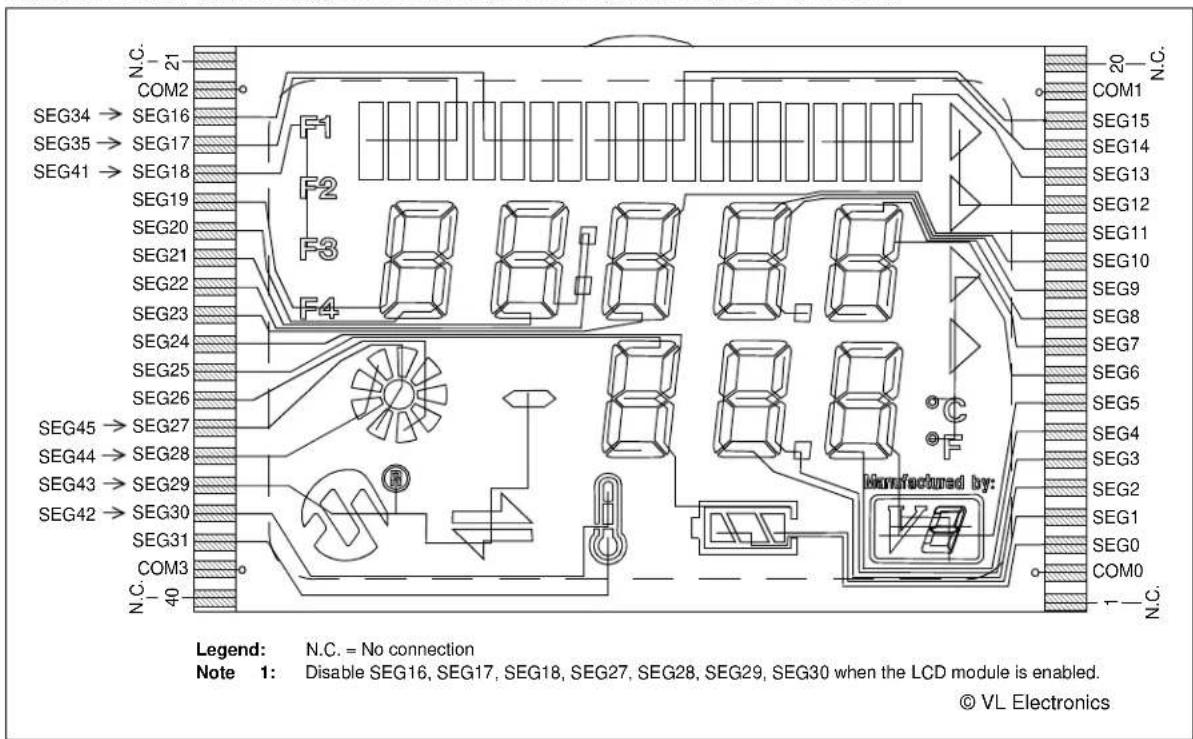
Legend: Unshaded cells indicate a perfect match between the PIM and the glass. Shaded cells indicate the pins that are remapped to the corresponding pin on the PIM.
FIGURE A-9: SEGMENT CONFIGURATION FOR PIC16F/LF1946/7 DEVICES
text_image
N.C. COM2 SEG34 → SEG16 SEG35 → SEG17 SEG41 → SEG18 SEG19 SEG20 SEG21 SEG22 SEG23 SEG24 SEG25 SEG26 SEG45 → SEG27 SEG44 → SEG28 SEG43 → SEG29 SEG42 → SEG30 SEG31 COM3 N.C. 40 F1 F2 F3 F4 Manufactured by: N.C. = No connection Note 1: Disable SEG16, SEG17, SEG18, SEG27, SEG28, SEG29, SEG30 when the LCD module is enabled. © VL ElectronicsTABLE A-18: PIC16F/LF1946/7 PORT AND PIN COMPARISON
| PIC16F/LF1946/7 Port | PIC16F/LF1946/7 Pin ICE | Pin ICE Port | |
| RA0 AN0 AN0 | RA0 | ||
| RA1 AN1 AN1 | RA1 | ||
| RC0 T1OSCO | T1OSCO RC0 | ||
| RC1 T1OSCI | T1OSCI RC1 | ||
| RB0 RB0 RB0 | RB0 | ||
| RE3 COM0 COM0 | RE3 | ||
| RB5 COM1 COM1 | RE4 | ||
| RE5 COM2 COM2 | RE5 | ||
| RE6 COM3 COM3 | RE6 | ||
| RB6 RB6 RB6 | RB6 | ||
| RB7 RB7 RB7 | RB7 | ||
| RE0 VLCD1 BIAS1 | RE0 | ||
| RE1 VLCD2 BIAS2 | RE1 | ||
| RE2 VLCD3 BIAS3 | RE2 | ||
| RC3 | RC3 | RC3 | RC3 |
| RC4 | RC4 | RC4 | RC4 |
| RC6 | TX/CK | TX/CK | RC6 |
| RC7 | RX/DT | RX/DT | RC7 |
Legend: Unshaded cells indicate a perfect match between the PIM and the glass. Shaded cells indicate the pins that are remapped to the corresponding pin/port on the PIM.
TABLE A-19: PIC16F917 PIM AND ICE PIN/PORT COMPARISON
| PIC16F917PIM Pin No. | PIC16F917Port | PIC16F917Pin | ICE Pin ICE | Port ICE Pin No. | |
| 1 RC7 RX/DT RX/DT RC7 51 | |||||
| 2 | RD4 SEG17 | SEG17 RA3 17 | |||
| 3 | RD5 SEG18 | SEG18 RF0 18 | |||
| 4 | RD6 SEG19 | SEG19 RF1 19 | |||
| 5 | RD7 SEG20 | SEG20 RF2 20 | |||
| 6 | Vss | Vss | Vss | Vss | Vss |
| 7 | VDD | ICEVDD | ICEVDD | VDD | 45 |
| 8 | RB0 | RB0 | RB0 | RB0 | 72 |
| 9 | RB1 | SEG1 | SEG6 | RD6 | 78 |
| 10 | RB2 | SEG2 | SEG7 | RD7 | 77 |
| 11 | RB3 | SEG3 | SEG8 | RB1 | 71 |
| 14 | RB4 | COM0 | COM0 | RE3 | 8 |
| 15 | RB5 | COM1 | COM1 | RE4 | 7 |
| 16 RB6 | RB6 | RB6 | RB6 66 | ||
| 17 RB7 | RB7 | RB7 | RB7 60 | ||
| 18 | ICEMCLR | ICEMCLR | ICEMCLR | ICEMCLR | 20 |
| 19 RA0 | AN0 | AN0 | RA0 42 | ||
| 20 RA1 | AN1 | AN1 | RA1 41 | ||
| 21 | RA2 | COM2 | COM2 | RE5 | 6 |
| 22 | RA3 SEG15 | SEG15 RA5 15 | |||
| 23 | RA4 | SEG4 | SEG9 | RB2 | 4 |
| 24 | RA5 | SEG5 | SEG10 | RB3 | 5 |
| 25 | RE0 SEG21 | SEG21 RF3 21 | |||
| 26 | RE1 SEG22 | SEG22 RF4 22 | |||
| 27 | RE2 SEG23 | SEG23 RF5 23 | |||
| 28 | VDD | ICEVDD2 | ICEVDD | VDD | 2 |
| 29 | Vss | Vss | Vss | Vss | Vss |
| 30 | RA7 | T1OSCI | T1OSCI | RC1 | 48 |
| 31 | RA6 T1OSCO | T1OSCO | RC0 49 | ||
| 32 | RC0 VLCD1 | BIAS1 | RE0 15 | ||
| 35 | RC1 VLCD2 | BIAS2 | RE1 14 | ||
| 36 | RC2 VLCD3 | BIAS3 | RE2 9 | ||
| 37 | RC3 | SEG6 | SEG11 | RB4 | 68 |
| 38 | RD0 | COM3 | COM3 | RE6 | 5 |
| 39 | RD1 | RD1 | RC3 | RC3 | 57 |
| 40 | RD2 | RD2 | RC4 | RC4 | 58 |
| 41 | RD3 SEG16 | SEG16 RA2 16 | |||
| 42 | RC4 SEG11 | SEG14 RA4 47 | |||
| 43 | RC5 SEG10 | SEG13 RC2 56 | |||
| 44 RC6 TX/CK | TX/CK | RC6 50 | |||
Legend: Unshaded cells indicate where a perfect match between PIM and ICE pins and ports exists. Shaded cells indicate where differences between PIM and ICE ports and pins exist. Bold text indicates the PIM pins that are not connected to any ICE pins or ports.
TABLE A-20: PIC16F917 LCD CONNECTIONS COMPARISON
| PIC16F917 | ICE Pin # Pin | # ICE PIC16F917 | ||||||
| NC 21 NC NC 20 NC | ||||||||
| COM2 | COM2 | 22 | COM3 | COM2 | 19 | COM1 | COM1 | |
| SEG16 | SEG16 | 23 | X8,X6,X5,X7 | X9,X11,X12,X10 | 18 | SEG15 | SEG15 | |
| SEG17 | SEG17 | 24 | X1,X3,X4,X2 | X16,X14,X13,X15 | 17 | SEG14 | SEG11 | |
| SEG18 | SEG18 | 25 | -,F2,F1,F3 | X17,X19,X20,X18 | 16 | SEG13 | SEG10 | |
| SEG19 | SEG19 | 26 | 1A,1E,F4,1F | -,X22,X21,- | 15 | SEG12 | NC | |
| SEG20 | SEG20 | 27 | 1B,1C,1D,1G | 3B,3C,-,3G | 14 | SEG11 | SEG6 | |
| SEG21 | SEG21 | 28 | 2A,2E,2D,2F | 4A,4E,4D,4F | 13 | SEG10 | SEG5 | |
| SEG22 | SEG22 | 29 | 2B,2C,COL,2G | 4B,4C,DP1,4G | 12 | SEG9 | SEG4 | |
| SEG23 | SEG23 | 30 | 3A,3E,3D,3F | 5A,5E,5D,5F | 11 | SEG8 | SEG3 | |
| NC | SEG24 | 31 | S9,6G,6B,6C | 5B,5C,-,5G | 10 | SEG7 | SEG2 | |
| NC | SEG25 | 32 | 6D,6F,6A,6E | X23,X25,X26,X24 | 9 | SEG6 | SEG1 | |
| NC | SEG26 | 33 | X31,X33,X34,X32 | S13,8G,8B,8C | 8 | SEG5 | NC | |
| NC | SEG27 | 34 | -,X27,X35,X30 | 8D,8F,8A,8E | 7 | SEG4 | NC | |
| NC | SEG28 | 35 | -,X28,X36,X29 | DP2,7G,7B,7C | 6 | SEG3 | NC | |
| NC | SEG29 | 36 | S1,S3,S4,S2 | 7D,7F,7A,7E | 5 | SEG2 | NC | |
| NC | SEG30 | 37 | S6,-,-,S7 | S11,-,-,- | 4 | SEG1 | NC | |
| NC | SEG31 | 38 | S5,-,-S8 | S12,-,-,S10 | 3 | SEG0 | NC | |
| COM3 COM3 39 COM4 | COM1 | 2 COMO COM0 | ||||||
| NC 40 NC NC | 1 NC | |||||||
Legend: Unshaded cells indicate a perfect match between the PIM and the glass. Shaded cells indicate the pins that are remapped to the corresponding pin on the PIM. Bold text indicates the PIM pins that are not connected.
FIGURE A-10: SEGMENT CONFIGURATION FOR PIC16F914/917 DEVICES

text_image
N.C. 21 COM2 SEG16→SEG16 F1 SEG17→SEG17 F2 SEG18→SEG18 F3 SEG19→SEG19 F4 SEG20→SEG20 F5 SEG21→SEG21 F6 SEG22→SEG22 F7 SEG23→SEG23 F8 SEG24 SEG25 SEG26 SEG27 SEG28 SEG29 SEG30 SEG31 COM3 N.C. 40 20 N.C. COM1 SEG15←SEG15 SEG14(1)←SEG11 SEG13(1)←SEG10 SEG12(1) SEG11←SEG6 SEG10←SEG5 SEG9(1)←SEG4 SEG8(1)←SEG3 SEG7(1)←SEG2 SEG6←SEG1 SEG5 SEG4 SEG3 SEG2 SEG1 SEGO(1) COM0 Manufactured by: Legend: N.C. = No connection = Only segments available to PIC16F914/917 devices Note 1: Disable SEG0, SEG7, SEG8, SEG9, SEG12, and SEG14 when the LCD module is enabled. © VL ElectronicsTABLE A-21: PIC16F917 PIN AND PORT COMPARISON
| PIC16F917 Port PIC16F917 Pin ICE Pin ICE Port | |||
| RA0 AN0 AN0 RA0 | |||
| RA1 AN1 AN1 RA1 | |||
| RA6 T1OSCO T1OSCO RC0 | |||
| RA7 T1OSCI T1OSCI RC1 | |||
| RB0 RB0 RB0 RB0 | |||
| RB5 COM1 | COM1 RE4 | ||
| RB6 RB6 RB6 RB6 | |||
| RB7 RB7 RB7 RB7 | |||
| RC0 | VLCD1 BIAS1 | RE0 | |
| RC1 | VLCD2 BIAS2 | RE1 | |
| RC3 | SEG6 | SEG11 | RB4 |
| RC4 | SEG11 | SEG14 | RA4 |
| RC6 | TX/CK | TX/CK | RC6 |
| RC7 | RX/DT RX/DT | RC7 | |
Legend: Unshaded cells indicate a perfect match between the PIM and the glass. Shaded cells indicate the pins that are remapped to the corresponding pin on the PIM.
A.3 LED DISPLAY
Two green LEDs are connected to RC3 and RC4 of U1A through the J14 pins, 1, 2 and 7, 8 (outer ends), respectively.
One green LED is provided to determine whether there is power to the LCD 2 Demonstration Board (LED on) or not (LED off).
Note 1: For the PIC18F85J90 and PIC18F87J90 PIM, the RG2 and RG3 pins are connected to RC3 and RC4 of U1A, respectively.
2: For the PIC16F17 PIM, the RD1 and RD2 pins are connected to RC3 and RC4 of U1A, respectively.
3: For the PIC18F8490 PIM, the RC3 and RD4 pins are connected to RC3 and RC4 of U1A, respectively
A.4 CHARGE PUMP AND VLCAP
For charge pump mode operation in PIC18F85J90 and PIC18F87J90 devices, it is required that RC3 and RC4 of U1A connect to charge pump capacitor C7 through the J14 pins, 3, 4 and 5, 6 (inner pins), respectively.
A.5 RESISTIVE LADDER VERSUS CHARGE PUMP
The switch, S6, allows the connection of either the resistor ladder or the capacitors to the BIAS pins to generate the BIAS voltages for the LCD operation. For the Charge Pump mode operation in PIC18F85J90 and PIC18F87J90 devices, it is required that the S6 switch is flipped towards C and the VLCAP is connected through the inner jumpers of J14. For the resistor ladder, S6 must be flipped towards R. The R45 potentiometer controls the contrast to the LCD in the Resistive Ladder mode.
A.5.1 Jumper JP21
When jumper JP21 is on, the LCDBIAS0 is physically tied to ground. The jumper needs to be on for PIC18F85J90 and PIC18F87J90 devices when the bias voltages are generated through the resistor ladder.
A.6 OSCILLATOR OPTIONS
The on-board firmware uses the internal RC oscillator running at 8 MHz.
- Internal RC oscillator running at 8 MHz can be used.
- Pads provided for user-furnished crystal/resonator (Y2) and two capacitors (C16 and C17).
- Socket provided for a canned oscillator (Y3). This oscillator can be disabled by removing jumpers, JP9, JP11 and JP12.
- 32.768 kHz (watch-type) crystal for Timer1 (Y1) is always connected to RC0 and RC1.
A.7 RS-232 SERIAL PORT
An RS-232 level shifting IC has been provided with all necessary hardware to support connection of an RS-232 host through the DB9 connector (PI). The port is configured as DCE and can be connected to a PC using a serial cable.
A.8 REAL-TIME CLOCK
This circuit allows the user to configure a PIC microcontroller for timekeeping using a 32.768 kHz clock crystal connected to Timer1 module's T1OSO and T1OSI pins.
A.9 SERIAL EEPROM
A socket for a Microwire EEPROM is provided on the board to illustrate usage of the Synchronous mode of operation of the USART module. For its operation:
- Jumpers, JP15 and JP16, should be connected.
- In the jumper, J6, U9-CS should be connected with RB5.
- In the jumper, J13, U9-ORG (pin 6) should be connected to GND.
Note 1: For the PIC18F85J90 and PIC18F87J90 PIM, the RG2 and RG3 pins are connected to RC3 and RC4 of U1A, respectively.
2: For the PIC16F917 PIM, the RD1 and RD2 pins are connected to RC3 and RC4 of U1A, respectively.
3: For the PIC18F8490, PIC16F946 and PIC16F/LF/1946/7 PIMs, the RC3 and RC4 pins are connected to RC3 and RC4 of U1A, respectively.
A.10 ANALOG INPUT
A 10 kΩ potentiometer is connected through a series of 100Ω resistors to AN0. The potentiometer can be adjusted from V cc to GND. The jumper, J11, should be connecting the potentiometer to AN0.
A.11 TEMPERATURE SENSOR
A 10 kΩ TC thermistor (R11) is provided to sense the temperature. It is connected to AN1 (RA1) through the jumper, JP5. An optional unpopulated TC77-based circuit is provided to read the temperature serially using the USART module. The jumpers, JP15 and JP16, are to be connected and RA1 of U1A should be made digital to be used to enable TC77.
Note 1: For the PIC18F85J90 and PIC18F87J90 PIM, the RA2 pin is connected to RA1 of U1A and AN2 is used instead of AN1.
2: For the PIC18F8490, PIC16F/LF/1946/7, PIC16F946, and PIC16F917 PIMs, the RA1 pin is connected to RA1 of U1A.
A.12 SWITCHES
Four switches provide the following functions for digital I/Os:
- S1 – Active-low switch connected to RB6.
- S2 – Active-low switch connected to RB6 and RB7.
- S3 – Active-low switch connected to RB6, RB7 and RA6.
- S4 – Active-low switch connected to RB6, RB7, RA6 and RA7.
For this type of sensing, the jumpers, JP1, JP2, JP6, JP18, JP19, JP9 and JP10, should be connected and the potentiometer should be connected to AN0 through J11. Sensing should be done in the sequence, S1, S2, S3 and S4, only. Individual switch sensing is not allowed.
Additionally, the four switches provide the following functions for analog input (AN0):
- S1 – AN0 will be approximately at V cc/2.
- S2 – AN0 will be approximately at V cc/3.
- S3 – AN0 will be approximately at V cc/5.2.
- S4 – AN0 will be approximately at V cc/7.7.
For this type of sensing, the jumpers, JP1, JP2, JP6, JP18 and JP19, should not be connected and the SWT should be connected to AN0 through J11.
A.13 ICD CONNECTOR
By way of the modular connector (J37), the MPLAB ICD 2 can be connected for low-cost debugging. The ICD connector utilizes RB6/PGC and RB7/PGD of the microcontrollers for in-circuit debugging.
A.14 POWER SUPPLY
There are four ways to supply power to the PICDEM LCD 2:
- A 3V button cell (CR2032) can be plugged into BT1.
- A 9V, 100 mA unregulated AC to DC supply can be plugged into J5. A power supply can be purchased through Microchip Technology (Part Number AC162039).
- A 100 mA regulated DC supply of maximum +5V can be connected to the hooks provided.
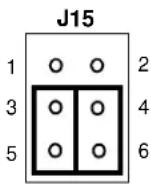
Note: There is one J15 jumper associated with the power supply circuit. This jumper must be correctly connected to select the required power supply. Refer to Figure A-11 for jumper setting examples.
MPLAB ICD 2 users may use the ICD to power the target board to 5V, up to 200 mA, for the following devices only: PIC18F8490, PIC16F/LF/1946/7, PIC16F946 and PIC16F916. The PIC18F85J90 and PIC18F87J90 families of devices do not support this capability.
The default power on the board is 5V. The board voltage can be varied based on resistors populated on the PIM in conjunction with the processor being used.
FIGURE A-11: J15 POWER SUPPLY CIRCUIT SETTING EXAMPLES
EXAMPLE A EXAMPLE B EXAMPLE C
VLCDBIAS = 3V, External Power

VLCDBIAS = Battery
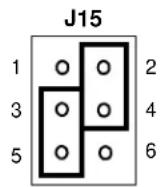
VLCDBIAS = Vcc
a) External Supply with VLCDBIAS Regulated (Default): This is the recommended jumper setting to operate when using external supply. This configuration allows the VLCDBIAS to be regulated to 3V even if the VDD of the board is higher than 3V.
b) Battery Operation: This is the recommend jumper setting when operating on a battery. In this configuration, VLCDBIAS is directly connected to the battery voltage.
c) External Supply with VLCDBIAS
Unregulated: This is not recommended to use with on-board glass as voltage higher than 3V may damage the glass.
If an external glass is connected to J2 and is capable of handling higher voltages, then this jumper setting allows Vcc to connect directly to the VLCDBIAS when an external power supply is used.
Note: For all examples shown above, the voltage regulation on the VLCDBIAS for 3V is not required for the regular operation of the module or device. It is added here for additional protection for the glass since the board is capable of generating 3.3V or 5V depending on the PIM being used.
A.14.1 Using the Adjustable Voltage Regulator
The PICDEM LCD 2 board features an adjustable voltage regulator, the venerable LM317. It is U3 on the board, and can be recognized by the SO-223 package on the upper left side. Nearby, there is a header, J10, and two resistors, R25 and R26. R25 and R26 are used to set the output voltage of the LM317. By default, R25 = 1K and R26 = 330R, which results in an output voltage of 5.0V.
The reason an adjustable voltage regulator is provided is so that the PICDEM LCD 2 Demonstration Board can be used with a wide range of LCD PIC microcontrollers. The PIC18FXXJ90 family of devices tolerates a maximum VDD of 3.6V, whereas the PIC18FXX90, PIC16F91X and PIC16F946 tolerate a maximum VDD of 5.5V. The adjustable voltage regulator allows a different VDD to be provided for PIC18FJ devices and PIC18F and PIC16F LCD devices.
The switching between 3.6V and 5.5V parts is very convenient. The plug-in module boards are populated with the R101 and R102, appropriately, according to the processor module requirement which mates with the daughter board/emulator header that surrounds the ICE module (U1A). J10 on the PICDEM LCD 2 board is intended to connect with the 3-pin header on the plug-in module. This allows the resistors, R101 and R102, on the plug-in module to be connected in parallel to the resistors, R25 and R26. This way VDD can automatically be adjusted to the voltage appropriate to the part soldered onto the plug-in module.
The plug-in module is prepopulated with the values shown in Table A-22:
TABLE A-22: PIM PREPOPULATED VALUES
| Module R101 R102 VDD | |||
| PIC18F87J90 Open 1.18K 3.3V | |||
| PIC18F85J90 Open 1.18K 3.3V | |||
| PIC18F8490 Open Open 5.0V | |||
| PIC16F914/917 | Open Open 5.0V | ||
| PIC16F946 | Open Open 5.0V | ||
| PIC16F1946/7 | Open Open 5.0V | ||
| PIC16LF1946/7 | Open 1.18K 3.3V | ||
For V_DD = 3.3 volts, R101 can be left unpopulated and R102 can be 1.18K. (1% resistors are recommended for precise adjustment of V_DD .)
Now, let's look at how to determine R101 and R102 if a different VDD is desired. First, it is a good idea to look at the data sheet for the LM317 to understand how the voltage is adjusted. We will not duplicate all the details here. The following equation is taken from an LM317 data sheet:
EQUATION A-1:
$$ V O U T = V R E F (1 + R 2 / R 1) + I A D J * R 2 $$
IADJ is minimized by the LM317, so it can be assumed to be zero or at least very small. VREF = 1.25V; it is the reference voltage developed by the LM317 between the output and adjustment terminal.
That gives us the following equation:
EQUATION A-2:
$$ \begin{array}{l} V O U T = 1. 2 5 V (1 + R 2 / R 1) \ R 2 = R 2 5 \mid \mid R 1 0 2 = (R 2 5 * R 1 0 2) / (R 2 5 + R 1 0 2) \ R 1 = R 2 6 \left| R 1 0 1. = (R 2 6 * R 1 0 1) / (R 2 6 + R 1 0 1) \right. \ \end{array} $$
As stated previously, R25 = 1K and R26 = 330. You can see that without R102 and R101, VOUT = 1.25V(1 + 1K/330R) = 5.04V.
For a desired VOUT, first solve for R2, given R1 = R26 = 330R. Then, knowing R2 and R25, solve for R102. Determine the nearest available resistor value for R102 and recalculate the resulting VDD to make sure it does not exceed the maximum VDD for the part you will be using.
Table A-23 shows values for R101 and R102 for different VDD values, assuming that R25 and R26 on the PICDEM LCD 2 Board are left as their default values of 1K and 330R.
TABLE A-23: R101 AND R102 V DD VALUES
| VDD R101 R102 | ||
| 5V Open Open | ||
| 3.6V Open 1.62K | ||
| 3.3V Open 1.18K | ||
| 3.0V Open 866R |
Recommended operating voltages for the various PIMs are:
- PIC18F85J90 and PIC18F87J90 families of devices – 3.3V
• PIC18F8490 family of devices – 5V
• PIC16F917/914 devices – 5V - PIC16F946 – 5V (when operating on an external 9V DC supply)
- PIC16F1946/7 - 5V
• PIC16LF1946/7 - 3.3V
A.14.2 Slide Switch (S6)
The slide switch allows choosing the BIAS values, either generated by the resistor ladder, or by the capacitive charge pump. When S6 is switched to the left, the LCDBIAS pins of the microcontroller are connected to the resistor ladder. When S6 is switched to the right, the LCDBIAS pins of the microcontroller are connected to the capacitor network.
A.15 BOARD LAYOUT AND SCHEMATICS
The following figures show the parts layout (silkscreen) and schematics for the PICDEM LCD 2 board.
FIGURE A-12: PICDEM™ LCD 2 DEMONSTRATION BOARD PARTS LAYOUT (SILKSCREEN)

text_image
PICtail TM RA5 RA4 RA3 RC5 RC4 RC3 RC2 RC1 RC0 RC1 RC2 VCC GND RC7 RC1 RC2 RC3 RC4 RC5 RC6 RC7 RC8 RC9 RC10 RC11 RC12 RC13 RC14 RC15 RC16 RC17 VCC RJ0 RJ2 RJ4 RJ6 RJ8 RJ10 RJ11 RJ12 RJ13 RJ14 RJ15 RJ16 RJ17 RJ18 RJ19 RJ20 RJ21 RJ22 RJ23 RJ24 RJ25 RJ26 RJ27 RJ28 RJ29 RJ30 RJ31 RJ32 RJ33 RJ34 RJ35 RJ36 RJ37 Temperature sensor SE047 SE045 SE043 SE041 SE039 SE037 SE035 SE033 SE031 SE029 SE027 SE025 SE023 SE021 SE019 SE017 SE015 SE013 SE011 SE09 SE07 SE05 SE03 SE01 COM3 COM1 COM8 COM2 F1 F2 F3 F4 LCD_VLS5573 ECPROM C17 C18 C19 C20 C21 C22 C23 C24 C25 C26 C27 C28 C29 C30 C31 C32 C33 C34 C35 C36 C37 C38 C39 C40 C41 C42 C43 C44 C45 C46 Microchip MICROCHIP VLCDBIAS = 3.0V EXT PWR EXT PWR VL.CDBIAS = Vcc VL.CDBIAS = Bct VL.CDBIAS = 6.9 VL.CDBIAS = 9.9 VL.CDBIAS = 1.9 VL.CDBIAS = 3.9 VL.CDBIAS = 6.9 VL.CDBIAS = 9.9 VL.CDBIAS = 1.9 VL.CDBIAS = 3.9 VL.CDBIAS = 6.9 VL.CDBIAS = 9.9 VL.CDBIAS = 1.9 VL.CDBIAS = 3.9 VL.CDBIAS = 6.9 VL.CDBIAS = 9.8 VL.CDBIAS = 1.9 VL.CDBIAS = 3.9 VL.CDBIAS = 6.9 VL.CDBIAS = 9.8 VL.CDBIAS = 1.9 VL.CDBIAS = 3.9 VL.CDBIAS = 6.9 VL.CDBIAS = 9.8 VL.CDBIAS = 1.9 VL.CDBIAS = 3.8 VL.CDBIAS = 6.8 VL.CDBIAS = 9.8 VL.CDBIAS = 1.9 VL.CDBIAS = 3.8 VL.CDBIAS = 6.8 VL.CDBIAS = 9.8 VL.CDBIAS = 1.9 VL.CDBIAS = 3.8 VL.CDBIAS = 6.8 VL.CDBIAS = 9.8 VL.CDBIAS = 1.8 VL.CDBIAS = 3.8 VL.CDBIAS = 6.8 VL.CDBIAS = 9.8 VL.CDBIAS = 1.8 VL.CDBIAS = 3.8 VL.CDBIAS = 6.8 VL.CDBIAS = 9.8 VL.CDBIAS = 1.8 VL.CDBIAS = 3.8 VL.CDBIAS = 6.7 VL.CDBIAS = 9.8 VL.CDBIAS = 1.8 VL.CDBIAS = 3.8 VL.CDBIAS = 6.7 VL.CDBIAS = 9.8 VL.CDBIAS = 1.8 VL.CDBIAS = 3.8 VL.CDBIAS = 6.7 VL.CDBIAS = 9.8 VL.CDBIAS = 1.7 VL.CDBIAS = 3.7 VL.CDBIAS = 6.7 VL.CDBIAS = 9.7 VL.CDBIAS = 1.7 VL.CDBIAS = 3.7 VL.CDBIAS = 6.7 VL.CDBIAS = 9.7 VL.CDBIAS = 1.7 VL.CDBIAS = 3.7 VL.CDBIAS = 6.7 VL.CDBIAS = 9.7 RLC2032 CR2032FIGURE A-13: PICDEM™ LCD 2 SCHEMATIC SHEET 1 OF 3
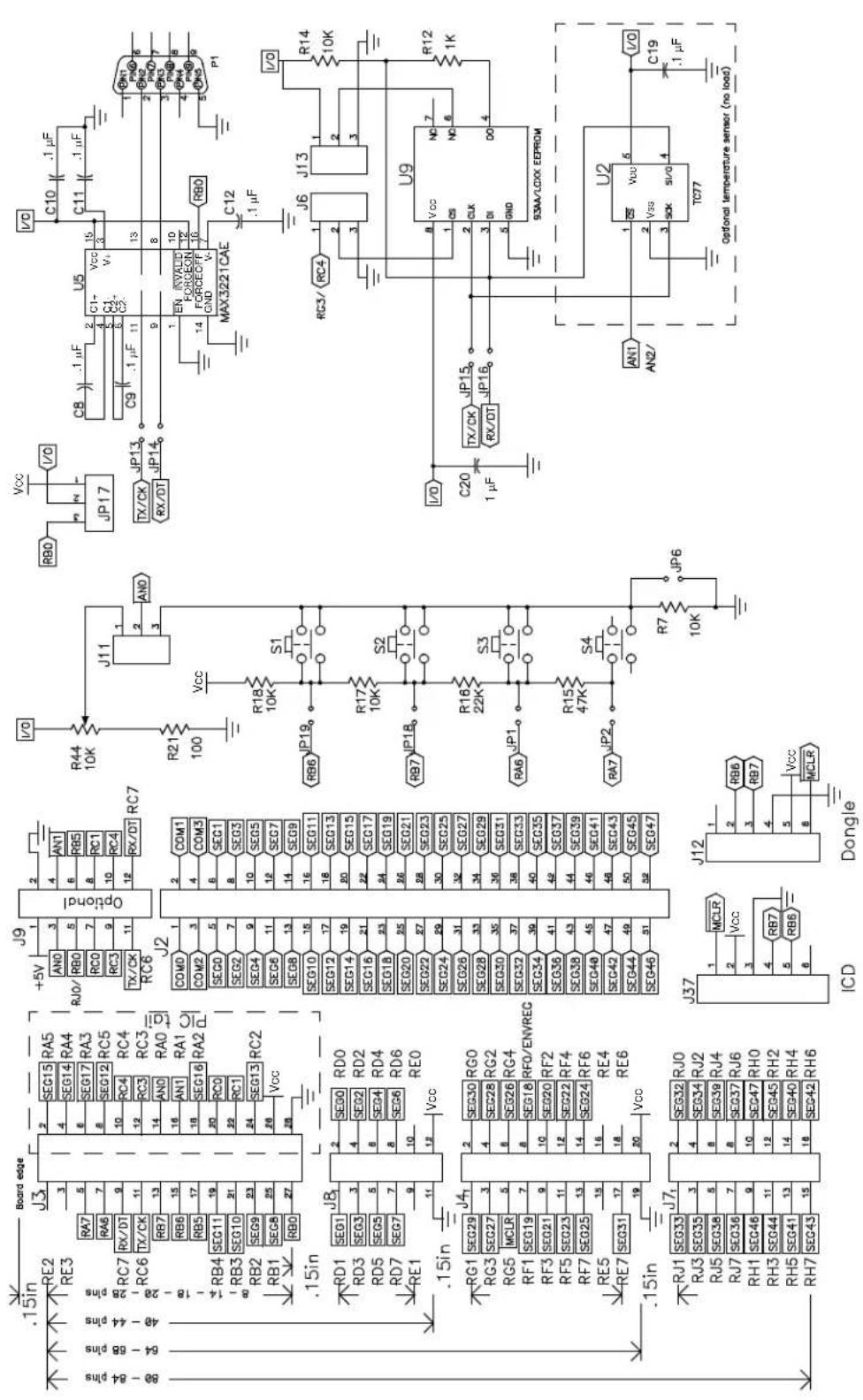
text_image
C10 C11 C12 J5 Vcc C8 1.1µF C11 1.1µF U5 Vcc C9 1.1µF C12 1.1µF R80 JP17 JP13 JP14 TX/CK RX/DT RX/DT RX/DT RX/DT RX/DT RX/DT RX/DT RX/DT RX/DT RX/DT RX/DT RX/DT RX/DT RX/DT RX/DT RX/DT RX/DT RX/DT RX/DT RX/DT RX/DT RX/DT RX/DT RX/DT RX/DT RX/RT RX/RT RX/RT RX/RT RX/RT RX/RT RX/RT RX/RT RX/RT RX/RT RX/RT RX/RT RX/RT RX/RT RX/RT RX/RT RX/RT RX/RT RX/RT RX/RT RX/RT RX/RT RX/RT RX/RT RX/RT RX/RS RX/RS RX/RS RX/RS RX/RS RX/RS RX/RS RX/RS RX/RS RX/RS RX/RS RX/RS RX/RS RX/RS RX/RS RX/RS RX/RS RX/RS RX/RS RX/RS RX/RS RX/RS RX/RS RX/RS RX/RS RX/RLS TX/CK TX/CK TX/CK TX/CK TX/CK TX/CK TX/CK TX/CK TX/CK TX/CK TX/CK TX/CK TX/CK TX/CK TX/CK TX/CK TX/CK TX/CK TX/CK TX/CK TX/CK TX/CK TX/CK TX/CK TX/CK TX/CLK TX/CLK TX/CLK TX/CLK TX/CLK TX/CLK TX/CLK TX/CLK TX/CLK TX/CLK TX/CLK TX/CLK TX/CLK TX/CLK TX/CLK TX/CLK TX/CLK TX/CLK TX/CLK TX/CLK TX/CLK TX/CLK TX/R6444444444444444444444444444444444444444444444444444444444444444444444444444444444444444444444444444480-88 pinsFIGURE A-14: PICDEM™ LCD 2 SCHEMATIC SHEET 2 OF 3

text_image
U1A ICE MODULE VCC R2 10K S5 .1μF C21 .1μF VCC R3 TBD R4 TBD optional VCC R9 10K R1 1K C21 .1μF VCC R2 10K S5 .1μF VCC R3 TBD R4 TBD optional VCC R9 10K R1 1K C21 .1μF VCC R2 10K S5 .1μF VCC R3 TBD R4 TBD optional VCC R9 10K R1 1K S5 .1μF VCC R2 10K S5 .1μF VCC R3 TBD R4 TBD optional VCC R9 10K R1 1K S5 .1μF VCC R3 TBD R4 TBD optionalFIGURE A-15: PICDEM™ LCD 2 SCHEMATIC SHEET 3 OF 3

text_image
21 NC LCD1 NC 30 COM2 22 00M0 CC M2 19 COM1 SEG16 23 X8,X8,X5,X7 X8,X11,X12,X18 SEG15 SEG17 24 X1,X3,X4,X2 X18,X14,X13,X15 SEG14 SEG18 25 -F3,F1,F3 X17,X19,X28,X18 SEG13 SEG19 26 1A,1E,F4,1F -X22,X21,- 15 SEG12 SEG20 27 1B,L,C,T,O,T,G 3W,3C,-3G 14 SEG11 SEG21 28 2A,2E,2D,2F 4A,4E,4O,4F 13 SEG10 SEG22 29 2B,RQ,OQ,K,ZC 4B,RQ,DP,F,A,G 12 SEC9 SEG23 30 3A,3E,3D,3F 5A,5E,5O,5F 11 SEC8 SEG24 31 SB,SG,6B,SG 5B,SG,-3G 10 SEC7 SEG25 32 RC,B,F,B,E 9 SEC6 SEG26 33 X31,X33,X34,X32 S13,BG,RB,RG 8 SEC5 SEG27 34 -X27,X35,X38 7 SEC4 SEG28 35 -X28,X38,X29 DP2,70,78,70 6 SEC3 SEG29 36 S1,S3,S4,S2 70,7T,7A,7E 5 SEC2 SEG30 37 S6,-,-,S7 4 SEG1 SEG31 38 S5,-,-,S8 S1Z,-,-,S10 3 SEG0 COM3 39 00M4 GCM1 2 CDM0 NC LCD_VLS5573 NC 1 J15 Battery VLCDBIAS - Battery J15 EXT PWR VLCDBIAS = 3.0V Default J15 EXP PWR Not recommended to VLCDBIAS = Vcc operate with on board glass Note: VLCDBIAS R45 75K BATTERY BT1 J1 1 BATTERY DJ0006 D5 1N4001 C26 .1 μF VIN OUT 2 VCC C27 C28 .1 μF VLCDBIAS J15 R2B 1K 2 ADJ R26 3.30_1% TP2 100 μF ECE-V1AA10WR D6 J10 LM317 MCP1700T-3002E/TT Q2 IN SNO OUT 2 C29 C30 C47 μF C23 C24 C25 EG4208A VIN ADJ VOUT 1 K_1% OUT 3 ADJ VCC R8 75K Left side BIAS3 BIAS2 BIAS1 R13 75K Right side R19 75K RB5 (BIAS0) JP21 C22 C23 C24 C25 .47 μF .47 μF .47 μF .47 μFA.16 PIM LAYOUT AND SCHEMATICS
The following figures show the layout (silkscreen) for the individual PIMs.
FIGURE A-16: PIC18F65J90 AND PIC18F85J90 PIM LAYOUT
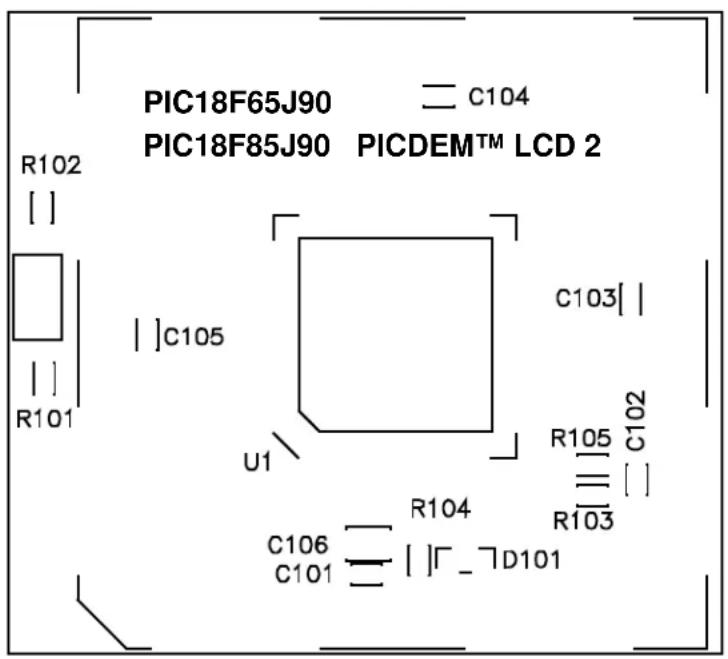
text_image
PIC18F65J90 C104 PIC18F85J90 PICDEM™ LCD 2 R102 | | | R101 | |C105 U1 C103[ | R105 C102 | | R103 C106 R104 C101 | |Γ_¬D101FIGURE A-17: PIC16F914/917 PIM LAYOUT

text_image
PIC16F917/914 R102 [ ] J102 [ ] C101 R101 U4 C102[ ] PICDEM™ LCD 2 MICROCHIPFIGURE A-18: PIC16F946 PIM LAYOUT

text_image
C104 PIC16F946 PICDEM™ LCD 2 R102 [ ] [ ] R101 C105 U3 C103 C102 [ ] C101FIGURE A-19: PIC16F/LF1946/7 PIM LAYOUT
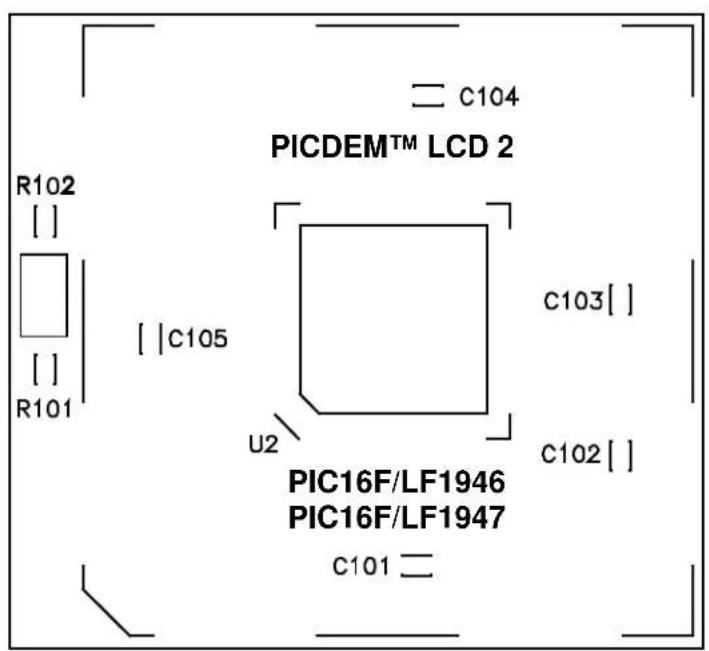
text_image
C104 PICDEM™ LCD 2 R102 [ ] [ ] R101 [ | C105 ] U2 c103[ ] C102[ ] PIC16F/LF1946 PIC16F/LF1947 C101=FIGURE A-20: PIC18F6490/8490 PIM LAYOUT
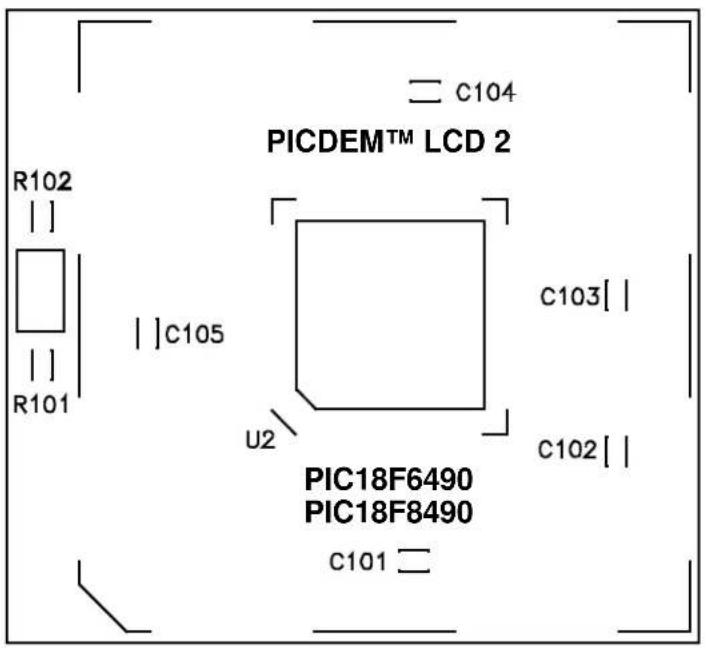
text_image
C104 PICDEM™ LCD 2 R102 ||| ||| R101 || C105 U2 C103| C102| PIC18F6490 PIC18F8490 C101FIGURE A-21: PIC18F87J90 PIM LAYOUT
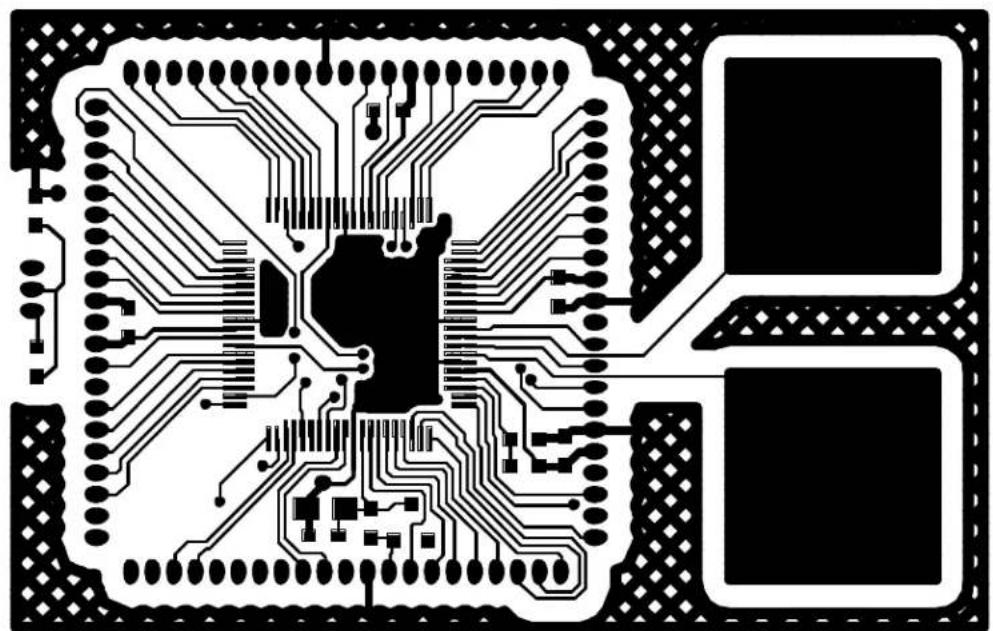
natural_image
Pure electrical circuit lines without any symbols or textFIGURE A-22: PICDEM™ LCD 2 PIC16F914/917 PIM SCHEMATIC
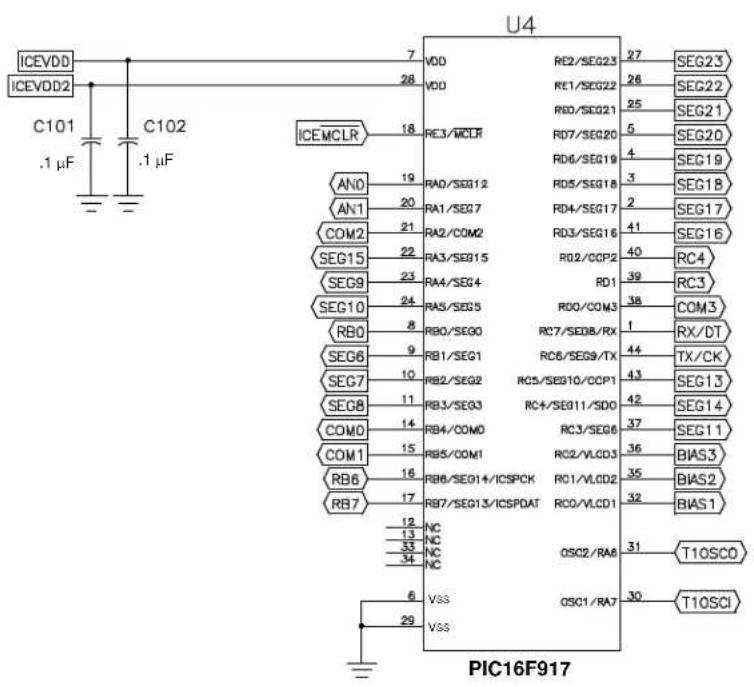
text_image
ICEVDD ICEVDD2 C101 .1 µF C102 .1 µF ICEMCLR 7 28 18 AN0 19 AN1 20 COM2 21 SEG15 22 SEG9 23 SEG10 24 RB0 8 SEG6 9 SEG7 10 SEG8 11 COM0 14 COM1 15 RB6 16 RB7 17 NC 13 NC 33 NC 34 NC 6 VSS 29 VSS U4 RE2/SEG23 27 26 25 5 RD7/SEG20 4 RD6/SEG19 3 RD5/SEG18 2 RD4/SEG17 41 RD3/SEG16 40 RD2/CCP2 39 RD1 38 RD0/COM3 37 RC7/SEDB/RX 44 RC6/SEG9/TX 43 RC5/SEG10/CCP1 42 RC4/SEG11/SDO 37 RC3/SEG6 36 RC2/VLCD3 35 RC1/VLCD2 32 RC0/VLCD1 31 OSC2/RA8 30 OSC1/RA7 T10SCO T10SCI PIC16F917FIGURE A-23: PICDEM LCD 2 PIC16F/LF1946/7 64-PIN PIM SCHEMATIC

text_image
U3 PIC16F/LF1946 PIC16F/LF1947 SEG19 1 RD6/SEG19 SEG20 2 RD7/SEG20 SEG8 3 RG0/SEG36 SEG9 4 RG1/SEG37 SEG11 5 RG2/SEG38 SEG12 6 RG3/SEG39 SEG13 7 RG4/SEG40 SEG14 8 RG5/SEG41 VDD48 9 VSS SEG32 10 VDD SEG0 11 RF0/SEG32 SEG6 12 RF1/SEG33 SEG7 13 RF2/SEG34 RB0 14 RF3/SEG35 RB0/INT/SEG0 RB1/SEG1 RD6/SEG18 RD7/SEG17 RD8/SEG16 RD9/SEG15 RD10/SEG14 RD11/SEG13 RD12/SEG12 RD13/SEG11 RD14/SEG10 RD15/SEG0 RD16/SEG0 RD17/SEG0 RD18/SEG0 RD19/SEG0 RD6/SEG19 RD7/SEG20 RG0/SEG36 RG1/SEG37 RG2/SEG38 RG3/SEG39 RG4/SEG40 RG5/SEG41 VDD 48 VSS 47 VSS 46 VSS 45 VSS 44 VSS 43 VSS 42 VSS 41 RD7/SEG31 RF6/SEG30 RF5/SEG29 RF4/SEG28 RE7/SEG27 RE8/SEG26 RE5/SEG25 VSS RA6/COSC2 RA7/COSC1 VDD 39 T1OSCO VDD12 RE4/SEG24 RE3/MCLR MCLR RE2/SEG23 RE1/SEG22 RED/SEG21 RD6/SEG30 RD7/SEG30 RD8/SEG30 RD9/SEG30 RD10/SEG30 RD11/SEG30 RD12/SEG30 RD13/SEG30 RD14/SEG30 RD15/SEG30 RD16/SEG30 RD17/SEG30 RD18/SEG30 RD19/SEG30 RD20/SEG30 RD21/SEG30 RD22/SEG30 RD23/SEG30 RD24/SEG30 RD25/SEG30 RD26/SEG30 RD27/SEG30 RD28/SEG30 RD29/SEG30 RD30/SEG30 RD31/SEG30 RD32/SEG30 RD33/SEG30 RD34/SEG30 RD35/SEG30 RD36/SEG30 RD37/SEG30 RD38/SEG30 RD39/SEG30 RD40/SEG30 RD41/SEG30 RD42/SEG30 RD43/SEG30 RD44/SEG30 RD45/SEG30 RD46/SEG30 RD47/SEG30 RD48/SEG30 RD49/SEG30 RD50/SEG30 RD51/SEG30 RD52/SEG30 RD53/SEG30 RD54/SEG30 RD55/SEG30FIGURE A-24: PICDEM™ LCD 2 PIC16F946 PIM SCHEMATIC
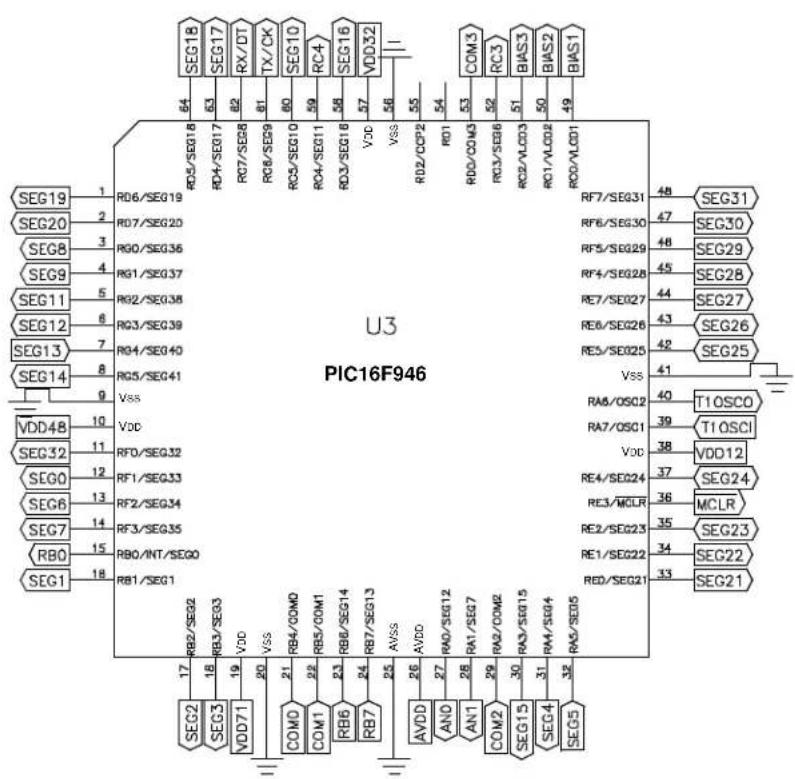
text_image
U3 PIC16F946 SEG19 1 RD6/SEG19 SEG20 2 RD7/SEG20 SEG8 3 RG0/SEG36 SEG9 4 RG1/SEG37 SEG11 5 RG2/SEG38 SEG12 6 RG3/SEG39 SEG13 7 RG4/SEG40 SEG14 8 RG5/SEG41 VDD4B 9 Vdd SEG32 10 RFD/SEG32 SEG0 11 RF1/SEG33 SEG6 12 RF2/SEG34 SEG7 13 RF3/SEG35 RB0 14 RB0/INT/SEG0 RB1 15 RB1/SEG1 RD2/SEG2 RB3/SEG3 VDD VDD VSS VSS AVDD AVDD AVDD AVDD AVDD AVDD AVDD AVDD AVDD AVDD AVDD AVDD AVDD AVDD AVDD AVDD AVDD AVDD AVDD AVDD AVDD AVDD AVDD AVDD AVDD AVDD AVDD AVDD AVDD AVDD AVDD AVDD AVDD AVDD AVDD AVDD AVDD AVDD AVDD AVDD AVDD AVDD AVDD AVDD AVDD AVDD AVDD AVDD AVDD AVDD AVD RD5/SEG18 RC4/SEG17 RC7/SEG8 RC8/SEG9 RC9/SEG10 RC4/SEG11 RC4/SEG16 VDC VSS RD2/CCP2 RD1 RD2/COM3 RC3/SEG6 RC2/VLD3 RC1/VLD2 RD2/VD01 RD6/SEG19 RC4/SEG17 RC7/SEG8 RC8/SEG9 RC9/SEG10 RC4/SEG11 RC4/SEG16 VDC VSS RD2/CCP2 RD1 RD2/COM3 RC3/SEG6 RC2/VLD3 RC1/VLD2 RD2/VD01 RF7/SEG31 48 SEG31 RF6/SEG30 47 SEG30 RF5/SEG29 48 SEG29 RF4/SEG28 45 SEG28 RE7/SEG27 44 SEG27 RE8/SEG26 43 SEG26 RE5/SEG25 42 SEG25 Vss 41 RA6/OSC2 40 T1OSCO RA7/OSC1 39 T1OSCI Vcc 38 VDD12 RE4/SEG24 37 SEG24 RE3/MCLR 36 MCLR RE2/SEG23 35 SEG23 RE1/SEG22 34 SEG22 RED/SEG21 33 SEG21 RD5/SE05FIGURE A-25: PICDEM™ LCD 2 PIC18F6490 64-PIN PIM SCHEMATIC

text_image
U2A PIC18F6490 BIAS2 1 LC0BAS2 BIAS1 2 LC0BAS1 SEG30 3 RG0/SEG30 SEG29 4 RG1/TX2/CK2/SEG29 SEG28 5 RG2/RX2/D12/SEG28 SEG27 6 RG3/SEG27 MCLR 7 RG5/MCLR/VPP SEG26 8 RG4/SEG26 VDD12 9 VSS SEG25 10 VDD SEG24 11 RF7/SS/SEG25 SEG23 12 RF5/AN11/C1IN-/SEG24 SEG22 13 RF5/AN10/C1IN+/SEG23 SEG21 14 RF4/AN9/C2IN-/SEG22 SEG20 15 RF3/AN8/C2IN+/SEG21 SEG19 16 RF2/AN7/C1OUT/SEG20 VDD25 17 18 19 20 21 22 23 24 25 26 27 28 29 30 31 32 33 SEQ18 34 VDD32 35 VDD15 36 SEG14 37 TIOSCI 38 TIOSCO TX/CK RX/DT SEQ17 39 VDD33 40 VDD16 41 VDD17 42 VDD18 SEQ16 43 VDD19 44 VDD20 45 VDD21 46 VDD22 47 VDD23 48 VDD24 49 VDD25 50 VDD26 51 VDD27 52 VDD28 53 VDD29 54 VDD30 55 VDD31 56 VDD32 57 VDD33 58 VDD34 59 VDD35 60 VDD36 61 VDD37 62 VDD38 63 VDD39 64 VDD40 65 VDD41 66 VDD42 67 VDD43 68 VDD44 69 VDD45 70 VDD46 71 VDD47 RIO/INTO RB0 RB1/INT1/SEG8 RB2/INT2/SEG8 RB3/INT3/SEG10 RB4/KBIO/PGC RB5/KB1/PDG RB6/KB2/PDG OSC2/CLKD/RAB OSC1/CLKI VDD RB7/KB0/POD RC5/SDO/SEG12 RC4/SDI/SDA RC3/SCK/SCL RC7/RK1/RD1/SEG13 OSC2 OSC1 VDDRB7 REG12 RC4 RC3 SEG13 RD0/INTO RIO RD1/SEG1 RD0/SEG0 RD1/SEG0 RD2/SEG0 RD3/SEG0 RD4/SEG0 RD5/SEG0 RD6/SEG0 RD7/SEG0 RD0/INTO RIO RD1/SEG1 RD0/SEG0 RD1/SEG0 RD2/SEG0 RD3/SEG0 RD4/SEG0 RD5/SEG0 RD6/SEG0 RD7/SEG0 RD0/INTO RIO RD1/SEG1 RD0/SEG0 RD1/SEG0 RD2/SEG0 RD3/SEG0 RD4/SEG0 RD5/SEG0 RD7/SEG0 RD0/INTO RIO RD1/SEG1 RD0/SEG0 RD1/SEG0 RD2/SEG0 RD3/SEG0 RD4/SEG0 RD5/SEG0 RD6/SEG0 RD7/SEG0 RD0/INTO RIO RD1/SEG1 RD0/SEG0 RD1/SEG0 RD2/SEG0 RD3/SEG0 RD4/LEG RD0/INTO RIO RD1/SEG1 RD0/SEG0 RD1/SEG0 RD2/SEG0 RD3/SEG0 RD4/LEG RD0/INTO RIO RD1/SEG1 RD0/SEG0 RD1/SEG0 RD2/SEG0 RD3/LEG RD0/INTO RIO RD1/SEG1 RD0/SEG0 RD1/SEG0 RD2/LEG RD0/INTO RIO RD1/SEG1 RD0/SEG0 RD1/LEG RD0/INTO RIO RD1/SEG1 RD0/SEG0 RD1/LEG RD0/INTO RIO RD1/SEG1 RD0/SEG0 RD1/LEG RD0/INTO RIO RD1/SEG1 RD0/SEG0 RD1/LEG RD0/INTO RIO RD1/SEG1 RD0/SEG0 RD1/LEG RD0/INTU RIO RD1/TOSI/RCP2 RC7/RK1/RCK RC7/RK1/RD1 SEQY RD0/TOSI/RCP2 RC7/RK1/RCK RC7/RK1/RD1 SEQY RD0/TOSI/RCP2 RC7/RK1/RCK RC7/RK1/RD1 SEQY RD0/TOSI/RCP2 RC7/RK1/RCK RC7/RK1/RD1 SEQY RD0/TOSI/RCP2 RC7/RK1/RCK RC7/RK1-RD1 SEQY RD0/TOSI/RCP2 RC7/RK1/RCK RC7/RK1/RD1 SEQY RD0/TOSI/RCP2 RC7/RK1/RCK RC7/RK1/RD1 SEQY RD0/TOSI/RCP2 RC7/RK1/RCK RC7/RK1/RD1 SEQY RD0/TOSI/RCP2 RC7/RK2/RCK RC7/RK1/RCK RC7/RK1/RD1 SEQY RD0/TOSI/RCP2 RC7/RK2/RCK RC7/RK1/RD1 SEQY RD0/TOSI/RCP2 RC7/RK2/RCK RC7/RK1/RD1 SEQY RD0/TOSI/RCP2 RC7/RK2/RCK RC7/RK1/RD1 SEQY RD0/TOSI/RCP2 RC7/RK2/RCK RC7/RK1/RD1 SEQY RD0/TOSL/RCP2 RC7/RK2/RCK RC7/RK1/RD1 SEQY RD0/TOSL/RCP2 RC7/RK2/RCK RC7/RK1/RD1 SEQY RD0/TOSL/RCP2 RC7/RK2/RCK RC7/RK1/RD1 SEQY RD0/TOSL/RCP2 RC7/RK2/RCK RC7/RK1/RD1SEQY RD0/TOSL/RCP2 RC7/RK2/RCK RC7/RK1/RD1SEQY RD0/TOSL/RCP2 RC7/RK2/RCK RC7/RK1/RD1SEQY RD0/TOSL/RCP2 RC7/RK2/RCK RC7/RK1/RD1SEQY RD0/TOSL/RCP2 RC7/RK2/RCKRC7/RK1/RD1SEQY RD0/TOSL/RCP2 RC7/RK2/RCKRC7/RK1/RD1SEQY RD0/TOSL/RCP2 RC7/RK2/RCKRC7/RK1/RD1SEQY RD0/TOSL/RCP2 RC7/RK2/RCKRC7/RK1RDKRDKRDKRDKRDKRDKRDKRDKRDKRDKRDKRDKRDKRDKRDKRDKRDKRDKRDKRDKRDKRDKRDKRDKRDKRDKRDKRDKRDKRDKRDKRDKRDKRDKRDKRDKRDKRDKRDKRDKRDKRDKRDKRDKRDKRDKRDKRDKRDKRDKRDCRRDCRRDCRRDCRRDCRRDCRRDCRRDCRRDCRRDCRRDCRRDCRRDCRRDCRRDCRRDCRRDCRRDCRRDCRRDCRRDCRRDCRRDCRRDCRRDCRRDCRRDCRRDCRRDCRRDCRRDCRRDCRRDCRRDCRRDCRRDCRRDCRRDCRRDCRRDCRRDCRRDCRRDCRRDCRRDCRRDCRRDCRRDCRRDCRRDCRRDCIRRDCRRDCRRDCRRDCRRDCRRDCRRDCRRDCRRDCRRDCRRDCRRDCRRDCRRDCRRDCRRDCRRDCRRDCRRDCRRDCRRDCRRDCRRDCRRDCRRDCRRDCRRDCRRDCRRDCRRDCRRDCRRDCRRDCRRDCRRDCRRDCRRDCRRDCRRDCRRDCRRDCRRDCRRDCRRDCRRDCRRDCRRDCRRDCRRDCRRDCERRDCCERDCCERDCCERDCCERDCCERDCCERDCCERDCCERDCCERDCCERDCCERDCCERDCCERDCCERDCCERDCCERDCCERDCCERDCCERDCCERDCCERDCCERDCCERDCCERDCCERDCCERDCCERDCCERDCCERDCCERDCCERDCCERDCCERDCCERDSCEEICCEIEICCEIEICCEIEICCEIEICCEIEICCEIEICCEIEICCEIEICCEIEICCEIEICCEIEICCEIEICCEIEICCEIEICCEIEICCEIEICCEIEICCEIEICCEIEICCEIEICCEIEICCEIEICCEIEICCEIEICCEIEICCEIEICCEIEICCEIEICCEIEICCEIEICCEIEICCEIEICCEIEICCEIEIIDECIRIDECIRIDECIRIDECIRIDECIRIDECIRIDECIRIDECIRIDECIRIDECIRIDECIRIDECIRIDECIRIDECIRIDECIRIDECIRIDECIRIDECIRIDECIRIDECIRIDECIRIDECIRIDECIRIDECIRIDECIRIDECIRIDECIRIDECIRIDECIRIDECIRIDECIRIDECIRIDECIRIDECIRIDIEDECIRIDIEDECIRIDIEDECIRIDIEDECIRIDIEDECIRIDIEDECIRIDIEDECIRIDIEDECIRIDIEDECIRIDIEDECIRIDIEDECIRIDIEDECIRIDIEDECIRIDIEDECIRIDIEDECIRIDIEDECIRIDIEDECIRIDIEDECIRIDIEDECIRIDIEDECIRIDIEDECIRIDIEDECIRIDIEDECIRIDIEDECIRIDIEDECIRIDIEDIETEETEETEETEETEETEETEETEETEETEETEETEETEETEETEETEETEETEETEETEETEETEETEETEETEETEETEETEETEETEETEETEETEETEETEETEETEETEETEETEETEETEETEETEETEETEETEETEETEETEETTENDETEETTENDETEETTENDETEETTENDETEETTENDETEETTENDETEETTENDETEETTENDETEETTENDETEETTENDETEETTENDETEETTENDETEETTENDETEETTENDETEETTENDETEETTENDETEETTENDETEETTENDETEETTENDETEETTENDETEETTENDETELTCNTCNTCNTCNTCNTCNTCNTCNTCNTCNTCNTCNTCNTCNTCNTCNTCNTCNTCNTCNTCNTCNTCNTCNTCNTCNTCNTCNTCNTCNTCNTCNTCNTCNTCNTCNTCNTCNTCNTCNTCNTCNTCNTCNTCNTCNTCNTCNTCNTCNTCNTNTCNTNTCNTNTCNTNTCNTNTCNTNTCNTNTCNTNTCNTNTCNTNTCNTNTCNTNTCNTNTCNTNTCNTNTCNTNTCNTNTCNTNTCNTNTCNTNTCNTNTCNTNTCNTNTCNTNTCNTNTCNTNTCNTNTCNTNTCNTNTCNTNTCNTNTCNTNTCNTNTCNTSNCNCNCNCNCNCNCNCNCNCNCNCNCNCNCNCNCNCNCNCNCNCNCNCNCNCNCNCNCNCNCNCNCNCNCNCNCNCNCNCNCNCNCNCNCNCNCNCNCNCNCNCNCNCNCNCNCNCNCNCNCNCNCNCNCNCNCNCNCNCNCNCNCNCNCNCNCNCNCNCNCNCNCNCNCNCNCNCNCNCNCNCNCNCNCNCNCNCNCNCNACTCACTCACTCACTCACTCACTCACTCACTCACTCACTCACTCACTCACTCACTCACTCACTCACTCACTCACTCACTCACTCACTCACTCACTCACTCACTCACTCACTCACTCACTCACTCACTCACTCACTCACTCACTCACTCACTCACTCACTCACTCACTCACTCACTCACTCACTCACTCACTCACTCACTCACTCATCCTCATCCTCATCCTCATCCTCATCCTCATCCTCATCCTCATCCTCATCCTCATCCTCATCCTCATCCTCATCCTCATCCTCATCCTCATCCTCATCCTCATCCTCATCCTCATCCTCATCCTCATCCTCATCCTCATCCTCATCCTCATCCTCATCCTCATCCTCATCCTCATCCTCATCCTCATCCTCATCCTCATCCHATCCHATCCHATCCHATCCHATCCHATCCHATCCHATCCHATCCHATCCHATCCHATCCHATCCHATCCHATCCHATCCHATCCHATCCHATCCHATCCHATCCHATCCHATCCHATCCHATCCHATCCHATCCHATCCHATCCHATCCHATCCHATCCHATCCHATCRHTRCRHTRCRHTRCRHTRCRHTRCRHTRCRHTRCRHTRCRHTRCRHTRCRHTRCRHTRCRHTRCRHTRCRHTRCRHTRCRHTRCRHTRCRHTRCRHTRCRHTRCRHTRCRHTRCRHTRCRHTRCRHTRCRHTRCRHTRCRHTRCRHTRCRHTRCRHTRCRHTRCRHTRFRGRTGRTGRTGRTGRTGRTGRTGRTGRTGRTGRTGRTGRTGRTGRTGRTGRTGRTGRTGRTGRTGRTGRTGRTGRTGRTGRTGRTGRTGRTGRTGRTGRTGRTGRTGRTGRTGRTGRTGRTGRTGRTGRTGRTGRTGRTGRTGRTGRTGRTGHTCGTTCGTTCGTTCGTTCGTTCGTTCGTTCGTTCGTTCGTTCGTTCGTTCGTTCGTTCGTTCGTTCGTTCGTTCGTTCGTTCGTTCGTTCGTTCGTTCGTTCGTTCGTTCGTTCGTTCGTTCGTTCGTTCGTTCGTTCGTTCGTTCGTTCGTTCGTTCGTTCGTTCGTTCGTTCGTTCGTTCGTTCGTTCGTTCGTTCGTTCGTGTGTGTGTGTGTGTGTGTGTGTGTGTGTGTGTGTGTGTGTGTGTGTGTGTGTGTGTGTGTGTGTGTGTGTGTGTGTGTGTGTGTGTGTGTGTGTGTGTGTGTGTGTGTGTGTGTGTGTGTGTGTGTGTGTGTGTGTGTGTGTGTGTGTGTGTGTGTGTGTGTGTGTGTGTGTGTGTGTGTGTGTGTGTGTGTGTGTGTGTGSSTTGTSSTTGTSSTTGTSSTTGTSSTTGTSSTTGTSSTTGTSSTTGTSSTTGTSSTTGTSSTTGTSSTTGTSSTTGTSSTTGTSSTTGTSSTTGTSSTTGTSSTTGTSSTTGTSSTTGTSSTTGTSSTTGTSSTTGTSSTTGTSSTTGTSSTTGTSSTTGTSSTTGTSSTTGTSSTTGTSSTTGTSSTTGTSSTTGTSSTTGTS STTGTSSTTGTSSTTGTSSTTGTSSTTGTSSTTGTSSTTGTSSTTGTSSTTGTSSTTGTSSTTGTSSTTGTSSTTGTSSTTGTSSTTGTSSTTGTSSTTGTSSTTGTSSTTGTSSTTGTSSTTGTSSTTGTSSTTGTSSTTGTSSTTGTSSTTGTSSTTGTSSTTGTSSTTGTSSTTGTSSTTGTSSTTGTSSTTGTSSTYGTSSTYGTSSTYGTSSTYGTSSTYGTSSTYGTSSTYGTSSTYGTSSTYGTSSTYGTSSTYGTSSTYGTSSTYGTSSTYGTSSTYGTSSTYGTSSTYGTSSTYGTSSTYGTSSTYGTSSTYGTSSTYGTSSTYGTSSTYGTSSTYGTSSTYGTSSTYGTSSTYGTSSTYGTSSTYGTSSTYGTSSTYGTSSTYGTSSTYG TS STG TS STG TS STG TS STG TS STG TS STG TS STG TS STG TS STG TS STG TS STG TS STG TS STG TS STG TS STG TS STG TS STG TS STG TS STG TS STG TS STG TS STG TS STG TS STG TS STG TS STG TS STG TS STG TS STG TS STG TS STG TS STG TS STG TS STGFIGURE A-26: PICDEM™ LCD 2 PIC18F8490 80-PIN PIM SCHEMATIC
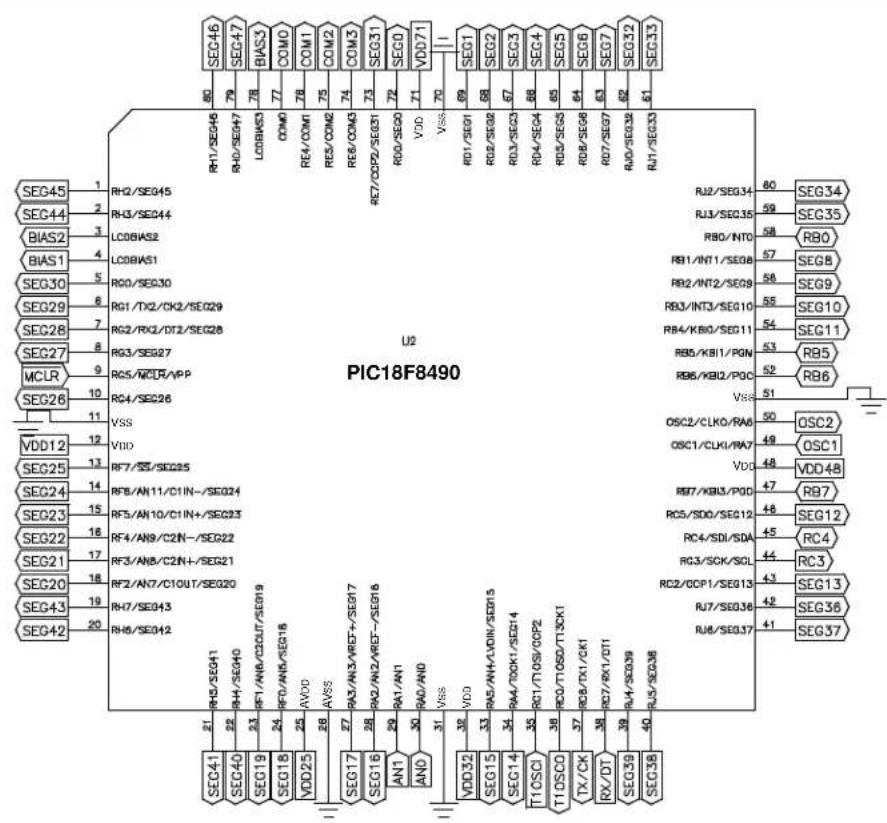
text_image
U2 PIC18F8490 SEG45 1 RH2/SEG45 SEC44 2 RH3/SEG44 BIAS2 3 LC0BAS2 BIAS1 4 LC0BAS1 SEC30 5 RD0/SEG30 SEC29 6 RG1/TX2/CK2/SEG29 SEC28 7 RG2/RX2/DT2/SEG28 SEC27 8 RG3/SEG27 MCLR 9 RC5/MCLR/APP SEC26 10 RC4/SEG26 VDD12 11 VSS SEC25 12 VIIO SEC24 13 RF7/SS/SEG25 SEC23 14 RF8/AN11/C1IN-/SEG24 SEC22 15 RF5/AN10/C1IN+/SEG23 SEC21 16 RF4/AN9/C2IN-/SEG22 SEC20 17 RF3/AN8/C2IN+/SEG21 SEC20 18 RF2/AN7/C1OUT/SEG20 SEC43 19 RH7/SEG43 SEC42 20 RH6/SEG42 RJ1/SEG46 RH7/SEG46 RJ0/SEG47 RJ0/SEG47 RD1/SEQ1 RD2/SEQ2 RD3/SEQ3 RD4/SEQ4 RD5/SEQ5 RD6/SEQ6 RD7/SEQ7 RD8/SEQ8 RD9/SEQ9 RD10/SEQ10 VDD11 70 VDD71 VSS 70 VSS 69 RD1/SEQ1 RD2/SEQ2 RD3/SEQ3 RD4/SEQ4 RD5/SEQ5 RD6/SEQ6 RD7/SEQ7 RD8/SEQ8 RD9/SEQ9 RD10/SEQ10 VDD2 68 RD3/SEQ3 RD4/SEQ4 RD5/SEQ5 RD6/SEQ6 RD7/SEQ7 RD8/SEQ8 VDD3 67 RD3/SEQ3 RD4/SEQ4 RD5/SEQ5 RD6/SEQ6 RD7/SEQ7 RD8/SEQ8 VDD4 66 RD3/SEQ3 RD4/SEQ4 RD5/SEQ5 RD6/SEQ6 RD7/SEQ7 RD8/SEQ8 VDD5 65 RD3/SEQ3 RD4/SEQ4 RD5/SEQ5 RD6/SEQ6 RD7/SEQ7 RD8/SEQ8 VDD6 64 RD3/SEQ3 RD4/SEQ4 RD5/SEQ5 RD6/SEQ6 RD7/SEQ7 RD8/SEQ8 VDD7 63 RD3/SEQ3 RD4/SEQ4 RD5/SEQ5 RD6/SEQ6 RD7/SEQ7 RD8/SEQ8 VDD8 62 RD3/SEQ3 RD4/SEQ4 RD5/SEQ5 RD6/SEQ6 RD7/SEQ7 RD8/SEQ8 VDD9 61 RD3/SEQ3 RD4/SEQ4 RD5/SEQ5 RD6/SEQ6 RD7/SEQ7 RD8/SEQ8 VDD10 60 RJ2/SEG34 RJ3/SEG35 RBO/INTO RB1/INT1/SEG8 RB2/INT2/SEG9 RB3/INT3/SEG10 RB4/KBIO/SEG11 RB5/KBI1/PGN RB6/KBI2/PGC OSC2/CLKO/RAD OSC1/CLKI/RAD VDD3 59 OSC2 VDD48 RB7 RC5/SDD/SEG12 RC4/SDI/SDA RC3/SCK/SCL RC2/DDP1/SEG13 RJ7/SEG36 RJ8/SEG37 RJ9/SEG38FIGURE A-27: PICDEM™ LCD 2 PIC18F6XJ90 64-PIN PIM SCHEMATIC

text_image
U2 PIC18F6XJ90 BIAS2 1 BIAS1 2 BIAS0 3 RBO 4 VLCAP1 5 VLCAP2 6 MCLR 7 SEC26 8 VDDCORE 9 SEG25 10 SEG24 11 SEG23 12 SEG22 13 SEG21 14 SEG20 15 ENVREG 16 AVDD 17 RD1/LCDBIAS2 RE0/LCDBIAS1 RG0/LCDBIAS0 RG1/TX2/CK2 RG2/RX2/DT2/Vcap1 (RC3) RG3/VCAP2 (RC4) (RC3) MCLR RG4/SEQ26 VSS VDDCORE/VCAP RF7/AN5/SS/SEG25 RF6/AN11/C1INA/SEG24 RF5/AN10/C1INB/SEG23 RF4/AN9/C2INA/SEG22 RF3/AN8/C2INB/SEG21 RF2/AN7/C1OUT/SEG20 RF1/AN6/C2OUT/SEQ19 (RA1) ENVREG 20 AVDD 21 AVSS 22 RA5/AN3/VREF+ RA2/AN2/VREF- RA1/AN1/SEG18 RA8/AN0 VSS VDD32 25 VDD14 26 VDD33 27 VDD15 28 VDD16 29 VDD17 30 TX/CK 31 RX/DT 32 SEG18 33 SEG15 34 SEG14 35 SEG13 36 SEG12 37 SEG11 38 SEG10 39 SEG9 40 SEG8 41 RB0/INT0/SEG30 48 RB1/INT1/SEG8 47 RB2/INT2/SEG9 46 RB3/INT3/SEG10 45 RB4/KBI0/SEG11 44 RB5/KBI1/SEG29 43 RB6/KBI2/P0C 42 VSS 41 OSC2 40 OSC1 39 VDD48 38 RB7/KBI3/PGD 37 RB6/SDO/SEG12 38 SC4/SDL/SDA/SEG16 39 SC5/SCL/SEG17 35 SC6/SCL/SEG18 34 SC7/CCP1/SEG19 33 SC8/TX1/CK1 34 SC9/TIOSCO 35 TX/CK 36FIGURE A-28: PICDEM™ LCD 2 PIC18F87J90 80-PIN PIM SCHEMATIC
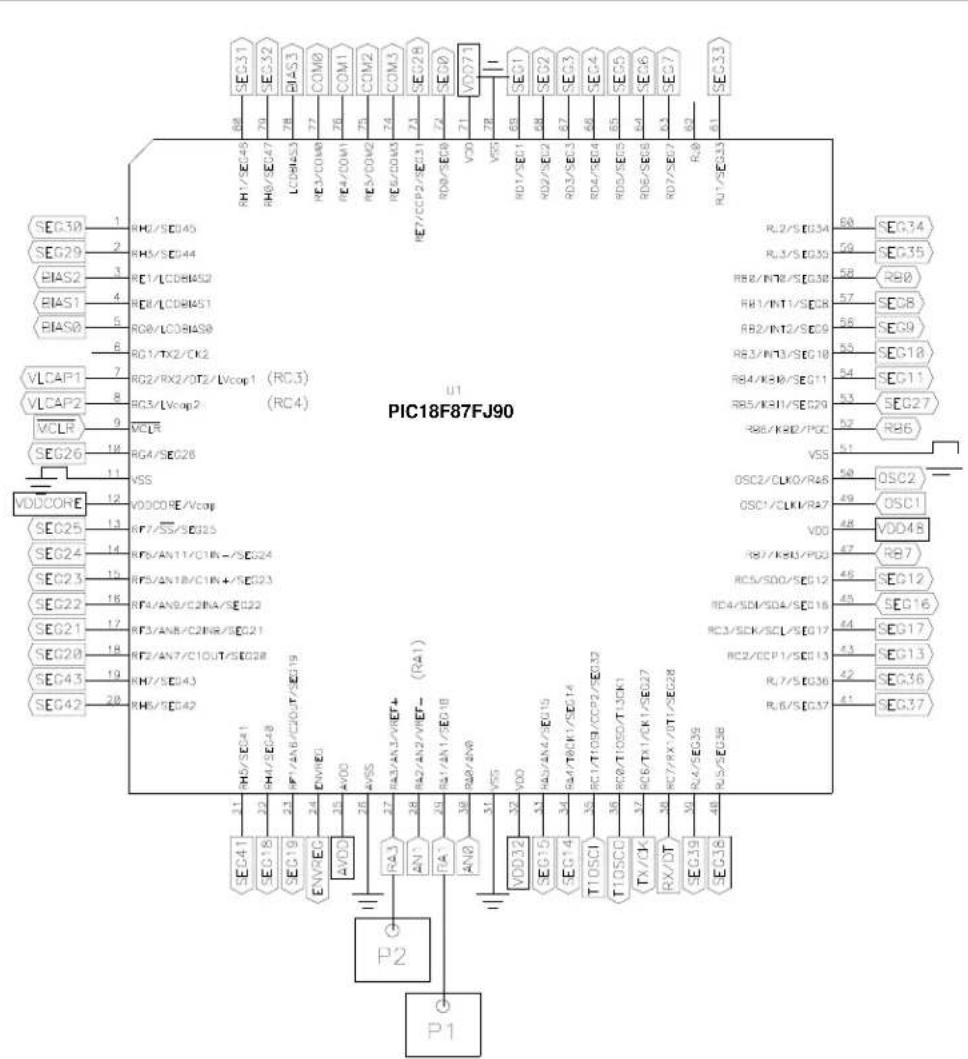
text_image
PIC18F87FJ90 U1 SEC30 1 RH2/SE045 SEC29 2 RH3/SE044 BIAS2 3 RE1/LCD8A52 BIAS1 4 RE1/LCD8A51 BIAS0 5 RO0/LCD8A50 VLCAP1 6 RG1/TX2/CK2 VLCAP2 7 RG2/RX2/DT2/Vcop1 (RC3) VCLR 8 RC3/Vcop2 (RC4) SEG26 9 VCLR VDDCORE 10 RG4/SE026 SEG25 11 VSS SEG24 12 VDDCORE/Vcop SEG23 13 RF7/SS/SE025 SEG22 14 RF5/AN11/C1R-/SE024 SEG21 15 RF5/AN18/C1R+/SE023 SEG20 16 RF4/AN9/C2INA/SE022 SEG21 17 RF3/AN8/C2INR/SE021 SEG20 18 RF2/AN7/C1OUT/SE028 SEG43 19 RH7/SE043 SEG42 20 RH5/SE042 P2 P1 SEC41 31 RH6/SE041 SEC18 32 RH7/SE048 SEC19 33 NF/AN6/C2OUT/SE019 EVVEC 34 ENVEO AVOD 35 AVOD AVSS 36 AVSS RA3 37 RA3/AN3/VIEF+ (RA1) AN1 38 RA2/AN2/VIEF- (RA1) PA7 39 RA1/AN1/SE018 AN8 40 RBP/AN9 VDD32 41 VDD VDD35 42 VDD/AN4/VIEF+ (VDD) AN1 43 AN2/VIEF- (VDD) AN1 44 AN3/VIEF- (VDD) VDD32 45 VDD/AN4/VIEF+ (VDD) AN1 46 VDD/AN4/VIEF- (VDD) VDD35 47 VDD/AN4/VIEF+ (VDD) AN1 48 VDD/AN4/VIEF- (VDD) VDD35 49 VDD/AN4/VIEF+ (VDD) AN1 50 VDD/AN4/VIEF- (VDD) VDD35 51 VDD/AN4/VIEF+ (VDD) AN1 52 VDD/AN4/VIEF- (VDD) VDD35 53 VDD/AN4/VIEF+ (VDD) AN1 54 VDD/AN4/VIEF- (VDD) VDD35 55 VDD/AN4/VIEF+ (VDD) AN1 56 VDD/AN4/VIEF- (VDD) VDD35 57 VDD/AN4/VIEF- (VDD) VDD35 58 VDD/AN4/VIEF- (VDD) VDD35 59 VDD/AN4/VIEF- (VDD) VDD35 60 VDD/AN4/VIEF- (VDD) VDD35 61 VDD/AN4/VIEF- (VDD) VDD35 62 VDD/AN4/VIEF- (VDD) VDD35 63 VDD/AN4/VIEF- (VDD) VDD35 64 VDD/AN4/VIEF- (VDD) VDD35 65 VDD/AN4/VIEF- (VDD) VDD35 66 VDD/AN4/VIEF- (VDD) VDD35 67 VDD/AN4/VIEF- (VDD) VDD35 68 VDD/AN4/VIEF- (VDD) VDD35 69 VDD/AN4/VIEF- (VDD) VDD35 70 VDD/AN4/VIEF- (VDD) VDD35 71 VDD/AN4/VIEF- (VDD) VDD35 72 VDD/AN4/VIEF- (VDD) VDD35 73 VDD/AN4/VIEF- (VDD) VDD35 74 VDD/AN4/VIEF- (VDD) VDD35 75 VDD/AN4/VIEF- (VDD) VDD35 76 VDD/AN4/VIEF- (VDD) VDD35 77 VDD/AN4/VIEF- (VDD) VDD35 78 VDD/AN4/VIEF- (VDD) VDD35 79 VDD/AN4/VIEF- (VDD) VDD35 80 VDD/AN4/VIEF- (VDD) VDD35 81 VDD/AN4/VIEF- (VDD) VDD35 82 VDD/AN4/VIEF- (VDD) VDD35 83 VDD/AN4/VIEF- (VDD) VDD35 84 VDD/AN4/VIEF- (VDD) VDD35 85 VDD/AN4/VIEF- (VDD) VDD35 86 VDD/AN4/VIEF- (VDD) VDD35 87 VDD/AN4/VIEF- (VDD) VDD35 88 VDD/AN4/VIEF- (VDD) VDD35 89 VDD/AN4/VIEF- (VDD) VDD35 90 VDD/AN4/VIEF- (VDD) VDD35 91 VDD/AN4/VIEF- (VDD) VDD35 92 VDD/AN4/VIEF- (VDD) VDD35 93 VDD/AN4/VIEF- (VDD) VDD35 94 VDD/AN4/VIEF- (VDD) VDD35 95 VDD/AN4/VIEF- (VDD) VDD35 96 VDD/AN4/VIEF- (VDD) VDD35 97 VDD/AN4/VIEF- (VDD) VDD35 98 VDD/AN4/VIEF- (VDD) VDD35 99 VDD/AN4/VIEF- (VDD) VDD35 100 VDOZI RJ7/CCP2/SCE01 RD0/TX2/EQ0 RD7/EQ0/EQ0 RD7/EQ0/EQ0 RD7/EQ0/EQ0 RD7/EQ0/EQ0 RD7/EQ0/EQ0 RD7/EQ0/EQ0 RD7/EQ0/EQ0 RD7/EQ0/EQ0 RD7/EQ0/EQ0 RD7/EQ0/EQ0 RD7/EQ0/EQ0 RD7/EQ0/BG RJ8/KB/DG RJ8/KB/DG/RG RJ8/KB/DG/RG/RG/RG/RG/RG/RG/RG/RG/RG/RG/RG/RG/RG/RG/RG/RG/RG/RG/RG/RG/RG/RG/RG/RG/RG/RG/RG/RG/RG/RG/RG/RG/RG/RG/RG/RG/RG/RG/RG/RG/RG/RG/RG/RG/RG/RG/RG/RG/RG/RGFIGURE A-29: PICDEM™ LCD 2 PIC18F85J90 80-PIN PIM SCHEMATIC
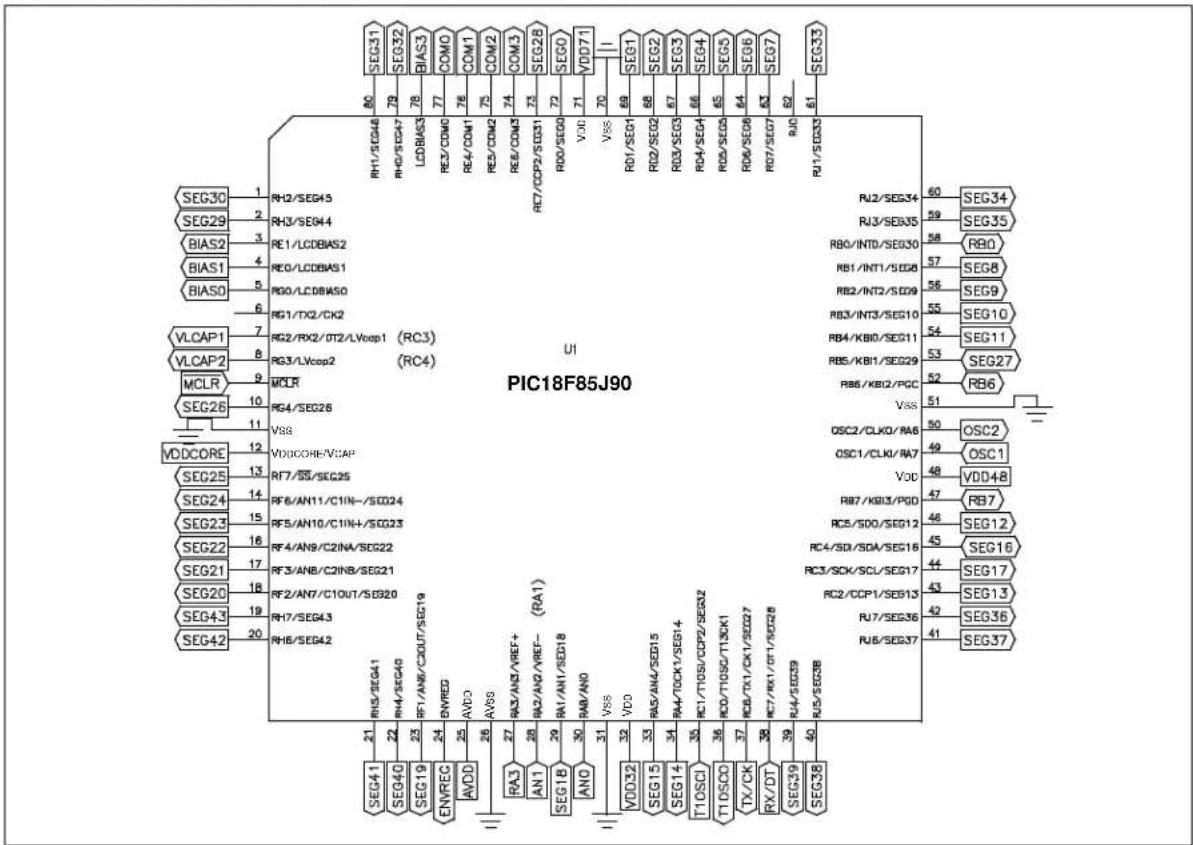
text_image
Pinout diagram of PIC18F85J90 integrated circuit with labeled pins and functionsNOTES:
Index
A
Analog Input 47
B
Board 11
C
Charge Pump and Software Contrast...... 17
Clock....17
Customer Notification Service....8
Customer Support....9
D
Demonstration Board. See Board
Demonstration Programs. See Sample Programs.
Documentation
Conventions....6
Layout.... 5
H
Hardware Features 12
|
Internet Address....8
K
Kit Components 11
L
LCD
Digit Description.... 27
Display Definition.... 27
SEGx and COMx 28
LCD Display.... 26
LEDs
Green Display.... 46
Green Power 46
M
Microchip Internet Web Site....8
MPASM Assembler.... 15
MPLAB C18 C Compiler 15
MPLAB ICD 2....11, 16, 48
MPLAB ICE....11, 16
MPLAB IDE.... 15
0
Oscillator Options.... 47
Oscillator Selection 16
P
Part Numbers.... 25
PIC16XXXX
Demo 17
PIC18XXXX
Demo Program.... 17
PICDEM LCD 2 Board
Hardware 23
PICDEM LCD 2 Board. See Board
PICDEM LCD 2 Demo Board.... 12
PICDEM LCD 2 Hardware (Graphic) 13
PICDEM LCD 2 Kit. See Kit Components.
PICDEM LCD 2 Stand-Alone Board.... 15
Power Supply.... 15
PICDEM LCD2 Board
Power Supply.... 49
Processors 25
Push Buttons. See Switches.
R
Reading, Recommended 7
Real-Time Clock.... 47
RS-232 12,47
s
Sample Devices 13
Sample PIM....11
Sample Programs 11, 13
Serial EEPROM 47
Switches.... 12
Analog Input.... 48
Digital I/O 48
T
Temperature Sensor 48
Thermometer.... 17
U
Using the Demo Software 17
V
Voltmeter.... 17
W
Warranty Registration 7
WWW Address....8
Worldwide Sales and Service
AMERICAS
Corporate Office
2355 West Chandler Blvd.
Chandler, AZ 85224-6199
Tel: 480-792-7200
Fax: 480-792-7277
Technical Support:
http://support.microchip.com
Web Address:
www.microchip.com
Atlanta
Duluth, GA
Tel: 678-957-9614
Fax: 678-957-1455
Boston
Westborough, MA
Tel: 774-760-0087
Fax: 774-760-0088
Chicago
Itasca, IL
Tel: 630-285-0071
Fax: 630-285-0075
Cleveland
Independence, OH
Tel: 216-447-0464
Fax: 216-447-0643
Dallas
Addison, TX
Tel: 972-818-7423
Fax: 972-818-2924
Detroit
Farmington Hills, MI
Tel: 248-538-2250
Fax: 248-538-2260
Kokomo
Kokomo, IN
Tel: 765-864-8360
Fax: 765-864-8387
Los Angeles
Mission Viejo, CA
Tel: 949-462-9523
Fax: 949-462-9608
Santa Clara
Santa Clara, CA
Tel: 408-961-6444
Fax: 408-961-6445
Toronto
Mississauga, Ontario,
Canada
Tel: 905-673-0699
Fax: 905-673-6509
ASIA/PACIFIC
Asia Pacific Office
Suites 3707-14, 37th Floor
Tower 6, The Gateway
Harbour City, Kowloon
Hong Kong
Tel: 852-2401-1200
Fax: 852-2401-3431
Australia - Sydney
Tel: 61-2-9868-6733
Fax: 61-2-9868-6755
China - Beijing
Tel: 86-10-8528-2100
Fax: 86-10-8528-2104
China - Chengdu
Tel: 86-28-8665-5511
Fax: 86-28-8665-7889
China - Chongqing
Tel: 86-23-8980-9588
Fax: 86-23-8980-9500
China - Hong Kong SAR
Tel: 852-2401-1200
Fax: 852-2401-3431
China - Nanjing
Tel: 86-25-8473-2460
Fax: 86-25-8473-2470
China - Qingdao
Tel: 86-532-8502-7355
Fax: 86-532-8502-7205
China - Shanghai
Tel: 86-21-5407-5533
Fax: 86-21-5407-5066
China - Shenyang
Tel: 86-24-2334-2829
Fax: 86-24-2334-2393
China - Shenzhen
Tel: 86-755-8203-2660
Fax: 86-755-8203-1760
China - Wuhan
Tel: 86-27-5980-5300
Fax: 86-27-5980-5118
China - Xian
Tel: 86-29-8833-7252
Fax: 86-29-8833-7256
China - Xiamen
Tel: 86-592-2388138
Fax: 86-592-2388130
China - Zhuhai
Tel: 86-756-3210040
Fax: 86-756-3210049
ASIA/PACIFIC
India - Bangalore
Tel: 91-80-3090-4444
Fax: 91-80-3090-4123
India - New Delhi
Tel: 91-11-4160-8631
Fax: 91-11-4160-8632
India - Pune
Tel: 91-20-2566-1512
Fax: 91-20-2566-1513
Japan - Yokohama
Tel: 81-45-471-6166
Fax: 81-45-471-6122
Korea - Daegu
Tel: 82-53-744-4301
Fax: 82-53-744-4302
Korea - Seoul
Tel: 82-2-554-7200
Fax: 82-2-558-5932 or
82-2-558-5934
Malaysia - Kuala Lumpur
Tel: 60-3-6201-9857
Fax: 60-3-6201-9859
Malaysia - Penang
Tel: 60-4-227-8870
Fax: 60-4-227-4068
Philippines - Manila
Tel: 63-2-634-9065
Fax: 63-2-634-9069
Singapore
Tel: 65-6334-8870
Fax: 65-6334-8850
Taiwan - Hsin Chu
Tel: 886-3-6578-300
Fax: 886-3-6578-370
Taiwan - Kaohsiung
Tel: 886-7-213-7830
Fax: 886-7-330-9305
Taiwan - Taipei
Tel: 886-2-2500-6610
Fax: 886-2-2508-0102
Thailand - Bangkok
Tel: 66-2-694-1351
Fax: 66-2-694-1350
EUROPE
Austria - Wels
Tel: 43-7242-2244-39
Fax: 43-7242-2244-393
Denmark - Copenhagen
Tel: 45-4450-2828
Fax: 45-4485-2829
France - Paris
Tel: 33-1-69-53-63-20
Fax: 33-1-69-30-90-79
Germany - Munich
Tel: 49-89-627-144-0
Fax: 49-89-627-144-44
Italy - Milan
Tel: 39-0331-742611
Fax: 39-0331-466781
Netherlands - Drunen
Tel: 31-416-690399
Fax: 31-416-690340
Spain - Madrid
Tel: 34-91-708-08-90
Fax: 34-91-708-08-91
UK - Wokingham
Tel: 44-118-921-5869
Fax: 44-118-921-5820