
JB2G - Junction box Speco Technologies - Free user manual and instructions
Find the device manual for free JB2G Speco Technologies in PDF.


| Product Type | Junction Box |
| Brand | Speco Technologies |
| Model | JB2G |
| Material | Aluminum alloy |
| Diameter | Approx. 4.5 inches (115 mm) |
| Height | Approx. 2.2 inches (56 mm) |
| Weight | 0.5 lbs (0.23 kg) |
| Mounting Type | Wall mount |
| Cable Entry | Side conduit |
| Compatible Cameras | Bullet and dome cameras |
| Weatherproof Rating | IP66 (estimated) |
| Color | White |
| Included Parts | Junction box, mounting base, upper cover, screws, expansion anchors |
| Load Capacity | Supports up to 3 times camera weight |
| Operating Temperature | -40°C to 60°C |
| Warranty | 1 year |
| Cleaning | Dry cloth only |
| Safety | Ensure wall strength for mounting |
| Repairability | No user-serviceable parts |
| Installation | Refer to included quick start guide |
Frequently Asked Questions - JB2G Speco Technologies
User questions about JB2G Speco Technologies
0 question about this device. Answer the ones you know or ask your own.
Ask a new question about this device
Download the instructions for your Junction box in PDF format for free! Find your manual JB2G - Speco Technologies and take your electronic device back in hand. On this page are published all the documents necessary for the use of your device. JB2G by Speco Technologies.
USER MANUAL JB2G Speco Technologies
natural_image
Technical line drawing of a circular mechanical component with mounting holes and central hub (no text or symbols)Junction Box
Quick Star t Guide
Thank you for purchasing our products. All examples and pictures used in this manual are only for reference purpose. Please take the real object as the standard.
Before installation, make sure that the wall is strong enough to withstand 3 times the weight of the junction box and the camera. We only introduce the installation of some cameras with junction box in this manual.
● Mount the Junction Box and Bullet Camera
- Drill the screw holes on the wall according to the drill template.

natural_image
Pure technical diagram showing a circular component with cross symbol inside, supported by vertical lines (no text or labels)- Push the expansion screws into the screw holes (if the wall is wooden, please skip this step) and then fix the mounting base of the junction box to the wall with screws.

- Reinstall the upper cover to the junction box.

natural_image
Technical line drawing of a mechanical assembly or mounting bracket (no text or symbols)- Open the mounting base and the upper cover of the junction box.

- Fix the mounting base of the camera to the upper cover of the junction box. Then route the cables through the cable hole (take side conduit cabling for example) and connect the cables.

natural_image
Technical line drawing of a mechanical assembly or lifting device (no text or symbols visible)- Adjust the view angle of the camera.

natural_image
Technical line drawing of a mechanical assembly with a rotating component (no text or symbols)● Mount the Junction Box and Dome Camera (1)
- Drill the screw holes on the wall according to the drill template.

natural_image
Pure electrical circuit lines without any symbols- Secure the mounting base of the junction box to the wall.

- Route the cables through the cable hole (take side conduit cabling for example) and connect the cables. Then reinstall the upper cover to the junction box.

natural_image
Technical line drawing of a mechanical assembly with internal components and alignment lines (no text or symbols)- Open the mounting base and the upper cover of the junction box.

- Fix the camera to the upper cover of the junction box.

natural_image
Technical line drawing of two mechanical components with mounting holes and connecting rods (no text or symbols)- Adjust the view angle of the camera.
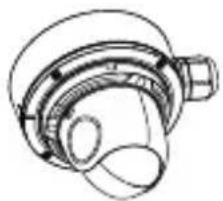
natural_image
Technical line drawing of a mechanical component with no visible text or symbols● Mount the Junction Box and Dome Camera (2)
The step 1 and step 2 are the same as the above-mentioned step 1 and step 2.
- Secure the mounting base of the junction box to the wall.

natural_image
Technical line drawing of a mechanical component with wires and housing (no text or symbols)- Unscrew the lock screw and then remove the mounting base of the camera.
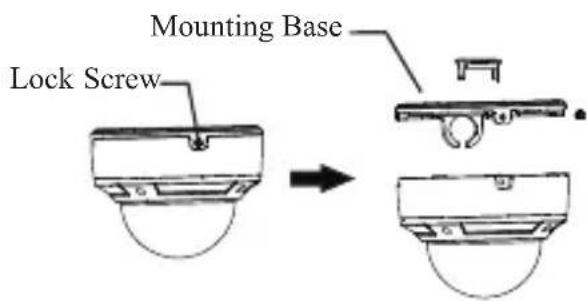
- Connect the cables and then fix the lower dome to the mounting base by tightening the lock screw.

natural_image
Technical diagram of a mechanical component with two views (top and side), no visible text or symbols- Route the cables through the cable hole (take side conduit cabling for example). Then reinstall the upper cover to the junction box.

natural_image
Technical line drawing of a mechanical component with cross-sectional and top views (no text or symbols)- Mount the mounting base of the camera to the junction box.

natural_image
Technical line drawing of a mechanical component with two views (top and side), no text or symbols present.- Remove the lower dome to adjust the view angle. After that, reinstall the lower dome to complete the installation.
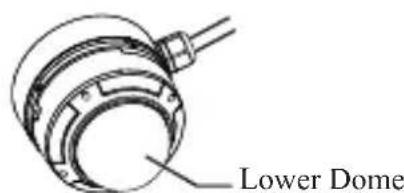
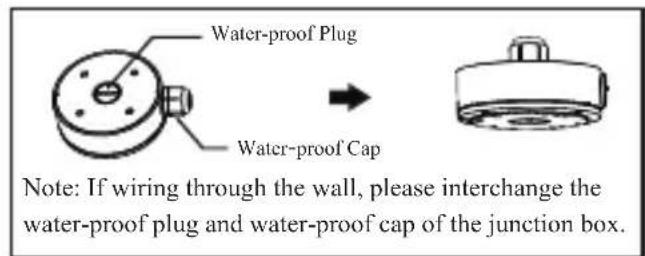
Brand : Speco Technologies
Model : JB2G
Category : Junction box