
CMT1 - Mounting bracket Speco Technologies - Free user manual and instructions
Find the device manual for free CMT1 Speco Technologies in PDF.


| Product Type | Corner Mount Bracket |
| Brand | Speco Technologies |
| Model | CMT1 |
| Compatibility | Dome cameras with wall mount; bullet cameras with junction box |
| Mounting Type | Corner mount |
| Material | Metal (aluminum or steel) |
| Installation | Requires screws, nuts, and lock screw (included) |
| Lock Screw | Yes, for securing the camera to the mount |
| Wall Mount | Included for dome camera corner mounting |
| Junction Box | For bullet camera corner mounting (includes upper and lower covers) |
| Cable Management | Through junction box or mount base |
| Weight Capacity | Designed for typical surveillance cameras under 5 lbs |
| Color | White or silver (standard) |
| Dimensions | Fits standard corner angles (90 degrees) |
| Included Accessories | Nuts, bolts, lock screw |
| Maintenance | Clean with dry cloth; avoid harsh chemicals |
| Safety | Ensure bracket is securely fastened to prevent camera fall |
| Reparability | No user-serviceable parts; replace if damaged |
| Temperature Range | -20°C to 50°C (typical) |
| Application | Indoor and outdoor (if corrosion-resistant) |
Frequently Asked Questions - CMT1 Speco Technologies
User questions about CMT1 Speco Technologies
0 question about this device. Answer the ones you know or ask your own.
Ask a new question about this device
Download the instructions for your Mounting bracket in PDF format for free! Find your manual CMT1 - Speco Technologies and take your electronic device back in hand. On this page are published all the documents necessary for the use of your device. CMT1 by Speco Technologies.
USER MANUAL CMT1 Speco Technologies
natural_image
Simple line drawing of a rectangular device with internal components and mounting holes (no text or symbols)CMT1
Corner Mount
Quick Start Guide
Thank you for purchasing our product. All examples and pictures used in the manual are only for reference purpose. Please take the real object as the standard.
Installation
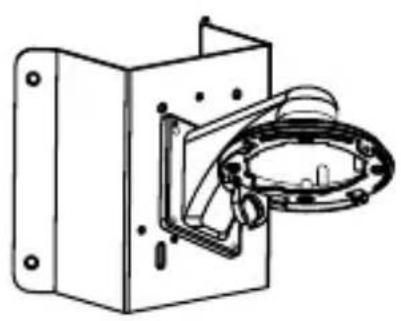
Corner mounting examples of the bracket and junction box.
natural_image
Technical line drawing of a mechanical device with mounting bracket and housing (no text or symbols)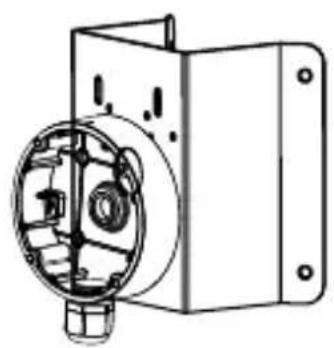
natural_image
Technical line drawing of a mechanical device with internal components and mounting brackets (no text or symbols)Here we only take some models for example to introduce their corner mounting with the junction box and other bracket. Please take the quick start guide of the relevant cameras for more details of camera installation.
● Corner Mounting of Dome Camera with Wall Mount
-
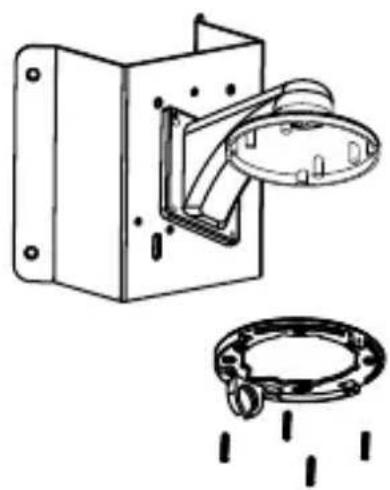
Loosen the lock screw to remove the mounting base.
-
Fix the wall mount to the corner mount with the nuts and bolts.


- Install the corner mount to the corner.

natural_image
Technical line drawing of a mechanical device with internal components and mounting holes (no text or symbols)- Srew the mounting base of the dome camera to the wall mount with screws.
natural_image
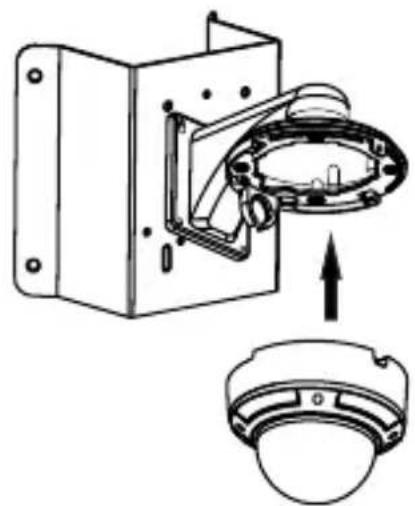
Technical line drawing of a mechanical assembly with mounting bracket and flange (no text or symbols)- Mount the camera to the mounting base.
natural_image
Technical diagram of a mechanical assembly with housing and component, showing upward force direction (no text or labels)- Fix the camera with lock screw.

natural_image
Technical line drawing of a mechanical device with a circular component mounted on a rectangular base (no text or symbols)● Corner Mounting of Bullet Camera with Junction Box
-
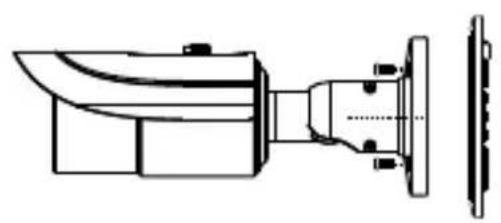
Open the covers of the junction box.
-
Screw the camera to the upper cover of the junction box.

natural_image
Technical line drawing of a mechanical component with no visible text or symbols-
Fix the lower cover of the junction box to the corner mount with the nuts and bolts.
-
Install the corner mount to the corner.

natural_image
Technical illustration of a mechanical device with exploded view and side-view view (no text or symbols)
natural_image
Technical line drawing of a mechanical component with two views: top shows a rectangular housing with bolt holes, bottom shows a 3D cross-section with diagonal hatching (no text or symbols)- Tighten the covers of the junction box with screws.

natural_image
Technical line drawing of a mechanical component with no visible text or symbols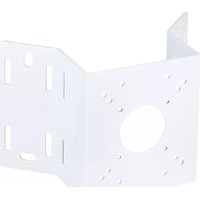
Brand : Speco Technologies
Model : CMT1
Category : Mounting bracket