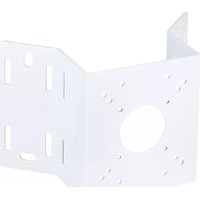
INTCMW - Mounting bracket Speco Technologies - Free user manual and instructions
Find the device manual for free INTCMW Speco Technologies in PDF.


| Product Type | Indoor/Outdoor Security Camera |
| Model | INTCMW |
| Brand | Speco Technologies |
| Dimensions | 4.5 x 3.2 x 2.8 inches (approx.) |
| Weight | 1.2 lbs (approx.) |
| Power Supply | 12V DC, 1A (PoE compatible) |
| Resolution | 1080p Full HD (1920x1080) |
| Night Vision | Yes, up to 30 ft (9 m) |
| Motion Detection | Yes, with push notifications |
| Video Output | Ethernet (PoE), HDMI (optional) |
| Audio | Built-in two-way audio |
| Connectivity | Ethernet (10/100 Mbps), Wi-Fi 802.11 b/g/n |
| Storage | MicroSD card slot (up to 128GB), NVR compatible |
| Operating Temperature | -4°F to 122°F (-20°C to 50°C) |
| Weatherproof Rating | IP66 (outdoor use) |
| Mounting | Wall or ceiling mount (included) |
| Field of View | 90° horizontal, 50° vertical |
| Warranty | 1 year limited |
| Included Accessories | Mounting kit, power adapter, user manual |
Frequently Asked Questions - INTCMW Speco Technologies
User questions about INTCMW Speco Technologies
0 question about this device. Answer the ones you know or ask your own.
Ask a new question about this device
Download the instructions for your Mounting bracket in PDF format for free! Find your manual INTCMW - Speco Technologies and take your electronic device back in hand. On this page are published all the documents necessary for the use of your device. INTCMW by Speco Technologies.
USER MANUAL INTCMW Speco Technologies
200 New Highway, Amityville NY 11701
800.645.5516 / www.specotech.com
Pole / Corner Mount
Compatible Models
The following items are included in this package.
• INTCM / INTCMW
• 4 Tapping Screws #8 x 25
• 4 Hexagon Socket Screws M5 x 15
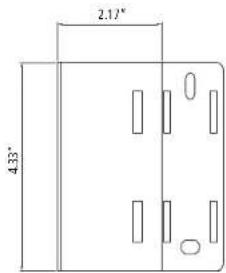
Dimensions
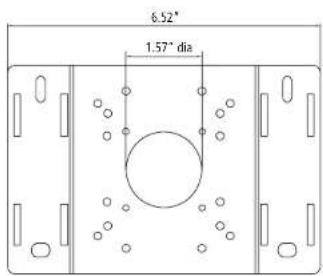
Side ViewFront View
Optional Accessories
CVCJBB

INTWM

Bullet Junction Box Wall Mount
Installation Instruction Diagram
1-1. Install mount onto the wall by using the screws provided.

1-2. Install INTCM onto pole or wall.
1-3. Install wall mount onto INTCM as shown in the image below.

Installation Guide
INTCM / INTCMW
speco technologies
200 New Highway, Amityville NY 11701
800.645.5516 / www.specotech.com
Installation Instruction Diagram Installation Instruction Diagra
1-4. Install INTCM onto pole or wall.
1-5. Install junction box onto INTCM as shown in the image below.
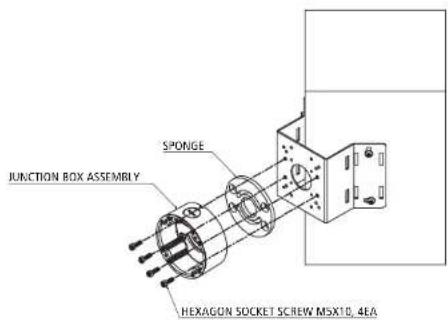
- Arrange each piece as shown in the image below.
- Fasten the camera onto the mount or junction box.
*Compatible models
HTINTB8(W)
HTINTB9(W)
HTINTB10(W)
HTB11FFi
CVC5100BPVF(W)
CVC5200BPVF(W)
CVC5815DNV(W)
CVC5915DNV(W)
HTINTB8G(W)
HTINTB10G(W)
HT5100BPVFG(W)
HT5200BPVFG(W)
OB1
OINT56B1G


Brand : Speco Technologies
Model : INTCMW
Category : Mounting bracket