FBQ20DAVMK - Air-conditioner DAIKIN - Free user manual and instructions
Find the device manual for free FBQ20DAVMK DAIKIN in PDF.


User questions about FBQ20DAVMK DAIKIN
0 question about this device. Answer the ones you know or ask your own.
Ask a new question about this device
Download the instructions for your Air-conditioner in PDF format for free! Find your manual FBQ20DAVMK - DAIKIN and take your electronic device back in hand. On this page are published all the documents necessary for the use of your device. FBQ20DAVMK by DAIKIN.
USER MANUAL FBQ20DAVMK DAIKIN
Thank you for purchasing this Daikin air conditioner.
Carefully read this operation manual before using the air conditioner.
It will tell you how to use the unit properly and help you if any trouble occurs.
This operation manual is specifically for the indoor unit. Also read the operation manual that came with the remote controller.
After reading the manual, file it away for future reference.

Never operate remote controller buttons with hard, pointed objects.
This may result in remote controller damage.
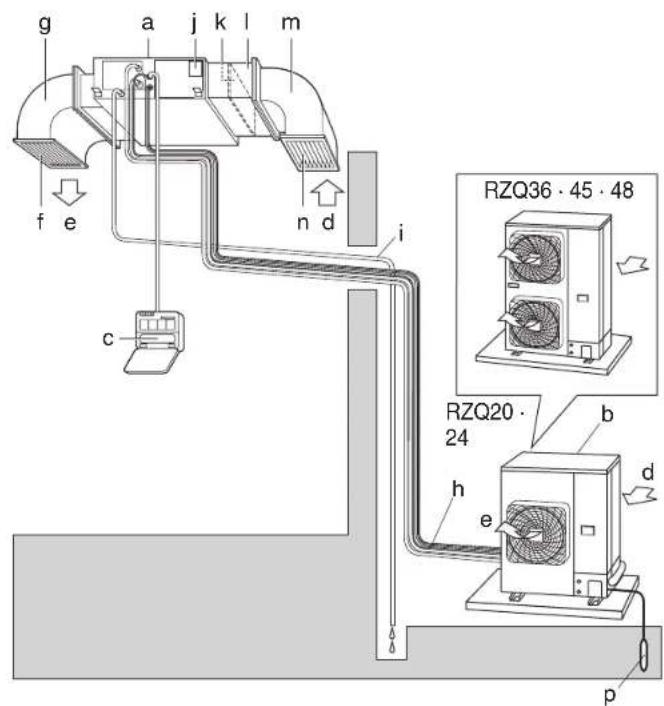
figure 1
text_image
g a j k l m f e c n d i RZQ36 · 45 · 48 RZQ20 · 24 b h e d p
text_image
DAIKINfigure 3
text_image
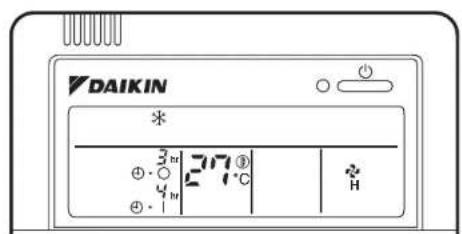
DAIKIN * 3° 27℃ 4° Hfigure 4 figure 2
[1]
CONTENTS
ILLUSTRATIONS....[1]
- WHAT TO DO BEFORE OPERATION ...... 1
- SAFETY PRECAUTIONS .... 2
- OPERATION RANGE 4
- INSTALLATION SITE.... 4
- NAME AND FUNCTION OF EACH SWITCH AND DISPLAY ON THE REMOTE CONTROLLER.... 5
- OPERATION PROCEDURE 6
- OPTIMUM OPERATION 8
- MAINTENANCE (FOR SERVICE PERSONNEL) 8
- NOT MALFUNCTION OF THE AIR CONDITIONER .... 9
- TROUBLE SHOOTING 11
This operation manual is for the system with standard control. Before initiating operation, contact your Daikin dealer for the operation that corresponds to your system.

text_image
Outdoor unit Indoor unitIf your installation has a customized control system, ask your Daikin dealer for the operation that corresponds to your system.
- Heat pump type
This system provides cooling, heating, automatic, program dry, and fan operation modes.
PRECAUTIONS FOR GROUP CONTROL SYSTEM OR TWO REMOTE CONTROLLERS CONTROL SYSTEM
This system provides two other control systems beside individual control (one remote controller controls one indoor unit) system. Confirm the following if your unit is of the following control system type.
• Group control system
One remote controller controls up to 16 indoor units. All indoor units are equally set.
- Two remote controllers control system
Two remote controllers control one indoor unit (In case of group control system, one group of indoor units) The unit is individually operated.
NOTE
- Contact your Daikin dealer in case of changing the combination or setting of group control and two remote controllers control system.
Names and functions of parts
Refer to figure 2 on page [1]
| a Indoor unit | |
| b Outdoor unit | |
| c | Remote controllerDepending on the system configuration, the remote controller is not provided. |
| d Inlet air | |
| e Discharge air | |
| f Air outlet (Field supply) | |
| g | Exhaust duct (Field supply) |
| h Refrigerant piping, connection electric wire | |
| i | Drain pipe |
| j | Model name (model name plate) |
| k Air filter (Option) | |
| l | Suction filter chamber (Option) |
| m | Suction duct (Field supply) |
| n | Suction grille (Field supply) |
| p | Earth wireThe line passes electricity from the inside unit to the ground to prevent accidental electrical shock. |
2. SAFETY PRECAUTIONS
To gain full advantage of the air conditioner's functions and to avoid malfunction due to mishandling, we recommend that you read this instruction manual carefully before use.
Read the precautions thoroughly to avoid misuse of the equipment.
This air conditioner is classified under "appliances not accessible to the general public".
- The precautions described herein are classified as WARNING and CAUTION. They both contain important information regarding safety. Be sure to observe all precautions without fail.
There are two kinds of safety precaution and tips listed in the following.
WARNING
..Failure to follow these instructions properly may result in personal injury or loss of life.
CAUTION
.Failure to observe these instructions properly may result in property damage or personal injury, which may be serious depending on the circumstances.
- After reading, keep this manual in a convenient place so that you can refer to it whenever necessary. If the equipment is transferred to a new user, be sure also to hand over the manual.
WARNING
- Be aware that prolonged, direct exposure to cool or warm air from the air conditioner, or to air that is too cool or too warm can be harmful to your physical condition and health.
- When the air conditioner is malfunctioning (giving off a burning odour, etc.) turn off power to the unit and contact your local dealer.
Continued operation under such circumstances may result in a failure, electric shocks or fire hazards.
- Consult your local dealer about installation work.
Doing the work yourself may result in water leakage, electric shocks or fire hazards.
- Consult your local dealer regarding modification, repair and maintenance of the air conditioner.
Improper workmanship may result in water leakage, electric shocks or fire hazards.
- Do not place objects, including rods, your fingers, etc., in the air inlet or outlet.
Injury may result due to contact with the air conditioner's highspeed fan blades.
- Beware of fire in case of refrigerant leakage. If the air conditioner is not operating correctly, i.e. not generating cool or warm air, refrigerant leakage could be the cause. Consult your dealer for assistance. The refrigerant within the air conditioner is safe and normally does not leak. However, in the event of a leakage, contact with a naked burner, heater or cooker may result in generation of noxious gas. Do not longer use the air conditioner until a qualified service person confirms that the leakage has been repaired.
- Consult your local dealer regarding what to do in case of refrigerant leakage.
When the air conditioner is to be installed in a small room, it is necessary to take proper measures so that the amount of any leaked refrigerant does not exceed the concentration limit in the event of a leakage. Otherwise, this may lead to an accident due to oxygen depletion.
- Contact professional personnel about attachment of accessories and be sure to use only accessories specified by the manufacturer.
If a defect results from your own workmanship, it may result in water leaks, electric shock or fire.
- Consult your local dealer regarding relocation and reinstallation of the air conditioner. Improper installation work may result in leakage, electric shocks or fire hazards.
- Be sure to use fuses with the correct ampere reading.
Do not use improper fuses, copper or other wires as a substitute, as this may result in electric shock, fire, injury or damage to the unit.
- Be sure to earth the unit.
Do not earth the unit to a utility pipe, lightning conductor or telephone earth lead. Imperfect earthing may result in electric shocks or fire. A high surge current from lightning or other sources may cause damage to the air conditioner. - Be sure to install an earth leakage breaker. Failure to install the earth leakage breaker may result in electric shocks or fire.
- Consult the dealer if the air conditioner submerges owing to a natural disaster, such as a flood or typhoon.
Do not operate the air conditioner in that case, or otherwise a malfunction, electric shock, or fire may result.
- Do not start or stop operating the air conditioner with the power supply breaker turned ON or OFF.
Otherwise, fire or water leakage may result. Furthermore, the fan will rotate abruptly if power failure compensation is enabled, which may result in injury.
- Do not use the product in the atmosphere contaminated with oil vapor, such as cooking oil or machine oil vapor.
Oil vapor may cause crack damage, electric shocks, or fire.
- Do not place flammable sprays near the unit as this can cause explosions.
- Do not place water containers (flower vases, etc.) on the unit, as this may result in electric shocks or fire.
- Do not operate with the control panel lid open. If water gets inside the panel, it may result in equipment failure or electric shock.
- Do not use the product in places with excessive oily smoke, such as cooking rooms, or in places with flammable gas, corrosive gas, or metal dust. Using the product in such places may cause fire or product failures.
- Do not use flammable materials (e.g., hairspray or insecticide) near the product. Do not clean the product with organic solvents such as paint thinner.
The use of organic solvents may cause crack damage to the product, electric shocks, or fire
- Be sure to use a dedicated power supply for the air conditioner.
The use of any other power supply may cause heat generation, fire, or product failures.
- Consult your dealer regarding cleaning the inside of the air conditioner.
Improper cleaning may cause breakage of plastic parts, water leakage and other damage as well as electric shocks.
CAUTION
- Do not use the air conditioner for purposes other than those for which it is intended. Do not use the air conditioner for cooling precision instruments, food, plants, animals or works of art as this may adversely affect the performance, quality and/or longevity of the object concerned.
- Do not remove the Indoor unit's fan guard. The guard protects against the unit's high speed fan, which may cause injury.
- Do not place objects that are susceptible to moisture directly beneath the indoor or outdoor units.
Under certain conditions, condensation on the main unit or refrigerant pipes, air filter dirt or drain blockage may cause dripping, resulting in fouling or failure of the object concerned.
- To avoid oxygen depletion, ensure that the room is adequately ventilated if equipment such as a burner is used together with the air conditioner.
• After prolonged use, check the unit stand and its mounts for damage.
If left in a damaged condition, the unit may fall and cause injury.
- Do not place flammable sprays or operate spray containers near the unit as this may result in fire.
- Before cleaning, be sure to stop unit operation, turn the breaker off or remove the power cord.
Otherwise, an electric shock and injury may result.
- To avoid electric shocks do not operate with wet hands. Doing so may cause electric shock.
- Do not place appliances that produce naked flames in places exposed to the airflow from the unit as this may impair combustion of the burner.
- Do not place heaters directly below the unit, as resulting heat can cause deformation.
- Be sure that children, plants or animals are not exposed directly to airflow from the unit, as adverse effects may ensue.
- Do not wash the air conditioner with water, as this may result in electric shocks or fire.
- Do not install the air conditioner at any place where there is a danger of flammable gas leakage.
In the event of a gas leakage, build-up of gas near the air conditioner may result in fire hazards.
- Do not put flammable containers, such as spray cans, within 1 m from the blow-off mouth.
The containers may explode because the warm air output of the indoor or outdoor unit will affect them.
- Arrange the drain to ensure complete drainage.
If proper drainage from the outdoor drain pipe does not occur during air conditioner operation, there could be a blockage due to dirt and debris build-up in the pipe.
This may result in a water leakage from the indoor unit. Under these circumstances, stop air conditioner operation and consult your dealer for assistance.
- Do not allow a child to mount on the outdoor unit or avoid placing any object on it.
Falling or tumbling may result in injury.
• Do not block air inlets nor outlets.
Impaired airflow may result in insufficient performance or trouble.
- The appliance is not intended for use by unattended young children or infirm persons.
Impairment of bodily functions and harm to health may result.
- Children should be supervised to ensure that they do not play with the unit or its remote controller.
Accidental operation by a child may result in impairment of bodily functions and harm health.
- Do not let children play on or around the outdoor unit.
If they touch the unit carelessly, injury may be caused.
• To avoid injury, do not touch the air inlet or aluminium fins of the unit.
• Take care of scaffolding and exercise caution when working high above ground level. - Arrange the drain hose to ensure smooth drainage.
Imperfect drainage may cause wetting.
- Do not place objects in direct proximity of the outdoor unit and do not let leaves and other debris accumulate around the unit.
Leaves are a hotbed for small animals which can enter the unit. Once in the unit, such animals can cause malfunctions, smoke or fire when making contact with electrical parts.
- Turn off the main power switch when the air conditioner is not to be used for prolonged periods.
When the main power switch is left on, some electrical power (watts) is still consumed even if the air conditioner is not operating. Therefore, switch off the main power switch to save energy. When resuming operation, to ensure smooth running, turn on the main power switch 6 hour before operating the air conditioner again.
- Do not sit or place objects on the outdoor unit.
Falling yourself or falling objects could cause injury.
- Do not place burners or heaters in places exposed to the airflow from the unit as this may impair combustion of the burner or heater.
- Arrange the drain hose to ensure smooth drainage.
Imperfect drainage may cause wetting of the building, furniture etc.
- Ensure that the remote controller is not exposed to direct sunlight.
This will cause discoloration of the LCD display with resulting loss of readability.
- Do not wipe the controller panel with benzene or other organic solvent.
This will cause discoloration and/or peeling. If the panel needs cleaning, use a damp cloth with some water-diluted neutral detergent. Wipe with a dry cloth afterwards.
- Never operate remote controller buttons with hard, pointed objects.
- Do not pull or twist the remote controller cord. This may cause malfunctioning.
- Do not operate the air conditioner when using a room fumigation type insecticide.
Fumigation chemicals deposited in the unit could endanger the health of those who are hypersensitive to touch chemicals.
- Never touch the internal parts of the controller.
Do not remove the front panel. Touching certain internal parts will cause electric shocks and damage to the unit. Please consult your dealer about checking and adjustment of internal parts.
- Do not leave the remote controller wherever there is a risk of wetting.
If water gets into the remote controller there is a risk of electrical leakage and damage to electronic components.
- Watch your steps at the time of air filter cleaning or inspection.
High-place work is required, to which utmost attention must be paid.
If the scaffold is unstable, you may fall or topple down, thus causing injury.
3. OPERATION RANGE
If the temperature or the humidity is beyond the following conditions, safety devices may work and the air conditioner may not operate, or sometime, water may drop from the indoor unit.
COOLING
| OUTDOOR UNIT | INDOOR | OUTDOOR TEMPERA-TURE | |||
| TEMPERA-TURE | HUMID-ITY | ||||
| RZQ 2024364548 | DB | 21 to 35 | 80% or below | DB | -5 to 50 |
| WB | 14 to 25 | ||||
HEATING
| OUTDOOR UNIT | INDOOR TEMPERATURE | OUTDOOR TEMPERATURE | ||
| RZQ 2024364548 | DB | 15 to 27 | DB | -14 to 21 |
| WB | -15 to 15.5 | |||
DB: Dry bulb temperature (°C)
WB: Wet bulb temperature (°C)
The setting temperature range of the remote controller is 16^ C to 32^ C.
■ Tips for saving energy
- Be careful not to cool (heat) the room too much. Keeping the temperature setting at a moderate level helps save energy.
- Cover windows with a blind or a curtain. Blocking sunlight and air from outdoors increases the cooling (heating) effect.
| Recommended temperature setting | |
| For cooling 26 to | 28 °C |
| For heating 18 to | 23 °C |
4. INSTALLATION SITE
Regarding places for installation
- Is the air conditioner installed at a well-ventilated place where there are no obstacles around?
- Do not use the air conditioner in the following places.
a. Filled with much mineral oil such as cutting oil
b. Where there is much spray of oil and vapor such as a cookery, etc.
c. Where there is much salt such as a beach area
d. Where sulfured gas exists such as a hot-spring resort
e. Where there are considerable voltage fluctuations such as a factory or plant
f. Vehicles and vessels
g. Where there are machines generating electromagnetic waves
h. Filled with acid and/or alkaline steam or vapor
• Is a snow protection measure taken?
For details, consult your dealer.
Regarding wiring
- All wiring must be performed by an authorized electrician.
To do wiring, ask your dealer. Never do it by yourself. - Make sure that a separate power supply circuit is provided for this air conditioner and that all electrical work is carried out by qualified personnel according to local laws and regulations.
Pay attention to running noises, too
• Are the following places selected?
a. A place that can sufficiently withstand the weight of the air conditioner with less running noises and vibrations.
b. A place where the hot wind discharged from the air outlet of the outdoor unit and the running noises.
- Are you sure that there are no obstacles near the air outlet of the outdoor unit?
Such obstacles may result in declined performance and increased running noises.
- If abnormal noises occur in use, consult your dealer.
System relocation
- Consult your Daikin dealer about remodelling and relocation.
Regarding drainage of drain piping
- Is the drain piping executed to perform complete drainage?
If proper drainage is not carried out from the outdoor drain pipes during air-conditioning operation, chances are that dust and dirt are clogged in the pipe. This may result in a water leakage from the indoor unit. Under such circumstances, stop the operation of the air conditioner, and then consult your dealer or our service station.
5. NAME AND FUNCTION OF EACH SWITCH AND DISPLAY ON THE REMOTE CONTROLLER
Refer to figure 1 on page [1]
The illustrations in this operating manual correspond to the remote control format BRC1C type.
| 1 | ON/OFF BUTTON |
| Press the button and the system will start. Press the button again and the system will stop. | |
| 2 | OPERATION LAMP (RED) |
| The lamp lights up during operation. | |
| 3 | DISPLAY “”(UNDER CENTRALIZED CONTROL) |
| When this display shows, the system is UNDER CENTRALIZED CONTROL. (This is not a standard specification) | |
| 4 | DISPLAY “”“”“”“”* (OPERATION MODE) |
| This display shows the current OPERATION MODE. | |
| 5 | DISPLAY “TEST” (INSPECTION/TEST OPERATION) |
| When the INSPECTION/TEST OPERATION BUTTON is pressed, the display shows that this mode is operation. | |
| 6 | DISPLAY “PROGRAMMED TIME) |
| This display shows the PROGRAMMED TIME of the system start or stop. | |
| 7 | DISPLAY “(SET TEMPERATURE) |
| This display shows the set temperature. | |
| 8 | DISPLAY “” (FAN SPEED) |
| This display shows the set fan speed. | |
| 9 | DISPLAY “” (TIME TO CLEAN AIR FILTER) |
| Refer to “HOW TO CLEAN THE AIR FILTER”. | |
| 10 | DISPLAY “(DEFROST) |
| Refer to “DEFROST OPERATION”. | |
| 11 | NON-FUNCTIONING DISPLAY |
| If that particular function is not available, pressing the button may display the words “NOT AVAILABLE” for a few seconds. When running multiple units simultaneously, the “NOT AVAILABLE” message will only be appear if none of the indoor units is equipped with the function. If even one unit is equipped with the function, the display will not appear. | |
| 12 | TIMER MODE START/STOP BUTTON |
| Refer to “PROGRAM TIMER OPERATION”. | |
| 13 | TIMER ON/OFF BUTTON |
| Refer to “PROGRAM TIMER OPERATION”. | |
| 14 | INSPECTION/TEST OPERATION BUTTON |
| This button is used only by qualified service persons for maintenance purposes. | |
| 15 | PROGRAMMING TIME BUTTON |
| Use this button for programming “START and/or STOP” time. | |
| 16 | TEMPERATURE SETTING BUTTON |
| Use this button for SETTING TEMPERATURE | |
| 17 | FILTER SIGN RESET BUTTON |
| Refer to “HOW TO CLEAN THE AIR FILTER”. | |
| 18 | FAN SPEED CONTROL BUTTON |
| Press this button to select the fan speed, HIGH or LOW, of your choice. | |
| 19 | OPERATION MODE SELECTOR BUTTON |
| Press this button to select OPERATION MODE. | |
| NOTEFor the sake of explanation, all indications are shown on the display in figure 1 contrary to actual running situations. | |
Refer to figure 1 on page [1]
- To protect the unit, turn on the main power switch 6 hours before operation.
- If the main power supply is turned off during operation, operation will restart automatically after the power turns back on again.
COOLING, HEATING, AUTOMATIC, FAN, AND PROGRAM DRY OPERATION
Operate in the following order.
1

Press OPERATION MODE SELECTOR button several times and select the OPERATION MODE of your choice as follows.
- In this operation mode, COOL/HEAT changeover is automatically carried out.
■ FAN OPERATION ...... “
■ DRY OPERATION .... "
- The function of this program is to decrease the humidity in your room with the minimum temperature decrease.
- Micro computer automatically determines TEMPERATURE and FAN SPEED.
- This system does not go into operation if the room temperature is below 16°C.
Refer to figure 3 on page [1]
2
![DAIKIN FBQ20DAVMK - Refer to figure 3 on page [1] - 1](/content/2026/06/1221364/images/155f30de3ba4ca3878e03b81f02a86d7aff2ee939dd1a28b9d818d61012a3cf0.jpg)
ON/OFF
Press ON/OFF button
OPERATION lamp lights up or goes off and the system starts or stops OPERATION.
ADJUSTMENT
For programming TEMPERATURE and FAN SPEED, follow the procedure shown below.

TEMPERATURE SETTING
Press TEMPERATURE SETTING button and program the setting temperature.
Each time this button is pressed, setting temperature rises 1^ C.
Each time this button is pressed, setting temperature lowers 1°C.
• The setting is impossible for fan operation.
NOTE
- The setting temperature range of the remote controller is 16°C to 32°C.

FAN SPEED CONTROL
Press FAN SPEED CONTROL button.
High or Low fan speed can be selected. The microchip may sometimes control the fan speed in order to protect the unit.
■ Characteristics of the cooling operation (cooling operation and automatic cooling operation)
- If the cooling operation is used when the indoor temperature is low, frost adheres to the heat exchanger of the indoor unit.
This can decrease the cooling capacity. In this case, the system automatically switches to defrosting operation for a while.
Low airflow rate is used to prevent humidity increase.
- When the outdoor temperature is high, it takes some time until the indoor temperature reaches the set temperature.
■ Characteristics of the heating operation
(1) DEFROST OPERATION
- As the frost on the coil of an outdoor unit increase, heating effect decreases and the system goes into DEFROST OPERATION.
- The indoor unit fan stops and the remote controller displays shows “/B/ (DEFROST/HOT START).
• After 6 to 8 minutes (maximum 10 minutes) of DEFROST OPERATION, the system returns to HEATING OPERATION.
- A hissing and "Shuh" sound may be heard during this particular operation.
(2) HOT START
- In order to prevent cold air from blowing out of an indoor unit at the start of heating operation, the indoor fan is automatically stopped. The display of the remote controller shows "3(DEFROST/HOT START).
(3) OPERATION START
- For ordinary heating, it will take longer for the room temperature to reach the set temperature than with cooling. We therefore recommend starting the unit ahead of time using the timer operation.
■ Outside temperature and heating capacity
- The heating capacity of the air conditioner declines as the outside air temperature falls. In such a case, use the air conditioner in combination with other heating systems. (When a combustion appliance is used, ventilate the room regularly.) Do not use the combustion appliance where the air from the air conditioner is blown directly toward it.
- If the warm air collects near the ceiling and your feet are cold, we recommend that you use a circulator (a fan to circulate the air inside the room). For details, consult your dealer.
- When the indoor temperature exceeds the set temperature, the air conditioner discharges a gentle breeze (switches to whisper mode).
■ Characteristics of the program dry operation
- This operation lowers the humidity without lowering the indoor temperature. The indoor temperature when the operation button is pressed will be the set temperature. At this time, the airflow rate and humidity are set automatically, so the remote controller does not display the airflow rate and set temperature. To efficiently lower the indoor temperature and humidity, first lower the indoor temperature using the cooling operation, and then use program dry operation. When the indoor temperature is lowered, air discharge from the air conditioner may stop.
- If the program dry operation is used when the indoor temperature is low, frost is attached to the heat exchanger of the indoor unit. In this case, the system automatically switches to defrosting operation for a while. Low airflow rate is used to prevent humidity increase.
Operate in the following order.
- The timer is operated in the following two ways. Programming the stop time (☐.☐) The system stops operating after the set time has elapsed.
Programming the start time (∅... |
The system starts operating after the set time has elapsed.
- The timer can be programmed a maximum of 72 hours.
- The start and the stop time can be simultaneously programmed.
TIMER MODE START/STOP
Press the TIMER MODE START/STOP button several times and select the mode on the display.
The display flashes.
For setting the timer stop .... “💡 - ○
For setting the timer start .... “ ” · 1

PROGRAMMING TIME
Press the PROGRAMMING TIME button and set the time for stopping or starting the system.
When this button is pressed, the time advances by 1 hour.
When this button is pressed, the time goes backward by 1 hour.
3
□/
TIMER ON/OFF
Press the TIMER ON/OFF button.
The timer setting procedure ends.
The display "or changes from flashing light to a constant light.
Refer to figure 4 on page [1]
NOTE

- When setting the timer Off and On at the same time, repeat the above procedure from 1 to 3 once again.
When the timer is programmed to stop the system after 3 hours and start the system after 4 hours, the system will stop after 3 hours and then 1 hour later the system will start.
• After the timer is programmed, the display shows the remaining time.
- Press the TIMER ON/OFF button once again to cancel programming. The display vanishes.
Observe the following precautions to ensure the system operates.
- Adjust the room temperature properly for a comfortable environment. Avoid excessive heating or cooling.
- Prevent direct sunlight from entering a room during cooling operation by using curtains or blinds.
- Ventilate the room regularly. Using the unit for long periods of time requires attentive ventilation of the room.
- Keep doors and windows closed. If the doors and windows remain open, room air will flow out and cause to decrease the effect of cooling and heating.
- Do not place other heaters directly below the indoor unit. They may deform due to the heat.
- Never place objects near the air inlet and the air outlet of the unit. It may cause deterioration in the effect or stop in the operation.
- Turn off the main power supply switch when it is not used for long periods of time. When the main power switch is turned on, some watts of electricity is being used even if the system is not operating.
Turn off the main power supply switch for saving energy. When reoperating, turn on the main power supply switch 6 hours before operation for smooth running (Refer to MAINTENANCE).
Note 1: The consumed power while the outdoor unit is stopped depends on the model of the unit.
Note 2: The saved setting is the state before the power circuit breaker is shut off. (Timer settings will be erased.)
- Do not let the a blow directly to a person.
- When the display shows “☐” (TIME TO CLEAN AIR FILTER), ask a qualified service person to clean the filter (Refer to MAINTENANCE).
- It takes time for the room temperature to reach the set temperature.
We recommend starting the operation in advance using timer operation. - Install TVs, radios, and stereos 1 m or more away from the indoor unit and remote controller. Images may become fuzzy and noise may be generated.
8. MAINTENANCE
(FOR SERVICE PERSONNEL)
ONLY A QUALIFIED SERVICE PERSON IS ALLOWED TO PERFORM MAINTENANCE

WARNING
Do not use flammable materials (e.g., hairspray or insecticide) near the product. Do not clean the product with organic solvents such as paint thinner.
The use of organic solvents may cause crack damage to the product, electric shocks, or fire.

CAUTION
- BEFORE OBTAINING ACCESS TO TERMINAL DEVICES, ALL POWER SUPPLY CIRCUITS MUST BE INTERRUPTED
Before cleaning, be sure to stop unit operation, turn the breaker off or remove the power cord. Otherwise, an electric shock and injury may result.
- Do not wash the air conditioner with water, as this may result in electric shocks or fire.
- Watch your steps at the time of air filter cleaning or inspection.
High-place work is required, to which utmost attention must be paid.
If the scaffold is unstable, you may fall or topple down, thus causing injury.
HOW TO CLEAN THE AIR FILTER
Clean the air filter when the display shows “” (TIME TO CLEAN AIR FILTER).
It will display that it will operate for a set amount of time. Be sure to clean the air filter at the beginning of the cooling or heating season.
(A decrease in the airflow volume of the air conditioner will result and the performance of the air conditioner will be degraded if the air filter is clogged with dust or dirt.)
Increase the frequency of cleaning if the unit is installed in a room where the air is extremely contaminated.
* For the methods of mounting, dismounting, and cleaning the air filter (option), refer to the operation manual provided with the air filter.
1. Clean the air filter.
For the methods of mounting, dismounting, and cleaning the air filter (option), refer to the manual provided with the air filter.
2. Press the FILTER SIGN RESET BUTTON on the remote controller.
The display “” (TIME TO CLEAN AIR FILTER) vanishes.
NOTE
- Do not remove the air filter except when cleaning. Unnecessary handling may damage the filter. (This product is not provided with an air filter as a standard accessory.)
- Do not attach objects other than the genuine air filter (e.g., kitchen paper) to the air inlet. Otherwise, the performance of the air conditioner will be degraded, and icing or water leakage may result.
- This product is a ceiling mounted air conditioner. Installing under roof
If the air filter (option) is used, request a special contractor for the cleaning of the air filter.
Not installing under roof
Always use the long-life filterkit (option). Be sure to request your dealer for the installation of the long-life kit. For the methods of mounting, dismounting, and cleaning the air filter, refer to the manual provided with the air filter.
HOW TO CLEAN AIR OUTLET, EXTERIOR, AND REMOTE CONTROLLER
- Clean with soft cloth.
- When it is difficult to remove stains, use water or neutral detergent.
NOTES
- Do not use gasoline, benzene, thinner, polishing powder, liquid insecticide. It may cause discoloring or warping.
- Do not let the indoor unit get wet. It may cause an electric shock or a fire.
START UP AFTER A LONG STOP
Confirm the following
- Check that the air inlet and outlet are not blocked. Remove any obstacle.
- Check if the earth is connected. Might there be a broken wire somewhere? Contact your dealer if there are any problems.
Clean the air filter
• After cleaning the air filter, make sure to attach it.
- For the methods of mounting, dismounting, and cleaning the air filter (option), refer to the manual provided with the air filter.
Turn on the main power supply switch
- The display on the remote controller will be shown when the power is turned on.
- To protect the unit, turn on the main power switch at least 6 hours before operation.
WHAT TO DO WHEN STOPPING THE SYSTEM FOR A LONG PERIOD
Turn on FAN OPERATION for a half day and dry the unit.
• Refer to "FAN OPERATION".
Cut off the power supply.
- When the main power switch is turned on, some watts of electricity is being used even if the system is not operating.
Turn off the main power supply switch for saving energy. - The display on the remote controller will vanish when the main power switch is turned off.
Clean the air filter
- Be sure to replace the air filter to its original place after cleaning. Refer to "MAINTENANCE".
9. NOT MALFUNCTION OF THE AIR CONDITIONER
The following symptoms do not indicate air conditioner malfunction.
- The system does not restart immediately after the ON/OFF button is pressed.
It does not restart immediately because a safety device operates to prevent overload of the system.
If the OPERATION lamp lights, the system is in normal condition. After 3 minutes, the system will turn on again automatically.
- The system does not restart immediately when TEMPERATURE SETTING button is returned to the former position after pushing the button.
It does not restart immediately because a safety device operates to prevent overload of the system. If the OPERATION lamp lights, the system is in normal condition. After 3 minutes, the system will turn on again automatically.
- The system does not start when the display shows “” (UNDER CENTRALIZED CONTROL) and it flashes for few seconds after pressing an operation button.
This is because the system is under centralized control. Flashes on the display indicates that the system cannot be controlled by the remote controller.
- The system does not start immediately after the power supply is turned on.
Wait 6 hours until the micro computer is prepared for operation.
• The outdoor unit stops.
The room temperature has reached the preset temperature. The indoor unit is in ventilation operation. Cooling operation (automatic cooling operation): Lower the set temperature.
Heating operation (automatic heating operation): Raise the set temperature.
The operation starts after a while when the system is in normal condition.
- The remote controller displays "④" and air discharge stops.
This is because the system automatically switches to DEFROST operation to prevent a decrease in heating capacity when frost on the outdoor unit increases.
After 6 to 8 minutes (maximum 10 minutes), the system returns to its original operation.
II. THE OPERATION SOMETIMES STOPS.
- The remote controller displays "U4" and "U5", and the operation stops. However, it will restart in a few minutes.
This is because communication between the units is shut off and stopped due to noise caused by devices other than the air conditioner.
When the electrical noise decreases, the system automatically restarts.
III. THE FAN SPEED IS DIFFERENT FROM THE SETTING.
- Pressing the fan speed control button does not change the fan speed.
During defrost operation, low airflow rate is used to prevent the discharge of melt water.
After a while, the airflow rate can be changed.
When the room temperature reaches the set temperature in heating mode, the power supply from the outdoor unit stops and the indoor unit goes into whisper mode.
It takes some time until the airflow rate changes. Raise the set temperature.
After a while, the airflow rate changes.
IV.WHITE MIST COMES OUT OF A UNIT
- When humidity is high during cooling operation (In oily or dusty places)
If the inside of an indoor unit is extremely contaminated, the temperature distribution inside a room becomes uneven. It is necessary to clean the inside of the indoor unit Ask your Daikin dealer for details on cleaning the unit.
This operation requires a qualified service person.
- When the system is changed over to HEATING OPERATION after DEFROST OPERATION.
Moisture generated by DEFROST becomes steam and exists.
When the remote controller display shows
"detrosting operation is being used.
V. NOISE OF AIR CONDITIONERS
• A ringing sound after the unit is started.
This sound is generated by the temperature regulator working.
It will quiet down after about a minute.
- A continuous flow "Shuh" sound is heard when the systems is in COOLING or DEFROST OPERATION.
This is the sound of refrigerant gas flowing through both indoor and outdoor units.
- A "Shuh" sound which is heard at the start or immediately after the stop of operation or which is heard at the start or immediately after the stop of DEFROST OPERATION.
This is the noise of refrigerant caused by flow stop and flow change.
During heating operation, the system switches to DEFROST operation automatically. The remote controller shows "
After 6 to 8 minutes (maximum 10 minutes), the system returns to its original operation.
- A continuous low "Shah" sound is heard when the system is in COOLING OPERATION or at a stop.
The noise is heard when the drain pump is in operation.
- A "Pishi-pishi" squeaking sound is heard when the system is in operation or after the stop of operation.
Expansion and contraction of plastic parts caused by temperature change makes this noise.
VI. DUST FROM THE UNITS
- Dust may blow out from the unit after starting operation from long resting time.
Dust absorbed by the unit blows out.
VII. THE UNITS GIVE OFF ODORS
The unit absorbs the smell of rooms, furniture, cigarettes, etc., and then emits them.
If odor is a concern, set the airflow rate to gentle or no airflow when the indoor temperature reaches the set temperature.
For details, contact your Daikin dealer.
VIII. THE UNIT DOES NOT COOL EFFECTIVELY
• Program dry operation.
Program dry operation is designed to lower the room temperature as little as possible.
Lower the room temperature using cooling operation, and then use program dry operation.
- Read through characteristics of the cooling operation, characteristics of the heating operation, and characteristics of the program dry operation. (Refer to page 6, 7)
IX. THE LIQUID CRYSTAL OF THE REMOTE CONTROLLER SHOW "88
- It happens immediately after the main power supply switch is turned on.
This shows that the remote controller is in normal condition.
This continues temporary.
10. TROUBLE SHOOTING
I. If one of the following malfunctions occurs, take the measures shown below and contact your Daikin dealer.
The system must be repaired by a qualified service person.
WARNING
When the air conditioner is malfunctioning (giving off a burning odour, etc.) turn off power to the unit and contact your local dealer.
Continued operation under such circumstances may result in a failure, electric shocks or fire hazard.
- If a safety device such as a fuse, a breaker, or an earth leakage breaker frequently actuates;
Measure: Do not turn on the main power switch.
• If the ON/OFF switch does not properly work;
Measure: Turn off the main power switch
• If water leaks from unit.
Measure: Stop the operation. - If the display “💡” (INSPECTION), “UNIT No.”, and the OPERATION lamp flash and the “MALFUNCTION CODE” appears.

text_image
OPERATION lamp DAIKIN * MTR K 0 273° R 21°C INDOOR UNIT No. in which a malfunction occurs MALFUNCTION CODE INSPECTION displayMeasure: Notify your Daikin dealer and inform him/her of the display.
II. If the system does not properly operate except for the above mentioned case, and none of the above mentioned malfunctions is evident, investigate the system according to the following procedures.
- If the system does not operate at all.
- Check if there is a power failure. Wait until power is restored. If power failure occurs during operation, the system automationally restarts immediately after the power supply recovers.
- Check if no fuse has blown.
Turn off the power supply.
- Check if the breaker is blown.
Turn the power on with the breaker switch in the off position.
Do not turn the power on with the breaker switch in the trip position.
(Contact your dealer.)
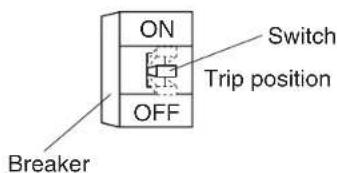
text_image
ON OFF Breaker Switch Trip position- If the system stops operating after operating the system.
- Check if the air inlet or outlet of outdoor or indoor unit is blocked by obstacles.
Remove the obstacle and make it well-ventilated. Obstacles decrease the airflow rate, and cause performance decrease and breakage when discharged air is suctioned. They cause a waste of electricity, and that may stop the devices.
- Check if the air filter is clogged. Ask a qualified service person to clean the air filters (Refer to MAINTENANCE). Clean the air filter. A decrease in the airflow volume of the air conditioner will result and the performance of the air conditioner will be degraded if the air filter is clogged with dust or dirt. In addition, this may cause dew condensation at the air outlet. (Refer to "HOW TO CLEAN THE AIR FILTER".)
3. The system operates but it does not sufficiently cool or heat.
- If the air inlet or outlet of the indoor or the outdoor unit is blocked with obstacles. Remove the obstacle and make it well-ventilated.
- If the air filter is clogged. Ask a qualified service person to clean the air filters (Refer to MAINTENANCE).
- If the set temperature is not proper (Refer to ADJUSTMENT).
- If the FAN SPEED button is set to LOW SPEED (Refer to ADJUSTMENT).
- If the doors or the windows are open. Shut doors or windows to prevent wind from coming in.
- If direct sunlight enters the room (when cooling). Use curtains or blinds.
- When there are too many inhabitants in the room (when cooling). Cooling effect decreases if heat gain of the room is too large.
- If the heat source of the room is excessive (when cooling). Cooling effect decreases if heat gain of the room is too large.
4. Operation was performed and it was stopped although the ON/OFF button was not pressed.
- Are you sure that the ON/OFF timer operation is not used? Cancel the TIMER operation.
- Are you sure that a remote control device is not connected? Are you sure that the display for centralised control is not lit? Contact the central control room that directed the stop.
If the problem is not solved after checking the above points, please do not try to repair it yourself. In such cases, always ask your local dealer.
At this time, please tell the symptom and model name (written on the model name plate on the suction grille). (Refer to page 1)

MEMO


00_CV_3PN07753-14T.fm Page 2 Thursday, January 13, 2011 3:50 PM
DAIKIN INDUSTRIES, LTD.
Head office:
Umeda Center Bldg., 2-4-12, Nakazaki-Nishi,
Kita-ku, Osaka, 530-8323 Japan
Tokyo office:
JR Shinagawa East Bldg., 2-18-1, Konan,
Minato-ku, Tokyo, 108-0075 Japan
http://www.daikin.com/global_ac/