Atlas green - Laser pointer Sola - Free user manual and instructions
Find the device manual for free Atlas green Sola in PDF.


User questions about Atlas green Sola
0 question about this device. Answer the ones you know or ask your own.
Ask a new question about this device
Download the instructions for your Laser pointer in PDF format for free! Find your manual Atlas green - Sola and take your electronic device back in hand. On this page are published all the documents necessary for the use of your device. Atlas green by Sola.
USER MANUAL Atlas green Sola
PASSION FOR PRECISION
DE Gebrauchsanweisung
EN Operating instructions
FR Manuel d'instructions
Instruzioni d'uso
ES Instrucciones de uso
NL Gebruiksaanwijzing
RU Руководство по применению
PL Instrukcja obsługi
LT Eksploatacijos instrukcija
LV Lietošanas instrukcija
SR Uputstvo za upotrebu
cs Návod k použití
RO Manual de utilizare
BG Ръководство за употреба
HU Használati útmutató

natural_image
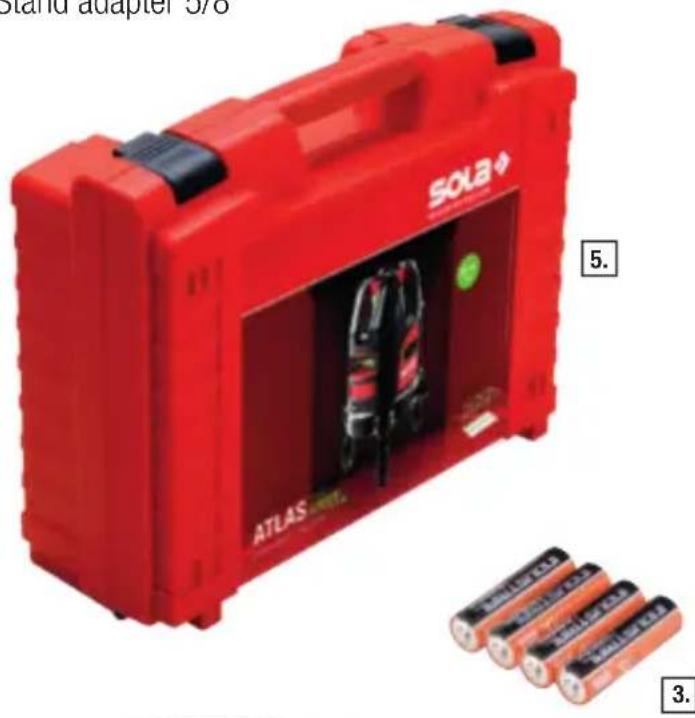
Exterior view of a black and red Sola Atlas surveying rig with green laser path (no text or symbols on the device itself)Scope of delivery for ATLAS
- ATLAS line laser
- LB GREEN laser goggles
- AA batteries
- Quick Starter
- Case
- Stand adapter 1/4"
- Stand adapter 5/8"
natural_image
Red Sola battery pack with ATLAS branding and four batteries, no visible text or symbols on the main body.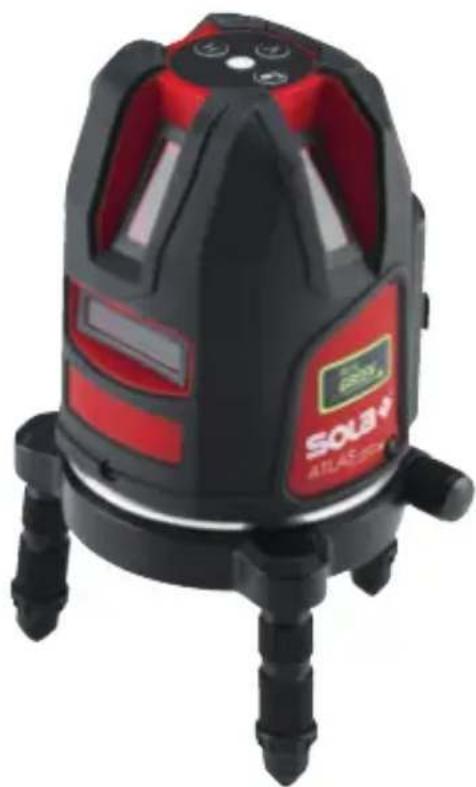
natural_image
Close-up of a red and black laser leveling device with visible measurement markings (no readable text or symbols)
natural_image
Green safety glasses with black frame (no text or symbols)
text_image
sola QUICK START SOLA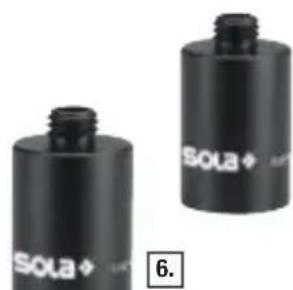
natural_image
Two black cylindrical batteries labeled 'SOLA' with a small screw cap, shown from different angles (no additional text or symbols visible)2.1 Device components, display and operating elements
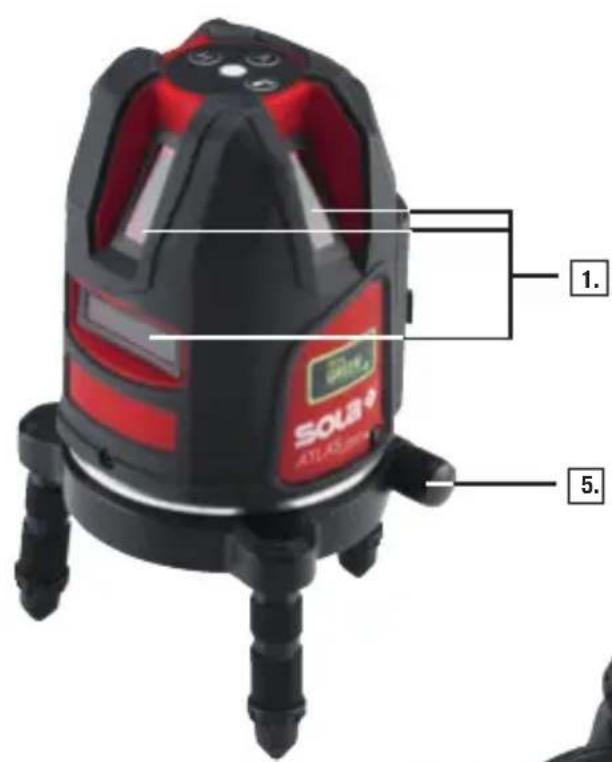
- Laser beam output opening
- On/off switch, transport lock
- Tripod adapter 5/8"
- Battery compartment cover
- Fine adjustment
- Keypad
text_image
1. SOSB ATLAS,8000 5.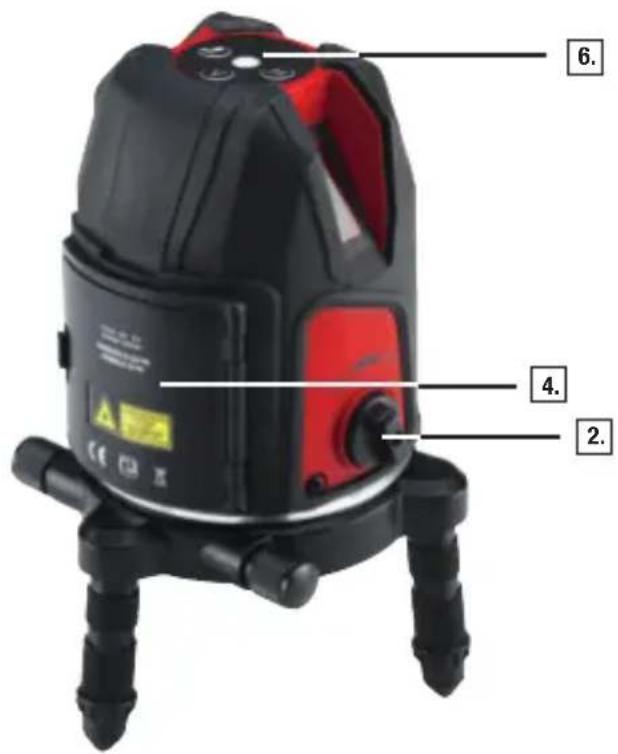
text_image
6. 4. 2.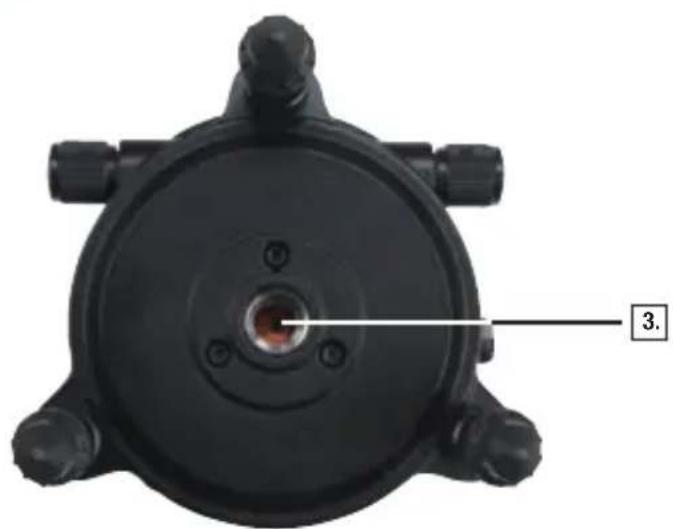
natural_image
Top-down view of a black mechanical component with a central hole and four protruding ports (no text or symbols visible)ATLAS GREEN operating manual
About this manual
Congratulations on the purchase of your new ATLAS GREEN! You have acquired a SOLA measurement instrument, which can make your work easier, faster and more precise. To utilize the complete functionality range of this measurement instrument, and to ensure a safe operation, please observe the following instructions:
- Please read this operating manual before starting to use the device.
• Always keep the operating manual near the device. - Only hand over the device to other persons together with the operating manual.
- Never render the attached warning signs unreadable.
Contents
- General information
- Description
- Technical data
- Safety instructions
- Laser safety / classification
- Startup
- Operation
- Checking the accuracy
- Maintenance, storage and transportation
- Scope of delivery and accessories
- Troubleshooting
12.Disposal
13.Warranty - EC conformity declaration
1. General information
1.1 Signal words and their meaning
DANGER
For an imminent danger that could lead to serious injury or death.
WARNING
For a possibly dangerous situation that could lead to serious injury or death.
CAUTION
For a possibly dangerous situation that could lead to slight injury or property damage.
NOTE
For application notes and other useful information
1.2 Pictograms and other information
1.2.1 Warning signs

Warning of dangers in general
1.2.2 Symbole

Read instructions before use
Batteries and devices must not be disposed of with household waste

Do not throw batteries into a fire

Warning signs on battery Do not heat the battery above 60 °C.

Class 2 laser device

Do not look into the laser beam!
2. Description
2.1 Device components, display and operating elements
- Laser beam output opening
- On/off switch, transport lock
- Tripod adapter 5/8"
- Battery compartment cover
- Fine adjustment
- Keypad
2.2 Intended use
The ATLAS GREEN is a line laser that enables a single person to level and align plumb points as well as 90 degree angles horizontally and vertically.
The device is designed to be preferably used indoors. For outdoor applications, it must be ensured that the ambient conditions are similar to those indoors.
The visibility range of the laser lines depends on the ambient conditions.
In low light conditions or for long distances, the hand-held receiver can be used to locate the laser line position (the hand-held receiver is not included in the standard delivery, but can be ordered as an option).
Follow the instructions contained in this manual. The device and accessory equipment may be a source of danger if they are utilised improperly or inappropriately by persons who are not adequately instructed.
3. Technical data
3.1 ATLAS GREEN line laser
| Working range | |
| - Laser lines | r = 25 m* |
| - receiver | r = 80 m* |
| Max. measurement tolerance | |
| - Laser lines ±0.2mm/m | |
| Protection class IP 54 | |
| Levelling range (typical) ± 3° | |
| Levelling time (typical) ≤ 5 s | |
| Power supply 3 x 1.5 V AA batteries | |
| Battery life (at 20°C) | |
| - AA batteries | 6,5 h |
| Permissible temperatures | |
| Operating temperature | -10°C to +50°C |
| Storage temperature | -20°C to +60°C |
| Laser diode lines/points 510-525 nm < 5 mW | |
| Laser class 2, DIN EN 60825-1 : 2014 | |
| Tripod adapter 5/8" | |
| Weight without batteries 1100 g | |
| Dimensions H x W x L 125 x 123 x 204 mm | |
*... depending on the ambient conditions in the workplace. Subject to modifications (drawings, descriptions and technical data).
4. Safety instructions
4.1 AREA OF RESPONSIBILITY
4.1.1 Manufacturer
SOLA is responsible for the safe delivery condition of the product, including the operating manual and the original accessories.
4.1.2 Operator
The operator is responsible for using the product as intended, the deployment of personnel, their training and the operational safety of the product.

The operator understands the safety information which is stated on the product and the instructions which are contained in the operating manual.
The operator shall comply with local regulations relating to safety and accident prevention regulations as well as worker protection laws and regulations.
The operator shall immediately notify SOLA if safety-related issues should develop on the product or during its utilization.
The operator shall ensure that the product is not utilized any further if defects become evident, and he will have the product repaired professionally.
4.2 Improper Use
Use of the device and the accessories without instruction.
Use of third-party accessories or additional equipment.
Use outside of the intended limits (see Chapter 3 / Technical data)
Use under extreme temperature fluctuations without an adequate acclimatization.
Disabling of safety devices and removal of hazard notices and labels.
▶ Unauthorized opening of the device.
Performance of modifications or alterations the device or the accessories.
Deliberate blinding of third parties.
Inadequate safeguarding at the installation site.
4.3 Utilization limitations
The ATLAS GREEN is suitable for a continuous use in an atmosphere which can be inhabited by humans.
Do not operate the product in explosion-prone or corrosive environments.
Inform the local safety authorities and safety experts before working in hazardous environments, in close proximity to electrical installations or similar surroundings.
4.4 Usage Hazards
4.4.1 General

WARNING
Missing or incomplete instructions may result in improper or incorrect use. This can cause accidents with serious damages to persons, property, assets and the environment.
Follow the manufacturer's and operator's safety instructions.
Protect equipment and accessories from access by children.

WARNING
Blinding by laser radiation can indirectly lead to serious accidents, especially for people who are driving a vehicle or operating machinery. Do not look into the laser beam.
Do not set up the laser beam and the laser plane at eye level or aim at people.

CAUTION
A fall, longer storage, transportation or other mechanical effects can lead to erroneous measurement results. Check the unit for damage before use. Do not use damaged equipment.
Repairs have to be exclusively performed by SOLA
Before use, check the accuracy of the device (see Chapter 8 / Checking the accuracy)
4.4.2 batteries/rechargeable batteries

DANGER
Mechanical damage can lead to a leakage, fire or explosion of the batteries or trigger the release of toxic substances.
Batteries and rechargeable batteries may not be opened or exposed to mechanical loads.
Damaged batteries, chargers and charging stations may not be used.
Repairs have to be exclusively performed by SOLA.

WARNING
High ambient temperatures and immersion into liquids can cause a leakage, fire or explosion of the batteries or trigger the release of toxic substances.
Protect batteries and rechargeable batteries from mechanical damage during transport.
Never store the Li-Ion battery in the sun, on radiators or behind glass windows.
Do not overheat batteries and rechargeable batteries or expose them to fire.
Avoid the ingress of moisture into batteries and rechargeable batteries.
Do not use damaged batteries or rechargeable batteries. Dispose of properly(seeChapter12/Disposal).

WARNING
A short-circuiting or unintended use can cause batteries to overheat and create an injury or fire hazard.
Do not transport or store batteries in the pockets of garments.
Do not bring the battery contacts in contact with jewelry, keys, or other electrically conductive objects.
Do not charge non-rechargeable batteries
Do not discharge the batteries through short-circuiting.
Do not solder the batteries within the device.
Do not mix old and new batteries, and do not mix batteries from different manufacturers or with a differing type designation.

WARNING
If disposed of improperly third parties can possibly be seriously injured and the environment polluted. The burning of plastic components generates toxic fumes which may impair the health of people. Batteries / rechargeable batteries may explode if they are damaged or heated excessively, and thereby cause poisoning, burning, corrosion or environmental contamination. If disposed of negligently unauthorized persons are able to use the product improperly.
The product must not be disposed of together with household waste. Dispose of the device and accessories properly (see Chapter 12 / Disposal)
Protect the product at all times from access by unauthorized persons, and especially children.
4.5 ELECTROMAGNETIC COMPATIBILITY (EMC)
The electromagnetic compatibility is the ability of the product to function in an environment where electromagnetic radiation and electrostatic discharge are present, without causing electromagnetic interference to other devices.
4.5.1 Interference of other devices by ATLAS GREEN
Although the product meets the strict requirements of the relevant directives and standards, SOLA can not completely exclude the possibility of interference with other devices (for example, when using the product in combination with third-party devices, such as field computers, personal computers, wireless devices, mobile phones, certain cables or external batteries).
When using computers and radio equipment make sure to observe the vendor-specific information about electromagnetic compatibility.
Only use original SOLA equipment and accessories.
4.5.2 Interference of the ATLAS GREEN by other devices
Although the product meets the strict requirements of the relevant directives and standards, SOLA can not entirely exclude the possibility that intense electromagnetic radiation in the immediate vicinity of radio transmitters, two-way radios, diesel generators, etc. can distort the measurement results.
When performing measurements under these conditions check the plausibility of the results.
5. LASER SAFETY/CLASSIFICATION
The ATLAS GREEN emits one 120° horizontal line as well as three 120° vertical lines.
The product corresponds to Laser class 2 according to DIN EN 60825-1:2014.
Laser class 2:
With class 2 laser devices, eyes are protected by the the blink reflex and/or the aversion responses in the event that a person accidentally looks at the laser for a short time.

text_image
2 >1/4 s
WARNING
Looking directly into the laser beam with optical aids (such as binoculars, telescopes) can be dangerous.

WARNING
Looking directly into the laser beam can damage the eyes.
Do not look into the laser beam.
Do not point the laser beam at other people.
Labelling on the device:

text_image
LASER RADIATION DO NOT STARE INTO BEAM CLASS 2 LASER PRODUCT DIN EN 60825-1:2014 λ= 510-525Hz MAX.OUTPUT< mWSee cover page for the position of the label.
Do not remove the label!
6. Start-up
6.1 Operation with batteries
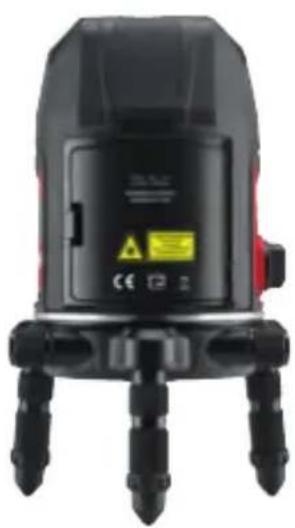
- Open the battery compartment cover.
- Insert batteries with the correct polarity into the ATLAS GREEN.
- Close the battery compartment cover (audible click of the cover).
Use only 1.5v AA size (Mignon) batteries.
Remove the batteries if the instrument is not used for an extended period.

NOTE
The intensity of the laser lines can vary depending on the battery quality.
natural_image
Close-up of a black laser leveling device with three legs and a red sensor, no visible text or symbols on the device itself.
text_image
Diagram of a surveying instrument with labeled battery polarity indicators and internal charge distribution7. Operation
7.1 ATLAS GREEN
Switching the laser on / off
On:
▶ Turn the on/off switch, transport lock to the right (ON position) and the pendulum unit will be released. The device transmits the horizontal 360° line from the output aperture. To turn off the vertical 360° line, press V on the keypad.
The instrument will level itself automatically within the specified inclination range (see Chapter 3/Technical data).
Off:
Turn the on/off switch, transport lock to the left (OFF position) and the pendulum unit will be locked; the laser lines will disappear.

NOTE
Magnets can affect the measurement instrument and lead to false results.
If the vertical laser line is not projected vertically to the wall or to the target surface, uneven surfaces can lead to erroneous measurement results.
Make sure that the vertical laser line is projected vertically to the wall or to the target surface.
Severe temperature fluctuations can lead to erroneous measurement results.
Before start-up, allow the device to acclimatise to the environmental conditions.
The laser lines will flash every 30 seconds when the battery capacity falls below 10%.
Recharge the battery regularly or ensure additional batteries are available.
7.1.2 PULSE mode
The REC LRDO receiver can be used to detect the laser lines at even greater distances or in unfavourable environmental conditions. The pulse mode is active at all times for the ATLAS.
7.1.3 Creating inclinations beyond the range of automatic levelling
On:
Turn the on/off switch, transport lock to the left (OFF position).
Press and hold the tilt key for 5 seconds to start the tilt function.
Press the V key to switch on the vertical lines.
Press the H key to switch off the horizontal lines.
To indicate that the self-levelling is switched off, the lines will blink every 4 seconds.
Off:
Briefly press the tilt key to exit the tilt function.

CAUTION
If the laser line is not projected vertically to the surface or the surface is uneven, this can lead to erroneous measurement results.
Make sure that the laser line is projected vertically to the wall or to the target surface.
7.2 Applications
7.2.1 Horizontal levelling 360°
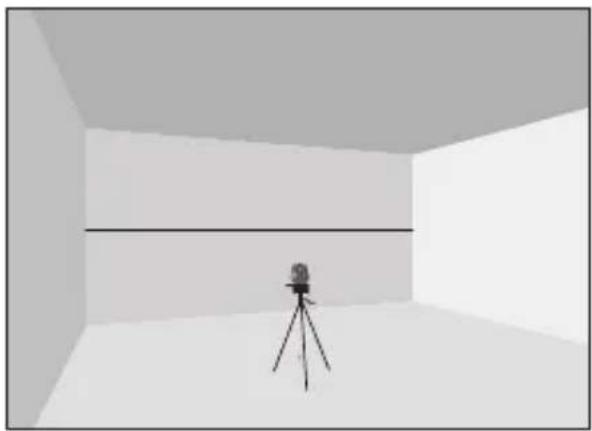
natural_image
Interior view of a room with a camera on a tripod, no text or symbols visible7.2.2 Vertical levelling 360°

natural_image
Interior view of a room with a camera on a tripod, no visible text or symbols7.2.3 90^ angle

natural_image
Interior view of a room with a tripod-mounted camera and an inset showing a close-up of a building facade (no text or symbols visible)7.2.4 Layout with a 90° angle
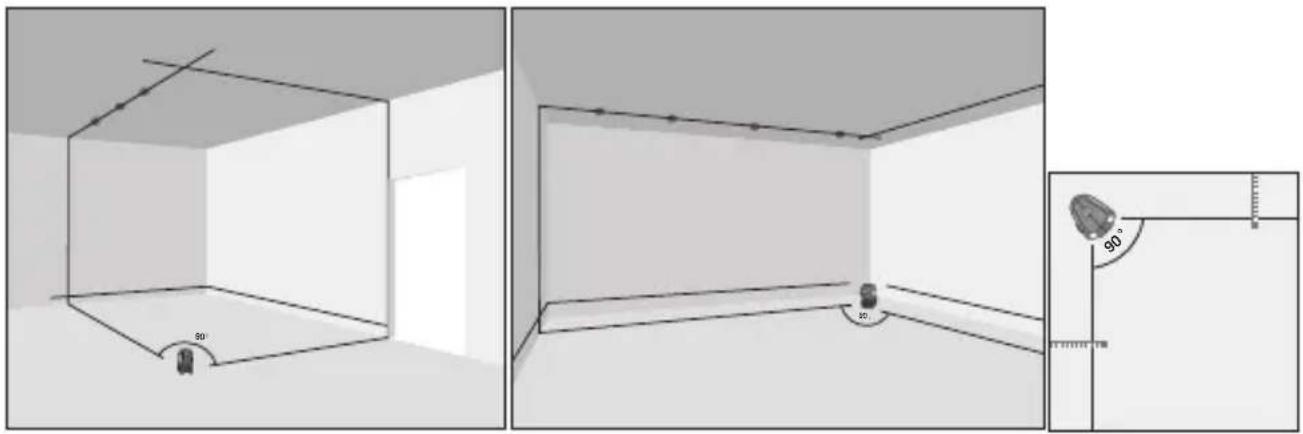
7.2.5 Inclination

natural_image
Interior view of a room with stairs and a camera on a tripod (no text or symbols)7.2.6 Working at distances

natural_image
Interior view of a room with a camera and tripod, showing a distance measurement setup (no text or symbols)8. Checking the accuracy
Check the accuracy of the ATLAS GREEN before each measurement.
Before starting the check, let the device acclimatise to the environmental conditions.
8.1 Checking the accuracy of the vertical line
▶ Attach a plumb line as close as possible possible to a (at least) 3 m high wall.
Mount the ATLAS GREEN onto a tripod at a height of approx. 1.2 m.
Position the device approx. 3 m in front of the plumb line.
Switch on the ATLAS GREEN and project the vertical laser line onto the plumb line.
If the deviation is greater than 4 mm, the device must be readjusted. In this case, consult your dealer.
8.2 Checking the leveling accuracy of the horizontal line
- Select two horizontal, flat walls (A & B), which are approx. 10 meters apart.
Mount the ATLAS GREEN onto a tripod and position it at a distance of approx. 20 cm from wall A.
Mark the intersecting point of the vertical and horizontal lines on wall A.
- Rotate the ATLAS GREEN by 180^ and mark point on wall B.
Position the laser at the same height approx. 20 cm away from wall B and mark point ③ on wall B.
- Rotate the ATLAS GREEN by 180^ and mark point on wall A.
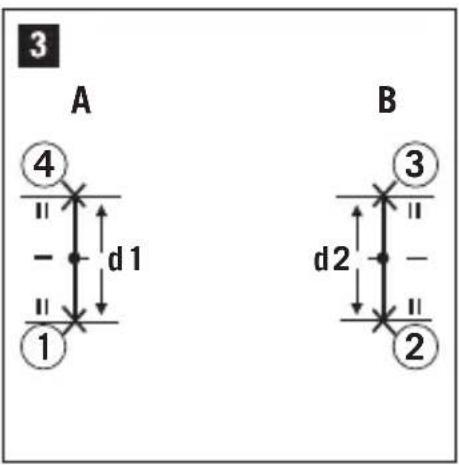
Measure the vertical distance d1 of the marked points ① - and the vertical spacing of the points -. ② ③

text_image
ca. 3 m ca. 1,2 m min. 3 m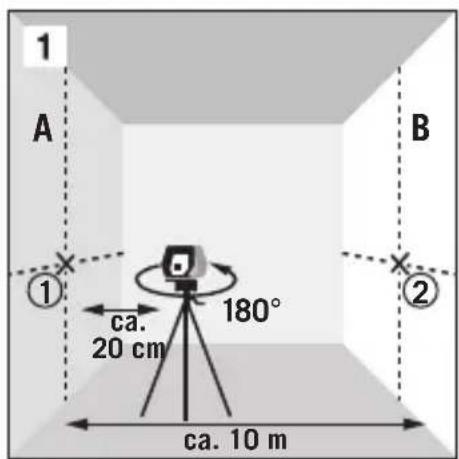
text_image
1 A B ① ca. 20 cm 180° ② ca. 10 m
text_image
2 A ④ ① 180° ca. 20 cm ③ ② ca. 10 m BMark the center point of and . d2
If the reference points and are on different sides of the center point, d2 must be subtracted from d1
If the reference points and are on the same side of the center point, d2 must be added to d1
Divide the results with twice the value of the room length.
If the result is greater than 4 mm, the device must be readjusted. For this, please consult your dealer.
text_image
3 A 4 d 1 1 B 3 d 2 29. Maintenance, storage and transportation
9.1 Cleaning
Wipe off any dirt with a soft damp cloth.
▶ Check the outlet openings of the laser regularly, and thoroughly clean them if necessary. Do not touch the glass with your fingers.
Do not use aggressive cleaning agents or solvents.
Do not immerse the device into water!
Clean and dry wet equipment, accessories and transport containers prior to packaging them. Only pack equipment again when it is completely dry.
Keep plug connections clean and protected from moisture.
9.2 Storage
The equipment may only be stored within the specified temperature limits(see Chapter 3 / Technical data)
After a prolonged storage, check the accuracy of the measuring device before using it.
9.3 Transport
9.3.1 General
The device may be damaged by strong vibrations or by dropping.
Never transport the product loose. Always use the original packaging or an equivalent transport container.
Switch off the measuring device before transporting it. During the shutdown the pendulum unit is locked in position and protected against damage.
▶ Check the unit for damage before use.
Regularly check the accuracy of the device(see Chapter 8 / Checking the accuracy)
9.3.2 Batteries/rechargeable batteries
When transporting or shipping batteries, the operator is responsible for complying with the applicable national and international laws and regulations.
Before shipping, remove the batteries from the device.
10. Scope of delivery and accessories
10.1 Product contents ATLAS GREEN
1 ATLAS line laser
4 AA batteries
1 LB GREEN laser goggles
1 Quick Starter
1 case
1 Tripod adapter 1/4"
1 Tripod adapter 5/8"
10.2 ACCESSORIES (optional)
Receiver REC LRDO
Compact tripod FST
Telescopic tripod TST
Elevator tripod KST
Construction tripod BST
Clamp tripod KLST
Flexi-gauge FL
Measuring rod ML 5
Flexible wall bracket FWH
Inclination wedge NK1
Thread adapter set GA-SET
Laser goggles LB GREEN
Magnetic target ZS RED
Further information regarding the accessories can be found at www.sola.at
11. Troubleshooting
Error Possible cause Troubleshooting
| Laser lines blink in one second intervals | Device is beyond the self-leveling range | Align the device horizontally |
| Device turns off again immediately after startup. | BatteryexhaustedRechargeablebattery exhausted | Replace the batteryRecharge or replace battery |
| Laser lines blink every 4 seconds | Device is in the manual inclination mode | Turn the on/off switch, transport lock to the right (OFF position). |
| Laser lines flash every 30 seconds | Battery capacity below 10% | Replace batteries |
12. Disposal
If disposed of improperly third parties can possibly be seriously injured and the environment polluted.
The burning of plastic components generates toxic fumes which may impair the health of people. Batteries / rechargeable batteries may explode if they are damaged or heated excessively, and thereby cause poisoning, burning, corrosion or environmental contamination.
If disposed of negligently unauthorized persons may be able to use the product improperly.
Measuring tools, accessories and packaging must be recycled in an environmentally-friendly manner.

natural_image
Red crossed-out trash bin symbol (no text or numbers)The product as well as the accessories - especially the batteries and rechargeable batteries - must not be disposed of with household waste.
→ Dispose of the device and the accessories properly
▶ Only dispose of batteries in a discharged state.
Observe the country-specific disposal requirements.
Your SOLA dealership will take back batteries as well as old equipment, and will ensure proper disposal.
Only for EU countries

natural_image
Red line drawing of a trash bin with crossed lines indicating no waste or discharge (no text or symbols)Electric tools must not be disposed of with household waste! According to the European Directive 2002 / 96 / EC on Waste Electrical and Electronic Equipment and its implementation in national law, no longer usable electrical and electronic equipment must be collected separately and recycled in an environmentally friendly manner.
13. Manufacturer's Guarantee
The manufacturer warrants to the original purchaser stated on the guarantee card, freedom from defects of the device for a period of two years, with the exception of batteries, as of the point in time the device is handed over. The guarantee is limited to repairs and / or replacements at the manufacturer's discretion. Defects which are caused through improper handling by the purchaser or third parties, natural wear and optical flaws that do not affect the usability of the equipment, are not covered by this guarantee. Claims under this guarantee can only be invoked if the device is submitted along with the guarantee card, completely filled out by the dealer, dated and provided with the company stamp. If the guarantee claim is justified, the manufacturer shall bear the transport costs. The duration of the guarantee will not be extended through repair or spare parts work which is carried out within the scope of the guarantee. Further claims are excluded, unless these are stipulated by by the respective national legislation. In particular the manufacturer shall not be liable for any direct, indirect, incidental or consequential damages, losses or expenses in connection with the use or because of the inability to use the tool for any purpose whatsoever. Implied warranties for the usage or suitability for a particular purpose are expressly excluded.